google-api-python-client 2.160.0__py2.py3-none-any.whl → 2.161.0__py2.py3-none-any.whl
This diff represents the content of publicly available package versions that have been released to one of the supported registries. The information contained in this diff is provided for informational purposes only and reflects changes between package versions as they appear in their respective public registries.
- {google_api_python_client-2.160.0.dist-info → google_api_python_client-2.161.0.dist-info}/METADATA +1 -1
- {google_api_python_client-2.160.0.dist-info → google_api_python_client-2.161.0.dist-info}/RECORD +190 -190
- googleapiclient/discovery_cache/documents/admin.reports_v1.json +4 -4
- googleapiclient/discovery_cache/documents/admin.reportsv1.json +4 -4
- googleapiclient/discovery_cache/documents/adsenseplatform.v1alpha.json +4 -4
- googleapiclient/discovery_cache/documents/aiplatform.v1.json +451 -5
- googleapiclient/discovery_cache/documents/aiplatform.v1beta1.json +386 -6
- googleapiclient/discovery_cache/documents/alloydb.v1.json +9 -3
- googleapiclient/discovery_cache/documents/alloydb.v1alpha.json +9 -3
- googleapiclient/discovery_cache/documents/alloydb.v1beta.json +9 -3
- googleapiclient/discovery_cache/documents/analyticshub.v1.json +39 -3
- googleapiclient/discovery_cache/documents/analyticshub.v1beta1.json +1 -2
- googleapiclient/discovery_cache/documents/androidenterprise.v1.json +6 -1
- googleapiclient/discovery_cache/documents/androidmanagement.v1.json +3 -3
- googleapiclient/discovery_cache/documents/apigee.v1.json +61 -4
- googleapiclient/discovery_cache/documents/appengine.v1.json +15 -1
- googleapiclient/discovery_cache/documents/appengine.v1beta.json +15 -1
- googleapiclient/discovery_cache/documents/apphub.v1.json +3 -391
- googleapiclient/discovery_cache/documents/apphub.v1alpha.json +3 -391
- googleapiclient/discovery_cache/documents/authorizedbuyersmarketplace.v1alpha.json +2 -2
- googleapiclient/discovery_cache/documents/backupdr.v1.json +315 -2
- googleapiclient/discovery_cache/documents/batch.v1.json +52 -5
- googleapiclient/discovery_cache/documents/bigquery.v2.json +396 -2
- googleapiclient/discovery_cache/documents/bigtableadmin.v2.json +2 -2
- googleapiclient/discovery_cache/documents/binaryauthorization.v1.json +3 -2
- googleapiclient/discovery_cache/documents/calendar.v3.json +147 -24
- googleapiclient/discovery_cache/documents/certificatemanager.v1.json +21 -1
- googleapiclient/discovery_cache/documents/chat.v1.json +84 -68
- googleapiclient/discovery_cache/documents/chromemanagement.v1.json +29 -12
- googleapiclient/discovery_cache/documents/cloudbuild.v2.json +2 -2
- googleapiclient/discovery_cache/documents/clouddeploy.v1.json +3 -2
- googleapiclient/discovery_cache/documents/cloudfunctions.v1.json +2 -2
- googleapiclient/discovery_cache/documents/cloudfunctions.v2.json +53 -11
- googleapiclient/discovery_cache/documents/cloudfunctions.v2alpha.json +53 -11
- googleapiclient/discovery_cache/documents/cloudfunctions.v2beta.json +53 -11
- googleapiclient/discovery_cache/documents/cloudidentity.v1.json +2 -2
- googleapiclient/discovery_cache/documents/cloudidentity.v1beta1.json +17 -4
- googleapiclient/discovery_cache/documents/cloudtasks.v2.json +2 -2
- googleapiclient/discovery_cache/documents/cloudtasks.v2beta3.json +2 -2
- googleapiclient/discovery_cache/documents/compute.alpha.json +448 -39
- googleapiclient/discovery_cache/documents/compute.beta.json +566 -35
- googleapiclient/discovery_cache/documents/compute.v1.json +255 -32
- googleapiclient/discovery_cache/documents/connectors.v1.json +63 -3
- googleapiclient/discovery_cache/documents/contactcenteraiplatform.v1alpha1.json +2 -2
- googleapiclient/discovery_cache/documents/contactcenterinsights.v1.json +5 -1
- googleapiclient/discovery_cache/documents/container.v1.json +46 -8
- googleapiclient/discovery_cache/documents/container.v1beta1.json +46 -8
- googleapiclient/discovery_cache/documents/containeranalysis.v1.json +74 -1
- googleapiclient/discovery_cache/documents/containeranalysis.v1alpha1.json +74 -1
- googleapiclient/discovery_cache/documents/containeranalysis.v1beta1.json +74 -1
- googleapiclient/discovery_cache/documents/content.v2.1.json +13 -3
- googleapiclient/discovery_cache/documents/dataflow.v1b3.json +9 -3
- googleapiclient/discovery_cache/documents/dataform.v1beta1.json +63 -17
- googleapiclient/discovery_cache/documents/datafusion.v1.json +47 -3
- googleapiclient/discovery_cache/documents/datafusion.v1beta1.json +45 -1
- googleapiclient/discovery_cache/documents/datalabeling.v1beta1.json +9 -9
- googleapiclient/discovery_cache/documents/datalineage.v1.json +6 -1
- googleapiclient/discovery_cache/documents/datamigration.v1.json +6 -2
- googleapiclient/discovery_cache/documents/dataplex.v1.json +19 -15
- googleapiclient/discovery_cache/documents/dataportability.v1.json +8 -1
- googleapiclient/discovery_cache/documents/dataportability.v1beta.json +8 -1
- googleapiclient/discovery_cache/documents/dataproc.v1.json +9 -2
- googleapiclient/discovery_cache/documents/datastore.v1.json +2 -2
- googleapiclient/discovery_cache/documents/datastore.v1beta3.json +2 -2
- googleapiclient/discovery_cache/documents/datastream.v1.json +52 -7
- googleapiclient/discovery_cache/documents/developerconnect.v1.json +160 -1
- googleapiclient/discovery_cache/documents/dialogflow.v2.json +57 -1
- googleapiclient/discovery_cache/documents/dialogflow.v2beta1.json +33 -1
- googleapiclient/discovery_cache/documents/dialogflow.v3.json +35 -2
- googleapiclient/discovery_cache/documents/dialogflow.v3beta1.json +38 -221
- googleapiclient/discovery_cache/documents/discoveryengine.v1.json +852 -24
- googleapiclient/discovery_cache/documents/discoveryengine.v1alpha.json +914 -17
- googleapiclient/discovery_cache/documents/discoveryengine.v1beta.json +881 -14
- googleapiclient/discovery_cache/documents/displayvideo.v2.json +64 -135
- googleapiclient/discovery_cache/documents/displayvideo.v3.json +179 -8
- googleapiclient/discovery_cache/documents/dlp.v2.json +5 -5
- googleapiclient/discovery_cache/documents/documentai.v1.json +9 -1
- googleapiclient/discovery_cache/documents/documentai.v1beta3.json +9 -1
- googleapiclient/discovery_cache/documents/drive.v2.json +2 -2
- googleapiclient/discovery_cache/documents/drive.v3.json +23 -5
- googleapiclient/discovery_cache/documents/eventarc.v1.json +2 -1
- googleapiclient/discovery_cache/documents/file.v1.json +2 -2
- googleapiclient/discovery_cache/documents/file.v1beta1.json +2 -2
- googleapiclient/discovery_cache/documents/firebaseappdistribution.v1alpha.json +33 -8
- googleapiclient/discovery_cache/documents/firebaseml.v2beta.json +84 -1
- googleapiclient/discovery_cache/documents/firestore.v1.json +25 -3
- googleapiclient/discovery_cache/documents/forms.v1.json +17 -1
- googleapiclient/discovery_cache/documents/gkebackup.v1.json +5 -3
- googleapiclient/discovery_cache/documents/gkehub.v1.json +3 -1
- googleapiclient/discovery_cache/documents/gkehub.v1alpha.json +3 -39
- googleapiclient/discovery_cache/documents/gkehub.v1beta.json +3 -39
- googleapiclient/discovery_cache/documents/gkehub.v2.json +3 -1
- googleapiclient/discovery_cache/documents/gkehub.v2alpha.json +3 -1
- googleapiclient/discovery_cache/documents/gkehub.v2beta.json +3 -1
- googleapiclient/discovery_cache/documents/healthcare.v1beta1.json +3 -2
- googleapiclient/discovery_cache/documents/iam.v1.json +2 -2
- googleapiclient/discovery_cache/documents/identitytoolkit.v1.json +5 -8
- googleapiclient/discovery_cache/documents/identitytoolkit.v2.json +36 -1
- googleapiclient/discovery_cache/documents/integrations.v1.json +27 -1
- googleapiclient/discovery_cache/documents/language.v1.json +7 -1
- googleapiclient/discovery_cache/documents/language.v1beta2.json +7 -1
- googleapiclient/discovery_cache/documents/language.v2.json +7 -1
- googleapiclient/discovery_cache/documents/logging.v2.json +1 -1
- googleapiclient/discovery_cache/documents/managedidentities.v1.json +7 -7
- googleapiclient/discovery_cache/documents/managedidentities.v1alpha1.json +7 -7
- googleapiclient/discovery_cache/documents/managedidentities.v1beta1.json +7 -7
- googleapiclient/discovery_cache/documents/meet.v2.json +8 -3
- googleapiclient/discovery_cache/documents/memcache.v1.json +1 -389
- googleapiclient/discovery_cache/documents/merchantapi.accounts_v1beta.json +32 -3
- googleapiclient/discovery_cache/documents/merchantapi.conversions_v1beta.json +4 -2
- googleapiclient/discovery_cache/documents/merchantapi.datasources_v1beta.json +4 -1
- googleapiclient/discovery_cache/documents/merchantapi.inventories_v1beta.json +4 -1
- googleapiclient/discovery_cache/documents/merchantapi.lfp_v1beta.json +4 -1
- googleapiclient/discovery_cache/documents/merchantapi.notifications_v1beta.json +4 -1
- googleapiclient/discovery_cache/documents/merchantapi.products_v1beta.json +11 -2
- googleapiclient/discovery_cache/documents/merchantapi.promotions_v1beta.json +18 -9
- googleapiclient/discovery_cache/documents/merchantapi.quota_v1beta.json +4 -1
- googleapiclient/discovery_cache/documents/merchantapi.reports_v1beta.json +7 -1
- googleapiclient/discovery_cache/documents/merchantapi.reviews_v1beta.json +16 -1
- googleapiclient/discovery_cache/documents/metastore.v1.json +30 -30
- googleapiclient/discovery_cache/documents/metastore.v1alpha.json +33 -33
- googleapiclient/discovery_cache/documents/metastore.v1beta.json +33 -33
- googleapiclient/discovery_cache/documents/migrationcenter.v1alpha1.json +190 -1
- googleapiclient/discovery_cache/documents/monitoring.v1.json +50 -1
- googleapiclient/discovery_cache/documents/monitoring.v3.json +7 -3
- googleapiclient/discovery_cache/documents/netapp.v1.json +304 -1
- googleapiclient/discovery_cache/documents/netapp.v1beta1.json +304 -1
- googleapiclient/discovery_cache/documents/networkconnectivity.v1.json +2 -2
- googleapiclient/discovery_cache/documents/networkconnectivity.v1alpha1.json +2 -2
- googleapiclient/discovery_cache/documents/networkmanagement.v1beta1.json +3 -3
- googleapiclient/discovery_cache/documents/networksecurity.v1.json +7 -1
- googleapiclient/discovery_cache/documents/networksecurity.v1beta1.json +71 -5
- googleapiclient/discovery_cache/documents/networkservices.v1.json +41 -5
- googleapiclient/discovery_cache/documents/networkservices.v1beta1.json +41 -5
- googleapiclient/discovery_cache/documents/orgpolicy.v2.json +29 -29
- googleapiclient/discovery_cache/documents/playdeveloperreporting.v1alpha1.json +5 -5
- googleapiclient/discovery_cache/documents/playdeveloperreporting.v1beta1.json +5 -5
- googleapiclient/discovery_cache/documents/policysimulator.v1.json +9 -9
- googleapiclient/discovery_cache/documents/policysimulator.v1alpha.json +9 -9
- googleapiclient/discovery_cache/documents/policysimulator.v1beta.json +9 -9
- googleapiclient/discovery_cache/documents/privateca.v1.json +26 -1
- googleapiclient/discovery_cache/documents/pubsub.v1.json +45 -1
- googleapiclient/discovery_cache/documents/realtimebidding.v1.json +3 -3
- googleapiclient/discovery_cache/documents/recaptchaenterprise.v1.json +7 -3
- googleapiclient/discovery_cache/documents/redis.v1.json +13 -3
- googleapiclient/discovery_cache/documents/redis.v1beta1.json +13 -3
- googleapiclient/discovery_cache/documents/retail.v2.json +4 -3
- googleapiclient/discovery_cache/documents/retail.v2alpha.json +4 -3
- googleapiclient/discovery_cache/documents/retail.v2beta.json +4 -3
- googleapiclient/discovery_cache/documents/run.v1.json +78 -1
- googleapiclient/discovery_cache/documents/run.v2.json +275 -7
- googleapiclient/discovery_cache/documents/script.v1.json +2 -2
- googleapiclient/discovery_cache/documents/searchconsole.v1.json +2 -1
- googleapiclient/discovery_cache/documents/secretmanager.v1.json +11 -1
- googleapiclient/discovery_cache/documents/secretmanager.v1beta1.json +11 -1
- googleapiclient/discovery_cache/documents/secretmanager.v1beta2.json +11 -1
- googleapiclient/discovery_cache/documents/securitycenter.v1.json +2 -1
- googleapiclient/discovery_cache/documents/securitycenter.v1beta1.json +3 -2
- googleapiclient/discovery_cache/documents/securitycenter.v1beta2.json +2 -1
- googleapiclient/discovery_cache/documents/serviceconsumermanagement.v1.json +6 -2
- googleapiclient/discovery_cache/documents/serviceconsumermanagement.v1beta1.json +6 -2
- googleapiclient/discovery_cache/documents/servicecontrol.v1.json +6 -2
- googleapiclient/discovery_cache/documents/servicecontrol.v2.json +5 -1
- googleapiclient/discovery_cache/documents/servicemanagement.v1.json +10 -2
- googleapiclient/discovery_cache/documents/servicenetworking.v1.json +36 -2
- googleapiclient/discovery_cache/documents/servicenetworking.v1beta.json +36 -2
- googleapiclient/discovery_cache/documents/serviceusage.v1.json +6 -2
- googleapiclient/discovery_cache/documents/serviceusage.v1beta1.json +6 -2
- googleapiclient/discovery_cache/documents/spanner.v1.json +25 -6
- googleapiclient/discovery_cache/documents/sqladmin.v1.json +20 -9
- googleapiclient/discovery_cache/documents/sqladmin.v1beta4.json +24 -11
- googleapiclient/discovery_cache/documents/sts.v1.json +6 -1
- googleapiclient/discovery_cache/documents/sts.v1beta.json +6 -1
- googleapiclient/discovery_cache/documents/tagmanager.v2.json +5 -1
- googleapiclient/discovery_cache/documents/toolresults.v1beta3.json +2 -1
- googleapiclient/discovery_cache/documents/tpu.v2.json +2 -2
- googleapiclient/discovery_cache/documents/tpu.v2alpha1.json +9 -4
- googleapiclient/discovery_cache/documents/vault.v1.json +70 -16
- googleapiclient/discovery_cache/documents/videointelligence.v1.json +3 -3
- googleapiclient/discovery_cache/documents/vmmigration.v1.json +5 -3
- googleapiclient/discovery_cache/documents/vmmigration.v1alpha1.json +5 -3
- googleapiclient/discovery_cache/documents/walletobjects.v1.json +56 -1
- googleapiclient/discovery_cache/documents/webfonts.v1.json +6 -1
- googleapiclient/discovery_cache/documents/workloadmanager.v1.json +17 -3
- googleapiclient/discovery_cache/documents/workstations.v1beta.json +14 -1
- googleapiclient/discovery_cache/documents/youtube.v3.json +60 -1
- googleapiclient/version.py +1 -1
- {google_api_python_client-2.160.0.dist-info → google_api_python_client-2.161.0.dist-info}/LICENSE +0 -0
- {google_api_python_client-2.160.0.dist-info → google_api_python_client-2.161.0.dist-info}/WHEEL +0 -0
- {google_api_python_client-2.160.0.dist-info → google_api_python_client-2.161.0.dist-info}/top_level.txt +0 -0
|
@@ -1052,7 +1052,7 @@
|
|
|
1052
1052
|
"reactions": {
|
|
1053
1053
|
"methods": {
|
|
1054
1054
|
"create": {
|
|
1055
|
-
"description": "Creates a reaction and adds it to a message.
|
|
1055
|
+
"description": "Creates a reaction and adds it to a message. For an example, see [Add a reaction to a message](https://developers.google.com/workspace/chat/create-reactions). Requires [user authentication](https://developers.google.com/workspace/chat/authenticate-authorize-chat-user).",
|
|
1056
1056
|
"flatPath": "v1/spaces/{spacesId}/messages/{messagesId}/reactions",
|
|
1057
1057
|
"httpMethod": "POST",
|
|
1058
1058
|
"id": "chat.spaces.messages.reactions.create",
|
|
@@ -1083,7 +1083,7 @@
|
|
|
1083
1083
|
]
|
|
1084
1084
|
},
|
|
1085
1085
|
"delete": {
|
|
1086
|
-
"description": "Deletes a reaction to a message.
|
|
1086
|
+
"description": "Deletes a reaction to a message. For an example, see [Delete a reaction](https://developers.google.com/workspace/chat/delete-reactions). Requires [user authentication](https://developers.google.com/workspace/chat/authenticate-authorize-chat-user).",
|
|
1087
1087
|
"flatPath": "v1/spaces/{spacesId}/messages/{messagesId}/reactions/{reactionsId}",
|
|
1088
1088
|
"httpMethod": "DELETE",
|
|
1089
1089
|
"id": "chat.spaces.messages.reactions.delete",
|
|
@@ -1344,7 +1344,7 @@
|
|
|
1344
1344
|
}
|
|
1345
1345
|
}
|
|
1346
1346
|
},
|
|
1347
|
-
"revision": "
|
|
1347
|
+
"revision": "20250130",
|
|
1348
1348
|
"rootUrl": "https://chat.googleapis.com/",
|
|
1349
1349
|
"schemas": {
|
|
1350
1350
|
"AccessSettings": {
|
|
@@ -1497,6 +1497,10 @@
|
|
|
1497
1497
|
"description": "Output only. Annotations associated with the plain-text body of the message. To add basic formatting to a text message, see [Format text messages](https://developers.google.com/workspace/chat/format-messages). Example plain-text message body: ``` Hello @FooBot how are you!\" ``` The corresponding annotations metadata: ``` \"annotations\":[{ \"type\":\"USER_MENTION\", \"startIndex\":6, \"length\":7, \"userMention\": { \"user\": { \"name\":\"users/{user}\", \"displayName\":\"FooBot\", \"avatarUrl\":\"https://goo.gl/aeDtrS\", \"type\":\"BOT\" }, \"type\":\"MENTION\" } }] ```",
|
|
1498
1498
|
"id": "Annotation",
|
|
1499
1499
|
"properties": {
|
|
1500
|
+
"customEmojiMetadata": {
|
|
1501
|
+
"$ref": "CustomEmojiMetadata",
|
|
1502
|
+
"description": "The metadata for a custom emoji."
|
|
1503
|
+
},
|
|
1500
1504
|
"length": {
|
|
1501
1505
|
"description": "Length of the substring in the plain-text message body this annotation corresponds to.",
|
|
1502
1506
|
"format": "int32",
|
|
@@ -1521,13 +1525,15 @@
|
|
|
1521
1525
|
"ANNOTATION_TYPE_UNSPECIFIED",
|
|
1522
1526
|
"USER_MENTION",
|
|
1523
1527
|
"SLASH_COMMAND",
|
|
1524
|
-
"RICH_LINK"
|
|
1528
|
+
"RICH_LINK",
|
|
1529
|
+
"CUSTOM_EMOJI"
|
|
1525
1530
|
],
|
|
1526
1531
|
"enumDescriptions": [
|
|
1527
1532
|
"Default value for the enum. Don't use.",
|
|
1528
1533
|
"A user is mentioned.",
|
|
1529
1534
|
"A slash command is invoked.",
|
|
1530
|
-
"A rich link annotation."
|
|
1535
|
+
"A rich link annotation.",
|
|
1536
|
+
"A custom emoji annotation."
|
|
1531
1537
|
],
|
|
1532
1538
|
"type": "string"
|
|
1533
1539
|
},
|
|
@@ -1910,6 +1916,17 @@
|
|
|
1910
1916
|
},
|
|
1911
1917
|
"type": "object"
|
|
1912
1918
|
},
|
|
1919
|
+
"CustomEmojiMetadata": {
|
|
1920
|
+
"description": "Annotation metadata for custom emoji.",
|
|
1921
|
+
"id": "CustomEmojiMetadata",
|
|
1922
|
+
"properties": {
|
|
1923
|
+
"customEmoji": {
|
|
1924
|
+
"$ref": "CustomEmoji",
|
|
1925
|
+
"description": "The custom emoji."
|
|
1926
|
+
}
|
|
1927
|
+
},
|
|
1928
|
+
"type": "object"
|
|
1929
|
+
},
|
|
1913
1930
|
"DateInput": {
|
|
1914
1931
|
"description": "Date input values.",
|
|
1915
1932
|
"id": "DateInput",
|
|
@@ -1984,7 +2001,7 @@
|
|
|
1984
2001
|
"description": "Represents information about the user's client, such as locale, host app, and platform. For Chat apps, `CommonEventObject` includes information submitted by users interacting with [dialogs](https://developers.google.com/workspace/chat/dialogs), like data entered on a card."
|
|
1985
2002
|
},
|
|
1986
2003
|
"configCompleteRedirectUrl": {
|
|
1987
|
-
"description": "
|
|
2004
|
+
"description": "This URL is populated for `MESSAGE` and `ADDED_TO_SPACE` interaction events. After completing an authorization or configuration flow outside of Google Chat, users must be redirected to this URL to signal to Google Chat that the authorization or configuration flow was successful. For more information, see [Connect a Chat app with other services and tools](https://developers.google.com/workspace/chat/connect-web-services-tools). In [Developer Preview](https://developers.google.com/workspace/preview), this URL is also populated for `APP_COMMAND` interaction events.",
|
|
1988
2005
|
"type": "string"
|
|
1989
2006
|
},
|
|
1990
2007
|
"dialogEventType": {
|
|
@@ -2113,8 +2130,7 @@
|
|
|
2113
2130
|
"properties": {
|
|
2114
2131
|
"customEmoji": {
|
|
2115
2132
|
"$ref": "CustomEmoji",
|
|
2116
|
-
"description": "
|
|
2117
|
-
"readOnly": true
|
|
2133
|
+
"description": "A custom emoji."
|
|
2118
2134
|
},
|
|
2119
2135
|
"unicode": {
|
|
2120
2136
|
"description": "Optional. A basic emoji represented by a unicode string.",
|
|
@@ -2166,11 +2182,11 @@
|
|
|
2166
2182
|
"type": "object"
|
|
2167
2183
|
},
|
|
2168
2184
|
"GoogleAppsCardV1Action": {
|
|
2169
|
-
"description": "An action that describes the behavior when the form is submitted. For example, you can invoke an Apps Script script to handle the form. If the action is triggered, the form values are sent to the server. [Google Workspace
|
|
2185
|
+
"description": "An action that describes the behavior when the form is submitted. For example, you can invoke an Apps Script script to handle the form. If the action is triggered, the form values are sent to the server. [Google Workspace add-ons and Chat apps](https://developers.google.com/workspace/extend):",
|
|
2170
2186
|
"id": "GoogleAppsCardV1Action",
|
|
2171
2187
|
"properties": {
|
|
2172
2188
|
"allWidgetsAreRequired": {
|
|
2173
|
-
"description": "Optional. If this is true, then all widgets are considered required by this action. [Google Workspace
|
|
2189
|
+
"description": "Optional. If this is true, then all widgets are considered required by this action. [Google Workspace add-ons and Chat apps](https://developers.google.com/workspace/extend):",
|
|
2174
2190
|
"type": "boolean"
|
|
2175
2191
|
},
|
|
2176
2192
|
"function": {
|
|
@@ -2213,7 +2229,7 @@
|
|
|
2213
2229
|
"type": "boolean"
|
|
2214
2230
|
},
|
|
2215
2231
|
"requiredWidgets": {
|
|
2216
|
-
"description": "Optional. Fill this list with the names of widgets that this Action needs for a valid submission. If the widgets listed here don't have a value when this Action is invoked, the form submission is aborted. [Google Workspace
|
|
2232
|
+
"description": "Optional. Fill this list with the names of widgets that this Action needs for a valid submission. If the widgets listed here don't have a value when this Action is invoked, the form submission is aborted. [Google Workspace add-ons and Chat apps](https://developers.google.com/workspace/extend):",
|
|
2217
2233
|
"items": {
|
|
2218
2234
|
"type": "string"
|
|
2219
2235
|
},
|
|
@@ -2223,7 +2239,7 @@
|
|
|
2223
2239
|
"type": "object"
|
|
2224
2240
|
},
|
|
2225
2241
|
"GoogleAppsCardV1ActionParameter": {
|
|
2226
|
-
"description": "List of string parameters to supply when the action method is invoked. For example, consider three snooze buttons: snooze now, snooze one day, or snooze next week. You might use `action method = snooze()`, passing the snooze type and snooze time in the list of string parameters. To learn more, see [`CommonEventObject`](https://developers.google.com/workspace/chat/api/reference/rest/v1/Event#commoneventobject). [Google Workspace
|
|
2242
|
+
"description": "List of string parameters to supply when the action method is invoked. For example, consider three snooze buttons: snooze now, snooze one day, or snooze next week. You might use `action method = snooze()`, passing the snooze type and snooze time in the list of string parameters. To learn more, see [`CommonEventObject`](https://developers.google.com/workspace/chat/api/reference/rest/v1/Event#commoneventobject). [Google Workspace add-ons and Chat apps](https://developers.google.com/workspace/extend):",
|
|
2227
2243
|
"id": "GoogleAppsCardV1ActionParameter",
|
|
2228
2244
|
"properties": {
|
|
2229
2245
|
"key": {
|
|
@@ -2238,7 +2254,7 @@
|
|
|
2238
2254
|
"type": "object"
|
|
2239
2255
|
},
|
|
2240
2256
|
"GoogleAppsCardV1BorderStyle": {
|
|
2241
|
-
"description": "The style options for the border of a card or widget, including the border type and color. [Google Workspace
|
|
2257
|
+
"description": "The style options for the border of a card or widget, including the border type and color. [Google Workspace add-ons and Chat apps](https://developers.google.com/workspace/extend):",
|
|
2242
2258
|
"id": "GoogleAppsCardV1BorderStyle",
|
|
2243
2259
|
"properties": {
|
|
2244
2260
|
"cornerRadius": {
|
|
@@ -2268,7 +2284,7 @@
|
|
|
2268
2284
|
"type": "object"
|
|
2269
2285
|
},
|
|
2270
2286
|
"GoogleAppsCardV1Button": {
|
|
2271
|
-
"description": "A text, icon, or text and icon button that users can click. For an example in Google Chat apps, see [Add a button](https://developers.google.com/workspace/chat/design-interactive-card-dialog#add_a_button). To make an image a clickable button, specify an `Image` (not an `ImageComponent`) and set an `onClick` action. [Google Workspace
|
|
2287
|
+
"description": "A text, icon, or text and icon button that users can click. For an example in Google Chat apps, see [Add a button](https://developers.google.com/workspace/chat/design-interactive-card-dialog#add_a_button). To make an image a clickable button, specify an `Image` (not an `ImageComponent`) and set an `onClick` action. [Google Workspace add-ons and Chat apps](https://developers.google.com/workspace/extend):",
|
|
2272
2288
|
"id": "GoogleAppsCardV1Button",
|
|
2273
2289
|
"properties": {
|
|
2274
2290
|
"altText": {
|
|
@@ -2317,7 +2333,7 @@
|
|
|
2317
2333
|
"type": "object"
|
|
2318
2334
|
},
|
|
2319
2335
|
"GoogleAppsCardV1ButtonList": {
|
|
2320
|
-
"description": "A list of buttons layed out horizontally. For an example in Google Chat apps, see [Add a button](https://developers.google.com/workspace/chat/design-interactive-card-dialog#add_a_button). [Google Workspace
|
|
2336
|
+
"description": "A list of buttons layed out horizontally. For an example in Google Chat apps, see [Add a button](https://developers.google.com/workspace/chat/design-interactive-card-dialog#add_a_button). [Google Workspace add-ons and Chat apps](https://developers.google.com/workspace/extend):",
|
|
2321
2337
|
"id": "GoogleAppsCardV1ButtonList",
|
|
2322
2338
|
"properties": {
|
|
2323
2339
|
"buttons": {
|
|
@@ -2331,18 +2347,18 @@
|
|
|
2331
2347
|
"type": "object"
|
|
2332
2348
|
},
|
|
2333
2349
|
"GoogleAppsCardV1Card": {
|
|
2334
|
-
"description": "A card interface displayed in a Google Chat message or Google Workspace
|
|
2350
|
+
"description": "A card interface displayed in a Google Chat message or Google Workspace add-on. Cards support a defined layout, interactive UI elements like buttons, and rich media like images. Use cards to present detailed information, gather information from users, and guide users to take a next step. [Card builder](https://addons.gsuite.google.com/uikit/builder) To learn how to build cards, see the following documentation: * For Google Chat apps, see [Design the components of a card or dialog](https://developers.google.com/workspace/chat/design-components-card-dialog). * For Google Workspace add-ons, see [Card-based interfaces](https://developers.google.com/apps-script/add-ons/concepts/cards). Note: You can add up to 100 widgets per card. Any widgets beyond this limit are ignored. This limit applies to both card messages and dialogs in Google Chat apps, and to cards in Google Workspace add-ons. **Example: Card message for a Google Chat app** 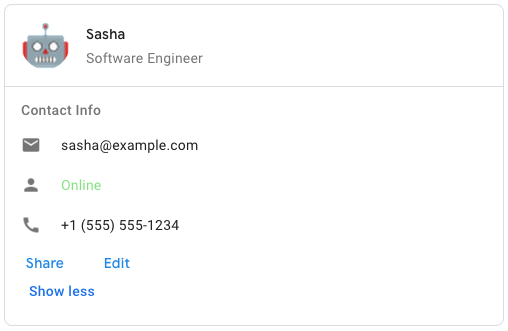 To create the sample card message in Google Chat, use the following JSON: ``` { \"cardsV2\": [ { \"cardId\": \"unique-card-id\", \"card\": { \"header\": { \"title\": \"Sasha\", \"subtitle\": \"Software Engineer\", \"imageUrl\": \"https://developers.google.com/workspace/chat/images/quickstart-app-avatar.png\", \"imageType\": \"CIRCLE\", \"imageAltText\": \"Avatar for Sasha\" }, \"sections\": [ { \"header\": \"Contact Info\", \"collapsible\": true, \"uncollapsibleWidgetsCount\": 1, \"widgets\": [ { \"decoratedText\": { \"startIcon\": { \"knownIcon\": \"EMAIL\" }, \"text\": \"sasha@example.com\" } }, { \"decoratedText\": { \"startIcon\": { \"knownIcon\": \"PERSON\" }, \"text\": \"Online\" } }, { \"decoratedText\": { \"startIcon\": { \"knownIcon\": \"PHONE\" }, \"text\": \"+1 (555) 555-1234\" } }, { \"buttonList\": { \"buttons\": [ { \"text\": \"Share\", \"onClick\": { \"openLink\": { \"url\": \"https://example.com/share\" } } }, { \"text\": \"Edit\", \"onClick\": { \"action\": { \"function\": \"goToView\", \"parameters\": [ { \"key\": \"viewType\", \"value\": \"EDIT\" } ] } } } ] } } ] } ] } } ] } ```",
|
|
2335
2351
|
"id": "GoogleAppsCardV1Card",
|
|
2336
2352
|
"properties": {
|
|
2337
2353
|
"cardActions": {
|
|
2338
|
-
"description": "The card's actions. Actions are added to the card's toolbar menu. [Google Workspace
|
|
2354
|
+
"description": "The card's actions. Actions are added to the card's toolbar menu. [Google Workspace add-ons](https://developers.google.com/workspace/add-ons): For example, the following JSON constructs a card action menu with `Settings` and `Send Feedback` options: ``` \"card_actions\": [ { \"actionLabel\": \"Settings\", \"onClick\": { \"action\": { \"functionName\": \"goToView\", \"parameters\": [ { \"key\": \"viewType\", \"value\": \"SETTING\" } ], \"loadIndicator\": \"LoadIndicator.SPINNER\" } } }, { \"actionLabel\": \"Send Feedback\", \"onClick\": { \"openLink\": { \"url\": \"https://example.com/feedback\" } } } ] ```",
|
|
2339
2355
|
"items": {
|
|
2340
2356
|
"$ref": "GoogleAppsCardV1CardAction"
|
|
2341
2357
|
},
|
|
2342
2358
|
"type": "array"
|
|
2343
2359
|
},
|
|
2344
2360
|
"displayStyle": {
|
|
2345
|
-
"description": "In Google Workspace
|
|
2361
|
+
"description": "In Google Workspace add-ons, sets the display properties of the `peekCardHeader`. [Google Workspace add-ons](https://developers.google.com/workspace/add-ons):",
|
|
2346
2362
|
"enum": [
|
|
2347
2363
|
"DISPLAY_STYLE_UNSPECIFIED",
|
|
2348
2364
|
"PEEK",
|
|
@@ -2357,19 +2373,19 @@
|
|
|
2357
2373
|
},
|
|
2358
2374
|
"fixedFooter": {
|
|
2359
2375
|
"$ref": "GoogleAppsCardV1CardFixedFooter",
|
|
2360
|
-
"description": "The fixed footer shown at the bottom of this card. Setting `fixedFooter` without specifying a `primaryButton` or a `secondaryButton` causes an error. For Chat apps, you can use fixed footers in [dialogs](https://developers.google.com/workspace/chat/dialogs), but not [card messages](https://developers.google.com/workspace/chat/create-messages#create). [Google Workspace
|
|
2376
|
+
"description": "The fixed footer shown at the bottom of this card. Setting `fixedFooter` without specifying a `primaryButton` or a `secondaryButton` causes an error. For Chat apps, you can use fixed footers in [dialogs](https://developers.google.com/workspace/chat/dialogs), but not [card messages](https://developers.google.com/workspace/chat/create-messages#create). [Google Workspace add-ons and Chat apps](https://developers.google.com/workspace/extend):"
|
|
2361
2377
|
},
|
|
2362
2378
|
"header": {
|
|
2363
2379
|
"$ref": "GoogleAppsCardV1CardHeader",
|
|
2364
2380
|
"description": "The header of the card. A header usually contains a leading image and a title. Headers always appear at the top of a card."
|
|
2365
2381
|
},
|
|
2366
2382
|
"name": {
|
|
2367
|
-
"description": "Name of the card. Used as a card identifier in card navigation. [Google Workspace
|
|
2383
|
+
"description": "Name of the card. Used as a card identifier in card navigation. [Google Workspace add-ons](https://developers.google.com/workspace/add-ons):",
|
|
2368
2384
|
"type": "string"
|
|
2369
2385
|
},
|
|
2370
2386
|
"peekCardHeader": {
|
|
2371
2387
|
"$ref": "GoogleAppsCardV1CardHeader",
|
|
2372
|
-
"description": "When displaying contextual content, the peek card header acts as a placeholder so that the user can navigate forward between the homepage cards and the contextual cards. [Google Workspace
|
|
2388
|
+
"description": "When displaying contextual content, the peek card header acts as a placeholder so that the user can navigate forward between the homepage cards and the contextual cards. [Google Workspace add-ons](https://developers.google.com/workspace/add-ons):"
|
|
2373
2389
|
},
|
|
2374
2390
|
"sectionDividerStyle": {
|
|
2375
2391
|
"description": "The divider style between the header, sections and footer.",
|
|
@@ -2396,7 +2412,7 @@
|
|
|
2396
2412
|
"type": "object"
|
|
2397
2413
|
},
|
|
2398
2414
|
"GoogleAppsCardV1CardAction": {
|
|
2399
|
-
"description": "A card action is the action associated with the card. For example, an invoice card might include actions such as delete invoice, email invoice, or open the invoice in a browser. [Google Workspace
|
|
2415
|
+
"description": "A card action is the action associated with the card. For example, an invoice card might include actions such as delete invoice, email invoice, or open the invoice in a browser. [Google Workspace add-ons](https://developers.google.com/workspace/add-ons):",
|
|
2400
2416
|
"id": "GoogleAppsCardV1CardAction",
|
|
2401
2417
|
"properties": {
|
|
2402
2418
|
"actionLabel": {
|
|
@@ -2411,7 +2427,7 @@
|
|
|
2411
2427
|
"type": "object"
|
|
2412
2428
|
},
|
|
2413
2429
|
"GoogleAppsCardV1CardFixedFooter": {
|
|
2414
|
-
"description": "A persistent (sticky) footer that that appears at the bottom of the card. Setting `fixedFooter` without specifying a `primaryButton` or a `secondaryButton` causes an error. For Chat apps, you can use fixed footers in [dialogs](https://developers.google.com/workspace/chat/dialogs), but not [card messages](https://developers.google.com/workspace/chat/create-messages#create). For an example in Google Chat apps, see [Add a persistent footer](https://developers.google.com/workspace/chat/design-components-card-dialog#add_a_persistent_footer). [Google Workspace
|
|
2430
|
+
"description": "A persistent (sticky) footer that that appears at the bottom of the card. Setting `fixedFooter` without specifying a `primaryButton` or a `secondaryButton` causes an error. For Chat apps, you can use fixed footers in [dialogs](https://developers.google.com/workspace/chat/dialogs), but not [card messages](https://developers.google.com/workspace/chat/create-messages#create). For an example in Google Chat apps, see [Add a persistent footer](https://developers.google.com/workspace/chat/design-components-card-dialog#add_a_persistent_footer). [Google Workspace add-ons and Chat apps](https://developers.google.com/workspace/extend):",
|
|
2415
2431
|
"id": "GoogleAppsCardV1CardFixedFooter",
|
|
2416
2432
|
"properties": {
|
|
2417
2433
|
"primaryButton": {
|
|
@@ -2426,7 +2442,7 @@
|
|
|
2426
2442
|
"type": "object"
|
|
2427
2443
|
},
|
|
2428
2444
|
"GoogleAppsCardV1CardHeader": {
|
|
2429
|
-
"description": "Represents a card header. For an example in Google Chat apps, see [Add a header](https://developers.google.com/workspace/chat/design-components-card-dialog#add_a_header). [Google Workspace
|
|
2445
|
+
"description": "Represents a card header. For an example in Google Chat apps, see [Add a header](https://developers.google.com/workspace/chat/design-components-card-dialog#add_a_header). [Google Workspace add-ons and Chat apps](https://developers.google.com/workspace/extend):",
|
|
2430
2446
|
"id": "GoogleAppsCardV1CardHeader",
|
|
2431
2447
|
"properties": {
|
|
2432
2448
|
"imageAltText": {
|
|
@@ -2434,7 +2450,7 @@
|
|
|
2434
2450
|
"type": "string"
|
|
2435
2451
|
},
|
|
2436
2452
|
"imageType": {
|
|
2437
|
-
"description": "The shape used to crop the image. [Google Workspace
|
|
2453
|
+
"description": "The shape used to crop the image. [Google Workspace add-ons and Chat apps](https://developers.google.com/workspace/extend):",
|
|
2438
2454
|
"enum": [
|
|
2439
2455
|
"SQUARE",
|
|
2440
2456
|
"CIRCLE"
|
|
@@ -2496,7 +2512,7 @@
|
|
|
2496
2512
|
"type": "object"
|
|
2497
2513
|
},
|
|
2498
2514
|
"GoogleAppsCardV1Chip": {
|
|
2499
|
-
"description": "A text, icon, or text and icon chip that users can click. [Google Workspace
|
|
2515
|
+
"description": "A text, icon, or text and icon chip that users can click. [Google Workspace add-ons and Chat apps](https://developers.google.com/workspace/extend):",
|
|
2500
2516
|
"id": "GoogleAppsCardV1Chip",
|
|
2501
2517
|
"properties": {
|
|
2502
2518
|
"altText": {
|
|
@@ -2528,7 +2544,7 @@
|
|
|
2528
2544
|
"type": "object"
|
|
2529
2545
|
},
|
|
2530
2546
|
"GoogleAppsCardV1ChipList": {
|
|
2531
|
-
"description": "A list of chips layed out horizontally, which can either scroll horizontally or wrap to the next line. [Google Workspace
|
|
2547
|
+
"description": "A list of chips layed out horizontally, which can either scroll horizontally or wrap to the next line. [Google Workspace add-ons and Chat apps](https://developers.google.com/workspace/extend):",
|
|
2532
2548
|
"id": "GoogleAppsCardV1ChipList",
|
|
2533
2549
|
"properties": {
|
|
2534
2550
|
"chips": {
|
|
@@ -2556,7 +2572,7 @@
|
|
|
2556
2572
|
"type": "object"
|
|
2557
2573
|
},
|
|
2558
2574
|
"GoogleAppsCardV1CollapseControl": {
|
|
2559
|
-
"description": "Represent an expand and collapse control. [Google Workspace
|
|
2575
|
+
"description": "Represent an expand and collapse control. [Google Workspace add-ons and Chat apps](https://developers.google.com/workspace/extend):",
|
|
2560
2576
|
"id": "GoogleAppsCardV1CollapseControl",
|
|
2561
2577
|
"properties": {
|
|
2562
2578
|
"collapseButton": {
|
|
@@ -2587,7 +2603,7 @@
|
|
|
2587
2603
|
"type": "object"
|
|
2588
2604
|
},
|
|
2589
2605
|
"GoogleAppsCardV1Column": {
|
|
2590
|
-
"description": "A column. [Google Workspace
|
|
2606
|
+
"description": "A column. [Google Workspace add-ons and Chat apps](https://developers.google.com/workspace/extend)",
|
|
2591
2607
|
"id": "GoogleAppsCardV1Column",
|
|
2592
2608
|
"properties": {
|
|
2593
2609
|
"horizontalAlignment": {
|
|
@@ -2647,7 +2663,7 @@
|
|
|
2647
2663
|
"type": "object"
|
|
2648
2664
|
},
|
|
2649
2665
|
"GoogleAppsCardV1Columns": {
|
|
2650
|
-
"description": "The `Columns` widget displays up to 2 columns in a card or dialog. You can add widgets to each column; the widgets appear in the order that they are specified. For an example in Google Chat apps, see [Display cards and dialogs in columns](https://developers.google.com/workspace/chat/format-structure-card-dialog#display_cards_and_dialogs_in_columns). The height of each column is determined by the taller column. For example, if the first column is taller than the second column, both columns have the height of the first column. Because each column can contain a different number of widgets, you can't define rows or align widgets between the columns. Columns are displayed side-by-side. You can customize the width of each column using the `HorizontalSizeStyle` field. If the user's screen width is too narrow, the second column wraps below the first: * On web, the second column wraps if the screen width is less than or equal to 480 pixels. * On iOS devices, the second column wraps if the screen width is less than or equal to 300 pt. * On Android devices, the second column wraps if the screen width is less than or equal to 320 dp. To include more than two columns, or to use rows, use the `Grid` widget. [Google Workspace
|
|
2666
|
+
"description": "The `Columns` widget displays up to 2 columns in a card or dialog. You can add widgets to each column; the widgets appear in the order that they are specified. For an example in Google Chat apps, see [Display cards and dialogs in columns](https://developers.google.com/workspace/chat/format-structure-card-dialog#display_cards_and_dialogs_in_columns). The height of each column is determined by the taller column. For example, if the first column is taller than the second column, both columns have the height of the first column. Because each column can contain a different number of widgets, you can't define rows or align widgets between the columns. Columns are displayed side-by-side. You can customize the width of each column using the `HorizontalSizeStyle` field. If the user's screen width is too narrow, the second column wraps below the first: * On web, the second column wraps if the screen width is less than or equal to 480 pixels. * On iOS devices, the second column wraps if the screen width is less than or equal to 300 pt. * On Android devices, the second column wraps if the screen width is less than or equal to 320 dp. To include more than two columns, or to use rows, use the `Grid` widget. [Google Workspace add-ons and Chat apps](https://developers.google.com/workspace/extend): The add-on UIs that support columns include: * The dialog displayed when users open the add-on from an email draft. * The dialog displayed when users open the add-on from the **Add attachment** menu in a Google Calendar event.",
|
|
2651
2667
|
"id": "GoogleAppsCardV1Columns",
|
|
2652
2668
|
"properties": {
|
|
2653
2669
|
"columnItems": {
|
|
@@ -2661,7 +2677,7 @@
|
|
|
2661
2677
|
"type": "object"
|
|
2662
2678
|
},
|
|
2663
2679
|
"GoogleAppsCardV1DateTimePicker": {
|
|
2664
|
-
"description": "Lets users input a date, a time, or both a date and a time. Supports form submission validation. When `Action.all_widgets_are_required` is set to `true` or this widget is specified in `Action.required_widgets`, the submission action is blocked unless a value is selected. For an example in Google Chat apps, see [Let a user pick a date and time](https://developers.google.com/workspace/chat/design-interactive-card-dialog#let_a_user_pick_a_date_and_time). Users can input text or use the picker to select dates and times. If users input an invalid date or time, the picker shows an error that prompts users to input the information correctly. [Google Workspace
|
|
2680
|
+
"description": "Lets users input a date, a time, or both a date and a time. Supports form submission validation. When `Action.all_widgets_are_required` is set to `true` or this widget is specified in `Action.required_widgets`, the submission action is blocked unless a value is selected. For an example in Google Chat apps, see [Let a user pick a date and time](https://developers.google.com/workspace/chat/design-interactive-card-dialog#let_a_user_pick_a_date_and_time). Users can input text or use the picker to select dates and times. If users input an invalid date or time, the picker shows an error that prompts users to input the information correctly. [Google Workspace add-ons and Chat apps](https://developers.google.com/workspace/extend):",
|
|
2665
2681
|
"id": "GoogleAppsCardV1DateTimePicker",
|
|
2666
2682
|
"properties": {
|
|
2667
2683
|
"label": {
|
|
@@ -2704,7 +2720,7 @@
|
|
|
2704
2720
|
"type": "object"
|
|
2705
2721
|
},
|
|
2706
2722
|
"GoogleAppsCardV1DecoratedText": {
|
|
2707
|
-
"description": "A widget that displays text with optional decorations such as a label above or below the text, an icon in front of the text, a selection widget, or a button after the text. For an example in Google Chat apps, see [Display text with decorative text](https://developers.google.com/workspace/chat/add-text-image-card-dialog#display_text_with_decorative_elements). [Google Workspace
|
|
2723
|
+
"description": "A widget that displays text with optional decorations such as a label above or below the text, an icon in front of the text, a selection widget, or a button after the text. For an example in Google Chat apps, see [Display text with decorative text](https://developers.google.com/workspace/chat/add-text-image-card-dialog#display_text_with_decorative_elements). [Google Workspace add-ons and Chat apps](https://developers.google.com/workspace/extend):",
|
|
2708
2724
|
"id": "GoogleAppsCardV1DecoratedText",
|
|
2709
2725
|
"properties": {
|
|
2710
2726
|
"bottomLabel": {
|
|
@@ -2737,7 +2753,7 @@
|
|
|
2737
2753
|
"description": "A switch widget that a user can click to change its state and trigger an action."
|
|
2738
2754
|
},
|
|
2739
2755
|
"text": {
|
|
2740
|
-
"description": "Required. The primary text. Supports simple formatting. For more information about formatting text, see [Formatting text in Google Chat apps](https://developers.google.com/workspace/chat/format-messages#card-formatting) and [Formatting text in Google Workspace
|
|
2756
|
+
"description": "Required. The primary text. Supports simple formatting. For more information about formatting text, see [Formatting text in Google Chat apps](https://developers.google.com/workspace/chat/format-messages#card-formatting) and [Formatting text in Google Workspace add-ons](https://developers.google.com/apps-script/add-ons/concepts/widgets#text_formatting).",
|
|
2741
2757
|
"type": "string"
|
|
2742
2758
|
},
|
|
2743
2759
|
"topLabel": {
|
|
@@ -2752,13 +2768,13 @@
|
|
|
2752
2768
|
"type": "object"
|
|
2753
2769
|
},
|
|
2754
2770
|
"GoogleAppsCardV1Divider": {
|
|
2755
|
-
"description": "Displays a divider between widgets as a horizontal line. For an example in Google Chat apps, see [Add a horizontal divider between widgets](https://developers.google.com/workspace/chat/format-structure-card-dialog#add_a_horizontal_divider_between_widgets). [Google Workspace
|
|
2771
|
+
"description": "Displays a divider between widgets as a horizontal line. For an example in Google Chat apps, see [Add a horizontal divider between widgets](https://developers.google.com/workspace/chat/format-structure-card-dialog#add_a_horizontal_divider_between_widgets). [Google Workspace add-ons and Chat apps](https://developers.google.com/workspace/extend): For example, the following JSON creates a divider: ``` \"divider\": {} ```",
|
|
2756
2772
|
"id": "GoogleAppsCardV1Divider",
|
|
2757
2773
|
"properties": {},
|
|
2758
2774
|
"type": "object"
|
|
2759
2775
|
},
|
|
2760
2776
|
"GoogleAppsCardV1Grid": {
|
|
2761
|
-
"description": "Displays a grid with a collection of items. Items can only include text or images. For responsive columns, or to include more than text or images, use `Columns`. For an example in Google Chat apps, see [Display a Grid with a collection of items](https://developers.google.com/workspace/chat/format-structure-card-dialog#display_a_grid_with_a_collection_of_items). A grid supports any number of columns and items. The number of rows is determined by items divided by columns. A grid with 10 items and 2 columns has 5 rows. A grid with 11 items and 2 columns has 6 rows. [Google Workspace
|
|
2777
|
+
"description": "Displays a grid with a collection of items. Items can only include text or images. For responsive columns, or to include more than text or images, use `Columns`. For an example in Google Chat apps, see [Display a Grid with a collection of items](https://developers.google.com/workspace/chat/format-structure-card-dialog#display_a_grid_with_a_collection_of_items). A grid supports any number of columns and items. The number of rows is determined by items divided by columns. A grid with 10 items and 2 columns has 5 rows. A grid with 11 items and 2 columns has 6 rows. [Google Workspace add-ons and Chat apps](https://developers.google.com/workspace/extend): For example, the following JSON creates a 2 column grid with a single item: ``` \"grid\": { \"title\": \"A fine collection of items\", \"columnCount\": 2, \"borderStyle\": { \"type\": \"STROKE\", \"cornerRadius\": 4 }, \"items\": [ { \"image\": { \"imageUri\": \"https://www.example.com/image.png\", \"cropStyle\": { \"type\": \"SQUARE\" }, \"borderStyle\": { \"type\": \"STROKE\" } }, \"title\": \"An item\", \"textAlignment\": \"CENTER\" } ], \"onClick\": { \"openLink\": { \"url\": \"https://www.example.com\" } } } ```",
|
|
2762
2778
|
"id": "GoogleAppsCardV1Grid",
|
|
2763
2779
|
"properties": {
|
|
2764
2780
|
"borderStyle": {
|
|
@@ -2789,7 +2805,7 @@
|
|
|
2789
2805
|
"type": "object"
|
|
2790
2806
|
},
|
|
2791
2807
|
"GoogleAppsCardV1GridItem": {
|
|
2792
|
-
"description": "Represents an item in a grid layout. Items can contain text, an image, or both text and an image. [Google Workspace
|
|
2808
|
+
"description": "Represents an item in a grid layout. Items can contain text, an image, or both text and an image. [Google Workspace add-ons and Chat apps](https://developers.google.com/workspace/extend):",
|
|
2793
2809
|
"id": "GoogleAppsCardV1GridItem",
|
|
2794
2810
|
"properties": {
|
|
2795
2811
|
"id": {
|
|
@@ -2826,7 +2842,7 @@
|
|
|
2826
2842
|
"type": "object"
|
|
2827
2843
|
},
|
|
2828
2844
|
"GoogleAppsCardV1Icon": {
|
|
2829
|
-
"description": "An icon displayed in a widget on a card. For an example in Google Chat apps, see [Add an icon](https://developers.google.com/workspace/chat/add-text-image-card-dialog#add_an_icon). Supports [built-in](https://developers.google.com/workspace/chat/format-messages#builtinicons) and [custom](https://developers.google.com/workspace/chat/format-messages#customicons) icons. [Google Workspace
|
|
2845
|
+
"description": "An icon displayed in a widget on a card. For an example in Google Chat apps, see [Add an icon](https://developers.google.com/workspace/chat/add-text-image-card-dialog#add_an_icon). Supports [built-in](https://developers.google.com/workspace/chat/format-messages#builtinicons) and [custom](https://developers.google.com/workspace/chat/format-messages#customicons) icons. [Google Workspace add-ons and Chat apps](https://developers.google.com/workspace/extend):",
|
|
2830
2846
|
"id": "GoogleAppsCardV1Icon",
|
|
2831
2847
|
"properties": {
|
|
2832
2848
|
"altText": {
|
|
@@ -2861,7 +2877,7 @@
|
|
|
2861
2877
|
"type": "object"
|
|
2862
2878
|
},
|
|
2863
2879
|
"GoogleAppsCardV1Image": {
|
|
2864
|
-
"description": "An image that is specified by a URL and can have an `onClick` action. For an example, see [Add an image](https://developers.google.com/workspace/chat/add-text-image-card-dialog#add_an_image). [Google Workspace
|
|
2880
|
+
"description": "An image that is specified by a URL and can have an `onClick` action. For an example, see [Add an image](https://developers.google.com/workspace/chat/add-text-image-card-dialog#add_an_image). [Google Workspace add-ons and Chat apps](https://developers.google.com/workspace/extend):",
|
|
2865
2881
|
"id": "GoogleAppsCardV1Image",
|
|
2866
2882
|
"properties": {
|
|
2867
2883
|
"altText": {
|
|
@@ -2880,7 +2896,7 @@
|
|
|
2880
2896
|
"type": "object"
|
|
2881
2897
|
},
|
|
2882
2898
|
"GoogleAppsCardV1ImageComponent": {
|
|
2883
|
-
"description": "Represents an image. [Google Workspace
|
|
2899
|
+
"description": "Represents an image. [Google Workspace add-ons and Chat apps](https://developers.google.com/workspace/extend):",
|
|
2884
2900
|
"id": "GoogleAppsCardV1ImageComponent",
|
|
2885
2901
|
"properties": {
|
|
2886
2902
|
"altText": {
|
|
@@ -2903,7 +2919,7 @@
|
|
|
2903
2919
|
"type": "object"
|
|
2904
2920
|
},
|
|
2905
2921
|
"GoogleAppsCardV1ImageCropStyle": {
|
|
2906
|
-
"description": "Represents the crop style applied to an image. [Google Workspace
|
|
2922
|
+
"description": "Represents the crop style applied to an image. [Google Workspace add-ons and Chat apps](https://developers.google.com/workspace/extend): For example, here's how to apply a 16:9 aspect ratio: ``` cropStyle { \"type\": \"RECTANGLE_CUSTOM\", \"aspectRatio\": 16/9 } ```",
|
|
2907
2923
|
"id": "GoogleAppsCardV1ImageCropStyle",
|
|
2908
2924
|
"properties": {
|
|
2909
2925
|
"aspectRatio": {
|
|
@@ -2977,7 +2993,7 @@
|
|
|
2977
2993
|
"type": "object"
|
|
2978
2994
|
},
|
|
2979
2995
|
"GoogleAppsCardV1OnClick": {
|
|
2980
|
-
"description": "Represents how to respond when users click an interactive element on a card, such as a button. [Google Workspace
|
|
2996
|
+
"description": "Represents how to respond when users click an interactive element on a card, such as a button. [Google Workspace add-ons and Chat apps](https://developers.google.com/workspace/extend):",
|
|
2981
2997
|
"id": "GoogleAppsCardV1OnClick",
|
|
2982
2998
|
"properties": {
|
|
2983
2999
|
"action": {
|
|
@@ -2986,11 +3002,11 @@
|
|
|
2986
3002
|
},
|
|
2987
3003
|
"card": {
|
|
2988
3004
|
"$ref": "GoogleAppsCardV1Card",
|
|
2989
|
-
"description": "A new card is pushed to the card stack after clicking if specified. [Google Workspace
|
|
3005
|
+
"description": "A new card is pushed to the card stack after clicking if specified. [Google Workspace add-ons](https://developers.google.com/workspace/add-ons):"
|
|
2990
3006
|
},
|
|
2991
3007
|
"openDynamicLinkAction": {
|
|
2992
3008
|
"$ref": "GoogleAppsCardV1Action",
|
|
2993
|
-
"description": "An add-on triggers this action when the action needs to open a link. This differs from the `open_link` above in that this needs to talk to server to get the link. Thus some preparation work is required for web client to do before the open link action response comes back. [Google Workspace
|
|
3009
|
+
"description": "An add-on triggers this action when the action needs to open a link. This differs from the `open_link` above in that this needs to talk to server to get the link. Thus some preparation work is required for web client to do before the open link action response comes back. [Google Workspace add-ons](https://developers.google.com/workspace/add-ons):"
|
|
2994
3010
|
},
|
|
2995
3011
|
"openLink": {
|
|
2996
3012
|
"$ref": "GoogleAppsCardV1OpenLink",
|
|
@@ -3004,11 +3020,11 @@
|
|
|
3004
3020
|
"type": "object"
|
|
3005
3021
|
},
|
|
3006
3022
|
"GoogleAppsCardV1OpenLink": {
|
|
3007
|
-
"description": "Represents an `onClick` event that opens a hyperlink. [Google Workspace
|
|
3023
|
+
"description": "Represents an `onClick` event that opens a hyperlink. [Google Workspace add-ons and Chat apps](https://developers.google.com/workspace/extend):",
|
|
3008
3024
|
"id": "GoogleAppsCardV1OpenLink",
|
|
3009
3025
|
"properties": {
|
|
3010
3026
|
"onClose": {
|
|
3011
|
-
"description": "Whether the client forgets about a link after opening it, or observes it until the window closes. [Google Workspace
|
|
3027
|
+
"description": "Whether the client forgets about a link after opening it, or observes it until the window closes. [Google Workspace add-ons](https://developers.google.com/workspace/add-ons):",
|
|
3012
3028
|
"enum": [
|
|
3013
3029
|
"NOTHING",
|
|
3014
3030
|
"RELOAD"
|
|
@@ -3020,7 +3036,7 @@
|
|
|
3020
3036
|
"type": "string"
|
|
3021
3037
|
},
|
|
3022
3038
|
"openAs": {
|
|
3023
|
-
"description": "How to open a link. [Google Workspace
|
|
3039
|
+
"description": "How to open a link. [Google Workspace add-ons](https://developers.google.com/workspace/add-ons):",
|
|
3024
3040
|
"enum": [
|
|
3025
3041
|
"FULL_SIZE",
|
|
3026
3042
|
"OVERLAY"
|
|
@@ -3039,7 +3055,7 @@
|
|
|
3039
3055
|
"type": "object"
|
|
3040
3056
|
},
|
|
3041
3057
|
"GoogleAppsCardV1OverflowMenu": {
|
|
3042
|
-
"description": "A widget that presents a pop-up menu with one or more actions that users can invoke. For example, showing non-primary actions in a card. You can use this widget when actions don't fit in the available space. To use, specify this widget in the `OnClick` action of widgets that support it. For example, in a `Button`. [Google Workspace
|
|
3058
|
+
"description": "A widget that presents a pop-up menu with one or more actions that users can invoke. For example, showing non-primary actions in a card. You can use this widget when actions don't fit in the available space. To use, specify this widget in the `OnClick` action of widgets that support it. For example, in a `Button`. [Google Workspace add-ons and Chat apps](https://developers.google.com/workspace/extend):",
|
|
3043
3059
|
"id": "GoogleAppsCardV1OverflowMenu",
|
|
3044
3060
|
"properties": {
|
|
3045
3061
|
"items": {
|
|
@@ -3053,7 +3069,7 @@
|
|
|
3053
3069
|
"type": "object"
|
|
3054
3070
|
},
|
|
3055
3071
|
"GoogleAppsCardV1OverflowMenuItem": {
|
|
3056
|
-
"description": "An option that users can invoke in an overflow menu. [Google Workspace
|
|
3072
|
+
"description": "An option that users can invoke in an overflow menu. [Google Workspace add-ons and Chat apps](https://developers.google.com/workspace/extend):",
|
|
3057
3073
|
"id": "GoogleAppsCardV1OverflowMenuItem",
|
|
3058
3074
|
"properties": {
|
|
3059
3075
|
"disabled": {
|
|
@@ -3099,7 +3115,7 @@
|
|
|
3099
3115
|
"type": "object"
|
|
3100
3116
|
},
|
|
3101
3117
|
"GoogleAppsCardV1Section": {
|
|
3102
|
-
"description": "A section contains a collection of widgets that are rendered vertically in the order that they're specified. [Google Workspace
|
|
3118
|
+
"description": "A section contains a collection of widgets that are rendered vertically in the order that they're specified. [Google Workspace add-ons and Chat apps](https://developers.google.com/workspace/extend):",
|
|
3103
3119
|
"id": "GoogleAppsCardV1Section",
|
|
3104
3120
|
"properties": {
|
|
3105
3121
|
"collapseControl": {
|
|
@@ -3111,7 +3127,7 @@
|
|
|
3111
3127
|
"type": "boolean"
|
|
3112
3128
|
},
|
|
3113
3129
|
"header": {
|
|
3114
|
-
"description": "Text that appears at the top of a section. Supports simple HTML formatted text. For more information about formatting text, see [Formatting text in Google Chat apps](https://developers.google.com/workspace/chat/format-messages#card-formatting) and [Formatting text in Google Workspace
|
|
3130
|
+
"description": "Text that appears at the top of a section. Supports simple HTML formatted text. For more information about formatting text, see [Formatting text in Google Chat apps](https://developers.google.com/workspace/chat/format-messages#card-formatting) and [Formatting text in Google Workspace add-ons](https://developers.google.com/apps-script/add-ons/concepts/widgets#text_formatting).",
|
|
3115
3131
|
"type": "string"
|
|
3116
3132
|
},
|
|
3117
3133
|
"uncollapsibleWidgetsCount": {
|
|
@@ -3130,7 +3146,7 @@
|
|
|
3130
3146
|
"type": "object"
|
|
3131
3147
|
},
|
|
3132
3148
|
"GoogleAppsCardV1SelectionInput": {
|
|
3133
|
-
"description": "A widget that creates one or more UI items that users can select. Supports form submission validation for `dropdown` and `multiselect` menus only. When `Action.all_widgets_are_required` is set to `true` or this widget is specified in `Action.required_widgets`, the submission action is blocked unless a value is selected. For example, a dropdown menu or checkboxes. You can use this widget to collect data that can be predicted or enumerated. For an example in Google Chat apps, see [Add selectable UI elements](/workspace/chat/design-interactive-card-dialog#add_selectable_ui_elements). Chat apps can process the value of items that users select or input. For details about working with form inputs, see [Receive form data](https://developers.google.com/workspace/chat/read-form-data). To collect undefined or abstract data from users, use the TextInput widget. [Google Workspace
|
|
3149
|
+
"description": "A widget that creates one or more UI items that users can select. Supports form submission validation for `dropdown` and `multiselect` menus only. When `Action.all_widgets_are_required` is set to `true` or this widget is specified in `Action.required_widgets`, the submission action is blocked unless a value is selected. For example, a dropdown menu or checkboxes. You can use this widget to collect data that can be predicted or enumerated. For an example in Google Chat apps, see [Add selectable UI elements](/workspace/chat/design-interactive-card-dialog#add_selectable_ui_elements). Chat apps can process the value of items that users select or input. For details about working with form inputs, see [Receive form data](https://developers.google.com/workspace/chat/read-form-data). To collect undefined or abstract data from users, use the TextInput widget. [Google Workspace add-ons and Chat apps](https://developers.google.com/workspace/extend):",
|
|
3134
3150
|
"id": "GoogleAppsCardV1SelectionInput",
|
|
3135
3151
|
"properties": {
|
|
3136
3152
|
"externalDataSource": {
|
|
@@ -3184,7 +3200,7 @@
|
|
|
3184
3200
|
"A set of radio buttons. Users can select one radio button.",
|
|
3185
3201
|
"A set of switches. Users can turn on one or more switches.",
|
|
3186
3202
|
"A dropdown menu. Users can select one item from the menu.",
|
|
3187
|
-
"A menu with a text box. Users can type and select one or more items. For Google Workspace
|
|
3203
|
+
"A menu with a text box. Users can type and select one or more items. For Google Workspace add-ons, you must populate items using a static array of `SelectionItem` objects. For Google Chat apps, you can also populate items using a dynamic data source and autosuggest items as users type in the menu. For example, users can start typing the name of a Google Chat space and the widget autosuggests the space. To dynamically populate items for a multiselect menu, use one of the following types of data sources: * Google Workspace data: Items are populated using data from Google Workspace, such as Google Workspace users or Google Chat spaces. * External data: Items are populated from an external data source outside of Google Workspace. For examples of how to implement multiselect menus for Chat apps, see [Add a multiselect menu](https://developers.google.com/workspace/chat/design-interactive-card-dialog#multiselect-menu). [Google Workspace add-ons and Chat apps](https://developers.google.com/workspace/extend):"
|
|
3188
3204
|
],
|
|
3189
3205
|
"type": "string"
|
|
3190
3206
|
}
|
|
@@ -3192,7 +3208,7 @@
|
|
|
3192
3208
|
"type": "object"
|
|
3193
3209
|
},
|
|
3194
3210
|
"GoogleAppsCardV1SelectionItem": {
|
|
3195
|
-
"description": "An item that users can select in a selection input, such as a checkbox or switch. Supports up to 100 items. [Google Workspace
|
|
3211
|
+
"description": "An item that users can select in a selection input, such as a checkbox or switch. Supports up to 100 items. [Google Workspace add-ons and Chat apps](https://developers.google.com/workspace/extend):",
|
|
3196
3212
|
"id": "GoogleAppsCardV1SelectionItem",
|
|
3197
3213
|
"properties": {
|
|
3198
3214
|
"bottomText": {
|
|
@@ -3219,7 +3235,7 @@
|
|
|
3219
3235
|
"type": "object"
|
|
3220
3236
|
},
|
|
3221
3237
|
"GoogleAppsCardV1SuggestionItem": {
|
|
3222
|
-
"description": "One suggested value that users can enter in a text input field. [Google Workspace
|
|
3238
|
+
"description": "One suggested value that users can enter in a text input field. [Google Workspace add-ons and Chat apps](https://developers.google.com/workspace/extend):",
|
|
3223
3239
|
"id": "GoogleAppsCardV1SuggestionItem",
|
|
3224
3240
|
"properties": {
|
|
3225
3241
|
"text": {
|
|
@@ -3230,7 +3246,7 @@
|
|
|
3230
3246
|
"type": "object"
|
|
3231
3247
|
},
|
|
3232
3248
|
"GoogleAppsCardV1Suggestions": {
|
|
3233
|
-
"description": "Suggested values that users can enter. These values appear when users click inside the text input field. As users type, the suggested values dynamically filter to match what the users have typed. For example, a text input field for programming language might suggest Java, JavaScript, Python, and C++. When users start typing `Jav`, the list of suggestions filters to show `Java` and `JavaScript`. Suggested values help guide users to enter values that your app can make sense of. When referring to JavaScript, some users might enter `javascript` and others `java script`. Suggesting `JavaScript` can standardize how users interact with your app. When specified, `TextInput.type` is always `SINGLE_LINE`, even if it's set to `MULTIPLE_LINE`. [Google Workspace
|
|
3249
|
+
"description": "Suggested values that users can enter. These values appear when users click inside the text input field. As users type, the suggested values dynamically filter to match what the users have typed. For example, a text input field for programming language might suggest Java, JavaScript, Python, and C++. When users start typing `Jav`, the list of suggestions filters to show `Java` and `JavaScript`. Suggested values help guide users to enter values that your app can make sense of. When referring to JavaScript, some users might enter `javascript` and others `java script`. Suggesting `JavaScript` can standardize how users interact with your app. When specified, `TextInput.type` is always `SINGLE_LINE`, even if it's set to `MULTIPLE_LINE`. [Google Workspace add-ons and Chat apps](https://developers.google.com/workspace/extend):",
|
|
3234
3250
|
"id": "GoogleAppsCardV1Suggestions",
|
|
3235
3251
|
"properties": {
|
|
3236
3252
|
"items": {
|
|
@@ -3244,11 +3260,11 @@
|
|
|
3244
3260
|
"type": "object"
|
|
3245
3261
|
},
|
|
3246
3262
|
"GoogleAppsCardV1SwitchControl": {
|
|
3247
|
-
"description": "Either a toggle-style switch or a checkbox inside a `decoratedText` widget. [Google Workspace
|
|
3263
|
+
"description": "Either a toggle-style switch or a checkbox inside a `decoratedText` widget. [Google Workspace add-ons and Chat apps](https://developers.google.com/workspace/extend): Only supported in the `decoratedText` widget.",
|
|
3248
3264
|
"id": "GoogleAppsCardV1SwitchControl",
|
|
3249
3265
|
"properties": {
|
|
3250
3266
|
"controlType": {
|
|
3251
|
-
"description": "How the switch appears in the user interface. [Google Workspace
|
|
3267
|
+
"description": "How the switch appears in the user interface. [Google Workspace add-ons and Chat apps](https://developers.google.com/workspace/extend):",
|
|
3252
3268
|
"enum": [
|
|
3253
3269
|
"SWITCH",
|
|
3254
3270
|
"CHECKBOX",
|
|
@@ -3281,12 +3297,12 @@
|
|
|
3281
3297
|
"type": "object"
|
|
3282
3298
|
},
|
|
3283
3299
|
"GoogleAppsCardV1TextInput": {
|
|
3284
|
-
"description": "A field in which users can enter text. Supports suggestions and on-change actions. Supports form submission validation. When `Action.all_widgets_are_required` is set to `true` or this widget is specified in `Action.required_widgets`, the submission action is blocked unless a value is entered. For an example in Google Chat apps, see [Add a field in which a user can enter text](https://developers.google.com/workspace/chat/design-interactive-card-dialog#add_a_field_in_which_a_user_can_enter_text). Chat apps receive and can process the value of entered text during form input events. For details about working with form inputs, see [Receive form data](https://developers.google.com/workspace/chat/read-form-data). When you need to collect undefined or abstract data from users, use a text input. To collect defined or enumerated data from users, use the SelectionInput widget. [Google Workspace
|
|
3300
|
+
"description": "A field in which users can enter text. Supports suggestions and on-change actions. Supports form submission validation. When `Action.all_widgets_are_required` is set to `true` or this widget is specified in `Action.required_widgets`, the submission action is blocked unless a value is entered. For an example in Google Chat apps, see [Add a field in which a user can enter text](https://developers.google.com/workspace/chat/design-interactive-card-dialog#add_a_field_in_which_a_user_can_enter_text). Chat apps receive and can process the value of entered text during form input events. For details about working with form inputs, see [Receive form data](https://developers.google.com/workspace/chat/read-form-data). When you need to collect undefined or abstract data from users, use a text input. To collect defined or enumerated data from users, use the SelectionInput widget. [Google Workspace add-ons and Chat apps](https://developers.google.com/workspace/extend):",
|
|
3285
3301
|
"id": "GoogleAppsCardV1TextInput",
|
|
3286
3302
|
"properties": {
|
|
3287
3303
|
"autoCompleteAction": {
|
|
3288
3304
|
"$ref": "GoogleAppsCardV1Action",
|
|
3289
|
-
"description": "Optional. Specify what action to take when the text input field provides suggestions to users who interact with it. If unspecified, the suggestions are set by `initialSuggestions` and are processed by the client. If specified, the app takes the action specified here, such as running a custom function. [Google Workspace
|
|
3305
|
+
"description": "Optional. Specify what action to take when the text input field provides suggestions to users who interact with it. If unspecified, the suggestions are set by `initialSuggestions` and are processed by the client. If specified, the app takes the action specified here, such as running a custom function. [Google Workspace add-ons](https://developers.google.com/workspace/add-ons):"
|
|
3290
3306
|
},
|
|
3291
3307
|
"hintText": {
|
|
3292
3308
|
"description": "Text that appears below the text input field meant to assist users by prompting them to enter a certain value. This text is always visible. Required if `label` is unspecified. Otherwise, optional.",
|
|
@@ -3294,7 +3310,7 @@
|
|
|
3294
3310
|
},
|
|
3295
3311
|
"initialSuggestions": {
|
|
3296
3312
|
"$ref": "GoogleAppsCardV1Suggestions",
|
|
3297
|
-
"description": "Suggested values that users can enter. These values appear when users click inside the text input field. As users type, the suggested values dynamically filter to match what the users have typed. For example, a text input field for programming language might suggest Java, JavaScript, Python, and C++. When users start typing `Jav`, the list of suggestions filters to show just `Java` and `JavaScript`. Suggested values help guide users to enter values that your app can make sense of. When referring to JavaScript, some users might enter `javascript` and others `java script`. Suggesting `JavaScript` can standardize how users interact with your app. When specified, `TextInput.type` is always `SINGLE_LINE`, even if it's set to `MULTIPLE_LINE`. [Google Workspace
|
|
3313
|
+
"description": "Suggested values that users can enter. These values appear when users click inside the text input field. As users type, the suggested values dynamically filter to match what the users have typed. For example, a text input field for programming language might suggest Java, JavaScript, Python, and C++. When users start typing `Jav`, the list of suggestions filters to show just `Java` and `JavaScript`. Suggested values help guide users to enter values that your app can make sense of. When referring to JavaScript, some users might enter `javascript` and others `java script`. Suggesting `JavaScript` can standardize how users interact with your app. When specified, `TextInput.type` is always `SINGLE_LINE`, even if it's set to `MULTIPLE_LINE`. [Google Workspace add-ons and Chat apps](https://developers.google.com/workspace/extend):"
|
|
3298
3314
|
},
|
|
3299
3315
|
"label": {
|
|
3300
3316
|
"description": "The text that appears above the text input field in the user interface. Specify text that helps the user enter the information your app needs. For example, if you are asking someone's name, but specifically need their surname, write `surname` instead of `name`. Required if `hintText` is unspecified. Otherwise, optional.",
|
|
@@ -3326,7 +3342,7 @@
|
|
|
3326
3342
|
},
|
|
3327
3343
|
"validation": {
|
|
3328
3344
|
"$ref": "GoogleAppsCardV1Validation",
|
|
3329
|
-
"description": "Specify the input format validation necessary for this text field. [Google Workspace
|
|
3345
|
+
"description": "Specify the input format validation necessary for this text field. [Google Workspace add-ons and Chat apps](https://developers.google.com/workspace/extend):"
|
|
3330
3346
|
},
|
|
3331
3347
|
"value": {
|
|
3332
3348
|
"description": "The value entered by a user, returned as part of a form input event. For details about working with form inputs, see [Receive form data](https://developers.google.com/workspace/chat/read-form-data).",
|
|
@@ -3336,7 +3352,7 @@
|
|
|
3336
3352
|
"type": "object"
|
|
3337
3353
|
},
|
|
3338
3354
|
"GoogleAppsCardV1TextParagraph": {
|
|
3339
|
-
"description": "A paragraph of text that supports formatting. For an example in Google Chat apps, see [Add a paragraph of formatted text](https://developers.google.com/workspace/chat/add-text-image-card-dialog#add_a_paragraph_of_formatted_text). For more information about formatting text, see [Formatting text in Google Chat apps](https://developers.google.com/workspace/chat/format-messages#card-formatting) and [Formatting text in Google Workspace
|
|
3355
|
+
"description": "A paragraph of text that supports formatting. For an example in Google Chat apps, see [Add a paragraph of formatted text](https://developers.google.com/workspace/chat/add-text-image-card-dialog#add_a_paragraph_of_formatted_text). For more information about formatting text, see [Formatting text in Google Chat apps](https://developers.google.com/workspace/chat/format-messages#card-formatting) and [Formatting text in Google Workspace add-ons](https://developers.google.com/apps-script/add-ons/concepts/widgets#text_formatting). [Google Workspace add-ons and Chat apps](https://developers.google.com/workspace/extend):",
|
|
3340
3356
|
"id": "GoogleAppsCardV1TextParagraph",
|
|
3341
3357
|
"properties": {
|
|
3342
3358
|
"maxLines": {
|
|
@@ -3352,16 +3368,16 @@
|
|
|
3352
3368
|
"type": "object"
|
|
3353
3369
|
},
|
|
3354
3370
|
"GoogleAppsCardV1Validation": {
|
|
3355
|
-
"description": "Represents the necessary data for validating the widget it's attached to. [Google Workspace
|
|
3371
|
+
"description": "Represents the necessary data for validating the widget it's attached to. [Google Workspace add-ons and Chat apps](https://developers.google.com/workspace/extend):",
|
|
3356
3372
|
"id": "GoogleAppsCardV1Validation",
|
|
3357
3373
|
"properties": {
|
|
3358
3374
|
"characterLimit": {
|
|
3359
|
-
"description": "Specify the character limit for text input widgets. Note that this is only used for text input and is ignored for other widgets. [Google Workspace
|
|
3375
|
+
"description": "Specify the character limit for text input widgets. Note that this is only used for text input and is ignored for other widgets. [Google Workspace add-ons and Chat apps](https://developers.google.com/workspace/extend):",
|
|
3360
3376
|
"format": "int32",
|
|
3361
3377
|
"type": "integer"
|
|
3362
3378
|
},
|
|
3363
3379
|
"inputType": {
|
|
3364
|
-
"description": "Specify the type of the input widgets. [Google Workspace
|
|
3380
|
+
"description": "Specify the type of the input widgets. [Google Workspace add-ons and Chat apps](https://developers.google.com/workspace/extend):",
|
|
3365
3381
|
"enum": [
|
|
3366
3382
|
"INPUT_TYPE_UNSPECIFIED",
|
|
3367
3383
|
"TEXT",
|
|
@@ -3417,7 +3433,7 @@
|
|
|
3417
3433
|
},
|
|
3418
3434
|
"grid": {
|
|
3419
3435
|
"$ref": "GoogleAppsCardV1Grid",
|
|
3420
|
-
"description": "Displays a grid with a collection of items. A grid supports any number of columns and items. The number of rows is determined by the upper bounds of the number items divided by the number of columns. A grid with 10 items and 2 columns has 5 rows. A grid with 11 items and 2 columns has 6 rows. [Google Workspace
|
|
3436
|
+
"description": "Displays a grid with a collection of items. A grid supports any number of columns and items. The number of rows is determined by the upper bounds of the number items divided by the number of columns. A grid with 10 items and 2 columns has 5 rows. A grid with 11 items and 2 columns has 6 rows. [Google Workspace add-ons and Chat apps](https://developers.google.com/workspace/extend): For example, the following JSON creates a 2 column grid with a single item: ``` \"grid\": { \"title\": \"A fine collection of items\", \"columnCount\": 2, \"borderStyle\": { \"type\": \"STROKE\", \"cornerRadius\": 4 }, \"items\": [ { \"image\": { \"imageUri\": \"https://www.example.com/image.png\", \"cropStyle\": { \"type\": \"SQUARE\" }, \"borderStyle\": { \"type\": \"STROKE\" } }, \"title\": \"An item\", \"textAlignment\": \"CENTER\" } ], \"onClick\": { \"openLink\": { \"url\": \"https://www.example.com\" } } } ```"
|
|
3421
3437
|
},
|
|
3422
3438
|
"horizontalAlignment": {
|
|
3423
3439
|
"description": "Specifies whether widgets align to the left, right, or center of a column.",
|
|
@@ -3449,13 +3465,13 @@
|
|
|
3449
3465
|
},
|
|
3450
3466
|
"textParagraph": {
|
|
3451
3467
|
"$ref": "GoogleAppsCardV1TextParagraph",
|
|
3452
|
-
"description": "Displays a text paragraph. Supports simple HTML formatted text. For more information about formatting text, see [Formatting text in Google Chat apps](https://developers.google.com/workspace/chat/format-messages#card-formatting) and [Formatting text in Google Workspace
|
|
3468
|
+
"description": "Displays a text paragraph. Supports simple HTML formatted text. For more information about formatting text, see [Formatting text in Google Chat apps](https://developers.google.com/workspace/chat/format-messages#card-formatting) and [Formatting text in Google Workspace add-ons](https://developers.google.com/apps-script/add-ons/concepts/widgets#text_formatting). For example, the following JSON creates a bolded text: ``` \"textParagraph\": { \"text\": \" *bold text*\" } ```"
|
|
3453
3469
|
}
|
|
3454
3470
|
},
|
|
3455
3471
|
"type": "object"
|
|
3456
3472
|
},
|
|
3457
3473
|
"GoogleAppsCardV1Widgets": {
|
|
3458
|
-
"description": "The supported widgets that you can include in a column. [Google Workspace
|
|
3474
|
+
"description": "The supported widgets that you can include in a column. [Google Workspace add-ons and Chat apps](https://developers.google.com/workspace/extend)",
|
|
3459
3475
|
"id": "GoogleAppsCardV1Widgets",
|
|
3460
3476
|
"properties": {
|
|
3461
3477
|
"buttonList": {
|