google-api-python-client 2.149.0__py2.py3-none-any.whl → 2.151.0__py2.py3-none-any.whl
This diff represents the content of publicly available package versions that have been released to one of the supported registries. The information contained in this diff is provided for informational purposes only and reflects changes between package versions as they appear in their respective public registries.
- {google_api_python_client-2.149.0.dist-info → google_api_python_client-2.151.0.dist-info}/METADATA +6 -6
- {google_api_python_client-2.149.0.dist-info → google_api_python_client-2.151.0.dist-info}/RECORD +187 -183
- {google_api_python_client-2.149.0.dist-info → google_api_python_client-2.151.0.dist-info}/WHEEL +1 -1
- googleapiclient/discovery_cache/documents/accesscontextmanager.v1.json +50 -5
- googleapiclient/discovery_cache/documents/aiplatform.v1.json +398 -8
- googleapiclient/discovery_cache/documents/aiplatform.v1beta1.json +719 -35
- googleapiclient/discovery_cache/documents/alertcenter.v1beta1.json +8 -8
- googleapiclient/discovery_cache/documents/alloydb.v1.json +40 -6
- googleapiclient/discovery_cache/documents/alloydb.v1alpha.json +64 -6
- googleapiclient/discovery_cache/documents/alloydb.v1beta.json +40 -6
- googleapiclient/discovery_cache/documents/androidenterprise.v1.json +6 -2
- googleapiclient/discovery_cache/documents/androidmanagement.v1.json +3 -3
- googleapiclient/discovery_cache/documents/androidpublisher.v3.json +23 -1
- googleapiclient/discovery_cache/documents/apigee.v1.json +17 -5
- googleapiclient/discovery_cache/documents/apikeys.v2.json +5 -1
- googleapiclient/discovery_cache/documents/appengine.v1.json +61 -1
- googleapiclient/discovery_cache/documents/appengine.v1beta.json +61 -1
- googleapiclient/discovery_cache/documents/apphub.v1.json +410 -20
- googleapiclient/discovery_cache/documents/apphub.v1alpha.json +410 -20
- googleapiclient/discovery_cache/documents/artifactregistry.v1.json +67 -14
- googleapiclient/discovery_cache/documents/artifactregistry.v1beta1.json +2 -2
- googleapiclient/discovery_cache/documents/artifactregistry.v1beta2.json +2 -2
- googleapiclient/discovery_cache/documents/assuredworkloads.v1.json +24 -1
- googleapiclient/discovery_cache/documents/assuredworkloads.v1beta1.json +24 -1
- googleapiclient/discovery_cache/documents/backupdr.v1.json +17 -397
- googleapiclient/discovery_cache/documents/batch.v1.json +2 -2
- googleapiclient/discovery_cache/documents/beyondcorp.v1.json +217 -27
- googleapiclient/discovery_cache/documents/beyondcorp.v1alpha.json +27 -27
- googleapiclient/discovery_cache/documents/bigquery.v2.json +29 -1
- googleapiclient/discovery_cache/documents/bigqueryreservation.v1.json +13 -2
- googleapiclient/discovery_cache/documents/bigtableadmin.v2.json +15 -15
- googleapiclient/discovery_cache/documents/binaryauthorization.v1beta1.json +1 -2
- googleapiclient/discovery_cache/documents/chat.v1.json +187 -20
- googleapiclient/discovery_cache/documents/checks.v1alpha.json +211 -3
- googleapiclient/discovery_cache/documents/chromemanagement.v1.json +98 -3
- googleapiclient/discovery_cache/documents/classroom.v1.json +5 -5
- googleapiclient/discovery_cache/documents/cloudbilling.v1.json +5 -1
- googleapiclient/discovery_cache/documents/cloudbuild.v1.json +24 -1
- googleapiclient/discovery_cache/documents/cloudchannel.v1.json +138 -12
- googleapiclient/discovery_cache/documents/cloudcontrolspartner.v1.json +104 -1
- googleapiclient/discovery_cache/documents/cloudcontrolspartner.v1beta.json +104 -1
- googleapiclient/discovery_cache/documents/clouddeploy.v1.json +55 -5
- googleapiclient/discovery_cache/documents/cloudidentity.v1.json +1 -1
- googleapiclient/discovery_cache/documents/cloudidentity.v1beta1.json +157 -1
- googleapiclient/discovery_cache/documents/cloudsearch.v1.json +3 -3
- googleapiclient/discovery_cache/documents/composer.v1.json +216 -1
- googleapiclient/discovery_cache/documents/composer.v1beta1.json +216 -1
- googleapiclient/discovery_cache/documents/compute.alpha.json +4616 -1188
- googleapiclient/discovery_cache/documents/compute.beta.json +2002 -419
- googleapiclient/discovery_cache/documents/compute.v1.json +208 -1443
- googleapiclient/discovery_cache/documents/connectors.v1.json +24 -5
- googleapiclient/discovery_cache/documents/connectors.v2.json +5 -5
- googleapiclient/discovery_cache/documents/contactcenteraiplatform.v1alpha1.json +6 -6
- googleapiclient/discovery_cache/documents/contactcenterinsights.v1.json +5944 -2070
- googleapiclient/discovery_cache/documents/container.v1.json +168 -12
- googleapiclient/discovery_cache/documents/container.v1beta1.json +460 -12
- googleapiclient/discovery_cache/documents/content.v2.1.json +4 -326
- googleapiclient/discovery_cache/documents/datacatalog.v1.json +256 -4
- googleapiclient/discovery_cache/documents/datacatalog.v1beta1.json +21 -1
- googleapiclient/discovery_cache/documents/dataflow.v1b3.json +3 -3
- googleapiclient/discovery_cache/documents/dataform.v1beta1.json +22 -50
- googleapiclient/discovery_cache/documents/datalineage.v1.json +229 -2
- googleapiclient/discovery_cache/documents/datamigration.v1.json +22 -5
- googleapiclient/discovery_cache/documents/dataplex.v1.json +413 -19
- googleapiclient/discovery_cache/documents/dataproc.v1.json +4 -2
- googleapiclient/discovery_cache/documents/datastore.v1.json +122 -2
- googleapiclient/discovery_cache/documents/datastore.v1beta3.json +122 -2
- googleapiclient/discovery_cache/documents/datastream.v1.json +9 -9
- googleapiclient/discovery_cache/documents/developerconnect.v1.json +140 -2
- googleapiclient/discovery_cache/documents/dialogflow.v2.json +233 -6
- googleapiclient/discovery_cache/documents/dialogflow.v2beta1.json +232 -5
- googleapiclient/discovery_cache/documents/dialogflow.v3.json +17 -1
- googleapiclient/discovery_cache/documents/dialogflow.v3beta1.json +17 -1
- googleapiclient/discovery_cache/documents/discoveryengine.v1.json +942 -94
- googleapiclient/discovery_cache/documents/discoveryengine.v1alpha.json +1225 -95
- googleapiclient/discovery_cache/documents/discoveryengine.v1beta.json +1391 -203
- googleapiclient/discovery_cache/documents/displayvideo.v2.json +21 -12
- googleapiclient/discovery_cache/documents/displayvideo.v3.json +292 -12
- googleapiclient/discovery_cache/documents/dlp.v2.json +15 -13
- googleapiclient/discovery_cache/documents/documentai.v1beta3.json +11 -1
- googleapiclient/discovery_cache/documents/drive.v3.json +178 -1
- googleapiclient/discovery_cache/documents/eventarc.v1.json +1619 -189
- googleapiclient/discovery_cache/documents/file.v1.json +19 -7
- googleapiclient/discovery_cache/documents/file.v1beta1.json +19 -7
- googleapiclient/discovery_cache/documents/firebase.v1beta1.json +8 -8
- googleapiclient/discovery_cache/documents/firebaseappdistribution.v1alpha.json +31 -3
- googleapiclient/discovery_cache/documents/firebasedataconnect.v1beta.json +2 -2
- googleapiclient/discovery_cache/documents/firebaseml.v2beta.json +76 -3
- googleapiclient/discovery_cache/documents/firestore.v1.json +3 -3
- googleapiclient/discovery_cache/documents/firestore.v1beta1.json +3 -3
- googleapiclient/discovery_cache/documents/gkebackup.v1.json +9 -7
- googleapiclient/discovery_cache/documents/gkehub.v1.json +40 -2
- googleapiclient/discovery_cache/documents/gkehub.v1alpha.json +40 -2
- googleapiclient/discovery_cache/documents/gkehub.v1beta.json +40 -2
- googleapiclient/discovery_cache/documents/gkehub.v2.json +2942 -77
- googleapiclient/discovery_cache/documents/gkehub.v2alpha.json +2942 -77
- googleapiclient/discovery_cache/documents/gkehub.v2beta.json +2942 -77
- googleapiclient/discovery_cache/documents/healthcare.v1.json +14 -14
- googleapiclient/discovery_cache/documents/healthcare.v1beta1.json +2 -2
- googleapiclient/discovery_cache/documents/iam.v1.json +16 -16
- googleapiclient/discovery_cache/documents/iamcredentials.v1.json +43 -1
- googleapiclient/discovery_cache/documents/identitytoolkit.v1.json +38 -6
- googleapiclient/discovery_cache/documents/identitytoolkit.v2.json +101 -4
- googleapiclient/discovery_cache/documents/integrations.v1.json +47 -31
- googleapiclient/discovery_cache/documents/logging.v2.json +6 -6
- googleapiclient/discovery_cache/documents/looker.v1.json +5 -5
- googleapiclient/discovery_cache/documents/memcache.v1.json +5 -5
- googleapiclient/discovery_cache/documents/memcache.v1beta2.json +5 -5
- googleapiclient/discovery_cache/documents/merchantapi.accounts_v1beta.json +23 -13
- googleapiclient/discovery_cache/documents/merchantapi.conversions_v1beta.json +7 -2
- googleapiclient/discovery_cache/documents/merchantapi.datasources_v1beta.json +32 -7
- googleapiclient/discovery_cache/documents/merchantapi.inventories_v1beta.json +6 -1
- googleapiclient/discovery_cache/documents/merchantapi.lfp_v1beta.json +6 -1
- googleapiclient/discovery_cache/documents/merchantapi.notifications_v1beta.json +6 -1
- googleapiclient/discovery_cache/documents/merchantapi.products_v1beta.json +8 -3
- googleapiclient/discovery_cache/documents/merchantapi.promotions_v1beta.json +21 -4
- googleapiclient/discovery_cache/documents/merchantapi.quota_v1beta.json +6 -1
- googleapiclient/discovery_cache/documents/merchantapi.reports_v1beta.json +6 -1
- googleapiclient/discovery_cache/documents/merchantapi.reviews_v1beta.json +1357 -0
- googleapiclient/discovery_cache/documents/migrationcenter.v1.json +74 -4
- googleapiclient/discovery_cache/documents/migrationcenter.v1alpha1.json +75 -5
- googleapiclient/discovery_cache/documents/monitoring.v1.json +2 -2
- googleapiclient/discovery_cache/documents/monitoring.v3.json +39 -22
- googleapiclient/discovery_cache/documents/netapp.v1.json +3952 -0
- googleapiclient/discovery_cache/documents/netapp.v1beta1.json +3952 -0
- googleapiclient/discovery_cache/documents/networkconnectivity.v1.json +57 -7
- googleapiclient/discovery_cache/documents/networkconnectivity.v1alpha1.json +3 -3
- googleapiclient/discovery_cache/documents/networkmanagement.v1.json +5 -2
- googleapiclient/discovery_cache/documents/networkmanagement.v1beta1.json +20 -7
- googleapiclient/discovery_cache/documents/networkservices.v1.json +566 -8
- googleapiclient/discovery_cache/documents/networkservices.v1beta1.json +566 -8
- googleapiclient/discovery_cache/documents/notebooks.v1.json +3 -3
- googleapiclient/discovery_cache/documents/notebooks.v2.json +2 -2
- googleapiclient/discovery_cache/documents/oracledatabase.v1.json +11 -8
- googleapiclient/discovery_cache/documents/orgpolicy.v2.json +131 -2
- googleapiclient/discovery_cache/documents/osconfig.v1.json +45 -1
- googleapiclient/discovery_cache/documents/osconfig.v1alpha.json +45 -1
- googleapiclient/discovery_cache/documents/osconfig.v1beta.json +45 -1
- googleapiclient/discovery_cache/documents/osconfig.v2beta.json +2274 -0
- googleapiclient/discovery_cache/documents/places.v1.json +187 -2
- googleapiclient/discovery_cache/documents/playdeveloperreporting.v1alpha1.json +27 -1
- googleapiclient/discovery_cache/documents/playdeveloperreporting.v1beta1.json +27 -1
- googleapiclient/discovery_cache/documents/privateca.v1.json +3 -3
- googleapiclient/discovery_cache/documents/readerrevenuesubscriptionlinking.v1.json +2 -2
- googleapiclient/discovery_cache/documents/recaptchaenterprise.v1.json +18 -1
- googleapiclient/discovery_cache/documents/recommender.v1.json +12 -1
- googleapiclient/discovery_cache/documents/recommender.v1beta1.json +12 -1
- googleapiclient/discovery_cache/documents/redis.v1.json +111 -392
- googleapiclient/discovery_cache/documents/redis.v1beta1.json +111 -392
- googleapiclient/discovery_cache/documents/retail.v2.json +41 -2
- googleapiclient/discovery_cache/documents/retail.v2alpha.json +41 -2
- googleapiclient/discovery_cache/documents/retail.v2beta.json +41 -2
- googleapiclient/discovery_cache/documents/run.v1.json +3 -3
- googleapiclient/discovery_cache/documents/run.v2.json +15 -8
- googleapiclient/discovery_cache/documents/securitycenter.v1.json +37 -17
- googleapiclient/discovery_cache/documents/securitycenter.v1beta1.json +28 -17
- googleapiclient/discovery_cache/documents/securitycenter.v1beta2.json +35 -1
- googleapiclient/discovery_cache/documents/sheets.v4.json +6 -6
- googleapiclient/discovery_cache/documents/spanner.v1.json +186 -24
- googleapiclient/discovery_cache/documents/speech.v1.json +18 -1
- googleapiclient/discovery_cache/documents/speech.v1p1beta1.json +18 -1
- googleapiclient/discovery_cache/documents/sqladmin.v1.json +47 -60
- googleapiclient/discovery_cache/documents/sqladmin.v1beta4.json +48 -49
- googleapiclient/discovery_cache/documents/storage.v1.json +51 -2
- googleapiclient/discovery_cache/documents/storagetransfer.v1.json +5 -5
- googleapiclient/discovery_cache/documents/texttospeech.v1.json +36 -103
- googleapiclient/discovery_cache/documents/texttospeech.v1beta1.json +36 -105
- googleapiclient/discovery_cache/documents/tpu.v1.json +5 -3
- googleapiclient/discovery_cache/documents/tpu.v1alpha1.json +5 -3
- googleapiclient/discovery_cache/documents/tpu.v2.json +5 -3
- googleapiclient/discovery_cache/documents/tpu.v2alpha1.json +19 -3
- googleapiclient/discovery_cache/documents/transcoder.v1.json +3 -3
- googleapiclient/discovery_cache/documents/travelimpactmodel.v1.json +2 -2
- googleapiclient/discovery_cache/documents/verifiedaccess.v2.json +2 -2
- googleapiclient/discovery_cache/documents/vmmigration.v1.json +75 -1
- googleapiclient/discovery_cache/documents/vmmigration.v1alpha1.json +75 -1
- googleapiclient/discovery_cache/documents/vmwareengine.v1.json +17 -17
- googleapiclient/discovery_cache/documents/walletobjects.v1.json +147 -1
- googleapiclient/discovery_cache/documents/workflowexecutions.v1.json +2 -2
- googleapiclient/discovery_cache/documents/workloadmanager.v1.json +83 -383
- googleapiclient/discovery_cache/documents/workspaceevents.v1.json +54 -4
- googleapiclient/discovery_cache/documents/workstations.v1.json +51 -1
- googleapiclient/discovery_cache/documents/workstations.v1beta.json +8 -1
- googleapiclient/discovery_cache/documents/youtube.v3.json +69 -3
- googleapiclient/version.py +1 -1
- {google_api_python_client-2.149.0.dist-info → google_api_python_client-2.151.0.dist-info}/LICENSE +0 -0
- {google_api_python_client-2.149.0.dist-info → google_api_python_client-2.151.0.dist-info}/top_level.txt +0 -0
|
@@ -2194,7 +2194,7 @@
|
|
|
2194
2194
|
}
|
|
2195
2195
|
}
|
|
2196
2196
|
},
|
|
2197
|
-
"revision": "
|
|
2197
|
+
"revision": "20241008",
|
|
2198
2198
|
"rootUrl": "https://bigtableadmin.googleapis.com/",
|
|
2199
2199
|
"schemas": {
|
|
2200
2200
|
"AppProfile": {
|
|
@@ -2325,7 +2325,7 @@
|
|
|
2325
2325
|
"id": "AutomatedBackupPolicy",
|
|
2326
2326
|
"properties": {
|
|
2327
2327
|
"frequency": {
|
|
2328
|
-
"description": "
|
|
2328
|
+
"description": "How frequently automated backups should occur. The only supported value at this time is 24 hours. An undefined frequency is treated as 24 hours.",
|
|
2329
2329
|
"format": "google-duration",
|
|
2330
2330
|
"type": "string"
|
|
2331
2331
|
},
|
|
@@ -3174,7 +3174,7 @@
|
|
|
3174
3174
|
"type": "object"
|
|
3175
3175
|
},
|
|
3176
3176
|
"GoogleBigtableAdminV2TypeAggregate": {
|
|
3177
|
-
"description": "A value that combines incremental updates into a summarized value. Data is never directly written or read using type `Aggregate`. Writes
|
|
3177
|
+
"description": "A value that combines incremental updates into a summarized value. Data is never directly written or read using type `Aggregate`. Writes provide either the `input_type` or `state_type`, and reads always return the `state_type` .",
|
|
3178
3178
|
"id": "GoogleBigtableAdminV2TypeAggregate",
|
|
3179
3179
|
"properties": {
|
|
3180
3180
|
"hllppUniqueCount": {
|
|
@@ -3183,7 +3183,7 @@
|
|
|
3183
3183
|
},
|
|
3184
3184
|
"inputType": {
|
|
3185
3185
|
"$ref": "Type",
|
|
3186
|
-
"description": "Type of the inputs that are accumulated by this `Aggregate
|
|
3186
|
+
"description": "Type of the inputs that are accumulated by this `Aggregate`. Use `AddInput` mutations to accumulate new inputs."
|
|
3187
3187
|
},
|
|
3188
3188
|
"max": {
|
|
3189
3189
|
"$ref": "GoogleBigtableAdminV2TypeAggregateMax",
|
|
@@ -3195,7 +3195,7 @@
|
|
|
3195
3195
|
},
|
|
3196
3196
|
"stateType": {
|
|
3197
3197
|
"$ref": "Type",
|
|
3198
|
-
"description": "Output only. Type that holds the internal accumulator state for the `Aggregate`. This is a function of the `input_type` and `aggregator` chosen
|
|
3198
|
+
"description": "Output only. Type that holds the internal accumulator state for the `Aggregate`. This is a function of the `input_type` and `aggregator` chosen.",
|
|
3199
3199
|
"readOnly": true
|
|
3200
3200
|
},
|
|
3201
3201
|
"sum": {
|
|
@@ -3252,13 +3252,13 @@
|
|
|
3252
3252
|
"properties": {
|
|
3253
3253
|
"encoding": {
|
|
3254
3254
|
"$ref": "GoogleBigtableAdminV2TypeBytesEncoding",
|
|
3255
|
-
"description": "The encoding to use when converting to
|
|
3255
|
+
"description": "The encoding to use when converting to or from lower level types."
|
|
3256
3256
|
}
|
|
3257
3257
|
},
|
|
3258
3258
|
"type": "object"
|
|
3259
3259
|
},
|
|
3260
3260
|
"GoogleBigtableAdminV2TypeBytesEncoding": {
|
|
3261
|
-
"description": "Rules used to convert to
|
|
3261
|
+
"description": "Rules used to convert to or from lower level types.",
|
|
3262
3262
|
"id": "GoogleBigtableAdminV2TypeBytesEncoding",
|
|
3263
3263
|
"properties": {
|
|
3264
3264
|
"raw": {
|
|
@@ -3269,7 +3269,7 @@
|
|
|
3269
3269
|
"type": "object"
|
|
3270
3270
|
},
|
|
3271
3271
|
"GoogleBigtableAdminV2TypeBytesEncodingRaw": {
|
|
3272
|
-
"description": "Leaves the value
|
|
3272
|
+
"description": "Leaves the value as-is. Sorted mode: all values are supported. Distinct mode: all values are supported.",
|
|
3273
3273
|
"id": "GoogleBigtableAdminV2TypeBytesEncodingRaw",
|
|
3274
3274
|
"properties": {},
|
|
3275
3275
|
"type": "object"
|
|
@@ -3298,13 +3298,13 @@
|
|
|
3298
3298
|
"properties": {
|
|
3299
3299
|
"encoding": {
|
|
3300
3300
|
"$ref": "GoogleBigtableAdminV2TypeInt64Encoding",
|
|
3301
|
-
"description": "The encoding to use when converting to
|
|
3301
|
+
"description": "The encoding to use when converting to or from lower level types."
|
|
3302
3302
|
}
|
|
3303
3303
|
},
|
|
3304
3304
|
"type": "object"
|
|
3305
3305
|
},
|
|
3306
3306
|
"GoogleBigtableAdminV2TypeInt64Encoding": {
|
|
3307
|
-
"description": "Rules used to convert to
|
|
3307
|
+
"description": "Rules used to convert to or from lower level types.",
|
|
3308
3308
|
"id": "GoogleBigtableAdminV2TypeInt64Encoding",
|
|
3309
3309
|
"properties": {
|
|
3310
3310
|
"bigEndianBytes": {
|
|
@@ -3315,7 +3315,7 @@
|
|
|
3315
3315
|
"type": "object"
|
|
3316
3316
|
},
|
|
3317
3317
|
"GoogleBigtableAdminV2TypeInt64EncodingBigEndianBytes": {
|
|
3318
|
-
"description": "Encodes the value as an 8-byte big
|
|
3318
|
+
"description": "Encodes the value as an 8-byte big-endian two's complement value. Sorted mode: non-negative values are supported. Distinct mode: all values are supported. Compatible with: - BigQuery `BINARY` encoding - HBase `Bytes.toBytes` - Java `ByteBuffer.putLong()` with `ByteOrder.BIG_ENDIAN`",
|
|
3319
3319
|
"id": "GoogleBigtableAdminV2TypeInt64EncodingBigEndianBytes",
|
|
3320
3320
|
"properties": {
|
|
3321
3321
|
"bytesType": {
|
|
@@ -3347,13 +3347,13 @@
|
|
|
3347
3347
|
"properties": {
|
|
3348
3348
|
"encoding": {
|
|
3349
3349
|
"$ref": "GoogleBigtableAdminV2TypeStringEncoding",
|
|
3350
|
-
"description": "The encoding to use when converting to
|
|
3350
|
+
"description": "The encoding to use when converting to or from lower level types."
|
|
3351
3351
|
}
|
|
3352
3352
|
},
|
|
3353
3353
|
"type": "object"
|
|
3354
3354
|
},
|
|
3355
3355
|
"GoogleBigtableAdminV2TypeStringEncoding": {
|
|
3356
|
-
"description": "Rules used to convert to
|
|
3356
|
+
"description": "Rules used to convert to or from lower level types.",
|
|
3357
3357
|
"id": "GoogleBigtableAdminV2TypeStringEncoding",
|
|
3358
3358
|
"properties": {
|
|
3359
3359
|
"utf8Bytes": {
|
|
@@ -3369,7 +3369,7 @@
|
|
|
3369
3369
|
"type": "object"
|
|
3370
3370
|
},
|
|
3371
3371
|
"GoogleBigtableAdminV2TypeStringEncodingUtf8Bytes": {
|
|
3372
|
-
"description": "UTF-8 encoding
|
|
3372
|
+
"description": "UTF-8 encoding. Sorted mode: - All values are supported. - Code point order is preserved. Distinct mode: all values are supported. Compatible with: - BigQuery `TEXT` encoding - HBase `Bytes.toBytes` - Java `String#getBytes(StandardCharsets.UTF_8)`",
|
|
3373
3373
|
"id": "GoogleBigtableAdminV2TypeStringEncodingUtf8Bytes",
|
|
3374
3374
|
"properties": {},
|
|
3375
3375
|
"type": "object"
|
|
@@ -4302,7 +4302,7 @@
|
|
|
4302
4302
|
"type": "object"
|
|
4303
4303
|
},
|
|
4304
4304
|
"Type": {
|
|
4305
|
-
"description": "`Type` represents the type of data that is written to, read from, or stored in Bigtable. It is heavily based on the GoogleSQL standard to help maintain familiarity and consistency across products and features. For compatibility with Bigtable's existing untyped APIs, each `Type` includes an `Encoding` which describes how to convert to
|
|
4305
|
+
"description": "`Type` represents the type of data that is written to, read from, or stored in Bigtable. It is heavily based on the GoogleSQL standard to help maintain familiarity and consistency across products and features. For compatibility with Bigtable's existing untyped APIs, each `Type` includes an `Encoding` which describes how to convert to or from the underlying data. Each encoding can operate in one of two modes: - Sorted: In this mode, Bigtable guarantees that `Encode(X) <= Encode(Y)` if and only if `X <= Y`. This is useful anywhere sort order is important, for example when encoding keys. - Distinct: In this mode, Bigtable guarantees that if `X != Y` then `Encode(X) != Encode(Y)`. However, the converse is not guaranteed. For example, both \"{'foo': '1', 'bar': '2'}\" and \"{'bar': '2', 'foo': '1'}\" are valid encodings of the same JSON value. The API clearly documents which mode is used wherever an encoding can be configured. Each encoding also documents which values are supported in which modes. For example, when encoding INT64 as a numeric STRING, negative numbers cannot be encoded in sorted mode. This is because `INT64(1) > INT64(-1)`, but `STRING(\"-00001\") > STRING(\"00001\")`.",
|
|
4306
4306
|
"id": "Type",
|
|
4307
4307
|
"properties": {
|
|
4308
4308
|
"aggregateType": {
|
|
@@ -551,7 +551,7 @@
|
|
|
551
551
|
}
|
|
552
552
|
}
|
|
553
553
|
},
|
|
554
|
-
"revision": "
|
|
554
|
+
"revision": "20241018",
|
|
555
555
|
"rootUrl": "https://binaryauthorization.googleapis.com/",
|
|
556
556
|
"schemas": {
|
|
557
557
|
"AdmissionRule": {
|
|
@@ -589,7 +589,6 @@
|
|
|
589
589
|
"type": "string"
|
|
590
590
|
},
|
|
591
591
|
"requireAttestationsBy": {
|
|
592
|
-
"description": "Optional. The resource names of the attestors that must attest to a container image, in the format `projects/*/attestors/*`. Each attestor must exist before a policy can reference it. To add an attestor to a policy the principal issuing the policy change request must be able to read the attestor resource. Note: this field must be non-empty when the evaluation_mode field specifies REQUIRE_ATTESTATION, otherwise it must be empty.",
|
|
593
592
|
"items": {
|
|
594
593
|
"type": "string"
|
|
595
594
|
},
|
|
@@ -262,7 +262,7 @@
|
|
|
262
262
|
"spaces": {
|
|
263
263
|
"methods": {
|
|
264
264
|
"completeImport": {
|
|
265
|
-
"description": "Completes the [import process](https://developers.google.com/workspace/chat/import-data) for the specified space and makes it visible to users. Requires app authentication and domain-wide delegation. For more information, see [Authorize Google Chat apps to import data](https://developers.google.com/workspace/chat/authorize-import).",
|
|
265
|
+
"description": "Completes the [import process](https://developers.google.com/workspace/chat/import-data) for the specified space and makes it visible to users. Requires [app authentication](https://developers.google.com/workspace/chat/authenticate-authorize-chat-app) and domain-wide delegation. For more information, see [Authorize Google Chat apps to import data](https://developers.google.com/workspace/chat/authorize-import).",
|
|
266
266
|
"flatPath": "v1/spaces/{spacesId}:completeImport",
|
|
267
267
|
"httpMethod": "POST",
|
|
268
268
|
"id": "chat.spaces.completeImport",
|
|
@@ -318,7 +318,7 @@
|
|
|
318
318
|
]
|
|
319
319
|
},
|
|
320
320
|
"delete": {
|
|
321
|
-
"description": "Deletes a named space. Always performs a cascading delete, which means that the space's child resources\u2014like messages posted in the space and memberships in the space\u2014are also deleted. For an example, see [Delete a space](https://developers.google.com/workspace/chat/delete-spaces). Supports the following types of [authentication](https://developers.google.com/workspace/chat/authenticate-authorize): - [App authentication](https://developers.google.com/workspace/chat/authenticate-authorize-chat-app) with [administrator approval](https://support.google.com/a?p=chat-app-auth) in [Developer Preview](https://developers.google.com/workspace/preview) - [User authentication](https://developers.google.com/workspace/chat/authenticate-authorize-chat-user)",
|
|
321
|
+
"description": "Deletes a named space. Always performs a cascading delete, which means that the space's child resources\u2014like messages posted in the space and memberships in the space\u2014are also deleted. For an example, see [Delete a space](https://developers.google.com/workspace/chat/delete-spaces). Supports the following types of [authentication](https://developers.google.com/workspace/chat/authenticate-authorize): - [App authentication](https://developers.google.com/workspace/chat/authenticate-authorize-chat-app) with [administrator approval](https://support.google.com/a?p=chat-app-auth) in [Developer Preview](https://developers.google.com/workspace/preview) - [User authentication](https://developers.google.com/workspace/chat/authenticate-authorize-chat-user) You can authenticate and authorize this method with administrator privileges by setting the `use_admin_access` field in the request.",
|
|
322
322
|
"flatPath": "v1/spaces/{spacesId}",
|
|
323
323
|
"httpMethod": "DELETE",
|
|
324
324
|
"id": "chat.spaces.delete",
|
|
@@ -374,7 +374,7 @@
|
|
|
374
374
|
]
|
|
375
375
|
},
|
|
376
376
|
"get": {
|
|
377
|
-
"description": "Returns details about a space. For an example, see [Get details about a space](https://developers.google.com/workspace/chat/get-spaces). Supports the following types of [authentication](https://developers.google.com/workspace/chat/authenticate-authorize): - [App authentication](https://developers.google.com/workspace/chat/authenticate-authorize-chat-app) - [User authentication](https://developers.google.com/workspace/chat/authenticate-authorize-chat-user)",
|
|
377
|
+
"description": "Returns details about a space. For an example, see [Get details about a space](https://developers.google.com/workspace/chat/get-spaces). Supports the following types of [authentication](https://developers.google.com/workspace/chat/authenticate-authorize): - [App authentication](https://developers.google.com/workspace/chat/authenticate-authorize-chat-app) - [User authentication](https://developers.google.com/workspace/chat/authenticate-authorize-chat-user) You can authenticate and authorize this method with administrator privileges by setting the `use_admin_access` field in the request.",
|
|
378
378
|
"flatPath": "v1/spaces/{spacesId}",
|
|
379
379
|
"httpMethod": "GET",
|
|
380
380
|
"id": "chat.spaces.get",
|
|
@@ -409,7 +409,7 @@
|
|
|
409
409
|
]
|
|
410
410
|
},
|
|
411
411
|
"list": {
|
|
412
|
-
"description": "Lists spaces the caller is a member of. Group chats and DMs aren't listed until the first message is sent. For an example, see [List spaces](https://developers.google.com/workspace/chat/list-spaces). Supports the following types of [authentication](https://developers.google.com/workspace/chat/authenticate-authorize): - [App authentication](https://developers.google.com/workspace/chat/authenticate-authorize-chat-app) - [User authentication](https://developers.google.com/workspace/chat/authenticate-authorize-chat-user)
|
|
412
|
+
"description": "Lists spaces the caller is a member of. Group chats and DMs aren't listed until the first message is sent. For an example, see [List spaces](https://developers.google.com/workspace/chat/list-spaces). Supports the following types of [authentication](https://developers.google.com/workspace/chat/authenticate-authorize): - [App authentication](https://developers.google.com/workspace/chat/authenticate-authorize-chat-app) - [User authentication](https://developers.google.com/workspace/chat/authenticate-authorize-chat-user) To list all named spaces by Google Workspace organization, use the [`spaces.search()`](https://developers.google.com/workspace/chat/api/reference/rest/v1/spaces/search) method using Workspace administrator privileges instead.",
|
|
413
413
|
"flatPath": "v1/spaces",
|
|
414
414
|
"httpMethod": "GET",
|
|
415
415
|
"id": "chat.spaces.list",
|
|
@@ -443,7 +443,7 @@
|
|
|
443
443
|
]
|
|
444
444
|
},
|
|
445
445
|
"patch": {
|
|
446
|
-
"description": "Updates a space. For an example, see [Update a space](https://developers.google.com/workspace/chat/update-spaces). If you're updating the `displayName` field and receive the error message `ALREADY_EXISTS`, try a different display name.. An existing space within the Google Workspace organization might already use this display name. Supports the following types of [authentication](https://developers.google.com/workspace/chat/authenticate-authorize): - [App authentication](https://developers.google.com/workspace/chat/authenticate-authorize-chat-app) with [administrator approval](https://support.google.com/a?p=chat-app-auth) in [Developer Preview](https://developers.google.com/workspace/preview) - [User authentication](https://developers.google.com/workspace/chat/authenticate-authorize-chat-user)",
|
|
446
|
+
"description": "Updates a space. For an example, see [Update a space](https://developers.google.com/workspace/chat/update-spaces). If you're updating the `displayName` field and receive the error message `ALREADY_EXISTS`, try a different display name.. An existing space within the Google Workspace organization might already use this display name. Supports the following types of [authentication](https://developers.google.com/workspace/chat/authenticate-authorize): - [App authentication](https://developers.google.com/workspace/chat/authenticate-authorize-chat-app) with [administrator approval](https://support.google.com/a?p=chat-app-auth) in [Developer Preview](https://developers.google.com/workspace/preview) - [User authentication](https://developers.google.com/workspace/chat/authenticate-authorize-chat-user) You can authenticate and authorize this method with administrator privileges by setting the `use_admin_access` field in the request.",
|
|
447
447
|
"flatPath": "v1/spaces/{spacesId}",
|
|
448
448
|
"httpMethod": "PATCH",
|
|
449
449
|
"id": "chat.spaces.patch",
|
|
@@ -459,7 +459,7 @@
|
|
|
459
459
|
"type": "string"
|
|
460
460
|
},
|
|
461
461
|
"updateMask": {
|
|
462
|
-
"description": "
|
|
462
|
+
"description": "Required. The updated field paths, comma separated if there are multiple. You can update the following fields for a space: `space_details`: Updates the space's description. Supports up to 150 characters. `display_name`: Only supports updating the display name for spaces where `spaceType` field is `SPACE`. If you receive the error message `ALREADY_EXISTS`, try a different value. An existing space within the Google Workspace organization might already use this display name. `space_type`: Only supports changing a `GROUP_CHAT` space type to `SPACE`. Include `display_name` together with `space_type` in the update mask and ensure that the specified space has a non-empty display name and the `SPACE` space type. Including the `space_type` mask and the `SPACE` type in the specified space when updating the display name is optional if the existing space already has the `SPACE` type. Trying to update the space type in other ways results in an invalid argument error. `space_type` is not supported with `useAdminAccess`. `space_history_state`: Updates [space history settings](https://support.google.com/chat/answer/7664687) by turning history on or off for the space. Only supported if history settings are enabled for the Google Workspace organization. To update the space history state, you must omit all other field masks in your request. `space_history_state` is not supported with `useAdminAccess`. `access_settings.audience`: Updates the [access setting](https://support.google.com/chat/answer/11971020) of who can discover the space, join the space, and preview the messages in named space where `spaceType` field is `SPACE`. If the existing space has a target audience, you can remove the audience and restrict space access by omitting a value for this field mask. To update access settings for a space, the authenticating user must be a space manager and omit all other field masks in your request. You can't update this field if the space is in [import mode](https://developers.google.com/workspace/chat/import-data-overview). To learn more, see [Make a space discoverable to specific users](https://developers.google.com/workspace/chat/space-target-audience). `access_settings.audience` is not supported with `useAdminAccess`. `permission_settings`: Supports changing the [permission settings](https://support.google.com/chat/answer/13340792) of a space. When updating permission settings, you can only specify `permissionSettings` field masks; you cannot update other field masks at the same time. `permissionSettings` is not supported with `useAdminAccess`. The supported field masks include: - `permission_settings.manageMembersAndGroups` - `permission_settings.modifySpaceDetails` - `permission_settings.toggleHistory` - `permission_settings.useAtMentionAll` - `permission_settings.manageApps` - `permission_settings.manageWebhooks` - `permission_settings.replyMessages`",
|
|
463
463
|
"format": "google-fieldmask",
|
|
464
464
|
"location": "query",
|
|
465
465
|
"type": "string"
|
|
@@ -551,7 +551,7 @@
|
|
|
551
551
|
"members": {
|
|
552
552
|
"methods": {
|
|
553
553
|
"create": {
|
|
554
|
-
"description": "Creates a membership for the calling Chat app, a user, or a Google Group. Creating memberships for other Chat apps isn't supported. When creating a membership, if the specified member has their auto-accept policy turned off, then they're invited, and must accept the space invitation before joining. Otherwise, creating a membership adds the member directly to the specified space. Supports the following types of [authentication](https://developers.google.com/workspace/chat/authenticate-authorize): - [App authentication](https://developers.google.com/workspace/chat/authenticate-authorize-chat-app) with [administrator approval](https://support.google.com/a?p=chat-app-auth) in [Developer Preview](https://developers.google.com/workspace/preview) - [User authentication](https://developers.google.com/workspace/chat/authenticate-authorize-chat-user) For example usage, see: - [Invite or add a user to a space](https://developers.google.com/workspace/chat/create-members#create-user-membership). - [Invite or add a Google Group to a space](https://developers.google.com/workspace/chat/create-members#create-group-membership). - [Add the Chat app to a space](https://developers.google.com/workspace/chat/create-members#create-membership-calling-api).",
|
|
554
|
+
"description": "Creates a membership for the calling Chat app, a user, or a Google Group. Creating memberships for other Chat apps isn't supported. When creating a membership, if the specified member has their auto-accept policy turned off, then they're invited, and must accept the space invitation before joining. Otherwise, creating a membership adds the member directly to the specified space. Supports the following types of [authentication](https://developers.google.com/workspace/chat/authenticate-authorize): - [App authentication](https://developers.google.com/workspace/chat/authenticate-authorize-chat-app) with [administrator approval](https://support.google.com/a?p=chat-app-auth) in [Developer Preview](https://developers.google.com/workspace/preview) - [User authentication](https://developers.google.com/workspace/chat/authenticate-authorize-chat-user) You can authenticate and authorize this method with administrator privileges by setting the `use_admin_access` field in the request. For example usage, see: - [Invite or add a user to a space](https://developers.google.com/workspace/chat/create-members#create-user-membership). - [Invite or add a Google Group to a space](https://developers.google.com/workspace/chat/create-members#create-group-membership). - [Add the Chat app to a space](https://developers.google.com/workspace/chat/create-members#create-membership-calling-api).",
|
|
555
555
|
"flatPath": "v1/spaces/{spacesId}/members",
|
|
556
556
|
"httpMethod": "POST",
|
|
557
557
|
"id": "chat.spaces.members.create",
|
|
@@ -588,7 +588,7 @@
|
|
|
588
588
|
]
|
|
589
589
|
},
|
|
590
590
|
"delete": {
|
|
591
|
-
"description": "Deletes a membership. For an example, see [Remove a user or a Google Chat app from a space](https://developers.google.com/workspace/chat/delete-members). Supports the following types of [authentication](https://developers.google.com/workspace/chat/authenticate-authorize): - [App authentication](https://developers.google.com/workspace/chat/authenticate-authorize-chat-app) with [administrator approval](https://support.google.com/a?p=chat-app-auth) in [Developer Preview](https://developers.google.com/workspace/preview) - [User authentication](https://developers.google.com/workspace/chat/authenticate-authorize-chat-user)",
|
|
591
|
+
"description": "Deletes a membership. For an example, see [Remove a user or a Google Chat app from a space](https://developers.google.com/workspace/chat/delete-members). Supports the following types of [authentication](https://developers.google.com/workspace/chat/authenticate-authorize): - [App authentication](https://developers.google.com/workspace/chat/authenticate-authorize-chat-app) with [administrator approval](https://support.google.com/a?p=chat-app-auth) in [Developer Preview](https://developers.google.com/workspace/preview) - [User authentication](https://developers.google.com/workspace/chat/authenticate-authorize-chat-user) You can authenticate and authorize this method with administrator privileges by setting the `use_admin_access` field in the request.",
|
|
592
592
|
"flatPath": "v1/spaces/{spacesId}/members/{membersId}",
|
|
593
593
|
"httpMethod": "DELETE",
|
|
594
594
|
"id": "chat.spaces.members.delete",
|
|
@@ -622,7 +622,7 @@
|
|
|
622
622
|
]
|
|
623
623
|
},
|
|
624
624
|
"get": {
|
|
625
|
-
"description": "Returns details about a membership. For an example, see [Get details about a user's or Google Chat app's membership](https://developers.google.com/workspace/chat/get-members). Supports the following types of [authentication](https://developers.google.com/workspace/chat/authenticate-authorize): - [App authentication](https://developers.google.com/workspace/chat/authenticate-authorize-chat-app) - [User authentication](https://developers.google.com/workspace/chat/authenticate-authorize-chat-user)",
|
|
625
|
+
"description": "Returns details about a membership. For an example, see [Get details about a user's or Google Chat app's membership](https://developers.google.com/workspace/chat/get-members). Supports the following types of [authentication](https://developers.google.com/workspace/chat/authenticate-authorize): - [App authentication](https://developers.google.com/workspace/chat/authenticate-authorize-chat-app) - [User authentication](https://developers.google.com/workspace/chat/authenticate-authorize-chat-user) You can authenticate and authorize this method with administrator privileges by setting the `use_admin_access` field in the request.",
|
|
626
626
|
"flatPath": "v1/spaces/{spacesId}/members/{membersId}",
|
|
627
627
|
"httpMethod": "GET",
|
|
628
628
|
"id": "chat.spaces.members.get",
|
|
@@ -656,7 +656,7 @@
|
|
|
656
656
|
]
|
|
657
657
|
},
|
|
658
658
|
"list": {
|
|
659
|
-
"description": "Lists memberships in a space. For an example, see [List users and Google Chat apps in a space](https://developers.google.com/workspace/chat/list-members). Listing memberships with [app authentication](https://developers.google.com/workspace/chat/authenticate-authorize-chat-app) lists memberships in spaces that the Chat app has access to, but excludes Chat app memberships, including its own. Listing memberships with [User authentication](https://developers.google.com/workspace/chat/authenticate-authorize-chat-user) lists memberships in spaces that the authenticated user has access to. Supports the following types of [authentication](https://developers.google.com/workspace/chat/authenticate-authorize): - [App authentication](https://developers.google.com/workspace/chat/authenticate-authorize-chat-app) - [User authentication](https://developers.google.com/workspace/chat/authenticate-authorize-chat-user)",
|
|
659
|
+
"description": "Lists memberships in a space. For an example, see [List users and Google Chat apps in a space](https://developers.google.com/workspace/chat/list-members). Listing memberships with [app authentication](https://developers.google.com/workspace/chat/authenticate-authorize-chat-app) lists memberships in spaces that the Chat app has access to, but excludes Chat app memberships, including its own. Listing memberships with [User authentication](https://developers.google.com/workspace/chat/authenticate-authorize-chat-user) lists memberships in spaces that the authenticated user has access to. Supports the following types of [authentication](https://developers.google.com/workspace/chat/authenticate-authorize): - [App authentication](https://developers.google.com/workspace/chat/authenticate-authorize-chat-app) - [User authentication](https://developers.google.com/workspace/chat/authenticate-authorize-chat-user) You can authenticate and authorize this method with administrator privileges by setting the `use_admin_access` field in the request.",
|
|
660
660
|
"flatPath": "v1/spaces/{spacesId}/members",
|
|
661
661
|
"httpMethod": "GET",
|
|
662
662
|
"id": "chat.spaces.members.list",
|
|
@@ -717,7 +717,7 @@
|
|
|
717
717
|
]
|
|
718
718
|
},
|
|
719
719
|
"patch": {
|
|
720
|
-
"description": "Updates a membership. For an example, see [Update a user's membership in a space](https://developers.google.com/workspace/chat/update-members). Supports the following types of [authentication](https://developers.google.com/workspace/chat/authenticate-authorize): - [App authentication](https://developers.google.com/workspace/chat/authenticate-authorize-chat-app) with [administrator approval](https://support.google.com/a?p=chat-app-auth) in [Developer Preview](https://developers.google.com/workspace/preview) - [User authentication](https://developers.google.com/workspace/chat/authenticate-authorize-chat-user)",
|
|
720
|
+
"description": "Updates a membership. For an example, see [Update a user's membership in a space](https://developers.google.com/workspace/chat/update-members). Supports the following types of [authentication](https://developers.google.com/workspace/chat/authenticate-authorize): - [App authentication](https://developers.google.com/workspace/chat/authenticate-authorize-chat-app) with [administrator approval](https://support.google.com/a?p=chat-app-auth) in [Developer Preview](https://developers.google.com/workspace/preview) - [User authentication](https://developers.google.com/workspace/chat/authenticate-authorize-chat-user) You can authenticate and authorize this method with administrator privileges by setting the `use_admin_access` field in the request.",
|
|
721
721
|
"flatPath": "v1/spaces/{spacesId}/members/{membersId}",
|
|
722
722
|
"httpMethod": "PATCH",
|
|
723
723
|
"id": "chat.spaces.members.patch",
|
|
@@ -763,7 +763,7 @@
|
|
|
763
763
|
"messages": {
|
|
764
764
|
"methods": {
|
|
765
765
|
"create": {
|
|
766
|
-
"description": "Creates a message in a Google Chat space. For an example, see [Send a message](https://developers.google.com/workspace/chat/create-messages). The `create()` method requires either user or app authentication. Chat attributes the message sender differently depending on the type of authentication that you use in your request. The following image shows how Chat attributes a message when you use app authentication. Chat displays the Chat app as the message sender. The content of the message can contain text (`text`), cards (`cardsV2`), and accessory widgets (`accessoryWidgets`). 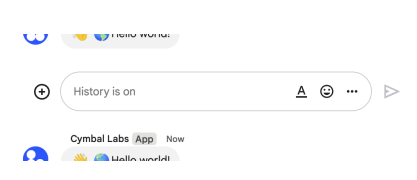 The following image shows how Chat attributes a message when you use user authentication. Chat displays the user as the message sender and attributes the Chat app to the message by displaying its name. The content of message can only contain text (`text`). 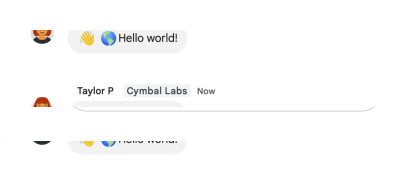 The maximum message size, including the message contents, is 32,000 bytes.",
|
|
766
|
+
"description": "Creates a message in a Google Chat space. For an example, see [Send a message](https://developers.google.com/workspace/chat/create-messages). The `create()` method requires either [user authentication](https://developers.google.com/workspace/chat/authenticate-authorize-chat-user) or [app authentication](https://developers.google.com/workspace/chat/authorize-import). Chat attributes the message sender differently depending on the type of authentication that you use in your request. The following image shows how Chat attributes a message when you use app authentication. Chat displays the Chat app as the message sender. The content of the message can contain text (`text`), cards (`cardsV2`), and accessory widgets (`accessoryWidgets`).  The following image shows how Chat attributes a message when you use user authentication. Chat displays the user as the message sender and attributes the Chat app to the message by displaying its name. The content of message can only contain text (`text`).  The maximum message size, including the message contents, is 32,000 bytes.",
|
|
767
767
|
"flatPath": "v1/spaces/{spacesId}/messages",
|
|
768
768
|
"httpMethod": "POST",
|
|
769
769
|
"id": "chat.spaces.messages.create",
|
|
@@ -1160,7 +1160,7 @@
|
|
|
1160
1160
|
"spaceEvents": {
|
|
1161
1161
|
"methods": {
|
|
1162
1162
|
"get": {
|
|
1163
|
-
"description": "Returns an event from a Google Chat space. The [event payload](https://developers.google.com/workspace/chat/api/reference/rest/v1/spaces.spaceEvents#SpaceEvent.FIELDS.oneof_payload) contains the most recent version of the resource that changed. For example, if you request an event about a new message but the message was later updated, the server returns the updated `Message` resource in the event payload. Requires [user authentication](https://developers.google.com/workspace/chat/authenticate-authorize-chat-user). To get an event, the authenticated user must be a member of the space. For an example, see [Get details about an event from a Google Chat space](https://developers.google.com/workspace/chat/get-space-event).",
|
|
1163
|
+
"description": "Returns an event from a Google Chat space. The [event payload](https://developers.google.com/workspace/chat/api/reference/rest/v1/spaces.spaceEvents#SpaceEvent.FIELDS.oneof_payload) contains the most recent version of the resource that changed. For example, if you request an event about a new message but the message was later updated, the server returns the updated `Message` resource in the event payload. Note: The `permissionSettings` field is not returned in the Space object of the Space event data for this request. Requires [user authentication](https://developers.google.com/workspace/chat/authenticate-authorize-chat-user). To get an event, the authenticated user must be a member of the space. For an example, see [Get details about an event from a Google Chat space](https://developers.google.com/workspace/chat/get-space-event).",
|
|
1164
1164
|
"flatPath": "v1/spaces/{spacesId}/spaceEvents/{spaceEventsId}",
|
|
1165
1165
|
"httpMethod": "GET",
|
|
1166
1166
|
"id": "chat.spaces.spaceEvents.get",
|
|
@@ -1344,7 +1344,7 @@
|
|
|
1344
1344
|
}
|
|
1345
1345
|
}
|
|
1346
1346
|
},
|
|
1347
|
-
"revision": "
|
|
1347
|
+
"revision": "20241020",
|
|
1348
1348
|
"rootUrl": "https://chat.googleapis.com/",
|
|
1349
1349
|
"schemas": {
|
|
1350
1350
|
"AccessSettings": {
|
|
@@ -1999,7 +1999,7 @@
|
|
|
1999
1999
|
"Default value. Unspecified.",
|
|
2000
2000
|
"A user opens a dialog.",
|
|
2001
2001
|
"A user clicks an interactive element of a dialog. For example, a user fills out information in a dialog and clicks a button to submit the information.",
|
|
2002
|
-
"A user closes a dialog without submitting information,
|
|
2002
|
+
"A user closes a dialog without submitting information. The Chat app only receives this interaction event when users click the close icon in the top right corner of the dialog. When the user closes the dialog by other means (such as refreshing the browser, clicking outside the dialog box, or pressing the escape key), no event is sent. ."
|
|
2003
2003
|
],
|
|
2004
2004
|
"type": "string"
|
|
2005
2005
|
},
|
|
@@ -2281,6 +2281,24 @@
|
|
|
2281
2281
|
"text": {
|
|
2282
2282
|
"description": "The text displayed inside the button.",
|
|
2283
2283
|
"type": "string"
|
|
2284
|
+
},
|
|
2285
|
+
"type": {
|
|
2286
|
+
"description": "Optional. The type of a button. If unset, button type defaults to `OUTLINED`. If the `color` field is set, the button type is forced to `FILLED` and any value set for this field is ignored. [Google Chat apps](https://developers.google.com/workspace/chat):",
|
|
2287
|
+
"enum": [
|
|
2288
|
+
"TYPE_UNSPECIFIED",
|
|
2289
|
+
"OUTLINED",
|
|
2290
|
+
"FILLED",
|
|
2291
|
+
"FILLED_TONAL",
|
|
2292
|
+
"BORDERLESS"
|
|
2293
|
+
],
|
|
2294
|
+
"enumDescriptions": [
|
|
2295
|
+
"Don't use. Unspecified.",
|
|
2296
|
+
"Outlined buttons are medium-emphasis buttons. They usually contain actions that are important, but aren\u2019t the primary action in a Chat app or an add-on.",
|
|
2297
|
+
"A filled button has a container with a solid color. It has the most visual impact and is recommended for the important and primary action in a Chat app or an add-on.",
|
|
2298
|
+
"A filled tonal button is an alternative middle ground between filled and outlined buttons. They\u2019re useful in contexts where a lower-priority button requires slightly more emphasis than an outline button would give.",
|
|
2299
|
+
"A button does not have an invisible container in its default state. It is often used for the lowest priority actions, especially when presenting multiple options."
|
|
2300
|
+
],
|
|
2301
|
+
"type": "string"
|
|
2284
2302
|
}
|
|
2285
2303
|
},
|
|
2286
2304
|
"type": "object"
|
|
@@ -2429,6 +2447,97 @@
|
|
|
2429
2447
|
},
|
|
2430
2448
|
"type": "object"
|
|
2431
2449
|
},
|
|
2450
|
+
"GoogleAppsCardV1Chip": {
|
|
2451
|
+
"description": "A text, icon, or text and icon chip that users can click. [Google Chat apps](https://developers.google.com/workspace/chat):",
|
|
2452
|
+
"id": "GoogleAppsCardV1Chip",
|
|
2453
|
+
"properties": {
|
|
2454
|
+
"altText": {
|
|
2455
|
+
"description": "The alternative text that's used for accessibility. Set descriptive text that lets users know what the chip does. For example, if a chip opens a hyperlink, write: \"Opens a new browser tab and navigates to the Google Chat developer documentation at https://developers.google.com/workspace/chat\".",
|
|
2456
|
+
"type": "string"
|
|
2457
|
+
},
|
|
2458
|
+
"disabled": {
|
|
2459
|
+
"description": "Whether the chip is in an inactive state and ignores user actions. Defaults to `false`.",
|
|
2460
|
+
"type": "boolean"
|
|
2461
|
+
},
|
|
2462
|
+
"enabled": {
|
|
2463
|
+
"deprecated": true,
|
|
2464
|
+
"description": "Whether the chip is in an active state and responds to user actions. Defaults to `true`. Deprecated. Use `disabled` instead.",
|
|
2465
|
+
"type": "boolean"
|
|
2466
|
+
},
|
|
2467
|
+
"icon": {
|
|
2468
|
+
"$ref": "GoogleAppsCardV1Icon",
|
|
2469
|
+
"description": "The icon image. If both `icon` and `text` are set, then the icon appears before the text."
|
|
2470
|
+
},
|
|
2471
|
+
"label": {
|
|
2472
|
+
"description": "The text displayed inside the chip.",
|
|
2473
|
+
"type": "string"
|
|
2474
|
+
},
|
|
2475
|
+
"onClick": {
|
|
2476
|
+
"$ref": "GoogleAppsCardV1OnClick",
|
|
2477
|
+
"description": "Optional. The action to perform when a user clicks the chip, such as opening a hyperlink or running a custom function."
|
|
2478
|
+
}
|
|
2479
|
+
},
|
|
2480
|
+
"type": "object"
|
|
2481
|
+
},
|
|
2482
|
+
"GoogleAppsCardV1ChipList": {
|
|
2483
|
+
"description": "A list of chips layed out horizontally, which can either scroll horizontally or wrap to the next line. [Google Chat apps](https://developers.google.com/workspace/chat):",
|
|
2484
|
+
"id": "GoogleAppsCardV1ChipList",
|
|
2485
|
+
"properties": {
|
|
2486
|
+
"chips": {
|
|
2487
|
+
"description": "An array of chips.",
|
|
2488
|
+
"items": {
|
|
2489
|
+
"$ref": "GoogleAppsCardV1Chip"
|
|
2490
|
+
},
|
|
2491
|
+
"type": "array"
|
|
2492
|
+
},
|
|
2493
|
+
"layout": {
|
|
2494
|
+
"description": "Specified chip list layout.",
|
|
2495
|
+
"enum": [
|
|
2496
|
+
"LAYOUT_UNSPECIFIED",
|
|
2497
|
+
"WRAPPED",
|
|
2498
|
+
"HORIZONTAL_SCROLLABLE"
|
|
2499
|
+
],
|
|
2500
|
+
"enumDescriptions": [
|
|
2501
|
+
"Don't use. Unspecified.",
|
|
2502
|
+
"Default value. The chip list wraps to the next line if there isn't enough horizontal space.",
|
|
2503
|
+
"The chips scroll horizontally if they don't fit in the available space."
|
|
2504
|
+
],
|
|
2505
|
+
"type": "string"
|
|
2506
|
+
}
|
|
2507
|
+
},
|
|
2508
|
+
"type": "object"
|
|
2509
|
+
},
|
|
2510
|
+
"GoogleAppsCardV1CollapseControl": {
|
|
2511
|
+
"description": "Represent an expand and collapse control. [Google Chat apps](https://developers.google.com/workspace/chat):",
|
|
2512
|
+
"id": "GoogleAppsCardV1CollapseControl",
|
|
2513
|
+
"properties": {
|
|
2514
|
+
"collapseButton": {
|
|
2515
|
+
"$ref": "GoogleAppsCardV1Button",
|
|
2516
|
+
"description": "Optional. Define a customizable button to collapse the section. Both expand_button and collapse_button field must be set. Only one field set will not take into effect. If this field isn't set, the default button is used."
|
|
2517
|
+
},
|
|
2518
|
+
"expandButton": {
|
|
2519
|
+
"$ref": "GoogleAppsCardV1Button",
|
|
2520
|
+
"description": "Optional. Define a customizable button to expand the section. Both expand_button and collapse_button field must be set. Only one field set will not take into effect. If this field isn't set, the default button is used."
|
|
2521
|
+
},
|
|
2522
|
+
"horizontalAlignment": {
|
|
2523
|
+
"description": "The horizontal alignment of the expand and collapse button.",
|
|
2524
|
+
"enum": [
|
|
2525
|
+
"HORIZONTAL_ALIGNMENT_UNSPECIFIED",
|
|
2526
|
+
"START",
|
|
2527
|
+
"CENTER",
|
|
2528
|
+
"END"
|
|
2529
|
+
],
|
|
2530
|
+
"enumDescriptions": [
|
|
2531
|
+
"Don't use. Unspecified.",
|
|
2532
|
+
"Default value. Aligns widgets to the start position of the column. For left-to-right layouts, aligns to the left. For right-to-left layouts, aligns to the right.",
|
|
2533
|
+
"Aligns widgets to the center of the column.",
|
|
2534
|
+
"Aligns widgets to the end position of the column. For left-to-right layouts, aligns widgets to the right. For right-to-left layouts, aligns widgets to the left."
|
|
2535
|
+
],
|
|
2536
|
+
"type": "string"
|
|
2537
|
+
}
|
|
2538
|
+
},
|
|
2539
|
+
"type": "object"
|
|
2540
|
+
},
|
|
2432
2541
|
"GoogleAppsCardV1Column": {
|
|
2433
2542
|
"description": "A column. [Google Workspace Add-ons and Chat apps](https://developers.google.com/workspace/extend)",
|
|
2434
2543
|
"id": "GoogleAppsCardV1Column",
|
|
@@ -2819,6 +2928,10 @@
|
|
|
2819
2928
|
"openLink": {
|
|
2820
2929
|
"$ref": "GoogleAppsCardV1OpenLink",
|
|
2821
2930
|
"description": "If specified, this `onClick` triggers an open link action."
|
|
2931
|
+
},
|
|
2932
|
+
"overflowMenu": {
|
|
2933
|
+
"$ref": "GoogleAppsCardV1OverflowMenu",
|
|
2934
|
+
"description": "If specified, this `onClick` opens an overflow menu. [Google Chat apps](https://developers.google.com/workspace/chat):"
|
|
2822
2935
|
}
|
|
2823
2936
|
},
|
|
2824
2937
|
"type": "object"
|
|
@@ -2858,6 +2971,43 @@
|
|
|
2858
2971
|
},
|
|
2859
2972
|
"type": "object"
|
|
2860
2973
|
},
|
|
2974
|
+
"GoogleAppsCardV1OverflowMenu": {
|
|
2975
|
+
"description": "A widget that presents a pop-up menu with one or more actions that users can invoke. For example, showing non-primary actions in a card. You can use this widget when actions don't fit in the available space. To use, specify this widget in the `OnClick` action of widgets that support it. For example, in a `Button`. [Google Chat apps](https://developers.google.com/workspace/chat):",
|
|
2976
|
+
"id": "GoogleAppsCardV1OverflowMenu",
|
|
2977
|
+
"properties": {
|
|
2978
|
+
"items": {
|
|
2979
|
+
"description": "Required. The list of menu options.",
|
|
2980
|
+
"items": {
|
|
2981
|
+
"$ref": "GoogleAppsCardV1OverflowMenuItem"
|
|
2982
|
+
},
|
|
2983
|
+
"type": "array"
|
|
2984
|
+
}
|
|
2985
|
+
},
|
|
2986
|
+
"type": "object"
|
|
2987
|
+
},
|
|
2988
|
+
"GoogleAppsCardV1OverflowMenuItem": {
|
|
2989
|
+
"description": "An option that users can invoke in an overflow menu. [Google Chat apps](https://developers.google.com/workspace/chat):",
|
|
2990
|
+
"id": "GoogleAppsCardV1OverflowMenuItem",
|
|
2991
|
+
"properties": {
|
|
2992
|
+
"disabled": {
|
|
2993
|
+
"description": "Whether the menu option is disabled. Defaults to false.",
|
|
2994
|
+
"type": "boolean"
|
|
2995
|
+
},
|
|
2996
|
+
"onClick": {
|
|
2997
|
+
"$ref": "GoogleAppsCardV1OnClick",
|
|
2998
|
+
"description": "Required. The action invoked when a menu option is selected. This `OnClick` cannot contain an `OverflowMenu`, any specified `OverflowMenu` is dropped and the menu item disabled."
|
|
2999
|
+
},
|
|
3000
|
+
"startIcon": {
|
|
3001
|
+
"$ref": "GoogleAppsCardV1Icon",
|
|
3002
|
+
"description": "The icon displayed in front of the text."
|
|
3003
|
+
},
|
|
3004
|
+
"text": {
|
|
3005
|
+
"description": "Required. The text that identifies or describes the item to users.",
|
|
3006
|
+
"type": "string"
|
|
3007
|
+
}
|
|
3008
|
+
},
|
|
3009
|
+
"type": "object"
|
|
3010
|
+
},
|
|
2861
3011
|
"GoogleAppsCardV1PlatformDataSource": {
|
|
2862
3012
|
"description": "For a `SelectionInput` widget that uses a multiselect menu, a data source from Google Workspace. Used to populate items in a multiselect menu. [Google Chat apps](https://developers.google.com/workspace/chat):",
|
|
2863
3013
|
"id": "GoogleAppsCardV1PlatformDataSource",
|
|
@@ -2885,6 +3035,10 @@
|
|
|
2885
3035
|
"description": "A section contains a collection of widgets that are rendered vertically in the order that they're specified. [Google Workspace Add-ons and Chat apps](https://developers.google.com/workspace/extend):",
|
|
2886
3036
|
"id": "GoogleAppsCardV1Section",
|
|
2887
3037
|
"properties": {
|
|
3038
|
+
"collapseControl": {
|
|
3039
|
+
"$ref": "GoogleAppsCardV1CollapseControl",
|
|
3040
|
+
"description": "Optional. Define the expand and collapse button of the section. This button will be shown only if the section is collapsible. If this field isn't set, the default button is used. [Google Chat apps](https://developers.google.com/workspace/chat):"
|
|
3041
|
+
},
|
|
2888
3042
|
"collapsible": {
|
|
2889
3043
|
"description": "Indicates whether this section is collapsible. Collapsible sections hide some or all widgets, but users can expand the section to reveal the hidden widgets by clicking **Show more**. Users can hide the widgets again by clicking **Show less**. To determine which widgets are hidden, specify `uncollapsibleWidgetsCount`.",
|
|
2890
3044
|
"type": "boolean"
|
|
@@ -3114,6 +3268,11 @@
|
|
|
3114
3268
|
"description": "A paragraph of text that supports formatting. For an example in Google Chat apps, see [Add a paragraph of formatted text](https://developers.google.com/workspace/chat/add-text-image-card-dialog#add_a_paragraph_of_formatted_text). For more information about formatting text, see [Formatting text in Google Chat apps](https://developers.google.com/workspace/chat/format-messages#card-formatting) and [Formatting text in Google Workspace Add-ons](https://developers.google.com/apps-script/add-ons/concepts/widgets#text_formatting). [Google Workspace Add-ons and Chat apps](https://developers.google.com/workspace/extend):",
|
|
3115
3269
|
"id": "GoogleAppsCardV1TextParagraph",
|
|
3116
3270
|
"properties": {
|
|
3271
|
+
"maxLines": {
|
|
3272
|
+
"description": "The maximum number of lines of text that are displayed in the widget. If the text exceeds the specified maximum number of lines, the excess content is concealed behind a **show more** button. If the text is equal or shorter than the specified maximum number of lines, a **show more** button isn't displayed. The default value is 0, in which case all context is displayed. Negative values are ignored. [Google Chat apps](https://developers.google.com/workspace/chat):",
|
|
3273
|
+
"format": "int32",
|
|
3274
|
+
"type": "integer"
|
|
3275
|
+
},
|
|
3117
3276
|
"text": {
|
|
3118
3277
|
"description": "The text that's shown in the widget.",
|
|
3119
3278
|
"type": "string"
|
|
@@ -3129,6 +3288,10 @@
|
|
|
3129
3288
|
"$ref": "GoogleAppsCardV1ButtonList",
|
|
3130
3289
|
"description": "A list of buttons. For example, the following JSON creates two buttons. The first is a blue text button and the second is an image button that opens a link: ``` \"buttonList\": { \"buttons\": [ { \"text\": \"Edit\", \"color\": { \"red\": 0, \"green\": 0, \"blue\": 1, }, \"disabled\": true, }, { \"icon\": { \"knownIcon\": \"INVITE\", \"altText\": \"check calendar\" }, \"onClick\": { \"openLink\": { \"url\": \"https://example.com/calendar\" } } } ] } ```"
|
|
3131
3290
|
},
|
|
3291
|
+
"chipList": {
|
|
3292
|
+
"$ref": "GoogleAppsCardV1ChipList",
|
|
3293
|
+
"description": "A list of chips. For example, the following JSON creates two chips. The first is a text chip and the second is an icon chip that opens a link: ``` \"chipList\": { \"chips\": [ { \"text\": \"Edit\", \"disabled\": true, }, { \"icon\": { \"knownIcon\": \"INVITE\", \"altText\": \"check calendar\" }, \"onClick\": { \"openLink\": { \"url\": \"https://example.com/calendar\" } } } ] } ``` [Google Chat apps](https://developers.google.com/workspace/chat):"
|
|
3294
|
+
},
|
|
3132
3295
|
"columns": {
|
|
3133
3296
|
"$ref": "GoogleAppsCardV1Columns",
|
|
3134
3297
|
"description": "Displays up to 2 columns. To include more than 2 columns, or to use rows, use the `Grid` widget. For example, the following JSON creates 2 columns that each contain text paragraphs: ``` \"columns\": { \"columnItems\": [ { \"horizontalSizeStyle\": \"FILL_AVAILABLE_SPACE\", \"horizontalAlignment\": \"CENTER\", \"verticalAlignment\": \"CENTER\", \"widgets\": [ { \"textParagraph\": { \"text\": \"First column text paragraph\" } } ] }, { \"horizontalSizeStyle\": \"FILL_AVAILABLE_SPACE\", \"horizontalAlignment\": \"CENTER\", \"verticalAlignment\": \"CENTER\", \"widgets\": [ { \"textParagraph\": { \"text\": \"Second column text paragraph\" } } ] } ] } ```"
|
|
@@ -3192,6 +3355,10 @@
|
|
|
3192
3355
|
"$ref": "GoogleAppsCardV1ButtonList",
|
|
3193
3356
|
"description": "ButtonList widget."
|
|
3194
3357
|
},
|
|
3358
|
+
"chipList": {
|
|
3359
|
+
"$ref": "GoogleAppsCardV1ChipList",
|
|
3360
|
+
"description": "ChipList widget. [Google Chat apps](https://developers.google.com/workspace/chat):"
|
|
3361
|
+
},
|
|
3195
3362
|
"dateTimePicker": {
|
|
3196
3363
|
"$ref": "GoogleAppsCardV1DateTimePicker",
|
|
3197
3364
|
"description": "DateTimePicker widget."
|
|
@@ -3541,7 +3708,7 @@
|
|
|
3541
3708
|
"type": "string"
|
|
3542
3709
|
},
|
|
3543
3710
|
"spaceEvents": {
|
|
3544
|
-
"description": "Results are returned in chronological order (oldest event first).",
|
|
3711
|
+
"description": "Results are returned in chronological order (oldest event first). Note: The `permissionSettings` field is not returned in the Space object for list requests.",
|
|
3545
3712
|
"items": {
|
|
3546
3713
|
"$ref": "SpaceEvent"
|
|
3547
3714
|
},
|
|
@@ -3559,7 +3726,7 @@
|
|
|
3559
3726
|
"type": "string"
|
|
3560
3727
|
},
|
|
3561
3728
|
"spaces": {
|
|
3562
|
-
"description": "List of spaces in the requested (or first) page.",
|
|
3729
|
+
"description": "List of spaces in the requested (or first) page. Note: The `permissionSettings` field is not returned in the Space object for list requests.",
|
|
3563
3730
|
"items": {
|
|
3564
3731
|
"$ref": "Space"
|
|
3565
3732
|
},
|
|
@@ -4009,7 +4176,7 @@
|
|
|
4009
4176
|
"type": "object"
|
|
4010
4177
|
},
|
|
4011
4178
|
"PermissionSettings": {
|
|
4012
|
-
"description": "[Permission settings](https://support.google.com/chat/answer/13340792)
|
|
4179
|
+
"description": "[Permission settings](https://support.google.com/chat/answer/13340792) that you can specify when updating an existing named space. To set permission settings when creating a space, specify the `PredefinedPermissionSettings` field in your request.",
|
|
4013
4180
|
"id": "PermissionSettings",
|
|
4014
4181
|
"properties": {
|
|
4015
4182
|
"manageApps": {
|
|
@@ -4343,10 +4510,10 @@
|
|
|
4343
4510
|
},
|
|
4344
4511
|
"permissionSettings": {
|
|
4345
4512
|
"$ref": "PermissionSettings",
|
|
4346
|
-
"description": "Optional.
|
|
4513
|
+
"description": "Optional. Space permission settings for existing spaces. Input for updating exact space permission settings, where existing permission settings are replaced. Output lists current permission settings."
|
|
4347
4514
|
},
|
|
4348
4515
|
"predefinedPermissionSettings": {
|
|
4349
|
-
"description": "Optional. Input only.
|
|
4516
|
+
"description": "Optional. Input only. Predefined space permission settings, input only when creating a space. If the field is not set, a collaboration space is created. After you create the space, settings are populated in the `PermissionSettings` field.",
|
|
4350
4517
|
"enum": [
|
|
4351
4518
|
"PREDEFINED_PERMISSION_SETTINGS_UNSPECIFIED",
|
|
4352
4519
|
"COLLABORATION_SPACE",
|