google-api-python-client 2.148.0__py2.py3-none-any.whl → 2.150.0__py2.py3-none-any.whl
This diff represents the content of publicly available package versions that have been released to one of the supported registries. The information contained in this diff is provided for informational purposes only and reflects changes between package versions as they appear in their respective public registries.
- {google_api_python_client-2.148.0.dist-info → google_api_python_client-2.150.0.dist-info}/METADATA +1 -1
- {google_api_python_client-2.148.0.dist-info → google_api_python_client-2.150.0.dist-info}/RECORD +130 -130
- googleapiclient/discovery_cache/documents/adexchangebuyer2.v2beta1.json +5 -5
- googleapiclient/discovery_cache/documents/aiplatform.v1.json +86 -7
- googleapiclient/discovery_cache/documents/aiplatform.v1beta1.json +91 -29
- googleapiclient/discovery_cache/documents/alloydb.v1.json +34 -6
- googleapiclient/discovery_cache/documents/alloydb.v1alpha.json +58 -6
- googleapiclient/discovery_cache/documents/alloydb.v1beta.json +34 -6
- googleapiclient/discovery_cache/documents/analyticsadmin.v1alpha.json +2 -2
- googleapiclient/discovery_cache/documents/androidpublisher.v3.json +1 -16
- googleapiclient/discovery_cache/documents/apigee.v1.json +322 -1
- googleapiclient/discovery_cache/documents/appengine.v1.json +61 -1
- googleapiclient/discovery_cache/documents/appengine.v1beta.json +61 -1
- googleapiclient/discovery_cache/documents/apphub.v1.json +410 -20
- googleapiclient/discovery_cache/documents/apphub.v1alpha.json +410 -20
- googleapiclient/discovery_cache/documents/artifactregistry.v1.json +19 -25
- googleapiclient/discovery_cache/documents/artifactregistry.v1beta1.json +3 -3
- googleapiclient/discovery_cache/documents/artifactregistry.v1beta2.json +3 -3
- googleapiclient/discovery_cache/documents/assuredworkloads.v1.json +24 -1
- googleapiclient/discovery_cache/documents/assuredworkloads.v1beta1.json +24 -1
- googleapiclient/discovery_cache/documents/authorizedbuyersmarketplace.v1.json +5 -5
- googleapiclient/discovery_cache/documents/authorizedbuyersmarketplace.v1alpha.json +5 -5
- googleapiclient/discovery_cache/documents/backupdr.v1.json +49 -3
- googleapiclient/discovery_cache/documents/batch.v1.json +2 -2
- googleapiclient/discovery_cache/documents/beyondcorp.v1.json +721 -27
- googleapiclient/discovery_cache/documents/beyondcorp.v1alpha.json +70 -117
- googleapiclient/discovery_cache/documents/bigquery.v2.json +74 -5
- googleapiclient/discovery_cache/documents/businessprofileperformance.v1.json +9 -9
- googleapiclient/discovery_cache/documents/calendar.v3.json +2 -2
- googleapiclient/discovery_cache/documents/chat.v1.json +100 -27
- googleapiclient/discovery_cache/documents/chromemanagement.v1.json +6 -4
- googleapiclient/discovery_cache/documents/chromepolicy.v1.json +3 -3
- googleapiclient/discovery_cache/documents/classroom.v1.json +5 -5
- googleapiclient/discovery_cache/documents/clouddeploy.v1.json +100 -9
- googleapiclient/discovery_cache/documents/cloudidentity.v1beta1.json +2 -2
- googleapiclient/discovery_cache/documents/cloudkms.v1.json +2 -2
- googleapiclient/discovery_cache/documents/composer.v1.json +61 -1
- googleapiclient/discovery_cache/documents/composer.v1beta1.json +61 -1
- googleapiclient/discovery_cache/documents/compute.alpha.json +2297 -134
- googleapiclient/discovery_cache/documents/compute.beta.json +1177 -24
- googleapiclient/discovery_cache/documents/compute.v1.json +75 -1153
- googleapiclient/discovery_cache/documents/contactcenteraiplatform.v1alpha1.json +5 -5
- googleapiclient/discovery_cache/documents/contactcenterinsights.v1.json +12 -12
- googleapiclient/discovery_cache/documents/container.v1.json +184 -14
- googleapiclient/discovery_cache/documents/container.v1beta1.json +184 -14
- googleapiclient/discovery_cache/documents/datamigration.v1.json +114 -3
- googleapiclient/discovery_cache/documents/dataplex.v1.json +2 -2
- googleapiclient/discovery_cache/documents/dataproc.v1.json +8950 -3781
- googleapiclient/discovery_cache/documents/datastream.v1.json +9 -9
- googleapiclient/discovery_cache/documents/developerconnect.v1.json +46 -1
- googleapiclient/discovery_cache/documents/discoveryengine.v1.json +59 -11
- googleapiclient/discovery_cache/documents/discoveryengine.v1alpha.json +59 -11
- googleapiclient/discovery_cache/documents/discoveryengine.v1beta.json +126 -4
- googleapiclient/discovery_cache/documents/displayvideo.v2.json +5 -5
- googleapiclient/discovery_cache/documents/displayvideo.v3.json +6 -6
- googleapiclient/discovery_cache/documents/dlp.v2.json +10 -10
- googleapiclient/discovery_cache/documents/drive.v3.json +178 -1
- googleapiclient/discovery_cache/documents/factchecktools.v1alpha1.json +6 -14
- googleapiclient/discovery_cache/documents/firebaseappcheck.v1.json +9 -9
- googleapiclient/discovery_cache/documents/firebaseappcheck.v1beta.json +8 -8
- googleapiclient/discovery_cache/documents/firebaseappdistribution.v1alpha.json +58 -4
- googleapiclient/discovery_cache/documents/firebasedataconnect.v1beta.json +2 -2
- googleapiclient/discovery_cache/documents/firebaseml.v2beta.json +79 -3
- googleapiclient/discovery_cache/documents/gkebackup.v1.json +9 -7
- googleapiclient/discovery_cache/documents/gkehub.v2.json +2919 -77
- googleapiclient/discovery_cache/documents/gkehub.v2alpha.json +2919 -77
- googleapiclient/discovery_cache/documents/gkehub.v2beta.json +2919 -77
- googleapiclient/discovery_cache/documents/integrations.v1.json +11 -11
- googleapiclient/discovery_cache/documents/language.v1.json +27 -1
- googleapiclient/discovery_cache/documents/language.v1beta2.json +27 -1
- googleapiclient/discovery_cache/documents/language.v2.json +38 -1
- googleapiclient/discovery_cache/documents/merchantapi.accounts_v1beta.json +8 -22
- googleapiclient/discovery_cache/documents/merchantapi.conversions_v1beta.json +2 -2
- googleapiclient/discovery_cache/documents/merchantapi.datasources_v1beta.json +6 -6
- googleapiclient/discovery_cache/documents/merchantapi.notifications_v1beta.json +2 -2
- googleapiclient/discovery_cache/documents/merchantapi.products_v1beta.json +4 -4
- googleapiclient/discovery_cache/documents/merchantapi.promotions_v1beta.json +2 -2
- googleapiclient/discovery_cache/documents/migrationcenter.v1.json +74 -3
- googleapiclient/discovery_cache/documents/migrationcenter.v1alpha1.json +75 -4
- googleapiclient/discovery_cache/documents/monitoring.v1.json +9 -7
- googleapiclient/discovery_cache/documents/monitoring.v3.json +179 -10
- googleapiclient/discovery_cache/documents/mybusinessbusinessinformation.v1.json +5 -5
- googleapiclient/discovery_cache/documents/mybusinesslodging.v1.json +5 -5
- googleapiclient/discovery_cache/documents/oracledatabase.v1.json +5 -5
- googleapiclient/discovery_cache/documents/osconfig.v1.json +5 -5
- googleapiclient/discovery_cache/documents/osconfig.v1beta.json +5 -5
- googleapiclient/discovery_cache/documents/playdeveloperreporting.v1alpha1.json +27 -1
- googleapiclient/discovery_cache/documents/playdeveloperreporting.v1beta1.json +27 -1
- googleapiclient/discovery_cache/documents/privateca.v1.json +3 -3
- googleapiclient/discovery_cache/documents/realtimebidding.v1.json +3 -3
- googleapiclient/discovery_cache/documents/redis.v1.json +5 -5
- googleapiclient/discovery_cache/documents/redis.v1beta1.json +5 -5
- googleapiclient/discovery_cache/documents/retail.v2.json +17 -2
- googleapiclient/discovery_cache/documents/retail.v2alpha.json +17 -2
- googleapiclient/discovery_cache/documents/retail.v2beta.json +17 -2
- googleapiclient/discovery_cache/documents/run.v1.json +7 -5
- googleapiclient/discovery_cache/documents/run.v2.json +16 -10
- googleapiclient/discovery_cache/documents/searchads360.v0.json +98 -4
- googleapiclient/discovery_cache/documents/securitycenter.v1.json +24 -208
- googleapiclient/discovery_cache/documents/securitycenter.v1beta1.json +24 -1
- googleapiclient/discovery_cache/documents/securitycenter.v1beta2.json +24 -1
- googleapiclient/discovery_cache/documents/serviceconsumermanagement.v1.json +2 -2
- googleapiclient/discovery_cache/documents/serviceconsumermanagement.v1beta1.json +2 -2
- googleapiclient/discovery_cache/documents/servicemanagement.v1.json +2 -2
- googleapiclient/discovery_cache/documents/serviceusage.v1.json +2 -2
- googleapiclient/discovery_cache/documents/serviceusage.v1beta1.json +2 -2
- googleapiclient/discovery_cache/documents/sheets.v4.json +2 -2
- googleapiclient/discovery_cache/documents/spanner.v1.json +21 -1
- googleapiclient/discovery_cache/documents/speech.v1.json +5 -3
- googleapiclient/discovery_cache/documents/speech.v1p1beta1.json +5 -3
- googleapiclient/discovery_cache/documents/sqladmin.v1.json +42 -57
- googleapiclient/discovery_cache/documents/sqladmin.v1beta4.json +43 -46
- googleapiclient/discovery_cache/documents/storage.v1.json +51 -2
- googleapiclient/discovery_cache/documents/storagetransfer.v1.json +11 -11
- googleapiclient/discovery_cache/documents/texttospeech.v1.json +178 -1
- googleapiclient/discovery_cache/documents/texttospeech.v1beta1.json +180 -1
- googleapiclient/discovery_cache/documents/tpu.v1.json +5 -3
- googleapiclient/discovery_cache/documents/tpu.v1alpha1.json +5 -3
- googleapiclient/discovery_cache/documents/tpu.v2.json +5 -3
- googleapiclient/discovery_cache/documents/tpu.v2alpha1.json +5 -3
- googleapiclient/discovery_cache/documents/verifiedaccess.v2.json +2 -2
- googleapiclient/discovery_cache/documents/workflowexecutions.v1.json +2 -2
- googleapiclient/discovery_cache/documents/workflows.v1.json +2 -2
- googleapiclient/discovery_cache/documents/workloadmanager.v1.json +19 -1
- googleapiclient/discovery_cache/documents/workspaceevents.v1.json +3 -3
- googleapiclient/discovery_cache/documents/youtube.v3.json +63 -2
- googleapiclient/version.py +1 -1
- {google_api_python_client-2.148.0.dist-info → google_api_python_client-2.150.0.dist-info}/LICENSE +0 -0
- {google_api_python_client-2.148.0.dist-info → google_api_python_client-2.150.0.dist-info}/WHEEL +0 -0
- {google_api_python_client-2.148.0.dist-info → google_api_python_client-2.150.0.dist-info}/top_level.txt +0 -0
|
@@ -262,7 +262,7 @@
|
|
|
262
262
|
"spaces": {
|
|
263
263
|
"methods": {
|
|
264
264
|
"completeImport": {
|
|
265
|
-
"description": "Completes the [import process](https://developers.google.com/workspace/chat/import-data) for the specified space and makes it visible to users. Requires app authentication and domain-wide delegation. For more information, see [Authorize Google Chat apps to import data](https://developers.google.com/workspace/chat/authorize-import).",
|
|
265
|
+
"description": "Completes the [import process](https://developers.google.com/workspace/chat/import-data) for the specified space and makes it visible to users. Requires [app authentication](https://developers.google.com/workspace/chat/authenticate-authorize-chat-app) and domain-wide delegation. For more information, see [Authorize Google Chat apps to import data](https://developers.google.com/workspace/chat/authorize-import).",
|
|
266
266
|
"flatPath": "v1/spaces/{spacesId}:completeImport",
|
|
267
267
|
"httpMethod": "POST",
|
|
268
268
|
"id": "chat.spaces.completeImport",
|
|
@@ -290,7 +290,7 @@
|
|
|
290
290
|
]
|
|
291
291
|
},
|
|
292
292
|
"create": {
|
|
293
|
-
"description": "Creates a space with no members. Can be used to create a named space. Spaces grouped by topics aren't supported. For an example, see [Create a space](https://developers.google.com/workspace/chat/create-spaces). If you receive the error message `ALREADY_EXISTS` when creating a space, try a different `displayName`. An existing space within the Google Workspace organization might already use this display name. If you're a member of the [Developer Preview program](https://developers.google.com/workspace/preview), you can create a group chat in import mode using `spaceType.GROUP_CHAT`.
|
|
293
|
+
"description": "Creates a space with no members. Can be used to create a named space. Spaces grouped by topics aren't supported. For an example, see [Create a space](https://developers.google.com/workspace/chat/create-spaces). If you receive the error message `ALREADY_EXISTS` when creating a space, try a different `displayName`. An existing space within the Google Workspace organization might already use this display name. If you're a member of the [Developer Preview program](https://developers.google.com/workspace/preview), you can create a group chat in import mode using `spaceType.GROUP_CHAT`. Supports the following types of [authentication](https://developers.google.com/workspace/chat/authenticate-authorize): - [App authentication](https://developers.google.com/workspace/chat/authenticate-authorize-chat-app) with [administrator approval](https://support.google.com/a?p=chat-app-auth) in [Developer Preview](https://developers.google.com/workspace/preview) - [User authentication](https://developers.google.com/workspace/chat/authenticate-authorize-chat-user) When authenticating as an app, the `space.customer` field must be set in the request.",
|
|
294
294
|
"flatPath": "v1/spaces",
|
|
295
295
|
"httpMethod": "POST",
|
|
296
296
|
"id": "chat.spaces.create",
|
|
@@ -318,7 +318,7 @@
|
|
|
318
318
|
]
|
|
319
319
|
},
|
|
320
320
|
"delete": {
|
|
321
|
-
"description": "Deletes a named space. Always performs a cascading delete, which means that the space's child resources\u2014like messages posted in the space and memberships in the space\u2014are also deleted. For an example, see [Delete a space](https://developers.google.com/workspace/chat/delete-spaces).
|
|
321
|
+
"description": "Deletes a named space. Always performs a cascading delete, which means that the space's child resources\u2014like messages posted in the space and memberships in the space\u2014are also deleted. For an example, see [Delete a space](https://developers.google.com/workspace/chat/delete-spaces). Supports the following types of [authentication](https://developers.google.com/workspace/chat/authenticate-authorize): - [App authentication](https://developers.google.com/workspace/chat/authenticate-authorize-chat-app) with [administrator approval](https://support.google.com/a?p=chat-app-auth) in [Developer Preview](https://developers.google.com/workspace/preview) - [User authentication](https://developers.google.com/workspace/chat/authenticate-authorize-chat-user) You can authenticate and authorize this method with administrator privileges by setting the `use_admin_access` field in the request.",
|
|
322
322
|
"flatPath": "v1/spaces/{spacesId}",
|
|
323
323
|
"httpMethod": "DELETE",
|
|
324
324
|
"id": "chat.spaces.delete",
|
|
@@ -351,7 +351,7 @@
|
|
|
351
351
|
]
|
|
352
352
|
},
|
|
353
353
|
"findDirectMessage": {
|
|
354
|
-
"description": "Returns the existing direct message with the specified user. If no direct message space is found, returns a `404 NOT_FOUND` error. For an example, see [Find a direct message](/chat/api/guides/v1/spaces/find-direct-message). With [
|
|
354
|
+
"description": "Returns the existing direct message with the specified user. If no direct message space is found, returns a `404 NOT_FOUND` error. For an example, see [Find a direct message](/chat/api/guides/v1/spaces/find-direct-message). With [app authentication](https://developers.google.com/workspace/chat/authenticate-authorize-chat-app), returns the direct message space between the specified user and the calling Chat app. With [user authentication](https://developers.google.com/workspace/chat/authenticate-authorize-chat-user), returns the direct message space between the specified user and the authenticated user. // Supports the following types of [authentication](https://developers.google.com/workspace/chat/authenticate-authorize): - [App authentication](https://developers.google.com/workspace/chat/authenticate-authorize-chat-app) - [User authentication](https://developers.google.com/workspace/chat/authenticate-authorize-chat-user)",
|
|
355
355
|
"flatPath": "v1/spaces:findDirectMessage",
|
|
356
356
|
"httpMethod": "GET",
|
|
357
357
|
"id": "chat.spaces.findDirectMessage",
|
|
@@ -374,7 +374,7 @@
|
|
|
374
374
|
]
|
|
375
375
|
},
|
|
376
376
|
"get": {
|
|
377
|
-
"description": "Returns details about a space. For an example, see [Get details about a space](https://developers.google.com/workspace/chat/get-spaces).
|
|
377
|
+
"description": "Returns details about a space. For an example, see [Get details about a space](https://developers.google.com/workspace/chat/get-spaces). Supports the following types of [authentication](https://developers.google.com/workspace/chat/authenticate-authorize): - [App authentication](https://developers.google.com/workspace/chat/authenticate-authorize-chat-app) - [User authentication](https://developers.google.com/workspace/chat/authenticate-authorize-chat-user) You can authenticate and authorize this method with administrator privileges by setting the `use_admin_access` field in the request.",
|
|
378
378
|
"flatPath": "v1/spaces/{spacesId}",
|
|
379
379
|
"httpMethod": "GET",
|
|
380
380
|
"id": "chat.spaces.get",
|
|
@@ -409,7 +409,7 @@
|
|
|
409
409
|
]
|
|
410
410
|
},
|
|
411
411
|
"list": {
|
|
412
|
-
"description": "Lists spaces the caller is a member of. Group chats and DMs aren't listed until the first message is sent. For an example, see [List spaces](https://developers.google.com/workspace/chat/list-spaces).
|
|
412
|
+
"description": "Lists spaces the caller is a member of. Group chats and DMs aren't listed until the first message is sent. For an example, see [List spaces](https://developers.google.com/workspace/chat/list-spaces). Supports the following types of [authentication](https://developers.google.com/workspace/chat/authenticate-authorize): - [App authentication](https://developers.google.com/workspace/chat/authenticate-authorize-chat-app) - [User authentication](https://developers.google.com/workspace/chat/authenticate-authorize-chat-user) To list all named spaces by Google Workspace organization, use the [`spaces.search()`](https://developers.google.com/workspace/chat/api/reference/rest/v1/spaces/search) method using Workspace administrator privileges instead.",
|
|
413
413
|
"flatPath": "v1/spaces",
|
|
414
414
|
"httpMethod": "GET",
|
|
415
415
|
"id": "chat.spaces.list",
|
|
@@ -443,7 +443,7 @@
|
|
|
443
443
|
]
|
|
444
444
|
},
|
|
445
445
|
"patch": {
|
|
446
|
-
"description": "Updates a space. For an example, see [Update a space](https://developers.google.com/workspace/chat/update-spaces). If you're updating the `displayName` field and receive the error message `ALREADY_EXISTS`, try a different display name.. An existing space within the Google Workspace organization might already use this display name.
|
|
446
|
+
"description": "Updates a space. For an example, see [Update a space](https://developers.google.com/workspace/chat/update-spaces). If you're updating the `displayName` field and receive the error message `ALREADY_EXISTS`, try a different display name.. An existing space within the Google Workspace organization might already use this display name. Supports the following types of [authentication](https://developers.google.com/workspace/chat/authenticate-authorize): - [App authentication](https://developers.google.com/workspace/chat/authenticate-authorize-chat-app) with [administrator approval](https://support.google.com/a?p=chat-app-auth) in [Developer Preview](https://developers.google.com/workspace/preview) - [User authentication](https://developers.google.com/workspace/chat/authenticate-authorize-chat-user) You can authenticate and authorize this method with administrator privileges by setting the `use_admin_access` field in the request.",
|
|
447
447
|
"flatPath": "v1/spaces/{spacesId}",
|
|
448
448
|
"httpMethod": "PATCH",
|
|
449
449
|
"id": "chat.spaces.patch",
|
|
@@ -459,7 +459,7 @@
|
|
|
459
459
|
"type": "string"
|
|
460
460
|
},
|
|
461
461
|
"updateMask": {
|
|
462
|
-
"description": "Required. The updated field paths, comma separated if there are multiple. You can update the following fields for a space:
|
|
462
|
+
"description": "Required. The updated field paths, comma separated if there are multiple. You can update the following fields for a space: `space_details`: Updates the space's description. Supports up to 150 characters. `display_name`: Only supports updating the display name for spaces where `spaceType` field is `SPACE`. If you receive the error message `ALREADY_EXISTS`, try a different value. An existing space within the Google Workspace organization might already use this display name. `space_type`: Only supports changing a `GROUP_CHAT` space type to `SPACE`. Include `display_name` together with `space_type` in the update mask and ensure that the specified space has a non-empty display name and the `SPACE` space type. Including the `space_type` mask and the `SPACE` type in the specified space when updating the display name is optional if the existing space already has the `SPACE` type. Trying to update the space type in other ways results in an invalid argument error. `space_type` is not supported with `useAdminAccess`. `space_history_state`: Updates [space history settings](https://support.google.com/chat/answer/7664687) by turning history on or off for the space. Only supported if history settings are enabled for the Google Workspace organization. To update the space history state, you must omit all other field masks in your request. `space_history_state` is not supported with `useAdminAccess`. `access_settings.audience`: Updates the [access setting](https://support.google.com/chat/answer/11971020) of who can discover the space, join the space, and preview the messages in named space where `spaceType` field is `SPACE`. If the existing space has a target audience, you can remove the audience and restrict space access by omitting a value for this field mask. To update access settings for a space, the authenticating user must be a space manager and omit all other field masks in your request. You can't update this field if the space is in [import mode](https://developers.google.com/workspace/chat/import-data-overview). To learn more, see [Make a space discoverable to specific users](https://developers.google.com/workspace/chat/space-target-audience). `access_settings.audience` is not supported with `useAdminAccess`. `permission_settings`: Supports changing the [permission settings](https://support.google.com/chat/answer/13340792) of a space. When updating permission settings, you can only specify `permissionSettings` field masks; you cannot update other field masks at the same time. `permissionSettings` is not supported with `useAdminAccess`. The supported field masks include: - `permission_settings.manageMembersAndGroups` - `permission_settings.modifySpaceDetails` - `permission_settings.toggleHistory` - `permission_settings.useAtMentionAll` - `permission_settings.manageApps` - `permission_settings.manageWebhooks` - `permission_settings.replyMessages`",
|
|
463
463
|
"format": "google-fieldmask",
|
|
464
464
|
"location": "query",
|
|
465
465
|
"type": "string"
|
|
@@ -551,7 +551,7 @@
|
|
|
551
551
|
"members": {
|
|
552
552
|
"methods": {
|
|
553
553
|
"create": {
|
|
554
|
-
"description": "Creates a membership for the calling Chat app, a user, or a Google Group. Creating memberships for other Chat apps isn't supported. When creating a membership, if the specified member has their auto-accept policy turned off, then they're invited, and must accept the space invitation before joining. Otherwise, creating a membership adds the member directly to the specified space.
|
|
554
|
+
"description": "Creates a membership for the calling Chat app, a user, or a Google Group. Creating memberships for other Chat apps isn't supported. When creating a membership, if the specified member has their auto-accept policy turned off, then they're invited, and must accept the space invitation before joining. Otherwise, creating a membership adds the member directly to the specified space. Supports the following types of [authentication](https://developers.google.com/workspace/chat/authenticate-authorize): - [App authentication](https://developers.google.com/workspace/chat/authenticate-authorize-chat-app) with [administrator approval](https://support.google.com/a?p=chat-app-auth) in [Developer Preview](https://developers.google.com/workspace/preview) - [User authentication](https://developers.google.com/workspace/chat/authenticate-authorize-chat-user) You can authenticate and authorize this method with administrator privileges by setting the `use_admin_access` field in the request. For example usage, see: - [Invite or add a user to a space](https://developers.google.com/workspace/chat/create-members#create-user-membership). - [Invite or add a Google Group to a space](https://developers.google.com/workspace/chat/create-members#create-group-membership). - [Add the Chat app to a space](https://developers.google.com/workspace/chat/create-members#create-membership-calling-api).",
|
|
555
555
|
"flatPath": "v1/spaces/{spacesId}/members",
|
|
556
556
|
"httpMethod": "POST",
|
|
557
557
|
"id": "chat.spaces.members.create",
|
|
@@ -588,7 +588,7 @@
|
|
|
588
588
|
]
|
|
589
589
|
},
|
|
590
590
|
"delete": {
|
|
591
|
-
"description": "Deletes a membership. For an example, see [Remove a user or a Google Chat app from a space](https://developers.google.com/workspace/chat/delete-members).
|
|
591
|
+
"description": "Deletes a membership. For an example, see [Remove a user or a Google Chat app from a space](https://developers.google.com/workspace/chat/delete-members). Supports the following types of [authentication](https://developers.google.com/workspace/chat/authenticate-authorize): - [App authentication](https://developers.google.com/workspace/chat/authenticate-authorize-chat-app) with [administrator approval](https://support.google.com/a?p=chat-app-auth) in [Developer Preview](https://developers.google.com/workspace/preview) - [User authentication](https://developers.google.com/workspace/chat/authenticate-authorize-chat-user) You can authenticate and authorize this method with administrator privileges by setting the `use_admin_access` field in the request.",
|
|
592
592
|
"flatPath": "v1/spaces/{spacesId}/members/{membersId}",
|
|
593
593
|
"httpMethod": "DELETE",
|
|
594
594
|
"id": "chat.spaces.members.delete",
|
|
@@ -622,7 +622,7 @@
|
|
|
622
622
|
]
|
|
623
623
|
},
|
|
624
624
|
"get": {
|
|
625
|
-
"description": "Returns details about a membership. For an example, see [Get details about a user's or Google Chat app's membership](https://developers.google.com/workspace/chat/get-members).
|
|
625
|
+
"description": "Returns details about a membership. For an example, see [Get details about a user's or Google Chat app's membership](https://developers.google.com/workspace/chat/get-members). Supports the following types of [authentication](https://developers.google.com/workspace/chat/authenticate-authorize): - [App authentication](https://developers.google.com/workspace/chat/authenticate-authorize-chat-app) - [User authentication](https://developers.google.com/workspace/chat/authenticate-authorize-chat-user) You can authenticate and authorize this method with administrator privileges by setting the `use_admin_access` field in the request.",
|
|
626
626
|
"flatPath": "v1/spaces/{spacesId}/members/{membersId}",
|
|
627
627
|
"httpMethod": "GET",
|
|
628
628
|
"id": "chat.spaces.members.get",
|
|
@@ -631,7 +631,7 @@
|
|
|
631
631
|
],
|
|
632
632
|
"parameters": {
|
|
633
633
|
"name": {
|
|
634
|
-
"description": "Required. Resource name of the membership to retrieve. To get the app's own membership [by using user authentication](https://developers.google.com/workspace/chat/authenticate-authorize-chat-user), you can optionally use `spaces/{space}/members/app`. Format: `spaces/{space}/members/{member}` or `spaces/{space}/members/app`
|
|
634
|
+
"description": "Required. Resource name of the membership to retrieve. To get the app's own membership [by using user authentication](https://developers.google.com/workspace/chat/authenticate-authorize-chat-user), you can optionally use `spaces/{space}/members/app`. Format: `spaces/{space}/members/{member}` or `spaces/{space}/members/app` You can use the user's email as an alias for `{member}`. For example, `spaces/{space}/members/example@gmail.com` where `example@gmail.com` is the email of the Google Chat user.",
|
|
635
635
|
"location": "path",
|
|
636
636
|
"pattern": "^spaces/[^/]+/members/[^/]+$",
|
|
637
637
|
"required": true,
|
|
@@ -656,7 +656,7 @@
|
|
|
656
656
|
]
|
|
657
657
|
},
|
|
658
658
|
"list": {
|
|
659
|
-
"description": "Lists memberships in a space. For an example, see [List users and Google Chat apps in a space](https://developers.google.com/workspace/chat/list-members). Listing memberships with [app authentication](https://developers.google.com/workspace/chat/authenticate-authorize-chat-app) lists memberships in spaces that the Chat app has access to, but excludes Chat app memberships, including its own. Listing memberships with [User authentication](https://developers.google.com/workspace/chat/authenticate-authorize-chat-user) lists memberships in spaces that the authenticated user has access to.
|
|
659
|
+
"description": "Lists memberships in a space. For an example, see [List users and Google Chat apps in a space](https://developers.google.com/workspace/chat/list-members). Listing memberships with [app authentication](https://developers.google.com/workspace/chat/authenticate-authorize-chat-app) lists memberships in spaces that the Chat app has access to, but excludes Chat app memberships, including its own. Listing memberships with [User authentication](https://developers.google.com/workspace/chat/authenticate-authorize-chat-user) lists memberships in spaces that the authenticated user has access to. Supports the following types of [authentication](https://developers.google.com/workspace/chat/authenticate-authorize): - [App authentication](https://developers.google.com/workspace/chat/authenticate-authorize-chat-app) - [User authentication](https://developers.google.com/workspace/chat/authenticate-authorize-chat-user) You can authenticate and authorize this method with administrator privileges by setting the `use_admin_access` field in the request.",
|
|
660
660
|
"flatPath": "v1/spaces/{spacesId}/members",
|
|
661
661
|
"httpMethod": "GET",
|
|
662
662
|
"id": "chat.spaces.members.list",
|
|
@@ -717,7 +717,7 @@
|
|
|
717
717
|
]
|
|
718
718
|
},
|
|
719
719
|
"patch": {
|
|
720
|
-
"description": "Updates a membership. For an example, see [Update a user's membership in a space](https://developers.google.com/workspace/chat/update-members).
|
|
720
|
+
"description": "Updates a membership. For an example, see [Update a user's membership in a space](https://developers.google.com/workspace/chat/update-members). Supports the following types of [authentication](https://developers.google.com/workspace/chat/authenticate-authorize): - [App authentication](https://developers.google.com/workspace/chat/authenticate-authorize-chat-app) with [administrator approval](https://support.google.com/a?p=chat-app-auth) in [Developer Preview](https://developers.google.com/workspace/preview) - [User authentication](https://developers.google.com/workspace/chat/authenticate-authorize-chat-user) You can authenticate and authorize this method with administrator privileges by setting the `use_admin_access` field in the request.",
|
|
721
721
|
"flatPath": "v1/spaces/{spacesId}/members/{membersId}",
|
|
722
722
|
"httpMethod": "PATCH",
|
|
723
723
|
"id": "chat.spaces.members.patch",
|
|
@@ -763,7 +763,7 @@
|
|
|
763
763
|
"messages": {
|
|
764
764
|
"methods": {
|
|
765
765
|
"create": {
|
|
766
|
-
"description": "Creates a message in a Google Chat space. For an example, see [Send a message](https://developers.google.com/workspace/chat/create-messages). The `create()` method requires either user or app authentication. Chat attributes the message sender differently depending on the type of authentication that you use in your request. The following image shows how Chat attributes a message when you use app authentication. Chat displays the Chat app as the message sender. The content of the message can contain text (`text`), cards (`cardsV2`), and accessory widgets (`accessoryWidgets`). 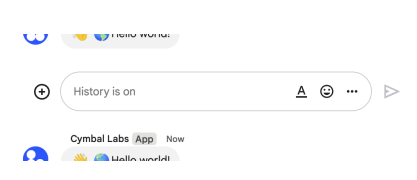 The following image shows how Chat attributes a message when you use user authentication. Chat displays the user as the message sender and attributes the Chat app to the message by displaying its name. The content of message can only contain text (`text`). 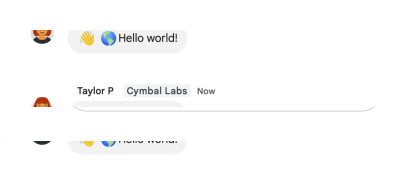 The maximum message size, including the message contents, is 32,000 bytes.",
|
|
766
|
+
"description": "Creates a message in a Google Chat space. For an example, see [Send a message](https://developers.google.com/workspace/chat/create-messages). The `create()` method requires either [user authentication](https://developers.google.com/workspace/chat/authenticate-authorize-chat-user) or [app authentication](https://developers.google.com/workspace/chat/authorize-import). Chat attributes the message sender differently depending on the type of authentication that you use in your request. The following image shows how Chat attributes a message when you use app authentication. Chat displays the Chat app as the message sender. The content of the message can contain text (`text`), cards (`cardsV2`), and accessory widgets (`accessoryWidgets`).  The following image shows how Chat attributes a message when you use user authentication. Chat displays the user as the message sender and attributes the Chat app to the message by displaying its name. The content of message can only contain text (`text`).  The maximum message size, including the message contents, is 32,000 bytes.",
|
|
767
767
|
"flatPath": "v1/spaces/{spacesId}/messages",
|
|
768
768
|
"httpMethod": "POST",
|
|
769
769
|
"id": "chat.spaces.messages.create",
|
|
@@ -825,7 +825,7 @@
|
|
|
825
825
|
]
|
|
826
826
|
},
|
|
827
827
|
"delete": {
|
|
828
|
-
"description": "Deletes a message. For an example, see [Delete a message](https://developers.google.com/workspace/chat/delete-messages).
|
|
828
|
+
"description": "Deletes a message. For an example, see [Delete a message](https://developers.google.com/workspace/chat/delete-messages). Supports the following types of [authentication](https://developers.google.com/workspace/chat/authenticate-authorize): - [App authentication](https://developers.google.com/workspace/chat/authenticate-authorize-chat-app) - [User authentication](https://developers.google.com/workspace/chat/authenticate-authorize-chat-user) When using app authentication, requests can only delete messages created by the calling Chat app.",
|
|
829
829
|
"flatPath": "v1/spaces/{spacesId}/messages/{messagesId}",
|
|
830
830
|
"httpMethod": "DELETE",
|
|
831
831
|
"id": "chat.spaces.messages.delete",
|
|
@@ -857,7 +857,7 @@
|
|
|
857
857
|
]
|
|
858
858
|
},
|
|
859
859
|
"get": {
|
|
860
|
-
"description": "Returns details about a message. For an example, see [Get details about a message](https://developers.google.com/workspace/chat/get-messages).
|
|
860
|
+
"description": "Returns details about a message. For an example, see [Get details about a message](https://developers.google.com/workspace/chat/get-messages). Supports the following types of [authentication](https://developers.google.com/workspace/chat/authenticate-authorize): - [App authentication](https://developers.google.com/workspace/chat/authenticate-authorize-chat-app) - [User authentication](https://developers.google.com/workspace/chat/authenticate-authorize-chat-user) Note: Might return a message from a blocked member or space.",
|
|
861
861
|
"flatPath": "v1/spaces/{spacesId}/messages/{messagesId}",
|
|
862
862
|
"httpMethod": "GET",
|
|
863
863
|
"id": "chat.spaces.messages.get",
|
|
@@ -937,7 +937,7 @@
|
|
|
937
937
|
]
|
|
938
938
|
},
|
|
939
939
|
"patch": {
|
|
940
|
-
"description": "Updates a message. There's a difference between the `patch` and `update` methods. The `patch` method uses a `patch` request while the `update` method uses a `put` request. We recommend using the `patch` method. For an example, see [Update a message](https://developers.google.com/workspace/chat/update-messages).
|
|
940
|
+
"description": "Updates a message. There's a difference between the `patch` and `update` methods. The `patch` method uses a `patch` request while the `update` method uses a `put` request. We recommend using the `patch` method. For an example, see [Update a message](https://developers.google.com/workspace/chat/update-messages). Supports the following types of [authentication](https://developers.google.com/workspace/chat/authenticate-authorize): - [App authentication](https://developers.google.com/workspace/chat/authenticate-authorize-chat-app) - [User authentication](https://developers.google.com/workspace/chat/authenticate-authorize-chat-user) When using app authentication, requests can only update messages created by the calling Chat app.",
|
|
941
941
|
"flatPath": "v1/spaces/{spacesId}/messages/{messagesId}",
|
|
942
942
|
"httpMethod": "PATCH",
|
|
943
943
|
"id": "chat.spaces.messages.patch",
|
|
@@ -978,7 +978,7 @@
|
|
|
978
978
|
]
|
|
979
979
|
},
|
|
980
980
|
"update": {
|
|
981
|
-
"description": "Updates a message. There's a difference between the `patch` and `update` methods. The `patch` method uses a `patch` request while the `update` method uses a `put` request. We recommend using the `patch` method. For an example, see [Update a message](https://developers.google.com/workspace/chat/update-messages).
|
|
981
|
+
"description": "Updates a message. There's a difference between the `patch` and `update` methods. The `patch` method uses a `patch` request while the `update` method uses a `put` request. We recommend using the `patch` method. For an example, see [Update a message](https://developers.google.com/workspace/chat/update-messages). Supports the following types of [authentication](https://developers.google.com/workspace/chat/authenticate-authorize): - [App authentication](https://developers.google.com/workspace/chat/authenticate-authorize-chat-app) - [User authentication](https://developers.google.com/workspace/chat/authenticate-authorize-chat-user) When using app authentication, requests can only update messages created by the calling Chat app.",
|
|
982
982
|
"flatPath": "v1/spaces/{spacesId}/messages/{messagesId}",
|
|
983
983
|
"httpMethod": "PUT",
|
|
984
984
|
"id": "chat.spaces.messages.update",
|
|
@@ -1160,7 +1160,7 @@
|
|
|
1160
1160
|
"spaceEvents": {
|
|
1161
1161
|
"methods": {
|
|
1162
1162
|
"get": {
|
|
1163
|
-
"description": "Returns an event from a Google Chat space. The [event payload](https://developers.google.com/workspace/chat/api/reference/rest/v1/spaces.spaceEvents#SpaceEvent.FIELDS.oneof_payload) contains the most recent version of the resource that changed. For example, if you request an event about a new message but the message was later updated, the server returns the updated `Message` resource in the event payload. Requires [user authentication](https://developers.google.com/workspace/chat/authenticate-authorize-chat-user). To get an event, the authenticated user must be a member of the space. For an example, see [Get details about an event from a Google Chat space](https://developers.google.com/workspace/chat/get-space-event).",
|
|
1163
|
+
"description": "Returns an event from a Google Chat space. The [event payload](https://developers.google.com/workspace/chat/api/reference/rest/v1/spaces.spaceEvents#SpaceEvent.FIELDS.oneof_payload) contains the most recent version of the resource that changed. For example, if you request an event about a new message but the message was later updated, the server returns the updated `Message` resource in the event payload. Note: The `permissionSettings` field is not returned in the Space object of the Space event data for this request. Requires [user authentication](https://developers.google.com/workspace/chat/authenticate-authorize-chat-user). To get an event, the authenticated user must be a member of the space. For an example, see [Get details about an event from a Google Chat space](https://developers.google.com/workspace/chat/get-space-event).",
|
|
1164
1164
|
"flatPath": "v1/spaces/{spacesId}/spaceEvents/{spaceEventsId}",
|
|
1165
1165
|
"httpMethod": "GET",
|
|
1166
1166
|
"id": "chat.spaces.spaceEvents.get",
|
|
@@ -1344,7 +1344,7 @@
|
|
|
1344
1344
|
}
|
|
1345
1345
|
}
|
|
1346
1346
|
},
|
|
1347
|
-
"revision": "
|
|
1347
|
+
"revision": "20241008",
|
|
1348
1348
|
"rootUrl": "https://chat.googleapis.com/",
|
|
1349
1349
|
"schemas": {
|
|
1350
1350
|
"AccessSettings": {
|
|
@@ -1361,13 +1361,13 @@
|
|
|
1361
1361
|
"enumDescriptions": [
|
|
1362
1362
|
"Access state is unknown or not supported in this API.",
|
|
1363
1363
|
"Only users or Google Groups that have been individually added or invited by other users or Google Workspace administrators can discover and access the space.",
|
|
1364
|
-
"A space manager has granted a target audience access to the space. Users or Google Groups that have been individually added or invited to the space can also discover and access the space. To learn more, see [Make a space discoverable to specific users](https://developers.google.com/workspace/chat/space-target-audience)."
|
|
1364
|
+
"A space manager has granted a target audience access to the space. Users or Google Groups that have been individually added or invited to the space can also discover and access the space. To learn more, see [Make a space discoverable to specific users](https://developers.google.com/workspace/chat/space-target-audience). Creating discoverable spaces requires [user authentication](https://developers.google.com/workspace/chat/authenticate-authorize-chat-user)."
|
|
1365
1365
|
],
|
|
1366
1366
|
"readOnly": true,
|
|
1367
1367
|
"type": "string"
|
|
1368
1368
|
},
|
|
1369
1369
|
"audience": {
|
|
1370
|
-
"description": "Optional. The resource name of the [target audience](https://support.google.com/a/answer/9934697) who can discover the space, join the space, and preview the messages in the space. If unset, only users or Google Groups who have been individually invited or added to the space can access it. For details, see [Make a space discoverable to a target audience](https://developers.google.com/workspace/chat/space-target-audience). Format: `audiences/{audience}` To use the default target audience for the Google Workspace organization, set to `audiences/default`. This field is not populated when using the `chat.bot` scope with [app authentication](https://developers.google.com/workspace/chat/authenticate-authorize-chat-app).",
|
|
1370
|
+
"description": "Optional. The resource name of the [target audience](https://support.google.com/a/answer/9934697) who can discover the space, join the space, and preview the messages in the space. If unset, only users or Google Groups who have been individually invited or added to the space can access it. For details, see [Make a space discoverable to a target audience](https://developers.google.com/workspace/chat/space-target-audience). Format: `audiences/{audience}` To use the default target audience for the Google Workspace organization, set to `audiences/default`. Reading the target audience supports: - [User authentication](https://developers.google.com/workspace/chat/authenticate-authorize-chat-user) - [App authentication](https://developers.google.com/workspace/chat/authenticate-authorize-chat-app) with [administrator approval](https://support.google.com/a?p=chat-app-auth) with the `chat.app.spaces` scope in [Developer Preview](https://developers.google.com/workspace/preview). This field is not populated when using the `chat.bot` scope with [app authentication](https://developers.google.com/workspace/chat/authenticate-authorize-chat-app). Setting the target audience requires [user authentication](https://developers.google.com/workspace/chat/authenticate-authorize-chat-user).",
|
|
1371
1371
|
"type": "string"
|
|
1372
1372
|
}
|
|
1373
1373
|
},
|
|
@@ -3541,7 +3541,7 @@
|
|
|
3541
3541
|
"type": "string"
|
|
3542
3542
|
},
|
|
3543
3543
|
"spaceEvents": {
|
|
3544
|
-
"description": "Results are returned in chronological order (oldest event first).",
|
|
3544
|
+
"description": "Results are returned in chronological order (oldest event first). Note: The `permissionSettings` field is not returned in the Space object for list requests.",
|
|
3545
3545
|
"items": {
|
|
3546
3546
|
"$ref": "SpaceEvent"
|
|
3547
3547
|
},
|
|
@@ -3559,7 +3559,7 @@
|
|
|
3559
3559
|
"type": "string"
|
|
3560
3560
|
},
|
|
3561
3561
|
"spaces": {
|
|
3562
|
-
"description": "List of spaces in the requested (or first) page.",
|
|
3562
|
+
"description": "List of spaces in the requested (or first) page. Note: The `permissionSettings` field is not returned in the Space object for list requests.",
|
|
3563
3563
|
"items": {
|
|
3564
3564
|
"$ref": "Space"
|
|
3565
3565
|
},
|
|
@@ -3607,7 +3607,7 @@
|
|
|
3607
3607
|
},
|
|
3608
3608
|
"groupMember": {
|
|
3609
3609
|
"$ref": "Group",
|
|
3610
|
-
"description": "The Google Group the membership corresponds to."
|
|
3610
|
+
"description": "The Google Group the membership corresponds to. Reading or mutating memberships for Google Groups requires [user authentication](https://developers.google.com/workspace/chat/authenticate-authorize-chat-user)."
|
|
3611
3611
|
},
|
|
3612
3612
|
"member": {
|
|
3613
3613
|
"$ref": "User",
|
|
@@ -3993,6 +3993,61 @@
|
|
|
3993
3993
|
},
|
|
3994
3994
|
"type": "object"
|
|
3995
3995
|
},
|
|
3996
|
+
"PermissionSetting": {
|
|
3997
|
+
"description": "Represents a space permission setting.",
|
|
3998
|
+
"id": "PermissionSetting",
|
|
3999
|
+
"properties": {
|
|
4000
|
+
"managersAllowed": {
|
|
4001
|
+
"description": "Whether spaces managers have this permission.",
|
|
4002
|
+
"type": "boolean"
|
|
4003
|
+
},
|
|
4004
|
+
"membersAllowed": {
|
|
4005
|
+
"description": "Whether non-manager members have this permission.",
|
|
4006
|
+
"type": "boolean"
|
|
4007
|
+
}
|
|
4008
|
+
},
|
|
4009
|
+
"type": "object"
|
|
4010
|
+
},
|
|
4011
|
+
"PermissionSettings": {
|
|
4012
|
+
"description": "[Permission settings](https://support.google.com/chat/answer/13340792) that you can specify when updating an existing named space. To set permission settings when creating a space, specify the `PredefinedPermissionSettings` field in your request.",
|
|
4013
|
+
"id": "PermissionSettings",
|
|
4014
|
+
"properties": {
|
|
4015
|
+
"manageApps": {
|
|
4016
|
+
"$ref": "PermissionSetting",
|
|
4017
|
+
"description": "Setting for managing apps in a space."
|
|
4018
|
+
},
|
|
4019
|
+
"manageMembersAndGroups": {
|
|
4020
|
+
"$ref": "PermissionSetting",
|
|
4021
|
+
"description": "Setting for managing members and groups in a space."
|
|
4022
|
+
},
|
|
4023
|
+
"manageWebhooks": {
|
|
4024
|
+
"$ref": "PermissionSetting",
|
|
4025
|
+
"description": "Setting for managing webhooks in a space."
|
|
4026
|
+
},
|
|
4027
|
+
"modifySpaceDetails": {
|
|
4028
|
+
"$ref": "PermissionSetting",
|
|
4029
|
+
"description": "Setting for updating space name, avatar, description and guidelines."
|
|
4030
|
+
},
|
|
4031
|
+
"postMessages": {
|
|
4032
|
+
"$ref": "PermissionSetting",
|
|
4033
|
+
"description": "Output only. Setting for posting messages in a space.",
|
|
4034
|
+
"readOnly": true
|
|
4035
|
+
},
|
|
4036
|
+
"replyMessages": {
|
|
4037
|
+
"$ref": "PermissionSetting",
|
|
4038
|
+
"description": "Setting for replying to messages in a space."
|
|
4039
|
+
},
|
|
4040
|
+
"toggleHistory": {
|
|
4041
|
+
"$ref": "PermissionSetting",
|
|
4042
|
+
"description": "Setting for toggling space history on and off."
|
|
4043
|
+
},
|
|
4044
|
+
"useAtMentionAll": {
|
|
4045
|
+
"$ref": "PermissionSetting",
|
|
4046
|
+
"description": "Setting for using @all in a space."
|
|
4047
|
+
}
|
|
4048
|
+
},
|
|
4049
|
+
"type": "object"
|
|
4050
|
+
},
|
|
3996
4051
|
"QuotedMessageMetadata": {
|
|
3997
4052
|
"description": "Information about a quoted message.",
|
|
3998
4053
|
"id": "QuotedMessageMetadata",
|
|
@@ -4268,7 +4323,7 @@
|
|
|
4268
4323
|
"type": "boolean"
|
|
4269
4324
|
},
|
|
4270
4325
|
"importMode": {
|
|
4271
|
-
"description": "Optional. Whether this space is created in `Import Mode` as part of a data migration into Google Workspace. While spaces are being imported, they aren't visible to users until the import is complete.",
|
|
4326
|
+
"description": "Optional. Whether this space is created in `Import Mode` as part of a data migration into Google Workspace. While spaces are being imported, they aren't visible to users until the import is complete. Creating a space in `Import Mode`requires [user authentication](https://developers.google.com/workspace/chat/authenticate-authorize-chat-user).",
|
|
4272
4327
|
"type": "boolean"
|
|
4273
4328
|
},
|
|
4274
4329
|
"lastActiveTime": {
|
|
@@ -4286,6 +4341,24 @@
|
|
|
4286
4341
|
"description": "Resource name of the space. Format: `spaces/{space}` Where `{space}` represents the system-assigned ID for the space. You can obtain the space ID by calling the [`spaces.list()`](https://developers.google.com/workspace/chat/api/reference/rest/v1/spaces/list) method or from the space URL. For example, if the space URL is `https://mail.google.com/mail/u/0/#chat/space/AAAAAAAAA`, the space ID is `AAAAAAAAA`.",
|
|
4287
4342
|
"type": "string"
|
|
4288
4343
|
},
|
|
4344
|
+
"permissionSettings": {
|
|
4345
|
+
"$ref": "PermissionSettings",
|
|
4346
|
+
"description": "Optional. Space permission settings for existing spaces. Input for updating exact space permission settings, where existing permission settings are replaced. Output lists current permission settings."
|
|
4347
|
+
},
|
|
4348
|
+
"predefinedPermissionSettings": {
|
|
4349
|
+
"description": "Optional. Input only. Predefined space permission settings, input only when creating a space. If the field is not set, a collaboration space is created. After you create the space, settings are populated in the `PermissionSettings` field.",
|
|
4350
|
+
"enum": [
|
|
4351
|
+
"PREDEFINED_PERMISSION_SETTINGS_UNSPECIFIED",
|
|
4352
|
+
"COLLABORATION_SPACE",
|
|
4353
|
+
"ANNOUNCEMENT_SPACE"
|
|
4354
|
+
],
|
|
4355
|
+
"enumDescriptions": [
|
|
4356
|
+
"Unspecified. Don't use.",
|
|
4357
|
+
"Setting to make the space a collaboration space where all members can post messages.",
|
|
4358
|
+
"Setting to make the space an announcement space where only space managers can post messages."
|
|
4359
|
+
],
|
|
4360
|
+
"type": "string"
|
|
4361
|
+
},
|
|
4289
4362
|
"singleUserBotDm": {
|
|
4290
4363
|
"description": "Optional. Whether the space is a DM between a Chat app and a single human.",
|
|
4291
4364
|
"type": "boolean"
|
|
@@ -9,7 +9,7 @@
|
|
|
9
9
|
"description": "See reports about devices and Chrome browsers managed within your organization"
|
|
10
10
|
},
|
|
11
11
|
"https://www.googleapis.com/auth/chrome.management.telemetry.readonly": {
|
|
12
|
-
"description": "See basic device and telemetry information collected from
|
|
12
|
+
"description": "See basic device and telemetry information collected from ChromeOS devices or users managed within your organization"
|
|
13
13
|
}
|
|
14
14
|
}
|
|
15
15
|
}
|
|
@@ -1172,7 +1172,7 @@
|
|
|
1172
1172
|
}
|
|
1173
1173
|
}
|
|
1174
1174
|
},
|
|
1175
|
-
"revision": "
|
|
1175
|
+
"revision": "20241003",
|
|
1176
1176
|
"rootUrl": "https://chromemanagement.googleapis.com/",
|
|
1177
1177
|
"schemas": {
|
|
1178
1178
|
"GoogleChromeManagementV1AndroidAppInfo": {
|
|
@@ -3682,7 +3682,8 @@
|
|
|
3682
3682
|
"APPLICATION_LAUNCH_SOURCE_FIRST_RUN",
|
|
3683
3683
|
"APPLICATION_LAUNCH_SOURCE_WELCOME_TOUR",
|
|
3684
3684
|
"APPLICATION_LAUNCH_SOURCE_FOCUS_MODE",
|
|
3685
|
-
"APPLICATION_LAUNCH_SOURCE_SPARKY"
|
|
3685
|
+
"APPLICATION_LAUNCH_SOURCE_SPARKY",
|
|
3686
|
+
"APPLICATION_LAUNCH_SOURCE_NAVIGATION_CAPTURING"
|
|
3686
3687
|
],
|
|
3687
3688
|
"enumDescriptions": [
|
|
3688
3689
|
"Application launch source unknown.",
|
|
@@ -3726,7 +3727,8 @@
|
|
|
3726
3727
|
"Count first-run Help app launches separately so that we can understand the number of user-triggered launches.",
|
|
3727
3728
|
"Application launched from welcome tour.",
|
|
3728
3729
|
"Applicationed launched from focus panel.",
|
|
3729
|
-
"Application launched from experimental feature Sparky."
|
|
3730
|
+
"Application launched from experimental feature Sparky.",
|
|
3731
|
+
"Application launched from navigation capturing."
|
|
3730
3732
|
],
|
|
3731
3733
|
"type": "string"
|
|
3732
3734
|
},
|
|
@@ -3,10 +3,10 @@
|
|
|
3
3
|
"oauth2": {
|
|
4
4
|
"scopes": {
|
|
5
5
|
"https://www.googleapis.com/auth/chrome.management.policy": {
|
|
6
|
-
"description": "See, edit, create or delete policies applied to
|
|
6
|
+
"description": "See, edit, create or delete policies applied to ChromeOS and Chrome Browsers managed within your organization"
|
|
7
7
|
},
|
|
8
8
|
"https://www.googleapis.com/auth/chrome.management.policy.readonly": {
|
|
9
|
-
"description": "See policies applied to
|
|
9
|
+
"description": "See policies applied to ChromeOS and Chrome Browsers managed within your organization"
|
|
10
10
|
}
|
|
11
11
|
}
|
|
12
12
|
}
|
|
@@ -557,7 +557,7 @@
|
|
|
557
557
|
}
|
|
558
558
|
}
|
|
559
559
|
},
|
|
560
|
-
"revision": "
|
|
560
|
+
"revision": "20241004",
|
|
561
561
|
"rootUrl": "https://chromepolicy.googleapis.com/",
|
|
562
562
|
"schemas": {
|
|
563
563
|
"GoogleChromePolicyVersionsV1AdditionalTargetKeyName": {
|
|
@@ -3695,7 +3695,7 @@
|
|
|
3695
3695
|
}
|
|
3696
3696
|
}
|
|
3697
3697
|
},
|
|
3698
|
-
"revision": "
|
|
3698
|
+
"revision": "20241007",
|
|
3699
3699
|
"rootUrl": "https://classroom.googleapis.com/",
|
|
3700
3700
|
"schemas": {
|
|
3701
3701
|
"AddOnAttachment": {
|
|
@@ -5488,22 +5488,22 @@
|
|
|
5488
5488
|
"id": "TimeOfDay",
|
|
5489
5489
|
"properties": {
|
|
5490
5490
|
"hours": {
|
|
5491
|
-
"description": "Hours of day in 24 hour format.
|
|
5491
|
+
"description": "Hours of a day in 24 hour format. Must be greater than or equal to 0 and typically must be less than or equal to 23. An API may choose to allow the value \"24:00:00\" for scenarios like business closing time.",
|
|
5492
5492
|
"format": "int32",
|
|
5493
5493
|
"type": "integer"
|
|
5494
5494
|
},
|
|
5495
5495
|
"minutes": {
|
|
5496
|
-
"description": "Minutes of hour
|
|
5496
|
+
"description": "Minutes of an hour. Must be greater than or equal to 0 and less than or equal to 59.",
|
|
5497
5497
|
"format": "int32",
|
|
5498
5498
|
"type": "integer"
|
|
5499
5499
|
},
|
|
5500
5500
|
"nanos": {
|
|
5501
|
-
"description": "Fractions of seconds in nanoseconds. Must be
|
|
5501
|
+
"description": "Fractions of seconds, in nanoseconds. Must be greater than or equal to 0 and less than or equal to 999,999,999.",
|
|
5502
5502
|
"format": "int32",
|
|
5503
5503
|
"type": "integer"
|
|
5504
5504
|
},
|
|
5505
5505
|
"seconds": {
|
|
5506
|
-
"description": "Seconds of
|
|
5506
|
+
"description": "Seconds of a minute. Must be greater than or equal to 0 and typically must be less than or equal to 59. An API may allow the value 60 if it allows leap-seconds.",
|
|
5507
5507
|
"format": "int32",
|
|
5508
5508
|
"type": "integer"
|
|
5509
5509
|
}
|