google-api-python-client 2.142.0__py2.py3-none-any.whl → 2.144.0__py2.py3-none-any.whl
This diff represents the content of publicly available package versions that have been released to one of the supported registries. The information contained in this diff is provided for informational purposes only and reflects changes between package versions as they appear in their respective public registries.
- {google_api_python_client-2.142.0.dist-info → google_api_python_client-2.144.0.dist-info}/METADATA +1 -1
- {google_api_python_client-2.142.0.dist-info → google_api_python_client-2.144.0.dist-info}/RECORD +139 -139
- googleapiclient/discovery_cache/documents/accessapproval.v1.json +16 -1
- googleapiclient/discovery_cache/documents/aiplatform.v1.json +728 -21
- googleapiclient/discovery_cache/documents/aiplatform.v1beta1.json +697 -44
- googleapiclient/discovery_cache/documents/airquality.v1.json +4 -4
- googleapiclient/discovery_cache/documents/alloydb.v1.json +9 -1
- googleapiclient/discovery_cache/documents/alloydb.v1alpha.json +9 -1
- googleapiclient/discovery_cache/documents/alloydb.v1beta.json +9 -1
- googleapiclient/discovery_cache/documents/analyticsadmin.v1alpha.json +37 -37
- googleapiclient/discovery_cache/documents/analyticsadmin.v1beta.json +22 -22
- googleapiclient/discovery_cache/documents/analyticsdata.v1beta.json +21 -21
- googleapiclient/discovery_cache/documents/analyticshub.v1.json +2 -2
- googleapiclient/discovery_cache/documents/androidenterprise.v1.json +5 -5
- googleapiclient/discovery_cache/documents/androidmanagement.v1.json +6 -1
- googleapiclient/discovery_cache/documents/androidpublisher.v3.json +18 -2
- googleapiclient/discovery_cache/documents/artifactregistry.v1.json +26 -1
- googleapiclient/discovery_cache/documents/artifactregistry.v1beta1.json +11 -1
- googleapiclient/discovery_cache/documents/artifactregistry.v1beta2.json +11 -1
- googleapiclient/discovery_cache/documents/assuredworkloads.v1.json +23 -7
- googleapiclient/discovery_cache/documents/assuredworkloads.v1beta1.json +23 -7
- googleapiclient/discovery_cache/documents/backupdr.v1.json +1 -6
- googleapiclient/discovery_cache/documents/batch.v1.json +23 -1
- googleapiclient/discovery_cache/documents/bigquery.v2.json +9 -9
- googleapiclient/discovery_cache/documents/bigtableadmin.v2.json +1 -20
- googleapiclient/discovery_cache/documents/chat.v1.json +148 -14
- googleapiclient/discovery_cache/documents/cloudasset.v1.json +98 -3
- googleapiclient/discovery_cache/documents/cloudchannel.v1.json +27 -1
- googleapiclient/discovery_cache/documents/cloudcontrolspartner.v1.json +2 -2
- googleapiclient/discovery_cache/documents/cloudcontrolspartner.v1beta.json +2 -2
- googleapiclient/discovery_cache/documents/cloudfunctions.v2.json +3 -3
- googleapiclient/discovery_cache/documents/cloudfunctions.v2alpha.json +3 -3
- googleapiclient/discovery_cache/documents/cloudfunctions.v2beta.json +3 -3
- googleapiclient/discovery_cache/documents/cloudidentity.v1.json +2 -2
- googleapiclient/discovery_cache/documents/cloudkms.v1.json +34 -2
- googleapiclient/discovery_cache/documents/cloudtrace.v1.json +2 -2
- googleapiclient/discovery_cache/documents/compute.alpha.json +688 -777
- googleapiclient/discovery_cache/documents/compute.beta.json +79 -1
- googleapiclient/discovery_cache/documents/compute.v1.json +12 -1
- googleapiclient/discovery_cache/documents/connectors.v1.json +56 -1
- googleapiclient/discovery_cache/documents/container.v1.json +25 -2
- googleapiclient/discovery_cache/documents/container.v1beta1.json +25 -2
- googleapiclient/discovery_cache/documents/containeranalysis.v1.json +349 -1
- googleapiclient/discovery_cache/documents/containeranalysis.v1alpha1.json +181 -1
- googleapiclient/discovery_cache/documents/containeranalysis.v1beta1.json +181 -1
- googleapiclient/discovery_cache/documents/content.v2.1.json +4053 -8413
- googleapiclient/discovery_cache/documents/customsearch.v1.json +11 -1
- googleapiclient/discovery_cache/documents/dataflow.v1b3.json +11 -1
- googleapiclient/discovery_cache/documents/dataform.v1beta1.json +109 -1
- googleapiclient/discovery_cache/documents/datamigration.v1.json +3 -3
- googleapiclient/discovery_cache/documents/dataplex.v1.json +828 -42
- googleapiclient/discovery_cache/documents/dataportability.v1.json +15 -1
- googleapiclient/discovery_cache/documents/dataportability.v1beta.json +15 -1
- googleapiclient/discovery_cache/documents/dataproc.v1.json +22 -3
- googleapiclient/discovery_cache/documents/datastream.v1.json +2 -2
- googleapiclient/discovery_cache/documents/developerconnect.v1.json +8 -1
- googleapiclient/discovery_cache/documents/dfareporting.v3.5.json +1 -155
- googleapiclient/discovery_cache/documents/dfareporting.v4.json +75 -3
- googleapiclient/discovery_cache/documents/dialogflow.v2.json +3 -3
- googleapiclient/discovery_cache/documents/dialogflow.v2beta1.json +3 -3
- googleapiclient/discovery_cache/documents/dialogflow.v3.json +26 -3
- googleapiclient/discovery_cache/documents/dialogflow.v3beta1.json +26 -3
- googleapiclient/discovery_cache/documents/discoveryengine.v1.json +35 -14
- googleapiclient/discovery_cache/documents/discoveryengine.v1alpha.json +35 -12
- googleapiclient/discovery_cache/documents/discoveryengine.v1beta.json +35 -12
- googleapiclient/discovery_cache/documents/dlp.v2.json +5 -5
- googleapiclient/discovery_cache/documents/file.v1.json +47 -10
- googleapiclient/discovery_cache/documents/firebasedynamiclinks.v1.json +22 -6
- googleapiclient/discovery_cache/documents/firebaseml.v2beta.json +10 -3
- googleapiclient/discovery_cache/documents/firestore.v1.json +27 -18
- googleapiclient/discovery_cache/documents/firestore.v1beta1.json +12 -3
- googleapiclient/discovery_cache/documents/firestore.v1beta2.json +3 -3
- googleapiclient/discovery_cache/documents/gkehub.v1.json +19 -15
- googleapiclient/discovery_cache/documents/gkehub.v1alpha.json +19 -15
- googleapiclient/discovery_cache/documents/gkehub.v1beta.json +19 -15
- googleapiclient/discovery_cache/documents/gkeonprem.v1.json +105 -2
- googleapiclient/discovery_cache/documents/healthcare.v1.json +210 -4
- googleapiclient/discovery_cache/documents/healthcare.v1beta1.json +4 -4
- googleapiclient/discovery_cache/documents/integrations.v1.json +6 -3
- googleapiclient/discovery_cache/documents/looker.v1.json +71 -1
- googleapiclient/discovery_cache/documents/merchantapi.accounts_v1beta.json +21 -5
- googleapiclient/discovery_cache/documents/merchantapi.conversions_v1beta.json +9 -3
- googleapiclient/discovery_cache/documents/merchantapi.datasources_v1beta.json +9 -3
- googleapiclient/discovery_cache/documents/merchantapi.inventories_v1beta.json +9 -3
- googleapiclient/discovery_cache/documents/merchantapi.lfp_v1beta.json +9 -3
- googleapiclient/discovery_cache/documents/merchantapi.notifications_v1beta.json +9 -3
- googleapiclient/discovery_cache/documents/merchantapi.products_v1beta.json +25 -7
- googleapiclient/discovery_cache/documents/merchantapi.promotions_v1beta.json +25 -7
- googleapiclient/discovery_cache/documents/merchantapi.quota_v1beta.json +9 -3
- googleapiclient/discovery_cache/documents/merchantapi.reports_v1beta.json +17 -5
- googleapiclient/discovery_cache/documents/migrationcenter.v1.json +37 -1
- googleapiclient/discovery_cache/documents/migrationcenter.v1alpha1.json +160 -11
- googleapiclient/discovery_cache/documents/monitoring.v3.json +4 -1
- googleapiclient/discovery_cache/documents/networkmanagement.v1.json +41 -1
- googleapiclient/discovery_cache/documents/networkmanagement.v1beta1.json +51 -3
- googleapiclient/discovery_cache/documents/networkservices.v1.json +14 -2
- googleapiclient/discovery_cache/documents/networkservices.v1beta1.json +14 -2
- googleapiclient/discovery_cache/documents/notebooks.v1.json +9 -1
- googleapiclient/discovery_cache/documents/notebooks.v2.json +55 -1
- googleapiclient/discovery_cache/documents/pagespeedonline.v5.json +37 -1
- googleapiclient/discovery_cache/documents/places.v1.json +2 -2
- googleapiclient/discovery_cache/documents/pollen.v1.json +7 -3
- googleapiclient/discovery_cache/documents/privateca.v1.json +5 -1
- googleapiclient/discovery_cache/documents/recaptchaenterprise.v1.json +12 -2
- googleapiclient/discovery_cache/documents/redis.v1.json +160 -2
- googleapiclient/discovery_cache/documents/redis.v1beta1.json +160 -2
- googleapiclient/discovery_cache/documents/retail.v2.json +3 -3
- googleapiclient/discovery_cache/documents/retail.v2alpha.json +3 -3
- googleapiclient/discovery_cache/documents/retail.v2beta.json +3 -3
- googleapiclient/discovery_cache/documents/run.v2.json +11 -3
- googleapiclient/discovery_cache/documents/searchads360.v0.json +54 -3
- googleapiclient/discovery_cache/documents/secretmanager.v1.json +2 -2
- googleapiclient/discovery_cache/documents/securitycenter.v1.json +279 -5
- googleapiclient/discovery_cache/documents/securitycenter.v1beta1.json +229 -5
- googleapiclient/discovery_cache/documents/securitycenter.v1beta2.json +229 -5
- googleapiclient/discovery_cache/documents/servicemanagement.v1.json +35 -1
- googleapiclient/discovery_cache/documents/servicenetworking.v1.json +40 -2
- googleapiclient/discovery_cache/documents/servicenetworking.v1beta.json +36 -2
- googleapiclient/discovery_cache/documents/sheets.v4.json +2 -2
- googleapiclient/discovery_cache/documents/solar.v1.json +41 -5
- googleapiclient/discovery_cache/documents/spanner.v1.json +2 -2
- googleapiclient/discovery_cache/documents/sqladmin.v1.json +33 -15
- googleapiclient/discovery_cache/documents/sqladmin.v1beta4.json +33 -15
- googleapiclient/discovery_cache/documents/storage.v1.json +12 -2
- googleapiclient/discovery_cache/documents/texttospeech.v1.json +2 -2
- googleapiclient/discovery_cache/documents/texttospeech.v1beta1.json +2 -2
- googleapiclient/discovery_cache/documents/translate.v3.json +20 -5
- googleapiclient/discovery_cache/documents/vmmigration.v1.json +2 -2
- googleapiclient/discovery_cache/documents/vmmigration.v1alpha1.json +2 -2
- googleapiclient/discovery_cache/documents/workflowexecutions.v1.json +94 -3
- googleapiclient/discovery_cache/documents/workflows.v1.json +15 -1
- googleapiclient/discovery_cache/documents/workloadmanager.v1.json +2 -1
- googleapiclient/discovery_cache/documents/workspaceevents.v1.json +3 -3
- googleapiclient/discovery_cache/documents/workstations.v1.json +10 -1
- googleapiclient/discovery_cache/documents/workstations.v1beta.json +5 -1
- googleapiclient/version.py +1 -1
- {google_api_python_client-2.142.0.dist-info → google_api_python_client-2.144.0.dist-info}/LICENSE +0 -0
- {google_api_python_client-2.142.0.dist-info → google_api_python_client-2.144.0.dist-info}/WHEEL +0 -0
- {google_api_python_client-2.142.0.dist-info → google_api_python_client-2.144.0.dist-info}/top_level.txt +0 -0
|
@@ -561,7 +561,7 @@
|
|
|
561
561
|
}
|
|
562
562
|
}
|
|
563
563
|
},
|
|
564
|
-
"revision": "
|
|
564
|
+
"revision": "20240821",
|
|
565
565
|
"rootUrl": "https://batch.googleapis.com/",
|
|
566
566
|
"schemas": {
|
|
567
567
|
"Accelerator": {
|
|
@@ -866,6 +866,20 @@
|
|
|
866
866
|
},
|
|
867
867
|
"type": "object"
|
|
868
868
|
},
|
|
869
|
+
"AgentTaskLoggingOption": {
|
|
870
|
+
"description": "AgentTaskLoggingOption contains the options for the logging of the task.",
|
|
871
|
+
"id": "AgentTaskLoggingOption",
|
|
872
|
+
"properties": {
|
|
873
|
+
"labels": {
|
|
874
|
+
"additionalProperties": {
|
|
875
|
+
"type": "string"
|
|
876
|
+
},
|
|
877
|
+
"description": "Labels to be added to the log entry. Now only cloud logging is supported.",
|
|
878
|
+
"type": "object"
|
|
879
|
+
}
|
|
880
|
+
},
|
|
881
|
+
"type": "object"
|
|
882
|
+
},
|
|
869
883
|
"AgentTaskRunnable": {
|
|
870
884
|
"description": "AgentTaskRunnable is the Runnable representation between Agent and CLH communication.",
|
|
871
885
|
"id": "AgentTaskRunnable",
|
|
@@ -910,6 +924,10 @@
|
|
|
910
924
|
"$ref": "AgentEnvironment",
|
|
911
925
|
"description": "Environment variables to set before running the Task."
|
|
912
926
|
},
|
|
927
|
+
"loggingOption": {
|
|
928
|
+
"$ref": "AgentTaskLoggingOption",
|
|
929
|
+
"description": "Logging option for the task."
|
|
930
|
+
},
|
|
913
931
|
"maxRunDuration": {
|
|
914
932
|
"description": "Maximum duration the task should run before being automatically retried (if enabled) or automatically failed. Format the value of this field as a time limit in seconds followed by `s`\u2014for example, `3600s` for 1 hour. The field accepts any value between 0 and the maximum listed for the `Duration` field type at https://protobuf.dev/reference/protobuf/google.protobuf/#duration; however, the actual maximum run time for a job will be limited to the maximum run time for a job listed at https://cloud.google.com/batch/quotas#max-job-duration.",
|
|
915
933
|
"format": "google-duration",
|
|
@@ -1256,6 +1274,10 @@
|
|
|
1256
1274
|
"description": "InstancePolicyOrTemplate lets you define the type of resources to use for this job either with an InstancePolicy or an instance template. If undefined, Batch picks the type of VM to use and doesn't include optional VM resources such as GPUs and extra disks.",
|
|
1257
1275
|
"id": "InstancePolicyOrTemplate",
|
|
1258
1276
|
"properties": {
|
|
1277
|
+
"blockProjectSshKeys": {
|
|
1278
|
+
"description": "Optional. Set this field to `true` if you want Batch to block project-level SSH keys from accessing this job's VMs. Alternatively, you can configure the job to specify a VM instance template that blocks project-level SSH keys. In either case, Batch blocks project-level SSH keys while creating the VMs for this job. Batch allows project-level SSH keys for a job's VMs only if all the following are true: + This field is undefined or set to `false`. + The job's VM instance template (if any) doesn't block project-level SSH keys. Notably, you can override this behavior by manually updating a VM to block or allow project-level SSH keys. For more information about blocking project-level SSH keys, see the Compute Engine documentation: https://cloud.google.com/compute/docs/connect/restrict-ssh-keys#block-keys",
|
|
1279
|
+
"type": "boolean"
|
|
1280
|
+
},
|
|
1259
1281
|
"installGpuDrivers": {
|
|
1260
1282
|
"description": "Set this field true if you want Batch to help fetch drivers from a third party location and install them for GPUs specified in `policy.accelerators` or `instance_template` on your behalf. Default is false. For Container-Optimized Image cases, Batch will install the accelerator driver following milestones of https://cloud.google.com/container-optimized-os/docs/release-notes. For non Container-Optimized Image cases, following https://github.com/GoogleCloudPlatform/compute-gpu-installation/blob/main/linux/install_gpu_driver.py.",
|
|
1261
1283
|
"type": "boolean"
|
|
@@ -1935,7 +1935,7 @@
|
|
|
1935
1935
|
}
|
|
1936
1936
|
}
|
|
1937
1937
|
},
|
|
1938
|
-
"revision": "
|
|
1938
|
+
"revision": "20240815",
|
|
1939
1939
|
"rootUrl": "https://bigquery.googleapis.com/",
|
|
1940
1940
|
"schemas": {
|
|
1941
1941
|
"AggregateClassificationMetrics": {
|
|
@@ -4810,7 +4810,7 @@
|
|
|
4810
4810
|
},
|
|
4811
4811
|
"jobCreationReason": {
|
|
4812
4812
|
"$ref": "JobCreationReason",
|
|
4813
|
-
"description": "Output only.
|
|
4813
|
+
"description": "Output only. The reason why a Job was created. [Preview](/products/#product-launch-stages)",
|
|
4814
4814
|
"readOnly": true
|
|
4815
4815
|
},
|
|
4816
4816
|
"jobReference": {
|
|
@@ -5370,7 +5370,7 @@
|
|
|
5370
5370
|
"type": "object"
|
|
5371
5371
|
},
|
|
5372
5372
|
"JobCreationReason": {
|
|
5373
|
-
"description": "Reason about why a Job was created from a [`jobs.query`](https://cloud.google.com/bigquery/docs/reference/rest/v2/jobs/query) method when used with `JOB_CREATION_OPTIONAL` Job creation mode. For [`jobs.insert`](https://cloud.google.com/bigquery/docs/reference/rest/v2/jobs/insert) method calls it will always be `REQUESTED`.
|
|
5373
|
+
"description": "Reason about why a Job was created from a [`jobs.query`](https://cloud.google.com/bigquery/docs/reference/rest/v2/jobs/query) method when used with `JOB_CREATION_OPTIONAL` Job creation mode. For [`jobs.insert`](https://cloud.google.com/bigquery/docs/reference/rest/v2/jobs/insert) method calls it will always be `REQUESTED`. [Preview](/products/#product-launch-stages)",
|
|
5374
5374
|
"id": "JobCreationReason",
|
|
5375
5375
|
"properties": {
|
|
5376
5376
|
"code": {
|
|
@@ -7109,7 +7109,7 @@
|
|
|
7109
7109
|
"description": "Optional. Output format adjustments."
|
|
7110
7110
|
},
|
|
7111
7111
|
"jobCreationMode": {
|
|
7112
|
-
"description": "Optional. If not set, jobs are always required. If set, the query request will follow the behavior described JobCreationMode.
|
|
7112
|
+
"description": "Optional. If not set, jobs are always required. If set, the query request will follow the behavior described JobCreationMode. [Preview](/products/#product-launch-stages)",
|
|
7113
7113
|
"enum": [
|
|
7114
7114
|
"JOB_CREATION_MODE_UNSPECIFIED",
|
|
7115
7115
|
"JOB_CREATION_REQUIRED",
|
|
@@ -7216,11 +7216,11 @@
|
|
|
7216
7216
|
},
|
|
7217
7217
|
"jobCreationReason": {
|
|
7218
7218
|
"$ref": "JobCreationReason",
|
|
7219
|
-
"description": "Optional. Only relevant when a job_reference is present in the response. If job_reference is not present it will always be unset.
|
|
7219
|
+
"description": "Optional. The reason why a Job was created. Only relevant when a job_reference is present in the response. If job_reference is not present it will always be unset. [Preview](/products/#product-launch-stages)"
|
|
7220
7220
|
},
|
|
7221
7221
|
"jobReference": {
|
|
7222
7222
|
"$ref": "JobReference",
|
|
7223
|
-
"description": "Reference to the Job that was created to run the query. This field will be present even if the original request timed out, in which case GetQueryResults can be used to read the results once the query has completed. Since this API only returns the first page of results, subsequent pages can be fetched via the same mechanism (GetQueryResults)."
|
|
7223
|
+
"description": "Reference to the Job that was created to run the query. This field will be present even if the original request timed out, in which case GetQueryResults can be used to read the results once the query has completed. Since this API only returns the first page of results, subsequent pages can be fetched via the same mechanism (GetQueryResults). If job_creation_mode was set to `JOB_CREATION_OPTIONAL` and the query completes without creating a job, this field will be empty."
|
|
7224
7224
|
},
|
|
7225
7225
|
"kind": {
|
|
7226
7226
|
"default": "bigquery#queryResponse",
|
|
@@ -7238,7 +7238,7 @@
|
|
|
7238
7238
|
"type": "string"
|
|
7239
7239
|
},
|
|
7240
7240
|
"queryId": {
|
|
7241
|
-
"description": "
|
|
7241
|
+
"description": "Auto-generated ID for the query. [Preview](/products/#product-launch-stages)",
|
|
7242
7242
|
"type": "string"
|
|
7243
7243
|
},
|
|
7244
7244
|
"rows": {
|
|
@@ -8152,7 +8152,7 @@
|
|
|
8152
8152
|
"type": "object"
|
|
8153
8153
|
},
|
|
8154
8154
|
"StandardSqlDataType": {
|
|
8155
|
-
"description": "The data type of a variable such as a function argument. Examples include: * INT64: `{\"typeKind\": \"INT64\"}` * ARRAY: { \"typeKind\": \"ARRAY\", \"arrayElementType\": {\"typeKind\": \"STRING\"} } * STRUCT>: { \"typeKind\": \"STRUCT\", \"structType\": { \"fields\": [ { \"name\": \"x\", \"type\": {\"typeKind\": \"STRING\"} }, { \"name\": \"y\", \"type\": { \"typeKind\": \"ARRAY\", \"arrayElementType\": {\"typeKind\": \"DATE\"} } } ] } }",
|
|
8155
|
+
"description": "The data type of a variable such as a function argument. Examples include: * INT64: `{\"typeKind\": \"INT64\"}` * ARRAY: { \"typeKind\": \"ARRAY\", \"arrayElementType\": {\"typeKind\": \"STRING\"} } * STRUCT>: { \"typeKind\": \"STRUCT\", \"structType\": { \"fields\": [ { \"name\": \"x\", \"type\": {\"typeKind\": \"STRING\"} }, { \"name\": \"y\", \"type\": { \"typeKind\": \"ARRAY\", \"arrayElementType\": {\"typeKind\": \"DATE\"} } } ] } } * RANGE: { \"typeKind\": \"RANGE\", \"rangeElementType\": {\"typeKind\": \"DATE\"} }",
|
|
8156
8156
|
"id": "StandardSqlDataType",
|
|
8157
8157
|
"properties": {
|
|
8158
8158
|
"arrayElementType": {
|
|
@@ -8908,7 +8908,7 @@
|
|
|
8908
8908
|
"type": "string"
|
|
8909
8909
|
},
|
|
8910
8910
|
"type": {
|
|
8911
|
-
"description": "Required. The field data type. Possible values include: * STRING * BYTES * INTEGER (or INT64) * FLOAT (or FLOAT64) * BOOLEAN (or BOOL) * TIMESTAMP * DATE * TIME * DATETIME * GEOGRAPHY * NUMERIC * BIGNUMERIC * JSON * RECORD (or STRUCT) * RANGE
|
|
8911
|
+
"description": "Required. The field data type. Possible values include: * STRING * BYTES * INTEGER (or INT64) * FLOAT (or FLOAT64) * BOOLEAN (or BOOL) * TIMESTAMP * DATE * TIME * DATETIME * GEOGRAPHY * NUMERIC * BIGNUMERIC * JSON * RECORD (or STRUCT) * RANGE Use of RECORD/STRUCT indicates that the field contains a nested schema.",
|
|
8912
8912
|
"type": "string"
|
|
8913
8913
|
}
|
|
8914
8914
|
},
|
|
@@ -2194,7 +2194,7 @@
|
|
|
2194
2194
|
}
|
|
2195
2195
|
}
|
|
2196
2196
|
},
|
|
2197
|
-
"revision": "
|
|
2197
|
+
"revision": "20240824",
|
|
2198
2198
|
"rootUrl": "https://bigtableadmin.googleapis.com/",
|
|
2199
2199
|
"schemas": {
|
|
2200
2200
|
"AppProfile": {
|
|
@@ -2375,20 +2375,6 @@
|
|
|
2375
2375
|
"description": "A backup of a Cloud Bigtable table.",
|
|
2376
2376
|
"id": "Backup",
|
|
2377
2377
|
"properties": {
|
|
2378
|
-
"backupType": {
|
|
2379
|
-
"description": "Indicates the backup type of the backup.",
|
|
2380
|
-
"enum": [
|
|
2381
|
-
"BACKUP_TYPE_UNSPECIFIED",
|
|
2382
|
-
"STANDARD",
|
|
2383
|
-
"HOT"
|
|
2384
|
-
],
|
|
2385
|
-
"enumDescriptions": [
|
|
2386
|
-
"Not specified.",
|
|
2387
|
-
"The default type for Cloud Bigtable managed backups. Supported for backups created in both HDD and SSD instances. Requires optimization when restored to a table in an SSD instance.",
|
|
2388
|
-
"A backup type with faster restore to SSD performance. Only supported for backups created in SSD instances. A new SSD table restored from a hot backup reaches production performance more quickly than a standard backup."
|
|
2389
|
-
],
|
|
2390
|
-
"type": "string"
|
|
2391
|
-
},
|
|
2392
2378
|
"encryptionInfo": {
|
|
2393
2379
|
"$ref": "EncryptionInfo",
|
|
2394
2380
|
"description": "Output only. The encryption information for the backup.",
|
|
@@ -2405,11 +2391,6 @@
|
|
|
2405
2391
|
"format": "google-datetime",
|
|
2406
2392
|
"type": "string"
|
|
2407
2393
|
},
|
|
2408
|
-
"hotToStandardTime": {
|
|
2409
|
-
"description": "The time at which the hot backup will be converted to a standard backup. Once the `hot_to_standard_time` has passed, Cloud Bigtable will convert the hot backup to a standard backup. This value must be greater than the backup creation time by: - At least 24 hours This field only applies for hot backups. When creating or updating a standard backup, attempting to set this field will fail the request.",
|
|
2410
|
-
"format": "google-datetime",
|
|
2411
|
-
"type": "string"
|
|
2412
|
-
},
|
|
2413
2394
|
"name": {
|
|
2414
2395
|
"description": "A globally unique identifier for the backup which cannot be changed. Values are of the form `projects/{project}/instances/{instance}/clusters/{cluster}/ backups/_a-zA-Z0-9*` The final segment of the name must be between 1 and 50 characters in length. The backup is stored in the cluster identified by the prefix of the backup name of the form `projects/{project}/instances/{instance}/clusters/{cluster}`.",
|
|
2415
2396
|
"type": "string"
|
|
@@ -318,6 +318,11 @@
|
|
|
318
318
|
"pattern": "^spaces/[^/]+$",
|
|
319
319
|
"required": true,
|
|
320
320
|
"type": "string"
|
|
321
|
+
},
|
|
322
|
+
"useAdminAccess": {
|
|
323
|
+
"description": "[Developer Preview](https://developers.google.com/workspace/preview). When `true`, the method runs using the user's Google Workspace administrator privileges. The calling user must be a Google Workspace administrator with the [manage chat and spaces conversations privilege](https://support.google.com/a/answer/13369245). Requires the `chat.admin.delete` [OAuth 2.0 scope](https://developers.google.com/workspace/chat/authenticate-authorize#chat-api-scopes).",
|
|
324
|
+
"location": "query",
|
|
325
|
+
"type": "boolean"
|
|
321
326
|
}
|
|
322
327
|
},
|
|
323
328
|
"path": "v1/{+name}",
|
|
@@ -368,6 +373,11 @@
|
|
|
368
373
|
"pattern": "^spaces/[^/]+$",
|
|
369
374
|
"required": true,
|
|
370
375
|
"type": "string"
|
|
376
|
+
},
|
|
377
|
+
"useAdminAccess": {
|
|
378
|
+
"description": "[Developer Preview](https://developers.google.com/workspace/preview). When `true`, the method runs using the user's Google Workspace administrator privileges. The calling user must be a Google Workspace administrator with the [manage chat and spaces conversations privilege](https://support.google.com/a/answer/13369245). Requires the `chat.admin.spaces` or `chat.admin.spaces.readonly` [OAuth 2.0 scopes](https://developers.google.com/workspace/chat/authenticate-authorize#chat-api-scopes).",
|
|
379
|
+
"location": "query",
|
|
380
|
+
"type": "boolean"
|
|
371
381
|
}
|
|
372
382
|
},
|
|
373
383
|
"path": "v1/{+name}",
|
|
@@ -426,7 +436,7 @@
|
|
|
426
436
|
],
|
|
427
437
|
"parameters": {
|
|
428
438
|
"name": {
|
|
429
|
-
"description": "Resource name of the space. Format: `spaces/{space}`",
|
|
439
|
+
"description": "Resource name of the space. Format: `spaces/{space}` Where `{space}` represents the system-assigned ID for the space. You can obtain the space ID by calling the [`spaces.list()`](https://developers.google.com/workspace/chat/api/reference/rest/v1/spaces/list) method or from the space URL. For example, if the space URL is `https://mail.google.com/mail/u/0/#chat/space/AAAAAAAAA`, the space ID is `AAAAAAAAA`.",
|
|
430
440
|
"location": "path",
|
|
431
441
|
"pattern": "^spaces/[^/]+$",
|
|
432
442
|
"required": true,
|
|
@@ -437,6 +447,11 @@
|
|
|
437
447
|
"format": "google-fieldmask",
|
|
438
448
|
"location": "query",
|
|
439
449
|
"type": "string"
|
|
450
|
+
},
|
|
451
|
+
"useAdminAccess": {
|
|
452
|
+
"description": "[Developer Preview](https://developers.google.com/workspace/preview). When `true`, the method runs using the user's Google Workspace administrator privileges. The calling user must be a Google Workspace administrator with the [manage chat and spaces conversations privilege](https://support.google.com/a/answer/13369245). Requires the `chat.admin.spaces` [OAuth 2.0 scope](https://developers.google.com/workspace/chat/authenticate-authorize#chat-api-scopes). Some `FieldMask` values are not supported using admin access. For details, see the description of `update_mask`.",
|
|
453
|
+
"location": "query",
|
|
454
|
+
"type": "boolean"
|
|
440
455
|
}
|
|
441
456
|
},
|
|
442
457
|
"path": "v1/{+name}",
|
|
@@ -452,6 +467,49 @@
|
|
|
452
467
|
"https://www.googleapis.com/auth/chat.spaces"
|
|
453
468
|
]
|
|
454
469
|
},
|
|
470
|
+
"search": {
|
|
471
|
+
"description": "[Developer Preview](https://developers.google.com/workspace/preview). Returns a list of spaces based on a user's search. Requires [user authentication](https://developers.google.com/workspace/chat/authenticate-authorize-chat-user). The user must be an administrator for the Google Workspace organization. In the request, set `use_admin_access` to `true`.",
|
|
472
|
+
"flatPath": "v1/spaces:search",
|
|
473
|
+
"httpMethod": "GET",
|
|
474
|
+
"id": "chat.spaces.search",
|
|
475
|
+
"parameterOrder": [],
|
|
476
|
+
"parameters": {
|
|
477
|
+
"orderBy": {
|
|
478
|
+
"description": "Optional. How the list of spaces is ordered. Supported attributes to order by are: - `membership_count.joined_direct_human_user_count` \u2014 Denotes the count of human users that have directly joined a space. - `last_active_time` \u2014 Denotes the time when last eligible item is added to any topic of this space. - `create_time` \u2014 Denotes the time of the space creation. Valid ordering operation values are: - `ASC` for ascending. Default value. - `DESC` for descending. The supported syntax are: - `membership_count.joined_direct_human_user_count DESC` - `membership_count.joined_direct_human_user_count ASC` - `last_active_time DESC` - `last_active_time ASC` - `create_time DESC` - `create_time ASC`",
|
|
479
|
+
"location": "query",
|
|
480
|
+
"type": "string"
|
|
481
|
+
},
|
|
482
|
+
"pageSize": {
|
|
483
|
+
"description": "The maximum number of spaces to return. The service may return fewer than this value. If unspecified, at most 100 spaces are returned. The maximum value is 1000. If you use a value more than 1000, it's automatically changed to 1000.",
|
|
484
|
+
"format": "int32",
|
|
485
|
+
"location": "query",
|
|
486
|
+
"type": "integer"
|
|
487
|
+
},
|
|
488
|
+
"pageToken": {
|
|
489
|
+
"description": "A token, received from the previous search spaces call. Provide this parameter to retrieve the subsequent page. When paginating, all other parameters provided should match the call that provided the page token. Passing different values to the other parameters might lead to unexpected results.",
|
|
490
|
+
"location": "query",
|
|
491
|
+
"type": "string"
|
|
492
|
+
},
|
|
493
|
+
"query": {
|
|
494
|
+
"description": "Required. A search query. You can search by using the following parameters: - `create_time` - `customer` - `display_name` - `external_user_allowed` - `last_active_time` - `space_history_state` - `space_type` `create_time` and `last_active_time` accept a timestamp in [RFC-3339](https://www.rfc-editor.org/rfc/rfc3339) format and the supported comparison operators are: `=`, `<`, `>`, `<=`, `>=`. `customer` is required and is used to indicate which customer to fetch spaces from. `customers/my_customer` is the only supported value. `display_name` only accepts the `HAS` (`:`) operator. The text to match is first tokenized into tokens and each token is prefix-matched case-insensitively and independently as a substring anywhere in the space's `display_name`. For example, `Fun Eve` matches `Fun event` or `The evening was fun`, but not `notFun event` or `even`. `external_user_allowed` accepts either `true` or `false`. `space_history_state` only accepts values from the [`historyState`] (https://developers.google.com/workspace/chat/api/reference/rest/v1/spaces#Space.HistoryState) field of a `space` resource. `space_type` is required and the only valid value is `SPACE`. Across different fields, only `AND` operators are supported. A valid example is `space_type = \"SPACE\" AND display_name:\"Hello\"` and an invalid example is `space_type = \"SPACE\" OR display_name:\"Hello\"`. Among the same field, `space_type` doesn't support `AND` or `OR` operators. `display_name`, 'space_history_state', and 'external_user_allowed' only support `OR` operators. `last_active_time` and `create_time` support both `AND` and `OR` operators. `AND` can only be used to represent an interval, such as `last_active_time < \"2022-01-01T00:00:00+00:00\" AND last_active_time > \"2023-01-01T00:00:00+00:00\"`. The following example queries are valid: ``` customer = \"customers/my_customer\" AND space_type = \"SPACE\" customer = \"customers/my_customer\" AND space_type = \"SPACE\" AND display_name:\"Hello World\" customer = \"customers/my_customer\" AND space_type = \"SPACE\" AND (last_active_time < \"2020-01-01T00:00:00+00:00\" OR last_active_time > \"2022-01-01T00:00:00+00:00\") customer = \"customers/my_customer\" AND space_type = \"SPACE\" AND (display_name:\"Hello World\" OR display_name:\"Fun event\") AND (last_active_time > \"2020-01-01T00:00:00+00:00\" AND last_active_time < \"2022-01-01T00:00:00+00:00\") customer = \"customers/my_customer\" AND space_type = \"SPACE\" AND (create_time > \"2019-01-01T00:00:00+00:00\" AND create_time < \"2020-01-01T00:00:00+00:00\") AND (external_user_allowed = \"true\") AND (space_history_state = \"HISTORY_ON\" OR space_history_state = \"HISTORY_OFF\") ```",
|
|
495
|
+
"location": "query",
|
|
496
|
+
"type": "string"
|
|
497
|
+
},
|
|
498
|
+
"useAdminAccess": {
|
|
499
|
+
"description": "When `true`, the method runs using the user's Google Workspace administrator privileges. The calling user must be a Google Workspace administrator with the [manage chat and spaces conversations privilege](https://support.google.com/a/answer/13369245). Requires either the `chat.admin.spaces.readonly` or `chat.admin.spaces` [OAuth 2.0 scope](https://developers.google.com/workspace/chat/authenticate-authorize#chat-api-scopes). This method currently only supports admin access, thus only `true` is accepted for this field.",
|
|
500
|
+
"location": "query",
|
|
501
|
+
"type": "boolean"
|
|
502
|
+
}
|
|
503
|
+
},
|
|
504
|
+
"path": "v1/spaces:search",
|
|
505
|
+
"response": {
|
|
506
|
+
"$ref": "SearchSpacesResponse"
|
|
507
|
+
},
|
|
508
|
+
"scopes": [
|
|
509
|
+
"https://www.googleapis.com/auth/chat.admin.spaces",
|
|
510
|
+
"https://www.googleapis.com/auth/chat.admin.spaces.readonly"
|
|
511
|
+
]
|
|
512
|
+
},
|
|
455
513
|
"setup": {
|
|
456
514
|
"description": "Creates a space and adds specified users to it. The calling user is automatically added to the space, and shouldn't be specified as a membership in the request. For an example, see [Set up a space with initial members](https://developers.google.com/workspace/chat/set-up-spaces). To specify the human members to add, add memberships with the appropriate `membership.member.name`. To add a human user, use `users/{user}`, where `{user}` can be the email address for the user. For users in the same Workspace organization `{user}` can also be the `id` for the person from the People API, or the `id` for the user in the Directory API. For example, if the People API Person profile ID for `user@example.com` is `123456789`, you can add the user to the space by setting the `membership.member.name` to `users/user@example.com` or `users/123456789`. To specify the Google groups to add, add memberships with the appropriate `membership.group_member.name`. To add or invite a Google group, use `groups/{group}`, where `{group}` is the `id` for the group from the Cloud Identity Groups API. For example, you can use [Cloud Identity Groups lookup API](https://cloud.google.com/identity/docs/reference/rest/v1/groups/lookup) to retrieve the ID `123456789` for group email `group@example.com`, then you can add the group to the space by setting the `membership.group_member.name` to `groups/123456789`. Group email is not supported, and Google groups can only be added as members in named spaces. For a named space or group chat, if the caller blocks, or is blocked by some members, or doesn't have permission to add some members, then those members aren't added to the created space. To create a direct message (DM) between the calling user and another human user, specify exactly one membership to represent the human user. If one user blocks the other, the request fails and the DM isn't created. To create a DM between the calling user and the calling app, set `Space.singleUserBotDm` to `true` and don't specify any memberships. You can only use this method to set up a DM with the calling app. To add the calling app as a member of a space or an existing DM between two human users, see [Invite or add a user or app to a space](https://developers.google.com/workspace/chat/create-members). If a DM already exists between two users, even when one user blocks the other at the time a request is made, then the existing DM is returned. Spaces with threaded replies aren't supported. If you receive the error message `ALREADY_EXISTS` when setting up a space, try a different `displayName`. An existing space within the Google Workspace organization might already use this display name. Requires [user authentication](https://developers.google.com/workspace/chat/authenticate-authorize-chat-user).",
|
|
457
515
|
"flatPath": "v1/spaces:setup",
|
|
@@ -476,7 +534,7 @@
|
|
|
476
534
|
"members": {
|
|
477
535
|
"methods": {
|
|
478
536
|
"create": {
|
|
479
|
-
"description": "Creates a
|
|
537
|
+
"description": "Creates a membership for the calling Chat app, a user, or a Google Group. Creating memberships for other Chat apps isn't supported. When creating a membership, if the specified member has their auto-accept policy turned off, then they're invited, and must accept the space invitation before joining. Otherwise, creating a membership adds the member directly to the specified space. Requires [user authentication](https://developers.google.com/workspace/chat/authenticate-authorize-chat-user). For example usage, see: - [Invite or add a user to a space](https://developers.google.com/workspace/chat/create-members#create-user-membership). - [Invite or add a Google Group to a space](https://developers.google.com/workspace/chat/create-members#create-group-membership). - [Add the Chat app to a space](https://developers.google.com/workspace/chat/create-members#create-membership-calling-api).",
|
|
480
538
|
"flatPath": "v1/spaces/{spacesId}/members",
|
|
481
539
|
"httpMethod": "POST",
|
|
482
540
|
"id": "chat.spaces.members.create",
|
|
@@ -490,6 +548,11 @@
|
|
|
490
548
|
"pattern": "^spaces/[^/]+$",
|
|
491
549
|
"required": true,
|
|
492
550
|
"type": "string"
|
|
551
|
+
},
|
|
552
|
+
"useAdminAccess": {
|
|
553
|
+
"description": "[Developer Preview](https://developers.google.com/workspace/preview). When `true`, the method runs using the user's Google Workspace administrator privileges. The calling user must be a Google Workspace administrator with the [manage chat and spaces conversations privilege](https://support.google.com/a/answer/13369245). Requires the `chat.admin.memberships` [OAuth 2.0 scope](https://developers.google.com/workspace/chat/authenticate-authorize#chat-api-scopes). Creating app memberships or creating memberships for users outside the administrator's Google Workspace organization isn't supported using admin access.",
|
|
554
|
+
"location": "query",
|
|
555
|
+
"type": "boolean"
|
|
493
556
|
}
|
|
494
557
|
},
|
|
495
558
|
"path": "v1/{+parent}/members",
|
|
@@ -521,6 +584,11 @@
|
|
|
521
584
|
"pattern": "^spaces/[^/]+/members/[^/]+$",
|
|
522
585
|
"required": true,
|
|
523
586
|
"type": "string"
|
|
587
|
+
},
|
|
588
|
+
"useAdminAccess": {
|
|
589
|
+
"description": "[Developer Preview](https://developers.google.com/workspace/preview). When `true`, the method runs using the user's Google Workspace administrator privileges. The calling user must be a Google Workspace administrator with the [manage chat and spaces conversations privilege](https://support.google.com/a/answer/13369245). Requires the `chat.admin.memberships` [OAuth 2.0 scope](https://developers.google.com/workspace/chat/authenticate-authorize#chat-api-scopes). Deleting app memberships in a space isn't supported using admin access.",
|
|
590
|
+
"location": "query",
|
|
591
|
+
"type": "boolean"
|
|
524
592
|
}
|
|
525
593
|
},
|
|
526
594
|
"path": "v1/{+name}",
|
|
@@ -549,6 +617,11 @@
|
|
|
549
617
|
"pattern": "^spaces/[^/]+/members/[^/]+$",
|
|
550
618
|
"required": true,
|
|
551
619
|
"type": "string"
|
|
620
|
+
},
|
|
621
|
+
"useAdminAccess": {
|
|
622
|
+
"description": "[Developer Preview](https://developers.google.com/workspace/preview). When `true`, the method runs using the user's Google Workspace administrator privileges. The calling user must be a Google Workspace administrator with the [manage chat and spaces conversations privilege](https://support.google.com/a/answer/13369245). Requires the `chat.admin.memberships` or `chat.admin.memberships.readonly` [OAuth 2.0 scopes](https://developers.google.com/workspace/chat/authenticate-authorize#chat-api-scopes). Getting app memberships in a space isn't supported when using admin access.",
|
|
623
|
+
"location": "query",
|
|
624
|
+
"type": "boolean"
|
|
552
625
|
}
|
|
553
626
|
},
|
|
554
627
|
"path": "v1/{+name}",
|
|
@@ -604,6 +677,11 @@
|
|
|
604
677
|
"description": "Optional. When `true`, also returns memberships associated with invited members, in addition to other types of memberships. If a filter is set, invited memberships that don't match the filter criteria aren't returned. Currently requires [user authentication](https://developers.google.com/workspace/chat/authenticate-authorize-chat-user).",
|
|
605
678
|
"location": "query",
|
|
606
679
|
"type": "boolean"
|
|
680
|
+
},
|
|
681
|
+
"useAdminAccess": {
|
|
682
|
+
"description": "[Developer Preview](https://developers.google.com/workspace/preview). When `true`, the method runs using the user's Google Workspace administrator privileges. The calling user must be a Google Workspace administrator with the [manage chat and spaces conversations privilege](https://support.google.com/a/answer/13369245). Requires either the `chat.admin.memberships.readonly` or `chat.admin.memberships` [OAuth 2.0 scope](https://developers.google.com/workspace/chat/authenticate-authorize#chat-api-scopes). Listing app memberships in a space isn't supported when using admin access.",
|
|
683
|
+
"location": "query",
|
|
684
|
+
"type": "boolean"
|
|
607
685
|
}
|
|
608
686
|
},
|
|
609
687
|
"path": "v1/{+parent}/members",
|
|
@@ -640,6 +718,11 @@
|
|
|
640
718
|
"format": "google-fieldmask",
|
|
641
719
|
"location": "query",
|
|
642
720
|
"type": "string"
|
|
721
|
+
},
|
|
722
|
+
"useAdminAccess": {
|
|
723
|
+
"description": "[Developer Preview](https://developers.google.com/workspace/preview). When `true`, the method runs using the user's Google Workspace administrator privileges. The calling user must be a Google Workspace administrator with the [manage chat and spaces conversations privilege](https://support.google.com/a/answer/13369245). Requires the `chat.admin.memberships` [OAuth 2.0 scope](https://developers.google.com/workspace/chat/authenticate-authorize#chat-api-scopes).",
|
|
724
|
+
"location": "query",
|
|
725
|
+
"type": "boolean"
|
|
643
726
|
}
|
|
644
727
|
},
|
|
645
728
|
"path": "v1/{+name}",
|
|
@@ -660,7 +743,7 @@
|
|
|
660
743
|
"messages": {
|
|
661
744
|
"methods": {
|
|
662
745
|
"create": {
|
|
663
|
-
"description": "Creates a message in a Google Chat space.
|
|
746
|
+
"description": "Creates a message in a Google Chat space. For an example, see [Send a message](https://developers.google.com/workspace/chat/create-messages). The `create()` method requires either user or app authentication. Chat attributes the message sender differently depending on the type of authentication that you use in your request. The following image shows how Chat attributes a message when you use app authentication. Chat displays the Chat app as the message sender. The content of the message can contain text (`text`), cards (`cardsV2`), and accessory widgets (`accessoryWidgets`). 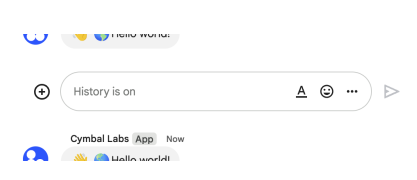 The following image shows how Chat attributes a message when you use user authentication. Chat displays the user as the message sender and attributes the Chat app to the message by displaying its name. The content of message can only contain text (`text`). 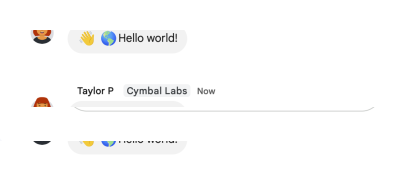 The maximum message size, including the message contents, is 32,000 bytes.",
|
|
664
747
|
"flatPath": "v1/spaces/{spacesId}/messages",
|
|
665
748
|
"httpMethod": "POST",
|
|
666
749
|
"id": "chat.spaces.messages.create",
|
|
@@ -781,7 +864,7 @@
|
|
|
781
864
|
]
|
|
782
865
|
},
|
|
783
866
|
"list": {
|
|
784
|
-
"description": "Lists messages in a space that the caller is a member of, including messages from blocked members and spaces. For an example, see [List messages](/chat/api/guides/v1/messages/list). Requires [user authentication](https://developers.google.com/workspace/chat/authenticate-authorize-chat-user).",
|
|
867
|
+
"description": "Lists messages in a space that the caller is a member of, including messages from blocked members and spaces. If you list messages from a space with no messages, the response is an empty object. When using a REST/HTTP interface, the response contains an empty JSON object, `{}`. For an example, see [List messages](https://developers.google.com/workspace/chat/api/guides/v1/messages/list). Requires [user authentication](https://developers.google.com/workspace/chat/authenticate-authorize-chat-user).",
|
|
785
868
|
"flatPath": "v1/spaces/{spacesId}/messages",
|
|
786
869
|
"httpMethod": "GET",
|
|
787
870
|
"id": "chat.spaces.messages.list",
|
|
@@ -1241,7 +1324,7 @@
|
|
|
1241
1324
|
}
|
|
1242
1325
|
}
|
|
1243
1326
|
},
|
|
1244
|
-
"revision": "
|
|
1327
|
+
"revision": "20240825",
|
|
1245
1328
|
"rootUrl": "https://chat.googleapis.com/",
|
|
1246
1329
|
"schemas": {
|
|
1247
1330
|
"AccessSettings": {
|
|
@@ -2113,7 +2196,7 @@
|
|
|
2113
2196
|
},
|
|
2114
2197
|
"strokeColor": {
|
|
2115
2198
|
"$ref": "Color",
|
|
2116
|
-
"description": "The colors to use when the type is `BORDER_TYPE_STROKE`."
|
|
2199
|
+
"description": "The colors to use when the type is `BORDER_TYPE_STROKE`. To set the stroke color, specify a value for the `red`, `green`, and `blue` fields. The value must be a float number between 0 and 1 based on the RGB color value, where `0` (0/255) represents the absence of color and `1` (255/255) represents the maximum intensity of the color. For example, the following sets the color to red at its maximum intensity: ``` \"color\": { \"red\": 1, \"green\": 0, \"blue\": 0, } ``` The `alpha` field is unavailable for stroke color. If specified, this field is ignored."
|
|
2117
2200
|
},
|
|
2118
2201
|
"type": {
|
|
2119
2202
|
"description": "The border type.",
|
|
@@ -2142,7 +2225,7 @@
|
|
|
2142
2225
|
},
|
|
2143
2226
|
"color": {
|
|
2144
2227
|
"$ref": "Color",
|
|
2145
|
-
"description": "If set, the button is
|
|
2228
|
+
"description": "Optional. The color of the button. If set, the button `type` is set to `FILLED` and the color of `text` and `icon` fields are set to a contrasting color for readability. For example, if the button color is set to blue, any text or icons in the button are set to white. To set the button color, specify a value for the `red`, `green`, and `blue` fields. The value must be a float number between 0 and 1 based on the RGB color value, where `0` (0/255) represents the absence of color and `1` (255/255) represents the maximum intensity of the color. For example, the following sets the color to red at its maximum intensity: ``` \"color\": { \"red\": 1, \"green\": 0, \"blue\": 0, } ``` The `alpha` field is unavailable for button color. If specified, this field is ignored."
|
|
2146
2229
|
},
|
|
2147
2230
|
"disabled": {
|
|
2148
2231
|
"description": "If `true`, the button is displayed in an inactive state and doesn't respond to user actions.",
|
|
@@ -2150,7 +2233,7 @@
|
|
|
2150
2233
|
},
|
|
2151
2234
|
"icon": {
|
|
2152
2235
|
"$ref": "GoogleAppsCardV1Icon",
|
|
2153
|
-
"description": "
|
|
2236
|
+
"description": "An icon displayed inside the button. If both `icon` and `text` are set, then the icon appears before the text."
|
|
2154
2237
|
},
|
|
2155
2238
|
"onClick": {
|
|
2156
2239
|
"$ref": "GoogleAppsCardV1OnClick",
|
|
@@ -2754,7 +2837,7 @@
|
|
|
2754
2837
|
},
|
|
2755
2838
|
"hostAppDataSource": {
|
|
2756
2839
|
"$ref": "HostAppDataSourceMarkup",
|
|
2757
|
-
"description": "A data source that's unique to a Google Workspace host application, such spaces in Google Chat."
|
|
2840
|
+
"description": "A data source that's unique to a Google Workspace host application, such spaces in Google Chat. This field supports the Google API Client Libraries but isn't available in the Cloud Client Libraries. To learn more, see [Install the client libraries](https://developers.google.com/workspace/chat/libraries)."
|
|
2758
2841
|
}
|
|
2759
2842
|
},
|
|
2760
2843
|
"type": "object"
|
|
@@ -3005,7 +3088,7 @@
|
|
|
3005
3088
|
"properties": {
|
|
3006
3089
|
"buttonList": {
|
|
3007
3090
|
"$ref": "GoogleAppsCardV1ButtonList",
|
|
3008
|
-
"description": "A list of buttons. For example, the following JSON creates two buttons. The first is a blue text button and the second is an image button that opens a link: ``` \"buttonList\": { \"buttons\": [ { \"text\": \"Edit\", \"color\": { \"red\": 0, \"green\": 0, \"blue\": 1,
|
|
3091
|
+
"description": "A list of buttons. For example, the following JSON creates two buttons. The first is a blue text button and the second is an image button that opens a link: ``` \"buttonList\": { \"buttons\": [ { \"text\": \"Edit\", \"color\": { \"red\": 0, \"green\": 0, \"blue\": 1, }, \"disabled\": true, }, { \"icon\": { \"knownIcon\": \"INVITE\", \"altText\": \"check calendar\" }, \"onClick\": { \"openLink\": { \"url\": \"https://example.com/calendar\" } } } ] } ```"
|
|
3009
3092
|
},
|
|
3010
3093
|
"columns": {
|
|
3011
3094
|
"$ref": "GoogleAppsCardV1Columns",
|
|
@@ -3571,6 +3654,23 @@
|
|
|
3571
3654
|
},
|
|
3572
3655
|
"type": "object"
|
|
3573
3656
|
},
|
|
3657
|
+
"MembershipCount": {
|
|
3658
|
+
"description": "[Developer Preview](https://developers.google.com/workspace/preview). Represents the count of memberships of a space, grouped into categories.",
|
|
3659
|
+
"id": "MembershipCount",
|
|
3660
|
+
"properties": {
|
|
3661
|
+
"joinedDirectHumanUserCount": {
|
|
3662
|
+
"description": "Count of human users that have directly joined the space, not counting users joined by having membership in a joined group.",
|
|
3663
|
+
"format": "int32",
|
|
3664
|
+
"type": "integer"
|
|
3665
|
+
},
|
|
3666
|
+
"joinedGroupCount": {
|
|
3667
|
+
"description": "Count of all groups that have directly joined the space.",
|
|
3668
|
+
"format": "int32",
|
|
3669
|
+
"type": "integer"
|
|
3670
|
+
}
|
|
3671
|
+
},
|
|
3672
|
+
"type": "object"
|
|
3673
|
+
},
|
|
3574
3674
|
"MembershipCreatedEventData": {
|
|
3575
3675
|
"description": "Event payload for a new membership. Event type: `google.workspace.chat.membership.v1.created`.",
|
|
3576
3676
|
"id": "MembershipCreatedEventData",
|
|
@@ -3656,7 +3756,7 @@
|
|
|
3656
3756
|
"type": "array"
|
|
3657
3757
|
},
|
|
3658
3758
|
"cardsV2": {
|
|
3659
|
-
"description": "An array of [cards](https://developers.google.com/workspace/chat/api/reference/rest/v1/cards). Only Chat apps can create cards. If your Chat app [authenticates as a user](https://developers.google.com/workspace/chat/authenticate-authorize-chat-user), the messages can't contain cards. To learn
|
|
3759
|
+
"description": "An array of [cards](https://developers.google.com/workspace/chat/api/reference/rest/v1/cards). Only Chat apps can create cards. If your Chat app [authenticates as a user](https://developers.google.com/workspace/chat/authenticate-authorize-chat-user), the messages can't contain cards. To learn how to create a message that contains cards, see [Send a message](https://developers.google.com/workspace/chat/create-messages). [Card builder](https://addons.gsuite.google.com/uikit/builder)",
|
|
3660
3760
|
"items": {
|
|
3661
3761
|
"$ref": "CardWithId"
|
|
3662
3762
|
},
|
|
@@ -3716,7 +3816,7 @@
|
|
|
3716
3816
|
},
|
|
3717
3817
|
"privateMessageViewer": {
|
|
3718
3818
|
"$ref": "User",
|
|
3719
|
-
"description": "Immutable. Input for creating a message, otherwise output only. The user that can view the message. When set, the message is private and only visible to the specified user and the Chat app. Link previews and attachments aren't supported for private messages. Only Chat apps can send private messages. If your Chat app [authenticates as a user](https://developers.google.com/workspace/chat/authenticate-authorize-chat-user) to send a message, the message can't be private and must omit this field. For details, see [Send
|
|
3819
|
+
"description": "Immutable. Input for creating a message, otherwise output only. The user that can view the message. When set, the message is private and only visible to the specified user and the Chat app. Link previews and attachments aren't supported for private messages. Only Chat apps can send private messages. If your Chat app [authenticates as a user](https://developers.google.com/workspace/chat/authenticate-authorize-chat-user) to send a message, the message can't be private and must omit this field. For details, see [Send a message privately](https://developers.google.com/workspace/chat/create-messages#private)."
|
|
3720
3820
|
},
|
|
3721
3821
|
"quotedMessageMetadata": {
|
|
3722
3822
|
"$ref": "QuotedMessageMetadata",
|
|
@@ -3738,7 +3838,7 @@
|
|
|
3738
3838
|
"description": "If your Chat app [authenticates as a user](https://developers.google.com/workspace/chat/authenticate-authorize-chat-user), the output populates the [space](https://developers.google.com/workspace/chat/api/reference/rest/v1/spaces) `name`."
|
|
3739
3839
|
},
|
|
3740
3840
|
"text": {
|
|
3741
|
-
"description": "Plain-text body of the message. The first link to an image, video, or web page generates a [preview chip](https://developers.google.com/workspace/chat/preview-links). You can also [@mention a Google Chat user](https://developers.google.com/workspace/chat/format-messages#messages-@mention), or everyone in the space. To learn about creating text messages, see [Send a
|
|
3841
|
+
"description": "Plain-text body of the message. The first link to an image, video, or web page generates a [preview chip](https://developers.google.com/workspace/chat/preview-links). You can also [@mention a Google Chat user](https://developers.google.com/workspace/chat/format-messages#messages-@mention), or everyone in the space. To learn about creating text messages, see [Send a message](https://developers.google.com/workspace/chat/create-messages).",
|
|
3742
3842
|
"type": "string"
|
|
3743
3843
|
},
|
|
3744
3844
|
"thread": {
|
|
@@ -3969,6 +4069,29 @@
|
|
|
3969
4069
|
},
|
|
3970
4070
|
"type": "object"
|
|
3971
4071
|
},
|
|
4072
|
+
"SearchSpacesResponse": {
|
|
4073
|
+
"description": "Response with a list of spaces corresponding to the search spaces request.",
|
|
4074
|
+
"id": "SearchSpacesResponse",
|
|
4075
|
+
"properties": {
|
|
4076
|
+
"nextPageToken": {
|
|
4077
|
+
"description": "A token that can be used to retrieve the next page. If this field is empty, there are no subsequent pages.",
|
|
4078
|
+
"type": "string"
|
|
4079
|
+
},
|
|
4080
|
+
"spaces": {
|
|
4081
|
+
"description": "A page of the requested spaces.",
|
|
4082
|
+
"items": {
|
|
4083
|
+
"$ref": "Space"
|
|
4084
|
+
},
|
|
4085
|
+
"type": "array"
|
|
4086
|
+
},
|
|
4087
|
+
"totalSize": {
|
|
4088
|
+
"description": "The total number of spaces that match the query, across all pages. If the result is over 10,000 spaces, this value is an estimate.",
|
|
4089
|
+
"format": "int32",
|
|
4090
|
+
"type": "integer"
|
|
4091
|
+
}
|
|
4092
|
+
},
|
|
4093
|
+
"type": "object"
|
|
4094
|
+
},
|
|
3972
4095
|
"Section": {
|
|
3973
4096
|
"description": "A section contains a collection of widgets that are rendered (vertically) in the order that they are specified. Across all platforms, cards have a narrow fixed width, so there's currently no need for layout properties (for example, float).",
|
|
3974
4097
|
"id": "Section",
|
|
@@ -4103,8 +4226,19 @@
|
|
|
4103
4226
|
"description": "Optional. Whether this space is created in `Import Mode` as part of a data migration into Google Workspace. While spaces are being imported, they aren't visible to users until the import is complete.",
|
|
4104
4227
|
"type": "boolean"
|
|
4105
4228
|
},
|
|
4229
|
+
"lastActiveTime": {
|
|
4230
|
+
"description": "Output only. Timestamp of the last message in the space. [Developer Preview](https://developers.google.com/workspace/preview).",
|
|
4231
|
+
"format": "google-datetime",
|
|
4232
|
+
"readOnly": true,
|
|
4233
|
+
"type": "string"
|
|
4234
|
+
},
|
|
4235
|
+
"membershipCount": {
|
|
4236
|
+
"$ref": "MembershipCount",
|
|
4237
|
+
"description": "Output only. The count of joined memberships grouped by member type. Populated when the `space_type` is `SPACE`, `DIRECT_MESSAGE` or `GROUP_CHAT`. [Developer Preview](https://developers.google.com/workspace/preview).",
|
|
4238
|
+
"readOnly": true
|
|
4239
|
+
},
|
|
4106
4240
|
"name": {
|
|
4107
|
-
"description": "Resource name of the space. Format: `spaces/{space}`",
|
|
4241
|
+
"description": "Resource name of the space. Format: `spaces/{space}` Where `{space}` represents the system-assigned ID for the space. You can obtain the space ID by calling the [`spaces.list()`](https://developers.google.com/workspace/chat/api/reference/rest/v1/spaces/list) method or from the space URL. For example, if the space URL is `https://mail.google.com/mail/u/0/#chat/space/AAAAAAAAA`, the space ID is `AAAAAAAAA`.",
|
|
4108
4242
|
"type": "string"
|
|
4109
4243
|
},
|
|
4110
4244
|
"singleUserBotDm": {
|