flet 0.70.0.dev5623__py3-none-any.whl → 0.70.0.dev5774__py3-none-any.whl
This diff represents the content of publicly available package versions that have been released to one of the supported registries. The information contained in this diff is provided for informational purposes only and reflects changes between package versions as they appear in their respective public registries.
Potentially problematic release.
This version of flet might be problematic. Click here for more details.
- flet/__init__.py +2 -0
- flet/controls/adaptive_control.py +16 -13
- flet/controls/base_page.py +5 -5
- flet/controls/border.py +4 -3
- flet/controls/box.py +6 -11
- flet/controls/buttons.py +7 -7
- flet/controls/context.py +2 -2
- flet/controls/control.py +18 -11
- flet/controls/core/animated_switcher.py +9 -13
- flet/controls/core/canvas/canvas.py +1 -1
- flet/controls/core/canvas/line.py +2 -3
- flet/controls/core/canvas/oval.py +1 -1
- flet/controls/core/canvas/shape.py +10 -10
- flet/controls/core/canvas/text.py +1 -1
- flet/controls/core/column.py +5 -5
- flet/controls/core/dismissible.py +8 -8
- flet/controls/core/drag_target.py +5 -4
- flet/controls/core/draggable.py +19 -14
- flet/controls/core/grid_view.py +2 -2
- flet/controls/core/image.py +1 -1
- flet/controls/core/interactive_viewer.py +2 -2
- flet/controls/core/list_view.py +7 -7
- flet/controls/core/markdown.py +1 -1
- flet/controls/core/pagelet.py +10 -10
- flet/controls/core/reorderable_draggable.py +1 -1
- flet/controls/core/responsive_row.py +7 -7
- flet/controls/core/row.py +8 -8
- flet/controls/core/semantics.py +9 -6
- flet/controls/core/shader_mask.py +3 -3
- flet/controls/core/stack.py +4 -4
- flet/controls/core/text.py +7 -7
- flet/controls/core/text_span.py +4 -4
- flet/controls/core/transparent_pointer.py +3 -3
- flet/controls/core/view.py +16 -16
- flet/controls/core/window.py +1 -1
- flet/controls/core/window_drag_area.py +1 -1
- flet/controls/cupertino/cupertino_action_sheet.py +19 -8
- flet/controls/cupertino/cupertino_activity_indicator.py +5 -6
- flet/controls/cupertino/cupertino_alert_dialog.py +7 -10
- flet/controls/cupertino/cupertino_app_bar.py +34 -34
- flet/controls/cupertino/cupertino_bottom_sheet.py +5 -5
- flet/controls/cupertino/cupertino_button.py +4 -4
- flet/controls/cupertino/cupertino_checkbox.py +33 -40
- flet/controls/cupertino/cupertino_context_menu.py +7 -6
- flet/controls/cupertino/cupertino_context_menu_action.py +2 -4
- flet/controls/cupertino/cupertino_date_picker.py +35 -37
- flet/controls/cupertino/cupertino_dialog_action.py +12 -9
- flet/controls/cupertino/cupertino_list_tile.py +24 -36
- flet/controls/cupertino/cupertino_navigation_bar.py +10 -11
- flet/controls/cupertino/cupertino_picker.py +11 -10
- flet/controls/cupertino/cupertino_radio.py +10 -13
- flet/controls/cupertino/cupertino_segmented_button.py +9 -12
- flet/controls/cupertino/cupertino_slider.py +6 -9
- flet/controls/cupertino/cupertino_sliding_segmented_button.py +14 -17
- flet/controls/cupertino/cupertino_switch.py +30 -41
- flet/controls/cupertino/cupertino_textfield.py +14 -18
- flet/controls/cupertino/cupertino_timer_picker.py +11 -8
- flet/controls/exceptions.py +5 -5
- flet/controls/icon_data.py +2 -2
- flet/controls/keys.py +2 -1
- flet/controls/layout_control.py +22 -27
- flet/controls/material/alert_dialog.py +44 -50
- flet/controls/material/app_bar.py +41 -45
- flet/controls/material/auto_complete.py +10 -8
- flet/controls/material/badge.py +32 -28
- flet/controls/material/banner.py +14 -14
- flet/controls/material/bottom_app_bar.py +7 -9
- flet/controls/material/bottom_sheet.py +10 -10
- flet/controls/material/button.py +2 -24
- flet/controls/material/card.py +10 -11
- flet/controls/material/checkbox.py +41 -49
- flet/controls/material/chip.py +44 -47
- flet/controls/material/circle_avatar.py +19 -22
- flet/controls/material/container.py +16 -123
- flet/controls/material/datatable.py +71 -95
- flet/controls/material/date_picker.py +13 -14
- flet/controls/material/date_range_picker.py +183 -0
- flet/controls/material/divider.py +24 -23
- flet/controls/material/dropdown.py +13 -13
- flet/controls/material/expansion_tile.py +5 -6
- flet/controls/material/filled_button.py +1 -1
- flet/controls/material/floating_action_button.py +2 -2
- flet/controls/material/form_field_control.py +64 -56
- flet/controls/material/icon_button.py +29 -65
- flet/controls/material/list_tile.py +25 -23
- flet/controls/material/menu_item_button.py +2 -2
- flet/controls/material/navigation_bar.py +3 -3
- flet/controls/material/navigation_rail.py +11 -11
- flet/controls/material/outlined_button.py +1 -1
- flet/controls/material/popup_menu_button.py +3 -3
- flet/controls/material/progress_bar.py +15 -22
- flet/controls/material/progress_ring.py +8 -8
- flet/controls/material/radio.py +3 -8
- flet/controls/material/range_slider.py +1 -1
- flet/controls/material/search_bar.py +15 -16
- flet/controls/material/segmented_button.py +4 -4
- flet/controls/material/selection_area.py +4 -3
- flet/controls/material/slider.py +16 -16
- flet/controls/material/snack_bar.py +33 -32
- flet/controls/material/submenu_button.py +9 -9
- flet/controls/material/switch.py +13 -13
- flet/controls/material/tabs.py +77 -78
- flet/controls/material/text_button.py +2 -2
- flet/controls/material/textfield.py +4 -6
- flet/controls/material/tooltip.py +16 -15
- flet/controls/material/vertical_divider.py +10 -10
- flet/controls/page.py +4 -4
- flet/controls/painting.py +2 -2
- flet/controls/scrollable_control.py +1 -1
- flet/controls/services/file_picker.py +7 -7
- flet/controls/services/haptic_feedback.py +1 -1
- flet/controls/services/shake_detector.py +1 -1
- flet/controls/services/storage_paths.py +3 -3
- flet/controls/text_style.py +1 -1
- flet/controls/theme.py +611 -609
- flet/controls/types.py +11 -11
- flet/testing/finder.py +2 -0
- flet/testing/flet_test_app.py +6 -4
- flet/version.py +1 -1
- {flet-0.70.0.dev5623.dist-info → flet-0.70.0.dev5774.dist-info}/METADATA +5 -5
- flet-0.70.0.dev5774.dist-info/RECORD +239 -0
- flet-0.70.0.dev5623.dist-info/RECORD +0 -238
- {flet-0.70.0.dev5623.dist-info → flet-0.70.0.dev5774.dist-info}/WHEEL +0 -0
- {flet-0.70.0.dev5623.dist-info → flet-0.70.0.dev5774.dist-info}/entry_points.txt +0 -0
- {flet-0.70.0.dev5623.dist-info → flet-0.70.0.dev5774.dist-info}/top_level.txt +0 -0
|
@@ -41,7 +41,7 @@ class Container(LayoutControl, AdaptiveControl):
|
|
|
41
41
|
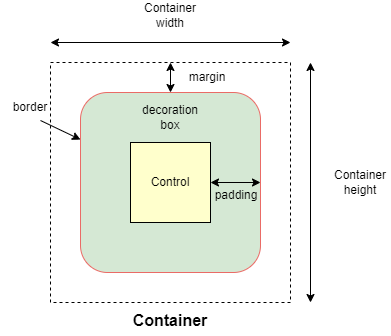{width="80%"}
|
|
42
42
|
/// caption
|
|
43
43
|
///
|
|
44
|
-
"""
|
|
44
|
+
""" # noqa: E501
|
|
45
45
|
|
|
46
46
|
content: Optional[Control] = None
|
|
47
47
|
"""
|
|
@@ -56,19 +56,17 @@ class Container(LayoutControl, AdaptiveControl):
|
|
|
56
56
|
|
|
57
57
|
alignment: Optional[Alignment] = None
|
|
58
58
|
"""
|
|
59
|
-
Defines the alignment of the [`content`][
|
|
60
|
-
container.
|
|
59
|
+
Defines the alignment of the [`content`][(c).] inside the container.
|
|
61
60
|
"""
|
|
62
61
|
|
|
63
62
|
bgcolor: Optional[ColorValue] = None
|
|
64
63
|
"""
|
|
65
|
-
Defines the background color of
|
|
66
|
-
container.
|
|
64
|
+
Defines the background color of this container.
|
|
67
65
|
"""
|
|
68
66
|
|
|
69
67
|
gradient: Optional[Gradient] = None
|
|
70
68
|
"""
|
|
71
|
-
Defines the gradient background of
|
|
69
|
+
Defines the gradient background of this container.
|
|
72
70
|
"""
|
|
73
71
|
|
|
74
72
|
blend_mode: Optional[BlendMode] = None
|
|
@@ -95,16 +93,15 @@ class Container(LayoutControl, AdaptiveControl):
|
|
|
95
93
|
|
|
96
94
|
clip_behavior: Optional[ClipBehavior] = None
|
|
97
95
|
"""
|
|
98
|
-
Defines how the [`content`][
|
|
96
|
+
Defines how the [`content`][(c).] of this container is clipped.
|
|
99
97
|
|
|
100
|
-
Defaults to `ClipBehavior.ANTI_ALIAS` if
|
|
101
|
-
[`border_radius`][flet.Container.border_radius] is not `None`;
|
|
98
|
+
Defaults to `ClipBehavior.ANTI_ALIAS` if [`border_radius`][(c).] is not `None`;
|
|
102
99
|
otherwise `ClipBehavior.NONE`.
|
|
103
100
|
"""
|
|
104
101
|
|
|
105
102
|
ink: bool = False
|
|
106
103
|
"""
|
|
107
|
-
`True` to produce ink ripples effect when user clicks
|
|
104
|
+
`True` to produce ink ripples effect when user clicks this container.
|
|
108
105
|
"""
|
|
109
106
|
|
|
110
107
|
image: Optional[DecorationImage] = None
|
|
@@ -127,7 +124,7 @@ class Container(LayoutControl, AdaptiveControl):
|
|
|
127
124
|
|
|
128
125
|
blur: Optional[BlurValue] = None
|
|
129
126
|
"""
|
|
130
|
-
|
|
127
|
+
Defines how Gaussian blur effect should be applied under this container.
|
|
131
128
|
|
|
132
129
|
Example:
|
|
133
130
|
```python
|
|
@@ -175,56 +172,14 @@ class Container(LayoutControl, AdaptiveControl):
|
|
|
175
172
|
"""
|
|
176
173
|
The URL to open when this container is clicked.
|
|
177
174
|
|
|
178
|
-
Additionally, if [`on_click`][
|
|
175
|
+
Additionally, if an [`on_click`][(c).] callback is provided,
|
|
179
176
|
it is fired after that.
|
|
180
177
|
"""
|
|
181
178
|
|
|
182
179
|
theme: Optional[Theme] = None
|
|
183
180
|
"""
|
|
184
|
-
Allows setting a nested theme for all controls inside
|
|
181
|
+
Allows setting a nested theme for all controls inside this container and down its
|
|
185
182
|
tree.
|
|
186
|
-
|
|
187
|
-
Example:
|
|
188
|
-
```python
|
|
189
|
-
import flet as ft
|
|
190
|
-
|
|
191
|
-
def main(page: ft.Page):
|
|
192
|
-
# Yellow page theme with SYSTEM (default) mode
|
|
193
|
-
page.theme = ft.Theme(
|
|
194
|
-
color_scheme_seed=ft.Colors.YELLOW,
|
|
195
|
-
)
|
|
196
|
-
|
|
197
|
-
page.add(
|
|
198
|
-
# Page theme
|
|
199
|
-
ft.Container(
|
|
200
|
-
content=ft.Button("Page theme button"),
|
|
201
|
-
bgcolor=ft.Colors.SURFACE_CONTAINER_HIGHEST,
|
|
202
|
-
padding=20,
|
|
203
|
-
width=300,
|
|
204
|
-
),
|
|
205
|
-
|
|
206
|
-
# Inherited theme with primary color overridden
|
|
207
|
-
ft.Container(
|
|
208
|
-
theme=ft.Theme(color_scheme=ft.ColorScheme(primary=ft.Colors.PINK)),
|
|
209
|
-
content=ft.Button("Inherited theme button"),
|
|
210
|
-
bgcolor=ft.Colors.SURFACE_CONTAINER_HIGHEST,
|
|
211
|
-
padding=20,
|
|
212
|
-
width=300,
|
|
213
|
-
),
|
|
214
|
-
|
|
215
|
-
# Unique always DARK theme
|
|
216
|
-
ft.Container(
|
|
217
|
-
theme=ft.Theme(color_scheme_seed=ft.Colors.INDIGO),
|
|
218
|
-
theme_mode=ft.ThemeMode.DARK,
|
|
219
|
-
content=ft.Button("Unique theme button"),
|
|
220
|
-
bgcolor=ft.Colors.SURFACE_CONTAINER_HIGHEST,
|
|
221
|
-
padding=20,
|
|
222
|
-
width=300,
|
|
223
|
-
),
|
|
224
|
-
)
|
|
225
|
-
|
|
226
|
-
ft.run(main)
|
|
227
|
-
```
|
|
228
183
|
"""
|
|
229
184
|
|
|
230
185
|
dark_theme: Optional[Theme] = None
|
|
@@ -237,7 +192,7 @@ class Container(LayoutControl, AdaptiveControl):
|
|
|
237
192
|
"""
|
|
238
193
|
"Resets" parent theme and creates a new, unique scheme for all
|
|
239
194
|
controls inside the container. Otherwise the styles defined in container's
|
|
240
|
-
[`theme`][
|
|
195
|
+
[`theme`][(c).] property override corresponding styles from
|
|
241
196
|
the parent, inherited theme.
|
|
242
197
|
|
|
243
198
|
Defaults to `ThemeMode.SYSTEM`.
|
|
@@ -260,52 +215,14 @@ class Container(LayoutControl, AdaptiveControl):
|
|
|
260
215
|
|
|
261
216
|
on_click: Optional[ControlEventHandler["Container"]] = None
|
|
262
217
|
"""
|
|
263
|
-
Called when a user clicks the container.
|
|
218
|
+
Called when a user clicks the container.
|
|
219
|
+
|
|
220
|
+
It will not be called if this container is long pressed.
|
|
264
221
|
"""
|
|
265
222
|
|
|
266
223
|
on_tap_down: Optional[EventHandler[TapEvent["Container"]]] = None
|
|
267
224
|
"""
|
|
268
225
|
Called when a user clicks the container with or without a long press.
|
|
269
|
-
|
|
270
|
-
Info:
|
|
271
|
-
If [`ink=True`][flet.Container.ink], the event handler argument will be plain
|
|
272
|
-
[`ControlEvent`][flet.ControlEvent] with empty `data` instead of
|
|
273
|
-
[`TapEvent`][flet.TapEvent].
|
|
274
|
-
|
|
275
|
-
Example:
|
|
276
|
-
```python
|
|
277
|
-
import flet as ft
|
|
278
|
-
|
|
279
|
-
def main(page: ft.Page):
|
|
280
|
-
page.vertical_alignment = ft.MainAxisAlignment.CENTER
|
|
281
|
-
page.horizontal_alignment = ft.CrossAxisAlignment.CENTER
|
|
282
|
-
|
|
283
|
-
def on_long_press(e):
|
|
284
|
-
print("on long press")
|
|
285
|
-
page.add(ft.Text("on_long_press triggered"))
|
|
286
|
-
|
|
287
|
-
def on_click(e):
|
|
288
|
-
print("on click")
|
|
289
|
-
page.add(ft.Text("on_click triggered"))
|
|
290
|
-
|
|
291
|
-
def on_tap_down(e: ft.ContainerTapEvent):
|
|
292
|
-
print("on tap down", e.local_x, e.local_y)
|
|
293
|
-
page.add(ft.Text("on_tap_down triggered"))
|
|
294
|
-
|
|
295
|
-
c = ft.Container(
|
|
296
|
-
bgcolor=ft.Colors.RED,
|
|
297
|
-
content=ft.Text("Test Long Press"),
|
|
298
|
-
height=100,
|
|
299
|
-
width=100,
|
|
300
|
-
on_click=on_click,
|
|
301
|
-
on_long_press=on_long_press,
|
|
302
|
-
on_tap_down=on_tap_down,
|
|
303
|
-
)
|
|
304
|
-
|
|
305
|
-
page.add(c)
|
|
306
|
-
|
|
307
|
-
ft.run(main)
|
|
308
|
-
```
|
|
309
226
|
"""
|
|
310
227
|
|
|
311
228
|
on_long_press: Optional[ControlEventHandler["Container"]] = None
|
|
@@ -317,32 +234,8 @@ class Container(LayoutControl, AdaptiveControl):
|
|
|
317
234
|
"""
|
|
318
235
|
Called when a mouse pointer enters or exists the container area.
|
|
319
236
|
|
|
320
|
-
The `data` property of the event handler argument is
|
|
321
|
-
enters and `False` when it exits.
|
|
322
|
-
|
|
323
|
-
Example:
|
|
324
|
-
A container changing its background color on mouse hover:
|
|
325
|
-
|
|
326
|
-
```python
|
|
327
|
-
import flet as ft
|
|
328
|
-
|
|
329
|
-
def main(page: ft.Page):
|
|
330
|
-
def on_hover(e):
|
|
331
|
-
e.control.bgcolor = "blue" if e.data == True else "red"
|
|
332
|
-
e.control.update()
|
|
333
|
-
|
|
334
|
-
page.add(
|
|
335
|
-
ft.Container(
|
|
336
|
-
width=100,
|
|
337
|
-
height=100,
|
|
338
|
-
bgcolor="red",
|
|
339
|
-
ink=False,
|
|
340
|
-
on_hover=on_hover,
|
|
341
|
-
)
|
|
342
|
-
)
|
|
343
|
-
|
|
344
|
-
ft.run(main)
|
|
345
|
-
```
|
|
237
|
+
The [`data`][flet.Event.] property of the event handler argument is a boolean:
|
|
238
|
+
`True` when the cursor enters and `False` when it exits this container.
|
|
346
239
|
"""
|
|
347
240
|
|
|
348
241
|
def init(self):
|
|
@@ -33,7 +33,7 @@ class DataColumnSortEvent(Event["DataColumn"]):
|
|
|
33
33
|
@control("DataColumn")
|
|
34
34
|
class DataColumn(Control):
|
|
35
35
|
"""
|
|
36
|
-
Column configuration for a [`DataTable`][flet.
|
|
36
|
+
Column configuration for a [`DataTable`][flet.].
|
|
37
37
|
|
|
38
38
|
Raises:
|
|
39
39
|
AssertionError: If the [`label`][(c).] is neither a string nor
|
|
@@ -44,9 +44,9 @@ class DataColumn(Control):
|
|
|
44
44
|
"""
|
|
45
45
|
The column heading.
|
|
46
46
|
|
|
47
|
-
Typically, this will be a [`Text`][flet.
|
|
48
|
-
It could also be an [`Icon`][flet.
|
|
49
|
-
|
|
47
|
+
Typically, this will be a [`Text`][flet.] control.
|
|
48
|
+
It could also be an [`Icon`][flet.] (typically using size 18),
|
|
49
|
+
or a combination of both in a [`Row`][flet.].
|
|
50
50
|
"""
|
|
51
51
|
|
|
52
52
|
numeric: bool = False
|
|
@@ -90,7 +90,7 @@ class DataColumn(Control):
|
|
|
90
90
|
@control("DataCell")
|
|
91
91
|
class DataCell(Control):
|
|
92
92
|
"""
|
|
93
|
-
The data for a cell of a [`DataTable`][flet.
|
|
93
|
+
The data for a cell of a [`DataTable`][flet.].
|
|
94
94
|
|
|
95
95
|
Raises:
|
|
96
96
|
AssertionError: If the [`content`][(c).] is neither a string nor a visible
|
|
@@ -99,22 +99,23 @@ class DataCell(Control):
|
|
|
99
99
|
|
|
100
100
|
content: StrOrControl
|
|
101
101
|
"""
|
|
102
|
-
The content of this cell.
|
|
102
|
+
The content of this cell.
|
|
103
103
|
|
|
104
|
-
Typically a [`Text`][flet.
|
|
104
|
+
Typically a [`Text`][flet.] control or a [`Dropdown`][flet.] control.
|
|
105
105
|
|
|
106
|
-
If the cell has no data, then a `Text`
|
|
107
|
-
provided instead, and [`placeholder`][
|
|
106
|
+
If the cell has no data, then a [`Text`][flet.] control with placeholder text
|
|
107
|
+
should be provided instead, and [`placeholder`][(c).] should be set to
|
|
108
108
|
`True`.
|
|
109
109
|
|
|
110
|
-
|
|
111
|
-
|
|
112
|
-
|
|
110
|
+
Tip:
|
|
111
|
+
To lay out multiple children, set the [`content`][(c).] to a
|
|
112
|
+
container-like control such as [`Row`][flet.], [`Column`][flet.], or
|
|
113
|
+
[`Stack`][flet.], which have a `controls` property.
|
|
113
114
|
"""
|
|
114
115
|
|
|
115
116
|
placeholder: bool = False
|
|
116
117
|
"""
|
|
117
|
-
Whether the
|
|
118
|
+
Whether the [`content`][(c).] is actually a placeholder.
|
|
118
119
|
|
|
119
120
|
If this is `True`, the default text style for the cell is changed to be appropriate
|
|
120
121
|
for placeholder text.
|
|
@@ -122,53 +123,44 @@ class DataCell(Control):
|
|
|
122
123
|
|
|
123
124
|
show_edit_icon: bool = False
|
|
124
125
|
"""
|
|
125
|
-
Whether to show an edit icon at the end of
|
|
126
|
+
Whether to show an edit icon at the end of this cell.
|
|
126
127
|
|
|
127
128
|
This does not make the cell actually editable; the caller must implement editing
|
|
128
|
-
behavior if desired (initiated from the [`on_tap`][
|
|
129
|
+
behavior if desired (initiated from the [`on_tap`][(c).] callback).
|
|
129
130
|
|
|
130
131
|
Note:
|
|
131
|
-
If this is set, [`on_tap`][
|
|
132
|
+
If this is set, [`on_tap`][(c).] should also be set,
|
|
132
133
|
otherwise tapping the icon will have no effect.
|
|
133
134
|
"""
|
|
134
135
|
|
|
135
136
|
on_tap: Optional[ControlEventHandler["DataCell"]] = None
|
|
136
137
|
"""
|
|
137
|
-
Called if
|
|
138
|
+
Called if this cell is tapped.
|
|
138
139
|
|
|
139
140
|
Note:
|
|
140
|
-
If this is `None` (including [`on_double_tap`][
|
|
141
|
-
[`
|
|
142
|
-
[`
|
|
143
|
-
[`on_tap_down`][flet.DataCell.on_tap_down]), tapping this cell
|
|
144
|
-
will attempt to select its row (if
|
|
145
|
-
[`DataRow.on_select_change`][flet.DataRow.on_select_change] is provided).
|
|
141
|
+
If this is `None` (including [`on_double_tap`][(c).], [`on_long_press`][(c).],
|
|
142
|
+
[`on_tap_cancel`][(c).], [`on_tap_down`][(c).]), tapping this cell will
|
|
143
|
+
attempt to select its row (if [`DataRow.on_select_change`][flet.] is provided).
|
|
146
144
|
"""
|
|
147
145
|
|
|
148
146
|
on_double_tap: Optional[ControlEventHandler["DataCell"]] = None
|
|
149
147
|
"""
|
|
150
|
-
Called when
|
|
148
|
+
Called when this cell is double tapped.
|
|
151
149
|
|
|
152
150
|
Note:
|
|
153
|
-
If this is `None` (including [`on_tap`][
|
|
154
|
-
[`
|
|
155
|
-
[`
|
|
156
|
-
[`on_tap_down`][flet.DataCell.on_tap_down]), tapping this cell
|
|
157
|
-
will attempt to select its row (if
|
|
158
|
-
[`DataRow.on_select_change`][flet.DataRow.on_select_change] is provided).
|
|
151
|
+
If this is `None` (including [`on_tap`][(c).], [`on_long_press`][(c).],
|
|
152
|
+
[`on_tap_cancel`][(c).], [`on_tap_down`][(c).]), tapping this cell will
|
|
153
|
+
attempt to select its row (if [`DataRow.on_select_change`][flet.] is provided).
|
|
159
154
|
"""
|
|
160
155
|
|
|
161
156
|
on_long_press: Optional[ControlEventHandler["DataCell"]] = None
|
|
162
157
|
"""
|
|
163
|
-
Called if
|
|
158
|
+
Called if this cell is long-pressed.
|
|
164
159
|
|
|
165
160
|
Note:
|
|
166
|
-
If this is `None` (including [`on_tap`][
|
|
167
|
-
[`
|
|
168
|
-
[`
|
|
169
|
-
[`on_tap_down`][flet.DataCell.on_tap_down]), tapping this cell
|
|
170
|
-
will attempt to select its row (if
|
|
171
|
-
[`DataRow.on_select_change`][flet.DataRow.on_select_change] is provided).
|
|
161
|
+
If this is `None` (including [`on_tap`][(c).], [`on_double_tap`][(c).],
|
|
162
|
+
[`on_tap_cancel`][(c).], [`on_tap_down`][(c).]), tapping this cell will attempt
|
|
163
|
+
to select its row (if [`DataRow.on_select_change`][flet.] is provided).
|
|
172
164
|
"""
|
|
173
165
|
|
|
174
166
|
on_tap_cancel: Optional[ControlEventHandler["DataCell"]] = None
|
|
@@ -176,25 +168,19 @@ class DataCell(Control):
|
|
|
176
168
|
Called if the user cancels a tap was started on cell.
|
|
177
169
|
|
|
178
170
|
Note:
|
|
179
|
-
If this is `None` (including [`on_tap`][
|
|
180
|
-
[`
|
|
181
|
-
[`
|
|
182
|
-
[`on_tap_down`][flet.DataCell.on_tap_down]), tapping this cell
|
|
183
|
-
will attempt to select its row (if
|
|
184
|
-
[`DataRow.on_select_change`][flet.DataRow.on_select_change] is provided).
|
|
171
|
+
If this is `None` (including [`on_tap`][(c).], [`on_double_tap`][(c).],
|
|
172
|
+
[`on_long_press`][(c).], [`on_tap_down`][(c).]), tapping this cell will
|
|
173
|
+
attempt to select its row (if [`DataRow.on_select_change`][flet.] is provided).
|
|
185
174
|
"""
|
|
186
175
|
|
|
187
176
|
on_tap_down: Optional[EventHandler[TapEvent["DataCell"]]] = None
|
|
188
177
|
"""
|
|
189
|
-
Called if
|
|
178
|
+
Called if this cell is tapped down.
|
|
190
179
|
|
|
191
180
|
Note:
|
|
192
|
-
If this is `None` (including [`on_tap`][
|
|
193
|
-
[`
|
|
194
|
-
[`
|
|
195
|
-
[`on_tap_cancel`][flet.DataCell.on_tap_cancel]), tapping this cell
|
|
196
|
-
will attempt to select its row (if
|
|
197
|
-
[`DataRow.on_select_change`][flet.DataRow.on_select_change] is provided).
|
|
181
|
+
If this is `None` (including [`on_tap`][(c).], [`on_double_tap`][(c).],
|
|
182
|
+
[`on_long_press`][(c).], [`on_tap_cancel`][(c).]), tapping this cell will
|
|
183
|
+
attempt to select its row (if [`DataRow.on_select_change`][flet.] is provided).
|
|
198
184
|
"""
|
|
199
185
|
|
|
200
186
|
def before_update(self):
|
|
@@ -215,8 +201,7 @@ class DataRow(Control):
|
|
|
215
201
|
|
|
216
202
|
cells: list[DataCell] = field(default_factory=list)
|
|
217
203
|
"""
|
|
218
|
-
The data for this row
|
|
219
|
-
controls.
|
|
204
|
+
The data for this row: a list of [`DataCell`][flet.] controls.
|
|
220
205
|
|
|
221
206
|
Note:
|
|
222
207
|
There must be exactly as many cells as there are columns in the table.
|
|
@@ -224,12 +209,12 @@ class DataRow(Control):
|
|
|
224
209
|
|
|
225
210
|
color: Optional[ControlStateValue[ColorValue]] = None
|
|
226
211
|
"""
|
|
227
|
-
The color
|
|
212
|
+
The color of this row.
|
|
228
213
|
|
|
229
214
|
By default, the color is transparent unless selected. Selected rows has a grey
|
|
230
215
|
translucent color.
|
|
231
216
|
|
|
232
|
-
The effective color can depend on the [`ControlState`][flet.
|
|
217
|
+
The effective color can depend on the [`ControlState`][flet.]
|
|
233
218
|
state, if the row is selected, pressed, hovered, focused, disabled or enabled. The
|
|
234
219
|
color is painted as an overlay to the row. To make sure that the row's InkWell is
|
|
235
220
|
visible (when pressed, hovered and focused), it is recommended to use a translucent
|
|
@@ -249,14 +234,11 @@ class DataRow(Control):
|
|
|
249
234
|
|
|
250
235
|
on_long_press: Optional[ControlEventHandler["DataRow"]] = None
|
|
251
236
|
"""
|
|
252
|
-
Called
|
|
237
|
+
Called when this row is long-pressed.
|
|
253
238
|
|
|
254
|
-
If a [`DataCell`][flet.
|
|
255
|
-
[`DataCell.
|
|
256
|
-
[`DataCell.
|
|
257
|
-
[`DataCell.on_long_press`][flet.DataCell.on_long_press],
|
|
258
|
-
[`DataCell.on_tap_cancel`][flet.DataCell.on_tap_cancel]
|
|
259
|
-
or [`DataCell.on_tap_down`][flet.DataCell.on_tap_down]
|
|
239
|
+
If a [`DataCell`][flet.] in the row has its [`DataCell.on_tap`][flet.],
|
|
240
|
+
[`DataCell.on_double_tap`][flet.], [`DataCell.on_long_press`][flet.],
|
|
241
|
+
[`DataCell.on_tap_cancel`][flet.] or [`DataCell.on_tap_down`][flet.]
|
|
260
242
|
callback defined, that callback behavior overrides the gesture behavior of the row
|
|
261
243
|
for that particular cell.
|
|
262
244
|
"""
|
|
@@ -275,10 +257,9 @@ class DataRow(Control):
|
|
|
275
257
|
A row whose `on_select_change` callback is null is ignored for the purposes of
|
|
276
258
|
determining the state of the "all" checkbox, and its checkbox is disabled.
|
|
277
259
|
|
|
278
|
-
If a [`DataCell`][flet.
|
|
279
|
-
|
|
280
|
-
|
|
281
|
-
cell.
|
|
260
|
+
If a [`DataCell`][flet.] in the row has its [`DataCell.on_tap`][flet.]
|
|
261
|
+
callback defined, that callback behavior overrides the gesture behavior of the
|
|
262
|
+
row for that particular cell.
|
|
282
263
|
"""
|
|
283
264
|
|
|
284
265
|
def __contains__(self, item):
|
|
@@ -299,7 +280,7 @@ class DataTable(LayoutControl):
|
|
|
299
280
|
Raises:
|
|
300
281
|
AssertionError: If there are no visible [`columns`][(c).].
|
|
301
282
|
AssertionError: If any visible row does not contain exactly as many visible
|
|
302
|
-
[`cells`][flet.
|
|
283
|
+
[`DataRow.cells`][flet.] as there are visible [`columns`][(c).].
|
|
303
284
|
AssertionError: If [`data_row_min_height`][(c).] is greater than
|
|
304
285
|
[`data_row_max_height`][(c).].
|
|
305
286
|
AssertionError: If [`divider_thickness`][(c).] is negative.
|
|
@@ -308,19 +289,17 @@ class DataTable(LayoutControl):
|
|
|
308
289
|
|
|
309
290
|
columns: list[DataColumn]
|
|
310
291
|
"""
|
|
311
|
-
A list of [`DataColumn`][flet.
|
|
312
|
-
controls describing table columns.
|
|
292
|
+
A list of [`DataColumn`][flet.] controls describing table columns.
|
|
313
293
|
"""
|
|
314
294
|
|
|
315
295
|
rows: list[DataRow] = field(default_factory=list)
|
|
316
296
|
"""
|
|
317
|
-
A list of [`DataRow`][flet.
|
|
297
|
+
A list of [`DataRow`][flet.] controls defining table rows.
|
|
318
298
|
"""
|
|
319
299
|
|
|
320
300
|
sort_ascending: bool = False
|
|
321
301
|
"""
|
|
322
|
-
Whether the column mentioned in
|
|
323
|
-
[`sort_column_index`][flet.DataTable.sort_column_index],
|
|
302
|
+
Whether the column mentioned in [`sort_column_index`][(c).],
|
|
324
303
|
if any, is sorted in ascending order.
|
|
325
304
|
|
|
326
305
|
If `True`, the order is ascending (meaning the rows with the smallest values for
|
|
@@ -335,7 +314,7 @@ class DataTable(LayoutControl):
|
|
|
335
314
|
Whether the control should display checkboxes for selectable rows.
|
|
336
315
|
|
|
337
316
|
If `True`, a checkbox will be placed at the beginning of each row that is
|
|
338
|
-
selectable. However, if [`DataRow.on_select_change`][flet.
|
|
317
|
+
selectable. However, if [`DataRow.on_select_change`][flet.]
|
|
339
318
|
is not set for any row, checkboxes will not be placed, even if this value is `True`.
|
|
340
319
|
|
|
341
320
|
If `False`, all rows will not display a checkbox.
|
|
@@ -347,7 +326,7 @@ class DataTable(LayoutControl):
|
|
|
347
326
|
|
|
348
327
|
If specified, indicates that the indicated column is the column by which the data
|
|
349
328
|
is sorted. The number must correspond to the index of the relevant column in
|
|
350
|
-
[`columns`][
|
|
329
|
+
[`columns`][(c).].
|
|
351
330
|
|
|
352
331
|
Setting this will cause the relevant column to have a sort indicator displayed.
|
|
353
332
|
|
|
@@ -400,11 +379,10 @@ class DataTable(LayoutControl):
|
|
|
400
379
|
The background color for the data rows.
|
|
401
380
|
|
|
402
381
|
The effective background color can be made to depend on the
|
|
403
|
-
[`ControlState`][flet.
|
|
404
|
-
|
|
405
|
-
|
|
406
|
-
|
|
407
|
-
translucent background color.
|
|
382
|
+
[`ControlState`][flet.] state, i.e. if the row is selected, pressed, hovered,
|
|
383
|
+
focused, disabled or enabled. The color is painted as an overlay to the row.
|
|
384
|
+
To make sure that the row's InkWell is visible (when pressed, hovered and focused),
|
|
385
|
+
it is recommended to use a translucent background color.
|
|
408
386
|
"""
|
|
409
387
|
|
|
410
388
|
data_row_min_height: Optional[Number] = None
|
|
@@ -414,8 +392,7 @@ class DataTable(LayoutControl):
|
|
|
414
392
|
Defaults to `48.0`.
|
|
415
393
|
|
|
416
394
|
Note:
|
|
417
|
-
Must be less than or equal to
|
|
418
|
-
[`data_row_max_height`][flet.DataTable.data_row_max_height].
|
|
395
|
+
Must be less than or equal to [`data_row_max_height`][(c).].
|
|
419
396
|
"""
|
|
420
397
|
|
|
421
398
|
data_row_max_height: Optional[Number] = None
|
|
@@ -427,28 +404,27 @@ class DataTable(LayoutControl):
|
|
|
427
404
|
Defaults to `48.0`.
|
|
428
405
|
|
|
429
406
|
Note:
|
|
430
|
-
Must be greater than or equal to
|
|
431
|
-
[`data_row_min_height`][flet.DataTable.data_row_min_height].
|
|
407
|
+
Must be greater than or equal to [`data_row_min_height`][(c).].
|
|
432
408
|
"""
|
|
433
409
|
|
|
434
410
|
data_text_style: Optional[TextStyle] = None
|
|
435
411
|
"""
|
|
436
|
-
The text style
|
|
412
|
+
The text style of the data [`rows`][(c).].
|
|
437
413
|
"""
|
|
438
414
|
|
|
439
415
|
bgcolor: Optional[ColorValue] = None
|
|
440
416
|
"""
|
|
441
|
-
The background color for
|
|
417
|
+
The background color for this table.
|
|
442
418
|
"""
|
|
443
419
|
|
|
444
420
|
gradient: Optional[Gradient] = None
|
|
445
421
|
"""
|
|
446
|
-
The background gradient
|
|
422
|
+
The background gradient of this table.
|
|
447
423
|
"""
|
|
448
424
|
|
|
449
425
|
divider_thickness: Number = 1.0
|
|
450
426
|
"""
|
|
451
|
-
The width of the divider that appears between [`rows`][
|
|
427
|
+
The width of the divider that appears between [`rows`][(c).].
|
|
452
428
|
|
|
453
429
|
Note:
|
|
454
430
|
Must be greater than or equal to zero.
|
|
@@ -459,7 +435,7 @@ class DataTable(LayoutControl):
|
|
|
459
435
|
The background color for the heading row.
|
|
460
436
|
|
|
461
437
|
The effective background color can be made to depend on the
|
|
462
|
-
[`ControlState`][flet.
|
|
438
|
+
[`ControlState`][flet.] state, i.e. if the row is pressed, hovered,
|
|
463
439
|
focused when sorted. The color is painted as an overlay to the row. To make sure
|
|
464
440
|
that the row's InkWell is visible (when pressed, hovered and focused), it is
|
|
465
441
|
recommended to use a translucent color.
|
|
@@ -477,7 +453,7 @@ class DataTable(LayoutControl):
|
|
|
477
453
|
|
|
478
454
|
horizontal_margin: Optional[Number] = None
|
|
479
455
|
"""
|
|
480
|
-
The horizontal margin between the edges of
|
|
456
|
+
The horizontal margin between the edges of this table and the content in the first
|
|
481
457
|
and last cells of each row.
|
|
482
458
|
|
|
483
459
|
When a checkbox is displayed, it is also the margin between the checkbox the
|
|
@@ -486,7 +462,7 @@ class DataTable(LayoutControl):
|
|
|
486
462
|
|
|
487
463
|
clip_behavior: ClipBehavior = ClipBehavior.NONE
|
|
488
464
|
"""
|
|
489
|
-
Defines how the contents of
|
|
465
|
+
Defines how the contents of this table are clipped.
|
|
490
466
|
"""
|
|
491
467
|
|
|
492
468
|
on_select_all: Optional[ControlEventHandler["DataTable"]] = None
|
|
@@ -494,13 +470,13 @@ class DataTable(LayoutControl):
|
|
|
494
470
|
Invoked when the user selects or unselects every row, using the checkbox in the
|
|
495
471
|
heading row.
|
|
496
472
|
|
|
497
|
-
If this is `None`, then the
|
|
498
|
-
[
|
|
499
|
-
callback of every row in the table is invoked appropriately instead.
|
|
473
|
+
If this is `None`, then the [`DataRow.on_select_change`][flet.]
|
|
474
|
+
callback of every [row][(c).rows] of this table is invoked appropriately instead.
|
|
500
475
|
|
|
501
|
-
|
|
502
|
-
|
|
503
|
-
|
|
476
|
+
Tip:
|
|
477
|
+
To control whether a particular row is selectable or not, see
|
|
478
|
+
[`DataRow.on_select_change`][flet.]. This callback is only relevant if
|
|
479
|
+
any row is selectable.
|
|
504
480
|
"""
|
|
505
481
|
|
|
506
482
|
def __contains__(self, item):
|
|
@@ -47,8 +47,7 @@ class DatePicker(DialogControl):
|
|
|
47
47
|
"""
|
|
48
48
|
A Material-style date picker dialog.
|
|
49
49
|
|
|
50
|
-
It
|
|
51
|
-
calling [`Page.show_dialog()`][flet.Page.show_dialog] method.
|
|
50
|
+
It can be opened by calling [`Page.show_dialog()`][flet.Page.show_dialog] method.
|
|
52
51
|
|
|
53
52
|
Depending on the [`date_picker_entry_mode`][(c).], it will show either a Calendar
|
|
54
53
|
or an Input (TextField) for picking a date.
|
|
@@ -58,7 +57,7 @@ class DatePicker(DialogControl):
|
|
|
58
57
|
"""
|
|
59
58
|
The selected date that the picker should display.
|
|
60
59
|
|
|
61
|
-
Defaults to [`current_date`][
|
|
60
|
+
Defaults to [`current_date`][(c).].
|
|
62
61
|
"""
|
|
63
62
|
|
|
64
63
|
modal: bool = False
|
|
@@ -153,25 +152,25 @@ class DatePicker(DialogControl):
|
|
|
153
152
|
switch_to_calendar_icon: Optional[IconData] = None
|
|
154
153
|
"""
|
|
155
154
|
The name of the icon displayed in the corner of the dialog when
|
|
156
|
-
[`date_picker_entry_mode`][
|
|
157
|
-
is [`DatePickerEntryMode.INPUT`][flet.
|
|
155
|
+
[`date_picker_entry_mode`][(c).]
|
|
156
|
+
is [`DatePickerEntryMode.INPUT`][flet.].
|
|
158
157
|
|
|
159
158
|
Clicking on this icon changes the `date_picker_entry_mode` to
|
|
160
|
-
[`DatePickerEntryMode.CALENDAR`][flet.
|
|
159
|
+
[`DatePickerEntryMode.CALENDAR`][flet.].
|
|
161
160
|
|
|
162
|
-
If `None`, [`Icons.CALENDAR_TODAY`][flet.
|
|
161
|
+
If `None`, [`Icons.CALENDAR_TODAY`][flet.] is used.
|
|
163
162
|
"""
|
|
164
163
|
|
|
165
164
|
switch_to_input_icon: Optional[IconData] = None
|
|
166
165
|
"""
|
|
167
166
|
The name of the icon displayed in the corner of the dialog when
|
|
168
|
-
[`date_picker_entry_mode`][
|
|
169
|
-
is [`DatePickerEntryMode.CALENDAR`][flet.
|
|
167
|
+
[`date_picker_entry_mode`][(c).]
|
|
168
|
+
is [`DatePickerEntryMode.CALENDAR`][flet.].
|
|
170
169
|
|
|
171
170
|
Clicking on icon changes the `DatePickerEntryMode` to
|
|
172
|
-
[`DatePickerEntryMode.INPUT`][flet.
|
|
171
|
+
[`DatePickerEntryMode.INPUT`][flet.].
|
|
173
172
|
|
|
174
|
-
If `None`, [`Icons.EDIT_OUTLINED`][flet.
|
|
173
|
+
If `None`, [`Icons.EDIT_OUTLINED`][flet.] is used.
|
|
175
174
|
"""
|
|
176
175
|
|
|
177
176
|
barrier_color: Optional[ColorValue] = None
|
|
@@ -179,7 +178,7 @@ class DatePicker(DialogControl):
|
|
|
179
178
|
The color of the modal barrier that
|
|
180
179
|
darkens everything below the date picker.
|
|
181
180
|
|
|
182
|
-
If `None`, the [`DialogTheme.barrier_color`][flet.
|
|
181
|
+
If `None`, the [`DialogTheme.barrier_color`][flet.]
|
|
183
182
|
is used.
|
|
184
183
|
If it is also `None`, then `Colors.BLACK_54` is used.
|
|
185
184
|
"""
|
|
@@ -187,13 +186,13 @@ class DatePicker(DialogControl):
|
|
|
187
186
|
on_change: Optional[ControlEventHandler["DatePicker"]] = None
|
|
188
187
|
"""
|
|
189
188
|
Called when user clicks confirm button.
|
|
190
|
-
[`value`][
|
|
189
|
+
[`value`][(c).] is updated with selected date.
|
|
191
190
|
|
|
192
191
|
The `data` property of the event handler argument contains the selected date.
|
|
193
192
|
"""
|
|
194
193
|
|
|
195
194
|
on_entry_mode_change: Optional[EventHandler[DatePickerEntryModeChangeEvent]] = None
|
|
196
195
|
"""
|
|
197
|
-
Called when the [`date_picker_entry_mode`][
|
|
196
|
+
Called when the [`date_picker_entry_mode`][(c).]
|
|
198
197
|
is changed.
|
|
199
198
|
"""
|