farssh 0.4__py3-none-any.whl
This diff represents the content of publicly available package versions that have been released to one of the supported registries. The information contained in this diff is provided for informational purposes only and reflects changes between package versions as they appear in their respective public registries.
- farssh/__init__.py +0 -0
- farssh/__main__.py +47 -0
- farssh/args.py +78 -0
- farssh/aws.py +181 -0
- farssh/commands.py +83 -0
- farssh/const.py +4 -0
- farssh/ssh.py +39 -0
- farssh-0.4.dist-info/METADATA +273 -0
- farssh-0.4.dist-info/RECORD +11 -0
- farssh-0.4.dist-info/WHEEL +4 -0
- farssh-0.4.dist-info/entry_points.txt +2 -0
farssh/__init__.py
ADDED
|
File without changes
|
farssh/__main__.py
ADDED
|
@@ -0,0 +1,47 @@
|
|
|
1
|
+
#!/usr/bin/env python3
|
|
2
|
+
|
|
3
|
+
import subprocess
|
|
4
|
+
|
|
5
|
+
from farssh.const import *
|
|
6
|
+
from farssh.args import FarsshArguments
|
|
7
|
+
from farssh.ssh import FarsshSshKeyHandler
|
|
8
|
+
from farssh.commands import build_commands
|
|
9
|
+
import farssh.aws as aws
|
|
10
|
+
|
|
11
|
+
def main():
|
|
12
|
+
args = FarsshArguments()
|
|
13
|
+
ssh_keys = FarsshSshKeyHandler(args)
|
|
14
|
+
database = aws.select_database(args) if args.cmd_args.get('command') in ["psql", "mysql"] else None
|
|
15
|
+
target_ip_address = aws.run_ecs_task(args, ssh_keys, FARSSH_ID)
|
|
16
|
+
|
|
17
|
+
ssh_keys.write_known_hosts(target_ip_address)
|
|
18
|
+
(ssh_command, main_command) = build_commands(args, ssh_keys, target_ip_address, database)
|
|
19
|
+
|
|
20
|
+
if not main_command:
|
|
21
|
+
try:
|
|
22
|
+
subprocess.run(ssh_command)
|
|
23
|
+
except KeyboardInterrupt:
|
|
24
|
+
pass
|
|
25
|
+
|
|
26
|
+
exit(0)
|
|
27
|
+
|
|
28
|
+
ssh_command.insert(1, "-n") # StdinNull
|
|
29
|
+
ssh_command += [ "echo connected; sleep infinity" ]
|
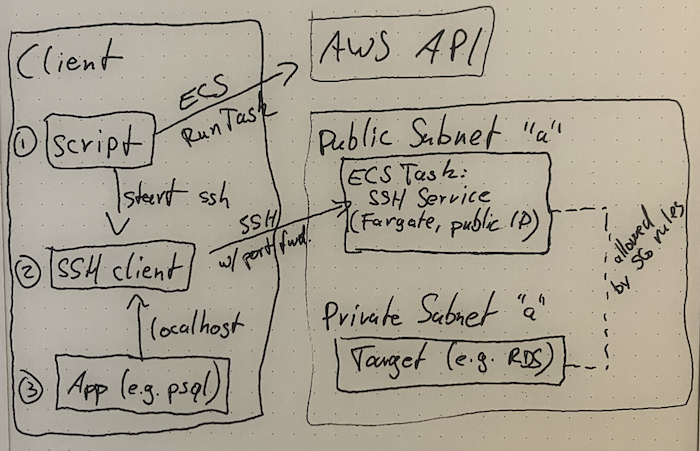
|
30
|
+
|
|
31
|
+
with subprocess.Popen(ssh_command, stdout = subprocess.PIPE, stdin = subprocess.DEVNULL, text = True) as ssh:
|
|
32
|
+
try:
|
|
33
|
+
ssh_out = ssh.stdout.readline().strip() # wait for "connected"
|
|
34
|
+
ssh.stdout.close()
|
|
35
|
+
|
|
36
|
+
print(f"Tunnel connection established.")
|
|
37
|
+
print(f"Running {' '.join(main_command)}")
|
|
38
|
+
print("------------------------------------------------------------------------")
|
|
39
|
+
|
|
40
|
+
subprocess.run(main_command)
|
|
41
|
+
|
|
42
|
+
finally:
|
|
43
|
+
ssh.terminate()
|
|
44
|
+
|
|
45
|
+
if __name__ == "__main__":
|
|
46
|
+
main()
|
|
47
|
+
|
farssh/args.py
ADDED
|
@@ -0,0 +1,78 @@
|
|
|
1
|
+
#!/usr/bin/env python3
|
|
2
|
+
|
|
3
|
+
import argparse
|
|
4
|
+
import sys
|
|
5
|
+
|
|
6
|
+
from farssh.const import *
|
|
7
|
+
from farssh.aws import get_farssh_ssm_parameters
|
|
8
|
+
|
|
9
|
+
class FarsshArguments:
|
|
10
|
+
def __init__(self):
|
|
11
|
+
self.cmd_args = self._parse_args()
|
|
12
|
+
self.cmd_args['remote_port'] = self.cmd_args.get('remote_port') or self.cmd_args.get('local_port')
|
|
13
|
+
|
|
14
|
+
self.enable_execute_command = False
|
|
15
|
+
|
|
16
|
+
# defaults, if not found in Parameter Store
|
|
17
|
+
self.force_public_ipv4 = False
|
|
18
|
+
|
|
19
|
+
for (key, value) in get_farssh_ssm_parameters(FARSSH_ID).items():
|
|
20
|
+
setattr(self, key, value)
|
|
21
|
+
|
|
22
|
+
try:
|
|
23
|
+
self.public_subnets = self.public_subnets.split(',')
|
|
24
|
+
self.force_public_ipv4 = (self.force_public_ipv4 == "true")
|
|
25
|
+
except AttributeError:
|
|
26
|
+
x = f"ERROR: FarSSH parameters not found for this AWS account and region. "
|
|
27
|
+
x += f"Please follow setup instructions at {FARSSH_URL} first."
|
|
28
|
+
raise SystemExit(x)
|
|
29
|
+
|
|
30
|
+
# assign_public_ipv4 is not set from Parameter Store, but set here dynamically. It has to be sent from
|
|
31
|
+
# the client (network configuration in ecs:RunTask), but the AWS side can set force_public_ipv4 to
|
|
32
|
+
# signal the client that the server side needs public IPv4, e.g. for pulling the FarSSH image without NAT.
|
|
33
|
+
# Otherwise, and if we're going to use IPv6 anyway, we don't need public IPv4.
|
|
34
|
+
self.assign_public_ipv4 = "ENABLED" if self.force_public_ipv4 or not self.cmd_args.get('ipv6') else "DISABLED"
|
|
35
|
+
|
|
36
|
+
def _parse_args(self):
|
|
37
|
+
# TODO: the old syntax from v0.1, where it's possible to omit the "tunnel" command word,
|
|
38
|
+
# seems to be impossible with python's argparse. figure out a way to support this again.
|
|
39
|
+
|
|
40
|
+
if len(sys.argv) == 1:
|
|
41
|
+
sys.argv += [ "--help" ]
|
|
42
|
+
|
|
43
|
+
parser = argparse.ArgumentParser(
|
|
44
|
+
description = "Secure on-demand connections into AWS VPCs",
|
|
45
|
+
)
|
|
46
|
+
|
|
47
|
+
parser.add_argument('-6', '--ipv6', action='store_true', help = 'use IPv6 (disables public IPv4 when possible)')
|
|
48
|
+
parser.add_argument('-V', '--version', action='version', version = f'FarSSH {FARSSH_VERSION}')
|
|
49
|
+
|
|
50
|
+
subparsers = parser.add_subparsers(dest = 'command', required = True)
|
|
51
|
+
|
|
52
|
+
parser_ssh = subparsers.add_parser('ssh', help = 'start interactive SSH session')
|
|
53
|
+
parser_ssh.add_argument('extra_arguments', nargs = '*', help = 'extra arguments passed to ssh')
|
|
54
|
+
|
|
55
|
+
parser_proxy = subparsers.add_parser('proxy', help = 'start SOCKS proxy')
|
|
56
|
+
|
|
57
|
+
parser_tunnel = subparsers.add_parser('tunnel', help = 'establish a port-forwarding tunnel')
|
|
58
|
+
parser_tunnel.add_argument('local_port', help='local port number')
|
|
59
|
+
parser_tunnel.add_argument('remote_host', help='remote host address')
|
|
60
|
+
parser_tunnel.add_argument('remote_port', help='remote port (optional)', nargs = '?', default = argparse.SUPPRESS)
|
|
61
|
+
|
|
62
|
+
parser_psql = subparsers.add_parser('psql', help = 'establish tunnel to a postgres endpoint and launch the psql client')
|
|
63
|
+
parser_psql.add_argument('-i', '--identifier', help='database identifier (RDS)')
|
|
64
|
+
parser_psql.add_argument('-u', '--user', dest='username', help='database username')
|
|
65
|
+
parser_psql.add_argument('-U', '--username', help=argparse.SUPPRESS)
|
|
66
|
+
parser_psql.add_argument('database', nargs = '?', help='database name (in the DB engine)')
|
|
67
|
+
parser_psql.add_argument('extra_arguments', nargs = '*', help = 'extra arguments passed to psql')
|
|
68
|
+
|
|
69
|
+
parser_mysql = subparsers.add_parser('mysql', help = 'establish tunnel to a mysql/mariadb endpoint and launch the mysql client')
|
|
70
|
+
parser_mysql.add_argument('-i', '--identifier', help='database identifier (RDS)')
|
|
71
|
+
parser_mysql.add_argument('-p', '--password', dest='password', action='store_true', help='ask for mysql password (pass -p to the mysql client)')
|
|
72
|
+
parser_mysql.add_argument('-u', '--user', dest='username', help=argparse.SUPPRESS)
|
|
73
|
+
parser_mysql.add_argument('-U', '--username', help='database username')
|
|
74
|
+
parser_mysql.add_argument('database', nargs = '?', help='database name (in the DB engine)')
|
|
75
|
+
parser_mysql.add_argument('extra_arguments', nargs = '*', help = 'extra arguments passed to mysql')
|
|
76
|
+
|
|
77
|
+
return vars(parser.parse_args())
|
|
78
|
+
|
farssh/aws.py
ADDED
|
@@ -0,0 +1,181 @@
|
|
|
1
|
+
import base64
|
|
2
|
+
import boto3
|
|
3
|
+
import time
|
|
4
|
+
|
|
5
|
+
# ----------------------------------------------------------------------
|
|
6
|
+
|
|
7
|
+
def get_farssh_ssm_parameters(farssh_id):
|
|
8
|
+
r = {}
|
|
9
|
+
|
|
10
|
+
ssm = boto3.client('ssm')
|
|
11
|
+
for param in ssm.get_parameters_by_path(Path = f"/farssh/{farssh_id}", Recursive = True)['Parameters']:
|
|
12
|
+
param_name = param['Name'].split('/')[-1]
|
|
13
|
+
r[param_name] = param['Value']
|
|
14
|
+
|
|
15
|
+
return r
|
|
16
|
+
|
|
17
|
+
def select_ip_address(args, task):
|
|
18
|
+
ipv4_address = None
|
|
19
|
+
ipv6_address = task['containers'][0]['networkInterfaces'][0].get('ipv6Address')
|
|
20
|
+
|
|
21
|
+
if args.cmd_args.get('ipv6'):
|
|
22
|
+
if not ipv6_address:
|
|
23
|
+
raise SystemExit("ERROR: IPv6 requested, but no IPv6 address on the FarSSH ECS task. Check selected VPC subnets.")
|
|
24
|
+
|
|
25
|
+
return ipv6_address
|
|
26
|
+
|
|
27
|
+
# The IPv6 is available in `task`, but the public IPv4 address is not, so we need to query this separately.
|
|
28
|
+
ec2 = boto3.client('ec2')
|
|
29
|
+
eni_id = [detail['value'] for detail in task['attachments'][0]['details'] if detail['name'] == "networkInterfaceId"][0]
|
|
30
|
+
dni = ec2.describe_network_interfaces(NetworkInterfaceIds = [ eni_id ])
|
|
31
|
+
ipv4_address = dni['NetworkInterfaces'][0].get('Association', {}).get('PublicIp')
|
|
32
|
+
|
|
33
|
+
if ipv4_address:
|
|
34
|
+
return ipv4_address
|
|
35
|
+
|
|
36
|
+
if ipv6_address:
|
|
37
|
+
print("WARNING: FarSSH ECS task has no public IPv4 address; attempting with IPv6.")
|
|
38
|
+
return ipv6_address
|
|
39
|
+
|
|
40
|
+
raise SystemExit("ERROR: FarSSH ECS task has neither IPv6 nor public IPv4 address. Check selected VPC subnets.")
|
|
41
|
+
|
|
42
|
+
def run_ecs_task(args, ssh_keys, farssh_id):
|
|
43
|
+
override_env = [
|
|
44
|
+
{
|
|
45
|
+
"name": "FARSSH_SSH_AUTHORIZED_KEYS",
|
|
46
|
+
"value": ssh_keys.login_key_pub,
|
|
47
|
+
},
|
|
48
|
+
{
|
|
49
|
+
"name": "FARSSH_SSH_HOST_RSA_KEY_BASE64",
|
|
50
|
+
"value": base64.b64encode(bytes(ssh_keys.host_key, "utf-8")).decode("utf-8")
|
|
51
|
+
}
|
|
52
|
+
]
|
|
53
|
+
|
|
54
|
+
override_entry = {
|
|
55
|
+
"name": "farssh", # container name from task definition
|
|
56
|
+
"environment": override_env,
|
|
57
|
+
}
|
|
58
|
+
|
|
59
|
+
overrides = {}
|
|
60
|
+
overrides['containerOverrides'] = [ override_entry ]
|
|
61
|
+
|
|
62
|
+
network_configuration = {
|
|
63
|
+
"awsvpcConfiguration": {
|
|
64
|
+
"subnets": args.public_subnets,
|
|
65
|
+
"securityGroups": [ args.security_group ],
|
|
66
|
+
"assignPublicIp": args.assign_public_ipv4,
|
|
67
|
+
}
|
|
68
|
+
}
|
|
69
|
+
|
|
70
|
+
ecs = boto3.client('ecs')
|
|
71
|
+
tasks = ecs.run_task(
|
|
72
|
+
cluster = "farssh",
|
|
73
|
+
capacityProviderStrategy = [
|
|
74
|
+
{ "capacityProvider": "FARGATE", "weight": 1, "base": 1 },
|
|
75
|
+
# { "capacityProvider": "FARGATE_SPOT", "weight": 0, "base": 0 }, # not supported for Arm images
|
|
76
|
+
],
|
|
77
|
+
taskDefinition = f"farssh-{farssh_id}",
|
|
78
|
+
enableExecuteCommand = args.enable_execute_command,
|
|
79
|
+
overrides = overrides,
|
|
80
|
+
networkConfiguration = network_configuration,
|
|
81
|
+
)
|
|
82
|
+
|
|
83
|
+
task = tasks['tasks'][0]
|
|
84
|
+
task_arn = task['taskArn']
|
|
85
|
+
task_id = task_arn.split('/')[-1]
|
|
86
|
+
|
|
87
|
+
print(f"Launched FarSSH ECS task: {task_id}")
|
|
88
|
+
print(f"Status: {task['lastStatus']}")
|
|
89
|
+
|
|
90
|
+
while True:
|
|
91
|
+
time.sleep(1)
|
|
92
|
+
|
|
93
|
+
task_old = task
|
|
94
|
+
task = ecs.describe_tasks(cluster = "farssh", tasks = [ task_arn ])['tasks'][0]
|
|
95
|
+
|
|
96
|
+
if task['lastStatus'] == "STOPPED":
|
|
97
|
+
raise SystemExit("ERROR: ECS task is in status STOPPED; see ECS Console for details.")
|
|
98
|
+
|
|
99
|
+
if task['lastStatus'] != task_old['lastStatus']:
|
|
100
|
+
print(f"Status: {task['lastStatus']}")
|
|
101
|
+
|
|
102
|
+
if task['lastStatus'] == "RUNNING":
|
|
103
|
+
break
|
|
104
|
+
|
|
105
|
+
ip_address = select_ip_address(args, task)
|
|
106
|
+
|
|
107
|
+
print(f"FarSSH task IP address: {ip_address}")
|
|
108
|
+
print()
|
|
109
|
+
|
|
110
|
+
return ip_address
|
|
111
|
+
|
|
112
|
+
def select_database(args):
|
|
113
|
+
rds = boto3.client('rds')
|
|
114
|
+
|
|
115
|
+
db_instances = rds.describe_db_instances()['DBInstances']
|
|
116
|
+
db_clusters = rds.describe_db_clusters()['DBClusters']
|
|
117
|
+
db_clusters_with_instances = [dbi.get('DBClusterIdentifier') for dbi in db_instances if dbi.get('DBClusterIdentifier')]
|
|
118
|
+
|
|
119
|
+
available = []
|
|
120
|
+
|
|
121
|
+
for candidate_instance in db_instances:
|
|
122
|
+
available += [{
|
|
123
|
+
'identifier': candidate_instance.get('DBInstanceIdentifier'),
|
|
124
|
+
'cluster': candidate_instance.get('DBClusterIdentifier'),
|
|
125
|
+
'engine': candidate_instance.get('Engine'),
|
|
126
|
+
'status': candidate_instance.get('DBInstanceStatus'),
|
|
127
|
+
'hostname': candidate_instance['Endpoint'].get('Address'),
|
|
128
|
+
'port': candidate_instance['Endpoint'].get('Port'),
|
|
129
|
+
'database': candidate_instance.get('DBName'),
|
|
130
|
+
'username': candidate_instance.get('MasterUsername'),
|
|
131
|
+
}]
|
|
132
|
+
|
|
133
|
+
for candidate_cluster in db_clusters:
|
|
134
|
+
cluster_id = candidate_cluster.get('DBClusterIdentifier')
|
|
135
|
+
|
|
136
|
+
# exclude clusters that also have associated instances
|
|
137
|
+
if cluster_id in db_clusters_with_instances:
|
|
138
|
+
continue
|
|
139
|
+
|
|
140
|
+
available += [{
|
|
141
|
+
'identifier': cluster_id,
|
|
142
|
+
'cluster': cluster_id,
|
|
143
|
+
'engine': candidate_instance.get('Engine'),
|
|
144
|
+
'status': candidate_cluster.get('Status'),
|
|
145
|
+
'hostname': candidate_cluster['Endpoint'],
|
|
146
|
+
'port': candidate_cluster.get('Port'),
|
|
147
|
+
'database': candidate_cluster.get('DatabaseName'),
|
|
148
|
+
'username': candidate_cluster.get('MasterUsername'),
|
|
149
|
+
}]
|
|
150
|
+
|
|
151
|
+
candidates = []
|
|
152
|
+
for db in available:
|
|
153
|
+
if db['status'] != "available":
|
|
154
|
+
continue
|
|
155
|
+
|
|
156
|
+
if args.cmd_args.get('command') == "psql" and "postgres" not in db['engine']:
|
|
157
|
+
continue
|
|
158
|
+
|
|
159
|
+
if args.cmd_args.get('command') == "mysql" and "mysql" not in db['engine'] and "maria" not in db['engine']:
|
|
160
|
+
continue
|
|
161
|
+
|
|
162
|
+
if args.cmd_args.get('identifier') and db['identifier'].lower() != args.cmd_args.get('identifier').lower():
|
|
163
|
+
continue
|
|
164
|
+
|
|
165
|
+
candidates += [db]
|
|
166
|
+
|
|
167
|
+
if len(candidates) == 0:
|
|
168
|
+
raise SystemExit("ERROR: No matching database found")
|
|
169
|
+
|
|
170
|
+
if len(candidates) == 1:
|
|
171
|
+
db = candidates[0]
|
|
172
|
+
if not args.cmd_args.get('identifier'):
|
|
173
|
+
print(f"Selected database: {db['identifier']} ({db['hostname']})")
|
|
174
|
+
return db
|
|
175
|
+
|
|
176
|
+
print("Multiple databases available; use --identifier/-i to select one:")
|
|
177
|
+
for db in candidates:
|
|
178
|
+
print(f"- {db['identifier']}")
|
|
179
|
+
|
|
180
|
+
exit(0)
|
|
181
|
+
|
farssh/commands.py
ADDED
|
@@ -0,0 +1,83 @@
|
|
|
1
|
+
import os
|
|
2
|
+
import shutil
|
|
3
|
+
|
|
4
|
+
from farssh.const import *
|
|
5
|
+
|
|
6
|
+
def build_commands(args, ssh_keys, ip_address, database):
|
|
7
|
+
ssh_command = [ shutil.which("ssh") ]
|
|
8
|
+
ssh_command += [ "-p", args.ssh_port ]
|
|
9
|
+
ssh_command += [ "-o", f"IdentityFile {ssh_keys.login_key_file}" ]
|
|
10
|
+
ssh_command += [ "-o", f"IdentitiesOnly yes" ]
|
|
11
|
+
ssh_command += [ "-o", f"UserKnownHostsFile {ssh_keys.known_hosts_file}" ]
|
|
12
|
+
ssh_command += [ "-o", f"StrictHostKeyChecking yes" ]
|
|
13
|
+
ssh_command += [ "-o", f"ExitOnForwardFailure yes" ]
|
|
14
|
+
ssh_command += [ "-l", f"root" ]
|
|
15
|
+
|
|
16
|
+
main_command = None
|
|
17
|
+
|
|
18
|
+
if args.cmd_args.get('command') == "ssh":
|
|
19
|
+
ssh_command += [ ip_address ]
|
|
20
|
+
ssh_command += args.cmd_args.get('extra_arguments')
|
|
21
|
+
|
|
22
|
+
print("------------------------------------------------------------------------")
|
|
23
|
+
print()
|
|
24
|
+
|
|
25
|
+
elif args.cmd_args.get('command') == "proxy":
|
|
26
|
+
ssh_command += [ "-D", "1080" ]
|
|
27
|
+
ssh_command += [ ip_address ]
|
|
28
|
+
ssh_command += [ "echo SOCKS proxy available on port 1080. Hit Ctrl-C to terminate.; sleep infinity" ]
|
|
29
|
+
|
|
30
|
+
elif args.cmd_args.get('command') in [ "psql", "mysql" ]:
|
|
31
|
+
port = str(database['port'])
|
|
32
|
+
|
|
33
|
+
l_args = [ port, database['hostname'], port ]
|
|
34
|
+
ssh_command += [ "-L", ":".join(l_args) ]
|
|
35
|
+
ssh_command += [ ip_address ]
|
|
36
|
+
|
|
37
|
+
if args.cmd_args.get('command') == "psql":
|
|
38
|
+
username = args.cmd_args.get('username') or os.environ.get('PGUSER') or database.get('username')
|
|
39
|
+
database = args.cmd_args.get('database') or os.environ.get('PGDATABASE') or database.get('database') or 'template1'
|
|
40
|
+
main_command = [ "psql" ]
|
|
41
|
+
main_command += [ "--host", "localhost" ]
|
|
42
|
+
main_command += [ "--port", port ]
|
|
43
|
+
main_command += args.cmd_args.get('extra_arguments')
|
|
44
|
+
main_command += [ database ]
|
|
45
|
+
main_command += [ username ]
|
|
46
|
+
elif args.cmd_args.get('command') == "mysql":
|
|
47
|
+
username = args.cmd_args.get('username') or database.get('username')
|
|
48
|
+
database = args.cmd_args.get('database') or database.get('database') or 'mysql'
|
|
49
|
+
main_command = [ "mysql" ]
|
|
50
|
+
main_command += [ "--protocol", "tcp" ] # defaults to local socket otherwise
|
|
51
|
+
main_command += [ "--host", "localhost" ]
|
|
52
|
+
main_command += [ "--port", port ]
|
|
53
|
+
main_command += [ "--user", username ]
|
|
54
|
+
|
|
55
|
+
if args.cmd_args.get('password'):
|
|
56
|
+
# we intentionally only support -p without an argument; it would
|
|
57
|
+
# create ambiguity for argparse otherwise.
|
|
58
|
+
main_command += [ "-p" ]
|
|
59
|
+
|
|
60
|
+
main_command += args.cmd_args.get('extra_arguments')
|
|
61
|
+
main_command += [ database ]
|
|
62
|
+
|
|
63
|
+
elif args.cmd_args.get('command') == "tunnel":
|
|
64
|
+
l_args = [
|
|
65
|
+
args.cmd_args.get('local_port'),
|
|
66
|
+
args.cmd_args.get('remote_host'),
|
|
67
|
+
args.cmd_args.get('remote_port'),
|
|
68
|
+
]
|
|
69
|
+
|
|
70
|
+
ssh_command += [ "-L", ":".join(l_args) ]
|
|
71
|
+
ssh_command += [ ip_address ]
|
|
72
|
+
ssh_command += [ "echo Port forwarding tunnel established. Hit Ctrl-C to terminate.; sleep infinity" ]
|
|
73
|
+
|
|
74
|
+
if main_command:
|
|
75
|
+
mc_path = shutil.which(main_command[0])
|
|
76
|
+
|
|
77
|
+
if not mc_path:
|
|
78
|
+
raise SystemExit(f"ERROR: Command {main_command[0]} not found")
|
|
79
|
+
|
|
80
|
+
main_command[0] = mc_path
|
|
81
|
+
|
|
82
|
+
return (ssh_command, main_command)
|
|
83
|
+
|
farssh/const.py
ADDED
farssh/ssh.py
ADDED
|
@@ -0,0 +1,39 @@
|
|
|
1
|
+
#!/usr/bin/env python3
|
|
2
|
+
|
|
3
|
+
import subprocess
|
|
4
|
+
import tempfile
|
|
5
|
+
|
|
6
|
+
# ----------------------------------------------------------------------
|
|
7
|
+
|
|
8
|
+
class FarsshSshKeyHandler:
|
|
9
|
+
def __init__(self, farssh_args):
|
|
10
|
+
self._tempdir = tempfile.TemporaryDirectory()
|
|
11
|
+
|
|
12
|
+
self.farssh_args = farssh_args
|
|
13
|
+
self.known_hosts_file = f"{self._tempdir.name}/known-hosts"
|
|
14
|
+
|
|
15
|
+
subprocess.run(["ssh-keygen", "-q", "-N", "", "-t", "rsa", "-f", f"{self._tempdir.name}/ssh_host_rsa_key"], check = True)
|
|
16
|
+
subprocess.run(["ssh-keygen", "-q", "-N", "", "-t", "rsa", "-f", f"{self._tempdir.name}/ssh_login_key"], check = True)
|
|
17
|
+
|
|
18
|
+
self.host_key_file = f"{self._tempdir.name}/ssh_host_rsa_key"
|
|
19
|
+
self.host_key_pub_file = f"{self._tempdir.name}/ssh_host_rsa_key.pub"
|
|
20
|
+
self.login_key_file = f"{self._tempdir.name}/ssh_login_key"
|
|
21
|
+
self.login_key_pub_file = f"{self._tempdir.name}/ssh_login_key.pub"
|
|
22
|
+
|
|
23
|
+
self.host_key = open(self.host_key_file, "r").read()
|
|
24
|
+
self.host_key_pub = open(self.host_key_pub_file, "r").read()
|
|
25
|
+
# self.login_key = open(self.login_key_file, "r").read() # not used
|
|
26
|
+
self.login_key_pub = open(self.login_key_pub_file, "r").read()
|
|
27
|
+
|
|
28
|
+
def write_known_hosts(self, ip_address):
|
|
29
|
+
# Create temporary known-hosts file so the SSH client can verify the remote host's public key that we configured it with.
|
|
30
|
+
# The `host` *must* be without port number when the port is 22; this seems to be a quirk of OpenSSH's known-hosts file format.
|
|
31
|
+
|
|
32
|
+
with open(self.known_hosts_file, "w") as f:
|
|
33
|
+
host = ip_address
|
|
34
|
+
|
|
35
|
+
if self.farssh_args.ssh_port != "22":
|
|
36
|
+
host = f"[{host}]:{self.farssh_args.ssh_port}"
|
|
37
|
+
|
|
38
|
+
f.write(f"{host} {self.host_key_pub}\n")
|
|
39
|
+
|
|
@@ -0,0 +1,273 @@
|
|
|
1
|
+
Metadata-Version: 2.3
|
|
2
|
+
Name: farssh
|
|
3
|
+
Version: 0.4
|
|
4
|
+
Summary: Secure on-demand connections into AWS VPCs
|
|
5
|
+
Project-URL: Homepage, https://github.com/apparentorder/farssh
|
|
6
|
+
Author-email: "@apparentorder" <apparentorder@neveragain.de>
|
|
7
|
+
License: BSD 2-clause
|
|
8
|
+
Keywords: aws,mysql,postgresql,proxy,rds,ssh,tunnel,vpc
|
|
9
|
+
Classifier: License :: OSI Approved :: BSD License
|
|
10
|
+
Classifier: Programming Language :: Python :: 3
|
|
11
|
+
Requires-Python: >=3.8
|
|
12
|
+
Requires-Dist: boto3
|
|
13
|
+
Description-Content-Type: text/markdown
|
|
14
|
+
|
|
15
|
+
## FarSSH
|
|
16
|
+
|
|
17
|
+
FarSSH provides secure on-demand connections into AWS VPCs.
|
|
18
|
+
|
|
19
|
+
You can easily connect to in-VPC resources like RDS and OpenSearch endpoints, using tools installed on your local machine.
|
|
20
|
+
|
|
21
|
+
FarSSH features a SOCKS proxy mode, enabling your browser to be "in" the target VPC; this works both for accessing VPC
|
|
22
|
+
resources and as a quick way to tunnel all your browser traffic, so your browser's connections will
|
|
23
|
+
appear to come from this AWS region's public IP addresses (like a VPN).
|
|
24
|
+
|
|
25
|
+
FarSSH integrates with the `psql` and `mysql` command line clients for easy database access.
|
|
26
|
+
|
|
27
|
+
Resources are deployed in *your* AWS account; there is no third party / no external service involved. AWS charges apply,
|
|
28
|
+
at roughly $0.01 per hour (billed per second) per active client; no charges when no client is active.
|
|
29
|
+
|
|
30
|
+
|
|
31
|
+
## Usage
|
|
32
|
+
|
|
33
|
+
### SQL Client Mode
|
|
34
|
+
|
|
35
|
+
To launch a `psql` or `mysql` client directly to one of your RDS databases (instance or cluster), simply:
|
|
36
|
+
```
|
|
37
|
+
farssh psql [-U username] [database_name]
|
|
38
|
+
```
|
|
39
|
+
|
|
40
|
+
For MySQL / MariaDB:
|
|
41
|
+
```
|
|
42
|
+
farssh mysql -p [-u username] [database_name]
|
|
43
|
+
```
|
|
44
|
+
|
|
45
|
+
When not specified, username and database_name will be taken from the RDS configuration (master username and the
|
|
46
|
+
initial database).
|
|
47
|
+
|
|
48
|
+
If only one matching RDS database is available, it will automatically be selected. If there are multiple databases,
|
|
49
|
+
use `--identifier` to select one; otherwise, a list of available databases will be shown.
|
|
50
|
+
|
|
51
|
+
### Tunnel mode
|
|
52
|
+
|
|
53
|
+
Forward a local port to your VPC like this:
|
|
54
|
+
```
|
|
55
|
+
farssh tunnel 5432 pg-cluster.cluster-foo.eu-central-1.rds.amazonaws.com
|
|
56
|
+
```
|
|
57
|
+
|
|
58
|
+
Then connect to the local port 5432 on your machine, e.g. just using `psql -h localhost` in another shell, or your favorite GUI client.
|
|
59
|
+
|
|
60
|
+
Remember to terminate the FarSSH session using `^C` when done.
|
|
61
|
+
|
|
62
|
+
### Proxy mode
|
|
63
|
+
|
|
64
|
+
Simply run
|
|
65
|
+
```
|
|
66
|
+
farssh proxy
|
|
67
|
+
```
|
|
68
|
+
|
|
69
|
+
Then configure your browser to use a SOCKS proxy on `localhost`, port 1080.
|
|
70
|
+
|
|
71
|
+
Remember to terminate the FarSSH session using `^C` when done.
|
|
72
|
+
|
|
73
|
+
### SSH mode
|
|
74
|
+
|
|
75
|
+
If you just need a shell inside your VPC, run
|
|
76
|
+
```
|
|
77
|
+
farssh ssh
|
|
78
|
+
```
|
|
79
|
+
|
|
80
|
+
### Additional Arguments
|
|
81
|
+
|
|
82
|
+
The `psql`, `mysql` and `ssh` commands can be used with additional arguments that will be passed to the client, so you
|
|
83
|
+
could do something like `farssh ssh -- /sbin/ip address` or `farssh psql -- -c "select foo from bar"`.
|
|
84
|
+
|
|
85
|
+
|
|
86
|
+
## Installation
|
|
87
|
+
|
|
88
|
+
### Requirements
|
|
89
|
+
|
|
90
|
+
* The target VPC needs to have a public subnet
|
|
91
|
+
* note that the connection target (FarSSH tunnel mode) can be in a private subnet, or, via VPC peering, even
|
|
92
|
+
in a different VPC
|
|
93
|
+
* For the client machine:
|
|
94
|
+
* local AWS configuration (appropriate credentials / profiles configured etc.)
|
|
95
|
+
* Python 3
|
|
96
|
+
* [AWS SDK for Python](https://boto3.amazonaws.com/v1/documentation/api/latest/guide/quickstart.html), aka `boto3`
|
|
97
|
+
* OpenSSH `ssh` client
|
|
98
|
+
* The `psql` / `mysql` command line utilities if you want to use the respective mode
|
|
99
|
+
|
|
100
|
+
### Deploy configuration on AWS
|
|
101
|
+
|
|
102
|
+
Use this [Cloudformation quick-create link](https://console.aws.amazon.com/cloudformation/home#/stacks/create/review?templateURL=https://farssh.s3.amazonaws.com/cloudformation/farssh.yaml&stackName=farssh-default) to deploy necessary
|
|
103
|
+
resources in the target environment.
|
|
104
|
+
|
|
105
|
+
For Subnets, be sure to select one or more *public* subnets, i.e. that are connected to an Internet Gateway.
|
|
106
|
+
|
|
107
|
+
Make sure you have selected the correct region! For a list of created resources,
|
|
108
|
+
see below.
|
|
109
|
+
|
|
110
|
+
**NOTE: If you intend to use IPv6, please read below, before continuing**
|
|
111
|
+
|
|
112
|
+
**NOTE: If Cloudformation fails to create the stack with this error ...**
|
|
113
|
+
```
|
|
114
|
+
Unable to assume the service linked role. Please verify that the ECS service linked role exists.
|
|
115
|
+
```
|
|
116
|
+
... then please delete the stack from Cloudformation and simply retry from the quick-create link above.
|
|
117
|
+
That role is automatically created by AWS on first-ever ECS usage, but the cluster creation fails anyway. If
|
|
118
|
+
you know how to properly fix this in Cloudformation, please let me know.
|
|
119
|
+
|
|
120
|
+
|
|
121
|
+
### Allow connections from FarSSH
|
|
122
|
+
|
|
123
|
+
Adjust your existing Security Groups to allow inbound connections from the FarSSH Security Group.
|
|
124
|
+
|
|
125
|
+
For example, to allow tunnel connections to your RDS instance, modify a corresponding RDS instance Security Group:
|
|
126
|
+
* Edit *inbound rules*
|
|
127
|
+
* Type: PostgreSQL (or MySQL or ...)
|
|
128
|
+
* Source: custom: security group `farssh-default`
|
|
129
|
+
|
|
130
|
+
### Install the FarSSH client
|
|
131
|
+
|
|
132
|
+
The FarSSH client is available in the Python Package Index, so you can simply use `pip` to install and update:
|
|
133
|
+
|
|
134
|
+
```
|
|
135
|
+
pip install farssh
|
|
136
|
+
```
|
|
137
|
+
|
|
138
|
+
FarSSH will use the target AWS account, region and credentials from the local AWS configuration, e.g. your configuration in `~/.aws`,
|
|
139
|
+
your `AWS_PROFILE` and `AWS_REGION` environment variables etc.
|
|
140
|
+
|
|
141
|
+
**Note:** Make sure that your local environment uses the same AWS account and region that you deployed the
|
|
142
|
+
Cloudformation template to.
|
|
143
|
+
|
|
144
|
+
That's it. For usage, see above.
|
|
145
|
+
|
|
146
|
+
|
|
147
|
+
### Updating
|
|
148
|
+
|
|
149
|
+
To update the FarSSH client, simply re-download the client (see above).
|
|
150
|
+
|
|
151
|
+
To update the FarSSH Cloudformation template, select the FarSSH stack in the Cloudformation console, hit
|
|
152
|
+
"Update" and replace the template using this S3 url: `https://farssh.s3.amazonaws.com/cloudformation/farssh.yaml`
|
|
153
|
+
|
|
154
|
+
To update FarSSH settings, update the stack with the "Use current template" option.
|
|
155
|
+
|
|
156
|
+
|
|
157
|
+
## IPv6 Support
|
|
158
|
+
|
|
159
|
+
Given that AWS now charges for any use of public IPv4 addresses, it's important to use IPv6 when possible.
|
|
160
|
+
|
|
161
|
+
FarSSH supports IPv6 both on the AWS side and on the client.
|
|
162
|
+
|
|
163
|
+
### Client Side
|
|
164
|
+
|
|
165
|
+
Run the client with the option `-6` (or `--ipv6`) to make it connect to the FarSSH ECS task via IPv6. The
|
|
166
|
+
client will fail when the FarSSH ECS task does not have an IPv6 address.
|
|
167
|
+
|
|
168
|
+
### Server Side (ECS)
|
|
169
|
+
|
|
170
|
+
IPv6 for the FarSSH ECS task is a bit more complicated, as we need to work around several IPv6 potholes in AWS.
|
|
171
|
+
|
|
172
|
+
To allow IPv6 connections from the client, you only need to make sure that the configured public subnets have IPv6 configured.
|
|
173
|
+
Fargate tasks will automatically get an IPv6 address. If that doesn't work out of the box, double-check the ECS [`dualStackIPv6` setting](https://docs.aws.amazon.com/AmazonECS/latest/developerguide/ecs-account-settings.html).
|
|
174
|
+
|
|
175
|
+
But an ECS task also needs some IP connectivity to pull the image and to send logs to Cloudwatch. If you have neither VPC endpoints
|
|
176
|
+
nor NAT in your VPC, this will cause the ECS task to fail when a FarSSH client uses IPv6.
|
|
177
|
+
|
|
178
|
+
The Cloudformation template has some knobs for this:
|
|
179
|
+
|
|
180
|
+
The easy fix is to set `ForcePublicIpv4` to `true` in the Cloudformation stack; FarSSH will then always
|
|
181
|
+
request a public IPv4 address, even when a clients connects via IPv6. With the public IPv4 address, everything works.
|
|
182
|
+
|
|
183
|
+
Alternatively, to fully avoid using public IPv4 addresses, change these options during the Cloudformation setup:
|
|
184
|
+
|
|
185
|
+
- set `ImageUri` to the `docker.io` address (the AWS ECR does not support IPv6)
|
|
186
|
+
- disable the `awslogs` driver (Cloudwatch Logs does not support IPv6)
|
|
187
|
+
|
|
188
|
+
|
|
189
|
+
## How it works
|
|
190
|
+
|
|
191
|
+
FarSSH is basically a wrapper around an OpenSSH server and your local OpenSSH client. The latter does the
|
|
192
|
+
actual work of tunneling (local port forwarding, parameter `-L`) and proxying (SOCKS proxy, parameter `-D`).
|
|
193
|
+
|
|
194
|
+
FarSSH consists of three rather simple components to glue it together. Here's a highly professional
|
|
195
|
+
architecture diagram:
|
|
196
|
+
|
|
197
|
+
|
|
198
|
+
|
|
199
|
+
### Container image
|
|
200
|
+
|
|
201
|
+
FarSSH publishes a container image in AWS Public ECR at `public.ecr.aws/apparentorder/farssh`. This is
|
|
202
|
+
a tiny Alpine-based image that only runs an SSH server. There is also a background process that will
|
|
203
|
+
terminate the task if there are no active connections.
|
|
204
|
+
|
|
205
|
+
The same image is also published to Dockerhub at `docker.io/apparentorder/farssh`, because Dockerhub
|
|
206
|
+
supports IPv6 and AWS Public ECR does not. Using Dockerhub over IPv4 might result in pull errors due
|
|
207
|
+
to rate limit though.
|
|
208
|
+
|
|
209
|
+
### Resources in the target environment
|
|
210
|
+
|
|
211
|
+
The Cloudformation template creates the following resources so FarSSH tasks can be run in the target
|
|
212
|
+
environment:
|
|
213
|
+
|
|
214
|
+
* IAM roles for the ECS task (TaskRole and ExecutionRole)
|
|
215
|
+
* ECS resources: cluster `farssh`, task definition `farssh-default`
|
|
216
|
+
* SSM Parameters `/farssh/*`
|
|
217
|
+
* Security Group `farssh-default`
|
|
218
|
+
|
|
219
|
+
### Client
|
|
220
|
+
|
|
221
|
+
The "client" pulls a few parameters from SSM Parameter Store
|
|
222
|
+
and then starts an ECS Task with the FarSSH image. The FarSSH task will be available after a few seconds.
|
|
223
|
+
|
|
224
|
+
The client will then start an `ssh` session to the public IP address of the FarSSH task.
|
|
225
|
+
|
|
226
|
+
Key pairs are generated locally for both the client connection and the FarSSH task's SSH host key, and
|
|
227
|
+
the SSH client will "strictly" check the expected host key.
|
|
228
|
+
|
|
229
|
+
### Caveats
|
|
230
|
+
|
|
231
|
+
* Currently, FarSSH can be deployed to only one VPC per region per account (deploying multiple times to
|
|
232
|
+
different regions works fine)
|
|
233
|
+
|
|
234
|
+
|
|
235
|
+
## Future ideas
|
|
236
|
+
|
|
237
|
+
* Support for multiple VPCs per region
|
|
238
|
+
* Optionally use some kind of "reverse SSH", so the FarSSH task does not need a public IP address
|
|
239
|
+
* Enable using existing ECS clusters (possibly including EC2-based)
|
|
240
|
+
* Only half-way through building this I realized that I could have built the same thing for an
|
|
241
|
+
ad-hoc VPN endpoint instead of an SSH server; I have yet to think through what kind of sense
|
|
242
|
+
that could make
|
|
243
|
+
* Properly tag the public ECR image(s) so it can be coupled with released versions
|
|
244
|
+
|
|
245
|
+
|
|
246
|
+
|
|
247
|
+
## Motivation
|
|
248
|
+
|
|
249
|
+
To my knowledge, all alternative options use [time-based billing](https://tty.neveragain.de/2021/06/29/timeless-services.html),
|
|
250
|
+
meaning that you pay a base fee for having them around, even if you're not using them at all.
|
|
251
|
+
For example, while AWS ClientVPN does charge per connection hour, it also charges you just for
|
|
252
|
+
being associated to your VPC.
|
|
253
|
+
|
|
254
|
+
AWS recently announced [EC2 Instance Connect Endpoints](https://docs.aws.amazon.com/AWSEC2/latest/UserGuide/connect-using-eice.html)
|
|
255
|
+
which absolutely solve this problem, even without additional charges. For a few days after release, this
|
|
256
|
+
allowed to make arbitrary TCP connections (e.g. to your RDS instance's port 5432!).
|
|
257
|
+
|
|
258
|
+
Unfortunately, AWS decided that while this works great and allows most customer to get rid of jump hosts
|
|
259
|
+
once and for all, it's just too easy. As it stands today, it's artificially limited to target ports 22 (ssh)
|
|
260
|
+
and 3389 (RDP). This move also influenced this project's name: While "FarSSH" is a play on "Fargate" and "SSH",
|
|
261
|
+
it shall be pronounced "farce" – because this project shouldn't have to exist.
|
|
262
|
+
|
|
263
|
+
|
|
264
|
+
|
|
265
|
+
## Contact
|
|
266
|
+
|
|
267
|
+
For bug reports, pull requests and other issues please use Github.
|
|
268
|
+
|
|
269
|
+
For everything else:
|
|
270
|
+
|
|
271
|
+
I'm (still) trying to get used to X/Twitter as [@apparentorder](https://twitter.com/apparentorder). DMs are open.
|
|
272
|
+
You can also try legacy message delivery to apparentorder@neveragain.de.
|
|
273
|
+
|
|
@@ -0,0 +1,11 @@
|
|
|
1
|
+
farssh/__init__.py,sha256=47DEQpj8HBSa-_TImW-5JCeuQeRkm5NMpJWZG3hSuFU,0
|
|
2
|
+
farssh/__main__.py,sha256=ROQYTg4ZonNI_9Q2HHBzur3c3muk476XbUa4JpseIEQ,1290
|
|
3
|
+
farssh/args.py,sha256=MymYlAwntfXibNftjTTn96i1CxzWxwoVjrp0TZhTFzI,3938
|
|
4
|
+
farssh/aws.py,sha256=jMGxe6nXdull1QpdYNdLsgUw8IXOHTLAxLWIHSo5cXk,5531
|
|
5
|
+
farssh/commands.py,sha256=hSFOJLRfXxcU3fH1wGmyCYqM8Od0BdkEKIMbEQbOGHE,2990
|
|
6
|
+
farssh/const.py,sha256=5glhV7D_xx-9x-RyYk8TDLLMyj6bQNzkYLYVJjDT0t0,101
|
|
7
|
+
farssh/ssh.py,sha256=Vg5ex4HL1R7aAwj2W8UDStDctX8Pkcz-V5VLYXrjWMo,1620
|
|
8
|
+
farssh-0.4.dist-info/METADATA,sha256=cdNyXc-q4je7AjnMXmv9yuyo0iQQFqB1uDYKwJoXP54,11128
|
|
9
|
+
farssh-0.4.dist-info/WHEEL,sha256=C2FUgwZgiLbznR-k0b_5k3Ai_1aASOXDss3lzCUsUug,87
|
|
10
|
+
farssh-0.4.dist-info/entry_points.txt,sha256=z_HBSvz92D1GbXve__7qdAgOS1uUrG4bVGVnOxrfx5w,48
|
|
11
|
+
farssh-0.4.dist-info/RECORD,,
|