dmsh 0.3.6__cp313-none-any.whl
This diff represents the content of publicly available package versions that have been released to one of the supported registries. The information contained in this diff is provided for informational purposes only and reflects changes between package versions as they appear in their respective public registries.
- dmsh/py.typed +0 -0
- dmsh-0.3.6.dist-info/METADATA +326 -0
- dmsh-0.3.6.dist-info/RECORD +7 -0
- dmsh-0.3.6.dist-info/WHEEL +5 -0
- dmsh-0.3.6.dist-info/top_level.txt +1 -0
- dmsh.cpython-313.sfc +0 -0
dmsh/py.typed
ADDED
|
File without changes
|
|
@@ -0,0 +1,326 @@
|
|
|
1
|
+
Metadata-Version: 2.4
|
|
2
|
+
Name: dmsh
|
|
3
|
+
Version: 0.3.6
|
|
4
|
+
Summary: High-quality 2D mesh generator based on distmesh
|
|
5
|
+
Author-email: Nico Schlömer <nico.schloemer@gmail.com>
|
|
6
|
+
License-Expression: LicenseRef-Proprietary
|
|
7
|
+
Project-URL: Home, https://github.com/meshpro/dmsh
|
|
8
|
+
Project-URL: Issues, https://github.com/meshpro/dmsh/issues
|
|
9
|
+
Classifier: Development Status :: 4 - Beta
|
|
10
|
+
Classifier: Intended Audience :: Science/Research
|
|
11
|
+
Classifier: Operating System :: OS Independent
|
|
12
|
+
Classifier: Programming Language :: Python
|
|
13
|
+
Classifier: Programming Language :: Python :: 3
|
|
14
|
+
Classifier: Programming Language :: Python :: 3.10
|
|
15
|
+
Classifier: Programming Language :: Python :: 3.11
|
|
16
|
+
Classifier: Programming Language :: Python :: 3.12
|
|
17
|
+
Classifier: Programming Language :: Python :: 3.13
|
|
18
|
+
Classifier: Programming Language :: Python :: 3.14
|
|
19
|
+
Classifier: Topic :: Scientific/Engineering
|
|
20
|
+
Classifier: Topic :: Scientific/Engineering :: Mathematics
|
|
21
|
+
Requires-Python: >=3.10
|
|
22
|
+
Description-Content-Type: text/markdown
|
|
23
|
+
Requires-Dist: meshplex<0.22.0,>=0.21.17
|
|
24
|
+
Requires-Dist: npx
|
|
25
|
+
Requires-Dist: numpy
|
|
26
|
+
Requires-Dist: stonefish-license-manager
|
|
27
|
+
Requires-Dist: scipy
|
|
28
|
+
Provides-Extra: all
|
|
29
|
+
Requires-Dist: matplotlib; extra == "all"
|
|
30
|
+
Requires-Dist: stonefish-runtime>=0.4.6
|
|
31
|
+
|
|
32
|
+
<p align="center">
|
|
33
|
+
<a href="https://github.com/nschloe/dmsh"><img alt="dmsh" src="https://raw.githubusercontent.com/meshpro/dmsh/main/logo/logo-with-text.svg" width="50%"></a>
|
|
34
|
+
<p align="center">The worst mesh generator you'll ever use.</p>
|
|
35
|
+
</p>
|
|
36
|
+
|
|
37
|
+
[](https://pypi.org/project/dmsh/)
|
|
38
|
+
[](https://pypi.org/project/dmsh/)
|
|
39
|
+
[](https://github.com/nschloe/dmsh)
|
|
40
|
+
[](https://pypistats.org/packages/dmsh)
|
|
41
|
+
|
|
42
|
+
[](https://discord.gg/PBCCvwHqpv)
|
|
43
|
+
|
|
44
|
+
Inspired by [distmesh](http://persson.berkeley.edu/distmesh/), dmsh can be slow,
|
|
45
|
+
requires a lot of memory, and isn't terribly robust either.
|
|
46
|
+
|
|
47
|
+
On the plus side,
|
|
48
|
+
|
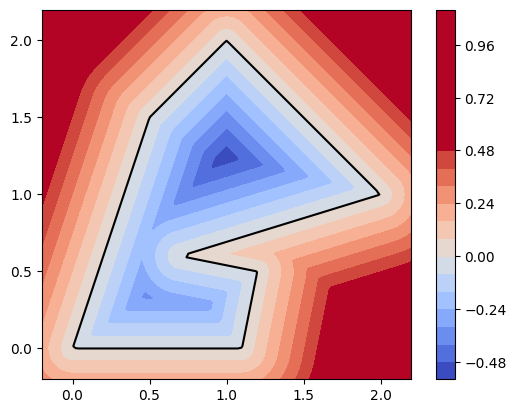
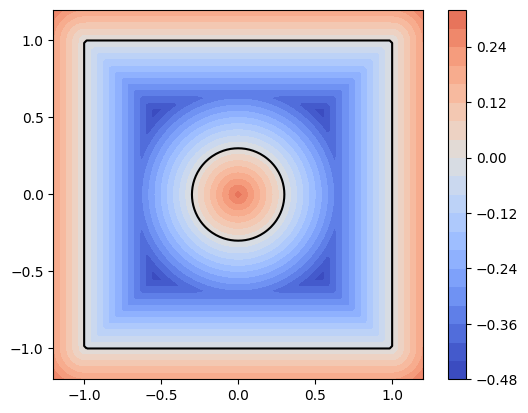
|
49
|
+
- it's got a user-friendly interface,
|
|
50
|
+
- is pure Python (and hence easily installable on any system), and
|
|
51
|
+
- it produces pretty high-quality meshes.
|
|
52
|
+
|
|
53
|
+
Combined with [optimesh](https://github.com/nschloe/optimesh), dmsh produces the
|
|
54
|
+
highest-quality 2D meshes in the west.
|
|
55
|
+
|
|
56
|
+
### Examples
|
|
57
|
+
|
|
58
|
+
#### Primitives
|
|
59
|
+
|
|
60
|
+
| <img alt="circle" src="https://raw.githubusercontent.com/meshpro/dmsh/main/plots/circle.svg" width="100%"> | <img alt="circle" src="https://raw.githubusercontent.com/meshpro/dmsh/main/plots/rectangle.svg" width="100%"> | <img alt="circle" src="https://raw.githubusercontent.com/meshpro/dmsh/main/plots/polygon.svg" width="100%"> |
|
|
61
|
+
| :--------------------------------------------------------------------------------------------------------: | :-----------------------------------------------------------------------------------------------------------: | :---------------------------------------------------------------------------------------------------------: |
|
|
62
|
+
|
|
63
|
+
```python
|
|
64
|
+
import dmsh
|
|
65
|
+
import meshio
|
|
66
|
+
import optimesh
|
|
67
|
+
|
|
68
|
+
geo = dmsh.Circle([0.0, 0.0], 1.0)
|
|
69
|
+
X, cells = dmsh.generate(geo, 0.1)
|
|
70
|
+
|
|
71
|
+
# optionally optimize the mesh
|
|
72
|
+
X, cells = optimesh.optimize_points_cells(X, cells, "CVT (full)", 1.0e-10, 100)
|
|
73
|
+
|
|
74
|
+
# visualize the mesh
|
|
75
|
+
dmsh.show(X, cells, geo)
|
|
76
|
+
|
|
77
|
+
# and write it to a file
|
|
78
|
+
meshio.Mesh(X, {"triangle": cells}).write("circle.vtk")
|
|
79
|
+
```
|
|
80
|
+
|
|
81
|
+
```python
|
|
82
|
+
import dmsh
|
|
83
|
+
|
|
84
|
+
geo = dmsh.Rectangle(-1.0, +2.0, -1.0, +1.0)
|
|
85
|
+
X, cells = dmsh.generate(geo, 0.1)
|
|
86
|
+
```
|
|
87
|
+
|
|
88
|
+
```python
|
|
89
|
+
import dmsh
|
|
90
|
+
|
|
91
|
+
geo = dmsh.Polygon(
|
|
92
|
+
[
|
|
93
|
+
[0.0, 0.0],
|
|
94
|
+
[1.1, 0.0],
|
|
95
|
+
[1.2, 0.5],
|
|
96
|
+
[0.7, 0.6],
|
|
97
|
+
[2.0, 1.0],
|
|
98
|
+
[1.0, 2.0],
|
|
99
|
+
[0.5, 1.5],
|
|
100
|
+
]
|
|
101
|
+
)
|
|
102
|
+
X, cells = dmsh.generate(geo, 0.1)
|
|
103
|
+
```
|
|
104
|
+
|
|
105
|
+
#### Combinations
|
|
106
|
+
|
|
107
|
+
##### Difference
|
|
108
|
+
|
|
109
|
+
| <img src="https://raw.githubusercontent.com/meshpro/dmsh/main/plots/moon.svg" width="100%"> | <img src="https://raw.githubusercontent.com/meshpro/dmsh/main/plots/pacman.svg" width="100%"> | <img src="https://raw.githubusercontent.com/meshpro/dmsh/main/plots/rectangle-hole-refinement.svg" width="100%"> |
|
|
110
|
+
| :-----------------------------------------------------------------------------------------: | :-------------------------------------------------------------------------------------------: | :--------------------------------------------------------------------------------------------------------------: |
|
|
111
|
+
|
|
112
|
+
```python
|
|
113
|
+
import dmsh
|
|
114
|
+
|
|
115
|
+
geo = dmsh.Circle([-0.5, 0.0], 1.0) - dmsh.Circle([+0.5, 0.0], 1.0)
|
|
116
|
+
X, cells = dmsh.generate(geo, 0.1)
|
|
117
|
+
```
|
|
118
|
+
|
|
119
|
+
```python
|
|
120
|
+
import dmsh
|
|
121
|
+
|
|
122
|
+
geo = dmsh.Circle([0.0, 0.0], 1.0) - dmsh.Polygon([[0.0, 0.0], [1.5, 0.4], [1.5, -0.4]])
|
|
123
|
+
X, cells = dmsh.generate(geo, 0.1, tol=1.0e-10)
|
|
124
|
+
```
|
|
125
|
+
|
|
126
|
+
The following example uses a nonconstant edge length; it depends on the distance to the
|
|
127
|
+
circle `c`.
|
|
128
|
+
|
|
129
|
+
```python
|
|
130
|
+
import dmsh
|
|
131
|
+
import numpy as np
|
|
132
|
+
|
|
133
|
+
r = dmsh.Rectangle(-1.0, +1.0, -1.0, +1.0)
|
|
134
|
+
c = dmsh.Circle([0.0, 0.0], 0.3)
|
|
135
|
+
geo = r - c
|
|
136
|
+
|
|
137
|
+
X, cells = dmsh.generate(geo, lambda pts: np.abs(c.dist(pts)) / 5 + 0.05, tol=1.0e-10)
|
|
138
|
+
```
|
|
139
|
+
|
|
140
|
+
##### Union
|
|
141
|
+
|
|
142
|
+
| <img src="https://raw.githubusercontent.com/meshpro/dmsh/main/plots/union-circles.svg" width="100%"> | <img src="https://raw.githubusercontent.com/meshpro/dmsh/main/plots/union-rectangles.svg" width="100%"> | <img src="https://raw.githubusercontent.com/meshpro/dmsh/main/plots/union-three-circles.svg" width="100%"> |
|
|
143
|
+
| :--------------------------------------------------------------------------------------------------: | :-----------------------------------------------------------------------------------------------------: | :--------------------------------------------------------------------------------------------------------: |
|
|
144
|
+
|
|
145
|
+
```python
|
|
146
|
+
import dmsh
|
|
147
|
+
|
|
148
|
+
geo = dmsh.Circle([-0.5, 0.0], 1.0) + dmsh.Circle([+0.5, 0.0], 1.0)
|
|
149
|
+
X, cells = dmsh.generate(geo, 0.15)
|
|
150
|
+
```
|
|
151
|
+
|
|
152
|
+
```python
|
|
153
|
+
import dmsh
|
|
154
|
+
|
|
155
|
+
geo = dmsh.Rectangle(-1.0, +0.5, -1.0, +0.5) + dmsh.Rectangle(-0.5, +1.0, -0.5, +1.0)
|
|
156
|
+
X, cells = dmsh.generate(geo, 0.15)
|
|
157
|
+
```
|
|
158
|
+
|
|
159
|
+
```python
|
|
160
|
+
import dmsh
|
|
161
|
+
import numpy as np
|
|
162
|
+
|
|
163
|
+
angles = np.pi * np.array([3.0 / 6.0, 7.0 / 6.0, 11.0 / 6.0])
|
|
164
|
+
geo = dmsh.Union(
|
|
165
|
+
[
|
|
166
|
+
dmsh.Circle([np.cos(angles[0]), np.sin(angles[0])], 1.0),
|
|
167
|
+
dmsh.Circle([np.cos(angles[1]), np.sin(angles[1])], 1.0),
|
|
168
|
+
dmsh.Circle([np.cos(angles[2]), np.sin(angles[2])], 1.0),
|
|
169
|
+
]
|
|
170
|
+
)
|
|
171
|
+
X, cells = dmsh.generate(geo, 0.15)
|
|
172
|
+
```
|
|
173
|
+
|
|
174
|
+
#### Intersection
|
|
175
|
+
|
|
176
|
+
| <img src="https://raw.githubusercontent.com/meshpro/dmsh/main/plots/intersection-circles.svg" width="100%"> | <img src="https://raw.githubusercontent.com/meshpro/dmsh/main/plots/intersection-three-circles.svg" width="100%"> | <img src="https://raw.githubusercontent.com/meshpro/dmsh/main/plots/intersection-circle-halfspace.svg" width="100%"> |
|
|
177
|
+
| :---------------------------------------------------------------------------------------------------------: | :---------------------------------------------------------------------------------------------------------------: | :------------------------------------------------------------------------------------------------------------------: |
|
|
178
|
+
|
|
179
|
+
```python
|
|
180
|
+
import dmsh
|
|
181
|
+
|
|
182
|
+
geo = dmsh.Circle([0.0, -0.5], 1.0) & dmsh.Circle([0.0, +0.5], 1.0)
|
|
183
|
+
X, cells = dmsh.generate(geo, 0.1, tol=1.0e-10)
|
|
184
|
+
```
|
|
185
|
+
|
|
186
|
+
```python
|
|
187
|
+
import dmsh
|
|
188
|
+
import numpy as np
|
|
189
|
+
|
|
190
|
+
angles = np.pi * np.array([3.0 / 6.0, 7.0 / 6.0, 11.0 / 6.0])
|
|
191
|
+
geo = dmsh.Intersection(
|
|
192
|
+
[
|
|
193
|
+
dmsh.Circle([np.cos(angles[0]), np.sin(angles[0])], 1.5),
|
|
194
|
+
dmsh.Circle([np.cos(angles[1]), np.sin(angles[1])], 1.5),
|
|
195
|
+
dmsh.Circle([np.cos(angles[2]), np.sin(angles[2])], 1.5),
|
|
196
|
+
]
|
|
197
|
+
)
|
|
198
|
+
X, cells = dmsh.generate(geo, 0.1, tol=1.0e-10)
|
|
199
|
+
```
|
|
200
|
+
|
|
201
|
+
The following uses the `HalfSpace` primtive for cutting off a circle.
|
|
202
|
+
|
|
203
|
+
```python
|
|
204
|
+
import dmsh
|
|
205
|
+
|
|
206
|
+
geo = dmsh.HalfSpace([1.0, 1.0]) & dmsh.Circle([0.0, 0.0], 1.0)
|
|
207
|
+
X, cells = dmsh.generate(geo, 0.1)
|
|
208
|
+
```
|
|
209
|
+
|
|
210
|
+
### Rotation, translation, scaling
|
|
211
|
+
|
|
212
|
+
| <img src="https://raw.githubusercontent.com/meshpro/dmsh/main/plots/rotation.svg" width="100%"> | <img src="https://raw.githubusercontent.com/meshpro/dmsh/main/plots/scaling.svg" width="100%"> |
|
|
213
|
+
| :---------------------------------------------------------------------------------------------: | :--------------------------------------------------------------------------------------------: |
|
|
214
|
+
|
|
215
|
+
```python
|
|
216
|
+
import dmsh
|
|
217
|
+
import numpy as np
|
|
218
|
+
|
|
219
|
+
geo = dmsh.Rotation(dmsh.Rectangle(-1.0, +2.0, -1.0, +1.0), 0.1 * np.pi)
|
|
220
|
+
X, cells = dmsh.generate(geo, 0.1, tol=1.0e-10)
|
|
221
|
+
```
|
|
222
|
+
|
|
223
|
+
```python
|
|
224
|
+
import dmsh
|
|
225
|
+
|
|
226
|
+
geo = dmsh.Rectangle(-1.0, +2.0, -1.0, +1.0) + [1.0, 1.0]
|
|
227
|
+
X, cells = dmsh.generate(geo, 0.1)
|
|
228
|
+
```
|
|
229
|
+
|
|
230
|
+
```python
|
|
231
|
+
import dmsh
|
|
232
|
+
|
|
233
|
+
geo = dmsh.Rectangle(-1.0, +2.0, -1.0, +1.0) * 2.0
|
|
234
|
+
X, cells = dmsh.generate(geo, 0.1, tol=1.0e-5)
|
|
235
|
+
```
|
|
236
|
+
|
|
237
|
+
### Local refinement
|
|
238
|
+
|
|
239
|
+
<img alt="local-refinement" src="https://raw.githubusercontent.com/meshpro/dmsh/main/plots/local-refinement.svg" width="30%">
|
|
240
|
+
|
|
241
|
+
All objects can be used to refine the mesh according to the distance to the object;
|
|
242
|
+
e.g. a `Path`:
|
|
243
|
+
|
|
244
|
+
```python
|
|
245
|
+
import dmsh
|
|
246
|
+
|
|
247
|
+
geo = dmsh.Rectangle(0.0, 1.0, 0.0, 1.0)
|
|
248
|
+
|
|
249
|
+
p1 = dmsh.Path([[0.4, 0.6], [0.6, 0.4]])
|
|
250
|
+
|
|
251
|
+
|
|
252
|
+
def target_edge_length(x):
|
|
253
|
+
return 0.03 + 0.1 * p1.dist(x)
|
|
254
|
+
|
|
255
|
+
|
|
256
|
+
X, cells = dmsh.generate(geo, target_edge_length, tol=1.0e-10)
|
|
257
|
+
```
|
|
258
|
+
|
|
259
|
+
### Custom shapes
|
|
260
|
+
|
|
261
|
+
It is also possible to define your own geometry. Simply create a class derived from
|
|
262
|
+
`dmsh.Geometry` that contains a `dist` method and a method to project points onto the
|
|
263
|
+
boundary.
|
|
264
|
+
|
|
265
|
+
```python
|
|
266
|
+
import dmsh
|
|
267
|
+
import numpy as np
|
|
268
|
+
|
|
269
|
+
|
|
270
|
+
class MyDisk(dmsh.Geometry):
|
|
271
|
+
def __init__(self):
|
|
272
|
+
self.r = 1.0
|
|
273
|
+
self.x0 = [0.0, 0.0]
|
|
274
|
+
bounding_box = [-1.0, 1.0, -1.0, 1.0]
|
|
275
|
+
feature_points = np.array([[], []]).T
|
|
276
|
+
super().__init__(bounding_box, feature_points)
|
|
277
|
+
|
|
278
|
+
def dist(self, x):
|
|
279
|
+
assert x.shape[0] == 2
|
|
280
|
+
y = (x.T - self.x0).T
|
|
281
|
+
return np.sqrt(np.einsum("i...,i...->...", y, y)) - self.r
|
|
282
|
+
|
|
283
|
+
def boundary_step(self, x):
|
|
284
|
+
# project onto the circle
|
|
285
|
+
y = (x.T - self.x0).T
|
|
286
|
+
r = np.sqrt(np.einsum("ij,ij->j", y, y))
|
|
287
|
+
return ((y / r * self.r).T + self.x0).T
|
|
288
|
+
|
|
289
|
+
|
|
290
|
+
geo = MyDisk()
|
|
291
|
+
X, cells = dmsh.generate(geo, 0.1)
|
|
292
|
+
```
|
|
293
|
+
|
|
294
|
+
### Debugging
|
|
295
|
+
|
|
296
|
+
|  |  |
|
|
297
|
+
| :-----------------------------------------------------------------------------------------------: | :------------------------------------------------------------------------------------------------------: |
|
|
298
|
+
|
|
299
|
+
dmsh is rather fragile, but sometimes the break-downs are due to an incorrectly defined
|
|
300
|
+
geometry. Use
|
|
301
|
+
|
|
302
|
+
```
|
|
303
|
+
geo.show()
|
|
304
|
+
```
|
|
305
|
+
|
|
306
|
+
to inspect the level set function of your domain. (It must be negative inside the
|
|
307
|
+
domain and positive outside. The 0-level set forms the domain boundary.)
|
|
308
|
+
|
|
309
|
+
### Installation
|
|
310
|
+
|
|
311
|
+
dmsh is [available from the Python Package
|
|
312
|
+
Index](https://pypi.org/project/dmsh/), so simply type
|
|
313
|
+
|
|
314
|
+
```
|
|
315
|
+
pip install dmsh
|
|
316
|
+
```
|
|
317
|
+
|
|
318
|
+
to install.
|
|
319
|
+
|
|
320
|
+
### Testing
|
|
321
|
+
|
|
322
|
+
To run the dmsh unit tests, check out this repository and type
|
|
323
|
+
|
|
324
|
+
```
|
|
325
|
+
tox
|
|
326
|
+
```
|
|
@@ -0,0 +1,7 @@
|
|
|
1
|
+
dmsh/py.typed,sha256=47DEQpj8HBSa-_TImW-5JCeuQeRkm5NMpJWZG3hSuFU,0
|
|
2
|
+
dmsh-0.3.6.dist-info/METADATA,sha256=D67sZtePyri9mY2KD0ncNXIPwp-zUZe2K3R-8Fn7MbE,11192
|
|
3
|
+
dmsh-0.3.6.dist-info/RECORD,sha256=47DEQpj8HBSa-_TImW-5JCeuQeRkm5NMpJWZG3hSuFU,0
|
|
4
|
+
dmsh-0.3.6.dist-info/WHEEL,sha256=EzUt3pYDvnkhACfxBprtVyxF_hDBkiY66r1jOpHqmA0,91
|
|
5
|
+
dmsh-0.3.6.dist-info/top_level.txt,sha256=k0yVaKPAwcsf1B5dwMb9lUsxo0GXQi23BzruoCHPdXw,5
|
|
6
|
+
dmsh.cpython-313.sfc,sha256=SDzM6V5QO3eV7UcVS81BjKIya6TKp6y2W5iYPvnGFGY,93107
|
|
7
|
+
dmsh-0.3.6.dist-info/RECORD,,
|
|
@@ -0,0 +1 @@
|
|
|
1
|
+
dmsh
|
dmsh.cpython-313.sfc
ADDED
|
Binary file
|