cratefill 0.1.0__py3-none-any.whl
This diff represents the content of publicly available package versions that have been released to one of the supported registries. The information contained in this diff is provided for informational purposes only and reflects changes between package versions as they appear in their respective public registries.
|
@@ -0,0 +1,124 @@
|
|
|
1
|
+
Metadata-Version: 2.4
|
|
2
|
+
Name: cratefill
|
|
3
|
+
Version: 0.1.0
|
|
4
|
+
Summary: Desktop app to move songs between CSV files, music folders, and YouTube Music playlists.
|
|
5
|
+
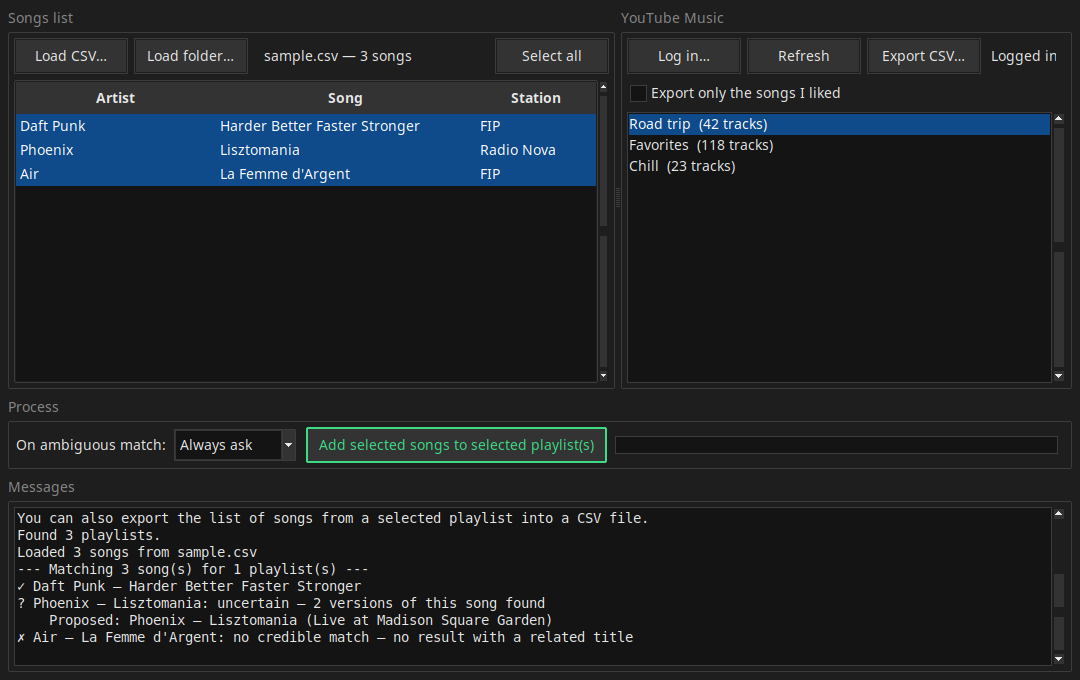
Author-email: flochrislas <florent.globalsign@gmail.com>
|
|
6
|
+
License-Expression: GPL-3.0-or-later
|
|
7
|
+
Project-URL: Homepage, https://github.com/flochrislas/cratefill
|
|
8
|
+
Project-URL: Repository, https://github.com/flochrislas/cratefill
|
|
9
|
+
Project-URL: Issues, https://github.com/flochrislas/cratefill/issues
|
|
10
|
+
Keywords: youtube-music,ytmusic,playlist,csv,tkinter,music
|
|
11
|
+
Classifier: Development Status :: 4 - Beta
|
|
12
|
+
Classifier: Environment :: X11 Applications
|
|
13
|
+
Classifier: Environment :: Win32 (MS Windows)
|
|
14
|
+
Classifier: Intended Audience :: End Users/Desktop
|
|
15
|
+
Classifier: Operating System :: Microsoft :: Windows
|
|
16
|
+
Classifier: Operating System :: POSIX :: Linux
|
|
17
|
+
Classifier: Programming Language :: Python :: 3
|
|
18
|
+
Classifier: Topic :: Multimedia :: Sound/Audio
|
|
19
|
+
Requires-Python: >=3.10
|
|
20
|
+
Description-Content-Type: text/markdown
|
|
21
|
+
License-File: LICENSE
|
|
22
|
+
Requires-Dist: ytmusicapi>=1.12
|
|
23
|
+
Provides-Extra: dnd
|
|
24
|
+
Requires-Dist: tkinterdnd2>=0.4; extra == "dnd"
|
|
25
|
+
Dynamic: license-file
|
|
26
|
+
|
|
27
|
+
# Cratefill
|
|
28
|
+
|
|
29
|
+
A small desktop app that moves songs between CSV files, folders of music files,
|
|
30
|
+
and your YouTube Music playlists.
|
|
31
|
+
|
|
32
|
+
|
|
33
|
+
|
|
34
|
+
- **Left pane:** load your songs, either from a CSV (artist + song name; extra
|
|
35
|
+
columns are ignored) or from a folder of music files (**Load folder…** — the
|
|
36
|
+
folder name + file name become the search query). You can also drag and drop
|
|
37
|
+
a CSV file or a folder straight onto the song list. Click a column title to sort.
|
|
38
|
+
- **Right pane:** log in to YouTube Music and see your playlists.
|
|
39
|
+
- Select songs on the left, one or more playlists on the right, click **Add** —
|
|
40
|
+
each song is searched on YouTube Music and added to every selected playlist.
|
|
41
|
+
- The log pane shows what matched (`✓`), what matched only loosely (`?` — review these),
|
|
42
|
+
and what wasn't found (`✗`).
|
|
43
|
+
- The reverse works too: select playlists and click **Export CSV…** to save each
|
|
44
|
+
one as a CSV file with artist, track name, and album columns.
|
|
45
|
+
|
|
46
|
+
## Get it
|
|
47
|
+
|
|
48
|
+
- **Windows, no Python:** download `Cratefill.exe` from the
|
|
49
|
+
[latest release](https://github.com/flochrislas/cratefill/releases/latest)
|
|
50
|
+
and double-click it.
|
|
51
|
+
- **With Python (any OS):** `pipx install cratefill` (or `pip install cratefill`),
|
|
52
|
+
then run `cratefill`. Add drag-and-drop with `pipx install "cratefill[dnd]"`.
|
|
53
|
+
- **From source:** see [Run](#run) below.
|
|
54
|
+
|
|
55
|
+
## Requirements
|
|
56
|
+
|
|
57
|
+
- Python 3.10+ (uses the built-in Tkinter GUI)
|
|
58
|
+
- [ytmusicapi](https://github.com/sigma67/ytmusicapi)
|
|
59
|
+
- [tkinterdnd2](https://github.com/Eliav2/tkinterdnd2) (optional — enables
|
|
60
|
+
drag-and-drop; the app runs fine without it)
|
|
61
|
+
|
|
62
|
+
```
|
|
63
|
+
py -m pip install -r requirements.txt
|
|
64
|
+
```
|
|
65
|
+
|
|
66
|
+
## Run
|
|
67
|
+
|
|
68
|
+
Windows:
|
|
69
|
+
|
|
70
|
+
```
|
|
71
|
+
py cratefill.py
|
|
72
|
+
```
|
|
73
|
+
|
|
74
|
+
Linux (e.g. Ubuntu) — Tkinter is packaged separately from Python there, so install it once:
|
|
75
|
+
|
|
76
|
+
```
|
|
77
|
+
sudo apt install python3-tk
|
|
78
|
+
python3 -m pip install -r requirements.txt
|
|
79
|
+
python3 cratefill.py
|
|
80
|
+
```
|
|
81
|
+
|
|
82
|
+
## Logging in (first time)
|
|
83
|
+
|
|
84
|
+
YouTube Music has no public login API, so the app authenticates the way
|
|
85
|
+
[ytmusicapi browser auth](https://ytmusicapi.readthedocs.io/en/stable/setup/browser.html)
|
|
86
|
+
does — by reusing your browser session:
|
|
87
|
+
|
|
88
|
+
1. Open https://music.youtube.com in your browser, logged in to your account.
|
|
89
|
+
2. Press F12 → **Network** tab, then click around the page (e.g. Library).
|
|
90
|
+
3. Filter requests by `browse`, click one of the `browse?...` POST requests.
|
|
91
|
+
4. Copy the **request headers**:
|
|
92
|
+
- **Firefox:** right-click the request → Copy Value → **Copy Request Headers**
|
|
93
|
+
- **Chrome/Edge:** in the Headers panel, select everything under
|
|
94
|
+
*Request Headers* and copy it.
|
|
95
|
+
5. In Cratefill, click **Log in…**, paste the headers, click **Log in**.
|
|
96
|
+
|
|
97
|
+
The session is saved to `browser.json` next to the app, so subsequent launches
|
|
98
|
+
log in automatically. It stays valid until you log out of YouTube in that
|
|
99
|
+
browser. **`browser.json` contains your session cookies — don't share it.**
|
|
100
|
+
|
|
101
|
+
## CSV format
|
|
102
|
+
|
|
103
|
+
Any CSV with an artist column and a song-name column works:
|
|
104
|
+
|
|
105
|
+
- Column headers are detected by name (`artist`/`artiste`, `title`/`titre`/`song`/`track`/`chanson`…).
|
|
106
|
+
- Without recognizable headers, the first column is taken as artist, the second as song name.
|
|
107
|
+
- Comma, semicolon, or tab delimiters are auto-detected; extra columns are ignored.
|
|
108
|
+
- An optional `station`/`radio`/`chaîne` column is displayed in the app — handy to
|
|
109
|
+
remember where you heard a song — but is not used when searching YouTube Music.
|
|
110
|
+
|
|
111
|
+
See `sample.csv` for an example.
|
|
112
|
+
|
|
113
|
+
## Files
|
|
114
|
+
|
|
115
|
+
| File | Purpose |
|
|
116
|
+
|---|---|
|
|
117
|
+
| `cratefill.py` | The app (single file) |
|
|
118
|
+
| `sample.csv` | Example CSV |
|
|
119
|
+
| `browser.json` | Your saved login session (created on first login — keep private) |
|
|
120
|
+
| `RESEARCH.md` | Notes on the approaches considered |
|
|
121
|
+
|
|
122
|
+
## License
|
|
123
|
+
|
|
124
|
+
[GNU General Public License v3.0](LICENSE)
|
|
@@ -0,0 +1,7 @@
|
|
|
1
|
+
cratefill.py,sha256=5zoJAQHmzyT8p7vvoCSwDboWA2NWlmbvUfIeinBIJgs,32001
|
|
2
|
+
cratefill-0.1.0.dist-info/licenses/LICENSE,sha256=v94f2Uw7F7ifu_pjIWYMgoT2Mb8SbbHgoyyJeUSoQts,35825
|
|
3
|
+
cratefill-0.1.0.dist-info/METADATA,sha256=3wYfpiHr3u5cj6E487ZGN-S94Wyw3kthCKQ0koAFWx0,5054
|
|
4
|
+
cratefill-0.1.0.dist-info/WHEEL,sha256=aeYiig01lYGDzBgS8HxWXOg3uV61G9ijOsup-k9o1sk,91
|
|
5
|
+
cratefill-0.1.0.dist-info/entry_points.txt,sha256=G-mippib9ja8Z-0DBuoWipcnabX3iExVlx_VOAwLqYE,41
|
|
6
|
+
cratefill-0.1.0.dist-info/top_level.txt,sha256=nKiOAWAflD6KBWAEluSbbNXVZxnnZMvVn0cuJ7DQctU,10
|
|
7
|
+
cratefill-0.1.0.dist-info/RECORD,,
|