cdxcore 0.1.6__py3-none-any.whl → 0.1.10__py3-none-any.whl
This diff represents the content of publicly available package versions that have been released to one of the supported registries. The information contained in this diff is provided for informational purposes only and reflects changes between package versions as they appear in their respective public registries.
Potentially problematic release.
This version of cdxcore might be problematic. Click here for more details.
- cdxcore/__init__.py +1 -9
- cdxcore/config.py +1188 -521
- cdxcore/crman.py +95 -25
- cdxcore/err.py +371 -0
- cdxcore/pretty.py +468 -0
- cdxcore/pretty.py_bak.py +750 -0
- cdxcore/subdir.py +2238 -1339
- cdxcore/uniquehash.py +515 -363
- cdxcore/util.py +358 -417
- cdxcore/verbose.py +683 -248
- cdxcore/version.py +399 -140
- cdxcore-0.1.10.dist-info/METADATA +27 -0
- cdxcore-0.1.10.dist-info/RECORD +35 -0
- {cdxcore-0.1.6.dist-info → cdxcore-0.1.10.dist-info}/top_level.txt +2 -1
- docs/source/conf.py +123 -0
- tests/test_config.py +500 -0
- tests/test_crman.py +54 -0
- tests/test_err.py +86 -0
- tests/test_pretty.py +404 -0
- tests/test_subdir.py +289 -0
- tests/test_uniquehash.py +159 -144
- tests/test_util.py +122 -83
- tests/test_verbose.py +119 -0
- tests/test_version.py +153 -0
- up/git_message.py +2 -2
- cdxcore/logger.py +0 -319
- cdxcore/prettydict.py +0 -388
- cdxcore/prettyobject.py +0 -64
- cdxcore-0.1.6.dist-info/METADATA +0 -1418
- cdxcore-0.1.6.dist-info/RECORD +0 -30
- conda/conda_exists.py +0 -10
- conda/conda_modify_yaml.py +0 -42
- tests/_cdxbasics.py +0 -1086
- {cdxcore-0.1.6.dist-info → cdxcore-0.1.10.dist-info}/WHEEL +0 -0
- {cdxcore-0.1.6.dist-info → cdxcore-0.1.10.dist-info}/licenses/LICENSE +0 -0
- {cdxcore → tmp}/deferred.py +0 -0
- {cdxcore → tmp}/dynaplot.py +0 -0
- {cdxcore → tmp}/filelock.py +0 -0
- {cdxcore → tmp}/np.py +0 -0
- {cdxcore → tmp}/npio.py +0 -0
- {cdxcore → tmp}/sharedarray.py +0 -0
cdxcore-0.1.6.dist-info/METADATA
DELETED
|
@@ -1,1418 +0,0 @@
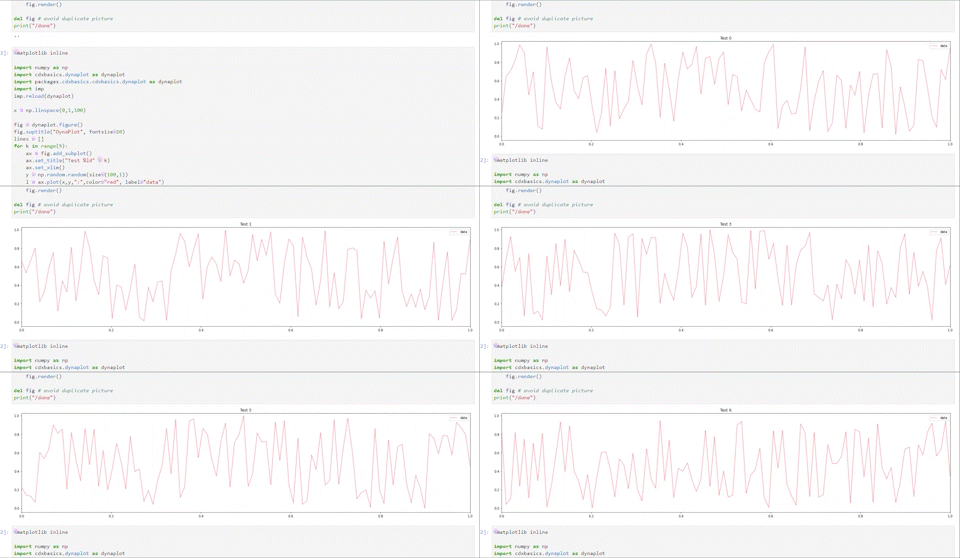
|
|
|
1
|
-
Metadata-Version: 2.4
|
|
2
|
-
Name: cdxcore
|
|
3
|
-
Version: 0.1.6
|
|
4
|
-
Summary: Basic Python Tools; upgraded cdxbasics
|
|
5
|
-
Author-email: Hans Buehler <github@buehler.london>
|
|
6
|
-
License-Expression: MIT
|
|
7
|
-
Project-URL: Homepage, https://github.com/hansbuehler/cdxcore
|
|
8
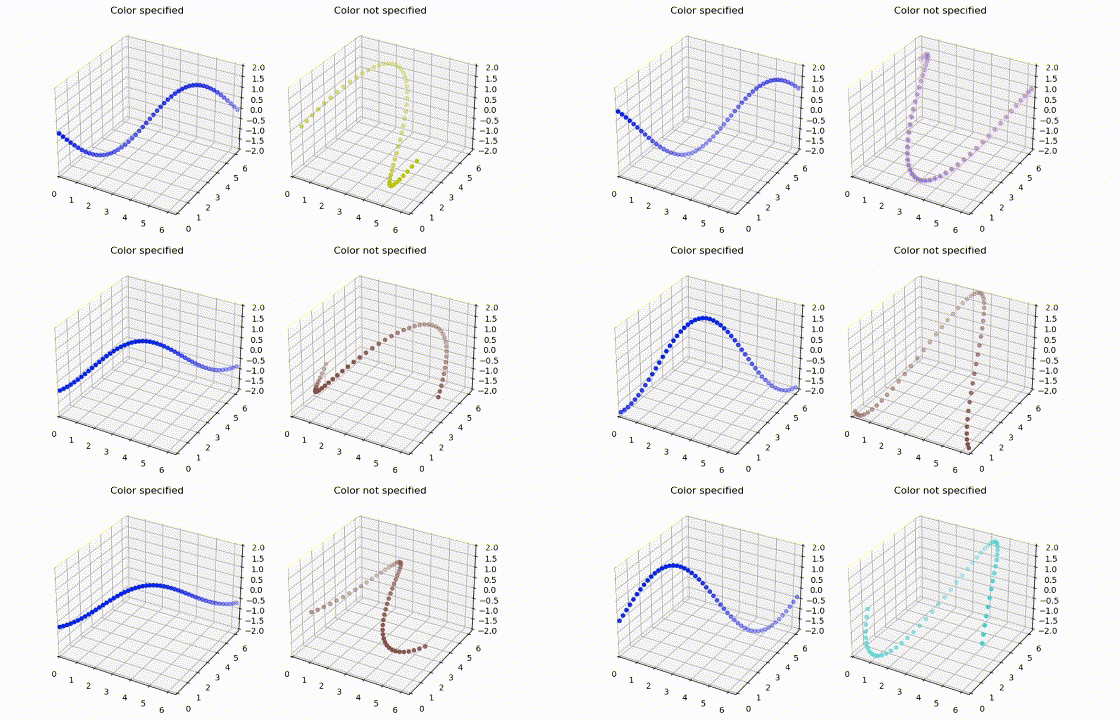
|
-
Classifier: Programming Language :: Python :: 3
|
|
9
|
-
Classifier: Operating System :: OS Independent
|
|
10
|
-
Requires-Python: >=3.12
|
|
11
|
-
Description-Content-Type: text/markdown
|
|
12
|
-
License-File: LICENSE
|
|
13
|
-
Requires-Dist: numpy
|
|
14
|
-
Requires-Dist: pandas
|
|
15
|
-
Requires-Dist: matplotlib
|
|
16
|
-
Requires-Dist: sortedcontainers
|
|
17
|
-
Requires-Dist: psutil
|
|
18
|
-
Requires-Dist: jsonpickle
|
|
19
|
-
Requires-Dist: numba
|
|
20
|
-
Requires-Dist: joblib
|
|
21
|
-
Requires-Dist: blosc
|
|
22
|
-
Dynamic: license-file
|
|
23
|
-
|
|
24
|
-
# cdxbasics
|
|
25
|
-
|
|
26
|
-
Collection of basic tools for Python development.
|
|
27
|
-
Install by
|
|
28
|
-
|
|
29
|
-
pip install cdxbasics
|
|
30
|
-
|
|
31
|
-
Most useful additions:
|
|
32
|
-
* *dynaplot* is a framework for simple dynamic graphs with matplotlib.
|
|
33
|
-
* *config* allows robust managements of configurations. It automates help, validation checking, and detects misspelled configuration arguments
|
|
34
|
-
* *subdir* wraps various file and directory functions into convenient objects. Useful if files have common extensions. Supports versioned file i/o
|
|
35
|
-
with `version`. With that it offers a simple but effective caching methodology.
|
|
36
|
-
* *filelock* implements a simple locking mechanism for parallel taks.
|
|
37
|
-
* *npio* has a low level interface for binary i/o for numpy files for fast read/write.
|
|
38
|
-
* *version* adds version information including dependencies to functions and objects.
|
|
39
|
-
* *verbose* provides user-controllable context output.
|
|
40
|
-
* *utils* offers a number of utility functions such as uniqueHashes, standard formatting for lists, dictionaries etc
|
|
41
|
-
* *prettydict*, *prettyobject* are dictionary objects with attribute item access. Just looks better than a dict.
|
|
42
|
-
|
|
43
|
-
# dynaplot
|
|
44
|
-
|
|
45
|
-
Tools for dynamic (animated) plotting in Jupyer/IPython. The aim of the toolkit is making it easy to develop visualization with `matplotlib` which dynamically updates, for example during training with machine learing kits such as `tensorflow`. This has been tested with Anaconda's JupyterHub and `%matplotlib inline`.
|
|
46
|
-
|
|
47
|
-
It also makes the creation of subplots more streamlined.
|
|
48
|
-
|
|
49
|
-
The package now contains a lazy method to manage updates. Instead of updating individual names, we recommend to simply remove the previous element and redraw. This is implemented as follows
|
|
50
|
-
* Once a figure `fig` is created, call `fig.store()` to return a element store.
|
|
51
|
-
* When creating new matplotlib elements such as plots, figures, fills, lines, add them to the store with `store +=`.
|
|
52
|
-
* Before the next update call `store.remove()` to remove all old updates; create the renewed elements, and only then call `fig.render()` or `fig.close()`. See example below.
|
|
53
|
-
|
|
54
|
-
### Animated Matplotlib in Jupyter
|
|
55
|
-
|
|
56
|
-
See the jupyter notebook [notebooks/DynamicPlot.ipynb](https://github.com/hansbuehler/cdxbasics/blob/master/cdxbasics/notebooksth/DynamicPlot.ipynb) for some applications.
|
|
57
|
-
|
|
58
|
-
|
|
59
|
-
|
|
60
|
-
|
|
61
|
-
```
|
|
62
|
-
%matplotlib inline
|
|
63
|
-
import numpy as np
|
|
64
|
-
import cdxbasics.dynaplot as dynaplot
|
|
65
|
-
|
|
66
|
-
x = np.linspace(0,1,100)
|
|
67
|
-
pm = 0.2
|
|
68
|
-
|
|
69
|
-
# create figure and plots
|
|
70
|
-
fig = dynaplot.figure(col_size=10)
|
|
71
|
-
ax = fig.add_subplot()
|
|
72
|
-
ax2 = fig.add_subplot()
|
|
73
|
-
ax2.sharey(ax)
|
|
74
|
-
store = fig.store()
|
|
75
|
-
|
|
76
|
-
# render the figure: places the plots and draws their frames
|
|
77
|
-
fig.render()
|
|
78
|
-
|
|
79
|
-
import time
|
|
80
|
-
for i in range(5):
|
|
81
|
-
y = np.random.random(size=(100,))
|
|
82
|
-
ax.set_title(f"Test {i}")
|
|
83
|
-
ax2.set_title(f"Test {i}")
|
|
84
|
-
|
|
85
|
-
store.remove() # delete all prviously stored elements
|
|
86
|
-
store += ax.plot(x,y,":", label=f"data {i}")
|
|
87
|
-
store += ax2.plot(x,y,"-",color="red", label=f"data {i}")
|
|
88
|
-
store += ax2.fill_between( x, y-pm, y+pm, color="blue", alpha=0.2 )
|
|
89
|
-
store += ax.legend()
|
|
90
|
-
|
|
91
|
-
fig.render()
|
|
92
|
-
time.sleep(1)
|
|
93
|
-
fig.close()
|
|
94
|
-
```
|
|
95
|
-
See example notebook for how to use the package for lines, confidence intervals, and 3D graphs.
|
|
96
|
-
|
|
97
|
-
### Issues
|
|
98
|
-
|
|
99
|
-
Some users reported that the package does not work in some versions of Jupyter, in particular with VS Code.
|
|
100
|
-
In this case, please try setting `dynaplot.DynamicFig.MODE = 'canvas'`. I appreciate if you let me know whether this resolved
|
|
101
|
-
the problem.
|
|
102
|
-
|
|
103
|
-
### Simpler sub_plot
|
|
104
|
-
|
|
105
|
-
The package lets you create sub plots without having to know the number of plots in advance.
|
|
106
|
-
You can combine the following features:
|
|
107
|
-
* Define as usual `figsize`, and add `col_num`. In this case the size of the figure is specified by the former argument as usual, while the number of plots per columns is controlled by the latter.
|
|
108
|
-
* Use `col_size`, `row_size`, and `col_num`: the first two define the size per subplot. Assuming you add `N` subplots, the overall `figsize` will be `(col_size* (N%col_num), row_size (N//col_num))`.
|
|
109
|
-
|
|
110
|
-
You can force another row with `next_row` if need be. The example also shows that we can specify titles for subplots and figures easily.
|
|
111
|
-
|
|
112
|
-
### Example
|
|
113
|
-
```
|
|
114
|
-
# create figure
|
|
115
|
-
from cdxbasics.dynaplot import figure
|
|
116
|
-
fig = figure("Example", col_size=4, row_size=4, col_num=3)
|
|
117
|
-
# equivalent to matplotlib.figure
|
|
118
|
-
ax = fig.add_subplot("First") # no need to specify row,col,num
|
|
119
|
-
ax.plot( x, y )
|
|
120
|
-
ax = fig.add_subplot("Second") # no need to specify row,col,num
|
|
121
|
-
ax.plot( x, y )
|
|
122
|
-
...
|
|
123
|
-
fig.next_row() # another row
|
|
124
|
-
ax = fig.add_subplot() # no need to specify row,col,num
|
|
125
|
-
ax.plot( x, y )
|
|
126
|
-
...
|
|
127
|
-
|
|
128
|
-
fig.render() # draws the plots
|
|
129
|
-
```
|
|
130
|
-
|
|
131
|
-
### Implementation Note
|
|
132
|
-
|
|
133
|
-
The `DynamicFig` object returned by `dynaplot.figure()` will keep track of all function calls and other operations, and will defer calling
|
|
134
|
-
them until the first time `render()` is called. Once `render()` is called you can no longer add plots. It does this so it can figure out the desired layout before actually creating any plots. Each deferred function call in turn returns a deferring object. Read the Python comments in `deferred.py` for implementation details.
|
|
135
|
-
|
|
136
|
-
### Color Management
|
|
137
|
-
|
|
138
|
-
##### `color_css4, color_base, color_tableau, color_xkcd`:
|
|
139
|
-
|
|
140
|
-
Each function returns the _i_'th element of the respective matplotlib color
|
|
141
|
-
table. The purpose is to simplify using consistent colors accross different plots.
|
|
142
|
-
|
|
143
|
-
**Example:**
|
|
144
|
-
```
|
|
145
|
-
fig = dynaplot.figure()
|
|
146
|
-
ax = fig.add_subplot()
|
|
147
|
-
# draw 10 lines in the first sub plot, and add a legend
|
|
148
|
-
for i in range(10):
|
|
149
|
-
ax.plot( x, y[i], color=color_css4(i), label=labels[i] )
|
|
150
|
-
ax.legend()
|
|
151
|
-
|
|
152
|
-
# draw 10 lines in the second sub plot. No legend needed as colors are shared with first plot
|
|
153
|
-
ax = fig.add_subplot()
|
|
154
|
-
for i in range(10):
|
|
155
|
-
ax.plot( x, z[i], color=color_css4(i) )
|
|
156
|
-
fig.render()
|
|
157
|
-
```
|
|
158
|
-
##### `colors_css4, colors_base, colors_tableau, colors_xkcd`:
|
|
159
|
-
|
|
160
|
-
Generator versions of the `color_` functions.
|
|
161
|
-
|
|
162
|
-
# prettydict
|
|
163
|
-
|
|
164
|
-
A number of simple extensions to standard dictionaries which allow accessing any element of the dictionary with "." notation.
|
|
165
|
-
The purpose is to create a functional-programming style method of generating complex objects.
|
|
166
|
-
|
|
167
|
-
from cdxbasics.prettydict import PrettyOrderedDict
|
|
168
|
-
pdct = PrettyOrderedDict(z=1)
|
|
169
|
-
pdct['a'] = 1 # standard dictionary write access
|
|
170
|
-
pdct.b = 2 # pretty write access
|
|
171
|
-
_ = pdct.b # read access
|
|
172
|
-
_ = pdct("c",3) # short cut for pdct.get("c",3)
|
|
173
|
-
|
|
174
|
-
There are two versions:
|
|
175
|
-
|
|
176
|
-
* `PrettyDict`:
|
|
177
|
-
Pretty version of standard dictionary.
|
|
178
|
-
* `PrettyOrderedDict`:
|
|
179
|
-
Pretty version of ordered dictionary. This object allows access by numerical index:
|
|
180
|
-
* `at_pos[i]` returns the `i`th element
|
|
181
|
-
* `at_pos.keys[i]` returns the `i`th key
|
|
182
|
-
* `at_pos.items[i]` returns the `i`th item
|
|
183
|
-
|
|
184
|
-
Each of them is derived from the respective dictionary class. This can have some odd side effects for example when using `pickle`. In this case, consider
|
|
185
|
-
`prettyobject`.
|
|
186
|
-
|
|
187
|
-
### Assigning member functions
|
|
188
|
-
|
|
189
|
-
"Pretty" objects also allow assigning bona fide member functions by a simple semantic of the form:
|
|
190
|
-
|
|
191
|
-
def mult_b( self, x ):
|
|
192
|
-
return self.b * x
|
|
193
|
-
pdct = PrettyOrderedDict()
|
|
194
|
-
pdct = mult_a
|
|
195
|
-
pdct.mult_a(3)
|
|
196
|
-
|
|
197
|
-
Calling `pdct.mult_a(3)` with above config will return `6` as expected. This only works when using the member synthax for assigning values
|
|
198
|
-
to a pretty dictionary; if the standard `[]` operator is used then functions will be assigned to the dictionary as usual, hence they are static members of the object.
|
|
199
|
-
|
|
200
|
-
The reason for this is as follows: consider
|
|
201
|
-
|
|
202
|
-
def mult( a, b ):
|
|
203
|
-
return a*b
|
|
204
|
-
pdct = PrettyOrderedDict()
|
|
205
|
-
pdct.mult = mult
|
|
206
|
-
pdct.mult(3,4) --> produces am error as three arguments as are passed if we count 'self'
|
|
207
|
-
|
|
208
|
-
In this case, use:
|
|
209
|
-
|
|
210
|
-
pdct = PrettyOrderedDict()
|
|
211
|
-
pdct['mult'] = mult
|
|
212
|
-
pdct.mult(3,4) --> 12
|
|
213
|
-
|
|
214
|
-
### Functions passed to the Constructor
|
|
215
|
-
|
|
216
|
-
The constructor works like an item assignment, i.e.
|
|
217
|
-
|
|
218
|
-
def mult( a, b ):
|
|
219
|
-
return a*b
|
|
220
|
-
pdct = PrettyOrderedDict(mult=mult)
|
|
221
|
-
pdct.mult(3,4) --> 12
|
|
222
|
-
|
|
223
|
-
### Dataclasses
|
|
224
|
-
|
|
225
|
-
Dataclasses have difficulties with derived dictionaries.
|
|
226
|
-
This applies as well to `Flax` modules.
|
|
227
|
-
For fields in dataclasses use `PrettyDictField`:
|
|
228
|
-
|
|
229
|
-
```
|
|
230
|
-
from cdxbasics.prettydict import PrettyDictField
|
|
231
|
-
from dataclasses import dataclass
|
|
232
|
-
|
|
233
|
-
@dataclass
|
|
234
|
-
class Data:
|
|
235
|
-
...
|
|
236
|
-
data : PrettyDictField = PrettyDictField.Field()
|
|
237
|
-
|
|
238
|
-
def f(self):
|
|
239
|
-
return self.data.x
|
|
240
|
-
|
|
241
|
-
p = PrettyDict(x=1)
|
|
242
|
-
d = Data( p.as_field() )
|
|
243
|
-
f.f()
|
|
244
|
-
```
|
|
245
|
-
|
|
246
|
-
This ca
|
|
247
|
-
|
|
248
|
-
# prettyobject
|
|
249
|
-
|
|
250
|
-
A barebone base class object which implements basic dictionary semantics.
|
|
251
|
-
In contrast to `prettydict` this class does not derive from `dict` and is therefore more natural for `pickle`. As element assignments
|
|
252
|
-
are simply attributes, the object's contents are not ordered.
|
|
253
|
-
|
|
254
|
-
Usage pattern:
|
|
255
|
-
```
|
|
256
|
-
class M( PrettyObject ):
|
|
257
|
-
pass
|
|
258
|
-
|
|
259
|
-
m = M()
|
|
260
|
-
m.x = 1 # standard object handling
|
|
261
|
-
m['y'] = 1 # mimic dictionary
|
|
262
|
-
print( m['x'] ) # mimic dictionary
|
|
263
|
-
print( m.y ) # standard object handling
|
|
264
|
-
```
|
|
265
|
-
|
|
266
|
-
Mimics a dictionary:
|
|
267
|
-
```
|
|
268
|
-
u = dict( m )
|
|
269
|
-
print(u) --> {'x': 1, 'y': 2}
|
|
270
|
-
|
|
271
|
-
u = { k: 2*v for k,v in m.items() }
|
|
272
|
-
print(u) --> {'x': 2, 'y': 4}
|
|
273
|
-
|
|
274
|
-
l = list( m )
|
|
275
|
-
print(l) --> ['x', 'y']
|
|
276
|
-
```
|
|
277
|
-
|
|
278
|
-
# config
|
|
279
|
-
|
|
280
|
-
Tooling for setting up program-wide configuration. Aimed at machine learning programs to ensure consistency of code accross experimentation.
|
|
281
|
-
|
|
282
|
-
from cdxbasics.config import Config
|
|
283
|
-
config = Config()
|
|
284
|
-
|
|
285
|
-
**Key features**
|
|
286
|
-
|
|
287
|
-
* Detect misspelled parameters by checking that all parameters of a config have been read.
|
|
288
|
-
* Provide summary of all values read, including summary help for what they were for.
|
|
289
|
-
* Nicer synthax than dictionary notation, in particular for nested configurations.
|
|
290
|
-
* Simple validation to ensure values are within a given range or from a list of options.
|
|
291
|
-
|
|
292
|
-
### Creating configs
|
|
293
|
-
|
|
294
|
-
Set data with both dictionary and member notation:
|
|
295
|
-
|
|
296
|
-
config = Config()
|
|
297
|
-
config['features'] = [ 'time', 'spot' ]
|
|
298
|
-
config.weights = [ 1, 2, 3 ]
|
|
299
|
-
|
|
300
|
-
Create sub configurations with member notation
|
|
301
|
-
|
|
302
|
-
config.network.depth = 10
|
|
303
|
-
config.network.activation = 'relu'
|
|
304
|
-
config.network.width = 100
|
|
305
|
-
|
|
306
|
-
This is equivalent to
|
|
307
|
-
|
|
308
|
-
config.network = Config()
|
|
309
|
-
config.network.depth = 10
|
|
310
|
-
config.network.activation = 'relu'
|
|
311
|
-
config.network.width = 100
|
|
312
|
-
|
|
313
|
-
### Reading a config
|
|
314
|
-
|
|
315
|
-
When reading the value of a `key` from config, `config.__call__()` uses a default value, and a cast type. It first attempts to find `key` in the `config`.
|
|
316
|
-
* If `key` is found, it casts the value provided for `key` using the `cast` type and returned.
|
|
317
|
-
* If `key` is not found, then the default value will be cast using `cast` type and returned.
|
|
318
|
-
|
|
319
|
-
The function also takes a `help` text which allows providing live information on what variable are read from the config. The latter is used by the function `usage_report()` which therefore provides live documentation of the code which uses the config object.
|
|
320
|
-
|
|
321
|
-
class Network(object):
|
|
322
|
-
def __init__( self, config ):
|
|
323
|
-
# read top level parameters
|
|
324
|
-
self.features = config("features", [], list, "Features for the agent" )
|
|
325
|
-
self.weights = config("weights", [], np.asarray, "Weigths for the agent", help_default="no initial weights")
|
|
326
|
-
config.done() # see below
|
|
327
|
-
|
|
328
|
-
In above example any data provided for they keywords `weigths` will be cast using `numpy.asarray`.
|
|
329
|
-
|
|
330
|
-
Further parameters of `()` are the help text, plus ability to provide text versions of the default with `help_default` (e.g. if the default value is complex), and the cast operator with `help_cast` (again if the
|
|
331
|
-
respective operation is complex).
|
|
332
|
-
|
|
333
|
-
__Important__: the `()` operator does not have a default value unless specified. If no default value is specified, and the key is not found, then a KeyError is generated.
|
|
334
|
-
|
|
335
|
-
You can read sub-configurations with the previsouly introduced member notation:
|
|
336
|
-
|
|
337
|
-
self.activation = config.network("activation", "relu", str, "Activation function for the network")
|
|
338
|
-
|
|
339
|
-
An alternative is the explicit:
|
|
340
|
-
|
|
341
|
-
network = config.network
|
|
342
|
-
self.depth = network('depth', 10000, int, "Depth for the network")
|
|
343
|
-
|
|
344
|
-
### Imposing simple restrictions on values
|
|
345
|
-
|
|
346
|
-
We can impose simple restrictions to any values read from a config. To this end, import the respective type operators:
|
|
347
|
-
|
|
348
|
-
from cdxbasics.config import Int, Float
|
|
349
|
-
|
|
350
|
-
One-sided restriction:
|
|
351
|
-
|
|
352
|
-
# example enforcing simple conditions
|
|
353
|
-
self.width = network('width', 100, Int>3, "Width for the network")
|
|
354
|
-
|
|
355
|
-
Restrictions on both sides of a scalar:
|
|
356
|
-
|
|
357
|
-
# example encorcing two-sided conditions
|
|
358
|
-
self.percentage = network('percentage', 0.5, ( Float >= 0. ) & ( Float <= 1.), "A percentage")
|
|
359
|
-
|
|
360
|
-
Enforce the value being a member of a list:
|
|
361
|
-
|
|
362
|
-
# example ensuring a returned type is from a list
|
|
363
|
-
self.ntype = network('ntype', 'fastforward', ['fastforward','recurrent','lstm'], "Type of network")
|
|
364
|
-
|
|
365
|
-
We can allow a returned value to be one of several casting types by using tuples. The most common use case is that `None` is a valid value for a config, too. For example, assume that the `name` of the network model should be a string or `None`. This is implemented as
|
|
366
|
-
|
|
367
|
-
# example allowing either None or a string
|
|
368
|
-
self.keras_name = network('name', None, (None, str), "Keras name of the network model")
|
|
369
|
-
|
|
370
|
-
We can combine conditional expressions with the tuple notation:
|
|
371
|
-
|
|
372
|
-
# example allowing either None or a positive int
|
|
373
|
-
self.batch_size = network('batch_size', None, (None, Int>0), "Batch size or None for TensorFlow's default 32", help_cast="Positive integer, or None")
|
|
374
|
-
|
|
375
|
-
### Ensuring that we had no typos & that all provided data is meaningful
|
|
376
|
-
|
|
377
|
-
A common issue when using dictionary-based code is that we might misspell one of the parameters. Unless this is a mandatory parameter we might not notice that we have not actually changed its value in the code below.
|
|
378
|
-
|
|
379
|
-
To check that all values of `config` are read use `done()`
|
|
380
|
-
|
|
381
|
-
config.done() # checks that we have read all keywords.
|
|
382
|
-
|
|
383
|
-
It will alert you if there are keywords or children which haven't been read. Most likely, those will be typos. Consider the following example where `width` is misspelled in our config:
|
|
384
|
-
|
|
385
|
-
class Network(object):
|
|
386
|
-
def __init__( self, config ):
|
|
387
|
-
# read top level parameters
|
|
388
|
-
self.depth = config("depth", 1, Int>=1, "Depth of the network")
|
|
389
|
-
self.width = config("width", 3, Int>=1, "Width of the network")
|
|
390
|
-
self.activaton = config("activation", "relu", help="Activation function", help_cast="String with the function name, or function")
|
|
391
|
-
config.done() # <-- test that all members of config where read
|
|
392
|
-
|
|
393
|
-
config = Config()
|
|
394
|
-
config.features = ['time', 'spot']
|
|
395
|
-
config.network.depth = 10
|
|
396
|
-
config.network.activation = 'relu'
|
|
397
|
-
config.network.widht = 100 # (intentional typo)
|
|
398
|
-
|
|
399
|
-
n = Network(config.network)
|
|
400
|
-
|
|
401
|
-
Since `width` was misspelled in setting up the config, you will get a warning to this end:
|
|
402
|
-
|
|
403
|
-
Error closing 'config.network': the following config arguments were not read: ['widht']
|
|
404
|
-
|
|
405
|
-
Summary of all variables read from this object:
|
|
406
|
-
config.network['activation'] = relu # Activation function; default: relu
|
|
407
|
-
config.network['depth'] = 10 # Depth of the network; default: 1
|
|
408
|
-
config.network['width'] = 3 # Width of the network; default: 3
|
|
409
|
-
|
|
410
|
-
Note that you can also call `done()` at top level:
|
|
411
|
-
|
|
412
|
-
class Network(object):
|
|
413
|
-
def __init__( self, config ):
|
|
414
|
-
# read top level parameters
|
|
415
|
-
self.depth = config("depth", 1, Int>=1, "Depth of the network")
|
|
416
|
-
self.width = config("width", 3, Int>=1, "Width of the network")
|
|
417
|
-
self.activaton = config("activation", "relu", help="Activation function", help_cast="String with the function name, or function")
|
|
418
|
-
|
|
419
|
-
config = Config()
|
|
420
|
-
config.features = ['time', 'spot']
|
|
421
|
-
config.network.depth = 10
|
|
422
|
-
config.network.activation = 'relu'
|
|
423
|
-
config.network.widht = 100 # (intentional typo)
|
|
424
|
-
|
|
425
|
-
n = Network(config.network)
|
|
426
|
-
test_features = config("features", [], list, "Features for my network")
|
|
427
|
-
config.done()
|
|
428
|
-
|
|
429
|
-
produces
|
|
430
|
-
|
|
431
|
-
ERROR:x:Error closing 'config.network': the following config arguments were not read: ['widht']
|
|
432
|
-
|
|
433
|
-
Summary of all variables read from this object:
|
|
434
|
-
config.network['activation'] = relu # Activation function; default: relu
|
|
435
|
-
config.network['depth'] = 10 # Depth of the network; default: 1
|
|
436
|
-
config.network['width'] = 3 # Width of the network; default: 3
|
|
437
|
-
#
|
|
438
|
-
config['features'] = ['time', 'spot'] # Default: 2
|
|
439
|
-
|
|
440
|
-
You can check the status of the use of the config by using the `not_done` property.
|
|
441
|
-
|
|
442
|
-
### Detaching child configs and other Copy operations
|
|
443
|
-
|
|
444
|
-
You can also detach a child config, which allows you to store it for later use without triggering `done()` errors:
|
|
445
|
-
|
|
446
|
-
def read_config( self, confg ):
|
|
447
|
-
...
|
|
448
|
-
self.config_training = config.training.detach()
|
|
449
|
-
config.done()
|
|
450
|
-
|
|
451
|
-
`detach()` will mark he original child as 'done'. Therefore, we will need to call `done()` again, when we finished processing the detached child:
|
|
452
|
-
|
|
453
|
-
def training(self)
|
|
454
|
-
epochs = self.config_training("epochs", 100, int, "Epochs for training")
|
|
455
|
-
batch_size = self.config_training("batch_size", None, help="Batch size. Use None for default of 32" )
|
|
456
|
-
|
|
457
|
-
self.config_training.done()
|
|
458
|
-
|
|
459
|
-
Use `copy()` to make a bona fide copy of a child, without marking the source child as 'done'. `copy()` will return a config which shares the same status as the source object. If you want an "unused" copy, use `clean_copy()`. A virtual clone is created via `clone()`. A cloned config stores information on usage in the same place for the original object. This is also the semantic of the copy constructor.
|
|
460
|
-
|
|
461
|
-
### Self-recording all available configuration parameters
|
|
462
|
-
|
|
463
|
-
Once your program ran, you can read the summary of all values, their defaults, and their help texts.
|
|
464
|
-
|
|
465
|
-
print( config.usage_report( with_cast=True ) )
|
|
466
|
-
|
|
467
|
-
Prints:
|
|
468
|
-
|
|
469
|
-
config.network['activation'] = relu # (str) Activation function for the network; default: relu
|
|
470
|
-
config.network['depth'] = 10 # (int) Depth for the network; default: 10000
|
|
471
|
-
config.network['width'] = 100 # (int>3) Width for the network; default: 100
|
|
472
|
-
config.network['percentage'] = 0.5 # (float>=0. and float<=1.) Width for the network; default: 0.5
|
|
473
|
-
config.network['ntype'] = 'fastforward' # (['fastforward','recurrent','lstm']) Type of network; default 'fastforward'
|
|
474
|
-
config.training['batch_size'] = None # () Batch size. Use None for default of 32; default: None
|
|
475
|
-
config.training['epochs'] = 100 # (int) Epochs for training; default: 100
|
|
476
|
-
config['features'] = ['time', 'spot'] # (list) Features for the agent; default: []
|
|
477
|
-
config['weights'] = [1 2 3] # (asarray) Weigths for the agent; default: no initial weights
|
|
478
|
-
|
|
479
|
-
### Calling functions with named parameters:
|
|
480
|
-
|
|
481
|
-
def create_network( depth=20, activation="relu", width=4 ):
|
|
482
|
-
...
|
|
483
|
-
|
|
484
|
-
We may use
|
|
485
|
-
|
|
486
|
-
create_network( **config.network )
|
|
487
|
-
|
|
488
|
-
However, there is no magic - this function will mark all direct members (not children) as 'done' and will not record the default values of the function `create_network`. Therefore `usage_report` will be somewhat useless. This method will still catch unused variables as "unexpected keyword arguments".
|
|
489
|
-
|
|
490
|
-
### Unique ID
|
|
491
|
-
|
|
492
|
-
Another common use case is that we wish to cache some process in a complex operation. Assuming that the `config` describes all relevant parameters
|
|
493
|
-
we can use `config.unique_id()` to obtain a unique hash ID for the given config.
|
|
494
|
-
|
|
495
|
-
This can be used, for example, as file name for caching. See also `cdxbasics.subdir` below.
|
|
496
|
-
|
|
497
|
-
### Advanced **kwargs Handling
|
|
498
|
-
|
|
499
|
-
The `Config` class can be used to improve `kwargs` handling.
|
|
500
|
-
Assume we have
|
|
501
|
-
|
|
502
|
-
def f(**kwargs):
|
|
503
|
-
a = kwargs.get("difficult_name", 10)
|
|
504
|
-
b = kwargs.get("b", 20)
|
|
505
|
-
|
|
506
|
-
We run the usual risk of somebody mispronouncing the parameter name which we would never know. Therefore we may improve upon the above with
|
|
507
|
-
|
|
508
|
-
def f(**kwargs):
|
|
509
|
-
kwargs = Config(kwargs)
|
|
510
|
-
a = kwargs("difficult_name", 10)
|
|
511
|
-
b = kwargs("b", 20)
|
|
512
|
-
kwargs.done()
|
|
513
|
-
|
|
514
|
-
If now a user calls `f` with a misspelled `config(difficlt_name=5)` an error will be raised.
|
|
515
|
-
|
|
516
|
-
Another pattern is to allow both `config` and `kwargs`:
|
|
517
|
-
|
|
518
|
-
def f( config=None, **kwargs):
|
|
519
|
-
config = Config.config_kwargs(config,kwargs)
|
|
520
|
-
a = config("difficult_name", 10, int)
|
|
521
|
-
b = config("b", 20, int)
|
|
522
|
-
config.done()
|
|
523
|
-
|
|
524
|
-
### Dataclasses
|
|
525
|
-
|
|
526
|
-
To support data classes, use `ConfigField`:
|
|
527
|
-
|
|
528
|
-
```
|
|
529
|
-
import dataclasses as dataclasses
|
|
530
|
-
from cdxbasics.config import Config, ConfigField
|
|
531
|
-
import types as types
|
|
532
|
-
|
|
533
|
-
@dataclasses.dataclass
|
|
534
|
-
class A:
|
|
535
|
-
i : int = 3
|
|
536
|
-
config : ConfigField = ConfigField.Field()
|
|
537
|
-
|
|
538
|
-
def f(self):
|
|
539
|
-
return self.config("a", 2, int, "Test")
|
|
540
|
-
|
|
541
|
-
a = A()
|
|
542
|
-
a.i --> prints 3 as usual
|
|
543
|
-
a.config.f() --> prints 2
|
|
544
|
-
|
|
545
|
-
a = A(i=2,config=Config(a=1))
|
|
546
|
-
a.i --> prints 3 as usual
|
|
547
|
-
a.config.f() --> prints 1
|
|
548
|
-
```
|
|
549
|
-
|
|
550
|
-
# logger
|
|
551
|
-
|
|
552
|
-
Tools for defensive programming a'la the C++ ASSERT/VERIFY macros. Aim is to provide one line validation of inputs to functions with intelligible error messages:
|
|
553
|
-
|
|
554
|
-
from cdxbasics.logger import Logger
|
|
555
|
-
_log = Logger(__file__)
|
|
556
|
-
...
|
|
557
|
-
def some_function( a, ...):
|
|
558
|
-
_log.verify( a==1, "'a' is not one but %s", a)
|
|
559
|
-
_log.warn_if( a!=1, "'a' was not one but %s", a)
|
|
560
|
-
|
|
561
|
-
### Member functions
|
|
562
|
-
|
|
563
|
-
Exceptions independent of logging level
|
|
564
|
-
|
|
565
|
-
verify( cond, text, *args, **kwargs )
|
|
566
|
-
If cond is not met, raise an exception with util.fmt( text, *args, **kwargs ). This is the Python version of C++ VERIFY
|
|
567
|
-
|
|
568
|
-
throw_if(cond, text, *args, **kwargs )
|
|
569
|
-
If cond is met, raise an exception with util.fmt( text, *args, **kwargs )
|
|
570
|
-
|
|
571
|
-
throw( text, *args, **kwargs )
|
|
572
|
-
Just throw an exception with util.fmt( text, *args, **kwargs )
|
|
573
|
-
|
|
574
|
-
Unconditional logging
|
|
575
|
-
|
|
576
|
-
debug( text, *args, **kwargs )
|
|
577
|
-
info( text, *args, **kwargs )
|
|
578
|
-
warning( text, *args, **kwargs )
|
|
579
|
-
error( text, *args, **kwargs )
|
|
580
|
-
critical( text, *args, **kwargs )
|
|
581
|
-
|
|
582
|
-
throw( text, *args, **kwargs )
|
|
583
|
-
|
|
584
|
-
Verify-conditional functions
|
|
585
|
-
|
|
586
|
-
# raise an exception if 'cond' is not True
|
|
587
|
-
verify( cond, text, *args, **kwargs )
|
|
588
|
-
|
|
589
|
-
# print log message of respective level if 'cond' is not True
|
|
590
|
-
verify_debug( cond, text, *args, **kwargs )
|
|
591
|
-
verify_info( cond, text, *args, **kwargs )
|
|
592
|
-
verify_warning( cond, text, *args, **kwargs )
|
|
593
|
-
|
|
594
|
-
If-conditional functions
|
|
595
|
-
|
|
596
|
-
# raise an exception if 'cond' is True
|
|
597
|
-
throw_if( cond, text, *args, **kwargs )
|
|
598
|
-
|
|
599
|
-
# write log message if 'cond' is True
|
|
600
|
-
debug_if( cond, text, *args, **kwargs )
|
|
601
|
-
info_if( cond, text, *args, **kwargs )
|
|
602
|
-
warning_if( cond, text, *args, **kwargs )
|
|
603
|
-
|
|
604
|
-
# print message if 'cond' is True
|
|
605
|
-
prnt_if( cond, text, *args, **kwargs ) # with EOL
|
|
606
|
-
write_if( cond, text, *args, **kwargs ) # without EOL
|
|
607
|
-
|
|
608
|
-
# subdir
|
|
609
|
-
|
|
610
|
-
A few tools to handle file i/o in a transparent way.
|
|
611
|
-
The key idea is to provide transparent, concise pickle access to the file system in a manner similar to dictionary access - hence core file names are referred to as 'keys'. Files managed by `subdir` all have the same extension.
|
|
612
|
-
From 0.2.60 `SubDir` supports different file formats specified with the `fmt=` keyword to `SubDir`:
|
|
613
|
-
|
|
614
|
-
* PICKLE: standard pickling. Default extension 'pck'
|
|
615
|
-
* JSON_PICKLE: uses the `jsonpickle` package. Default extension 'jpck'. The advantage of this format over PICKLE is that it is somewhat human-readable. However, `jsonpickle` uses compressed formats for complex objects such as `numpy` arrays, hence readablility is somewhat limited. It comes at cost of slower writing speeds.
|
|
616
|
-
* JSON_PLAIN: calls `cdxbasics.util.plain()` to convert objects into plain Python objects before using `json` to write them. That means that deserialized data does not have the correct object structure. However, such files are much easier to read.
|
|
617
|
-
* BLOSC: uses [blosc](https://github.com/blosc/python-blosc) to write compressed binary data. The blosc compression algorithm is very fast, hence using this mode will not usually lead to notably slower performanbce than using PICKLE but will generate smaller files, depending on your data structure.
|
|
618
|
-
|
|
619
|
-
`subdir` supports versioned files.
|
|
620
|
-
|
|
621
|
-
### Creating directories
|
|
622
|
-
|
|
623
|
-
You can create directories object using the `SubDir` class.
|
|
624
|
-
By default the underlying directory is only created once a write attempt is made.
|
|
625
|
-
|
|
626
|
-
Simply write
|
|
627
|
-
|
|
628
|
-
from cdxbasics.subdir import SubDir
|
|
629
|
-
subdir = SubDir("my_directory") # relative to current working directory
|
|
630
|
-
subdir = SubDir("./my_directory") # relative to current working directory
|
|
631
|
-
subdir = SubDir("~/my_directory") # relative to home directory
|
|
632
|
-
subdir = SubDir("!/my_directory") # relative to default temp directory
|
|
633
|
-
|
|
634
|
-
You can specify a parent for relative path names:
|
|
635
|
-
|
|
636
|
-
from cdxbasics.subdir import SubDir
|
|
637
|
-
subdir = SubDir("my_directory", "~") # relative to home directory
|
|
638
|
-
subdir = SubDir("my_directory", "!") # relative to default temp directory
|
|
639
|
-
subdir = SubDir("my_directory", ".") # relative to current directory
|
|
640
|
-
subdir2 = SubDir("my_directory", subdir) # subdir2 is relative to `subdir`
|
|
641
|
-
|
|
642
|
-
Change the extension to `bin`
|
|
643
|
-
|
|
644
|
-
from cdxbasics.subdir import SubDir
|
|
645
|
-
subdir = SubDir("~/my_directory;*.bin")
|
|
646
|
-
subdir = SubDir("~/my_directory", ext="bin")
|
|
647
|
-
subdir = SubDir("my_directory", "~", ext="bin")
|
|
648
|
-
|
|
649
|
-
You can turn off extension management by setting the extension to "":
|
|
650
|
-
|
|
651
|
-
from cdxbasics.subdir import SubDir
|
|
652
|
-
subdir = SubDir("~/my_directory", ext="")
|
|
653
|
-
|
|
654
|
-
You may specify the file format; in this case the extension will be automaticall set to `pck`, `jpck` or `json`, respectively. See discussion above about the relative merits of each format:
|
|
655
|
-
|
|
656
|
-
from cdxbasics.subdir import SubDir
|
|
657
|
-
subdir = SubDir("~/my_directory", fmt=SubDir.PICKLE)
|
|
658
|
-
subdir = SubDir("~/my_directory", fmt=SubDir.JSON_PICKLE)
|
|
659
|
-
subdir = SubDir("~/my_directory", fmt=SubDir.JSON_PLAIN)
|
|
660
|
-
|
|
661
|
-
You can also use the `()` operator to generate sub directories.
|
|
662
|
-
This operator is overloaded: for a single argument, it creates a relative sub-directory:
|
|
663
|
-
|
|
664
|
-
from cdxbasics.subdir import SubDir
|
|
665
|
-
parent = SubDir("~/parent")
|
|
666
|
-
subdir = parent("subdir") # shares extension and format with parent
|
|
667
|
-
subdir = parent("subdir", ext="bin", fmt=SubDir.PICKLE) # change extension and format
|
|
668
|
-
|
|
669
|
-
Be aware that when the operator `()` is called with two keyword arguments, then it reads files; see below.
|
|
670
|
-
|
|
671
|
-
You can obtain a list of all sub directories in a directory by using `subDirs()`. The list of files
|
|
672
|
-
with the corresponding extension is accessible via `files()`.
|
|
673
|
-
|
|
674
|
-
### Reading
|
|
675
|
-
|
|
676
|
-
To read the data contained in a file 'file' in our subdirectory with the extension used for the sub directory, use either of the following
|
|
677
|
-
|
|
678
|
-
data = subdir.read("file") # returns the default if file is not found
|
|
679
|
-
data = subdir.read("file", default=None) # returns the default if file is not found
|
|
680
|
-
|
|
681
|
-
This function will return `None` or the default if 'file' does not exist with the respective extension. You can make it throw an error by calling `subdir.read("file", throwOnError=True)` instead.
|
|
682
|
-
|
|
683
|
-
You may specify a different extension:
|
|
684
|
-
|
|
685
|
-
data = subdir.read("file", ext="bin")
|
|
686
|
-
|
|
687
|
-
Specifying a different format for `read` does *not* change the extension automatically, hence you may want to set this explicitly at the same time:
|
|
688
|
-
|
|
689
|
-
data = subdir.read("file", ext="json", fmt=Subdir.JSON_PLAIN )
|
|
690
|
-
|
|
691
|
-
You can also use the `()` operator, in which case you must specify a default value (if you don't, then the operator will return a sub directory):
|
|
692
|
-
|
|
693
|
-
data = subdir("file", None) # returns None if file is not found
|
|
694
|
-
|
|
695
|
-
You can also use both member and item notation to access files. In this case, though, an error will be thrown if the file does not exist
|
|
696
|
-
|
|
697
|
-
data = subdir.file # raises AtttributeError if file is not found
|
|
698
|
-
data = subdir['file'] # raises KeyError if file is not found
|
|
699
|
-
|
|
700
|
-
You can read a range of files in one function call:
|
|
701
|
-
|
|
702
|
-
data = subdir.read( ["file1", "file2"] )
|
|
703
|
-
|
|
704
|
-
Finally, you can also iterate through all existing files:
|
|
705
|
-
|
|
706
|
-
for file in subdir:
|
|
707
|
-
data = subdir.read(file)
|
|
708
|
-
...
|
|
709
|
-
|
|
710
|
-
To obtain a list of all files in our directory which have the correct extension, use `files()` or `keys()`.
|
|
711
|
-
|
|
712
|
-
### Writing
|
|
713
|
-
|
|
714
|
-
To write data, use any of
|
|
715
|
-
|
|
716
|
-
subdir.write("file", data)
|
|
717
|
-
subdir.file = data
|
|
718
|
-
subdir['file'] = data
|
|
719
|
-
|
|
720
|
-
You may specifify different extensions:
|
|
721
|
-
|
|
722
|
-
subdir.write("file", data, ext="bin)
|
|
723
|
-
|
|
724
|
-
You can also specify the file format. Note that this will not automatically change the extension, so you may want to set this at the same time:
|
|
725
|
-
|
|
726
|
-
subdir.write("file", data, fmt=SubDir.JSON_PLAIN, ext="json")
|
|
727
|
-
|
|
728
|
-
To write several files at once, write
|
|
729
|
-
|
|
730
|
-
subdir.write(["file1", "file"], [data1, data2])
|
|
731
|
-
|
|
732
|
-
Note that when writing to an object, `subdir` will first write to a temporary file, and then rename this file into the target file name. The temporary file name is a `util.uniqueHash48` generated from the target file name, current time, process and thread ID, as well as the machines's UUID. This is done to reduce collisions between processes/machines accessing the same files. It does not remove collision risk entirely, though.
|
|
733
|
-
|
|
734
|
-
### Filenames
|
|
735
|
-
|
|
736
|
-
`SubDir` handles core file names for you as "keys" and adds directories and extensions as required. You can obtain the full qualified filename given a "key" by calling `fullFileName()`
|
|
737
|
-
or `fullKeyName()`.
|
|
738
|
-
|
|
739
|
-
### Reading and Writing Versioned Files
|
|
740
|
-
|
|
741
|
-
From 0.2.64 `SubDir` supports versioned files. If versions are used, then they *must* be used for both reading and writing.
|
|
742
|
-
`cdxbasics.version` provides a standards framework to define versions for classes and functions.
|
|
743
|
-
|
|
744
|
-
If `version=` is provided, then `write()` will write it in a block ahead of the main content of the file.
|
|
745
|
-
In case of the PICKLE format, this is a byte string. In case of JSON_PLAIN and JSON_PICKLE this is line of text starting with `#` ahead of the file. (Note that this violates
|
|
746
|
-
the JSON file format.)
|
|
747
|
-
The point of writing short block ahead of the main data is that `read()` can read this version information back quickly before attempting to read the entire file. `read()` does attempt so if its called with `version=` as well. In this case it will compare the read version with the provided version, and only return the main content of the file if versions match.
|
|
748
|
-
|
|
749
|
-
Use `is_version()` to check whether a given file has a specific version. This function only reads the information required to obtain the information and will be much faster than reading the whole file if the file size is big.
|
|
750
|
-
|
|
751
|
-
**Examples:**
|
|
752
|
-
|
|
753
|
-
Writing a versioned file:
|
|
754
|
-
|
|
755
|
-
from cdxbasics.subdir import sub_dir
|
|
756
|
-
sub_dir = SubDir("!/test_version)
|
|
757
|
-
sub_dir.write("test", [1,2,3], version="0.0.1" )
|
|
758
|
-
|
|
759
|
-
To read `[1,2,3]` from "test" we need to use the correct version:
|
|
760
|
-
|
|
761
|
-
_ = sub_dir.read("test", version="0.0.1")
|
|
762
|
-
|
|
763
|
-
We now try to use:
|
|
764
|
-
|
|
765
|
-
_ = sub_dir.read("test", version="0.0.2")
|
|
766
|
-
|
|
767
|
-
This fails reading `[1,2,3]` from "test" as the versions do not match.
|
|
768
|
-
Moreoever, `read()` will then attempt to delete the file "test". This can be turned off
|
|
769
|
-
with the keyword `delete_wrong_version`.
|
|
770
|
-
We do not do that below, so the file will be deleted, and `read()` will then return the default value `None`.
|
|
771
|
-
|
|
772
|
-
You can ignoore the version used to write a file by using `*` as version:
|
|
773
|
-
|
|
774
|
-
_ = sub_dir.read("test", version="*")
|
|
775
|
-
|
|
776
|
-
Note that reading files which have been written with a version back without
|
|
777
|
-
`version=` keyword will fail because `SubDir` will only append additional information
|
|
778
|
-
to the chosen file format if required.
|
|
779
|
-
|
|
780
|
-
### Test existence of files
|
|
781
|
-
|
|
782
|
-
To test existence of 'file' in a directory, use one of
|
|
783
|
-
|
|
784
|
-
subdir.exist('file')
|
|
785
|
-
'file' in subdir
|
|
786
|
-
|
|
787
|
-
### Deleting files
|
|
788
|
-
|
|
789
|
-
To delete a 'file', use any of the following:
|
|
790
|
-
|
|
791
|
-
subdir.delete(file)
|
|
792
|
-
del subdir.file
|
|
793
|
-
del subdir['file']
|
|
794
|
-
|
|
795
|
-
All of these are _silent_, and will not throw errors if 'file' does not exist. In order to throw an error use
|
|
796
|
-
|
|
797
|
-
subdir.delete(file, raiseOnError=True)
|
|
798
|
-
|
|
799
|
-
#### Other file and directory deletion methods:
|
|
800
|
-
|
|
801
|
-
* `deleteAllKeys`: delete all files in the directory, but do not delete sub directories or files with extensions different to our own.
|
|
802
|
-
* `deleteAllContent`: delete all files with our extension, and all sub directories.
|
|
803
|
-
* `eraseEverything`: delete everything
|
|
804
|
-
|
|
805
|
-
### Caching
|
|
806
|
-
|
|
807
|
-
A `SubDir` object offers an context for caching calls to `Callable`s.
|
|
808
|
-
This involves keying the cache by the function name and its current parameters, and monitoring the functions version. The caching behaviour itself can be controlled by specifying a `CacheMode` parameter (see below).
|
|
809
|
-
|
|
810
|
-
1. Explicit: we specify a version, label and a unique ID explicitly.
|
|
811
|
-
```
|
|
812
|
-
from cdxbasics.subdir import SubDir
|
|
813
|
-
|
|
814
|
-
def f(x,y):
|
|
815
|
-
return x*y
|
|
816
|
-
|
|
817
|
-
subdir = SubDir("!/cache")
|
|
818
|
-
x = 1
|
|
819
|
-
y = 2
|
|
820
|
-
z = subdir.cache_callable( f, unique_args_id=f"{x},{y}", version="1", label="f" )( x, y=y )
|
|
821
|
-
```
|
|
822
|
-
|
|
823
|
-
3. A pythonic version uses the `version` decorator.
|
|
824
|
-
|
|
825
|
-
To use this pattern
|
|
826
|
-
* The callable `F` must be decorated with `cdxbascis.version.version`
|
|
827
|
-
* All parameters of `F` must be compatible with `cdxbasics.util.uniqueHash`
|
|
828
|
-
* The function name must be unique.
|
|
829
|
-
|
|
830
|
-
Example:
|
|
831
|
-
|
|
832
|
-
````
|
|
833
|
-
from cdxbasics.version import version
|
|
834
|
-
from cdxbasics.subdir import SubDir
|
|
835
|
-
|
|
836
|
-
@version("1") # automatically equip 'f' with a version
|
|
837
|
-
def f(x,y):
|
|
838
|
-
return x*y
|
|
839
|
-
|
|
840
|
-
subdir = SubDir("!/cache")
|
|
841
|
-
z = cache_callable( f )( 1, y=2 )
|
|
842
|
-
```
|
|
843
|
-
|
|
844
|
-
Note that you can exclude or include parameters with `exclude_args` and `include_args`, respectively.
|
|
845
|
-
````
|
|
846
|
-
from cdxbasics.version import version
|
|
847
|
-
from cdxbasics.subdir import SubDir
|
|
848
|
-
from cdxbasics.verbose import Context
|
|
849
|
-
|
|
850
|
-
@version("1") # automatically equip 'f' with a version
|
|
851
|
-
def f(x,y,verbose : Context = Context.all):
|
|
852
|
-
return x*y
|
|
853
|
-
|
|
854
|
-
subdir = SubDir("!/cache")
|
|
855
|
-
# exclude 'verbose'
|
|
856
|
-
z = cache_callable( f, exclude_args=['verbose'] )( 1, y=2 )
|
|
857
|
-
```
|
|
858
|
-
|
|
859
|
-
|
|
860
|
-
## CacheMode
|
|
861
|
-
|
|
862
|
-
A simple enum-type class to help implement a standard caching pattern.
|
|
863
|
-
It implements the following decision matrix
|
|
864
|
-
|
|
865
|
-
| |on |off |update |clear |readonly|
|
|
866
|
-
|----------------------------------------|------|--------|---------|--------|--------|
|
|
867
|
-
|load cache from disk if exists |x |- |- |- |x|
|
|
868
|
-
|write updates to di.sk |x |- |x |- |-|
|
|
869
|
-
|delete existing object |- |- |- |x |-|
|
|
870
|
-
|delete existing object if incompatible |x |- |x |x |-|
|
|
871
|
-
|
|
872
|
-
(For debugging purposes, an additional mode `gen` behaves like `on` except that it does not delete files with the wrong version.)
|
|
873
|
-
|
|
874
|
-
Typically, the user is allowed to set the desired `CacheMode` using a `Config` element. The corresponding `CacheMode` object then implements the properties `read`, `write`, `delete` and `del_incomp`.
|
|
875
|
-
Caching of versioned functions with the above logic is implemented in `cdxbasics.cached`, see below. It used `cdxbasics.version` to determine the version of a function, and all its dependencies.
|
|
876
|
-
|
|
877
|
-
This is used in `SubDir.cache_callable` and by cachable functions descorated with versioned caches
|
|
878
|
-
implemented in ``cdxbasics.vcache`.
|
|
879
|
-
|
|
880
|
-
**Prototype code is to be implemented as follows:**
|
|
881
|
-
|
|
882
|
-
from cdxbasics.util import uniqueHash48
|
|
883
|
-
from cdxbasics.subdir import SubDir, CacheMode
|
|
884
|
-
from cdxbasics.version import version
|
|
885
|
-
|
|
886
|
-
@version("0.0.1")
|
|
887
|
-
def compute( *kargs, **kwargs ):
|
|
888
|
-
... my function
|
|
889
|
-
return ...
|
|
890
|
-
|
|
891
|
-
def compute_cached( *kargs, cache_mode : CacheMode, cache_dir : SubDir, **kargs ):
|
|
892
|
-
# compute a unique hash from the input parameters.
|
|
893
|
-
# the default method used here may not work for all parameter types
|
|
894
|
-
# (most notable, uniqueHash48 will ignore members of any objects starting with '_'; see above)
|
|
895
|
-
|
|
896
|
-
unique_id = unqiueHash48( kargs, kwarg )
|
|
897
|
-
|
|
898
|
-
# obtain a unique summary of the version of this function
|
|
899
|
-
# and all its dependents.
|
|
900
|
-
|
|
901
|
-
version_id = compute.version.unique_id48
|
|
902
|
-
|
|
903
|
-
# delete existing cache
|
|
904
|
-
# if requested by the user
|
|
905
|
-
|
|
906
|
-
if cache_mode.delete:
|
|
907
|
-
cache_dir.delete(unique_id)
|
|
908
|
-
|
|
909
|
-
# attempt to read cache
|
|
910
|
-
# by providing a version we ensure that changes to the function
|
|
911
|
-
# code will trigger an update of the cache by deleting any
|
|
912
|
-
# existing files with different versions
|
|
913
|
-
|
|
914
|
-
if cache_mode.read:
|
|
915
|
-
ret = cache_dir.read(unique_id,
|
|
916
|
-
default=None,
|
|
917
|
-
version=version_id,
|
|
918
|
-
delete_wrong_version=cache_model.del_incomp
|
|
919
|
-
)
|
|
920
|
-
if not ret is None:
|
|
921
|
-
return ret
|
|
922
|
-
|
|
923
|
-
# compute new object
|
|
924
|
-
# using main function
|
|
925
|
-
|
|
926
|
-
ret = compute( *kargs, **kwargs )
|
|
927
|
-
|
|
928
|
-
# write new object to disk if so desired
|
|
929
|
-
# include version
|
|
930
|
-
|
|
931
|
-
if cache_mode.write:
|
|
932
|
-
cache_dir.write(unique_id, ret, version=version_id )
|
|
933
|
-
|
|
934
|
-
return ret
|
|
935
|
-
|
|
936
|
-
# vcache
|
|
937
|
-
|
|
938
|
-
Project-wide caching based on `SubDir.cache_callable`.
|
|
939
|
-
|
|
940
|
-
# filelock
|
|
941
|
-
|
|
942
|
-
A system wide resource lock using a simplistic but robust implementation via a file lock.
|
|
943
|
-
|
|
944
|
-
## FileLock
|
|
945
|
-
|
|
946
|
-
The `FileLock` represents a lock implemented using a file with exclusive access under both Linux and Windows. The `filename` supports short-hand root directory references to the current temp directory (`!/`) or the user directory (`~/`).
|
|
947
|
-
|
|
948
|
-
### Classic Form
|
|
949
|
-
|
|
950
|
-
Simplest form - will throw an exception if the lock could not be attained:
|
|
951
|
-
|
|
952
|
-
from cdxbasics.filelock import FileLock
|
|
953
|
-
fl = FileLock("!/resource.lock", acquire=True, wait=False)
|
|
954
|
-
|
|
955
|
-
With timeout up to 5*10 seconds, exception thereafter:
|
|
956
|
-
|
|
957
|
-
from cdxbasics.filelock import FileLock
|
|
958
|
-
fl = FileLock("!/resource.lock", acquire=True, wait=True, timeout_seconds=5, timeout_repeat=10 )
|
|
959
|
-
|
|
960
|
-
Wait forever
|
|
961
|
-
|
|
962
|
-
from cdxbasics.filelock import FileLock
|
|
963
|
-
fl = FileLock("!/resource.lock", acquire=True, wait=True, timeout_seconds=5, timeout_repeat=None )
|
|
964
|
-
|
|
965
|
-
With timeout up to 5*10 seconds, return an unlocked lock if failed
|
|
966
|
-
|
|
967
|
-
from cdxbasics.filelock import FileLock
|
|
968
|
-
fl = FileLock("!/resource.lock", acquire=True, wait=True, timeout_seconds=5, timeout_repeat=10, raise_on_fail=False )
|
|
969
|
-
if not fl.locked:
|
|
970
|
-
return
|
|
971
|
-
|
|
972
|
-
Sligthly more elegant version of the above:
|
|
973
|
-
|
|
974
|
-
from cdxbasics.filelock import AttemptLock
|
|
975
|
-
fl = AttemptLock("!/resource.lock", acquire=True, wait=True, timeout_seconds=5, timeout_repeat=10 )
|
|
976
|
-
if fl is None:
|
|
977
|
-
return
|
|
978
|
-
|
|
979
|
-
A more verbose use case is to not automatically aqcuire the lock upon construction.
|
|
980
|
-
In this case call `acquire()` to obtain a lock:
|
|
981
|
-
|
|
982
|
-
from cdxbasics.filelock import FileLock
|
|
983
|
-
fl = FileLock("!/resource.lock")
|
|
984
|
-
|
|
985
|
-
if not fl.acquire():
|
|
986
|
-
print("Failed to acquire lock")
|
|
987
|
-
return
|
|
988
|
-
|
|
989
|
-
...
|
|
990
|
-
|
|
991
|
-
fl.release()
|
|
992
|
-
|
|
993
|
-
The lock will keep count of the number of times `acquire` and `release` are called, respectively. The number of current (net) acquisitions can be obtained using the `num_acquisitions` property.
|
|
994
|
-
|
|
995
|
-
Note that a `FileLock` will by default release the lock upon destruction of the lock. However, due to Python's garbage collection that even might not be immediate. To enforce releasing a lock use `release()`. This is handled more elegantly by using it as a context manager:
|
|
996
|
-
|
|
997
|
-
### FileLock Context Manager
|
|
998
|
-
|
|
999
|
-
You can use `AcquireLock` is as a context manager in which case the lock will be released upon leaving the while block.
|
|
1000
|
-
|
|
1001
|
-
from cdxbasics.filelock import AcquireLock
|
|
1002
|
-
with AcquireLock("!/resource.lock"):
|
|
1003
|
-
...
|
|
1004
|
-
|
|
1005
|
-
### Debugging FileLock
|
|
1006
|
-
|
|
1007
|
-
To debug usage of the lock one may use a `Context` object from the `verbose` sub-module. To display all verbose information, pass `None`:
|
|
1008
|
-
|
|
1009
|
-
# util
|
|
1010
|
-
|
|
1011
|
-
A collection of utility functions.
|
|
1012
|
-
|
|
1013
|
-
## uniqueHash
|
|
1014
|
-
|
|
1015
|
-
```
|
|
1016
|
-
uniqueHash( *kargs, **kwargs )
|
|
1017
|
-
uniqueHash32( *kargs, **kwargs )
|
|
1018
|
-
uniqueHash48( *kargs, **kwargs )
|
|
1019
|
-
uniqueHash64( *kargs, **kwargs )
|
|
1020
|
-
```
|
|
1021
|
-
|
|
1022
|
-
Each of these functions returns a unique hash key for the arguments provided for the respective function. The functions *32,*48,*64 return hashes of the respective length, while `uniqueHash` returns the hashes of standard length. These functions will make an effort to robustify the hashes against Python particulars: for example, dictionaries are hashed with sorted keys.
|
|
1023
|
-
|
|
1024
|
-
**These functions will ignore all dictionary or object members starting with "`_`".** They also will by default not hash _functions_ or _properties_.
|
|
1025
|
-
This is sometimes undesitable, for example when functions are configuration elements:
|
|
1026
|
-
|
|
1027
|
-
config = Config()
|
|
1028
|
-
config.f = lambda x : x**2
|
|
1029
|
-
|
|
1030
|
-
To change default behaviour, use
|
|
1031
|
-
|
|
1032
|
-
myUniqueHash = uniqueHashExt( length = 48, parse_functions = True, parse_underscore = "protected")
|
|
1033
|
-
|
|
1034
|
-
The returned function `myUniqueHash` will parse functions, and will also include `protect` members.
|
|
1035
|
-
|
|
1036
|
-
|
|
1037
|
-
## WriteLine (superseded by crman.CRMan)
|
|
1038
|
-
|
|
1039
|
-
A simple utility class to manage printing in a given line with carriage returns (`\r`).
|
|
1040
|
-
Essentially, it keeps track of the length what was printed so far at the current line. If a `\r` is encountered it will clear the rest of the line to avoid having residual text from the previous line.
|
|
1041
|
-
|
|
1042
|
-
Example 1 (how to use \r and \n)
|
|
1043
|
-
|
|
1044
|
-
write = WriteLine("Initializing...")
|
|
1045
|
-
import time
|
|
1046
|
-
for i in range(10):
|
|
1047
|
-
time.sleep(1)
|
|
1048
|
-
write("\rRunning %g%% ...", round(float(i+1)/float(10)*100,0))
|
|
1049
|
-
write(" done.\nProcess finished.\n")
|
|
1050
|
-
|
|
1051
|
-
Example 2 (line length is getting shorter)
|
|
1052
|
-
|
|
1053
|
-
write = WriteLine("Initializing...")
|
|
1054
|
-
import time
|
|
1055
|
-
for i in range(10):
|
|
1056
|
-
time.sleep(1)
|
|
1057
|
-
write("\r" + ("#" * (9-i)))
|
|
1058
|
-
write("\rProcess finished.\n")
|
|
1059
|
-
|
|
1060
|
-
## Misc
|
|
1061
|
-
|
|
1062
|
-
* `fmt()`: C++ style format function.
|
|
1063
|
-
* `plain()`: converts most combinations of standards elements or objects into plain list/dict structures.
|
|
1064
|
-
* `isAtomic()`: whether something is string, float, int, bool or date.
|
|
1065
|
-
* `isFloat()`: whether something is a float, including a numpy float.
|
|
1066
|
-
* `isFunction()`: whether something is some function.
|
|
1067
|
-
* `bind()`: simple shortcut to bind function parameters, e.g.
|
|
1068
|
-
|
|
1069
|
-
def f(a, b, c):
|
|
1070
|
-
pass
|
|
1071
|
-
f_a = bind(f, a=1)
|
|
1072
|
-
|
|
1073
|
-
* `fmt_list()` returns a nicely formatted list, e.g. `fmt_list([1,2,3])` returns `1, 2 and 3`.
|
|
1074
|
-
|
|
1075
|
-
* `fmt_dict()` returns a nicely formatted dictionary, e.g. `fmt_dict({'a':1,'b':'test'})` returns `a: 1, b: test`.
|
|
1076
|
-
* `fmt_seconds()` returns string for seconds, e.g. `fmt_seconds(10)` returns `10s` while `fmt_seconds(61)` returns `1:00`.
|
|
1077
|
-
* `fmt_digits()` inserts ',' or another separator in thousands, i.e. `fmt_digits(12345)` returns `12,345`.
|
|
1078
|
-
* `fmt_big_number()` converts a large integer into an abbreviated string with terminating `K`, `M`, `B`, `T` as appropriate, using base 10. For example `fmt_big_number(12345)` returns `12.35K`.
|
|
1079
|
-
* `fmt_big_byte_number()` converts a large integer into an abbreviated string with terminating `K`, `M`, `G`, `T` as appropriate, here using base 16. For example `fmt_big_byte_number(12345)` returns `12.06K`.
|
|
1080
|
-
* `fmt_date()` returns a date string in natural order e.g. YYYY-MM-DD.
|
|
1081
|
-
* `fmt_time()` returns a time string in natural order HH:MM:SS. The colon can be changed into another character if required, e.g. for file names.
|
|
1082
|
-
* `fmt_datetime()` returns a datetime string in natural order e.g. YYYY-MM-DD HH:SS. It returns the respective simplification if just a `date` or `time` is passed instead of a `datetime`.
|
|
1083
|
-
* `fmt_filename()` returns a valid filename for both Windows and Linux by replacing unsupported characters with alternatives. Instead of our default alternatives you can pass a dictionary of your own.
|
|
1084
|
-
|
|
1085
|
-
* `is_jupyter()` tries to assess whether the current environment is a jupyer IPython environment.
|
|
1086
|
-
This is experimental as it appears there is no safe way to do this. The current implemenentation checks whether the command which started the current process contains the string `jupyter`.
|
|
1087
|
-
|
|
1088
|
-
# np
|
|
1089
|
-
A small number of statistical numpy functions which take a weight vector (distribution) into account, namely
|
|
1090
|
-
|
|
1091
|
-
* `mean(P,x,axis)` computes the mean of `x` using the distribution `P`. If `P` is None, it returns `numpy.mean(x,axis)`.
|
|
1092
|
-
* `var(P,x,axis)` computes the variance of `x` using the distribution `P`. If `P` is None, it returns `numpy.var(x,axis)`.
|
|
1093
|
-
* `std(P,x,axis)` computes the standard deviation of `x` using the distribution `P`. If `P` is None, it returns `numpy.std(x,axis)`.
|
|
1094
|
-
* `err(P,x,axis)` computes the standard error of `x` using the distribution `P`. If `P` is None, it returns `numpy.std(x,axis)/sqrt(x.shape[axis])`.
|
|
1095
|
-
|
|
1096
|
-
* `quantile(P,x,quantiles,axis)` computes `P`-quantiles of `x`. If `P` is None, it returns `numpy.quantile(x,quantiles,axis)`.
|
|
1097
|
-
* `median(P,x,axis)` computes the `P`-median of `x`. If `P` is None, it returns `numpy.median(x,axis)`.
|
|
1098
|
-
* `mad(P,x,axis)` computes the [median absolute deviation](https://en.wikipedia.org/wiki/Median_absolute_deviation) of `x` with respect to the distribution `P`. Note that `mad` returned by this function is scaled to be an estimator of `std`.
|
|
1099
|
-
|
|
1100
|
-
Two further functions are used to compute binned statistics:
|
|
1101
|
-
|
|
1102
|
-
* `mean_bins(x,bins,axis,P)` computes the means of `x` over equidistant `bins` using the distribition `P`.
|
|
1103
|
-
* `mean_std_bins(x,bins,axis,P)` computes the means and standard deviations of `x` over equidistant `bins` using the distribition `P`.
|
|
1104
|
-
|
|
1105
|
-
For derivative pricing:
|
|
1106
|
-
|
|
1107
|
-
* `np_european(...)` computes European option prices and greeks.
|
|
1108
|
-
|
|
1109
|
-
# npio
|
|
1110
|
-
High efficency numpy file i/io functions. They offer reading/writing numpy arrays in their native byte form from and to disk, and support files larger than 2GB on linux for unbuffered i/o (cf. [unbuffered 2GB Linux write limit](https://man7.org/linux/man-pages/man2/write.2.html). These methods only work with a number of supported file types contained in `dtype_map` (all the standard numerical and date/time types are supported).
|
|
1111
|
-
|
|
1112
|
-
* `tofile(file,array,buffering)` writes a numpy array in an efficient native binary format to `file`.
|
|
1113
|
-
* `fromfile(file, validate_dtype, validate_shape, read_only )` reads from a numpy binary file into a new numpy array. It can validate against a correct dtype and shape, and can set the returned memory to read only.
|
|
1114
|
-
* `readinto(file, array, read_only)` reads `file` into an existing target `array` which must have the correct size and shape.
|
|
1115
|
-
* `readfromfile(file, target, read_only, buffering, validate_dtype, validate_shape)` reads `file` into an existing numpy array, or into a new one. For this purpose `target` can be a numpy array or a function to create arrays of a given shape and dtype.
|
|
1116
|
-
* `read_shape_dtype(file, buffering)` reads shape and dtype information from a previously stored file.
|
|
1117
|
-
|
|
1118
|
-
# verbose
|
|
1119
|
-
|
|
1120
|
-
**The `verbose` interface has changed in 0.2.36**
|
|
1121
|
-
Since 0.2.95 verbose is using `CRMan` to manage messages containing '\r'.
|
|
1122
|
-
|
|
1123
|
-
This module provides the `Context` utility class for printing 'verbose' information, with indentation depending on the detail level.
|
|
1124
|
-
|
|
1125
|
-
The basic idea is that the root context has level 0, with increasing levels for sub-contexts. When printing information, we can (a) limit printing up to a given level and (b) automatically indent the output to reflect the current level of detail.
|
|
1126
|
-
|
|
1127
|
-
* Create a `Context` model, and define its verbosity in its constructor, e.g. `all`, `none` or a number. A negative number means that no outout will be generated (`quiet`), while `None` means all output will be printed (`all`). Sub-contexts inherent verbosity from their parents.
|
|
1128
|
-
* To write a text at current level to `stdout` use `write()`.
|
|
1129
|
-
* To write a text at a sub-level use `report()`. You can also use the overloaded call operator.
|
|
1130
|
-
* To create a sub-context, either call `sub()` or use the overloaded call operator.
|
|
1131
|
-
|
|
1132
|
-
Here is an example:
|
|
1133
|
-
|
|
1134
|
-
from cdxbasics.verbose import Context, quiet
|
|
1135
|
-
|
|
1136
|
-
def f_sub( num=10, context = quiet ):
|
|
1137
|
-
context.report(0, "Entering loop")
|
|
1138
|
-
for i in range(num):
|
|
1139
|
-
context.report(1, "Number %ld", i)
|
|
1140
|
-
|
|
1141
|
-
def f_main( context = quiet ):
|
|
1142
|
-
context.write( "First step" )
|
|
1143
|
-
# ... do something
|
|
1144
|
-
context.report( 1, "Intermediate step 1" )
|
|
1145
|
-
context.report( 1, "Intermediate step 2\nwith newlines" )
|
|
1146
|
-
# ... do something
|
|
1147
|
-
f_sub( context=context(1) ) # call function f_sub with a sub-context
|
|
1148
|
-
# ... do something
|
|
1149
|
-
context.write( "Final step" )
|
|
1150
|
-
|
|
1151
|
-
print("Verbose=1")
|
|
1152
|
-
context = Context(1)
|
|
1153
|
-
f_main(context)
|
|
1154
|
-
|
|
1155
|
-
print("\nVerbose=2")
|
|
1156
|
-
context = Context(2)
|
|
1157
|
-
f_main(context)
|
|
1158
|
-
|
|
1159
|
-
print("\nVerbose='all'")
|
|
1160
|
-
context = Context('all')
|
|
1161
|
-
f_main(context)
|
|
1162
|
-
|
|
1163
|
-
print("\nVerbose='quiet'")
|
|
1164
|
-
context = Context('quiet')
|
|
1165
|
-
f_main(context)
|
|
1166
|
-
|
|
1167
|
-
Returns
|
|
1168
|
-
|
|
1169
|
-
Verbose=1
|
|
1170
|
-
00: First step
|
|
1171
|
-
01: Intermediate step 1
|
|
1172
|
-
01: Intermediate step 2
|
|
1173
|
-
01: with newlines
|
|
1174
|
-
01: Entering loop
|
|
1175
|
-
00: Final step
|
|
1176
|
-
|
|
1177
|
-
Verbose=2
|
|
1178
|
-
00: First step
|
|
1179
|
-
01: Intermediate step 1
|
|
1180
|
-
01: Intermediate step 2
|
|
1181
|
-
01: with newlines
|
|
1182
|
-
01: Entering loop
|
|
1183
|
-
02: Number 0
|
|
1184
|
-
02: Number 1
|
|
1185
|
-
02: Number 2
|
|
1186
|
-
02: Number 3
|
|
1187
|
-
02: Number 4
|
|
1188
|
-
02: Number 5
|
|
1189
|
-
02: Number 6
|
|
1190
|
-
02: Number 7
|
|
1191
|
-
02: Number 8
|
|
1192
|
-
02: Number 9
|
|
1193
|
-
00: Final step
|
|
1194
|
-
|
|
1195
|
-
Verbose='all'
|
|
1196
|
-
00: First step
|
|
1197
|
-
01: Intermediate step 1
|
|
1198
|
-
01: Intermediate step 2
|
|
1199
|
-
01: with newlines
|
|
1200
|
-
01: Entering loop
|
|
1201
|
-
02: Number 0
|
|
1202
|
-
02: Number 1
|
|
1203
|
-
02: Number 2
|
|
1204
|
-
02: Number 3
|
|
1205
|
-
02: Number 4
|
|
1206
|
-
02: Number 5
|
|
1207
|
-
02: Number 6
|
|
1208
|
-
02: Number 7
|
|
1209
|
-
02: Number 8
|
|
1210
|
-
02: Number 9
|
|
1211
|
-
00: Final step
|
|
1212
|
-
|
|
1213
|
-
Verbose='quiet'
|
|
1214
|
-
|
|
1215
|
-
The purpose of initializing functions usually with `quiet` is that they can be used accross different contexts without printing anything by default.
|
|
1216
|
-
|
|
1217
|
-
# version
|
|
1218
|
-
|
|
1219
|
-
Framework to keep track of versions of functions, and their dependencies. Main use case is a data pipeline where a changes in versions down a dependency tree should trigger an update of the "full" version of the respective top level calculation.
|
|
1220
|
-
|
|
1221
|
-
The framework relies on the `@version` decorator which works for both classes and functions.
|
|
1222
|
-
Applied to either a function or class it will add a member `version` which has the following properties:
|
|
1223
|
-
|
|
1224
|
-
* `version.input`: the input version as defined with `@version`.
|
|
1225
|
-
* `version.full`: a fully qualified version with all dependent functions and classes in human readable form.
|
|
1226
|
-
* `version.unique_id48`, `version.unique_id64`: unique hashes of `version.full` of 48 or 64 characters, respectively. You can use the function `version.unique_id()` to compute hash IDs of any length.
|
|
1227
|
-
* `version.dependencies`: a hierarchical list of dependencies for systematic inspection.
|
|
1228
|
-
|
|
1229
|
-
Note that dependencies and all other information will only be resolved upon a first call to any of these properties.
|
|
1230
|
-
|
|
1231
|
-
Usage is straight forward:
|
|
1232
|
-
|
|
1233
|
-
from cdxbasics.version import version
|
|
1234
|
-
|
|
1235
|
-
@version("0.0.1")
|
|
1236
|
-
def f(x):
|
|
1237
|
-
return x
|
|
1238
|
-
|
|
1239
|
-
print( f.version.input ) --> 0.0.1
|
|
1240
|
-
print( f.version.full ) --> 0.0.1
|
|
1241
|
-
|
|
1242
|
-
Dependencies are declared with the `dependencies` keyword:
|
|
1243
|
-
|
|
1244
|
-
@version("0.0.2", dependencies=[f])
|
|
1245
|
-
def g(x):
|
|
1246
|
-
return f(x)
|
|
1247
|
-
|
|
1248
|
-
print( g.version.input ) --> 0.0.2
|
|
1249
|
-
print( g.version.full ) --> 0.0.2 { f: 0.0.01 }
|
|
1250
|
-
|
|
1251
|
-
You have access to `version` from within the function:
|
|
1252
|
-
|
|
1253
|
-
@version("0.0.2", dependencies=[f])
|
|
1254
|
-
def g(x):
|
|
1255
|
-
print(g.version.full) --> 0.0.2 { f: 0.0.01 }
|
|
1256
|
-
return f(x)
|
|
1257
|
-
|
|
1258
|
-
This works with classes, too:
|
|
1259
|
-
|
|
1260
|
-
@version("0.0.3", dependencies=[f] )
|
|
1261
|
-
class A(object):
|
|
1262
|
-
def h(self, x):
|
|
1263
|
-
return f(x)
|
|
1264
|
-
|
|
1265
|
-
print( A.version.input ) --> 0.0.3
|
|
1266
|
-
print( A.version.full ) --> 0.0.3 { f: 0.0.01 }
|
|
1267
|
-
|
|
1268
|
-
a = A()
|
|
1269
|
-
print( a.version.input ) --> 0.0.3
|
|
1270
|
-
print( a.version.full ) --> 0.0.3 { f: 0.0.01 }
|
|
1271
|
-
|
|
1272
|
-
You can also use strings to refer to dependencies. This functionality depends on visibility of the referred dependencies by the function in the function's `__global__` scope. Currently, it does not work with local function definitions.
|
|
1273
|
-
|
|
1274
|
-
@version("0.0.4", dependencies=['f'])
|
|
1275
|
-
def r(x)
|
|
1276
|
-
return x
|
|
1277
|
-
|
|
1278
|
-
print( r.version.full ) --> 0.0.4 { f: 0.0.01 }
|
|
1279
|
-
|
|
1280
|
-
Dependencies on base classes are automatic:
|
|
1281
|
-
|
|
1282
|
-
@version("0.0.1")
|
|
1283
|
-
class A(object):
|
|
1284
|
-
pass
|
|
1285
|
-
|
|
1286
|
-
@version("0.0.2")
|
|
1287
|
-
class B(A):
|
|
1288
|
-
pass
|
|
1289
|
-
|
|
1290
|
-
print( A.version.full ) --> 0.0.1
|
|
1291
|
-
print( B.version.full ) --> 0.0.2 { A: 0.0.1 }
|
|
1292
|
-
|
|
1293
|
-
### Version aware I/O
|
|
1294
|
-
|
|
1295
|
-
As a direct use case you can provide `version.unqiue_id48` to the `version` keyword of `SubDir.read` and `SubDir.write`. The latter will write the version string into the output file. The former will then read it back (by reading a small block of data), and check that the version written to the file matches the current version. If not, the file will be considered invalid; depending on the parameters to `read` the function will either return a default value, or will throw an exception.
|
|
1296
|
-
|
|
1297
|
-
from cdxbasics.util import uniqueHash48
|
|
1298
|
-
from cdxbasics.version import version
|
|
1299
|
-
from cdxbasics.subdir import SubDir
|
|
1300
|
-
|
|
1301
|
-
@version("0.0.1")
|
|
1302
|
-
def f( path, x, y, z ):
|
|
1303
|
-
|
|
1304
|
-
unique_file = uniqueHash48( x,y,z )
|
|
1305
|
-
unique_ver = f.version.unique_id48
|
|
1306
|
-
subdir = SubDir(path)
|
|
1307
|
-
data = subdir.read( unique_file, None, version=unique_ver )
|
|
1308
|
-
if not data is None:
|
|
1309
|
-
return data
|
|
1310
|
-
|
|
1311
|
-
data = compute(x,y,z)
|
|
1312
|
-
|
|
1313
|
-
subdir.write( unique_file, data, version=unique_ver )
|
|
1314
|
-
return data
|
|
1315
|
-
|
|
1316
|
-
This functionality is used in `cdxbasics.cached`, below.
|
|
1317
|
-
|
|
1318
|
-
## cached
|
|
1319
|
-
|
|
1320
|
-
Framework for caching versioned functions.
|
|
1321
|
-
|
|
1322
|
-
The core tennets are:
|
|
1323
|
-
|
|
1324
|
-
1. Cached functions have versions. If the version of a cached file differs from the current function version, do not use it. Versioning is implemented using `cdxbasics.version.version`.
|
|
1325
|
-
|
|
1326
|
-
2. Ability to control the use of the cache dynamically. The user can chose to use, ignore or update the cache. This is controlled using `cdxbasics.util.CacheMode`.
|
|
1327
|
-
Control extends to dependent functions, i.e. we can force an update of a top level function if a dependent function needs an update.
|
|
1328
|
-
|
|
1329
|
-
3. Transparent tracing: by default caching will provide detailled information about what is happening. This can be controlled using the `cache_verbose` parameter to `Cache`, which uses `cdxbasics.verbose.Context`.
|
|
1330
|
-
|
|
1331
|
-
Here are some examples for managing caching:
|
|
1332
|
-
|
|
1333
|
-
from cdxbasics.cached import version, cached, Cache
|
|
1334
|
-
|
|
1335
|
-
# the function f,g are not cached but have versions
|
|
1336
|
-
@version("0.0.1")
|
|
1337
|
-
def f(x,y):
|
|
1338
|
-
return x*y
|
|
1339
|
-
@version("0.0.2", dependencies=[f])
|
|
1340
|
-
def g(x,y):
|
|
1341
|
-
return f(-x,y)
|
|
1342
|
-
|
|
1343
|
-
# the cached function 'my_func' depends on g and therefore also on f
|
|
1344
|
-
@cached("0.0.3", dependencies=[g])
|
|
1345
|
-
def my_func( x,y, cache=None ):
|
|
1346
|
-
return g(2*x,y)
|
|
1347
|
-
|
|
1348
|
-
# the casched function 'my_big_func' depends on 'my_func' and therefore also on g,f
|
|
1349
|
-
@cached("0.0.4", dependencies=[my_func])
|
|
1350
|
-
def my_big_func(x,y,z, cache=None ):
|
|
1351
|
-
r = my_func(x,y,cache=cache)
|
|
1352
|
-
return r*z
|
|
1353
|
-
|
|
1354
|
-
# test versioning
|
|
1355
|
-
print("Version", my_big_func.version) # --> 0.0.4 { my_func: 0.0.3 { g: 0.0.2 { f: 0.0.1 } } }
|
|
1356
|
-
|
|
1357
|
-
# function call without caching
|
|
1358
|
-
r = my_big_func(2,3,4) # does not generate a cache: 'cache' argument not provided
|
|
1359
|
-
|
|
1360
|
-
# delete existing caches
|
|
1361
|
-
print("\nDelete existing cache")
|
|
1362
|
-
cache = Cache(cache_mode="clear") # path defaults to !/.cached (e.g. tempdir/.cached)
|
|
1363
|
-
r = my_big_func(2,3,4,cache=cache) # generates the cache for my_big_func and my_func
|
|
1364
|
-
|
|
1365
|
-
# test caching
|
|
1366
|
-
print("\nGenerate new cache")
|
|
1367
|
-
cache = Cache() # path defaults to !/.cached (e.g. tempdir/.cached)
|
|
1368
|
-
r = my_big_func(2,3,4,cache=cache) # generates the cache for my_big_func and my_func
|
|
1369
|
-
print("\nReading cache")
|
|
1370
|
-
r = my_big_func(2,3,4,cache=cache) # reads cache for my_big_func
|
|
1371
|
-
|
|
1372
|
-
# update
|
|
1373
|
-
print("\nUpdating all cached objects")
|
|
1374
|
-
cache_u = Cache(cache_mode="update")
|
|
1375
|
-
r = my_big_func(2,3,4,cache=cache_u) # updates the caches for my_big_func, my_func
|
|
1376
|
-
print("\nReading cache")
|
|
1377
|
-
r = my_big_func(2,3,4,cache=cache) # reads cache for my_big_func
|
|
1378
|
-
|
|
1379
|
-
# update only top level cache
|
|
1380
|
-
print("\nUpdating only 'my_big_func'")
|
|
1381
|
-
cache_lu = Cache(cache_mode="on", update=[my_big_func] )
|
|
1382
|
-
r = my_big_func(2,3,4,cache=cache_lu) # updates the cache for my_big_func using the cache for my_func
|
|
1383
|
-
print("\nReading cache")
|
|
1384
|
-
r = my_big_func(2,3,4,cache=cache) # reads cached my_big_func
|
|
1385
|
-
|
|
1386
|
-
Here is the output of above code block: it also shows the aforementioned transparent trading.
|
|
1387
|
-
|
|
1388
|
-
Version 0.0.4 { my_func: 0.0.3 { g: 0.0.2 { f: 0.0.1 } } }
|
|
1389
|
-
|
|
1390
|
-
Delete existing cache
|
|
1391
|
-
00: Deleted existing 'my_big_func' cache C:/Users/hansb/AppData/Local/Temp/.cache/my_big_func_6ac240bc128ec33ca37c17c5aab243e46b976893ccf0c40a.pck
|
|
1392
|
-
01: Deleted existing 'my_func' cache C:/Users/hansb/AppData/Local/Temp/.cache/my_func_47317c662192f51fddd527cb89369f77c547fc58cca962d7.pck
|
|
1393
|
-
|
|
1394
|
-
Generate new cache
|
|
1395
|
-
01: Wrote 'my_func' cache C:/Users/hansb/AppData/Local/Temp/.cache/my_func_47317c662192f51fddd527cb89369f77c547fc58cca962d7.pck
|
|
1396
|
-
00: Wrote 'my_big_func' cache C:/Users/hansb/AppData/Local/Temp/.cache/my_big_func_6ac240bc128ec33ca37c17c5aab243e46b976893ccf0c40a.pck
|
|
1397
|
-
|
|
1398
|
-
Reading cache
|
|
1399
|
-
00: Successfully read cache for 'my_big_func' from 'C:/Users/hansb/AppData/Local/Temp/.cache/my_big_func_6ac240bc128ec33ca37c17c5aab243e46b976893ccf0c40a.pck'
|
|
1400
|
-
|
|
1401
|
-
Updating cache
|
|
1402
|
-
00: Deleted existing 'my_big_func' cache C:/Users/hansb/AppData/Local/Temp/.cache/my_big_func_6ac240bc128ec33ca37c17c5aab243e46b976893ccf0c40a.pck
|
|
1403
|
-
01: Deleted existing 'my_func' cache C:/Users/hansb/AppData/Local/Temp/.cache/my_func_47317c662192f51fddd527cb89369f77c547fc58cca962d7.pck
|
|
1404
|
-
01: Wrote 'my_func' cache C:/Users/hansb/AppData/Local/Temp/.cache/my_func_47317c662192f51fddd527cb89369f77c547fc58cca962d7.pck
|
|
1405
|
-
00: Wrote 'my_big_func' cache C:/Users/hansb/AppData/Local/Temp/.cache/my_big_func_6ac240bc128ec33ca37c17c5aab243e46b976893ccf0c40a.pck
|
|
1406
|
-
|
|
1407
|
-
Reading cache
|
|
1408
|
-
00: Successfully read cache for 'my_big_func' from 'C:/Users/hansb/AppData/Local/Temp/.cache/my_big_func_6ac240bc128ec33ca37c17c5aab243e46b976893ccf0c40a.pck'
|
|
1409
|
-
|
|
1410
|
-
Updating only 'my_big_func'
|
|
1411
|
-
00: Caching mode for function 'my_big_func' set to 'update' as it depends on 'my_big_func'
|
|
1412
|
-
00: Deleted existing 'my_big_func' cache C:/Users/hansb/AppData/Local/Temp/.cache/my_big_func_6ac240bc128ec33ca37c17c5aab243e46b976893ccf0c40a.pck
|
|
1413
|
-
01: Successfully read cache for 'my_func' from 'C:/Users/hansb/AppData/Local/Temp/.cache/my_func_47317c662192f51fddd527cb89369f77c547fc58cca962d7.pck'
|
|
1414
|
-
00: Wrote 'my_big_func' cache C:/Users/hansb/AppData/Local/Temp/.cache/my_big_func_6ac240bc128ec33ca37c17c5aab243e46b976893ccf0c40a.pck
|
|
1415
|
-
|
|
1416
|
-
Reading cache
|
|
1417
|
-
00: Successfully read cache for 'my_big_func' from 'C:/Users/hansb/AppData/Local/Temp/.cache/my_big_func_6ac240bc128ec33ca37c17c5aab243e46b976893ccf0c40a.pck'
|
|
1418
|
-
|