cbfpy 0.0.1__py3-none-any.whl
This diff represents the content of publicly available package versions that have been released to one of the supported registries. The information contained in this diff is provided for informational purposes only and reflects changes between package versions as they appear in their respective public registries.
- cbfpy/__init__.py +11 -0
- cbfpy/cbfs/__init__.py +0 -0
- cbfpy/cbfs/cbf.py +384 -0
- cbfpy/cbfs/clf_cbf.py +490 -0
- cbfpy/config/__init__.py +0 -0
- cbfpy/config/cbf_config.py +401 -0
- cbfpy/config/clf_cbf_config.py +251 -0
- cbfpy/envs/__init__.py +0 -0
- cbfpy/envs/arm_envs.py +84 -0
- cbfpy/envs/base_env.py +69 -0
- cbfpy/envs/car_env.py +332 -0
- cbfpy/envs/drone_env.py +153 -0
- cbfpy/envs/point_robot_envs.py +209 -0
- cbfpy/examples/__init__.py +0 -0
- cbfpy/examples/adaptive_cruise_control_demo.py +117 -0
- cbfpy/examples/drone_demo.py +109 -0
- cbfpy/examples/joint_limits_demo.py +150 -0
- cbfpy/examples/point_robot_demo.py +91 -0
- cbfpy/examples/point_robot_obstacle_demo.py +118 -0
- cbfpy/temp/test_import.py +3 -0
- cbfpy/utils/__init__.py +0 -0
- cbfpy/utils/general_utils.py +131 -0
- cbfpy/utils/jax_utils.py +26 -0
- cbfpy/utils/math_utils.py +21 -0
- cbfpy/utils/visualization.py +93 -0
- cbfpy-0.0.1.dist-info/LICENSE +21 -0
- cbfpy-0.0.1.dist-info/METADATA +226 -0
- cbfpy-0.0.1.dist-info/RECORD +33 -0
- cbfpy-0.0.1.dist-info/WHEEL +5 -0
- cbfpy-0.0.1.dist-info/top_level.txt +2 -0
- test/__init__.py +0 -0
- test/test_speed.py +191 -0
- test/test_utils.py +34 -0
|
@@ -0,0 +1,118 @@
|
|
|
1
|
+
"""
|
|
2
|
+
# Point Robot Obstacle Avoidance Demo
|
|
3
|
+
|
|
4
|
+
Example of using a CBF + PD controller to control a point robot to reach the origin,
|
|
5
|
+
while avoiding a moving obstacle and staying in a safe set.
|
|
6
|
+
|
|
7
|
+
This demo is interactive: click and drag the obstacle to move it around.
|
|
8
|
+
|
|
9
|
+
Here, we have double integrator dynamics: z = [position, velocity], u = [acceleration]
|
|
10
|
+
and we also use the state of the obstacle as an input to the CBF: z_obs = [position, velocity]
|
|
11
|
+
|
|
12
|
+
This example includes both relative-degree-1 and relative-degree-2 CBFs. Staying inside the safe-set box is
|
|
13
|
+
RD2, since we have a positional barrier with acceleration inputs. Avoiding the obstacle is relative-degree-1,
|
|
14
|
+
because this is based on the relative velocity between the two objects.
|
|
15
|
+
"""
|
|
16
|
+
|
|
17
|
+
import time
|
|
18
|
+
import jax
|
|
19
|
+
from jax import Array
|
|
20
|
+
import jax.numpy as jnp
|
|
21
|
+
from jax.typing import ArrayLike
|
|
22
|
+
|
|
23
|
+
from cbfpy import CBF, CBFConfig
|
|
24
|
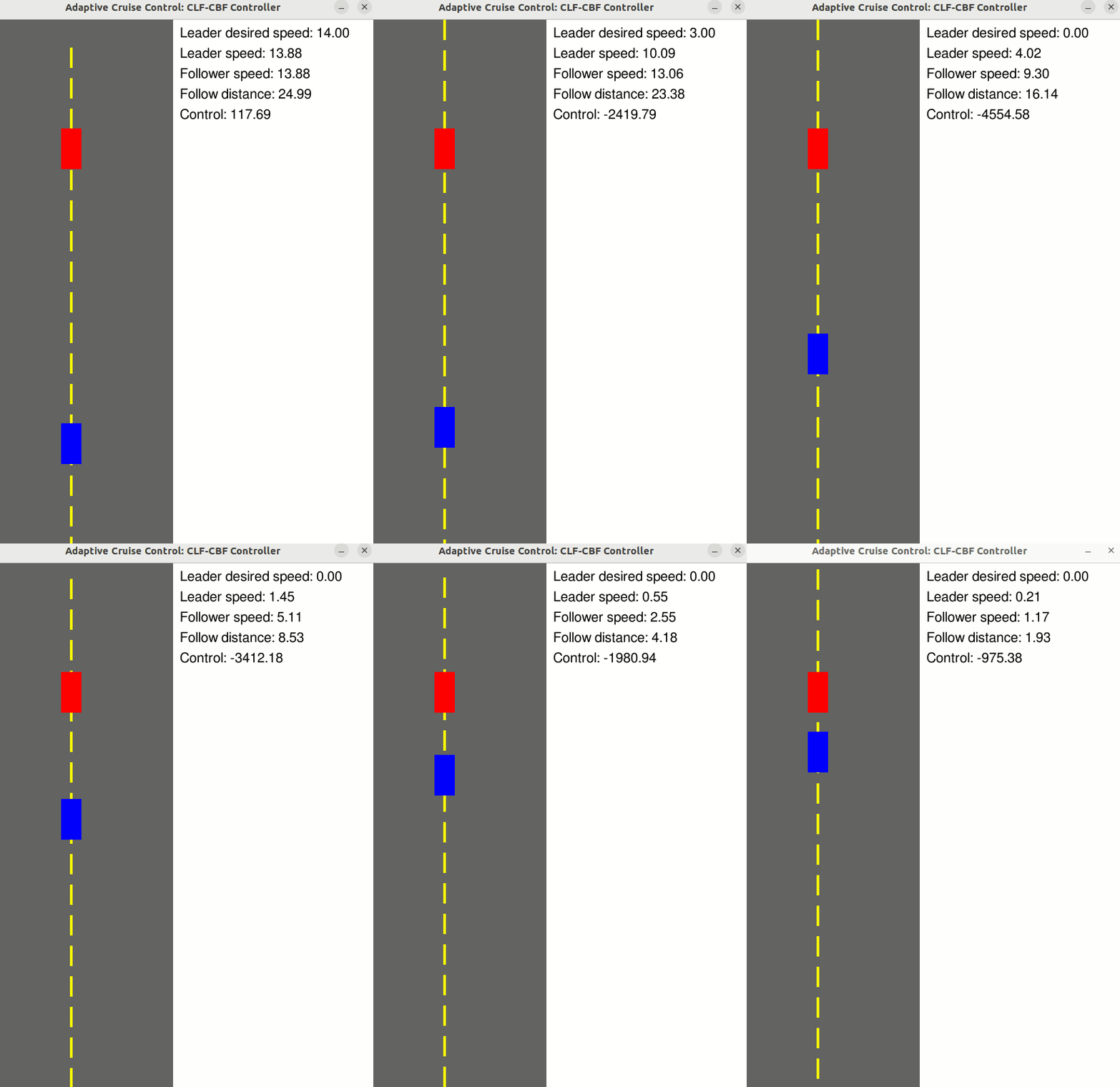
+
from cbfpy.envs.point_robot_envs import PointRobotObstacleEnv
|
|
25
|
+
|
|
26
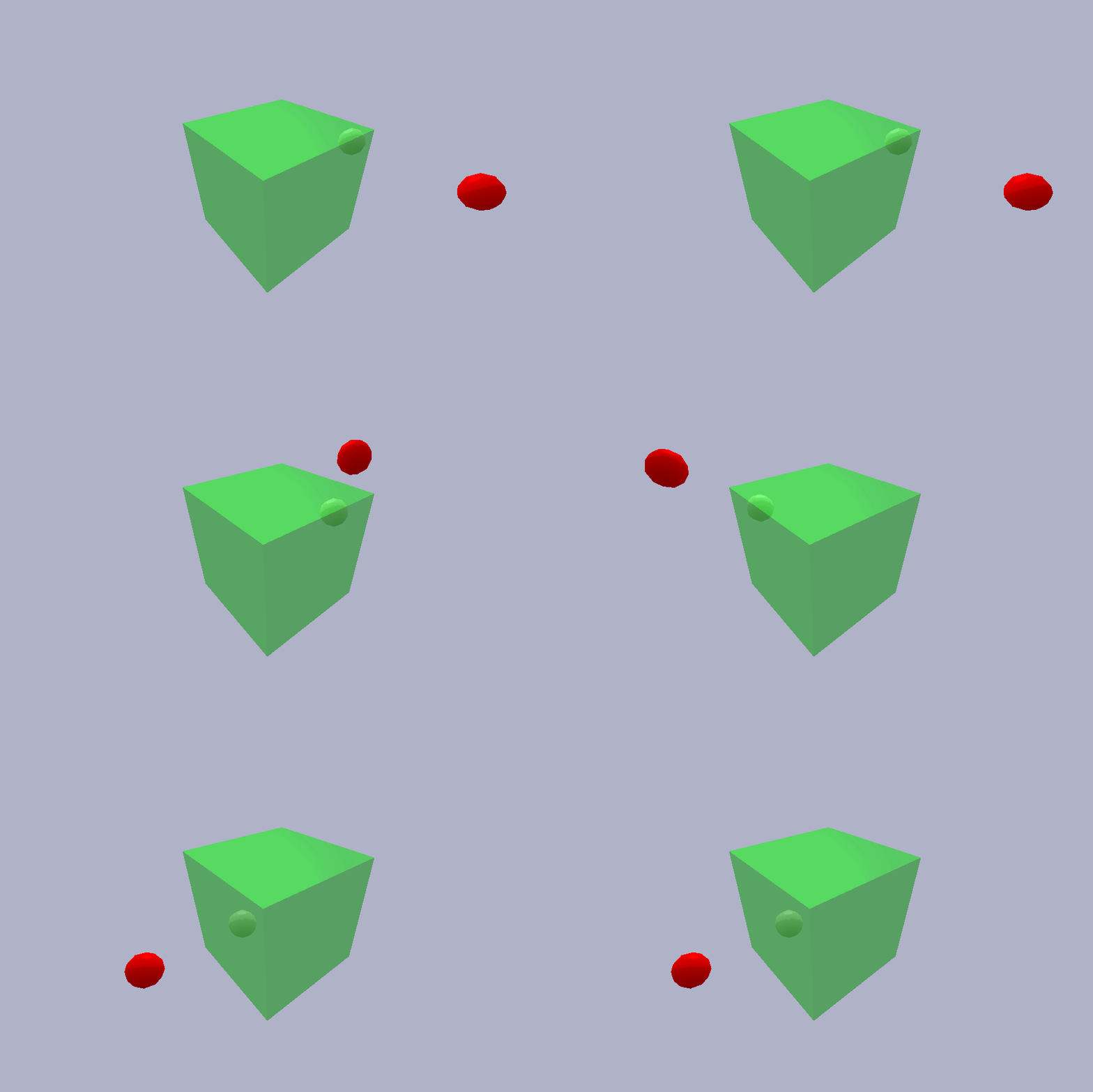
|
+
|
|
27
|
+
class PointRobotObstacleConfig(CBFConfig):
|
|
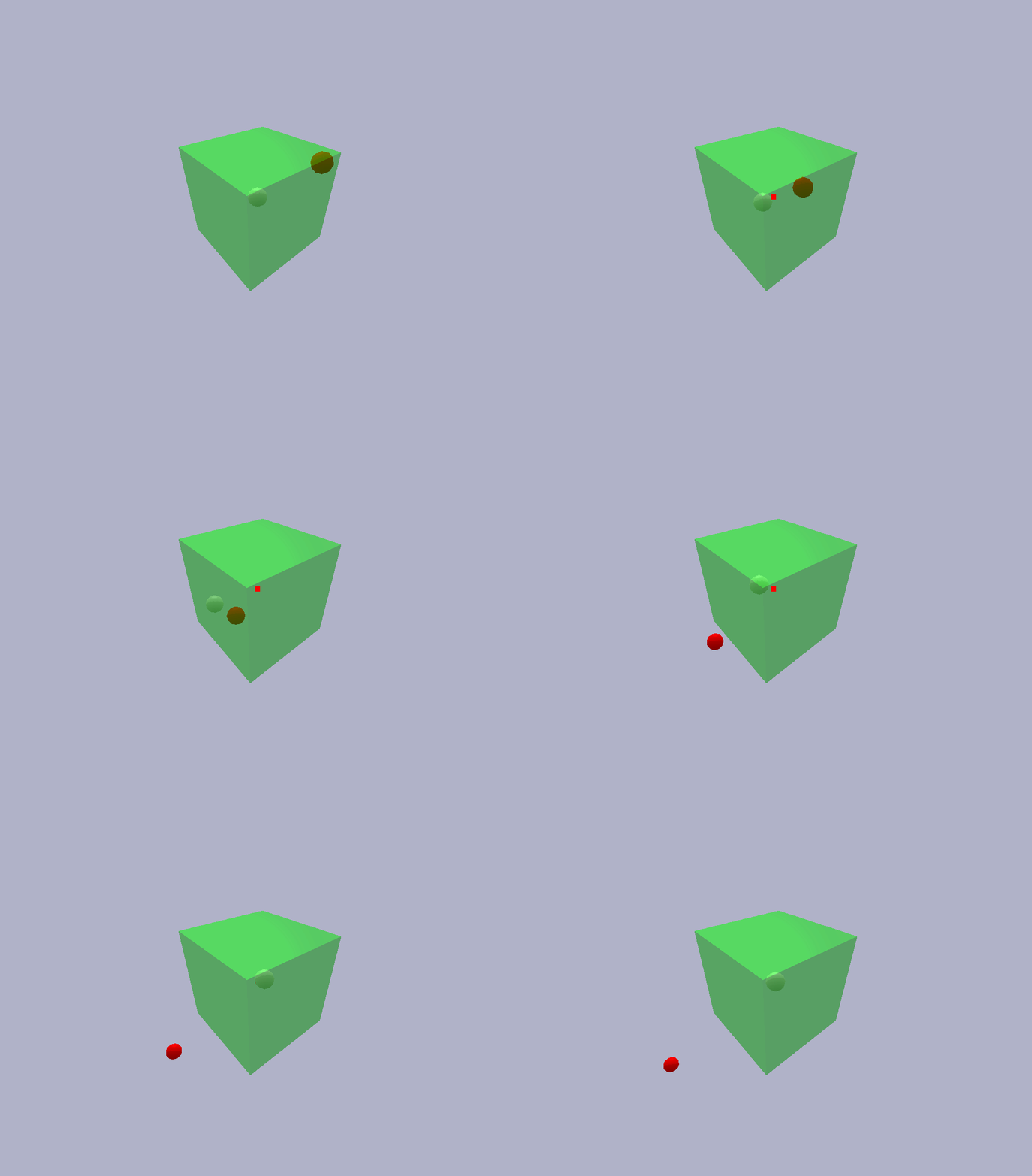
28
|
+
"""Configuration for the 3D 'point-robot-avoiding-an-obstacle' example."""
|
|
29
|
+
|
|
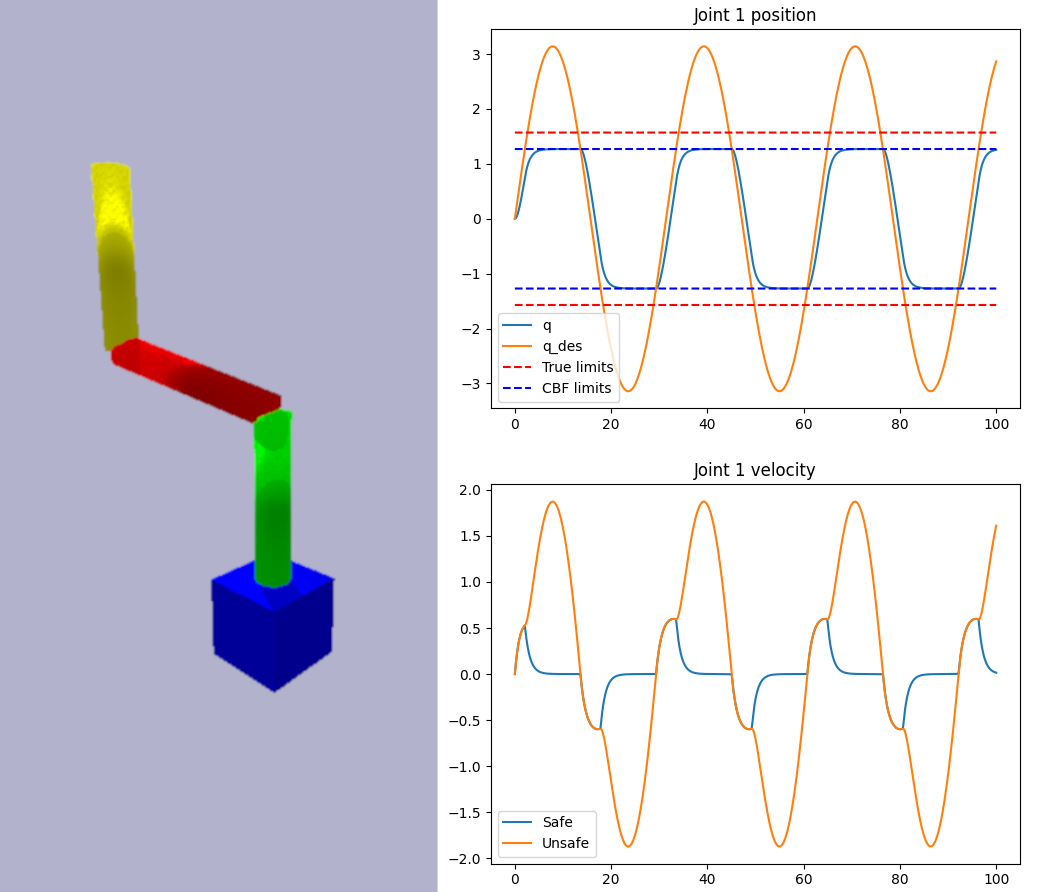
30
|
+
def __init__(self):
|
|
31
|
+
self.mass = 1.0
|
|
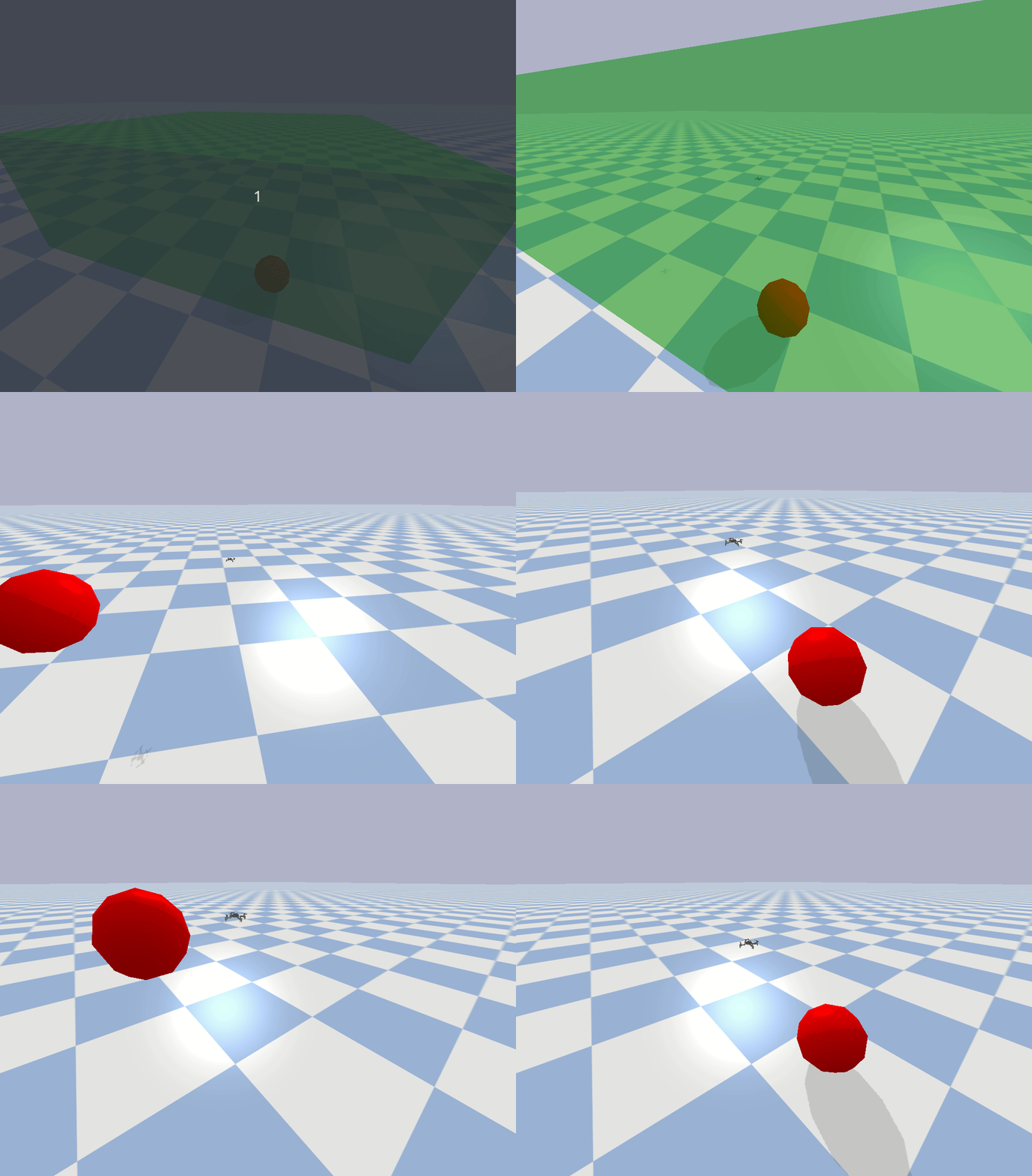
32
|
+
self.robot_radius = 0.25
|
|
33
|
+
self.obstacle_radius = 0.25
|
|
34
|
+
init_z_obs = jnp.array([3.0, 1.0, 1.0, -0.1, -0.1, -0.1])
|
|
35
|
+
super().__init__(
|
|
36
|
+
n=6, # State = [position, velocity]
|
|
37
|
+
m=3, # Control = [force]
|
|
38
|
+
init_args=(init_z_obs,),
|
|
39
|
+
)
|
|
40
|
+
|
|
41
|
+
def f(self, z):
|
|
42
|
+
A = jnp.block(
|
|
43
|
+
[[jnp.zeros((3, 3)), jnp.eye(3)], [jnp.zeros((3, 3)), jnp.zeros((3, 3))]]
|
|
44
|
+
)
|
|
45
|
+
return A @ z
|
|
46
|
+
|
|
47
|
+
def g(self, z):
|
|
48
|
+
B = jnp.block([[jnp.zeros((3, 3))], [jnp.eye(3) / self.mass]])
|
|
49
|
+
return B
|
|
50
|
+
|
|
51
|
+
def h_1(self, z, z_obs):
|
|
52
|
+
# Distance between >= obstacle radius + robot radius + deceleration distance
|
|
53
|
+
pos_robot = z[:3]
|
|
54
|
+
vel_robot = z[3:]
|
|
55
|
+
pos_obs = z_obs[:3]
|
|
56
|
+
vel_obs = z_obs[3:]
|
|
57
|
+
dist_between_centers = jnp.linalg.norm(pos_obs - pos_robot)
|
|
58
|
+
dir_obs_to_robot = (pos_robot - pos_obs) / dist_between_centers
|
|
59
|
+
collision_velocity_component = (vel_obs - vel_robot).T @ dir_obs_to_robot
|
|
60
|
+
lookahead_time = 2.0
|
|
61
|
+
padding = 0.1
|
|
62
|
+
return jnp.array(
|
|
63
|
+
[
|
|
64
|
+
dist_between_centers
|
|
65
|
+
- collision_velocity_component * lookahead_time
|
|
66
|
+
- self.obstacle_radius
|
|
67
|
+
- self.robot_radius
|
|
68
|
+
- padding
|
|
69
|
+
]
|
|
70
|
+
)
|
|
71
|
+
|
|
72
|
+
def h_2(self, z, z_obs):
|
|
73
|
+
# Stay inside the safe set (a box)
|
|
74
|
+
pos_max = jnp.array([1.0, 1.0, 1.0])
|
|
75
|
+
pos_min = jnp.array([-1.0, -1.0, -1.0])
|
|
76
|
+
return jnp.concatenate([pos_max - z[:3], z[:3] - pos_min])
|
|
77
|
+
|
|
78
|
+
def alpha(self, h):
|
|
79
|
+
return 3 * h
|
|
80
|
+
|
|
81
|
+
|
|
82
|
+
@jax.jit
|
|
83
|
+
def nominal_controller(z: ArrayLike, z_des: ArrayLike) -> Array:
|
|
84
|
+
"""A simple PD controller for the point robot.
|
|
85
|
+
|
|
86
|
+
This is unsafe without the CBF, as there is no guarantee that the robot wil not collide with the obstacle
|
|
87
|
+
|
|
88
|
+
Args:
|
|
89
|
+
z (ArrayLike): The current state of the robot [x, y, z, vx, vy, vz]
|
|
90
|
+
z_des (ArrayLike): The desired state of the robot [x_des, y_des, z_des, vx_des, vy_des, vz_des]
|
|
91
|
+
"""
|
|
92
|
+
Kp = 1.0
|
|
93
|
+
Kd = 1.0
|
|
94
|
+
u = -Kp * (z[:3] - z_des[:3]) - Kd * (z[3:] - z_des[3:])
|
|
95
|
+
return u
|
|
96
|
+
|
|
97
|
+
|
|
98
|
+
def main():
|
|
99
|
+
config = PointRobotObstacleConfig()
|
|
100
|
+
cbf = CBF.from_config(config)
|
|
101
|
+
env = PointRobotObstacleEnv()
|
|
102
|
+
|
|
103
|
+
@jax.jit
|
|
104
|
+
def safe_controller(z, z_des, z_obs):
|
|
105
|
+
u = nominal_controller(z, z_des)
|
|
106
|
+
return cbf.safety_filter(z, u, z_obs)
|
|
107
|
+
|
|
108
|
+
while True:
|
|
109
|
+
z, z_obs = env.get_state()
|
|
110
|
+
z_des = env.get_desired_state()
|
|
111
|
+
u = safe_controller(z, z_des, z_obs)
|
|
112
|
+
env.apply_control(u)
|
|
113
|
+
env.step()
|
|
114
|
+
time.sleep(1 / 300)
|
|
115
|
+
|
|
116
|
+
|
|
117
|
+
if __name__ == "__main__":
|
|
118
|
+
main()
|
cbfpy/utils/__init__.py
ADDED
|
File without changes
|
|
@@ -0,0 +1,131 @@
|
|
|
1
|
+
"""Assorted utility functions"""
|
|
2
|
+
|
|
3
|
+
import os
|
|
4
|
+
import sys
|
|
5
|
+
import warnings
|
|
6
|
+
from enum import Enum
|
|
7
|
+
from contextlib import contextmanager
|
|
8
|
+
|
|
9
|
+
|
|
10
|
+
class ANSITextStyles(Enum):
|
|
11
|
+
"""A non-exhaustive list of ANSI text styles for use in terminal output."""
|
|
12
|
+
|
|
13
|
+
BLACK = "\033[30m"
|
|
14
|
+
RED = "\033[31m"
|
|
15
|
+
ORANGE = "\033[38;5;214m" # 256-color mode
|
|
16
|
+
YELLOW = "\033[33m"
|
|
17
|
+
GREEN = "\033[32m"
|
|
18
|
+
BLUE = "\033[34m"
|
|
19
|
+
MAGENTA = "\033[35m"
|
|
20
|
+
CYAN = "\033[36m"
|
|
21
|
+
WHITE = "\033[37m"
|
|
22
|
+
COLOR_DEFAULT = "\033[39m"
|
|
23
|
+
BOLD = "\033[1m"
|
|
24
|
+
UNDERLINE = "\033[4m"
|
|
25
|
+
INVISIBLE = "\033[08m"
|
|
26
|
+
BG_BLACK = "\033[40m"
|
|
27
|
+
BG_RED = "\033[41m"
|
|
28
|
+
BG_ORANGE = "\033[48;5;214m" # 256-color mode
|
|
29
|
+
BG_YELLOW = "\033[43m"
|
|
30
|
+
BG_GREEN = "\033[42m"
|
|
31
|
+
BG_BLUE = "\033[44m"
|
|
32
|
+
BG_MAGENTA = "\033[45m"
|
|
33
|
+
BG_CYAN = "\033[46m"
|
|
34
|
+
BG_WHITE = "\033[47m"
|
|
35
|
+
BG_DEFAULT = "\033[49m"
|
|
36
|
+
RESET = "\033[0m"
|
|
37
|
+
|
|
38
|
+
|
|
39
|
+
def print_warning(msg: str) -> None:
|
|
40
|
+
"""Print a warning message with ANSI color formatting."""
|
|
41
|
+
warnings.warn(
|
|
42
|
+
f"{ANSITextStyles.YELLOW.value}{msg}{ANSITextStyles.RESET.value}", stacklevel=2
|
|
43
|
+
)
|
|
44
|
+
|
|
45
|
+
|
|
46
|
+
# NOTE: This might be overkill if we always assume that this script is in the utils/ folder. But, it seems to work
|
|
47
|
+
def find_toplevel_dir():
|
|
48
|
+
current_dir = os.path.dirname(os.path.abspath(__file__))
|
|
49
|
+
while current_dir != os.path.dirname(
|
|
50
|
+
current_dir
|
|
51
|
+
): # Check if we've reached the root
|
|
52
|
+
if "setup.py" in os.listdir(current_dir) or ".git" in os.listdir(current_dir):
|
|
53
|
+
# Found the top-level package directory
|
|
54
|
+
return current_dir
|
|
55
|
+
current_dir = os.path.dirname(current_dir)
|
|
56
|
+
# Top-level directory not found, handle appropriately
|
|
57
|
+
raise RuntimeError("Top-level directory not found")
|
|
58
|
+
|
|
59
|
+
|
|
60
|
+
def find_assets_dir():
|
|
61
|
+
assets_dir = os.path.join(find_toplevel_dir(), "cbfpy/assets/")
|
|
62
|
+
if not os.path.exists(assets_dir):
|
|
63
|
+
raise RuntimeError("Assets directory not found")
|
|
64
|
+
return assets_dir
|
|
65
|
+
|
|
66
|
+
|
|
67
|
+
# The motivation for this is Pybullet prints a ton of logging info when it launches, but I don't necessarily want this
|
|
68
|
+
# printed out. See the following stack overflow thread for the source:
|
|
69
|
+
# https://stackoverflow.com/questions/5081657/how-do-i-prevent-a-c-shared-library-to-print-on-stdout-in-python/17954769#17954769
|
|
70
|
+
@contextmanager
|
|
71
|
+
def stdout_redirected(to: str = os.devnull, restore: bool = True):
|
|
72
|
+
"""Temporarily redirects `sys.stdout` to the specified file
|
|
73
|
+
|
|
74
|
+
This context manager is useful for silencing output or redirecting it to a
|
|
75
|
+
file or other writable stream during the execution of a code block.
|
|
76
|
+
|
|
77
|
+
Example:
|
|
78
|
+
```
|
|
79
|
+
import os
|
|
80
|
+
with stdout_redirected(to=filename):
|
|
81
|
+
print("from Python")
|
|
82
|
+
os.system("echo non-Python applications are also supported")
|
|
83
|
+
```
|
|
84
|
+
|
|
85
|
+
Args:
|
|
86
|
+
to (str): The target file where stdout should be redirected.
|
|
87
|
+
Defaults to `os.devnull` (silencing output).
|
|
88
|
+
restore (bool): Whether to restores stdout to its original state after
|
|
89
|
+
the context manager exits. Defaults to True.
|
|
90
|
+
"""
|
|
91
|
+
fd = sys.stdout.fileno()
|
|
92
|
+
|
|
93
|
+
##### assert that Python and C stdio write using the same file descriptor
|
|
94
|
+
####assert libc.fileno(ctypes.c_void_p.in_dll(libc, "stdout")) == fd == 1
|
|
95
|
+
|
|
96
|
+
def _redirect_stdout(to):
|
|
97
|
+
sys.stdout.close() # + implicit flush()
|
|
98
|
+
os.dup2(to.fileno(), fd) # fd writes to 'to' file
|
|
99
|
+
sys.stdout = os.fdopen(fd, "w") # Python writes to fd
|
|
100
|
+
|
|
101
|
+
with os.fdopen(os.dup(fd), "w") as old_stdout:
|
|
102
|
+
with open(to, "w") as file:
|
|
103
|
+
_redirect_stdout(to=file)
|
|
104
|
+
try:
|
|
105
|
+
yield # allow code to be run with the redirected stdout
|
|
106
|
+
finally:
|
|
107
|
+
if restore:
|
|
108
|
+
_redirect_stdout(to=old_stdout) # restore stdout.
|
|
109
|
+
# buffering and flags such as
|
|
110
|
+
# CLOEXEC may be different
|
|
111
|
+
|
|
112
|
+
|
|
113
|
+
## Tests ##
|
|
114
|
+
|
|
115
|
+
|
|
116
|
+
def _test_styles():
|
|
117
|
+
for fmt in ANSITextStyles:
|
|
118
|
+
print(f"{fmt.name}: {fmt.value}{fmt.name}{ANSITextStyles.RESET.value}")
|
|
119
|
+
|
|
120
|
+
|
|
121
|
+
def _test_warning():
|
|
122
|
+
print_warning("This is a warning message.")
|
|
123
|
+
|
|
124
|
+
|
|
125
|
+
def main():
|
|
126
|
+
_test_styles()
|
|
127
|
+
_test_warning()
|
|
128
|
+
|
|
129
|
+
|
|
130
|
+
if __name__ == "__main__":
|
|
131
|
+
main()
|
cbfpy/utils/jax_utils.py
ADDED
|
@@ -0,0 +1,26 @@
|
|
|
1
|
+
"""Jax helper functions and decorators"""
|
|
2
|
+
|
|
3
|
+
import os
|
|
4
|
+
|
|
5
|
+
import jax
|
|
6
|
+
|
|
7
|
+
|
|
8
|
+
def conditional_jit(condition: bool):
|
|
9
|
+
"""Decorator to jit a function if a condition is met.
|
|
10
|
+
|
|
11
|
+
Args:
|
|
12
|
+
condition (bool): True to jit the function, False otherwise
|
|
13
|
+
"""
|
|
14
|
+
|
|
15
|
+
def wrapper(func):
|
|
16
|
+
if condition:
|
|
17
|
+
return jax.jit(func)
|
|
18
|
+
return func
|
|
19
|
+
|
|
20
|
+
return wrapper
|
|
21
|
+
|
|
22
|
+
|
|
23
|
+
def jit_if_not_debugging(func):
|
|
24
|
+
"""Decorator to jit a function if the DEBUG environment variable is not set."""
|
|
25
|
+
debug = os.environ.get("DEBUG", "").lower() in ("1", "true")
|
|
26
|
+
return conditional_jit(not debug)(func)
|
|
@@ -0,0 +1,21 @@
|
|
|
1
|
+
"""Assorted helper functions related to math operations / linear algebra"""
|
|
2
|
+
|
|
3
|
+
import jax.numpy as jnp
|
|
4
|
+
from jax import Array
|
|
5
|
+
from jax.typing import ArrayLike
|
|
6
|
+
|
|
7
|
+
|
|
8
|
+
def normalize(vec: ArrayLike) -> Array:
|
|
9
|
+
"""Normalizes a vector to have magnitude 1
|
|
10
|
+
|
|
11
|
+
If normalizing an array of vectors, each vector will have magnitude 1
|
|
12
|
+
|
|
13
|
+
Args:
|
|
14
|
+
vec (ArrayLike): Input vector or array. Shape (dim,) or (n_vectors, dim)
|
|
15
|
+
|
|
16
|
+
Returns:
|
|
17
|
+
Array: Unit vector(s), shape (dim,) or (n_vectors, dim) (same shape as the input)
|
|
18
|
+
"""
|
|
19
|
+
vec = jnp.atleast_1d(vec)
|
|
20
|
+
norms = jnp.linalg.norm(vec, axis=-1)
|
|
21
|
+
return vec / norms[..., jnp.newaxis]
|
|
@@ -0,0 +1,93 @@
|
|
|
1
|
+
"""Tools for visualizing shapes in Pybullet"""
|
|
2
|
+
|
|
3
|
+
from typing import Optional
|
|
4
|
+
|
|
5
|
+
import numpy as np
|
|
6
|
+
import numpy.typing as npt
|
|
7
|
+
import pybullet
|
|
8
|
+
from pybullet_utils.bullet_client import BulletClient
|
|
9
|
+
|
|
10
|
+
|
|
11
|
+
def visualize_3D_box(
|
|
12
|
+
box: npt.ArrayLike,
|
|
13
|
+
padding: Optional[npt.ArrayLike] = None,
|
|
14
|
+
rgba: npt.ArrayLike = (1, 0, 0, 0.5),
|
|
15
|
+
client: Optional[BulletClient] = None,
|
|
16
|
+
) -> int:
|
|
17
|
+
"""Visualize a box in Pybullet
|
|
18
|
+
|
|
19
|
+
Args:
|
|
20
|
+
box (npt.ArrayLike): Box to visualize. If an array, must be of shape (1, 2, box_dim)
|
|
21
|
+
padding (Optional[npt.ArrayLike]): If expanding (or contracting) the boxes by a certain amount, include the
|
|
22
|
+
(x, y, z) padding distances here (shape (3,)). Defaults to None.
|
|
23
|
+
rgba (npt.ArrayLike): Color of the box (RGB + alpha), shape (4,). Defaults to (1, 0, 0, 0.5).
|
|
24
|
+
client (BulletClient, optional): If connecting to multiple physics servers, include the client
|
|
25
|
+
(the class instance, not just the ID) here. Defaults to None (use default connected client)
|
|
26
|
+
|
|
27
|
+
Returns:
|
|
28
|
+
int: Pybullet ID of the box
|
|
29
|
+
"""
|
|
30
|
+
lower, upper = box
|
|
31
|
+
if padding is not None:
|
|
32
|
+
lower -= padding
|
|
33
|
+
upper += padding
|
|
34
|
+
return create_box(
|
|
35
|
+
pos=(lower + (upper - lower) / 2), # Midpoint
|
|
36
|
+
orn=(0, 0, 0, 1),
|
|
37
|
+
mass=0,
|
|
38
|
+
sidelengths=(upper - lower),
|
|
39
|
+
use_collision=False,
|
|
40
|
+
rgba=rgba,
|
|
41
|
+
client=client,
|
|
42
|
+
)
|
|
43
|
+
|
|
44
|
+
|
|
45
|
+
def create_box(
|
|
46
|
+
pos: npt.ArrayLike,
|
|
47
|
+
orn: npt.ArrayLike,
|
|
48
|
+
mass: float,
|
|
49
|
+
sidelengths: npt.ArrayLike,
|
|
50
|
+
use_collision: bool,
|
|
51
|
+
rgba: npt.ArrayLike = (1, 1, 1, 1),
|
|
52
|
+
client: Optional[BulletClient] = None,
|
|
53
|
+
) -> int:
|
|
54
|
+
"""Creates a rigid box in the Pybullet simulation
|
|
55
|
+
|
|
56
|
+
Args:
|
|
57
|
+
pos (npt.ArrayLike): Position of the box in world frame, shape (3)
|
|
58
|
+
orn (npt.ArrayLike): Orientation (XYZW quaternion) of the box in world frame, shape (4,)
|
|
59
|
+
mass (float): Mass of the box. If set to 0, the box is fixed in space
|
|
60
|
+
sidelengths (npt.ArrayLike): Sidelengths of the box along the local XYZ axes, shape (3,)
|
|
61
|
+
use_collision (bool): Whether or not collision is enabled for the box
|
|
62
|
+
rgba (npt.ArrayLike, optional): Color of the box, with each RGBA value being in [0, 1].
|
|
63
|
+
Defaults to (1, 1, 1, 1) (white)
|
|
64
|
+
client (BulletClient, optional): If connecting to multiple physics servers, include the client
|
|
65
|
+
(the class instance, not just the ID) here. Defaults to None (use default connected client)
|
|
66
|
+
|
|
67
|
+
Returns:
|
|
68
|
+
int: ID of the box in Pybullet
|
|
69
|
+
"""
|
|
70
|
+
client: pybullet = pybullet if client is None else client
|
|
71
|
+
if len(sidelengths) != 3:
|
|
72
|
+
raise ValueError("Must provide the dimensions of the three sides of the box")
|
|
73
|
+
half_extents = np.asarray(sidelengths) / 2
|
|
74
|
+
visual_id = client.createVisualShape(
|
|
75
|
+
pybullet.GEOM_BOX,
|
|
76
|
+
halfExtents=half_extents,
|
|
77
|
+
rgbaColor=rgba,
|
|
78
|
+
)
|
|
79
|
+
if use_collision:
|
|
80
|
+
collision_id = client.createCollisionShape(
|
|
81
|
+
pybullet.GEOM_BOX,
|
|
82
|
+
halfExtents=half_extents,
|
|
83
|
+
)
|
|
84
|
+
else:
|
|
85
|
+
collision_id = -1
|
|
86
|
+
box_id = client.createMultiBody(
|
|
87
|
+
baseMass=mass,
|
|
88
|
+
basePosition=pos,
|
|
89
|
+
baseOrientation=orn,
|
|
90
|
+
baseCollisionShapeIndex=collision_id,
|
|
91
|
+
baseVisualShapeIndex=visual_id,
|
|
92
|
+
)
|
|
93
|
+
return box_id
|
|
@@ -0,0 +1,21 @@
|
|
|
1
|
+
MIT License
|
|
2
|
+
|
|
3
|
+
Copyright (c) 2024 Daniel Morton
|
|
4
|
+
|
|
5
|
+
Permission is hereby granted, free of charge, to any person obtaining a copy
|
|
6
|
+
of this software and associated documentation files (the "Software"), to deal
|
|
7
|
+
in the Software without restriction, including without limitation the rights
|
|
8
|
+
to use, copy, modify, merge, publish, distribute, sublicense, and/or sell
|
|
9
|
+
copies of the Software, and to permit persons to whom the Software is
|
|
10
|
+
furnished to do so, subject to the following conditions:
|
|
11
|
+
|
|
12
|
+
The above copyright notice and this permission notice shall be included in all
|
|
13
|
+
copies or substantial portions of the Software.
|
|
14
|
+
|
|
15
|
+
THE SOFTWARE IS PROVIDED "AS IS", WITHOUT WARRANTY OF ANY KIND, EXPRESS OR
|
|
16
|
+
IMPLIED, INCLUDING BUT NOT LIMITED TO THE WARRANTIES OF MERCHANTABILITY,
|
|
17
|
+
FITNESS FOR A PARTICULAR PURPOSE AND NONINFRINGEMENT. IN NO EVENT SHALL THE
|
|
18
|
+
AUTHORS OR COPYRIGHT HOLDERS BE LIABLE FOR ANY CLAIM, DAMAGES OR OTHER
|
|
19
|
+
LIABILITY, WHETHER IN AN ACTION OF CONTRACT, TORT OR OTHERWISE, ARISING FROM,
|
|
20
|
+
OUT OF OR IN CONNECTION WITH THE SOFTWARE OR THE USE OR OTHER DEALINGS IN THE
|
|
21
|
+
SOFTWARE.
|
|
@@ -0,0 +1,226 @@
|
|
|
1
|
+
Metadata-Version: 2.1
|
|
2
|
+
Name: cbfpy
|
|
3
|
+
Version: 0.0.1
|
|
4
|
+
Summary: Control Barrier Functions in Python
|
|
5
|
+
Author-email: Daniel Morton <danielpmorton@gmail.com>
|
|
6
|
+
Project-URL: Documentation, https://danielpmorton.github.io/cbfpy/
|
|
7
|
+
Project-URL: Repository, https://github.com/danielpmorton/cbfpy/
|
|
8
|
+
Keywords: control,barrier,function,CBF,Jax
|
|
9
|
+
Classifier: Programming Language :: Python :: 3
|
|
10
|
+
Classifier: License :: OSI Approved :: MIT License
|
|
11
|
+
Classifier: Operating System :: OS Independent
|
|
12
|
+
Description-Content-Type: text/markdown
|
|
13
|
+
License-File: LICENSE
|
|
14
|
+
Requires-Dist: numpy<2
|
|
15
|
+
Requires-Dist: jax
|
|
16
|
+
Requires-Dist: jaxlib
|
|
17
|
+
Requires-Dist: qpax
|
|
18
|
+
Provides-Extra: examples
|
|
19
|
+
Requires-Dist: pybullet; extra == "examples"
|
|
20
|
+
Requires-Dist: pygame; extra == "examples"
|
|
21
|
+
Requires-Dist: wheel; extra == "examples"
|
|
22
|
+
Requires-Dist: matplotlib; extra == "examples"
|
|
23
|
+
Provides-Extra: dev
|
|
24
|
+
Requires-Dist: mkdocs-material; extra == "dev"
|
|
25
|
+
Requires-Dist: mkdocstrings[python]; extra == "dev"
|
|
26
|
+
Requires-Dist: pylint; extra == "dev"
|
|
27
|
+
Requires-Dist: black; extra == "dev"
|
|
28
|
+
Provides-Extra: all
|
|
29
|
+
Requires-Dist: pylint; extra == "all"
|
|
30
|
+
Requires-Dist: black; extra == "all"
|
|
31
|
+
Requires-Dist: pybullet; extra == "all"
|
|
32
|
+
Requires-Dist: pygame; extra == "all"
|
|
33
|
+
Requires-Dist: mkdocs-material; extra == "all"
|
|
34
|
+
Requires-Dist: mkdocstrings[python]; extra == "all"
|
|
35
|
+
|
|
36
|
+
# CBFpy: Control Barrier Functions in Python and Jax
|
|
37
|
+
|
|
38
|
+
CBFpy is an easy-to-use and high-performance framework for constructing and solving Control Barrier Functions (CBFs) and Control Lyapunov Functions (CLFs), using [Jax](https://github.com/google/jax) for:
|
|
39
|
+
|
|
40
|
+
- Just-in-time compilation
|
|
41
|
+
- Accelerated linear algebra operations with [XLA](https://openxla.org/xla)
|
|
42
|
+
- Automatic differentiation
|
|
43
|
+
|
|
44
|
+
For API reference, see the following [documentation](https://danielpmorton.github.io/cbfpy)
|
|
45
|
+
|
|
46
|
+
If you use CBFpy in your research, please use the following citation:
|
|
47
|
+
|
|
48
|
+
```
|
|
49
|
+
@software{Morton_CBFpy_2024,
|
|
50
|
+
author = {Morton, Daniel},
|
|
51
|
+
license = {MIT},
|
|
52
|
+
title = {{CBFpy: Control Barrier Functions in Python and Jax}},
|
|
53
|
+
url = {https://github.com/danielpmorton/cbfpy},
|
|
54
|
+
version = {0.0.1},
|
|
55
|
+
month = Dec,
|
|
56
|
+
year = {2024}
|
|
57
|
+
}
|
|
58
|
+
```
|
|
59
|
+
|
|
60
|
+
## Installation
|
|
61
|
+
|
|
62
|
+
### From PyPI
|
|
63
|
+
|
|
64
|
+
```
|
|
65
|
+
pip install cbfpy
|
|
66
|
+
```
|
|
67
|
+
|
|
68
|
+
### From source
|
|
69
|
+
|
|
70
|
+
A virtual environment is optional, but highly recommended. For `pyenv` installation instructions, see [here](https://danielpmorton.github.io/cbfpy/pyenv).
|
|
71
|
+
|
|
72
|
+
```
|
|
73
|
+
git clone https://github.com/danielpmorton/cbfpy
|
|
74
|
+
cd cbfpy
|
|
75
|
+
pip install -e ".[examples]"
|
|
76
|
+
```
|
|
77
|
+
The `[examples]` tag installs all of the required packages for development and running the examples. The pure `cbfpy` functionality does not require these extra packages though. If you want to contribute to the repo, you can also include the `[dev]` dependencies.
|
|
78
|
+
|
|
79
|
+
If you are working on Apple silicon and have issues installing Jax, the following threads may be useful: [[1]](https://stackoverflow.com/questions/68327863/importing-jax-fails-on-mac-with-m1-chip), [[2]](https://github.com/jax-ml/jax/issues/5501#issuecomment-955590288)
|
|
80
|
+
|
|
81
|
+
## Usage:
|
|
82
|
+
|
|
83
|
+
#### Example: A point-mass robot in 1D with an applied force and a positional barrier
|
|
84
|
+
|
|
85
|
+
For this problem, the state $z$ is defined as the position and velocity of the robot,
|
|
86
|
+
|
|
87
|
+
$$z = [x, \dot{x}]$$
|
|
88
|
+
|
|
89
|
+
So, the state derivative $\dot{z}$ is therefore
|
|
90
|
+
|
|
91
|
+
$$\dot{z} = [\dot{x}, \ddot{x}]$$
|
|
92
|
+
|
|
93
|
+
And the control input is the applied force in the $x$ direction:
|
|
94
|
+
|
|
95
|
+
$$u = F_{x}$$
|
|
96
|
+
|
|
97
|
+
The dynamics can be expressed as follows (with $m$ denoting the robot's mass):
|
|
98
|
+
|
|
99
|
+
$$\dot{z} = \begin{bmatrix}0 & 1 \\
|
|
100
|
+
0 & 0
|
|
101
|
+
\end{bmatrix}z +
|
|
102
|
+
\begin{bmatrix}0 \\
|
|
103
|
+
1/m
|
|
104
|
+
\end{bmatrix} u$$
|
|
105
|
+
|
|
106
|
+
This is a control affine system, since the dynamics can be expressed as
|
|
107
|
+
|
|
108
|
+
$$\dot{z} = f(z) + g(z) u$$
|
|
109
|
+
|
|
110
|
+
If the robot is controlled by some nominal (unsafe) controller, we may want to guarantee that it remains in some safe region. If we define $X_{safe} \in [x_{min}, \infty]$, we can construct a (relative-degree-2, zeroing) barrier $h$ where $h(z) \geq 0$ for any $z$ in the safe set:
|
|
111
|
+
|
|
112
|
+
$$h(z) = x - x_{min}$$
|
|
113
|
+
|
|
114
|
+
### In Code
|
|
115
|
+
|
|
116
|
+
We'll first define our problem (dynamics, barrier, and any additional parameters) in a `CBFConfig`-derived class.
|
|
117
|
+
|
|
118
|
+
We use [Jax](https://github.com/google/jax) for fast compilation of the problem. Jax can be tricky to learn at first, but luckily `cbfpy` just requires formulating your functions in `jax.numpy` which has the same familiar interface as `numpy`. These should be pure functions without side effects (for instance, modifying a class variable in `self`).
|
|
119
|
+
|
|
120
|
+
Additional tuning parameters/functions can be found in the `CBFConfig` documentation.
|
|
121
|
+
|
|
122
|
+
```python
|
|
123
|
+
import jax.numpy as jnp
|
|
124
|
+
from cbfpy import CBF, CBFConfig
|
|
125
|
+
|
|
126
|
+
# Create a config class for your problem inheriting from the CBFConfig class
|
|
127
|
+
class MyCBFConfig(CBFConfig):
|
|
128
|
+
def __init__(self):
|
|
129
|
+
super().__init__(
|
|
130
|
+
# Define the state and control dimensions
|
|
131
|
+
n = 2, # [x, x_dot]
|
|
132
|
+
m = 1, # [F_x]
|
|
133
|
+
# Define control limits (if desired)
|
|
134
|
+
u_min = None,
|
|
135
|
+
u_max = None,
|
|
136
|
+
)
|
|
137
|
+
|
|
138
|
+
# Define the control-affine dynamics functions `f` and `g` for your system
|
|
139
|
+
def f(self, z):
|
|
140
|
+
A = jnp.array([[0.0, 1.0], [0.0, 0.0]])
|
|
141
|
+
return A @ z
|
|
142
|
+
|
|
143
|
+
def g(self, z):
|
|
144
|
+
mass = 1.0
|
|
145
|
+
B = jnp.array([[0.0], [1.0 / mass]])
|
|
146
|
+
return B
|
|
147
|
+
|
|
148
|
+
# Define the barrier function `h`
|
|
149
|
+
# The *relative degree* of this system is 2, so, we'll use the h_2 method
|
|
150
|
+
def h_2(self, z):
|
|
151
|
+
x_min = 1.0
|
|
152
|
+
x = z[0]
|
|
153
|
+
return jnp.array([x - x_min])
|
|
154
|
+
```
|
|
155
|
+
We can then construct the CBF from our config and use it in our control loop as follows.
|
|
156
|
+
```python
|
|
157
|
+
config = MyCBFConfig()
|
|
158
|
+
cbf = CBF.from_config(config)
|
|
159
|
+
|
|
160
|
+
# Pseudocode
|
|
161
|
+
while True:
|
|
162
|
+
z = get_state()
|
|
163
|
+
z_des = get_desired_state()
|
|
164
|
+
u_nom = nominal_controller(z, z_des)
|
|
165
|
+
u = cbf.safety_filter(z, u_nom)
|
|
166
|
+
apply_control(u)
|
|
167
|
+
step()
|
|
168
|
+
```
|
|
169
|
+
|
|
170
|
+
## Examples
|
|
171
|
+
|
|
172
|
+
These can be found in the `examples` folder [here](https://github.com/danielpmorton/cbfpy/tree/main/cbfpy/examples)
|
|
173
|
+
|
|
174
|
+
### [Adaptive Cruise Control](https://github.com/danielpmorton/cbfpy/blob/main/cbfpy/examples/adaptive_cruise_control_demo.py)
|
|
175
|
+
|
|
176
|
+
Use a CLF-CBF to maintain a safe follow distance to the vehicle in front, while tracking a desired velocity
|
|
177
|
+
|
|
178
|
+
- State: z = [Follower velocity, Leader velocity, Follow distance] (n = 3)
|
|
179
|
+
- Control: u = [Follower wheel force] (m = 1)
|
|
180
|
+
- Relative degree: 1
|
|
181
|
+
|
|
182
|
+
|
|
183
|
+
|
|
184
|
+
### [Point Robot Safe-Set Containment](https://github.com/danielpmorton/cbfpy/blob/main/cbfpy/examples/point_robot_demo.py)
|
|
185
|
+
|
|
186
|
+
Use a CBF to enforce that a point robot stays within a safe box, while a PD controller attempts to reduce the distance to a target position
|
|
187
|
+
|
|
188
|
+
- State: z = [Position, Velocity] (n = 6)
|
|
189
|
+
- Control: u = [Force] (m = 3)
|
|
190
|
+
- Relative degree: 2
|
|
191
|
+
|
|
192
|
+
|
|
193
|
+
|
|
194
|
+
### [Point Robot Obstacle Avoidance](https://github.com/danielpmorton/cbfpy/blob/main/cbfpy/examples/point_robot_obstacle_demo.py)
|
|
195
|
+
|
|
196
|
+
Use a CBF to keep a point robot inside a safe box, while avoiding a moving obstacle. The nominal PD controller attempts to keep the robot at the origin.
|
|
197
|
+
|
|
198
|
+
- State: z = [Position, Velocity] (n = 6)
|
|
199
|
+
- Control: u = [Force] (m = 3)
|
|
200
|
+
- Relative degree: 1 + 2 (1 for obstacle avoidance, 2 for safe set containment)
|
|
201
|
+
- Additional data: The state of the obstacle (position and velocity)
|
|
202
|
+
|
|
203
|
+
|
|
204
|
+
|
|
205
|
+
### [Manipulator Joint Limit Avoidance](https://github.com/danielpmorton/cbfpy/blob/main/cbfpy/examples/joint_limits_demo.py)
|
|
206
|
+
|
|
207
|
+
Use a CBF to keep a manipulator operating within its joint limits, even if a nominal joint trajectory is unsafe.
|
|
208
|
+
|
|
209
|
+
- State: z = [Joint angles] (n = 3)
|
|
210
|
+
- Control: u = [Joint velocities] (m = 3)
|
|
211
|
+
- Relative degree: 1
|
|
212
|
+
|
|
213
|
+
|
|
214
|
+
|
|
215
|
+
### [Drone Obstacle Avoidance](https://github.com/danielpmorton/cbfpy/blob/main/cbfpy/examples/drone_demo.py)
|
|
216
|
+
|
|
217
|
+
Use a CBF to keep a drone inside a safe box, while avoiding a moving obstacle. This is similar to the "point robot obstacle avoidance" demo, but with slightly different dynamics.
|
|
218
|
+
|
|
219
|
+
- State: z = [Position, Velocity] (n = 6)
|
|
220
|
+
- Control: u = [Velocity] (m = 3)
|
|
221
|
+
- Relative degree: 1
|
|
222
|
+
- Additional data: The state of the obstacle (position and velocity)
|
|
223
|
+
|
|
224
|
+
This is the same CBF which was used in the ["Drone Fencing" demo](https://danielpmorton.github.io/drone_fencing/) at the Stanford Robotics center.
|
|
225
|
+
|
|
226
|
+
|
|
@@ -0,0 +1,33 @@
|
|
|
1
|
+
cbfpy/__init__.py,sha256=Fq5snpGxff_id-Qlpl1f52OZWr9WrVaEpZhmWE9fRpI,366
|
|
2
|
+
cbfpy/cbfs/__init__.py,sha256=47DEQpj8HBSa-_TImW-5JCeuQeRkm5NMpJWZG3hSuFU,0
|
|
3
|
+
cbfpy/cbfs/cbf.py,sha256=WDNAMFjWJq2gaa8rceg8nsimnb2o3CvAOgf_wCCmr-Q,13923
|
|
4
|
+
cbfpy/cbfs/clf_cbf.py,sha256=o8wyKRhj3h4xqMwxnb3wbOyN5O54TYKTWySUhyQYuY4,17492
|
|
5
|
+
cbfpy/config/__init__.py,sha256=47DEQpj8HBSa-_TImW-5JCeuQeRkm5NMpJWZG3hSuFU,0
|
|
6
|
+
cbfpy/config/cbf_config.py,sha256=A6HGlf9P3HrG6DeK3qL9pr2zQtaWthbBwm7uN47CQLE,17069
|
|
7
|
+
cbfpy/config/clf_cbf_config.py,sha256=TJVuK5wsESbnVCqm6VNJ5kuaPRpWbQVjyHHALc6KDTs,10703
|
|
8
|
+
cbfpy/envs/__init__.py,sha256=47DEQpj8HBSa-_TImW-5JCeuQeRkm5NMpJWZG3hSuFU,0
|
|
9
|
+
cbfpy/envs/arm_envs.py,sha256=mY5A3nId0CbhpwbXrXx34T_Tce0QJzj3fiaJ2YAw4K8,2785
|
|
10
|
+
cbfpy/envs/base_env.py,sha256=JRS9ASNM0NS5pYUG2wiBcvZSUsa5Buf-ggRzd0Xs9js,1818
|
|
11
|
+
cbfpy/envs/car_env.py,sha256=u8-m3Mpp49FJclxARI63IDmZmKSz6zCFnxxwg1Q3CVo,11245
|
|
12
|
+
cbfpy/envs/drone_env.py,sha256=9PpUFXLjz_vj_eGolkbMDpPTXvyQxF6juGcW3zvDua4,5762
|
|
13
|
+
cbfpy/envs/point_robot_envs.py,sha256=p_UK_uwUWLyDdwvsFgVRWEI1Ngw1WqgadkMb8yjuj8Q,7877
|
|
14
|
+
cbfpy/examples/__init__.py,sha256=47DEQpj8HBSa-_TImW-5JCeuQeRkm5NMpJWZG3hSuFU,0
|
|
15
|
+
cbfpy/examples/adaptive_cruise_control_demo.py,sha256=QzdYJnUlt5SphE6Foz7wTMnxkk-ojxQ7I1tHVPNQdBg,4147
|
|
16
|
+
cbfpy/examples/drone_demo.py,sha256=FjV9DLeo6CyhwA77XNKxW7LzWZCYULu-XMhG6nYXIes,3590
|
|
17
|
+
cbfpy/examples/joint_limits_demo.py,sha256=imAK7cQ8Uch5b_kFfsmCHy4E7pmlSfZFoEhs8_-rJBw,4534
|
|
18
|
+
cbfpy/examples/point_robot_demo.py,sha256=rLHI32H76Sk-w4CTvuIo8YjgBLFZi7NLZILaGEciG9Y,2868
|
|
19
|
+
cbfpy/examples/point_robot_obstacle_demo.py,sha256=zItuf3L-s9RZvactqo7chZAv0ylTmCTvOPrsHn4V3mk,3775
|
|
20
|
+
cbfpy/temp/test_import.py,sha256=pPeIB0ZtQ-Fb71or2A8LFnSA7fCcpDAYRwocoxdMRIg,25
|
|
21
|
+
cbfpy/utils/__init__.py,sha256=47DEQpj8HBSa-_TImW-5JCeuQeRkm5NMpJWZG3hSuFU,0
|
|
22
|
+
cbfpy/utils/general_utils.py,sha256=TV8pk7Miysu0H3HLe9L0MrEZLMTxOIykW_h4cIrts-o,4157
|
|
23
|
+
cbfpy/utils/jax_utils.py,sha256=87zT1_6OlaSw2HCdTfC-rqP8gchtUleSH6v_QlwzkYA,596
|
|
24
|
+
cbfpy/utils/math_utils.py,sha256=69Wb6kAuAAG38_eW39QrZHNDYYv--5hBS8RJOFsJ0BE,637
|
|
25
|
+
cbfpy/utils/visualization.py,sha256=d4bdZCEl9AUjRz-D_uNpCu4bSUkz_wOBBaTaAH9D7go,3319
|
|
26
|
+
test/__init__.py,sha256=47DEQpj8HBSa-_TImW-5JCeuQeRkm5NMpJWZG3hSuFU,0
|
|
27
|
+
test/test_speed.py,sha256=hBXNKjO414f3wzHfEIK2ND60dD9AssE9ku_p15YPttE,7336
|
|
28
|
+
test/test_utils.py,sha256=vf9NOPLxY9EnQStzAGhctQ21DBoggbFdMOpzbDg1o8E,829
|
|
29
|
+
cbfpy-0.0.1.dist-info/LICENSE,sha256=VsRPtVDiLQq5oEH67g9hLJNScJhe6URhGIkCcfLjGAA,1070
|
|
30
|
+
cbfpy-0.0.1.dist-info/METADATA,sha256=sA7_vBtcmrNTPKE3WsLXmWoXOSAd2wYuGKkJFzyAT-c,8883
|
|
31
|
+
cbfpy-0.0.1.dist-info/WHEEL,sha256=PZUExdf71Ui_so67QXpySuHtCi3-J3wvF4ORK6k_S8U,91
|
|
32
|
+
cbfpy-0.0.1.dist-info/top_level.txt,sha256=zf3vvm0IroFA5aatt-r1KWBtjBg-FeAh_e2ut4fLsjk,11
|
|
33
|
+
cbfpy-0.0.1.dist-info/RECORD,,
|