bspy 3.0.1__py3-none-any.whl → 4.1__py3-none-any.whl
This diff represents the content of publicly available package versions that have been released to one of the supported registries. The information contained in this diff is provided for informational purposes only and reflects changes between package versions as they appear in their respective public registries.
- bspy/__init__.py +16 -9
- bspy/_spline_domain.py +83 -47
- bspy/_spline_evaluation.py +44 -62
- bspy/_spline_fitting.py +353 -75
- bspy/_spline_intersection.py +332 -59
- bspy/_spline_operations.py +33 -38
- bspy/hyperplane.py +540 -0
- bspy/manifold.py +391 -0
- bspy/solid.py +839 -0
- bspy/spline.py +310 -77
- bspy/splineOpenGLFrame.py +683 -19
- bspy/viewer.py +795 -0
- {bspy-3.0.1.dist-info → bspy-4.1.dist-info}/METADATA +25 -13
- bspy-4.1.dist-info/RECORD +17 -0
- {bspy-3.0.1.dist-info → bspy-4.1.dist-info}/WHEEL +1 -1
- bspy/bspyApp.py +0 -426
- bspy/drawableSpline.py +0 -585
- bspy-3.0.1.dist-info/RECORD +0 -15
- {bspy-3.0.1.dist-info → bspy-4.1.dist-info}/LICENSE +0 -0
- {bspy-3.0.1.dist-info → bspy-4.1.dist-info}/top_level.txt +0 -0
|
@@ -1,6 +1,6 @@
|
|
|
1
1
|
Metadata-Version: 2.1
|
|
2
2
|
Name: bspy
|
|
3
|
-
Version:
|
|
3
|
+
Version: 4.1
|
|
4
4
|
Summary: Library for manipulating and rendering non-uniform B-splines
|
|
5
5
|
Home-page: http://github.com/ericbrec/BSpy
|
|
6
6
|
Author: Eric Brechner
|
|
@@ -25,36 +25,38 @@ Requires-Python: >=3.0
|
|
|
25
25
|
Description-Content-Type: text/markdown
|
|
26
26
|
License-File: LICENSE
|
|
27
27
|
Requires-Dist: numpy
|
|
28
|
+
Requires-Dist: scipy
|
|
28
29
|
Requires-Dist: PyOpenGL
|
|
29
30
|
Requires-Dist: pyopengltk
|
|
30
31
|
|
|
31
32
|
# BSpy
|
|
32
33
|
Library for manipulating and rendering B-spline curves, surfaces, and multidimensional manifolds with non-uniform knots in each dimension.
|
|
33
34
|
|
|
35
|
+
The [Manifold](https://ericbrec.github.io/BSpy/bspy/manifold.html) abstract base class for [Hyperplane](https://ericbrec.github.io/BSpy/bspy/hyperplane.html) and [Spline](https://ericbrec.github.io/BSpy/bspy/spline.html).
|
|
36
|
+
|
|
34
37
|
The [Spline](https://ericbrec.github.io/BSpy/bspy/spline.html) class has a method to fit multidimensional data for
|
|
35
38
|
scalar and vector functions of single and multiple variables. It also has methods to create points, lines, circular arcs, spheres, cones, cylinders, tori, ruled surfaces, surfaces of revolution, and four-sided patches.
|
|
36
39
|
Other methods add, subtract, and multiply splines, as well as confine spline curves to a given range.
|
|
37
40
|
There are methods to evaluate spline values, derivatives, integrals, normals, curvature, and the Jacobian, as well as methods that return spline representations of derivatives, normals, integrals, graphs, and convolutions. In addition, there are methods to manipulate the domain of splines, including trim, join, reparametrize, transpose, reverse, add and remove knots, elevate and extrapolate, and fold and unfold. There are methods to manipulate the range of splines, including dot product, cross product, translate, rotate, scale, and transform. Finally, there are methods to compute the zeros and contours of a spline and to intersect two splines.
|
|
38
41
|
|
|
39
|
-
The [
|
|
40
|
-
[OpenGLFrame](https://pypi.org/project/pyopengltk/) with custom shaders to render spline curves and surfaces. Only tested on Windows systems.
|
|
42
|
+
The [Hyperplane](https://ericbrec.github.io/BSpy/bspy/hyperplane.html) class has methods to create individual hyperplanes in any dimension, along with axis-aligned hyperplanes and hypercubes.
|
|
41
43
|
|
|
42
|
-
The [
|
|
43
|
-
[Spline](https://ericbrec.github.io/BSpy/bspy/spline.html) to a curve, surface, or solid that can be drawn in a
|
|
44
|
-
[SplineOpenGLFrame](https://ericbrec.github.io/BSpy/bspy/splineOpenGLFrame.html). Only 1D, 2D, and 3D splines can be converted.
|
|
45
|
-
Spline surfaces and solids with more than 3 dependent variables will have their added dimensions rendered as colors
|
|
46
|
-
(up to 6 dependent variables are supported).
|
|
44
|
+
The [Solid](https://ericbrec.github.io/BSpy/bspy/solid.html) class has methods to construct n-dimensional solids from trimmed [Manifold](https://ericbrec.github.io/BSpy/bspy/manifold.html) boundaries. Each solid consists of a list of boundaries and a Boolean value that indicates if the solid contains infinity. Each [Boundary](https://ericbrec.github.io/BSpy/bspy/solid.html) consists of a manifold (currently a [Hyperplane](https://ericbrec.github.io/BSpy/bspy/hyperplane.html) or [Spline](https://ericbrec.github.io/BSpy/bspy/spline.html)) and a domain solid that trims the manifold. Solids have methods to form the intersection, union, difference, and complement of solids. There are methods to compute point containment, winding numbers, surface integrals, and volume integrals. There are also methods to translate, transform, and slice solids.
|
|
47
45
|
|
|
48
|
-
The [
|
|
46
|
+
The [SplineOpenGLFrame](https://ericbrec.github.io/BSpy/bspy/splineOpenGLFrame.html) class is an
|
|
47
|
+
[OpenGLFrame](https://pypi.org/project/pyopengltk/) with custom shaders to render spline curves and surfaces. Spline surfaces with more
|
|
48
|
+
than 3 dependent variables will have their added dimensions rendered as colors (up to 6 dependent variables are supported). Only tested on Windows systems.
|
|
49
|
+
|
|
50
|
+
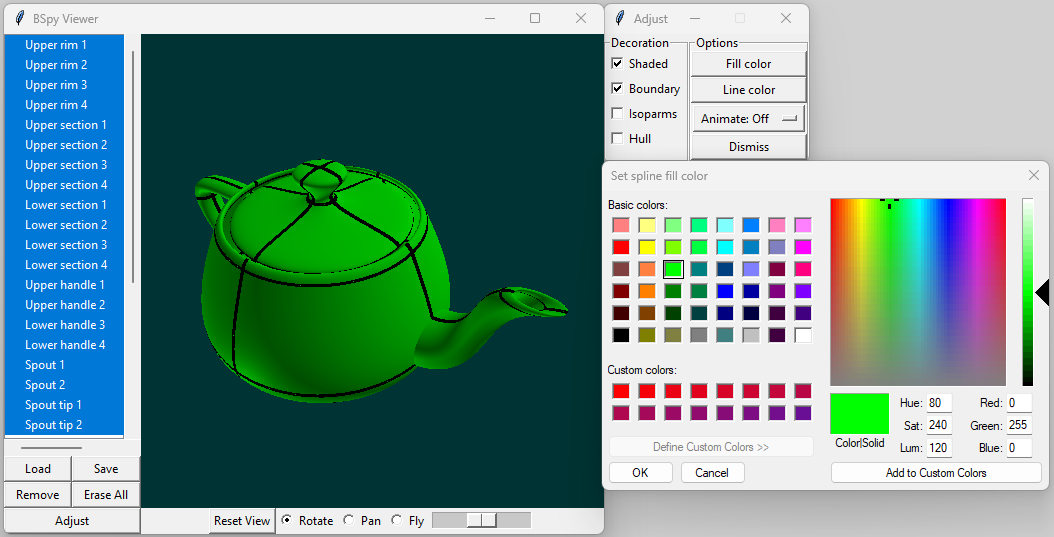
The [Viewer](https://ericbrec.github.io/BSpy/bspy/viewer.html) class is a
|
|
49
51
|
[tkinter.Tk](https://docs.python.org/3/library/tkinter.html) app that hosts a
|
|
50
52
|
[SplineOpenGLFrame](https://ericbrec.github.io/BSpy/bspy/splineOpenGLFrame.html),
|
|
51
|
-
a
|
|
53
|
+
a tree view full of solids and splines, and a set of controls to adjust and view the selected solids and splines. Only tested on Windows systems.
|
|
52
54
|
|
|
53
|
-
The [
|
|
54
|
-
It launches a [
|
|
55
|
+
The [Graphics](https://ericbrec.github.io/BSpy/bspy/viewer.html#Graphics) class is a graphics engine to display splines.
|
|
56
|
+
It launches a [Viewer](https://ericbrec.github.io/BSpy/bspy/viewer.html) and issues commands to the viewer for use
|
|
55
57
|
in [jupyter](https://jupyter.org/) notebooks and other scripting environments. Only tested on Windows systems.
|
|
56
58
|
|
|
57
|
-
|
|
58
60
|
|
|
59
61
|
The full documentation for BSpy can be found [here](https://ericbrec.github.io/BSpy), its GitHub project can be found
|
|
60
62
|
[here](https://github.com/ericbrec/BSpy), a test suite can be found [here](https://github.com/ericbrec/BSpy/tree/main/tests), and
|
|
@@ -65,3 +67,13 @@ a set of examples, including a jupyter notebook, can be found [here](https://git
|
|
|
65
67
|
* Spline.common_basis is now a static method (see documentation for details)
|
|
66
68
|
* Spline.least_squares changed arguments (see documentation for details)
|
|
67
69
|
* Spline.load always returns a list of splines
|
|
70
|
+
|
|
71
|
+
### Release 4.0 breaking changes
|
|
72
|
+
* Removed Spline blossom method
|
|
73
|
+
* Removed DrawableSpline class
|
|
74
|
+
* Changed bspyApp class name to Viewer
|
|
75
|
+
* Changed Viewer listbox to use extended selection (shift and ctrl keys)
|
|
76
|
+
* Changed bspyGraphics class name to Graphics
|
|
77
|
+
* Moved DrawableSpine methods for adjusting spline appearance to Viewer (see documentation for details)
|
|
78
|
+
* Spline.bspline_values changed arguments (see documentation for details)
|
|
79
|
+
* Spline.intersect changed return values (see documentation for details)
|
|
@@ -0,0 +1,17 @@
|
|
|
1
|
+
bspy/__init__.py,sha256=q8XOJK3FsbHybfy2CSPufY5Z5SQJNxK_tH-d9zXR5vY,1308
|
|
2
|
+
bspy/_spline_domain.py,sha256=kklvRrSeEEUUQ48yXvCCDzHMRPd4_BHICxAsOhyxhjk,30178
|
|
3
|
+
bspy/_spline_evaluation.py,sha256=3cWD3sL4odnZ4w1DBQFmUnPg2PuPpSfaGfNcBl8ZrW0,7079
|
|
4
|
+
bspy/_spline_fitting.py,sha256=hFhPyL39d87IGZiAs8teFhYZHxPN1EvzQYxHcDTeBLw,45318
|
|
5
|
+
bspy/_spline_intersection.py,sha256=EV19Qt-kccr5K17aB1EETJXENdz-_UJlYTKWjK-ueJU,58324
|
|
6
|
+
bspy/_spline_operations.py,sha256=y98zl-r31xsZzD6X0VYbuEPUabg3UNC_ERCbkXZRZXU,42530
|
|
7
|
+
bspy/hyperplane.py,sha256=gRConjCEdMAjP8UXA7kaYU--NQHr1tYiVHtmZzLNnqY,24639
|
|
8
|
+
bspy/manifold.py,sha256=29KkZXvv759-aywGd7Ek4Egm-DCBNDTEfusW_Az1kC4,14244
|
|
9
|
+
bspy/solid.py,sha256=qbHofcdNbMTaoCCfKfxloYiEqZDsxfOIJD3MwZguEJ8,36444
|
|
10
|
+
bspy/spline.py,sha256=747e_kChnGnN2Y93EcP9XymDrf2T4NFFweFB_YghEvw,94776
|
|
11
|
+
bspy/splineOpenGLFrame.py,sha256=ezPUyDr9QKF0KU7H6XjHL-HhN23ffC8KbxGhGgGJhQ0,95843
|
|
12
|
+
bspy/viewer.py,sha256=HdtjAj5CZnv4VKcfS8MhT-ciPEPRVNUTp-02TW1NQSU,33717
|
|
13
|
+
bspy-4.1.dist-info/LICENSE,sha256=nLfJULN68Jw6GfCJp4xeMksGuRdyWNdgEsZGjw2twig,1091
|
|
14
|
+
bspy-4.1.dist-info/METADATA,sha256=Fe5wy39gSJOVk7Z3Ruz1Utm3oYZQlPyyJJMYGu6YvP4,6152
|
|
15
|
+
bspy-4.1.dist-info/WHEEL,sha256=GJ7t_kWBFywbagK5eo9IoUwLW6oyOeTKmQ-9iHFVNxQ,92
|
|
16
|
+
bspy-4.1.dist-info/top_level.txt,sha256=fotZnJn6aCwgUbBEV3hslIko7Nw-eqtHLq2eyJLlFsY,5
|
|
17
|
+
bspy-4.1.dist-info/RECORD,,
|
bspy/bspyApp.py
DELETED
|
@@ -1,426 +0,0 @@
|
|
|
1
|
-
import numpy as np
|
|
2
|
-
import tkinter as tk
|
|
3
|
-
from tkinter.colorchooser import askcolor
|
|
4
|
-
from tkinter import filedialog
|
|
5
|
-
import queue, threading
|
|
6
|
-
from bspy import SplineOpenGLFrame
|
|
7
|
-
from bspy import Spline, DrawableSpline
|
|
8
|
-
|
|
9
|
-
class _BitCheckbutton(tk.Checkbutton):
|
|
10
|
-
"""A tkinter `CheckButton` that gets/sets its variable based on a given `bitmask`."""
|
|
11
|
-
def __init__(self, parent, bitMask, **kw):
|
|
12
|
-
self.bitMask = bitMask
|
|
13
|
-
self.variable = kw.get("variable")
|
|
14
|
-
self.command = kw.get("command")
|
|
15
|
-
self.var = tk.IntVar()
|
|
16
|
-
self.var.set(1 if self.variable.get() & self.bitMask else 0)
|
|
17
|
-
kw["variable"] = self.var
|
|
18
|
-
kw["onvalue"] = 1
|
|
19
|
-
kw["offvalue"] = 0
|
|
20
|
-
kw["command"] = self.Command
|
|
21
|
-
tk.Checkbutton.__init__(self, parent, **kw)
|
|
22
|
-
|
|
23
|
-
def Command(self):
|
|
24
|
-
"""
|
|
25
|
-
Handles when the checkbutton is pushed, updating the variable based on the
|
|
26
|
-
bitmask and then calling the checkbutton command.
|
|
27
|
-
"""
|
|
28
|
-
if self.var.get() == 1:
|
|
29
|
-
self.variable.set(self.variable.get() | self.bitMask)
|
|
30
|
-
else:
|
|
31
|
-
self.variable.set(self.variable.get() & ~self.bitMask)
|
|
32
|
-
self.command(self.variable.get())
|
|
33
|
-
|
|
34
|
-
def Update(self):
|
|
35
|
-
"""Updates checkbutton state."""
|
|
36
|
-
self.var.set(1 if self.variable.get() & self.bitMask else 0)
|
|
37
|
-
|
|
38
|
-
class bspyApp(tk.Tk):
|
|
39
|
-
"""
|
|
40
|
-
A tkinter app (`tkinter.Tk`) that hosts a `SplineOpenGLFrame`, a listbox full of
|
|
41
|
-
splines, and a set of controls to adjust and view the selected splines.
|
|
42
|
-
|
|
43
|
-
See Also
|
|
44
|
-
--------
|
|
45
|
-
`bspyGraphics` : A graphics engine to display splines. It launches a `bspyApp` and issues commands to the app.
|
|
46
|
-
|
|
47
|
-
Examples
|
|
48
|
-
--------
|
|
49
|
-
Creates a bspyApp, show some splines, and launches the app (blocks on the main loop).
|
|
50
|
-
>>> app = bspyApp()
|
|
51
|
-
>>> app.show(spline1)
|
|
52
|
-
>>> app.show(spline2)
|
|
53
|
-
>>> app.show(spline3)
|
|
54
|
-
>>> app.mainloop()
|
|
55
|
-
"""
|
|
56
|
-
|
|
57
|
-
def __init__(self, *args, SplineOpenGLFrame=SplineOpenGLFrame, workQueue=None, **kw):
|
|
58
|
-
tk.Tk.__init__(self, *args, **kw)
|
|
59
|
-
self.title('bspy')
|
|
60
|
-
self.geometry('600x500')
|
|
61
|
-
|
|
62
|
-
# Controls on the left
|
|
63
|
-
controls = tk.Frame(self)
|
|
64
|
-
controls.pack(side=tk.LEFT, fill=tk.Y)
|
|
65
|
-
|
|
66
|
-
tk.Button(controls, text='Adjust', command=self._Adjust).pack(side=tk.BOTTOM, fill=tk.X)
|
|
67
|
-
#tk.Button(controls, text='Empty', command=self.empty).pack(side=tk.BOTTOM, fill=tk.X)
|
|
68
|
-
tk.Button(controls, text='Erase', command=self.erase_all).pack(side=tk.BOTTOM, fill=tk.X)
|
|
69
|
-
tk.Button(controls, text='Save', command=self.save_splines).pack(side=tk.BOTTOM, fill=tk.X)
|
|
70
|
-
tk.Button(controls, text='Load', command=self.load_splines).pack(side=tk.BOTTOM, fill=tk.X)
|
|
71
|
-
|
|
72
|
-
self.listBox = tk.Listbox(controls, selectmode=tk.MULTIPLE)
|
|
73
|
-
self.listBox.pack(side=tk.LEFT, fill=tk.Y)
|
|
74
|
-
self.listBox.bind('<<ListboxSelect>>', self._ListSelectionChanged)
|
|
75
|
-
|
|
76
|
-
verticalScroll = tk.Scrollbar(controls, orient=tk.VERTICAL)
|
|
77
|
-
verticalScroll.pack(side=tk.LEFT, fill=tk.Y)
|
|
78
|
-
self.listBox.configure(yscrollcommand=verticalScroll.set)
|
|
79
|
-
verticalScroll.config(command=self.listBox.yview)
|
|
80
|
-
|
|
81
|
-
# Controls on the right
|
|
82
|
-
controls = tk.Frame(self)
|
|
83
|
-
controls.pack(side=tk.RIGHT, fill=tk.BOTH, expand=tk.YES)
|
|
84
|
-
|
|
85
|
-
self.frame = SplineOpenGLFrame(controls, draw_func=self._DrawSplines)
|
|
86
|
-
self.frame.pack(side=tk.TOP, fill=tk.BOTH, expand=tk.YES)
|
|
87
|
-
|
|
88
|
-
buttons = tk.Frame(controls)
|
|
89
|
-
buttons.pack(side=tk.BOTTOM)
|
|
90
|
-
tk.Button(buttons, text='Reset View', command=self.frame.Reset).pack(side=tk.LEFT)
|
|
91
|
-
self.frameMode = tk.IntVar()
|
|
92
|
-
tk.Radiobutton(buttons, text='Rotate', variable=self.frameMode, value=SplineOpenGLFrame.ROTATE, command=self._ChangeFrameMode).pack(side=tk.LEFT)
|
|
93
|
-
tk.Radiobutton(buttons, text='Pan', variable=self.frameMode, value=SplineOpenGLFrame.PAN, command=self._ChangeFrameMode).pack(side=tk.LEFT)
|
|
94
|
-
tk.Radiobutton(buttons, text='Fly', variable=self.frameMode, value=SplineOpenGLFrame.FLY, command=self._ChangeFrameMode).pack(side=tk.LEFT)
|
|
95
|
-
self.frameMode.set(SplineOpenGLFrame.ROTATE)
|
|
96
|
-
self.scale = tk.Scale(buttons, orient=tk.HORIZONTAL, from_=0, to=1, resolution=0.1, showvalue=0, command=self.frame.SetScale)
|
|
97
|
-
self.scale.pack(side=tk.LEFT)
|
|
98
|
-
self.scale.set(0.5)
|
|
99
|
-
|
|
100
|
-
self.splineList = []
|
|
101
|
-
self.splineDrawList = []
|
|
102
|
-
self.splineRadius = 0.0
|
|
103
|
-
self.adjust = None
|
|
104
|
-
self.workQueue = workQueue
|
|
105
|
-
if self.workQueue is not None:
|
|
106
|
-
self.work = {
|
|
107
|
-
"show" : self.show,
|
|
108
|
-
"draw" : self.draw,
|
|
109
|
-
"erase_all" : self.erase_all,
|
|
110
|
-
"empty" : self.empty,
|
|
111
|
-
"set_background_color" : self.set_background_color,
|
|
112
|
-
"update" : self.update
|
|
113
|
-
}
|
|
114
|
-
self.after(1000, self._check_for_work)
|
|
115
|
-
|
|
116
|
-
def _check_for_work(self):
|
|
117
|
-
"""Check queue for calls to make."""
|
|
118
|
-
while not self.workQueue.empty():
|
|
119
|
-
try:
|
|
120
|
-
work = self.workQueue.get_nowait()
|
|
121
|
-
except queue.Empty:
|
|
122
|
-
break
|
|
123
|
-
else:
|
|
124
|
-
if work[0] in self.work:
|
|
125
|
-
self.work[work[0]](*work[1])
|
|
126
|
-
self.after(200, self._check_for_work)
|
|
127
|
-
|
|
128
|
-
def list(self, spline, name = None):
|
|
129
|
-
"""List a `Spline` in the listbox. Can be called before app is running."""
|
|
130
|
-
spline = DrawableSpline.make_drawable(spline)
|
|
131
|
-
if name is not None:
|
|
132
|
-
spline.metadata["Name"] = name
|
|
133
|
-
self.splineList.append(spline)
|
|
134
|
-
self.listBox.insert(tk.END, spline)
|
|
135
|
-
|
|
136
|
-
def show(self, spline, name = None):
|
|
137
|
-
"""Show a `Spline` in the listbox (calls the list method, kept for compatibility). Can be called before app is running."""
|
|
138
|
-
self.list(spline, name)
|
|
139
|
-
|
|
140
|
-
def draw(self, spline, name = None):
|
|
141
|
-
"""Add a `Spline` to the listbox and draw it. Can be called before the app is running."""
|
|
142
|
-
self.list(spline, name)
|
|
143
|
-
self.listBox.selection_set(self.listBox.size() - 1)
|
|
144
|
-
self.update()
|
|
145
|
-
|
|
146
|
-
def save_splines(self):
|
|
147
|
-
if self.splineDrawList:
|
|
148
|
-
initialName = self.splineDrawList[0].metadata.get("Name", "spline") + ".json"
|
|
149
|
-
fileName = filedialog.asksaveasfilename(title="Save splines", initialfile=initialName,
|
|
150
|
-
defaultextension=".json", filetypes=(('Json files', '*.json'),('All files', '*.*')))
|
|
151
|
-
if fileName:
|
|
152
|
-
self.splineDrawList[0].save(fileName, *self.splineDrawList[1:])
|
|
153
|
-
|
|
154
|
-
def load_splines(self):
|
|
155
|
-
fileName = filedialog.askopenfilename(title="Load splines",
|
|
156
|
-
defaultextension=".json", filetypes=(('Json files', '*.json'),('All files', '*.*')))
|
|
157
|
-
if fileName:
|
|
158
|
-
splines = DrawableSpline.load(fileName)
|
|
159
|
-
for spline in splines:
|
|
160
|
-
self.list(spline)
|
|
161
|
-
|
|
162
|
-
def erase_all(self):
|
|
163
|
-
"""Stop drawing all splines. Splines remain in the listbox."""
|
|
164
|
-
self.listBox.selection_clear(0, self.listBox.size() - 1)
|
|
165
|
-
self.splineRadius = 0.0
|
|
166
|
-
self.frame.ResetView()
|
|
167
|
-
self.update()
|
|
168
|
-
|
|
169
|
-
def empty(self):
|
|
170
|
-
"""Stop drawing all splines and remove them from the listbox."""
|
|
171
|
-
self.splineList = []
|
|
172
|
-
self.listBox.delete(0, self.listBox.size() - 1)
|
|
173
|
-
self.splineRadius = 0.0
|
|
174
|
-
self.frame.ResetView()
|
|
175
|
-
self.update()
|
|
176
|
-
|
|
177
|
-
def set_background_color(self, r, g=None, b=None, a=None):
|
|
178
|
-
"""
|
|
179
|
-
Set the background color.
|
|
180
|
-
|
|
181
|
-
Parameters
|
|
182
|
-
----------
|
|
183
|
-
r : `float`, `int` or array-like of floats or ints
|
|
184
|
-
The red value [0, 1] as a float, [0, 255] as an int, or the rgb or rgba value as floats or ints (default).
|
|
185
|
-
|
|
186
|
-
g: `float` or `int`
|
|
187
|
-
The green value [0, 1] as a float or [0, 255] as an int.
|
|
188
|
-
|
|
189
|
-
b: `float` or `int`
|
|
190
|
-
The blue value [0, 1] as a float or [0, 255] as an int.
|
|
191
|
-
|
|
192
|
-
a: `float`, `int`, or None
|
|
193
|
-
The alpha value [0, 1] as a float or [0, 255] as an int. If `None` then alpha is set to 1.
|
|
194
|
-
"""
|
|
195
|
-
self.frame.SetBackgroundColor(r, g, b, a)
|
|
196
|
-
self.frame.Update()
|
|
197
|
-
|
|
198
|
-
def update(self):
|
|
199
|
-
"""Update the spline draw list, set the default view, reset the bounds, and refresh the frame."""
|
|
200
|
-
self.splineDrawList = []
|
|
201
|
-
gotOne = False
|
|
202
|
-
for item in self.listBox.curselection():
|
|
203
|
-
spline = self.splineList[item]
|
|
204
|
-
coefsAxis = tuple(range(1,spline.nInd + 1))
|
|
205
|
-
if gotOne:
|
|
206
|
-
splineMin = np.minimum(splineMin, spline.coefs[:3].min(axis=coefsAxis))
|
|
207
|
-
splineMax = np.maximum(splineMax, spline.coefs[:3].max(axis=coefsAxis))
|
|
208
|
-
else:
|
|
209
|
-
splineMin = spline.coefs[:3].min(axis=coefsAxis)
|
|
210
|
-
splineMax = spline.coefs[:3].max(axis=coefsAxis)
|
|
211
|
-
gotOne = True
|
|
212
|
-
self.splineDrawList.append(spline)
|
|
213
|
-
|
|
214
|
-
if gotOne:
|
|
215
|
-
newRadius = 0.5 * np.max(splineMax - splineMin)
|
|
216
|
-
self.splineRadius = newRadius
|
|
217
|
-
atDefaultEye = np.allclose(self.frame.eye, self.frame.defaultEye)
|
|
218
|
-
center = 0.5 * (splineMax + splineMin)
|
|
219
|
-
self.frame.SetDefaultView(center + (0.0, 0.0, 3.0 * newRadius), center, (0.0, 1.0, 0.0))
|
|
220
|
-
self.frame.ResetBounds()
|
|
221
|
-
if atDefaultEye:
|
|
222
|
-
self.frame.ResetView()
|
|
223
|
-
else:
|
|
224
|
-
self.splineRadius = 0.0
|
|
225
|
-
|
|
226
|
-
if self.adjust is not None:
|
|
227
|
-
if self.splineDrawList:
|
|
228
|
-
self.bits.set(self.splineDrawList[0].get_options())
|
|
229
|
-
animate = self.splineDrawList[0].get_animate()
|
|
230
|
-
else:
|
|
231
|
-
self.bits.set(0)
|
|
232
|
-
animate = None
|
|
233
|
-
for button in self.checkButtons.winfo_children():
|
|
234
|
-
button.Update()
|
|
235
|
-
self.animate.set(next(key for key, value in self.animateOptions.items() if value == animate))
|
|
236
|
-
|
|
237
|
-
self.frame.Update()
|
|
238
|
-
|
|
239
|
-
def _DrawSplines(self, frame, transform):
|
|
240
|
-
for spline in self.splineDrawList:
|
|
241
|
-
spline._Draw(frame, transform)
|
|
242
|
-
|
|
243
|
-
def _ListSelectionChanged(self, event):
|
|
244
|
-
"""Handle when the listbox selection has changed."""
|
|
245
|
-
self.update()
|
|
246
|
-
|
|
247
|
-
def _ChangeFrameMode(self):
|
|
248
|
-
"""Handle when the view mode has changed."""
|
|
249
|
-
self.frame.SetMode(self.frameMode.get())
|
|
250
|
-
|
|
251
|
-
def _Adjust(self):
|
|
252
|
-
"""Handle when the Adjust button is pressed."""
|
|
253
|
-
if self.adjust is None:
|
|
254
|
-
self.adjust = tk.Toplevel()
|
|
255
|
-
self.adjust.title("Adjust")
|
|
256
|
-
self.adjust.bind('<Destroy>', self._AdjustDestroy)
|
|
257
|
-
|
|
258
|
-
self.checkButtons = tk.LabelFrame(self.adjust, text="Decoration")
|
|
259
|
-
self.checkButtons.pack(side=tk.LEFT, fill=tk.BOTH, expand=tk.YES)
|
|
260
|
-
|
|
261
|
-
self.bits = tk.IntVar()
|
|
262
|
-
if self.splineDrawList:
|
|
263
|
-
self.bits.set(self.splineDrawList[0].get_options())
|
|
264
|
-
else:
|
|
265
|
-
self.bits.set(0)
|
|
266
|
-
_BitCheckbutton(self.checkButtons, DrawableSpline.SHADED, text="Shaded", anchor=tk.W, variable=self.bits, command=self._ChangeOptions).pack(side=tk.TOP, fill=tk.X)
|
|
267
|
-
_BitCheckbutton(self.checkButtons, DrawableSpline.BOUNDARY, text="Boundary", anchor=tk.W, variable=self.bits, command=self._ChangeOptions).pack(side=tk.TOP, fill=tk.X)
|
|
268
|
-
_BitCheckbutton(self.checkButtons, DrawableSpline.ISOPARMS, text="Isoparms", anchor=tk.W, variable=self.bits, command=self._ChangeOptions).pack(side=tk.TOP, fill=tk.X)
|
|
269
|
-
_BitCheckbutton(self.checkButtons, DrawableSpline.HULL, text="Hull", anchor=tk.W, variable=self.bits, command=self._ChangeOptions).pack(side=tk.TOP, fill=tk.X)
|
|
270
|
-
|
|
271
|
-
buttons = tk.LabelFrame(self.adjust, text="Options")
|
|
272
|
-
buttons.pack(side=tk.LEFT, fill=tk.BOTH, expand=tk.YES)
|
|
273
|
-
tk.Button(buttons, text='Fill color', command=self._FillColorChange).pack(side=tk.TOP, fill=tk.X)
|
|
274
|
-
tk.Button(buttons, text='Line color', command=self._LineColorChange).pack(side=tk.TOP, fill=tk.X)
|
|
275
|
-
self.animate = tk.StringVar()
|
|
276
|
-
self.animateOptions = {"Animate: Off" : None, "Animate: u(0)" : 0, "Animate: v(1)" : 1, "Animate: w(2)" : 2}
|
|
277
|
-
if self.splineDrawList:
|
|
278
|
-
animate = self.splineDrawList[0].get_animate()
|
|
279
|
-
else:
|
|
280
|
-
animate = None
|
|
281
|
-
self.animate.set(next(key for key, value in self.animateOptions.items() if value == animate))
|
|
282
|
-
tk.OptionMenu(buttons, self.animate, *self.animateOptions.keys(), command=self._ChangeAnimate).pack(side=tk.TOP, fill=tk.X)
|
|
283
|
-
tk.Button(buttons, text='Dismiss', command=self.adjust.withdraw).pack(side=tk.TOP, fill=tk.X)
|
|
284
|
-
|
|
285
|
-
self.adjust.update()
|
|
286
|
-
self.adjust.resizable(False, False)
|
|
287
|
-
else:
|
|
288
|
-
self.adjust.deiconify()
|
|
289
|
-
|
|
290
|
-
if self.winfo_x() + self.winfo_width() + 205 <= self.winfo_screenwidth():
|
|
291
|
-
self.adjust.geometry("{width}x{height}+{x}+{y}".format(width=205, height=self.adjust.winfo_height(), x=self.winfo_x() + self.winfo_width(), y=self.winfo_y()))
|
|
292
|
-
else:
|
|
293
|
-
self.adjust.geometry("{width}x{height}+{x}+{y}".format(width=205, height=self.adjust.winfo_height(), x=self.winfo_screenwidth() - 205, y=self.winfo_y()))
|
|
294
|
-
|
|
295
|
-
def _AdjustDestroy(self, event):
|
|
296
|
-
"""Handle when the adjust dialog is destroyed."""
|
|
297
|
-
self.adjust = None
|
|
298
|
-
self.checkButtons = None
|
|
299
|
-
|
|
300
|
-
def _ChangeOptions(self, options):
|
|
301
|
-
"""Handle when the spline options are changed."""
|
|
302
|
-
for spline in self.splineDrawList:
|
|
303
|
-
spline.set_options(options)
|
|
304
|
-
self.frame.Update()
|
|
305
|
-
|
|
306
|
-
def _ChangeAnimate(self, value):
|
|
307
|
-
"""Handle when the spline animation is changed."""
|
|
308
|
-
nInd = self.animateOptions[value]
|
|
309
|
-
animating = False
|
|
310
|
-
for spline in self.splineDrawList:
|
|
311
|
-
if nInd is None or nInd < spline.nInd:
|
|
312
|
-
spline.set_animate(nInd)
|
|
313
|
-
animating = True
|
|
314
|
-
self.frame.SetAnimating(animating)
|
|
315
|
-
self.frame.Update()
|
|
316
|
-
|
|
317
|
-
def _FillColorChange(self):
|
|
318
|
-
"""Handle when the fill color changed."""
|
|
319
|
-
if self.splineDrawList:
|
|
320
|
-
oldColor = 255.0 * self.splineDrawList[0].get_fill_color()
|
|
321
|
-
newColor = askcolor(title="Set spline fill color", color="#%02x%02x%02x" % (int(oldColor[0]), int(oldColor[1]), int(oldColor[2])))
|
|
322
|
-
if newColor[0] is not None:
|
|
323
|
-
for spline in self.splineDrawList:
|
|
324
|
-
spline.set_fill_color(newColor[0])
|
|
325
|
-
self.frame.Update()
|
|
326
|
-
|
|
327
|
-
def _LineColorChange(self):
|
|
328
|
-
"""Handle when the line color changed."""
|
|
329
|
-
if self.splineDrawList:
|
|
330
|
-
oldColor = 255.0 * self.splineDrawList[0].get_line_color()
|
|
331
|
-
newColor = askcolor(title="Set spline line color", color="#%02x%02x%02x" % (int(oldColor[0]), int(oldColor[1]), int(oldColor[2])))
|
|
332
|
-
if newColor[0] is not None:
|
|
333
|
-
for spline in self.splineDrawList:
|
|
334
|
-
spline.set_line_color(newColor[0])
|
|
335
|
-
self.frame.Update()
|
|
336
|
-
|
|
337
|
-
class bspyGraphics:
|
|
338
|
-
"""
|
|
339
|
-
A graphics engine to display splines. It launches a `bspyApp` and issues commands to the app.
|
|
340
|
-
|
|
341
|
-
Parameters
|
|
342
|
-
----------
|
|
343
|
-
variableDictionary : `dict`
|
|
344
|
-
A dictionary of variable names, typically `locals()`, used to assign names to splines.
|
|
345
|
-
|
|
346
|
-
See Also
|
|
347
|
-
--------
|
|
348
|
-
`bspyApp` : A tkinter app (`tkinter.Tk`) that hosts a `SplineOpenGLFrame`, a listbox full of
|
|
349
|
-
splines, and a set of controls to adjust and view the selected splines.
|
|
350
|
-
|
|
351
|
-
Examples
|
|
352
|
-
--------
|
|
353
|
-
Launch a bspyApp and tell it to draw some splines.
|
|
354
|
-
>>> graphics = bspyGraphics(locals())
|
|
355
|
-
>>> graphics.draw(spline1)
|
|
356
|
-
>>> graphics.draw(spline2)
|
|
357
|
-
>>> graphics.draw(spline3)
|
|
358
|
-
"""
|
|
359
|
-
|
|
360
|
-
def __init__(self, variableDictionary):
|
|
361
|
-
self.workQueue = queue.Queue()
|
|
362
|
-
self.appThread = threading.Thread(target=self._app_thread)
|
|
363
|
-
self.appThread.start()
|
|
364
|
-
self.variableDictionary = variableDictionary
|
|
365
|
-
|
|
366
|
-
def _app_thread(self):
|
|
367
|
-
app = bspyApp(workQueue=self.workQueue)
|
|
368
|
-
app.mainloop()
|
|
369
|
-
|
|
370
|
-
def list(self, spline, name = None):
|
|
371
|
-
"""List a `Spline` in the listbox."""
|
|
372
|
-
if name is not None:
|
|
373
|
-
spline.metadata["Name"] = name
|
|
374
|
-
elif "Name" not in spline.metadata:
|
|
375
|
-
for name, value in self.variableDictionary.items():
|
|
376
|
-
if value is spline:
|
|
377
|
-
spline.metadata["Name"] = name
|
|
378
|
-
break
|
|
379
|
-
self.workQueue.put(("show", (spline,)))
|
|
380
|
-
|
|
381
|
-
def show(self, spline, name = None):
|
|
382
|
-
"""Show a `Spline` in the listbox (calls list method, kept for compatibility)."""
|
|
383
|
-
self.list(spline, name)
|
|
384
|
-
|
|
385
|
-
def draw(self, spline, name = None):
|
|
386
|
-
"""Add a `Spline` to the listbox and draw it."""
|
|
387
|
-
if name is not None:
|
|
388
|
-
spline.metadata["Name"] = name
|
|
389
|
-
elif "Name" not in spline.metadata:
|
|
390
|
-
for name, value in self.variableDictionary.items():
|
|
391
|
-
if value is spline:
|
|
392
|
-
spline.metadata["Name"] = name
|
|
393
|
-
break
|
|
394
|
-
self.workQueue.put(("draw", (spline,)))
|
|
395
|
-
|
|
396
|
-
def erase_all(self):
|
|
397
|
-
"""Stop drawing all splines. Splines remain in the listbox."""
|
|
398
|
-
self.workQueue.put(("erase_all", ()))
|
|
399
|
-
|
|
400
|
-
def empty(self):
|
|
401
|
-
"""Stop drawing all splines and remove them from the listbox."""
|
|
402
|
-
self.workQueue.put(("empty", ()))
|
|
403
|
-
|
|
404
|
-
def set_background_color(self, r, g=None, b=None, a=None):
|
|
405
|
-
"""
|
|
406
|
-
Set the background color.
|
|
407
|
-
|
|
408
|
-
Parameters
|
|
409
|
-
----------
|
|
410
|
-
r : `float`, `int` or array-like of floats or ints
|
|
411
|
-
The red value [0, 1] as a float, [0, 255] as an int, or the rgb or rgba value as floats or ints (default).
|
|
412
|
-
|
|
413
|
-
g: `float` or `int`
|
|
414
|
-
The green value [0, 1] as a float or [0, 255] as an int.
|
|
415
|
-
|
|
416
|
-
b: `float` or `int`
|
|
417
|
-
The blue value [0, 1] as a float or [0, 255] as an int.
|
|
418
|
-
|
|
419
|
-
a: `float`, `int`, or None
|
|
420
|
-
The alpha value [0, 1] as a float or [0, 255] as an int. If `None` then alpha is set to 1.
|
|
421
|
-
"""
|
|
422
|
-
self.workQueue.put(("set_background_color", (r, g, b, a)))
|
|
423
|
-
|
|
424
|
-
def update(self):
|
|
425
|
-
"""Update the spline draw list and refresh the frame."""
|
|
426
|
-
self.workQueue.put(("update", ()))
|