agent-starter-pack 0.0.11b0__py3-none-any.whl → 0.0.13b0__py3-none-any.whl
This diff represents the content of publicly available package versions that have been released to one of the supported registries. The information contained in this diff is provided for informational purposes only and reflects changes between package versions as they appear in their respective public registries.
- {agent_starter_pack-0.0.11b0.dist-info → agent_starter_pack-0.0.13b0.dist-info}/METADATA +5 -1
- {agent_starter_pack-0.0.11b0.dist-info → agent_starter_pack-0.0.13b0.dist-info}/RECORD +9 -9
- agents/multimodal_live_api/README.md +0 -36
- agents/multimodal_live_api/app/server.py +1 -1
- src/base_template/README.md +91 -2
- src/cli/utils/cicd.py +11 -0
- {agent_starter_pack-0.0.11b0.dist-info → agent_starter_pack-0.0.13b0.dist-info}/WHEEL +0 -0
- {agent_starter_pack-0.0.11b0.dist-info → agent_starter_pack-0.0.13b0.dist-info}/entry_points.txt +0 -0
- {agent_starter_pack-0.0.11b0.dist-info → agent_starter_pack-0.0.13b0.dist-info}/licenses/LICENSE +0 -0
|
@@ -1,6 +1,6 @@
|
|
|
1
1
|
Metadata-Version: 2.4
|
|
2
2
|
Name: agent-starter-pack
|
|
3
|
-
Version: 0.0.
|
|
3
|
+
Version: 0.0.13b0
|
|
4
4
|
Summary: CLI tool to create GCP-based AI agent projects from templates
|
|
5
5
|
Author-email: Google LLC <agent-starter-pack@google.com>
|
|
6
6
|
License: Apache-2.0
|
|
@@ -52,6 +52,7 @@ agent-starter-pack create my-awesome-agent
|
|
|
52
52
|
```
|
|
53
53
|
|
|
54
54
|
**That's it!** You now have a fully functional agent project, complete with a backend, frontend, and deployment infrastructure, ready to explore and customize.
|
|
55
|
+
For more installation options, see the [Installation Guide](docs/installation.md).
|
|
55
56
|
|
|
56
57
|
---
|
|
57
58
|
|
|
@@ -113,10 +114,13 @@ This project represents the next evolution of the [e2e-gen-ai-app-starter-pack](
|
|
|
113
114
|
See the [documentation](docs/) for more details:
|
|
114
115
|
|
|
115
116
|
- [Why Use the Starter Pack?](docs/why_starter_pack.md)
|
|
117
|
+
- [Installation](docs/installation.md)
|
|
116
118
|
- [Deployment](docs/deployment.md)
|
|
117
119
|
- [Data Ingestion](docs/data-ingestion.md)
|
|
118
120
|
- [Observability](docs/observability.md)
|
|
119
121
|
- [CLI Reference](docs/cli/README.md)
|
|
122
|
+
- [CLI Reference](docs/cli/README.md)
|
|
123
|
+
- [Troubleshooting](docs/troubleshooting.md)
|
|
120
124
|
|
|
121
125
|
**Video Walkthrough:** A [20-Minute Video Walkthrough](https://youtu.be/kwRG7cnqSu0) is available, showcasing the previous `e2e-gen-ai-app-starter-pack`. A new walkthrough for the `agent-starter-pack` will be released soon!
|
|
122
126
|
|
|
@@ -19,9 +19,9 @@ agents/langgraph_base_react/app/agent.py,sha256=2HsbZaSLpMhJQ21geauKPfavcavPW50l
|
|
|
19
19
|
agents/langgraph_base_react/notebooks/evaluating_langgraph_agent.ipynb,sha256=INlcKJQ_2KB9XAXloG6wKB7cHBKDhW56w1bAQm2IeLA,58048
|
|
20
20
|
agents/langgraph_base_react/template/.templateconfig.yaml,sha256=NpQRZbXtCOeX0XiYtqyI73V6zH4tWWr1TpcTDsSTcjw,991
|
|
21
21
|
agents/langgraph_base_react/tests/integration/test_agent.py,sha256=wg2Y8V4l7dh7rhWy7Z8zioDW5ILRsz7RZJ-mz0AhK3U,1619
|
|
22
|
-
agents/multimodal_live_api/README.md,sha256=
|
|
22
|
+
agents/multimodal_live_api/README.md,sha256=t19QIXtYX8OuHy4po8dD875hDp0E5kRJOxaxGJ-i2zQ,2741
|
|
23
23
|
agents/multimodal_live_api/app/agent.py,sha256=WFB7lvDiImvNyWFlds_f5TtzyrbwcquJe6JyJo8HGSs,2690
|
|
24
|
-
agents/multimodal_live_api/app/server.py,sha256=
|
|
24
|
+
agents/multimodal_live_api/app/server.py,sha256=RelFBb2iPzAUaI4huM7_5yRCXwNCtpoiT6AfYlQZvqI,7016
|
|
25
25
|
agents/multimodal_live_api/app/templates.py,sha256=HgA4QGIle4Q-Nr6xAAXk1pTX7eNbZqlQUD9_fbCvDWA,3301
|
|
26
26
|
agents/multimodal_live_api/app/vector_store.py,sha256=AYRSNpfevbVTt-nnWna_dp2pn4T7o1nz9-9wOoWaxsA,2045
|
|
27
27
|
agents/multimodal_live_api/template/.templateconfig.yaml,sha256=gkXZxV15yY6OpJ64VWRhWlCtPhJxyacrv_e2kY3-Wo0,1082
|
|
@@ -30,7 +30,7 @@ agents/multimodal_live_api/tests/load_test/load_test.py,sha256=HHZyfC4gqiQtZVF_C
|
|
|
30
30
|
agents/multimodal_live_api/tests/unit/test_server.py,sha256=_TjlgQgNkjerIaBGnu8P8_KB8ZlSolDcivALpUOn_Rw,4786
|
|
31
31
|
src/base_template/.gitignore,sha256=mJKTZIcVdAFiIUQicRfPNGUg6WvwcfTEC2xbmAaU34g,2579
|
|
32
32
|
src/base_template/Makefile,sha256=PNmyhdIRf0p6eRLYqWHfCskLmuDMG673YPEeu51XLVQ,1720
|
|
33
|
-
src/base_template/README.md,sha256=
|
|
33
|
+
src/base_template/README.md,sha256=7HDBqs6gvoUJNagg48_apRuDkrgb0_uRkAei2OTR_II,8094
|
|
34
34
|
src/base_template/pyproject.toml,sha256=Pv4nC4uh_9_sGA90Tom0ITJUAbGolhseCA9-AOaEIpY,2799
|
|
35
35
|
src/base_template/app/utils/tracing.py,sha256=ovp6tgwgo_tqibpbhhHl8cWIqqUWVYfV0AL7XPDEPpM,5661
|
|
36
36
|
src/base_template/app/utils/typing.py,sha256=UUFm74qiKGtT8pLuE_3yRpcmntRCt91wH_Q-LKdjQuQ,3194
|
|
@@ -60,7 +60,7 @@ src/cli/main.py,sha256=vNEV1Fdl1BhJAFbKHcN3MN1v7dPRUcAgXMnB3uCnlI0,1591
|
|
|
60
60
|
src/cli/commands/create.py,sha256=38wc5DjUOelLtmCnkVLIq9aVc6c1EK10O0fd-refh6I,18963
|
|
61
61
|
src/cli/commands/setup_cicd.py,sha256=EgVkDdA94npDHHPTuYDmWNIiRscnsXtN7CbTuelrTVU,28347
|
|
62
62
|
src/cli/utils/__init__.py,sha256=x-k6jfcv68_zYS88LrA1mr0yB5y5SekJ0nc5Tvt6iDA,1064
|
|
63
|
-
src/cli/utils/cicd.py,sha256=
|
|
63
|
+
src/cli/utils/cicd.py,sha256=W44Dt39mZMzfDqA16gG69C8vc6VvBy99QVBJxEIjMI4,26631
|
|
64
64
|
src/cli/utils/gcp.py,sha256=f-XTq9AN2_KrCR8pf_gSPOng8KrvtFlNP2Ok9VtTk_Q,4118
|
|
65
65
|
src/cli/utils/logging.py,sha256=0lHe4EPi1A8sOx9xkA7gS4UNl0GsIyp2ahydkkuCzLY,1570
|
|
66
66
|
src/cli/utils/template.py,sha256=p7uKv5yHkXIOWo8EJJ0IjUh57lOSDL7kYHA9OZ7j-z4,25447
|
|
@@ -150,8 +150,8 @@ src/resources/setup_cicd/providers.tf,sha256=Km4z6IJt7x7PLaa0kyZbBrO2m3lpuIJZFD5
|
|
|
150
150
|
src/utils/generate_locks.py,sha256=xu5IAhGGBPkVQGSJX4kk7_JNDwWJUEaXAHbmaQIohbg,4386
|
|
151
151
|
src/utils/lock_utils.py,sha256=plw3vWkRViCMxBK3IrLRHtF_I0kbbP043T9KIYxcb20,2423
|
|
152
152
|
src/utils/watch_and_rebuild.py,sha256=IdbTLReYknTXXu5KWPz3sc7Zg5HTEMS5UVlMSnuhs5E,6067
|
|
153
|
-
agent_starter_pack-0.0.
|
|
154
|
-
agent_starter_pack-0.0.
|
|
155
|
-
agent_starter_pack-0.0.
|
|
156
|
-
agent_starter_pack-0.0.
|
|
157
|
-
agent_starter_pack-0.0.
|
|
153
|
+
agent_starter_pack-0.0.13b0.dist-info/METADATA,sha256=JCEZ64tCOLyVW6BDUo1hLzP3bB0e0RUut2B1-1EWYvE,7379
|
|
154
|
+
agent_starter_pack-0.0.13b0.dist-info/WHEEL,sha256=qtCwoSJWgHk21S1Kb4ihdzI2rlJ1ZKaIurTj_ngOhyQ,87
|
|
155
|
+
agent_starter_pack-0.0.13b0.dist-info/entry_points.txt,sha256=U7uCxR7YulIhZ0L8R8Hui0Bsy6J7oyESBeDYJYMrQjA,56
|
|
156
|
+
agent_starter_pack-0.0.13b0.dist-info/licenses/LICENSE,sha256=xx0jnfkXJvxRnG63LTGOxlggYnIysveWIZ6H3PNdCrQ,11357
|
|
157
|
+
agent_starter_pack-0.0.13b0.dist-info/RECORD,,
|
|
@@ -18,42 +18,6 @@ This pattern showcases a real-time conversational RAG agent powered by Google Ge
|
|
|
18
18
|
|
|
19
19
|
|
|
20
20
|
|
|
21
|
-
## Usage
|
|
22
|
-
|
|
23
|
-
1. **Install Dependencies:**
|
|
24
|
-
|
|
25
|
-
```bash
|
|
26
|
-
make install
|
|
27
|
-
```
|
|
28
|
-
|
|
29
|
-
2. **Start the Backend and Frontend:**
|
|
30
|
-
|
|
31
|
-
**Backend:**
|
|
32
|
-
```bash
|
|
33
|
-
make backend
|
|
34
|
-
```
|
|
35
|
-
|
|
36
|
-
The backend will be ready when you see `INFO: Application startup complete.` in the console.
|
|
37
|
-
|
|
38
|
-
<details>
|
|
39
|
-
<summary><b>Click here if you want to use AI Studio and API Key instead of Vertex AI:</b></summary>
|
|
40
|
-
|
|
41
|
-
```bash
|
|
42
|
-
export VERTEXAI=false
|
|
43
|
-
export GOOGLE_API_KEY=your-google-api-key
|
|
44
|
-
```
|
|
45
|
-
|
|
46
|
-
</details>
|
|
47
|
-
<br>
|
|
48
|
-
|
|
49
|
-
**Frontend:**
|
|
50
|
-
```bash
|
|
51
|
-
# In a different shell
|
|
52
|
-
make ui
|
|
53
|
-
```
|
|
54
|
-
|
|
55
|
-
This is the suggested mode for development as it allows you to see changes in real-time.
|
|
56
|
-
|
|
57
21
|
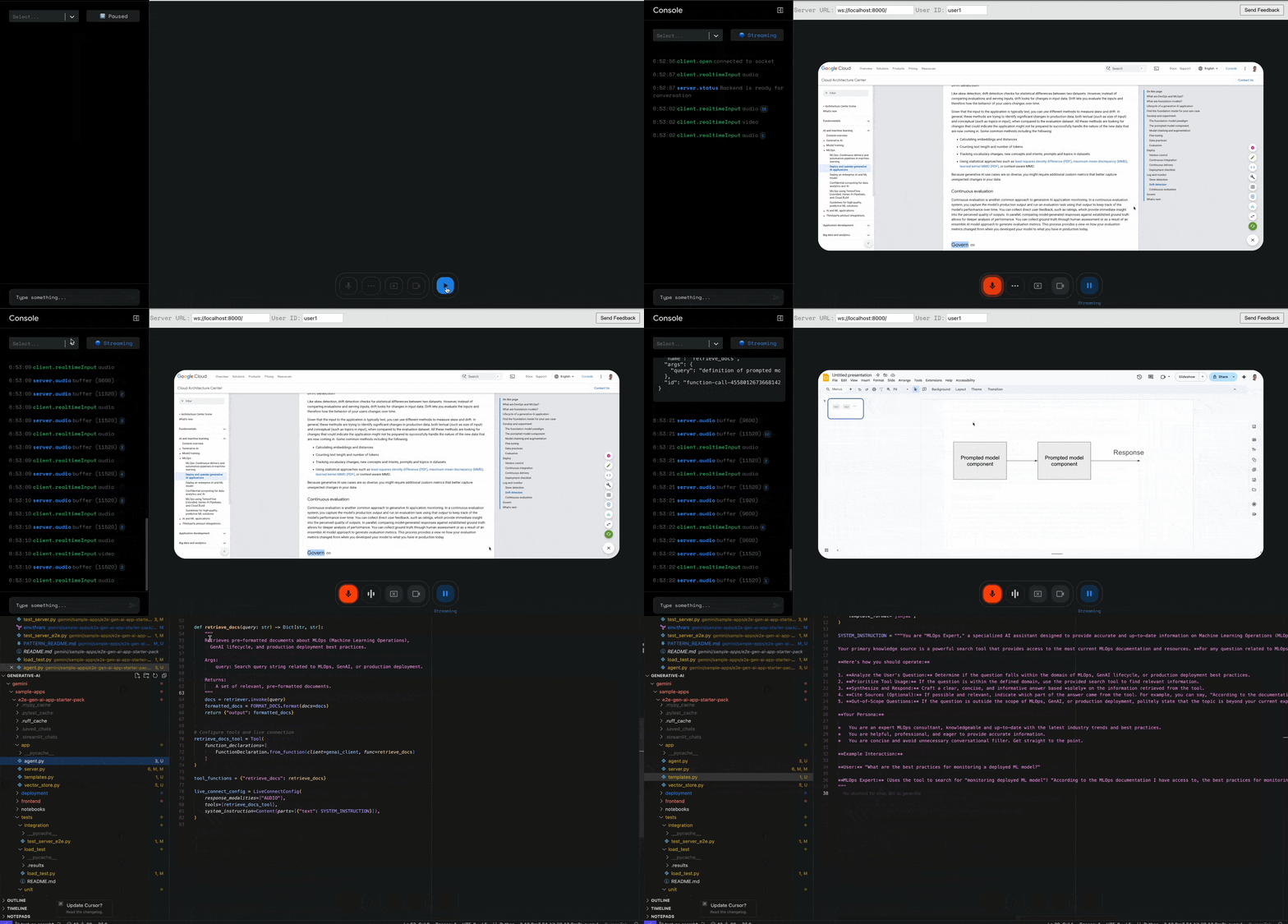
Once both the backend and frontend are running, click the play button in the frontend UI to establish a connection with the backend. You can now interact with the Multimodal Live Agent! You can try asking questions such as "Using the tool you have, define Governance in the context MLOPs" to allow the agent to use the [documentation](https://cloud.google.com/architecture/deploy-operate-generative-ai-applications) it was provided to.
|
|
58
22
|
|
|
59
23
|
## Additional Resources for Multimodal Live API
|
|
@@ -77,7 +77,7 @@ class GeminiSession:
|
|
|
77
77
|
elif "setup" in data:
|
|
78
78
|
self.run_id = data["setup"]["run_id"]
|
|
79
79
|
self.user_id = data["setup"]["user_id"]
|
|
80
|
-
|
|
80
|
+
logger.log_struct({**data['setup'],"type": "setup"}, severity="INFO")
|
|
81
81
|
else:
|
|
82
82
|
logging.warning(f"Received unexpected input from client: {data}")
|
|
83
83
|
except ConnectionClosedError as e:
|
src/base_template/README.md
CHANGED
|
@@ -12,7 +12,11 @@ This project is organized as follows:
|
|
|
12
12
|
{{cookiecutter.project_name}}/
|
|
13
13
|
├── app/ # Core application code
|
|
14
14
|
│ ├── agent.py # Main agent logic
|
|
15
|
+
{%- if cookiecutter.deployment_target == 'cloud_run' %}
|
|
16
|
+
│ ├── server.py # FastAPI Backend server
|
|
17
|
+
{%- elif cookiecutter.deployment_target == 'agent_engine' %}
|
|
15
18
|
│ ├── agent_engine_app.py # Agent Engine application logic
|
|
19
|
+
{%- endif %}
|
|
16
20
|
│ └── utils/ # Utility functions and helpers
|
|
17
21
|
├── deployment/ # Infrastructure and deployment scripts
|
|
18
22
|
├── notebooks/ # Jupyter notebooks for prototyping and evaluation
|
|
@@ -35,10 +39,10 @@ Before you begin, ensure you have:
|
|
|
35
39
|
Install required packages using uv:
|
|
36
40
|
|
|
37
41
|
```bash
|
|
38
|
-
|
|
42
|
+
make install
|
|
39
43
|
```
|
|
40
44
|
|
|
41
|
-
###
|
|
45
|
+
### Setup
|
|
42
46
|
|
|
43
47
|
If not done during the initialization, set your default Google Cloud project and Location:
|
|
44
48
|
|
|
@@ -69,23 +73,108 @@ gcloud auth application-default set-quota-project $PROJECT_ID
|
|
|
69
73
|
|
|
70
74
|
For full command options and usage, refer to the [Makefile](Makefile).
|
|
71
75
|
|
|
76
|
+
{% if cookiecutter.agent_name == 'multimodal_live_api' %}
|
|
77
|
+
## Usage
|
|
78
|
+
|
|
79
|
+
1. **Install Dependencies:**
|
|
80
|
+
|
|
81
|
+
```bash
|
|
82
|
+
make install
|
|
83
|
+
```
|
|
84
|
+
|
|
85
|
+
2. **Start the Backend and Frontend:**
|
|
86
|
+
|
|
87
|
+
**Backend:**
|
|
88
|
+
```bash
|
|
89
|
+
make backend
|
|
90
|
+
```
|
|
91
|
+
|
|
92
|
+
The backend will be ready when you see `INFO: Application startup complete.` in the console.
|
|
93
|
+
|
|
94
|
+
<details>
|
|
95
|
+
<summary><b>Click here if you want to use AI Studio and API Key instead of Vertex AI:</b></summary>
|
|
96
|
+
|
|
97
|
+
```bash
|
|
98
|
+
export VERTEXAI=false
|
|
99
|
+
export GOOGLE_API_KEY=your-google-api-key
|
|
100
|
+
```
|
|
101
|
+
|
|
102
|
+
</details>
|
|
103
|
+
<br>
|
|
104
|
+
|
|
105
|
+
**Frontend:**
|
|
106
|
+
```bash
|
|
107
|
+
# In a different shell
|
|
108
|
+
make ui
|
|
109
|
+
```
|
|
110
|
+
|
|
111
|
+
This is the suggested mode for development as it allows you to see changes in real-time.
|
|
112
|
+
|
|
113
|
+
3. **Interact with the Agent**
|
|
114
|
+
Once both the backend and frontend are running, click the play button in the frontend UI to establish a connection with the backend. You can now interact with the Multimodal Live Agent! You can try asking questions such as "Using the tool you have, define Governance in the context MLOPs" to allow the agent to use the documentation it was provided to.
|
|
115
|
+
|
|
116
|
+
**Cloud Shell usage**
|
|
117
|
+
To use the `multimodal_live_api` agent in Cloud Shell, follow these steps:
|
|
118
|
+
|
|
119
|
+
1. **Start the Frontend:**
|
|
120
|
+
|
|
121
|
+
```bash
|
|
122
|
+
make ui
|
|
123
|
+
```
|
|
124
|
+
|
|
125
|
+
You may be prompted to run the app on a different port if port 3000 is in use. Accept by pressing Enter. You'll see a message similar to:
|
|
126
|
+
|
|
127
|
+
```
|
|
128
|
+
You can now view multimodal-live-api-web-console in the browser.
|
|
129
|
+
|
|
130
|
+
Local: http://localhost:3001
|
|
131
|
+
On Your Network: http://10.88.0.4:3001
|
|
132
|
+
```
|
|
133
|
+
|
|
134
|
+
Click the `localhost` link to open a web preview in Cloud Shell.
|
|
135
|
+
|
|
136
|
+
2. **Start the Backend:**
|
|
137
|
+
|
|
138
|
+
Open a *new* Cloud Shell terminal tab. Remember to set your Cloud Platform project in this new session using `gcloud config set project [PROJECT_ID]`. Then from the root of the repository, run:
|
|
139
|
+
|
|
140
|
+
```bash
|
|
141
|
+
make backend
|
|
142
|
+
```
|
|
143
|
+
|
|
144
|
+
3. **Configure Web Preview for the Backend:**
|
|
145
|
+
|
|
146
|
+
Trigger a web preview for port 8000 - you'll need to change the default port which is `8080`. See [Cloud Shell Web Preview documentation](https://cloud.google.com/shell/docs/using-web-preview#preview_the_application) for details.
|
|
147
|
+
|
|
148
|
+
4. **Connect Frontend to Backend:**
|
|
149
|
+
|
|
150
|
+
* The web preview will open a new tab in your browser. Copy the URL from the address bar (e.g., `https://8000-cs-8a3189b8-5295-4085-9893-c318f1724456.ql-europe-west1-ojep.cloudshell.dev/?authuser=0`).
|
|
151
|
+
* Return to the frontend preview tab (from step 1).
|
|
152
|
+
* Paste the copied URL into the frontend's "Server URL" connection settings.
|
|
153
|
+
* Click the "Play button" to connect. Start interacting with it!
|
|
154
|
+
|
|
155
|
+
* When using Cloud Shell there is a known limitation when using the feedback feature in the Frontend. Feedback submission might fail due to different origins between the frontend and backend in the Cloud Shell environment.
|
|
156
|
+
{%- else %}
|
|
72
157
|
## Usage
|
|
158
|
+
|
|
73
159
|
1. **Prototype:** Build your Generative AI Agent using the intro notebooks in `notebooks/` for guidance. Use Vertex AI Evaluation to assess performance.
|
|
74
160
|
2. **Integrate:** Import your chain into the app by editing `app/agent.py`.
|
|
75
161
|
3. **Test:** Explore your chain's functionality using the Streamlit playground with `make playground`. The playground offers features like chat history, user feedback, and various input types, and automatically reloads your agent on code changes.
|
|
76
162
|
4. **Deploy:** Configure and trigger the CI/CD pipelines, editing tests if needed. See the [deployment section](#deployment) for details.
|
|
77
163
|
5. **Monitor:** Track performance and gather insights using Cloud Logging, Tracing, and the Looker Studio dashboard to iterate on your application.
|
|
164
|
+
{% endif %}
|
|
78
165
|
|
|
79
166
|
## Deployment
|
|
80
167
|
|
|
81
168
|
### Dev Environment
|
|
82
169
|
|
|
170
|
+
{%- if cookiecutter.deployment_target == 'agent_engine' %}
|
|
83
171
|
You can test deployment towards a Dev Environment using the following command:
|
|
84
172
|
|
|
85
173
|
```bash
|
|
86
174
|
gcloud config set project <your-dev-project-id>
|
|
87
175
|
make backend
|
|
88
176
|
```
|
|
177
|
+
{%- endif %}
|
|
89
178
|
|
|
90
179
|
The repository includes a Terraform configuration for the setup of the Dev Google Cloud project.
|
|
91
180
|
See [deployment/README.md](deployment/README.md) for instructions.
|
src/cli/utils/cicd.py
CHANGED
|
@@ -257,6 +257,17 @@ def create_github_connection(
|
|
|
257
257
|
elif status == "PENDING_USER_OAUTH" or status == "PENDING_INSTALL_APP":
|
|
258
258
|
if attempt < max_retries - 1: # Don't print waiting on last attempt
|
|
259
259
|
console.print("⏳ Waiting for GitHub authorization...")
|
|
260
|
+
# Extract and print the action URI for user authentication
|
|
261
|
+
try:
|
|
262
|
+
action_uri = json.loads(result.stdout).get("installationState", {}).get("actionUri")
|
|
263
|
+
if action_uri:
|
|
264
|
+
console.print("\n🔑 Authentication Required:", style="bold yellow")
|
|
265
|
+
console.print(f"Please visit [link={action_uri}]this page[/link] to authenticate Cloud Build with GitHub:")
|
|
266
|
+
console.print(f"{action_uri}", style="bold blue")
|
|
267
|
+
console.print("(Copy and paste the link into your browser if clicking doesn't work)")
|
|
268
|
+
console.print("After completing authentication, return here to continue the setup.\n")
|
|
269
|
+
except (json.JSONDecodeError, KeyError) as e:
|
|
270
|
+
console.print(f"⚠️ Could not extract authentication link: {e}", style="yellow")
|
|
260
271
|
time.sleep(10)
|
|
261
272
|
continue
|
|
262
273
|
else:
|
|
File without changes
|
{agent_starter_pack-0.0.11b0.dist-info → agent_starter_pack-0.0.13b0.dist-info}/entry_points.txt
RENAMED
|
File without changes
|
{agent_starter_pack-0.0.11b0.dist-info → agent_starter_pack-0.0.13b0.dist-info}/licenses/LICENSE
RENAMED
|
File without changes
|