TwoPy 0.1.2__py3-none-any.whl → 0.1.3__py3-none-any.whl
This diff represents the content of publicly available package versions that have been released to one of the supported registries. The information contained in this diff is provided for informational purposes only and reflects changes between package versions as they appear in their respective public registries.
- twopy/database/cache.py +2 -5
- twopy/napari/controls.py +43 -2
- twopy/napari/loading.py +53 -1
- twopy/napari/plotting/label_visibility.py +34 -8
- twopy/napari/viewer.py +4 -2
- twopy/session.py +5 -1
- twopy/stimulus.py +8 -4
- twopy-0.1.3.dist-info/METADATA +97 -0
- {twopy-0.1.2.dist-info → twopy-0.1.3.dist-info}/RECORD +12 -12
- twopy-0.1.2.dist-info/METADATA +0 -304
- {twopy-0.1.2.dist-info → twopy-0.1.3.dist-info}/WHEEL +0 -0
- {twopy-0.1.2.dist-info → twopy-0.1.3.dist-info}/entry_points.txt +0 -0
- {twopy-0.1.2.dist-info → twopy-0.1.3.dist-info}/top_level.txt +0 -0
twopy/database/cache.py
CHANGED
|
@@ -11,9 +11,9 @@ import hashlib
|
|
|
11
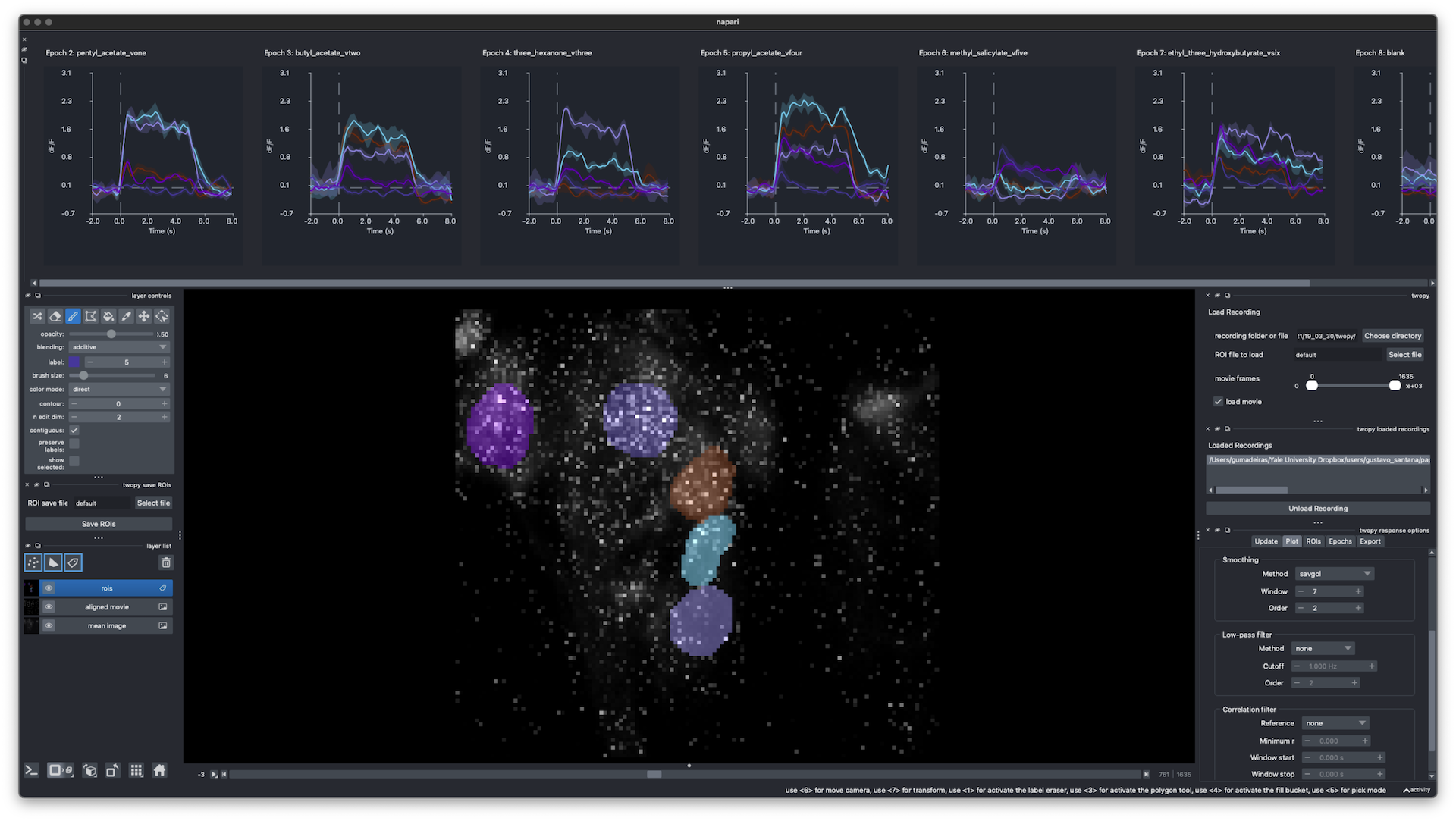
11
|
import json
|
|
12
12
|
import shutil
|
|
13
13
|
from pathlib import Path
|
|
14
|
-
from typing import cast
|
|
15
14
|
|
|
16
15
|
from twopy.database.types import DatabaseAccess
|
|
16
|
+
from twopy.typing_guards import string_key_mapping_or_none
|
|
17
17
|
|
|
18
18
|
__all__ = [
|
|
19
19
|
"DEFAULT_DATABASE_CACHE_DIR",
|
|
@@ -107,10 +107,7 @@ def _read_copy_manifest(manifest_path: Path) -> dict[str, object] | None:
|
|
|
107
107
|
except (OSError, json.JSONDecodeError):
|
|
108
108
|
return None
|
|
109
109
|
|
|
110
|
-
|
|
111
|
-
return None
|
|
112
|
-
|
|
113
|
-
return cast(dict[str, object], loaded)
|
|
110
|
+
return string_key_mapping_or_none(loaded)
|
|
114
111
|
|
|
115
112
|
|
|
116
113
|
def _manifest_metadata_matches(
|
twopy/napari/controls.py
CHANGED
|
@@ -272,9 +272,14 @@ def _make_twopy_load_widget(state: NapariControlState) -> object:
|
|
|
272
272
|
)
|
|
273
273
|
movie_range = None
|
|
274
274
|
if load_movie:
|
|
275
|
+
start_frame, end_frame = _widget_movie_frame_range_for_load(
|
|
276
|
+
movie_frame_range,
|
|
277
|
+
frame_count=loaded_recording.movie.shape[0],
|
|
278
|
+
preserve_current_range=replace_selected,
|
|
279
|
+
)
|
|
275
280
|
movie_range = resolve_movie_frame_range(
|
|
276
|
-
start_frame=
|
|
277
|
-
end_frame=
|
|
281
|
+
start_frame=start_frame,
|
|
282
|
+
end_frame=end_frame,
|
|
278
283
|
frame_count=loaded_recording.movie.shape[0],
|
|
279
284
|
zero_end_means_last=True,
|
|
280
285
|
)
|
|
@@ -717,6 +722,42 @@ def _default_movie_end_frame(recording: RecordingData | None) -> int:
|
|
|
717
722
|
return max(recording.movie.shape[0] - 1, 0)
|
|
718
723
|
|
|
719
724
|
|
|
725
|
+
def _widget_movie_frame_range_for_load(
|
|
726
|
+
movie_frame_range: tuple[int, int],
|
|
727
|
+
*,
|
|
728
|
+
frame_count: int,
|
|
729
|
+
preserve_current_range: bool,
|
|
730
|
+
) -> tuple[int, int]:
|
|
731
|
+
"""Choose a GUI movie preview range for the recording being loaded.
|
|
732
|
+
|
|
733
|
+
Args:
|
|
734
|
+
movie_frame_range: Current range-slider value.
|
|
735
|
+
frame_count: Number of movie frames in the recording being loaded.
|
|
736
|
+
preserve_current_range: Whether this is a reload of the selected
|
|
737
|
+
recording after an option change.
|
|
738
|
+
|
|
739
|
+
Returns:
|
|
740
|
+
Inclusive preview range constrained to the recording length. New
|
|
741
|
+
recordings default to their full movie, while reloads preserve the
|
|
742
|
+
visible slider value where possible.
|
|
743
|
+
|
|
744
|
+
The frame-range widget keeps its previous value until after a recording
|
|
745
|
+
loads. That value is meaningful when reloading the same recording after an
|
|
746
|
+
option change, but stale when choosing a different recording.
|
|
747
|
+
"""
|
|
748
|
+
last_frame = max(frame_count - 1, 0)
|
|
749
|
+
if not preserve_current_range:
|
|
750
|
+
return (0, last_frame)
|
|
751
|
+
|
|
752
|
+
start_frame = int(movie_frame_range[0])
|
|
753
|
+
end_frame = int(movie_frame_range[1])
|
|
754
|
+
if start_frame > last_frame:
|
|
755
|
+
start_frame = last_frame
|
|
756
|
+
if end_frame > last_frame:
|
|
757
|
+
end_frame = last_frame
|
|
758
|
+
return (start_frame, end_frame)
|
|
759
|
+
|
|
760
|
+
|
|
720
761
|
def _load_recording_for_defaults(
|
|
721
762
|
*,
|
|
722
763
|
recording_data_path: Path,
|
twopy/napari/loading.py
CHANGED
|
@@ -193,6 +193,7 @@ def _first_source_recording_dir(candidates: tuple[Path | None, ...]) -> Path | N
|
|
|
193
193
|
Resolved source folder, or ``None``.
|
|
194
194
|
"""
|
|
195
195
|
seen: set[Path] = set()
|
|
196
|
+
validation_error: FileNotFoundError | ValueError | None = None
|
|
196
197
|
for candidate in candidates:
|
|
197
198
|
if candidate is None:
|
|
198
199
|
continue
|
|
@@ -202,6 +203,57 @@ def _first_source_recording_dir(candidates: tuple[Path | None, ...]) -> Path | N
|
|
|
202
203
|
seen.add(expanded)
|
|
203
204
|
try:
|
|
204
205
|
return discover_session_files(expanded).session_dir.resolve()
|
|
205
|
-
except (FileNotFoundError, ValueError):
|
|
206
|
+
except (FileNotFoundError, ValueError) as error:
|
|
207
|
+
if validation_error is None and _looks_like_source_recording_dir(expanded):
|
|
208
|
+
validation_error = error
|
|
206
209
|
continue
|
|
210
|
+
if validation_error is not None:
|
|
211
|
+
raise validation_error
|
|
207
212
|
return None
|
|
213
|
+
|
|
214
|
+
|
|
215
|
+
def _looks_like_source_recording_dir(path: Path) -> bool:
|
|
216
|
+
"""Return whether a folder appears to be microscope source output.
|
|
217
|
+
|
|
218
|
+
Args:
|
|
219
|
+
path: Candidate folder.
|
|
220
|
+
|
|
221
|
+
Returns:
|
|
222
|
+
``True`` when the folder contains stable source-recording markers.
|
|
223
|
+
|
|
224
|
+
Discovery errors from source-like folders should reach the user. Errors
|
|
225
|
+
from arbitrary folders should stay quiet so twopy can continue checking
|
|
226
|
+
other candidates such as a parent source folder.
|
|
227
|
+
"""
|
|
228
|
+
if not path.is_dir():
|
|
229
|
+
return False
|
|
230
|
+
fixed_markers = (
|
|
231
|
+
"stimulusData",
|
|
232
|
+
"alignedMovie.mat",
|
|
233
|
+
"defaultAlignChannel.txt",
|
|
234
|
+
"highResPd.mat",
|
|
235
|
+
"imageDescription.mat",
|
|
236
|
+
"imagingResPd.mat",
|
|
237
|
+
)
|
|
238
|
+
if any((path / marker).exists() for marker in fixed_markers):
|
|
239
|
+
return True
|
|
240
|
+
return any(_source_candidate_files(path, "*.tif")) or any(
|
|
241
|
+
_source_candidate_files(path, "*_alignment.txt")
|
|
242
|
+
)
|
|
243
|
+
|
|
244
|
+
|
|
245
|
+
def _source_candidate_files(path: Path, pattern: str) -> tuple[Path, ...]:
|
|
246
|
+
"""Return source files matching a flexible microscope filename pattern.
|
|
247
|
+
|
|
248
|
+
Args:
|
|
249
|
+
path: Candidate source folder.
|
|
250
|
+
pattern: Glob pattern.
|
|
251
|
+
|
|
252
|
+
Returns:
|
|
253
|
+
Matching files excluding macOS AppleDouble sidecars.
|
|
254
|
+
"""
|
|
255
|
+
return tuple(
|
|
256
|
+
candidate
|
|
257
|
+
for candidate in path.glob(pattern)
|
|
258
|
+
if candidate.is_file() and not candidate.name.startswith("._")
|
|
259
|
+
)
|
|
@@ -9,10 +9,12 @@ image, so hiding an ROI in the plot options cannot delete ROI data.
|
|
|
9
9
|
"""
|
|
10
10
|
|
|
11
11
|
from collections.abc import Mapping
|
|
12
|
-
from typing import
|
|
12
|
+
from typing import Protocol, cast
|
|
13
13
|
|
|
14
14
|
from qtpy.QtGui import QColor
|
|
15
15
|
|
|
16
|
+
from twopy.typing_guards import int_or_none, string_key_mapping_or_none
|
|
17
|
+
|
|
16
18
|
__all__ = [
|
|
17
19
|
"apply_roi_visibility_to_labels_layer",
|
|
18
20
|
"roi_label_value_from_label",
|
|
@@ -241,13 +243,11 @@ def _base_label_colormap_params(
|
|
|
241
243
|
color cycle while users toggle ROI visibility.
|
|
242
244
|
"""
|
|
243
245
|
stored = layer.metadata.get(_BASE_LABEL_COLORMAP_METADATA_KEY)
|
|
244
|
-
|
|
245
|
-
|
|
246
|
-
|
|
247
|
-
|
|
248
|
-
|
|
249
|
-
"background_value": int(cast(Any, stored_params["background_value"])),
|
|
250
|
-
}
|
|
246
|
+
stored_params = string_key_mapping_or_none(stored)
|
|
247
|
+
if stored_params is not None:
|
|
248
|
+
params = _parsed_label_colormap_params(stored_params)
|
|
249
|
+
if params is not None:
|
|
250
|
+
return params
|
|
251
251
|
|
|
252
252
|
colormap = cast(_LabelColormapLike, layer.colormap)
|
|
253
253
|
colors = getattr(colormap, "colors", ())
|
|
@@ -258,3 +258,29 @@ def _base_label_colormap_params(
|
|
|
258
258
|
}
|
|
259
259
|
layer.metadata[_BASE_LABEL_COLORMAP_METADATA_KEY] = params
|
|
260
260
|
return params
|
|
261
|
+
|
|
262
|
+
|
|
263
|
+
def _parsed_label_colormap_params(
|
|
264
|
+
params: dict[str, object],
|
|
265
|
+
) -> dict[str, int | float] | None:
|
|
266
|
+
"""Return persisted label-colormap parameters when all fields parse."""
|
|
267
|
+
num_colors = int_or_none(params.get("num_colors"))
|
|
268
|
+
seed = _float_or_none(params.get("seed"))
|
|
269
|
+
background_value = int_or_none(params.get("background_value"))
|
|
270
|
+
if num_colors is None or seed is None or background_value is None:
|
|
271
|
+
return None
|
|
272
|
+
return {
|
|
273
|
+
"num_colors": num_colors,
|
|
274
|
+
"seed": seed,
|
|
275
|
+
"background_value": background_value,
|
|
276
|
+
}
|
|
277
|
+
|
|
278
|
+
|
|
279
|
+
def _float_or_none(value: object) -> float | None:
|
|
280
|
+
"""Return a float for simple numeric metadata values."""
|
|
281
|
+
if isinstance(value, bool) or not isinstance(value, int | float | str):
|
|
282
|
+
return None
|
|
283
|
+
try:
|
|
284
|
+
return float(value)
|
|
285
|
+
except ValueError:
|
|
286
|
+
return None
|
twopy/napari/viewer.py
CHANGED
|
@@ -32,7 +32,9 @@ from twopy.napari.types import NapariRecordingView
|
|
|
32
32
|
from twopy.roi import RoiSet
|
|
33
33
|
from twopy.spatial import SpatialCrop
|
|
34
34
|
|
|
35
|
-
|
|
35
|
+
APPLICATION_TITLE = "twopy"
|
|
36
|
+
|
|
37
|
+
__all__ = ["APPLICATION_TITLE", "create_viewer", "open_recording_in_napari"]
|
|
36
38
|
|
|
37
39
|
|
|
38
40
|
class _LabelsLayerWithBrushSize(Protocol):
|
|
@@ -229,7 +231,7 @@ def create_viewer() -> NapariViewer:
|
|
|
229
231
|
"""
|
|
230
232
|
import napari
|
|
231
233
|
|
|
232
|
-
return cast(NapariViewer, napari.Viewer())
|
|
234
|
+
return cast(NapariViewer, napari.Viewer(title=APPLICATION_TITLE))
|
|
233
235
|
|
|
234
236
|
|
|
235
237
|
def set_labels_brush_size(layer: object, *, brush_size: int) -> None:
|
twopy/session.py
CHANGED
|
@@ -154,7 +154,11 @@ def _find_one_file(session_dir: Path, pattern: str, label: str) -> Path:
|
|
|
154
154
|
The raw movie and alignment text include stimulus/run details in their
|
|
155
155
|
names. A strict one-match check avoids guessing when the folder is messy.
|
|
156
156
|
"""
|
|
157
|
-
matches = sorted(
|
|
157
|
+
matches = sorted(
|
|
158
|
+
path
|
|
159
|
+
for path in session_dir.glob(pattern)
|
|
160
|
+
if path.is_file() and not path.name.startswith("._")
|
|
161
|
+
)
|
|
158
162
|
|
|
159
163
|
if len(matches) != 1:
|
|
160
164
|
joined = ", ".join(str(path) for path in matches) if matches else "none"
|
twopy/stimulus.py
CHANGED
|
@@ -10,9 +10,9 @@ per-``stimtype`` mapping explicit for scripts and analysis code.
|
|
|
10
10
|
"""
|
|
11
11
|
|
|
12
12
|
from dataclasses import dataclass
|
|
13
|
-
from typing import cast
|
|
14
13
|
|
|
15
14
|
from twopy.converted import RecordingData
|
|
15
|
+
from twopy.typing_guards import require_string_key_mapping
|
|
16
16
|
|
|
17
17
|
__all__ = [
|
|
18
18
|
"StimulusSpecificColumnMapping",
|
|
@@ -176,10 +176,14 @@ def _mappings_from_metadata(
|
|
|
176
176
|
|
|
177
177
|
mappings: list[StimulusSpecificColumnMapping] = []
|
|
178
178
|
for column in columns:
|
|
179
|
-
|
|
179
|
+
try:
|
|
180
|
+
column_metadata = require_string_key_mapping(
|
|
181
|
+
column,
|
|
182
|
+
name=f"stimulus metadata for stimtype {stimtype!r} column",
|
|
183
|
+
)
|
|
184
|
+
except ValueError as error:
|
|
180
185
|
msg = f"stimulus metadata for stimtype {stimtype!r} is malformed"
|
|
181
|
-
raise ValueError(msg)
|
|
182
|
-
column_metadata = cast(dict[str, object], column)
|
|
186
|
+
raise ValueError(msg) from error
|
|
183
187
|
if column_metadata.get("column_name") != stable_column_name:
|
|
184
188
|
continue
|
|
185
189
|
|
|
@@ -0,0 +1,97 @@
|
|
|
1
|
+
Metadata-Version: 2.4
|
|
2
|
+
Name: twopy
|
|
3
|
+
Version: 0.1.3
|
|
4
|
+
Summary: Two-photon imaging analysis tool with a napari interface.
|
|
5
|
+
Author-email: Gustavo Madeira Santana <fromweb1@gumadeiras.com>
|
|
6
|
+
License-Expression: MIT
|
|
7
|
+
Requires-Python: <3.14,>=3.13
|
|
8
|
+
Description-Content-Type: text/markdown
|
|
9
|
+
Requires-Dist: h5py<4,>=3.16
|
|
10
|
+
Requires-Dist: matplotlib<4,>=3.10
|
|
11
|
+
Requires-Dist: napari[all]<0.8,>=0.7
|
|
12
|
+
Requires-Dist: numpy<3,>=2.3
|
|
13
|
+
Requires-Dist: pre-commit<5,>=4.6
|
|
14
|
+
Requires-Dist: qtpy<3,>=2.4
|
|
15
|
+
Requires-Dist: pyyaml<7,>=6.0.3
|
|
16
|
+
Requires-Dist: ruff>=0.15
|
|
17
|
+
Requires-Dist: scipy<2,>=1.17
|
|
18
|
+
Requires-Dist: tifffile<2027,>=2026.3
|
|
19
|
+
Requires-Dist: ty<0.1,>=0.0.34
|
|
20
|
+
|
|
21
|
+
# twopy
|
|
22
|
+
|
|
23
|
+
Two-photon imaging analysis tool for the Clark Lab output format.
|
|
24
|
+
|
|
25
|
+
|
|
26
|
+
|
|
27
|
+
## Getting Started
|
|
28
|
+
|
|
29
|
+
twopy lets you open two-photon recordings, draw ROIs, plot responses in real time,
|
|
30
|
+
process and analyze them, and save them.
|
|
31
|
+
|
|
32
|
+
When you first load a recording, twopy converts it to a standardized HDF5 format.
|
|
33
|
+
The converted format includes the aligned movie, mean image, stimulus tables,
|
|
34
|
+
photodiode signals, and recording metadata. Analysis and the GUI both work from
|
|
35
|
+
the converted files, so the original source files remain separate from twopy's outputs.
|
|
36
|
+
|
|
37
|
+
## Install
|
|
38
|
+
|
|
39
|
+
Examples use micromamba, but any conda-compatible environment manager should work.
|
|
40
|
+
|
|
41
|
+
|
|
42
|
+
```sh
|
|
43
|
+
micromamba create -n twopy -c conda-forge python=3.13 pip -y
|
|
44
|
+
micromamba run -n twopy python -m pip install twopy
|
|
45
|
+
```
|
|
46
|
+
|
|
47
|
+
Verify the install:
|
|
48
|
+
|
|
49
|
+
```sh
|
|
50
|
+
micromamba run -n twopy python -c 'import twopy; print(twopy.__name__)'
|
|
51
|
+
```
|
|
52
|
+
|
|
53
|
+
For a source checkout, copy `config.example.yml` to `config.yml` and edit the
|
|
54
|
+
paths for your computer. `config.yml` stays local and is not tracked by git.
|
|
55
|
+
|
|
56
|
+
## Start
|
|
57
|
+
|
|
58
|
+
```sh
|
|
59
|
+
micromamba activate twopy
|
|
60
|
+
twopy
|
|
61
|
+
```
|
|
62
|
+
|
|
63
|
+
Open a source recording or converted recording directly:
|
|
64
|
+
|
|
65
|
+
```sh
|
|
66
|
+
twopy /path/to/source/recording
|
|
67
|
+
twopy /path/to/recording_data.h5
|
|
68
|
+
```
|
|
69
|
+
|
|
70
|
+
Basic GUI flow:
|
|
71
|
+
|
|
72
|
+
1. Choose a recording.
|
|
73
|
+
2. Draw or edit ROIs in the `rois` Labels layer.
|
|
74
|
+
3. Click Save ROIs.
|
|
75
|
+
4. Update response plots from the current ROIs.
|
|
76
|
+
5. Save analysis outputs.
|
|
77
|
+
|
|
78
|
+
When a source recording has not been converted yet, twopy converts it first.
|
|
79
|
+
Converted data includes the aligned movie, mean image, stimulus tables,
|
|
80
|
+
photodiode signals, and recording metadata.
|
|
81
|
+
|
|
82
|
+
## Docs
|
|
83
|
+
|
|
84
|
+
- [GUI guide](docs/gui.md): napari loading, ROI editing, plotting, and saved
|
|
85
|
+
outputs.
|
|
86
|
+
- [Python API guide](docs/python_api.md): find recordings, convert data, run
|
|
87
|
+
analysis, and open napari from scripts.
|
|
88
|
+
- [Development guide](docs/development.md): source setup and local checks.
|
|
89
|
+
- [Input data spec](docs/input_data_spec.md): short recording folder contract.
|
|
90
|
+
- [Recording file reference](docs/recording_file_schema.md): detailed source
|
|
91
|
+
and converted file schema.
|
|
92
|
+
|
|
93
|
+
## Check
|
|
94
|
+
|
|
95
|
+
```sh
|
|
96
|
+
micromamba run -n twopy pre-commit run --all-files
|
|
97
|
+
```
|
|
@@ -9,9 +9,9 @@ twopy/matlab.py,sha256=tIx3RBskSyfWqUut3EX6A0C57_iCiZOJh3f8pPkKOpw,12254
|
|
|
9
9
|
twopy/photodiode.py,sha256=2MUc-yxKlCFHlr7VLBuDngkGqEIgrKD4scRqj4jjA2U,12147
|
|
10
10
|
twopy/photodiode_classification.py,sha256=yhLBlE1ExV7ufGz9c2AcXvOxg8wScsjecYEaVO5mHrU,15916
|
|
11
11
|
twopy/roi.py,sha256=dGRfpsHi3vdZuNxXirQYpNTLiZE79O-Njy6wbIP2Nso,14756
|
|
12
|
-
twopy/session.py,sha256
|
|
12
|
+
twopy/session.py,sha256=-IwB5GDu8c_wPya5TAt2NljIGLp2zNm9MF_nw8IJ4ZA,5838
|
|
13
13
|
twopy/spatial.py,sha256=-3uUu5cOCxTLi5XbFzgoOBmL65ADwqRI-JMwG6XFBw4,4663
|
|
14
|
-
twopy/stimulus.py,sha256=
|
|
14
|
+
twopy/stimulus.py,sha256=S3BcubmBDSIoKj2EzT9ojtqVPBF4LfJH2LpiIz5eKTg,8071
|
|
15
15
|
twopy/synchronization.py,sha256=ltsCW6cDNcUcO_PaYhHbul-vvsrfvezChYhNw8uMvOA,8103
|
|
16
16
|
twopy/typing_guards.py,sha256=-dcYZZ4xK4mEIH7WdKQZnQWndYVW6PX56HvDWDhXEfk,7394
|
|
17
17
|
twopy/analysis/__init__.py,sha256=luf0StS2UjCIRZQoeWyBItKTQEQiYovQZr7Jio4FgnQ,3485
|
|
@@ -39,7 +39,7 @@ twopy/conversion/source_loading.py,sha256=TcbNQXufB7sMnnV2ZPnVjRyqSpvH8HScuMXGz0
|
|
|
39
39
|
twopy/conversion/stimulus_code.py,sha256=_20gbcQ1W3GiMixaawavmMUqf-5kb_mJq6l619Pjzzw,7935
|
|
40
40
|
twopy/conversion/types.py,sha256=66OOzbl50xebE3KQIVQiAFZ0nEWE6RdFITtjZZbPPA4,9971
|
|
41
41
|
twopy/database/__init__.py,sha256=DC11J6iEgPrMMEsXOfK3xBXDlj1GWkB07MIF5fXV82o,915
|
|
42
|
-
twopy/database/cache.py,sha256=
|
|
42
|
+
twopy/database/cache.py,sha256=Bm8CQ34qUaWJpx9p0aYu-NPZCaZWpj7U_5CpbXdZRTA,4855
|
|
43
43
|
twopy/database/catalog.py,sha256=EzkoUkBYSTyOEfDvywVidFtIkNTD0TEX93teOEpDCyI,2763
|
|
44
44
|
twopy/database/connection.py,sha256=j2U_FMvzgTeAMFUzahA3KI_uepjKkVxbceCdnNLjp3c,756
|
|
45
45
|
twopy/database/generic.py,sha256=G4TaqSpbaQAjiLxqnVloQnTm4fNGyXfQyqGcF7iC3e8,8195
|
|
@@ -49,13 +49,13 @@ twopy/database/types.py,sha256=kZA2c3Duv_boiEuxWRCzg5CNkxqwDqea4wwN1b_GuHk,3229
|
|
|
49
49
|
twopy/napari/__init__.py,sha256=XG3ny3KEz8m6VFUz6ZaKpSNesIo6G9GHgCaQ4wz-3YM,965
|
|
50
50
|
twopy/napari/__main__.py,sha256=NnZzUP0UCWU6xOiCzPoBfGBVfrRYi6jWXVJNZ1wNuK8,250
|
|
51
51
|
twopy/napari/constants.py,sha256=pP_b6W8IPTeoKUsX3bkP74XlNGRhP7-rmZBVpVgPgts,393
|
|
52
|
-
twopy/napari/controls.py,sha256=
|
|
52
|
+
twopy/napari/controls.py,sha256=EQ3lrMeE6qTyoyDkFiKkRkDmTRsm8GG7OFo3j_xC4Uc,26441
|
|
53
53
|
twopy/napari/display.py,sha256=0t0VTDqqXY04Xe5RDKi6nYLPmJbEZAdSJFJVierFGK4,5888
|
|
54
54
|
twopy/napari/display_paths.py,sha256=OXnmNOEtYerVtDG_FhkpfUYAaGVoGAlRqQvmxV9tYEM,5930
|
|
55
55
|
twopy/napari/interactive.py,sha256=At1y8VQz1TFkPwfzZftIbX5O1UjL5HUSKD1Ye2995JY,12665
|
|
56
56
|
twopy/napari/launcher.py,sha256=A89XJSusEBh8FeYhWBKVH1gW1QVq5OzRAlJsXudPeMc,6088
|
|
57
57
|
twopy/napari/layout.py,sha256=MLO0YP-gpYP54INOgQRn3pEfYXxntR3_ix19AbGMGoo,4148
|
|
58
|
-
twopy/napari/loading.py,sha256=
|
|
58
|
+
twopy/napari/loading.py,sha256=ruIn-rhTKonCwxAm70NqqxhUT6J1pDk14fh4Wf4fwUw,8303
|
|
59
59
|
twopy/napari/movie.py,sha256=BAwniak4TR-mk9gnXlwivfPRMb4jhrhQ3EwvgdO2MEY,2344
|
|
60
60
|
twopy/napari/paths.py,sha256=gFrmtO-YJqjNlpjW6Q6VyP0QV3BZ55qTJdM8q6CJDTM,5309
|
|
61
61
|
twopy/napari/protocols.py,sha256=FnUqCWrDYIW5XrKdHNaE6f75NzxfYW5Ycnw67eBil78,2275
|
|
@@ -65,13 +65,13 @@ twopy/napari/session.py,sha256=G12Zf-Bhd3dbPRnKGL8gD1ryaBKiDYf-yehYLaDq_Bs,11866
|
|
|
65
65
|
twopy/napari/state.py,sha256=OtMZfk2ifdWlC7j3jmkqN1TNAApTmlZ4szGhH5ksgaY,2908
|
|
66
66
|
twopy/napari/text.py,sha256=kHS91G4CyPjMzKcPcqGlT7ASmgl4z4uX1jgQIbu0FME,800
|
|
67
67
|
twopy/napari/types.py,sha256=Hth2EVLTdg1S3OSr4Af4UJBTzFA4yTT2p3jh7PSJskc,1289
|
|
68
|
-
twopy/napari/viewer.py,sha256=
|
|
68
|
+
twopy/napari/viewer.py,sha256=d_jtslpdTDYw9VNNlNPxb7m_GxN6t4k86Ypf-Jr8zv4,14834
|
|
69
69
|
twopy/napari/plotting/__init__.py,sha256=CQW3sf1ujm2ZTXk4xKKhp6ZkabKZw6QsTSJ6iy84Twc,650
|
|
70
70
|
twopy/napari/plotting/data.py,sha256=L812gMFWUuV79h62buCFnt_ul9V3B9VRDQ3bzpjJtd0,9867
|
|
71
71
|
twopy/napari/plotting/docks.py,sha256=UMOiPnuwcLfmo_-3-km3sG_0Sixl1VbRrUD5NHSJEgw,41629
|
|
72
72
|
twopy/napari/plotting/export.py,sha256=Y9hvLAf7IzxE47jFp7kp9lFb_UDiuQ0i8AzUR0TXITE,25617
|
|
73
73
|
twopy/napari/plotting/export_controls.py,sha256=t7jLjQwd8HG5F-Zxyc0TLW0EFXn5m70diNFAawL6IRc,6695
|
|
74
|
-
twopy/napari/plotting/label_visibility.py,sha256=
|
|
74
|
+
twopy/napari/plotting/label_visibility.py,sha256=r_i8s61lnHfbLo_oEVUYOR7wc7HPQOa1XZxhXQF6kXQ,8970
|
|
75
75
|
twopy/napari/plotting/options.py,sha256=Ilq4s5I2aFNe-KQg6P99rIXmRKniOvaPYZx-yJYf5ng,8123
|
|
76
76
|
twopy/napari/plotting/panels.py,sha256=0SZI3Hw4ftGCpPpOyFodAfC5CPXPofOTNOza-W6pvtI,2864
|
|
77
77
|
twopy/napari/plotting/processing_options.py,sha256=rPGO40SnAGjvuv0UMZ8ei7q5dhDoESDkJGL2wn2rCE8,14688
|
|
@@ -80,8 +80,8 @@ twopy/parity/__init__.py,sha256=IfSiTYAP4FVNzgQVVrCtbpVF5SI9vSYlR3yNZN1UWes,1009
|
|
|
80
80
|
twopy/parity/dff.py,sha256=wBnkZ95kaywT2U7XtoZ5rbG-wD5Ergqs5cnLwVPc6-g,14446
|
|
81
81
|
twopy/parity/roi.py,sha256=Q3deH6xRGCmTXASTlPHQgzH7FhBWkdjRUgh9skyS8j0,4975
|
|
82
82
|
twopy/parity/saved_analysis.py,sha256=Kbpaxh1zapR5XxnHEkin8r4mEZX8kEtonudeZcwI7Dw,5597
|
|
83
|
-
twopy-0.1.
|
|
84
|
-
twopy-0.1.
|
|
85
|
-
twopy-0.1.
|
|
86
|
-
twopy-0.1.
|
|
87
|
-
twopy-0.1.
|
|
83
|
+
twopy-0.1.3.dist-info/METADATA,sha256=mn5HAUc-Sgg-ewECdgNWUFLkM8zoolC2yxM3Fi31gHw,2882
|
|
84
|
+
twopy-0.1.3.dist-info/WHEEL,sha256=aeYiig01lYGDzBgS8HxWXOg3uV61G9ijOsup-k9o1sk,91
|
|
85
|
+
twopy-0.1.3.dist-info/entry_points.txt,sha256=RnmRKOxEv5ZwLN-dArdSB678gM2iNxbE30VwRpwhp8o,44
|
|
86
|
+
twopy-0.1.3.dist-info/top_level.txt,sha256=8MB6QGpnHMTeTfEE543DOr676HcemeoELujrJkFcvak,6
|
|
87
|
+
twopy-0.1.3.dist-info/RECORD,,
|
twopy-0.1.2.dist-info/METADATA
DELETED
|
@@ -1,304 +0,0 @@
|
|
|
1
|
-
Metadata-Version: 2.4
|
|
2
|
-
Name: twopy
|
|
3
|
-
Version: 0.1.2
|
|
4
|
-
Summary: Two-photon imaging analysis tool with a napari interface.
|
|
5
|
-
Author-email: Gustavo Madeira Santana <fromweb1@gumadeiras.com>
|
|
6
|
-
License-Expression: MIT
|
|
7
|
-
Requires-Python: <3.14,>=3.13
|
|
8
|
-
Description-Content-Type: text/markdown
|
|
9
|
-
Requires-Dist: h5py<4,>=3.16
|
|
10
|
-
Requires-Dist: matplotlib<4,>=3.10
|
|
11
|
-
Requires-Dist: napari[all]<0.8,>=0.7
|
|
12
|
-
Requires-Dist: numpy<3,>=2.3
|
|
13
|
-
Requires-Dist: pre-commit<5,>=4.6
|
|
14
|
-
Requires-Dist: qtpy<3,>=2.4
|
|
15
|
-
Requires-Dist: pyyaml<7,>=6.0.3
|
|
16
|
-
Requires-Dist: ruff>=0.15
|
|
17
|
-
Requires-Dist: scipy<2,>=1.17
|
|
18
|
-
Requires-Dist: tifffile<2027,>=2026.3
|
|
19
|
-
Requires-Dist: ty<0.1,>=0.0.34
|
|
20
|
-
|
|
21
|
-
# twopy
|
|
22
|
-
|
|
23
|
-
Two-photon imaging analysis tool for the Clark Lab output format.
|
|
24
|
-
|
|
25
|
-

|
|
26
|
-
|
|
27
|
-
## Getting Started
|
|
28
|
-
|
|
29
|
-
twopy lets you open two-photon recordings, draw ROIs, plot responses in real time,
|
|
30
|
-
process and analyze them, and save them.
|
|
31
|
-
|
|
32
|
-
When you first load a recording, twopy converts it to a standardized HDF5 format.
|
|
33
|
-
The converted format includes the aligned movie, mean image, stimulus tables,
|
|
34
|
-
photodiode signals, and recording metadata. Analysis and the GUI both work from
|
|
35
|
-
the converted files, so the original source files remain separate from twopy's outputs.
|
|
36
|
-
|
|
37
|
-
### Install
|
|
38
|
-
|
|
39
|
-
Examples use micromamba, but any conda-compatible environment manager should work.
|
|
40
|
-
|
|
41
|
-
Preferred setup is a fresh Python 3.13 environment with the published PyPI
|
|
42
|
-
package:
|
|
43
|
-
|
|
44
|
-
```sh
|
|
45
|
-
micromamba create -n twopy -c conda-forge python=3.13 pip -y && micromamba run -n twopy python -m pip install twopy
|
|
46
|
-
```
|
|
47
|
-
|
|
48
|
-
Verify the install:
|
|
49
|
-
|
|
50
|
-
```sh
|
|
51
|
-
micromamba run -n twopy python -c 'import twopy; print(twopy.__name__)'
|
|
52
|
-
```
|
|
53
|
-
|
|
54
|
-
If you are working from a source checkout, copy `config.example.yml` to
|
|
55
|
-
`config.yml`, then edit `config.yml` so the paths match your computer. The
|
|
56
|
-
example file explains each setting in plain language. `config.yml` stays local
|
|
57
|
-
to your machine and is not tracked by git.
|
|
58
|
-
|
|
59
|
-
### Start The GUI
|
|
60
|
-
|
|
61
|
-
Start napari from the twopy environment:
|
|
62
|
-
|
|
63
|
-
```sh
|
|
64
|
-
micromamba activate twopy
|
|
65
|
-
twopy
|
|
66
|
-
```
|
|
67
|
-
|
|
68
|
-
Or run it without activating the environment first:
|
|
69
|
-
|
|
70
|
-
```sh
|
|
71
|
-
micromamba run -n twopy twopy
|
|
72
|
-
```
|
|
73
|
-
|
|
74
|
-
You can also open a recording directly:
|
|
75
|
-
|
|
76
|
-
```sh
|
|
77
|
-
twopy /path/to/source/recording
|
|
78
|
-
```
|
|
79
|
-
|
|
80
|
-
Or direct path to converted HDF5 files:
|
|
81
|
-
|
|
82
|
-
```sh
|
|
83
|
-
twopy /path/to/recording_data.h5
|
|
84
|
-
```
|
|
85
|
-
|
|
86
|
-
Inside napari, use the `twopy` panel to choose a recording folder or a
|
|
87
|
-
`recording_data.h5` file. If a source recording has not been converted yet,
|
|
88
|
-
twopy converts it first, then opens the converted files.
|
|
89
|
-
|
|
90
|
-
Basic GUI flow:
|
|
91
|
-
|
|
92
|
-
1. Start twopy.
|
|
93
|
-
2. Choose a recording.
|
|
94
|
-
3. Draw or edit ROIs in the `rois` Labels layer.
|
|
95
|
-
4. Click Save ROIs.
|
|
96
|
-
5. Use the response plot panel to update plots from the current ROIs.
|
|
97
|
-
|
|
98
|
-
## Setup Details
|
|
99
|
-
|
|
100
|
-
For development, install from the repository so local code edits are used:
|
|
101
|
-
|
|
102
|
-
```sh
|
|
103
|
-
micromamba env create -f environment.yml
|
|
104
|
-
micromamba activate twopy
|
|
105
|
-
micromamba run -n twopy pre-commit install
|
|
106
|
-
```
|
|
107
|
-
|
|
108
|
-
The development environment installs twopy as an editable package, so the
|
|
109
|
-
`twopy` terminal command is available after activating the environment. If the
|
|
110
|
-
environment already existed before the command was added, refresh the editable
|
|
111
|
-
install:
|
|
112
|
-
|
|
113
|
-
```sh
|
|
114
|
-
micromamba run -n twopy python -m pip install -e .
|
|
115
|
-
```
|
|
116
|
-
|
|
117
|
-
## Check
|
|
118
|
-
|
|
119
|
-
```sh
|
|
120
|
-
micromamba run -n twopy pre-commit run --all-files
|
|
121
|
-
```
|
|
122
|
-
|
|
123
|
-
The installed pre-commit hook runs ruff, ty, and the unit tests before each
|
|
124
|
-
commit.
|
|
125
|
-
|
|
126
|
-
## Find Recordings
|
|
127
|
-
|
|
128
|
-
```python
|
|
129
|
-
from twopy import find_recordings
|
|
130
|
-
|
|
131
|
-
recordings = find_recordings(
|
|
132
|
-
year=2023,
|
|
133
|
-
month=10,
|
|
134
|
-
day=17,
|
|
135
|
-
genotype="gh146",
|
|
136
|
-
stimulus="combo_stim",
|
|
137
|
-
sensor="g6f",
|
|
138
|
-
cell_type="ALPN",
|
|
139
|
-
hemisphere="right",
|
|
140
|
-
person="Gustavo",
|
|
141
|
-
)
|
|
142
|
-
```
|
|
143
|
-
|
|
144
|
-
`config.yml` controls whether DB queries use mounted files directly or cached
|
|
145
|
-
local copies. The default is `database_access: copy` because database searches
|
|
146
|
-
over the network can be slow, while copying the DB file locally is usually fast.
|
|
147
|
-
|
|
148
|
-
## Convert Recording
|
|
149
|
-
|
|
150
|
-
```python
|
|
151
|
-
from pathlib import Path
|
|
152
|
-
|
|
153
|
-
from twopy import convert_recording_to_twopy
|
|
154
|
-
|
|
155
|
-
recording = Path("/path/to/recording")
|
|
156
|
-
|
|
157
|
-
converted = convert_recording_to_twopy(recording)
|
|
158
|
-
print(converted.path)
|
|
159
|
-
print(converted.movie_path)
|
|
160
|
-
```
|
|
161
|
-
|
|
162
|
-
Conversion writes `recording_data.h5` for metadata, stimulus tables,
|
|
163
|
-
photodiode signals, and the mean image. The large aligned movie is written
|
|
164
|
-
separately to `aligned_movie.h5`. By default the mean image uses the full movie;
|
|
165
|
-
pass `mean_start_frame` and `mean_stop_frame` to use a frame range. By default,
|
|
166
|
-
conversion writes to the location configured by `analysis_output`; pass
|
|
167
|
-
`output_dir` only when you want to override that for a specific call.
|
|
168
|
-
|
|
169
|
-
`config.yml` also controls analysis output routing. `analysis_output: source`
|
|
170
|
-
writes into `recording/twopy`; a path mirrors the recording directory structure
|
|
171
|
-
under that output root.
|
|
172
|
-
|
|
173
|
-
## Analyze Converted Data
|
|
174
|
-
|
|
175
|
-
```python
|
|
176
|
-
from pathlib import Path
|
|
177
|
-
|
|
178
|
-
import numpy as np
|
|
179
|
-
|
|
180
|
-
from twopy import (
|
|
181
|
-
classify_recording_photodiode_events,
|
|
182
|
-
compute_roi_delta_f_over_f,
|
|
183
|
-
detect_recording_photodiode_events,
|
|
184
|
-
extract_background_corrected_roi_traces,
|
|
185
|
-
load_converted_recording,
|
|
186
|
-
make_roi_set,
|
|
187
|
-
map_stimulus_epochs_to_frame_windows,
|
|
188
|
-
select_epoch_frame_windows,
|
|
189
|
-
)
|
|
190
|
-
|
|
191
|
-
recording = load_converted_recording(Path("/path/to/recording_data.h5"))
|
|
192
|
-
mask_array = np.zeros((1, *recording.movie.shape[1:]), dtype=bool)
|
|
193
|
-
mask_array[0, :10, :10] = True
|
|
194
|
-
roi_set = make_roi_set(mask_array)
|
|
195
|
-
traces = extract_background_corrected_roi_traces(
|
|
196
|
-
recording,
|
|
197
|
-
roi_set,
|
|
198
|
-
method="movie_global_percentile",
|
|
199
|
-
)
|
|
200
|
-
alignment = detect_recording_photodiode_events(recording)
|
|
201
|
-
timing = classify_recording_photodiode_events(recording, alignment)
|
|
202
|
-
epoch_windows = map_stimulus_epochs_to_frame_windows(recording, alignment)
|
|
203
|
-
interleave_windows = select_epoch_frame_windows(
|
|
204
|
-
epoch_windows,
|
|
205
|
-
epoch_name="Gray Interleave",
|
|
206
|
-
)
|
|
207
|
-
dff = compute_roi_delta_f_over_f(
|
|
208
|
-
traces,
|
|
209
|
-
interleave_windows,
|
|
210
|
-
data_rate_hz=float(recording.acquisition_metadata["acq.frameRate"]),
|
|
211
|
-
fit_mode="robust",
|
|
212
|
-
)
|
|
213
|
-
```
|
|
214
|
-
|
|
215
|
-
Analysis starts from converted HDF5 files. ROI masks are GUI-independent, trace
|
|
216
|
-
extraction streams movie chunks, background correction stays explicit, and
|
|
217
|
-
stimulus epoch windows come from classified photodiode events instead of
|
|
218
|
-
nominal frame-rate assumptions. `timing.events` keeps the start, transition,
|
|
219
|
-
and end classifications auditable. Analysis trace extraction uses the saved
|
|
220
|
-
alignment-valid spatial crop by default, including `method="none"` when you
|
|
221
|
-
want uncorrected traces through the analysis path. ROI masks remain full-frame;
|
|
222
|
-
pass `spatial_domain="full_frame"` only when that is the intended audit path.
|
|
223
|
-
The lower-level `extract_roi_traces` helper is a full-frame raw primitive. ROI
|
|
224
|
-
dF/F uses corrected ROI fluorescence plus gray interleave windows to fit one
|
|
225
|
-
shared exponential tau and one amplitude per ROI. The default dF/F fit mode is
|
|
226
|
-
`robust`; pass `fit_mode="source_bounds"` when you need original source-bound
|
|
227
|
-
behavior for audit comparisons.
|
|
228
|
-
|
|
229
|
-
The script and napari workflows also accept `ResponseProcessingOptions` for
|
|
230
|
-
post-dF/F response processing. Smoothing and low-pass filters are applied to
|
|
231
|
-
continuous dF/F before trial grouping, while correlation filtering scores
|
|
232
|
-
grouped trial responses and stores the selected settings plus QC scores in the
|
|
233
|
-
analysis HDF5 output. Smoothing supports moving-average and Savitzky-Golay
|
|
234
|
-
methods; Savitzky-Golay defaults to a seven-frame window with polynomial order
|
|
235
|
-
two.
|
|
236
|
-
|
|
237
|
-
## Open In Napari
|
|
238
|
-
|
|
239
|
-
From a converted output directory that contains `recording_data.h5`, or from a
|
|
240
|
-
source recording directory:
|
|
241
|
-
|
|
242
|
-
```sh
|
|
243
|
-
twopy
|
|
244
|
-
```
|
|
245
|
-
|
|
246
|
-
If converted files are missing and the selected folder has the expected source
|
|
247
|
-
recording files, twopy runs conversion first and then opens the converted HDF5
|
|
248
|
-
files. If no recording is found, `twopy` still opens napari. Choose a recording
|
|
249
|
-
folder or `recording_data.h5` in the `twopy` dock panel; twopy loads it after
|
|
250
|
-
selection.
|
|
251
|
-
|
|
252
|
-
Or pass a source folder or converted recording explicitly:
|
|
253
|
-
|
|
254
|
-
```sh
|
|
255
|
-
twopy /path/to/source/recording
|
|
256
|
-
twopy /path/to/recording_data.h5
|
|
257
|
-
```
|
|
258
|
-
|
|
259
|
-
By default the launcher opens the mean image, the full movie, an editable
|
|
260
|
-
`rois` Labels layer, a top response-plot dock, a `twopy` loading dock, and a left
|
|
261
|
-
Save ROIs dock. Use `--no-movie` to skip the movie preview, or `--movie-start`
|
|
262
|
-
and `--movie-end` to choose a different preview range. Save ROIs writes
|
|
263
|
-
`rois.h5` beside the current recording by default. The response dock can reload
|
|
264
|
-
existing `analysis_outputs.h5` or update plots from the current Labels layer.
|
|
265
|
-
Saving analysis writes `rois.h5`, `analysis_outputs.h5`,
|
|
266
|
-
`exports/csvs/response_summary_trials.csv`, and
|
|
267
|
-
`exports/csvs/response_summary_grouped.csv` beside the converted recording.
|
|
268
|
-
Response plots share one y-axis across epochs and show two seconds before
|
|
269
|
-
stimulus onset and two seconds after stimulus offset by default, when gray
|
|
270
|
-
interleave frames are available in the grouped responses. Epoch plots are laid
|
|
271
|
-
out horizontally. Each saved response trial includes its own `time_seconds`
|
|
272
|
-
vector, so plots use direct response time values rather than inferring time from
|
|
273
|
-
array indices.
|
|
274
|
-
|
|
275
|
-
```python
|
|
276
|
-
from pathlib import Path
|
|
277
|
-
|
|
278
|
-
from twopy import (
|
|
279
|
-
launch_napari,
|
|
280
|
-
open_recording_in_napari,
|
|
281
|
-
roi_label_image_from_layer,
|
|
282
|
-
save_napari_label_rois,
|
|
283
|
-
)
|
|
284
|
-
|
|
285
|
-
launch_napari(Path("/path/to/recording_data.h5"))
|
|
286
|
-
|
|
287
|
-
view = open_recording_in_napari(
|
|
288
|
-
Path("/path/to/recording_data.h5"),
|
|
289
|
-
movie_frame_range=(0, 200),
|
|
290
|
-
)
|
|
291
|
-
|
|
292
|
-
# After drawing or editing the rois Labels layer:
|
|
293
|
-
label_image = roi_label_image_from_layer(view.roi_labels_layer)
|
|
294
|
-
roi_set = save_napari_label_rois(label_image, Path("/path/to/rois.h5"))
|
|
295
|
-
```
|
|
296
|
-
|
|
297
|
-
Napari code is a thin adapter. It loads converted twopy files, displays the
|
|
298
|
-
mean image, optionally displays a bounded movie preview, creates an editable
|
|
299
|
-
ROI Labels layer, and adds small dock widgets for loading folders, saving ROIs,
|
|
300
|
-
and plotting responses. ROI saving writes the current Labels layer through the
|
|
301
|
-
core ROI HDF5 helpers. Response plotting calls the core analysis workflow when
|
|
302
|
-
updating from current ROIs. Pass `roi_set=Path("/path/to/rois.h5")` when
|
|
303
|
-
reopening existing ROIs. Napari code does not read source MATLAB/TIFF files or
|
|
304
|
-
own analysis decisions.
|
|
File without changes
|
|
File without changes
|
|
File without changes
|