SPACEc 0.0.2__py3-none-any.whl
This diff represents the content of publicly available package versions that have been released to one of the supported registries. The information contained in this diff is provided for informational purposes only and reflects changes between package versions as they appear in their respective public registries.
- SPACEc-0.0.2.dist-info/LICENSE.txt +21 -0
- SPACEc-0.0.2.dist-info/METADATA +135 -0
- SPACEc-0.0.2.dist-info/RECORD +21 -0
- SPACEc-0.0.2.dist-info/WHEEL +5 -0
- SPACEc-0.0.2.dist-info/top_level.txt +1 -0
- spacec/__init__.py +38 -0
- spacec/_shared/segmentation.py +194 -0
- spacec/_shared/segmentation_unused.py +80 -0
- spacec/helperfunctions/__init__.py +4 -0
- spacec/helperfunctions/_general.py +1076 -0
- spacec/helperfunctions/_qptiff_converter.py +44 -0
- spacec/plotting/__init__.py +40 -0
- spacec/plotting/_general.py +4665 -0
- spacec/plotting/_qptiff_converter.py +40 -0
- spacec/plotting/_segmentation.py +227 -0
- spacec/preprocessing/__init__.py +8 -0
- spacec/preprocessing/_general.py +431 -0
- spacec/tools/__init__.py +32 -0
- spacec/tools/_general.py +3561 -0
- spacec/tools/_qptiff_converter.py +144 -0
- spacec/tools/_segmentation.py +895 -0
|
@@ -0,0 +1,21 @@
|
|
|
1
|
+
The MIT License (MIT)
|
|
2
|
+
|
|
3
|
+
Copyright (c) 2023 yuqiyuqitan
|
|
4
|
+
|
|
5
|
+
Permission is hereby granted, free of charge, to any person obtaining a copy
|
|
6
|
+
of this software and associated documentation files (the "Software"), to deal
|
|
7
|
+
in the Software without restriction, including without limitation the rights
|
|
8
|
+
to use, copy, modify, merge, publish, distribute, sublicense, and/or sell
|
|
9
|
+
copies of the Software, and to permit persons to whom the Software is
|
|
10
|
+
furnished to do so, subject to the following conditions:
|
|
11
|
+
|
|
12
|
+
The above copyright notice and this permission notice shall be included in all
|
|
13
|
+
copies or substantial portions of the Software.
|
|
14
|
+
|
|
15
|
+
THE SOFTWARE IS PROVIDED "AS IS", WITHOUT WARRANTY OF ANY KIND, EXPRESS OR
|
|
16
|
+
IMPLIED, INCLUDING BUT NOT LIMITED TO THE WARRANTIES OF MERCHANTABILITY,
|
|
17
|
+
FITNESS FOR A PARTICULAR PURPOSE AND NONINFRINGEMENT. IN NO EVENT SHALL THE
|
|
18
|
+
AUTHORS OR COPYRIGHT HOLDERS BE LIABLE FOR ANY CLAIM, DAMAGES OR OTHER
|
|
19
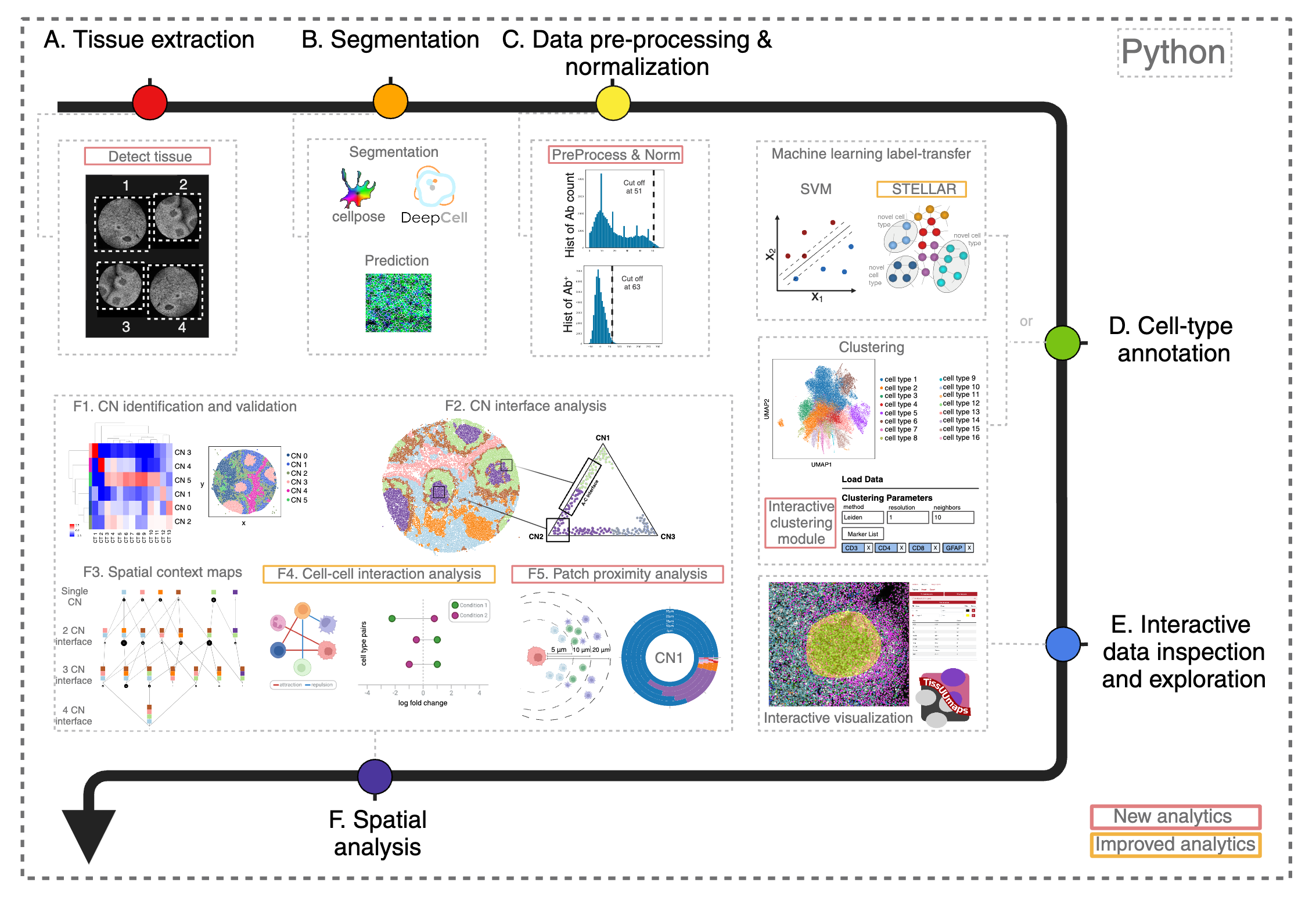
|
+
LIABILITY, WHETHER IN AN ACTION OF CONTRACT, TORT OR OTHERWISE, ARISING FROM,
|
|
20
|
+
OUT OF OR IN CONNECTION WITH THE SOFTWARE OR THE USE OR OTHER DEALINGS IN THE
|
|
21
|
+
SOFTWARE.
|
|
@@ -0,0 +1,135 @@
|
|
|
1
|
+
Metadata-Version: 2.1
|
|
2
|
+
Name: SPACEc
|
|
3
|
+
Version: 0.0.2
|
|
4
|
+
Summary: Add a short description here!
|
|
5
|
+
Home-page: https://github.com/pyscaffold/pyscaffold/
|
|
6
|
+
Author: yuqiyuqitan
|
|
7
|
+
Author-email: tanyuqi527@gmail.com
|
|
8
|
+
License: MIT
|
|
9
|
+
Project-URL: Documentation, https://pyscaffold.org/
|
|
10
|
+
Platform: any
|
|
11
|
+
Classifier: Development Status :: 4 - Beta
|
|
12
|
+
Classifier: Programming Language :: Python
|
|
13
|
+
Requires-Python: <3.10,>=3.9
|
|
14
|
+
Description-Content-Type: text/markdown; charset=UTF-8; variant=GFM
|
|
15
|
+
License-File: LICENSE.txt
|
|
16
|
+
Requires-Dist: tqdm
|
|
17
|
+
Requires-Dist: joblib
|
|
18
|
+
Requires-Dist: pandas
|
|
19
|
+
Requires-Dist: yellowbrick
|
|
20
|
+
Requires-Dist: statsmodels
|
|
21
|
+
Requires-Dist: scikit-learn
|
|
22
|
+
Requires-Dist: scikit-image
|
|
23
|
+
Requires-Dist: scanpy ==1.9.6
|
|
24
|
+
Requires-Dist: python-igraph
|
|
25
|
+
Requires-Dist: leidenalg
|
|
26
|
+
Requires-Dist: networkx
|
|
27
|
+
Requires-Dist: tensorly
|
|
28
|
+
Requires-Dist: cellpose
|
|
29
|
+
Requires-Dist: deepcell
|
|
30
|
+
Requires-Dist: concave-hull
|
|
31
|
+
Requires-Dist: pyFlowSOM
|
|
32
|
+
Requires-Dist: TissUUmaps ==3.1.1.6
|
|
33
|
+
Requires-Dist: Flask ==2.0.0
|
|
34
|
+
Requires-Dist: Werkzeug ==2.3.8
|
|
35
|
+
Requires-Dist: GitPython
|
|
36
|
+
Requires-Dist: igraph ==0.9.10
|
|
37
|
+
Requires-Dist: louvain ==0.7.1
|
|
38
|
+
Requires-Dist: python-louvain ==0.1
|
|
39
|
+
Requires-Dist: matplotlib ==3.9
|
|
40
|
+
Requires-Dist: importlib-metadata ; python_version < "3.8"
|
|
41
|
+
Provides-Extra: testing
|
|
42
|
+
Requires-Dist: setuptools ; extra == 'testing'
|
|
43
|
+
Requires-Dist: pytest ; extra == 'testing'
|
|
44
|
+
Requires-Dist: pytest-cov ; extra == 'testing'
|
|
45
|
+
|
|
46
|
+
# SPatial Analysis for CodEX data (SPACEc)
|
|
47
|
+
|
|
48
|
+
## Installation notes
|
|
49
|
+
|
|
50
|
+
**Note**: Due to some dependencies, we currently only support Python up to `3.9`.
|
|
51
|
+
|
|
52
|
+
We generally recommend to use a `conda` environment. It makes installing requirements like `graphviz` a lot easier.
|
|
53
|
+
|
|
54
|
+
### Install
|
|
55
|
+
|
|
56
|
+
```bash
|
|
57
|
+
# setup `conda` repository
|
|
58
|
+
conda create -n spacec python==3.9
|
|
59
|
+
conda activate spacec
|
|
60
|
+
|
|
61
|
+
# install `graphviz`
|
|
62
|
+
conda install graphviz
|
|
63
|
+
|
|
64
|
+
# install 'libvips' - only on Mac and Linux
|
|
65
|
+
conda install -c conda-forge libvips pyvips openslide-python
|
|
66
|
+
|
|
67
|
+
# install `SPACEc` from pypi
|
|
68
|
+
pip install spacec
|
|
69
|
+
|
|
70
|
+
# install `SPACEc` from cloned repo
|
|
71
|
+
#pip install -e .
|
|
72
|
+
|
|
73
|
+
# on Apple M1/M2
|
|
74
|
+
# conda install tensorflow=2.10.0
|
|
75
|
+
# and always import spacec first before importing other packages
|
|
76
|
+
```
|
|
77
|
+
|
|
78
|
+
Example tonsil data on [dryad](https://datadryad.org/stash/share/OXTHu8fAybiINGD1S3tIVUIcUiG4nOsjjeWmrvJV-dQ)
|
|
79
|
+
|
|
80
|
+
### Docker
|
|
81
|
+
If you run into an installation issue or want to run SPACEc in a containerized environment, we have created a Docker image for you to use SPACEc so that you don't have to install manually. You can find the SPACEc Docker image here: https://hub.docker.com/repository/docker/tkempchen/spacec/general
|
|
82
|
+
|
|
83
|
+
```bash
|
|
84
|
+
#Run CPU version:
|
|
85
|
+
docker pull tkempchen/spacec:cpu
|
|
86
|
+
docker run -p 8888:8888 -p 5100:5100 spacec:cpu
|
|
87
|
+
|
|
88
|
+
#Or run GPU version:
|
|
89
|
+
docker pull tkempchen/spacec:gpu
|
|
90
|
+
docker run --gpus all -p 8888:8888 -p 5100:5100 spacec:gpu
|
|
91
|
+
```
|
|
92
|
+
|
|
93
|
+
### Install additional features
|
|
94
|
+
#### GPU accelerated clustering
|
|
95
|
+
NOTE: This module is based on Nvidia `RAPIDS` that is currently only available on linux! If you run SPACEc on a Windows machine you need to run SPACEc in WSL to take advantage of this module. For further information read the offical RAPIDS documentation:
|
|
96
|
+
- https://t1p.de/hxo3c
|
|
97
|
+
|
|
98
|
+
To use RAPIDS you need a Linux-based system (we tested under Ubuntu 22) and an Nvidia RTX 20 Series GPU or better.
|
|
99
|
+
|
|
100
|
+
```bash
|
|
101
|
+
# before installing GPU related features check your installed CUDA version
|
|
102
|
+
nvcc --version
|
|
103
|
+
|
|
104
|
+
# make sure to use the right CUDA version! Here is an example for CUDA 12
|
|
105
|
+
|
|
106
|
+
pip install rapids-singlecell==0.9.5
|
|
107
|
+
|
|
108
|
+
pip install --extra-index-url=https://pypi.nvidia.com cudf-cu12==24.2.* dask-cudf-cu12==24.2.* cuml-cu12==24.2.* cugraph-cu12==24.2.* cuspatial-cu12==24.2.* cuproj-cu12==24.2.* cuxfilter-cu12==24.2.* cucim-cu12==24.2.* pylibraft-cu12==24.2.* raft-dask-cu12==24.2.*
|
|
109
|
+
|
|
110
|
+
pip install protobuf==3.20
|
|
111
|
+
```
|
|
112
|
+
|
|
113
|
+
#### STELLAR machine learning-based cell annotation
|
|
114
|
+
Further install information for `PyTorch` and `PyTorch Geometric` can be found here:
|
|
115
|
+
- https://pytorch.org/get-started/locally/
|
|
116
|
+
- https://pytorch-geometric.readthedocs.io/en/latest/install/installation.html
|
|
117
|
+
|
|
118
|
+
```bash
|
|
119
|
+
# before installing GPU related features check your installed CUDA version
|
|
120
|
+
nvcc --version
|
|
121
|
+
|
|
122
|
+
# install 'PyTorch' and 'PyTorch Geometric' (only needed if STELLAR is used)
|
|
123
|
+
# make sure to use the right CUDA version! Here is an example for CUDA 12 and PyTorch 2.3
|
|
124
|
+
|
|
125
|
+
pip install torch
|
|
126
|
+
|
|
127
|
+
pip install torch_geometric
|
|
128
|
+
|
|
129
|
+
pip install pyg_lib torch_scatter torch_sparse torch_cluster torch_spline_conv -f https://data.pyg.org/whl/torch-2.3.0+cu121.html
|
|
130
|
+
```
|
|
131
|
+
|
|
132
|
+
|
|
133
|
+
## General outline of SPACEc analysis
|
|
134
|
+
|
|
135
|
+
|
|
@@ -0,0 +1,21 @@
|
|
|
1
|
+
spacec/__init__.py,sha256=yPIVOK3f1CiyICVXtEBxew3gaWY4IT55GmT2n85DbBI,1220
|
|
2
|
+
spacec/_shared/segmentation.py,sha256=Y19JERnEw1a4OVDP_iWRH3VtF6YUKt1Vu5OXBbKzWPs,6139
|
|
3
|
+
spacec/_shared/segmentation_unused.py,sha256=-AvTkKHM6Ba-U-859qEa_GmV_mTtUaWXbgcSOaZvghE,2620
|
|
4
|
+
spacec/helperfunctions/__init__.py,sha256=1bvCmpKU5Fnfv0QJwVHsmFBCxf69ZqLIdT7KM4H1NdA,163
|
|
5
|
+
spacec/helperfunctions/_general.py,sha256=IcIyYJzFNkChGi89cUY3qpoI1bLayELD3ArB824O2Ag,35330
|
|
6
|
+
spacec/helperfunctions/_qptiff_converter.py,sha256=FZ5xYejVWkeqPMHKMBobr9djOIkP3eR1q-8enrUDLXc,1312
|
|
7
|
+
spacec/plotting/__init__.py,sha256=yfrvnYxYEWLT_CCsmsPtgF4M781IOSh-ajaRIT1ZwgM,826
|
|
8
|
+
spacec/plotting/_general.py,sha256=X3lrjpGNcXtIjenJrbeCmD8sV2sbQx6eTVTmFUnC3Ng,142078
|
|
9
|
+
spacec/plotting/_qptiff_converter.py,sha256=1Y-feLoYeU1FKPfWMo78hPXv6ZuvP8csgpc91fR1ZrE,1112
|
|
10
|
+
spacec/plotting/_segmentation.py,sha256=vdSeuUnUIjOKibjyTMK55fCvgc34GkP-Vpg_JoAZQRU,8433
|
|
11
|
+
spacec/preprocessing/__init__.py,sha256=BpJvqTAPEgZBfX6o3moknU_j6y1OkI-eLkqqlZDU9BQ,154
|
|
12
|
+
spacec/preprocessing/_general.py,sha256=50kkr9OUqmIda6ULgOQOWSXfEmsX-vsHwqmJDVAE0hM,13929
|
|
13
|
+
spacec/tools/__init__.py,sha256=51pTzxDseI281axRkdFIlIAy-URz-5d-X7YF8ed0oo0,686
|
|
14
|
+
spacec/tools/_general.py,sha256=Dbo6feTpgGb4eRrrD4Mga0TJejt87ZNxdohLUonrNrM,115251
|
|
15
|
+
spacec/tools/_qptiff_converter.py,sha256=8GAAbyHHpbVYFFSWiVgp6UQNVIO8ppigX4yV7Np_zPA,4459
|
|
16
|
+
spacec/tools/_segmentation.py,sha256=XugEpO3sgRbda8mjZHPX34XdSxiPap1xPSpcYGklYtw,33517
|
|
17
|
+
SPACEc-0.0.2.dist-info/LICENSE.txt,sha256=qXK5ol5ZO1cL2OMsh3KYkjdwo3hNbrwUP80kBr6A-uU,1078
|
|
18
|
+
SPACEc-0.0.2.dist-info/METADATA,sha256=keKFtAjdCPJWy_MsRlx-WTg9Axt3UkfFogJShmEfX34,4569
|
|
19
|
+
SPACEc-0.0.2.dist-info/WHEEL,sha256=y4mX-SOX4fYIkonsAGA5N0Oy-8_gI4FXw5HNI1xqvWg,91
|
|
20
|
+
SPACEc-0.0.2.dist-info/top_level.txt,sha256=jafkYV_sU9a1BQ3GdEShjuCp6WstP_lKQB-Hmy8nn00,7
|
|
21
|
+
SPACEc-0.0.2.dist-info/RECORD,,
|
|
@@ -0,0 +1 @@
|
|
|
1
|
+
spacec
|
spacec/__init__.py
ADDED
|
@@ -0,0 +1,38 @@
|
|
|
1
|
+
import sys
|
|
2
|
+
|
|
3
|
+
if sys.version_info[:2] >= (3, 8):
|
|
4
|
+
# TODO: Import directly (no need for conditional) when `python_requires = >= 3.8`
|
|
5
|
+
from importlib.metadata import PackageNotFoundError, version # pragma: no cover
|
|
6
|
+
else:
|
|
7
|
+
from importlib_metadata import PackageNotFoundError, version # pragma: no cover
|
|
8
|
+
|
|
9
|
+
try:
|
|
10
|
+
# Change here if project is renamed and does not equal the package name
|
|
11
|
+
dist_name = "SPACEc"
|
|
12
|
+
__version__ = version(dist_name)
|
|
13
|
+
except PackageNotFoundError: # pragma: no cover
|
|
14
|
+
__version__ = "unknown"
|
|
15
|
+
finally:
|
|
16
|
+
del version, PackageNotFoundError
|
|
17
|
+
|
|
18
|
+
# TODO: hacky!
|
|
19
|
+
# NOTE: Be aware of potential side-effects: but that may cause crashes or silently produce incorrect results.
|
|
20
|
+
# sources:
|
|
21
|
+
# - https://stackoverflow.com/questions/53014306/error-15-initializing-libiomp5-dylib-but-found-libiomp5-dylib-already-initial
|
|
22
|
+
# - https://stackoverflow.com/questions/55714135/how-can-i-fix-an-omp-error-15-initializing-libiomp5-dylib-but-found-libomp
|
|
23
|
+
import os
|
|
24
|
+
|
|
25
|
+
os.environ["KMP_DUPLICATE_LIB_OK"] = "True"
|
|
26
|
+
|
|
27
|
+
from . import helperfunctions as hf
|
|
28
|
+
from . import plotting as pl
|
|
29
|
+
from . import preprocessing as pp
|
|
30
|
+
from . import tools as tl
|
|
31
|
+
|
|
32
|
+
__all__ = [
|
|
33
|
+
"__version__",
|
|
34
|
+
"pp",
|
|
35
|
+
"tl",
|
|
36
|
+
"hf",
|
|
37
|
+
"pl",
|
|
38
|
+
]
|
|
@@ -0,0 +1,194 @@
|
|
|
1
|
+
import os
|
|
2
|
+
|
|
3
|
+
import numpy as np
|
|
4
|
+
from skimage import io
|
|
5
|
+
|
|
6
|
+
|
|
7
|
+
def create_multichannel_tiff(input_dir, output_dir, output_filename):
|
|
8
|
+
"""
|
|
9
|
+
Create a multi-channel TIFF image from individual TIFF files.
|
|
10
|
+
|
|
11
|
+
Parameters
|
|
12
|
+
----------
|
|
13
|
+
input_dir : str
|
|
14
|
+
Directory containing the input TIFF files.
|
|
15
|
+
output_dir : str
|
|
16
|
+
Directory to save the output TIFF file.
|
|
17
|
+
output_filename : str
|
|
18
|
+
Name of the output TIFF file.
|
|
19
|
+
|
|
20
|
+
Returns
|
|
21
|
+
-------
|
|
22
|
+
list of str
|
|
23
|
+
List of channel names.
|
|
24
|
+
"""
|
|
25
|
+
# Get a list of all TIFF files in the input directory
|
|
26
|
+
tiff_files = [f for f in os.listdir(input_dir) if f.endswith((".tiff", ".tif"))]
|
|
27
|
+
|
|
28
|
+
# Create a list of channel names from the TIFF file names
|
|
29
|
+
channel_names = [os.path.splitext(f)[0] for f in tiff_files]
|
|
30
|
+
|
|
31
|
+
# Read the images into a list of numpy arrays
|
|
32
|
+
images = [io.imread(os.path.join(input_dir, f)) for f in tiff_files]
|
|
33
|
+
|
|
34
|
+
# Stack the images along the third axis to create a multi-channel image
|
|
35
|
+
multi_channel_image = np.stack(images, axis=-1)
|
|
36
|
+
|
|
37
|
+
# move last dimension to first position
|
|
38
|
+
multi_channel_image = np.moveaxis(multi_channel_image, -1, 0)
|
|
39
|
+
|
|
40
|
+
print(multi_channel_image.shape)
|
|
41
|
+
|
|
42
|
+
# Save the multi-channel image as a new TIFF file in the output directory
|
|
43
|
+
io.imsave(os.path.join(output_dir, output_filename), multi_channel_image)
|
|
44
|
+
|
|
45
|
+
# save channel names to text file
|
|
46
|
+
with open(os.path.join(output_dir, "channelnames.txt"), "w") as f:
|
|
47
|
+
for item in channel_names:
|
|
48
|
+
f.write("%s\n" % item)
|
|
49
|
+
|
|
50
|
+
return channel_names
|
|
51
|
+
|
|
52
|
+
|
|
53
|
+
# combine multiple channels in one image and add as new image to image_dict with the name segmentation_channel
|
|
54
|
+
def combine_channels(image_dict, channel_list, new_channel_name):
|
|
55
|
+
"""
|
|
56
|
+
Combine multiple channels into a single channel.
|
|
57
|
+
|
|
58
|
+
Parameters
|
|
59
|
+
----------
|
|
60
|
+
image_dict : dict
|
|
61
|
+
Dictionary with channel names as keys and images as values.
|
|
62
|
+
channel_list : list of str
|
|
63
|
+
List of channel names to combine.
|
|
64
|
+
new_channel_name : str
|
|
65
|
+
Name of the new channel.
|
|
66
|
+
|
|
67
|
+
Returns
|
|
68
|
+
-------
|
|
69
|
+
dict
|
|
70
|
+
Updated dictionary with the new channel added.
|
|
71
|
+
"""
|
|
72
|
+
# Determine bit depth of input images
|
|
73
|
+
bit_depth = image_dict[channel_list[0]].dtype
|
|
74
|
+
|
|
75
|
+
# Create empty image
|
|
76
|
+
new_image = np.zeros(
|
|
77
|
+
(image_dict[channel_list[0]].shape[0], image_dict[channel_list[0]].shape[1]),
|
|
78
|
+
dtype=bit_depth,
|
|
79
|
+
)
|
|
80
|
+
|
|
81
|
+
# Add channels to image as maximum projection
|
|
82
|
+
for channel in channel_list:
|
|
83
|
+
new_image = np.maximum(new_image, image_dict[channel])
|
|
84
|
+
|
|
85
|
+
# Add image to image_dict
|
|
86
|
+
image_dict[new_channel_name] = new_image
|
|
87
|
+
|
|
88
|
+
return image_dict
|
|
89
|
+
|
|
90
|
+
|
|
91
|
+
def format_CODEX(
|
|
92
|
+
image,
|
|
93
|
+
channel_names=None,
|
|
94
|
+
number_cycles=None,
|
|
95
|
+
images_per_cycle=None,
|
|
96
|
+
# show_plots=False,
|
|
97
|
+
stack=True,
|
|
98
|
+
input_format="Multichannel",
|
|
99
|
+
):
|
|
100
|
+
"""
|
|
101
|
+
Format images based on the input format.
|
|
102
|
+
|
|
103
|
+
Parameters
|
|
104
|
+
----------
|
|
105
|
+
image : ndarray or str
|
|
106
|
+
Input image or directory containing images.
|
|
107
|
+
channel_names : list of str, optional
|
|
108
|
+
List of channel names.
|
|
109
|
+
number_cycles : int, optional
|
|
110
|
+
Number of cycles in the CODEX format.
|
|
111
|
+
images_per_cycle : int, optional
|
|
112
|
+
Number of images per cycle in the CODEX format.
|
|
113
|
+
stack : bool, default=True
|
|
114
|
+
If True, stack the images in the list.
|
|
115
|
+
input_format : str, default="Multichannel"
|
|
116
|
+
Format of the input images. Options are "CODEX", "Multichannel", and "Channels".
|
|
117
|
+
|
|
118
|
+
Returns
|
|
119
|
+
-------
|
|
120
|
+
dict
|
|
121
|
+
Dictionary with channel names as keys and images as values. If `stack` is True and `input_format` is "CODEX",
|
|
122
|
+
also returns a stacked image as a numpy array.
|
|
123
|
+
"""
|
|
124
|
+
|
|
125
|
+
if input_format == "CODEX":
|
|
126
|
+
total_images = number_cycles * images_per_cycle
|
|
127
|
+
image_list = [None] * total_images # pre-allocated list
|
|
128
|
+
image_dict = {}
|
|
129
|
+
|
|
130
|
+
index = 0
|
|
131
|
+
for i in range(number_cycles):
|
|
132
|
+
cycle = image[i, :, :, :]
|
|
133
|
+
|
|
134
|
+
for n in range(images_per_cycle):
|
|
135
|
+
chan = i * 4 + n
|
|
136
|
+
c = channel_names[chan]
|
|
137
|
+
image2 = cycle[:, :, n]
|
|
138
|
+
|
|
139
|
+
image_list[index] = image2
|
|
140
|
+
index += 1
|
|
141
|
+
|
|
142
|
+
image_dict[c] = image2
|
|
143
|
+
|
|
144
|
+
# if show_plots:
|
|
145
|
+
# plt.figure(figsize=(2, 2))
|
|
146
|
+
# plt.imshow(image2, interpolation='nearest', cmap='magma')
|
|
147
|
+
# plt.axis('off')
|
|
148
|
+
# cbar = plt.colorbar(shrink=0.5)
|
|
149
|
+
# cbar.ax.tick_params(labelsize=3)
|
|
150
|
+
# plt.title(c)
|
|
151
|
+
# plt.show()
|
|
152
|
+
|
|
153
|
+
if stack:
|
|
154
|
+
stacked_image = np.stack(image_list)
|
|
155
|
+
return image_dict, stacked_image
|
|
156
|
+
else:
|
|
157
|
+
return image_dict
|
|
158
|
+
|
|
159
|
+
if input_format == "Multichannel":
|
|
160
|
+
image_dict = {}
|
|
161
|
+
index = 0
|
|
162
|
+
|
|
163
|
+
for i in range(len(channel_names)):
|
|
164
|
+
image2 = image[i, :, :]
|
|
165
|
+
image_dict[channel_names[i]] = image2
|
|
166
|
+
index += 1
|
|
167
|
+
|
|
168
|
+
return image_dict
|
|
169
|
+
|
|
170
|
+
if input_format == "Channels":
|
|
171
|
+
# Get a list of all TIFF files in the input directory
|
|
172
|
+
tiff_files = [f for f in os.listdir(image) if f.endswith((".tiff", ".tif"))]
|
|
173
|
+
|
|
174
|
+
# Create a list of channel names from the TIFF file names
|
|
175
|
+
channel_names = [os.path.splitext(f)[0] for f in tiff_files]
|
|
176
|
+
|
|
177
|
+
# Read the images into a list of numpy arrays
|
|
178
|
+
images = [io.imread(os.path.join(image, f)) for f in tiff_files]
|
|
179
|
+
|
|
180
|
+
# Stack the images along the third axis to create a multi-channel image
|
|
181
|
+
multi_channel_image = np.stack(images, axis=-1)
|
|
182
|
+
|
|
183
|
+
# move last dimension to first position
|
|
184
|
+
multi_channel_image = np.moveaxis(multi_channel_image, -1, 0)
|
|
185
|
+
|
|
186
|
+
image_dict = {}
|
|
187
|
+
index = 0
|
|
188
|
+
|
|
189
|
+
for i in range(len(channel_names)):
|
|
190
|
+
image2 = multi_channel_image[i, :, :]
|
|
191
|
+
image_dict[channel_names[i]] = image2
|
|
192
|
+
index += 1
|
|
193
|
+
|
|
194
|
+
return image_dict
|
|
@@ -0,0 +1,80 @@
|
|
|
1
|
+
import os
|
|
2
|
+
import pathlib
|
|
3
|
+
import random
|
|
4
|
+
import shutil
|
|
5
|
+
import sys
|
|
6
|
+
import time
|
|
7
|
+
from glob import glob
|
|
8
|
+
from turtle import mode
|
|
9
|
+
from urllib.parse import urlparse
|
|
10
|
+
|
|
11
|
+
import matplotlib as mpl
|
|
12
|
+
import matplotlib.pyplot as plt
|
|
13
|
+
import numpy as np
|
|
14
|
+
import pandas as pd
|
|
15
|
+
import requests
|
|
16
|
+
import skimage.io
|
|
17
|
+
from cellpose import core, io, metrics, models, plot, utils
|
|
18
|
+
from deepcell.applications import Mesmer
|
|
19
|
+
from deepcell.utils.plot_utils import create_rgb_image, make_outline_overlay
|
|
20
|
+
from skimage import exposure
|
|
21
|
+
from skimage.color import rgb2gray
|
|
22
|
+
from skimage.measure import regionprops_table
|
|
23
|
+
from tensorflow.keras.models import load_model
|
|
24
|
+
from tqdm import tqdm
|
|
25
|
+
|
|
26
|
+
|
|
27
|
+
def overlay_masks_on_image(image, masks, gamma=1.5):
|
|
28
|
+
# Convert image to grayscale
|
|
29
|
+
gray_image = rgb2gray(image)
|
|
30
|
+
|
|
31
|
+
# Increase brightness using gamma correction
|
|
32
|
+
# Adjust the gamma value as needed
|
|
33
|
+
gray_image = exposure.adjust_gamma(gray_image, gamma=gamma)
|
|
34
|
+
|
|
35
|
+
# Convert grayscale to RGB to overlay the masks
|
|
36
|
+
overlay = np.stack([gray_image] * 3, axis=-1)
|
|
37
|
+
|
|
38
|
+
outlines = utils.masks_to_outlines(masks)
|
|
39
|
+
|
|
40
|
+
# Overlay the mask as red outlines on the grayscale image
|
|
41
|
+
overlay[outlines == 1] = [255, 0, 0]
|
|
42
|
+
|
|
43
|
+
return overlay, gray_image
|
|
44
|
+
|
|
45
|
+
|
|
46
|
+
def check_segmentation(overlay, grayscale, n=10, tilesize=1000):
|
|
47
|
+
# Check the shapes of provided arrays
|
|
48
|
+
# if overlay.shape != grayscale.shape:
|
|
49
|
+
# raise ValueError("The two images should have the same shape")
|
|
50
|
+
|
|
51
|
+
# Calculate the number of tiles in x and y directions
|
|
52
|
+
y_tiles, x_tiles = overlay.shape[0] // tilesize, overlay.shape[1] // tilesize
|
|
53
|
+
|
|
54
|
+
# Split images into tiles
|
|
55
|
+
overlay_tiles = []
|
|
56
|
+
grayscale_tiles = []
|
|
57
|
+
for i in range(x_tiles):
|
|
58
|
+
for j in range(y_tiles):
|
|
59
|
+
x_start, y_start = i * tilesize, j * tilesize
|
|
60
|
+
overlay_tile = overlay[
|
|
61
|
+
y_start : y_start + tilesize, x_start : x_start + tilesize
|
|
62
|
+
]
|
|
63
|
+
grayscale_tile = grayscale[
|
|
64
|
+
y_start : y_start + tilesize, x_start : x_start + tilesize
|
|
65
|
+
]
|
|
66
|
+
overlay_tiles.append(overlay_tile)
|
|
67
|
+
grayscale_tiles.append(grayscale_tile)
|
|
68
|
+
|
|
69
|
+
# Randomly select n tiles
|
|
70
|
+
random_indices = random.sample(range(len(overlay_tiles)), n)
|
|
71
|
+
|
|
72
|
+
# Plot the tiles
|
|
73
|
+
fig, axs = plt.subplots(n, 2, figsize=(10, 5 * n))
|
|
74
|
+
for i, idx in enumerate(random_indices):
|
|
75
|
+
axs[i, 0].imshow(overlay_tiles[idx])
|
|
76
|
+
axs[i, 0].axis("off")
|
|
77
|
+
axs[i, 1].imshow(grayscale_tiles[idx], cmap="gray")
|
|
78
|
+
axs[i, 1].axis("off")
|
|
79
|
+
plt.tight_layout()
|
|
80
|
+
plt.show()
|