Flowfile 0.3.0.1__py3-none-any.whl → 0.3.0.2__py3-none-any.whl
This diff represents the content of publicly available package versions that have been released to one of the supported registries. The information contained in this diff is provided for informational purposes only and reflects changes between package versions as they appear in their respective public registries.
Potentially problematic release.
This version of Flowfile might be problematic. Click here for more details.
- flowfile/__main__.py +5 -6
- flowfile/api.py +9 -5
- flowfile/readme.md +130 -0
- flowfile/web/__init__.py +5 -5
- flowfile-0.3.0.2.dist-info/METADATA +235 -0
- {flowfile-0.3.0.1.dist-info → flowfile-0.3.0.2.dist-info}/RECORD +9 -8
- flowfile-0.3.0.1.dist-info/METADATA +0 -219
- {flowfile-0.3.0.1.dist-info → flowfile-0.3.0.2.dist-info}/LICENSE +0 -0
- {flowfile-0.3.0.1.dist-info → flowfile-0.3.0.2.dist-info}/WHEEL +0 -0
- {flowfile-0.3.0.1.dist-info → flowfile-0.3.0.2.dist-info}/entry_points.txt +0 -0
flowfile/__main__.py
CHANGED
|
@@ -19,7 +19,7 @@ def main():
|
|
|
19
19
|
args = parser.parse_args()
|
|
20
20
|
|
|
21
21
|
if args.command == "run" and args.component:
|
|
22
|
-
if args.component == "
|
|
22
|
+
if args.component == "ui":
|
|
23
23
|
try:
|
|
24
24
|
flowfile.start_web_ui(
|
|
25
25
|
host=args.host,
|
|
@@ -42,19 +42,18 @@ def main():
|
|
|
42
42
|
print("A framework combining visual ETL with a Polars-like API")
|
|
43
43
|
print("\nUsage:")
|
|
44
44
|
print(" # Start the FlowFile web UI with integrated services")
|
|
45
|
-
print(" flowfile run
|
|
45
|
+
print(" flowfile run ui")
|
|
46
46
|
print("")
|
|
47
47
|
print(" # Advanced: Run individual components")
|
|
48
48
|
print(" flowfile run core # Start only the core service")
|
|
49
49
|
print(" flowfile run worker # Start only the worker service")
|
|
50
50
|
print("")
|
|
51
51
|
print(" # Options")
|
|
52
|
-
print(" flowfile run
|
|
53
|
-
print(" flowfile run
|
|
52
|
+
print(" flowfile run ui --host 0.0.0.0 --port 8080 # Custom host/port")
|
|
53
|
+
print(" flowfile run ui --no-browser # Don't open browser")
|
|
54
54
|
print("")
|
|
55
55
|
print(" # Python API usage examples")
|
|
56
56
|
print(" import flowfile as ff")
|
|
57
57
|
print(" df = ff.read_csv('data.csv')")
|
|
58
58
|
print(" result = df.filter(ff.col('value') > 10)")
|
|
59
|
-
print(" ff.open_graph_in_editor(result)")
|
|
60
|
-
print(" ff.start_web_ui()")
|
|
59
|
+
print(" ff.open_graph_in_editor(result)")
|
flowfile/api.py
CHANGED
|
@@ -119,7 +119,7 @@ def build_server_command(module_name: str) -> List[str]:
|
|
|
119
119
|
"run",
|
|
120
120
|
module_name,
|
|
121
121
|
"run",
|
|
122
|
-
"
|
|
122
|
+
"ui",
|
|
123
123
|
"--no-browser",
|
|
124
124
|
f"--port={FLOWFILE_PORT}",
|
|
125
125
|
]
|
|
@@ -134,7 +134,7 @@ def build_server_command(module_name: str) -> List[str]:
|
|
|
134
134
|
"-m",
|
|
135
135
|
module_name,
|
|
136
136
|
"run",
|
|
137
|
-
"
|
|
137
|
+
"ui",
|
|
138
138
|
"--no-browser",
|
|
139
139
|
f"--port={FLOWFILE_PORT}",
|
|
140
140
|
]
|
|
@@ -314,7 +314,7 @@ def _save_flow_to_location(
|
|
|
314
314
|
def _open_flow_in_browser(flow_id: int) -> None:
|
|
315
315
|
"""Opens the specified flow ID in a browser tab if in unified mode."""
|
|
316
316
|
if os.environ.get("FLOWFILE_MODE") == "electron":
|
|
317
|
-
flow_url = f"http://{FLOWFILE_HOST}:{FLOWFILE_PORT}/
|
|
317
|
+
flow_url = f"http://{FLOWFILE_HOST}:{FLOWFILE_PORT}/ui/flow/{flow_id}"
|
|
318
318
|
logger.info(f"Unified mode detected. Opening imported flow in browser: {flow_url}")
|
|
319
319
|
try:
|
|
320
320
|
time.sleep(0.5)
|
|
@@ -335,7 +335,8 @@ def _cleanup_temporary_storage(temp_dir_obj: Optional[TemporaryDirectory]) -> No
|
|
|
335
335
|
logger.error(f"Error cleaning up temporary directory {temp_dir_obj.name}: {e}")
|
|
336
336
|
|
|
337
337
|
|
|
338
|
-
def open_graph_in_editor(flow_graph: FlowGraph, storage_location: Optional[str] = None,
|
|
338
|
+
def open_graph_in_editor(flow_graph: FlowGraph, storage_location: Optional[str] = None,
|
|
339
|
+
module_name: str = DEFAULT_MODULE_NAME) -> bool:
|
|
339
340
|
"""
|
|
340
341
|
Save the ETL graph, ensure the Flowfile server is running (starting it
|
|
341
342
|
if necessary), import the graph via API, and open it in a new browser
|
|
@@ -353,10 +354,13 @@ def open_graph_in_editor(flow_graph: FlowGraph, storage_location: Optional[str]
|
|
|
353
354
|
"""
|
|
354
355
|
temp_dir_obj: Optional[TemporaryDirectory] = None
|
|
355
356
|
try:
|
|
357
|
+
original_execution_settings = flow_graph.flow_settings.model_copy()
|
|
358
|
+
flow_graph.flow_settings.execution_location = "auto"
|
|
359
|
+
flow_graph.flow_settings.execution_mode = "Development"
|
|
356
360
|
flow_file_path, temp_dir_obj = _save_flow_to_location(flow_graph, storage_location)
|
|
357
361
|
if not flow_file_path:
|
|
358
362
|
return False
|
|
359
|
-
|
|
363
|
+
flow_graph.flow_settings = original_execution_settings
|
|
360
364
|
if not start_flowfile_server_process(module_name):
|
|
361
365
|
return False
|
|
362
366
|
|
flowfile/readme.md
ADDED
|
@@ -0,0 +1,130 @@
|
|
|
1
|
+
# Flowfile Web UI Documentation
|
|
2
|
+
|
|
3
|
+
## Overview
|
|
4
|
+
|
|
5
|
+
Flowfile now supports a web-based user interface that can be launched directly from the pip-installed package. This enhancement allows users to quickly get started with the visual ETL tool without needing to install the desktop application, set up Docker, or manually configure the services.
|
|
6
|
+
|
|
7
|
+
## Key Features
|
|
8
|
+
|
|
9
|
+
- **Integrated Web UI**: Launch the Flowfile interface directly in your browser
|
|
10
|
+
- **Unified Service**: Combined API that serves both the web UI and processes worker operations
|
|
11
|
+
- **Easy Installation**: Simple pip installation and startup process
|
|
12
|
+
- **Visual ETL**: Access to all the visual ETL capabilities through a web interface
|
|
13
|
+
|
|
14
|
+
## Installation
|
|
15
|
+
|
|
16
|
+
Install Flowfile from PyPI using pip:
|
|
17
|
+
|
|
18
|
+
```bash
|
|
19
|
+
pip install Flowfile
|
|
20
|
+
```
|
|
21
|
+
|
|
22
|
+
## Starting the Web UI
|
|
23
|
+
|
|
24
|
+
You can start the Flowfile web UI using either the Python module or the command-line interface:
|
|
25
|
+
|
|
26
|
+
### Using the Command-Line Interface
|
|
27
|
+
|
|
28
|
+
```bash
|
|
29
|
+
# Start the web UI with default settings
|
|
30
|
+
flowfile run ui
|
|
31
|
+
|
|
32
|
+
# Customize host and port
|
|
33
|
+
flowfile run ui --host 0.0.0.0 --port 8080
|
|
34
|
+
|
|
35
|
+
# Start without automatically opening a browser window
|
|
36
|
+
flowfile run ui --no-browser
|
|
37
|
+
```
|
|
38
|
+
|
|
39
|
+
### Using Python
|
|
40
|
+
|
|
41
|
+
```python
|
|
42
|
+
import flowfile
|
|
43
|
+
|
|
44
|
+
# Start the web UI with default settings
|
|
45
|
+
flowfile.start_web_ui()
|
|
46
|
+
|
|
47
|
+
# Customize host, port, and browser launch
|
|
48
|
+
flowfile.start_web_ui(host="0.0.0.0", port=8080, open_browser=False)
|
|
49
|
+
```
|
|
50
|
+
|
|
51
|
+
## Architecture Overview
|
|
52
|
+
|
|
53
|
+
The web UI functionality combines multiple components:
|
|
54
|
+
|
|
55
|
+
1. **Core Service**: The main ETL engine (flowfile_core) that processes data transformations
|
|
56
|
+
2. **Worker Service**: Handles computation and caching of data operations (flowfile_worker)
|
|
57
|
+
3. **Web UI**: A Vue.js frontend that provides the visual interface
|
|
58
|
+
|
|
59
|
+
When you start the web UI, all these services are launched together in a unified mode, making it simple to get started without configuration.
|
|
60
|
+
|
|
61
|
+
## Using the Web UI with FlowFrame API
|
|
62
|
+
|
|
63
|
+
You can create data pipelines programmatically with the FlowFrame API and then visualize them in the web UI:
|
|
64
|
+
|
|
65
|
+
```python
|
|
66
|
+
import flowfile as ff
|
|
67
|
+
from flowfile import open_graph_in_editor
|
|
68
|
+
|
|
69
|
+
# Create a data pipeline
|
|
70
|
+
df = ff.from_dict({
|
|
71
|
+
"id": [1, 2, 3, 4, 5],
|
|
72
|
+
"category": ["A", "B", "A", "C", "B"],
|
|
73
|
+
"value": [100, 200, 150, 300, 250]
|
|
74
|
+
})
|
|
75
|
+
|
|
76
|
+
# Process the data
|
|
77
|
+
result = df.filter(ff.col("value") > 150).with_columns([
|
|
78
|
+
(ff.col("value") * 2).alias("double_value")
|
|
79
|
+
])
|
|
80
|
+
|
|
81
|
+
# Open the graph in the web UI (starts the server if it's not running)
|
|
82
|
+
open_graph_in_editor(result.flow_graph)
|
|
83
|
+
```
|
|
84
|
+
|
|
85
|
+
The `open_graph_in_editor` function automatically:
|
|
86
|
+
1. Saves the flow graph to a temporary file
|
|
87
|
+
2. Starts the Flowfile server if it's not already running
|
|
88
|
+
3. Imports the flow into the editor
|
|
89
|
+
4. Opens a browser tab with the imported flow
|
|
90
|
+
|
|
91
|
+
## Advanced Server Configuration
|
|
92
|
+
|
|
93
|
+
For advanced users who need to customize the server behavior:
|
|
94
|
+
|
|
95
|
+
### Environment Variables
|
|
96
|
+
|
|
97
|
+
- `FLOWFILE_HOST`: Host to bind the server to (default: "127.0.0.1")
|
|
98
|
+
- `FLOWFILE_PORT`: Port to bind the server to (default: 63578)
|
|
99
|
+
- `FLOWFILE_MODE`: Set to "electron" to enable browser auto-opening behavior
|
|
100
|
+
- `WORKER_URL`: URL for the worker service
|
|
101
|
+
- `SINGLE_FILE_MODE`: Set to "1" to run in unified mode with worker functionality
|
|
102
|
+
- `FLOWFILE_MODULE_NAME`: Module name to run (default: "flowfile")
|
|
103
|
+
|
|
104
|
+
### Running Individual Components
|
|
105
|
+
|
|
106
|
+
For development or specialized deployments, you can run the components separately:
|
|
107
|
+
|
|
108
|
+
```bash
|
|
109
|
+
# Run only the core service
|
|
110
|
+
flowfile run core --host 0.0.0.0 --port 8080
|
|
111
|
+
|
|
112
|
+
# Run only the worker service
|
|
113
|
+
flowfile run worker --host 0.0.0.0 --port 8081
|
|
114
|
+
```
|
|
115
|
+
|
|
116
|
+
## Troubleshooting
|
|
117
|
+
|
|
118
|
+
- If the web UI doesn't open automatically, manually navigate to http://localhost:63578/ui
|
|
119
|
+
- If you encounter connection issues, check if the port is already in use
|
|
120
|
+
- Look for server logs in the terminal where you started the service for error messages
|
|
121
|
+
- For issues with the API, navigate to http://localhost:63578/docs to verify the API is running
|
|
122
|
+
|
|
123
|
+
## Next Steps
|
|
124
|
+
|
|
125
|
+
Once you're familiar with the web UI, you might want to explore:
|
|
126
|
+
|
|
127
|
+
1. The desktop application for a more native experience
|
|
128
|
+
2. Docker deployment for production environments
|
|
129
|
+
3. Advanced ETL operations using the FlowFrame API
|
|
130
|
+
4. Custom node development for specialized transformations
|
flowfile/web/__init__.py
CHANGED
|
@@ -54,7 +54,7 @@ def extend_app(app: FastAPI):
|
|
|
54
54
|
from flowfile_core.configs.settings import WORKER_URL
|
|
55
55
|
return WORKER_URL
|
|
56
56
|
|
|
57
|
-
@app.get("/
|
|
57
|
+
@app.get("/ui", include_in_schema=False)
|
|
58
58
|
async def web_ui_root():
|
|
59
59
|
"""Serve the main index.html file for the web UI"""
|
|
60
60
|
index_path = static_dir / "index.html"
|
|
@@ -62,7 +62,7 @@ def extend_app(app: FastAPI):
|
|
|
62
62
|
return FileResponse(index_path)
|
|
63
63
|
return {"error": "Web UI not installed. Build the frontend and install it in the package."}
|
|
64
64
|
|
|
65
|
-
@app.get("/
|
|
65
|
+
@app.get("/ui/{path:path}", include_in_schema=False)
|
|
66
66
|
async def serve_vue_app(path: str):
|
|
67
67
|
"""Serve static files or the index.html for client-side routing"""
|
|
68
68
|
# Try to serve the requested file
|
|
@@ -72,7 +72,7 @@ def extend_app(app: FastAPI):
|
|
|
72
72
|
|
|
73
73
|
# If it's a directory, redirect to add trailing slash
|
|
74
74
|
if (static_dir / path).exists() and (static_dir / path).is_dir():
|
|
75
|
-
return RedirectResponse(f"/
|
|
75
|
+
return RedirectResponse(f"/ui/{path}/")
|
|
76
76
|
|
|
77
77
|
# For client-side routing, serve the index.html
|
|
78
78
|
index_path = static_dir / "index.html"
|
|
@@ -143,11 +143,11 @@ def start_server(host="127.0.0.1", port=63578, open_browser=True):
|
|
|
143
143
|
# Open browser if requested
|
|
144
144
|
if open_browser:
|
|
145
145
|
time.sleep(2)
|
|
146
|
-
webbrowser.open_new_tab(f"http://{host}:{port}/
|
|
146
|
+
webbrowser.open_new_tab(f"http://{host}:{port}/ui")
|
|
147
147
|
|
|
148
148
|
print("\n" + "=" * 60)
|
|
149
149
|
print(" FlowFile - Visual ETL Tool (Unified Mode)")
|
|
150
|
-
print(f" Web UI: http://{host}:{port}/
|
|
150
|
+
print(f" Web UI: http://{host}:{port}/ui")
|
|
151
151
|
print(f" API Docs: http://{host}:{port}/docs")
|
|
152
152
|
print("=" * 60 + "\n")
|
|
153
153
|
|
|
@@ -0,0 +1,235 @@
|
|
|
1
|
+
Metadata-Version: 2.3
|
|
2
|
+
Name: Flowfile
|
|
3
|
+
Version: 0.3.0.2
|
|
4
|
+
Summary: Project combining flowfile core (backend) and flowfile_worker (compute offloader) and flowfile_frame (api)
|
|
5
|
+
Author: Edward van Eechoud
|
|
6
|
+
Author-email: evaneechoud@gmail.com
|
|
7
|
+
Requires-Python: >=3.10,<3.13
|
|
8
|
+
Classifier: Programming Language :: Python :: 3
|
|
9
|
+
Classifier: Programming Language :: Python :: 3.10
|
|
10
|
+
Classifier: Programming Language :: Python :: 3.11
|
|
11
|
+
Classifier: Programming Language :: Python :: 3.12
|
|
12
|
+
Requires-Dist: XlsxWriter (>=3.2.0,<3.3.0)
|
|
13
|
+
Requires-Dist: aiofiles (>=24.1.0,<25.0.0)
|
|
14
|
+
Requires-Dist: airbyte-cdk (==6.47.2)
|
|
15
|
+
Requires-Dist: bcrypt (>=4.3.0,<5.0.0)
|
|
16
|
+
Requires-Dist: connectorx (>=0.4.2,<0.5.0)
|
|
17
|
+
Requires-Dist: databases (>=0.9.0,<0.10.0)
|
|
18
|
+
Requires-Dist: faker (>=23.1.0,<23.2.0)
|
|
19
|
+
Requires-Dist: fastapi (>=0.115.2,<0.116.0)
|
|
20
|
+
Requires-Dist: fastexcel (>=0.12.0,<0.13.0)
|
|
21
|
+
Requires-Dist: google-api-python-client (>=2.149.0,<2.150.0)
|
|
22
|
+
Requires-Dist: gspread (>=6.1.3,<6.2.0)
|
|
23
|
+
Requires-Dist: loky (>=3.4.1,<3.5.0)
|
|
24
|
+
Requires-Dist: methodtools (>=0.4.7,<0.5.0)
|
|
25
|
+
Requires-Dist: openpyxl (>=3.1.2,<3.2.0)
|
|
26
|
+
Requires-Dist: passlib (>=1.7.4,<1.8.0)
|
|
27
|
+
Requires-Dist: pendulum (==2.1.2) ; python_version < "3.12"
|
|
28
|
+
Requires-Dist: polars (>1.8.2,<=1.25.2)
|
|
29
|
+
Requires-Dist: polars-distance (>=0.4.3,<0.5.0)
|
|
30
|
+
Requires-Dist: polars-ds (>=0.6.0)
|
|
31
|
+
Requires-Dist: polars-expr-transformer (>0.4.7.0)
|
|
32
|
+
Requires-Dist: polars-grouper (>=0.3.0,<0.4.0)
|
|
33
|
+
Requires-Dist: polars_simed (>=0.3.4,<0.4.0)
|
|
34
|
+
Requires-Dist: pyairbyte-flowfile (==0.20.2)
|
|
35
|
+
Requires-Dist: pyarrow (>=18.0.0,<19.0.0)
|
|
36
|
+
Requires-Dist: pydantic (>=2.9.2,<2.10.0)
|
|
37
|
+
Requires-Dist: pyinstaller (>=6.11.0,<7.0.0)
|
|
38
|
+
Requires-Dist: pytest (>=8.3.4,<9.0.0)
|
|
39
|
+
Requires-Dist: python-jose (>=3.4.0,<4.0.0)
|
|
40
|
+
Requires-Dist: python-multipart (>=0.0.12,<0.1.0)
|
|
41
|
+
Requires-Dist: uvicorn (>=0.32.0,<0.33.0)
|
|
42
|
+
Description-Content-Type: text/markdown
|
|
43
|
+
|
|
44
|
+
# Flowfile
|
|
45
|
+
|
|
46
|
+

|
|
47
|
+
|
|
48
|
+
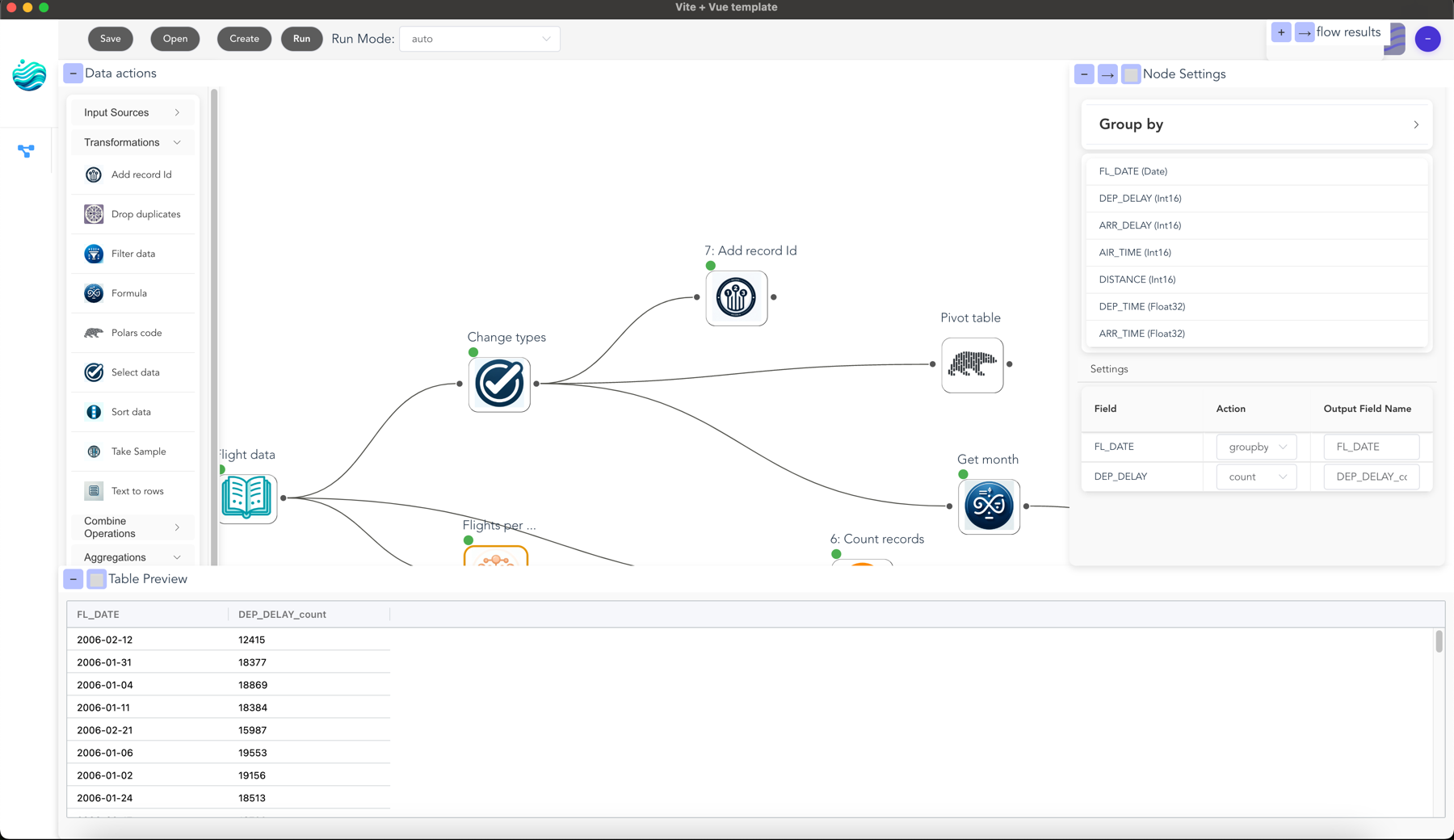
Flowfile is a visual ETL tool and Python library suite that combines drag-and-drop workflow building with the speed of Polars dataframes. Build data pipelines visually, transform data using powerful nodes, or define data flows programmatically with Python and analyze results - all with high-performance data processing.
|
|
49
|
+
|
|
50
|
+
|
|
51
|
+
|
|
52
|
+
## 🚀 Getting Started
|
|
53
|
+
|
|
54
|
+
### Installation
|
|
55
|
+
|
|
56
|
+
Install Flowfile directly from PyPI:
|
|
57
|
+
|
|
58
|
+
```bash
|
|
59
|
+
pip install Flowfile
|
|
60
|
+
```
|
|
61
|
+
|
|
62
|
+
### Quick Start: Web UI
|
|
63
|
+
|
|
64
|
+
The easiest way to get started is by launching the web-based UI:
|
|
65
|
+
|
|
66
|
+
```bash
|
|
67
|
+
# Start the Flowfile web UI with integrated services
|
|
68
|
+
flowfile run ui
|
|
69
|
+
```
|
|
70
|
+
|
|
71
|
+
This will:
|
|
72
|
+
- Start the combined core and worker services
|
|
73
|
+
- Launch a web interface in your browser
|
|
74
|
+
- Provide access to the full visual ETL capabilities
|
|
75
|
+
|
|
76
|
+
**Options:**
|
|
77
|
+
```bash
|
|
78
|
+
# Customize host and port
|
|
79
|
+
flowfile run ui --host 0.0.0.0 --port 8080
|
|
80
|
+
|
|
81
|
+
# Start without opening a browser
|
|
82
|
+
flowfile run ui --no-browser
|
|
83
|
+
```
|
|
84
|
+
|
|
85
|
+
You can also start the web UI programmatically:
|
|
86
|
+
|
|
87
|
+
```python
|
|
88
|
+
import flowfile
|
|
89
|
+
|
|
90
|
+
# Start with default settings
|
|
91
|
+
flowfile.start_web_ui()
|
|
92
|
+
|
|
93
|
+
# Or customize
|
|
94
|
+
flowfile.start_web_ui(host="0.0.0.0", port=8080, open_browser=False)
|
|
95
|
+
```
|
|
96
|
+
|
|
97
|
+
### Using the FlowFrame API
|
|
98
|
+
|
|
99
|
+
Flowfile provides a Polars-like API for defining data pipelines programmatically:
|
|
100
|
+
|
|
101
|
+
```python
|
|
102
|
+
import flowfile as ff
|
|
103
|
+
from flowfile import col, open_graph_in_editor
|
|
104
|
+
|
|
105
|
+
# Create a data pipeline
|
|
106
|
+
df = ff.from_dict({
|
|
107
|
+
"id": [1, 2, 3, 4, 5],
|
|
108
|
+
"category": ["A", "B", "A", "C", "B"],
|
|
109
|
+
"value": [100, 200, 150, 300, 250]
|
|
110
|
+
})
|
|
111
|
+
|
|
112
|
+
# Process the data
|
|
113
|
+
result = df.filter(col("value") > 150).with_columns([
|
|
114
|
+
(col("value") * 2).alias("double_value")
|
|
115
|
+
])
|
|
116
|
+
|
|
117
|
+
# Open the graph in the web UI (starts the server if needed)
|
|
118
|
+
open_graph_in_editor(result.flow_graph)
|
|
119
|
+
```
|
|
120
|
+
|
|
121
|
+
## 📦 Package Components
|
|
122
|
+
|
|
123
|
+
The `Flowfile` PyPI package includes:
|
|
124
|
+
|
|
125
|
+
- **Core Service (`flowfile_core`)**: The main ETL engine using Polars
|
|
126
|
+
- **Worker Service (`flowfile_worker`)**: Handles computation-intensive tasks
|
|
127
|
+
- **Web UI**: Browser-based visual ETL interface
|
|
128
|
+
- **FlowFrame API (`flowfile_frame`)**: Polars-like API for Python coding
|
|
129
|
+
|
|
130
|
+
## ✨ Key Features
|
|
131
|
+
|
|
132
|
+
### Visual ETL with Web UI
|
|
133
|
+
|
|
134
|
+
- **No Installation Required**: Launch directly from the pip package
|
|
135
|
+
- **Drag-and-Drop Interface**: Build data pipelines visually
|
|
136
|
+
- **Integrated Services**: Combined core and worker services
|
|
137
|
+
- **Browser-Based**: Access from any device on your network
|
|
138
|
+
|
|
139
|
+
### FlowFrame API
|
|
140
|
+
|
|
141
|
+
- **Familiar Syntax**: Polars-like API makes it easy to learn
|
|
142
|
+
- **ETL Graph Generation**: Automatically builds visual workflows
|
|
143
|
+
- **Lazy Evaluation**: Operations are not executed until needed
|
|
144
|
+
- **Interoperability**: Move between code and visual interfaces
|
|
145
|
+
|
|
146
|
+
### Data Operations
|
|
147
|
+
|
|
148
|
+
- **Data Cleaning & Transformation**: Complex joins, filtering, etc.
|
|
149
|
+
- **High Performance**: Built on Polars for efficient processing
|
|
150
|
+
- **Data Integration**: Handle various file formats
|
|
151
|
+
- **ETL Pipeline Building**: Create reusable workflows
|
|
152
|
+
|
|
153
|
+
## 🔄 Common FlowFrame Operations
|
|
154
|
+
|
|
155
|
+
```python
|
|
156
|
+
|
|
157
|
+
import flowfile as ff
|
|
158
|
+
from flowfile import col, when, lit
|
|
159
|
+
|
|
160
|
+
# Read data
|
|
161
|
+
df = ff.from_dict({
|
|
162
|
+
"id": [1, 2, 3, 4, 5],
|
|
163
|
+
"category": ["A", "B", "A", "C", "B"],
|
|
164
|
+
"value": [100, 200, 150, 300, 250]
|
|
165
|
+
})
|
|
166
|
+
# df_parquet = ff.read_parquet("data.parquet")
|
|
167
|
+
# df_csv = ff.read_csv("data.csv")
|
|
168
|
+
|
|
169
|
+
other_df = ff.from_dict({
|
|
170
|
+
"product_id": [1, 2, 3, 4, 6],
|
|
171
|
+
"product_name": ["WidgetA", "WidgetB", "WidgetC", "WidgetD", "WidgetE"],
|
|
172
|
+
"supplier": ["SupplierX", "SupplierY", "SupplierX", "SupplierZ", "SupplierY"]
|
|
173
|
+
}, flow_graph=df.flow_graph # Assign the data to the same graph
|
|
174
|
+
)
|
|
175
|
+
|
|
176
|
+
# Filter
|
|
177
|
+
filtered = df.filter(col("value") > 150)
|
|
178
|
+
|
|
179
|
+
# Transform
|
|
180
|
+
result = df.select(
|
|
181
|
+
col("id"),
|
|
182
|
+
(col("value") * 2).alias("double_value")
|
|
183
|
+
)
|
|
184
|
+
|
|
185
|
+
# Conditional logic
|
|
186
|
+
with_status = df.with_columns([
|
|
187
|
+
when(col("value") > 200).then(lit("High")).otherwise(lit("Low")).alias("status")
|
|
188
|
+
])
|
|
189
|
+
|
|
190
|
+
# Group and aggregate
|
|
191
|
+
by_category = df.group_by("category").agg([
|
|
192
|
+
col("value").sum().alias("total"),
|
|
193
|
+
col("value").mean().alias("average")
|
|
194
|
+
])
|
|
195
|
+
|
|
196
|
+
# Join data
|
|
197
|
+
joined = df.join(other_df, left_on="id", right_on="product_id")
|
|
198
|
+
|
|
199
|
+
joined.flow_graph.flow_settings.execution_location = "auto"
|
|
200
|
+
joined.flow_graph.flow_settings.execution_mode = "Development"
|
|
201
|
+
ff.open_graph_in_editor(joined.flow_graph) # opens the graph in the UI!
|
|
202
|
+
|
|
203
|
+
```
|
|
204
|
+
|
|
205
|
+
## 🧰 Command-Line Interface
|
|
206
|
+
|
|
207
|
+
```bash
|
|
208
|
+
# Show help and version info
|
|
209
|
+
flowfile
|
|
210
|
+
|
|
211
|
+
# Start the web UI
|
|
212
|
+
flowfile run ui [options]
|
|
213
|
+
|
|
214
|
+
# Run individual services
|
|
215
|
+
flowfile run core --host 0.0.0.0 --port 8080
|
|
216
|
+
flowfile run worker --host 0.0.0.0 --port 8079
|
|
217
|
+
```
|
|
218
|
+
|
|
219
|
+
## 📚 Resources
|
|
220
|
+
|
|
221
|
+
- **[Main Repository](https://github.com/Edwardvaneechoud/Flowfile)**: Latest code and examples
|
|
222
|
+
- **[Documentation](https://edwardvaneechoud.github.io/Flowfile/)**: Comprehensive guides
|
|
223
|
+
- **[Technical Architecture](https://dev.to/edwardvaneechoud/building-flowfile-architecting-a-visual-etl-tool-with-polars-576c)**: Design overview
|
|
224
|
+
|
|
225
|
+
## 🖥️ Full Application Options
|
|
226
|
+
|
|
227
|
+
For the complete visual ETL experience, you have additional options:
|
|
228
|
+
|
|
229
|
+
- **Desktop Application**: Download from the [main repository](https://github.com/Edwardvaneechoud/Flowfile#-getting-started)
|
|
230
|
+
- **Docker Setup**: Run with Docker Compose
|
|
231
|
+
- **Manual Setup**: For development environments
|
|
232
|
+
|
|
233
|
+
## 📋 Development Roadmap
|
|
234
|
+
|
|
235
|
+
See the [main repository](https://github.com/Edwardvaneechoud/Flowfile#-todo) for the latest development roadmap and TODO list.
|
|
@@ -2,9 +2,10 @@ build_backends/__init__.py,sha256=47DEQpj8HBSa-_TImW-5JCeuQeRkm5NMpJWZG3hSuFU,0
|
|
|
2
2
|
build_backends/main.py,sha256=hLmfqTeHLSTiwwZ5mUuoLQgtO40Igvl1_4NbnvzWSgI,9912
|
|
3
3
|
build_backends/main_prd.py,sha256=JR2tYCMWM5ThooQjv5pw6nwVKMQjgsiHgKMhYn9NXWI,6927
|
|
4
4
|
flowfile/__init__.py,sha256=B1vnUboOki3pP3BAmoQ0j62nEiB51X9kc9N8Qu7bgcg,2419
|
|
5
|
-
flowfile/__main__.py,sha256=
|
|
6
|
-
flowfile/api.py,sha256=
|
|
7
|
-
flowfile/
|
|
5
|
+
flowfile/__main__.py,sha256=Pu_LFcXQBtOi1QBtkrQqufLhhOJAcZjDdDx3u5ifUJQ,2614
|
|
6
|
+
flowfile/api.py,sha256=uMfTHtTfSaXZM9eCT9rXajNCXwo6Jb8oEOmSB24o4xk,14537
|
|
7
|
+
flowfile/readme.md,sha256=Y8jlzBnCpk9bSt6PqMbXebOC5y1HdTUrFA7hhPCNiwQ,4204
|
|
8
|
+
flowfile/web/__init__.py,sha256=6pVoCRGatkebWdpA2HAO2ZyXk0268H8LmttayDv8gTU,5489
|
|
8
9
|
flowfile/web/static/assets/AirbyteReader-1ac35765.css,sha256=GsNXZRBzBqcgSHWYHFfpQjYnQ1G90hCaWgThLCG80jI,6260
|
|
9
10
|
flowfile/web/static/assets/AirbyteReader-cb0c1d4a.js,sha256=PtikU6aU5vN4K9VlsLZb15GWnxM-t7fd45DqqOlDeRg,38759
|
|
10
11
|
flowfile/web/static/assets/CrossJoin-41efa4cb.css,sha256=Qe-ky2QI7rYfXMKV-bCB5HP0OJ6uBU74g9EEmcpXTlc,2838
|
|
@@ -295,8 +296,8 @@ test_utils/__init__.py,sha256=8WwOgIuKw6YtOc1GWR1DqIhQ8BhlLWqsMyQJSpxnzKk,66
|
|
|
295
296
|
test_utils/postgres/__init__.py,sha256=y3V_6a9N1Pvm5NIBaA8CFf3i4mvPVY-H1teHA-rg0VU,33
|
|
296
297
|
test_utils/postgres/commands.py,sha256=4oA8EHW3EqwGkG02HSqEGbXEBGM01sUW5FsyHm86W4k,4347
|
|
297
298
|
test_utils/postgres/fixtures.py,sha256=kR8UBjQr3pgbe-xM-V8x8VseTHCPv0EmDEzPHl5Qc8Y,13507
|
|
298
|
-
flowfile-0.3.0.
|
|
299
|
-
flowfile-0.3.0.
|
|
300
|
-
flowfile-0.3.0.
|
|
301
|
-
flowfile-0.3.0.
|
|
302
|
-
flowfile-0.3.0.
|
|
299
|
+
flowfile-0.3.0.2.dist-info/LICENSE,sha256=pCfLAA27jMHReYk_wGiirZxWRRXz_Bm7PVInRCa9P5g,1075
|
|
300
|
+
flowfile-0.3.0.2.dist-info/METADATA,sha256=nbI8Qsr1rvM5QfFUJ9kdrXXAml_5MEdZWcaVfdSL764,7389
|
|
301
|
+
flowfile-0.3.0.2.dist-info/WHEEL,sha256=b4K_helf-jlQoXBBETfwnf4B04YC67LOev0jo4fX5m8,88
|
|
302
|
+
flowfile-0.3.0.2.dist-info/entry_points.txt,sha256=Q3CEYNk33UaWlA9D-8yXYH0FwjKBsrtNuzzzHxhwnNI,333
|
|
303
|
+
flowfile-0.3.0.2.dist-info/RECORD,,
|
|
@@ -1,219 +0,0 @@
|
|
|
1
|
-
Metadata-Version: 2.3
|
|
2
|
-
Name: Flowfile
|
|
3
|
-
Version: 0.3.0.1
|
|
4
|
-
Summary: Project combining flowfile core (backend) and flowfile_worker (compute offloader) and flowfile_frame (api)
|
|
5
|
-
Author: Edward van Eechoud
|
|
6
|
-
Author-email: evaneechoud@gmail.com
|
|
7
|
-
Requires-Python: >=3.10,<3.13
|
|
8
|
-
Classifier: Programming Language :: Python :: 3
|
|
9
|
-
Classifier: Programming Language :: Python :: 3.10
|
|
10
|
-
Classifier: Programming Language :: Python :: 3.11
|
|
11
|
-
Classifier: Programming Language :: Python :: 3.12
|
|
12
|
-
Requires-Dist: XlsxWriter (>=3.2.0,<3.3.0)
|
|
13
|
-
Requires-Dist: aiofiles (>=24.1.0,<25.0.0)
|
|
14
|
-
Requires-Dist: airbyte-cdk (==6.47.2)
|
|
15
|
-
Requires-Dist: bcrypt (>=4.3.0,<5.0.0)
|
|
16
|
-
Requires-Dist: connectorx (>=0.4.2,<0.5.0)
|
|
17
|
-
Requires-Dist: databases (>=0.9.0,<0.10.0)
|
|
18
|
-
Requires-Dist: faker (>=23.1.0,<23.2.0)
|
|
19
|
-
Requires-Dist: fastapi (>=0.115.2,<0.116.0)
|
|
20
|
-
Requires-Dist: fastexcel (>=0.12.0,<0.13.0)
|
|
21
|
-
Requires-Dist: google-api-python-client (>=2.149.0,<2.150.0)
|
|
22
|
-
Requires-Dist: gspread (>=6.1.3,<6.2.0)
|
|
23
|
-
Requires-Dist: loky (>=3.4.1,<3.5.0)
|
|
24
|
-
Requires-Dist: methodtools (>=0.4.7,<0.5.0)
|
|
25
|
-
Requires-Dist: openpyxl (>=3.1.2,<3.2.0)
|
|
26
|
-
Requires-Dist: passlib (>=1.7.4,<1.8.0)
|
|
27
|
-
Requires-Dist: pendulum (==2.1.2) ; python_version < "3.12"
|
|
28
|
-
Requires-Dist: polars (>1.8.2,<=1.25.2)
|
|
29
|
-
Requires-Dist: polars-distance (>=0.4.3,<0.5.0)
|
|
30
|
-
Requires-Dist: polars-ds (>=0.6.0)
|
|
31
|
-
Requires-Dist: polars-expr-transformer (>0.4.7.0)
|
|
32
|
-
Requires-Dist: polars-grouper (>=0.3.0,<0.4.0)
|
|
33
|
-
Requires-Dist: polars_simed (>=0.3.4,<0.4.0)
|
|
34
|
-
Requires-Dist: pyairbyte-flowfile (==0.20.2)
|
|
35
|
-
Requires-Dist: pyarrow (>=18.0.0,<19.0.0)
|
|
36
|
-
Requires-Dist: pydantic (>=2.9.2,<2.10.0)
|
|
37
|
-
Requires-Dist: pyinstaller (>=6.11.0,<7.0.0)
|
|
38
|
-
Requires-Dist: pytest (>=8.3.4,<9.0.0)
|
|
39
|
-
Requires-Dist: python-jose (>=3.4.0,<4.0.0)
|
|
40
|
-
Requires-Dist: python-multipart (>=0.0.12,<0.1.0)
|
|
41
|
-
Requires-Dist: uvicorn (>=0.32.0,<0.33.0)
|
|
42
|
-
Description-Content-Type: text/markdown
|
|
43
|
-
|
|
44
|
-
<h1 align="center">
|
|
45
|
-
<img src="https://raw.githubusercontent.com/Edwardvaneechoud/Flowfile/main/.github/images/logo.png" alt="Flowfile Logo" width="100">
|
|
46
|
-
<br>
|
|
47
|
-
Flowfile
|
|
48
|
-
</h1>
|
|
49
|
-
|
|
50
|
-
<p align="center">
|
|
51
|
-
<b>Main Repository</b>: <a href="https://github.com/Edwardvaneechoud/Flowfile">Edwardvaneechoud/Flowfile</a><br>
|
|
52
|
-
<b>Documentation</b>:
|
|
53
|
-
<a href="https://edwardvaneechoud.github.io/Flowfile/">Website</a> -
|
|
54
|
-
<a href="https://github.com/Edwardvaneechoud/Flowfile/blob/main/flowfile_core/README.md">Core</a> -
|
|
55
|
-
<a href="https://github.com/Edwardvaneechoud/Flowfile/blob/main/flowfile_worker/README.md">Worker</a> -
|
|
56
|
-
<a href="https://github.com/Edwardvaneechoud/Flowfile/blob/main/flowfile_frontend/README.md">Frontend</a> -
|
|
57
|
-
<a href="https://dev.to/edwardvaneechoud/building-flowfile-architecting-a-visual-etl-tool-with-polars-576c">Technical Architecture</a>
|
|
58
|
-
</p>
|
|
59
|
-
|
|
60
|
-
<p>
|
|
61
|
-
Flowfile is a visual ETL tool and Python library suite that combines drag-and-drop workflow building with the speed of Polars dataframes. Build data pipelines visually, transform data using powerful nodes, or define data flows programmatically with Python and analyze results - all with high-performance data processing.
|
|
62
|
-
</p>
|
|
63
|
-
|
|
64
|
-
<div align="center">
|
|
65
|
-
<img src="https://raw.githubusercontent.com/Edwardvaneechoud/Flowfile/main/.github/images/group_by_screenshot.png" alt="Flowfile Interface" width="800"/>
|
|
66
|
-
</div>
|
|
67
|
-
|
|
68
|
-
## ⚡ Technical Design
|
|
69
|
-
|
|
70
|
-
The `Flowfile` PyPI package provides the backend services and the `flowfile_frame` Python library:
|
|
71
|
-
|
|
72
|
-
- **Core (`flowfile_core`)** (FastAPI): The main ETL engine using Polars for high-performance data transformations. Typically runs on port `:63578`.
|
|
73
|
-
- **Worker (`flowfile_worker`)** (FastAPI): Handles computation-intensive tasks and caching of data operations, supporting the Core service. Typically runs on port `:63579`.
|
|
74
|
-
- **FlowFrame API (`flowfile_frame`)**: A Python library with a Polars-like API for defining data manipulation pipelines programmatically, which also generates an underlying ETL graph compatible with the Flowfile ecosystem.
|
|
75
|
-
|
|
76
|
-
Each flow is represented as a directed acyclic graph (DAG), where nodes represent data operations and edges represent data flow between operations.
|
|
77
|
-
|
|
78
|
-
For a deeper dive into the technical architecture, check out [this article](https://dev.to/edwardvaneechoud/building-flowfile-architecting-a-visual-etl-tool-with-polars-576c) on how Flowfile leverages Polars for efficient data processing.
|
|
79
|
-
|
|
80
|
-
## ✨ Introducing FlowFile Frame - A Polars-Like API for ETL
|
|
81
|
-
|
|
82
|
-
FlowFile Frame is a Python library that provides a familiar Polars-like API for data manipulation, while simultaneously building an ETL (Extract, Transform, Load) graph under the hood. This allows you to:
|
|
83
|
-
|
|
84
|
-
1. Write data transformation code using a simple, Pandas/Polars-like API
|
|
85
|
-
2. Automatically generate executable ETL workflows compatible with the Flowfile ecosystem
|
|
86
|
-
3. Visualize, save, and share your data pipelines
|
|
87
|
-
4. Get the performance benefits of Polars with the traceability of ETL graphs
|
|
88
|
-
|
|
89
|
-
### FlowFrame Quick Start
|
|
90
|
-
|
|
91
|
-
```python
|
|
92
|
-
import flowfile_frame as ff
|
|
93
|
-
from flowfile_frame.utils import open_graph_in_editor
|
|
94
|
-
|
|
95
|
-
# Create a complex data pipeline
|
|
96
|
-
df = ff.from_dict({
|
|
97
|
-
"id": [1, 2, 3, 4, 5],
|
|
98
|
-
"category": ["A", "B", "A", "C", "B"],
|
|
99
|
-
"value": [100, 200, 150, 300, 250]
|
|
100
|
-
})
|
|
101
|
-
|
|
102
|
-
open_graph_in_editor(df.flow_graph)
|
|
103
|
-
|
|
104
|
-
```
|
|
105
|
-
|
|
106
|
-
### Key FlowFrame Features
|
|
107
|
-
|
|
108
|
-
- **Familiar API**: Based on Polars, making it easy to learn if you know Pandas or Polars
|
|
109
|
-
- **ETL Graph Generation**: Automatically builds a directed acyclic graph of your data operations
|
|
110
|
-
- **Lazy Evaluation**: Operations are not executed until `collect()` or a write operation
|
|
111
|
-
- **Interoperability**: Saved `.flowfile` graphs can be opened in the visual Flowfile Designer
|
|
112
|
-
- **High Performance**: Leverages Polars for fast data processing
|
|
113
|
-
- **Reproducible**: Save and share your data transformation workflows
|
|
114
|
-
|
|
115
|
-
### Common FlowFrame Operations
|
|
116
|
-
|
|
117
|
-
```python
|
|
118
|
-
import flowfile_frame as ff
|
|
119
|
-
from flowfile_frame import col, when
|
|
120
|
-
|
|
121
|
-
# Create from dictionary
|
|
122
|
-
df = ff.from_dict({
|
|
123
|
-
"id": [1, 2, 3],
|
|
124
|
-
"name": ["Alice", "Bob", "Charlie"],
|
|
125
|
-
"age": [25, 35, 28]
|
|
126
|
-
})
|
|
127
|
-
|
|
128
|
-
flow_graph = df.flow_graph
|
|
129
|
-
# Reading data
|
|
130
|
-
# df_csv = ff.read_csv("data.csv")
|
|
131
|
-
# df_parquet = ff.read_parquet("data.parquet")
|
|
132
|
-
|
|
133
|
-
# Filtering
|
|
134
|
-
adults = df.filter(col("age") >= 30)
|
|
135
|
-
|
|
136
|
-
# Select and transform
|
|
137
|
-
result = df.select(
|
|
138
|
-
col("name"),
|
|
139
|
-
(col("age") * 2).alias("double_age")
|
|
140
|
-
)
|
|
141
|
-
|
|
142
|
-
# Add new columns
|
|
143
|
-
df_with_cols = df.with_columns([
|
|
144
|
-
(col("age") + 10).alias("future_age"),
|
|
145
|
-
when(col("age") >= 30).then(ff.lit("Senior")).otherwise(ff.lit("Junior")).alias("status")]
|
|
146
|
-
)
|
|
147
|
-
|
|
148
|
-
# Group by and aggregate
|
|
149
|
-
df_sales = ff.from_dict({
|
|
150
|
-
"region": ["North", "South", "North", "South"],
|
|
151
|
-
"sales": [100, 200, 150, 300]
|
|
152
|
-
})
|
|
153
|
-
sales_by_region = df_sales.group_by("region").agg([
|
|
154
|
-
col("sales").sum().alias("total_sales"),
|
|
155
|
-
col("sales").mean().alias("avg_sales")
|
|
156
|
-
])
|
|
157
|
-
|
|
158
|
-
# Joins
|
|
159
|
-
customers = ff.from_dict({"id": [1, 2, 3], "name": ["Alice", "Bob", "Charlie"]}, flow_graph=flow_graph)
|
|
160
|
-
orders = ff.from_dict({"id": [101, 102], "customer_id": [1, 2], "amount": [100, 200]}, flow_graph=flow_graph)
|
|
161
|
-
joined = customers.join(orders, left_on="id", right_on="customer_id")
|
|
162
|
-
|
|
163
|
-
# Save and visualize ETL graph
|
|
164
|
-
|
|
165
|
-
result.save_graph("my_pipeline.flowfile")
|
|
166
|
-
# open_graph_in_editor(result.flow_graph, "my_pipeline.flowfile") # Opens in Designer UI if installed
|
|
167
|
-
```
|
|
168
|
-
|
|
169
|
-
For more detailed information on all available operations, including pivoting, window functions, complex workflows, and more, please refer to the [FlowFrame documentation](https://github.com/Edwardvaneechoud/Flowfile/blob/main/flowfile_frame/README.md).
|
|
170
|
-
|
|
171
|
-
## 🔥 Example Use Cases
|
|
172
|
-
|
|
173
|
-
Flowfile is great for:
|
|
174
|
-
|
|
175
|
-
- **Data Cleaning & Transformation**
|
|
176
|
-
- Complex joins (fuzzy matching)
|
|
177
|
-
- Text-to-rows transformations
|
|
178
|
-
- Advanced filtering and grouping
|
|
179
|
-
- Custom formulas and expressions
|
|
180
|
-
- Filter data based on conditions
|
|
181
|
-
|
|
182
|
-
- **Performance**
|
|
183
|
-
- Built to scale out of core
|
|
184
|
-
- Using Polars for data processing
|
|
185
|
-
|
|
186
|
-
- **Data Integration**
|
|
187
|
-
- Standardize data formats
|
|
188
|
-
- Handle messy Excel files
|
|
189
|
-
|
|
190
|
-
- **ETL Operations**
|
|
191
|
-
- Data quality checks
|
|
192
|
-
|
|
193
|
-
(For more visual examples of these use cases, please see our [main GitHub repository](https://github.com/Edwardvaneechoud/Flowfile#-example-use-cases)).
|
|
194
|
-
|
|
195
|
-
## 🚀 Getting Started
|
|
196
|
-
|
|
197
|
-
### Installing the Flowfile Python Package
|
|
198
|
-
|
|
199
|
-
This package provides the `flowfile_core` and `flowfile_worker` backend services, and the `flowfile_frame` library.
|
|
200
|
-
|
|
201
|
-
```bash
|
|
202
|
-
pip install Flowfile
|
|
203
|
-
```
|
|
204
|
-
|
|
205
|
-
Once installed, you can use `flowfile_frame` as a library in your Python scripts (see Quick Start above).
|
|
206
|
-
|
|
207
|
-
### Full Application with Visual Designer
|
|
208
|
-
|
|
209
|
-
For the complete visual ETL experience with the Designer UI, please see the [installation instructions in the main repository](https://github.com/Edwardvaneechoud/Flowfile#-getting-started).
|
|
210
|
-
|
|
211
|
-
Available options include:
|
|
212
|
-
- Desktop application (recommended for most users)
|
|
213
|
-
- Docker setup (backend services + web frontend)
|
|
214
|
-
- Manual setup for development
|
|
215
|
-
|
|
216
|
-
## 📋 Development Roadmap
|
|
217
|
-
|
|
218
|
-
For the latest development roadmap and TODO list, please refer to the [main repository](https://github.com/Edwardvaneechoud/Flowfile#-todo).
|
|
219
|
-
|
|
File without changes
|
|
File without changes
|
|
File without changes
|