ApiLogicServer 15.0.52__py3-none-any.whl → 15.0.55__py3-none-any.whl
This diff represents the content of publicly available package versions that have been released to one of the supported registries. The information contained in this diff is provided for informational purposes only and reflects changes between package versions as they appear in their respective public registries.
- api_logic_server_cli/api_logic_server.py +6 -3
- api_logic_server_cli/api_logic_server_info.yaml +3 -3
- api_logic_server_cli/create_from_model/api_logic_server_utils.py +9 -0
- api_logic_server_cli/prototypes/base/.github/.copilot-instructions.md +49 -21
- api_logic_server_cli/prototypes/base/database/alembic/alembic_run.py +98 -0
- api_logic_server_cli/prototypes/base/database/alembic/readme_alembic.md +36 -0
- api_logic_server_cli/prototypes/base/docs/training/admin_app_1_context.prompt.md +40 -0
- api_logic_server_cli/prototypes/base/integration/mcp/mcp_client_executor.py +4 -4
- api_logic_server_cli/prototypes/base/readme.md +11 -13
- api_logic_server_cli/prototypes/base/security/readme_security.md +0 -1
- api_logic_server_cli/prototypes/basic_demo/README.md +267 -272
- api_logic_server_cli/prototypes/basic_demo/_config.yml +8 -0
- api_logic_server_cli/prototypes/basic_demo/_layouts/redirect.html +15 -0
- api_logic_server_cli/prototypes/basic_demo/docs/system-creation-vibe.md +158 -0
- api_logic_server_cli/prototypes/basic_demo/logic/declarative-vs-procedural-comparison.html +110 -0
- api_logic_server_cli/prototypes/basic_demo/logic/procedural/declarative-vs-procedural-comparison.md +295 -0
- api_logic_server_cli/prototypes/manager/samples/prompts/add_email.prompt +8 -0
- api_logic_server_cli/prototypes/manager/samples/prompts/elections.prompt +3 -0
- api_logic_server_cli/prototypes/manager/samples/prompts/emp_dept.prompt +4 -0
- api_logic_server_cli/prototypes/manager/samples/prompts/genai_demo.prompt +13 -0
- api_logic_server_cli/prototypes/manager/samples/readme_samples.md +3 -1
- api_logic_server_cli/prototypes/manager/system/genai/app_templates/app_learning/Admin-App-Resource-Learning-Prompt.md +1 -1
- api_logic_server_cli/prototypes/manager/system/genai/app_templates/react-admin-template/package.json +1 -0
- api_logic_server_cli/sqlacodegen_wrapper/sqlacodegen_wrapper.py +5 -2
- {apilogicserver-15.0.52.dist-info → apilogicserver-15.0.55.dist-info}/METADATA +1 -1
- {apilogicserver-15.0.52.dist-info → apilogicserver-15.0.55.dist-info}/RECORD +30 -23
- api_logic_server_cli/prototypes/base/.devcontainer-option/.copilot-instructions.md +0 -178
- api_logic_server_cli/prototypes/base/database/alembic/readme.md +0 -18
- api_logic_server_cli/prototypes/base/database/system/SAFRSBaseX.pyZ +0 -73
- api_logic_server_cli/prototypes/basic_demo/customizations/database/system/SAFRSBaseX.py +0 -139
- {apilogicserver-15.0.52.dist-info → apilogicserver-15.0.55.dist-info}/WHEEL +0 -0
- {apilogicserver-15.0.52.dist-info → apilogicserver-15.0.55.dist-info}/entry_points.txt +0 -0
- {apilogicserver-15.0.52.dist-info → apilogicserver-15.0.55.dist-info}/licenses/LICENSE +0 -0
- {apilogicserver-15.0.52.dist-info → apilogicserver-15.0.55.dist-info}/top_level.txt +0 -0
|
@@ -1,497 +1,492 @@
|
|
|
1
1
|
---
|
|
2
2
|
title: Instant Microservices - with Logic and Security
|
|
3
3
|
notes: gold is proto (-- doc); alert for apostrophe
|
|
4
|
-
version: 0.
|
|
4
|
+
version: 0.23 from docsite, for readme 7/11/2025
|
|
5
5
|
---
|
|
6
|
+
<style>
|
|
7
|
+
-typeset h1,
|
|
8
|
+
-content__button {
|
|
9
|
+
display: none;
|
|
10
|
+
}
|
|
11
|
+
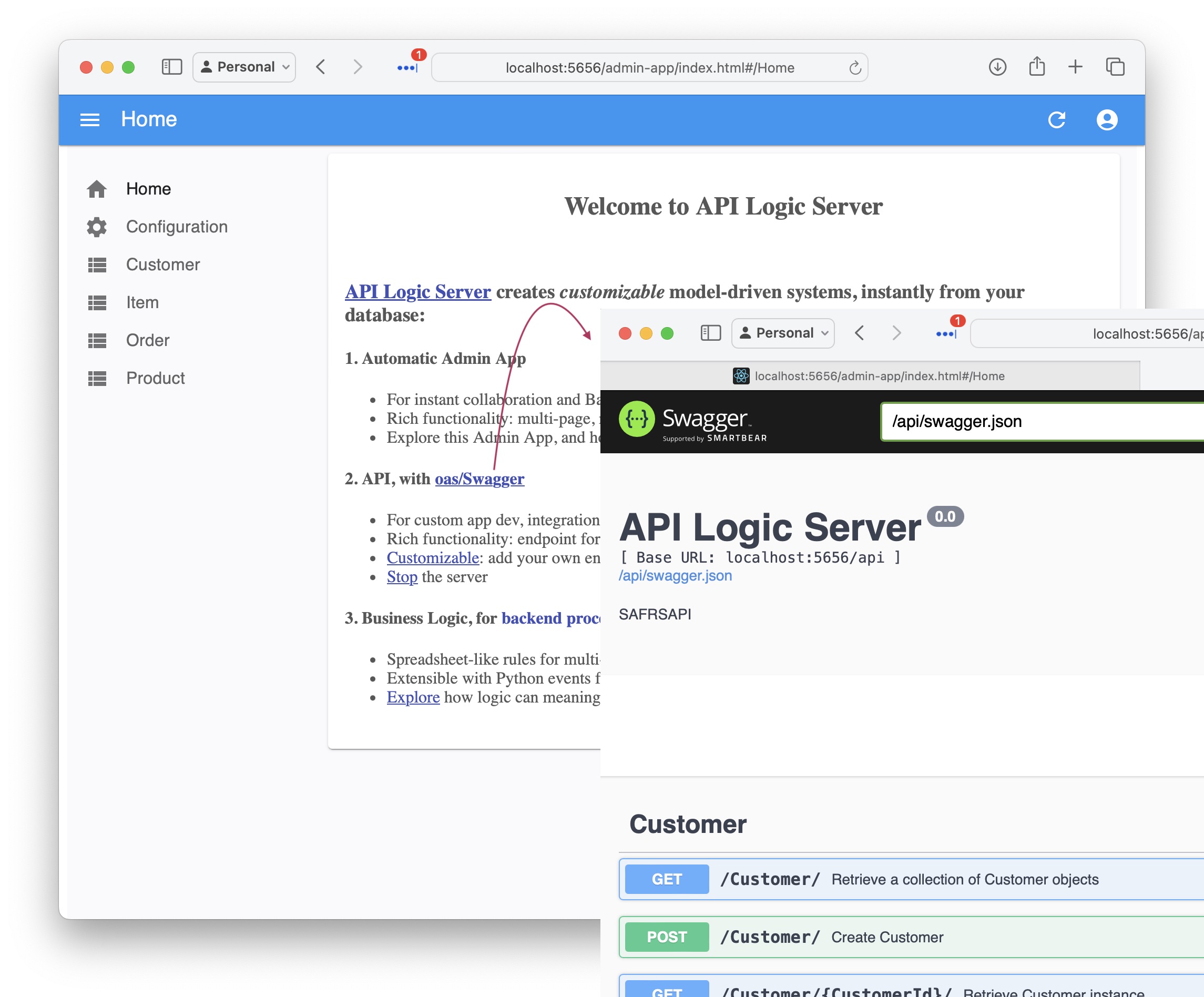
</style>
|
|
6
12
|
|
|
7
|
-
|
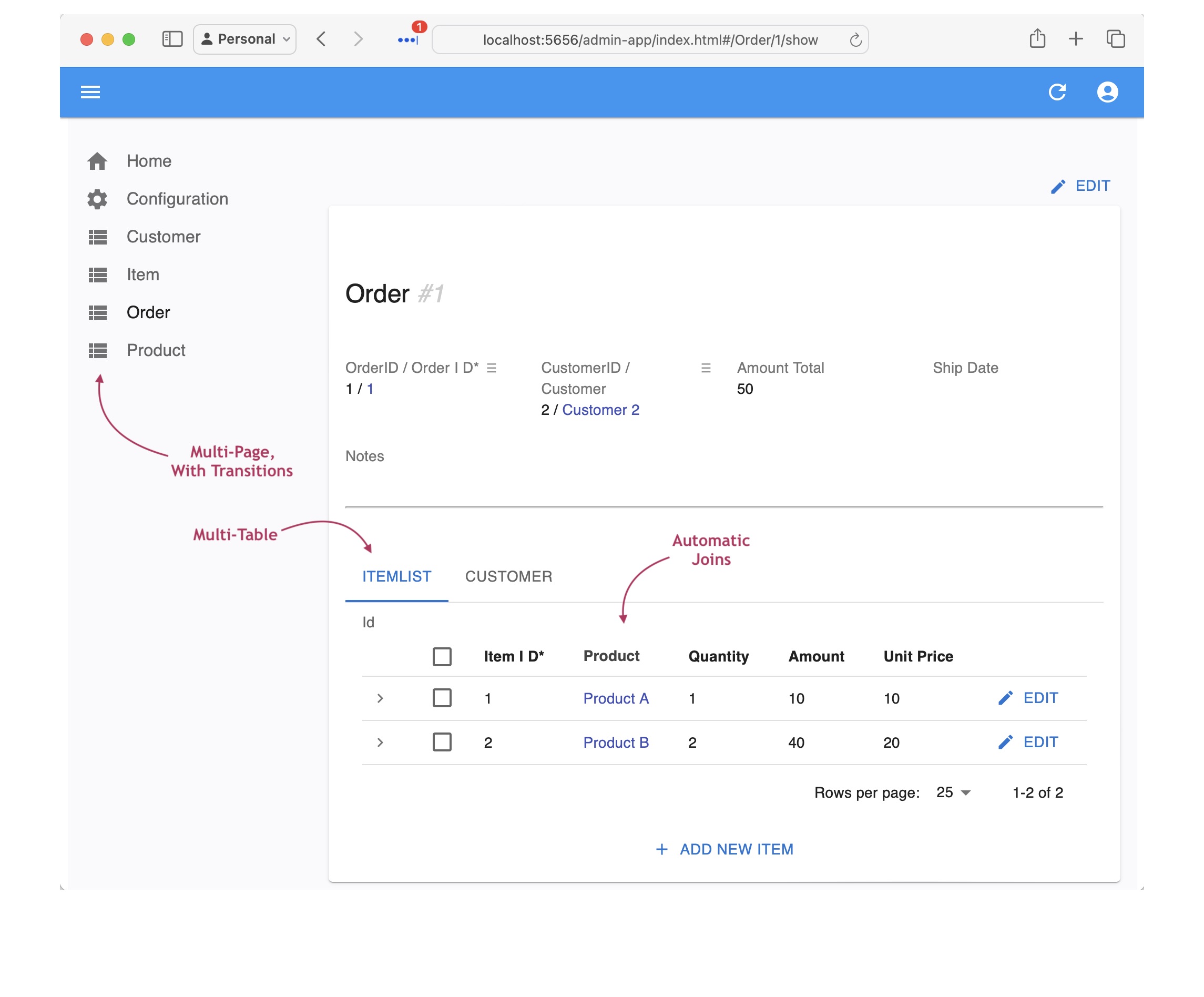
|
13
|
+
# Product Tour (Start Here)
|
|
8
14
|
|
|
9
|
-
|
|
10
|
-
2. **Logic and Security:** multi-table constraints and derivations, role-based security, and application integration
|
|
11
|
-
3. **An Admin App:** a multi-page, multi-table web app
|
|
12
|
-
4. **Customizable:** use your IDE to customize with declarative rules and standard Python
|
|
15
|
+
This illustrates basic [GenAI-Logic](https://www.genai-logic.com/product/key-features) operation:
|
|
13
16
|
|
|
14
|
-
|
|
17
|
+
1. Creating projects from new or existing databases, providing a MCP-enabled API and an Admin App
|
|
18
|
+
2. Adding declarative logic and security, and
|
|
19
|
+
3. Customizing your project using your IDE and Python<br><br>
|
|
15
20
|
|
|
16
|
-
|
|
21
|
+
> 🤖 **Bootstrap Copilot by pasting the following into the chat:**
|
|
22
|
+
```
|
|
23
|
+
Please find and read `.github/.copilot-instructions.md`.
|
|
24
|
+
```
|
|
17
25
|
|
|
18
|
-
|
|
26
|
+
<br>
|
|
19
27
|
|
|
20
|
-
|
|
28
|
+
The entire process takes 20 minutes; usage notes:
|
|
21
29
|
|
|
22
|
-
*
|
|
30
|
+
* Important: look for **readme files** in created projects
|
|
31
|
+
* You may find it more convenient to view this [in your Browser](https://apilogicserver.github.io/Docs/Sample-Basic-Tour)
|
|
32
|
+
* A slide show summary is available [on our Web Site](https://www.genai-logic.com/product/tour)
|
|
23
33
|
|
|
24
|
-
|
|
34
|
+

|
|
25
35
|
|
|
26
|
-
* Self-demo with video - you can also use [this video](https://www.youtube.com/watch?v=sD6RFp8S6Fg) (it's the same system, but the database is created with ChatGPT).
|
|
27
36
|
|
|
28
37
|
|
|
29
38
|
|
|
30
|
-
## 1.
|
|
39
|
+
## 1. Create and Run
|
|
31
40
|
|
|
32
|
-
API Logic Server can create projects from existing databases, or use GenAI to create projects with new databases.
|
|
41
|
+
API Logic Server can create projects from existing databases, or use GenAI to create projects with new databases. Let's see how.
|
|
33
42
|
|
|
34
43
|
|
|
35
|
-
###
|
|
44
|
+
### From Existing Database
|
|
36
45
|
|
|
37
|
-
This
|
|
46
|
+
This is the best way to start:
|
|
38
47
|
|
|
48
|
+
1. Open a terminal window: **Terminal > New Terminal**
|
|
49
|
+
2. **Create Project from Existing Database:**
|
|
39
50
|
```bash
|
|
40
|
-
|
|
51
|
+
genai-logic create --project_name=basic_demo --db_url=sqlite:///samples/dbs/basic_demo.sqlite
|
|
41
52
|
```
|
|
42
53
|
|
|
43
|
-
> Note: the `db_url` value is [an abbreviation](https://apilogicserver.github.io/Docs/Data-Model-Examples/)
|
|
54
|
+
> Note: the `db_url` value is [an abbreviation](https://apilogicserver.github.io/Docs/Data-Model-Examples/) for a test database provided as part of the installation. You would normally supply a SQLAlchemy URI to your existing database, e.g. <br>`genai-logic create --project_name=basic_demo --db_url=sqlite:///samples/dbs/basic_demo.sqlite`.
|
|
55
|
+
|
|
56
|
+
|
|
57
|
+
<details markdown>
|
|
58
|
+
|
|
59
|
+
<summary> The database is Customer, Orders, Items and Product</summary>
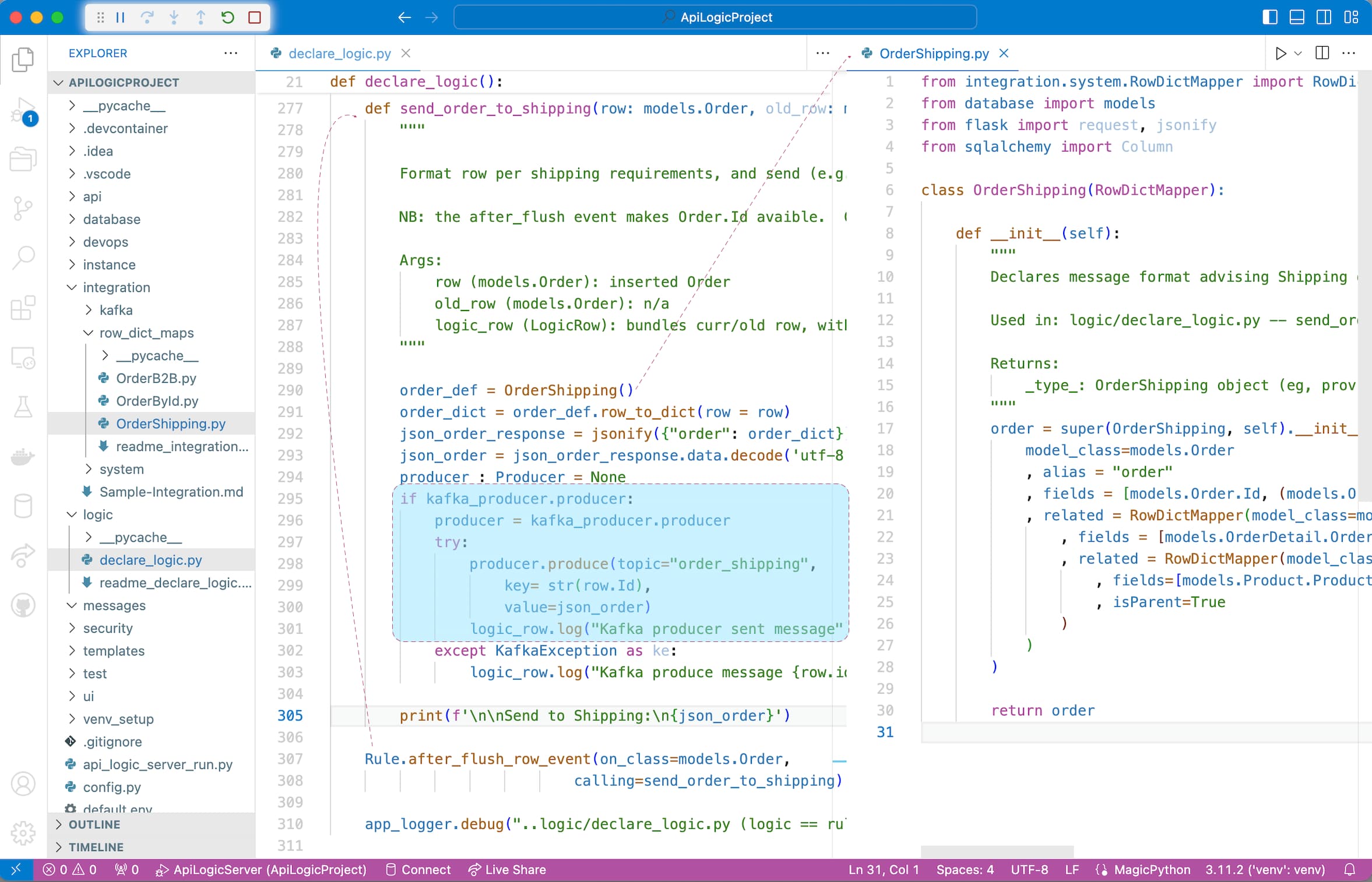
|
|
44
60
|
|
|
45
|
-
|
|
61
|
+

|
|
46
62
|
|
|
63
|
+
</details>
|
|
64
|
+
<br>
|
|
47
65
|
|
|
48
66
|
|
|
49
|
-
###
|
|
67
|
+
### GenAI: New Database
|
|
50
68
|
|
|
51
|
-
|
|
69
|
+
Alternatively, you can create a project *and a new database* from a prompt, using GenAI.
|
|
70
|
+
> ***Don't*** do this if you are executing the basic Product Tour.
|
|
52
71
|
|
|
53
|
-
|
|
72
|
+
There are 3 ways to use GenAI:
|
|
54
73
|
|
|
55
|
-
|
|
74
|
+
* WebGenAI - in the Browser, via pubic website - [click here](https://apilogicserver.github.io/Docs/WebGenAI), or
|
|
75
|
+
* GenAI - in the Browser, via docker - [click here](https://apilogicserver.github.io/Docs/WebGenAI-install), or
|
|
76
|
+
* GenAI CLI - [click here](https://apilogicserver.github.io/Docs/WebGenAI-CLI)
|
|
77
|
+
|
|
78
|
+
To use the GenAI CLI:
|
|
79
|
+
|
|
80
|
+
1. If you have signed up (see *Get an OpenAI Key*, below), this will create and open a project called `genai_demo` from `genai_demo.prompt` (available in left Explorer pane):
|
|
56
81
|
|
|
57
82
|
```bash
|
|
58
|
-
|
|
83
|
+
genai-logic genai --using=system/genai/examples/genai_demo/genai_demo.prompt --project-name=genai_demo
|
|
59
84
|
```
|
|
60
85
|
|
|
61
|
-
|
|
62
|
-
|
|
63
86
|
2. ***Or,*** you can simulate the process (no signup) using:
|
|
64
87
|
|
|
65
88
|
```bash
|
|
66
|
-
|
|
67
|
-
als genai --repaired-response=system/genai/examples/genai_demo/genai_demo.response_example --project-name=genai_demo
|
|
68
|
-
|
|
89
|
+
genai-logic genai --repaired-response=system/genai/examples/genai_demo/genai_demo.response_example --project-name=genai_demo
|
|
69
90
|
```
|
|
70
91
|
|
|
92
|
+
For background on how it works, [click here](Sample-Genai#how-does-it-work).
|
|
93
|
+
|
|
71
94
|
|
|
95
|
+
|
|
96
|
+
|
|
72
97
|
### Open in your IDE and Run
|
|
73
98
|
|
|
74
99
|
You can open with VSCode, and run it as follows:
|
|
75
100
|
|
|
76
|
-
1. **
|
|
101
|
+
1. **Start the Server:** F5 (also described in the Appendix).
|
|
77
102
|
|
|
78
|
-
|
|
103
|
+
* Your virtual environment is automatically configured in most cases; see the Appendix (Procedures / Detail Procedures) if that's not working.
|
|
79
104
|
|
|
80
|
-
|
|
105
|
+
2. **Start the Admin App:** either use the links provided in the IDE console, or click [http://localhost:5656/](http://localhost:5656/). The Admin App screen shown below should appear in your Browser.
|
|
81
106
|
|
|
82
107
|
The sections below explore the system that has been created (which would be similar for your own database).
|
|
83
108
|
<br><br>
|
|
84
109
|
|
|
85
|
-
|
|
110
|
+
### API with Swagger
|
|
86
111
|
|
|
87
|
-
|
|
112
|
+
The system creates an API with end points for each table, with filtering, sorting, pagination, optimistic locking and related data access -- **[self-serve](https://apilogicserver.github.io/Docs/API-Self-Serve/), ready for custom app dev.**
|
|
88
113
|
|
|
89
|
-
|
|
114
|
+
<details markdown>
|
|
90
115
|
|
|
91
|
-
|
|
116
|
+
<summary>See the Swagger </summary>
|
|
92
117
|
|
|
93
|
-
|
|
118
|
+
|
|
119
|
+
</details>
|
|
120
|
+
<br>
|
|
94
121
|
|
|
95
|
-
|
|
122
|
+
### Admin App
|
|
96
123
|
|
|
97
|
-
|
|
124
|
+
It also creates an Admin App: multi-page, multi-table -- ready for **[business user agile collaboration](https://apilogicserver.github.io/Docs/Tech-AI/),** and back office data maintenance. This complements custom UIs created with the API.
|
|
98
125
|
|
|
99
|
-
|
|
126
|
+
You can click Customer Alice, and see their Orders, and Items.
|
|
100
127
|
|
|
101
|
-
|
|
128
|
+
<details markdown>
|
|
102
129
|
|
|
103
|
-
|
|
130
|
+
<summary>See the Admin App </summary>
|
|
131
|
+
|
|
132
|
+
</details>
|
|
104
133
|
|
|
105
|
-
|
|
134
|
+
<br>
|
|
106
135
|
|
|
107
|
-
|
|
136
|
+
## 2. Custom UI: GenAI, Vibe
|
|
108
137
|
|
|
109
|
-
|
|
110
|
-
* Using your IDE to declare logic and security in `logic/declare_logic.sh` and `security/declare_security.py`.
|
|
138
|
+
The app above is suitable for collaborative iteration to nail down the requirements, and back office data maintenance. It's also easy to make simple customizations, using the yaml file.
|
|
111
139
|
|
|
112
|
-
|
|
113
|
-
|
|
114
|
-
To add customizations, in a terminal window for your project:
|
|
115
|
-
|
|
116
|
-
**1. Stop the Server** (Red Stop button, or Shift-F5 -- see Appendix)
|
|
117
|
-
|
|
118
|
-
**2. Add Customizations**
|
|
140
|
+
For more custom apps, you get complete control by generating app source code, which you can then customize in your IDE, e.g. using Vibe Natural Language:
|
|
119
141
|
|
|
120
142
|
```bash
|
|
121
|
-
|
|
143
|
+
# create react source (requires OpenAI key)
|
|
144
|
+
genai-logic genai-add-app --vibe
|
|
145
|
+
cd ui/react-app
|
|
146
|
+
npm install
|
|
147
|
+
npm start
|
|
122
148
|
```
|
|
123
|
-
|
|
124
|
-
|
|
125
|
-
### Declare Security
|
|
126
149
|
|
|
127
|
-
|
|
150
|
+
And you are ready to Vibe:
|
|
128
151
|
|
|
129
|
-
|
|
152
|
+
* Instead of creating data mockups, you have a **running API server with real data**
|
|
153
|
+
* Instead of starting from scratch, you have a **running multi-page app**
|
|
154
|
+
* And, you'll have projects that are **architecturally correct:** shared logic, enforced in the server, available for both User Interfaces and services.
|
|
155
|
+
* Then, use you favorite Vibe tools with your running API
|
|
130
156
|
|
|
131
|
-
**1. Start the Server** F5
|
|
132
|
-
|
|
133
|
-
**2. Start the Admin App:** [http://localhost:5656/](http://localhost:5656/)
|
|
134
|
-
|
|
135
|
-
**3. Login** as `s1`, password `p`
|
|
136
157
|
|
|
137
|
-
|
|
158
|
+
```txt title='Customize using Natural Language'
|
|
159
|
+
In the ui/react app, Update the Product list to provide users an option to see results in a list, or in cards.
|
|
160
|
+
```
|
|
161
|
+
<br>
|
|
138
162
|
|
|
139
|
-
|
|
163
|
+
> Below is an example from Northwind: [click here](https://apilogicserver.github.io/Docs/Admin-Vibe-Sample)
|
|
140
164
|
|
|
141
|
-
|
|
165
|
+

|
|
142
166
|
|
|
143
|
-
|
|
167
|
+
<br>
|
|
144
168
|
|
|
145
|
-
|
|
169
|
+
## 3. MCP-Ready APIs
|
|
146
170
|
|
|
147
|
-
|
|
171
|
+
Your project is MCP-ready - this will run a simple query *List customers with credit_limit > 1000* (we'll explore more interesting examples below, including provisions for user input):
|
|
148
172
|
|
|
149
|
-
|
|
173
|
+
```bash
|
|
174
|
+
Create a table SysEmail in `database/db.sqlite` as a child of customer,
|
|
175
|
+
with columns id, message, subject, customer_id and CreatedOn.
|
|
176
|
+
```
|
|
150
177
|
|
|
151
|
-
|
|
178
|
+
Follow the suggestions to update the admin app.
|
|
152
179
|
|
|
153
|
-
|
|
180
|
+
TODO: add mcp client here, and test
|
|
154
181
|
|
|
155
|
-
|
|
182
|
+
TODO: test the service
|
|
156
183
|
|
|
157
|
-
|
|
184
|
+
```bash
|
|
185
|
+
List the orders date_shipped is null and CreatedOn before 2023-07-14, and send a discount email (subject: 'Discount Offer') to the customer for each one.
|
|
186
|
+
```
|
|
158
187
|
|
|
159
|
-
|
|
188
|
+

|
|
160
189
|
|
|
161
|
-
|
|
190
|
+
<br>
|
|
162
191
|
|
|
163
|
-
|
|
192
|
+
## 4. Declare Logic And Security
|
|
164
193
|
|
|
165
|
-
|
|
194
|
+
While API/MCP/UI automation is a great start, it's **critical to enforce logic and security.** You do this in your IDE. Here's how.
|
|
166
195
|
|
|
167
|
-
The `add_customizations` process
|
|
196
|
+
The following `add_customizations` process simulates:
|
|
168
197
|
|
|
169
|
-
|
|
198
|
+
* Adding security to your project, and
|
|
199
|
+
* Using your IDE to declare logic and security in `logic/declare_logic.sh` and `security/declare_security.py`.
|
|
170
200
|
|
|
171
|
-
|
|
201
|
+
> Declared security and logic are shown in the screenshots below.<br>It's quite short - 5 rules, 7 security settings.
|
|
172
202
|
|
|
173
|
-
|
|
203
|
+
To add customizations, in a terminal window for your project:
|
|
174
204
|
|
|
175
|
-
|
|
205
|
+
**1. Stop the Server** (Red Stop button, or Shift-F5 -- see Appendix)
|
|
176
206
|
|
|
177
|
-
|
|
207
|
+
**2. Add Customizations**
|
|
178
208
|
|
|
209
|
+
```bash
|
|
210
|
+
genai-logic add-cust
|
|
211
|
+
genai-logic add-auth --db_url=auth
|
|
212
|
+
```
|
|
179
213
|
|
|
180
214
|
|
|
181
|
-
|
|
215
|
+
### Security: Role Based Access
|
|
182
216
|
|
|
183
|
-
|
|
217
|
+
The `add_customizations` process above has simulated using your IDE to declare security in `logic/declare_logic.sh`.
|
|
184
218
|
|
|
185
|
-
|
|
219
|
+
To see security in action:
|
|
186
220
|
|
|
187
|
-
|
|
221
|
+
**1. Start the Server** F5
|
|
188
222
|
|
|
189
|
-
|
|
223
|
+
**2. Start the Admin App:** [http://localhost:5656/](http://localhost:5656/)
|
|
224
|
+
|
|
225
|
+
**3. Login** as `s1`, password `p`
|
|
190
226
|
|
|
191
|
-
|
|
227
|
+
**4. Click Customers**
|
|
192
228
|
|
|
193
|
-
|
|
194
|
-
|
|
229
|
+
<br>
|
|
230
|
+
Observe:
|
|
195
231
|
|
|
196
|
-
|
|
232
|
+
**1. Login now required**
|
|
197
233
|
|
|
198
|
-
|
|
199
|
-
<br><br>
|
|
234
|
+
**2. Role-Based Filtering**
|
|
200
235
|
|
|
201
|
-
|
|
236
|
+
Observe you now see fewer customers, since user `s1` has role `sales`. This role has a declared filter, as shown in the screenshot below.
|
|
202
237
|
|
|
203
|
-
|
|
204
|
-
<br><br>
|
|
238
|
+
**3. Transparent Logging**
|
|
205
239
|
|
|
206
|
-
|
|
240
|
+
<details markdown>
|
|
207
241
|
|
|
208
|
-
|
|
242
|
+
<summary>See Security Declarations </summary>
|
|
209
243
|
|
|
210
|
-
|
|
244
|
+
<br>The screenshot below illustrates security declaration and operation:
|
|
211
245
|
|
|
212
|
-
|
|
246
|
+
* The declarative Grants in the upper code panel, and
|
|
213
247
|
|
|
214
|
-
|
|
248
|
+
* The logging in the lower panel, to assist in debugging by showing which Grants (`+ Grant:`) are applied:
|
|
215
249
|
|
|
216
|
-
|
|
250
|
+

|
|
217
251
|
|
|
218
|
-
|
|
252
|
+
</details>
|
|
219
253
|
|
|
220
254
|
|
|
221
255
|
|
|
222
|
-
|
|
256
|
+
### Logic: Derivations, Constraints
|
|
223
257
|
|
|
224
|
-
|
|
258
|
+
Logic (multi-table derivations and constraints) is a significant portion of a system, typically nearly half. API Logic Server provides **spreadsheet-like rules** that dramatically simplify and accelerate logic development.
|
|
225
259
|
|
|
226
|
-
|
|
260
|
+
Rules are declared in Python, simplified with IDE code completion. The screen below shows the 5 rules for **Check Credit Logic.**
|
|
227
261
|
|
|
228
|
-
|
|
262
|
+
The `add_customizations` process above has simulated the process of using your IDE to declare logic in `logic/declare_logic.sh`.
|
|
229
263
|
|
|
230
|
-
|
|
264
|
+
To see logic in action:
|
|
231
265
|
|
|
232
|
-
|
|
233
|
-
def derive_amount(row: models.Item, old_row: models.Item, logic_row: LogicRow):
|
|
234
|
-
amount = row.Quantity * row.UnitPrice
|
|
235
|
-
if row.Product.CarbonNeutral and row.Quantity >= 10:
|
|
236
|
-
amount = amount * Decimal(0.9) # breakpoint here
|
|
237
|
-
return amount
|
|
266
|
+
**1. In the admin app, Logout (upper right), and login as admin, p**
|
|
238
267
|
|
|
239
|
-
|
|
240
|
-
```
|
|
268
|
+
**2. Use the Admin App to access the first order for `Customer Alice`**
|
|
241
269
|
|
|
242
|
-
|
|
270
|
+
**3. Edit its first item to a very high quantity**
|
|
243
271
|
|
|
244
|
-
|
|
272
|
+
The update is properly rejected because it exceeds the credit limit. Observe the rules firing in the console log - see Logic In Action, below.
|
|
245
273
|
|
|
246
|
-
|
|
274
|
+
<br>
|
|
275
|
+
> 💡 Logic: Multi-table Derivations and Constraint Declarative Rules.<br>  Declarative Rules are 40X More Concise than procedural code.<br>  For more information, [click here](https://apilogicserver.github.io/Docs/Logic-Why).
|
|
247
276
|
|
|
248
|
-
|
|
277
|
+
<br>
|
|
249
278
|
|
|
250
|
-
|
|
251
|
-
als add-cust
|
|
252
|
-
```
|
|
253
|
-
|
|
279
|
+
<details markdown>
|
|
254
280
|
|
|
255
|
-
|
|
281
|
+
<summary>See Logic In Action </summary>
|
|
256
282
|
|
|
257
|
-
|
|
283
|
+
<br>[Declare logic](Logic#declaring-rules) with WebGenAI, or in your IDE using code completion or Natural Language:
|
|
258
284
|
|
|
259
|
-
|
|
285
|
+

|
|
260
286
|
|
|
261
|
-
|
|
287
|
+
**a. Chaining**
|
|
262
288
|
|
|
263
|
-
|
|
289
|
+
The screenshot below shows our logic declarations, and the logging for inserting an `Item`. Each line represents a rule firing, and shows the complete state of the row.
|
|
264
290
|
|
|
265
|
-
|
|
291
|
+
Note that it's a `Multi-Table Transaction`, as indicated by the indentation. This is because - like a spreadsheet - **rules automatically chain, *including across tables.***
|
|
266
292
|
|
|
267
|
-
|
|
268
|
-
|
|
269
|
-
!!! pied-piper ":bulb: Iteration: Automatic Invocation/Ordering, Extensible, Rebuild Preserves Customizations"
|
|
270
|
-
|
|
271
|
-
### a. Dependency Automation
|
|
293
|
+

|
|
272
294
|
|
|
273
|
-
|
|
295
|
+
**b. 40X More Concise**
|
|
274
296
|
|
|
275
|
-
|
|
276
|
-
<br><br>
|
|
297
|
+
The 5 spreadsheet-like rules represent the same logic as 200 lines of code, [shown here](https://github.com/valhuber/LogicBank/wiki/by-code). That's a remarkable 40X decrease in the backend half of the system.
|
|
277
298
|
|
|
278
|
-
|
|
299
|
+
> 💡 No FrankenCode<br>Note the rules look like syntactically correct requirements. They are not turned into piles of unmanageable "frankencode" - see [models not frankencode](https://www.genai-logic.com/faqs#h.3fe4qv21qtbs).
|
|
279
300
|
|
|
280
|
-
|
|
301
|
+
<br><br>
|
|
281
302
|
|
|
282
|
-
|
|
283
|
-
<br>
|
|
303
|
+
**c. Automatic Re-use**
|
|
284
304
|
|
|
285
|
-
|
|
305
|
+
The logic above, perhaps conceived for Place order, applies automatically to all transactions: deleting an order, changing items, moving an order to a new customer, etc. This reduces code, and promotes quality (no missed corner cases).
|
|
306
|
+
<br><br>
|
|
286
307
|
|
|
287
|
-
|
|
288
|
-
<br><br>
|
|
308
|
+
**d. Automatic Optimizations**
|
|
289
309
|
|
|
290
|
-
|
|
310
|
+
SQL overhead is minimized by pruning, and by elimination of expensive aggregate queries. These can result in orders of magnitude impact.
|
|
311
|
+
<br><br>
|
|
291
312
|
|
|
292
|
-
|
|
313
|
+
**e. Transparent**
|
|
293
314
|
|
|
294
|
-
|
|
315
|
+
Rules are an executable design. Note they map exactly to our natural language design (shown in comments) - readable by business users.
|
|
295
316
|
|
|
296
|
-
|
|
317
|
+
Optionally, you can use the Behave TDD approach to define tests, and the Rules Report will show the rules that execute for each test. For more information, [click here](https://apilogicserver.github.io/Docs/Behave-Logic-Report/).
|
|
297
318
|
|
|
298
|
-
|
|
319
|
+
</details>
|
|
299
320
|
|
|
300
|
-
|
|
321
|
+
|
|
301
322
|
|
|
302
|
-
|
|
323
|
+
### MCP: Logic, User Interface
|
|
303
324
|
|
|
304
|
-
|
|
325
|
+
Logic is automatically executed in your MCP-enabled API. For example, consider the following MCP orchestration:
|
|
305
326
|
|
|
306
|
-
|
|
327
|
+

|
|
307
328
|
|
|
308
|
-
### Messaging With Kafka
|
|
309
329
|
|
|
310
|
-
|
|
330
|
+
When sending email, we require ***business rules*** to ensure it respects the opt-out policy:
|
|
311
331
|
|
|
312
|
-
|
|
332
|
+

|
|
313
333
|
|
|
314
|
-
|
|
334
|
+
The server is automatically mcp-enabled, but we might also want an mcp user-interface client:
|
|
315
335
|
|
|
316
|
-
|
|
336
|
+
**1. Stop the Server**
|
|
317
337
|
|
|
318
|
-
|
|
338
|
+
**2. Create an MCP Client Executor like this:**
|
|
319
339
|
|
|
320
|
-
|
|
321
|
-
|
|
322
|
-
|
|
340
|
+
```
|
|
341
|
+
genai-logic genai-add-mcp-client
|
|
342
|
+
```
|
|
323
343
|
|
|
324
|
-
|
|
344
|
+
**3. Restart the Server**
|
|
325
345
|
|
|
326
|
-
|
|
346
|
+
<br>
|
|
327
347
|
|
|
328
|
-
|
|
348
|
+
With the server running, test it like this:
|
|
329
349
|
|
|
330
|
-
|
|
331
|
-
|
|
332
|
-
In minutes - not days or weeks - you've used API Logic Server to convert an idea into **working software**, customized using **rule-based logic and security**, and **iterated** to meet new requirements.
|
|
333
|
-
|
|
334
|
-
To dive deeper, you can install [API Logic Server](https://apilogicserver.github.io/Docs) and execute this demo - or create a system from your own databases.
|
|
350
|
+
1. **Test MCP**
|
|
335
351
|
|
|
336
|
-
|
|
352
|
+
You can do this in the command line, or via the admin app.
|
|
337
353
|
|
|
338
|
-
|
|
354
|
+
Use the **Admin App:** (shown above), and follow step 4 on the Home page to see a Business-User-friendly example.
|
|
339
355
|
|
|
340
|
-
|
|
356
|
+
Or, use the command line.
|
|
341
357
|
|
|
342
|
-
|
|
358
|
+
> Since the CLI does not pass an auth token,
|
|
359
|
+
you must first stop the server and disable security.
|
|
343
360
|
|
|
344
|
-
|
|
361
|
+
```bash title='MCP from the command line'
|
|
362
|
+
python integration/mcp/mcp_client_executor.py mcp
|
|
363
|
+
```
|
|
345
364
|
|
|
346
|
-
|
|
365
|
+
<br>
|
|
347
366
|
|
|
348
|
-
|
|
367
|
+
For more on MCP, [click here](https://apilogicserver.github.io/Docs/Integration-MCP).
|
|
349
368
|
|
|
350
|
-
|
|
369
|
+
<br>
|
|
351
370
|
|
|
352
|
-
##
|
|
371
|
+
## 5. Iterate with Rules and Python
|
|
353
372
|
|
|
354
|
-
|
|
373
|
+
Not only are spreadsheet-like rules 40X more concise, they meaningfully simplify maintenance. Let's take an example:
|
|
355
374
|
|
|
356
|
-
|
|
375
|
+
>> Give a 10% discount for carbon-neutral products for 10 items or more.
|
|
376
|
+
<br>
|
|
357
377
|
|
|
358
|
-
|
|
359
|
-
# Admin App, API, Project
|
|
360
|
-
als create --project-name=basic_demo --db-url=basic_demo
|
|
378
|
+
The following `add-cust` process simulates an iteration:
|
|
361
379
|
|
|
362
|
-
|
|
363
|
-
# see logic (logic/declare_logic.py, logic/cocktail-napkin.jpg); add an Order and Item
|
|
364
|
-
# see security (security/declare_security.py); compare customers, s1 vs. admin
|
|
365
|
-
als add-cust
|
|
366
|
-
als add-auth --db_url=auth
|
|
380
|
+
* acquires a new database with `Product.CarbonNeutral`
|
|
367
381
|
|
|
368
|
-
|
|
369
|
-
# see logic/declare_logic.py (breakpoint for Kafka)
|
|
370
|
-
# Swagger: ServicesEndPoint.OrderB2B
|
|
371
|
-
als add-cust
|
|
372
|
-
als rebuild-from-database --db_url=sqlite:///database/db.sqlite
|
|
373
|
-
```
|
|
382
|
+
* issues the `genai-logic rebuild-from-database` command that rebuilds your project (the database models, the api), while preserving the customizations we made above.
|
|
374
383
|
|
|
375
|
-
|
|
384
|
+
* acquires a revised `ui/admin/admin.yaml` that shows this new column in the admin app
|
|
376
385
|
|
|
377
|
-
|
|
386
|
+
* acquires this revised logic - in `logic/declare_logic.py`, we replaced the 2 lines for the `models.Item.Amount` formula with this (next screenshot shows revised logic executing with breakpoint):
|
|
378
387
|
|
|
379
|
-
|
|
388
|
+
```python
|
|
389
|
+
def derive_amount(row: models.Item, old_row: models.Item, logic_row: LogicRow):
|
|
390
|
+
amount = row.Quantity * row.UnitPrice
|
|
391
|
+
if row.Product.CarbonNeutral and row.Quantity >= 10:
|
|
392
|
+
amount = amount * Decimal(0.9) # breakpoint here
|
|
393
|
+
return amount
|
|
380
394
|
|
|
381
|
-
|
|
395
|
+
Rule.formula(derive=models.Item.Amount, calling=derive_amount)
|
|
396
|
+
```
|
|
382
397
|
|
|
383
398
|
|
|
384
399
|
|
|
385
|
-
|
|
386
|
-
|
|
387
|
-
Python employs a virtual environment for project-specific dependencies. Create one as shown below, depending on your IDE.
|
|
400
|
+
To add this iteration, repeat the process above - in a terminal window for your project:
|
|
388
401
|
|
|
389
|
-
|
|
402
|
+
**1. Stop the Server** (Red Stop button, or Shift-F5 -- see Appendix)
|
|
390
403
|
|
|
391
|
-
|
|
404
|
+
**2. Add Iteration**
|
|
392
405
|
|
|
393
406
|
```bash
|
|
394
|
-
|
|
395
|
-
|
|
396
|
-
|
|
397
|
-
pip install -r requirements.txt
|
|
407
|
+
genai-logic add-cust
|
|
408
|
+
genai-logic rebuild-from-database --db_url=sqlite:///database/db.sqlite
|
|
398
409
|
```
|
|
399
410
|
|
|
400
|
-
|
|
411
|
+
* You can ignore the warning regarding *'mcp-SysMcp' - not present*
|
|
401
412
|
|
|
402
|
-
|
|
403
|
-
|
|
404
|
-
|
|
413
|
+
**3. Set the breakpoint as shown in the screenshot below**
|
|
405
414
|
|
|
406
|
-
**
|
|
415
|
+
**4. Test: Start the Server, login as Admin**
|
|
407
416
|
|
|
408
|
-
|
|
417
|
+
**5. Use the Admin App to update your Order by adding 12 `Green` Items**
|
|
409
418
|
|
|
410
|
-
|
|
419
|
+
At the breakpoint, observe you can use standard debugger services to debug your logic (examine `Item` attributes, step, etc).
|
|
411
420
|
|
|
412
|
-
|
|
421
|
+

|
|
413
422
|
|
|
414
423
|
|
|
415
424
|
|
|
416
|
-
|
|
417
|
-
|
|
418
|
-
To enter a new Order:
|
|
419
|
-
|
|
420
|
-
1. Click `Customer 1``
|
|
425
|
+
This simple example illustrates some significant aspects of iteration, described in the sub-sections below.
|
|
421
426
|
|
|
422
|
-
|
|
427
|
+
<br>
|
|
428
|
+
> 💡 Iteration: Automatic Invocation/Ordering, Extensible, Rebuild Preserves Customizations
|
|
423
429
|
|
|
424
|
-
|
|
430
|
+
<br>
|
|
425
431
|
|
|
426
|
-
|
|
432
|
+
**a. Dependency Automation**
|
|
427
433
|
|
|
428
|
-
|
|
434
|
+
Along with perhaps documentation, one of the tasks programmers most loathe is maintenance. That's because it's not about writing code, but it's mainly archaeology - deciphering code someone else wrote, just so you can add 4 or 5 lines that will hopefully be called and function correctly.
|
|
429
435
|
|
|
430
|
-
|
|
436
|
+
Rules change that, since they **self-order their execution** (and pruning) based on system-discovered dependencies. So, to alter logic, you just "drop a new rule in the bucket", and the system will ensure it's called in the proper order, and re-used over all the Use Cases to which it applies. Maintenance is **faster, and higher quality.**
|
|
437
|
+
<br><br>
|
|
431
438
|
|
|
432
|
-
|
|
439
|
+
**b. Extensibile with Python**
|
|
433
440
|
|
|
434
|
-
|
|
441
|
+
In this case, we needed to do some if/else testing, and it was convenient to add a pinch of Python. Using "Python as a 4GL" is remarkably simple, even if you are new to Python.
|
|
435
442
|
|
|
443
|
+
Of course, you have the full object-oriented power of Python and its many libraries, so there are *no automation penalty* restrictions.
|
|
444
|
+
<br>
|
|
436
445
|
|
|
437
|
-
**
|
|
446
|
+
**c. Debugging: IDE, Logging**
|
|
438
447
|
|
|
439
|
-
|
|
448
|
+
The screenshot above illustrates that debugging logic is what you'd expect: use your IDE's debugger. This "standard-based" approach applies to other development activities, such as source code management, and container-based deployment.
|
|
449
|
+
<br><br>
|
|
440
450
|
|
|
441
|
-
|
|
451
|
+
**d. Customizations Retained**
|
|
442
452
|
|
|
443
|
-
|
|
453
|
+
Note we rebuilt the project from our altered database, illustrating we can **iterate, while *preserving customizations.***
|
|
444
454
|
|
|
445
455
|
|
|
446
456
|
|
|
447
|
-
|
|
448
|
-
|
|
449
|
-
The database here is SQLite. You can use the SQLite CLI to add a column using the terminal window of your IDE:
|
|
450
|
-
|
|
451
|
-
```bash
|
|
452
|
-
$ sqlite3 database/db.sqlite
|
|
453
|
-
> alter table Products Add CarbonNeutral Boolean;
|
|
454
|
-
> .exit
|
|
455
|
-
```
|
|
456
|
-
|
|
457
|
-
The SQLite DBMS is installed with API Logic Server, but the **CLI** is not provided on all systems. If it's not installed, [you can install it like this](https://apilogicserver.github.io/Docs/Database-Connectivity/#sqlite).
|
|
458
|
-
|
|
459
|
-
## Appendix: Setup Codespaces
|
|
460
|
-
|
|
461
|
-
Codespaces enables you to run in the cloud: VSCode via your Browser, courtesy GitHub. You can use codespaces on your GenAI project:
|
|
462
|
-
|
|
463
|
-
__1. Open your project on GitHub__
|
|
464
|
-
|
|
465
|
-

|
|
466
|
-
|
|
467
|
-
__2. Open it in Codespaces (takes a minute or 2):__
|
|
457
|
+
### API Customization: Standard
|
|
468
458
|
|
|
469
|
-
|
|
459
|
+
Of course, we all know that all businesses the world over depend on the `hello world` app. This is provided in `api/customize_api`. Observe that it's:
|
|
470
460
|
|
|
471
|
-
|
|
461
|
+
* standard Python
|
|
472
462
|
|
|
473
|
-
|
|
463
|
+
* using Flask
|
|
474
464
|
|
|
475
|
-
|
|
465
|
+
* and, for database access, SQLAlchemy. Note all updates from custom APIs also enforce your logic.
|
|
476
466
|
|
|
477
|
-
|
|
467
|
+
Explore the custom API in `api/api_discovery/order_b2b.py`, and test it using swagger:
|
|
478
468
|
|
|
479
|
-
|
|
469
|
+
1. **Access the Home page of the Admin App**
|
|
470
|
+
2. **Access the swagger**
|
|
471
|
+
3. **Test the b2b API / Logic, as shown below:**
|
|
480
472
|
|
|
481
|
-
|
|
473
|
+

|
|
482
474
|
|
|
483
|
-
|
|
475
|
+
|
|
484
476
|
|
|
477
|
+
### Messaging With Kafka
|
|
485
478
|
|
|
486
|
-
|
|
479
|
+
Along with APIs, messaging is another technology commonly employed for application integration. See the screenshot below; for more information, see [Sample Integration](Sample-Integration#produce-ordershipping-message).
|
|
487
480
|
|
|
481
|
+
|
|
488
482
|
|
|
489
483
|
|
|
490
|
-
##
|
|
484
|
+
## 6. Deploy Containers: No Fees
|
|
491
485
|
|
|
492
|
-
|
|
493
|
-
<br>GenAI-Logic uses OpenAI, which requires an Open API Key:
|
|
486
|
+
API Logic Server also creates scripts for deployment. While these are ***not required at this demo,*** this means you can enable collaboration with Business Users:
|
|
494
487
|
|
|
495
|
-
1.
|
|
488
|
+
1. Create a container from your project -- see `devops/docker-image/build_image.sh`
|
|
489
|
+
2. Upload to Docker Hub, and
|
|
490
|
+
3. Deploy for agile collaboration.
|
|
496
491
|
|
|
497
|
-
|
|
492
|
+
|