zigbee-clusters 1.8.0 → 2.0.0
This diff represents the content of publicly available package versions that have been released to one of the supported registries. The information contained in this diff is provided for informational purposes only and reflects changes between package versions as they appear in their respective public registries.
- package/README.md +102 -80
- package/index.d.ts +7 -2
- package/lib/Cluster.js +7 -2
- package/package.json +1 -1
package/README.md
CHANGED
|
@@ -1,7 +1,7 @@
|
|
|
1
1
|
# Zigbee Cluster Library for Node.js
|
|
2
2
|
|
|
3
3
|
This project implements the Zigbee Cluster Library (ZCL) based on the Zigbee Cluster Library
|
|
4
|
-
|
|
4
|
+
Specification ([documentation](https://etc.athom.com/zigbee_cluster_specification.pdf)). It is designed to work with Homey's Zigbee stack and can be used in Homey Apps to implement drivers for Zigbee devices that work with Homey.
|
|
5
5
|
|
|
6
6
|
Note: if you are looking for the best way to implement Zigbee drivers for Homey take a look at [node-homey-zigbeedriver](https://github.com/athombv/node-homey-zigbeedriver).
|
|
7
7
|
|
|
@@ -13,6 +13,16 @@ Make sure to take a look at the API documentation: [https://athombv.github.io/no
|
|
|
13
13
|
|
|
14
14
|
`$ npm install --save zigbee-clusters`
|
|
15
15
|
|
|
16
|
+
## Breaking changes
|
|
17
|
+
|
|
18
|
+
v2.0.0
|
|
19
|
+
|
|
20
|
+
- Changed `Cluster.readAttributes` signature, attributes must now be specified as an array of strings.
|
|
21
|
+
|
|
22
|
+
```js
|
|
23
|
+
zclNode.endpoints[1].clusters.basic.readAttributes(["modelId", "manufacturerName"]);
|
|
24
|
+
```
|
|
25
|
+
|
|
16
26
|
## Release
|
|
17
27
|
|
|
18
28
|
Merge to production and include `#patch`, `#minor` or `#major` in the PR/commit message. Or merge to production and run the "Deploy" workflow and provide a version bump parameter.
|
|
@@ -27,13 +37,16 @@ It is important to understand the structure of a Zigbee node:
|
|
|
27
37
|
[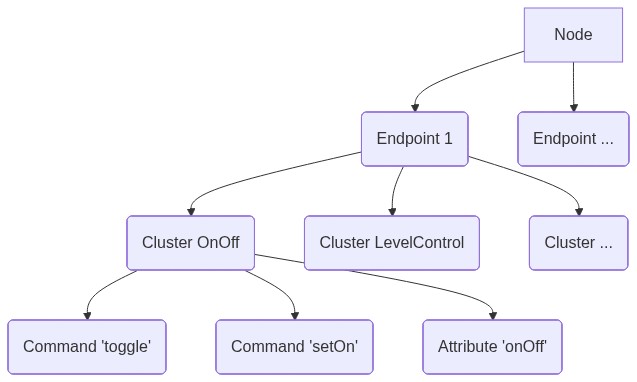](https://mermaid-js.github.io/mermaid-live-editor/#/edit/eyJjb2RlIjoiZ3JhcGggVERcbiAgQVtOb2RlXSAtLT4gQihFbmRwb2ludCAxKVxuICBBIC0tPiBEKEVuZHBvaW50IC4uLilcbiAgQiAtLT4gRShDbHVzdGVyIE9uT2ZmKVxuICBCIC0tPiBGKENsdXN0ZXIgTGV2ZWxDb250cm9sKVxuICBCIC0tPiBHKENsdXN0ZXIgLi4uKVxuICBFIC0tPiBIKENvbW1hbmQgJ3RvZ2dsZScpXG4gIEUgLS0-IEkoQ29tbWFuZCAnc2V0T24nKVxuICBFIC0tPiBKKEF0dHJpYnV0ZSAnb25PZmYnKSIsIm1lcm1haWQiOnsidGhlbWUiOiJkZWZhdWx0In0sInVwZGF0ZUVkaXRvciI6ZmFsc2V9)
|
|
28
38
|
|
|
29
39
|
### Client/Server clusters
|
|
40
|
+
|
|
30
41
|
A cluster can be implemented in two ways:
|
|
31
|
-
|
|
32
|
-
|
|
42
|
+
|
|
43
|
+
- As server
|
|
44
|
+
- As client
|
|
33
45
|
|
|
34
46
|
From the Zigbee Cluster Library Specification "Typically, the entity that stores the attributes of a cluster is referred to as the server of that cluster and an entity that affects or manipulates those attributes is referred to as the client of that cluster." More information on this can be found in the Zigbee Cluster Library Specification [section 2.2.2.](https://etc.athom.com/zigbee_cluster_specification.pdf).
|
|
35
47
|
|
|
36
48
|
### Bindings and bound clusters
|
|
49
|
+
|
|
37
50
|
The concept of server/client is important for the following reason. Nodes can be receivers of commands (i.e. servers), or senders of commands (i.e. clients), and sometimes both. An example on how to send a command to a node can be found [below](#basic-communication-with-node). Receiving commands from a node requires a binding to be made from the controller to the cluster on the node, and the implementation of a `BoundCluster` (i.e. server cluster) to receive and handle the incoming commands. For an example on implementing a `BoundCluster` see [below](#implementing-a-bound-cluster).
|
|
38
51
|
|
|
39
52
|
## Usage
|
|
@@ -43,72 +56,79 @@ In order to communicate with a Zigbee node retrieve a `node` instance from `Mana
|
|
|
43
56
|
### Basic communication with node
|
|
44
57
|
|
|
45
58
|
## Sending a command
|
|
59
|
+
|
|
46
60
|
`/drivers/my-driver/device.js`
|
|
61
|
+
|
|
47
62
|
```js
|
|
48
|
-
const Homey = require(
|
|
49
|
-
const { ZCLNode, CLUSTER } = require(
|
|
63
|
+
const Homey = require("homey");
|
|
64
|
+
const { ZCLNode, CLUSTER } = require("zigbee-clusters");
|
|
50
65
|
|
|
51
66
|
class MyDevice extends Homey.Device {
|
|
52
|
-
|
|
53
|
-
|
|
54
|
-
|
|
55
|
-
|
|
56
|
-
|
|
57
|
-
|
|
58
|
-
|
|
59
|
-
|
|
60
|
-
|
|
61
|
-
|
|
62
|
-
|
|
63
|
-
|
|
64
|
-
|
|
65
|
-
|
|
66
|
-
|
|
67
|
-
|
|
68
|
-
|
|
69
|
-
|
|
70
|
-
|
|
71
|
-
|
|
72
|
-
|
|
73
|
-
|
|
74
|
-
|
|
75
|
-
|
|
76
|
-
|
|
77
|
-
|
|
78
|
-
|
|
79
|
-
|
|
67
|
+
onInit() {
|
|
68
|
+
// Get ZigBeeNode instance from ManagerZigBee
|
|
69
|
+
this.homey.zigbee.getNode(this).then(async (node) => {
|
|
70
|
+
// Create ZCLNode instance
|
|
71
|
+
const zclNode = new ZCLNode(node);
|
|
72
|
+
|
|
73
|
+
// Send toggle command to onOff cluster on endpoint 1
|
|
74
|
+
await zclNode.endpoints[1].clusters[CLUSTER.ON_OFF.NAME].toggle();
|
|
75
|
+
|
|
76
|
+
// Send moveToLevel command to levelControl cluster on endpoint 1 and don't wait for
|
|
77
|
+
// the default response confirmation.
|
|
78
|
+
await zclNode.endpoints[1].clusters[CLUSTER.LEVEL_CONTROL.NAME].moveToLevel(
|
|
79
|
+
{
|
|
80
|
+
level: 100,
|
|
81
|
+
transitionTime: 2000,
|
|
82
|
+
},
|
|
83
|
+
{
|
|
84
|
+
// This is an optional flag that disables waiting for a default response from the
|
|
85
|
+
// receiving node as a confirmation that the command is received and executed.
|
|
86
|
+
// You should only use this flag if the device does not follow the
|
|
87
|
+
// Zigbee specification and refuses to send a default response.
|
|
88
|
+
waitForResponse: true,
|
|
89
|
+
|
|
90
|
+
// This is an optional property that allows for adjusting the response
|
|
91
|
+
// timeout (25000ms) before the command is considered rejected.
|
|
92
|
+
timeout: 10000,
|
|
93
|
+
}
|
|
94
|
+
);
|
|
95
|
+
});
|
|
96
|
+
}
|
|
80
97
|
}
|
|
81
98
|
```
|
|
82
99
|
|
|
83
100
|
## Receiving an attribute report
|
|
84
101
|
|
|
85
102
|
`/drivers/my-driver/device.js`
|
|
103
|
+
|
|
86
104
|
```js
|
|
87
|
-
const Homey = require(
|
|
88
|
-
const { ZCLNode, CLUSTER } = require(
|
|
105
|
+
const Homey = require("homey");
|
|
106
|
+
const { ZCLNode, CLUSTER } = require("zigbee-clusters");
|
|
89
107
|
|
|
90
108
|
class MyDevice extends Homey.Device {
|
|
91
109
|
onInit() {
|
|
92
110
|
// Get ZigBeeNode instance from ManagerZigBee
|
|
93
|
-
this.homey.zigbee.getNode(this)
|
|
94
|
-
|
|
95
|
-
|
|
96
|
-
|
|
97
|
-
|
|
98
|
-
|
|
99
|
-
|
|
100
|
-
|
|
101
|
-
|
|
102
|
-
|
|
103
|
-
|
|
104
|
-
}
|
|
105
|
-
});
|
|
106
|
-
|
|
107
|
-
// And listen for incoming attribute reports by binding a listener on the cluster
|
|
108
|
-
zclNode.endpoints[1].clusters[CLUSTER.COLOR_CONTROL.NAME].on('attr.currentSaturation', (currentSaturation) => {
|
|
109
|
-
// handle reported attribute value
|
|
110
|
-
});
|
|
111
|
+
this.homey.zigbee.getNode(this).then(async (node) => {
|
|
112
|
+
// Create ZCLNode instance
|
|
113
|
+
const zclNode = new ZCLNode(node);
|
|
114
|
+
|
|
115
|
+
// Configure reporting
|
|
116
|
+
await zclNode.endpoints[1].clusters[CLUSTER.COLOR_CONTROL.NAME].configureReporting({
|
|
117
|
+
currentSaturation: {
|
|
118
|
+
minInterval: 0,
|
|
119
|
+
maxInterval: 300,
|
|
120
|
+
minChange: 1,
|
|
121
|
+
},
|
|
111
122
|
});
|
|
123
|
+
|
|
124
|
+
// And listen for incoming attribute reports by binding a listener on the cluster
|
|
125
|
+
zclNode.endpoints[1].clusters[CLUSTER.COLOR_CONTROL.NAME].on(
|
|
126
|
+
"attr.currentSaturation",
|
|
127
|
+
(currentSaturation) => {
|
|
128
|
+
// handle reported attribute value
|
|
129
|
+
}
|
|
130
|
+
);
|
|
131
|
+
});
|
|
112
132
|
}
|
|
113
133
|
}
|
|
114
134
|
```
|
|
@@ -116,11 +136,12 @@ class MyDevice extends Homey.Device {
|
|
|
116
136
|
### Implementing a cluster
|
|
117
137
|
|
|
118
138
|
It is very easy to add support for a new cluster or add commands and/or attributes to an existing
|
|
119
|
-
|
|
139
|
+
cluster. All implemented clusters are listed in [lib/clusters/index.js](https://github.com/athombv/node-zigbee-clusters/blob/production/lib/clusters/index.js). It also exports a constant `CLUSTER` object for easy reference to a specific cluster name and/or id (e.g. `CLUSTER.WINDOW_COVERING` -> `{NAME: "windowCovering", ID: 258})`.
|
|
120
140
|
|
|
121
141
|
This example shows in a simplified way how the OnOff cluster is implemented ([actual implementation](https://github.com/athombv/node-zigbee-clusters/blob/production/lib/clusters/onOff.js)). All the information with regard to the ids, names, available attributes and commands can be found in the Zigbee Cluster Library Specification [section 3.8.](https://etc.athom.com/zigbee_cluster_specification.pdf):
|
|
122
142
|
|
|
123
143
|
`zigbee-clusters/lib/clusters/onOff.js`
|
|
144
|
+
|
|
124
145
|
```js
|
|
125
146
|
// Define the cluster attributes
|
|
126
147
|
const ATTRIBUTES = {
|
|
@@ -144,13 +165,12 @@ const COMMANDS = {
|
|
|
144
165
|
|
|
145
166
|
// Implement the OnOff cluster by extending `Cluster`
|
|
146
167
|
class OnOffCluster extends Cluster {
|
|
147
|
-
|
|
148
168
|
static get ID() {
|
|
149
169
|
return 6; // The cluster id
|
|
150
170
|
}
|
|
151
171
|
|
|
152
172
|
static get NAME() {
|
|
153
|
-
return
|
|
173
|
+
return "onOff"; // The cluster name
|
|
154
174
|
}
|
|
155
175
|
|
|
156
176
|
static get ATTRIBUTES() {
|
|
@@ -160,32 +180,32 @@ class OnOffCluster extends Cluster {
|
|
|
160
180
|
static get COMMANDS() {
|
|
161
181
|
return COMMANDS; // Returns the defined commands
|
|
162
182
|
}
|
|
163
|
-
|
|
164
183
|
}
|
|
165
184
|
|
|
166
185
|
// Add the cluster to the clusters that will be available on the `ZCLNode`
|
|
167
186
|
Cluster.addCluster(OnOffCluster);
|
|
168
187
|
|
|
169
188
|
module.exports = OnOffCluster;
|
|
170
|
-
|
|
171
189
|
```
|
|
172
190
|
|
|
173
191
|
After a cluster is implemented it can be used on a `ZCLNode` instance like this:
|
|
192
|
+
|
|
174
193
|
```
|
|
175
194
|
await zclNode.endpoints[1].clusters[CLUSTER.ON_OFF.NAME].toggle();
|
|
176
195
|
```
|
|
177
|
-
Note that `CLUSTER.ON_OFF.NAME` is just a string that refers to `onOff` in `zigbee-clusters/lib/clusters/onOff.js`
|
|
178
196
|
|
|
197
|
+
Note that `CLUSTER.ON_OFF.NAME` is just a string that refers to `onOff` in `zigbee-clusters/lib/clusters/onOff.js`
|
|
179
198
|
|
|
180
199
|
### Implementing a bound cluster
|
|
200
|
+
|
|
181
201
|
Zigbee nodes can send commands to Homey via bound clusters. This requires a binding to be created on a specific endpoint and cluster. Next, a `BoundCluster` implementation must be registered with the `ZCLNode` which implements handlers for the incomming commands:
|
|
182
202
|
|
|
183
203
|
`/lib/LevelControlBoundCluster.js`
|
|
204
|
+
|
|
184
205
|
```js
|
|
185
|
-
const { BoundCluster } = require(
|
|
206
|
+
const { BoundCluster } = require("zigbee-clusters");
|
|
186
207
|
|
|
187
208
|
class LevelControlBoundCluster extends BoundCluster {
|
|
188
|
-
|
|
189
209
|
constructor({ onMove }) {
|
|
190
210
|
super();
|
|
191
211
|
this._onMove = onMove;
|
|
@@ -201,30 +221,34 @@ class LevelControlBoundCluster extends BoundCluster {
|
|
|
201
221
|
}
|
|
202
222
|
|
|
203
223
|
module.exports = LevelControlBoundCluster;
|
|
204
|
-
|
|
205
224
|
```
|
|
225
|
+
|
|
206
226
|
`/drivers/my-driver/device.js`
|
|
207
227
|
|
|
208
228
|
```js
|
|
209
|
-
const LevelControlBoundCluster = require(
|
|
229
|
+
const LevelControlBoundCluster = require("../../lib/LevelControlBoundCluster");
|
|
210
230
|
|
|
211
231
|
// Register the `BoundCluster` implementation with the `ZCLNode`
|
|
212
|
-
zclNode.endpoints[1].bind(
|
|
213
|
-
|
|
214
|
-
|
|
215
|
-
|
|
216
|
-
|
|
232
|
+
zclNode.endpoints[1].bind(
|
|
233
|
+
CLUSTER.LEVEL_CONTROL.NAME,
|
|
234
|
+
new LevelControlBoundCluster({
|
|
235
|
+
onMove: (payload) => {
|
|
236
|
+
// Do something with the received payload
|
|
237
|
+
},
|
|
238
|
+
})
|
|
239
|
+
);
|
|
217
240
|
```
|
|
218
241
|
|
|
219
242
|
### Implementing a custom cluster
|
|
243
|
+
|
|
220
244
|
There are cases where it is required to implement a custom cluster, for example to handle manufacturer specific cluster implementations. Often these manufacturer specific cluster implementations are extensions of existing clusters. An example is the `IkeaSpecificSceneCluster` ([complete implementation](https://github.com/athombv/com.ikea.tradfri-example/tree/master/lib/IkeaSpecificSceneCluster.js)):
|
|
221
245
|
|
|
222
246
|
`lib/IkeaSpecificSceneCluster.js`
|
|
247
|
+
|
|
223
248
|
```js
|
|
224
|
-
const { ScenesCluster, ZCLDataTypes } = require(
|
|
249
|
+
const { ScenesCluster, ZCLDataTypes } = require("zigbee-clusters");
|
|
225
250
|
|
|
226
251
|
class IkeaSpecificSceneCluster extends ScenesCluster {
|
|
227
|
-
|
|
228
252
|
// Here we override the `COMMANDS` getter from the `ScenesClusters` by
|
|
229
253
|
// extending it with the custom command we'd like to implement `ikeaSceneMove`.
|
|
230
254
|
static get COMMANDS() {
|
|
@@ -232,7 +256,7 @@ class IkeaSpecificSceneCluster extends ScenesCluster {
|
|
|
232
256
|
...super.COMMANDS,
|
|
233
257
|
ikeaSceneMove: {
|
|
234
258
|
id: 0x08,
|
|
235
|
-
manufacturerId:
|
|
259
|
+
manufacturerId: 0x117c,
|
|
236
260
|
args: {
|
|
237
261
|
mode: ZCLDataTypes.enum8({
|
|
238
262
|
up: 0,
|
|
@@ -256,32 +280,30 @@ class IkeaSpecificSceneCluster extends ScenesCluster {
|
|
|
256
280
|
},
|
|
257
281
|
};
|
|
258
282
|
}
|
|
259
|
-
|
|
260
283
|
}
|
|
261
284
|
|
|
262
285
|
module.exports = IkeaSpecificSceneCluster;
|
|
263
|
-
|
|
264
|
-
|
|
265
286
|
```
|
|
266
287
|
|
|
267
288
|
`/drivers/my-driver/device.js`
|
|
289
|
+
|
|
268
290
|
```js
|
|
269
|
-
const IkeaSpecificSceneCluster = require(
|
|
291
|
+
const IkeaSpecificSceneCluster = require("../../lib/IkeaSpecificSceneCluster");
|
|
270
292
|
|
|
271
293
|
// Important: we have created a new `Cluster` instance which needs to be added before
|
|
272
294
|
// it becomes available on any `ZCLNode` instance.
|
|
273
295
|
Cluster.addCluster(IkeaSpecificSceneCluster);
|
|
274
296
|
|
|
275
297
|
// Example invocation of custom cluster command
|
|
276
|
-
zclNode.endpoints[1].clusters[
|
|
277
|
-
|
|
298
|
+
zclNode.endpoints[1].clusters["scenes"].ikeaSceneMove({ mode: 0, transitionTime: 10 });
|
|
278
299
|
```
|
|
279
300
|
|
|
280
301
|
This also works for `BoundClusters`, if a node sends commands to Homey using a custom cluster it is necessary to implement a custom `BoundCluster` and bind it to the `ZCLNode` instance. For an example check the implementation in the `com.ikea.tradfri` driver [remote_control](https://github.com/athombv/com.ikea.tradfri-example/tree/master/drivers/remote_control/device.js).
|
|
281
302
|
|
|
282
303
|
## Contributing
|
|
304
|
+
|
|
283
305
|
Great if you'd like to contribute to this project, a few things to take note of before submitting a PR:
|
|
284
|
-
* This project enforces ESLint, validate by running `npm run lint`.
|
|
285
|
-
* This project implements a basic test framework based on mocha, see [test](https://github.com/athombv/node-zigbee-clusters/blob/production/test) directory.
|
|
286
|
-
* This project uses several [GitHub Action workflows](https://github.com/athombv/node-zigbee-clusters/blob/production/.github/workflows) (e.g. ESLint, running test and versioning/publishing).
|
|
287
306
|
|
|
307
|
+
- This project enforces ESLint, validate by running `npm run lint`.
|
|
308
|
+
- This project implements a basic test framework based on mocha, see [test](https://github.com/athombv/node-zigbee-clusters/blob/production/test) directory.
|
|
309
|
+
- This project uses several [GitHub Action workflows](https://github.com/athombv/node-zigbee-clusters/blob/production/.github/workflows) (e.g. ESLint, running test and versioning/publishing).
|
package/index.d.ts
CHANGED
|
@@ -11,8 +11,13 @@ type ConstructorOptions = {
|
|
|
11
11
|
sendFrame: (endpointId: number, clusterId: number, frame: Buffer) => Promise<void>;
|
|
12
12
|
};
|
|
13
13
|
type ZCLNodeCluster = EventEmitter & {
|
|
14
|
-
readAttributes: (
|
|
15
|
-
|
|
14
|
+
readAttributes: (
|
|
15
|
+
attributeNames: string[],
|
|
16
|
+
opts: { timeout: number }
|
|
17
|
+
) => Promise<{ [attributeName: string]: any }>;
|
|
18
|
+
writeAttributes: (attributes: {
|
|
19
|
+
[attributeName: string]: any;
|
|
20
|
+
}) => Promise<{ [attributeName: string]: { id: number; status: "SUCCESS" | "FAILURE" } }>;
|
|
16
21
|
};
|
|
17
22
|
type ZCLNodeEndpoint = {
|
|
18
23
|
clusters: { [clusterName: string]: ZCLNodeCluster };
|
package/lib/Cluster.js
CHANGED
|
@@ -398,9 +398,14 @@ class Cluster extends EventEmitter {
|
|
|
398
398
|
* Command which reads a given set of attributes from the remote cluster.
|
|
399
399
|
* Note: do not mix regular and manufacturer specific attributes.
|
|
400
400
|
* @param {string[]} attributeNames
|
|
401
|
+
* @param {{timeout: number}} opts
|
|
401
402
|
* @returns {Promise<{}>} - Object with attribute values (e.g. `{ onOff: true }`)
|
|
402
403
|
*/
|
|
403
|
-
async readAttributes(
|
|
404
|
+
async readAttributes(attributeNames, opts) {
|
|
405
|
+
if (attributeNames instanceof Array === false) {
|
|
406
|
+
throw new Error('Expected attribute names array, as of zigbee-clusters@2.0.0 call readAttributes([\'myAttr\'])');
|
|
407
|
+
}
|
|
408
|
+
|
|
404
409
|
if (!attributeNames.length) {
|
|
405
410
|
attributeNames = Object.keys(this.constructor.attributes);
|
|
406
411
|
}
|
|
@@ -424,7 +429,7 @@ class Cluster extends EventEmitter {
|
|
|
424
429
|
const { attributes } = await super.readAttributes({
|
|
425
430
|
attributes: [...attrIds],
|
|
426
431
|
manufacturerId,
|
|
427
|
-
});
|
|
432
|
+
}, opts);
|
|
428
433
|
|
|
429
434
|
debug(this.logId, 'read attributes result', { attributes });
|
|
430
435
|
const result = this.constructor.attributeArrayStatusDataType.fromBuffer(attributes, 0);
|