zen-gitsync 2.17.14 → 2.17.16
This diff represents the content of publicly available package versions that have been released to one of the supported registries. The information contained in this diff is provided for informational purposes only and reflects changes between package versions as they appear in their respective public registries.
- package/README.md +211 -185
- package/package.json +2 -2
- package/scripts/release.js +33 -16
- package/src/cli/ai/agent.js +24 -2
- package/src/cli/ai/runtime.test.js +1 -1
- package/src/cli/ai/tools.js +69 -14
- package/src/cli/ai/tools.test.js +46 -1
- package/src/config.js +8 -4
- package/src/gitCommit.js +18 -1
- package/src/ui/public/assets/AgentView-DOyN97Ve.js +5 -0
- package/src/ui/public/assets/{AgentView-vvVhbIQ5.css → AgentView-DkM2KXuc.css} +1 -1
- package/src/ui/public/assets/AppVersionBadge-oON3sAj4.js +2 -0
- package/src/ui/public/assets/{BranchSelector-XIN87Mkw.js → BranchSelector-Cpj7eGqY.js} +1 -1
- package/src/ui/public/assets/CommitForm-D_ovYhVw.js +6 -0
- package/src/ui/public/assets/{CommonDialog-BiNTGpA-.js → CommonDialog-ChZbqfRF.js} +1 -1
- package/src/ui/public/assets/EditorView-BPzpI0GV.js +1 -0
- package/src/ui/public/assets/FileDiffViewer-B_qEKA9L.js +15 -0
- package/src/ui/public/assets/{FlowExecutionViewer-D9Vzgh91.js → FlowExecutionViewer-Drw4hlJG.js} +1 -1
- package/src/ui/public/assets/FlowOrchestrationWorkspace-C7yTD1gj.js +21 -0
- package/src/ui/public/assets/{IconButton-DysyaC1j.js → IconButton-DEARmMkZ.js} +1 -1
- package/src/ui/public/assets/{LogList-QDgok-UJ.js → LogList-BA_gowxE.js} +5 -5
- package/src/ui/public/assets/MindmapView-8X6z245q.css +1 -0
- package/src/ui/public/assets/MindmapView-K-XcLLXr.js +2 -0
- package/src/ui/public/assets/MonitorView-C0RL5K9W.js +1 -0
- package/src/ui/public/assets/ProjectStartupButton-DC36_vvU.js +1 -0
- package/src/ui/public/assets/RemoteManagerDialog-Bkqja660.js +4 -0
- package/src/ui/public/assets/{RemoteRepoCard-Bn9cKt1D.js → RemoteRepoCard-Bsm7cj_H.js} +2 -2
- package/src/ui/public/assets/SourceMapView-Y5NKdIk6.js +3 -0
- package/src/ui/public/assets/{SvgIcon-CvtoU5yo.js → SvgIcon-D_mFHXP4.js} +1 -1
- package/src/ui/public/assets/{TemplateManager-saqC9kdQ.js → TemplateManager-BzKVXZhy.js} +1 -1
- package/src/ui/public/assets/UserInputNode-BPLK4aYx.js +1 -0
- package/src/ui/public/assets/WorkbenchView-xbGdiVMQ.js +56 -0
- package/src/ui/public/assets/_plugin-vue_export-helper-dg2VUnSQ.js +19 -0
- package/src/ui/public/assets/configStore-DtjAc3w9.js +1 -0
- package/src/ui/public/assets/{css.worker-DFdt6_zu.js → css.worker-BDCmgL4U.js} +9 -9
- package/src/ui/public/assets/editor.worker-GCPm6rMv.js +26 -0
- package/src/ui/public/assets/{element-plus-Dc1iTOWq.css → element-plus-Cwwq-Gje.css} +1 -1
- package/src/ui/public/assets/element-plus-DxBPQwL7.js +48 -0
- package/src/ui/public/assets/{flow-mindmap-CHxAWdLw.js → flow-mindmap-BqFb1WO5.js} +1 -1
- package/src/ui/public/assets/{gitStore-BgC8OY0k.js → gitStore-BZo9_zyy.js} +5 -5
- package/src/ui/public/assets/{html.worker-JUzsMP-j.js → html.worker-DG8hnSJR.js} +8 -8
- package/src/ui/public/assets/index-CHuCYLWm.js +111 -0
- package/src/ui/public/assets/index-CmbatbSR.css +1 -0
- package/src/ui/public/assets/json.worker-CxwlJRnL.js +58 -0
- package/src/ui/public/assets/{monaco-DkJuNcCr.js → monaco-BScz9v63.js} +6 -6
- package/src/ui/public/assets/{office-docx-CmBY5bpF.js → office-docx-CZXLkCf5.js} +1 -1
- package/src/ui/public/assets/{office-excel-BEhsBUNX.js → office-excel-CBKszjVA.js} +1 -1
- package/src/ui/public/assets/{office-pptx-DWfi413x.js → office-pptx-NeUSnN3k.js} +3 -3
- package/src/ui/public/assets/previewSandbox-BTTTXooN.js +0 -0
- package/src/ui/public/assets/{ts.worker-CmEKzkmF.js → ts.worker-DgFMIcEs.js} +49 -49
- package/src/ui/public/assets/{useThemeObserver-DhCU3SIo.js → useThemeObserver-E7Hk50l3.js} +1 -1
- package/src/ui/public/assets/vendor-DnB9EJa3.css +1 -0
- package/src/ui/public/assets/{vendor-CZnXb2r9.js → vendor-bdHhLiED.js} +28 -28
- package/src/ui/public/assets/{vue-flow-7_n4vJqi.js → vue-flow-fLUQ0_kE.js} +1 -1
- package/src/ui/public/index.html +19 -19
- package/src/ui/server/index.js +4 -0
- package/src/ui/server/routes/explorerContextMenu.js +208 -0
- package/src/ui/server/routes/explorerContextMenu.test.js +180 -0
- package/src/ui/server/routes/workbench/agentChat.js +14 -3
- package/src/ui/server/routes/workbench/agentMarketplace.js +23 -9
- package/src/ui/server/routes/workbench/agentMarketplace.test.js +32 -0
- package/src/ui/server/routes/workbench/agentRoutes.js +14 -7
- package/src/ui/server/routes/workbench/agentRoutes.test.js +47 -1
- package/src/ui/server/routes/workbench/taskRunner.codex.test.js +173 -0
- package/src/ui/server/routes/workbench/taskRunner.js +259 -10
- package/src/ui/server/routes/workbench/taskRunner.opencode.test.js +4 -2
- package/src/ui/public/assets/AgentView-DLHlVWRg.js +0 -5
- package/src/ui/public/assets/AppVersionBadge-JxpMuGwP.js +0 -2
- package/src/ui/public/assets/CommitForm-CW53Er5m.js +0 -6
- package/src/ui/public/assets/EditorView-D0JoJhgt.js +0 -1
- package/src/ui/public/assets/FileDiffViewer-Yas2nO2U.js +0 -15
- package/src/ui/public/assets/FlowOrchestrationWorkspace-DQ3fg5b9.js +0 -21
- package/src/ui/public/assets/MindmapView-BQTqx842.css +0 -1
- package/src/ui/public/assets/MindmapView-CeZsQNBK.js +0 -2
- package/src/ui/public/assets/MonitorView-D1tgmjjS.js +0 -1
- package/src/ui/public/assets/ProjectStartupButton-COntA4q1.js +0 -1
- package/src/ui/public/assets/RemoteManagerDialog-3dihAOab.js +0 -4
- package/src/ui/public/assets/SourceMapView-C8UdzQXF.js +0 -3
- package/src/ui/public/assets/UserInputNode-CvEfvX3i.js +0 -1
- package/src/ui/public/assets/WorkbenchView-B7WAu1Ay.js +0 -56
- package/src/ui/public/assets/_plugin-vue_export-helper-BdTxl34g.js +0 -19
- package/src/ui/public/assets/configStore-AQMSazCM.js +0 -1
- package/src/ui/public/assets/editor.worker-O-CH8JUO.js +0 -26
- package/src/ui/public/assets/element-plus-CMSkP_w2.js +0 -48
- package/src/ui/public/assets/index-Dpx9Bcqn.css +0 -1
- package/src/ui/public/assets/index-qAmzFO10.js +0 -104
- package/src/ui/public/assets/json.worker-B4dEhy0e.js +0 -58
- package/src/ui/public/assets/previewSandbox-CyuMMYaq.js +0 -0
- package/src/ui/public/assets/vendor-4ojsjDYc.css +0 -1
package/README.md
CHANGED
|
@@ -11,6 +11,7 @@ A Git automation platform with interactive commits, scheduled sync, custom comma
|
|
|
11
11
|
- [GUI](#gui)
|
|
12
12
|
- [Core Git Panel](#core-git-panel)
|
|
13
13
|
- [GitHub / Gitee Repositories](#github--gitee-repositories)
|
|
14
|
+
- [Quick Directory Switch](#quick-directory-switch)
|
|
14
15
|
- [Branch Management](#branch-management)
|
|
15
16
|
- [Remote Management](#remote-management)
|
|
16
17
|
- [Stash Management](#stash-management)
|
|
@@ -19,13 +20,15 @@ A Git automation platform with interactive commits, scheduled sync, custom comma
|
|
|
19
20
|
- [Custom Commands](#custom-commands)
|
|
20
21
|
- [Flow Orchestration](#flow-orchestration-visual-workflow-designer)
|
|
21
22
|
- [NPM Scripts Panel](#npm-scripts-panel)
|
|
22
|
-
- [
|
|
23
|
+
- [Console Panel](#console-panel)
|
|
23
24
|
- [Project Startup](#project-startup)
|
|
25
|
+
- [Views at a glance](#views-at-a-glance)
|
|
24
26
|
- [Built-in Code Editor](#built-in-code-editor)
|
|
25
|
-
- [
|
|
26
|
-
- [Workbench](#workbench-task-driven-claude-execution)
|
|
27
|
+
- [Workbench](#workbench-task-driven-agent-execution)
|
|
27
28
|
- [AI Agent](#ai-agent-web)
|
|
28
29
|
- [Settings](#settings)
|
|
30
|
+
- [Self-Upgrade](#self-upgrade)
|
|
31
|
+
- [Development Notes](#development-notes)
|
|
29
32
|
- [CLI Commands](#cli-commands)
|
|
30
33
|
|
|
31
34
|
---
|
|
@@ -55,8 +58,9 @@ npm install -g zen-gitsync
|
|
|
55
58
|
- **Custom commands** — Save, parameterize, and reuse shell commands
|
|
56
59
|
- **Project startup** — Auto-run commands or workflows when a project opens
|
|
57
60
|
- **Built-in code editor** — Monaco-based file editor with Markdown preview
|
|
58
|
-
- **
|
|
59
|
-
- **
|
|
61
|
+
- **Workbench** — a multi-project board with a kanban view and a master-agent dispatch console; task-driven agent execution (Claude Code or OpenCode) with prompt presets, isolated per-task processes, live streaming output, AI-generated presets and task-level attachments
|
|
62
|
+
- **Repository cloning** — clone any GitHub / Gitee repository into a folder straight from the repo browser, with an *Already cloned* badge (and its local path) backed by a whole-disk local-repository scan
|
|
63
|
+
- **Skill / MCP marketplace** — install skills and MCP servers from the Agent view into the current project or the `g ai` agent
|
|
60
64
|
- **Reset to remote** — One-click `git reset --hard origin/<branch>` from the Git panel (auto-refreshes branch info first to avoid wrong-target resets)
|
|
61
65
|
- **AI commit message** — Generate commit message from staged diff automatically
|
|
62
66
|
- **Selection-scoped diff** — AI commit message and quick commit/push use only the diff of currently selected files when the Git view is the active tab
|
|
@@ -77,50 +81,55 @@ npm install -g zen-gitsync
|
|
|
77
81
|
$ g ui
|
|
78
82
|
```
|
|
79
83
|
|
|
80
|
-
The GUI runs as a local web server and opens in your default browser. It attaches to the current Git repository automatically. The activity bar on the left switches between
|
|
84
|
+
The GUI runs as a local web server and opens in your default browser on the first free port it finds in `4000–6000` (set `PORT` to pin a fixed one). It attaches to the current Git repository automatically. The activity bar on the left switches between **Git**, **Console**, **Agent**, **Editor**, **Workbench**, **System Monitor** and **Mindmap**, top to bottom. See the [Core Git Panel](#core-git-panel) screenshot below for what the main view looks like.
|
|
81
85
|
|
|
82
86
|
### Architecture at a glance
|
|
83
87
|
|
|
84
88
|
```
|
|
85
89
|
┌─────────────────────────────────────────────┐
|
|
86
|
-
│ Header: current dir · theme ·
|
|
90
|
+
│ Header: current dir · theme · instances │
|
|
87
91
|
├─────────────────────────────────────────────┤
|
|
88
92
|
│ Activity Bar (left rail) │
|
|
89
93
|
│ ┌───┐ │
|
|
90
|
-
│ │Git│────► Git panel (
|
|
94
|
+
│ │Git│────► Git panel (files + commit) │
|
|
91
95
|
│ └───┘ │
|
|
92
|
-
│ ┌─────┐ │
|
|
93
|
-
│ │Edit│────► Monaco editor + file tree │
|
|
94
|
-
│ └─────┘ │
|
|
95
96
|
│ ┌──────┐ │
|
|
96
|
-
│ │
|
|
97
|
+
│ │Consol│─► Saved commands + terminal │
|
|
98
|
+
│ └──────┘ │
|
|
99
|
+
│ ┌──────┐ │
|
|
100
|
+
│ │Agent │─► Web agent + Skill/MCP plaza │
|
|
101
|
+
│ └──────┘ │
|
|
102
|
+
│ ┌──────┐ │
|
|
103
|
+
│ │Edit │─► Monaco editor + file tree │
|
|
104
|
+
│ └──────┘ │
|
|
105
|
+
│ ┌──────┐ │
|
|
106
|
+
│ │Bench │─► Board: projects·kanban·agent│
|
|
107
|
+
│ └──────┘ │
|
|
108
|
+
│ ┌──────┐ │
|
|
109
|
+
│ │Monit │─► System monitor │
|
|
110
|
+
│ └──────┘ │
|
|
111
|
+
│ ┌──────┐ │
|
|
112
|
+
│ │ Mind │─► Mindmap │
|
|
97
113
|
│ └──────┘ │
|
|
98
|
-
│ ┌──────┐ │
|
|
99
|
-
│ │Bench │─► Tasks + Claude runs │
|
|
100
|
-
│ └──────┘ │
|
|
101
|
-
│ ┌──────┐ │
|
|
102
|
-
│ │Consol│─► Commands + terminal │
|
|
103
|
-
│ └──────┘ │
|
|
104
114
|
└─────────────────────────────────────────────┘
|
|
105
115
|
▲ ▲ ▲
|
|
106
116
|
│ │ │
|
|
107
117
|
Pinia stores ──── EventBus ──── Socket.IO
|
|
108
118
|
▲
|
|
109
119
|
│
|
|
110
|
-
Backend Express server (port
|
|
120
|
+
Backend Express server (free port 4000–6000) → git / npm / shell
|
|
111
121
|
```
|
|
112
122
|
|
|
113
123
|
### A typical day in the GUI
|
|
114
124
|
|
|
115
125
|
```
|
|
116
|
-
1. g ui → browser opens
|
|
126
|
+
1. g ui → browser opens on the first free port in 4000–6000
|
|
117
127
|
2. Glance header → current dir, branch, instance count, theme toggle
|
|
118
128
|
3. Edit files → Activity Bar → Editor, save with Ctrl+S
|
|
119
129
|
4. Stage & commit → Activity Bar → Git, pick files, fill commit form, push
|
|
120
130
|
5. AI commit msg → click ✨ AI 生成 in commit form, diff → Conventional Commits
|
|
121
131
|
6. Background job → Activity Bar → Workbench, run task, watch live logs
|
|
122
|
-
7.
|
|
123
|
-
8. Quick command → Activity Bar → Console → pick saved command → run
|
|
132
|
+
7. Quick command → Activity Bar → Console → pick saved command → run
|
|
124
133
|
```
|
|
125
134
|
|
|
126
135
|
---
|
|
@@ -133,7 +142,7 @@ The GUI runs as a local web server and opens in your default browser. It attache
|
|
|
133
142
|
|
|
134
143
|
| Feature | Description |
|
|
135
144
|
|---|---|
|
|
136
|
-
| File list | Shows all changed files grouped by staged / unstaged / untracked / conflicted |
|
|
145
|
+
| File list | Shows all changed files grouped by staged / unstaged / untracked / conflicted — plus intent-to-add files as their own "to be staged" group |
|
|
137
146
|
| View toggle | Switch between flat list and directory tree view (persisted) |
|
|
138
147
|
| Selection mode | Multi-select files to stage or stash only chosen files. When the Git view is the active tab, **Quick Commit / Quick Push** and **AI commit message** automatically scope their action to the current selection (button label switches to *Commit Selected* / *Push Selected*). |
|
|
139
148
|
| Per-file actions | Stage, unstage, or revert individual files |
|
|
@@ -146,7 +155,7 @@ The GUI runs as a local web server and opens in your default browser. It attache
|
|
|
146
155
|
| Reset to remote | One-click `git reset --hard origin/<branch>`; auto-refreshes branch info first to avoid stale-branch targets; hidden when working tree is clean and no unpushed commits |
|
|
147
156
|
| Merge | Merge another branch; detects and surfaces in-progress merge state |
|
|
148
157
|
| Diff viewer | Monaco-based side-by-side diff for any changed file |
|
|
149
|
-
| In-diff preview | Toggle a preview pane below the diff for `.html` / `.htm` / `.svg` (sandboxed iframe with JavaScript enabled — interactive reports work, isolated from the app via an opaque origin)
|
|
158
|
+
| In-diff preview | Toggle a preview pane below the diff for `.html` / `.htm` / `.svg` (sandboxed iframe with JavaScript enabled — interactive reports work, isolated from the app via an opaque origin), `.md` / `.markdown` (rendered Markdown) and Office documents (`.doc` / `.docx` / `.xls` / `.xlsx` / `.ppt` / `.pptx` / `.odt` / `.ods` / `.odp`, converted server-side) — same preview experience as the built-in editor, with a draggable vertical resizer; split ratio is persisted per project |
|
|
150
159
|
| Commit log | Browse commit history with author, date, branch tags, and changed files |
|
|
151
160
|
| Remote URL | Display and one-click copy the remote repository URL; the gear icon beside it opens **Remote Management** (multi-remote setups, multi push URLs) |
|
|
152
161
|
| Auto-refresh | Silently refreshes status and branch info when the window gains focus, the tab becomes visible, or you switch back to the **Git** view in the Activity Bar |
|
|
@@ -172,6 +181,8 @@ In either mode, click **AI Generate** to fill in the fields automatically based
|
|
|
172
181
|
- **Group by workspace** — repositories are grouped by their `owner` by default, so everything under one account or organisation sits together instead of being scattered across the grid by push date; group order follows the current sort rule (the workspace pushed most recently comes first) and so does the order inside each group, with the header showing how many repositories that workspace holds. Switch to **No grouping** for a flat, cross-workspace timeline
|
|
173
182
|
- **No refetch on tab switch** — the list is cached per account, so coming back to the tab paints instantly instead of shelling out to `gh repo list` again; once the cache is a minute old it paints from cache first and refreshes quietly in the background, while **刷新** always pulls for real
|
|
174
183
|
- **Informative cards** — repository name, description and privacy / fork / language / star badges, plus a third line with last-push date, fork count, non-`main` default branch and license (each omitted when there is nothing to say)
|
|
184
|
+
- **Clone straight to a folder** — a repository that is not on your disk yet offers **Clone to folder…**: pick a directory and the clone runs over SSH (`git@github.com:owner/repo.git`), with an `https://` URL normalised first so it never stalls on a Git Credential Manager prompt
|
|
185
|
+
- **"Already cloned" badge** — the server keeps a whole-disk index of local Git repositories (built in the background and refreshable on demand), so a card for a repo you already have shows its local path instead of offering another clone
|
|
175
186
|
- **One click to open or copy** — clicking a card opens the repository page in your browser; the actions that appear on hover copy the URL or open it
|
|
176
187
|
|
|
177
188
|
---
|
|
@@ -182,6 +193,8 @@ In either mode, click **AI Generate** to fill in the fields automatically based
|
|
|
182
193
|
|
|
183
194
|
> Click the directory name in the header (or the folder icon) to open this dialog. Type a path, hit **浏览** to use the OS file picker, or pick from **常用目录** for one-click switching. **使用新标签打开** spawns a new GUI tab on that path so you can keep the current project open.
|
|
184
195
|
|
|
196
|
+
The header row beside the directory name carries its own quick actions: open in the file manager, open in a terminal, copy the folder name (last path segment only), open with `g ai`, and one button per detected editor / AI tool — VS Code, Codex, OpenCode, Kimi Code, ZCode, DeepSeek Harness and Claude Code (right-click the Claude button for the default / fully-approved menu, or right-click any tool button to update it to the latest version). Tools that are not installed are collected into a **more** menu, where clicking one opens the install guide.
|
|
197
|
+
|
|
185
198
|
When the GUI is opened on a directory that is not a Git repository, the right pane shows the **Recent projects** list instead — every recent directory with its Git badges (behind / ahead / uncommitted) and one-click "open in a new tab". Each page load runs a `git fetch` pass over all of them automatically, so the ahead/behind badges show the real state rather than the snapshot from the last fetch; the **刷新全部** button does the same thing on demand.
|
|
186
199
|
|
|
187
200
|
The same list (and the **常用目录** list in the directory switcher dialog) carries a short note underneath the cards. With an AI model configured it is an **AI status summary** — one paragraph written by the model from the freshly fetched states, naming the projects that need a pull, have unpushed commits or uncommitted changes, and saying so when everything is in sync. It is generated once per distinct state right after the **刷新全部** pass finishes (never mid-refresh), cached for the page, and there is a regenerate button on the right; the summary is shared between the panel and the dialog, so opening the switcher never triggers a second call. Without a model configured it falls back to a static note explaining what the badges mean.
|
|
@@ -267,6 +280,10 @@ Build automated pipelines with a drag-and-drop canvas:
|
|
|
267
280
|
| **Command** | Execute a saved custom command |
|
|
268
281
|
| **Wait** | Pause execution for 1–3600 seconds |
|
|
269
282
|
| **Version** | Bump `package.json` version (patch / minor / major) or modify a dependency |
|
|
283
|
+
| **Confirm** | Pause the flow and wait for the user to confirm before continuing |
|
|
284
|
+
| **User input** | Pause the flow and collect parameter values from the user |
|
|
285
|
+
| **Code** | Run an inline code snippet and pass its output to downstream nodes |
|
|
286
|
+
| **Condition** | Branch the flow according to a condition |
|
|
270
287
|
|
|
271
288
|
- Nodes are executed in topological order
|
|
272
289
|
- Flows are saved and editable
|
|
@@ -276,7 +293,7 @@ Build automated pipelines with a drag-and-drop canvas:
|
|
|
276
293
|
|
|
277
294
|
### NPM Scripts Panel
|
|
278
295
|
|
|
279
|
-
> The panel lives inside the Git view (left column). It scans every `package.json` in the repo on demand, groups scripts by package, and lets you click any script name to run it directly. The
|
|
296
|
+
> The panel lives inside the Git view (left column). It scans every `package.json` in the repo on demand, groups scripts by package, and lets you click any script name to run it directly. The panel's own settings dialog configures the scan root and exclusion patterns.
|
|
280
297
|
|
|
281
298
|
- Automatically discovers all `package.json` files in the project tree
|
|
282
299
|
- Lists their `scripts` entries
|
|
@@ -308,20 +325,22 @@ Configure commands or workflows to run automatically when a project is opened:
|
|
|
308
325
|
|
|
309
326
|
---
|
|
310
327
|
|
|
311
|
-
###
|
|
328
|
+
### Views at a glance
|
|
312
329
|
|
|
313
330
|
| View | Purpose | Persistent state | Highlights |
|
|
314
331
|
|---|---|---|---|
|
|
315
332
|
| **Git** | Day-to-day staging, committing, pushing, history review | Per-project UI prefs (view mode, layout ratios) | Structured commit form, AI commit message, selection-scoped quick push |
|
|
316
333
|
| **Editor** | Browse & edit project files without leaving the GUI | Open tabs, unsaved markers, recent files | Monaco editor with syntax highlighting, Markdown preview, file search |
|
|
317
|
-
| **
|
|
318
|
-
| **
|
|
334
|
+
| **Workbench** | Multi-project board for dispatching and running agent tasks | Tasks, prompts, board layout, log retention | Kanban board, master-agent console, executor choice, live chat-style logs |
|
|
335
|
+
| **Agent** | Chat with the built-in AI agent (web + CLI sessions) | Sessions, pending questions | Streaming answers, tool-call cards, Skill / MCP plaza |
|
|
336
|
+
|
|
337
|
+
**Console**, **System Monitor** and **Mindmap** are utility views on the same rail.
|
|
319
338
|
|
|
320
339
|
---
|
|
321
340
|
|
|
322
341
|
### Built-in Code Editor
|
|
323
342
|
|
|
324
|
-
A full IDE-like editor (
|
|
343
|
+
A full IDE-like editor (fourth icon in the activity bar) for browsing and editing project files without leaving the tool:
|
|
325
344
|
|
|
326
345
|
| Feature | Description |
|
|
327
346
|
|---|---|
|
|
@@ -338,66 +357,39 @@ A full IDE-like editor (second icon in the activity bar) for browsing and editin
|
|
|
338
357
|
|
|
339
358
|
---
|
|
340
359
|
|
|
341
|
-
###
|
|
360
|
+
### Workbench (Task-Driven Agent Execution)
|
|
342
361
|
|
|
343
|
-
|
|
344
363
|
|
|
345
|
-
> Three
|
|
364
|
+
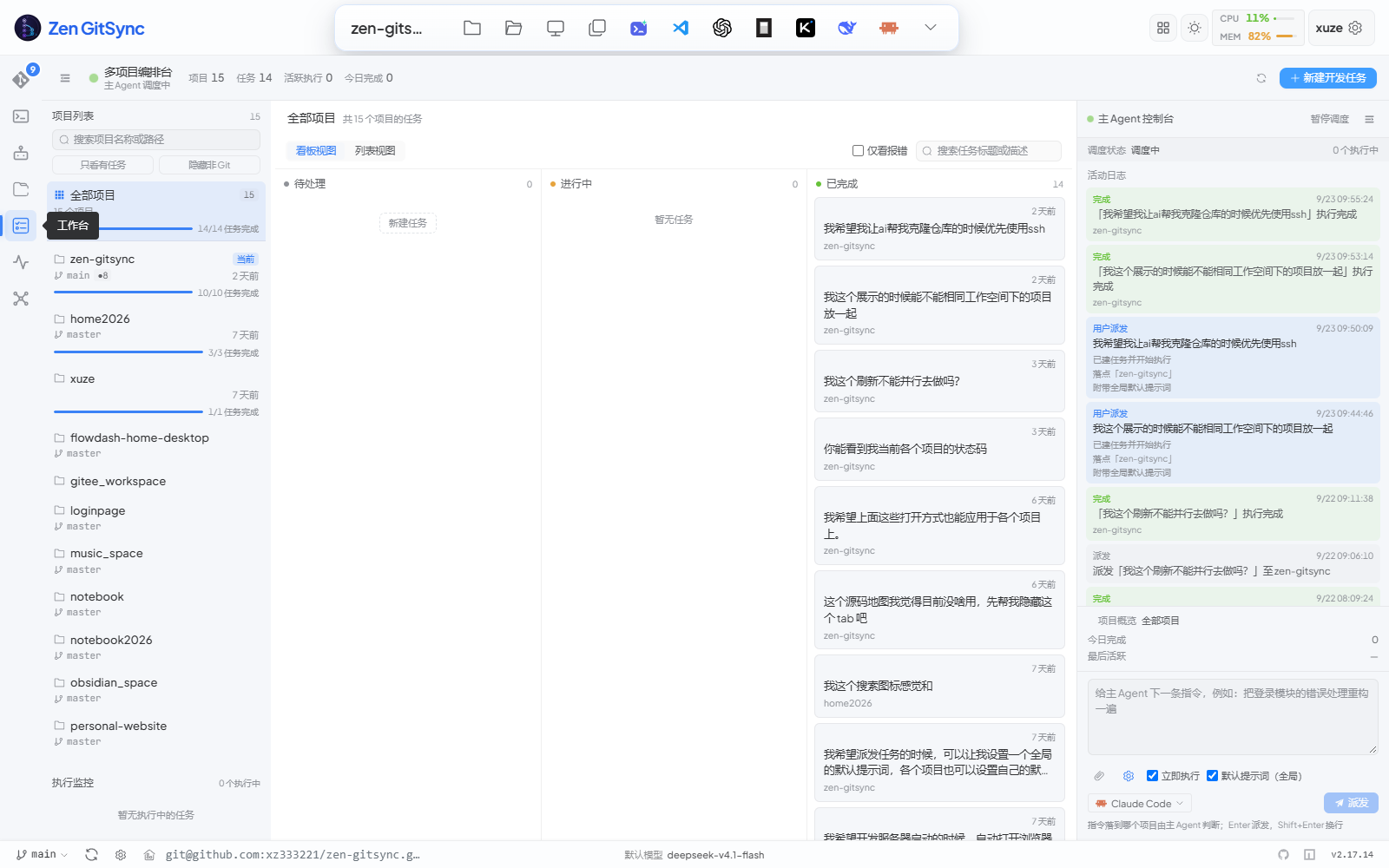
> Three panes on one board: the project list with its run monitor on the left, a kanban board in the middle, and the **master-agent console** on the right. Type an instruction into the console — the master agent decides which project it lands in, or you can target the project you selected yourself. Clicking a card opens the task editor as an overlay over the board, which stays mounted underneath.
|
|
346
365
|
|
|
347
|
-
A dedicated view
|
|
366
|
+
A dedicated view for running coding agents across one or many projects. Every task carries its own prompt preset, attachments and executor, and runs as its own detached process, so context never piles up.
|
|
348
367
|
|
|
349
368
|
| Feature | Description |
|
|
350
369
|
|---|---|
|
|
351
|
-
|
|
|
352
|
-
|
|
|
353
|
-
|
|
|
354
|
-
|
|
|
355
|
-
| Node detail | Click a node to view its source code in a Monaco editor panel |
|
|
356
|
-
| Tech stack | Detects the language and frameworks in use |
|
|
357
|
-
| Entry point | Identifies the main entry file and function |
|
|
358
|
-
| Analysis log | Real-time progress log during scanning and analysis |
|
|
359
|
-
| Resizable panels | File tree, graph, and source panels are all independently resizable |
|
|
360
|
-
|
|
361
|
-
Configure the model endpoint, API key, and model name in **Settings → AI**.
|
|
362
|
-
|
|
363
|
-
---
|
|
364
|
-
|
|
365
|
-
### Workbench (Task-Driven Claude Execution)
|
|
366
|
-
|
|
367
|
-
|
|
368
|
-
|
|
369
|
-
> Sidebar lists tasks (grouped by project, current project first) and prompt presets. The main pane is split between the task definition (commit-code field, preset selector, run/stop buttons) and the live **Claude** execution stream — a chronological card stack of stdout/stderr output, scrolled to the latest. The bottom composer captures follow-up prompts for `claude --resume`.
|
|
370
|
-
|
|
371
|
-
A dedicated view (fourth icon in the activity bar) for batch-running Claude against your repo. Define a task, split it into ordered subtasks, attach a reusable prompt preset, then click **Run task** — each subtask launches in its own terminal window with `claude --permission-mode bypassPermissions`, so context never piles up.
|
|
372
|
-
|
|
373
|
-
| Feature | Description |
|
|
374
|
-
|---|---|
|
|
375
|
-
| Task list | Create, edit, delete tasks. Each row is a single line — the title, or the first characters of the description (ellipsised) when the title is empty. Subtask / attachment / type badges are gone to cut noise, and tasks with neither a title nor a description count as drafts that are never saved (switching away drops them) |
|
|
376
|
-
| Resizable sidebar | Drag the divider between the sidebar and the main pane to resize it (200–480 px); the width is remembered across sessions. In grouped mode task rows are indented under their project header |
|
|
377
|
-
| Resizable / collapsible board panels | On the multi-project board, drag the divider on either side to resize the project list (180–420 px) and the master-agent console (260–560 px); the console is wider by default and both widths are remembered across sessions. Either side also collapses on demand — the top-bar button folds the project list, the console's own button folds it into a 32 px rail that expands on click. Double-click a divider to reset it to the responsive default. The run monitor below the project list has a divider of its own: drag it up or down when several jobs run at once and the cards no longer fit (120 px up to half the viewport height), and that height is remembered too |
|
|
370
|
+
| Task list | Create, edit, delete tasks. Rows are grouped by project (current project first), each a single line — the title, or the first characters of the description (ellipsised) when the title is empty. Tasks with neither a title nor a description count as drafts that are never saved (switching away drops them) |
|
|
371
|
+
| Multi-project board | Three resizable / collapsible panes: the project list with its run monitor, the kanban board, and the master-agent console. Drag a divider to resize (project list 180–420 px, console 260–560 px), double-click it to reset the responsive default, or fold a side away — the top-bar button folds the project list, the console folds into a 32 px rail that expands on click. The run monitor has its own divider (120 px up to half the viewport height) for when several jobs run at once. All widths / heights are remembered across sessions |
|
|
372
|
+
| Kanban board | **Todo / Doing / Done** columns with the done column sorted newest-first; a filter checkbox narrows the board to tasks whose last run failed, and a table view is one click away for a denser listing |
|
|
373
|
+
| Master-agent console | Give the master agent an instruction and it dispatches a new task, deciding the target project itself (or honouring the project you selected). Enter dispatches, Shift+Enter starts a new line. Dispatching can be paused and resumed — while paused, a dispatch creates the task without running it |
|
|
378
374
|
| Dispatch default prompts | Give every dispatch a standing prompt: one **global** entry that applies to all projects, plus one **per project** that is appended after it whenever you dispatch to that project (it supplements the global one rather than replacing it). Both are edited from the gear button in the console's composer; the combined text is prepended to the instruction, a "Default prompt (global + this project)" checkbox appears next to **Run now** so a single dispatch can opt out, and the activity feed records which level was attached. The prompt is copied onto the task at dispatch time, so editing the setting later never rewrites tasks that already exist; it lands in the task's own prompt field, where you can still edit it per task |
|
|
379
375
|
| Open-with menu per project | Hovering a project row in the board's project list reveals two buttons: **Open folder** (straight to your file manager) and **Open with**, a menu holding file manager / terminal / `g ui` in a new tab plus every editor and AI tool (VS Code, Codex, OpenCode, Kimi Code, ZCode, DeepSeek Harness, and Claude Code in default or fully-approved mode). Tools that are not installed are dimmed and labelled "Not installed" — clicking one opens the very same install guide the top bar uses. Every action applies to that row's project only; the board's selection is never touched |
|
|
380
|
-
|
|
|
381
|
-
|
|
|
382
|
-
|
|
|
383
|
-
|
|
|
384
|
-
|
|
|
385
|
-
|
|
|
386
|
-
|
|
|
387
|
-
|
|
|
388
|
-
|
|
|
389
|
-
|
|
|
390
|
-
|
|
|
391
|
-
|
|
|
392
|
-
|
|
|
393
|
-
|
|
|
394
|
-
|
|
|
395
|
-
|
|
396
|
-
|
|
397
|
-
| Continue chat (simple task) | After a simple task finishes (done / error / cancelled), the detail panel grows an **Exit** button and a follow-up composer; sending a follow-up message spawns `claude --resume <session_id> -p <newPrompt>` to continue the prior conversation, and each new turn appears as its own card stacked into a chat-style flow. The `session_id` is captured from claude's stream-json `system.init` event and persisted on the job |
|
|
398
|
-
| Local tool detection (vscode / claude) | On startup + every 10 min the server probes `code --version` and `claude --version` (3 s timeout). The Workbench "Execute task" button — and the header's "Open in Claude Code" popover — hide when the corresponding CLI is missing, replaced by a status hint linking to the install guide |
|
|
399
|
-
|
|
400
|
-
Prompt presets and tasks are persisted to `~/.zen-gitsync/prompts.json` and `~/.zen-gitsync/tasks.json` (cross-project, shared across repos).
|
|
376
|
+
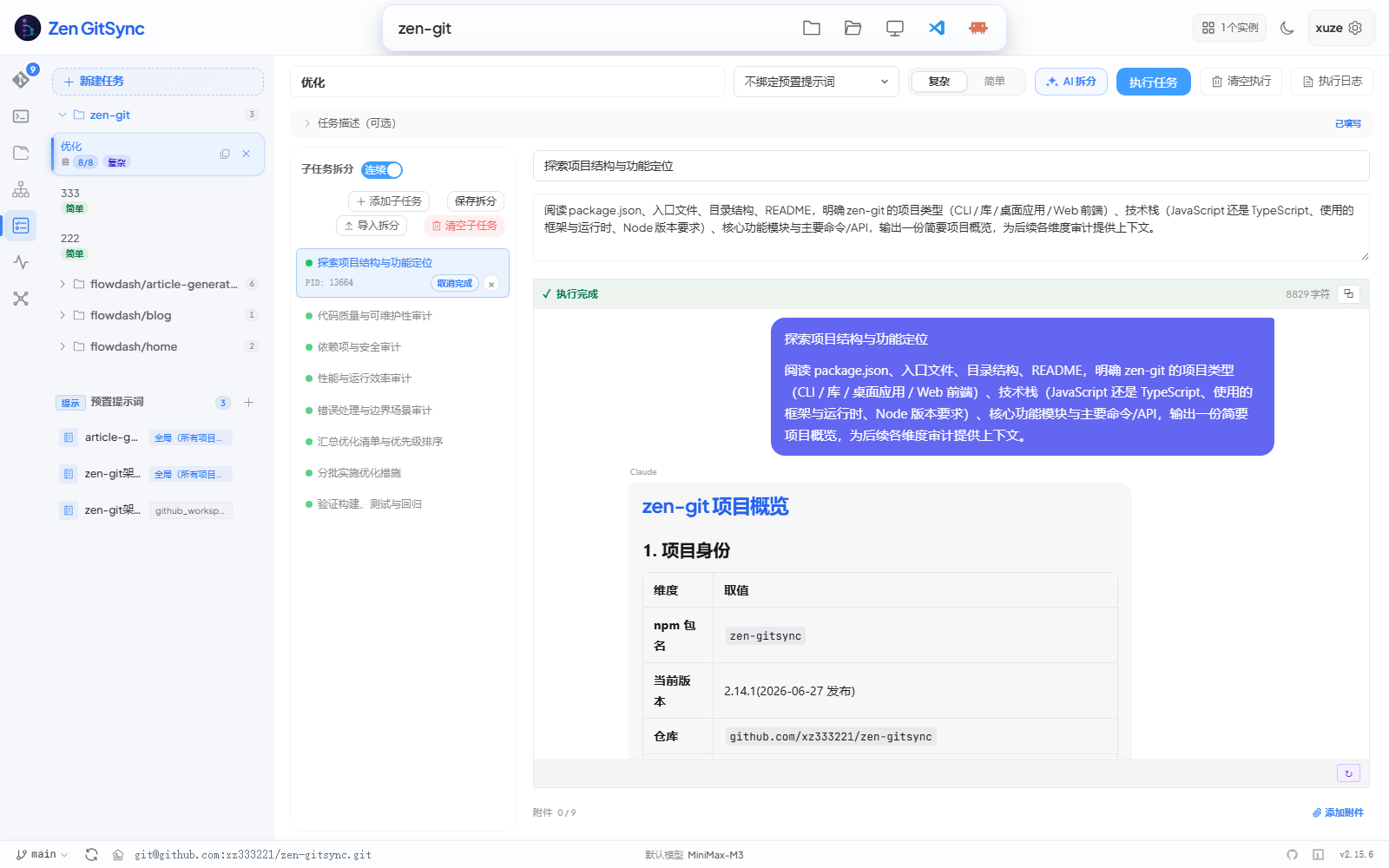
| Task editor overlay | Clicking a board card opens the editor as an overlay: a flat sidebar holding the task list and prompt presets, then the task header, preset selector, executor split-button, the execution-log / clear-execution actions, and a chat-style execution body. The description collapses into a one-line "Task description (optional)" summary until clicked, showing a "Filled" badge and the attachment count once there is content |
|
|
377
|
+
| Executor choice | Run each task with **Claude Code**, **OpenCode** or **Codex**. The global default is set in **Settings → General → Task executor** (`config.taskExecutor`); the split-button next to the run button switches it for the next run and remembers that pick in the browser. A continued conversation always stays on the executor that started it — Claude's `--resume`, OpenCode's `--session` and Codex's thread id are not interchangeable |
|
|
378
|
+
| Attachments | Up to 9 files per task (image / PDF / text / Markdown / CSV / JSON / log, ≤ 20 MB each); images over 3.5 MB are re-encoded / downscaled in the browser before upload so 4K screenshots still fit what the model and the reader can take. Their absolute paths are appended to the prompt so the agent reads them directly. Right-click an image attachment to copy it to the system clipboard (`image/png` / `jpeg` / `webp` / `gif`) |
|
|
379
|
+
| Prompt presets | Reusable prompt templates with `{{task.title}}` / `{{task.desc}}` / `{{repo.path}}` / `{{branch}}` variable interpolation |
|
|
380
|
+
| AI prompt generation | The "New / Edit preset" dialog carries an **AI Generate project architecture** button plus an **Edit instruction** button: the server recursively finds every sub-project (a directory holding `.git` or one of 9 manifests), reads each one's key files on its own (manifest 20 KB / README 8 KB / a 2-level tree), calls the LLM concurrently to produce a per-sub-project architecture description, and merges them into one when there are several. **Edit instruction** customises the prompt used for generation (persisted to `~/.zen-gitsync/ai-instruction.json`) |
|
|
381
|
+
| Pipe-mode launcher | Spawns the selected executor as a detached process with stdout/stderr piped to the server — no external terminal window is opened, so output streams directly into the UI. Claude Code runs as `claude -p - --output-format stream-json --verbose --permission-mode bypassPermissions --dangerously-skip-permissions` (the prompt goes in over stdin to dodge Windows' 32 K command-line limit); OpenCode runs as `opencode run --format json --auto --thinking`; Codex runs as `codex exec --json --skip-git-repo-check --dangerously-bypass-approvals-and-sandbox -`, both following whatever default model their own CLI is configured with |
|
|
382
|
+
| Isolated processes | Every run is its own detached process with fresh context, so memory and conversation state never accumulate across tasks |
|
|
383
|
+
| Live log | The "执行日志 / Execution log" panel **opens by default** and auto-scrolls, showing accumulated `stdout` + `stderr` (last 64 KB rendered client-side; the server keeps up to 100 MB per job) |
|
|
384
|
+
| Live status | Task status (pending / running / done / error / cancelled) and PID stream in real time over SSE |
|
|
385
|
+
| Tool-call stream | The model's tool calls are rendered inline in the conversation flow, so you can follow what the agent actually did |
|
|
386
|
+
| Finish notice | When a run finishes or fails you get an in-app toast while the page is in the foreground, and a system notification when it is not — so you can be looking at another view or window and still be told |
|
|
387
|
+
| Cross-view indicator | While any Workbench task is running, a pulsing dot appears on the Workbench icon in the Activity Bar so you can see job state from the Git or Editor view |
|
|
388
|
+
| Execution log manager (dialog) | The "Execution logs" button in the workbench top bar opens a dialog with the list / filter / batch delete / clear / retention-policy UI (defaults: 500 records, 256 MB); the task execution view stays mounted so no work-in-progress state is dropped |
|
|
389
|
+
| Continue chat | After a task reaches a done / error / cancelled state, a follow-up composer appears; sending a message resumes the previous session (`claude --resume <session_id>` for Claude Code, `--session` for OpenCode, `codex exec resume <thread_id>` for Codex), and each new turn stacks into the same chat-style flow |
|
|
390
|
+
| Local tool detection | On startup + every 10 min the server probes 7 CLIs (`code`, `claude`, `codex`, `opencode`, `kimi`, `zcode`, `dsh`). Tools that are missing are dimmed and labelled "Not installed" — clicking one opens the install guide, and right-clicking a tool button offers an update to the latest published version |
|
|
391
|
+
|
|
392
|
+
Prompt presets and tasks are persisted to `~/.zen-gitsync/prompts.json` and `~/.zen-gitsync/tasks.json` (cross-project, shared across repos); run history and the retention policy live in `jobs.json` / `jobs-config.json`, the master-agent console state in `orchestrator.json`, and task attachments under `~/.zen-gitsync/workbench-images/_task-<taskId>/`.
|
|
401
393
|
|
|
402
394
|
---
|
|
403
395
|
|
|
@@ -413,9 +405,10 @@ A dedicated view (robot icon in the activity bar) for chatting with the built-in
|
|
|
413
405
|
| Tool call display | Each tool invocation (run_command, read_file, edit_file, list_files, search_text, write_file) is shown as a collapsible card with arguments preview and execution result |
|
|
414
406
|
| Recent-projects awareness | Ask "which of my projects need a pull?" and the agent calls its built-in `list_projects` tool instead of scanning the disk: it returns exactly the list behind the GUI's **Recent projects** panel (recent directories plus any directory a task was created in, with branch / ahead / behind / uncommitted counts and task progress), so the agent's answer and the UI agree. Ahead/behind reads local refs, so the agent can pass `refresh=true` to run a `git fetch` pass first when the question is about pulling |
|
|
415
407
|
| Session persistence | All conversations are saved to `~/.zen-gitsync/agent-sessions/` as JSON files; the CLI agent (`g ai`) writes to the same directory so Web and CLI sessions are unified |
|
|
408
|
+
| Skill / MCP plaza | The **Skill plaza** and **MCP plaza** tabs list skills and MCP servers from several sources, each with its description, weekly downloads / usage count and install state. Install one into the **current project** or into the **`g ai` agent** — entries already installed can be uninstalled from the same card, and ones that still need environment variables are flagged. From a terminal, `g ai` lists what is installed with `/skills` (`/mcp` is an alias) |
|
|
416
409
|
| SSH-first cloning | When you ask it to clone a repo (or add a remote) it uses the SSH form — `git@github.com:owner/repo.git` / `git@gitee.com:owner/repo.git` — converting an `https://` URL first, so the clone never stalls on a Git Credential Manager username/password prompt; it falls back to https only when SSH genuinely fails (`Permission denied (publickey)` / host-key verification) and says which one it used. The same preference is injected into every workbench task, whose executor is an external CLI with a system prompt this app does not own |
|
|
417
410
|
| Per-turn tool limit | A single message may trigger up to N tool calls in a row (default **200**, range 1–2000). Configurable in **Settings → AI models → Agent Runtime**; hitting the limit ends the turn and asks you to send another message. The same setting drives the CLI agent |
|
|
418
|
-
| Preset questions | Quick-start buttons on the welcome screen for common tasks (view project structure, analyze code quality, write tests, check git status) |
|
|
411
|
+
| Preset questions | Quick-start buttons on the welcome screen for common tasks (view project structure, analyze code quality, write tests, check git status, start the project) |
|
|
419
412
|
| Stop generation | A floating stop button appears during streaming; aborts the LLM request and any running child processes |
|
|
420
413
|
| Theme sync | The chat area follows the GUI's current theme (light / dark / auto) |
|
|
421
414
|
|
|
@@ -425,22 +418,22 @@ A dedicated view (robot icon in the activity bar) for chatting with the built-in
|
|
|
425
418
|
|
|
426
419
|
|
|
427
420
|
|
|
428
|
-
> Click the gear icon in the top-right header.
|
|
421
|
+
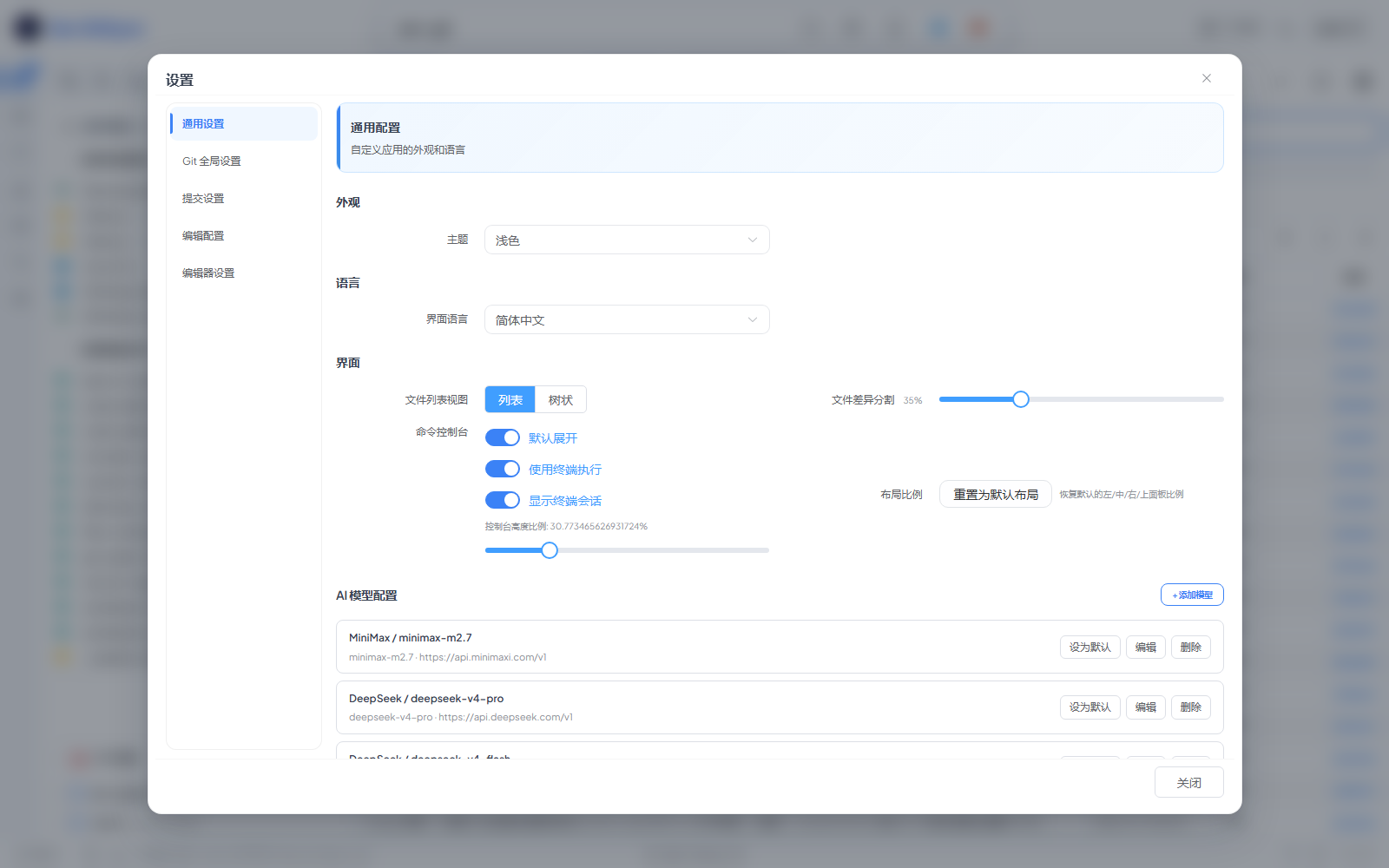
> Click the gear icon in the top-right header. The dialog has six tabs — **General settings / AI models / Git global settings / Commit settings / Edit config / Editor settings** — and most toggles take effect immediately without restarting the GUI. Clicking the default-model name in the footer jumps straight to the **AI models** tab. Two things that used to live here have their own dialogs now: locked files are managed from the **Locked files** dialog in the Git view, and the npm scan root from the NPM scripts panel's settings.
|
|
429
422
|
|
|
430
|
-
|
|
|
423
|
+
| Tab | What's inside |
|
|
431
424
|
|---|---|
|
|
432
|
-
|
|
|
433
|
-
|
|
|
434
|
-
|
|
|
435
|
-
|
|
|
436
|
-
|
|
|
437
|
-
|
|
|
425
|
+
| General settings | Appearance (theme — light / dark / follow the system — and language), task execution (task executor, task-finish notifications) and UI options (file-list view, diff split ratio, AI diff explanation, command console, layout ratios) |
|
|
426
|
+
| AI models | OpenAI-compatible endpoints — API key, base URL, model name — with several entries side by side, a default model, plus the **Agent runtime** section holding the per-turn tool-call budget |
|
|
427
|
+
| Git global settings | `user.name` / `user.email`, auto-set upstream, pull strategy, auto-prune remote branches, line-ending handling, the default branch for `git init` |
|
|
428
|
+
| Commit settings | Standardised commit form, skip hooks (`--no-verify`), Enter-to-commit, auto-close the push modal, pull before push, auto-fill the default commit message |
|
|
429
|
+
| Edit config | Raw JSON editor for the config, plus a button to open the file on disk |
|
|
430
|
+
| Editor settings | Editor behaviour such as auto-save on focus loss |
|
|
438
431
|
|
|
439
432
|
---
|
|
440
433
|
|
|
441
434
|
### Self-Upgrade
|
|
442
435
|
|
|
443
|
-
The footer version chip in the GUI checks npm for newer releases once per session. When an update is available, a **Upgrade** button appears next to the version; clicking it streams `npm install -g zen-gitsync` output into a modal dialog. On success, the dialog switches to a "Restart and reload now" CTA. Clicking it calls `POST /api/app-restart`, which **self-respawns a new Node process** (no external launcher / desktop shell is required), waits for the new process to bind its port, streams that port back to the browser over NDJSON, and gracefully exits the old process. The browser then **redirects** to the new port (preserving the current path, query, and hash) so the upgraded backend serves the next request. The footer version also updates instantly to the new number so you can see the bump even before restarting. If the child process fails to come up within
|
|
436
|
+
The footer version chip in the GUI checks npm for newer releases once per session. When an update is available, a **Upgrade** button appears next to the version; clicking it streams `npm install -g zen-gitsync` output into a modal dialog. On success, the dialog switches to a "Restart and reload now" CTA. Clicking it calls `POST /api/app-restart`, which **self-respawns a new Node process** (no external launcher / desktop shell is required), waits for the new process to bind its port, streams that port back to the browser over NDJSON, and gracefully exits the old process. The browser then **redirects** to the new port (preserving the current path, query, and hash) so the upgraded backend serves the next request. The footer version also updates instantly to the new number so you can see the bump even before restarting. If the child process fails to come up within 15s, the old process is preserved and an error toast is shown — your session stays connected.
|
|
444
437
|
|
|
445
438
|
On macOS / Linux, the global install is run under `sudo -n` (non-interactive); if sudo can't authenticate non-interactively, re-launch the GUI with admin rights and try again.
|
|
446
439
|
|
|
@@ -483,7 +476,12 @@ selection + Enter to confirm** (typing a number also jumps directly; `0` selects
|
|
|
483
476
|
"custom / manual input" entry). Non-TTY environments (CI, piped input) automatically fall back
|
|
484
477
|
to numeric input. `Esc` or `Ctrl+C` cancels the wizard cleanly.
|
|
485
478
|
|
|
486
|
-
|
|
479
|
+
`/skills` (alias `/mcp`) lists the skills and MCP servers already installed for the agent and
|
|
480
|
+
where they came from. Installation itself happens in the GUI's **Skill / MCP plaza** (Agent
|
|
481
|
+
view): pick the current project or the `g ai` agent as the target, and the entry becomes usable
|
|
482
|
+
from that side.
|
|
483
|
+
|
|
484
|
+
In-session commands: `/help`, `/model`, `/addmodel`, `/cd <path>`, `/image [path]`, `/think`, `/tools`, `/stats`, `/new`, `/resume`, `/skills` (`/mcp` is an alias), `/clear`, `/exit` (or `/quit`).
|
|
487
485
|
|
|
488
486
|
Reasoning, tool calls and answers have separate visual sections. Reasoning returned by the model is shown in full by default;
|
|
489
487
|
`/think full` restores full display, `/think off` hides it, and `/think compact` previews the first 12 nonblank lines. All three modes appear in the `/` menu and support completion after `/think `.
|
|
@@ -526,6 +524,13 @@ Enter your commit message: fix login page style
|
|
|
526
524
|
$ g -y
|
|
527
525
|
```
|
|
528
526
|
|
|
527
|
+
### AI-generated commit (skip prompt):
|
|
528
|
+
```bash
|
|
529
|
+
$ g --ai # the model writes the message, then commit + push
|
|
530
|
+
$ g --ai --no-diff # same, without printing the diff
|
|
531
|
+
$ g --ai --interval=600 # AI commit every 10 minutes
|
|
532
|
+
```
|
|
533
|
+
|
|
529
534
|
### Commit with inline message:
|
|
530
535
|
```bash
|
|
531
536
|
$ g -m <message>
|
|
@@ -548,6 +553,12 @@ $ g -h
|
|
|
548
553
|
$ g --help
|
|
549
554
|
```
|
|
550
555
|
|
|
556
|
+
### Add helper scripts to `package.json`:
|
|
557
|
+
```bash
|
|
558
|
+
$ g addScript # adds "g:y": "g -y"
|
|
559
|
+
$ g addResetScript # adds "g:reset": "git reset --hard origin/<current-branch>"
|
|
560
|
+
```
|
|
561
|
+
|
|
551
562
|
### Scheduled auto-commit (default interval: 1 hour):
|
|
552
563
|
```bash
|
|
553
564
|
$ g -y --interval
|
|
@@ -572,6 +583,11 @@ start /min cmd /k "g --cmd=\"echo at-time\" --at=23:59" # once at 23:59
|
|
|
572
583
|
start /min cmd /k "g --cmd=\"echo daily\" --at=23:59 --daily" # daily at 23:59
|
|
573
584
|
```
|
|
574
585
|
|
|
586
|
+
`--repeat=daily` and `--at-repeat=daily` are aliases of `--daily`. Custom commands run in a
|
|
587
|
+
shell by default; add `--cmd-strict` to split the command into argv and run it through
|
|
588
|
+
`execFile` instead — pipes, redirection and globs then stop working, which is exactly the
|
|
589
|
+
point when you do not want shell interpretation.
|
|
590
|
+
|
|
575
591
|
### Suppress git diff output:
|
|
576
592
|
```shell
|
|
577
593
|
$ g --no-diff
|
|
@@ -615,6 +631,7 @@ $ g --check-lock=config.json
|
|
|
615
631
|
- [GUI 界面](#gui-界面)
|
|
616
632
|
- [核心 Git 面板](#核心-git-面板)
|
|
617
633
|
- [GitHub / Gitee 仓库](#github--gitee-仓库)
|
|
634
|
+
- [快速切换目录](#快速切换目录)
|
|
618
635
|
- [分支管理](#分支管理)
|
|
619
636
|
- [远程仓库管理](#远程仓库管理)
|
|
620
637
|
- [Stash 管理](#stash-管理)
|
|
@@ -623,13 +640,15 @@ $ g --check-lock=config.json
|
|
|
623
640
|
- [自定义命令](#自定义命令)
|
|
624
641
|
- [可视化流程编排](#可视化流程编排)
|
|
625
642
|
- [NPM 脚本面板](#npm-脚本面板)
|
|
626
|
-
- [
|
|
643
|
+
- [控制台面板](#控制台面板)
|
|
627
644
|
- [项目启动](#项目启动)
|
|
645
|
+
- [视图一览](#视图一览)
|
|
628
646
|
- [内置代码编辑器](#内置代码编辑器)
|
|
629
|
-
- [
|
|
630
|
-
- [工作台](#工作台任务驱动的-claude-执行)
|
|
647
|
+
- [工作台](#工作台任务驱动的智能体执行)
|
|
631
648
|
- [智能体](#智能体web-端)
|
|
632
649
|
- [设置](#设置)
|
|
650
|
+
- [自升级](#自升级)
|
|
651
|
+
- [开发约定](#开发约定)
|
|
633
652
|
- [命令行](#命令行)
|
|
634
653
|
|
|
635
654
|
---
|
|
@@ -659,8 +678,9 @@ npm install -g zen-gitsync
|
|
|
659
678
|
- **自定义命令** — 保存、参数化并复用 Shell 命令
|
|
660
679
|
- **项目启动** — 打开项目时自动运行命令或工作流
|
|
661
680
|
- **内置代码编辑器** — 基于 Monaco 的文件编辑器,支持 Markdown 预览
|
|
662
|
-
-
|
|
663
|
-
-
|
|
681
|
+
- **工作台** — 多项目看板 + 主 Agent 派发控制台;任务驱动的智能体执行(Claude Code 或 OpenCode),支持提示词预置、任务级附件、独立进程、实时流式回传与 AI 生成预置提示词
|
|
682
|
+
- **仓库克隆** — 在仓库浏览器里把任意 GitHub / Gitee 仓库直接克隆到指定文件夹,卡片带「已克隆」徽标与本地路径(由全盘本地仓库扫描得出)
|
|
683
|
+
- **Skill / MCP 广场** — 在智能体页把 Skill 与 MCP 服务安装到当前项目或 `g ai` 智能体
|
|
664
684
|
- **重置到远程** — 在 Git 面板一键执行 `git reset --hard origin/<branch>`(点击前会先自动刷新分支信息,避免重置到陈旧分支)
|
|
665
685
|
- **AI 生成提交信息** — 基于 staged diff 自动生成提交消息
|
|
666
686
|
- **选择模式差异** — 当 Git 视图为当前激活标签时,AI 生成提交信息与一键提交/推送仅作用于当前勾选文件的 diff
|
|
@@ -681,7 +701,7 @@ npm install -g zen-gitsync
|
|
|
681
701
|
$ g ui
|
|
682
702
|
```
|
|
683
703
|
|
|
684
|
-
GUI 以本地 Web 服务器形式运行,自动在浏览器中打开,并附加到当前 Git
|
|
704
|
+
GUI 以本地 Web 服务器形式运行,自动在浏览器中打开,并附加到当前 Git 仓库。端口默认在 `4000–6000` 里挑第一个可用的(可用 `PORT` 固定)。左侧 Activity Bar 自上而下为 **Git** / **控制台** / **智能体** / **编辑器** / **工作台** / **系统监控** / **思维导图**。主界面长什么样可参考下方[核心 Git 面板](#核心-git-面板)的截图。
|
|
685
705
|
|
|
686
706
|
### 监听地址
|
|
687
707
|
|
|
@@ -718,44 +738,49 @@ $ ZEN_ALLOWED_ORIGINS="https://zen.example.com,http://10.0.0.5:8080" g ui
|
|
|
718
738
|
|
|
719
739
|
```
|
|
720
740
|
┌─────────────────────────────────────────────┐
|
|
721
|
-
│ 顶部条: 当前目录 · 主题 ·
|
|
741
|
+
│ 顶部条: 当前目录 · 主题 · 实例数 │
|
|
722
742
|
├─────────────────────────────────────────────┤
|
|
723
743
|
│ Activity Bar(左侧导航) │
|
|
724
744
|
│ ┌───┐ │
|
|
725
745
|
│ │Git│────► Git 面板 (文件列表 + 提交) │
|
|
726
746
|
│ └───┘ │
|
|
727
|
-
│ ┌─────┐ │
|
|
728
|
-
│ │编辑│────► Monaco 编辑器 + 文件树 │
|
|
729
|
-
│ └─────┘ │
|
|
730
747
|
│ ┌──────┐ │
|
|
731
|
-
│
|
|
748
|
+
│ │控制 │──► 保存的命令 + 终端 │
|
|
749
|
+
│ └──────┘ │
|
|
750
|
+
│ ┌──────┐ │
|
|
751
|
+
│ │智能 │──► Web 智能体 + Skill/MCP 广场 │
|
|
752
|
+
│ └──────┘ │
|
|
753
|
+
│ ┌──────┐ │
|
|
754
|
+
│ │编辑 │──► Monaco 编辑器 + 文件树 │
|
|
755
|
+
│ └──────┘ │
|
|
756
|
+
│ ┌──────┐ │
|
|
757
|
+
│ │工作 │──► 看板: 项目 · 看板 · 主 Agent │
|
|
758
|
+
│ └──────┘ │
|
|
759
|
+
│ ┌──────┐ │
|
|
760
|
+
│ │监控 │──► 系统监控 │
|
|
761
|
+
│ └──────┘ │
|
|
762
|
+
│ ┌──────┐ │
|
|
763
|
+
│ │导图 │──► 思维导图 │
|
|
732
764
|
│ └──────┘ │
|
|
733
|
-
│ ┌──────┐ │
|
|
734
|
-
│ │工作 │──► 任务 + Claude 实时执行 │
|
|
735
|
-
│ └──────┘ │
|
|
736
|
-
│ ┌──────┐ │
|
|
737
|
-
│ │控制 │──► 命令 + 终端 │
|
|
738
|
-
│ └──────┘ │
|
|
739
765
|
└─────────────────────────────────────────────┘
|
|
740
766
|
▲ ▲ ▲
|
|
741
767
|
│ │ │
|
|
742
768
|
Pinia stores ──── EventBus ──── Socket.IO
|
|
743
769
|
▲
|
|
744
770
|
│
|
|
745
|
-
后端 Express
|
|
771
|
+
后端 Express(4000–6000 中挑可用端口) → git / npm / shell
|
|
746
772
|
```
|
|
747
773
|
|
|
748
774
|
### GUI 典型一天
|
|
749
775
|
|
|
750
776
|
```
|
|
751
|
-
1. g ui →
|
|
777
|
+
1. g ui → 浏览器自动打开(4000–6000 中第一个可用端口)
|
|
752
778
|
2. 看顶部条 → 当前目录 / 当前分支 / 实例数 / 主题切换
|
|
753
779
|
3. 编辑文件 → Activity Bar → 编辑器,Ctrl+S 保存
|
|
754
780
|
4. 暂存并提交 → Activity Bar → Git,勾选文件,填提交表单,推送
|
|
755
781
|
5. AI 生成提交信息 → 点击提交表单里的 ✨ AI 生成,基于 diff 生成
|
|
756
782
|
6. 后台任务 → Activity Bar → 工作台,执行任务,实时日志
|
|
757
|
-
7.
|
|
758
|
-
8. 快速命令 → Activity Bar → 控制台 → 选保存的命令 → 执行
|
|
783
|
+
7. 快速命令 → Activity Bar → 控制台 → 选保存的命令 → 执行
|
|
759
784
|
```
|
|
760
785
|
|
|
761
786
|
---
|
|
@@ -768,7 +793,7 @@ $ ZEN_ALLOWED_ORIGINS="https://zen.example.com,http://10.0.0.5:8080" g ui
|
|
|
768
793
|
|
|
769
794
|
| 功能 | 说明 |
|
|
770
795
|
|---|---|
|
|
771
|
-
| 文件列表 |
|
|
796
|
+
| 文件列表 | 按已暂存/未暂存/未追踪/冲突分组显示所有变更文件;`git add -N` 的意向添加文件单独成一组「已声明添加(待暂存)」 |
|
|
772
797
|
| 视图切换 | 平铺列表与目录树形视图切换(持久化保存) |
|
|
773
798
|
| 选择模式 | 多选文件,仅对选中文件执行暂存或储藏。在 Git 视图下,**一键提交 / 一键推送** 与 **AI 生成提交信息** 会自动仅作用于当前勾选的文件(按钮文案切换为「一键提交所选」/「一键推送所选」) |
|
|
774
799
|
| 单文件操作 | 对每个文件独立执行暂存、取消暂存或还原 |
|
|
@@ -781,7 +806,7 @@ $ ZEN_ALLOWED_ORIGINS="https://zen.example.com,http://10.0.0.5:8080" g ui
|
|
|
781
806
|
| 重置到远程 | 一键执行 `git reset --hard origin/<branch>`;点击前会先刷新分支信息,避免重置到陈旧分支;当工作区干净且无未推送提交时按钮自动隐藏 |
|
|
782
807
|
| 合并 | 合并其他分支,自动检测并引导处理合并中间状态 |
|
|
783
808
|
| Diff 查看器 | 基于 Monaco 编辑器的并排文件差异视图 |
|
|
784
|
-
| 差异内预览 | 在差异下方一键展开预览面板:`.html` / `.htm` / `.svg` 走沙箱化 iframe(允许 JS 执行,报告类页面的按钮/交互可用,同时以不透明 origin 与宿主应用隔离),`.md` / `.markdown` 走 Markdown
|
|
809
|
+
| 差异内预览 | 在差异下方一键展开预览面板:`.html` / `.htm` / `.svg` 走沙箱化 iframe(允许 JS 执行,报告类页面的按钮/交互可用,同时以不透明 origin 与宿主应用隔离),`.md` / `.markdown` 走 Markdown 渲染,Office 文档(`.doc` / `.docx` / `.xls` / `.xlsx` / `.ppt` / `.pptx` / `.odt` / `.ods` / `.odp`)走服务端转换预览,与内置编辑器一致的预览体验;上下比例可拖拽,按项目持久化 |
|
|
785
810
|
| 提交日志 | 浏览历史提交(作者、时间、分支标签、变更文件) |
|
|
786
811
|
| 远程地址 | 显示并一键复制远程仓库 URL;旁边的齿轮图标打开 **远程仓库管理**(多远程、多推送地址) |
|
|
787
812
|
| 自动刷新 | 窗口获得焦点、标签页重新可见,或从 Activity Bar 切回 **Git** 视图时,自动静默刷新文件状态与分支信息 |
|
|
@@ -807,6 +832,8 @@ $ ZEN_ALLOWED_ORIGINS="https://zen.example.com,http://10.0.0.5:8080" g ui
|
|
|
807
832
|
- **按工作空间分组** — 默认按 `owner` 分组,同一账号/组织下的仓库收拢在一起,不再被推送时间打散在整屏里;组间顺序跟随当前排序规则(最近有推送的空间排前面),组内同样排序,组头写明该空间下的仓库数(只有一个空间时不显示组头)。切到「不分组」即回到跨空间的平铺视图
|
|
808
833
|
- **切 Tab 不重拉** — 列表按账号各缓存一份,切回来直接渲染,不再重跑一遍 `gh repo list`;缓存超过一分钟后先用它画出来、再在后台静默刷新,点「刷新」则永远真的去拉
|
|
809
834
|
- **信息更全的卡片** — 仓库名、描述,以及私有 / Fork / 语言 / 星标徽标,第三行再给最近推送日期、Fork 数、非 `main` 的默认分支与许可证(没有的项直接省略,不留占位)
|
|
835
|
+
- **直接克隆到文件夹** — 本地还没有的仓库提供「克隆到文件夹」:选好目录即可开始克隆,走 SSH 形式(`git@github.com:owner/repo.git`),遇到 `https://` 地址会先归一化,不会再卡在 Git Credential Manager 的账密弹窗上
|
|
836
|
+
- **「已克隆」徽标** — 服务端维护一份全盘本地 Git 仓库索引(后台构建、也可随时手动重扫),因此本地已有的仓库卡片会直接标出本地路径,而不是再让你克隆一遍
|
|
810
837
|
- **一键打开 / 复制** — 点击卡片在浏览器打开仓库主页,悬浮时出现的按钮可复制地址或直接打开
|
|
811
838
|
|
|
812
839
|
---
|
|
@@ -817,6 +844,8 @@ $ ZEN_ALLOWED_ORIGINS="https://zen.example.com,http://10.0.0.5:8080" g ui
|
|
|
817
844
|
|
|
818
845
|
> 点击顶部条里的目录名(或文件夹图标)即可弹出该对话框。直接输入路径、点击 **浏览** 唤起系统文件选择器,或从 **常用目录** 一键切换。**使用新标签打开** 会在新 GUI 标签里加载目标路径,原项目保持不动。
|
|
819
846
|
|
|
847
|
+
目录名旁边的顶部条自带一排快捷操作:在资源管理器中打开、在终端中打开、复制文件夹名称(只复制最后一级目录名)、用 `g ai` 打开,以及每个已检测到的编辑器 / AI 工具各一个按钮 —— VS Code、Codex、OpenCode、Kimi Code、ZCode、DeepSeek Harness 与 Claude Code(右键 Claude 按钮可选默认 / 完全批准,右键任意工具按钮可升级到最新版本)。没安装的工具会收进 **更多** 菜单,点一下弹出安装引导。
|
|
848
|
+
|
|
820
849
|
当 GUI 打开在一个**不是 Git 仓库**的目录上时,右侧会改为显示「最近项目」列表 —— 每个最近目录一张卡片,带 Git 徽标(落后 / 领先 / 未提交)与「在新标签页打开」。每次打开界面时会自动对所有项目跑一遍 `git fetch`,让「领先/落后」显示真实状态而不是上次 fetch 时的快照;**刷新全部** 按钮可以随时手动再刷一遍。
|
|
821
850
|
|
|
822
851
|
这份列表(以及切换目录弹窗里的 **常用目录**)在卡片下方还有一段说明。配置了 AI 模型时,它是模型根据刚刷新的状态写成的 **AI 项目状态解读**:一段话说清哪些项目该 pull、哪些有未推送的提交、哪些只是工作区脏了,全都同步干净时也会明确说明。它在「刷新全部」跑完的那一刻按状态生成一次(刷新途中不会生成),整页缓存复用,右侧带重新生成按钮;面板与弹窗共用同一份解读,打开弹窗不会多问一次模型。没配模型时退回一段静态说明,讲清徽标里的数字各是什么意思。
|
|
@@ -902,6 +931,10 @@ $ ZEN_ALLOWED_ORIGINS="https://zen.example.com,http://10.0.0.5:8080" g ui
|
|
|
902
931
|
| **命令节点** | 执行一个已保存的自定义命令 |
|
|
903
932
|
| **等待节点** | 暂停执行 1–3600 秒 |
|
|
904
933
|
| **版本节点** | 修改 `package.json` 版本号(patch/minor/major)或依赖版本 |
|
|
934
|
+
| **用户确认** | 暂停流程,等用户确认后继续 |
|
|
935
|
+
| **用户输入** | 暂停流程并收集参数值 |
|
|
936
|
+
| **代码节点** | 执行一段内联代码,并把输出传给后续节点 |
|
|
937
|
+
| **条件** | 按条件分支 |
|
|
905
938
|
|
|
906
939
|
- 节点按拓扑顺序执行
|
|
907
940
|
- 流程可保存并二次编辑
|
|
@@ -911,7 +944,7 @@ $ ZEN_ALLOWED_ORIGINS="https://zen.example.com,http://10.0.0.5:8080" g ui
|
|
|
911
944
|
|
|
912
945
|
### NPM 脚本面板
|
|
913
946
|
|
|
914
|
-
> 面板嵌在 Git 视图左下角。按需扫描仓库里的所有 `package.json`,按包分组列出 scripts
|
|
947
|
+
> 面板嵌在 Git 视图左下角。按需扫描仓库里的所有 `package.json`,按包分组列出 scripts,点击脚本名即可直接运行。扫描根路径与排除规则在面板自己的设置弹窗里配置。
|
|
915
948
|
|
|
916
949
|
- 自动扫描项目中所有 `package.json` 文件
|
|
917
950
|
- 列出其中的 `scripts` 条目
|
|
@@ -943,20 +976,22 @@ $ ZEN_ALLOWED_ORIGINS="https://zen.example.com,http://10.0.0.5:8080" g ui
|
|
|
943
976
|
|
|
944
977
|
---
|
|
945
978
|
|
|
946
|
-
###
|
|
979
|
+
### 视图一览
|
|
947
980
|
|
|
948
981
|
| 视图 | 用途 | 持久化状态 | 高亮特性 |
|
|
949
982
|
|---|---|---|---|
|
|
950
983
|
| **Git** | 日常暂存、提交、推送、历史回看 | 每个项目的 UI 偏好(视图模式、布局比例) | 结构化提交表单、AI 生成提交信息、选择范围一键推送 |
|
|
951
984
|
| **编辑器** | 不离开 GUI 浏览并编辑项目文件 | 打开的 tab、未保存标记、最近访问 | Monaco 编辑器带语法高亮、Markdown 预览、文件搜索 |
|
|
952
|
-
|
|
|
953
|
-
|
|
|
985
|
+
| **工作台** | 多项目看板:派发并执行智能体任务 | 任务、提示词、看板布局、日志保留策略 | 看板视图、主 Agent 控制台、执行器选择、对话式实时日志 |
|
|
986
|
+
| **智能体** | 与内置 AI 智能体对话(Web + CLI 会话) | 会话、待回答问题 | 流式回答、工具调用卡片、Skill / MCP 广场 |
|
|
987
|
+
|
|
988
|
+
**控制台**、**系统监控**、**思维导图** 是同一导航栏上的辅助视图。
|
|
954
989
|
|
|
955
990
|
---
|
|
956
991
|
|
|
957
992
|
### 内置代码编辑器
|
|
958
993
|
|
|
959
|
-
Activity Bar
|
|
994
|
+
Activity Bar 第四个视图,在 GUI 内直接浏览并编辑项目文件:
|
|
960
995
|
|
|
961
996
|
| 功能 | 说明 |
|
|
962
997
|
|---|---|
|
|
@@ -973,68 +1008,39 @@ Activity Bar 第二个视图,在 GUI 内直接浏览并编辑项目文件:
|
|
|
973
1008
|
|
|
974
1009
|
---
|
|
975
1010
|
|
|
976
|
-
###
|
|
1011
|
+
### 工作台(任务驱动的智能体执行)
|
|
977
1012
|
|
|
978
|
-

|
|
979
1014
|
|
|
980
|
-
>
|
|
1015
|
+
> 一块看板三栏:左侧项目列表(下方是执行监控),中间看板,右侧是 **主 Agent 控制台**。在控制台里写一条指令,由主 Agent 判断落到哪个项目,也可以先选中项目再指派。点击卡片时任务编辑器以浮层打开,看板保持挂载不丢状态。
|
|
981
1016
|
|
|
982
|
-
|
|
1017
|
+
面向单个或多个项目运行编码智能体:每个任务自带提示词预置、附件与执行器,各自跑在独立进程里,上下文不会跨任务累积。
|
|
983
1018
|
|
|
984
1019
|
| 功能 | 说明 |
|
|
985
1020
|
|---|---|
|
|
986
|
-
|
|
|
987
|
-
|
|
|
988
|
-
|
|
|
989
|
-
|
|
|
990
|
-
| 节点详情 | 点击节点在右侧 Monaco 面板中查看对应源码 |
|
|
991
|
-
| 技术栈检测 | 识别项目使用的语言和框架 |
|
|
992
|
-
| 入口点识别 | 标记主入口文件和入口函数 |
|
|
993
|
-
| 分析日志 | 扫描与分析过程实时输出进度日志 |
|
|
994
|
-
| 多面板布局 | 文件树、关系图、源码三个面板均可独立拖拽调整宽度 |
|
|
995
|
-
|
|
996
|
-
在 **设置 → AI** 中配置模型接口地址、API Key 和模型名称。
|
|
997
|
-
|
|
998
|
-
---
|
|
999
|
-
|
|
1000
|
-
### 工作台(任务驱动的 Claude 执行)
|
|
1001
|
-
|
|
1002
|
-

|
|
1003
|
-
|
|
1004
|
-
> 侧边栏按项目分组列出任务(当前项目排在最前)和提示词预置;主面板上半部分是任务定义(提交代码字段、预置提示词下拉、运行 / 停止按钮),下半部分是 **Claude** 实时执行流 —— 按时间顺序堆叠的 stdout / stderr 卡片,自动滚到最新。底部续聊输入框可以接着 `claude --resume` 继续对话。
|
|
1005
|
-
|
|
1006
|
-
Activity Bar 第四个视图,用于在当前仓库上批量调度 Claude:定义任务、拆成有序子任务、绑定可复用的提示词预置,点 **执行任务** 后按顺序依次执行。
|
|
1007
|
-
|
|
1008
|
-
| 功能 | 说明 |
|
|
1009
|
-
|---|---|
|
|
1010
|
-
| 任务列表 | 新建、编辑、删除任务;每条任务只占一行 —— 有标题显示标题,没标题则显示描述前若干字符(超出省略);子任务数 / 附件数 / 类型徽标已移除降噪;标题和描述都没填的任务视为草稿,切走时直接丢弃、不落盘 |
|
|
1011
|
-
| 侧边栏可拖动 | 侧边栏与主面板之间的分隔条可拖动调整宽度(200–480 px),松手后记住设置;分组模式下任务项相对组头缩进一层 |
|
|
1012
|
-
| 两侧栏可拖动 / 可折叠 | 多项目编排台里,项目列表与主 Agent 控制台两侧的分隔条都能拖动(左 180–420 px、右 260–560 px),右栏默认更宽,宽度跨会话记住;两侧也都能手动收起 —— 顶栏按钮收项目列表,控制台自己的按钮把它收成 32px 收纳条、点一下展开。双击分隔条恢复响应式默认值。项目列表下方的执行监控也有一条自己的分隔条:并行跑多个任务、卡片显示不全时上下拖动即可加高(120 px ~ 视口高度一半),这个高度同样跨会话记住 |
|
|
1021
|
+
| 任务列表 | 新建、编辑、删除任务;按项目分组(当前项目排在最前),每条任务只占一行 —— 有标题显示标题,没标题则显示描述前若干字符(超出省略);标题和描述都没填的任务视为草稿,切走时直接丢弃、不落盘 |
|
|
1022
|
+
| 多项目看板 | 三栏均可拖动 / 可折叠:项目列表(含执行监控)、看板、主 Agent 控制台。拖动分隔条调整宽度(项目列表 180–420 px、控制台 260–560 px),双击恢复响应式默认值;两侧也都能收起 —— 顶栏按钮收项目列表,控制台自己的按钮把它收成 32px 收纳条、点一下展开。项目列表下方的执行监控有独立分隔条(120 px ~ 视口高度一半),并行跑多个任务时上下拖动即可加高。所有宽高跨会话记住 |
|
|
1023
|
+
| 看板视图 | **待处理 / 进行中 / 已完成** 三列,已完成列按完成时间倒序;顶部勾选可只看「最近一次执行报错」的任务;一键切换成表格视图,信息密度更高 |
|
|
1024
|
+
| 主 Agent 控制台 | 写一条指令,主 Agent 派发成一个新任务,落点由它判断(或遵从此前选中的项目);Enter 派发,Shift+Enter 换行。调度可暂停 / 恢复,暂停期间派发只建任务不执行 |
|
|
1013
1025
|
| 派发默认提示词 | 给每次派发配一段常驻提示词:一条**全局**的(所有项目都附加)+ 每个项目一条(派发到该项目时追加在全局之后,是补充而不是覆盖)。两者都在控制台输入区的齿轮按钮里设置;拼好的正文放在指令**之前**,「立即执行」旁边会多出一个「默认提示词(全局 + 本项目)」勾选,单次派发可以取消勾选,活动流里也记下这条指令附带的是哪一级。提示词在派发那一刻就抄进任务自己的提示词字段,之后改设置不会回头改写已建任务,单条任务仍可再改 |
|
|
1014
1026
|
| 项目行打开方式 | 编排台项目列表里 hover 任意一行会出现两个按钮:「打开文件夹」一键进资源管理器,以及「打开方式」菜单 —— 文件管理器 / 终端 / 新标签页跑 `g ui`,以及各编辑器与 AI 工具(VS Code、Codex、OpenCode、Kimi Code、ZCode、DeepSeek Harness,加上默认权限或完全批准的 Claude Code)。没安装的工具会置灰并标「未安装」,点它弹的是顶栏那套安装引导;菜单里的动作只作用于该行项目,不会改变看板选中态 |
|
|
1015
|
-
|
|
|
1016
|
-
|
|
|
1017
|
-
|
|
|
1018
|
-
|
|
|
1019
|
-
| 执行中状态点 pill | 任务行 / 详情区 pill 退化为 8px 彩色圆点(无文字),running 时由外层行边框跑马灯 + 圆点呼吸两层动效传达"进行中",避免文字 pill 与动效叠加产生视觉歧义 |
|
|
1020
|
-
| 任务字段自动保存 | 标题 / 描述 / 预置提示词 / 简单任务覆盖 改动后 1.5s 防抖落盘,标题右侧显示「保存中 / 已保存 / 有未保存的更改」状态徽标;切换任务或关页面前自动 flush(含 `navigator.sendBeacon` 兜底) |
|
|
1021
|
-
| 简单任务 | 新建任务时选「简单(直接执行)」即跳过子任务拆分;执行时把 task.desc 拼成单 sub 走 `/tasks/:id/run-simple`;可填「覆盖预置提示词」独立覆写预置模板;主任务附件 + 描述 + 覆盖三者合并驱动 Claude;运行中详情区状态条末尾带「停止」按钮(带二次确认),与复杂任务子任务停止按钮对齐 |
|
|
1022
|
-
| 子任务拆分 | 增删改子任务,实时显示每个子任务的执行状态;空态提供居中插画卡片、主 CTA「添加子任务」与「用 AI 自动拆分」次级入口(仅复杂任务显示) |
|
|
1023
|
-
| 子任务附件 | 每个子任务最多挂 9 个附件(图片 / PDF / 文本 / Markdown / CSV / JSON / log,单个 ≤ 20 MB);超过 3.5 MB 的图片会先在浏览器里压缩(先按原分辨率转 WebP,压不下去再逐级降采样),4K 屏截图不用再手动裁剪;同 `originalName + size` 已存在则直接复用,跳过重复上传;执行时绝对路径会自动追加到 prompt 末尾,Claude 直接按路径读取。**右键图片附件可一键复制到系统剪贴板**(支持 png / jpeg / webp / gif) |
|
|
1024
|
-
| 提示词预置 | 可复用提示词模板,支持 `{{task.title}}` / `{{task.desc}}` / `{{sub.title}}` / `{{sub.desc}}` / `{{repo.path}}` / `{{branch}}` 变量插值 |
|
|
1027
|
+
| 任务编辑器浮层 | 点击看板卡片时以浮层打开:左侧是扁平化的任务列表与提示词预置,右侧依次是任务头部、预置下拉、执行器 split 按钮、「执行日志 / 清空执行」动作,以及对话式执行主体。描述默认折叠成一行「任务描述(可选)」摘要,点击展开;已填写描述或挂有附件时摘要右侧显示「已填写」徽标与附件数量 |
|
|
1028
|
+
| 执行器选择 | 每个任务可用 **Claude Code** / **OpenCode** / **Codex** 执行。全局默认在 **设置 → 通用设置 → 任务执行器**(`config.taskExecutor`);执行按钮旁的 split 按钮可临时切换下一次执行用的执行器,选择记在浏览器里。续聊固定沿用最初那个执行器 —— Claude 的 `--resume`、OpenCode 的 `--session`、Codex 的 thread id 互不通用 |
|
|
1029
|
+
| 附件 | 每个任务最多挂 9 个附件(图片 / PDF / 文本 / Markdown / CSV / JSON / log,单个 ≤ 20 MB);超过 3.5 MB 的图片会先在浏览器里压缩(先按原分辨率转 WebP,压不下去再逐级降采样),4K 屏截图不用再手动裁剪;执行时绝对路径会自动追加到 prompt 末尾,智能体直接按路径读取。**右键图片附件可一键复制到系统剪贴板**(支持 png / jpeg / webp / gif) |
|
|
1030
|
+
| 提示词预置 | 可复用提示词模板,支持 `{{task.title}}` / `{{task.desc}}` / `{{repo.path}}` / `{{branch}}` 变量插值 |
|
|
1025
1031
|
| AI 生成预置 | 「新建 / 编辑预置」对话框内置 **AI 生成项目架构说明** 按钮 + **编辑指令** 按钮:服务端递归识别当前项目里的所有子项目(含 `.git` 或 9 种 manifest 之一的目录),为每个子项目独立读取关键文件(manifest 20 KB / README 8 KB / 2 层目录树),并发调 LLM 产出各子项目架构说明,多子项目场景再合并成一份整体说明;用户可点「编辑指令」自定义生成策略(持久化到 `~/.zen-gitsync/ai-instruction.json`);`max_tokens=4000`,单次请求最多 20 分钟 |
|
|
1026
|
-
|
|
|
1027
|
-
|
|
|
1028
|
-
|
|
|
1029
|
-
|
|
|
1030
|
-
|
|
|
1031
|
-
|
|
|
1032
|
-
|
|
|
1033
|
-
|
|
|
1034
|
-
|
|
|
1035
|
-
|
|
|
1036
|
-
|
|
1037
|
-
提示词预置与任务数据持久化到 `~/.zen-gitsync/prompts.json` 和 `~/.zen-gitsync/tasks.json
|
|
1032
|
+
| 管道模式启动 | 选定执行器以 detached 进程拉起,stdout / stderr 通过管道回传服务端,不再弹外部终端窗口。Claude Code 走 `claude -p - --output-format stream-json --verbose --permission-mode bypassPermissions --dangerously-skip-permissions`(prompt 从 stdin 喂入,避开 Windows 32K 命令行上限);OpenCode 走 `opencode run --format json --auto --thinking`;Codex 走 `codex exec --json --skip-git-repo-check --dangerously-bypass-approvals-and-sandbox -`,后两者的模型都跟随各自 CLI 配置的默认值 |
|
|
1033
|
+
| 独立进程 | 每次执行都是独立的 detached 进程,上下文与状态不会跨任务累积 |
|
|
1034
|
+
| 实时日志 | 「执行日志」面板**默认展开**,方便随时回看上次执行结果;面板内自动滚到底,展示累积的 stdout / stderr(客户端渲染最近 64 KB,服务端单个 job 最多保留 100 MB 输出) |
|
|
1035
|
+
| 实时状态 | 任务状态(pending / running / done / error / cancelled)和 PID 通过 SSE 实时推送 |
|
|
1036
|
+
| 工具调用流 | 模型的工具调用直接渲染在对话流里,能看清智能体具体做了什么 |
|
|
1037
|
+
| 结束提示 | 任务结束或报错时:页面在前台弹应用内提示,页面在后台/别的窗口发系统通知,切到别的视图也不会漏掉结果 |
|
|
1038
|
+
| 跨视图指示 | 任意任务运行中时,Activity Bar 上的工作台图标会显示脉动小圆点;切换到 Git 或编辑器视图也能看到运行状态 |
|
|
1039
|
+
| 执行日志管理(弹窗) | 顶部「执行日志」按钮唤起弹窗:列表 / 过滤 / 批量删除 / 清空 / 保留策略全部可在此一次性管理(默认保留 500 条、256 MB);弹窗关闭后任务执行视图常驻,避免切换时不必要的卸载 |
|
|
1040
|
+
| 继续对话 | 任务进入终态(done / error / cancelled)后出现续聊输入框;发送续聊消息会用 `claude --resume <session_id>`(Claude Code)、`--session`(OpenCode)或 `codex exec resume <thread_id>`(Codex)续接上一轮会话,**新一轮 = 新 job**,多轮纵向堆叠成对话流 |
|
|
1041
|
+
| 本地工具检测 | 启动时 + 每 10 分钟探测 7 个 CLI(`code` / `claude` / `codex` / `opencode` / `kimi` / `zcode` / `dsh`)。未安装的工具置灰并标「未安装」,点击弹出安装引导;右键工具按钮可升级到最新已发布版本 |
|
|
1042
|
+
|
|
1043
|
+
提示词预置与任务数据持久化到 `~/.zen-gitsync/prompts.json` 和 `~/.zen-gitsync/tasks.json`(跨项目共享);执行历史与保留策略在 `jobs.json` / `jobs-config.json`,主 Agent 控制台状态在 `orchestrator.json`,任务附件落盘在 `~/.zen-gitsync/workbench-images/_task-<taskId>/`。
|
|
1038
1044
|
|
|
1039
1045
|
---
|
|
1040
1046
|
|
|
@@ -1050,9 +1056,10 @@ Activity Bar 中的机器人图标视图,可直接在浏览器中与内置 AI
|
|
|
1050
1056
|
| 工具调用展示 | 每次工具调用(run_command、read_file、edit_file、list_files、search_text、write_file)以可折叠卡片形式展示,含参数预览和执行结果 |
|
|
1051
1057
|
| 最近项目感知 | 问「我哪些项目需要 pull」时,智能体调用内置的 `list_projects` 工具,而不是自己去扫盘:返回的就是 GUI「最近项目」面板那份清单(最近目录 + 建过任务的目录,带分支 / 领先 / 落后 / 未提交数与任务进度),回答与界面对得上。领先/落后读的是本地引用,因此问到"要不要拉"时它可以带 `refresh=true` 先联网 fetch 一轮再答 |
|
|
1052
1058
|
| 会话持久化 | 所有对话保存为 JSON 文件到 `~/.zen-gitsync/agent-sessions/`;CLI 智能体(`g ai`)写入同一目录,Web 端与 CLI 端会话统一管理 |
|
|
1059
|
+
| Skill / MCP 广场 | **Skill 广场** 与 **MCP 广场** 两个 tab 列出多个来源的 Skill 与 MCP 服务,每项带说明、周下载 / 使用次数与安装状态。可安装到**当前项目**或 **`g ai` 智能体**;已安装的可在同一张卡片上卸载,还缺环境变量的会标出「还缺环境变量」。终端侧 `g ai` 用 `/skills`(`/mcp` 为别名)查看已装清单 |
|
|
1053
1060
|
| 克隆优先 SSH | 让它克隆仓库(或加远端)时走 SSH 形式 —— `git@github.com:owner/repo.git` / `git@gitee.com:owner/repo.git`;拿到 `https://` 地址先换算,克隆不会停在 Git Credential Manager 的账号密码弹窗上。只有 SSH 真的不可用(`Permission denied (publickey)` / 主机密钥校验失败)才退回 https,并说明这次走的是哪条。同一条偏好也会注入到每个工作台任务的 prompt —— 那里执行器是外部 CLI,系统提示词不归本应用管,环境上下文块是唯一的注入口 |
|
|
1054
1061
|
| 单轮工具调用上限 | 一条消息内智能体最多连续调用多少次工具(默认 **200**,可调范围 1–2000)。在 **设置 → AI 模型配置 → 智能体运行时** 中修改;达到上限本轮会被强制结束并提示再发一条消息继续。CLI 智能体共用同一项设置 |
|
|
1055
|
-
| 预设问题 | 开场界面提供快捷按钮(查看项目结构、分析代码质量、写测试、Git
|
|
1062
|
+
| 预设问题 | 开场界面提供快捷按钮(查看项目结构、分析代码质量、写测试、Git 状态检查、帮我启动项目)|
|
|
1056
1063
|
| 停止生成 | 流式输出期间出现浮动停止按钮;中止 LLM 请求及正在运行的子进程 |
|
|
1057
1064
|
| 主题同步 | 对话区域跟随 GUI 当前主题(浅色 / 深色 / 自动)|
|
|
1058
1065
|
|
|
@@ -1062,23 +1069,22 @@ Activity Bar 中的机器人图标视图,可直接在浏览器中与内置 AI
|
|
|
1062
1069
|
|
|
1063
1070
|

|
|
1064
1071
|
|
|
1065
|
-
>
|
|
1072
|
+
> 点击顶部条右上角齿轮图标。弹窗共 6 个 tab —— **通用设置 / AI 模型配置 / Git 全局设置 / 提交设置 / 编辑配置 / 编辑器设置**,大部分开关即时生效,无需重启 GUI。点击底栏的 **默认模型** 名称可一键定位到「AI 模型配置」tab。原先放在这里的两项现在各有自己的入口:锁定文件在 Git 视图的 **锁定文件管理** 弹窗里管理,npm 扫描根路径在 NPM 脚本面板自己的设置弹窗里配置。
|
|
1066
1073
|
|
|
1067
|
-
|
|
|
1074
|
+
| tab | 内容 |
|
|
1068
1075
|
|---|---|
|
|
1069
|
-
|
|
|
1070
|
-
|
|
|
1071
|
-
|
|
|
1072
|
-
|
|
|
1073
|
-
|
|
|
1074
|
-
|
|
|
1075
|
-
| AI 模型 | 配置 OpenAI / Claude 等兼容 OpenAI 协议的 LLM 端点(API Key、baseURL、模型名),可设置默认模型,多套配置并存 |
|
|
1076
|
+
| 通用设置 | 外观(主题 —— 浅色 / 深色 / 跟随系统,以及界面语言)、任务执行(任务执行器、任务完成提示),以及界面选项(文件列表视图、文件差异分割、AI 差异说明、命令控制台、布局比例) |
|
|
1077
|
+
| AI 模型配置 | 兼容 OpenAI 协议的模型端点 —— API Key、baseURL、模型名,可多套并存并设置默认模型;另有 **智能体运行时** 存放单轮工具调用上限 |
|
|
1078
|
+
| Git 全局设置 | `user.name` / `user.email`、自动设置上游、拉取策略、自动清理远程分支、换行符处理、`git init` 默认分支 |
|
|
1079
|
+
| 提交设置 | 标准化提交、跳过钩子检查(`--no-verify`)、回车自动提交、Push 完成自动关闭、推送前拉取更新、自动填充默认提交信息 |
|
|
1080
|
+
| 编辑配置 | 直接编辑配置 JSON,并可打开系统配置文件 |
|
|
1081
|
+
| 编辑器设置 | 编辑器行为,例如失去焦点时自动保存 |
|
|
1076
1082
|
|
|
1077
1083
|
---
|
|
1078
1084
|
|
|
1079
1085
|
### 自升级
|
|
1080
1086
|
|
|
1081
|
-
GUI 底栏版本号每个会话会向 npm 查询一次最新版本。检测到更新时版本旁会出现 **升级** 按钮,点击后在弹窗里实时回传 `npm install -g zen-gitsync` 的输出;升级成功后弹窗会切换为「**立即重启并刷新**」主 CTA。点击后调用 `POST /api/app-restart`,后端**自行 spawn 新 Node 进程**(不依赖任何外层 launcher / 桌面壳),通过 NDJSON 流把新进程端口推回前端,旧进程再优雅退出;浏览器**重定向**到新端口(保留当前 path、query、hash)由新后端服务后续请求。同时底栏版本号会立刻刷新到新版本号,重启前就能看到。若子进程
|
|
1087
|
+
GUI 底栏版本号每个会话会向 npm 查询一次最新版本。检测到更新时版本旁会出现 **升级** 按钮,点击后在弹窗里实时回传 `npm install -g zen-gitsync` 的输出;升级成功后弹窗会切换为「**立即重启并刷新**」主 CTA。点击后调用 `POST /api/app-restart`,后端**自行 spawn 新 Node 进程**(不依赖任何外层 launcher / 桌面壳),通过 NDJSON 流把新进程端口推回前端,旧进程再优雅退出;浏览器**重定向**到新端口(保留当前 path、query、hash)由新后端服务后续请求。同时底栏版本号会立刻刷新到新版本号,重启前就能看到。若子进程 15 秒内未就绪,旧进程不退出并弹错误提示,您的会话保持连接。
|
|
1082
1088
|
|
|
1083
1089
|
> macOS / Linux 上全局安装需要 sudo,前端会用 `sudo -n` 非交互式尝试;如非免密 sudo,请以管理员权限重启 GUI 后再试。
|
|
1084
1090
|
|
|
@@ -1115,7 +1121,10 @@ $ g ai --model=2 # 使用第 2 个已配置的模型(序号或
|
|
|
1115
1121
|
直接输入数字跳转,`0` = 列表底部的"自定义 / 手动输入");非 TTY 环境下自动回退为数字输入。
|
|
1116
1122
|
`Esc` 或 `Ctrl+C` 一键取消整个向导。
|
|
1117
1123
|
|
|
1118
|
-
|
|
1124
|
+
`/skills`(`/mcp` 为别名)列出智能体当前已安装的 Skill 与 MCP 服务及来源。安装本身在 GUI 的
|
|
1125
|
+
**Skill / MCP 广场**(智能体视图)里完成:选择安装到当前项目或 `g ai` 智能体,装好后对应一侧即可使用。
|
|
1126
|
+
|
|
1127
|
+
会话内命令:`/help`、`/model`、`/addmodel`、`/cd <路径>`、`/image [路径]`、`/think`、`/tools`、`/stats`、`/new`、`/resume`、`/skills`(`/mcp` 为别名)、`/clear`、`/exit`(或 `/quit`)。
|
|
1119
1128
|
|
|
1120
1129
|
思考、工具调用和回答分区展示。默认完整显示模型返回的思考,`/think full` 恢复完整显示,
|
|
1121
1130
|
`/think off` 隐藏思考,`/think compact` 切换为前 12 行非空预览。三种模式均直接列在 `/` 菜单中,输入 `/think ` 后也可补全。
|
|
@@ -1153,6 +1162,13 @@ $ g
|
|
|
1153
1162
|
$ g -y
|
|
1154
1163
|
```
|
|
1155
1164
|
|
|
1165
|
+
#### AI 生成提交信息并提交(跳过输入):
|
|
1166
|
+
```bash
|
|
1167
|
+
$ g --ai # 模型写好提交信息,然后提交 + 推送
|
|
1168
|
+
$ g --ai --no-diff # 同上,但不打印 diff
|
|
1169
|
+
$ g --ai --interval=600 # 每 10 分钟用 AI 提交一次
|
|
1170
|
+
```
|
|
1171
|
+
|
|
1156
1172
|
#### 传入 message 直接提交:
|
|
1157
1173
|
```bash
|
|
1158
1174
|
$ g -m <message>
|
|
@@ -1175,6 +1191,12 @@ $ g -h
|
|
|
1175
1191
|
$ g --help
|
|
1176
1192
|
```
|
|
1177
1193
|
|
|
1194
|
+
#### 向 `package.json` 写入快捷脚本:
|
|
1195
|
+
```bash
|
|
1196
|
+
$ g addScript # 写入 "g:y": "g -y"
|
|
1197
|
+
$ g addResetScript # 写入 "g:reset": "git reset --hard origin/<当前分支>"
|
|
1198
|
+
```
|
|
1199
|
+
|
|
1178
1200
|
#### 定时执行自动提交(默认间隔 1 小时):
|
|
1179
1201
|
```bash
|
|
1180
1202
|
$ g -y --interval
|
|
@@ -1199,6 +1221,10 @@ start /min cmd /k "g --cmd=\"echo at-time\" --at=23:59" # 在23:59执行
|
|
|
1199
1221
|
start /min cmd /k "g --cmd=\"echo daily\" --at=23:59 --daily" # 每天23:59执行一次
|
|
1200
1222
|
```
|
|
1201
1223
|
|
|
1224
|
+
`--repeat=daily` 与 `--at-repeat=daily` 是 `--daily` 的别名。自定义命令默认在 shell 里执行;
|
|
1225
|
+
加 `--cmd-strict` 后会拆成 argv 走 `execFile`,管道 / 重定向 / 通配符随之失效 —— 当你不希望
|
|
1226
|
+
命令被 shell 解释时,这正是想要的效果。
|
|
1227
|
+
|
|
1202
1228
|
#### 不显示 git diff 内容:
|
|
1203
1229
|
```shell
|
|
1204
1230
|
$ g --no-diff
|