zen-gitsync 2.15.5 → 2.15.7
This diff represents the content of publicly available package versions that have been released to one of the supported registries. The information contained in this diff is provided for informational purposes only and reflects changes between package versions as they appear in their respective public registries.
- package/README.md +179 -11
- package/package.json +5 -2
- package/src/ui/public/assets/{AppVersionBadge-jNKpz4Zv.js → AppVersionBadge-BIA5wbad.js} +2 -2
- package/src/ui/public/assets/{BranchSelector-FlXPeVlm.js → BranchSelector-CzxF1atn.js} +1 -1
- package/src/ui/public/assets/{CommitForm-DC1aAJzg.js → CommitForm-BNpSLTmo.js} +1 -1
- package/src/ui/public/assets/{ConsoleView-BC3FTRJd.js → ConsoleView-TOwRl0CE.js} +2 -2
- package/src/ui/public/assets/CustomCommandManager-DOv-qxlZ.js +1 -0
- package/src/ui/public/assets/{EditorView-C3NbM37Q.js → EditorView-BLY8Vs9G.js} +0 -0
- package/src/ui/public/assets/{FlowExecutionViewer-DByZ_uHj.js → FlowExecutionViewer-tpbVccBh.js} +1 -1
- package/src/ui/public/assets/{FlowOrchestrationWorkspace-3UqoiNF8.js → FlowOrchestrationWorkspace-aRGCXszc.js} +1 -1
- package/src/ui/public/assets/{LogList-CSV0mgZQ.js → LogList-MjC1nmsN.js} +1 -1
- package/src/ui/public/assets/{MindmapView-DO7Vx_mW.js → MindmapView-u5m7lyGg.js} +1 -1
- package/src/ui/public/assets/{MonitorView-C25GR4cJ.js → MonitorView-Wuza9xoA.js} +1 -1
- package/src/ui/public/assets/{ProjectStartupButton-DRSGErdt.js → ProjectStartupButton-MFxOB2-F.js} +1 -1
- package/src/ui/public/assets/{RemoteRepoCard-Bzv_dE6D.js → RemoteRepoCard-Bc4hTebM.js} +1 -1
- package/src/ui/public/assets/{SourceMapView-BoVsTsdH.js → SourceMapView-Dl9a3yIK.js} +1 -1
- package/src/ui/public/assets/{SvgIcon-B6tujJqO.js → SvgIcon-gZB9aFAd.js} +1 -1
- package/src/ui/public/assets/{TemplateManager-qcgRsZ_X.js → TemplateManager-BQRLJrZb.js} +1 -1
- package/src/ui/public/assets/{UserInputNode-Ct8P-cuc.js → UserInputNode-Cr1SxzIN.js} +1 -1
- package/src/ui/public/assets/{WorkbenchView-BuEZRkau.js → WorkbenchView--Nb1I8ru.js} +1 -1
- package/src/ui/public/assets/{_plugin-vue_export-helper-DIn89cdZ.js → _plugin-vue_export-helper-CbbG2Bfw.js} +3 -3
- package/src/ui/public/assets/{configStore-CN0dYgax.js → configStore-apbbX4nJ.js} +1 -1
- package/src/ui/public/assets/index-DuKALA-W.css +1 -0
- package/src/ui/public/assets/index-ge5fGkLk.js +23 -0
- package/src/ui/public/assets/vendor-CT8e9rs3.css +1 -0
- package/src/ui/public/assets/{vendor-DTvkqYXo.js → vendor-SOsdHF7M.js} +37 -37
- package/src/ui/public/index.html +7 -7
- package/src/ui/public/assets/CustomCommandManager-CnyrXPl1.js +0 -1
- package/src/ui/public/assets/index-DHCO3dbI.css +0 -1
- package/src/ui/public/assets/index-DZ1sMoYt.js +0 -23
- package/src/ui/public/assets/vendor-DNI_idR2.css +0 -1
package/README.md
CHANGED
|
@@ -72,14 +72,60 @@ npm install -g zen-gitsync
|
|
|
72
72
|
$ g ui
|
|
73
73
|
```
|
|
74
74
|
|
|
75
|
-
|
|
76
|
-
|
|
77
|
-
|
|
75
|
+
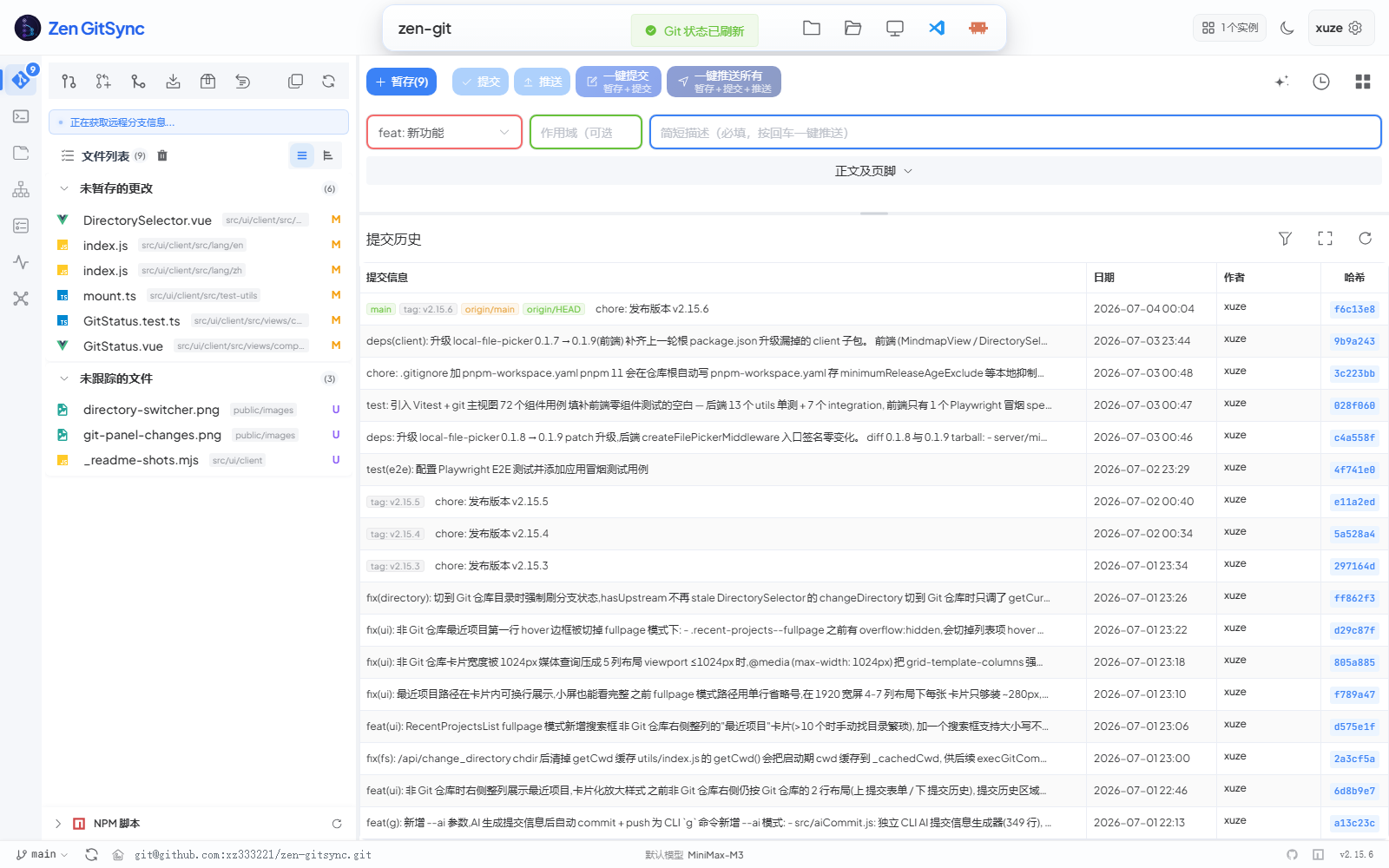
The GUI runs as a local web server and opens in your default browser. It attaches to the current Git repository automatically. The activity bar on the left switches between four primary views: **Git**, **Editor**, **Source Map**, and **Workbench** — plus three utility views (**Console**, **System Monitor**, **Mindmap**). See the [Core Git Panel](#core-git-panel) screenshot below for what the main view looks like.
|
|
76
|
+
|
|
77
|
+
### Architecture at a glance
|
|
78
|
+
|
|
79
|
+
```
|
|
80
|
+
┌─────────────────────────────────────────────┐
|
|
81
|
+
│ Header: current dir · theme · user │
|
|
82
|
+
├─────────────────────────────────────────────┤
|
|
83
|
+
│ Activity Bar (left rail) │
|
|
84
|
+
│ ┌───┐ │
|
|
85
|
+
│ │Git│────► Git panel (file list + commit) │
|
|
86
|
+
│ └───┘ │
|
|
87
|
+
│ ┌─────┐ │
|
|
88
|
+
│ │Edit│────► Monaco editor + file tree │
|
|
89
|
+
│ └─────┘ │
|
|
90
|
+
│ ┌──────┐ │
|
|
91
|
+
│ │SrcMap│─► AI dependency graph │
|
|
92
|
+
│ └──────┘ │
|
|
93
|
+
│ ┌──────┐ │
|
|
94
|
+
│ │Bench │─► Tasks + Claude runs │
|
|
95
|
+
│ └──────┘ │
|
|
96
|
+
│ ┌──────┐ │
|
|
97
|
+
│ │Consol│─► Commands + terminal │
|
|
98
|
+
│ └──────┘ │
|
|
99
|
+
└─────────────────────────────────────────────┘
|
|
100
|
+
▲ ▲ ▲
|
|
101
|
+
│ │ │
|
|
102
|
+
Pinia stores ──── EventBus ──── Socket.IO
|
|
103
|
+
▲
|
|
104
|
+
│
|
|
105
|
+
Backend Express server (port 5545) → git / npm / shell
|
|
106
|
+
```
|
|
107
|
+
|
|
108
|
+
### A typical day in the GUI
|
|
109
|
+
|
|
110
|
+
```
|
|
111
|
+
1. g ui → browser opens at http://127.0.0.1:5544
|
|
112
|
+
2. Glance header → current dir, branch, instance count, theme toggle
|
|
113
|
+
3. Edit files → Activity Bar → Editor, save with Ctrl+S
|
|
114
|
+
4. Stage & commit → Activity Bar → Git, pick files, fill commit form, push
|
|
115
|
+
5. AI commit msg → click ✨ AI 生成 in commit form, diff → Conventional Commits
|
|
116
|
+
6. Background job → Activity Bar → Workbench, run task, watch live logs
|
|
117
|
+
7. Visualize code → Activity Bar → Source Map → 开始分析 → click nodes
|
|
118
|
+
8. Quick command → Activity Bar → Console → pick saved command → run
|
|
119
|
+
```
|
|
78
120
|
|
|
79
121
|
---
|
|
80
122
|
|
|
81
123
|
### Core Git Panel
|
|
82
124
|
|
|
125
|
+
|
|
126
|
+
|
|
127
|
+
> Single-screen view of "what changed → what to commit → what was committed". The left column lists changed files grouped by staged / unstaged / untracked / conflicted; the right side stacks the structured commit form on top of a chronological commit history. No tab switching required for the 80% case.
|
|
128
|
+
|
|
83
129
|
| Feature | Description |
|
|
84
130
|
|---|---|
|
|
85
131
|
| File list | Shows all changed files grouped by staged / unstaged / untracked / conflicted |
|
|
@@ -110,6 +156,14 @@ In either mode, click **AI Generate** to fill in the fields automatically based
|
|
|
110
156
|
|
|
111
157
|
---
|
|
112
158
|
|
|
159
|
+
### Quick directory switch
|
|
160
|
+
|
|
161
|
+
|
|
162
|
+
|
|
163
|
+
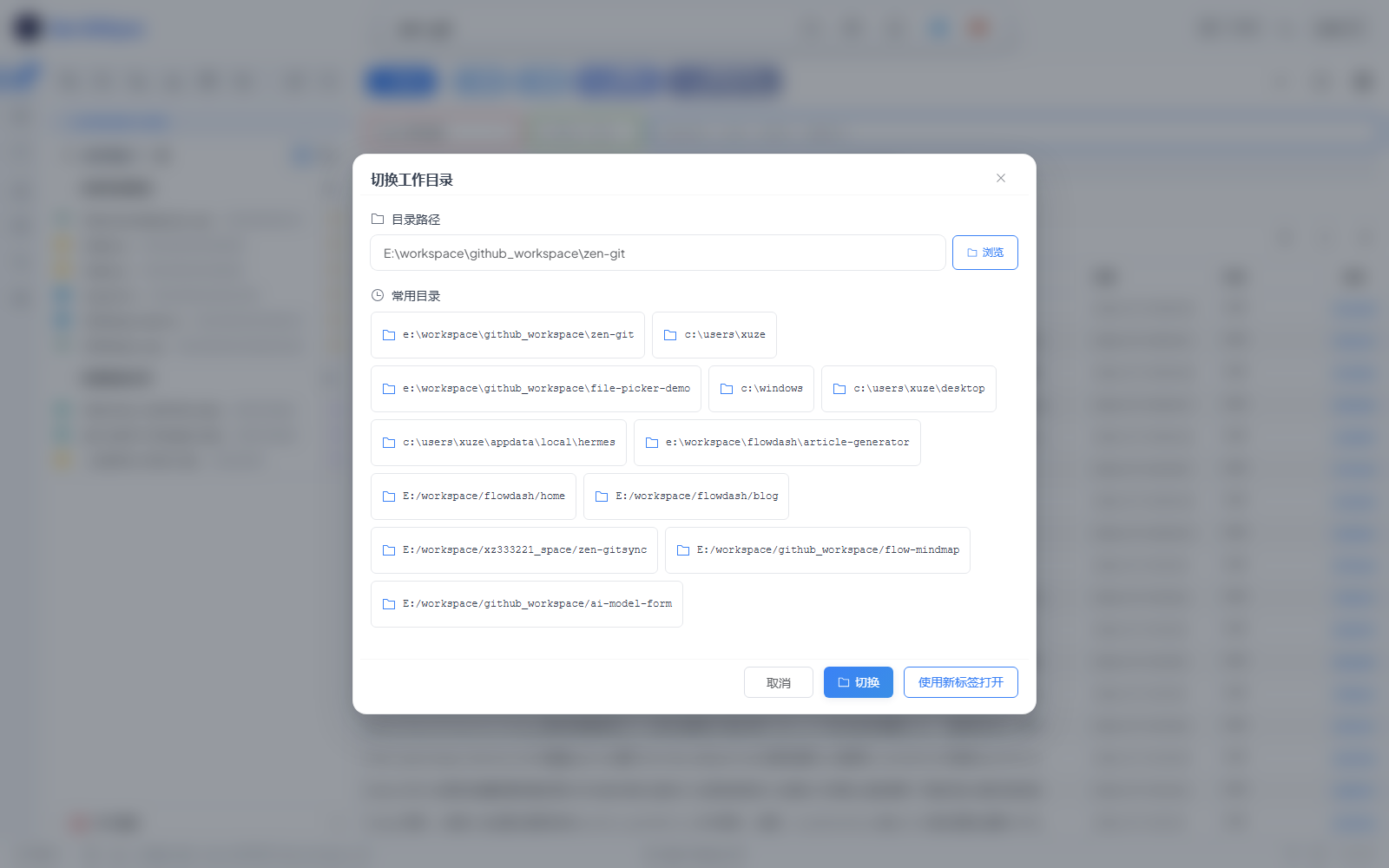
> Click the directory name in the header (or the folder icon) to open this dialog. Type a path, hit **浏览** to use the OS file picker, or pick from **常用目录** for one-click switching. **使用新标签打开** spawns a new GUI tab on that path so you can keep the current project open.
|
|
164
|
+
|
|
165
|
+
---
|
|
166
|
+
|
|
113
167
|
### Branch Management
|
|
114
168
|
|
|
115
169
|
- View all local and remote branches
|
|
@@ -150,12 +204,13 @@ Save reusable templates for:
|
|
|
150
204
|
|
|
151
205
|

|
|
152
206
|
|
|
153
|
-
Create, manage, and run shell commands from the sidebar:
|
|
207
|
+
Create, manage, and run shell commands from the sidebar (Console view):
|
|
154
208
|
|
|
155
209
|
- Define commands with a name, shell command, and working directory
|
|
156
210
|
- Add **parameters** with names, descriptions, and default values (referenced via `{{paramName}}`)
|
|
157
211
|
- Run a command instantly in a new terminal session
|
|
158
212
|
- Save command **templates** for quick reuse
|
|
213
|
+
- Each command has its own **enable / disable** toggle so you can stage a suite of commands without running them
|
|
159
214
|
|
|
160
215
|
---
|
|
161
216
|
|
|
@@ -178,6 +233,8 @@ Build automated pipelines with a drag-and-drop canvas:
|
|
|
178
233
|
|
|
179
234
|
### NPM Scripts Panel
|
|
180
235
|
|
|
236
|
+
> The panel lives inside the Git view (left column). It scans every `package.json` in the repo on demand, groups scripts by package, and lets you click any script name to run it directly. The **NPM 路径** setting under **Settings** configures the scan root and exclusion patterns.
|
|
237
|
+
|
|
181
238
|
- Automatically discovers all `package.json` files in the project tree
|
|
182
239
|
- Lists their `scripts` entries
|
|
183
240
|
- Run any script with one click
|
|
@@ -185,9 +242,13 @@ Build automated pipelines with a drag-and-drop canvas:
|
|
|
185
242
|
|
|
186
243
|
---
|
|
187
244
|
|
|
188
|
-
###
|
|
245
|
+
### Console Panel
|
|
189
246
|
|
|
190
|
-
|
|
247
|
+
|
|
248
|
+
|
|
249
|
+
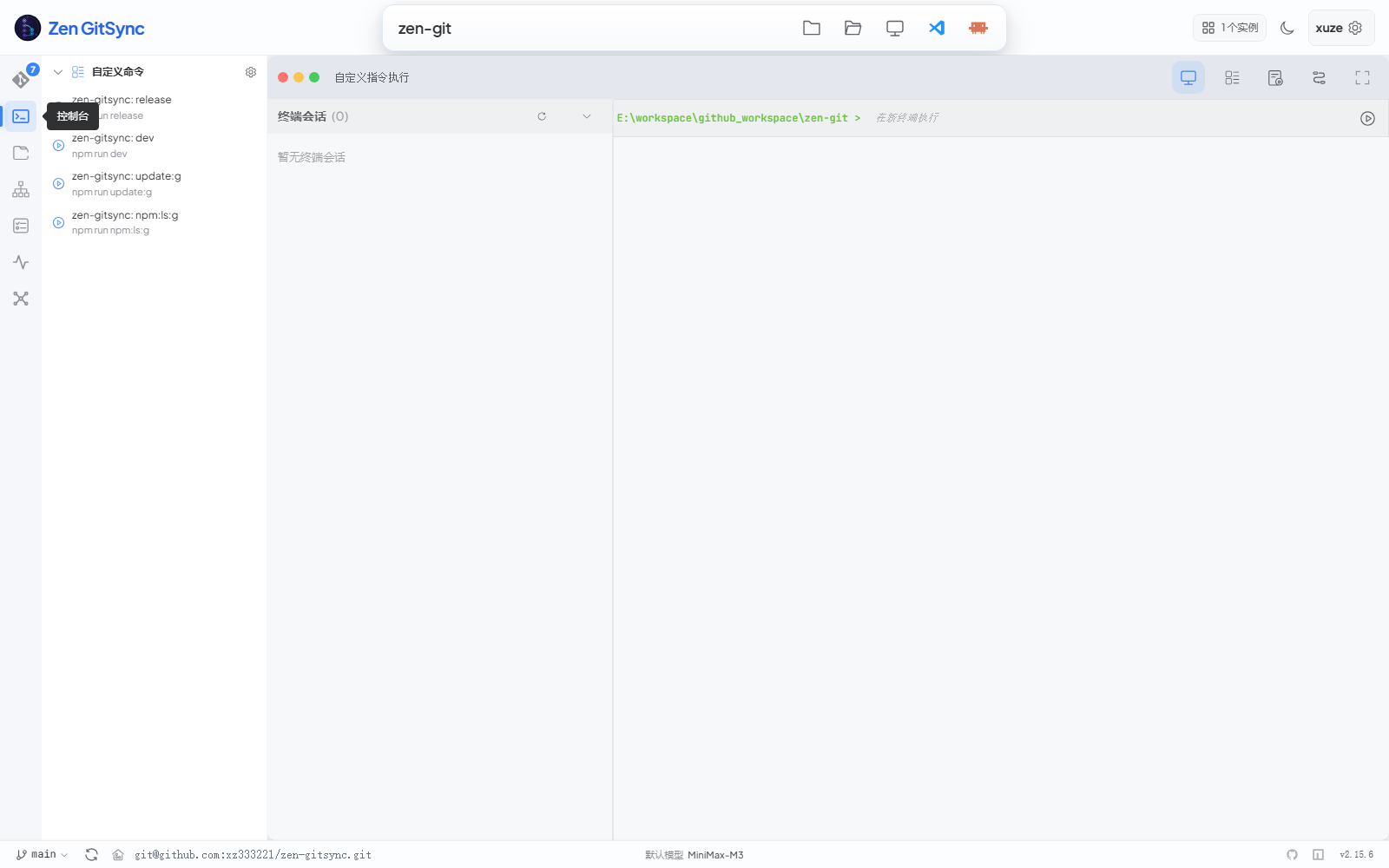
> Three-pane layout: saved custom commands on the left, **自定义指令执行** (saved custom commands + terminal sessions) tab on top, and a live terminal on the right. Click any saved command in the sidebar to launch it in a new terminal session; the terminal streams output in real time over SSE and supports running multiple sessions side by side. The `cmd.exe` shell is used on Windows, `sh` on Unix.
|
|
250
|
+
|
|
251
|
+
- Open new terminal sessions from within the GUI (one per command)
|
|
191
252
|
- Commands stream output in real time (Server-Sent Events)
|
|
192
253
|
- Running processes are tracked and can be stopped individually
|
|
193
254
|
- Cross-platform: uses `cmd.exe` on Windows, `sh` on Unix
|
|
@@ -204,6 +265,17 @@ Configure commands or workflows to run automatically when a project is opened:
|
|
|
204
265
|
|
|
205
266
|
---
|
|
206
267
|
|
|
268
|
+
### Four primary views at a glance
|
|
269
|
+
|
|
270
|
+
| View | Purpose | Persistent state | Highlights |
|
|
271
|
+
|---|---|---|---|
|
|
272
|
+
| **Git** | Day-to-day staging, committing, pushing, history review | Per-project UI prefs (view mode, layout ratios) | Structured commit form, AI commit message, selection-scoped quick push |
|
|
273
|
+
| **Editor** | Browse & edit project files without leaving the GUI | Open tabs, unsaved markers, recent files | Monaco editor with syntax highlighting, Markdown preview, file search |
|
|
274
|
+
| **Source Map** | AI-built visual dependency graph | Last analyzed project, layout ratios | Three-pane (tree / graph / source), subsystems, entry-point detection |
|
|
275
|
+
| **Workbench** | Batch Claude execution on the repo | Tasks, prompts, log retention | Subtask attachments, isolated contexts, live SSE logs, simple-task continuation |
|
|
276
|
+
|
|
277
|
+
---
|
|
278
|
+
|
|
207
279
|
### Built-in Code Editor
|
|
208
280
|
|
|
209
281
|
A full IDE-like editor (second icon in the activity bar) for browsing and editing project files without leaving the tool:
|
|
@@ -225,6 +297,10 @@ A full IDE-like editor (second icon in the activity bar) for browsing and editin
|
|
|
225
297
|
|
|
226
298
|
### Source Map (AI Codebase Visualization)
|
|
227
299
|
|
|
300
|
+
|
|
301
|
+
|
|
302
|
+
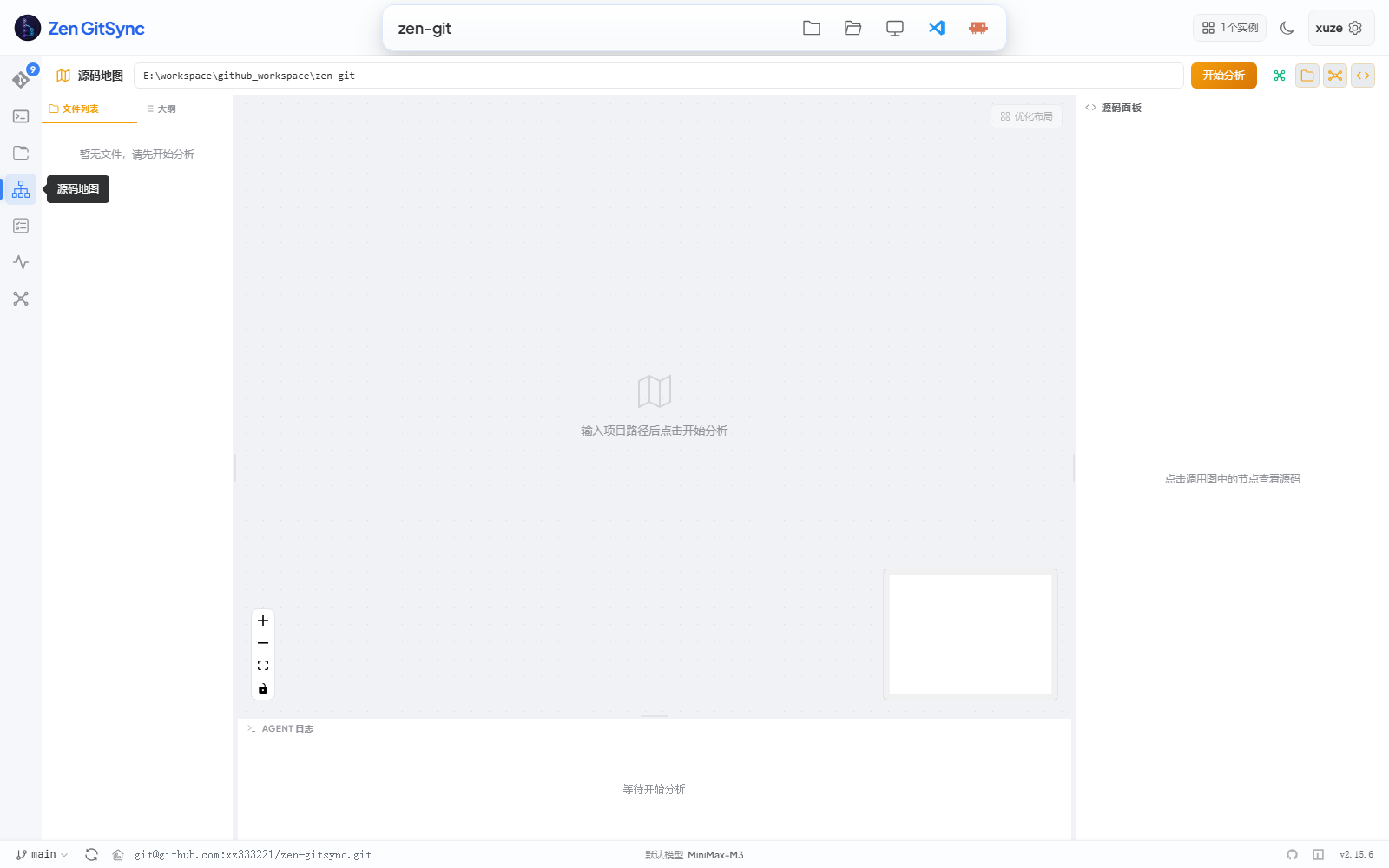
> Three-pane layout: file tree on the left, interactive dependency graph in the middle (drag / zoom / fit-view / minimap), source preview on the right. Click **开始分析** to send the project to the configured LLM and the graph populates with color-coded subsystems, an entry-point node, and tech-stack detection. Live progress streams into the **AGENT 日志** panel at the bottom.
|
|
303
|
+
|
|
228
304
|
A dedicated view (third icon in the activity bar) that uses an AI model to build a visual dependency graph of your project:
|
|
229
305
|
|
|
230
306
|
| Feature | Description |
|
|
@@ -245,6 +321,10 @@ Configure the model endpoint, API key, and model name in **Settings → AI**.
|
|
|
245
321
|
|
|
246
322
|
### Workbench (Task-Driven Claude Execution)
|
|
247
323
|
|
|
324
|
+
|
|
325
|
+
|
|
326
|
+
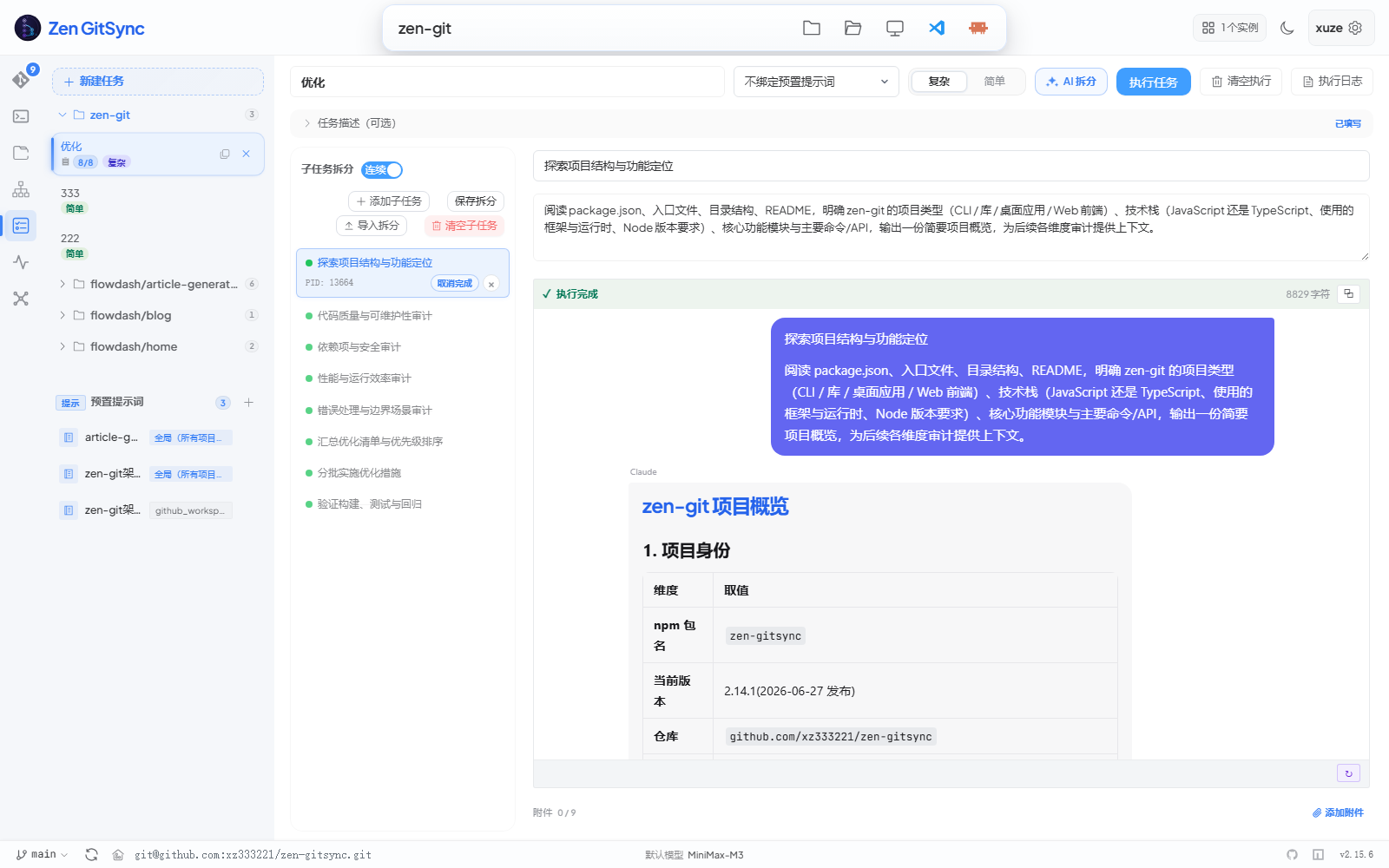
> Sidebar lists tasks (with project grouping) and prompt presets. The main pane is split between the task definition (commit-code field, preset selector, run/stop buttons) and the live **Claude** execution stream — a chronological card stack of stdout/stderr output, scrolled to the latest. The bottom composer captures follow-up prompts for `claude --resume`.
|
|
327
|
+
|
|
248
328
|
A dedicated view (fourth icon in the activity bar) for batch-running Claude against your repo. Define a task, split it into ordered subtasks, attach a reusable prompt preset, then click **Run task** — each subtask launches in its own terminal window with `claude --permission-mode bypassPermissions`, so context never piles up.
|
|
249
329
|
|
|
250
330
|
| Feature | Description |
|
|
@@ -275,6 +355,10 @@ Prompt presets and tasks are persisted to `~/.zen-gitsync/prompts.json` and `~/.
|
|
|
275
355
|
|
|
276
356
|
### Settings
|
|
277
357
|
|
|
358
|
+
|
|
359
|
+
|
|
360
|
+
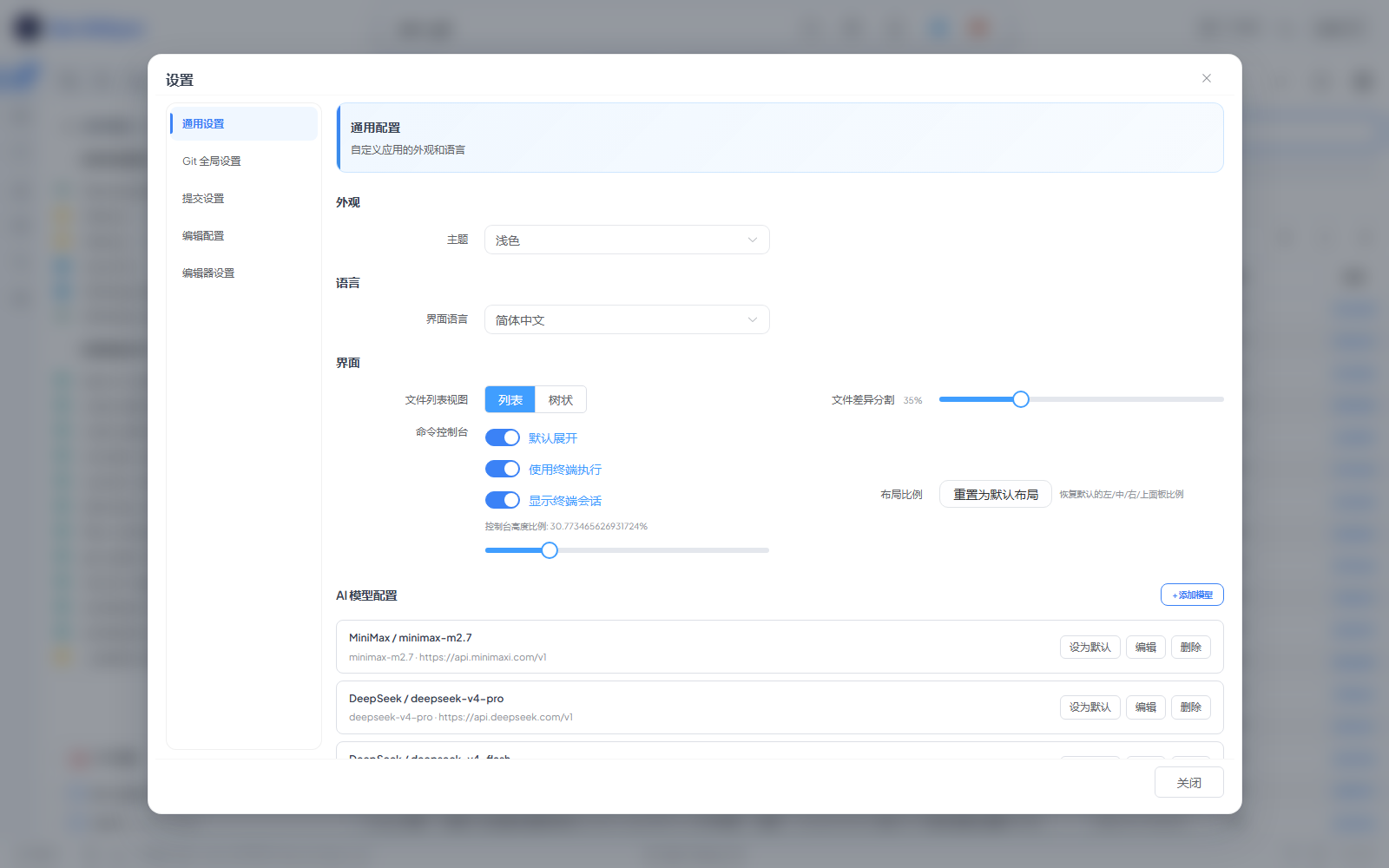
> Click the gear icon in the top-right header. Tabs cover **General / Git / Commit / AI / Theme / Language / File Locking / NPM Paths**. Most toggles take effect immediately without restarting the GUI.
|
|
361
|
+
|
|
278
362
|
| Setting | Description |
|
|
279
363
|
|---|---|
|
|
280
364
|
| Git user | Set `user.name` and `user.email` |
|
|
@@ -484,14 +568,60 @@ npm install -g zen-gitsync
|
|
|
484
568
|
$ g ui
|
|
485
569
|
```
|
|
486
570
|
|
|
487
|
-
|
|
571
|
+
GUI 以本地 Web 服务器形式运行,自动在浏览器中打开,并附加到当前 Git 仓库。左侧 Activity Bar 可在四个主视图(**Git** / **编辑器** / **源码地图** / **工作台**)与三个辅助视图(**控制台** / **系统监控** / **思维导图**)之间切换。主界面长什么样可参考下方[核心 Git 面板](#核心-git-面板)的截图。
|
|
488
572
|
|
|
489
|
-
|
|
573
|
+
### 一眼看懂架构
|
|
574
|
+
|
|
575
|
+
```
|
|
576
|
+
┌─────────────────────────────────────────────┐
|
|
577
|
+
│ 顶部条: 当前目录 · 主题 · 用户 │
|
|
578
|
+
├─────────────────────────────────────────────┤
|
|
579
|
+
│ Activity Bar(左侧导航) │
|
|
580
|
+
│ ┌───┐ │
|
|
581
|
+
│ │Git│────► Git 面板 (文件列表 + 提交) │
|
|
582
|
+
│ └───┘ │
|
|
583
|
+
│ ┌─────┐ │
|
|
584
|
+
│ │编辑│────► Monaco 编辑器 + 文件树 │
|
|
585
|
+
│ └─────┘ │
|
|
586
|
+
│ ┌──────┐ │
|
|
587
|
+
│ │源图 │──► AI 依赖关系图 │
|
|
588
|
+
│ └──────┘ │
|
|
589
|
+
│ ┌──────┐ │
|
|
590
|
+
│ │工作 │──► 任务 + Claude 实时执行 │
|
|
591
|
+
│ └──────┘ │
|
|
592
|
+
│ ┌──────┐ │
|
|
593
|
+
│ │控制 │──► 命令 + 终端 │
|
|
594
|
+
│ └──────┘ │
|
|
595
|
+
└─────────────────────────────────────────────┘
|
|
596
|
+
▲ ▲ ▲
|
|
597
|
+
│ │ │
|
|
598
|
+
Pinia stores ──── EventBus ──── Socket.IO
|
|
599
|
+
▲
|
|
600
|
+
│
|
|
601
|
+
后端 Express (端口 5545) → git / npm / shell
|
|
602
|
+
```
|
|
603
|
+
|
|
604
|
+
### GUI 典型一天
|
|
605
|
+
|
|
606
|
+
```
|
|
607
|
+
1. g ui → 浏览器自动打开 http://127.0.0.1:5544
|
|
608
|
+
2. 看顶部条 → 当前目录 / 当前分支 / 实例数 / 主题切换
|
|
609
|
+
3. 编辑文件 → Activity Bar → 编辑器,Ctrl+S 保存
|
|
610
|
+
4. 暂存并提交 → Activity Bar → Git,勾选文件,填提交表单,推送
|
|
611
|
+
5. AI 生成提交信息 → 点击提交表单里的 ✨ AI 生成,基于 diff 生成
|
|
612
|
+
6. 后台任务 → Activity Bar → 工作台,执行任务,实时日志
|
|
613
|
+
7. 可视化代码 → Activity Bar → 源码地图 → 开始分析 → 点击节点
|
|
614
|
+
8. 快速命令 → Activity Bar → 控制台 → 选保存的命令 → 执行
|
|
615
|
+
```
|
|
490
616
|
|
|
491
617
|
---
|
|
492
618
|
|
|
493
619
|
### 核心 Git 面板
|
|
494
620
|
|
|
621
|
+

|
|
622
|
+
|
|
623
|
+
> 单屏覆盖"改了什么 → 要提交什么 → 已经提交了什么"。左侧按 已暂存 / 未暂存 / 未追踪 / 冲突 分组列出变更文件;右侧上半部分是结构化提交表单,下半部分是时间倒序的提交历史。80% 的日常操作不需要切换 tab。
|
|
624
|
+
|
|
495
625
|
| 功能 | 说明 |
|
|
496
626
|
|---|---|
|
|
497
627
|
| 文件列表 | 按已暂存/未暂存/未追踪/冲突分组显示所有变更文件 |
|
|
@@ -522,6 +652,14 @@ GUI 以本地 Web 服务器形式运行,自动在浏览器中打开,并附
|
|
|
522
652
|
|
|
523
653
|
---
|
|
524
654
|
|
|
655
|
+
### 快速切换目录
|
|
656
|
+
|
|
657
|
+

|
|
658
|
+
|
|
659
|
+
> 点击顶部条里的目录名(或文件夹图标)即可弹出该对话框。直接输入路径、点击 **浏览** 唤起系统文件选择器,或从 **常用目录** 一键切换。**使用新标签打开** 会在新 GUI 标签里加载目标路径,原项目保持不动。
|
|
660
|
+
|
|
661
|
+
---
|
|
662
|
+
|
|
525
663
|
### 分支管理
|
|
526
664
|
|
|
527
665
|
- 查看所有本地和远程分支
|
|
@@ -562,12 +700,13 @@ GUI 以本地 Web 服务器形式运行,自动在浏览器中打开,并附
|
|
|
562
700
|
|
|
563
701
|

|
|
564
702
|
|
|
565
|
-
|
|
703
|
+
在侧边栏(控制台视图)创建、管理并运行 Shell 命令:
|
|
566
704
|
|
|
567
705
|
- 定义命令(名称、Shell 命令、工作目录)
|
|
568
706
|
- 添加**参数**(名称、描述、默认值,通过 `{{paramName}}` 引用)
|
|
569
707
|
- 一键在新终端会话中执行命令
|
|
570
708
|
- 保存**命令模板**快速复用
|
|
709
|
+
- 每条命令都有 **启用 / 禁用** 开关,可以在不立即运行的情况下预排一组命令
|
|
571
710
|
|
|
572
711
|
---
|
|
573
712
|
|
|
@@ -590,6 +729,8 @@ GUI 以本地 Web 服务器形式运行,自动在浏览器中打开,并附
|
|
|
590
729
|
|
|
591
730
|
### NPM 脚本面板
|
|
592
731
|
|
|
732
|
+
> 面板嵌在 Git 视图左下角。按需扫描仓库里的所有 `package.json`,按包分组列出 scripts,点击脚本名即可直接运行。扫描根路径与排除规则在 **设置** 的 **NPM 路径** 中配置。
|
|
733
|
+
|
|
593
734
|
- 自动扫描项目中所有 `package.json` 文件
|
|
594
735
|
- 列出其中的 `scripts` 条目
|
|
595
736
|
- 一键运行任意脚本
|
|
@@ -597,9 +738,13 @@ GUI 以本地 Web 服务器形式运行,自动在浏览器中打开,并附
|
|
|
597
738
|
|
|
598
739
|
---
|
|
599
740
|
|
|
600
|
-
###
|
|
741
|
+
### 控制台面板
|
|
601
742
|
|
|
602
|
-
|
|
743
|
+

|
|
744
|
+
|
|
745
|
+
> 三栏布局:左侧是已保存的自定义命令,顶部是 **自定义指令执行**(已保存命令 + 终端会话)两个 tab,右侧是实时终端。点击侧边栏任意命令即可在新终端会话里执行;终端通过 SSE 实时回传输出,支持多个会话并行。Windows 用 `cmd.exe`,Unix 用 `sh`。
|
|
746
|
+
|
|
747
|
+
- 在 GUI 内直接打开新的终端会话(每条命令独立会话)
|
|
603
748
|
- 命令输出实时流式显示(Server-Sent Events)
|
|
604
749
|
- 追踪运行中的进程,随时可以停止
|
|
605
750
|
- 跨平台:Windows 使用 `cmd.exe`,Unix 使用 `sh`
|
|
@@ -616,6 +761,17 @@ GUI 以本地 Web 服务器形式运行,自动在浏览器中打开,并附
|
|
|
616
761
|
|
|
617
762
|
---
|
|
618
763
|
|
|
764
|
+
### 四个主视图对照
|
|
765
|
+
|
|
766
|
+
| 视图 | 用途 | 持久化状态 | 高亮特性 |
|
|
767
|
+
|---|---|---|---|
|
|
768
|
+
| **Git** | 日常暂存、提交、推送、历史回看 | 每个项目的 UI 偏好(视图模式、布局比例) | 结构化提交表单、AI 生成提交信息、选择范围一键推送 |
|
|
769
|
+
| **编辑器** | 不离开 GUI 浏览并编辑项目文件 | 打开的 tab、未保存标记、最近访问 | Monaco 编辑器带语法高亮、Markdown 预览、文件搜索 |
|
|
770
|
+
| **源码地图** | AI 生成的可视化依赖图 | 最近分析的项目、布局比例 | 三栏布局(树 / 图 / 源码)、子系统聚类、入口点识别 |
|
|
771
|
+
| **工作台** | 在仓库上批量执行 Claude | 任务、提示词、日志保留策略 | 子任务附件、独立上下文、实时 SSE 日志、简单任务续聊 |
|
|
772
|
+
|
|
773
|
+
---
|
|
774
|
+
|
|
619
775
|
### 内置代码编辑器
|
|
620
776
|
|
|
621
777
|
Activity Bar 第二个视图,在 GUI 内直接浏览并编辑项目文件:
|
|
@@ -637,6 +793,10 @@ Activity Bar 第二个视图,在 GUI 内直接浏览并编辑项目文件:
|
|
|
637
793
|
|
|
638
794
|
### 源码地图(AI 代码库可视化)
|
|
639
795
|
|
|
796
|
+

|
|
797
|
+
|
|
798
|
+
> 三栏布局:左侧文件树 / 中间可交互依赖图(拖拽、缩放、适配视图、缩略图) / 右侧源码预览。点击 **开始分析** 把项目发给配置好的 LLM,图上就会填入颜色分明的子系统、入口节点、技术栈识别结果。底部 **AGENT 日志** 实时输出扫描进度。
|
|
799
|
+
|
|
640
800
|
Activity Bar 第三个视图,调用 AI 模型将项目代码库生成可交互的依赖关系图:
|
|
641
801
|
|
|
642
802
|
| 功能 | 说明 |
|
|
@@ -657,6 +817,10 @@ Activity Bar 第三个视图,调用 AI 模型将项目代码库生成可交互
|
|
|
657
817
|
|
|
658
818
|
### 工作台(任务驱动的 Claude 执行)
|
|
659
819
|
|
|
820
|
+

|
|
821
|
+
|
|
822
|
+
> 侧边栏按项目分组列出任务和提示词预置;主面板上半部分是任务定义(提交代码字段、预置提示词下拉、运行 / 停止按钮),下半部分是 **Claude** 实时执行流 —— 按时间顺序堆叠的 stdout / stderr 卡片,自动滚到最新。底部续聊输入框可以接着 `claude --resume` 继续对话。
|
|
823
|
+
|
|
660
824
|
Activity Bar 第四个视图,用于在当前仓库上批量调度 Claude:定义任务、拆成有序子任务、绑定可复用的提示词预置,点 **执行任务** 后按顺序依次执行。
|
|
661
825
|
|
|
662
826
|
| 功能 | 说明 |
|
|
@@ -690,6 +854,10 @@ Activity Bar 第四个视图,用于在当前仓库上批量调度 Claude:定
|
|
|
690
854
|
|
|
691
855
|
### 设置
|
|
692
856
|
|
|
857
|
+

|
|
858
|
+
|
|
859
|
+
> 点击顶部条右上角齿轮图标。tab 包含 **通用 / Git / 提交 / AI / 主题 / 语言 / 文件锁定 / NPM 路径**。大部分开关即时生效,无需重启 GUI。
|
|
860
|
+
|
|
693
861
|
| 设置项 | 说明 |
|
|
694
862
|
|---|---|
|
|
695
863
|
| Git 用户信息 | 设置 `user.name` 和 `user.email` |
|
package/package.json
CHANGED
|
@@ -1,6 +1,6 @@
|
|
|
1
1
|
{
|
|
2
2
|
"name": "zen-gitsync",
|
|
3
|
-
"version": "2.15.
|
|
3
|
+
"version": "2.15.7",
|
|
4
4
|
"description": "Auto commit, scheduled sync, and visual GUI for Git. Run `g` in any repo for one-key commit & push, AI commit messages, scheduled background sync, and a drag-and-drop workflow builder.",
|
|
5
5
|
"main": "index.js",
|
|
6
6
|
"type": "module",
|
|
@@ -20,6 +20,9 @@
|
|
|
20
20
|
"release": "node ./scripts/release.js",
|
|
21
21
|
"test": "node scripts/run-tests.cjs",
|
|
22
22
|
"test:watch": "node scripts/run-tests.cjs --watch",
|
|
23
|
+
"e2e": "cd src/ui/client && npx playwright test",
|
|
24
|
+
"e2e:headed": "cd src/ui/client && npx playwright test --headed",
|
|
25
|
+
"e2e:install": "cd src/ui/client && npx playwright install chromium",
|
|
23
26
|
"audit": "npm audit --omit=dev",
|
|
24
27
|
"audit:ci": "npm audit --audit-level=high --omit=dev",
|
|
25
28
|
"g": "node ./src/gitCommit.js",
|
|
@@ -101,7 +104,7 @@
|
|
|
101
104
|
"date-fns": "^4.1.0",
|
|
102
105
|
"express": "^5.1.0",
|
|
103
106
|
"iconv-lite": "^0.7.0",
|
|
104
|
-
"local-file-picker": "^0.1.
|
|
107
|
+
"local-file-picker": "^0.1.9",
|
|
105
108
|
"log-update": "^6.1.0",
|
|
106
109
|
"open": "^10.1.2",
|
|
107
110
|
"ora": "^8.1.1",
|
|
@@ -1,2 +1,2 @@
|
|
|
1
|
-
import"./rolldown-runtime-CMxvf4Kt.js";import{B as e,Cn as t,D as n,Et as r,Fn as i,G as a,Jn as o,Ln as s,Mn as c,Sn as l,Tn as u,Xn as d,Y as f,_n as p,_r as m,a as h,gn as g,hn as _,i as v,mn as y,mr as b,nt as x,pr as S,rt as C,sr as w,vn as T,zn as E}from"./element-plus-DB-NeCl9.js";import{n as D,t as O}from"./_plugin-vue_export-helper-
|
|
2
|
-
`);i=o.pop()??``;for(let e of o)e.trim()&&t(e)}i.trim()&&t(i)}async function A(){let e=await fetch(`/api/app-version`);return e.ok?e.json():{success:!1,current:``,latest:null,hasUpdate:!1,error:`HTTP ${e.status}`}}async function j(e){let t=await fetch(`/api/app-upgrade`,{method:`POST`});if(!t.ok){let n=`HTTP ${t.status}`;try{let e=await t.json();e?.error&&(n=e.error)}catch{}e({type:`error`,message:n}),e({type:`done`,code:t.status});return}if(!t.body){e({type:`error`,message:`响应无 body`}),e({type:`done`,code:-1});return}await k(t,t=>{try{e(JSON.parse(t))}catch{}})}async function M(){let e=await fetch(`/api/app-restart`,{method:`POST`});if(!e.ok){let t=`HTTP ${e.status}`;try{let n=await e.json();n?.error&&(t=n.error)}catch{}throw Error(t)}if(!e.body)throw Error(`响应无 body`);return new Promise((t,n)=>{let r=!1,i=e=>{r||(r=!0,e())};k(e,e=>{try{let r=JSON.parse(e);r.type===`ready`&&typeof r.port==`number`&&r.port>0?i(()=>t(r.port)):r.type===`timeout`?i(()=>n(Error(`restart.timeout`))):r.type===`error`&&i(()=>n(Error(r.message||`restart.failed`)))}catch{}}).then(()=>{i(()=>n(Error(`restart.stream-closed`)))}).catch(()=>{})})}var N={key:3},P={key:4},F={key:5},I={key:0,class:`upgrade-hint`},L={key:0,class:`upgrade-countdown`},R=O(u({__name:`UpgradeDialog`,props:{modelValue:{type:Boolean},logs:{},status:{},countdown:{default:0}},emits:[`update:modelValue`,`retry`,`restart`,`cancel`],setup(i,{emit:a}){let s=i,u=a,h=w(null);o(()=>s.logs,async()=>{await c(),h.value&&(h.value.scrollTop=h.value.scrollHeight)});function v(){s.status!==`running`&&(s.status===`success`&&s.countdown>0&&u(`cancel`),u(`update:modelValue`,!1))}function y(){u(`retry`)}function O(){u(`restart`)}function k(){u(`cancel`),u(`update:modelValue`,!1)}return(a,o)=>{let s=f,c=e,w=n;return E(),g(w,{"model-value":i.modelValue,"onUpdate:modelValue":o[0]||=e=>u(`update:modelValue`,e),title:S(D)(`@F13B4:升级`),width:`680px`,"close-on-click-modal":!1,"close-on-press-escape":!1,"show-close":i.status!==`running`,"append-to-body":``,onClose:v},{footer:d(()=>[i.status===`failed`?(E(),g(c,{key:0,type:`primary`,onClick:y},{default:d(()=>[l(m(S(D)(`@F13B4:重试`)),1)]),_:1})):p(``,!0),i.status===`success`?(E(),g(c,{key:1,type:`primary`,onClick:O},{default:d(()=>[l(m(S(D)(`@F13B4:立即重启并刷新`)),1)]),_:1})):p(``,!0),i.status===`success`?(E(),g(c,{key:2,onClick:k},{default:d(()=>[l(m(S(D)(`@F13B4:稍后手动重启`)),1)]),_:1})):p(``,!0),i.status===`running`?(E(),g(c,{key:3,disabled:``},{default:d(()=>[l(m(S(D)(`@F13B4:升级中`))+`... `,1)]),_:1})):p(``,!0)]),default:d(()=>[_(`div`,{class:b([`upgrade-status`,`is-${i.status}`])},[i.status===`running`?(E(),g(s,{key:0,class:`is-loading`},{default:d(()=>[t(S(r))]),_:1})):i.status===`success`?(E(),g(s,{key:1,color:`#67c23a`},{default:d(()=>[t(S(x))]),_:1})):(E(),g(s,{key:2,color:`#f56c6c`},{default:d(()=>[t(S(C))]),_:1})),i.status===`running`?(E(),T(`span`,N,m(S(D)(`@F13B4:升级中`)),1)):i.status===`success`?(E(),T(`span`,P,m(S(D)(`@F13B4:升级完成`)),1)):(E(),T(`span`,F,m(S(D)(`@F13B4:升级失败`)),1))],2),i.status===`success`?(E(),T(`p`,I,[l(m(S(D)(`@F13B4:新版本已全局安装,需要重启服务才能生效`))+` `,1),i.countdown>0?(E(),T(`span`,L,m(S(D)(`@F13B4:{seconds} 秒后自动刷新`,{seconds:i.countdown})),1)):p(``,!0)])):p(``,!0),_(`pre`,{ref_key:`logEl`,ref:h,class:`upgrade-log`},m(i.logs||S(D)(`@F13B4:等待日志输出`)),513)]),_:1},8,[`model-value`,`title`,`show-close`])}}}),[[`__scopeId`,`data-v-3de8edac`]]),z={class:`app-version-badge`},B=[`aria-label`],V=[`aria-label`],H=[`title`,`aria-label`],U={class:`upgrade-btn__label`},W={class:`upgrade-btn__version`},G=`https://github.com/xz333221/zen-gitsync/releases`,K=5,q=`app-version-check`,J=3600*1e3,Y=O(u({__name:`AppVersionBadge`,setup(e){let n=`2.15.
|
|
1
|
+
import"./rolldown-runtime-CMxvf4Kt.js";import{B as e,Cn as t,D as n,Et as r,Fn as i,G as a,Jn as o,Ln as s,Mn as c,Sn as l,Tn as u,Xn as d,Y as f,_n as p,_r as m,a as h,gn as g,hn as _,i as v,mn as y,mr as b,nt as x,pr as S,rt as C,sr as w,vn as T,zn as E}from"./element-plus-DB-NeCl9.js";import{n as D,t as O}from"./_plugin-vue_export-helper-CbbG2Bfw.js";async function k(e,t){let n=e.body.getReader(),r=new TextDecoder(`utf-8`),i=``;for(;;){let{done:e,value:a}=await n.read();if(e)break;i+=r.decode(a,{stream:!0});let o=i.split(`
|
|
2
|
+
`);i=o.pop()??``;for(let e of o)e.trim()&&t(e)}i.trim()&&t(i)}async function A(){let e=await fetch(`/api/app-version`);return e.ok?e.json():{success:!1,current:``,latest:null,hasUpdate:!1,error:`HTTP ${e.status}`}}async function j(e){let t=await fetch(`/api/app-upgrade`,{method:`POST`});if(!t.ok){let n=`HTTP ${t.status}`;try{let e=await t.json();e?.error&&(n=e.error)}catch{}e({type:`error`,message:n}),e({type:`done`,code:t.status});return}if(!t.body){e({type:`error`,message:`响应无 body`}),e({type:`done`,code:-1});return}await k(t,t=>{try{e(JSON.parse(t))}catch{}})}async function M(){let e=await fetch(`/api/app-restart`,{method:`POST`});if(!e.ok){let t=`HTTP ${e.status}`;try{let n=await e.json();n?.error&&(t=n.error)}catch{}throw Error(t)}if(!e.body)throw Error(`响应无 body`);return new Promise((t,n)=>{let r=!1,i=e=>{r||(r=!0,e())};k(e,e=>{try{let r=JSON.parse(e);r.type===`ready`&&typeof r.port==`number`&&r.port>0?i(()=>t(r.port)):r.type===`timeout`?i(()=>n(Error(`restart.timeout`))):r.type===`error`&&i(()=>n(Error(r.message||`restart.failed`)))}catch{}}).then(()=>{i(()=>n(Error(`restart.stream-closed`)))}).catch(()=>{})})}var N={key:3},P={key:4},F={key:5},I={key:0,class:`upgrade-hint`},L={key:0,class:`upgrade-countdown`},R=O(u({__name:`UpgradeDialog`,props:{modelValue:{type:Boolean},logs:{},status:{},countdown:{default:0}},emits:[`update:modelValue`,`retry`,`restart`,`cancel`],setup(i,{emit:a}){let s=i,u=a,h=w(null);o(()=>s.logs,async()=>{await c(),h.value&&(h.value.scrollTop=h.value.scrollHeight)});function v(){s.status!==`running`&&(s.status===`success`&&s.countdown>0&&u(`cancel`),u(`update:modelValue`,!1))}function y(){u(`retry`)}function O(){u(`restart`)}function k(){u(`cancel`),u(`update:modelValue`,!1)}return(a,o)=>{let s=f,c=e,w=n;return E(),g(w,{"model-value":i.modelValue,"onUpdate:modelValue":o[0]||=e=>u(`update:modelValue`,e),title:S(D)(`@F13B4:升级`),width:`680px`,"close-on-click-modal":!1,"close-on-press-escape":!1,"show-close":i.status!==`running`,"append-to-body":``,onClose:v},{footer:d(()=>[i.status===`failed`?(E(),g(c,{key:0,type:`primary`,onClick:y},{default:d(()=>[l(m(S(D)(`@F13B4:重试`)),1)]),_:1})):p(``,!0),i.status===`success`?(E(),g(c,{key:1,type:`primary`,onClick:O},{default:d(()=>[l(m(S(D)(`@F13B4:立即重启并刷新`)),1)]),_:1})):p(``,!0),i.status===`success`?(E(),g(c,{key:2,onClick:k},{default:d(()=>[l(m(S(D)(`@F13B4:稍后手动重启`)),1)]),_:1})):p(``,!0),i.status===`running`?(E(),g(c,{key:3,disabled:``},{default:d(()=>[l(m(S(D)(`@F13B4:升级中`))+`... `,1)]),_:1})):p(``,!0)]),default:d(()=>[_(`div`,{class:b([`upgrade-status`,`is-${i.status}`])},[i.status===`running`?(E(),g(s,{key:0,class:`is-loading`},{default:d(()=>[t(S(r))]),_:1})):i.status===`success`?(E(),g(s,{key:1,color:`#67c23a`},{default:d(()=>[t(S(x))]),_:1})):(E(),g(s,{key:2,color:`#f56c6c`},{default:d(()=>[t(S(C))]),_:1})),i.status===`running`?(E(),T(`span`,N,m(S(D)(`@F13B4:升级中`)),1)):i.status===`success`?(E(),T(`span`,P,m(S(D)(`@F13B4:升级完成`)),1)):(E(),T(`span`,F,m(S(D)(`@F13B4:升级失败`)),1))],2),i.status===`success`?(E(),T(`p`,I,[l(m(S(D)(`@F13B4:新版本已全局安装,需要重启服务才能生效`))+` `,1),i.countdown>0?(E(),T(`span`,L,m(S(D)(`@F13B4:{seconds} 秒后自动刷新`,{seconds:i.countdown})),1)):p(``,!0)])):p(``,!0),_(`pre`,{ref_key:`logEl`,ref:h,class:`upgrade-log`},m(i.logs||S(D)(`@F13B4:等待日志输出`)),513)]),_:1},8,[`model-value`,`title`,`show-close`])}}}),[[`__scopeId`,`data-v-3de8edac`]]),z={class:`app-version-badge`},B=[`aria-label`],V=[`aria-label`],H=[`title`,`aria-label`],U={class:`upgrade-btn__label`},W={class:`upgrade-btn__version`},G=`https://github.com/xz333221/zen-gitsync/releases`,K=5,q=`app-version-check`,J=3600*1e3,Y=O(u({__name:`AppVersionBadge`,setup(e){let n=`2.15.7`,r=w(n),o=y(()=>r.value||n),c=w(null),l=w(!1),u=w(``),f=w(`running`),g=w(0),b=null,x=w(!1);function C(){try{let e=sessionStorage.getItem(q);if(!e)return null;let{at:t,data:n}=JSON.parse(e);return Date.now()-t>J?null:n}catch{return null}}function O(e){try{sessionStorage.setItem(q,JSON.stringify({at:Date.now(),data:e}))}catch{}}async function k(e=!1){let t=C();t&&(c.value=t);try{let t=await A();c.value=t,O(t),t.current&&(r.value=t.current),!e&&t.success&&t.hasUpdate&&h({type:`success`,message:D(`@F13B4:发现新版本 {version}`,{version:t.latest??``}),duration:4e3})}catch(t){e||h({type:`warning`,message:D(`@F13B4:检查更新失败 {error}`,{error:t?.message||``})})}}async function N(){if(c.value?.hasUpdate){try{await v.confirm(D(`@F13B4:确定要从 {current} 升级到 {latest} 吗?`,{current:c.value.current,latest:c.value.latest}),D(`@F13B4:升级`),{confirmButtonText:D(`@F13B4:确定升级`),cancelButtonText:D(`@F13B4:取消`),type:`info`})}catch{return}u.value=``,f.value=`running`,l.value=!0,await j(e=>{if(e.type===`done`){if(f.value=e.code===0?`success`:`failed`,e.code===0){try{sessionStorage.removeItem(q)}catch{}c.value?.latest&&(r.value=c.value.latest),P()}}else e.message&&(u.value+=e.message)})}}function P(){F(),g.value=K,b=setInterval(()=>{--g.value,g.value<=0&&(b&&=(clearInterval(b),null),L())},1e3)}function F(){b&&=(clearInterval(b),null),g.value=0}function I(){F()}async function L(){if(F(),!x.value){x.value=!0;try{let e=await M(),{pathname:t,search:n,hash:r}=window.location;window.location.href=`http://localhost:${e}${t}${n}${r}`}catch(e){let t=e?.message||``,n={"restart.timeout":`@F13B4:重启超时`,"restart.stream-closed":`@F13B4:重启失败,请刷新页面重试`,"restart.failed":`@F13B4:重启失败`}[t];h({type:`warning`,message:n?D(n):D(`@F13B4:重启失败 {error}`,{error:t})}),x.value=!1}}}return i(()=>{F()}),s(()=>{k(!0)}),(e,n)=>{let r=a;return E(),T(`div`,z,[t(r,{content:S(D)(`@F13B4:在 GitHub 上查看源码`),placement:`top`,effect:`dark`,"show-after":300},{default:d(()=>[_(`a`,{href:`https://github.com/xz333221/zen-gitsync`,target:`_blank`,rel:`noopener noreferrer`,class:`badge-icon-link`,"aria-label":S(D)(`@F13B4:在 GitHub 上查看源码`)},[...n[1]||=[_(`svg`,{viewBox:`0 0 24 24`,width:`15`,height:`15`,"aria-hidden":`true`,fill:`currentColor`,xmlns:`http://www.w3.org/2000/svg`},[_(`path`,{d:`M12 2C6.477 2 2 6.484 2 12.017c0 4.425 2.865 8.18 6.839 9.504.5.092.682-.217.682-.483 0-.237-.008-.868-.013-1.703-2.782.605-3.369-1.343-3.369-1.343-.454-1.158-1.11-1.466-1.11-1.466-.908-.62.069-.608.069-.608 1.003.07 1.531 1.032 1.531 1.032.892 1.53 2.341 1.088 2.91.832.092-.647.35-1.088.636-1.338-2.22-.253-4.555-1.113-4.555-4.951 0-1.093.39-1.988 1.029-2.688-.103-.253-.446-1.272.098-2.65 0 0 .84-.27 2.75 1.026A9.564 9.564 0 0 1 12 6.844a9.59 9.59 0 0 1 2.504.337c1.909-1.296 2.747-1.027 2.747-1.027.546 1.379.202 2.398.1 2.651.64.7 1.028 1.595 1.028 2.688 0 3.848-2.339 4.695-4.566 4.943.359.309.678.92.678 1.855 0 1.338-.012 2.419-.012 2.747 0 .268.18.58.688.482A10.02 10.02 0 0 0 22 12.017C22 6.484 17.522 2 12 2z`})],-1)]],8,B)]),_:1},8,[`content`]),t(r,{content:S(D)(`@F13B4:在 npm 上查看包`),placement:`top`,effect:`dark`,"show-after":300},{default:d(()=>[_(`a`,{href:`https://www.npmjs.com/package/zen-gitsync`,target:`_blank`,rel:`noopener noreferrer`,class:`badge-icon-link badge-icon-link--npm`,"aria-label":S(D)(`@F13B4:在 npm 上查看包`)},[...n[2]||=[_(`svg`,{viewBox:`0 0 24 24`,width:`15`,height:`15`,"aria-hidden":`true`,fill:`currentColor`,xmlns:`http://www.w3.org/2000/svg`},[_(`path`,{d:`M2 2v20h20V2H2zm17.167 17.167H12.5v-10h-3.333v10H4.833V4.833h14.334v14.334z`})],-1)]],8,V)]),_:1},8,[`content`]),t(r,{content:S(D)(`@F13B4:查看更新`),placement:`top`,effect:`dark`,"show-after":300},{default:d(()=>[_(`a`,{href:G,target:`_blank`,rel:`noopener noreferrer`,class:`version-link`},`v`+m(o.value),1)]),_:1},8,[`content`]),c.value?.hasUpdate?(E(),T(`button`,{key:0,type:`button`,class:`upgrade-btn`,title:S(D)(`@F13B4:发现新版本 {version},点击升级`,{version:c.value.latest??``}),"aria-label":S(D)(`@F13B4:发现新版本 {version},点击升级`,{version:c.value.latest??``}),onClick:N},[n[3]||=_(`span`,{class:`upgrade-btn__dot`,"aria-hidden":`true`},null,-1),_(`span`,U,m(S(D)(`@F13B4:升级`)),1),_(`span`,W,`v`+m(c.value.latest),1)],8,H)):p(``,!0),t(R,{modelValue:l.value,"onUpdate:modelValue":n[0]||=e=>l.value=e,logs:u.value,status:f.value,countdown:g.value,onRetry:N,onRestart:L,onCancel:I},null,8,[`modelValue`,`logs`,`status`,`countdown`])])}}}),[[`__scopeId`,`data-v-bc7c0d5c`]]);export{Y as default};
|
|
@@ -1 +1 @@
|
|
|
1
|
-
import"./rolldown-runtime-CMxvf4Kt.js";import{Cn as e,K as t,L as ee,Lt as n,Pt as r,R as i,Tn as a,Vn as o,W as te,Xn as s,Y as ne,_n as c,_r as l,cn as u,gn as d,hn as f,kt as p,mn as m,mr as h,pr as g,q as re,r as ie,sr as _,tt as v,un as y,vn as b,zn as x}from"./element-plus-DB-NeCl9.js";import{n as S,t as C}from"./_plugin-vue_export-helper-
|
|
1
|
+
import"./rolldown-runtime-CMxvf4Kt.js";import{Cn as e,K as t,L as ee,Lt as n,Pt as r,R as i,Tn as a,Vn as o,W as te,Xn as s,Y as ne,_n as c,_r as l,cn as u,gn as d,hn as f,kt as p,mn as m,mr as h,pr as g,q as re,r as ie,sr as _,tt as v,un as y,vn as b,zn as x}from"./element-plus-DB-NeCl9.js";import{n as S,t as C}from"./_plugin-vue_export-helper-CbbG2Bfw.js";import{t as w}from"./SvgIcon-gZB9aFAd.js";import{b as ae,u as oe,v as T}from"./index-ge5fGkLk.js";var E={key:0,class:`branch-info`},D={class:`branch-wrapper`},O={class:`branch-btn`},k={class:`branch-btn-name`},A={class:`branch-btn-caret`},j={class:`branch-popover-inner`},M={class:`branch-search`},N={class:`branch-list`},P=[`onClick`],F={key:1,class:`branch-item-check-placeholder`},I={class:`branch-item-name`},L={key:0,class:`branch-empty`},R={class:`branch-popover-footer`},z={class:`create-branch-content`},B={class:`form-label`},se={class:`form-label`},V={class:`dialog-footer`},H={class:`footer-actions`},U=[`disabled`],W=C(a({__name:`BranchSelector`,emits:[`branchChanged`],setup(a,{emit:C}){let W=T(),G=C,K=_(!1),q=_(``),J=m(()=>{let e=q.value.trim().toLowerCase();return e?W.allBranches.filter(t=>t.toLowerCase().includes(e)):W.allBranches});async function ce(e){if(e===W.currentBranch){K.value=!1;return}K.value=!1,await W.changeBranch(e)&&(G(`branchChanged`),W.refreshLog())}let Y=_(!1),X=_(``),Z=_(``);function le(){K.value=!1,Z.value=W.currentBranch,Y.value=!0}async function Q(){await W.createBranch(X.value,Z.value)&&(Y.value=!1,X.value=``,G(`branchChanged`))}let $=_(!1);async function ue(){if(!$.value){$.value=!0;try{await Promise.all([W.getCurrentBranch(!0),W.getBranchStatus(!0),W.getAllBranches()]),G(`branchChanged`),W.refreshLog()}finally{$.value=!1}}}return(a,m)=>{let _=ne,C=te,T=ie,G=re,de=ee,fe=i,pe=t;return g(W).currentBranch?(x(),b(`div`,E,[f(`div`,D,[e(T,{visible:K.value,"onUpdate:visible":m[1]||=e=>K.value=e,placement:`top-start`,width:260,trigger:`click`,"popper-class":`branch-popover`,"show-arrow":!1,onShow:m[2]||=e=>q.value=``},{reference:s(()=>[f(`button`,O,[e(w,{"icon-class":`git-branch`,"class-name":`branch-btn-icon`}),f(`span`,k,l(g(W).currentBranch),1),f(`span`,A,[e(_,null,{default:s(()=>[...m[7]||=[f(`svg`,{viewBox:`0 0 1024 1024`,xmlns:`http://www.w3.org/2000/svg`},[f(`path`,{fill:`currentColor`,d:`M831.872 340.864 512 652.672 192.128 340.864a30.592 30.592 0 0 0-42.752 0 29.12 29.12 0 0 0 0 41.6L489.664 714.24a32 32 0 0 0 44.672 0l340.288-331.776a29.12 29.12 0 0 0 0-41.6 30.592 30.592 0 0 0-42.752 0z`})],-1)]]),_:1})])])]),default:s(()=>[f(`div`,j,[f(`div`,M,[e(C,{modelValue:q.value,"onUpdate:modelValue":m[0]||=e=>q.value=e,placeholder:g(S)(`@F13B4:搜索或签出分支`),size:`small`,clearable:``,autofocus:``},null,8,[`modelValue`,`placeholder`])]),f(`div`,N,[(x(!0),b(y,null,o(J.value,t=>(x(),b(`div`,{key:t,class:h([`branch-item`,{"is-active":t===g(W).currentBranch}]),onClick:e=>ce(t)},[t===g(W).currentBranch?(x(),d(_,{key:0,class:`branch-item-check`},{default:s(()=>[e(g(v))]),_:1})):(x(),b(`span`,F)),e(w,{"icon-class":`git-branch`,"class-name":`branch-item-icon`}),f(`span`,I,l(t),1)],10,P))),128)),J.value.length===0?(x(),b(`div`,L,l(g(S)(`@F13B4:没有匹配的分支`)),1)):c(``,!0)]),f(`div`,R,[f(`button`,{class:`branch-create-btn`,onClick:le},[e(_,null,{default:s(()=>[e(g(r))]),_:1}),f(`span`,null,l(g(S)(`@F13B4:创建新分支`)),1)])])])]),_:1},8,[`visible`]),e(ae,{tooltip:g(S)(`@CMDCON:刷新`),onClick:ue},{default:s(()=>[e(_,{class:h({"is-loading":$.value})},{default:s(()=>[e(g(n))]),_:1},8,[`class`])]),_:1},8,[`tooltip`])]),e(oe,{modelValue:Y.value,"onUpdate:modelValue":m[6]||=e=>Y.value=e,title:g(S)(`@F13B4:创建新分支`),size:`small`,"destroy-on-close":!0,"append-to-body":!0,"custom-class":`create-branch-dialog`},{footer:s(()=>[f(`div`,V,[f(`div`,H,[f(`button`,{type:`button`,class:`dialog-cancel-btn`,onClick:m[5]||=e=>Y.value=!1},l(g(S)(`@F13B4:取消`)),1),f(`button`,{type:`button`,class:`dialog-confirm-btn`,onClick:Q,disabled:g(W).isCreatingBranch},[g(W).isCreatingBranch?(x(),d(_,{key:1,class:`is-loading`},{default:s(()=>[...m[8]||=[f(`svg`,{viewBox:`0 0 1024 1024`,xmlns:`http://www.w3.org/2000/svg`},[f(`path`,{fill:`currentColor`,d:`M512 64a32 32 0 0 1 32 32v192a32 32 0 0 1-64 0V96a32 32 0 0 1 32-32zm0 640a32 32 0 0 1 32 32v192a32 32 0 1 1-64 0V736a32 32 0 0 1 32-32zm448-192a32 32 0 0 1-32 32H736a32 32 0 1 1 0-64h192a32 32 0 0 1 32 32zm-640 0a32 32 0 0 1-32 32H96a32 32 0 0 1 0-64h192a32 32 0 0 1 32 32z`})],-1)]]),_:1})):(x(),d(_,{key:0},{default:s(()=>[e(g(v))]),_:1})),f(`span`,null,l(g(S)(`@F13B4:创建`)),1)],8,U)])])]),default:s(()=>[f(`div`,z,[e(pe,{model:{newBranchName:X.value,selectedBaseBranch:Z.value},"label-position":`top`},{default:s(()=>[e(G,null,{label:s(()=>[f(`div`,B,[e(_,{class:`label-icon`},{default:s(()=>[e(g(r))]),_:1}),f(`span`,null,l(g(S)(`@F13B4:新分支名称`)),1)])]),default:s(()=>[e(C,{modelValue:X.value,"onUpdate:modelValue":m[3]||=e=>X.value=e,placeholder:g(S)(`@F13B4:请输入新分支名称`),class:`modern-input`,size:`large`,onKeyup:u(Q,[`enter`])},null,8,[`modelValue`,`placeholder`])]),_:1}),e(G,null,{label:s(()=>[f(`div`,se,[e(_,{class:`label-icon`},{default:s(()=>[e(g(p))]),_:1}),f(`span`,null,l(g(S)(`@F13B4:基于分支`)),1)])]),default:s(()=>[e(fe,{modelValue:Z.value,"onUpdate:modelValue":m[4]||=e=>Z.value=e,placeholder:g(S)(`@F13B4:选择基础分支`),class:`modern-select`,size:`large`,style:{width:`100%`}},{default:s(()=>[(x(!0),b(y,null,o(g(W).allBranches,e=>(x(),d(de,{key:e,label:e,value:e},null,8,[`label`,`value`]))),128))]),_:1},8,[`modelValue`,`placeholder`])]),_:1})]),_:1},8,[`model`])])]),_:1},8,[`modelValue`,`title`])])):c(``,!0)}}}),[[`__scopeId`,`data-v-665171bc`]]);export{W as default};
|