zen-gitsync 2.11.21 → 2.11.23
This diff represents the content of publicly available package versions that have been released to one of the supported registries. The information contained in this diff is provided for informational purposes only and reflects changes between package versions as they appear in their respective public registries.
package/README.md
CHANGED
|
@@ -1,9 +1,31 @@
|
|
|
1
|
-
# zen-gitsync
|
|
1
|
+
# zen-gitsync
|
|
2
2
|
|
|
3
|
-
[English](#zen-gitsync) | [中文](#
|
|
3
|
+
[English](#zen-gitsync) | [中文](#zh)
|
|
4
4
|
|
|
5
5
|
A Git automation platform with interactive commits, scheduled sync, custom command orchestration, file locking, and a visual GUI.
|
|
6
6
|
|
|
7
|
+
## Table of Contents
|
|
8
|
+
|
|
9
|
+
- [Installation](#installation)
|
|
10
|
+
- [What''s New](#v2xx--whats-new)
|
|
11
|
+
- [GUI](#gui)
|
|
12
|
+
- [Core Git Panel](#core-git-panel)
|
|
13
|
+
- [Branch Management](#branch-management)
|
|
14
|
+
- [Stash Management](#stash-management)
|
|
15
|
+
- [Tag Management](#tag-management)
|
|
16
|
+
- [Commit Message Templates](#commit-message-templates)
|
|
17
|
+
- [Custom Commands](#custom-commands)
|
|
18
|
+
- [Flow Orchestration](#flow-orchestration-visual-workflow-designer)
|
|
19
|
+
- [NPM Scripts Panel](#npm-scripts-panel)
|
|
20
|
+
- [Built-in Terminal](#built-in-terminal)
|
|
21
|
+
- [Project Startup](#project-startup)
|
|
22
|
+
- [Built-in Code Editor](#built-in-code-editor)
|
|
23
|
+
- [Source Map](#source-map-ai-codebase-visualization)
|
|
24
|
+
- [Settings](#settings)
|
|
25
|
+
- [CLI Commands](#cli-commands)
|
|
26
|
+
|
|
27
|
+
---
|
|
28
|
+
|
|
7
29
|
## Installation
|
|
8
30
|
|
|
9
31
|
Install globally via npm:
|
|
@@ -12,93 +34,289 @@ Install globally via npm:
|
|
|
12
34
|
npm install -g zen-gitsync
|
|
13
35
|
```
|
|
14
36
|
|
|
15
|
-
|
|
16
|
-
|
|
17
|
-
|
|
37
|
+
---
|
|
38
|
+
|
|
39
|
+
## v2.x.x — What''s New
|
|
40
|
+
|
|
41
|
+
- **Visual GUI** — Full graphical interface for Git operations
|
|
42
|
+
- **Branch management** — Create, switch, and track local/remote branches
|
|
43
|
+
- **Stash management** — Save and restore stashes with locked-file filtering
|
|
44
|
+
- **Tag management** — Create lightweight and annotated tags
|
|
45
|
+
- **Merge support** — Detect and complete in-progress merges
|
|
46
|
+
- **Flow orchestration** — Drag-and-drop visual workflow designer
|
|
47
|
+
- **NPM scripts panel** — Discover and run npm scripts from `package.json`
|
|
48
|
+
- **Built-in terminal** — Run commands with real-time streaming output
|
|
49
|
+
- **Custom commands** — Save, parameterize, and reuse shell commands
|
|
50
|
+
- **Project startup** — Auto-run commands or workflows when a project opens
|
|
51
|
+
- **Built-in code editor** — Monaco-based file editor with Markdown preview
|
|
52
|
+
- **Source map** — AI-generated interactive codebase dependency graph
|
|
53
|
+
- **AI commit message** — Generate commit message from staged diff automatically
|
|
54
|
+
- **Commit templates** — Save type/scope/description/message templates
|
|
55
|
+
- **Theme & language** — Light/dark theme and Chinese/English UI
|
|
18
56
|
|
|
19
|
-
|
|
57
|
+
---
|
|
58
|
+
|
|
59
|
+
## GUI
|
|
60
|
+
|
|
61
|
+
### Launch the GUI:
|
|
20
62
|
```shell
|
|
21
63
|
$ g ui
|
|
22
64
|
```
|
|
23
|
-

|
|
24
65
|
|
|
25
|
-
|
|
66
|
+
|
|
67
|
+
|
|
68
|
+
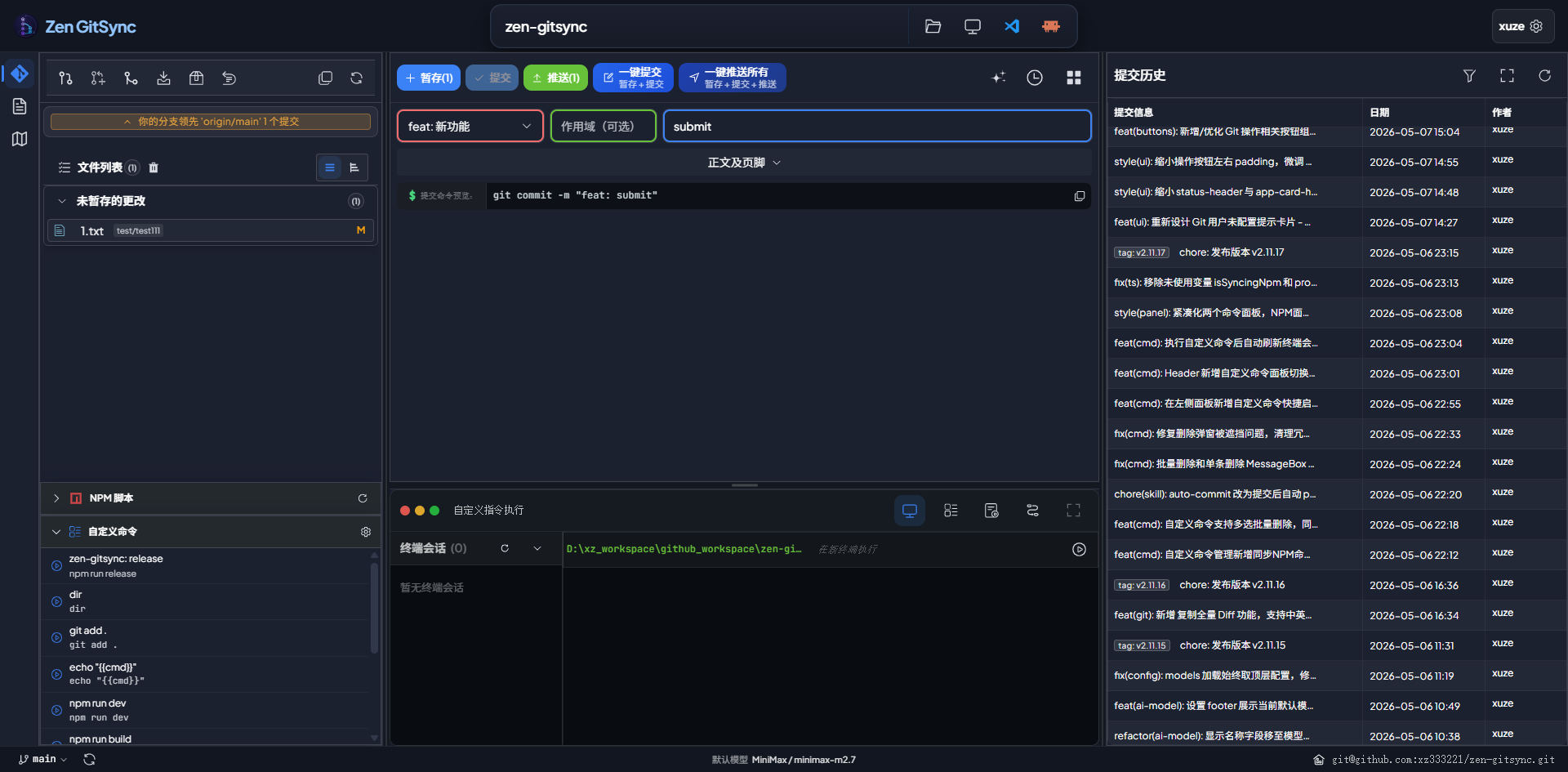
The GUI runs as a local web server and opens in your default browser. It attaches to the current Git repository automatically. The activity bar on the left switches between three views: **Git**, **Editor**, and **Source Map**.
|
|
69
|
+
|
|
70
|
+
---
|
|
71
|
+
|
|
72
|
+
### Core Git Panel
|
|
73
|
+
|
|
74
|
+
| Feature | Description |
|
|
75
|
+
|---|---|
|
|
76
|
+
| File list | Shows all changed files grouped by staged / unstaged / untracked / conflicted |
|
|
77
|
+
| View toggle | Switch between flat list and directory tree view (persisted) |
|
|
78
|
+
| Selection mode | Multi-select files to stage or stash only chosen files |
|
|
79
|
+
| Per-file actions | Stage, unstage, or revert individual files |
|
|
80
|
+
| Stage | Stage all or selected files (respects locked files) |
|
|
81
|
+
| Commit | Structured form (type / scope / description / body / footer) or free-text |
|
|
82
|
+
| AI commit message | Generate commit message from staged diff using an AI model |
|
|
83
|
+
| Push | Push to remote with live progress modal |
|
|
84
|
+
| Quick commit+push | One-click stage → commit → push |
|
|
85
|
+
| Pull / Fetch | Pull from or fetch the upstream branch |
|
|
86
|
+
| Merge | Merge another branch; detects and surfaces in-progress merge state |
|
|
87
|
+
| Diff viewer | Monaco-based side-by-side diff for any changed file |
|
|
88
|
+
| Commit log | Browse commit history with author, date, branch tags, and changed files |
|
|
89
|
+
| Remote URL | Display and one-click copy the remote repository URL |
|
|
90
|
+
|
|
91
|
+
#### Structured Commit Form
|
|
92
|
+
|
|
93
|
+
The commit form supports two modes toggled by a switch:
|
|
94
|
+
|
|
95
|
+
- **Standard mode** — separate fields for type (`feat` / `fix` / `docs` / `style` / `refactor` / `test` / `chore`), scope, short description, body, and footer — produces a Conventional Commits message automatically
|
|
96
|
+
- **Free-text mode** — single text area for any commit message
|
|
97
|
+
|
|
98
|
+
In either mode, click **AI Generate** to fill in the fields automatically based on the staged diff.
|
|
99
|
+
|
|
100
|
+
---
|
|
101
|
+
|
|
102
|
+
### Branch Management
|
|
103
|
+
|
|
104
|
+
- View all local and remote branches
|
|
105
|
+
- Create a new branch from any base branch
|
|
106
|
+
- Switch branches
|
|
107
|
+
- Track upstream status (commits ahead / behind)
|
|
108
|
+
|
|
109
|
+
---
|
|
110
|
+
|
|
111
|
+
### Stash Management
|
|
112
|
+
|
|
113
|
+
- Save stash with an optional message
|
|
114
|
+
- Optionally include untracked files
|
|
115
|
+
- Optionally exclude locked files from stash
|
|
116
|
+
- Apply, pop, or drop individual stash entries
|
|
117
|
+
|
|
118
|
+
---
|
|
119
|
+
|
|
120
|
+
### Tag Management
|
|
121
|
+
|
|
122
|
+
- Create **lightweight** or **annotated** tags
|
|
123
|
+
- Target a specific commit
|
|
124
|
+
- List, push, or delete tags
|
|
125
|
+
|
|
126
|
+
---
|
|
127
|
+
|
|
128
|
+
### Commit Message Templates
|
|
129
|
+
|
|
130
|
+
Save reusable templates for:
|
|
131
|
+
- **Type** — `feat`, `fix`, `chore`, …
|
|
132
|
+
- **Scope** — component or module name
|
|
133
|
+
- **Description** — short summary
|
|
134
|
+
- **Full message** — complete commit message
|
|
135
|
+
|
|
136
|
+
---
|
|
137
|
+
|
|
138
|
+
### Custom Commands
|
|
26
139
|
|
|
27
140
|

|
|
28
141
|
|
|
29
|
-
|
|
142
|
+
Create, manage, and run shell commands from the sidebar:
|
|
143
|
+
|
|
144
|
+
- Define commands with a name, shell command, and working directory
|
|
145
|
+
- Add **parameters** with names, descriptions, and default values (referenced via `{{paramName}}`)
|
|
146
|
+
- Run a command instantly in a new terminal session
|
|
147
|
+
- Save command **templates** for quick reuse
|
|
148
|
+
|
|
149
|
+
---
|
|
150
|
+
|
|
151
|
+
### Flow Orchestration (Visual Workflow Designer)
|
|
152
|
+
|
|
153
|
+
Build automated pipelines with a drag-and-drop canvas:
|
|
154
|
+
|
|
155
|
+
| Node type | Purpose |
|
|
156
|
+
|---|---|
|
|
157
|
+
| **Start** | Entry point of the flow (one per flow, not deletable) |
|
|
158
|
+
| **Command** | Execute a saved custom command |
|
|
159
|
+
| **Wait** | Pause execution for 1–3600 seconds |
|
|
160
|
+
| **Version** | Bump `package.json` version (patch / minor / major) or modify a dependency |
|
|
30
161
|
|
|
31
|
-
|
|
162
|
+
- Nodes are executed in topological order
|
|
163
|
+
- Flows are saved and editable
|
|
164
|
+
- Each node can be individually enabled or disabled
|
|
165
|
+
|
|
166
|
+
---
|
|
167
|
+
|
|
168
|
+
### NPM Scripts Panel
|
|
169
|
+
|
|
170
|
+
- Automatically discovers all `package.json` files in the project tree
|
|
171
|
+
- Lists their `scripts` entries
|
|
172
|
+
- Run any script with one click
|
|
173
|
+
- Configure the scan root and exclusion patterns per package
|
|
174
|
+
|
|
175
|
+
---
|
|
176
|
+
|
|
177
|
+
### Built-in Terminal
|
|
178
|
+
|
|
179
|
+
- Open new terminal sessions from within the GUI
|
|
180
|
+
- Commands stream output in real time (Server-Sent Events)
|
|
181
|
+
- Running processes are tracked and can be stopped individually
|
|
182
|
+
- Cross-platform: uses `cmd.exe` on Windows, `sh` on Unix
|
|
183
|
+
|
|
184
|
+
---
|
|
185
|
+
|
|
186
|
+
### Project Startup
|
|
187
|
+
|
|
188
|
+
Configure commands or workflows to run automatically when a project is opened:
|
|
189
|
+
|
|
190
|
+
- Toggle auto-run on / off
|
|
191
|
+
- Drag to reorder startup items
|
|
192
|
+
- Mix custom commands and flow workflows in any order
|
|
193
|
+
|
|
194
|
+
---
|
|
195
|
+
|
|
196
|
+
### Built-in Code Editor
|
|
197
|
+
|
|
198
|
+
A full IDE-like editor (second icon in the activity bar) for browsing and editing project files without leaving the tool:
|
|
199
|
+
|
|
200
|
+
| Feature | Description |
|
|
201
|
+
|---|---|
|
|
202
|
+
| File tree | Collapsible directory tree with file-type icons |
|
|
203
|
+
| Multi-tab editing | Open multiple files simultaneously; tabs show unsaved (●) indicator |
|
|
204
|
+
| Monaco editor | Syntax highlighting for JS, TS, Vue, Python, Go, JSON, CSS, and more |
|
|
205
|
+
| Markdown preview | Toggle between source and rendered preview for `.md` files |
|
|
206
|
+
| Save | `Ctrl+S` to save; optional auto-save on focus loss |
|
|
207
|
+
| Create | New file or folder inline in the file tree |
|
|
208
|
+
| Rename / Delete | Rename or delete any file or folder directly from the tree |
|
|
209
|
+
| Resizable sidebar | Drag the divider to adjust file tree width |
|
|
210
|
+
| Theme sync | Editor theme follows the global light / dark setting |
|
|
211
|
+
|
|
212
|
+
---
|
|
213
|
+
|
|
214
|
+
### Source Map (AI Codebase Visualization)
|
|
215
|
+
|
|
216
|
+
A dedicated view (third icon in the activity bar) that uses an AI model to build a visual dependency graph of your project:
|
|
217
|
+
|
|
218
|
+
| Feature | Description |
|
|
219
|
+
|---|---|
|
|
220
|
+
| File scanner | Recursively scans all source files and builds a file tree |
|
|
221
|
+
| AI analysis | Sends file contents to an OpenAI-compatible model to infer structure |
|
|
222
|
+
| Dependency graph | Interactive node-edge graph (drag, zoom, fit-view, minimap) |
|
|
223
|
+
| Subsystems | Automatically clusters files into color-coded subsystems |
|
|
224
|
+
| Node detail | Click a node to view its source code in a Monaco editor panel |
|
|
225
|
+
| Tech stack | Detects the language and frameworks in use |
|
|
226
|
+
| Entry point | Identifies the main entry file and function |
|
|
227
|
+
| Analysis log | Real-time progress log during scanning and analysis |
|
|
228
|
+
| Resizable panels | File tree, graph, and source panels are all independently resizable |
|
|
229
|
+
|
|
230
|
+
Configure the model endpoint, API key, and model name in **Settings → AI**.
|
|
231
|
+
|
|
232
|
+
---
|
|
233
|
+
|
|
234
|
+
### Settings
|
|
235
|
+
|
|
236
|
+
| Setting | Description |
|
|
237
|
+
|---|---|
|
|
238
|
+
| Git user | Set `user.name` and `user.email` |
|
|
239
|
+
| Default commit message | Fallback message when none is provided |
|
|
240
|
+
| Theme | Light / dark (follows system preference by default) |
|
|
241
|
+
| Language | Chinese / English |
|
|
242
|
+
| File locking | Lock files so they are never staged or stashed |
|
|
243
|
+
| NPM paths | Configure where to look for `package.json` files |
|
|
244
|
+
|
|
245
|
+
---
|
|
246
|
+
|
|
247
|
+
## CLI Commands
|
|
248
|
+
|
|
249
|
+
### Interactive commit:
|
|
32
250
|
```bash
|
|
33
251
|
$ g
|
|
34
252
|
Enter your commit message: fix login page style
|
|
35
253
|
```
|
|
36
254
|
|
|
37
|
-
|
|
255
|
+
### Commit directly (skip prompt):
|
|
38
256
|
```bash
|
|
39
257
|
$ g -y
|
|
40
258
|
```
|
|
41
259
|
|
|
42
|
-
|
|
260
|
+
### Commit with inline message:
|
|
43
261
|
```bash
|
|
44
|
-
$ g
|
|
262
|
+
$ g -m <message>
|
|
263
|
+
$ g -m=<message>
|
|
45
264
|
```
|
|
46
265
|
|
|
47
|
-
|
|
266
|
+
### Set default commit message:
|
|
48
267
|
```bash
|
|
49
|
-
$ g
|
|
268
|
+
$ g --set-default-message="update"
|
|
50
269
|
```
|
|
51
270
|
|
|
52
|
-
|
|
271
|
+
### Get current config:
|
|
53
272
|
```bash
|
|
54
|
-
$ g -
|
|
55
|
-
$ g -m=<message>
|
|
273
|
+
$ g get-config
|
|
56
274
|
```
|
|
57
275
|
|
|
58
|
-
|
|
276
|
+
### Show help:
|
|
59
277
|
```shell
|
|
60
278
|
$ g -h
|
|
61
279
|
$ g --help
|
|
62
280
|
```
|
|
63
281
|
|
|
64
|
-
|
|
282
|
+
### Scheduled auto-commit (default interval: 1 hour):
|
|
65
283
|
```bash
|
|
66
284
|
$ g -y --interval
|
|
67
285
|
$ g -y --interval=<seconds>
|
|
68
286
|
```
|
|
69
287
|
|
|
70
|
-
|
|
288
|
+
### Specify working directory:
|
|
71
289
|
```bash
|
|
72
290
|
$ g --path=<path>
|
|
73
291
|
$ g --cwd=<path>
|
|
74
292
|
```
|
|
75
293
|
|
|
76
|
-
|
|
294
|
+
### Sync a folder in background (Windows):
|
|
77
295
|
```shell
|
|
78
296
|
start /min cmd /k "g -y --path=<your-folder> --interval"
|
|
79
297
|
```
|
|
80
298
|
|
|
81
|
-
|
|
299
|
+
### Scheduled command execution (Windows):
|
|
82
300
|
```shell
|
|
83
|
-
start /min cmd /k "g --cmd=\"echo hello\" --cmd-interval=5" #
|
|
84
|
-
start /min cmd /k "g --cmd=\"echo at-time\" --at=23:59" #
|
|
85
|
-
start /min cmd /k "g --cmd=\"echo daily\" --at=23:59 --daily" #
|
|
301
|
+
start /min cmd /k "g --cmd=\"echo hello\" --cmd-interval=5" # every 5 seconds
|
|
302
|
+
start /min cmd /k "g --cmd=\"echo at-time\" --at=23:59" # once at 23:59
|
|
303
|
+
start /min cmd /k "g --cmd=\"echo daily\" --at=23:59 --daily" # daily at 23:59
|
|
86
304
|
```
|
|
87
305
|
|
|
88
|
-
|
|
306
|
+
### Suppress git diff output:
|
|
89
307
|
```shell
|
|
90
308
|
$ g --no-diff
|
|
91
309
|
```
|
|
92
310
|
|
|
93
|
-
|
|
311
|
+
### Print formatted git log:
|
|
94
312
|
```shell
|
|
95
313
|
$ g log
|
|
96
314
|
$ g log --n=5
|
|
97
315
|
```
|
|
98
316
|
|
|
99
|
-
|
|
317
|
+
### File locking (only effective within the tool):
|
|
100
318
|
```shell
|
|
101
|
-
# Lock a file (locked files are excluded from commits)
|
|
319
|
+
# Lock a file (locked files are excluded from commits and stashes)
|
|
102
320
|
$ g --lock-file=config.json
|
|
103
321
|
|
|
104
322
|
# Unlock a file
|
|
@@ -113,12 +331,36 @@ $ g --check-lock=config.json
|
|
|
113
331
|
|
|
114
332
|
---
|
|
115
333
|
|
|
334
|
+
<a name="zh"></a>
|
|
335
|
+
|
|
116
336
|
# zen-gitsync
|
|
117
337
|
|
|
118
|
-
[English](#zen-gitsync) | [中文](#
|
|
338
|
+
[English](#zen-gitsync) | [中文](#zh)
|
|
119
339
|
|
|
120
340
|
`zen-gitsync` 是一个 Git 自动化工作平台,支持交互式提交、定时同步、自定义命令编排、文件锁定与可视化 GUI 界面。
|
|
121
341
|
|
|
342
|
+
## 目录
|
|
343
|
+
|
|
344
|
+
- [安装](#安装)
|
|
345
|
+
- [新特性](#v2xx--新特性)
|
|
346
|
+
- [GUI 界面](#gui-界面)
|
|
347
|
+
- [核心 Git 面板](#核心-git-面板)
|
|
348
|
+
- [分支管理](#分支管理)
|
|
349
|
+
- [Stash 管理](#stash-管理)
|
|
350
|
+
- [Tag 管理](#tag-管理)
|
|
351
|
+
- [提交信息模板](#提交信息模板)
|
|
352
|
+
- [自定义命令](#自定义命令)
|
|
353
|
+
- [可视化流程编排](#可视化流程编排)
|
|
354
|
+
- [NPM 脚本面板](#npm-脚本面板)
|
|
355
|
+
- [内置终端](#内置终端)
|
|
356
|
+
- [项目启动](#项目启动)
|
|
357
|
+
- [内置代码编辑器](#内置代码编辑器)
|
|
358
|
+
- [源码地图](#源码地图ai-代码库可视化)
|
|
359
|
+
- [设置](#设置)
|
|
360
|
+
- [命令行](#命令行)
|
|
361
|
+
|
|
362
|
+
---
|
|
363
|
+
|
|
122
364
|
## 安装
|
|
123
365
|
|
|
124
366
|
通过 npm 全局安装:
|
|
@@ -127,21 +369,217 @@ $ g --check-lock=config.json
|
|
|
127
369
|
npm install -g zen-gitsync
|
|
128
370
|
```
|
|
129
371
|
|
|
130
|
-
|
|
131
|
-
|
|
132
|
-
|
|
372
|
+
---
|
|
373
|
+
|
|
374
|
+
## v2.x.x — 新特性
|
|
375
|
+
|
|
376
|
+
- **可视化 GUI** — 完整的 Git 图形操作界面
|
|
377
|
+
- **分支管理** — 创建、切换、追踪本地/远程分支
|
|
378
|
+
- **Stash 管理** — 储藏与恢复变更,支持排除锁定文件
|
|
379
|
+
- **Tag 管理** — 创建轻量/附注标签
|
|
380
|
+
- **合并支持** — 自动检测并引导完成进行中的合并
|
|
381
|
+
- **可视化流程编排** — 拖拽式工作流设计器
|
|
382
|
+
- **NPM 脚本面板** — 发现并运行 `package.json` 中的脚本
|
|
383
|
+
- **内置终端** — 实时流式输出的命令执行终端
|
|
384
|
+
- **自定义命令** — 保存、参数化并复用 Shell 命令
|
|
385
|
+
- **项目启动** — 打开项目时自动运行命令或工作流
|
|
386
|
+
- **内置代码编辑器** — 基于 Monaco 的文件编辑器,支持 Markdown 预览
|
|
387
|
+
- **源码地图** — AI 生成的交互式代码库依赖关系图
|
|
388
|
+
- **AI 生成提交信息** — 基于 staged diff 自动生成提交消息
|
|
389
|
+
- **提交模板** — 保存类型/范围/描述/完整提交信息模板
|
|
390
|
+
- **主题与语言** — 支持明/暗主题,中英文界面切换
|
|
391
|
+
|
|
392
|
+
---
|
|
393
|
+
|
|
394
|
+
## GUI 界面
|
|
133
395
|
|
|
134
396
|
### 启动图形界面:
|
|
135
397
|
```shell
|
|
136
398
|
$ g ui
|
|
137
399
|
```
|
|
138
|
-

|
|
139
400
|
|
|
140
|
-
|
|
401
|
+

|
|
402
|
+
|
|
403
|
+
GUI 以本地 Web 服务器形式运行,自动在浏览器中打开,并附加到当前 Git 仓库。左侧 Activity Bar 可在三个视图之间切换:**Git**、**编辑器**、**源码地图**。
|
|
404
|
+
|
|
405
|
+
---
|
|
406
|
+
|
|
407
|
+
### 核心 Git 面板
|
|
408
|
+
|
|
409
|
+
| 功能 | 说明 |
|
|
410
|
+
|---|---|
|
|
411
|
+
| 文件列表 | 按已暂存/未暂存/未追踪/冲突分组显示所有变更文件 |
|
|
412
|
+
| 视图切换 | 平铺列表与目录树形视图切换(持久化保存) |
|
|
413
|
+
| 选择模式 | 多选文件,仅对选中文件执行暂存或储藏 |
|
|
414
|
+
| 单文件操作 | 对每个文件独立执行暂存、取消暂存或还原 |
|
|
415
|
+
| 暂存 | 暂存全部或选中文件(自动排除锁定文件) |
|
|
416
|
+
| 提交 | 结构化表单(类型/范围/描述/正文/页脚)或自由文本 |
|
|
417
|
+
| AI 生成提交信息 | 基于 staged diff 自动生成提交消息 |
|
|
418
|
+
| 推送 | 推送到远程,实时显示进度弹窗 |
|
|
419
|
+
| 快速提交+推送 | 一键完成暂存 → 提交 → 推送 |
|
|
420
|
+
| 拉取 / Fetch | 从上游拉取或仅获取远程信息 |
|
|
421
|
+
| 合并 | 合并其他分支,自动检测并引导处理合并中间状态 |
|
|
422
|
+
| Diff 查看器 | 基于 Monaco 编辑器的并排文件差异视图 |
|
|
423
|
+
| 提交日志 | 浏览历史提交(作者、时间、分支标签、变更文件) |
|
|
424
|
+
| 远程地址 | 显示并一键复制远程仓库 URL |
|
|
425
|
+
|
|
426
|
+
#### 结构化提交表单
|
|
427
|
+
|
|
428
|
+
提交表单支持通过开关切换两种模式:
|
|
429
|
+
|
|
430
|
+
- **标准模式** — 分别填写类型(`feat` / `fix` / `docs` / `style` / `refactor` / `test` / `chore`)、范围、简短描述、正文和页脚,自动组合成符合 Conventional Commits 规范的提交信息
|
|
431
|
+
- **自由模式** — 单一文本框,输入任意提交信息
|
|
432
|
+
|
|
433
|
+
两种模式下均可点击 **AI 生成** 按钮,根据当前 staged diff 自动填充提交信息。
|
|
434
|
+
|
|
435
|
+
---
|
|
436
|
+
|
|
437
|
+
### 分支管理
|
|
438
|
+
|
|
439
|
+
- 查看所有本地和远程分支
|
|
440
|
+
- 从任意基础分支创建新分支
|
|
441
|
+
- 切换分支
|
|
442
|
+
- 追踪上游状态(领先/落后提交数)
|
|
443
|
+
|
|
444
|
+
---
|
|
445
|
+
|
|
446
|
+
### Stash 管理
|
|
447
|
+
|
|
448
|
+
- 创建 stash,支持自定义备注
|
|
449
|
+
- 可选是否包含未追踪文件
|
|
450
|
+
- 可选排除已锁定的文件
|
|
451
|
+
- 应用(apply)、弹出(pop)或删除(drop)单条 stash
|
|
452
|
+
|
|
453
|
+
---
|
|
454
|
+
|
|
455
|
+
### Tag 管理
|
|
456
|
+
|
|
457
|
+
- 创建**轻量标签**或**附注标签**
|
|
458
|
+
- 可指定特定 commit
|
|
459
|
+
- 列出、推送或删除标签
|
|
460
|
+
|
|
461
|
+
---
|
|
462
|
+
|
|
463
|
+
### 提交信息模板
|
|
464
|
+
|
|
465
|
+
为以下内容保存可复用模板:
|
|
466
|
+
- **类型** — `feat`、`fix`、`chore` 等
|
|
467
|
+
- **范围** — 组件或模块名
|
|
468
|
+
- **描述** — 简短说明
|
|
469
|
+
- **完整信息** — 完整提交消息
|
|
470
|
+
|
|
471
|
+
---
|
|
472
|
+
|
|
473
|
+
### 自定义命令
|
|
141
474
|
|
|
142
475
|

|
|
143
476
|
|
|
144
|
-
|
|
477
|
+
在侧边栏创建、管理并运行 Shell 命令:
|
|
478
|
+
|
|
479
|
+
- 定义命令(名称、Shell 命令、工作目录)
|
|
480
|
+
- 添加**参数**(名称、描述、默认值,通过 `{{paramName}}` 引用)
|
|
481
|
+
- 一键在新终端会话中执行命令
|
|
482
|
+
- 保存**命令模板**快速复用
|
|
483
|
+
|
|
484
|
+
---
|
|
485
|
+
|
|
486
|
+
### 可视化流程编排
|
|
487
|
+
|
|
488
|
+
通过拖拽画布构建自动化流程:
|
|
489
|
+
|
|
490
|
+
| 节点类型 | 用途 |
|
|
491
|
+
|---|---|
|
|
492
|
+
| **开始节点** | 流程入口(每个流程唯一,不可删除) |
|
|
493
|
+
| **命令节点** | 执行一个已保存的自定义命令 |
|
|
494
|
+
| **等待节点** | 暂停执行 1–3600 秒 |
|
|
495
|
+
| **版本节点** | 修改 `package.json` 版本号(patch/minor/major)或依赖版本 |
|
|
496
|
+
|
|
497
|
+
- 节点按拓扑顺序执行
|
|
498
|
+
- 流程可保存并二次编辑
|
|
499
|
+
- 每个节点可单独启用/禁用
|
|
500
|
+
|
|
501
|
+
---
|
|
502
|
+
|
|
503
|
+
### NPM 脚本面板
|
|
504
|
+
|
|
505
|
+
- 自动扫描项目中所有 `package.json` 文件
|
|
506
|
+
- 列出其中的 `scripts` 条目
|
|
507
|
+
- 一键运行任意脚本
|
|
508
|
+
- 可配置扫描根路径和排除规则
|
|
509
|
+
|
|
510
|
+
---
|
|
511
|
+
|
|
512
|
+
### 内置终端
|
|
513
|
+
|
|
514
|
+
- 在 GUI 内直接打开新的终端会话
|
|
515
|
+
- 命令输出实时流式显示(Server-Sent Events)
|
|
516
|
+
- 追踪运行中的进程,随时可以停止
|
|
517
|
+
- 跨平台:Windows 使用 `cmd.exe`,Unix 使用 `sh`
|
|
518
|
+
|
|
519
|
+
---
|
|
520
|
+
|
|
521
|
+
### 项目启动
|
|
522
|
+
|
|
523
|
+
配置在项目打开时自动执行的命令或工作流:
|
|
524
|
+
|
|
525
|
+
- 一键开启/关闭自动运行
|
|
526
|
+
- 拖拽调整启动项顺序
|
|
527
|
+
- 可混合使用自定义命令与流程工作流
|
|
528
|
+
|
|
529
|
+
---
|
|
530
|
+
|
|
531
|
+
### 内置代码编辑器
|
|
532
|
+
|
|
533
|
+
Activity Bar 第二个视图,在 GUI 内直接浏览并编辑项目文件:
|
|
534
|
+
|
|
535
|
+
| 功能 | 说明 |
|
|
536
|
+
|---|---|
|
|
537
|
+
| 文件树 | 可折叠的目录树,附带文件类型图标 |
|
|
538
|
+
| 多标签页 | 同时打开多个文件,未保存文件显示 ● 标记 |
|
|
539
|
+
| Monaco 编辑器 | 支持 JS、TS、Vue、Python、Go、JSON、CSS 等语法高亮 |
|
|
540
|
+
| Markdown 预览 | `.md` 文件可切换源码与渲染预览模式 |
|
|
541
|
+
| 保存 | `Ctrl+S` 手动保存;可选失去焦点时自动保存 |
|
|
542
|
+
| 新建 | 在文件树中内联创建文件或文件夹 |
|
|
543
|
+
| 重命名 / 删除 | 在树中直接对文件或文件夹重命名、删除 |
|
|
544
|
+
| 侧边栏调整 | 拖拽分隔条自由调整文件树宽度 |
|
|
545
|
+
| 主题同步 | 编辑器主题跟随全局明/暗设置 |
|
|
546
|
+
|
|
547
|
+
---
|
|
548
|
+
|
|
549
|
+
### 源码地图(AI 代码库可视化)
|
|
550
|
+
|
|
551
|
+
Activity Bar 第三个视图,调用 AI 模型将项目代码库生成可交互的依赖关系图:
|
|
552
|
+
|
|
553
|
+
| 功能 | 说明 |
|
|
554
|
+
|---|---|
|
|
555
|
+
| 文件扫描 | 递归扫描所有源码文件并构建文件树 |
|
|
556
|
+
| AI 分析 | 将文件内容发送到 OpenAI 兼容接口,推断项目结构 |
|
|
557
|
+
| 依赖关系图 | 可拖拽、缩放、适配视图的节点边图(带缩略图导航) |
|
|
558
|
+
| 子系统聚类 | 自动将文件聚类为颜色区分的子系统 |
|
|
559
|
+
| 节点详情 | 点击节点在右侧 Monaco 面板中查看对应源码 |
|
|
560
|
+
| 技术栈检测 | 识别项目使用的语言和框架 |
|
|
561
|
+
| 入口点识别 | 标记主入口文件和入口函数 |
|
|
562
|
+
| 分析日志 | 扫描与分析过程实时输出进度日志 |
|
|
563
|
+
| 多面板布局 | 文件树、关系图、源码三个面板均可独立拖拽调整宽度 |
|
|
564
|
+
|
|
565
|
+
在 **设置 → AI** 中配置模型接口地址、API Key 和模型名称。
|
|
566
|
+
|
|
567
|
+
---
|
|
568
|
+
|
|
569
|
+
### 设置
|
|
570
|
+
|
|
571
|
+
| 设置项 | 说明 |
|
|
572
|
+
|---|---|
|
|
573
|
+
| Git 用户信息 | 设置 `user.name` 和 `user.email` |
|
|
574
|
+
| 默认提交信息 | 未填写时的回退提交消息 |
|
|
575
|
+
| 主题 | 明亮/暗黑模式(默认跟随系统) |
|
|
576
|
+
| 语言 | 中文 / English |
|
|
577
|
+
| 文件锁定 | 锁定文件,使其永远不被暂存或储藏 |
|
|
578
|
+
| NPM 路径 | 配置 `package.json` 的扫描位置 |
|
|
579
|
+
|
|
580
|
+
---
|
|
581
|
+
|
|
582
|
+
## 命令行
|
|
145
583
|
|
|
146
584
|
#### 交互式提交:
|
|
147
585
|
```bash
|
|
@@ -154,6 +592,12 @@ $ g
|
|
|
154
592
|
$ g -y
|
|
155
593
|
```
|
|
156
594
|
|
|
595
|
+
#### 传入 message 直接提交:
|
|
596
|
+
```bash
|
|
597
|
+
$ g -m <message>
|
|
598
|
+
$ g -m=<message>
|
|
599
|
+
```
|
|
600
|
+
|
|
157
601
|
#### 设置默认提交信息:
|
|
158
602
|
```bash
|
|
159
603
|
$ g --set-default-message="提交"
|
|
@@ -164,12 +608,6 @@ $ g --set-default-message="提交"
|
|
|
164
608
|
$ g get-config
|
|
165
609
|
```
|
|
166
610
|
|
|
167
|
-
#### 传入 message 直接提交:
|
|
168
|
-
```bash
|
|
169
|
-
$ g -m <message>
|
|
170
|
-
$ g -m=<message>
|
|
171
|
-
```
|
|
172
|
-
|
|
173
611
|
#### 查看帮助:
|
|
174
612
|
```shell
|
|
175
613
|
$ g -h
|
|
@@ -188,12 +626,12 @@ $ g --path=<path>
|
|
|
188
626
|
$ g --cwd=<path>
|
|
189
627
|
```
|
|
190
628
|
|
|
191
|
-
#### 后台同步文件夹(Windows
|
|
629
|
+
#### 后台同步文件夹(Windows):
|
|
192
630
|
```shell
|
|
193
631
|
start /min cmd /k "g -y --path=你要同步的文件夹 --interval"
|
|
194
632
|
```
|
|
195
633
|
|
|
196
|
-
#### 定时执行命令(Windows
|
|
634
|
+
#### 定时执行命令(Windows):
|
|
197
635
|
```shell
|
|
198
636
|
start /min cmd /k "g --cmd=\"echo hello\" --cmd-interval=5" # 每5秒执行一次
|
|
199
637
|
start /min cmd /k "g --cmd=\"echo at-time\" --at=23:59" # 在23:59执行一次
|
|
@@ -213,7 +651,7 @@ $ g log --n=5
|
|
|
213
651
|
|
|
214
652
|
#### 文件锁定功能(仅在工具中有效):
|
|
215
653
|
```shell
|
|
216
|
-
#
|
|
654
|
+
# 锁定文件(锁定后的文件不会被暂存或储藏)
|
|
217
655
|
$ g --lock-file=config.json
|
|
218
656
|
|
|
219
657
|
# 解锁文件
|
package/package.json
CHANGED