zen-gitsync 2.1.29 → 2.2.1
This diff represents the content of publicly available package versions that have been released to one of the supported registries. The information contained in this diff is provided for informational purposes only and reflects changes between package versions as they appear in their respective public registries.
- package/README.md +148 -102
- package/package.json +6 -1
- package/src/config.js +64 -2
- package/src/gitCommit.js +53 -0
- package/src/ui/public/assets/index-BPoaF8NL.js +44 -0
- package/src/ui/public/assets/index-C06RP6-q.css +1 -0
- package/src/ui/public/assets/vendor-CKXtUB8u.js +45 -0
- package/src/ui/public/index.html +3 -3
- package/src/ui/server/index.js +111 -23
- package/src/utils/index.js +87 -3
- package/src/ui/public/assets/index-BKjt1yVw.js +0 -44
- package/src/ui/public/assets/index-th8vfo_E.css +0 -1
- package/src/ui/public/assets/vendor-Ym9LLftt.js +0 -45
package/README.md
CHANGED
|
@@ -1,102 +1,148 @@
|
|
|
1
|
-
# zen-gitsync
|
|
2
|
-
|
|
3
|
-
`zen-gitsync` 是一个简单的命令行工具,用于自动化 Git 提交和推送操作。只需在控制台输入 `g`,并输入提交内容,即可自动执行 `git add`、`git commit` 和 `git push` 操作,极大提升 Git 工作流程的效率。
|
|
4
|
-
|
|
5
|
-
## 安装
|
|
6
|
-
|
|
7
|
-
通过 npm 安装 `zen-gitsync`,并进行全局安装:
|
|
8
|
-
|
|
9
|
-
```bash
|
|
10
|
-
npm install -g zen-gitsync
|
|
11
|
-
```
|
|
12
|
-
|
|
13
|
-
## 使用方法
|
|
14
|
-
|
|
15
|
-
1. 在终端中,输入 `g` 并按回车。
|
|
16
|
-
2. 输入提交信息,按回车确认提交。
|
|
17
|
-
3. 工具将自动查看远程分支并自动提交
|
|
18
|
-
|
|
19
|
-
|
|
20
|
-
### 示例:
|
|
21
|
-
#### 交互式提交:
|
|
22
|
-
```bash
|
|
23
|
-
$ g
|
|
24
|
-
请输入你的提交信息: 修复了登录页样式问题
|
|
25
|
-
```
|
|
26
|
-
#### 直接提交:
|
|
27
|
-
```bash
|
|
28
|
-
$ g -y
|
|
29
|
-
```
|
|
30
|
-
#### 设置默认提交信息:
|
|
31
|
-
```bash
|
|
32
|
-
$ g --set-default-message="提交"
|
|
33
|
-
```
|
|
34
|
-
#### 获取默认提交信息:
|
|
35
|
-
```bash
|
|
36
|
-
$ g get-config
|
|
37
|
-
```
|
|
38
|
-
#### 传入message直接提交:
|
|
39
|
-
```bash
|
|
40
|
-
$ g -m <message>
|
|
41
|
-
$ g -m=<message>
|
|
42
|
-
```
|
|
43
|
-
|
|
44
|
-
#### 查看帮助
|
|
45
|
-
```shell
|
|
46
|
-
$ g -h
|
|
47
|
-
$ g --help
|
|
48
|
-
```
|
|
49
|
-
|
|
50
|
-
####
|
|
51
|
-
```
|
|
52
|
-
|
|
53
|
-
$ g -
|
|
54
|
-
|
|
55
|
-
|
|
56
|
-
|
|
57
|
-
|
|
58
|
-
|
|
59
|
-
|
|
60
|
-
|
|
61
|
-
|
|
62
|
-
|
|
63
|
-
|
|
64
|
-
|
|
65
|
-
|
|
66
|
-
|
|
67
|
-
|
|
68
|
-
|
|
69
|
-
|
|
70
|
-
|
|
71
|
-
```
|
|
72
|
-
|
|
73
|
-
|
|
74
|
-
|
|
75
|
-
|
|
76
|
-
|
|
77
|
-
|
|
78
|
-
|
|
79
|
-
|
|
80
|
-
|
|
81
|
-
|
|
82
|
-
|
|
83
|
-
|
|
84
|
-
|
|
85
|
-
|
|
86
|
-
|
|
87
|
-
|
|
88
|
-
|
|
89
|
-
|
|
90
|
-
|
|
91
|
-
|
|
92
|
-
|
|
93
|
-
|
|
94
|
-
|
|
95
|
-
|
|
96
|
-
-
|
|
97
|
-
|
|
98
|
-
|
|
99
|
-
|
|
100
|
-
```shell
|
|
101
|
-
$ g
|
|
102
|
-
```
|
|
1
|
+
# zen-gitsync
|
|
2
|
+
|
|
3
|
+
`zen-gitsync` 是一个简单的命令行工具,用于自动化 Git 提交和推送操作。只需在控制台输入 `g`,并输入提交内容,即可自动执行 `git add`、`git commit` 和 `git push` 操作,极大提升 Git 工作流程的效率。
|
|
4
|
+
|
|
5
|
+
## 安装
|
|
6
|
+
|
|
7
|
+
通过 npm 安装 `zen-gitsync`,并进行全局安装:
|
|
8
|
+
|
|
9
|
+
```bash
|
|
10
|
+
npm install -g zen-gitsync
|
|
11
|
+
```
|
|
12
|
+
|
|
13
|
+
## 使用方法
|
|
14
|
+
|
|
15
|
+
1. 在终端中,输入 `g` 并按回车。
|
|
16
|
+
2. 输入提交信息,按回车确认提交。
|
|
17
|
+
3. 工具将自动查看远程分支并自动提交
|
|
18
|
+
|
|
19
|
+
|
|
20
|
+
### 示例:
|
|
21
|
+
#### 交互式提交:
|
|
22
|
+
```bash
|
|
23
|
+
$ g
|
|
24
|
+
请输入你的提交信息: 修复了登录页样式问题
|
|
25
|
+
```
|
|
26
|
+
#### 直接提交:
|
|
27
|
+
```bash
|
|
28
|
+
$ g -y
|
|
29
|
+
```
|
|
30
|
+
#### 设置默认提交信息:
|
|
31
|
+
```bash
|
|
32
|
+
$ g --set-default-message="提交"
|
|
33
|
+
```
|
|
34
|
+
#### 获取默认提交信息:
|
|
35
|
+
```bash
|
|
36
|
+
$ g get-config
|
|
37
|
+
```
|
|
38
|
+
#### 传入message直接提交:
|
|
39
|
+
```bash
|
|
40
|
+
$ g -m <message>
|
|
41
|
+
$ g -m=<message>
|
|
42
|
+
```
|
|
43
|
+
|
|
44
|
+
#### 查看帮助
|
|
45
|
+
```shell
|
|
46
|
+
$ g -h
|
|
47
|
+
$ g --help
|
|
48
|
+
```
|
|
49
|
+
|
|
50
|
+
#### 文件锁定功能
|
|
51
|
+
```shell
|
|
52
|
+
# 锁定文件(锁定后的文件不会被包含在提交中)
|
|
53
|
+
$ g --lock-file=config.json
|
|
54
|
+
|
|
55
|
+
# 解锁文件
|
|
56
|
+
$ g --unlock-file=config.json
|
|
57
|
+
|
|
58
|
+
# 查看所有锁定的文件
|
|
59
|
+
$ g --list-locked
|
|
60
|
+
|
|
61
|
+
# 检查文件是否被锁定
|
|
62
|
+
$ g --check-lock=config.json
|
|
63
|
+
```
|
|
64
|
+
|
|
65
|
+
#### 定时执行自动提交,默认间隔1小时
|
|
66
|
+
```bash
|
|
67
|
+
$ g -y --interval
|
|
68
|
+
$ g -y --interval=<seconds>
|
|
69
|
+
```
|
|
70
|
+
#### 指定目录提交
|
|
71
|
+
```bash
|
|
72
|
+
$ g --path=<path>
|
|
73
|
+
```
|
|
74
|
+
或
|
|
75
|
+
```bash
|
|
76
|
+
$ g --cwd=<path>
|
|
77
|
+
```
|
|
78
|
+
|
|
79
|
+
#### 添加项目script
|
|
80
|
+
```json
|
|
81
|
+
{
|
|
82
|
+
"scripts": {
|
|
83
|
+
"g:y": "g -y"
|
|
84
|
+
}
|
|
85
|
+
}
|
|
86
|
+
```
|
|
87
|
+
|
|
88
|
+
#### cmd同步文件夹
|
|
89
|
+
```shell
|
|
90
|
+
start /min cmd /k "g -y --path=你要同步的文件夹 --interval"
|
|
91
|
+
```
|
|
92
|
+
|
|
93
|
+
#### cmd 定时执行命令
|
|
94
|
+
```shell
|
|
95
|
+
start /min cmd /k "g --cmd=\"echo hello\" --cmd-interval=5" # 每5秒执行一次echo hello
|
|
96
|
+
start /min cmd /k "g --cmd=\"echo at-time\" --at=23:59" # 在23:59执行一次echo at-time
|
|
97
|
+
```
|
|
98
|
+
|
|
99
|
+
#### 不显示git diff内容
|
|
100
|
+
```shell
|
|
101
|
+
$ g --no-diff
|
|
102
|
+
```
|
|
103
|
+
|
|
104
|
+
#### 格式化打印git log
|
|
105
|
+
```shell
|
|
106
|
+
$ g log
|
|
107
|
+
$ g log --n=5
|
|
108
|
+
```
|
|
109
|
+
|
|
110
|
+
## ✨ 新特性 (v2.0.0)
|
|
111
|
+
- 新增图形用户界面(GUI)模式
|
|
112
|
+
- 支持标准化的提交信息格式
|
|
113
|
+
|
|
114
|
+
### 启动图形界面:
|
|
115
|
+
```shell
|
|
116
|
+
$ g ui
|
|
117
|
+
```
|
|
118
|
+
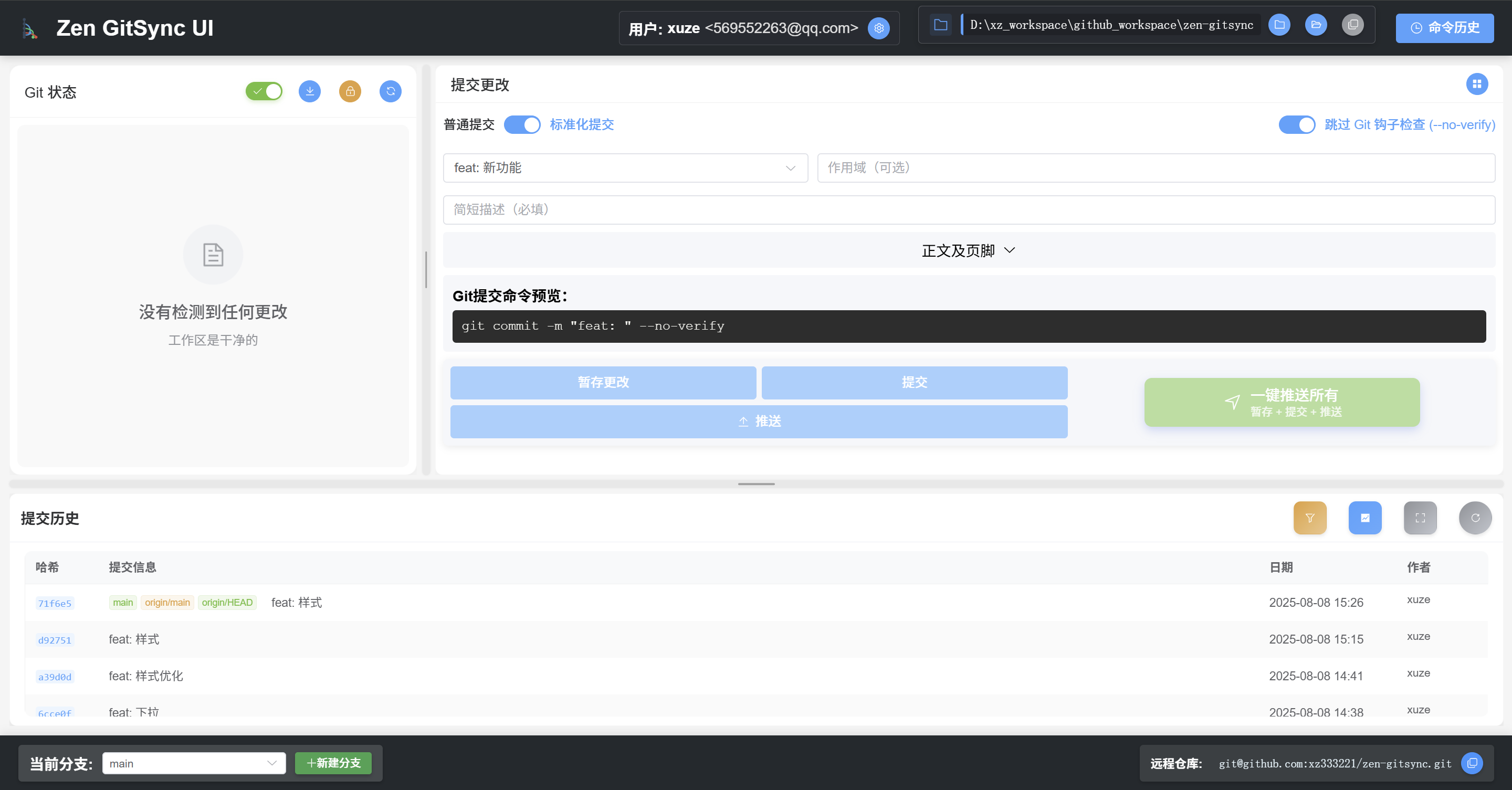
|
|
119
|
+
|
|
120
|
+
## 🔒 文件锁定功能
|
|
121
|
+
|
|
122
|
+
文件锁定功能允许您临时排除某些文件不被包含在 Git 提交中,而无需修改 `.gitignore` 文件。这对于以下场景特别有用:
|
|
123
|
+
|
|
124
|
+
- 临时排除配置文件(如包含敏感信息的配置)
|
|
125
|
+
- 跳过正在开发中的实验性文件
|
|
126
|
+
- 避免提交临时的调试文件
|
|
127
|
+
|
|
128
|
+
### 特点:
|
|
129
|
+
- ✅ 不修改 `.gitignore` 文件
|
|
130
|
+
- ✅ 支持命令行和 Web UI 操作
|
|
131
|
+
- ✅ 锁定状态持久保存
|
|
132
|
+
- ✅ 支持相对路径和绝对路径
|
|
133
|
+
- ✅ 自动跳过锁定文件,显示清晰的提示信息
|
|
134
|
+
|
|
135
|
+
### 使用场景示例:
|
|
136
|
+
```shell
|
|
137
|
+
# 锁定配置文件,避免提交敏感信息
|
|
138
|
+
$ g --lock-file=.env
|
|
139
|
+
|
|
140
|
+
# 锁定正在开发的功能文件
|
|
141
|
+
$ g --lock-file=src/experimental-feature.js
|
|
142
|
+
|
|
143
|
+
# 查看当前锁定的文件
|
|
144
|
+
$ g --list-locked
|
|
145
|
+
|
|
146
|
+
# 开发完成后解锁文件
|
|
147
|
+
$ g --unlock-file=src/experimental-feature.js
|
|
148
|
+
```
|
package/package.json
CHANGED
|
@@ -1,6 +1,6 @@
|
|
|
1
1
|
{
|
|
2
2
|
"name": "zen-gitsync",
|
|
3
|
-
"version": "2.1
|
|
3
|
+
"version": "2.2.1",
|
|
4
4
|
"description": "一个 git 自动查看差异并提交的工具",
|
|
5
5
|
"main": "index.js",
|
|
6
6
|
"type": "module",
|
|
@@ -28,6 +28,11 @@
|
|
|
28
28
|
"start:vue": "cd ./src/ui/client && npm run dev",
|
|
29
29
|
"start:server": "node server.js",
|
|
30
30
|
"start:server:no-open": "node server.js --no-open",
|
|
31
|
+
"nrm:ls": "nrm ls",
|
|
32
|
+
"change:nrm:npm": "nrm use npm",
|
|
33
|
+
"change:nrm:lenovo-nexus": "nrm use lenovo-nexus",
|
|
34
|
+
"update:g": "npm install -g zen-gitsync",
|
|
35
|
+
"npm:ls:g": "npm ls -g",
|
|
31
36
|
"release": "node ./scripts/release.js",
|
|
32
37
|
"release:win": ".\\scripts\\release.bat"
|
|
33
38
|
},
|
package/src/config.js
CHANGED
|
@@ -8,7 +8,8 @@ const configPath = path.join(os.homedir(), '.git-commit-tool.json');
|
|
|
8
8
|
// 默认配置
|
|
9
9
|
const defaultConfig = {
|
|
10
10
|
defaultCommitMessage: "submit",
|
|
11
|
-
descriptionTemplates: [] // 添加描述模板数组
|
|
11
|
+
descriptionTemplates: [], // 添加描述模板数组
|
|
12
|
+
lockedFiles: [] // 添加锁定文件数组
|
|
12
13
|
};
|
|
13
14
|
|
|
14
15
|
// 异步读取配置文件
|
|
@@ -25,6 +26,62 @@ async function loadConfig() {
|
|
|
25
26
|
async function saveConfig(config) {
|
|
26
27
|
await fs.writeFile(configPath, JSON.stringify(config, null, 2), 'utf-8');
|
|
27
28
|
}
|
|
29
|
+
// 文件锁定管理函数
|
|
30
|
+
async function lockFile(filePath) {
|
|
31
|
+
const config = await loadConfig();
|
|
32
|
+
const normalizedPath = path.normalize(filePath);
|
|
33
|
+
|
|
34
|
+
if (!config.lockedFiles.includes(normalizedPath)) {
|
|
35
|
+
config.lockedFiles.push(normalizedPath);
|
|
36
|
+
await saveConfig(config);
|
|
37
|
+
console.log(chalk.green(`✓ 文件已锁定: "${normalizedPath}"`));
|
|
38
|
+
return true;
|
|
39
|
+
} else {
|
|
40
|
+
console.log(chalk.yellow(`⚠️ 文件已经被锁定: "${normalizedPath}"`));
|
|
41
|
+
return false;
|
|
42
|
+
}
|
|
43
|
+
}
|
|
44
|
+
|
|
45
|
+
async function unlockFile(filePath) {
|
|
46
|
+
const config = await loadConfig();
|
|
47
|
+
const normalizedPath = path.normalize(filePath);
|
|
48
|
+
const index = config.lockedFiles.indexOf(normalizedPath);
|
|
49
|
+
|
|
50
|
+
if (index > -1) {
|
|
51
|
+
config.lockedFiles.splice(index, 1);
|
|
52
|
+
await saveConfig(config);
|
|
53
|
+
console.log(chalk.green(`✓ 文件已解锁: "${normalizedPath}"`));
|
|
54
|
+
return true;
|
|
55
|
+
} else {
|
|
56
|
+
console.log(chalk.yellow(`⚠️ 文件未被锁定: "${normalizedPath}"`));
|
|
57
|
+
return false;
|
|
58
|
+
}
|
|
59
|
+
}
|
|
60
|
+
|
|
61
|
+
async function isFileLocked(filePath) {
|
|
62
|
+
const config = await loadConfig();
|
|
63
|
+
const normalizedPath = path.normalize(filePath);
|
|
64
|
+
return config.lockedFiles.includes(normalizedPath);
|
|
65
|
+
}
|
|
66
|
+
|
|
67
|
+
async function listLockedFiles() {
|
|
68
|
+
const config = await loadConfig();
|
|
69
|
+
if (config.lockedFiles.length === 0) {
|
|
70
|
+
console.log(chalk.blue('📝 当前没有锁定的文件'));
|
|
71
|
+
} else {
|
|
72
|
+
console.log(chalk.blue('🔒 已锁定的文件:'));
|
|
73
|
+
config.lockedFiles.forEach((file, index) => {
|
|
74
|
+
console.log(chalk.gray(` ${index + 1}. ${file}`));
|
|
75
|
+
});
|
|
76
|
+
}
|
|
77
|
+
return config.lockedFiles;
|
|
78
|
+
}
|
|
79
|
+
|
|
80
|
+
async function getLockedFiles() {
|
|
81
|
+
const config = await loadConfig();
|
|
82
|
+
return config.lockedFiles || [];
|
|
83
|
+
}
|
|
84
|
+
|
|
28
85
|
// 添加配置管理函数
|
|
29
86
|
async function handleConfigCommands() {
|
|
30
87
|
if (process.argv.includes('get-config')) {
|
|
@@ -47,5 +104,10 @@ async function handleConfigCommands() {
|
|
|
47
104
|
export default {
|
|
48
105
|
loadConfig,
|
|
49
106
|
saveConfig,
|
|
50
|
-
handleConfigCommands
|
|
107
|
+
handleConfigCommands,
|
|
108
|
+
lockFile,
|
|
109
|
+
unlockFile,
|
|
110
|
+
isFileLocked,
|
|
111
|
+
listLockedFiles,
|
|
112
|
+
getLockedFiles
|
|
51
113
|
};
|
package/src/gitCommit.js
CHANGED
|
@@ -110,6 +110,56 @@ async function createGitCommit(options) {
|
|
|
110
110
|
throw e; // 继续向上抛出错误
|
|
111
111
|
}
|
|
112
112
|
}
|
|
113
|
+
// 处理文件锁定相关命令
|
|
114
|
+
async function handleFileLockCommands() {
|
|
115
|
+
// 锁定文件命令
|
|
116
|
+
const lockFileArg = process.argv.find(arg => arg.startsWith('--lock-file='));
|
|
117
|
+
if (lockFileArg) {
|
|
118
|
+
const filePath = lockFileArg.split('=')[1];
|
|
119
|
+
if (filePath) {
|
|
120
|
+
await config.lockFile(filePath);
|
|
121
|
+
} else {
|
|
122
|
+
console.log(chalk.red('❌ 请指定要锁定的文件路径'));
|
|
123
|
+
}
|
|
124
|
+
process.exit();
|
|
125
|
+
}
|
|
126
|
+
|
|
127
|
+
// 解锁文件命令
|
|
128
|
+
const unlockFileArg = process.argv.find(arg => arg.startsWith('--unlock-file='));
|
|
129
|
+
if (unlockFileArg) {
|
|
130
|
+
const filePath = unlockFileArg.split('=')[1];
|
|
131
|
+
if (filePath) {
|
|
132
|
+
await config.unlockFile(filePath);
|
|
133
|
+
} else {
|
|
134
|
+
console.log(chalk.red('❌ 请指定要解锁的文件路径'));
|
|
135
|
+
}
|
|
136
|
+
process.exit();
|
|
137
|
+
}
|
|
138
|
+
|
|
139
|
+
// 列出锁定文件命令
|
|
140
|
+
if (process.argv.includes('--list-locked')) {
|
|
141
|
+
await config.listLockedFiles();
|
|
142
|
+
process.exit();
|
|
143
|
+
}
|
|
144
|
+
|
|
145
|
+
// 检查文件是否锁定命令
|
|
146
|
+
const checkLockArg = process.argv.find(arg => arg.startsWith('--check-lock='));
|
|
147
|
+
if (checkLockArg) {
|
|
148
|
+
const filePath = checkLockArg.split('=')[1];
|
|
149
|
+
if (filePath) {
|
|
150
|
+
const isLocked = await config.isFileLocked(filePath);
|
|
151
|
+
if (isLocked) {
|
|
152
|
+
console.log(chalk.yellow(`🔒 文件已锁定: ${filePath}`));
|
|
153
|
+
} else {
|
|
154
|
+
console.log(chalk.green(`🔓 文件未锁定: ${filePath}`));
|
|
155
|
+
}
|
|
156
|
+
} else {
|
|
157
|
+
console.log(chalk.red('❌ 请指定要检查的文件路径'));
|
|
158
|
+
}
|
|
159
|
+
process.exit();
|
|
160
|
+
}
|
|
161
|
+
}
|
|
162
|
+
|
|
113
163
|
async function main() {
|
|
114
164
|
judgePlatform()
|
|
115
165
|
|
|
@@ -139,6 +189,9 @@ async function main() {
|
|
|
139
189
|
|
|
140
190
|
await handleConfigCommands();
|
|
141
191
|
|
|
192
|
+
// ========== 文件锁定功能 ==========
|
|
193
|
+
await handleFileLockCommands();
|
|
194
|
+
|
|
142
195
|
// ========== 新增:自定义cmd定时/定点执行功能 ==========
|
|
143
196
|
const cmdArg = process.argv.find(arg => arg.startsWith('--cmd='));
|
|
144
197
|
if (cmdArg) {
|