zapier-platform-cli 15.5.3 → 15.6.0
This diff represents the content of publicly available package versions that have been released to one of the supported registries. The information contained in this diff is provided for informational purposes only and reflects changes between package versions as they appear in their respective public registries.
- package/README-source.md +36 -7
- package/README.md +58 -11
- package/oclif.manifest.json +1 -1
- package/package.json +1 -1
package/README-source.md
CHANGED
|
@@ -786,9 +786,9 @@ On each trigger, search, or create in the operation directive - you can provide
|
|
|
786
786
|
|
|
787
787
|
Output Fields are optional, but can be used to:
|
|
788
788
|
|
|
789
|
-
|
|
790
789
|
- Define friendly labels for the returned fields. By default, we will *humanize* for example `my_key` as *My Key*.
|
|
791
790
|
- Make sure that custom fields that may not be found in every live sample and - since they're custom to the connected account - cannot be defined in the static sample, can still be mapped.
|
|
791
|
+
- (Added in v15.6.0) Define what field(s) can be used to uniquely identify and [deduplicate](#dedupe) items returned by a polling trigger call.
|
|
792
792
|
|
|
793
793
|
The [schema](https://github.com/zapier/zapier-platform/blob/main/packages/schema/docs/build/schema.md#fieldschema) for `outputFields` is shared with `inputFields` but only the `key`, `label`, `type`, and `required` properties are relevant:
|
|
794
794
|
|
|
@@ -796,6 +796,7 @@ The [schema](https://github.com/zapier/zapier-platform/blob/main/packages/schema
|
|
|
796
796
|
- `label` - defines the field name displayed to users.
|
|
797
797
|
- `type` - defines the type for static sample data. A [validation warning](https://platform.zapier.com/docs/integration-checks-reference#d024---static-sample-respects-output-field-definition) will be displayed if the static sample does not match the specified type.
|
|
798
798
|
- `required` - defines whether the field is required in static sample data. A [validation warning](https://platform.zapier.com/docs/integration-checks-reference#d024---static-sample-respects-output-field-definition) will be displayed if the value is true and the static sample does not contain the field.
|
|
799
|
+
- `primary` - defines whether the field is part of the primary key for polling trigger [deduplication](#dedupe).
|
|
799
800
|
|
|
800
801
|
Custom/Dynamic Output Fields are defined in the same way as [Custom/Dynamic Input Fields](#customdynamic-fields).
|
|
801
802
|
|
|
@@ -1157,17 +1158,23 @@ For example, you can access the `process.env` in your perform functions and in t
|
|
|
1157
1158
|
|
|
1158
1159
|
*Added in v15.4.0.*
|
|
1159
1160
|
|
|
1160
|
-
When a throttle configuration is set for an action, Zapier uses it to apply throttling when the limit for the timeframe window is exceeded. It can be set at the root level and/or on an action. When set at the root level, it is the default throttle configuration used on each action of the integration. And when set in an action's operation object, the root-level default is overwritten for that action only.
|
|
1161
|
+
When a throttle configuration is set for an action, Zapier uses it to apply throttling when the limit for the timeframe window is exceeded. It can be set at the root level and/or on an action. When set at the root level, it is the default throttle configuration used on each action of the integration. And when set in an action's operation object, the root-level default is overwritten for that action only. Note that the throttle limit is not shared across actions unless for those with the same key, window, limit, and scope when "action" is not in the scope.
|
|
1161
1162
|
|
|
1162
1163
|
To throttle an action, you need to set a `throttle` object with the following variables:
|
|
1163
1164
|
1. `window [integer]`: The timeframe, in seconds, within which the system tracks the number of invocations for an action. The number of invocations begins at zero at the start of each window.
|
|
1164
1165
|
2. `limit [integer]`: The maximum number of invocations for an action, allowed within the timeframe window.
|
|
1165
|
-
3. `
|
|
1166
|
+
3. `key [string]` (_added in v15.6.0_): The key to throttle with in combination with the scope. User data provided for the input fields can be used in the key with the use of the curly braces referencing. For example, to access the user data provided for the input field "test_field", use `{{bundle.inputData.test_field}}`. Note that a required input field should be referenced to get user data always.
|
|
1167
|
+
4. `scope [array]`: The granularity to throttle by. You can set the scope to one or more of the following options;
|
|
1166
1168
|
- 'user' - Throttles based on user ids.
|
|
1167
1169
|
- 'auth' - Throttles based on auth ids.
|
|
1168
1170
|
- 'account' - Throttles based on account ids for all users under a single account.
|
|
1171
|
+
- 'action' - Throttles the action it is set on separately from other actions.
|
|
1172
|
+
5. `overrides [array[object]]` (_added in v15.6.0_): EXPERIMENTAL: Overrides the original throttle configuration based on a Zapier account attribute;
|
|
1173
|
+
- `window [integer]`: Same description as above.
|
|
1174
|
+
- `limit [integer]`: Same description as above.
|
|
1175
|
+
- `filter [string]`: Account-based attribute to override the throttle by. You can set to one of the following: "free", "trial", "paid". Therefore, the throttle scope would be automatically set to "account" and ONLY the accounts based on the specified filter will have their requests throttled based on the throttle overrides while the rest are throttled based on the original configuration.
|
|
1169
1176
|
|
|
1170
|
-
|
|
1177
|
+
Both `window` and `limit` are required and others are optional. By default, throttling is scoped to the action and account.
|
|
1171
1178
|
|
|
1172
1179
|
Here is a typical usage of the throttle configuration:
|
|
1173
1180
|
|
|
@@ -1324,6 +1331,7 @@ Ensure you're handling errors correctly for your platform version. The latest re
|
|
|
1324
1331
|
* `headers`: request headers object, format `{'header-key': 'header-value'}`.
|
|
1325
1332
|
* `params`: URL query params object, format `{'query-key': 'query-value'}`.
|
|
1326
1333
|
* `body`: request body, can be a string, buffer, readable stream or plain object. When it is an object/array and the `Content-Type` header is `application/x-www-form-urlencoded` the body will be transformed to query string parameters, otherwise we'll set the header to `application/json; charset=utf-8` and JSON encode the body. Default is `null`.
|
|
1334
|
+
* `allowGetBody`: include `body` in `GET` requests. Set to `true` to enable. Default is `false`. Set only if required by the receiving API. See [section 4.3.1 in RFC 7231](https://www.rfc-editor.org/rfc/rfc7231#section-4.3.1).
|
|
1327
1335
|
* `json`: shortcut object/array/etc. you want to JSON encode into body. Default is `null`.
|
|
1328
1336
|
* `form`: shortcut object. you want to form encode into body. Default is `null`.
|
|
1329
1337
|
* `raw`: set this to stream the response instead of consuming it immediately. Default is `false`.
|
|
@@ -2051,11 +2059,13 @@ Lastly, you need to set `canPaginate` to `true` in your polling definition (per
|
|
|
2051
2059
|
<a id="dedup"></a>
|
|
2052
2060
|
### How does deduplication work?
|
|
2053
2061
|
|
|
2054
|
-
Each time a polling Zap runs, Zapier needs to decide which of the items
|
|
2062
|
+
Each time a polling Zap runs, Zapier extracts a unique "primary key" for each item in the response. Zapier needs to decide which of the items should trigger the Zap. To do this, we compare the primary keys to all those we've seen before, trigger on new objects, and update the list of seen primary keys. When a Zap is turned on, we initialize the list of seen primary keys with a single poll. When it's turned off, we clear that list. For this reason, it's important that calls to a polling endpoint always return the newest items.
|
|
2063
|
+
|
|
2064
|
+
For example, the initial poll returns objects 4, 5, and 6 (where a higher primary key is newer). If a later poll increases the limit and returns objects 1-6, then 1, 2, and 3 will be (incorrectly) treated like new objects.
|
|
2055
2065
|
|
|
2056
|
-
|
|
2066
|
+
By default, the primary key is the item's `id` field. Since v15.6.0, you can customize the primary by setting any `outputFields` to true.
|
|
2057
2067
|
|
|
2058
|
-
There's a more in-depth explanation [here](https://platform.zapier.com/
|
|
2068
|
+
There's a more in-depth explanation [here](https://platform.zapier.com/build/deduplication).
|
|
2059
2069
|
|
|
2060
2070
|
### Why are my triggers complaining if I don't provide an explicit `id` field?
|
|
2061
2071
|
|
|
@@ -2070,6 +2080,25 @@ return items.map((item) => {
|
|
|
2070
2080
|
});
|
|
2071
2081
|
```
|
|
2072
2082
|
|
|
2083
|
+
Since v15.6.0, instead of using the default `id` field, you can also define one or more `outputFields` as `primary`. For example:
|
|
2084
|
+
|
|
2085
|
+
```js
|
|
2086
|
+
{
|
|
2087
|
+
triggers: {
|
|
2088
|
+
recipe: {
|
|
2089
|
+
operation: {
|
|
2090
|
+
outputField: [
|
|
2091
|
+
{ key: 'userId', primary: true },
|
|
2092
|
+
{ key: 'slug', primary: true },
|
|
2093
|
+
]
|
|
2094
|
+
}
|
|
2095
|
+
}
|
|
2096
|
+
}
|
|
2097
|
+
}
|
|
2098
|
+
```
|
|
2099
|
+
|
|
2100
|
+
will tell Zapier to use `(userId, slug)` as the unique primary key to deduplicate items when running a polling trigger.
|
|
2101
|
+
|
|
2073
2102
|
### Node X No Longer Supported
|
|
2074
2103
|
|
|
2075
2104
|
If you're seeing errors like the following:
|
package/README.md
CHANGED
|
@@ -22,7 +22,7 @@ You may find some documents on the Zapier site duplicate or outdated. The most u
|
|
|
22
22
|
|
|
23
23
|
Our code is updated frequently. To see a full list of changes, look no further than [the CHANGELOG](https://github.com/zapier/zapier-platform/blob/main/CHANGELOG.md).
|
|
24
24
|
|
|
25
|
-
This doc describes the latest CLI version (**15.
|
|
25
|
+
This doc describes the latest CLI version (**15.6.0**), as of this writing. If you're using an older version of the CLI, you may want to check out these historical releases:
|
|
26
26
|
|
|
27
27
|
- CLI Docs: [14.x](https://github.com/zapier/zapier-platform/blob/zapier-platform-cli@14.1.2/packages/cli/README.md), [13.x](https://github.com/zapier/zapier-platform/blob/zapier-platform-cli@13.0.0/packages/cli/README.md)
|
|
28
28
|
- CLI Reference: [14.x](https://github.com/zapier/zapier-platform/blob/zapier-platform-cli@14.1.2/packages/cli/docs/cli.md), [13.x](https://github.com/zapier/zapier-platform/blob/zapier-platform-cli@13.0.0/packages/cli/docs/cli.md)
|
|
@@ -1677,9 +1677,9 @@ On each trigger, search, or create in the operation directive - you can provide
|
|
|
1677
1677
|
|
|
1678
1678
|
Output Fields are optional, but can be used to:
|
|
1679
1679
|
|
|
1680
|
-
|
|
1681
1680
|
- Define friendly labels for the returned fields. By default, we will *humanize* for example `my_key` as *My Key*.
|
|
1682
1681
|
- Make sure that custom fields that may not be found in every live sample and - since they're custom to the connected account - cannot be defined in the static sample, can still be mapped.
|
|
1682
|
+
- (Added in v15.6.0) Define what field(s) can be used to uniquely identify and [deduplicate](#dedupe) items returned by a polling trigger call.
|
|
1683
1683
|
|
|
1684
1684
|
The [schema](https://github.com/zapier/zapier-platform/blob/main/packages/schema/docs/build/schema.md#fieldschema) for `outputFields` is shared with `inputFields` but only the `key`, `label`, `type`, and `required` properties are relevant:
|
|
1685
1685
|
|
|
@@ -1687,6 +1687,7 @@ The [schema](https://github.com/zapier/zapier-platform/blob/main/packages/schema
|
|
|
1687
1687
|
- `label` - defines the field name displayed to users.
|
|
1688
1688
|
- `type` - defines the type for static sample data. A [validation warning](https://platform.zapier.com/docs/integration-checks-reference#d024---static-sample-respects-output-field-definition) will be displayed if the static sample does not match the specified type.
|
|
1689
1689
|
- `required` - defines whether the field is required in static sample data. A [validation warning](https://platform.zapier.com/docs/integration-checks-reference#d024---static-sample-respects-output-field-definition) will be displayed if the value is true and the static sample does not contain the field.
|
|
1690
|
+
- `primary` - defines whether the field is part of the primary key for polling trigger [deduplication](#dedupe).
|
|
1690
1691
|
|
|
1691
1692
|
Custom/Dynamic Output Fields are defined in the same way as [Custom/Dynamic Input Fields](#customdynamic-fields).
|
|
1692
1693
|
|
|
@@ -2159,17 +2160,23 @@ const App = {
|
|
|
2159
2160
|
|
|
2160
2161
|
*Added in v15.4.0.*
|
|
2161
2162
|
|
|
2162
|
-
When a throttle configuration is set for an action, Zapier uses it to apply throttling when the limit for the timeframe window is exceeded. It can be set at the root level and/or on an action. When set at the root level, it is the default throttle configuration used on each action of the integration. And when set in an action's operation object, the root-level default is overwritten for that action only.
|
|
2163
|
+
When a throttle configuration is set for an action, Zapier uses it to apply throttling when the limit for the timeframe window is exceeded. It can be set at the root level and/or on an action. When set at the root level, it is the default throttle configuration used on each action of the integration. And when set in an action's operation object, the root-level default is overwritten for that action only. Note that the throttle limit is not shared across actions unless for those with the same key, window, limit, and scope when "action" is not in the scope.
|
|
2163
2164
|
|
|
2164
2165
|
To throttle an action, you need to set a `throttle` object with the following variables:
|
|
2165
2166
|
1. `window [integer]`: The timeframe, in seconds, within which the system tracks the number of invocations for an action. The number of invocations begins at zero at the start of each window.
|
|
2166
2167
|
2. `limit [integer]`: The maximum number of invocations for an action, allowed within the timeframe window.
|
|
2167
|
-
3. `
|
|
2168
|
+
3. `key [string]` (_added in v15.6.0_): The key to throttle with in combination with the scope. User data provided for the input fields can be used in the key with the use of the curly braces referencing. For example, to access the user data provided for the input field "test_field", use `{{bundle.inputData.test_field}}`. Note that a required input field should be referenced to get user data always.
|
|
2169
|
+
4. `scope [array]`: The granularity to throttle by. You can set the scope to one or more of the following options;
|
|
2168
2170
|
- 'user' - Throttles based on user ids.
|
|
2169
2171
|
- 'auth' - Throttles based on auth ids.
|
|
2170
2172
|
- 'account' - Throttles based on account ids for all users under a single account.
|
|
2173
|
+
- 'action' - Throttles the action it is set on separately from other actions.
|
|
2174
|
+
5. `overrides [array[object]]` (_added in v15.6.0_): EXPERIMENTAL: Overrides the original throttle configuration based on a Zapier account attribute;
|
|
2175
|
+
- `window [integer]`: Same description as above.
|
|
2176
|
+
- `limit [integer]`: Same description as above.
|
|
2177
|
+
- `filter [string]`: Account-based attribute to override the throttle by. You can set to one of the following: "free", "trial", "paid". Therefore, the throttle scope would be automatically set to "account" and ONLY the accounts based on the specified filter will have their requests throttled based on the throttle overrides while the rest are throttled based on the original configuration.
|
|
2171
2178
|
|
|
2172
|
-
|
|
2179
|
+
Both `window` and `limit` are required and others are optional. By default, throttling is scoped to the action and account.
|
|
2173
2180
|
|
|
2174
2181
|
Here is a typical usage of the throttle configuration:
|
|
2175
2182
|
|
|
@@ -2194,12 +2201,30 @@ const App = {
|
|
|
2194
2201
|
},
|
|
2195
2202
|
operation: {
|
|
2196
2203
|
perform: () => {},
|
|
2197
|
-
inputFields: [],
|
|
2204
|
+
inputFields: [{key: 'name', required: true, type: 'string'}],
|
|
2198
2205
|
// overwrites the default, for this action
|
|
2199
2206
|
throttle: {
|
|
2200
2207
|
window: 600,
|
|
2201
2208
|
limit: 5,
|
|
2209
|
+
key: 'test-key-{{bundle.inputData.name}}',
|
|
2202
2210
|
scope: ['account'],
|
|
2211
|
+
overrides: [
|
|
2212
|
+
{
|
|
2213
|
+
window: 600,
|
|
2214
|
+
limit: 10,
|
|
2215
|
+
filter: 'free',
|
|
2216
|
+
},
|
|
2217
|
+
{
|
|
2218
|
+
window: 600,
|
|
2219
|
+
limit: 100,
|
|
2220
|
+
filter: 'trial',
|
|
2221
|
+
},
|
|
2222
|
+
{
|
|
2223
|
+
window: 0,
|
|
2224
|
+
limit: 0,
|
|
2225
|
+
filter: 'paid',
|
|
2226
|
+
},
|
|
2227
|
+
],
|
|
2203
2228
|
},
|
|
2204
2229
|
},
|
|
2205
2230
|
},
|
|
@@ -2465,7 +2490,7 @@ This behavior has changed periodically across major versions, which changes how/
|
|
|
2465
2490
|
|
|
2466
2491
|
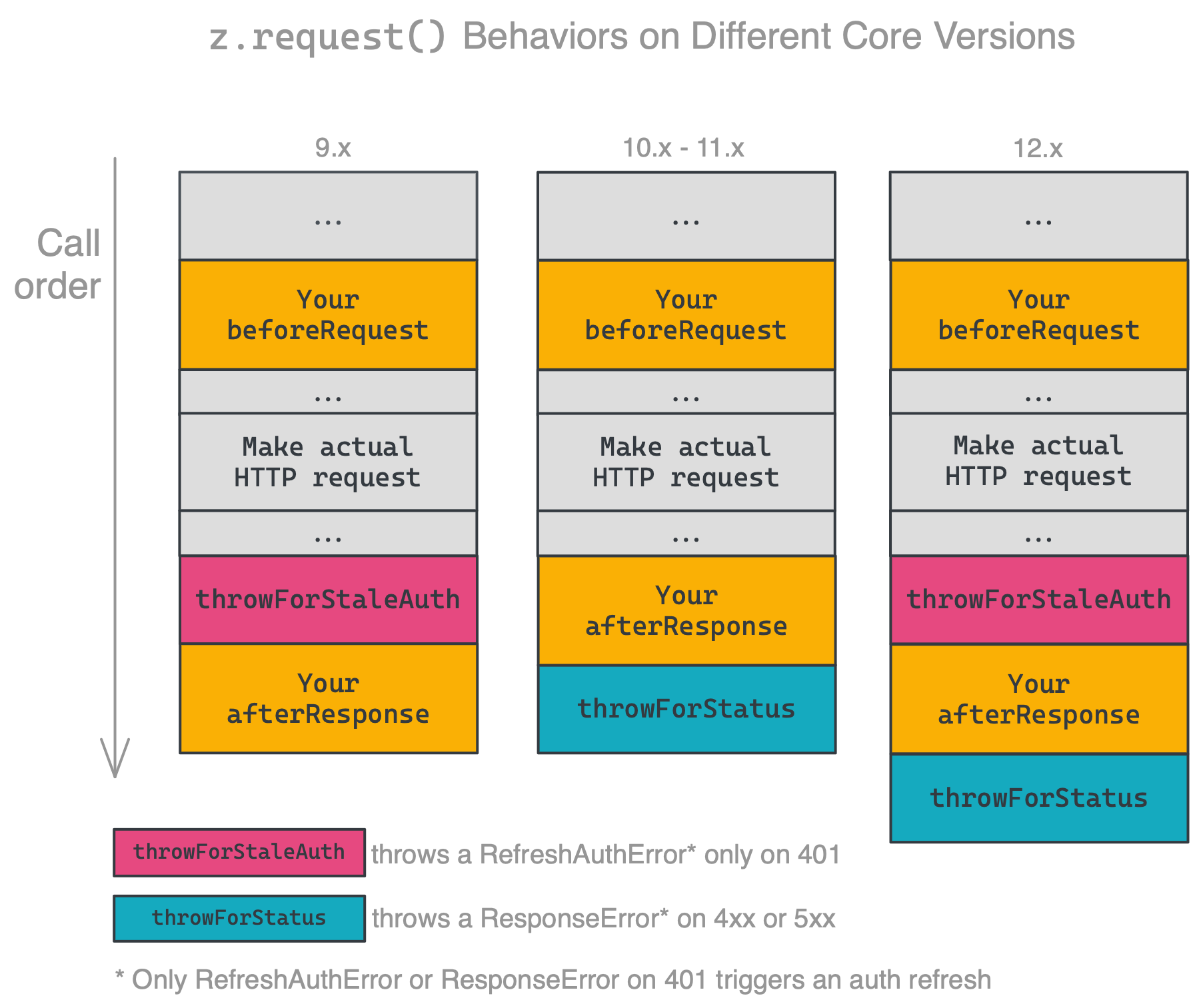
|
|
2467
2492
|
|
|
2468
|
-
Ensure you're handling errors correctly for your platform version. The latest released version is **15.
|
|
2493
|
+
Ensure you're handling errors correctly for your platform version. The latest released version is **15.6.0**.
|
|
2469
2494
|
|
|
2470
2495
|
### HTTP Request Options
|
|
2471
2496
|
|
|
@@ -2476,6 +2501,7 @@ Ensure you're handling errors correctly for your platform version. The latest re
|
|
|
2476
2501
|
* `headers`: request headers object, format `{'header-key': 'header-value'}`.
|
|
2477
2502
|
* `params`: URL query params object, format `{'query-key': 'query-value'}`.
|
|
2478
2503
|
* `body`: request body, can be a string, buffer, readable stream or plain object. When it is an object/array and the `Content-Type` header is `application/x-www-form-urlencoded` the body will be transformed to query string parameters, otherwise we'll set the header to `application/json; charset=utf-8` and JSON encode the body. Default is `null`.
|
|
2504
|
+
* `allowGetBody`: include `body` in `GET` requests. Set to `true` to enable. Default is `false`. Set only if required by the receiving API. See [section 4.3.1 in RFC 7231](https://www.rfc-editor.org/rfc/rfc7231#section-4.3.1).
|
|
2479
2505
|
* `json`: shortcut object/array/etc. you want to JSON encode into body. Default is `null`.
|
|
2480
2506
|
* `form`: shortcut object. you want to form encode into body. Default is `null`.
|
|
2481
2507
|
* `raw`: set this to stream the response instead of consuming it immediately. Default is `false`.
|
|
@@ -3542,11 +3568,13 @@ Lastly, you need to set `canPaginate` to `true` in your polling definition (per
|
|
|
3542
3568
|
<a id="dedup"></a>
|
|
3543
3569
|
### How does deduplication work?
|
|
3544
3570
|
|
|
3545
|
-
Each time a polling Zap runs, Zapier needs to decide which of the items
|
|
3571
|
+
Each time a polling Zap runs, Zapier extracts a unique "primary key" for each item in the response. Zapier needs to decide which of the items should trigger the Zap. To do this, we compare the primary keys to all those we've seen before, trigger on new objects, and update the list of seen primary keys. When a Zap is turned on, we initialize the list of seen primary keys with a single poll. When it's turned off, we clear that list. For this reason, it's important that calls to a polling endpoint always return the newest items.
|
|
3572
|
+
|
|
3573
|
+
For example, the initial poll returns objects 4, 5, and 6 (where a higher primary key is newer). If a later poll increases the limit and returns objects 1-6, then 1, 2, and 3 will be (incorrectly) treated like new objects.
|
|
3546
3574
|
|
|
3547
|
-
|
|
3575
|
+
By default, the primary key is the item's `id` field. Since v15.6.0, you can customize the primary by setting any `outputFields` to true.
|
|
3548
3576
|
|
|
3549
|
-
There's a more in-depth explanation [here](https://platform.zapier.com/
|
|
3577
|
+
There's a more in-depth explanation [here](https://platform.zapier.com/build/deduplication).
|
|
3550
3578
|
|
|
3551
3579
|
### Why are my triggers complaining if I don't provide an explicit `id` field?
|
|
3552
3580
|
|
|
@@ -3561,6 +3589,25 @@ return items.map((item) => {
|
|
|
3561
3589
|
});
|
|
3562
3590
|
```
|
|
3563
3591
|
|
|
3592
|
+
Since v15.6.0, instead of using the default `id` field, you can also define one or more `outputFields` as `primary`. For example:
|
|
3593
|
+
|
|
3594
|
+
```js
|
|
3595
|
+
{
|
|
3596
|
+
triggers: {
|
|
3597
|
+
recipe: {
|
|
3598
|
+
operation: {
|
|
3599
|
+
outputField: [
|
|
3600
|
+
{ key: 'userId', primary: true },
|
|
3601
|
+
{ key: 'slug', primary: true },
|
|
3602
|
+
]
|
|
3603
|
+
}
|
|
3604
|
+
}
|
|
3605
|
+
}
|
|
3606
|
+
}
|
|
3607
|
+
```
|
|
3608
|
+
|
|
3609
|
+
will tell Zapier to use `(userId, slug)` as the unique primary key to deduplicate items when running a polling trigger.
|
|
3610
|
+
|
|
3564
3611
|
### Node X No Longer Supported
|
|
3565
3612
|
|
|
3566
3613
|
If you're seeing errors like the following:
|
|
@@ -3639,7 +3686,7 @@ Broadly speaking, all releases will continue to work indefinitely. While you nev
|
|
|
3639
3686
|
For more info about which Node versions are supported, see [the faq](#how-do-i-manually-set-the-nodejs-version-to-run-my-app-with).
|
|
3640
3687
|
|
|
3641
3688
|
<!-- TODO: if we decouple releases, change this -->
|
|
3642
|
-
The most recently released version of `cli` and `core` is **15.
|
|
3689
|
+
The most recently released version of `cli` and `core` is **15.6.0**. You can see the versions you're working with by running `zapier -v`.
|
|
3643
3690
|
|
|
3644
3691
|
To update `cli`, run `npm install -g zapier-platform-cli`.
|
|
3645
3692
|
|
package/oclif.manifest.json
CHANGED
|
@@ -1 +1 @@
|
|
|
1
|
-
{"version":"15.5.3","commands":{"analytics":{"id":"analytics","description":"Show the status of the analytics that are collected. Also used to change what is collected.","pluginName":"zapier-platform-cli","pluginType":"core","aliases":[],"examples":["zapier analytics --mode enabled"],"flags":{"mode":{"name":"mode","type":"option","char":"m","description":"Choose how much information to share. Anonymous mode drops the OS type and Zapier user id, but keeps command info. Identifying information is used only for debugging purposes.","options":["enabled","anonymous","disabled"]},"debug":{"name":"debug","type":"boolean","char":"d","description":"Show extra debugging output.","allowNo":false},"invokedFromAnotherCommand":{"name":"invokedFromAnotherCommand","type":"boolean","hidden":true,"allowNo":false}},"args":[]},"build":{"id":"build","description":"Build a pushable zip from the current directory.\n\nThis command does the following:\n\n* Creates a temporary folder\n* Copies all code into the temporary folder\n* Adds an entry point: `zapierwrapper.js`\n* Generates and validates app definition.\n* Detects dependencies via browserify (optional, on by default)\n* Zips up all needed `.js` files. If you want to include more files, add a \"includeInBuild\" property (array with strings of regexp paths) to your `.zapierapprc`.\n* Moves the zip to `build/build.zip` and `build/source.zip` and deletes the temp folder\n\nThis command is typically followed by `zapier upload`.","pluginName":"zapier-platform-cli","pluginType":"core","aliases":[],"flags":{"disable-dependency-detection":{"name":"disable-dependency-detection","type":"boolean","description":"Disable \"smart\" file inclusion. By default, Zapier only includes files that are required by `index.js`. If you (or your dependencies) require files dynamically (such as with `require(someVar)`), then you may see \"Cannot find module\" errors. Disabling this may make your `build.zip` too large. If that's the case, try using the `includeInBuild` option in your `.zapierapprc`. See the docs about `includeInBuild` for more info.","allowNo":false},"skip-npm-install":{"name":"skip-npm-install","type":"boolean","description":"Skips installing a fresh copy of npm dependencies on build. Helpful for using `yarn` or local copies of dependencies.","hidden":true,"allowNo":false},"skip-validation":{"name":"skip-validation","type":"boolean","description":"Skips local pre-push validation checks, and remote validation check of the CLI app's schema and AppVersion integrity.","hidden":true,"allowNo":false},"debug":{"name":"debug","type":"boolean","char":"d","description":"Show extra debugging output.","allowNo":false},"invokedFromAnotherCommand":{"name":"invokedFromAnotherCommand","type":"boolean","hidden":true,"allowNo":false}},"args":[]},"convert":{"id":"convert","description":"Convert a Visual Builder integration to a CLI integration.\n\nThe resulting CLI integration will be identical to its Visual Builder version and ready to push and use immediately!\n\nIf you re-run this command on an existing directory it will leave existing files alone and not clobber them.\n\nYou'll need to do a `zapier push` before the new version is visible in the editor, but otherwise you're good to go.","pluginName":"zapier-platform-cli","pluginType":"core","aliases":[],"flags":{"version":{"name":"version","type":"option","char":"v","description":"Convert a specific version. Required when converting a Visual Builder integration.","required":true},"debug":{"name":"debug","type":"boolean","char":"d","description":"Show extra debugging output.","allowNo":false},"invokedFromAnotherCommand":{"name":"invokedFromAnotherCommand","type":"boolean","hidden":true,"allowNo":false}},"args":[{"name":"integrationId","description":"To get the integration/app ID, go to \"https://developer.zapier.com\", click on an integration, and copy the number directly after \"/app/\" in the URL.","required":true},{"name":"path","description":"Relative to your current path - IE: `.` for current directory.","required":true}]},"deprecate":{"id":"deprecate","description":"Mark a non-production version of your integration as deprecated, with removal by a certain date.\n\nUse this when an integration version will not be supported or start breaking at a known date.\n\nZapier will send an email warning users of the deprecation once a date is set, they'll start seeing it as \"Deprecated\" in the UI, and once the deprecation date arrives, if the Zaps weren't updated, they'll be paused and the users will be emailed again explaining what happened.\n\nAfter the deprecation date has passed it will be safe to delete that integration version.\n\nDo not use this if you have non-breaking changes, such as fixing help text.","pluginName":"zapier-platform-cli","pluginType":"core","aliases":[],"examples":["zapier deprecate 1.2.3 2011-10-01"],"flags":{"debug":{"name":"debug","type":"boolean","char":"d","description":"Show extra debugging output.","allowNo":false},"invokedFromAnotherCommand":{"name":"invokedFromAnotherCommand","type":"boolean","hidden":true,"allowNo":false}},"args":[{"name":"version","description":"The version to deprecate.","required":true},{"name":"date","description":"The date (YYYY-MM-DD) when Zapier will make the specified version unavailable.","required":true}]},"describe":{"id":"describe","description":"Describe the current integration.\n\nThis command prints a human readable enumeration of your integrations's\ntriggers, searches, and creates as seen by Zapier. Useful to understand how your\nresources convert and relate to different actions.\n\n* **Noun**: your action's noun\n* **Label**: your action's label\n* **Resource**: the resource (if any) this action is tied to\n* **Available Methods**: testable methods for this action","pluginName":"zapier-platform-cli","pluginType":"core","aliases":[],"flags":{"format":{"name":"format","type":"option","char":"f","description":"Change the way structured data is presented. If \"json\" or \"raw\", you can pipe the output of the command into other tools, such as jq.","options":["plain","json","raw","row","table"],"default":"table"},"debug":{"name":"debug","type":"boolean","char":"d","description":"Show extra debugging output.","allowNo":false},"invokedFromAnotherCommand":{"name":"invokedFromAnotherCommand","type":"boolean","hidden":true,"allowNo":false}},"args":[]},"history":{"id":"history","description":"Get the history of your integration.\n\nHistory includes all the changes made over the lifetime of your integration. This includes everything from creation, updates, migrations, admins, and invitee changes, as well as who made the change and when.","pluginName":"zapier-platform-cli","pluginType":"core","aliases":[],"flags":{"format":{"name":"format","type":"option","char":"f","description":"Change the way structured data is presented. If \"json\" or \"raw\", you can pipe the output of the command into other tools, such as jq.","options":["plain","json","raw","row","table"],"default":"table"},"debug":{"name":"debug","type":"boolean","char":"d","description":"Show extra debugging output.","allowNo":false},"invokedFromAnotherCommand":{"name":"invokedFromAnotherCommand","type":"boolean","hidden":true,"allowNo":false}},"args":[]},"init":{"id":"init","description":"Initialize a new Zapier integration with a project template.\n\nAfter running this, you'll have a new integration in the specified directory. If you re-run this command on an existing directory, it will prompt before overwriting any existing files.\n\nThis doesn't register or deploy the integration with Zapier - try the `zapier register` and `zapier push` commands for that!","pluginName":"zapier-platform-cli","pluginType":"core","aliases":[],"examples":["zapier init myapp","zapier init ./path/myapp --template oauth2"],"flags":{"template":{"name":"template","type":"option","char":"t","description":"The template to start your integration with.","options":["basic-auth","callback","custom-auth","digest-auth","dynamic-dropdown","files","minimal","oauth1-trello","oauth2","search-or-create","session-auth","typescript"]},"debug":{"name":"debug","type":"boolean","char":"d","description":"Show extra debugging output.","allowNo":false},"invokedFromAnotherCommand":{"name":"invokedFromAnotherCommand","type":"boolean","hidden":true,"allowNo":false}},"args":[{"name":"path","description":"Where to create the new integration. If the directory doesn't exist, it will be created. If the directory isn't empty, we'll ask for confirmation","required":true}]},"integrations":{"id":"integrations","description":"List integrations you have admin access to.\n\nThis command also checks the current directory for a linked integration.","pluginName":"zapier-platform-cli","pluginType":"core","aliases":["apps"],"flags":{"format":{"name":"format","type":"option","char":"f","description":"Change the way structured data is presented. If \"json\" or \"raw\", you can pipe the output of the command into other tools, such as jq.","options":["plain","json","raw","row","table"],"default":"table"},"debug":{"name":"debug","type":"boolean","char":"d","description":"Show extra debugging output.","allowNo":false},"invokedFromAnotherCommand":{"name":"invokedFromAnotherCommand","type":"boolean","hidden":true,"allowNo":false}},"args":[]},"jobs":{"id":"jobs","description":"Lists ongoing migration or promotion jobs for the current integration.\n\nA job represents a background process that will be queued up when users execute a \"migrate\" or \"promote\" command for the current integration.\n\nEach job will be added to the end of a queue of \"promote\" and \"migration\" jobs where the \"Job Stage\" will then be initialized with \"requested\".\n\nJob stages will then move to \"estimating\", \"in_progress\" and finally one of four \"end\" stages: \"complete\", \"aborted\", \"errored\" or \"paused\".\n\nJob times will vary as it depends on the size of the queue and how many users your integration has.\n\nJobs are returned from oldest to newest.\n","pluginName":"zapier-platform-cli","pluginType":"core","aliases":[],"examples":["zapier jobs"],"flags":{"format":{"name":"format","type":"option","char":"f","description":"Change the way structured data is presented. If \"json\" or \"raw\", you can pipe the output of the command into other tools, such as jq.","options":["plain","json","raw","row","table"],"default":"table"},"debug":{"name":"debug","type":"boolean","char":"d","description":"Show extra debugging output.","allowNo":false},"invokedFromAnotherCommand":{"name":"invokedFromAnotherCommand","type":"boolean","hidden":true,"allowNo":false}},"args":[]},"link":{"id":"link","description":"Link the current directory with an existing integration.\n\nThis command generates a `.zapierapprc` file in the directory in which it's ran. This file ties this code to an integration and is referenced frequently during `push` and `validate` operations. This file should be checked into source control.\n\nIf you're starting an integration from scratch, use `zapier init` instead.","pluginName":"zapier-platform-cli","pluginType":"core","aliases":[],"flags":{"debug":{"name":"debug","type":"boolean","char":"d","description":"Show extra debugging output.","allowNo":false},"invokedFromAnotherCommand":{"name":"invokedFromAnotherCommand","type":"boolean","hidden":true,"allowNo":false}},"args":[]},"login":{"id":"login","description":"Configure your `~/.zapierrc` with a deploy key.","pluginName":"zapier-platform-cli","pluginType":"core","aliases":[],"flags":{"sso":{"name":"sso","type":"boolean","char":"s","description":"Use this flag if you log into Zapier a Single Sign-On (SSO) button and don't have a Zapier password.","allowNo":false},"debug":{"name":"debug","type":"boolean","char":"d","description":"Show extra debugging output.","allowNo":false},"invokedFromAnotherCommand":{"name":"invokedFromAnotherCommand","type":"boolean","hidden":true,"allowNo":false}},"args":[]},"logout":{"id":"logout","description":"Deactivate your active deploy key and reset `~/.zapierrc`.","pluginName":"zapier-platform-cli","pluginType":"core","aliases":[],"flags":{"debug":{"name":"debug","type":"boolean","char":"d","description":"Show extra debugging output.","allowNo":false},"invokedFromAnotherCommand":{"name":"invokedFromAnotherCommand","type":"boolean","hidden":true,"allowNo":false}},"args":[]},"logs":{"id":"logs","description":"Print recent logs.\n\nLogs are created when your integration is run as part of a Zap. They come from explicit calls to `z.console.log()`, usage of `z.request()`, and any runtime errors.\n\nThis won't show logs from running locally with `zapier test`, since those never hit our server.","pluginName":"zapier-platform-cli","pluginType":"core","aliases":[],"flags":{"version":{"name":"version","type":"option","char":"v","description":"Filter logs to the specified version."},"status":{"name":"status","type":"option","char":"s","description":"Filter logs to only see errors or successes","options":["any","success","error"],"default":"any"},"type":{"name":"type","type":"option","char":"t","description":"See logs of the specified type","options":["console","bundle","http"],"default":"console"},"detailed":{"name":"detailed","type":"boolean","description":"See extra info, like request/response body and headers.","allowNo":false},"user":{"name":"user","type":"option","char":"u","description":"Only show logs for this user. Defaults to your account.","default":"me"},"limit":{"name":"limit","type":"option","description":"Cap the number of logs returned. Max is 50 (also the default)","default":50},"format":{"name":"format","type":"option","char":"f","description":"Change the way structured data is presented. If \"json\" or \"raw\", you can pipe the output of the command into other tools, such as jq.","options":["plain","json","raw","row","table"],"default":"table"},"debug":{"name":"debug","type":"boolean","char":"d","description":"Show extra debugging output.","allowNo":false},"invokedFromAnotherCommand":{"name":"invokedFromAnotherCommand","type":"boolean","hidden":true,"allowNo":false}},"args":[]},"migrate":{"id":"migrate","description":"Migrate a percentage of users or a single user from one version of your integration to another.\n\nStart a migration to move users between different versions of your integration. You may also \"revert\" by simply swapping the from/to verion strings in the command line arguments (i.e. `zapier migrate 1.0.1 1.0.0`).\n\n**Only use this command to migrate users between non-breaking versions, use `zapier deprecate` if you have breaking changes!**\n\nMigration time varies based on the number of affected Zaps. Be patient and check `zapier jobs` to track the status. Or use `zapier history` if you want to see older jobs.\n\nSince a migration is only for non-breaking changes, users are not emailed about the update/migration. It will be a transparent process for them.\n\nWe recommend migrating a small subset of users first, via the percent argument, then watching error logs of the new version for any sort of odd behavior. When you feel confident there are no bugs, go ahead and migrate everyone. If you see unexpected errors, you can revert.\n\nYou can migrate a specific user's Zaps by using `--user` (i.e. `zapier migrate 1.0.0 1.0.1 --user=user@example.com`). This will migrate Zaps in any account the user is a member of where the following criteria is met.\n\n - The Zap is owned by the user.\n - The Zap is not shared.\n - The integration auth used is not shared.\n\nAlternatively, you can pass the `--account` flag, (i.e. `zapier migrate 1.0.0 1.0.1 --account=account@example.com`). This will migrate all users' Zaps, Private & Shared, within all accounts for which the specified user is a member.\n\n**The `--account` flag should be used cautiously as it can break shared Zaps for other users in Team or Company accounts.**\n\nYou cannot pass both `PERCENT` and `--user` or `--account`.\n\nYou cannot pass both `--user` and `--account`.","pluginName":"zapier-platform-cli","pluginType":"core","aliases":[],"examples":["zapier migrate 1.0.0 1.0.1","zapier migrate 1.0.1 2.0.0 10","zapier migrate 2.0.0 2.0.1 --user=user@example.com","zapier migrate 2.0.0 2.0.1 --account=account@example.com"],"flags":{"user":{"name":"user","type":"option","description":"Migrates all of a users' Private Zaps within all accounts for which the specified user is a member"},"account":{"name":"account","type":"option","description":"Migrates all of a users' Zaps, Private & Shared, within all accounts for which the specified user is a member"},"debug":{"name":"debug","type":"boolean","char":"d","description":"Show extra debugging output.","allowNo":false},"invokedFromAnotherCommand":{"name":"invokedFromAnotherCommand","type":"boolean","hidden":true,"allowNo":false}},"args":[{"name":"fromVersion","description":"The version FROM which to migrate users.","required":true},{"name":"toVersion","description":"The version TO which to migrate users.","required":true},{"name":"percent","description":"Percentage (between 1 and 100) of users to migrate.","default":100}]},"promote":{"id":"promote","description":"Promote a specific version to public access.\n\nPromote an integration version into production (non-private) rotation, which means new users can use this integration version.\n\n* This **does** mark the version as the official public version - all other versions & users are grandfathered.\n* This does **NOT** build/upload or deploy a version to Zapier - you should `zapier push` first.\n* This does **NOT** move old users over to this version - `zapier migrate 1.0.0 1.0.1` does that.\n* This does **NOT** recommend old users stop using this version - `zapier deprecate 1.0.0 2017-01-01` does that.\n\nPromotes are an inherently safe operation for all existing users of your integration.\n\nIf your integration is private and passes our integration checks, this will give you a URL to a form where you can fill in additional information for your integration to go public. After reviewing, the Zapier team will approve to make it public if there are no issues or decline with feedback.\n\nCheck `zapier jobs` to track the status of the promotion. Or use `zapier history` if you want to see older jobs.","pluginName":"zapier-platform-cli","pluginType":"core","aliases":[],"examples":["zapier promote 1.0.0"],"flags":{"yes":{"name":"yes","type":"boolean","char":"y","description":"Automatically answer \"yes\" to any prompts. Useful if you want to avoid interactive prompts to run this command in CI.","allowNo":false},"debug":{"name":"debug","type":"boolean","char":"d","description":"Show extra debugging output.","allowNo":false},"invokedFromAnotherCommand":{"name":"invokedFromAnotherCommand","type":"boolean","hidden":true,"allowNo":false}},"args":[{"name":"version","description":"The version you want to promote.","required":true}]},"push":{"id":"push","description":"Build and upload the current integration.\n\nThis command is the same as running `zapier build` and `zapier upload` in sequence. See those for more info.","pluginName":"zapier-platform-cli","pluginType":"core","aliases":[],"flags":{"disable-dependency-detection":{"name":"disable-dependency-detection","type":"boolean","description":"Disable \"smart\" file inclusion. By default, Zapier only includes files that are required by `index.js`. If you (or your dependencies) require files dynamically (such as with `require(someVar)`), then you may see \"Cannot find module\" errors. Disabling this may make your `build.zip` too large. If that's the case, try using the `includeInBuild` option in your `.zapierapprc`. See the docs about `includeInBuild` for more info.","allowNo":false},"skip-npm-install":{"name":"skip-npm-install","type":"boolean","description":"Skips installing a fresh copy of npm dependencies on build. Helpful for using `yarn` or local copies of dependencies.","hidden":true,"allowNo":false},"skip-validation":{"name":"skip-validation","type":"boolean","description":"Skips local pre-push validation checks, and remote validation check of the CLI app's schema and AppVersion integrity.","hidden":true,"allowNo":false},"debug":{"name":"debug","type":"boolean","char":"d","description":"Show extra debugging output.","allowNo":false},"invokedFromAnotherCommand":{"name":"invokedFromAnotherCommand","type":"boolean","hidden":true,"allowNo":false}},"args":[]},"register":{"id":"register","description":"Register a new integration in your account, or update the existing one if a `.zapierapprc` file is found.\n\nThis command creates a new integration and links it in the `./.zapierapprc` file. If `.zapierapprc` already exists, it will ask you if you want to update the currently-linked integration, as opposed to creating a new one.\n\nAfter registering a new integration, you can run `zapier push` to build and upload your integration for use in the Zapier editor. This will change `.zapierapprc`, which identifies this directory as holding code for a specific integration.","pluginName":"zapier-platform-cli","pluginType":"core","aliases":[],"examples":["zapier register","zapier register \"My Cool Integration\"","zapier register \"My Cool Integration\" --desc \"My Cool Integration helps you integrate your apps with the apps that you need.\" --no-subscribe","zapier register \"My Cool Integration\" --url \"https://www.zapier.com\" --audience private --role employee --category marketing-automation","zapier register --subscribe"],"flags":{"desc":{"name":"desc","type":"option","char":"D","description":"A sentence describing your app in 140 characters or less, e.g. \"Trello is a team collaboration tool to organize tasks and keep projects on track.\""},"url":{"name":"url","type":"option","char":"u","description":"The homepage URL of your app, e.g., https://example.com."},"audience":{"name":"audience","type":"option","char":"a","description":"Are you building a public or private integration?"},"role":{"name":"role","type":"option","char":"r","description":"What is your relationship with the app you're integrating with Zapier?"},"category":{"name":"category","type":"option","char":"c","description":"How would you categorize your app? Choose the most appropriate option for your app's core features."},"subscribe":{"name":"subscribe","type":"boolean","char":"s","description":"Get tips and recommendations about this integration along with our monthly newsletter that details the performance of your integration and the latest Zapier news.","allowNo":true},"yes":{"name":"yes","type":"boolean","char":"y","description":"Assume yes for all yes/no prompts. This flag will also update an existing integration (as opposed to registering a new one) if a .zapierapprc file is found.","allowNo":false},"debug":{"name":"debug","type":"boolean","char":"d","description":"Show extra debugging output.","allowNo":false},"invokedFromAnotherCommand":{"name":"invokedFromAnotherCommand","type":"boolean","hidden":true,"allowNo":false}},"args":[{"name":"title","description":"Your integration's public title. Asked interactively if not present."}]},"scaffold":{"id":"scaffold","description":"Add a starting trigger, create, search, or resource to your integration.\n\nThe first argument should be one of `trigger|search|create|resource` followed by the noun that this will act on (something like \"contact\" or \"deal\").\n\nThe scaffold command does two general things:\n\n* Creates a new file (such as `triggers/contact.js`)\n* Imports and registers it inside your `index.js`\n\nYou can mix and match several options to customize the created scaffold for your project.","pluginName":"zapier-platform-cli","pluginType":"core","aliases":[],"examples":["zapier scaffold trigger contact","zapier scaffold search contact --dest=my_src/searches","zapier scaffold create contact --entry=src/index.js","zapier scaffold resource contact --force"],"flags":{"dest":{"name":"dest","type":"option","char":"d","description":"Specify the new file's directory. Use this flag when you want to create a different folder structure such as `src/triggers` instead of the default `triggers`. Defaults to `[triggers|searches|creates]/{noun}`."},"test-dest":{"name":"test-dest","type":"option","description":"Specify the new test file's directory. Use this flag when you want to create a different folder structure such as `src/triggers` instead of the default `triggers`. Defaults to `test/[triggers|searches|creates]/{noun}`."},"entry":{"name":"entry","type":"option","char":"e","description":"Supply the path to your integration's root (`index.js`). Only needed if your `index.js` is in a subfolder, like `src`.","default":"index.js"},"force":{"name":"force","type":"boolean","char":"f","description":"Should we overwrite an exisiting trigger/search/create file?","allowNo":false},"no-help":{"name":"no-help","type":"boolean","description":"When scaffolding, should we skip adding helpful intro comments? Useful if this isn't your first rodeo.","allowNo":false},"debug":{"name":"debug","type":"boolean","char":"d","description":"Show extra debugging output.","allowNo":false},"invokedFromAnotherCommand":{"name":"invokedFromAnotherCommand","type":"boolean","hidden":true,"allowNo":false}},"args":[{"name":"actionType","required":true,"options":["trigger","search","create","resource"]},{"name":"noun","required":true}]},"test":{"id":"test","description":"Test your integration via the \"test\" script in your \"package.json\".\n\nThis command is a wrapper around `npm test` that also validates the structure of your integration and sets up extra environment variables.\n\nYou can pass any args/flags after a `--`; they will get forwarded onto your test script.","pluginName":"zapier-platform-cli","pluginType":"core","aliases":[],"examples":["zapier test","zapier test --skip-validate -- -t 30000 --grep api","zapier test -- -fo --testNamePattern \"auth pass\""],"flags":{"skip-validate":{"name":"skip-validate","type":"boolean","description":"Forgo running `zapier validate` before tests are run. This will speed up tests if you're modifying functionality of an existing integration rather than adding new actions.","allowNo":false},"yarn":{"name":"yarn","type":"boolean","description":"Use `yarn` instead of `npm`. This happens automatically if there's a `yarn.lock` file, but you can manually force `yarn` if you run tests from a sub-directory.","allowNo":false},"pnpm":{"name":"pnpm","type":"boolean","description":"Use `pnpm` instead of `npm`. This happens automatically if there's a `pnpm-lock.yaml` file, but you can manually force `pnpm` if you run tests from a sub-directory.","allowNo":false},"debug":{"name":"debug","type":"boolean","char":"d","description":"Show extra debugging output.","allowNo":false},"invokedFromAnotherCommand":{"name":"invokedFromAnotherCommand","type":"boolean","hidden":true,"allowNo":false}},"args":[]},"upload":{"id":"upload","description":"Upload the latest build of your integration to Zapier.\n\nThis command sends both build/build.zip and build/source.zip to Zapier for use.\n\nTypically we recommend using `zapier push`, which does a build and upload, rather than `upload` by itself.\n","pluginName":"zapier-platform-cli","pluginType":"core","aliases":[],"flags":{"debug":{"name":"debug","type":"boolean","char":"d","description":"Show extra debugging output.","allowNo":false},"invokedFromAnotherCommand":{"name":"invokedFromAnotherCommand","type":"boolean","hidden":true,"allowNo":false}},"args":[]},"validate":{"id":"validate","description":"Validate your integration.\n\nRun the standard validation routine powered by json-schema that checks your integration for any structural errors. This is the same routine that runs during `zapier build`, `zapier upload`, `zapier push` or even as a test in `zapier test`.","pluginName":"zapier-platform-cli","pluginType":"core","aliases":[],"examples":["zapier validate","zapier validate --without-style","zapier validate --format json"],"flags":{"without-style":{"name":"without-style","type":"boolean","description":"Forgo pinging the Zapier server to run further checks.","allowNo":false},"format":{"name":"format","type":"option","char":"f","description":"Change the way structured data is presented. If \"json\" or \"raw\", you can pipe the output of the command into other tools, such as jq.","options":["plain","json","raw","row","table"],"default":"table"},"debug":{"name":"debug","type":"boolean","char":"d","description":"Show extra debugging output.","allowNo":false},"invokedFromAnotherCommand":{"name":"invokedFromAnotherCommand","type":"boolean","hidden":true,"allowNo":false}},"args":[]},"versions":{"id":"versions","description":"List the versions of your integration available for use in the Zapier editor.","pluginName":"zapier-platform-cli","pluginType":"core","aliases":[],"flags":{"format":{"name":"format","type":"option","char":"f","description":"Change the way structured data is presented. If \"json\" or \"raw\", you can pipe the output of the command into other tools, such as jq.","options":["plain","json","raw","row","table"],"default":"table"},"debug":{"name":"debug","type":"boolean","char":"d","description":"Show extra debugging output.","allowNo":false},"invokedFromAnotherCommand":{"name":"invokedFromAnotherCommand","type":"boolean","hidden":true,"allowNo":false}},"args":[]},"cache:clear":{"id":"cache:clear","description":"Clear the cache data for a major version. \n\nThis command clears the cache data for a major version of your integration.\nThe job will be run in the background and may take some time to complete.\nYou can check `zapier history` to see the job status.\n","pluginName":"zapier-platform-cli","pluginType":"core","aliases":[],"examples":["zapier cache:clear","zapier cache:clear 2"],"flags":{"debug":{"name":"debug","type":"boolean","char":"d","description":"Show extra debugging output.","allowNo":false},"invokedFromAnotherCommand":{"name":"invokedFromAnotherCommand","type":"boolean","hidden":true,"allowNo":false}},"args":[{"name":"majorVersion","description":"(Optional) The cache data will be deleted for this major version. If not provided, you must pick from a list of major versions for this integration.","required":false}]},"delete:integration":{"id":"delete:integration","description":"Delete your integration (including all versions).\n\nThis only works if there are no active users or Zaps on any version. If you only want to delete certain versions, use the `zapier delete:version` command instead. It's unlikely that you'll be able to run this on an app that you've pushed publicly, since there are usually still users.","pluginName":"zapier-platform-cli","pluginType":"core","aliases":["delete:app"],"flags":{"debug":{"name":"debug","type":"boolean","char":"d","description":"Show extra debugging output.","allowNo":false},"invokedFromAnotherCommand":{"name":"invokedFromAnotherCommand","type":"boolean","hidden":true,"allowNo":false}},"args":[]},"delete:version":{"id":"delete:version","description":"Delete a specific version of your integration.\n\nThis only works if there are no users or Zaps on that version. You will probably need to have run `zapier migrate` and `zapier deprecate` before this command will work.","pluginName":"zapier-platform-cli","pluginType":"core","aliases":[],"flags":{"debug":{"name":"debug","type":"boolean","char":"d","description":"Show extra debugging output.","allowNo":false},"invokedFromAnotherCommand":{"name":"invokedFromAnotherCommand","type":"boolean","hidden":true,"allowNo":false}},"args":[{"name":"version","description":"Specify the version to delete. It must have no users or Zaps.","required":true}]},"env:get":{"id":"env:get","description":"Get environment variables for a version.","pluginName":"zapier-platform-cli","pluginType":"core","aliases":[],"examples":["zapier env:get 1.2.3"],"flags":{"format":{"name":"format","type":"option","char":"f","description":"Change the way structured data is presented. If \"json\" or \"raw\", you can pipe the output of the command into other tools, such as jq.","options":["plain","json","raw","row","table"],"default":"table"},"debug":{"name":"debug","type":"boolean","char":"d","description":"Show extra debugging output.","allowNo":false},"invokedFromAnotherCommand":{"name":"invokedFromAnotherCommand","type":"boolean","hidden":true,"allowNo":false}},"args":[{"name":"version","description":"The version to get the environment for.","required":true}]},"env:set":{"id":"env:set","description":"Set environment variables for a version.","pluginName":"zapier-platform-cli","pluginType":"core","aliases":[],"examples":["zapier env:set 1.2.3 SECRET=12345 OTHER=4321"],"flags":{"debug":{"name":"debug","type":"boolean","char":"d","description":"Show extra debugging output.","allowNo":false},"invokedFromAnotherCommand":{"name":"invokedFromAnotherCommand","type":"boolean","hidden":true,"allowNo":false}},"args":[{"name":"version","description":"The version to set the environment for. Values are copied forward when a new version is created, but this command will only ever affect the specified version.","required":true},{"name":"key-value pairs...","description":"The key-value pairs to set. Keys are case-insensitive. Each pair should be space separated and pairs should be separated by an `=`. For example: `A=123 B=456`"}]},"env:unset":{"id":"env:unset","description":"Unset environment variables for a version.","pluginName":"zapier-platform-cli","pluginType":"core","aliases":[],"examples":["zapier env:unset 1.2.3 SECRET OTHER"],"flags":{"debug":{"name":"debug","type":"boolean","char":"d","description":"Show extra debugging output.","allowNo":false},"invokedFromAnotherCommand":{"name":"invokedFromAnotherCommand","type":"boolean","hidden":true,"allowNo":false}},"args":[{"name":"version","description":"The version to set the environment for.","required":true},{"name":"keys...","description":"The keys to unset. Keys are case-insensitive."}]},"team:add":{"id":"team:add","description":"Add a team member to your integration.\n\nThese users come in three levels:\n\n * `admin`, who can edit everything about the integration\n * `collaborator`, who has read-only access for the app, and will receive periodic email updates. These updates include quarterly health scores and more.\n * `subscriber`, who can't directly access the app, but will receive periodic email updates. These updates include quarterly health scores and more.\n\nTeam members can be freely added and removed.","pluginName":"zapier-platform-cli","pluginType":"core","aliases":["team:invite"],"examples":["zapier team:add bruce@wayne.com admin","zapier team:add robin@wayne.com collaborator \"Hey Robin, check out this app.\"","zapier team:add alfred@wayne.com subscriber \"Hey Alfred, check out this app.\""],"flags":{"debug":{"name":"debug","type":"boolean","char":"d","description":"Show extra debugging output.","allowNo":false},"invokedFromAnotherCommand":{"name":"invokedFromAnotherCommand","type":"boolean","hidden":true,"allowNo":false}},"args":[{"name":"email","description":"The user to be invited. If they don't have a Zapier account, they'll be prompted to create one.","required":true},{"name":"role","description":"The level the invited team member should be at. Admins can edit everything and get email updates. Collaborators have read-access to the app and get email updates. Subscribers only get email updates.","required":true,"options":["admin","collaborator","subscriber"]},{"name":"message","description":"A message sent in the email to your team member, if you need to provide context. Wrap the message in quotes to ensure spaces get saved."}]},"team:get":{"id":"team:get","description":"Get team members involved with your integration.\n\nThese users come in three levels:\n\n * `admin`, who can edit everything about the integration\n * `collaborator`, who has read-only access for the app, and will receive periodic email updates. These updates include quarterly health scores and more.\n * `subscriber`, who can't directly access the app, but will receive periodic email updates. These updates include quarterly health scores and more.\n\nUse the `zapier team:add` and `zapier team:remove` commands to modify your team.\n","pluginName":"zapier-platform-cli","pluginType":"core","aliases":["team:list"],"flags":{"format":{"name":"format","type":"option","char":"f","description":"Change the way structured data is presented. If \"json\" or \"raw\", you can pipe the output of the command into other tools, such as jq.","options":["plain","json","raw","row","table"],"default":"table"},"debug":{"name":"debug","type":"boolean","char":"d","description":"Show extra debugging output.","allowNo":false},"invokedFromAnotherCommand":{"name":"invokedFromAnotherCommand","type":"boolean","hidden":true,"allowNo":false}},"args":[]},"team:remove":{"id":"team:remove","description":"Remove a team member from all versions of your integration.\n\nAdmins will immediately lose write access to the integration.\nCollaborators will immediately lose read access to the integration.\nSubscribers won't receive future email updates.","pluginName":"zapier-platform-cli","pluginType":"core","aliases":["team:delete"],"flags":{"debug":{"name":"debug","type":"boolean","char":"d","description":"Show extra debugging output.","allowNo":false},"invokedFromAnotherCommand":{"name":"invokedFromAnotherCommand","type":"boolean","hidden":true,"allowNo":false}},"args":[]},"users:add":{"id":"users:add","description":"Add a user to some or all versions of your integration.\n\nWhen this command is run, we'll send an email to the user inviting them to try your integration. You can track the status of that invite using the `zapier users:get` command.\n\nInvited users will be able to see your integration's name, logo, and description. They'll also be able to create Zaps using any available triggers and actions.","pluginName":"zapier-platform-cli","pluginType":"core","aliases":["users:invite"],"examples":["zapier users:add bruce@wayne.com","zapier users:add alfred@wayne.com 1.2.3"],"flags":{"force":{"name":"force","type":"boolean","char":"f","description":"Skip confirmation. Useful for running programatically.","allowNo":false},"debug":{"name":"debug","type":"boolean","char":"d","description":"Show extra debugging output.","allowNo":false},"invokedFromAnotherCommand":{"name":"invokedFromAnotherCommand","type":"boolean","hidden":true,"allowNo":false}},"args":[{"name":"email","description":"The user to be invited. If they don't have a Zapier account, they'll be prompted to create one.","required":true},{"name":"version","description":"A version string (like 1.2.3). Optional, used only if you want to invite a user to a specific version instead of all versions."}]},"users:get":{"id":"users:get","description":"Get a list of users who have been invited to your integration.\n\nNote that this list of users is NOT a comprehensive list of everyone who is using your integration. It only includes users who were invited directly by email (using the `\u001b[36mzapier users:add\u001b[39m` command or the web UI). Users who joined by clicking links generated using the `\u001b[36mzapier user:links\u001b[39m` command won't show up here.","pluginName":"zapier-platform-cli","pluginType":"core","aliases":["users:list"],"flags":{"format":{"name":"format","type":"option","char":"f","description":"Change the way structured data is presented. If \"json\" or \"raw\", you can pipe the output of the command into other tools, such as jq.","options":["plain","json","raw","row","table"],"default":"table"},"debug":{"name":"debug","type":"boolean","char":"d","description":"Show extra debugging output.","allowNo":false},"invokedFromAnotherCommand":{"name":"invokedFromAnotherCommand","type":"boolean","hidden":true,"allowNo":false}},"args":[]},"users:links":{"id":"users:links","description":"Get a list of links that are used to invite users to your integration.","pluginName":"zapier-platform-cli","pluginType":"core","aliases":[],"flags":{"format":{"name":"format","type":"option","char":"f","description":"Change the way structured data is presented. If \"json\" or \"raw\", you can pipe the output of the command into other tools, such as jq.","options":["plain","json","raw","row","table"],"default":"table"},"debug":{"name":"debug","type":"boolean","char":"d","description":"Show extra debugging output.","allowNo":false},"invokedFromAnotherCommand":{"name":"invokedFromAnotherCommand","type":"boolean","hidden":true,"allowNo":false}},"args":[]},"users:remove":{"id":"users:remove","description":"Remove a user from all versions of your integration.\n\nWhen this command is run, their Zaps will immediately turn off. They won't be able to use your app again until they're re-invited or it has gone public. In practice, this command isn't run often as it's very disruptive to users.","pluginName":"zapier-platform-cli","pluginType":"core","aliases":["users:delete"],"flags":{"force":{"name":"force","type":"boolean","char":"f","description":"Skips confirmation. Useful for running programatically.","allowNo":false},"debug":{"name":"debug","type":"boolean","char":"d","description":"Show extra debugging output.","allowNo":false},"invokedFromAnotherCommand":{"name":"invokedFromAnotherCommand","type":"boolean","hidden":true,"allowNo":false}},"args":[{"name":"email","description":"The user to be removed.","required":true}]}}}
|
|
1
|
+
{"version":"15.6.0","commands":{"analytics":{"id":"analytics","description":"Show the status of the analytics that are collected. Also used to change what is collected.","pluginName":"zapier-platform-cli","pluginType":"core","aliases":[],"examples":["zapier analytics --mode enabled"],"flags":{"mode":{"name":"mode","type":"option","char":"m","description":"Choose how much information to share. Anonymous mode drops the OS type and Zapier user id, but keeps command info. Identifying information is used only for debugging purposes.","options":["enabled","anonymous","disabled"]},"debug":{"name":"debug","type":"boolean","char":"d","description":"Show extra debugging output.","allowNo":false},"invokedFromAnotherCommand":{"name":"invokedFromAnotherCommand","type":"boolean","hidden":true,"allowNo":false}},"args":[]},"build":{"id":"build","description":"Build a pushable zip from the current directory.\n\nThis command does the following:\n\n* Creates a temporary folder\n* Copies all code into the temporary folder\n* Adds an entry point: `zapierwrapper.js`\n* Generates and validates app definition.\n* Detects dependencies via browserify (optional, on by default)\n* Zips up all needed `.js` files. If you want to include more files, add a \"includeInBuild\" property (array with strings of regexp paths) to your `.zapierapprc`.\n* Moves the zip to `build/build.zip` and `build/source.zip` and deletes the temp folder\n\nThis command is typically followed by `zapier upload`.","pluginName":"zapier-platform-cli","pluginType":"core","aliases":[],"flags":{"disable-dependency-detection":{"name":"disable-dependency-detection","type":"boolean","description":"Disable \"smart\" file inclusion. By default, Zapier only includes files that are required by `index.js`. If you (or your dependencies) require files dynamically (such as with `require(someVar)`), then you may see \"Cannot find module\" errors. Disabling this may make your `build.zip` too large. If that's the case, try using the `includeInBuild` option in your `.zapierapprc`. See the docs about `includeInBuild` for more info.","allowNo":false},"skip-npm-install":{"name":"skip-npm-install","type":"boolean","description":"Skips installing a fresh copy of npm dependencies on build. Helpful for using `yarn` or local copies of dependencies.","hidden":true,"allowNo":false},"skip-validation":{"name":"skip-validation","type":"boolean","description":"Skips local pre-push validation checks, and remote validation check of the CLI app's schema and AppVersion integrity.","hidden":true,"allowNo":false},"debug":{"name":"debug","type":"boolean","char":"d","description":"Show extra debugging output.","allowNo":false},"invokedFromAnotherCommand":{"name":"invokedFromAnotherCommand","type":"boolean","hidden":true,"allowNo":false}},"args":[]},"convert":{"id":"convert","description":"Convert a Visual Builder integration to a CLI integration.\n\nThe resulting CLI integration will be identical to its Visual Builder version and ready to push and use immediately!\n\nIf you re-run this command on an existing directory it will leave existing files alone and not clobber them.\n\nYou'll need to do a `zapier push` before the new version is visible in the editor, but otherwise you're good to go.","pluginName":"zapier-platform-cli","pluginType":"core","aliases":[],"flags":{"version":{"name":"version","type":"option","char":"v","description":"Convert a specific version. Required when converting a Visual Builder integration.","required":true},"debug":{"name":"debug","type":"boolean","char":"d","description":"Show extra debugging output.","allowNo":false},"invokedFromAnotherCommand":{"name":"invokedFromAnotherCommand","type":"boolean","hidden":true,"allowNo":false}},"args":[{"name":"integrationId","description":"To get the integration/app ID, go to \"https://developer.zapier.com\", click on an integration, and copy the number directly after \"/app/\" in the URL.","required":true},{"name":"path","description":"Relative to your current path - IE: `.` for current directory.","required":true}]},"deprecate":{"id":"deprecate","description":"Mark a non-production version of your integration as deprecated, with removal by a certain date.\n\nUse this when an integration version will not be supported or start breaking at a known date.\n\nZapier will send an email warning users of the deprecation once a date is set, they'll start seeing it as \"Deprecated\" in the UI, and once the deprecation date arrives, if the Zaps weren't updated, they'll be paused and the users will be emailed again explaining what happened.\n\nAfter the deprecation date has passed it will be safe to delete that integration version.\n\nDo not use this if you have non-breaking changes, such as fixing help text.","pluginName":"zapier-platform-cli","pluginType":"core","aliases":[],"examples":["zapier deprecate 1.2.3 2011-10-01"],"flags":{"debug":{"name":"debug","type":"boolean","char":"d","description":"Show extra debugging output.","allowNo":false},"invokedFromAnotherCommand":{"name":"invokedFromAnotherCommand","type":"boolean","hidden":true,"allowNo":false}},"args":[{"name":"version","description":"The version to deprecate.","required":true},{"name":"date","description":"The date (YYYY-MM-DD) when Zapier will make the specified version unavailable.","required":true}]},"describe":{"id":"describe","description":"Describe the current integration.\n\nThis command prints a human readable enumeration of your integrations's\ntriggers, searches, and creates as seen by Zapier. Useful to understand how your\nresources convert and relate to different actions.\n\n* **Noun**: your action's noun\n* **Label**: your action's label\n* **Resource**: the resource (if any) this action is tied to\n* **Available Methods**: testable methods for this action","pluginName":"zapier-platform-cli","pluginType":"core","aliases":[],"flags":{"format":{"name":"format","type":"option","char":"f","description":"Change the way structured data is presented. If \"json\" or \"raw\", you can pipe the output of the command into other tools, such as jq.","options":["plain","json","raw","row","table"],"default":"table"},"debug":{"name":"debug","type":"boolean","char":"d","description":"Show extra debugging output.","allowNo":false},"invokedFromAnotherCommand":{"name":"invokedFromAnotherCommand","type":"boolean","hidden":true,"allowNo":false}},"args":[]},"history":{"id":"history","description":"Get the history of your integration.\n\nHistory includes all the changes made over the lifetime of your integration. This includes everything from creation, updates, migrations, admins, and invitee changes, as well as who made the change and when.","pluginName":"zapier-platform-cli","pluginType":"core","aliases":[],"flags":{"format":{"name":"format","type":"option","char":"f","description":"Change the way structured data is presented. If \"json\" or \"raw\", you can pipe the output of the command into other tools, such as jq.","options":["plain","json","raw","row","table"],"default":"table"},"debug":{"name":"debug","type":"boolean","char":"d","description":"Show extra debugging output.","allowNo":false},"invokedFromAnotherCommand":{"name":"invokedFromAnotherCommand","type":"boolean","hidden":true,"allowNo":false}},"args":[]},"init":{"id":"init","description":"Initialize a new Zapier integration with a project template.\n\nAfter running this, you'll have a new integration in the specified directory. If you re-run this command on an existing directory, it will prompt before overwriting any existing files.\n\nThis doesn't register or deploy the integration with Zapier - try the `zapier register` and `zapier push` commands for that!","pluginName":"zapier-platform-cli","pluginType":"core","aliases":[],"examples":["zapier init myapp","zapier init ./path/myapp --template oauth2"],"flags":{"template":{"name":"template","type":"option","char":"t","description":"The template to start your integration with.","options":["basic-auth","callback","custom-auth","digest-auth","dynamic-dropdown","files","minimal","oauth1-trello","oauth2","search-or-create","session-auth","typescript"]},"debug":{"name":"debug","type":"boolean","char":"d","description":"Show extra debugging output.","allowNo":false},"invokedFromAnotherCommand":{"name":"invokedFromAnotherCommand","type":"boolean","hidden":true,"allowNo":false}},"args":[{"name":"path","description":"Where to create the new integration. If the directory doesn't exist, it will be created. If the directory isn't empty, we'll ask for confirmation","required":true}]},"integrations":{"id":"integrations","description":"List integrations you have admin access to.\n\nThis command also checks the current directory for a linked integration.","pluginName":"zapier-platform-cli","pluginType":"core","aliases":["apps"],"flags":{"format":{"name":"format","type":"option","char":"f","description":"Change the way structured data is presented. If \"json\" or \"raw\", you can pipe the output of the command into other tools, such as jq.","options":["plain","json","raw","row","table"],"default":"table"},"debug":{"name":"debug","type":"boolean","char":"d","description":"Show extra debugging output.","allowNo":false},"invokedFromAnotherCommand":{"name":"invokedFromAnotherCommand","type":"boolean","hidden":true,"allowNo":false}},"args":[]},"jobs":{"id":"jobs","description":"Lists ongoing migration or promotion jobs for the current integration.\n\nA job represents a background process that will be queued up when users execute a \"migrate\" or \"promote\" command for the current integration.\n\nEach job will be added to the end of a queue of \"promote\" and \"migration\" jobs where the \"Job Stage\" will then be initialized with \"requested\".\n\nJob stages will then move to \"estimating\", \"in_progress\" and finally one of four \"end\" stages: \"complete\", \"aborted\", \"errored\" or \"paused\".\n\nJob times will vary as it depends on the size of the queue and how many users your integration has.\n\nJobs are returned from oldest to newest.\n","pluginName":"zapier-platform-cli","pluginType":"core","aliases":[],"examples":["zapier jobs"],"flags":{"format":{"name":"format","type":"option","char":"f","description":"Change the way structured data is presented. If \"json\" or \"raw\", you can pipe the output of the command into other tools, such as jq.","options":["plain","json","raw","row","table"],"default":"table"},"debug":{"name":"debug","type":"boolean","char":"d","description":"Show extra debugging output.","allowNo":false},"invokedFromAnotherCommand":{"name":"invokedFromAnotherCommand","type":"boolean","hidden":true,"allowNo":false}},"args":[]},"link":{"id":"link","description":"Link the current directory with an existing integration.\n\nThis command generates a `.zapierapprc` file in the directory in which it's ran. This file ties this code to an integration and is referenced frequently during `push` and `validate` operations. This file should be checked into source control.\n\nIf you're starting an integration from scratch, use `zapier init` instead.","pluginName":"zapier-platform-cli","pluginType":"core","aliases":[],"flags":{"debug":{"name":"debug","type":"boolean","char":"d","description":"Show extra debugging output.","allowNo":false},"invokedFromAnotherCommand":{"name":"invokedFromAnotherCommand","type":"boolean","hidden":true,"allowNo":false}},"args":[]},"login":{"id":"login","description":"Configure your `~/.zapierrc` with a deploy key.","pluginName":"zapier-platform-cli","pluginType":"core","aliases":[],"flags":{"sso":{"name":"sso","type":"boolean","char":"s","description":"Use this flag if you log into Zapier a Single Sign-On (SSO) button and don't have a Zapier password.","allowNo":false},"debug":{"name":"debug","type":"boolean","char":"d","description":"Show extra debugging output.","allowNo":false},"invokedFromAnotherCommand":{"name":"invokedFromAnotherCommand","type":"boolean","hidden":true,"allowNo":false}},"args":[]},"logout":{"id":"logout","description":"Deactivate your active deploy key and reset `~/.zapierrc`.","pluginName":"zapier-platform-cli","pluginType":"core","aliases":[],"flags":{"debug":{"name":"debug","type":"boolean","char":"d","description":"Show extra debugging output.","allowNo":false},"invokedFromAnotherCommand":{"name":"invokedFromAnotherCommand","type":"boolean","hidden":true,"allowNo":false}},"args":[]},"logs":{"id":"logs","description":"Print recent logs.\n\nLogs are created when your integration is run as part of a Zap. They come from explicit calls to `z.console.log()`, usage of `z.request()`, and any runtime errors.\n\nThis won't show logs from running locally with `zapier test`, since those never hit our server.","pluginName":"zapier-platform-cli","pluginType":"core","aliases":[],"flags":{"version":{"name":"version","type":"option","char":"v","description":"Filter logs to the specified version."},"status":{"name":"status","type":"option","char":"s","description":"Filter logs to only see errors or successes","options":["any","success","error"],"default":"any"},"type":{"name":"type","type":"option","char":"t","description":"See logs of the specified type","options":["console","bundle","http"],"default":"console"},"detailed":{"name":"detailed","type":"boolean","description":"See extra info, like request/response body and headers.","allowNo":false},"user":{"name":"user","type":"option","char":"u","description":"Only show logs for this user. Defaults to your account.","default":"me"},"limit":{"name":"limit","type":"option","description":"Cap the number of logs returned. Max is 50 (also the default)","default":50},"format":{"name":"format","type":"option","char":"f","description":"Change the way structured data is presented. If \"json\" or \"raw\", you can pipe the output of the command into other tools, such as jq.","options":["plain","json","raw","row","table"],"default":"table"},"debug":{"name":"debug","type":"boolean","char":"d","description":"Show extra debugging output.","allowNo":false},"invokedFromAnotherCommand":{"name":"invokedFromAnotherCommand","type":"boolean","hidden":true,"allowNo":false}},"args":[]},"migrate":{"id":"migrate","description":"Migrate a percentage of users or a single user from one version of your integration to another.\n\nStart a migration to move users between different versions of your integration. You may also \"revert\" by simply swapping the from/to verion strings in the command line arguments (i.e. `zapier migrate 1.0.1 1.0.0`).\n\n**Only use this command to migrate users between non-breaking versions, use `zapier deprecate` if you have breaking changes!**\n\nMigration time varies based on the number of affected Zaps. Be patient and check `zapier jobs` to track the status. Or use `zapier history` if you want to see older jobs.\n\nSince a migration is only for non-breaking changes, users are not emailed about the update/migration. It will be a transparent process for them.\n\nWe recommend migrating a small subset of users first, via the percent argument, then watching error logs of the new version for any sort of odd behavior. When you feel confident there are no bugs, go ahead and migrate everyone. If you see unexpected errors, you can revert.\n\nYou can migrate a specific user's Zaps by using `--user` (i.e. `zapier migrate 1.0.0 1.0.1 --user=user@example.com`). This will migrate Zaps in any account the user is a member of where the following criteria is met.\n\n - The Zap is owned by the user.\n - The Zap is not shared.\n - The integration auth used is not shared.\n\nAlternatively, you can pass the `--account` flag, (i.e. `zapier migrate 1.0.0 1.0.1 --account=account@example.com`). This will migrate all users' Zaps, Private & Shared, within all accounts for which the specified user is a member.\n\n**The `--account` flag should be used cautiously as it can break shared Zaps for other users in Team or Company accounts.**\n\nYou cannot pass both `PERCENT` and `--user` or `--account`.\n\nYou cannot pass both `--user` and `--account`.","pluginName":"zapier-platform-cli","pluginType":"core","aliases":[],"examples":["zapier migrate 1.0.0 1.0.1","zapier migrate 1.0.1 2.0.0 10","zapier migrate 2.0.0 2.0.1 --user=user@example.com","zapier migrate 2.0.0 2.0.1 --account=account@example.com"],"flags":{"user":{"name":"user","type":"option","description":"Migrates all of a users' Private Zaps within all accounts for which the specified user is a member"},"account":{"name":"account","type":"option","description":"Migrates all of a users' Zaps, Private & Shared, within all accounts for which the specified user is a member"},"debug":{"name":"debug","type":"boolean","char":"d","description":"Show extra debugging output.","allowNo":false},"invokedFromAnotherCommand":{"name":"invokedFromAnotherCommand","type":"boolean","hidden":true,"allowNo":false}},"args":[{"name":"fromVersion","description":"The version FROM which to migrate users.","required":true},{"name":"toVersion","description":"The version TO which to migrate users.","required":true},{"name":"percent","description":"Percentage (between 1 and 100) of users to migrate.","default":100}]},"promote":{"id":"promote","description":"Promote a specific version to public access.\n\nPromote an integration version into production (non-private) rotation, which means new users can use this integration version.\n\n* This **does** mark the version as the official public version - all other versions & users are grandfathered.\n* This does **NOT** build/upload or deploy a version to Zapier - you should `zapier push` first.\n* This does **NOT** move old users over to this version - `zapier migrate 1.0.0 1.0.1` does that.\n* This does **NOT** recommend old users stop using this version - `zapier deprecate 1.0.0 2017-01-01` does that.\n\nPromotes are an inherently safe operation for all existing users of your integration.\n\nIf your integration is private and passes our integration checks, this will give you a URL to a form where you can fill in additional information for your integration to go public. After reviewing, the Zapier team will approve to make it public if there are no issues or decline with feedback.\n\nCheck `zapier jobs` to track the status of the promotion. Or use `zapier history` if you want to see older jobs.","pluginName":"zapier-platform-cli","pluginType":"core","aliases":[],"examples":["zapier promote 1.0.0"],"flags":{"yes":{"name":"yes","type":"boolean","char":"y","description":"Automatically answer \"yes\" to any prompts. Useful if you want to avoid interactive prompts to run this command in CI.","allowNo":false},"debug":{"name":"debug","type":"boolean","char":"d","description":"Show extra debugging output.","allowNo":false},"invokedFromAnotherCommand":{"name":"invokedFromAnotherCommand","type":"boolean","hidden":true,"allowNo":false}},"args":[{"name":"version","description":"The version you want to promote.","required":true}]},"push":{"id":"push","description":"Build and upload the current integration.\n\nThis command is the same as running `zapier build` and `zapier upload` in sequence. See those for more info.","pluginName":"zapier-platform-cli","pluginType":"core","aliases":[],"flags":{"disable-dependency-detection":{"name":"disable-dependency-detection","type":"boolean","description":"Disable \"smart\" file inclusion. By default, Zapier only includes files that are required by `index.js`. If you (or your dependencies) require files dynamically (such as with `require(someVar)`), then you may see \"Cannot find module\" errors. Disabling this may make your `build.zip` too large. If that's the case, try using the `includeInBuild` option in your `.zapierapprc`. See the docs about `includeInBuild` for more info.","allowNo":false},"skip-npm-install":{"name":"skip-npm-install","type":"boolean","description":"Skips installing a fresh copy of npm dependencies on build. Helpful for using `yarn` or local copies of dependencies.","hidden":true,"allowNo":false},"skip-validation":{"name":"skip-validation","type":"boolean","description":"Skips local pre-push validation checks, and remote validation check of the CLI app's schema and AppVersion integrity.","hidden":true,"allowNo":false},"debug":{"name":"debug","type":"boolean","char":"d","description":"Show extra debugging output.","allowNo":false},"invokedFromAnotherCommand":{"name":"invokedFromAnotherCommand","type":"boolean","hidden":true,"allowNo":false}},"args":[]},"register":{"id":"register","description":"Register a new integration in your account, or update the existing one if a `.zapierapprc` file is found.\n\nThis command creates a new integration and links it in the `./.zapierapprc` file. If `.zapierapprc` already exists, it will ask you if you want to update the currently-linked integration, as opposed to creating a new one.\n\nAfter registering a new integration, you can run `zapier push` to build and upload your integration for use in the Zapier editor. This will change `.zapierapprc`, which identifies this directory as holding code for a specific integration.","pluginName":"zapier-platform-cli","pluginType":"core","aliases":[],"examples":["zapier register","zapier register \"My Cool Integration\"","zapier register \"My Cool Integration\" --desc \"My Cool Integration helps you integrate your apps with the apps that you need.\" --no-subscribe","zapier register \"My Cool Integration\" --url \"https://www.zapier.com\" --audience private --role employee --category marketing-automation","zapier register --subscribe"],"flags":{"desc":{"name":"desc","type":"option","char":"D","description":"A sentence describing your app in 140 characters or less, e.g. \"Trello is a team collaboration tool to organize tasks and keep projects on track.\""},"url":{"name":"url","type":"option","char":"u","description":"The homepage URL of your app, e.g., https://example.com."},"audience":{"name":"audience","type":"option","char":"a","description":"Are you building a public or private integration?"},"role":{"name":"role","type":"option","char":"r","description":"What is your relationship with the app you're integrating with Zapier?"},"category":{"name":"category","type":"option","char":"c","description":"How would you categorize your app? Choose the most appropriate option for your app's core features."},"subscribe":{"name":"subscribe","type":"boolean","char":"s","description":"Get tips and recommendations about this integration along with our monthly newsletter that details the performance of your integration and the latest Zapier news.","allowNo":true},"yes":{"name":"yes","type":"boolean","char":"y","description":"Assume yes for all yes/no prompts. This flag will also update an existing integration (as opposed to registering a new one) if a .zapierapprc file is found.","allowNo":false},"debug":{"name":"debug","type":"boolean","char":"d","description":"Show extra debugging output.","allowNo":false},"invokedFromAnotherCommand":{"name":"invokedFromAnotherCommand","type":"boolean","hidden":true,"allowNo":false}},"args":[{"name":"title","description":"Your integration's public title. Asked interactively if not present."}]},"scaffold":{"id":"scaffold","description":"Add a starting trigger, create, search, or resource to your integration.\n\nThe first argument should be one of `trigger|search|create|resource` followed by the noun that this will act on (something like \"contact\" or \"deal\").\n\nThe scaffold command does two general things:\n\n* Creates a new file (such as `triggers/contact.js`)\n* Imports and registers it inside your `index.js`\n\nYou can mix and match several options to customize the created scaffold for your project.","pluginName":"zapier-platform-cli","pluginType":"core","aliases":[],"examples":["zapier scaffold trigger contact","zapier scaffold search contact --dest=my_src/searches","zapier scaffold create contact --entry=src/index.js","zapier scaffold resource contact --force"],"flags":{"dest":{"name":"dest","type":"option","char":"d","description":"Specify the new file's directory. Use this flag when you want to create a different folder structure such as `src/triggers` instead of the default `triggers`. Defaults to `[triggers|searches|creates]/{noun}`."},"test-dest":{"name":"test-dest","type":"option","description":"Specify the new test file's directory. Use this flag when you want to create a different folder structure such as `src/triggers` instead of the default `triggers`. Defaults to `test/[triggers|searches|creates]/{noun}`."},"entry":{"name":"entry","type":"option","char":"e","description":"Supply the path to your integration's root (`index.js`). Only needed if your `index.js` is in a subfolder, like `src`.","default":"index.js"},"force":{"name":"force","type":"boolean","char":"f","description":"Should we overwrite an exisiting trigger/search/create file?","allowNo":false},"no-help":{"name":"no-help","type":"boolean","description":"When scaffolding, should we skip adding helpful intro comments? Useful if this isn't your first rodeo.","allowNo":false},"debug":{"name":"debug","type":"boolean","char":"d","description":"Show extra debugging output.","allowNo":false},"invokedFromAnotherCommand":{"name":"invokedFromAnotherCommand","type":"boolean","hidden":true,"allowNo":false}},"args":[{"name":"actionType","required":true,"options":["trigger","search","create","resource"]},{"name":"noun","required":true}]},"test":{"id":"test","description":"Test your integration via the \"test\" script in your \"package.json\".\n\nThis command is a wrapper around `npm test` that also validates the structure of your integration and sets up extra environment variables.\n\nYou can pass any args/flags after a `--`; they will get forwarded onto your test script.","pluginName":"zapier-platform-cli","pluginType":"core","aliases":[],"examples":["zapier test","zapier test --skip-validate -- -t 30000 --grep api","zapier test -- -fo --testNamePattern \"auth pass\""],"flags":{"skip-validate":{"name":"skip-validate","type":"boolean","description":"Forgo running `zapier validate` before tests are run. This will speed up tests if you're modifying functionality of an existing integration rather than adding new actions.","allowNo":false},"yarn":{"name":"yarn","type":"boolean","description":"Use `yarn` instead of `npm`. This happens automatically if there's a `yarn.lock` file, but you can manually force `yarn` if you run tests from a sub-directory.","allowNo":false},"pnpm":{"name":"pnpm","type":"boolean","description":"Use `pnpm` instead of `npm`. This happens automatically if there's a `pnpm-lock.yaml` file, but you can manually force `pnpm` if you run tests from a sub-directory.","allowNo":false},"debug":{"name":"debug","type":"boolean","char":"d","description":"Show extra debugging output.","allowNo":false},"invokedFromAnotherCommand":{"name":"invokedFromAnotherCommand","type":"boolean","hidden":true,"allowNo":false}},"args":[]},"upload":{"id":"upload","description":"Upload the latest build of your integration to Zapier.\n\nThis command sends both build/build.zip and build/source.zip to Zapier for use.\n\nTypically we recommend using `zapier push`, which does a build and upload, rather than `upload` by itself.\n","pluginName":"zapier-platform-cli","pluginType":"core","aliases":[],"flags":{"debug":{"name":"debug","type":"boolean","char":"d","description":"Show extra debugging output.","allowNo":false},"invokedFromAnotherCommand":{"name":"invokedFromAnotherCommand","type":"boolean","hidden":true,"allowNo":false}},"args":[]},"validate":{"id":"validate","description":"Validate your integration.\n\nRun the standard validation routine powered by json-schema that checks your integration for any structural errors. This is the same routine that runs during `zapier build`, `zapier upload`, `zapier push` or even as a test in `zapier test`.","pluginName":"zapier-platform-cli","pluginType":"core","aliases":[],"examples":["zapier validate","zapier validate --without-style","zapier validate --format json"],"flags":{"without-style":{"name":"without-style","type":"boolean","description":"Forgo pinging the Zapier server to run further checks.","allowNo":false},"format":{"name":"format","type":"option","char":"f","description":"Change the way structured data is presented. If \"json\" or \"raw\", you can pipe the output of the command into other tools, such as jq.","options":["plain","json","raw","row","table"],"default":"table"},"debug":{"name":"debug","type":"boolean","char":"d","description":"Show extra debugging output.","allowNo":false},"invokedFromAnotherCommand":{"name":"invokedFromAnotherCommand","type":"boolean","hidden":true,"allowNo":false}},"args":[]},"versions":{"id":"versions","description":"List the versions of your integration available for use in the Zapier editor.","pluginName":"zapier-platform-cli","pluginType":"core","aliases":[],"flags":{"format":{"name":"format","type":"option","char":"f","description":"Change the way structured data is presented. If \"json\" or \"raw\", you can pipe the output of the command into other tools, such as jq.","options":["plain","json","raw","row","table"],"default":"table"},"debug":{"name":"debug","type":"boolean","char":"d","description":"Show extra debugging output.","allowNo":false},"invokedFromAnotherCommand":{"name":"invokedFromAnotherCommand","type":"boolean","hidden":true,"allowNo":false}},"args":[]},"cache:clear":{"id":"cache:clear","description":"Clear the cache data for a major version. \n\nThis command clears the cache data for a major version of your integration.\nThe job will be run in the background and may take some time to complete.\nYou can check `zapier history` to see the job status.\n","pluginName":"zapier-platform-cli","pluginType":"core","aliases":[],"examples":["zapier cache:clear","zapier cache:clear 2"],"flags":{"debug":{"name":"debug","type":"boolean","char":"d","description":"Show extra debugging output.","allowNo":false},"invokedFromAnotherCommand":{"name":"invokedFromAnotherCommand","type":"boolean","hidden":true,"allowNo":false}},"args":[{"name":"majorVersion","description":"(Optional) The cache data will be deleted for this major version. If not provided, you must pick from a list of major versions for this integration.","required":false}]},"delete:integration":{"id":"delete:integration","description":"Delete your integration (including all versions).\n\nThis only works if there are no active users or Zaps on any version. If you only want to delete certain versions, use the `zapier delete:version` command instead. It's unlikely that you'll be able to run this on an app that you've pushed publicly, since there are usually still users.","pluginName":"zapier-platform-cli","pluginType":"core","aliases":["delete:app"],"flags":{"debug":{"name":"debug","type":"boolean","char":"d","description":"Show extra debugging output.","allowNo":false},"invokedFromAnotherCommand":{"name":"invokedFromAnotherCommand","type":"boolean","hidden":true,"allowNo":false}},"args":[]},"delete:version":{"id":"delete:version","description":"Delete a specific version of your integration.\n\nThis only works if there are no users or Zaps on that version. You will probably need to have run `zapier migrate` and `zapier deprecate` before this command will work.","pluginName":"zapier-platform-cli","pluginType":"core","aliases":[],"flags":{"debug":{"name":"debug","type":"boolean","char":"d","description":"Show extra debugging output.","allowNo":false},"invokedFromAnotherCommand":{"name":"invokedFromAnotherCommand","type":"boolean","hidden":true,"allowNo":false}},"args":[{"name":"version","description":"Specify the version to delete. It must have no users or Zaps.","required":true}]},"env:get":{"id":"env:get","description":"Get environment variables for a version.","pluginName":"zapier-platform-cli","pluginType":"core","aliases":[],"examples":["zapier env:get 1.2.3"],"flags":{"format":{"name":"format","type":"option","char":"f","description":"Change the way structured data is presented. If \"json\" or \"raw\", you can pipe the output of the command into other tools, such as jq.","options":["plain","json","raw","row","table"],"default":"table"},"debug":{"name":"debug","type":"boolean","char":"d","description":"Show extra debugging output.","allowNo":false},"invokedFromAnotherCommand":{"name":"invokedFromAnotherCommand","type":"boolean","hidden":true,"allowNo":false}},"args":[{"name":"version","description":"The version to get the environment for.","required":true}]},"env:set":{"id":"env:set","description":"Set environment variables for a version.","pluginName":"zapier-platform-cli","pluginType":"core","aliases":[],"examples":["zapier env:set 1.2.3 SECRET=12345 OTHER=4321"],"flags":{"debug":{"name":"debug","type":"boolean","char":"d","description":"Show extra debugging output.","allowNo":false},"invokedFromAnotherCommand":{"name":"invokedFromAnotherCommand","type":"boolean","hidden":true,"allowNo":false}},"args":[{"name":"version","description":"The version to set the environment for. Values are copied forward when a new version is created, but this command will only ever affect the specified version.","required":true},{"name":"key-value pairs...","description":"The key-value pairs to set. Keys are case-insensitive. Each pair should be space separated and pairs should be separated by an `=`. For example: `A=123 B=456`"}]},"env:unset":{"id":"env:unset","description":"Unset environment variables for a version.","pluginName":"zapier-platform-cli","pluginType":"core","aliases":[],"examples":["zapier env:unset 1.2.3 SECRET OTHER"],"flags":{"debug":{"name":"debug","type":"boolean","char":"d","description":"Show extra debugging output.","allowNo":false},"invokedFromAnotherCommand":{"name":"invokedFromAnotherCommand","type":"boolean","hidden":true,"allowNo":false}},"args":[{"name":"version","description":"The version to set the environment for.","required":true},{"name":"keys...","description":"The keys to unset. Keys are case-insensitive."}]},"team:add":{"id":"team:add","description":"Add a team member to your integration.\n\nThese users come in three levels:\n\n * `admin`, who can edit everything about the integration\n * `collaborator`, who has read-only access for the app, and will receive periodic email updates. These updates include quarterly health scores and more.\n * `subscriber`, who can't directly access the app, but will receive periodic email updates. These updates include quarterly health scores and more.\n\nTeam members can be freely added and removed.","pluginName":"zapier-platform-cli","pluginType":"core","aliases":["team:invite"],"examples":["zapier team:add bruce@wayne.com admin","zapier team:add robin@wayne.com collaborator \"Hey Robin, check out this app.\"","zapier team:add alfred@wayne.com subscriber \"Hey Alfred, check out this app.\""],"flags":{"debug":{"name":"debug","type":"boolean","char":"d","description":"Show extra debugging output.","allowNo":false},"invokedFromAnotherCommand":{"name":"invokedFromAnotherCommand","type":"boolean","hidden":true,"allowNo":false}},"args":[{"name":"email","description":"The user to be invited. If they don't have a Zapier account, they'll be prompted to create one.","required":true},{"name":"role","description":"The level the invited team member should be at. Admins can edit everything and get email updates. Collaborators have read-access to the app and get email updates. Subscribers only get email updates.","required":true,"options":["admin","collaborator","subscriber"]},{"name":"message","description":"A message sent in the email to your team member, if you need to provide context. Wrap the message in quotes to ensure spaces get saved."}]},"team:get":{"id":"team:get","description":"Get team members involved with your integration.\n\nThese users come in three levels:\n\n * `admin`, who can edit everything about the integration\n * `collaborator`, who has read-only access for the app, and will receive periodic email updates. These updates include quarterly health scores and more.\n * `subscriber`, who can't directly access the app, but will receive periodic email updates. These updates include quarterly health scores and more.\n\nUse the `zapier team:add` and `zapier team:remove` commands to modify your team.\n","pluginName":"zapier-platform-cli","pluginType":"core","aliases":["team:list"],"flags":{"format":{"name":"format","type":"option","char":"f","description":"Change the way structured data is presented. If \"json\" or \"raw\", you can pipe the output of the command into other tools, such as jq.","options":["plain","json","raw","row","table"],"default":"table"},"debug":{"name":"debug","type":"boolean","char":"d","description":"Show extra debugging output.","allowNo":false},"invokedFromAnotherCommand":{"name":"invokedFromAnotherCommand","type":"boolean","hidden":true,"allowNo":false}},"args":[]},"team:remove":{"id":"team:remove","description":"Remove a team member from all versions of your integration.\n\nAdmins will immediately lose write access to the integration.\nCollaborators will immediately lose read access to the integration.\nSubscribers won't receive future email updates.","pluginName":"zapier-platform-cli","pluginType":"core","aliases":["team:delete"],"flags":{"debug":{"name":"debug","type":"boolean","char":"d","description":"Show extra debugging output.","allowNo":false},"invokedFromAnotherCommand":{"name":"invokedFromAnotherCommand","type":"boolean","hidden":true,"allowNo":false}},"args":[]},"users:add":{"id":"users:add","description":"Add a user to some or all versions of your integration.\n\nWhen this command is run, we'll send an email to the user inviting them to try your integration. You can track the status of that invite using the `zapier users:get` command.\n\nInvited users will be able to see your integration's name, logo, and description. They'll also be able to create Zaps using any available triggers and actions.","pluginName":"zapier-platform-cli","pluginType":"core","aliases":["users:invite"],"examples":["zapier users:add bruce@wayne.com","zapier users:add alfred@wayne.com 1.2.3"],"flags":{"force":{"name":"force","type":"boolean","char":"f","description":"Skip confirmation. Useful for running programatically.","allowNo":false},"debug":{"name":"debug","type":"boolean","char":"d","description":"Show extra debugging output.","allowNo":false},"invokedFromAnotherCommand":{"name":"invokedFromAnotherCommand","type":"boolean","hidden":true,"allowNo":false}},"args":[{"name":"email","description":"The user to be invited. If they don't have a Zapier account, they'll be prompted to create one.","required":true},{"name":"version","description":"A version string (like 1.2.3). Optional, used only if you want to invite a user to a specific version instead of all versions."}]},"users:get":{"id":"users:get","description":"Get a list of users who have been invited to your integration.\n\nNote that this list of users is NOT a comprehensive list of everyone who is using your integration. It only includes users who were invited directly by email (using the `\u001b[36mzapier users:add\u001b[39m` command or the web UI). Users who joined by clicking links generated using the `\u001b[36mzapier user:links\u001b[39m` command won't show up here.","pluginName":"zapier-platform-cli","pluginType":"core","aliases":["users:list"],"flags":{"format":{"name":"format","type":"option","char":"f","description":"Change the way structured data is presented. If \"json\" or \"raw\", you can pipe the output of the command into other tools, such as jq.","options":["plain","json","raw","row","table"],"default":"table"},"debug":{"name":"debug","type":"boolean","char":"d","description":"Show extra debugging output.","allowNo":false},"invokedFromAnotherCommand":{"name":"invokedFromAnotherCommand","type":"boolean","hidden":true,"allowNo":false}},"args":[]},"users:links":{"id":"users:links","description":"Get a list of links that are used to invite users to your integration.","pluginName":"zapier-platform-cli","pluginType":"core","aliases":[],"flags":{"format":{"name":"format","type":"option","char":"f","description":"Change the way structured data is presented. If \"json\" or \"raw\", you can pipe the output of the command into other tools, such as jq.","options":["plain","json","raw","row","table"],"default":"table"},"debug":{"name":"debug","type":"boolean","char":"d","description":"Show extra debugging output.","allowNo":false},"invokedFromAnotherCommand":{"name":"invokedFromAnotherCommand","type":"boolean","hidden":true,"allowNo":false}},"args":[]},"users:remove":{"id":"users:remove","description":"Remove a user from all versions of your integration.\n\nWhen this command is run, their Zaps will immediately turn off. They won't be able to use your app again until they're re-invited or it has gone public. In practice, this command isn't run often as it's very disruptive to users.","pluginName":"zapier-platform-cli","pluginType":"core","aliases":["users:delete"],"flags":{"force":{"name":"force","type":"boolean","char":"f","description":"Skips confirmation. Useful for running programatically.","allowNo":false},"debug":{"name":"debug","type":"boolean","char":"d","description":"Show extra debugging output.","allowNo":false},"invokedFromAnotherCommand":{"name":"invokedFromAnotherCommand","type":"boolean","hidden":true,"allowNo":false}},"args":[{"name":"email","description":"The user to be removed.","required":true}]}}}
|
package/package.json
CHANGED