zapier-platform-cli 15.0.0 → 15.1.0
This diff represents the content of publicly available package versions that have been released to one of the supported registries. The information contained in this diff is provided for informational purposes only and reflects changes between package versions as they appear in their respective public registries.
- package/README-source.md +34 -20
- package/README.md +37 -23
- package/oclif.manifest.json +1 -1
- package/package.json +3 -2
- package/scaffold/test.template.js +0 -2
- package/src/constants.js +2 -0
- package/src/generators/index.js +1 -1
- package/src/oclif/ZapierBaseCommand.js +4 -0
- package/src/oclif/commands/promote.js +7 -3
- package/src/oclif/commands/register.js +18 -3
- package/src/utils/convert.js +49 -179
- package/scaffold/convert/create-test.template.js +0 -22
- package/scaffold/convert/gitignore +0 -62
- package/scaffold/convert/package.template.json +0 -26
- package/scaffold/convert/search-test.template.js +0 -24
- package/scaffold/convert/trigger-test.template.js +0 -22
package/README-source.md
CHANGED
|
@@ -12,7 +12,7 @@
|
|
|
12
12
|
|
|
13
13
|
Zapier is a platform for creating integrations and workflows. This CLI is your gateway to creating custom applications on the Zapier platform.
|
|
14
14
|
|
|
15
|
-
You may find
|
|
15
|
+
You may find some documents on the Zapier site duplicate or outdated. The most up-to-date contents are always available on GitHub:
|
|
16
16
|
|
|
17
17
|
- [Latest CLI Docs](https://github.com/zapier/zapier-platform/blob/main/packages/cli/README.md)
|
|
18
18
|
- [Latest CLI Reference](https://github.com/zapier/zapier-platform/blob/main/packages/cli/docs/cli.md)
|
|
@@ -22,9 +22,9 @@ Our code is updated frequently. To see a full list of changes, look no further t
|
|
|
22
22
|
|
|
23
23
|
This doc describes the latest CLI version (**PACKAGE_VERSION**), as of this writing. If you're using an older version of the CLI, you may want to check out these historical releases:
|
|
24
24
|
|
|
25
|
-
- CLI Docs: [
|
|
26
|
-
- CLI Reference: [
|
|
27
|
-
- Schema Docs: [
|
|
25
|
+
- CLI Docs: [14.x](https://github.com/zapier/zapier-platform/blob/zapier-platform-cli@14.1.2/packages/cli/README.md), [13.x](https://github.com/zapier/zapier-platform/blob/zapier-platform-cli@13.0.0/packages/cli/README.md)
|
|
26
|
+
- CLI Reference: [14.x](https://github.com/zapier/zapier-platform/blob/zapier-platform-cli@14.1.2/packages/cli/docs/cli.md), [13.x](https://github.com/zapier/zapier-platform/blob/zapier-platform-cli@13.0.0/packages/cli/docs/cli.md)
|
|
27
|
+
- Schema Docs: [14.x](https://github.com/zapier/zapier-platform/blob/zapier-platform-schema@14.1.2/packages/schema/docs/build/schema.md), [13.x](https://github.com/zapier/zapier-platform/blob/zapier-platform-schema@13.0.0/packages/schema/docs/build/schema.md)
|
|
28
28
|
|
|
29
29
|
## Table of Contents
|
|
30
30
|
|
|
@@ -34,7 +34,7 @@ This doc describes the latest CLI version (**PACKAGE_VERSION**), as of this writ
|
|
|
34
34
|
|
|
35
35
|
## Getting Started
|
|
36
36
|
|
|
37
|
-
> If you're new to Zapier Platform CLI, we strongly recommend you to walk through the [Tutorial](https://zapier.com/
|
|
37
|
+
> If you're new to Zapier Platform CLI, we strongly recommend you to walk through the [Tutorial](https://platform.zapier.com/cli_tutorials/getting-started) for a more thorough introduction.
|
|
38
38
|
|
|
39
39
|
### What is an App?
|
|
40
40
|
|
|
@@ -64,7 +64,7 @@ The Zapier Platform includes two ways to build integrations: a CLI (to build int
|
|
|
64
64
|
|
|
65
65
|
Zapier Platform CLI is designed to be used by development teams who collaborate with version control and CI, and can be used to build more advanced integrations with custom coding for every part of your API calls and response parsing.
|
|
66
66
|
|
|
67
|
-
[Zapier Platform UI](https://zapier.com/
|
|
67
|
+
[Zapier Platform UI](https://developer.zapier.com/) is designed to quickly spin up new integrations, and collaborate on them with teams that include non-developers. It's the quickest way to start using the Zapier platform—and you can manage your CLI apps' core details from its online UI as well. You can also [export](https://platform.zapier.com/docs/export) Zapier Platform UI integrations to CLI to start development in your browser, then finish out the core features in your local development environment.
|
|
68
68
|
|
|
69
69
|
> Learn more in our [Zapier Platform UI vs CLI](https://platform.zapier.com/docs/vs) post.
|
|
70
70
|
|
|
@@ -92,7 +92,7 @@ npm install -g zapier-platform-cli
|
|
|
92
92
|
# setup auth to Zapier's platform with a deploy key
|
|
93
93
|
zapier login
|
|
94
94
|
```
|
|
95
|
-
> Note: If you log into Zapier via the single sign-on (Google, Facebook, or Microsoft), you may not have a Zapier password. If that's the case, you'll need to generate a deploy key, go to [your Zapier developer account here](https://zapier.com/
|
|
95
|
+
> Note: If you log into Zapier via the single sign-on (Google, Facebook, or Microsoft), you may not have a Zapier password. If that's the case, you'll need to generate a deploy key, go to [your Zapier developer account here](https://developer.zapier.com/partner-settings/deploy-keys/) and create/copy a key, then run ```zapier login``` command with the --sso flag.
|
|
96
96
|
|
|
97
97
|
Your Zapier CLI should be installed and ready to go at this point. Next up, we'll create our first app!
|
|
98
98
|
|
|
@@ -100,14 +100,21 @@ Your Zapier CLI should be installed and ready to go at this point. Next up, we'l
|
|
|
100
100
|
# create a directory with the minimum required files
|
|
101
101
|
zapier init example-app
|
|
102
102
|
|
|
103
|
+
> Note: When you run `zapier init`, you'll be presented with a list of templates to start with. Pick the one that matches a feature you'll need (such as "dynamic-dropdown" for an integration with [dynamic dropdown fields](https://github.com/zapier/zapier-platform/blob/main/packages/cli/README.md#dynamic-dropdowns)), or select "minimal" for an integration with only the essentials. [View more example apps here](https://github.com/zapier/zapier-platform/tree/main/example-apps).
|
|
104
|
+
|
|
103
105
|
# move into the new directory
|
|
104
106
|
cd example-app
|
|
105
107
|
|
|
106
108
|
# install all the libraries needed for your app
|
|
107
109
|
npm install
|
|
108
110
|
```
|
|
111
|
+
Depending on the authentication method for your app, you'll also likely need to set your `CLIENT_ID` and `CLIENT_SECRET` as environment variables. These are the consumer key and secret in OAuth1 terminology.
|
|
109
112
|
|
|
110
|
-
|
|
113
|
+
```bash
|
|
114
|
+
# setting the environment variables on Zapier.com
|
|
115
|
+
$ zapier env:set 1.0.0 CLIENT_ID=1234
|
|
116
|
+
$ zapier env:set 1.0.0 CLIENT_SECRET=abcd
|
|
117
|
+
```
|
|
111
118
|
|
|
112
119
|
You should now have a working local app. You can run several local commands to try it out.
|
|
113
120
|
|
|
@@ -124,16 +131,16 @@ Next, you'll probably want to upload app to Zapier itself so you can start testi
|
|
|
124
131
|
zapier push
|
|
125
132
|
```
|
|
126
133
|
|
|
127
|
-
> Go check out our [full CLI reference documentation](https://
|
|
134
|
+
> Go check out our [full CLI reference documentation](https://github.com/zapier/zapier-platform/blob/main/packages/cli/docs/cli.md#zapier-cli-reference) to see all the other commands!
|
|
128
135
|
|
|
129
136
|
|
|
130
137
|
### Tutorial
|
|
131
138
|
|
|
132
|
-
For a full tutorial, head over to our [Tutorial](https://zapier.com/
|
|
139
|
+
For a full tutorial, head over to our [Tutorial](https://platform.zapier.com/cli_tutorials/getting-started) for a comprehensive walkthrough for creating your first app. If this isn't your first rodeo, read on!
|
|
133
140
|
|
|
134
141
|
## Creating a Local App
|
|
135
142
|
|
|
136
|
-
> Tip: Check the [Quick Setup](#quick-setup-guide) if this is your first time using the platform!
|
|
143
|
+
> Tip: Check the [Quick Setup](https://github.com/zapier/zapier-platform/blob/main/packages/cli/README.md#quick-setup-guide) if this is your first time using the platform!
|
|
137
144
|
|
|
138
145
|
Creating an App can be done entirely locally and they are fairly simple Node.js apps using the standard Node environment and should be completely testable. However, a local app stays local until you `zapier register`.
|
|
139
146
|
|
|
@@ -280,7 +287,7 @@ zapier deprecate 1.0.0 2020-06-01
|
|
|
280
287
|
|
|
281
288
|
## Converting an Existing App
|
|
282
289
|
|
|
283
|
-
If you have an existing Zapier [legacy Web Builder app](https://zapier.com/
|
|
290
|
+
If you have an existing Zapier [legacy Web Builder app](https://platform.zapier.com/conversion/maintaining), you can use it as a template to kickstart your local application.
|
|
284
291
|
|
|
285
292
|
```bash
|
|
286
293
|
# Convert an existing Web Builder app to a CLI app in the my-app directory
|
|
@@ -399,7 +406,7 @@ Also, `authentication.oauth1Config.getAccessToken` has access to the additional
|
|
|
399
406
|
|
|
400
407
|
### OAuth2
|
|
401
408
|
|
|
402
|
-
Zapier's OAuth2 implementation is based on the `authorization_code` flow, similar to [GitHub](https://
|
|
409
|
+
Zapier's OAuth2 implementation is based on the `authorization_code` flow, similar to [GitHub](https://docs.github.com/en/apps/oauth-apps/building-oauth-apps/authorizing-oauth-apps) and [Facebook](https://developers.facebook.com/docs/facebook-login/guides/advanced/manual-flow).
|
|
403
410
|
|
|
404
411
|
> To create a new integration with OAuth2, run `zapier init [your app name] --template oauth2`. You can also check out [our working example app](https://github.com/zapier/zapier-platform/tree/main/example-apps/oauth2).
|
|
405
412
|
|
|
@@ -445,12 +452,15 @@ Also, `authentication.oauth2Config.getAccessToken` has access to the additional
|
|
|
445
452
|
|
|
446
453
|
If you define `fields` to collect additional details from the user, please note that `client_id` and `client_secret` are reserved keys and cannot be used as keys for input form fields.
|
|
447
454
|
|
|
455
|
+
> Note: The OAuth2 `state` param is a [standard security feature](https://auth0.com/docs/secure/attack-protection/state-parameters) that helps ensure that authorization requests are only coming from your servers. Most OAuth clients have support for this and will send back the `state` query param that the user brings to your app. The Zapier Platform performs this check and this required field cannot be disabled. The state parameter is automatically generated by Zapier in the background, and can be accessed at `bundle.inputData.state`.
|
|
456
|
+
Since Zapier uses the `state` to verify that GET requests to your redirect URL truly come from your app, it needs to be generated by Zapier so that it can be validated later (once the user confirms that they'd like to grant Zapier permission to access their account in your app).
|
|
457
|
+
|
|
448
458
|
|
|
449
459
|
### OAuth2 with PKCE
|
|
450
460
|
|
|
451
461
|
*Added in v14.0.0.*
|
|
452
462
|
|
|
453
|
-
Zapier's OAuth2 implementation also supports [PKCE](https://oauth.net/2/pkce/). This implementation is an extension of the OAuth2 `authorization_code` flow described above.
|
|
463
|
+
Zapier's OAuth2 implementation also supports [PKCE](https://oauth.net/2/pkce/). This implementation is an extension of the OAuth2 `authorization_code` flow described above.
|
|
454
464
|
|
|
455
465
|
To use PKCE in your OAuth2 flow, you'll need to set the following variables:
|
|
456
466
|
1. `enablePkce: true`
|
|
@@ -805,7 +815,7 @@ We provide several methods off of the `z` object, which is provided as the first
|
|
|
805
815
|
|
|
806
816
|
### `z.request([url], options)`
|
|
807
817
|
|
|
808
|
-
`z.request([url], options)` is a promise based HTTP client with some Zapier-specific goodies. See [Making HTTP Requests](#making-http-requests).
|
|
818
|
+
`z.request([url], options)` is a promise based HTTP client with some Zapier-specific goodies. See [Making HTTP Requests](#making-http-requests). `z.request()` will [percent-encode](https://developer.mozilla.org/en-US/docs/Glossary/Percent-encoding) non-ascii characters and these reserved characters: ``:$/?#[]@$&+,;=^@`\``. Use [`skipEncodingChars`](https://github.com/zapier/zapier-platform/blob/main/packages/schema/docs/build/schema.md#requestschema) to modify this behaviour.
|
|
809
819
|
|
|
810
820
|
### `z.console`
|
|
811
821
|
|
|
@@ -864,6 +874,7 @@ For example, in your `perform` you might do:
|
|
|
864
874
|
const perform = async (z, bundle) => {
|
|
865
875
|
// something like this url:
|
|
866
876
|
// https://zapier.com/hooks/callback/123/abcdef01-2345-6789-abcd-ef0123456789/abcdef0123456789abcdef0123456789abcdef01/
|
|
877
|
+
// consider checking bundle.meta.isLoadingSample to determine if this is a test run or real run!
|
|
867
878
|
const callbackUrl = z.generateCallbackUrl();
|
|
868
879
|
await z.request({
|
|
869
880
|
url: 'https://example.com/api/slow-job',
|
|
@@ -886,6 +897,7 @@ Content-Type: application/json
|
|
|
886
897
|
|
|
887
898
|
{"foo":"bar"}
|
|
888
899
|
```
|
|
900
|
+
> We recommend using `bundle.meta.isLoadingSample` to determine if the execution is happening in the foreground (IE: during Zap setup) as using `z.generateCallbackUrl()` can be inappropriate given the disconnect. Instead, wait for the long running request without generating a callback, or if you must, return stubbed data.
|
|
889
901
|
|
|
890
902
|
And finally, in a `performResume` to handle the final step which will receive three bundle properties:
|
|
891
903
|
|
|
@@ -902,6 +914,8 @@ const performResume = async (z, bundle) => {
|
|
|
902
914
|
|
|
903
915
|
> The app will have a maximum of 30 days to `POST` to the callback URL. If a user deletes or modifies the Zap or Task in the meantime, we will not resume the task.
|
|
904
916
|
|
|
917
|
+
> `performResume` will only run when the Zap runs live, and cannot be tested in the Zap Editor when configuring the Zap. It is possible to use `bundle.meta.isLoadingSample` to load a fixed sample to allow users to test a step that includes `performResume`.
|
|
918
|
+
|
|
905
919
|
|
|
906
920
|
## Bundle Object
|
|
907
921
|
|
|
@@ -1001,7 +1015,7 @@ In `bundle.rawRequest`, headers other than `Content-Length` and `Content-Type` w
|
|
|
1001
1015
|
|
|
1002
1016
|
### `bundle.cleanedRequest`
|
|
1003
1017
|
|
|
1004
|
-
> `bundle.cleanedRequest` is only available in the `perform` for webhooks, `getAccessToken` for
|
|
1018
|
+
> `bundle.cleanedRequest` is only available in the `perform` for webhooks, `getAccessToken` for OAuth authentication methods, and `performResume` in a callback action.
|
|
1005
1019
|
|
|
1006
1020
|
`bundle.cleanedRequest` will return a formatted and parsed version of the request. Some or all of the following will be available:
|
|
1007
1021
|
|
|
@@ -1382,7 +1396,7 @@ Dehydration, and its counterpart Hydration, is a tool that can lazily load data
|
|
|
1382
1396
|
|
|
1383
1397
|
The method `z.dehydrate(func, inputData)` has two required arguments:
|
|
1384
1398
|
|
|
1385
|
-
* `func` - the function to call to fetch the extra data. Can be any raw `function`, defined in the file doing the dehydration or imported from another part of your app. You must also register the function in the app's `hydrators` property. Note that since v10.1.0, the maximum payload size to pass to `z.dehydrate` / `z.dehydrateFile` is 6KB.
|
|
1399
|
+
* `func` - the function to call to fetch the extra data. Can be any raw `function`, defined in the file doing the dehydration or imported from another part of your app. You must also register the function in the app's `hydrators` property. Note that since v10.1.0, the maximum payload size to pass to `z.dehydrate` / `z.dehydrateFile` is 6KB.
|
|
1386
1400
|
* `inputData` - this is an object that contains things like a `path` or `id` - whatever you need to load data on the other side
|
|
1387
1401
|
|
|
1388
1402
|
> **Why do I need to register my functions?** Because of how JavaScript works with its module system, we need an explicit handle on the function that can be accessed from the App definition without trying to "automagically" (and sometimes incorrectly) infer code locations.
|
|
@@ -1633,7 +1647,7 @@ const yourAfterResponse = (resp) => {
|
|
|
1633
1647
|
```
|
|
1634
1648
|
Instead of a user’s Zap erroring and halting, the request will be repeatedly retried at the specified time.
|
|
1635
1649
|
|
|
1636
|
-
For throttled requests that occur during processing of a webhook trigger's perform, before results are produced; there is a max retry delay of 300 seconds and a default delay of 60 seconds if none is specified. For webhook processing only, if a request during the retry attempt is also throttled, it will not be re-attempted again.
|
|
1650
|
+
For throttled requests that occur during processing of a webhook trigger's perform, before results are produced; there is a max retry delay of 300 seconds and a default delay of 60 seconds if none is specified. For webhook processing only, if a request during the retry attempt is also throttled, it will not be re-attempted again.
|
|
1637
1651
|
|
|
1638
1652
|
## Testing
|
|
1639
1653
|
|
|
@@ -1899,9 +1913,9 @@ zapier test
|
|
|
1899
1913
|
zapier push
|
|
1900
1914
|
```
|
|
1901
1915
|
|
|
1902
|
-
There are a lot of details left out - check out the full example app
|
|
1916
|
+
There are a lot of details left out - check out the full example app [here](https://github.com/zapier/zapier-platform/tree/main/example-apps/babel).
|
|
1903
1917
|
|
|
1904
|
-
>
|
|
1918
|
+
> We recommend using `zapier init .` to create an app - you’ll be presented with a list of currently available example templates to start with.
|
|
1905
1919
|
|
|
1906
1920
|
## FAQs
|
|
1907
1921
|
|
package/README.md
CHANGED
|
@@ -14,7 +14,7 @@
|
|
|
14
14
|
|
|
15
15
|
Zapier is a platform for creating integrations and workflows. This CLI is your gateway to creating custom applications on the Zapier platform.
|
|
16
16
|
|
|
17
|
-
You may find
|
|
17
|
+
You may find some documents on the Zapier site duplicate or outdated. The most up-to-date contents are always available on GitHub:
|
|
18
18
|
|
|
19
19
|
- [Latest CLI Docs](https://github.com/zapier/zapier-platform/blob/main/packages/cli/README.md)
|
|
20
20
|
- [Latest CLI Reference](https://github.com/zapier/zapier-platform/blob/main/packages/cli/docs/cli.md)
|
|
@@ -22,11 +22,11 @@ You may find docs duplicate or outdated across the Zapier site. The most up-to-d
|
|
|
22
22
|
|
|
23
23
|
Our code is updated frequently. To see a full list of changes, look no further than [the CHANGELOG](https://github.com/zapier/zapier-platform/blob/main/CHANGELOG.md).
|
|
24
24
|
|
|
25
|
-
This doc describes the latest CLI version (**15.
|
|
25
|
+
This doc describes the latest CLI version (**15.1.0**), as of this writing. If you're using an older version of the CLI, you may want to check out these historical releases:
|
|
26
26
|
|
|
27
|
-
- CLI Docs: [
|
|
28
|
-
- CLI Reference: [
|
|
29
|
-
- Schema Docs: [
|
|
27
|
+
- CLI Docs: [14.x](https://github.com/zapier/zapier-platform/blob/zapier-platform-cli@14.1.2/packages/cli/README.md), [13.x](https://github.com/zapier/zapier-platform/blob/zapier-platform-cli@13.0.0/packages/cli/README.md)
|
|
28
|
+
- CLI Reference: [14.x](https://github.com/zapier/zapier-platform/blob/zapier-platform-cli@14.1.2/packages/cli/docs/cli.md), [13.x](https://github.com/zapier/zapier-platform/blob/zapier-platform-cli@13.0.0/packages/cli/docs/cli.md)
|
|
29
|
+
- Schema Docs: [14.x](https://github.com/zapier/zapier-platform/blob/zapier-platform-schema@14.1.2/packages/schema/docs/build/schema.md), [13.x](https://github.com/zapier/zapier-platform/blob/zapier-platform-schema@13.0.0/packages/schema/docs/build/schema.md)
|
|
30
30
|
|
|
31
31
|
## Table of Contents
|
|
32
32
|
|
|
@@ -152,7 +152,7 @@ This doc describes the latest CLI version (**15.0.0**), as of this writing. If y
|
|
|
152
152
|
|
|
153
153
|
## Getting Started
|
|
154
154
|
|
|
155
|
-
> If you're new to Zapier Platform CLI, we strongly recommend you to walk through the [Tutorial](https://zapier.com/
|
|
155
|
+
> If you're new to Zapier Platform CLI, we strongly recommend you to walk through the [Tutorial](https://platform.zapier.com/cli_tutorials/getting-started) for a more thorough introduction.
|
|
156
156
|
|
|
157
157
|
### What is an App?
|
|
158
158
|
|
|
@@ -182,7 +182,7 @@ The Zapier Platform includes two ways to build integrations: a CLI (to build int
|
|
|
182
182
|
|
|
183
183
|
Zapier Platform CLI is designed to be used by development teams who collaborate with version control and CI, and can be used to build more advanced integrations with custom coding for every part of your API calls and response parsing.
|
|
184
184
|
|
|
185
|
-
[Zapier Platform UI](https://zapier.com/
|
|
185
|
+
[Zapier Platform UI](https://developer.zapier.com/) is designed to quickly spin up new integrations, and collaborate on them with teams that include non-developers. It's the quickest way to start using the Zapier platform—and you can manage your CLI apps' core details from its online UI as well. You can also [export](https://platform.zapier.com/docs/export) Zapier Platform UI integrations to CLI to start development in your browser, then finish out the core features in your local development environment.
|
|
186
186
|
|
|
187
187
|
> Learn more in our [Zapier Platform UI vs CLI](https://platform.zapier.com/docs/vs) post.
|
|
188
188
|
|
|
@@ -210,7 +210,7 @@ npm install -g zapier-platform-cli
|
|
|
210
210
|
# setup auth to Zapier's platform with a deploy key
|
|
211
211
|
zapier login
|
|
212
212
|
```
|
|
213
|
-
> Note: If you log into Zapier via the single sign-on (Google, Facebook, or Microsoft), you may not have a Zapier password. If that's the case, you'll need to generate a deploy key, go to [your Zapier developer account here](https://zapier.com/
|
|
213
|
+
> Note: If you log into Zapier via the single sign-on (Google, Facebook, or Microsoft), you may not have a Zapier password. If that's the case, you'll need to generate a deploy key, go to [your Zapier developer account here](https://developer.zapier.com/partner-settings/deploy-keys/) and create/copy a key, then run ```zapier login``` command with the --sso flag.
|
|
214
214
|
|
|
215
215
|
Your Zapier CLI should be installed and ready to go at this point. Next up, we'll create our first app!
|
|
216
216
|
|
|
@@ -218,14 +218,21 @@ Your Zapier CLI should be installed and ready to go at this point. Next up, we'l
|
|
|
218
218
|
# create a directory with the minimum required files
|
|
219
219
|
zapier init example-app
|
|
220
220
|
|
|
221
|
+
> Note: When you run `zapier init`, you'll be presented with a list of templates to start with. Pick the one that matches a feature you'll need (such as "dynamic-dropdown" for an integration with [dynamic dropdown fields](https://github.com/zapier/zapier-platform/blob/main/packages/cli/README.md#dynamic-dropdowns)), or select "minimal" for an integration with only the essentials. [View more example apps here](https://github.com/zapier/zapier-platform/tree/main/example-apps).
|
|
222
|
+
|
|
221
223
|
# move into the new directory
|
|
222
224
|
cd example-app
|
|
223
225
|
|
|
224
226
|
# install all the libraries needed for your app
|
|
225
227
|
npm install
|
|
226
228
|
```
|
|
229
|
+
Depending on the authentication method for your app, you'll also likely need to set your `CLIENT_ID` and `CLIENT_SECRET` as environment variables. These are the consumer key and secret in OAuth1 terminology.
|
|
227
230
|
|
|
228
|
-
|
|
231
|
+
```bash
|
|
232
|
+
# setting the environment variables on Zapier.com
|
|
233
|
+
$ zapier env:set 1.0.0 CLIENT_ID=1234
|
|
234
|
+
$ zapier env:set 1.0.0 CLIENT_SECRET=abcd
|
|
235
|
+
```
|
|
229
236
|
|
|
230
237
|
You should now have a working local app. You can run several local commands to try it out.
|
|
231
238
|
|
|
@@ -242,16 +249,16 @@ Next, you'll probably want to upload app to Zapier itself so you can start testi
|
|
|
242
249
|
zapier push
|
|
243
250
|
```
|
|
244
251
|
|
|
245
|
-
> Go check out our [full CLI reference documentation](https://
|
|
252
|
+
> Go check out our [full CLI reference documentation](https://github.com/zapier/zapier-platform/blob/main/packages/cli/docs/cli.md#zapier-cli-reference) to see all the other commands!
|
|
246
253
|
|
|
247
254
|
|
|
248
255
|
### Tutorial
|
|
249
256
|
|
|
250
|
-
For a full tutorial, head over to our [Tutorial](https://zapier.com/
|
|
257
|
+
For a full tutorial, head over to our [Tutorial](https://platform.zapier.com/cli_tutorials/getting-started) for a comprehensive walkthrough for creating your first app. If this isn't your first rodeo, read on!
|
|
251
258
|
|
|
252
259
|
## Creating a Local App
|
|
253
260
|
|
|
254
|
-
> Tip: Check the [Quick Setup](#quick-setup-guide) if this is your first time using the platform!
|
|
261
|
+
> Tip: Check the [Quick Setup](https://github.com/zapier/zapier-platform/blob/main/packages/cli/README.md#quick-setup-guide) if this is your first time using the platform!
|
|
255
262
|
|
|
256
263
|
Creating an App can be done entirely locally and they are fairly simple Node.js apps using the standard Node environment and should be completely testable. However, a local app stays local until you `zapier register`.
|
|
257
264
|
|
|
@@ -424,7 +431,7 @@ zapier deprecate 1.0.0 2020-06-01
|
|
|
424
431
|
|
|
425
432
|
## Converting an Existing App
|
|
426
433
|
|
|
427
|
-
If you have an existing Zapier [legacy Web Builder app](https://zapier.com/
|
|
434
|
+
If you have an existing Zapier [legacy Web Builder app](https://platform.zapier.com/conversion/maintaining), you can use it as a template to kickstart your local application.
|
|
428
435
|
|
|
429
436
|
```bash
|
|
430
437
|
# Convert an existing Web Builder app to a CLI app in the my-app directory
|
|
@@ -757,7 +764,7 @@ Also, `authentication.oauth1Config.getAccessToken` has access to the additional
|
|
|
757
764
|
|
|
758
765
|
### OAuth2
|
|
759
766
|
|
|
760
|
-
Zapier's OAuth2 implementation is based on the `authorization_code` flow, similar to [GitHub](https://
|
|
767
|
+
Zapier's OAuth2 implementation is based on the `authorization_code` flow, similar to [GitHub](https://docs.github.com/en/apps/oauth-apps/building-oauth-apps/authorizing-oauth-apps) and [Facebook](https://developers.facebook.com/docs/facebook-login/guides/advanced/manual-flow).
|
|
761
768
|
|
|
762
769
|
> To create a new integration with OAuth2, run `zapier init [your app name] --template oauth2`. You can also check out [our working example app](https://github.com/zapier/zapier-platform/tree/main/example-apps/oauth2).
|
|
763
770
|
|
|
@@ -865,12 +872,15 @@ Also, `authentication.oauth2Config.getAccessToken` has access to the additional
|
|
|
865
872
|
|
|
866
873
|
If you define `fields` to collect additional details from the user, please note that `client_id` and `client_secret` are reserved keys and cannot be used as keys for input form fields.
|
|
867
874
|
|
|
875
|
+
> Note: The OAuth2 `state` param is a [standard security feature](https://auth0.com/docs/secure/attack-protection/state-parameters) that helps ensure that authorization requests are only coming from your servers. Most OAuth clients have support for this and will send back the `state` query param that the user brings to your app. The Zapier Platform performs this check and this required field cannot be disabled. The state parameter is automatically generated by Zapier in the background, and can be accessed at `bundle.inputData.state`.
|
|
876
|
+
Since Zapier uses the `state` to verify that GET requests to your redirect URL truly come from your app, it needs to be generated by Zapier so that it can be validated later (once the user confirms that they'd like to grant Zapier permission to access their account in your app).
|
|
877
|
+
|
|
868
878
|
|
|
869
879
|
### OAuth2 with PKCE
|
|
870
880
|
|
|
871
881
|
*Added in v14.0.0.*
|
|
872
882
|
|
|
873
|
-
Zapier's OAuth2 implementation also supports [PKCE](https://oauth.net/2/pkce/). This implementation is an extension of the OAuth2 `authorization_code` flow described above.
|
|
883
|
+
Zapier's OAuth2 implementation also supports [PKCE](https://oauth.net/2/pkce/). This implementation is an extension of the OAuth2 `authorization_code` flow described above.
|
|
874
884
|
|
|
875
885
|
To use PKCE in your OAuth2 flow, you'll need to set the following variables:
|
|
876
886
|
1. `enablePkce: true`
|
|
@@ -1778,7 +1788,7 @@ We provide several methods off of the `z` object, which is provided as the first
|
|
|
1778
1788
|
|
|
1779
1789
|
### `z.request([url], options)`
|
|
1780
1790
|
|
|
1781
|
-
`z.request([url], options)` is a promise based HTTP client with some Zapier-specific goodies. See [Making HTTP Requests](#making-http-requests).
|
|
1791
|
+
`z.request([url], options)` is a promise based HTTP client with some Zapier-specific goodies. See [Making HTTP Requests](#making-http-requests). `z.request()` will [percent-encode](https://developer.mozilla.org/en-US/docs/Glossary/Percent-encoding) non-ascii characters and these reserved characters: ``:$/?#[]@$&+,;=^@`\``. Use [`skipEncodingChars`](https://github.com/zapier/zapier-platform/blob/main/packages/schema/docs/build/schema.md#requestschema) to modify this behaviour.
|
|
1782
1792
|
|
|
1783
1793
|
### `z.console`
|
|
1784
1794
|
|
|
@@ -1837,6 +1847,7 @@ For example, in your `perform` you might do:
|
|
|
1837
1847
|
const perform = async (z, bundle) => {
|
|
1838
1848
|
// something like this url:
|
|
1839
1849
|
// https://zapier.com/hooks/callback/123/abcdef01-2345-6789-abcd-ef0123456789/abcdef0123456789abcdef0123456789abcdef01/
|
|
1850
|
+
// consider checking bundle.meta.isLoadingSample to determine if this is a test run or real run!
|
|
1840
1851
|
const callbackUrl = z.generateCallbackUrl();
|
|
1841
1852
|
await z.request({
|
|
1842
1853
|
url: 'https://example.com/api/slow-job',
|
|
@@ -1859,6 +1870,7 @@ Content-Type: application/json
|
|
|
1859
1870
|
|
|
1860
1871
|
{"foo":"bar"}
|
|
1861
1872
|
```
|
|
1873
|
+
> We recommend using `bundle.meta.isLoadingSample` to determine if the execution is happening in the foreground (IE: during Zap setup) as using `z.generateCallbackUrl()` can be inappropriate given the disconnect. Instead, wait for the long running request without generating a callback, or if you must, return stubbed data.
|
|
1862
1874
|
|
|
1863
1875
|
And finally, in a `performResume` to handle the final step which will receive three bundle properties:
|
|
1864
1876
|
|
|
@@ -1875,6 +1887,8 @@ const performResume = async (z, bundle) => {
|
|
|
1875
1887
|
|
|
1876
1888
|
> The app will have a maximum of 30 days to `POST` to the callback URL. If a user deletes or modifies the Zap or Task in the meantime, we will not resume the task.
|
|
1877
1889
|
|
|
1890
|
+
> `performResume` will only run when the Zap runs live, and cannot be tested in the Zap Editor when configuring the Zap. It is possible to use `bundle.meta.isLoadingSample` to load a fixed sample to allow users to test a step that includes `performResume`.
|
|
1891
|
+
|
|
1878
1892
|
|
|
1879
1893
|
## Bundle Object
|
|
1880
1894
|
|
|
@@ -1974,7 +1988,7 @@ In `bundle.rawRequest`, headers other than `Content-Length` and `Content-Type` w
|
|
|
1974
1988
|
|
|
1975
1989
|
### `bundle.cleanedRequest`
|
|
1976
1990
|
|
|
1977
|
-
> `bundle.cleanedRequest` is only available in the `perform` for webhooks, `getAccessToken` for
|
|
1991
|
+
> `bundle.cleanedRequest` is only available in the `perform` for webhooks, `getAccessToken` for OAuth authentication methods, and `performResume` in a callback action.
|
|
1978
1992
|
|
|
1979
1993
|
`bundle.cleanedRequest` will return a formatted and parsed version of the request. Some or all of the following will be available:
|
|
1980
1994
|
|
|
@@ -2394,7 +2408,7 @@ This behavior has changed periodically across major versions, which changes how/
|
|
|
2394
2408
|
|
|
2395
2409
|
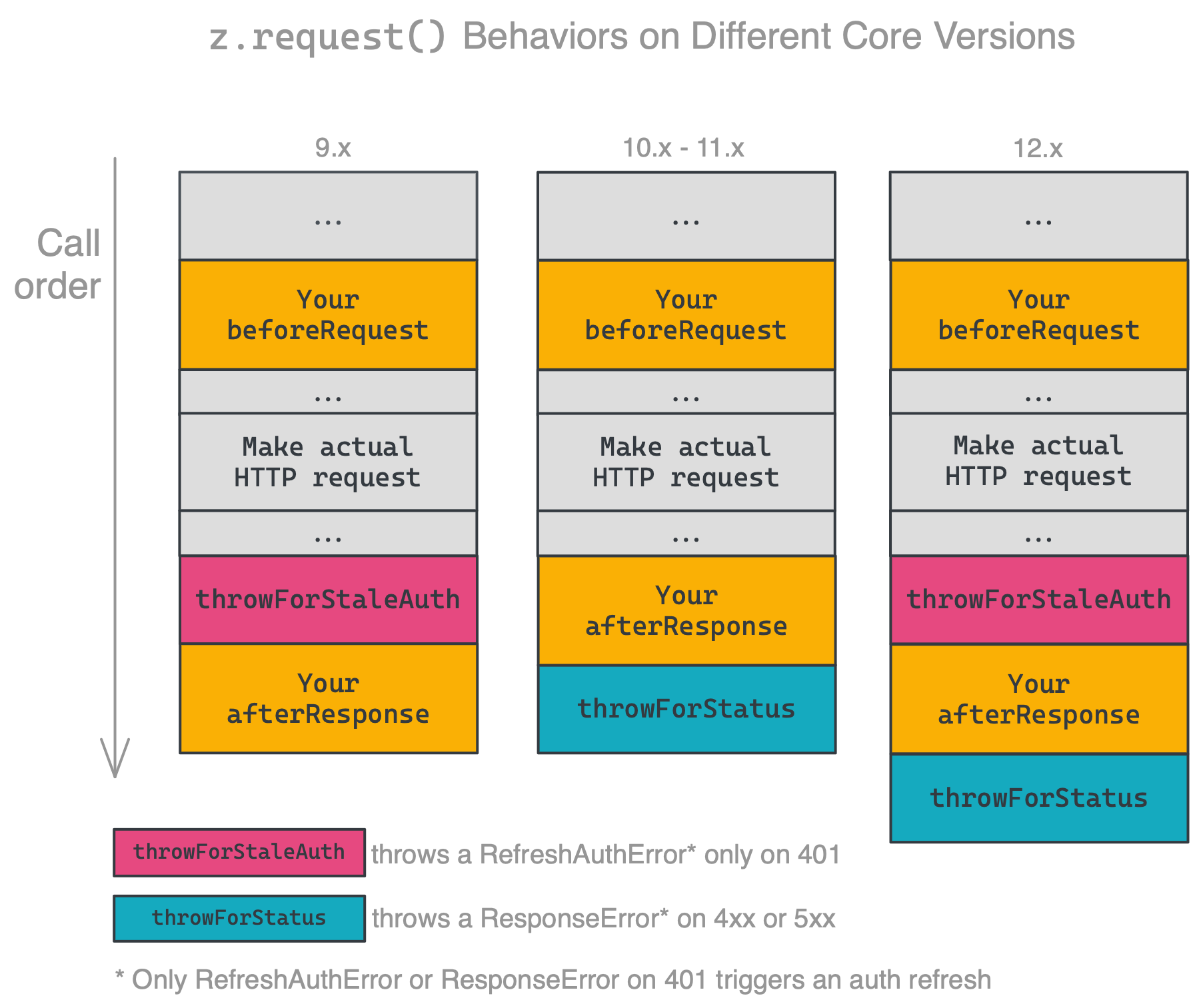
|
|
2396
2410
|
|
|
2397
|
-
Ensure you're handling errors correctly for your platform version. The latest released version is **15.
|
|
2411
|
+
Ensure you're handling errors correctly for your platform version. The latest released version is **15.1.0**.
|
|
2398
2412
|
|
|
2399
2413
|
### HTTP Request Options
|
|
2400
2414
|
|
|
@@ -2500,7 +2514,7 @@ Dehydration, and its counterpart Hydration, is a tool that can lazily load data
|
|
|
2500
2514
|
|
|
2501
2515
|
The method `z.dehydrate(func, inputData)` has two required arguments:
|
|
2502
2516
|
|
|
2503
|
-
* `func` - the function to call to fetch the extra data. Can be any raw `function`, defined in the file doing the dehydration or imported from another part of your app. You must also register the function in the app's `hydrators` property. Note that since v10.1.0, the maximum payload size to pass to `z.dehydrate` / `z.dehydrateFile` is 6KB.
|
|
2517
|
+
* `func` - the function to call to fetch the extra data. Can be any raw `function`, defined in the file doing the dehydration or imported from another part of your app. You must also register the function in the app's `hydrators` property. Note that since v10.1.0, the maximum payload size to pass to `z.dehydrate` / `z.dehydrateFile` is 6KB.
|
|
2504
2518
|
* `inputData` - this is an object that contains things like a `path` or `id` - whatever you need to load data on the other side
|
|
2505
2519
|
|
|
2506
2520
|
> **Why do I need to register my functions?** Because of how JavaScript works with its module system, we need an explicit handle on the function that can be accessed from the App definition without trying to "automagically" (and sometimes incorrectly) infer code locations.
|
|
@@ -2848,7 +2862,7 @@ const yourAfterResponse = (resp) => {
|
|
|
2848
2862
|
```
|
|
2849
2863
|
Instead of a user’s Zap erroring and halting, the request will be repeatedly retried at the specified time.
|
|
2850
2864
|
|
|
2851
|
-
For throttled requests that occur during processing of a webhook trigger's perform, before results are produced; there is a max retry delay of 300 seconds and a default delay of 60 seconds if none is specified. For webhook processing only, if a request during the retry attempt is also throttled, it will not be re-attempted again.
|
|
2865
|
+
For throttled requests that occur during processing of a webhook trigger's perform, before results are produced; there is a max retry delay of 300 seconds and a default delay of 60 seconds if none is specified. For webhook processing only, if a request during the retry attempt is also throttled, it will not be re-attempted again.
|
|
2852
2866
|
|
|
2853
2867
|
## Testing
|
|
2854
2868
|
|
|
@@ -3230,9 +3244,9 @@ zapier test
|
|
|
3230
3244
|
zapier push
|
|
3231
3245
|
```
|
|
3232
3246
|
|
|
3233
|
-
There are a lot of details left out - check out the full example app
|
|
3247
|
+
There are a lot of details left out - check out the full example app [here](https://github.com/zapier/zapier-platform/tree/main/example-apps/babel).
|
|
3234
3248
|
|
|
3235
|
-
>
|
|
3249
|
+
> We recommend using `zapier init .` to create an app - you’ll be presented with a list of currently available example templates to start with.
|
|
3236
3250
|
|
|
3237
3251
|
## FAQs
|
|
3238
3252
|
|
|
@@ -3587,7 +3601,7 @@ Broadly speaking, all releases will continue to work indefinitely. While you nev
|
|
|
3587
3601
|
For more info about which Node versions are supported, see [the faq](#how-do-i-manually-set-the-nodejs-version-to-run-my-app-with).
|
|
3588
3602
|
|
|
3589
3603
|
<!-- TODO: if we decouple releases, change this -->
|
|
3590
|
-
The most recently released version of `cli` and `core` is **15.
|
|
3604
|
+
The most recently released version of `cli` and `core` is **15.1.0**. You can see the versions you're working with by running `zapier -v`.
|
|
3591
3605
|
|
|
3592
3606
|
To update `cli`, run `npm install -g zapier-platform-cli`.
|
|
3593
3607
|
|