zapier-platform-cli 11.2.0 → 11.3.2
This diff represents the content of publicly available package versions that have been released to one of the supported registries. The information contained in this diff is provided for informational purposes only and reflects changes between package versions as they appear in their respective public registries.
- package/README-source.md +2002 -0
- package/README.md +34 -22
- package/oclif.manifest.json +1 -1
- package/package.json +3 -3
- package/src/generators/index.js +1 -1
- package/src/generators/templates/files/creates/uploadFile_v10.js +11 -5
- package/src/generators/templates/files/test/creates.test.js +1 -1
- package/src/oclif/commands/jobs.js +98 -0
- package/src/oclif/commands/migrate.js +12 -4
- package/src/oclif/commands/promote.js +13 -8
- package/src/oclif/commands/test.js +11 -9
- package/src/oclif/hooks/renderMarkdownHelp.js +1 -1
- package/src/oclif/oCommands.js +1 -0
- package/src/utils/api.js +3 -0
- package/src/utils/package-manager.js +45 -0
package/README.md
CHANGED
|
@@ -22,7 +22,7 @@ You may find docs duplicate or outdated across the Zapier site. The most up-to-d
|
|
|
22
22
|
|
|
23
23
|
Our code is updated frequently. To see a full list of changes, look no further than [the CHANGELOG](https://github.com/zapier/zapier-platform/blob/master/CHANGELOG.md).
|
|
24
24
|
|
|
25
|
-
This doc describes the latest CLI version (**11.2
|
|
25
|
+
This doc describes the latest CLI version (**11.3.2**), as of this writing. If you're using an older version of the CLI, you may want to check out these historical releases:
|
|
26
26
|
|
|
27
27
|
- CLI Docs: [10.2.0](https://github.com/zapier/zapier-platform/blob/zapier-platform-cli@10.2.0/packages/cli/README.md), [9.6.0](https://github.com/zapier/zapier-platform/blob/zapier-platform-cli@9.6.0/packages/cli/README.md), [8.4.2](https://github.com/zapier/zapier-platform/blob/zapier-platform-cli@8.4.2/packages/cli/README.md)
|
|
28
28
|
- CLI Reference: [10.2.0](https://github.com/zapier/zapier-platform/blob/zapier-platform-cli@10.2.0/packages/cli/docs/cli.md), [9.6.0](https://github.com/zapier/zapier-platform/blob/zapier-platform-cli@9.6.0/packages/cli/docs/cli.md), [8.4.2](https://github.com/zapier/zapier-platform/blob/zapier-platform-cli@8.4.2/packages/cli/docs/cli.md)
|
|
@@ -449,11 +449,11 @@ Most applications require some sort of authentication - and Zapier provides a ha
|
|
|
449
449
|
|
|
450
450
|
### Basic
|
|
451
451
|
|
|
452
|
-
Useful if your app requires two pieces of information to
|
|
452
|
+
Useful if your app requires two pieces of information to authenticate: `username` and `password`, which only the end user can provide. By default, Zapier will do the standard Basic authentication base64 header encoding for you (via an automatically registered middleware).
|
|
453
453
|
|
|
454
454
|
> Example App: Check out https://github.com/zapier/zapier-platform/tree/master/example-apps/basic-auth for a working example app for basic auth.
|
|
455
455
|
|
|
456
|
-
|
|
456
|
+
If your app uses Basic auth with an encoded API key rather than a username and password, like `Authorization: Basic APIKEYHERE:x`, consider the [Custom](#custom) authentication method instead.
|
|
457
457
|
|
|
458
458
|
```js
|
|
459
459
|
const authentication = {
|
|
@@ -641,11 +641,11 @@ Zapier's OAuth1 implementation matches [Twitter's](https://developer.twitter.com
|
|
|
641
641
|
|
|
642
642
|
The flow works like this:
|
|
643
643
|
|
|
644
|
-
1. Zapier makes a call to your API requesting a "request token" (also known as "temporary credentials")
|
|
645
|
-
2. Zapier sends the user to the authorization URL, defined by your app, along with the request token
|
|
644
|
+
1. Zapier makes a call to your API requesting a "request token" (also known as "temporary credentials").
|
|
645
|
+
2. Zapier sends the user to the authorization URL, defined by your app, along with the request token.
|
|
646
646
|
3. Once authorized, your website sends the user to the `redirect_uri` Zapier provided. Use `zapier describe` command to find out what it is: 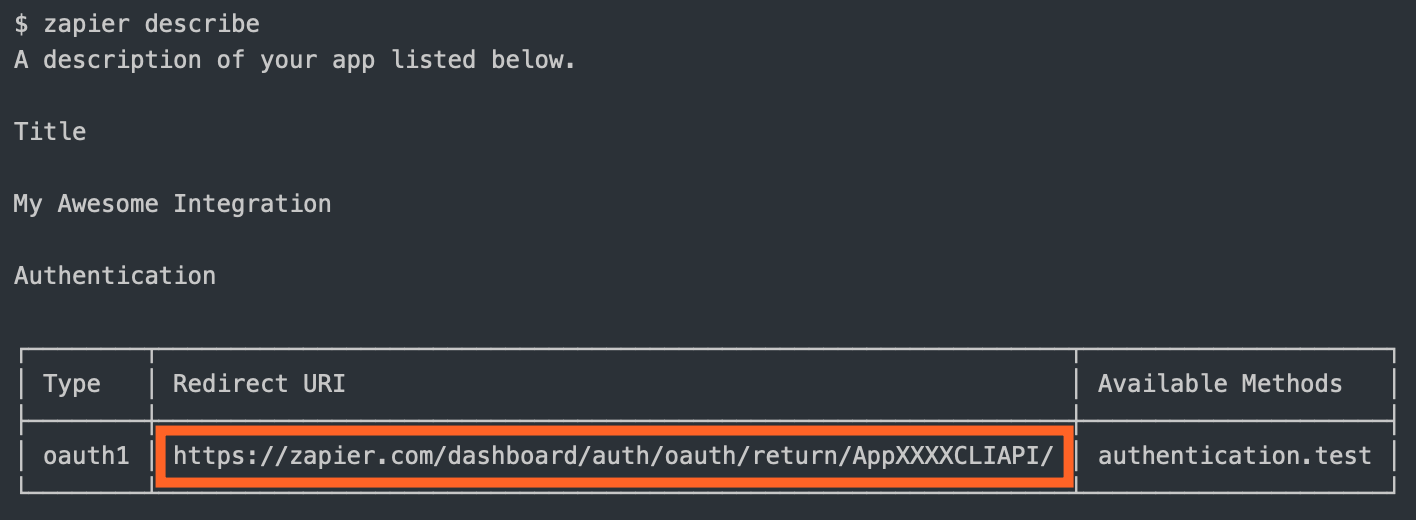
|
|
647
|
-
4. Zapier makes a call
|
|
648
|
-
5. Zapier
|
|
647
|
+
4. Zapier makes a backend call to your API to exchange the request token for an "access token" (also known as "long-lived credentials").
|
|
648
|
+
5. Zapier stores the `access_token` and uses it to make calls on behalf of the user.
|
|
649
649
|
|
|
650
650
|
You are required to define:
|
|
651
651
|
|
|
@@ -757,15 +757,24 @@ Zapier's OAuth2 implementation is based on the `authorization_code` flow, simila
|
|
|
757
757
|
|
|
758
758
|
> Example App: Check out https://github.com/zapier/zapier-platform/tree/master/example-apps/oauth2 for a working example app for OAuth2.
|
|
759
759
|
|
|
760
|
-
|
|
760
|
+
If your app's OAuth2 flow uses a different grant type, such as `client_credentials`, try using [Session auth](#session) instead.
|
|
761
761
|
|
|
762
|
-
|
|
763
|
-
2. Once authorized, your website sends the user to the `redirect_uri` Zapier provided. Use `zapier describe` command to find out what it is: 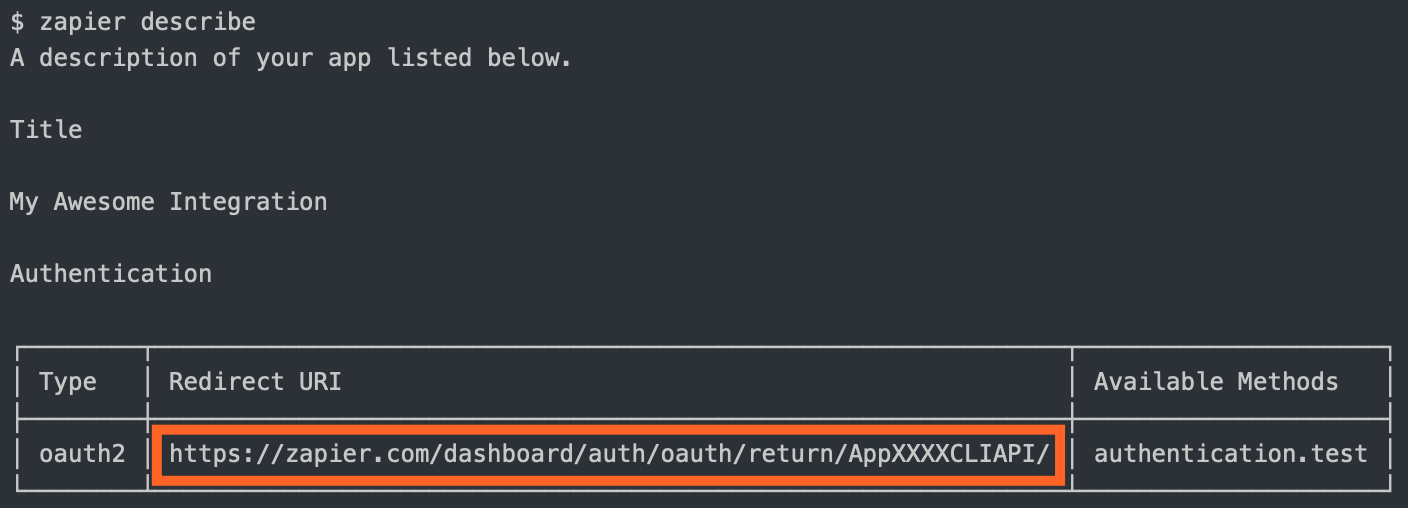
|
|
764
|
-
3. Zapier makes a call on our backend to your API to exchange the `code` for an `access_token`
|
|
765
|
-
4. Zapier remembers the `access_token` and makes calls on behalf of the user
|
|
766
|
-
5. (Optionally) Zapier can refresh the token if it expires
|
|
762
|
+
The OAuth2 flow looks like this:
|
|
767
763
|
|
|
768
|
-
|
|
764
|
+
1. Zapier sends the user to the authorization URL defined by your app.
|
|
765
|
+
2. Once authorized, your website sends the user to the `redirect_uri` Zapier provided. Use the `zapier describe` command to find out what it is: 
|
|
766
|
+
3. Zapier makes a backend call to your API to exchange the `code` for an `access_token`.
|
|
767
|
+
4. Zapier stores the `access_token` and uses it to make calls on behalf of the user.
|
|
768
|
+
5. (Optionally) Zapier can refresh the token if it expires.
|
|
769
|
+
|
|
770
|
+
You are required to define:
|
|
771
|
+
|
|
772
|
+
* `authorizeUrl`: The authorization URL
|
|
773
|
+
* `getAccessToken`: The API call to fetch the access token
|
|
774
|
+
|
|
775
|
+
If the access token has a limited life and you want to refresh the token when it expires, you'll also need to define the API call to perform that refresh. You can choose to set `autoRefresh: true`, as in the example app, if you want Zapier to automatically make a call to refresh the token after receiving a 401. See [Stale Authentication Credentials](#stale-authentication-credentials) for more details on handling auth refresh.
|
|
776
|
+
|
|
777
|
+
You'll also likely want to set your `CLIENT_ID` and `CLIENT_SECRET` as environment variables:
|
|
769
778
|
|
|
770
779
|
```bash
|
|
771
780
|
# setting the environment variables on Zapier.com
|
|
@@ -2564,15 +2573,18 @@ Example: `throw new z.errors.HaltedError('Your reason.');`
|
|
|
2564
2573
|
|
|
2565
2574
|
For apps that require manual refresh of authorization on a regular basis, Zapier
|
|
2566
2575
|
provides a mechanism to notify users of expired credentials. With the
|
|
2567
|
-
`ExpiredAuthError`, the current operation is interrupted
|
|
2568
|
-
|
|
2569
|
-
|
|
2576
|
+
`ExpiredAuthError`, the current operation is interrupted and a predefined email
|
|
2577
|
+
is sent out asking the user to refresh the credentials. While the auth is
|
|
2578
|
+
disconnected, Zap runs will not be executed, to prevent more calls with expired
|
|
2579
|
+
credentials. (The runs will be
|
|
2580
|
+
[Held](https://zapier.com/help/manage/history/view-and-manage-your-zap-history#holding),
|
|
2581
|
+
and the user will be able to replay them after reconnecting.)
|
|
2570
2582
|
|
|
2571
2583
|
Example: `throw new z.errors.ExpiredAuthError('Your message.');`
|
|
2572
2584
|
|
|
2573
|
-
For apps that use OAuth2
|
|
2574
|
-
`afterResponse` middleware that throws an error when the response status
|
|
2575
|
-
The error will signal Zapier to refresh the credentials and then
|
|
2585
|
+
For apps that use OAuth2 with `autoRefresh: true` or Session Auth, the core injects
|
|
2586
|
+
a built-in `afterResponse` middleware that throws an error when the response status
|
|
2587
|
+
is 401. The error will signal Zapier to refresh the credentials and then retry the
|
|
2576
2588
|
failed operation. For some cases, e.g, your server doesn't use the 401 status
|
|
2577
2589
|
for auth refresh, you may have to throw the `RefreshAuthError` on your own,
|
|
2578
2590
|
which will also signal Zapier to refresh the credentials.
|
|
@@ -2581,7 +2593,7 @@ Example: `throw new z.errors.RefreshAuthError();`
|
|
|
2581
2593
|
|
|
2582
2594
|
#### v10 Breaking Change: Auth Refresh
|
|
2583
2595
|
|
|
2584
|
-
A breaking change on v10+ is that the built-in `afterResponse` middleware
|
|
2596
|
+
A breaking change on v10+ is that the built-in `afterResponse` middleware that
|
|
2585
2597
|
handles auth refresh is changed to happen AFTER your app's `afterResponse`. On
|
|
2586
2598
|
v9 and older, it happens before your app's `afterResponse`. So it will break if
|
|
2587
2599
|
your `afterReponse` does something like:
|
|
@@ -3384,7 +3396,7 @@ Broadly speaking, all releases will continue to work indefinitely. While you nev
|
|
|
3384
3396
|
For more info about which Node versions are supported, see [the faq](#how-do-i-manually-set-the-nodejs-version-to-run-my-app-with).
|
|
3385
3397
|
|
|
3386
3398
|
<!-- TODO: if we decouple releases, change this -->
|
|
3387
|
-
The most recently released version of `cli` and `core` is **11.2
|
|
3399
|
+
The most recently released version of `cli` and `core` is **11.3.2**. You can see the versions you're working with by running `zapier -v`.
|
|
3388
3400
|
|
|
3389
3401
|
To update `cli`, run `npm install -g zapier-platform-cli`.
|
|
3390
3402
|
|
package/oclif.manifest.json
CHANGED
|
@@ -1 +1 @@
|
|
|
1
|
-
{"version":"11.2.0","commands":{"analytics":{"id":"analytics","description":"Show the status of the analytics that are collected. Also used to change what is collected.","pluginName":"zapier-platform-cli","pluginType":"core","aliases":[],"examples":["zapier analytics --mode enabled"],"flags":{"mode":{"name":"mode","type":"option","char":"m","description":"Choose how much information to share. Anonymous mode drops the OS type and Zapier user id, but keeps command info. Identifying information is used only for debugging purposes.","options":["enabled","anonymous","disabled"]},"debug":{"name":"debug","type":"boolean","char":"d","description":"Show extra debugging output.","allowNo":false},"invokedFromAnotherCommand":{"name":"invokedFromAnotherCommand","type":"boolean","hidden":true,"allowNo":false}},"args":[]},"build":{"id":"build","description":"Build a pushable zip from the current directory.\n\nThis command does the following:\n\n* Creates a temporary folder\n* Copies all code into the temporary folder\n* Adds an entry point: `zapierwrapper.js`\n* Generates and validates app definition.\n* Detects dependencies via browserify (optional, on by default)\n* Zips up all needed `.js` files. If you want to include more files, add a \"includeInBuild\" property (array with strings of regexp paths) to your `.zapierapprc`.\n* Moves the zip to `build/build.zip` and `build/source.zip` and deletes the temp folder\n\nThis command is typically followed by `zapier upload`.","pluginName":"zapier-platform-cli","pluginType":"core","aliases":[],"flags":{"disable-dependency-detection":{"name":"disable-dependency-detection","type":"boolean","description":"Disable \"smart\" file inclusion. By default, Zapier only includes files that are required by `index.js`. If you (or your dependencies) require files dynamically (such as with `require(someVar)`), then you may see \"Cannot find module\" errors. Disabling this may make your `build.zip` too large. If that's the case, try using the `includeInBuild` option in your `.zapierapprc`. See the docs about `includeInBuild` for more info.","allowNo":false},"skip-npm-install":{"name":"skip-npm-install","type":"boolean","description":"Skips installing a fresh copy of npm dependencies on build. Helpful for using `yarn` or local copies of dependencies.","hidden":true,"allowNo":false},"skip-validation":{"name":"skip-validation","type":"boolean","description":"Skips local pre-push validation checks, and remote validation check of the CLI app's schema and AppVersion integrity.","hidden":true,"allowNo":false},"debug":{"name":"debug","type":"boolean","char":"d","description":"Show extra debugging output.","allowNo":false},"invokedFromAnotherCommand":{"name":"invokedFromAnotherCommand","type":"boolean","hidden":true,"allowNo":false}},"args":[]},"convert":{"id":"convert","description":"Convert a Legacy Web Builder app or Visual Builder integration to a CLI integration.\n\nIf you're converting a **Legacy Web Builder** app: the new integration will have a dependency named zapier-platform-legacy-scripting-runner, a shim used to simulate behaviors that are specific to Legacy Web Builder. There could be differences on how the shim simulates and how Legacy Web Builder actually behaves on some edge cases, especially you have custom scripting code.\n\nIf you're converting a **Visual Builder** app, then it will be identical and ready to push and use immediately!\n\nIf you re-run this command on an existing directory it will leave existing files alone and not clobber them.\n\nYou'll need to do a `zapier push` before the new version is visible in the editor, but otherwise you're good to go.","pluginName":"zapier-platform-cli","pluginType":"core","aliases":[],"flags":{"version":{"name":"version","type":"option","char":"v","description":"Convert a specific version. Required when converting a Visual Builder integration."},"debug":{"name":"debug","type":"boolean","char":"d","description":"Show extra debugging output.","allowNo":false},"invokedFromAnotherCommand":{"name":"invokedFromAnotherCommand","type":"boolean","hidden":true,"allowNo":false}},"args":[{"name":"integrationId","description":"To get the integration/app ID, go to \"https://zapier.com/app/developer\", click on an integration, and copy the number directly after \"/app/\" in the URL.","required":true},{"name":"path","description":"Relative to your current path - IE: `.` for current directory.","required":true}]},"deprecate":{"id":"deprecate","description":"Mark a non-production version of your integration as deprecated, with removal by a certain date.\n\nUse this when an integration version will not be supported or start breaking at a known date.\n\nZapier will send an email warning users of the deprecation once a date is set, they'll start seeing it as \"Deprecated\" in the UI, and once the deprecation date arrives, if the Zaps weren't updated, they'll be paused and the users will be emailed again explaining what happened.\n\nAfter the deprecation date has passed it will be safe to delete that integration version.\n\nDo not use this if you have non-breaking changes, such as fixing help text.","pluginName":"zapier-platform-cli","pluginType":"core","aliases":[],"examples":["zapier deprecate 1.2.3 2011-10-01"],"flags":{"debug":{"name":"debug","type":"boolean","char":"d","description":"Show extra debugging output.","allowNo":false},"invokedFromAnotherCommand":{"name":"invokedFromAnotherCommand","type":"boolean","hidden":true,"allowNo":false}},"args":[{"name":"version","description":"The version to deprecate.","required":true},{"name":"date","description":"The date (YYYY-MM-DD) when Zapier will make the specified version unavailable.","required":true}]},"describe":{"id":"describe","description":"Describe the current integration.\n\nThis command prints a human readable enumeration of your integrations's\ntriggers, searches, and creates as seen by Zapier. Useful to understand how your\nresources convert and relate to different actions.\n\n* **Noun**: your action's noun\n* **Label**: your action's label\n* **Resource**: the resource (if any) this action is tied to\n* **Available Methods**: testable methods for this action","pluginName":"zapier-platform-cli","pluginType":"core","aliases":[],"flags":{"format":{"name":"format","type":"option","char":"f","description":"Change the way structured data is presented. If \"json\" or \"raw\", you can pipe the output of the command into other tools, such as jq.","options":["plain","json","raw","row","table"],"default":"table"},"debug":{"name":"debug","type":"boolean","char":"d","description":"Show extra debugging output.","allowNo":false},"invokedFromAnotherCommand":{"name":"invokedFromAnotherCommand","type":"boolean","hidden":true,"allowNo":false}},"args":[]},"history":{"id":"history","description":"Get the history of your integration.\n\nHistory includes all the changes made over the lifetime of your integration. This includes everything from creation, updates, migrations, admins, and invitee changes, as well as who made the change and when.","pluginName":"zapier-platform-cli","pluginType":"core","aliases":[],"flags":{"format":{"name":"format","type":"option","char":"f","description":"Change the way structured data is presented. If \"json\" or \"raw\", you can pipe the output of the command into other tools, such as jq.","options":["plain","json","raw","row","table"],"default":"table"},"debug":{"name":"debug","type":"boolean","char":"d","description":"Show extra debugging output.","allowNo":false},"invokedFromAnotherCommand":{"name":"invokedFromAnotherCommand","type":"boolean","hidden":true,"allowNo":false}},"args":[]},"init":{"id":"init","description":"Initialize a new Zapier integration with a project template.\n\nAfter running this, you'll have a new integration in the specified directory. If you re-run this command on an existing directory, it will prompt before overwriting any existing files.\n\nThis doesn't register or deploy the integration with Zapier - try the `zapier register` and `zapier push` commands for that!","pluginName":"zapier-platform-cli","pluginType":"core","aliases":[],"examples":["zapier init myapp","zapier init ./path/myapp --template oauth2"],"flags":{"template":{"name":"template","type":"option","char":"t","description":"The template to start your integration with.","options":["basic-auth","callback","custom-auth","digest-auth","dynamic-dropdown","files","minimal","oauth1-trello","oauth2","search-or-create","session-auth","typescript"]},"debug":{"name":"debug","type":"boolean","char":"d","description":"Show extra debugging output.","allowNo":false},"invokedFromAnotherCommand":{"name":"invokedFromAnotherCommand","type":"boolean","hidden":true,"allowNo":false}},"args":[{"name":"path","description":"Where to create the new integration. If the directory doesn't exist, it will be created. If the directory isn't empty, we'll ask for confirmation","required":true}]},"integrations":{"id":"integrations","description":"List integrations you have admin access to.\n\nThis command also checks the current directory for a linked integration.","pluginName":"zapier-platform-cli","pluginType":"core","aliases":["apps"],"flags":{"format":{"name":"format","type":"option","char":"f","description":"Change the way structured data is presented. If \"json\" or \"raw\", you can pipe the output of the command into other tools, such as jq.","options":["plain","json","raw","row","table"],"default":"table"},"debug":{"name":"debug","type":"boolean","char":"d","description":"Show extra debugging output.","allowNo":false},"invokedFromAnotherCommand":{"name":"invokedFromAnotherCommand","type":"boolean","hidden":true,"allowNo":false}},"args":[]},"link":{"id":"link","description":"Link the current directory with an existing integration.\n\nThis command generates a `.zapierapprc` file in the directory in which it's ran. This file ties this code to an integration and is referenced frequently during `push` and `validate` operations. This file should be checked into source control.\n\nIf you're starting an integration from scratch, use `zapier init` instead.","pluginName":"zapier-platform-cli","pluginType":"core","aliases":[],"flags":{"debug":{"name":"debug","type":"boolean","char":"d","description":"Show extra debugging output.","allowNo":false},"invokedFromAnotherCommand":{"name":"invokedFromAnotherCommand","type":"boolean","hidden":true,"allowNo":false}},"args":[]},"login":{"id":"login","description":"Configure your `~/.zapierrc` with a deploy key.","pluginName":"zapier-platform-cli","pluginType":"core","aliases":[],"flags":{"sso":{"name":"sso","type":"boolean","char":"s","description":"Use this flag if you log into Zapier a Single Sign-On (SSO) button and don't have a Zapier password.","allowNo":false},"debug":{"name":"debug","type":"boolean","char":"d","description":"Show extra debugging output.","allowNo":false},"invokedFromAnotherCommand":{"name":"invokedFromAnotherCommand","type":"boolean","hidden":true,"allowNo":false}},"args":[]},"logout":{"id":"logout","description":"Deactivate your active deploy key and reset `~/.zapierrc`.","pluginName":"zapier-platform-cli","pluginType":"core","aliases":[],"flags":{"debug":{"name":"debug","type":"boolean","char":"d","description":"Show extra debugging output.","allowNo":false},"invokedFromAnotherCommand":{"name":"invokedFromAnotherCommand","type":"boolean","hidden":true,"allowNo":false}},"args":[]},"logs":{"id":"logs","description":"Print recent logs.\n\nLogs are created when your integration is run as part of a Zap. They come from explicit calls to `z.console.log()`, usage of `z.request()`, and any runtime errors.\n\nThis won't show logs from running locally with `zapier test`, since those never hit our server.","pluginName":"zapier-platform-cli","pluginType":"core","aliases":[],"flags":{"version":{"name":"version","type":"option","char":"v","description":"Filter logs to the specified version."},"status":{"name":"status","type":"option","char":"s","description":"Filter logs to only see errors or successes","options":["any","success","error"],"default":"any"},"type":{"name":"type","type":"option","char":"t","description":"See logs of the specified type","options":["console","bundle","http"],"default":"console"},"detailed":{"name":"detailed","type":"boolean","description":"See extra info, like request/response body and headers.","allowNo":false},"user":{"name":"user","type":"option","char":"u","description":"Only show logs for this user. Defaults to your account.","default":"me"},"limit":{"name":"limit","type":"option","description":"Cap the number of logs returned. Max is 50 (also the default)","default":50},"format":{"name":"format","type":"option","char":"f","description":"Change the way structured data is presented. If \"json\" or \"raw\", you can pipe the output of the command into other tools, such as jq.","options":["plain","json","raw","row","table"],"default":"table"},"debug":{"name":"debug","type":"boolean","char":"d","description":"Show extra debugging output.","allowNo":false},"invokedFromAnotherCommand":{"name":"invokedFromAnotherCommand","type":"boolean","hidden":true,"allowNo":false}},"args":[]},"migrate":{"id":"migrate","description":"Migrate users from one version of your integration to another.\n\nStart a migration to move users between different versions of your integration. You may also \"revert\" by simply swapping the from/to verion strings in the command line arguments (i.e. `zapier migrate 1.0.1 1.0.0`).\n\nOnly use this command to migrate users between non-breaking versions, use `zapier deprecate` if you have breaking changes!\n\nMigration time varies based on the number of affected Zaps. Be patient and check `zapier history` to track the status.\n\nSince a migration is only for non-breaking changes, users are not emailed about the update/migration. It will be a transparent process for them.\n\nWe recommend migrating a small subset of users first, then watching error logs of the new version for any sort of odd behavior. When you feel confident there are no bugs, go ahead and migrate everyone. If you see unexpected errors, you can revert.\n\nYou can migrate a single user by using `--user` (i.e. `zapier migrate 1.0.0 1.0.1 --user=user@example.com`).","pluginName":"zapier-platform-cli","pluginType":"core","aliases":[],"examples":["zapier migrate 1.0.0 1.0.1","zapier migrate 1.0.1 2.0.0 10","zapier migrate 2.0.0 2.0.1 --user=user@example.com"],"flags":{"user":{"name":"user","type":"option","description":"Migrate only this user"},"debug":{"name":"debug","type":"boolean","char":"d","description":"Show extra debugging output.","allowNo":false},"invokedFromAnotherCommand":{"name":"invokedFromAnotherCommand","type":"boolean","hidden":true,"allowNo":false}},"args":[{"name":"fromVersion","description":"The version FROM which to migrate users.","required":true},{"name":"toVersion","description":"The version TO which to migrate users.","required":true},{"name":"percent","description":"Percentage (between 1 and 100) of users to migrate.","default":100}]},"promote":{"id":"promote","description":"Promote a specific version to public access.\n\nPromote an integration version into production (non-private) rotation, which means new users can use this integration version.\n\n* This **does** mark the version as the official public version - all other versions & users are grandfathered.\n* This does **NOT** build/upload or deploy a version to Zapier - you should `zapier push` first.\n* This does **NOT** move old users over to this version - `zapier migrate 1.0.0 1.0.1` does that.\n* This does **NOT** recommend old users stop using this version - `zapier deprecate 1.0.0 2017-01-01` does that.\n\nPromotes are an inherently safe operation for all existing users of your integration.\n\nIf your integration is private and passes our integration checks, this will give you a URL to a form where you can fill in additional information for your integration to go public. After reviewing, the Zapier team will approve to make it public if there are no issues or decline with feedback.","pluginName":"zapier-platform-cli","pluginType":"core","aliases":[],"examples":["zapier promote 1.0.0"],"flags":{"debug":{"name":"debug","type":"boolean","char":"d","description":"Show extra debugging output.","allowNo":false},"invokedFromAnotherCommand":{"name":"invokedFromAnotherCommand","type":"boolean","hidden":true,"allowNo":false}},"args":[{"name":"version","description":"The version you want promote.","required":true}]},"push":{"id":"push","description":"Build and upload the current integration.\n\nThis command is the same as running `zapier build` and `zapier upload` in sequence. See those for more info.","pluginName":"zapier-platform-cli","pluginType":"core","aliases":[],"flags":{"disable-dependency-detection":{"name":"disable-dependency-detection","type":"boolean","description":"Disable \"smart\" file inclusion. By default, Zapier only includes files that are required by `index.js`. If you (or your dependencies) require files dynamically (such as with `require(someVar)`), then you may see \"Cannot find module\" errors. Disabling this may make your `build.zip` too large. If that's the case, try using the `includeInBuild` option in your `.zapierapprc`. See the docs about `includeInBuild` for more info.","allowNo":false},"skip-npm-install":{"name":"skip-npm-install","type":"boolean","description":"Skips installing a fresh copy of npm dependencies on build. Helpful for using `yarn` or local copies of dependencies.","hidden":true,"allowNo":false},"skip-validation":{"name":"skip-validation","type":"boolean","description":"Skips local pre-push validation checks, and remote validation check of the CLI app's schema and AppVersion integrity.","hidden":true,"allowNo":false},"debug":{"name":"debug","type":"boolean","char":"d","description":"Show extra debugging output.","allowNo":false},"invokedFromAnotherCommand":{"name":"invokedFromAnotherCommand","type":"boolean","hidden":true,"allowNo":false}},"args":[]},"register":{"id":"register","description":"Register a new integration in your account.\n\nAfter running this, you can run `zapier push` to build and upload your integration for use in the Zapier editor.\n\nThis will change the `./.zapierapprc` (which identifies this directory as holding code for a specific integration).","pluginName":"zapier-platform-cli","pluginType":"core","aliases":[],"examples":["zapier register","zapier register \"My Cool Integration\""],"flags":{"debug":{"name":"debug","type":"boolean","char":"d","description":"Show extra debugging output.","allowNo":false},"invokedFromAnotherCommand":{"name":"invokedFromAnotherCommand","type":"boolean","hidden":true,"allowNo":false}},"args":[{"name":"title","description":"Your integrations's public title. Asked interactively if not present."}]},"scaffold":{"id":"scaffold","description":"Add a starting trigger, create, search, or resource to your integration.\n\nThe first argument should be one of `trigger|search|create|resource` followed by the noun that this will act on (something like \"contact\" or \"deal\").\n\nThe scaffold command does two general things:\n\n* Creates a new file (such as `triggers/contact.js`)\n* Imports and registers it inside your `index.js`\n\nYou can mix and match several options to customize the created scaffold for your project.","pluginName":"zapier-platform-cli","pluginType":"core","aliases":[],"examples":["zapier scaffold trigger contact","zapier scaffold search contact --dest=my_src/searches","zapier scaffold create contact --entry=src/index.js","zapier scaffold resource contact --force"],"flags":{"dest":{"name":"dest","type":"option","char":"d","description":"Specify the new file's directory. Use this flag when you want to create a different folder structure such as `src/triggers` instead of the default `triggers`. Defaults to `[triggers|searches|creates]/{noun}`."},"test-dest":{"name":"test-dest","type":"option","description":"Specify the new test file's directory. Use this flag when you want to create a different folder structure such as `src/triggers` instead of the default `triggers`. Defaults to `test/[triggers|searches|creates]/{noun}`."},"entry":{"name":"entry","type":"option","char":"e","description":"Supply the path to your integration's root (`index.js`). Only needed if your `index.js` is in a subfolder, like `src`.","default":"index.js"},"force":{"name":"force","type":"boolean","char":"f","description":"Should we overwrite an exisiting trigger/search/create file?","allowNo":false},"no-help":{"name":"no-help","type":"boolean","description":"When scaffolding, should we skip adding helpful intro comments? Useful if this isn't your first rodeo.","allowNo":false},"debug":{"name":"debug","type":"boolean","char":"d","description":"Show extra debugging output.","allowNo":false},"invokedFromAnotherCommand":{"name":"invokedFromAnotherCommand","type":"boolean","hidden":true,"allowNo":false}},"args":[{"name":"actionType","required":true,"options":["trigger","search","create","resource"]},{"name":"noun","required":true}]},"test":{"id":"test","description":"Test your integration via the \"test\" script in your \"package.json\".\n\nThis command is a wrapper around `npm test` that also validates the structure of your integration and sets up extra environment variables.\n\nYou can pass any args/flags after a `--`; they will get forwarded onto your test script.","pluginName":"zapier-platform-cli","pluginType":"core","aliases":[],"examples":["zapier test","zapier test --skip-validate -- -t 30000 --grep api","zapier test -- -fo --testNamePattern \"auth pass\""],"flags":{"skip-validate":{"name":"skip-validate","type":"boolean","description":"Forgo running `zapier validate` before tests are run. This will speed up tests if you're modifying functionality of an existing integration rather than adding new actions.","allowNo":false},"yarn":{"name":"yarn","type":"boolean","description":"Use `yarn` instead of `npm`. This happens automatically if there's a `yarn.lock` file, but you can manually force `yarn` if you run tests from a sub-directory.","allowNo":false},"debug":{"name":"debug","type":"boolean","char":"d","description":"Show extra debugging output.","allowNo":false},"invokedFromAnotherCommand":{"name":"invokedFromAnotherCommand","type":"boolean","hidden":true,"allowNo":false}},"args":[]},"upload":{"id":"upload","description":"Upload the latest build of your integration to Zapier.\n\nThis command sends both build/build.zip and build/source.zip to Zapier for use.\n\nTypically we recommend using `zapier push`, which does a build and upload, rather than `upload` by itself.\n","pluginName":"zapier-platform-cli","pluginType":"core","aliases":[],"flags":{"debug":{"name":"debug","type":"boolean","char":"d","description":"Show extra debugging output.","allowNo":false},"invokedFromAnotherCommand":{"name":"invokedFromAnotherCommand","type":"boolean","hidden":true,"allowNo":false}},"args":[]},"validate":{"id":"validate","description":"Validate your integration.\n\nRun the standard validation routine powered by json-schema that checks your integration for any structural errors. This is the same routine that runs during `zapier build`, `zapier upload`, `zapier push` or even as a test in `zapier test`.","pluginName":"zapier-platform-cli","pluginType":"core","aliases":[],"examples":["zapier validate","zapier validate --without-style","zapier validate --format json"],"flags":{"without-style":{"name":"without-style","type":"boolean","description":"Forgo pinging the Zapier server to run further checks.","allowNo":false},"format":{"name":"format","type":"option","char":"f","description":"Change the way structured data is presented. If \"json\" or \"raw\", you can pipe the output of the command into other tools, such as jq.","options":["plain","json","raw","row","table"],"default":"table"},"debug":{"name":"debug","type":"boolean","char":"d","description":"Show extra debugging output.","allowNo":false},"invokedFromAnotherCommand":{"name":"invokedFromAnotherCommand","type":"boolean","hidden":true,"allowNo":false}},"args":[]},"versions":{"id":"versions","description":"List the versions of your integration available for use in the Zapier editor.","pluginName":"zapier-platform-cli","pluginType":"core","aliases":[],"flags":{"format":{"name":"format","type":"option","char":"f","description":"Change the way structured data is presented. If \"json\" or \"raw\", you can pipe the output of the command into other tools, such as jq.","options":["plain","json","raw","row","table"],"default":"table"},"debug":{"name":"debug","type":"boolean","char":"d","description":"Show extra debugging output.","allowNo":false},"invokedFromAnotherCommand":{"name":"invokedFromAnotherCommand","type":"boolean","hidden":true,"allowNo":false}},"args":[]},"delete:integration":{"id":"delete:integration","description":"Delete your integration (including all versions).\n\nThis only works if there are no active users or Zaps on any version. If you only want to delete certain versions, use the `zapier delete:version` command instead. It's unlikely that you'll be able to run this on an app that you've pushed publicly, since there are usually still users.","pluginName":"zapier-platform-cli","pluginType":"core","aliases":["delete:app"],"flags":{"debug":{"name":"debug","type":"boolean","char":"d","description":"Show extra debugging output.","allowNo":false},"invokedFromAnotherCommand":{"name":"invokedFromAnotherCommand","type":"boolean","hidden":true,"allowNo":false}},"args":[]},"delete:version":{"id":"delete:version","description":"Delete a specific version of your integration.\n\nThis only works if there are no users or Zaps on that version. You will probably need to have run `zapier migrate` and `zapier deprecate` before this command will work.","pluginName":"zapier-platform-cli","pluginType":"core","aliases":[],"flags":{"debug":{"name":"debug","type":"boolean","char":"d","description":"Show extra debugging output.","allowNo":false},"invokedFromAnotherCommand":{"name":"invokedFromAnotherCommand","type":"boolean","hidden":true,"allowNo":false}},"args":[{"name":"version","description":"Specify the version to delete. It must have no users or Zaps.","required":true}]},"env:get":{"id":"env:get","description":"Get environment variables for a version.","pluginName":"zapier-platform-cli","pluginType":"core","aliases":[],"examples":["zapier env:get 1.2.3"],"flags":{"format":{"name":"format","type":"option","char":"f","description":"Change the way structured data is presented. If \"json\" or \"raw\", you can pipe the output of the command into other tools, such as jq.","options":["plain","json","raw","row","table"],"default":"table"},"debug":{"name":"debug","type":"boolean","char":"d","description":"Show extra debugging output.","allowNo":false},"invokedFromAnotherCommand":{"name":"invokedFromAnotherCommand","type":"boolean","hidden":true,"allowNo":false}},"args":[{"name":"version","description":"The version to get the environment for.","required":true}]},"env:set":{"id":"env:set","description":"Set environment variables for a version.","pluginName":"zapier-platform-cli","pluginType":"core","aliases":[],"examples":["zapier env:set 1.2.3 SECRET=12345 OTHER=4321"],"flags":{"debug":{"name":"debug","type":"boolean","char":"d","description":"Show extra debugging output.","allowNo":false},"invokedFromAnotherCommand":{"name":"invokedFromAnotherCommand","type":"boolean","hidden":true,"allowNo":false}},"args":[{"name":"version","description":"The version to set the environment for. Values are copied forward when a new version is created, but this command will only ever affect the specified version.","required":true},{"name":"key-value pairs...","description":"The key-value pairs to set. Keys are case-insensitive. Each pair should be space separated and pairs should be separated by an `=`. For example: `A=123 B=456`"}]},"env:unset":{"id":"env:unset","description":"Unset environment variables for a version.","pluginName":"zapier-platform-cli","pluginType":"core","aliases":[],"examples":["zapier env:unset 1.2.3 SECRET OTHER"],"flags":{"debug":{"name":"debug","type":"boolean","char":"d","description":"Show extra debugging output.","allowNo":false},"invokedFromAnotherCommand":{"name":"invokedFromAnotherCommand","type":"boolean","hidden":true,"allowNo":false}},"args":[{"name":"version","description":"The version to set the environment for.","required":true},{"name":"keys...","description":"The keys to unset. Keys are case-insensitive."}]},"team:add":{"id":"team:add","description":"Add a team member to your integration.\n\nThese users come in two levels:\n\n * `admin`, who can edit everything about the integration\n * `subscriber`, who can't directly access the app, but will receive periodic email updates. These updates include quarterly health socores and more.\n\nTeam members can be freely added and removed.","pluginName":"zapier-platform-cli","pluginType":"core","aliases":["team:invite"],"examples":["zapier team:add bruce@wayne.com admin","zapier team:add alfred@wayne.com subscriber \"Hey Alfred, check out this app.\""],"flags":{"debug":{"name":"debug","type":"boolean","char":"d","description":"Show extra debugging output.","allowNo":false},"invokedFromAnotherCommand":{"name":"invokedFromAnotherCommand","type":"boolean","hidden":true,"allowNo":false}},"args":[{"name":"email","description":"The user to be invited. If they don't have a Zapier account, they'll be prompted to create one.","required":true},{"name":"role","description":"The level the invited team member should be at. Admins can edit everything and get email updates. Subscribers only get email updates.","required":true,"options":["admin","subscriber"]},{"name":"message","description":"A message sent in the email to your team member, if you need to provide context. Wrap the message in quotes to ensure spaces get saved."}]},"team:get":{"id":"team:get","description":"Get team members involved with your integration.\n\nThese users come in two levels:\n\n * `admin`, who can edit everything about the integration\n * `subscriber`, who can't directly access the app, but will receive periodic email updates. These updates include quarterly health socores and more.\n\nUse the `zapier team:add` and `zapier team:remove` commands to modify your team.\n","pluginName":"zapier-platform-cli","pluginType":"core","aliases":["team:list"],"flags":{"format":{"name":"format","type":"option","char":"f","description":"Change the way structured data is presented. If \"json\" or \"raw\", you can pipe the output of the command into other tools, such as jq.","options":["plain","json","raw","row","table"],"default":"table"},"debug":{"name":"debug","type":"boolean","char":"d","description":"Show extra debugging output.","allowNo":false},"invokedFromAnotherCommand":{"name":"invokedFromAnotherCommand","type":"boolean","hidden":true,"allowNo":false}},"args":[]},"team:remove":{"id":"team:remove","description":"Remove a team member from all versions of your integration.\n\nAdmins will immediately lose write access to the integration. Subscribers won't receive future email updates.","pluginName":"zapier-platform-cli","pluginType":"core","aliases":["team:delete"],"flags":{"debug":{"name":"debug","type":"boolean","char":"d","description":"Show extra debugging output.","allowNo":false},"invokedFromAnotherCommand":{"name":"invokedFromAnotherCommand","type":"boolean","hidden":true,"allowNo":false}},"args":[]},"users:add":{"id":"users:add","description":"Add a user to some or all versions of your integration.\n\nWhen this command is run, we'll send an email to the user inviting them to try your integration. You can track the status of that invite using the `zapier users:get` command.\n\nInvited users will be able to see your integration's name, logo, and description. They'll also be able to create Zaps using any available triggers and actions.","pluginName":"zapier-platform-cli","pluginType":"core","aliases":["users:invite"],"examples":["zapier users:add bruce@wayne.com","zapier users:add alfred@wayne.com 1.2.3"],"flags":{"force":{"name":"force","type":"boolean","char":"f","description":"Skip confirmation. Useful for running programatically.","allowNo":false},"debug":{"name":"debug","type":"boolean","char":"d","description":"Show extra debugging output.","allowNo":false},"invokedFromAnotherCommand":{"name":"invokedFromAnotherCommand","type":"boolean","hidden":true,"allowNo":false}},"args":[{"name":"email","description":"The user to be invited. If they don't have a Zapier account, they'll be prompted to create one.","required":true},{"name":"version","description":"A version string (like 1.2.3). Optional, used only if you want to invite a user to a specific version instead of all versions."}]},"users:get":{"id":"users:get","description":"Get a list of users who have been invited to your integration.\n\nNote that this list of users is NOT a comprehensive list of everyone who is using your integration. It only includes users who were invited directly by email (using the `\u001b[36mzapier users:add\u001b[39m` command or the web UI). Users who joined by clicking links generated using the `\u001b[36mzapier user:links\u001b[39m` command won't show up here.","pluginName":"zapier-platform-cli","pluginType":"core","aliases":["users:list"],"flags":{"format":{"name":"format","type":"option","char":"f","description":"Change the way structured data is presented. If \"json\" or \"raw\", you can pipe the output of the command into other tools, such as jq.","options":["plain","json","raw","row","table"],"default":"table"},"debug":{"name":"debug","type":"boolean","char":"d","description":"Show extra debugging output.","allowNo":false},"invokedFromAnotherCommand":{"name":"invokedFromAnotherCommand","type":"boolean","hidden":true,"allowNo":false}},"args":[]},"users:links":{"id":"users:links","description":"Get a list of links that are used to invite users to your integration.","pluginName":"zapier-platform-cli","pluginType":"core","aliases":[],"flags":{"format":{"name":"format","type":"option","char":"f","description":"Change the way structured data is presented. If \"json\" or \"raw\", you can pipe the output of the command into other tools, such as jq.","options":["plain","json","raw","row","table"],"default":"table"},"debug":{"name":"debug","type":"boolean","char":"d","description":"Show extra debugging output.","allowNo":false},"invokedFromAnotherCommand":{"name":"invokedFromAnotherCommand","type":"boolean","hidden":true,"allowNo":false}},"args":[]},"users:remove":{"id":"users:remove","description":"Remove a user from all versions of your integration.\n\nWhen this command is run, their Zaps will immediately turn off. They won't be able to use your app again until they're re-invited or it has gone public. In practice, this command isn't run often as it's very disruptive to users.","pluginName":"zapier-platform-cli","pluginType":"core","aliases":["users:delete"],"flags":{"force":{"name":"force","type":"boolean","char":"f","description":"Skips confirmation. Useful for running programatically.","allowNo":false},"debug":{"name":"debug","type":"boolean","char":"d","description":"Show extra debugging output.","allowNo":false},"invokedFromAnotherCommand":{"name":"invokedFromAnotherCommand","type":"boolean","hidden":true,"allowNo":false}},"args":[{"name":"email","description":"The user to be removed.","required":true}]}}}
|
|
1
|
+
{"version":"11.3.2","commands":{"analytics":{"id":"analytics","description":"Show the status of the analytics that are collected. Also used to change what is collected.","pluginName":"zapier-platform-cli","pluginType":"core","aliases":[],"examples":["zapier analytics --mode enabled"],"flags":{"mode":{"name":"mode","type":"option","char":"m","description":"Choose how much information to share. Anonymous mode drops the OS type and Zapier user id, but keeps command info. Identifying information is used only for debugging purposes.","options":["enabled","anonymous","disabled"]},"debug":{"name":"debug","type":"boolean","char":"d","description":"Show extra debugging output.","allowNo":false},"invokedFromAnotherCommand":{"name":"invokedFromAnotherCommand","type":"boolean","hidden":true,"allowNo":false}},"args":[]},"build":{"id":"build","description":"Build a pushable zip from the current directory.\n\nThis command does the following:\n\n* Creates a temporary folder\n* Copies all code into the temporary folder\n* Adds an entry point: `zapierwrapper.js`\n* Generates and validates app definition.\n* Detects dependencies via browserify (optional, on by default)\n* Zips up all needed `.js` files. If you want to include more files, add a \"includeInBuild\" property (array with strings of regexp paths) to your `.zapierapprc`.\n* Moves the zip to `build/build.zip` and `build/source.zip` and deletes the temp folder\n\nThis command is typically followed by `zapier upload`.","pluginName":"zapier-platform-cli","pluginType":"core","aliases":[],"flags":{"disable-dependency-detection":{"name":"disable-dependency-detection","type":"boolean","description":"Disable \"smart\" file inclusion. By default, Zapier only includes files that are required by `index.js`. If you (or your dependencies) require files dynamically (such as with `require(someVar)`), then you may see \"Cannot find module\" errors. Disabling this may make your `build.zip` too large. If that's the case, try using the `includeInBuild` option in your `.zapierapprc`. See the docs about `includeInBuild` for more info.","allowNo":false},"skip-npm-install":{"name":"skip-npm-install","type":"boolean","description":"Skips installing a fresh copy of npm dependencies on build. Helpful for using `yarn` or local copies of dependencies.","hidden":true,"allowNo":false},"skip-validation":{"name":"skip-validation","type":"boolean","description":"Skips local pre-push validation checks, and remote validation check of the CLI app's schema and AppVersion integrity.","hidden":true,"allowNo":false},"debug":{"name":"debug","type":"boolean","char":"d","description":"Show extra debugging output.","allowNo":false},"invokedFromAnotherCommand":{"name":"invokedFromAnotherCommand","type":"boolean","hidden":true,"allowNo":false}},"args":[]},"convert":{"id":"convert","description":"Convert a Legacy Web Builder app or Visual Builder integration to a CLI integration.\n\nIf you're converting a **Legacy Web Builder** app: the new integration will have a dependency named zapier-platform-legacy-scripting-runner, a shim used to simulate behaviors that are specific to Legacy Web Builder. There could be differences on how the shim simulates and how Legacy Web Builder actually behaves on some edge cases, especially you have custom scripting code.\n\nIf you're converting a **Visual Builder** app, then it will be identical and ready to push and use immediately!\n\nIf you re-run this command on an existing directory it will leave existing files alone and not clobber them.\n\nYou'll need to do a `zapier push` before the new version is visible in the editor, but otherwise you're good to go.","pluginName":"zapier-platform-cli","pluginType":"core","aliases":[],"flags":{"version":{"name":"version","type":"option","char":"v","description":"Convert a specific version. Required when converting a Visual Builder integration."},"debug":{"name":"debug","type":"boolean","char":"d","description":"Show extra debugging output.","allowNo":false},"invokedFromAnotherCommand":{"name":"invokedFromAnotherCommand","type":"boolean","hidden":true,"allowNo":false}},"args":[{"name":"integrationId","description":"To get the integration/app ID, go to \"https://zapier.com/app/developer\", click on an integration, and copy the number directly after \"/app/\" in the URL.","required":true},{"name":"path","description":"Relative to your current path - IE: `.` for current directory.","required":true}]},"deprecate":{"id":"deprecate","description":"Mark a non-production version of your integration as deprecated, with removal by a certain date.\n\nUse this when an integration version will not be supported or start breaking at a known date.\n\nZapier will send an email warning users of the deprecation once a date is set, they'll start seeing it as \"Deprecated\" in the UI, and once the deprecation date arrives, if the Zaps weren't updated, they'll be paused and the users will be emailed again explaining what happened.\n\nAfter the deprecation date has passed it will be safe to delete that integration version.\n\nDo not use this if you have non-breaking changes, such as fixing help text.","pluginName":"zapier-platform-cli","pluginType":"core","aliases":[],"examples":["zapier deprecate 1.2.3 2011-10-01"],"flags":{"debug":{"name":"debug","type":"boolean","char":"d","description":"Show extra debugging output.","allowNo":false},"invokedFromAnotherCommand":{"name":"invokedFromAnotherCommand","type":"boolean","hidden":true,"allowNo":false}},"args":[{"name":"version","description":"The version to deprecate.","required":true},{"name":"date","description":"The date (YYYY-MM-DD) when Zapier will make the specified version unavailable.","required":true}]},"describe":{"id":"describe","description":"Describe the current integration.\n\nThis command prints a human readable enumeration of your integrations's\ntriggers, searches, and creates as seen by Zapier. Useful to understand how your\nresources convert and relate to different actions.\n\n* **Noun**: your action's noun\n* **Label**: your action's label\n* **Resource**: the resource (if any) this action is tied to\n* **Available Methods**: testable methods for this action","pluginName":"zapier-platform-cli","pluginType":"core","aliases":[],"flags":{"format":{"name":"format","type":"option","char":"f","description":"Change the way structured data is presented. If \"json\" or \"raw\", you can pipe the output of the command into other tools, such as jq.","options":["plain","json","raw","row","table"],"default":"table"},"debug":{"name":"debug","type":"boolean","char":"d","description":"Show extra debugging output.","allowNo":false},"invokedFromAnotherCommand":{"name":"invokedFromAnotherCommand","type":"boolean","hidden":true,"allowNo":false}},"args":[]},"history":{"id":"history","description":"Get the history of your integration.\n\nHistory includes all the changes made over the lifetime of your integration. This includes everything from creation, updates, migrations, admins, and invitee changes, as well as who made the change and when.","pluginName":"zapier-platform-cli","pluginType":"core","aliases":[],"flags":{"format":{"name":"format","type":"option","char":"f","description":"Change the way structured data is presented. If \"json\" or \"raw\", you can pipe the output of the command into other tools, such as jq.","options":["plain","json","raw","row","table"],"default":"table"},"debug":{"name":"debug","type":"boolean","char":"d","description":"Show extra debugging output.","allowNo":false},"invokedFromAnotherCommand":{"name":"invokedFromAnotherCommand","type":"boolean","hidden":true,"allowNo":false}},"args":[]},"init":{"id":"init","description":"Initialize a new Zapier integration with a project template.\n\nAfter running this, you'll have a new integration in the specified directory. If you re-run this command on an existing directory, it will prompt before overwriting any existing files.\n\nThis doesn't register or deploy the integration with Zapier - try the `zapier register` and `zapier push` commands for that!","pluginName":"zapier-platform-cli","pluginType":"core","aliases":[],"examples":["zapier init myapp","zapier init ./path/myapp --template oauth2"],"flags":{"template":{"name":"template","type":"option","char":"t","description":"The template to start your integration with.","options":["basic-auth","callback","custom-auth","digest-auth","dynamic-dropdown","files","minimal","oauth1-trello","oauth2","search-or-create","session-auth","typescript"]},"debug":{"name":"debug","type":"boolean","char":"d","description":"Show extra debugging output.","allowNo":false},"invokedFromAnotherCommand":{"name":"invokedFromAnotherCommand","type":"boolean","hidden":true,"allowNo":false}},"args":[{"name":"path","description":"Where to create the new integration. If the directory doesn't exist, it will be created. If the directory isn't empty, we'll ask for confirmation","required":true}]},"integrations":{"id":"integrations","description":"List integrations you have admin access to.\n\nThis command also checks the current directory for a linked integration.","pluginName":"zapier-platform-cli","pluginType":"core","aliases":["apps"],"flags":{"format":{"name":"format","type":"option","char":"f","description":"Change the way structured data is presented. If \"json\" or \"raw\", you can pipe the output of the command into other tools, such as jq.","options":["plain","json","raw","row","table"],"default":"table"},"debug":{"name":"debug","type":"boolean","char":"d","description":"Show extra debugging output.","allowNo":false},"invokedFromAnotherCommand":{"name":"invokedFromAnotherCommand","type":"boolean","hidden":true,"allowNo":false}},"args":[]},"jobs":{"id":"jobs","description":"Lists ongoing migration or promotion jobs for the current integration.\n\nA job represents a background process that will be queued up when users execute a \"migrate\" or \"promote\" command for the current integration.\n\nEach job will be added to the end of a queue of \"promote\" and \"migration\" jobs where the \"Job Stage\" will then be initialized with \"requested\". \n\nJob stages will then move to \"estimating\", \"in_progress\" and finally one of four \"end\" stages: \"complete\", \"aborted\", \"errored\" or \"paused\".\n\nJob times will vary as it depends on the size of the queue and how many users your integration has.\n\nJobs are returned from oldest to newest.\n","pluginName":"zapier-platform-cli","pluginType":"core","aliases":[],"examples":["zapier jobs"],"flags":{"format":{"name":"format","type":"option","char":"f","description":"Change the way structured data is presented. If \"json\" or \"raw\", you can pipe the output of the command into other tools, such as jq.","options":["plain","json","raw","row","table"],"default":"table"},"debug":{"name":"debug","type":"boolean","char":"d","description":"Show extra debugging output.","allowNo":false},"invokedFromAnotherCommand":{"name":"invokedFromAnotherCommand","type":"boolean","hidden":true,"allowNo":false}},"args":[]},"link":{"id":"link","description":"Link the current directory with an existing integration.\n\nThis command generates a `.zapierapprc` file in the directory in which it's ran. This file ties this code to an integration and is referenced frequently during `push` and `validate` operations. This file should be checked into source control.\n\nIf you're starting an integration from scratch, use `zapier init` instead.","pluginName":"zapier-platform-cli","pluginType":"core","aliases":[],"flags":{"debug":{"name":"debug","type":"boolean","char":"d","description":"Show extra debugging output.","allowNo":false},"invokedFromAnotherCommand":{"name":"invokedFromAnotherCommand","type":"boolean","hidden":true,"allowNo":false}},"args":[]},"login":{"id":"login","description":"Configure your `~/.zapierrc` with a deploy key.","pluginName":"zapier-platform-cli","pluginType":"core","aliases":[],"flags":{"sso":{"name":"sso","type":"boolean","char":"s","description":"Use this flag if you log into Zapier a Single Sign-On (SSO) button and don't have a Zapier password.","allowNo":false},"debug":{"name":"debug","type":"boolean","char":"d","description":"Show extra debugging output.","allowNo":false},"invokedFromAnotherCommand":{"name":"invokedFromAnotherCommand","type":"boolean","hidden":true,"allowNo":false}},"args":[]},"logout":{"id":"logout","description":"Deactivate your active deploy key and reset `~/.zapierrc`.","pluginName":"zapier-platform-cli","pluginType":"core","aliases":[],"flags":{"debug":{"name":"debug","type":"boolean","char":"d","description":"Show extra debugging output.","allowNo":false},"invokedFromAnotherCommand":{"name":"invokedFromAnotherCommand","type":"boolean","hidden":true,"allowNo":false}},"args":[]},"logs":{"id":"logs","description":"Print recent logs.\n\nLogs are created when your integration is run as part of a Zap. They come from explicit calls to `z.console.log()`, usage of `z.request()`, and any runtime errors.\n\nThis won't show logs from running locally with `zapier test`, since those never hit our server.","pluginName":"zapier-platform-cli","pluginType":"core","aliases":[],"flags":{"version":{"name":"version","type":"option","char":"v","description":"Filter logs to the specified version."},"status":{"name":"status","type":"option","char":"s","description":"Filter logs to only see errors or successes","options":["any","success","error"],"default":"any"},"type":{"name":"type","type":"option","char":"t","description":"See logs of the specified type","options":["console","bundle","http"],"default":"console"},"detailed":{"name":"detailed","type":"boolean","description":"See extra info, like request/response body and headers.","allowNo":false},"user":{"name":"user","type":"option","char":"u","description":"Only show logs for this user. Defaults to your account.","default":"me"},"limit":{"name":"limit","type":"option","description":"Cap the number of logs returned. Max is 50 (also the default)","default":50},"format":{"name":"format","type":"option","char":"f","description":"Change the way structured data is presented. If \"json\" or \"raw\", you can pipe the output of the command into other tools, such as jq.","options":["plain","json","raw","row","table"],"default":"table"},"debug":{"name":"debug","type":"boolean","char":"d","description":"Show extra debugging output.","allowNo":false},"invokedFromAnotherCommand":{"name":"invokedFromAnotherCommand","type":"boolean","hidden":true,"allowNo":false}},"args":[]},"migrate":{"id":"migrate","description":"Migrate users from one version of your integration to another.\n\nStart a migration to move users between different versions of your integration. You may also \"revert\" by simply swapping the from/to verion strings in the command line arguments (i.e. `zapier migrate 1.0.1 1.0.0`).\n\nOnly use this command to migrate users between non-breaking versions, use `zapier deprecate` if you have breaking changes!\n\nMigration time varies based on the number of affected Zaps. Be patient and check `zapier jobs` to track the status. Or use `zapier history` if you want to see older jobs.\n\nSince a migration is only for non-breaking changes, users are not emailed about the update/migration. It will be a transparent process for them.\n\nWe recommend migrating a small subset of users first, then watching error logs of the new version for any sort of odd behavior. When you feel confident there are no bugs, go ahead and migrate everyone. If you see unexpected errors, you can revert.\n\nYou can migrate a single user by using `--user` (i.e. `zapier migrate 1.0.0 1.0.1 --user=user@example.com`).","pluginName":"zapier-platform-cli","pluginType":"core","aliases":[],"examples":["zapier migrate 1.0.0 1.0.1","zapier migrate 1.0.1 2.0.0 10","zapier migrate 2.0.0 2.0.1 --user=user@example.com"],"flags":{"user":{"name":"user","type":"option","description":"Migrate only this user"},"debug":{"name":"debug","type":"boolean","char":"d","description":"Show extra debugging output.","allowNo":false},"invokedFromAnotherCommand":{"name":"invokedFromAnotherCommand","type":"boolean","hidden":true,"allowNo":false}},"args":[{"name":"fromVersion","description":"The version FROM which to migrate users.","required":true},{"name":"toVersion","description":"The version TO which to migrate users.","required":true},{"name":"percent","description":"Percentage (between 1 and 100) of users to migrate.","default":100}]},"promote":{"id":"promote","description":"Promote a specific version to public access.\n\nPromote an integration version into production (non-private) rotation, which means new users can use this integration version.\n\n* This **does** mark the version as the official public version - all other versions & users are grandfathered.\n* This does **NOT** build/upload or deploy a version to Zapier - you should `zapier push` first.\n* This does **NOT** move old users over to this version - `zapier migrate 1.0.0 1.0.1` does that.\n* This does **NOT** recommend old users stop using this version - `zapier deprecate 1.0.0 2017-01-01` does that.\n\nPromotes are an inherently safe operation for all existing users of your integration.\n\nIf your integration is private and passes our integration checks, this will give you a URL to a form where you can fill in additional information for your integration to go public. After reviewing, the Zapier team will approve to make it public if there are no issues or decline with feedback.\n\nCheck `zapier jobs` to track the status of the promotion. Or use `zapier history` if you want to see older jobs.","pluginName":"zapier-platform-cli","pluginType":"core","aliases":[],"examples":["zapier promote 1.0.0"],"flags":{"debug":{"name":"debug","type":"boolean","char":"d","description":"Show extra debugging output.","allowNo":false},"invokedFromAnotherCommand":{"name":"invokedFromAnotherCommand","type":"boolean","hidden":true,"allowNo":false}},"args":[{"name":"version","description":"The version you want to promote.","required":true}]},"push":{"id":"push","description":"Build and upload the current integration.\n\nThis command is the same as running `zapier build` and `zapier upload` in sequence. See those for more info.","pluginName":"zapier-platform-cli","pluginType":"core","aliases":[],"flags":{"disable-dependency-detection":{"name":"disable-dependency-detection","type":"boolean","description":"Disable \"smart\" file inclusion. By default, Zapier only includes files that are required by `index.js`. If you (or your dependencies) require files dynamically (such as with `require(someVar)`), then you may see \"Cannot find module\" errors. Disabling this may make your `build.zip` too large. If that's the case, try using the `includeInBuild` option in your `.zapierapprc`. See the docs about `includeInBuild` for more info.","allowNo":false},"skip-npm-install":{"name":"skip-npm-install","type":"boolean","description":"Skips installing a fresh copy of npm dependencies on build. Helpful for using `yarn` or local copies of dependencies.","hidden":true,"allowNo":false},"skip-validation":{"name":"skip-validation","type":"boolean","description":"Skips local pre-push validation checks, and remote validation check of the CLI app's schema and AppVersion integrity.","hidden":true,"allowNo":false},"debug":{"name":"debug","type":"boolean","char":"d","description":"Show extra debugging output.","allowNo":false},"invokedFromAnotherCommand":{"name":"invokedFromAnotherCommand","type":"boolean","hidden":true,"allowNo":false}},"args":[]},"register":{"id":"register","description":"Register a new integration in your account.\n\nAfter running this, you can run `zapier push` to build and upload your integration for use in the Zapier editor.\n\nThis will change the `./.zapierapprc` (which identifies this directory as holding code for a specific integration).","pluginName":"zapier-platform-cli","pluginType":"core","aliases":[],"examples":["zapier register","zapier register \"My Cool Integration\""],"flags":{"debug":{"name":"debug","type":"boolean","char":"d","description":"Show extra debugging output.","allowNo":false},"invokedFromAnotherCommand":{"name":"invokedFromAnotherCommand","type":"boolean","hidden":true,"allowNo":false}},"args":[{"name":"title","description":"Your integrations's public title. Asked interactively if not present."}]},"scaffold":{"id":"scaffold","description":"Add a starting trigger, create, search, or resource to your integration.\n\nThe first argument should be one of `trigger|search|create|resource` followed by the noun that this will act on (something like \"contact\" or \"deal\").\n\nThe scaffold command does two general things:\n\n* Creates a new file (such as `triggers/contact.js`)\n* Imports and registers it inside your `index.js`\n\nYou can mix and match several options to customize the created scaffold for your project.","pluginName":"zapier-platform-cli","pluginType":"core","aliases":[],"examples":["zapier scaffold trigger contact","zapier scaffold search contact --dest=my_src/searches","zapier scaffold create contact --entry=src/index.js","zapier scaffold resource contact --force"],"flags":{"dest":{"name":"dest","type":"option","char":"d","description":"Specify the new file's directory. Use this flag when you want to create a different folder structure such as `src/triggers` instead of the default `triggers`. Defaults to `[triggers|searches|creates]/{noun}`."},"test-dest":{"name":"test-dest","type":"option","description":"Specify the new test file's directory. Use this flag when you want to create a different folder structure such as `src/triggers` instead of the default `triggers`. Defaults to `test/[triggers|searches|creates]/{noun}`."},"entry":{"name":"entry","type":"option","char":"e","description":"Supply the path to your integration's root (`index.js`). Only needed if your `index.js` is in a subfolder, like `src`.","default":"index.js"},"force":{"name":"force","type":"boolean","char":"f","description":"Should we overwrite an exisiting trigger/search/create file?","allowNo":false},"no-help":{"name":"no-help","type":"boolean","description":"When scaffolding, should we skip adding helpful intro comments? Useful if this isn't your first rodeo.","allowNo":false},"debug":{"name":"debug","type":"boolean","char":"d","description":"Show extra debugging output.","allowNo":false},"invokedFromAnotherCommand":{"name":"invokedFromAnotherCommand","type":"boolean","hidden":true,"allowNo":false}},"args":[{"name":"actionType","required":true,"options":["trigger","search","create","resource"]},{"name":"noun","required":true}]},"test":{"id":"test","description":"Test your integration via the \"test\" script in your \"package.json\".\n\nThis command is a wrapper around `npm test` that also validates the structure of your integration and sets up extra environment variables.\n\nYou can pass any args/flags after a `--`; they will get forwarded onto your test script.","pluginName":"zapier-platform-cli","pluginType":"core","aliases":[],"examples":["zapier test","zapier test --skip-validate -- -t 30000 --grep api","zapier test -- -fo --testNamePattern \"auth pass\""],"flags":{"skip-validate":{"name":"skip-validate","type":"boolean","description":"Forgo running `zapier validate` before tests are run. This will speed up tests if you're modifying functionality of an existing integration rather than adding new actions.","allowNo":false},"yarn":{"name":"yarn","type":"boolean","description":"Use `yarn` instead of `npm`. This happens automatically if there's a `yarn.lock` file, but you can manually force `yarn` if you run tests from a sub-directory.","allowNo":false},"pnpm":{"name":"pnpm","type":"boolean","description":"Use `pnpm` instead of `npm`. This happens automatically if there's a `pnpm-lock.yaml` file, but you can manually force `pnpm` if you run tests from a sub-directory.","allowNo":false},"debug":{"name":"debug","type":"boolean","char":"d","description":"Show extra debugging output.","allowNo":false},"invokedFromAnotherCommand":{"name":"invokedFromAnotherCommand","type":"boolean","hidden":true,"allowNo":false}},"args":[]},"upload":{"id":"upload","description":"Upload the latest build of your integration to Zapier.\n\nThis command sends both build/build.zip and build/source.zip to Zapier for use.\n\nTypically we recommend using `zapier push`, which does a build and upload, rather than `upload` by itself.\n","pluginName":"zapier-platform-cli","pluginType":"core","aliases":[],"flags":{"debug":{"name":"debug","type":"boolean","char":"d","description":"Show extra debugging output.","allowNo":false},"invokedFromAnotherCommand":{"name":"invokedFromAnotherCommand","type":"boolean","hidden":true,"allowNo":false}},"args":[]},"validate":{"id":"validate","description":"Validate your integration.\n\nRun the standard validation routine powered by json-schema that checks your integration for any structural errors. This is the same routine that runs during `zapier build`, `zapier upload`, `zapier push` or even as a test in `zapier test`.","pluginName":"zapier-platform-cli","pluginType":"core","aliases":[],"examples":["zapier validate","zapier validate --without-style","zapier validate --format json"],"flags":{"without-style":{"name":"without-style","type":"boolean","description":"Forgo pinging the Zapier server to run further checks.","allowNo":false},"format":{"name":"format","type":"option","char":"f","description":"Change the way structured data is presented. If \"json\" or \"raw\", you can pipe the output of the command into other tools, such as jq.","options":["plain","json","raw","row","table"],"default":"table"},"debug":{"name":"debug","type":"boolean","char":"d","description":"Show extra debugging output.","allowNo":false},"invokedFromAnotherCommand":{"name":"invokedFromAnotherCommand","type":"boolean","hidden":true,"allowNo":false}},"args":[]},"versions":{"id":"versions","description":"List the versions of your integration available for use in the Zapier editor.","pluginName":"zapier-platform-cli","pluginType":"core","aliases":[],"flags":{"format":{"name":"format","type":"option","char":"f","description":"Change the way structured data is presented. If \"json\" or \"raw\", you can pipe the output of the command into other tools, such as jq.","options":["plain","json","raw","row","table"],"default":"table"},"debug":{"name":"debug","type":"boolean","char":"d","description":"Show extra debugging output.","allowNo":false},"invokedFromAnotherCommand":{"name":"invokedFromAnotherCommand","type":"boolean","hidden":true,"allowNo":false}},"args":[]},"delete:integration":{"id":"delete:integration","description":"Delete your integration (including all versions).\n\nThis only works if there are no active users or Zaps on any version. If you only want to delete certain versions, use the `zapier delete:version` command instead. It's unlikely that you'll be able to run this on an app that you've pushed publicly, since there are usually still users.","pluginName":"zapier-platform-cli","pluginType":"core","aliases":["delete:app"],"flags":{"debug":{"name":"debug","type":"boolean","char":"d","description":"Show extra debugging output.","allowNo":false},"invokedFromAnotherCommand":{"name":"invokedFromAnotherCommand","type":"boolean","hidden":true,"allowNo":false}},"args":[]},"delete:version":{"id":"delete:version","description":"Delete a specific version of your integration.\n\nThis only works if there are no users or Zaps on that version. You will probably need to have run `zapier migrate` and `zapier deprecate` before this command will work.","pluginName":"zapier-platform-cli","pluginType":"core","aliases":[],"flags":{"debug":{"name":"debug","type":"boolean","char":"d","description":"Show extra debugging output.","allowNo":false},"invokedFromAnotherCommand":{"name":"invokedFromAnotherCommand","type":"boolean","hidden":true,"allowNo":false}},"args":[{"name":"version","description":"Specify the version to delete. It must have no users or Zaps.","required":true}]},"env:get":{"id":"env:get","description":"Get environment variables for a version.","pluginName":"zapier-platform-cli","pluginType":"core","aliases":[],"examples":["zapier env:get 1.2.3"],"flags":{"format":{"name":"format","type":"option","char":"f","description":"Change the way structured data is presented. If \"json\" or \"raw\", you can pipe the output of the command into other tools, such as jq.","options":["plain","json","raw","row","table"],"default":"table"},"debug":{"name":"debug","type":"boolean","char":"d","description":"Show extra debugging output.","allowNo":false},"invokedFromAnotherCommand":{"name":"invokedFromAnotherCommand","type":"boolean","hidden":true,"allowNo":false}},"args":[{"name":"version","description":"The version to get the environment for.","required":true}]},"env:set":{"id":"env:set","description":"Set environment variables for a version.","pluginName":"zapier-platform-cli","pluginType":"core","aliases":[],"examples":["zapier env:set 1.2.3 SECRET=12345 OTHER=4321"],"flags":{"debug":{"name":"debug","type":"boolean","char":"d","description":"Show extra debugging output.","allowNo":false},"invokedFromAnotherCommand":{"name":"invokedFromAnotherCommand","type":"boolean","hidden":true,"allowNo":false}},"args":[{"name":"version","description":"The version to set the environment for. Values are copied forward when a new version is created, but this command will only ever affect the specified version.","required":true},{"name":"key-value pairs...","description":"The key-value pairs to set. Keys are case-insensitive. Each pair should be space separated and pairs should be separated by an `=`. For example: `A=123 B=456`"}]},"env:unset":{"id":"env:unset","description":"Unset environment variables for a version.","pluginName":"zapier-platform-cli","pluginType":"core","aliases":[],"examples":["zapier env:unset 1.2.3 SECRET OTHER"],"flags":{"debug":{"name":"debug","type":"boolean","char":"d","description":"Show extra debugging output.","allowNo":false},"invokedFromAnotherCommand":{"name":"invokedFromAnotherCommand","type":"boolean","hidden":true,"allowNo":false}},"args":[{"name":"version","description":"The version to set the environment for.","required":true},{"name":"keys...","description":"The keys to unset. Keys are case-insensitive."}]},"team:add":{"id":"team:add","description":"Add a team member to your integration.\n\nThese users come in two levels:\n\n * `admin`, who can edit everything about the integration\n * `subscriber`, who can't directly access the app, but will receive periodic email updates. These updates include quarterly health socores and more.\n\nTeam members can be freely added and removed.","pluginName":"zapier-platform-cli","pluginType":"core","aliases":["team:invite"],"examples":["zapier team:add bruce@wayne.com admin","zapier team:add alfred@wayne.com subscriber \"Hey Alfred, check out this app.\""],"flags":{"debug":{"name":"debug","type":"boolean","char":"d","description":"Show extra debugging output.","allowNo":false},"invokedFromAnotherCommand":{"name":"invokedFromAnotherCommand","type":"boolean","hidden":true,"allowNo":false}},"args":[{"name":"email","description":"The user to be invited. If they don't have a Zapier account, they'll be prompted to create one.","required":true},{"name":"role","description":"The level the invited team member should be at. Admins can edit everything and get email updates. Subscribers only get email updates.","required":true,"options":["admin","subscriber"]},{"name":"message","description":"A message sent in the email to your team member, if you need to provide context. Wrap the message in quotes to ensure spaces get saved."}]},"team:get":{"id":"team:get","description":"Get team members involved with your integration.\n\nThese users come in two levels:\n\n * `admin`, who can edit everything about the integration\n * `subscriber`, who can't directly access the app, but will receive periodic email updates. These updates include quarterly health socores and more.\n\nUse the `zapier team:add` and `zapier team:remove` commands to modify your team.\n","pluginName":"zapier-platform-cli","pluginType":"core","aliases":["team:list"],"flags":{"format":{"name":"format","type":"option","char":"f","description":"Change the way structured data is presented. If \"json\" or \"raw\", you can pipe the output of the command into other tools, such as jq.","options":["plain","json","raw","row","table"],"default":"table"},"debug":{"name":"debug","type":"boolean","char":"d","description":"Show extra debugging output.","allowNo":false},"invokedFromAnotherCommand":{"name":"invokedFromAnotherCommand","type":"boolean","hidden":true,"allowNo":false}},"args":[]},"team:remove":{"id":"team:remove","description":"Remove a team member from all versions of your integration.\n\nAdmins will immediately lose write access to the integration. Subscribers won't receive future email updates.","pluginName":"zapier-platform-cli","pluginType":"core","aliases":["team:delete"],"flags":{"debug":{"name":"debug","type":"boolean","char":"d","description":"Show extra debugging output.","allowNo":false},"invokedFromAnotherCommand":{"name":"invokedFromAnotherCommand","type":"boolean","hidden":true,"allowNo":false}},"args":[]},"users:add":{"id":"users:add","description":"Add a user to some or all versions of your integration.\n\nWhen this command is run, we'll send an email to the user inviting them to try your integration. You can track the status of that invite using the `zapier users:get` command.\n\nInvited users will be able to see your integration's name, logo, and description. They'll also be able to create Zaps using any available triggers and actions.","pluginName":"zapier-platform-cli","pluginType":"core","aliases":["users:invite"],"examples":["zapier users:add bruce@wayne.com","zapier users:add alfred@wayne.com 1.2.3"],"flags":{"force":{"name":"force","type":"boolean","char":"f","description":"Skip confirmation. Useful for running programatically.","allowNo":false},"debug":{"name":"debug","type":"boolean","char":"d","description":"Show extra debugging output.","allowNo":false},"invokedFromAnotherCommand":{"name":"invokedFromAnotherCommand","type":"boolean","hidden":true,"allowNo":false}},"args":[{"name":"email","description":"The user to be invited. If they don't have a Zapier account, they'll be prompted to create one.","required":true},{"name":"version","description":"A version string (like 1.2.3). Optional, used only if you want to invite a user to a specific version instead of all versions."}]},"users:get":{"id":"users:get","description":"Get a list of users who have been invited to your integration.\n\nNote that this list of users is NOT a comprehensive list of everyone who is using your integration. It only includes users who were invited directly by email (using the `\u001b[36mzapier users:add\u001b[39m` command or the web UI). Users who joined by clicking links generated using the `\u001b[36mzapier user:links\u001b[39m` command won't show up here.","pluginName":"zapier-platform-cli","pluginType":"core","aliases":["users:list"],"flags":{"format":{"name":"format","type":"option","char":"f","description":"Change the way structured data is presented. If \"json\" or \"raw\", you can pipe the output of the command into other tools, such as jq.","options":["plain","json","raw","row","table"],"default":"table"},"debug":{"name":"debug","type":"boolean","char":"d","description":"Show extra debugging output.","allowNo":false},"invokedFromAnotherCommand":{"name":"invokedFromAnotherCommand","type":"boolean","hidden":true,"allowNo":false}},"args":[]},"users:links":{"id":"users:links","description":"Get a list of links that are used to invite users to your integration.","pluginName":"zapier-platform-cli","pluginType":"core","aliases":[],"flags":{"format":{"name":"format","type":"option","char":"f","description":"Change the way structured data is presented. If \"json\" or \"raw\", you can pipe the output of the command into other tools, such as jq.","options":["plain","json","raw","row","table"],"default":"table"},"debug":{"name":"debug","type":"boolean","char":"d","description":"Show extra debugging output.","allowNo":false},"invokedFromAnotherCommand":{"name":"invokedFromAnotherCommand","type":"boolean","hidden":true,"allowNo":false}},"args":[]},"users:remove":{"id":"users:remove","description":"Remove a user from all versions of your integration.\n\nWhen this command is run, their Zaps will immediately turn off. They won't be able to use your app again until they're re-invited or it has gone public. In practice, this command isn't run often as it's very disruptive to users.","pluginName":"zapier-platform-cli","pluginType":"core","aliases":["users:delete"],"flags":{"force":{"name":"force","type":"boolean","char":"f","description":"Skips confirmation. Useful for running programatically.","allowNo":false},"debug":{"name":"debug","type":"boolean","char":"d","description":"Show extra debugging output.","allowNo":false},"invokedFromAnotherCommand":{"name":"invokedFromAnotherCommand","type":"boolean","hidden":true,"allowNo":false}},"args":[{"name":"email","description":"The user to be removed.","required":true}]}}}
|
package/package.json
CHANGED
|
@@ -1,6 +1,6 @@
|
|
|
1
1
|
{
|
|
2
2
|
"name": "zapier-platform-cli",
|
|
3
|
-
"version": "11.2
|
|
3
|
+
"version": "11.3.2",
|
|
4
4
|
"description": "The CLI for managing integrations in Zapier Developer Platform.",
|
|
5
5
|
"repository": "zapier/zapier-platform",
|
|
6
6
|
"homepage": "https://platform.zapier.com/",
|
|
@@ -57,9 +57,9 @@
|
|
|
57
57
|
"jscodeshift": "0.12.0",
|
|
58
58
|
"klaw": "3.0.0",
|
|
59
59
|
"lodash": "4.17.21",
|
|
60
|
-
"marked": "
|
|
60
|
+
"marked": "4.0.10",
|
|
61
61
|
"marked-terminal": "4.1.1",
|
|
62
|
-
"node-fetch": "2.6.
|
|
62
|
+
"node-fetch": "2.6.7",
|
|
63
63
|
"ora": "5.4.0",
|
|
64
64
|
"parse-gitignore": "0.4.0",
|
|
65
65
|
"prettier": "2.3.0",
|
package/src/generators/index.js
CHANGED
|
@@ -6,19 +6,25 @@ const FormData = require('form-data');
|
|
|
6
6
|
// 9.x compatible code, see uploadFile_v9.js.
|
|
7
7
|
const makeDownloadStream = (url) =>
|
|
8
8
|
new Promise((resolve, reject) => {
|
|
9
|
-
http.request(url,
|
|
9
|
+
http.request(url, (res) => {
|
|
10
|
+
// We can risk missing the first n bytes if we don't pause!
|
|
11
|
+
res.pause();
|
|
12
|
+
resolve(res);
|
|
13
|
+
}).on('error', reject).end();
|
|
10
14
|
});
|
|
11
15
|
|
|
12
16
|
const perform = async (z, bundle) => {
|
|
13
|
-
const form = new FormData();
|
|
14
|
-
|
|
15
|
-
form.append('filename', bundle.inputData.filename);
|
|
16
|
-
|
|
17
17
|
// bundle.inputData.file will in fact be an URL where the file data can be
|
|
18
18
|
// downloaded from which we do via a stream
|
|
19
19
|
const stream = await makeDownloadStream(bundle.inputData.file, z);
|
|
20
|
+
|
|
21
|
+
const form = new FormData();
|
|
22
|
+
form.append('filename', bundle.inputData.filename);
|
|
20
23
|
form.append('file', stream);
|
|
21
24
|
|
|
25
|
+
// All set! Resume the stream
|
|
26
|
+
stream.resume();
|
|
27
|
+
|
|
22
28
|
const response = await z.request({
|
|
23
29
|
url: 'https://auth-json-server.zapier-staging.com/upload',
|
|
24
30
|
method: 'POST',
|
|
@@ -14,7 +14,7 @@ const FILE_URL =
|
|
|
14
14
|
// This is what you get when doing `curl <FILE_URL> | sha1sum`
|
|
15
15
|
const EXPECTED_SHA1 = '3cf58b42a0fb1b7cc58de8110096841ece967530';
|
|
16
16
|
|
|
17
|
-
describe
|
|
17
|
+
describe('uploadFile', () => {
|
|
18
18
|
test('upload file v10', async () => {
|
|
19
19
|
if (CORE_VERSION[0] < 10) {
|
|
20
20
|
console.warn(
|
|
@@ -0,0 +1,98 @@
|
|
|
1
|
+
const { chain } = require('lodash');
|
|
2
|
+
|
|
3
|
+
const BaseCommand = require('../ZapierBaseCommand');
|
|
4
|
+
const { listMigrations } = require('../../utils/api');
|
|
5
|
+
const { buildFlags } = require('../buildFlags');
|
|
6
|
+
|
|
7
|
+
const getVersion = (versionStr) => versionStr.split('@')[1];
|
|
8
|
+
const getIsoDate = (unixTs) => (unixTs ? new Date(unixTs).toISOString() : '-');
|
|
9
|
+
|
|
10
|
+
class JobsCommand extends BaseCommand {
|
|
11
|
+
async perform() {
|
|
12
|
+
/**
|
|
13
|
+
* Migrations and Jobs are used somewhat interchangeably here.
|
|
14
|
+
* Migrations represents the collection of promotion and migration
|
|
15
|
+
* background "jobs" that were recently executed on this app.
|
|
16
|
+
*/
|
|
17
|
+
|
|
18
|
+
this.startSpinner('Loading jobs');
|
|
19
|
+
const { migrations } = await listMigrations();
|
|
20
|
+
this.stopSpinner();
|
|
21
|
+
|
|
22
|
+
const jobs = chain(migrations)
|
|
23
|
+
.filter(
|
|
24
|
+
(migration) =>
|
|
25
|
+
migration.job_kind === 'migrate' || migration.job_kind === 'promote'
|
|
26
|
+
)
|
|
27
|
+
.map((migration) => {
|
|
28
|
+
const job = {
|
|
29
|
+
app_title: migration.app_title,
|
|
30
|
+
job_id: migration.job_id,
|
|
31
|
+
job_kind: migration.job_kind,
|
|
32
|
+
job_stage: migration.job_stage,
|
|
33
|
+
version_from: getVersion(migration.from_selected_api),
|
|
34
|
+
version_to: getVersion(migration.to_selected_api),
|
|
35
|
+
started_at: getIsoDate(migration.started_at),
|
|
36
|
+
updated_at: getIsoDate(migration.updated_at),
|
|
37
|
+
};
|
|
38
|
+
|
|
39
|
+
if (migration.progress) {
|
|
40
|
+
job.overall_progress =
|
|
41
|
+
parseFloat(migration.progress.overall_progress * 100).toFixed(2) +
|
|
42
|
+
'%';
|
|
43
|
+
|
|
44
|
+
if (migration.progress.current_step) {
|
|
45
|
+
job.current_step = migration.progress.current_step.name;
|
|
46
|
+
job.current_progress = `${migration.progress.current_step.finished_points} finished, ${migration.progress.current_step.skipped_points} skipped, ${migration.progress.current_step.estimated_points} estimated`;
|
|
47
|
+
job.current_step_status = migration.progress.current_step.status;
|
|
48
|
+
}
|
|
49
|
+
}
|
|
50
|
+
|
|
51
|
+
if (migration.error) {
|
|
52
|
+
job.error_message = migration.error.message;
|
|
53
|
+
}
|
|
54
|
+
|
|
55
|
+
return job;
|
|
56
|
+
})
|
|
57
|
+
.sortBy((migration) => migration.started_at)
|
|
58
|
+
.value();
|
|
59
|
+
|
|
60
|
+
this.logTable({
|
|
61
|
+
rows: jobs,
|
|
62
|
+
headers: [
|
|
63
|
+
['App Title', 'app_title'],
|
|
64
|
+
['Job Id', 'job_id'],
|
|
65
|
+
['Job Kind', 'job_kind'],
|
|
66
|
+
['Job Stage', 'job_stage'],
|
|
67
|
+
['From', 'version_from'],
|
|
68
|
+
['To', 'version_to'],
|
|
69
|
+
['Current Step', 'current_step'],
|
|
70
|
+
['Current Progress', 'current_progress'],
|
|
71
|
+
['Current Step Status', 'current_step_status'],
|
|
72
|
+
['Progress', 'overall_progress'],
|
|
73
|
+
['Started At', 'started_at'],
|
|
74
|
+
['Updated At', 'updated_at'],
|
|
75
|
+
['Errors', 'error_message'],
|
|
76
|
+
],
|
|
77
|
+
emptyMessage:
|
|
78
|
+
'No recent migration or promotion jobs found. Try `zapier history` if you see older jobs.',
|
|
79
|
+
});
|
|
80
|
+
}
|
|
81
|
+
}
|
|
82
|
+
|
|
83
|
+
JobsCommand.examples = ['zapier jobs'];
|
|
84
|
+
JobsCommand.description = `Lists ongoing migration or promotion jobs for the current integration.
|
|
85
|
+
|
|
86
|
+
A job represents a background process that will be queued up when users execute a "migrate" or "promote" command for the current integration.
|
|
87
|
+
|
|
88
|
+
Each job will be added to the end of a queue of "promote" and "migration" jobs where the "Job Stage" will then be initialized with "requested".
|
|
89
|
+
|
|
90
|
+
Job stages will then move to "estimating", "in_progress" and finally one of four "end" stages: "complete", "aborted", "errored" or "paused".
|
|
91
|
+
|
|
92
|
+
Job times will vary as it depends on the size of the queue and how many users your integration has.
|
|
93
|
+
|
|
94
|
+
Jobs are returned from oldest to newest.
|
|
95
|
+
`;
|
|
96
|
+
|
|
97
|
+
JobsCommand.flags = buildFlags({ opts: { format: true } });
|
|
98
|
+
module.exports = JobsCommand;
|
|
@@ -46,10 +46,14 @@ class MigrateCommand extends BaseCommand {
|
|
|
46
46
|
}
|
|
47
47
|
|
|
48
48
|
const body = {
|
|
49
|
-
|
|
49
|
+
job: {
|
|
50
|
+
name: 'migrate',
|
|
51
|
+
from_version: fromVersion,
|
|
52
|
+
to_version: toVersion,
|
|
53
|
+
email: user,
|
|
54
|
+
},
|
|
50
55
|
};
|
|
51
56
|
if (user) {
|
|
52
|
-
body.user = user;
|
|
53
57
|
this.startSpinner(
|
|
54
58
|
`Starting migration from ${fromVersion} to ${toVersion} for ${user}`
|
|
55
59
|
);
|
|
@@ -58,8 +62,12 @@ class MigrateCommand extends BaseCommand {
|
|
|
58
62
|
`Starting migration from ${fromVersion} to ${toVersion} for ${percent}%`
|
|
59
63
|
);
|
|
60
64
|
}
|
|
65
|
+
if (percent) {
|
|
66
|
+
body.job.percent_human = percent;
|
|
67
|
+
}
|
|
68
|
+
|
|
69
|
+
const url = `/apps/${app.id}/migrations`;
|
|
61
70
|
|
|
62
|
-
const url = `/apps/${app.id}/versions/${fromVersion}/migrate-to/${toVersion}`;
|
|
63
71
|
try {
|
|
64
72
|
await callAPI(url, { method: 'POST', body });
|
|
65
73
|
} finally {
|
|
@@ -110,7 +118,7 @@ Start a migration to move users between different versions of your integration.
|
|
|
110
118
|
|
|
111
119
|
Only use this command to migrate users between non-breaking versions, use \`zapier deprecate\` if you have breaking changes!
|
|
112
120
|
|
|
113
|
-
Migration time varies based on the number of affected Zaps. Be patient and check \`zapier
|
|
121
|
+
Migration time varies based on the number of affected Zaps. Be patient and check \`zapier jobs\` to track the status. Or use \`zapier history\` if you want to see older jobs.
|
|
114
122
|
|
|
115
123
|
Since a migration is only for non-breaking changes, users are not emailed about the update/migration. It will be a transparent process for them.
|
|
116
124
|
|
|
@@ -60,19 +60,22 @@ class PromoteCommand extends BaseCommand {
|
|
|
60
60
|
`Preparing to promote version ${version} of your integration "${app.title}".`
|
|
61
61
|
);
|
|
62
62
|
|
|
63
|
-
const body = {
|
|
64
|
-
|
|
65
|
-
|
|
66
|
-
|
|
63
|
+
const body = {
|
|
64
|
+
job: {
|
|
65
|
+
name: 'promote',
|
|
66
|
+
to_version: version,
|
|
67
|
+
changelog,
|
|
68
|
+
},
|
|
69
|
+
};
|
|
67
70
|
|
|
68
71
|
this.startSpinner(`Verifying and promoting ${version}`);
|
|
69
72
|
|
|
70
|
-
const url = `/apps/${app.id}/
|
|
73
|
+
const url = `/apps/${app.id}/migrations`;
|
|
71
74
|
try {
|
|
72
75
|
await callAPI(
|
|
73
76
|
url,
|
|
74
77
|
{
|
|
75
|
-
method: '
|
|
78
|
+
method: 'POST',
|
|
76
79
|
body,
|
|
77
80
|
},
|
|
78
81
|
true
|
|
@@ -120,7 +123,7 @@ PromoteCommand.args = [
|
|
|
120
123
|
{
|
|
121
124
|
name: 'version',
|
|
122
125
|
required: true,
|
|
123
|
-
description: 'The version you want promote.',
|
|
126
|
+
description: 'The version you want to promote.',
|
|
124
127
|
},
|
|
125
128
|
];
|
|
126
129
|
|
|
@@ -136,6 +139,8 @@ Promote an integration version into production (non-private) rotation, which mea
|
|
|
136
139
|
|
|
137
140
|
Promotes are an inherently safe operation for all existing users of your integration.
|
|
138
141
|
|
|
139
|
-
If your integration is private and passes our integration checks, this will give you a URL to a form where you can fill in additional information for your integration to go public. After reviewing, the Zapier team will approve to make it public if there are no issues or decline with feedback
|
|
142
|
+
If your integration is private and passes our integration checks, this will give you a URL to a form where you can fill in additional information for your integration to go public. After reviewing, the Zapier team will approve to make it public if there are no issues or decline with feedback.
|
|
143
|
+
|
|
144
|
+
Check \`zapier jobs\` to track the status of the promotion. Or use \`zapier history\` if you want to see older jobs.`;
|
|
140
145
|
|
|
141
146
|
module.exports = PromoteCommand;
|