yingclaw 2.5.20 → 2.5.26
This diff represents the content of publicly available package versions that have been released to one of the supported registries. The information contained in this diff is provided for informational purposes only and reflects changes between package versions as they appear in their respective public registries.
- package/README.md +31 -6
- package/bin/cli.js +372 -67
- package/index.js +2 -0
- package/lib/config.js +193 -20
- package/lib/doctor.js +13 -3
- package/lib/gateway.js +137 -6
- package/lib/openai.js +294 -0
- package/lib/panel.js +19 -5
- package/lib/vscode.js +280 -0
- package/package.json +2 -2
package/README.md
CHANGED
|
@@ -2,7 +2,7 @@
|
|
|
2
2
|
|
|
3
3
|
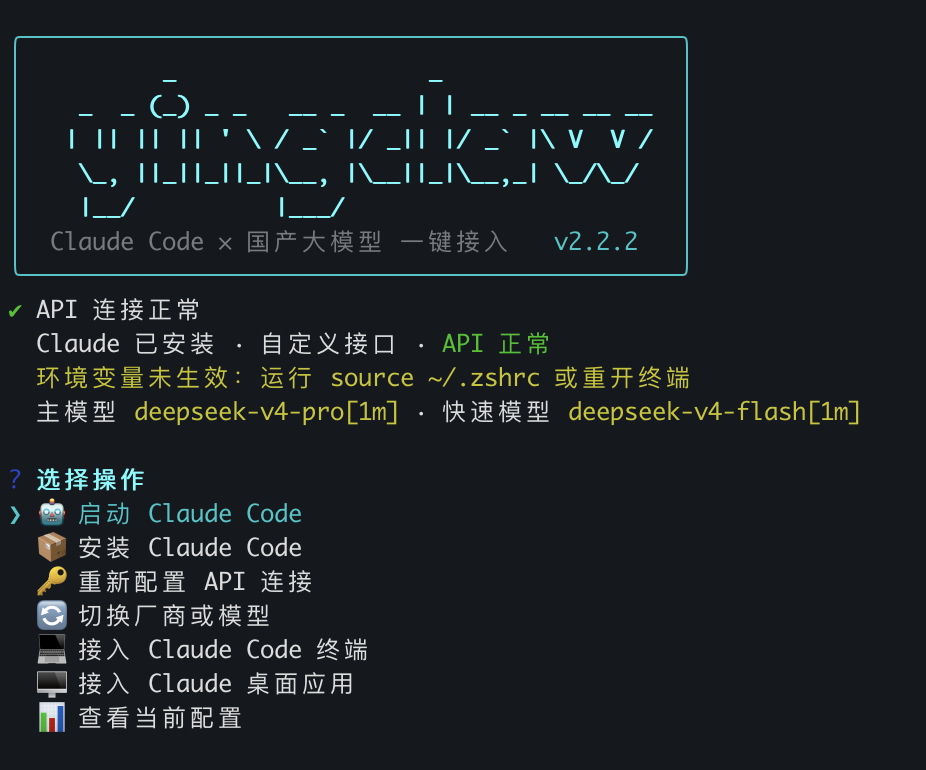
Claude Code × 国产大模型,一键接入。
|
|
4
4
|
|
|
5
|
-
支持 DeepSeek、Kimi、阿里云百炼(Qwen)、MiniMax、智谱 GLM、小米 MiMo,也支持自定义 Anthropic 兼容接口,无需梯子即可使用 Claude Code。
|
|
5
|
+
支持 DeepSeek、Kimi、火山方舟 Coding Plan、阿里云百炼(Qwen)、MiniMax、智谱 GLM、小米 MiMo、B.AI、OpenCode Zen/Go,也支持自定义 Anthropic 兼容接口和自定义 OpenAI 兼容接口,无需梯子即可使用 Claude Code。
|
|
6
6
|
|
|
7
7
|
|
|
8
8
|
|
|
@@ -44,6 +44,12 @@ claw code
|
|
|
44
44
|
```
|
|
45
45
|
写入 Claude Code 所需的环境变量,之后运行 `claude` 即可。
|
|
46
46
|
|
|
47
|
+
接入 VS Code Claude Code 扩展:
|
|
48
|
+
```bash
|
|
49
|
+
claw vscode
|
|
50
|
+
```
|
|
51
|
+
写入 Claude Code 共享设置 `~/.claude/settings.json`,并在 VS Code 用户设置中关闭 Claude Code 扩展登录提示。VS Code 已打开时需要执行 `Developer: Reload Window` 或完全重启。
|
|
52
|
+
|
|
47
53
|
接入 Claude 桌面应用:
|
|
48
54
|
```bash
|
|
49
55
|
claw desktop
|
|
@@ -57,21 +63,31 @@ claw desktop
|
|
|
57
63
|
| 厂商 | 主模型 | 快速模型 |
|
|
58
64
|
|------|--------|---------|
|
|
59
65
|
| DeepSeek | deepseek-v4-pro[1m] | deepseek-v4-flash[1m] |
|
|
60
|
-
| Kimi / Moonshot | kimi-k2.5 | kimi-k2.5 |
|
|
66
|
+
| Kimi / Moonshot(OpenAI 兼容) | kimi-k2.5 | kimi-k2.5 |
|
|
67
|
+
| 火山方舟 Coding Plan | ark-code-latest | ark-code-latest |
|
|
61
68
|
| 阿里云百炼 | qwen3-max | qwen3.5-plus |
|
|
62
69
|
| MiniMax | MiniMax-M2.7 | MiniMax-M2.7-Turbo |
|
|
63
70
|
| 智谱 GLM | GLM-4.7 | GLM-5-Turbo |
|
|
64
71
|
| 小米 MiMo | mimo-v2.5-pro | mimo-v2.5 |
|
|
65
|
-
|
|
|
72
|
+
| B.AI | claude-sonnet-4.6 | claude-haiku-4.5 |
|
|
73
|
+
| OpenCode Zen(按量) | claude-sonnet-4-6 | deepseek-v4-flash-free |
|
|
74
|
+
| OpenCode Go(订阅制) | glm-5.1 | deepseek-v4-flash |
|
|
75
|
+
| OpenRouter | deepseek/deepseek-r1-0528 | deepseek/deepseek-chat-v3-0324 |
|
|
76
|
+
| 自定义 Anthropic 兼容接口 | 自动获取或手动输入 | 手动选择 |
|
|
77
|
+
| 自定义 OpenAI 兼容接口 | 自动获取或手动输入 | 手动选择 |
|
|
66
78
|
|
|
67
79
|
DeepSeek 的 `[1m]` 后缀是真实 API 模型 ID,表示 100 万 token 上下文窗口([官方说明](https://api-docs.deepseek.com/zh-cn/quick_start/agent_integrations/claude_code))。
|
|
68
80
|
|
|
81
|
+
火山方舟 Coding Plan 使用官方指定的 Anthropic 兼容 Base URL `https://ark.cn-beijing.volces.com/api/coding`,不要替换成普通推理 API Base URL。
|
|
82
|
+
|
|
69
83
|
## 命令列表
|
|
70
84
|
|
|
71
85
|
```bash
|
|
72
86
|
claw # 交互菜单(无参数时自动进入)
|
|
73
87
|
claw config # 配置 API 连接
|
|
74
88
|
claw code # 接入 Claude Code 终端
|
|
89
|
+
claw vscode # 接入 VS Code Claude Code 扩展
|
|
90
|
+
claw vscode-reset # 恢复 VS Code Claude Code 扩展默认配置
|
|
75
91
|
claw desktop # 接入 Claude 桌面应用
|
|
76
92
|
claw gateway # 启动 Claude 桌面应用本机 Gateway
|
|
77
93
|
claw desktop --direct # 高级:直连写入厂商 Gateway URL
|
|
@@ -115,14 +131,23 @@ CLAUDE_CODE_EFFORT_LEVEL
|
|
|
115
131
|
|
|
116
132
|
- macOS / Windows:写入 `Claude-3p/configLibrary/` 中的 yingclaw entry
|
|
117
133
|
- Claude Desktop 访问 `http://127.0.0.1:18080/yingclaw`
|
|
118
|
-
- Gateway 再转发到当前保存的 Anthropic
|
|
134
|
+
- Gateway 再转发到当前保存的 Anthropic 兼容接口;如当前为 Kimi 或 OpenAI 兼容接口,则自动转换为 `/v1/chat/completions`
|
|
119
135
|
- macOS 使用 LaunchAgent 登录启动 Gateway,Windows 使用 Startup 目录脚本登录启动 Gateway
|
|
120
136
|
- Windows 会同时写入 Roaming / Local 两个 Claude-3p 位置,以兼容不同 Claude Desktop 安装方式
|
|
121
|
-
-
|
|
137
|
+
- Anthropic 兼容接口的终端接入仍直接使用 `ANTHROPIC_*` 环境变量;Kimi 和 OpenAI 兼容接口的终端/VS Code/桌面会通过本机 Gateway 转换协议
|
|
122
138
|
|
|
123
139
|
使用 `inferenceProvider=gateway`、`inferenceGatewayAuthScheme=bearer`,将 Gateway Base URL 指向 yingclaw 本机 Gateway。高级用户可用 `claw desktop --direct` 保留旧式直连写入,但新版 Claude Desktop 可能拒绝非 Claude 模型名。
|
|
124
140
|
|
|
125
|
-
|
|
141
|
+
**自定义 Anthropic 兼容接口**需支持 Anthropic `/v1/messages` 格式。**自定义 OpenAI 兼容接口**需支持 OpenAI `/v1/models` 和 `/v1/chat/completions` 格式,工具会通过本机 Gateway 转换为 Claude 可用的 Messages 格式。工具会根据 Base URL 自动尝试获取模型列表,失败则手动输入。
|
|
142
|
+
|
|
143
|
+
**VS Code 接入**(`claw vscode`)写入 Claude Code 官方共享设置:
|
|
144
|
+
|
|
145
|
+
- 接入时会让你单独选择 VS Code Claude Code 的主模型和快速模型,不影响终端或桌面配置
|
|
146
|
+
- `~/.claude/settings.json` 写入所选主模型,并把已获取的可用聊天模型写入 `availableModels`
|
|
147
|
+
- `env` 中启用 Gateway model discovery,并把所选快速模型写入 `ANTHROPIC_CUSTOM_MODEL_OPTION`
|
|
148
|
+
- VS Code 用户 `settings.json` 写入 `claudeCode.disableLoginPrompt=true`
|
|
149
|
+
- 扩展与 CLI 共享 Claude Code 设置;如果 VS Code 已打开,需重载窗口或重启后生效
|
|
150
|
+
- 如需恢复默认,运行 `claw vscode-reset`,只移除 yingclaw 写入的 Claude Code env 和 VS Code Claude Code 扩展项,保留其它用户设置
|
|
126
151
|
|
|
127
152
|
## 卸载
|
|
128
153
|
|