whistle.mockbubu 1.0.0 → 2.0.0-beta.1
This diff represents the content of publicly available package versions that have been released to one of the supported registries. The information contained in this diff is provided for informational purposes only and reflects changes between package versions as they appear in their respective public registries.
- package/.gitignore +4 -0
- package/README.md +173 -24
- package/lib/archive-utils.js +332 -0
- package/lib/const.js +19 -0
- package/lib/group-manager.js +660 -0
- package/lib/migration-v3.js +321 -0
- package/lib/server.js +336 -61
- package/lib/storage-adapter.js +518 -0
- package/lib/storage-v3.js +1368 -0
- package/lib/uiServer/index.js +76 -5
- package/lib/uiServer/router/group-router.js +218 -0
- package/lib/uiServer/router/index.js +1074 -51
- package/lib/uiServer/router/version-router.js +208 -63
- package/lib/uiServer/util.js +74 -16
- package/lib/uiServer/validator.js +105 -0
- package/lib/utils.js +107 -171
- package/package.json +1 -1
- package/public/js/app.js +5222 -1375
- package/public/js/app.js.map +1 -1
- package/public/js/chunk-vendors.js +14179 -8217
- package/public/js/chunk-vendors.js.map +1 -1
- package/rules.txt +1 -1
- package/step2.png +0 -0
package/.gitignore
CHANGED
package/README.md
CHANGED
|
@@ -1,76 +1,225 @@
|
|
|
1
1
|
# whistle.mockbubu
|
|
2
2
|
|
|
3
|
-
whistle.mockbubu
|
|
3
|
+
whistle.mockbubu is an extension script plugin for [whistle](https://github.com/avwo/whistle) that provides the following features:
|
|
4
4
|
|
|
5
|
-
-
|
|
6
|
-
-
|
|
5
|
+
- Real-time generation of mock files from captured API responses
|
|
6
|
+
- Mock file management
|
|
7
7
|
|
|
8
|
-
#
|
|
8
|
+
# Installation
|
|
9
9
|
|
|
10
|
+
```bash
|
|
10
11
|
$ w2 install whistle.mockbubu
|
|
12
|
+
```
|
|
11
13
|
|
|
12
|
-
#
|
|
14
|
+
# Usage
|
|
13
15
|
|
|
14
|
-
###
|
|
16
|
+
### Configure [whistle rules](https://avwo.github.io/whistle/rules/)
|
|
15
17
|
|
|
16
|
-
> mode
|
|
18
|
+
> Default mode uses pathname
|
|
17
19
|
|
|
18
20
|
```text
|
|
19
21
|
pattern mockbubu://[mode]
|
|
20
22
|
```
|
|
21
23
|
|
|
22
|
-
###
|
|
24
|
+
### Generate Mock Files
|
|
23
25
|
|
|
24
26
|
---
|
|
25
27
|
|
|
26
|
-
####
|
|
28
|
+
#### Pathname Mode: Uses the interface's origin + pathname as the filename
|
|
27
29
|
|
|
28
30
|
```text
|
|
29
|
-
pattern mockbubu://
|
|
31
|
+
pattern mockbubu:// or pattern mockbubu://pathname
|
|
30
32
|
```
|
|
31
33
|
|
|
34
|
+
> After configuring the rules and enabling the plugin, mockbubu will capture matching request data in real-time
|
|
35
|
+
|
|
36
|
+
[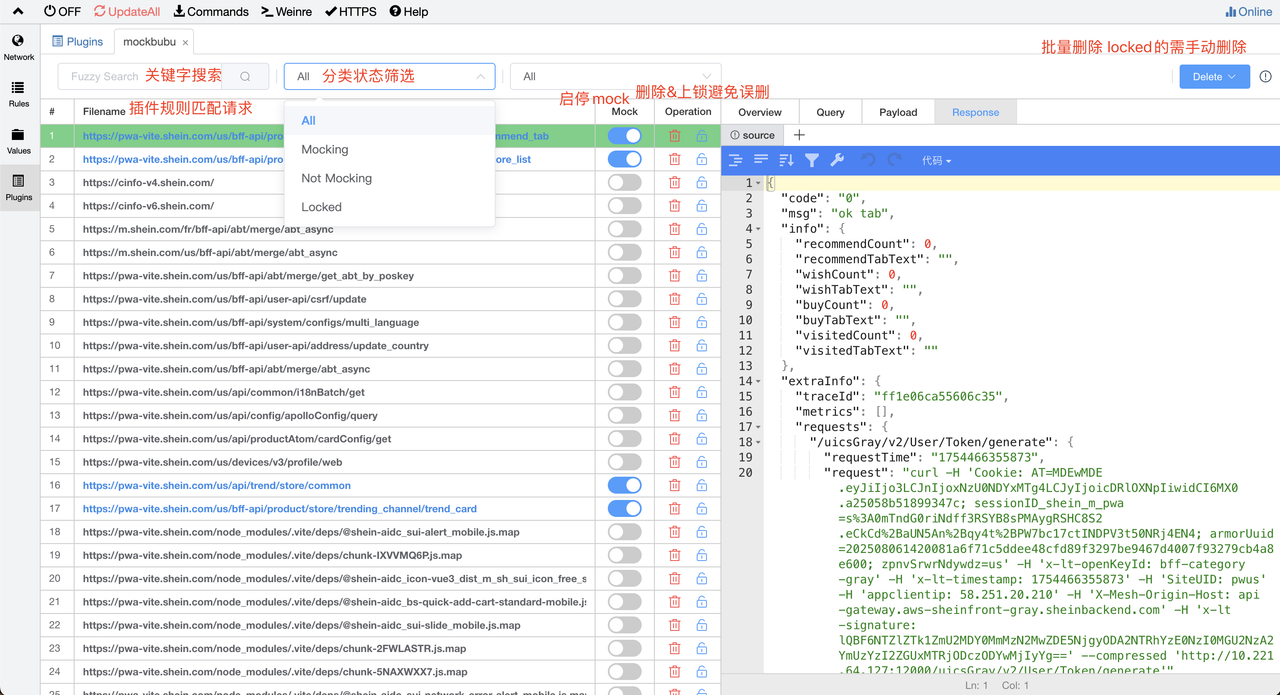](https://postimg.cc/21Nw93SQ)
|
|
37
|
+
|
|
32
38
|
---
|
|
33
39
|
|
|
34
|
-
|
|
40
|
+
### Start Mocking
|
|
35
41
|
|
|
36
|
-
|
|
37
|
-
pattern mockbubu://href
|
|
42
|
+
**Step 1:** Enable the mock switch for the file. When mockbubu intercepts the corresponding request, it will directly return the matched request data. After enabling the mock switch, you can manage file content in the Response panel.
|
|
38
43
|
|
|
39
|
-
|
|
44
|
+
**Step 2:** Manage file content in the Response panel
|
|
45
|
+
|
|
46
|
+
**Edit Files**
|
|
47
|
+
|
|
48
|
+
- Supports file editing
|
|
49
|
+
- Supports keyboard shortcuts for saving: Mac: Command + S / Windows: Ctrl + S
|
|
50
|
+
|
|
51
|
+
**Multiple Versions**
|
|
52
|
+
|
|
53
|
+
- Supports creating different versions of file content. Click to switch between different versions for instant effect and return that version's data
|
|
54
|
+
- The "source" version is the default generated version containing the original API response data and supports modification
|
|
55
|
+
|
|
56
|
+
**Switch Mock Files**
|
|
57
|
+
|
|
58
|
+
- Mock return content uses the currently selected version
|
|
59
|
+
|
|
60
|
+
[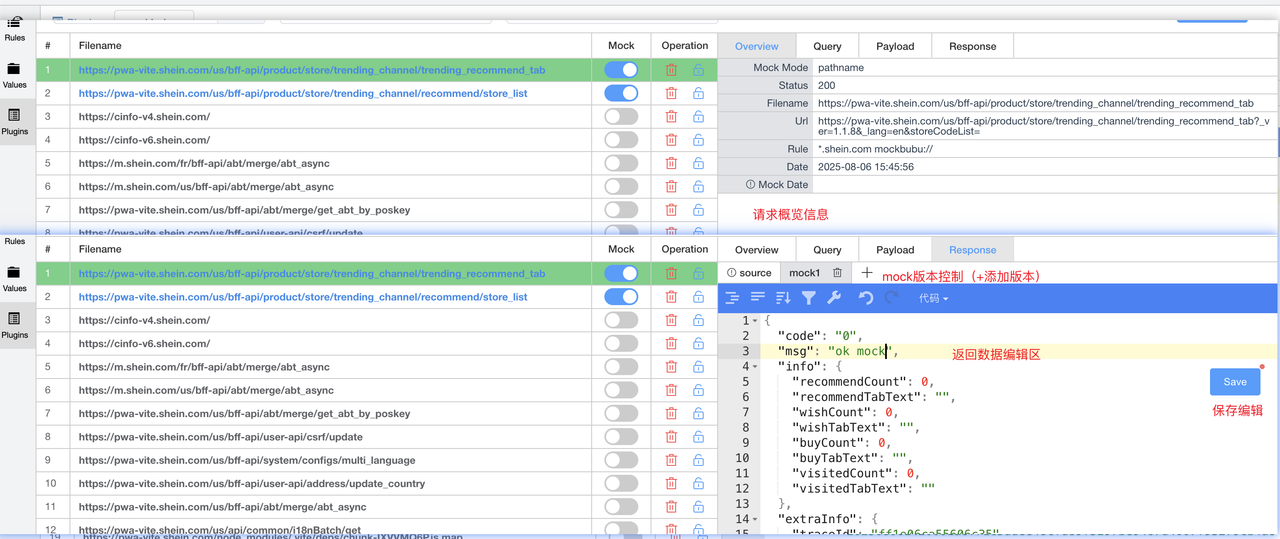](https://postimg.cc/Js3Qfms9)
|
|
40
61
|
|
|
41
62
|
---
|
|
42
63
|
|
|
43
|
-
|
|
64
|
+
# Performance & Memory Monitoring
|
|
44
65
|
|
|
45
|
-
|
|
46
|
-
|
|
66
|
+
For developers and advanced users, we provide performance monitoring tools:
|
|
67
|
+
|
|
68
|
+
## Memory Usage Monitoring
|
|
69
|
+
|
|
70
|
+
Monitor real-time memory usage of the mockbubu plugin:
|
|
71
|
+
|
|
72
|
+
```bash
|
|
73
|
+
$ node scripts/monitor-memory.js
|
|
47
74
|
```
|
|
48
75
|
|
|
76
|
+
This will display:
|
|
77
|
+
- Heap memory usage (New Space & Old Space)
|
|
78
|
+
- Process memory (RSS, external, array buffers)
|
|
79
|
+
- GC statistics
|
|
80
|
+
- Warnings when memory usage exceeds 80%
|
|
81
|
+
|
|
82
|
+
## Stress Testing
|
|
83
|
+
|
|
84
|
+
Test plugin performance with large datasets:
|
|
85
|
+
|
|
86
|
+
```bash
|
|
87
|
+
$ ./scripts/stress-test-memory.sh [file_count] [group_name]
|
|
88
|
+
|
|
89
|
+
# Example: Create 10,000 test files
|
|
90
|
+
$ ./scripts/stress-test-memory.sh 10000 stress-test-group
|
|
91
|
+
```
|
|
92
|
+
|
|
93
|
+
The test will:
|
|
94
|
+
1. Create specified number of mock files
|
|
95
|
+
2. Measure API list query performance (cold start, hot cache, concurrent)
|
|
96
|
+
3. Test batch deletion performance
|
|
97
|
+
4. Generate a detailed performance report
|
|
98
|
+
|
|
99
|
+
## Memory Limit Analysis
|
|
100
|
+
|
|
101
|
+
See [docs/MEMORY-LIMIT-ANALYSIS.md](/docs/MEMORY-LIMIT-ANALYSIS.md) for:
|
|
102
|
+
- Whistle's `--max-semi-space-size=64` parameter explanation
|
|
103
|
+
- Memory architecture analysis (New Space vs Old Space)
|
|
104
|
+
- Impact assessment for different file counts (10K, 100K, 1M files)
|
|
105
|
+
- Optimization recommendations
|
|
106
|
+
- Action plan for scaling
|
|
107
|
+
|
|
108
|
+
**Key Findings**:
|
|
109
|
+
- Current implementation is safe for up to 10,000 files without any optimization
|
|
110
|
+
- For 100,000+ files, consider implementing pagination or index sharding
|
|
111
|
+
- The plugin's file-system based V3 architecture provides excellent memory efficiency
|
|
112
|
+
|
|
49
113
|
---
|
|
50
114
|
|
|
51
|
-
|
|
115
|
+
# whistle.mockbubu
|
|
52
116
|
|
|
53
|
-
|
|
117
|
+
whistle.mockbubu 是[whistle](https://github.com/avwo/whistle)的一个扩展脚本插件,包括以下功能
|
|
118
|
+
|
|
119
|
+
- 实时生成捕获接口的 mock 文件
|
|
120
|
+
- 管理 mock 文件
|
|
121
|
+
|
|
122
|
+
# 安装
|
|
123
|
+
|
|
124
|
+
$ w2 install whistle.mockbubu
|
|
54
125
|
|
|
126
|
+
# 用法
|
|
127
|
+
|
|
128
|
+
### 配置 [whistle 规则](https://avwo.github.io/whistle/rules/)
|
|
129
|
+
|
|
130
|
+
> mode默认使用 pathname
|
|
131
|
+
|
|
132
|
+
```text
|
|
133
|
+
pattern mockbubu://[mode]
|
|
55
134
|
```
|
|
56
|
-
|
|
135
|
+
|
|
136
|
+
### 生成 mock 文件
|
|
137
|
+
|
|
138
|
+
---
|
|
139
|
+
|
|
140
|
+
#### pathname 模式:使用接口的 origin + pathname 作为文件名
|
|
141
|
+
|
|
142
|
+
```text
|
|
143
|
+
pattern mockbubu:// 或者 pattern mockbubu://pathname
|
|
57
144
|
```
|
|
145
|
+
> 配置规则并开启插件后,mockbubu将实时获取匹配到的请求数据
|
|
58
146
|
|
|
59
|
-
|
|
147
|
+
[](https://postimg.cc/21Nw93SQ)
|
|
148
|
+
|
|
149
|
+
---
|
|
150
|
+
|
|
151
|
+
### 开始 mock
|
|
152
|
+
|
|
153
|
+
第一步:开启文件的 mock 开关,拦截到对应请求mockbubu将直接返回对应匹配请求的数据,开启mock开关后可在Response面板管理文件内容
|
|
60
154
|
|
|
61
|
-
手动添加文件
|
|
62
155
|
|
|
63
|
-
|
|
156
|
+
第二步:在 Response 面板管理文件内容
|
|
64
157
|
|
|
65
158
|
编辑文件
|
|
66
159
|
|
|
67
160
|
- 支持文件编辑
|
|
161
|
+
- 支持快捷键保存 Mac: Command + s / Windows: Ctrl + s
|
|
68
162
|
|
|
69
163
|
多版本
|
|
70
164
|
|
|
71
|
-
-
|
|
165
|
+
- 支持新增不同版本的文件内容,点击切换不同版本即刻生效返回该版本数据
|
|
72
166
|
- 其中 source 版本是默认生成的,是原始接口响应数据,支持修改
|
|
73
167
|
|
|
74
168
|
切换 mock 文件
|
|
75
169
|
|
|
76
170
|
- mock 返回内容使用当前选中的版本
|
|
171
|
+
|
|
172
|
+
[](https://postimg.cc/Js3Qfms9)
|
|
173
|
+
|
|
174
|
+
---
|
|
175
|
+
|
|
176
|
+
# 性能与内存监控
|
|
177
|
+
|
|
178
|
+
为开发者和高级用户提供性能监控工具:
|
|
179
|
+
|
|
180
|
+
## 内存使用监控
|
|
181
|
+
|
|
182
|
+
实时监控 mockbubu 插件的内存使用情况:
|
|
183
|
+
|
|
184
|
+
```bash
|
|
185
|
+
$ node scripts/monitor-memory.js
|
|
186
|
+
```
|
|
187
|
+
|
|
188
|
+
将显示以下信息:
|
|
189
|
+
- 堆内存使用情况(New Space 和 Old Space)
|
|
190
|
+
- 进程内存(RSS、外部内存、数组缓冲区)
|
|
191
|
+
- GC 统计
|
|
192
|
+
- 内存使用超过 80% 时的警告
|
|
193
|
+
|
|
194
|
+
## 压力测试
|
|
195
|
+
|
|
196
|
+
使用大数据集测试插件性能:
|
|
197
|
+
|
|
198
|
+
```bash
|
|
199
|
+
$ ./scripts/stress-test-memory.sh [文件数量] [组名]
|
|
200
|
+
|
|
201
|
+
# 示例:创建 10,000 个测试文件
|
|
202
|
+
$ ./scripts/stress-test-memory.sh 10000 stress-test-group
|
|
203
|
+
```
|
|
204
|
+
|
|
205
|
+
测试将执行:
|
|
206
|
+
1. 创建指定数量的 mock 文件
|
|
207
|
+
2. 测量 API 列表查询性能(冷启动、热缓存、并发)
|
|
208
|
+
3. 测试批量删除性能
|
|
209
|
+
4. 生成详细的性能报告
|
|
210
|
+
|
|
211
|
+
## 内存限制分析
|
|
212
|
+
|
|
213
|
+
查看 [docs/MEMORY-LIMIT-ANALYSIS.md](/docs/MEMORY-LIMIT-ANALYSIS.md) 了解:
|
|
214
|
+
- Whistle 的 `--max-semi-space-size=64` 参数说明
|
|
215
|
+
- 内存架构分析(New Space vs Old Space)
|
|
216
|
+
- 不同文件数量(1万、10万、100万)的影响评估
|
|
217
|
+
- 优化建议
|
|
218
|
+
- 扩展性行动计划
|
|
219
|
+
|
|
220
|
+
**关键结论**:
|
|
221
|
+
- 当前实现在 10,000 文件以下完全安全,无需任何优化
|
|
222
|
+
- 对于 100,000+ 文件,建议实施分页或索引分片
|
|
223
|
+
- 插件的基于文件系统的 V3 架构提供了出色的内存效率
|
|
224
|
+
|
|
225
|
+
---
|
|
@@ -0,0 +1,332 @@
|
|
|
1
|
+
/**
|
|
2
|
+
* 压缩包工具函数
|
|
3
|
+
* 使用 Node.js 内置 API,无需额外依赖
|
|
4
|
+
*/
|
|
5
|
+
const fs = require('fs').promises
|
|
6
|
+
const path = require('path')
|
|
7
|
+
const zlib = require('zlib')
|
|
8
|
+
const { createReadStream, createWriteStream } = require('fs')
|
|
9
|
+
const { pipeline } = require('stream/promises')
|
|
10
|
+
const os = require('os')
|
|
11
|
+
|
|
12
|
+
/**
|
|
13
|
+
* 递归复制目录
|
|
14
|
+
*/
|
|
15
|
+
async function copyDirectory(src, dest) {
|
|
16
|
+
await fs.mkdir(dest, { recursive: true })
|
|
17
|
+
const entries = await fs.readdir(src, { withFileTypes: true })
|
|
18
|
+
|
|
19
|
+
for (const entry of entries) {
|
|
20
|
+
const srcPath = path.join(src, entry.name)
|
|
21
|
+
const destPath = path.join(dest, entry.name)
|
|
22
|
+
|
|
23
|
+
if (entry.isDirectory()) {
|
|
24
|
+
await copyDirectory(srcPath, destPath)
|
|
25
|
+
} else {
|
|
26
|
+
await fs.copyFile(srcPath, destPath)
|
|
27
|
+
}
|
|
28
|
+
}
|
|
29
|
+
}
|
|
30
|
+
|
|
31
|
+
/**
|
|
32
|
+
* 递归读取目录,返回所有文件路径
|
|
33
|
+
*/
|
|
34
|
+
async function getAllFiles(dir, baseDir = dir) {
|
|
35
|
+
const files = []
|
|
36
|
+
const entries = await fs.readdir(dir, { withFileTypes: true })
|
|
37
|
+
|
|
38
|
+
for (const entry of entries) {
|
|
39
|
+
const fullPath = path.join(dir, entry.name)
|
|
40
|
+
if (entry.isDirectory()) {
|
|
41
|
+
files.push(...await getAllFiles(fullPath, baseDir))
|
|
42
|
+
} else {
|
|
43
|
+
files.push({
|
|
44
|
+
path: fullPath,
|
|
45
|
+
name: path.relative(baseDir, fullPath),
|
|
46
|
+
})
|
|
47
|
+
}
|
|
48
|
+
}
|
|
49
|
+
|
|
50
|
+
return files
|
|
51
|
+
}
|
|
52
|
+
|
|
53
|
+
/**
|
|
54
|
+
* 创建 tar.gz 压缩包
|
|
55
|
+
* 使用 Node.js 内置 zlib + tar 格式手动实现
|
|
56
|
+
*/
|
|
57
|
+
async function createTarGz(sourceDir, outputFile) {
|
|
58
|
+
// 获取所有文件
|
|
59
|
+
const files = await getAllFiles(sourceDir)
|
|
60
|
+
|
|
61
|
+
// 创建 tar 文件
|
|
62
|
+
const tarPath = outputFile.replace(/\.gz$/, '')
|
|
63
|
+
await createTar(sourceDir, tarPath, files)
|
|
64
|
+
|
|
65
|
+
// gzip 压缩
|
|
66
|
+
await new Promise((resolve, reject) => {
|
|
67
|
+
const input = createReadStream(tarPath)
|
|
68
|
+
const output = createWriteStream(outputFile)
|
|
69
|
+
const gzip = zlib.createGzip()
|
|
70
|
+
|
|
71
|
+
pipeline(input, gzip, output)
|
|
72
|
+
.then(() => {
|
|
73
|
+
// 删除临时 tar 文件
|
|
74
|
+
fs.unlink(tarPath).catch(() => {})
|
|
75
|
+
resolve()
|
|
76
|
+
})
|
|
77
|
+
.catch(reject)
|
|
78
|
+
})
|
|
79
|
+
}
|
|
80
|
+
|
|
81
|
+
/**
|
|
82
|
+
* 创建 tar 文件(简化实现,支持基本的 tar 格式)
|
|
83
|
+
*/
|
|
84
|
+
async function createTar(sourceDir, outputFile, files) {
|
|
85
|
+
const output = createWriteStream(outputFile)
|
|
86
|
+
|
|
87
|
+
for (const file of files) {
|
|
88
|
+
const stat = await fs.stat(file.path)
|
|
89
|
+
const content = await fs.readFile(file.path)
|
|
90
|
+
|
|
91
|
+
// 写入 tar header (512 bytes)
|
|
92
|
+
const header = createTarHeader(file.name, stat.size)
|
|
93
|
+
output.write(header)
|
|
94
|
+
|
|
95
|
+
// 写入文件内容
|
|
96
|
+
output.write(content)
|
|
97
|
+
|
|
98
|
+
// 对齐到 512 字节边界
|
|
99
|
+
const padding = 512 - (content.length % 512)
|
|
100
|
+
if (padding < 512) {
|
|
101
|
+
output.write(Buffer.alloc(padding, 0))
|
|
102
|
+
}
|
|
103
|
+
}
|
|
104
|
+
|
|
105
|
+
// 写入结束标记(两个 512 字节的零块)
|
|
106
|
+
output.write(Buffer.alloc(1024, 0))
|
|
107
|
+
output.end()
|
|
108
|
+
|
|
109
|
+
return new Promise((resolve, reject) => {
|
|
110
|
+
output.on('finish', resolve)
|
|
111
|
+
output.on('error', reject)
|
|
112
|
+
})
|
|
113
|
+
}
|
|
114
|
+
|
|
115
|
+
/**
|
|
116
|
+
* 创建 tar header (POSIX ustar 格式)
|
|
117
|
+
*/
|
|
118
|
+
function createTarHeader(filename, size) {
|
|
119
|
+
const header = Buffer.alloc(512, 0)
|
|
120
|
+
|
|
121
|
+
// 文件名 (100 bytes)
|
|
122
|
+
header.write(filename, 0, 100, 'utf8')
|
|
123
|
+
|
|
124
|
+
// 文件模式 (8 bytes) - 0644
|
|
125
|
+
header.write('0000644 ', 100, 8, 'utf8')
|
|
126
|
+
|
|
127
|
+
// UID (8 bytes)
|
|
128
|
+
header.write('0000000 ', 108, 8, 'utf8')
|
|
129
|
+
|
|
130
|
+
// GID (8 bytes)
|
|
131
|
+
header.write('0000000 ', 116, 8, 'utf8')
|
|
132
|
+
|
|
133
|
+
// 文件大小 (12 bytes, 8进制)
|
|
134
|
+
const sizeOctal = size.toString(8).padStart(11, '0') + ' '
|
|
135
|
+
header.write(sizeOctal, 124, 12, 'utf8')
|
|
136
|
+
|
|
137
|
+
// 修改时间 (12 bytes, 8进制)
|
|
138
|
+
const mtime = Math.floor(Date.now() / 1000).toString(8).padStart(11, '0') + ' '
|
|
139
|
+
header.write(mtime, 136, 12, 'utf8')
|
|
140
|
+
|
|
141
|
+
// Checksum (8 bytes) - 先填充空格
|
|
142
|
+
header.write(' ', 148, 8, 'utf8')
|
|
143
|
+
|
|
144
|
+
// 文件类型 (1 byte) - '0' = 普通文件
|
|
145
|
+
header.write('0', 156, 1, 'utf8')
|
|
146
|
+
|
|
147
|
+
// ustar 标识 (6 bytes)
|
|
148
|
+
header.write('ustar', 257, 6, 'utf8')
|
|
149
|
+
|
|
150
|
+
// ustar 版本 (2 bytes)
|
|
151
|
+
header.write('00', 263, 2, 'utf8')
|
|
152
|
+
|
|
153
|
+
// 计算 checksum
|
|
154
|
+
let checksum = 0
|
|
155
|
+
for (let i = 0; i < 512; i++) {
|
|
156
|
+
checksum += header[i]
|
|
157
|
+
}
|
|
158
|
+
const checksumOctal = checksum.toString(8).padStart(6, '0') + '\0 '
|
|
159
|
+
header.write(checksumOctal, 148, 8, 'utf8')
|
|
160
|
+
|
|
161
|
+
return header
|
|
162
|
+
}
|
|
163
|
+
|
|
164
|
+
/**
|
|
165
|
+
* 解压 tar.gz 文件
|
|
166
|
+
*/
|
|
167
|
+
async function extractTarGz(archiveFile, destDir) {
|
|
168
|
+
// 先 gunzip 解压
|
|
169
|
+
const tarPath = path.join(os.tmpdir(), `extract-${Date.now()}.tar`)
|
|
170
|
+
|
|
171
|
+
await new Promise((resolve, reject) => {
|
|
172
|
+
const input = createReadStream(archiveFile)
|
|
173
|
+
const output = createWriteStream(tarPath)
|
|
174
|
+
const gunzip = zlib.createGunzip()
|
|
175
|
+
|
|
176
|
+
pipeline(input, gunzip, output)
|
|
177
|
+
.then(resolve)
|
|
178
|
+
.catch(reject)
|
|
179
|
+
})
|
|
180
|
+
|
|
181
|
+
// 解压 tar
|
|
182
|
+
await extractTar(tarPath, destDir)
|
|
183
|
+
|
|
184
|
+
// 删除临时 tar 文件
|
|
185
|
+
await fs.unlink(tarPath).catch(() => {})
|
|
186
|
+
}
|
|
187
|
+
|
|
188
|
+
/**
|
|
189
|
+
* 解压 tar 文件
|
|
190
|
+
*/
|
|
191
|
+
async function extractTar(tarFile, destDir) {
|
|
192
|
+
const buffer = await fs.readFile(tarFile)
|
|
193
|
+
let offset = 0
|
|
194
|
+
|
|
195
|
+
while (offset < buffer.length) {
|
|
196
|
+
// 检查是否到达结束标记
|
|
197
|
+
if (buffer[offset] === 0) {
|
|
198
|
+
break
|
|
199
|
+
}
|
|
200
|
+
|
|
201
|
+
// 读取 header
|
|
202
|
+
const header = buffer.subarray(offset, offset + 512)
|
|
203
|
+
|
|
204
|
+
// 读取文件名
|
|
205
|
+
const filename = header.subarray(0, 100).toString('utf8').replace(/\0.*$/, '')
|
|
206
|
+
if (!filename) break
|
|
207
|
+
|
|
208
|
+
// 读取文件大小
|
|
209
|
+
const sizeStr = header.subarray(124, 136).toString('utf8').trim()
|
|
210
|
+
const size = parseInt(sizeStr, 8)
|
|
211
|
+
|
|
212
|
+
// 跳过 header
|
|
213
|
+
offset += 512
|
|
214
|
+
|
|
215
|
+
// 读取文件内容
|
|
216
|
+
const content = buffer.subarray(offset, offset + size)
|
|
217
|
+
|
|
218
|
+
// 写入文件
|
|
219
|
+
const filepath = path.join(destDir, filename)
|
|
220
|
+
await fs.mkdir(path.dirname(filepath), { recursive: true })
|
|
221
|
+
await fs.writeFile(filepath, content)
|
|
222
|
+
|
|
223
|
+
// 移动到下一个文件(对齐到 512 字节)
|
|
224
|
+
const padding = 512 - (size % 512)
|
|
225
|
+
offset += size + (padding < 512 ? padding : 0)
|
|
226
|
+
}
|
|
227
|
+
}
|
|
228
|
+
|
|
229
|
+
/**
|
|
230
|
+
* 文件名安全处理(移除特殊字符)
|
|
231
|
+
*/
|
|
232
|
+
function sanitizeFilename(filename) {
|
|
233
|
+
// eslint-disable-next-line no-control-regex
|
|
234
|
+
return filename.replace(/[<>:"/\\|?*\x00-\x1F]/g, '_')
|
|
235
|
+
}
|
|
236
|
+
|
|
237
|
+
/**
|
|
238
|
+
* 检查路径是否在指定目录内(防止路径遍历攻击)
|
|
239
|
+
*/
|
|
240
|
+
function isPathSafe(filepath, baseDir) {
|
|
241
|
+
const normalized = path.normalize(filepath)
|
|
242
|
+
const relative = path.relative(baseDir, normalized)
|
|
243
|
+
return !relative.startsWith('..') && !path.isAbsolute(relative)
|
|
244
|
+
}
|
|
245
|
+
|
|
246
|
+
/**
|
|
247
|
+
* 解析 multipart/form-data 文件上传(原生实现)
|
|
248
|
+
*/
|
|
249
|
+
async function parseMultipartFile(ctx) {
|
|
250
|
+
return new Promise((resolve, reject) => {
|
|
251
|
+
const contentType = ctx.request.headers['content-type']
|
|
252
|
+
if (!contentType || !contentType.includes('multipart/form-data')) {
|
|
253
|
+
reject(new Error('不是 multipart/form-data 格式'))
|
|
254
|
+
return
|
|
255
|
+
}
|
|
256
|
+
|
|
257
|
+
// 提取 boundary
|
|
258
|
+
const boundaryMatch = contentType.match(/boundary=(.+)/)
|
|
259
|
+
if (!boundaryMatch) {
|
|
260
|
+
reject(new Error('缺少 boundary'))
|
|
261
|
+
return
|
|
262
|
+
}
|
|
263
|
+
const boundary = '--' + boundaryMatch[1]
|
|
264
|
+
|
|
265
|
+
const chunks = []
|
|
266
|
+
ctx.req.on('data', chunk => chunks.push(chunk))
|
|
267
|
+
ctx.req.on('end', () => {
|
|
268
|
+
try {
|
|
269
|
+
const buffer = Buffer.concat(chunks)
|
|
270
|
+
const file = parseMultipartBuffer(buffer, boundary)
|
|
271
|
+
resolve(file)
|
|
272
|
+
} catch (err) {
|
|
273
|
+
reject(err)
|
|
274
|
+
}
|
|
275
|
+
})
|
|
276
|
+
ctx.req.on('error', reject)
|
|
277
|
+
})
|
|
278
|
+
}
|
|
279
|
+
|
|
280
|
+
/**
|
|
281
|
+
* 解析 multipart buffer
|
|
282
|
+
*/
|
|
283
|
+
function parseMultipartBuffer(buffer, boundary) {
|
|
284
|
+
const parts = []
|
|
285
|
+
let start = 0
|
|
286
|
+
|
|
287
|
+
while (start < buffer.length) {
|
|
288
|
+
// 查找 boundary
|
|
289
|
+
const boundaryIndex = buffer.indexOf(boundary, start)
|
|
290
|
+
if (boundaryIndex === -1) break
|
|
291
|
+
|
|
292
|
+
// 查找下一个 boundary
|
|
293
|
+
const nextBoundaryIndex = buffer.indexOf(boundary, boundaryIndex + boundary.length)
|
|
294
|
+
if (nextBoundaryIndex === -1) break
|
|
295
|
+
|
|
296
|
+
// 提取部分内容
|
|
297
|
+
const partBuffer = buffer.subarray(boundaryIndex + boundary.length, nextBoundaryIndex)
|
|
298
|
+
|
|
299
|
+
// 查找 headers 和 body 的分隔符(\r\n\r\n)
|
|
300
|
+
const headerEndIndex = partBuffer.indexOf('\r\n\r\n')
|
|
301
|
+
if (headerEndIndex !== -1) {
|
|
302
|
+
const headers = partBuffer.subarray(0, headerEndIndex).toString('utf8')
|
|
303
|
+
const body = partBuffer.subarray(headerEndIndex + 4, partBuffer.length - 2) // 去掉结尾的 \r\n
|
|
304
|
+
|
|
305
|
+
// 解析 Content-Disposition
|
|
306
|
+
const filenameMatch = headers.match(/filename="(.+?)"/)
|
|
307
|
+
const nameMatch = headers.match(/name="(.+?)"/)
|
|
308
|
+
|
|
309
|
+
if (filenameMatch) {
|
|
310
|
+
parts.push({
|
|
311
|
+
fieldname: nameMatch ? nameMatch[1] : 'file',
|
|
312
|
+
filename: filenameMatch[1],
|
|
313
|
+
buffer: body,
|
|
314
|
+
})
|
|
315
|
+
}
|
|
316
|
+
}
|
|
317
|
+
|
|
318
|
+
start = nextBoundaryIndex
|
|
319
|
+
}
|
|
320
|
+
|
|
321
|
+
return parts[0] // 返回第一个文件
|
|
322
|
+
}
|
|
323
|
+
|
|
324
|
+
module.exports = {
|
|
325
|
+
copyDirectory,
|
|
326
|
+
getAllFiles,
|
|
327
|
+
createTarGz,
|
|
328
|
+
extractTarGz,
|
|
329
|
+
sanitizeFilename,
|
|
330
|
+
isPathSafe,
|
|
331
|
+
parseMultipartFile,
|
|
332
|
+
}
|
package/lib/const.js
CHANGED
|
@@ -26,3 +26,22 @@ exports.LockedFilterMap = {
|
|
|
26
26
|
'locked': { key: 'locked', value: true, method: 'equal' },
|
|
27
27
|
'unlocked': { key: 'locked', value: false, method: 'equal' },
|
|
28
28
|
}
|
|
29
|
+
|
|
30
|
+
// HTTP Method 筛选映射
|
|
31
|
+
exports.MethodFilterMap = {
|
|
32
|
+
'GET': { key: 'method', value: 'GET', method: 'equal' },
|
|
33
|
+
'POST': { key: 'method', value: 'POST', method: 'equal' },
|
|
34
|
+
'PUT': { key: 'method', value: 'PUT', method: 'equal' },
|
|
35
|
+
'DELETE': { key: 'method', value: 'DELETE', method: 'equal' },
|
|
36
|
+
'PATCH': { key: 'method', value: 'PATCH', method: 'equal' },
|
|
37
|
+
'HEAD': { key: 'method', value: 'HEAD', method: 'equal' },
|
|
38
|
+
'OPTIONS': { key: 'method', value: 'OPTIONS', method: 'equal' },
|
|
39
|
+
}
|
|
40
|
+
|
|
41
|
+
// 状态码筛选映射(使用自定义 method: 'statusRange')
|
|
42
|
+
exports.StatusFilterMap = {
|
|
43
|
+
'2xx': { key: 'status', value: [200, 299], method: 'range' },
|
|
44
|
+
'3xx': { key: 'status', value: [300, 399], method: 'range' },
|
|
45
|
+
'4xx': { key: 'status', value: [400, 499], method: 'range' },
|
|
46
|
+
'5xx': { key: 'status', value: [500, 599], method: 'range' },
|
|
47
|
+
}
|