whistle.mockbubu 1.0.0-dev.2 → 1.0.0-dev.4
This diff represents the content of publicly available package versions that have been released to one of the supported registries. The information contained in this diff is provided for informational purposes only and reflects changes between package versions as they appear in their respective public registries.
- package/README.md +66 -27
- package/package.json +2 -2
package/README.md
CHANGED
|
@@ -1,80 +1,119 @@
|
|
|
1
1
|
# whistle.mockbubu
|
|
2
2
|
|
|
3
|
-
whistle.mockbubu
|
|
3
|
+
whistle.mockbubu is an extension script plugin for [whistle](https://github.com/avwo/whistle) that provides the following features:
|
|
4
4
|
|
|
5
|
-
-
|
|
6
|
-
-
|
|
5
|
+
- Real-time generation of mock files from captured API responses
|
|
6
|
+
- Mock file management
|
|
7
7
|
|
|
8
|
-
#
|
|
8
|
+
# Installation
|
|
9
9
|
|
|
10
|
+
```bash
|
|
10
11
|
$ w2 install whistle.mockbubu
|
|
12
|
+
```
|
|
11
13
|
|
|
12
|
-
#
|
|
14
|
+
# Usage
|
|
13
15
|
|
|
14
|
-
###
|
|
16
|
+
### Configure [whistle rules](https://avwo.github.io/whistle/rules/)
|
|
15
17
|
|
|
16
|
-
> mode
|
|
18
|
+
> Default mode uses pathname
|
|
17
19
|
|
|
18
20
|
```text
|
|
19
21
|
pattern mockbubu://[mode]
|
|
20
22
|
```
|
|
21
23
|
|
|
22
|
-
###
|
|
24
|
+
### Generate Mock Files
|
|
23
25
|
|
|
24
26
|
---
|
|
25
27
|
|
|
26
|
-
####
|
|
28
|
+
#### Pathname Mode: Uses the interface's origin + pathname as the filename
|
|
27
29
|
|
|
28
30
|
```text
|
|
29
|
-
pattern mockbubu://
|
|
31
|
+
pattern mockbubu:// or pattern mockbubu://pathname
|
|
30
32
|
```
|
|
31
33
|
|
|
34
|
+
> After configuring the rules and enabling the plugin, mockbubu will capture matching request data in real-time
|
|
35
|
+
|
|
36
|
+
[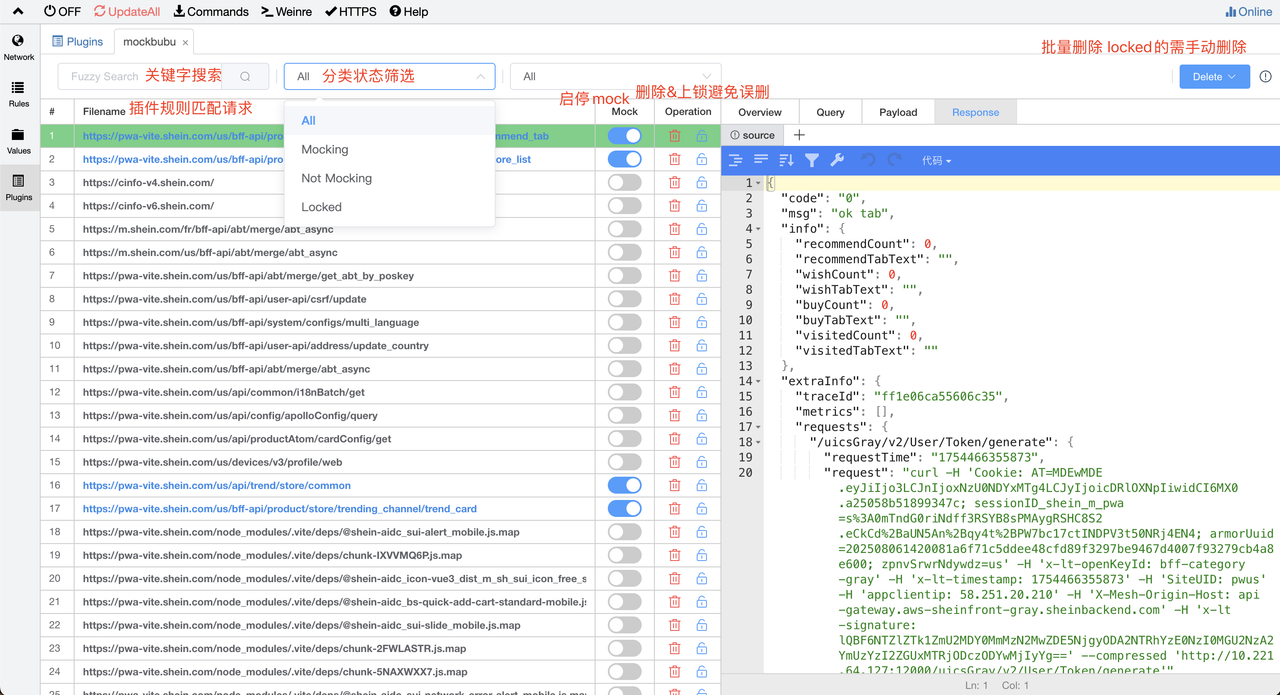](https://postimg.cc/21Nw93SQ)
|
|
37
|
+
|
|
32
38
|
---
|
|
33
39
|
|
|
34
|
-
|
|
40
|
+
### Start Mocking
|
|
35
41
|
|
|
36
|
-
|
|
37
|
-
|
|
42
|
+
**Step 1:** Enable the mock switch for the file. When mockbubu intercepts the corresponding request, it will directly return the matched request data. After enabling the mock switch, you can manage file content in the Response panel.
|
|
43
|
+
|
|
44
|
+
**Step 2:** Manage file content in the Response panel
|
|
45
|
+
|
|
46
|
+
**Edit Files**
|
|
47
|
+
|
|
48
|
+
- Supports file editing
|
|
49
|
+
- Supports keyboard shortcuts for saving: Mac: Command + S / Windows: Ctrl + S
|
|
50
|
+
|
|
51
|
+
**Multiple Versions**
|
|
52
|
+
|
|
53
|
+
- Supports creating different versions of file content. Click to switch between different versions for instant effect and return that version's data
|
|
54
|
+
- The "source" version is the default generated version containing the original API response data and supports modification
|
|
55
|
+
|
|
56
|
+
**Switch Mock Files**
|
|
57
|
+
|
|
58
|
+
- Mock return content uses the currently selected version
|
|
59
|
+
|
|
60
|
+
[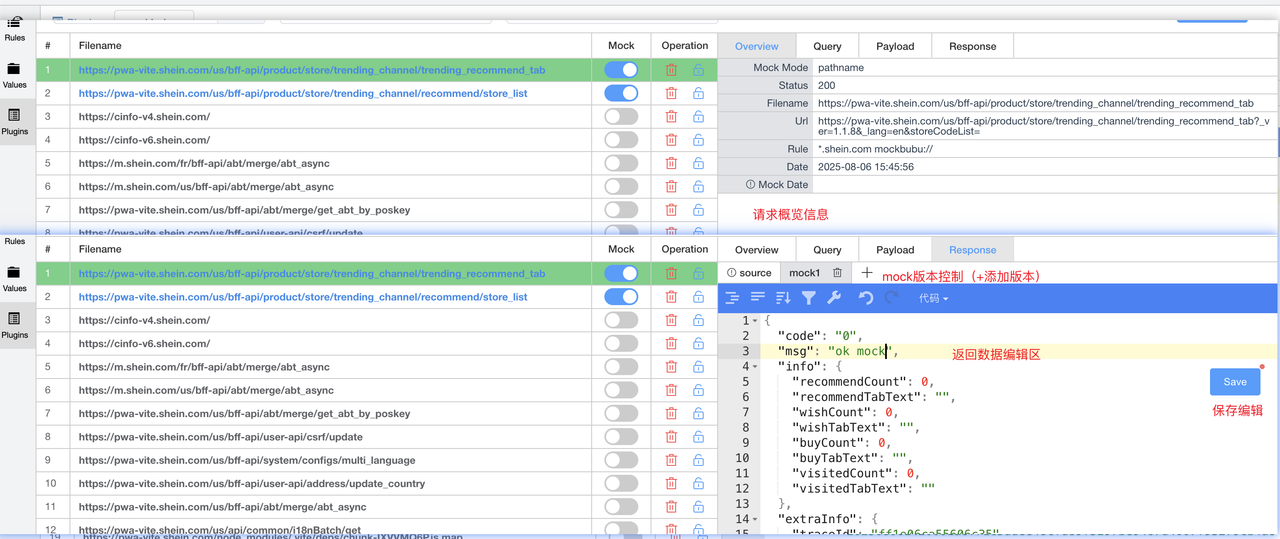](https://postimg.cc/Js3Qfms9)
|
|
61
|
+
|
|
62
|
+
# whistle.mockbubu
|
|
63
|
+
|
|
64
|
+
whistle.mockbubu 是[whistle](https://github.com/avwo/whistle)的一个扩展脚本插件,包括以下功能
|
|
38
65
|
|
|
66
|
+
- 实时生成捕获接口的 mock 文件
|
|
67
|
+
- 管理 mock 文件
|
|
68
|
+
|
|
69
|
+
# 安装
|
|
70
|
+
|
|
71
|
+
$ w2 install whistle.mockbubu
|
|
72
|
+
|
|
73
|
+
# 用法
|
|
74
|
+
|
|
75
|
+
### 配置 [whistle 规则](https://avwo.github.io/whistle/rules/)
|
|
76
|
+
|
|
77
|
+
> mode默认使用 pathname
|
|
78
|
+
|
|
79
|
+
```text
|
|
80
|
+
pattern mockbubu://[mode]
|
|
39
81
|
```
|
|
40
82
|
|
|
83
|
+
### 生成 mock 文件
|
|
84
|
+
|
|
41
85
|
---
|
|
42
86
|
|
|
43
|
-
####
|
|
87
|
+
#### pathname 模式:使用接口的 origin + pathname 作为文件名
|
|
44
88
|
|
|
45
89
|
```text
|
|
46
|
-
pattern mockbubu://pattern
|
|
90
|
+
pattern mockbubu:// 或者 pattern mockbubu://pathname
|
|
47
91
|
```
|
|
92
|
+
> 配置规则并开启插件后,mockbubu将实时获取匹配到的请求数据
|
|
93
|
+
|
|
94
|
+
[](https://postimg.cc/21Nw93SQ)
|
|
48
95
|
|
|
49
96
|
---
|
|
50
97
|
|
|
51
98
|
### 开始 mock
|
|
52
99
|
|
|
53
|
-
第一步:开启文件的 mock
|
|
100
|
+
第一步:开启文件的 mock 开关,拦截到对应请求mockbubu将直接返回对应匹配请求的数据,开启mock开关后可在Response面板管理文件内容
|
|
54
101
|
|
|
55
|
-
```
|
|
56
|
-
文件名 resBody:{文件内容}
|
|
57
|
-
```
|
|
58
102
|
|
|
59
103
|
第二步:在 Response 面板管理文件内容
|
|
60
104
|
|
|
61
|
-
手动添加文件
|
|
62
|
-
|
|
63
|
-
- 如果需要提前生成 mock 文件,可手动添加(通常不需要手动添加,通过实时捕获接口即可生成 mock 文件)
|
|
64
|
-
|
|
65
105
|
编辑文件
|
|
66
106
|
|
|
67
107
|
- 支持文件编辑
|
|
108
|
+
- 支持快捷键保存 Mac: Command + s / Windows: Ctrl + s
|
|
68
109
|
|
|
69
110
|
多版本
|
|
70
111
|
|
|
71
|
-
-
|
|
112
|
+
- 支持新增不同版本的文件内容,点击切换不同版本即刻生效返回该版本数据
|
|
72
113
|
- 其中 source 版本是默认生成的,是原始接口响应数据,支持修改
|
|
73
114
|
|
|
74
115
|
切换 mock 文件
|
|
75
116
|
|
|
76
117
|
- mock 返回内容使用当前选中的版本
|
|
77
118
|
|
|
78
|
-

|
|
119
|
+
[](https://postimg.cc/Js3Qfms9)
|
package/package.json
CHANGED
|
@@ -1,6 +1,6 @@
|
|
|
1
1
|
{
|
|
2
2
|
"name": "whistle.mockbubu",
|
|
3
|
-
"version": "1.0.0-dev.
|
|
3
|
+
"version": "1.0.0-dev.4",
|
|
4
4
|
"description": "mock response data",
|
|
5
5
|
"scripts": {
|
|
6
6
|
"lint": "eslint . --ext .js",
|
|
@@ -25,7 +25,7 @@
|
|
|
25
25
|
".gitignore",
|
|
26
26
|
"index.js",
|
|
27
27
|
"package.json",
|
|
28
|
-
"
|
|
28
|
+
"*.md",
|
|
29
29
|
"step1.png",
|
|
30
30
|
"step2.png"
|
|
31
31
|
],
|