webdriverio 7.17.0 → 7.17.3
This diff represents the content of publicly available package versions that have been released to one of the supported registries. The information contained in this diff is provided for informational purposes only and reflects changes between package versions as they appear in their respective public registries.
- package/build/commands/browser/$$.d.ts +50 -0
- package/build/commands/browser/$$.d.ts.map +1 -0
- package/build/commands/browser/$$.js +57 -0
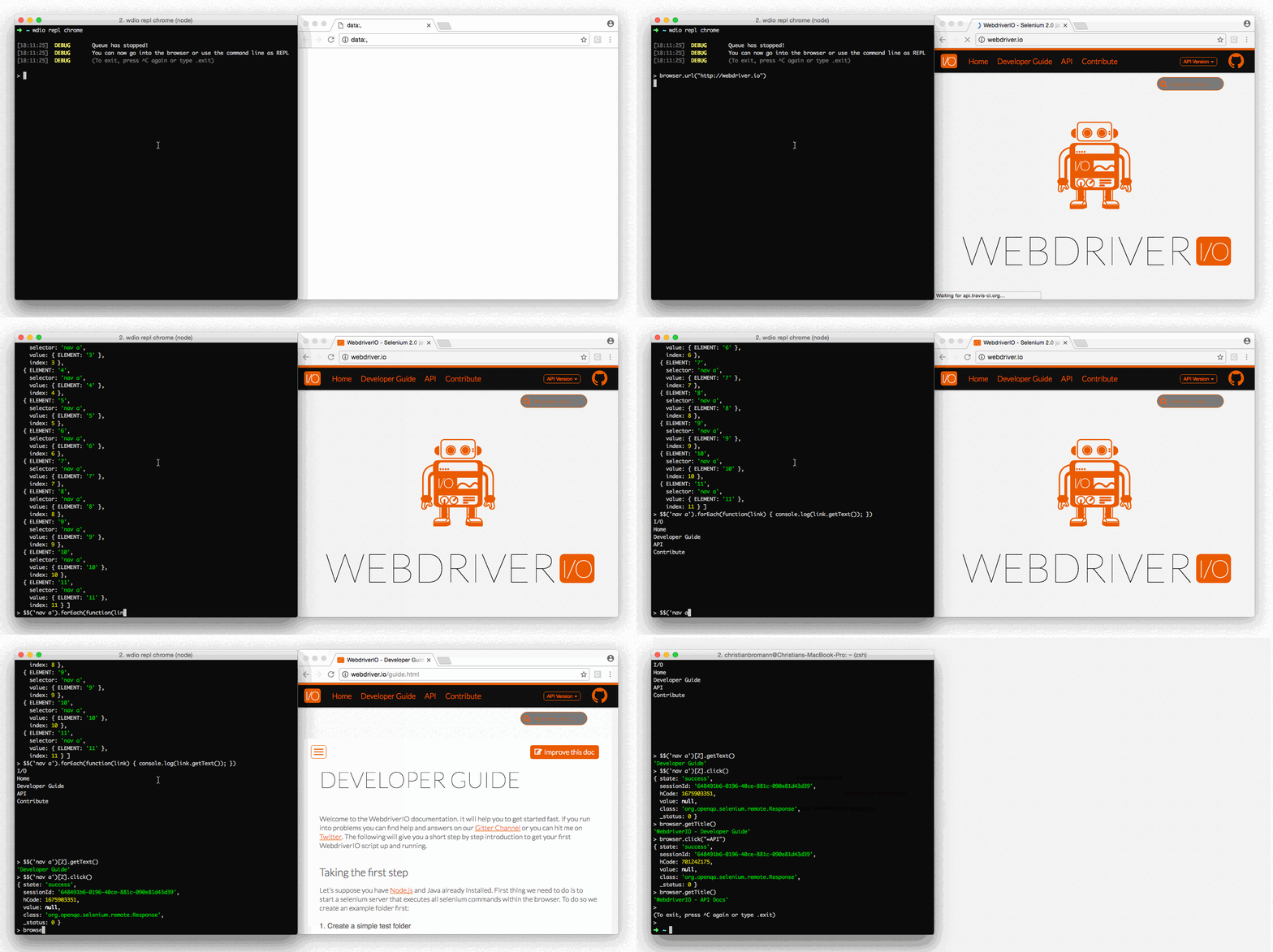
- package/build/commands/browser/$.d.ts +77 -0
- package/build/commands/browser/$.d.ts.map +1 -0
- package/build/commands/browser/$.js +91 -0
- package/build/commands/browser/addCommand.d.ts +37 -0
- package/build/commands/browser/addCommand.d.ts.map +1 -0
- package/build/commands/browser/addCommand.js +37 -0
- package/build/commands/browser/call.d.ts +42 -0
- package/build/commands/browser/call.d.ts.map +1 -0
- package/build/commands/browser/call.js +49 -0
- package/build/commands/browser/custom$$.d.ts +26 -0
- package/build/commands/browser/custom$$.d.ts.map +1 -0
- package/build/commands/browser/custom$$.js +47 -0
- package/build/commands/browser/custom$.d.ts +25 -0
- package/build/commands/browser/custom$.d.ts.map +1 -0
- package/build/commands/browser/custom$.js +47 -0
- package/build/commands/browser/debug.d.ts +32 -0
- package/build/commands/browser/debug.d.ts.map +1 -0
- package/build/commands/browser/debug.js +108 -0
- package/build/commands/browser/deleteCookies.d.ts +45 -0
- package/build/commands/browser/deleteCookies.d.ts.map +1 -0
- package/build/commands/browser/deleteCookies.js +56 -0
- package/build/commands/browser/execute.d.ts +37 -0
- package/build/commands/browser/execute.d.ts.map +1 -0
- package/build/commands/browser/execute.js +55 -0
- package/build/commands/browser/executeAsync.d.ts +45 -0
- package/build/commands/browser/executeAsync.d.ts.map +1 -0
- package/build/commands/browser/executeAsync.js +63 -0
- package/build/commands/browser/getCookies.d.ts +34 -0
- package/build/commands/browser/getCookies.d.ts.map +1 -0
- package/build/commands/browser/getCookies.js +46 -0
- package/build/commands/browser/getPuppeteer.d.ts +38 -0
- package/build/commands/browser/getPuppeteer.d.ts.map +1 -0
- package/build/commands/browser/getPuppeteer.js +119 -0
- package/build/commands/browser/getWindowSize.d.ts +25 -0
- package/build/commands/browser/getWindowSize.d.ts.map +1 -0
- package/build/commands/browser/getWindowSize.js +30 -0
- package/build/commands/browser/keys.d.ts +28 -0
- package/build/commands/browser/keys.d.ts.map +1 -0
- package/build/commands/browser/keys.js +64 -0
- package/build/commands/browser/mock.d.ts +111 -0
- package/build/commands/browser/mock.d.ts.map +1 -0
- package/build/commands/browser/mock.js +164 -0
- package/build/commands/browser/mockClearAll.d.ts +28 -0
- package/build/commands/browser/mockClearAll.d.ts.map +1 -0
- package/build/commands/browser/mockClearAll.js +43 -0
- package/build/commands/browser/mockRestoreAll.d.ts +26 -0
- package/build/commands/browser/mockRestoreAll.d.ts.map +1 -0
- package/build/commands/browser/mockRestoreAll.js +41 -0
- package/build/commands/browser/newWindow.d.ts +41 -0
- package/build/commands/browser/newWindow.d.ts.map +1 -0
- package/build/commands/browser/newWindow.js +83 -0
- package/build/commands/browser/overwriteCommand.d.ts +32 -0
- package/build/commands/browser/overwriteCommand.d.ts.map +1 -0
- package/build/commands/browser/overwriteCommand.js +32 -0
- package/build/commands/browser/pause.d.ts +23 -0
- package/build/commands/browser/pause.d.ts.map +1 -0
- package/build/commands/browser/pause.js +27 -0
- package/build/commands/browser/react$$.d.ts +36 -0
- package/build/commands/browser/react$$.d.ts.map +1 -0
- package/build/commands/browser/react$$.js +51 -0
- package/build/commands/browser/react$.d.ts +46 -0
- package/build/commands/browser/react$.d.ts.map +1 -0
- package/build/commands/browser/react$.js +59 -0
- package/build/commands/browser/reloadSession.d.ts +23 -0
- package/build/commands/browser/reloadSession.d.ts.map +1 -0
- package/build/commands/browser/reloadSession.js +58 -0
- package/build/commands/browser/savePDF.d.ts +46 -0
- package/build/commands/browser/savePDF.d.ts.map +1 -0
- package/build/commands/browser/savePDF.js +51 -0
- package/build/commands/browser/saveRecordingScreen.d.ts +28 -0
- package/build/commands/browser/saveRecordingScreen.d.ts.map +1 -0
- package/build/commands/browser/saveRecordingScreen.js +47 -0
- package/build/commands/browser/saveScreenshot.d.ts +22 -0
- package/build/commands/browser/saveScreenshot.d.ts.map +1 -0
- package/build/commands/browser/saveScreenshot.js +41 -0
- package/build/commands/browser/setCookies.d.ts +57 -0
- package/build/commands/browser/setCookies.d.ts.map +1 -0
- package/build/commands/browser/setCookies.js +66 -0
- package/build/commands/browser/setTimeout.d.ts +31 -0
- package/build/commands/browser/setTimeout.d.ts.map +1 -0
- package/build/commands/browser/setTimeout.js +61 -0
- package/build/commands/browser/setWindowSize.d.ts +20 -0
- package/build/commands/browser/setWindowSize.d.ts.map +1 -0
- package/build/commands/browser/setWindowSize.js +43 -0
- package/build/commands/browser/switchWindow.d.ts +30 -0
- package/build/commands/browser/switchWindow.d.ts.map +1 -0
- package/build/commands/browser/switchWindow.js +73 -0
- package/build/commands/browser/throttle.d.ts +3 -0
- package/build/commands/browser/throttle.d.ts.map +1 -0
- package/build/commands/browser/throttle.js +144 -0
- package/build/commands/browser/touchAction.d.ts +61 -0
- package/build/commands/browser/touchAction.d.ts.map +1 -0
- package/build/commands/browser/touchAction.js +65 -0
- package/build/commands/browser/uploadFile.d.ts +32 -0
- package/build/commands/browser/uploadFile.d.ts.map +1 -0
- package/build/commands/browser/uploadFile.js +63 -0
- package/build/commands/browser/url.d.ts +38 -0
- package/build/commands/browser/url.d.ts.map +1 -0
- package/build/commands/browser/url.js +49 -0
- package/build/commands/browser/waitUntil.d.ts +44 -0
- package/build/commands/browser/waitUntil.d.ts.map +1 -0
- package/build/commands/browser/waitUntil.js +73 -0
- package/build/commands/browser.d.ts +70 -0
- package/build/commands/browser.d.ts.map +1 -0
- package/build/commands/browser.js +44 -0
- package/build/commands/constant.d.ts +19 -0
- package/build/commands/constant.d.ts.map +1 -0
- package/build/commands/constant.js +91 -0
- package/build/commands/element/$$.d.ts +46 -0
- package/build/commands/element/$$.d.ts.map +1 -0
- package/build/commands/element/$$.js +50 -0
- package/build/commands/element/$.d.ts +72 -0
- package/build/commands/element/$.d.ts.map +1 -0
- package/build/commands/element/$.js +76 -0
- package/build/commands/element/addValue.d.ts +33 -0
- package/build/commands/element/addValue.d.ts.map +1 -0
- package/build/commands/element/addValue.js +48 -0
- package/build/commands/element/clearValue.d.ts +28 -0
- package/build/commands/element/clearValue.d.ts.map +1 -0
- package/build/commands/element/clearValue.js +32 -0
- package/build/commands/element/click.d.ts +73 -0
- package/build/commands/element/click.d.ts.map +1 -0
- package/build/commands/element/click.js +134 -0
- package/build/commands/element/custom$$.d.ts +28 -0
- package/build/commands/element/custom$$.d.ts.map +1 -0
- package/build/commands/element/custom$$.js +57 -0
- package/build/commands/element/custom$.d.ts +27 -0
- package/build/commands/element/custom$.d.ts.map +1 -0
- package/build/commands/element/custom$.js +57 -0
- package/build/commands/element/doubleClick.d.ts +25 -0
- package/build/commands/element/doubleClick.d.ts.map +1 -0
- package/build/commands/element/doubleClick.js +51 -0
- package/build/commands/element/dragAndDrop.d.ts +41 -0
- package/build/commands/element/dragAndDrop.d.ts.map +1 -0
- package/build/commands/element/dragAndDrop.js +98 -0
- package/build/commands/element/getAttribute.d.ts +28 -0
- package/build/commands/element/getAttribute.d.ts.map +1 -0
- package/build/commands/element/getAttribute.js +32 -0
- package/build/commands/element/getCSSProperty.d.ts +71 -0
- package/build/commands/element/getCSSProperty.d.ts.map +1 -0
- package/build/commands/element/getCSSProperty.js +108 -0
- package/build/commands/element/getComputedLabel.d.ts +20 -0
- package/build/commands/element/getComputedLabel.d.ts.map +1 -0
- package/build/commands/element/getComputedLabel.js +24 -0
- package/build/commands/element/getComputedRole.d.ts +20 -0
- package/build/commands/element/getComputedRole.d.ts.map +1 -0
- package/build/commands/element/getComputedRole.js +24 -0
- package/build/commands/element/getHTML.d.ts +32 -0
- package/build/commands/element/getHTML.d.ts.map +1 -0
- package/build/commands/element/getHTML.js +46 -0
- package/build/commands/element/getLocation.d.ts +6 -0
- package/build/commands/element/getLocation.d.ts.map +1 -0
- package/build/commands/element/getLocation.js +46 -0
- package/build/commands/element/getProperty.d.ts +53 -0
- package/build/commands/element/getProperty.d.ts.map +1 -0
- package/build/commands/element/getProperty.js +31 -0
- package/build/commands/element/getSize.d.ts +6 -0
- package/build/commands/element/getSize.d.ts.map +1 -0
- package/build/commands/element/getSize.js +47 -0
- package/build/commands/element/getTagName.d.ts +25 -0
- package/build/commands/element/getTagName.d.ts.map +1 -0
- package/build/commands/element/getTagName.js +29 -0
- package/build/commands/element/getText.d.ts +42 -0
- package/build/commands/element/getText.d.ts.map +1 -0
- package/build/commands/element/getText.js +46 -0
- package/build/commands/element/getValue.d.ts +25 -0
- package/build/commands/element/getValue.d.ts.map +1 -0
- package/build/commands/element/getValue.js +33 -0
- package/build/commands/element/isClickable.d.ts +40 -0
- package/build/commands/element/isClickable.d.ts.map +1 -0
- package/build/commands/element/isClickable.js +57 -0
- package/build/commands/element/isDisplayed.d.ts +50 -0
- package/build/commands/element/isDisplayed.d.ts.map +1 -0
- package/build/commands/element/isDisplayed.js +85 -0
- package/build/commands/element/isDisplayedInViewport.d.ts +38 -0
- package/build/commands/element/isDisplayedInViewport.d.ts.map +1 -0
- package/build/commands/element/isDisplayedInViewport.js +55 -0
- package/build/commands/element/isEnabled.d.ts +34 -0
- package/build/commands/element/isEnabled.d.ts.map +1 -0
- package/build/commands/element/isEnabled.js +38 -0
- package/build/commands/element/isEqual.d.ts +24 -0
- package/build/commands/element/isEqual.d.ts.map +1 -0
- package/build/commands/element/isEqual.js +52 -0
- package/build/commands/element/isExisting.d.ts +49 -0
- package/build/commands/element/isExisting.d.ts.map +1 -0
- package/build/commands/element/isExisting.js +65 -0
- package/build/commands/element/isFocused.d.ts +28 -0
- package/build/commands/element/isFocused.d.ts.map +1 -0
- package/build/commands/element/isFocused.js +42 -0
- package/build/commands/element/isSelected.d.ts +31 -0
- package/build/commands/element/isSelected.d.ts.map +1 -0
- package/build/commands/element/isSelected.js +35 -0
- package/build/commands/element/moveTo.d.ts +21 -0
- package/build/commands/element/moveTo.d.ts.map +1 -0
- package/build/commands/element/moveTo.js +39 -0
- package/build/commands/element/nextElement.d.ts +25 -0
- package/build/commands/element/nextElement.d.ts.map +1 -0
- package/build/commands/element/nextElement.js +31 -0
- package/build/commands/element/parentElement.d.ts +25 -0
- package/build/commands/element/parentElement.d.ts.map +1 -0
- package/build/commands/element/parentElement.js +31 -0
- package/build/commands/element/previousElement.d.ts +25 -0
- package/build/commands/element/previousElement.d.ts.map +1 -0
- package/build/commands/element/previousElement.js +31 -0
- package/build/commands/element/react$$.d.ts +36 -0
- package/build/commands/element/react$$.d.ts.map +1 -0
- package/build/commands/element/react$$.js +51 -0
- package/build/commands/element/react$.d.ts +46 -0
- package/build/commands/element/react$.d.ts.map +1 -0
- package/build/commands/element/react$.js +59 -0
- package/build/commands/element/saveScreenshot.d.ts +21 -0
- package/build/commands/element/saveScreenshot.d.ts.map +1 -0
- package/build/commands/element/saveScreenshot.js +40 -0
- package/build/commands/element/scrollIntoView.d.ts +21 -0
- package/build/commands/element/scrollIntoView.d.ts.map +1 -0
- package/build/commands/element/scrollIntoView.js +31 -0
- package/build/commands/element/selectByAttribute.d.ts +37 -0
- package/build/commands/element/selectByAttribute.d.ts.map +1 -0
- package/build/commands/element/selectByAttribute.js +59 -0
- package/build/commands/element/selectByIndex.d.ts +31 -0
- package/build/commands/element/selectByIndex.d.ts.map +1 -0
- package/build/commands/element/selectByIndex.js +55 -0
- package/build/commands/element/selectByVisibleText.d.ts +31 -0
- package/build/commands/element/selectByVisibleText.d.ts.map +1 -0
- package/build/commands/element/selectByVisibleText.js +66 -0
- package/build/commands/element/setValue.d.ts +29 -0
- package/build/commands/element/setValue.d.ts.map +1 -0
- package/build/commands/element/setValue.js +33 -0
- package/build/commands/element/shadow$$.d.ts +22 -0
- package/build/commands/element/shadow$$.d.ts.map +1 -0
- package/build/commands/element/shadow$$.js +27 -0
- package/build/commands/element/shadow$.d.ts +22 -0
- package/build/commands/element/shadow$.d.ts.map +1 -0
- package/build/commands/element/shadow$.js +27 -0
- package/build/commands/element/touchAction.d.ts +54 -0
- package/build/commands/element/touchAction.d.ts.map +1 -0
- package/build/commands/element/touchAction.js +58 -0
- package/build/commands/element/waitForClickable.d.ts +34 -0
- package/build/commands/element/waitForClickable.d.ts.map +1 -0
- package/build/commands/element/waitForClickable.js +37 -0
- package/build/commands/element/waitForDisplayed.d.ts +44 -0
- package/build/commands/element/waitForDisplayed.d.ts.map +1 -0
- package/build/commands/element/waitForDisplayed.js +47 -0
- package/build/commands/element/waitForEnabled.d.ts +46 -0
- package/build/commands/element/waitForEnabled.d.ts.map +1 -0
- package/build/commands/element/waitForEnabled.js +55 -0
- package/build/commands/element/waitForExist.d.ts +46 -0
- package/build/commands/element/waitForExist.d.ts.map +1 -0
- package/build/commands/element/waitForExist.js +49 -0
- package/build/commands/element/waitUntil.d.ts +49 -0
- package/build/commands/element/waitUntil.d.ts.map +1 -0
- package/build/commands/element/waitUntil.js +53 -0
- package/build/commands/element.d.ts +100 -0
- package/build/commands/element.d.ts.map +1 -0
- package/build/commands/element.js +63 -0
- package/build/commands/mock/abort.d.ts +19 -0
- package/build/commands/mock/abort.d.ts.map +1 -0
- package/build/commands/mock/abort.js +20 -0
- package/build/commands/mock/abortOnce.d.ts +27 -0
- package/build/commands/mock/abortOnce.d.ts.map +1 -0
- package/build/commands/mock/abortOnce.js +28 -0
- package/build/commands/mock/clear.d.ts +18 -0
- package/build/commands/mock/clear.d.ts.map +1 -0
- package/build/commands/mock/clear.js +19 -0
- package/build/commands/mock/respond.d.ts +54 -0
- package/build/commands/mock/respond.d.ts.map +1 -0
- package/build/commands/mock/respond.js +55 -0
- package/build/commands/mock/respondOnce.d.ts +55 -0
- package/build/commands/mock/respondOnce.d.ts.map +1 -0
- package/build/commands/mock/respondOnce.js +56 -0
- package/build/commands/mock/restore.d.ts +18 -0
- package/build/commands/mock/restore.d.ts.map +1 -0
- package/build/commands/mock/restore.js +19 -0
- package/build/constants.d.ts +14 -0
- package/build/constants.d.ts.map +1 -0
- package/build/constants.js +286 -0
- package/build/index.d.ts +45 -0
- package/build/index.d.ts.map +1 -0
- package/build/index.js +175 -0
- package/build/middlewares.d.ts +12 -0
- package/build/middlewares.d.ts.map +1 -0
- package/build/middlewares.js +65 -0
- package/build/multiremote.d.ts +71 -0
- package/build/multiremote.d.ts.map +1 -0
- package/build/multiremote.js +160 -0
- package/build/protocol-stub.d.ts +16 -0
- package/build/protocol-stub.d.ts.map +1 -0
- package/build/protocol-stub.js +77 -0
- package/build/scripts/getHTML.d.ts +9 -0
- package/build/scripts/getHTML.d.ts.map +1 -0
- package/build/scripts/getHTML.js +13 -0
- package/build/scripts/getProperty.d.ts +43 -0
- package/build/scripts/getProperty.d.ts.map +1 -0
- package/build/scripts/getProperty.js +12 -0
- package/build/scripts/isElementClickable.d.ts +7 -0
- package/build/scripts/isElementClickable.d.ts.map +1 -0
- package/build/scripts/isElementClickable.js +121 -0
- package/build/scripts/isElementDisplayed.d.ts +7 -0
- package/build/scripts/isElementDisplayed.d.ts.map +1 -0
- package/build/scripts/isElementDisplayed.js +216 -0
- package/build/scripts/isElementInViewport.d.ts +10 -0
- package/build/scripts/isElementInViewport.d.ts.map +1 -0
- package/build/scripts/isElementInViewport.js +22 -0
- package/build/scripts/isFocused.d.ts +7 -0
- package/build/scripts/isFocused.d.ts.map +1 -0
- package/build/scripts/isFocused.js +11 -0
- package/build/scripts/newWindow.d.ts +10 -0
- package/build/scripts/newWindow.d.ts.map +1 -0
- package/build/scripts/newWindow.js +14 -0
- package/build/scripts/resq.d.ts +6 -0
- package/build/scripts/resq.d.ts.map +1 -0
- package/build/scripts/resq.js +58 -0
- package/build/scripts/shadowFnFactory.d.ts +2 -0
- package/build/scripts/shadowFnFactory.d.ts.map +1 -0
- package/build/scripts/shadowFnFactory.js +17 -0
- package/build/types.d.ts +402 -0
- package/build/types.d.ts.map +1 -0
- package/build/types.js +2 -0
- package/build/utils/SevereServiceError.d.ts +7 -0
- package/build/utils/SevereServiceError.d.ts.map +1 -0
- package/build/utils/SevereServiceError.js +12 -0
- package/build/utils/Timer.d.ts +33 -0
- package/build/utils/Timer.d.ts.map +1 -0
- package/build/utils/Timer.js +126 -0
- package/build/utils/detectBackend.d.ts +23 -0
- package/build/utils/detectBackend.d.ts.map +1 -0
- package/build/utils/detectBackend.js +119 -0
- package/build/utils/findStrategy.d.ts +10 -0
- package/build/utils/findStrategy.d.ts.map +1 -0
- package/build/utils/findStrategy.js +267 -0
- package/build/utils/getElementObject.d.ts +17 -0
- package/build/utils/getElementObject.d.ts.map +1 -0
- package/build/utils/getElementObject.js +107 -0
- package/build/utils/implicitWait.d.ts +7 -0
- package/build/utils/implicitWait.d.ts.map +1 -0
- package/build/utils/implicitWait.js +39 -0
- package/build/utils/index.d.ts +102 -0
- package/build/utils/index.d.ts.map +1 -0
- package/build/utils/index.js +543 -0
- package/build/utils/interception/devtools.d.ts +61 -0
- package/build/utils/interception/devtools.d.ts.map +1 -0
- package/build/utils/interception/devtools.js +247 -0
- package/build/utils/interception/index.d.ts +26 -0
- package/build/utils/interception/index.d.ts.map +1 -0
- package/build/utils/interception/index.js +49 -0
- package/build/utils/interception/types.d.ts +94 -0
- package/build/utils/interception/types.d.ts.map +1 -0
- package/build/utils/interception/types.js +2 -0
- package/build/utils/interception/webdriver.d.ts +48 -0
- package/build/utils/interception/webdriver.d.ts.map +1 -0
- package/build/utils/interception/webdriver.js +75 -0
- package/build/utils/refetchElement.d.ts +6 -0
- package/build/utils/refetchElement.d.ts.map +1 -0
- package/build/utils/refetchElement.js +32 -0
- package/package.json +10 -10
|
@@ -0,0 +1,50 @@
|
|
|
1
|
+
import type { Selector, ElementArray } from '../../types';
|
|
2
|
+
/**
|
|
3
|
+
* The `$$` command is a short way to call the [`findElements`](/docs/api/webdriver#findelements) command in order
|
|
4
|
+
* to fetch multiple elements on the page. It returns an array with element results that will have an
|
|
5
|
+
* extended prototype to call action commands without passing in a selector. However if you still pass
|
|
6
|
+
* in a selector it will look for that element first and call the action on that element.
|
|
7
|
+
*
|
|
8
|
+
* Using the wdio testrunner this command is a global variable else it will be located on the browser object instead.
|
|
9
|
+
*
|
|
10
|
+
* You can chain `$` or `$$` together in order to walk down the DOM tree.
|
|
11
|
+
*
|
|
12
|
+
* :::info
|
|
13
|
+
*
|
|
14
|
+
* For more information on how to select specific elements, check out the [Selectors](/docs/selectors) guide.
|
|
15
|
+
*
|
|
16
|
+
* :::
|
|
17
|
+
*
|
|
18
|
+
* <example>
|
|
19
|
+
:index.html
|
|
20
|
+
<ul id="menu">
|
|
21
|
+
<li><a href="/">Home</a></li>
|
|
22
|
+
<li><a href="/">Developer Guide</a></li>
|
|
23
|
+
<li><a href="/">API</a></li>
|
|
24
|
+
<li><a href="/">Contribute</a></li>
|
|
25
|
+
</ul>
|
|
26
|
+
:$.js
|
|
27
|
+
it('should get text a menu link', async () => {
|
|
28
|
+
const text = await $$('#menu')[0];
|
|
29
|
+
console.log(await text.$$('li')[2].$('a').getText()); // outputs: "API"
|
|
30
|
+
});
|
|
31
|
+
|
|
32
|
+
it('should get text a menu link - JS Function', async () => {
|
|
33
|
+
const text = await $$(function() { // Arrow function is not allowed here.
|
|
34
|
+
// this is Window https://developer.mozilla.org/en-US/docs/Web/API/Window
|
|
35
|
+
// TypeScript users may do something like this
|
|
36
|
+
// return (this as Window).document.querySelectorAll('#menu')
|
|
37
|
+
return this.document.querySelectorAll('#menu'); // Element[]
|
|
38
|
+
})[0];
|
|
39
|
+
console.log(await text.$$('li')[2].$('a').getText()); // outputs: "API"
|
|
40
|
+
});
|
|
41
|
+
* </example>
|
|
42
|
+
*
|
|
43
|
+
* @alias $$
|
|
44
|
+
* @param {String|Function} selector selector or JS Function to fetch multiple elements
|
|
45
|
+
* @return {ElementArray}
|
|
46
|
+
* @type utility
|
|
47
|
+
*
|
|
48
|
+
*/
|
|
49
|
+
export default function $$(this: WebdriverIO.Browser | WebdriverIO.Element, selector: Selector): Promise<ElementArray>;
|
|
50
|
+
//# sourceMappingURL=$$.d.ts.map
|
|
@@ -0,0 +1 @@
|
|
|
1
|
+
{"version":3,"file":"$$.d.ts","sourceRoot":"","sources":["../../../src/commands/browser/$$.ts"],"names":[],"mappings":"AAEA,OAAO,KAAK,EAAE,QAAQ,EAAE,YAAY,EAAE,MAAM,aAAa,CAAA;AAEzD;;;;;;;;;;;;;;;;;;;;;;;;;;;;;;;;;;;;;;;;;;;;;;GA8CG;AACH,wBAA8B,EAAE,CAC5B,IAAI,EAAE,WAAW,CAAC,OAAO,GAAG,WAAW,CAAC,OAAO,EAC/C,QAAQ,EAAE,QAAQ,yBAKrB"}
|
|
@@ -0,0 +1,57 @@
|
|
|
1
|
+
"use strict";
|
|
2
|
+
Object.defineProperty(exports, "__esModule", { value: true });
|
|
3
|
+
const utils_1 = require("../../utils");
|
|
4
|
+
const getElementObject_1 = require("../../utils/getElementObject");
|
|
5
|
+
/**
|
|
6
|
+
* The `$$` command is a short way to call the [`findElements`](/docs/api/webdriver#findelements) command in order
|
|
7
|
+
* to fetch multiple elements on the page. It returns an array with element results that will have an
|
|
8
|
+
* extended prototype to call action commands without passing in a selector. However if you still pass
|
|
9
|
+
* in a selector it will look for that element first and call the action on that element.
|
|
10
|
+
*
|
|
11
|
+
* Using the wdio testrunner this command is a global variable else it will be located on the browser object instead.
|
|
12
|
+
*
|
|
13
|
+
* You can chain `$` or `$$` together in order to walk down the DOM tree.
|
|
14
|
+
*
|
|
15
|
+
* :::info
|
|
16
|
+
*
|
|
17
|
+
* For more information on how to select specific elements, check out the [Selectors](/docs/selectors) guide.
|
|
18
|
+
*
|
|
19
|
+
* :::
|
|
20
|
+
*
|
|
21
|
+
* <example>
|
|
22
|
+
:index.html
|
|
23
|
+
<ul id="menu">
|
|
24
|
+
<li><a href="/">Home</a></li>
|
|
25
|
+
<li><a href="/">Developer Guide</a></li>
|
|
26
|
+
<li><a href="/">API</a></li>
|
|
27
|
+
<li><a href="/">Contribute</a></li>
|
|
28
|
+
</ul>
|
|
29
|
+
:$.js
|
|
30
|
+
it('should get text a menu link', async () => {
|
|
31
|
+
const text = await $$('#menu')[0];
|
|
32
|
+
console.log(await text.$$('li')[2].$('a').getText()); // outputs: "API"
|
|
33
|
+
});
|
|
34
|
+
|
|
35
|
+
it('should get text a menu link - JS Function', async () => {
|
|
36
|
+
const text = await $$(function() { // Arrow function is not allowed here.
|
|
37
|
+
// this is Window https://developer.mozilla.org/en-US/docs/Web/API/Window
|
|
38
|
+
// TypeScript users may do something like this
|
|
39
|
+
// return (this as Window).document.querySelectorAll('#menu')
|
|
40
|
+
return this.document.querySelectorAll('#menu'); // Element[]
|
|
41
|
+
})[0];
|
|
42
|
+
console.log(await text.$$('li')[2].$('a').getText()); // outputs: "API"
|
|
43
|
+
});
|
|
44
|
+
* </example>
|
|
45
|
+
*
|
|
46
|
+
* @alias $$
|
|
47
|
+
* @param {String|Function} selector selector or JS Function to fetch multiple elements
|
|
48
|
+
* @return {ElementArray}
|
|
49
|
+
* @type utility
|
|
50
|
+
*
|
|
51
|
+
*/
|
|
52
|
+
async function $$(selector) {
|
|
53
|
+
const res = await utils_1.findElements.call(this, selector);
|
|
54
|
+
const elements = await getElementObject_1.getElements.call(this, selector, res);
|
|
55
|
+
return (0, utils_1.enhanceElementsArray)(elements, this, selector);
|
|
56
|
+
}
|
|
57
|
+
exports.default = $$;
|
|
@@ -0,0 +1,77 @@
|
|
|
1
|
+
import type { Selector } from '../../types';
|
|
2
|
+
/**
|
|
3
|
+
* The `$` command is a short way to call the [`findElement`](/docs/api/webdriver#findelement) command in order
|
|
4
|
+
* to fetch a single element on the page. It returns an object that with an extended prototype to call
|
|
5
|
+
* action commands without passing in a selector. However if you still pass in a selector it will look
|
|
6
|
+
* for that element first and call the action on that element.
|
|
7
|
+
*
|
|
8
|
+
* You can also pass in an object as selector where the object contains a property
|
|
9
|
+
* `element-6066-11e4-a52e-4f735466cecf` with the value of a reference to an element.
|
|
10
|
+
* The command will then transform the reference to an extended WebdriverIO element.
|
|
11
|
+
* __Note:__ only use these element objects if you are certain they still exist on the
|
|
12
|
+
* page, e.g. using the `isExisting` command. WebdriverIO is unable to refetch them given
|
|
13
|
+
* that there are no selector information available.
|
|
14
|
+
*
|
|
15
|
+
* Using the wdio testrunner this command is a global variable else it will be located on the browser object instead.
|
|
16
|
+
*
|
|
17
|
+
* You can chain `$` or `$$` together in order to walk down the DOM tree.
|
|
18
|
+
*
|
|
19
|
+
* :::info
|
|
20
|
+
*
|
|
21
|
+
* For more information on how to select specific elements, check out the [Selectors](/docs/selectors) guide.
|
|
22
|
+
*
|
|
23
|
+
* :::
|
|
24
|
+
*
|
|
25
|
+
* <example>
|
|
26
|
+
:index.html
|
|
27
|
+
<ul id="menu">
|
|
28
|
+
<li><a href="/">Home</a></li>
|
|
29
|
+
<li><a href="/">Developer Guide</a></li>
|
|
30
|
+
<li><a href="/">API</a></li>
|
|
31
|
+
<li><a href="/">Contribute</a></li>
|
|
32
|
+
</ul>
|
|
33
|
+
:$.js
|
|
34
|
+
it('should get text a menu link', async () => {
|
|
35
|
+
const text = await $('#menu');
|
|
36
|
+
console.log(await text.$$('li')[2].$('a').getText()); // outputs: "API"
|
|
37
|
+
});
|
|
38
|
+
|
|
39
|
+
it('should get text a menu link - JS Function', async () => {
|
|
40
|
+
const text = await $(function() { // Arrow function is not allowed here.
|
|
41
|
+
// this is Window https://developer.mozilla.org/en-US/docs/Web/API/Window
|
|
42
|
+
// TypeScript users may do something like this
|
|
43
|
+
// return (this as Window).document.querySelector('#menu')
|
|
44
|
+
return this.document.querySelector('#menu'); // Element
|
|
45
|
+
});
|
|
46
|
+
console.log(await text.$$('li')[2].$('a').getText()); // outputs: "API"
|
|
47
|
+
});
|
|
48
|
+
|
|
49
|
+
it('should allow to convert protocol result of an element into a WebdriverIO element', async () => {
|
|
50
|
+
const activeElement = await browser.getActiveElement();
|
|
51
|
+
console.log(await $(activeElement).getTagName()); // outputs active element
|
|
52
|
+
});
|
|
53
|
+
|
|
54
|
+
it('should use Androids DataMatcher or ViewMatcher selector', async () => {
|
|
55
|
+
const menuItem = await $({
|
|
56
|
+
"name": "hasEntry",
|
|
57
|
+
"args": ["title", "ViewTitle"],
|
|
58
|
+
"class": "androidx.test.espresso.matcher.ViewMatchers"
|
|
59
|
+
});
|
|
60
|
+
await menuItem.click();
|
|
61
|
+
|
|
62
|
+
const menuItem = await $({
|
|
63
|
+
"name": "hasEntry",
|
|
64
|
+
"args": ["title", "ViewTitle"]
|
|
65
|
+
});
|
|
66
|
+
await menuItem.click();
|
|
67
|
+
});
|
|
68
|
+
* </example>
|
|
69
|
+
*
|
|
70
|
+
* @alias $
|
|
71
|
+
* @param {String|Function|Matcher} selector selector, JS Function, or Matcher object to fetch a certain element
|
|
72
|
+
* @return {Element}
|
|
73
|
+
* @type utility
|
|
74
|
+
*
|
|
75
|
+
*/
|
|
76
|
+
export default function $(this: WebdriverIO.Browser | WebdriverIO.Element, selector: Selector): Promise<WebdriverIO.Element>;
|
|
77
|
+
//# sourceMappingURL=$.d.ts.map
|
|
@@ -0,0 +1 @@
|
|
|
1
|
+
{"version":3,"file":"$.d.ts","sourceRoot":"","sources":["../../../src/commands/browser/$.ts"],"names":[],"mappings":"AAGA,OAAO,KAAK,EAAE,QAAQ,EAAE,MAAM,aAAa,CAAA;AAE3C;;;;;;;;;;;;;;;;;;;;;;;;;;;;;;;;;;;;;;;;;;;;;;;;;;;;;;;;;;;;;;;;;;;;;;;;;GAyEG;AACH,wBAA8B,CAAC,CAC3B,IAAI,EAAE,WAAW,CAAC,OAAO,GAAG,WAAW,CAAC,OAAO,EAC/C,QAAQ,EAAE,QAAQ,gCAYrB"}
|
|
@@ -0,0 +1,91 @@
|
|
|
1
|
+
"use strict";
|
|
2
|
+
Object.defineProperty(exports, "__esModule", { value: true });
|
|
3
|
+
const utils_1 = require("../../utils");
|
|
4
|
+
const getElementObject_1 = require("../../utils/getElementObject");
|
|
5
|
+
const constants_1 = require("../../constants");
|
|
6
|
+
/**
|
|
7
|
+
* The `$` command is a short way to call the [`findElement`](/docs/api/webdriver#findelement) command in order
|
|
8
|
+
* to fetch a single element on the page. It returns an object that with an extended prototype to call
|
|
9
|
+
* action commands without passing in a selector. However if you still pass in a selector it will look
|
|
10
|
+
* for that element first and call the action on that element.
|
|
11
|
+
*
|
|
12
|
+
* You can also pass in an object as selector where the object contains a property
|
|
13
|
+
* `element-6066-11e4-a52e-4f735466cecf` with the value of a reference to an element.
|
|
14
|
+
* The command will then transform the reference to an extended WebdriverIO element.
|
|
15
|
+
* __Note:__ only use these element objects if you are certain they still exist on the
|
|
16
|
+
* page, e.g. using the `isExisting` command. WebdriverIO is unable to refetch them given
|
|
17
|
+
* that there are no selector information available.
|
|
18
|
+
*
|
|
19
|
+
* Using the wdio testrunner this command is a global variable else it will be located on the browser object instead.
|
|
20
|
+
*
|
|
21
|
+
* You can chain `$` or `$$` together in order to walk down the DOM tree.
|
|
22
|
+
*
|
|
23
|
+
* :::info
|
|
24
|
+
*
|
|
25
|
+
* For more information on how to select specific elements, check out the [Selectors](/docs/selectors) guide.
|
|
26
|
+
*
|
|
27
|
+
* :::
|
|
28
|
+
*
|
|
29
|
+
* <example>
|
|
30
|
+
:index.html
|
|
31
|
+
<ul id="menu">
|
|
32
|
+
<li><a href="/">Home</a></li>
|
|
33
|
+
<li><a href="/">Developer Guide</a></li>
|
|
34
|
+
<li><a href="/">API</a></li>
|
|
35
|
+
<li><a href="/">Contribute</a></li>
|
|
36
|
+
</ul>
|
|
37
|
+
:$.js
|
|
38
|
+
it('should get text a menu link', async () => {
|
|
39
|
+
const text = await $('#menu');
|
|
40
|
+
console.log(await text.$$('li')[2].$('a').getText()); // outputs: "API"
|
|
41
|
+
});
|
|
42
|
+
|
|
43
|
+
it('should get text a menu link - JS Function', async () => {
|
|
44
|
+
const text = await $(function() { // Arrow function is not allowed here.
|
|
45
|
+
// this is Window https://developer.mozilla.org/en-US/docs/Web/API/Window
|
|
46
|
+
// TypeScript users may do something like this
|
|
47
|
+
// return (this as Window).document.querySelector('#menu')
|
|
48
|
+
return this.document.querySelector('#menu'); // Element
|
|
49
|
+
});
|
|
50
|
+
console.log(await text.$$('li')[2].$('a').getText()); // outputs: "API"
|
|
51
|
+
});
|
|
52
|
+
|
|
53
|
+
it('should allow to convert protocol result of an element into a WebdriverIO element', async () => {
|
|
54
|
+
const activeElement = await browser.getActiveElement();
|
|
55
|
+
console.log(await $(activeElement).getTagName()); // outputs active element
|
|
56
|
+
});
|
|
57
|
+
|
|
58
|
+
it('should use Androids DataMatcher or ViewMatcher selector', async () => {
|
|
59
|
+
const menuItem = await $({
|
|
60
|
+
"name": "hasEntry",
|
|
61
|
+
"args": ["title", "ViewTitle"],
|
|
62
|
+
"class": "androidx.test.espresso.matcher.ViewMatchers"
|
|
63
|
+
});
|
|
64
|
+
await menuItem.click();
|
|
65
|
+
|
|
66
|
+
const menuItem = await $({
|
|
67
|
+
"name": "hasEntry",
|
|
68
|
+
"args": ["title", "ViewTitle"]
|
|
69
|
+
});
|
|
70
|
+
await menuItem.click();
|
|
71
|
+
});
|
|
72
|
+
* </example>
|
|
73
|
+
*
|
|
74
|
+
* @alias $
|
|
75
|
+
* @param {String|Function|Matcher} selector selector, JS Function, or Matcher object to fetch a certain element
|
|
76
|
+
* @return {Element}
|
|
77
|
+
* @type utility
|
|
78
|
+
*
|
|
79
|
+
*/
|
|
80
|
+
async function $(selector) {
|
|
81
|
+
/**
|
|
82
|
+
* convert protocol result into WebdriverIO element
|
|
83
|
+
* e.g. when element was fetched with `getActiveElement`
|
|
84
|
+
*/
|
|
85
|
+
if (typeof selector === 'object' && typeof selector[constants_1.ELEMENT_KEY] === 'string') {
|
|
86
|
+
return getElementObject_1.getElement.call(this, undefined, selector);
|
|
87
|
+
}
|
|
88
|
+
const res = await utils_1.findElement.call(this, selector);
|
|
89
|
+
return getElementObject_1.getElement.call(this, selector, res);
|
|
90
|
+
}
|
|
91
|
+
exports.default = $;
|
|
@@ -0,0 +1,37 @@
|
|
|
1
|
+
/**
|
|
2
|
+
* The browser method `addCommand` helps you to write your own set of commands. You can write your command in a synchronous way or in an asynchronous way.
|
|
3
|
+
*
|
|
4
|
+
* :::info
|
|
5
|
+
*
|
|
6
|
+
* You can find more information on adding custom commands in the [custom command](/docs/customcommands#adding-custom-commands) guide.
|
|
7
|
+
*
|
|
8
|
+
* :::
|
|
9
|
+
*
|
|
10
|
+
* <example>
|
|
11
|
+
:execute.js
|
|
12
|
+
await browser.addCommand('getUrlAndTitle', async function (customParam) {
|
|
13
|
+
// `this` refers to the `browser` scope
|
|
14
|
+
return {
|
|
15
|
+
url: await this.getUrl(),
|
|
16
|
+
title: await this.getTitle(),
|
|
17
|
+
customParam: customParam
|
|
18
|
+
}
|
|
19
|
+
})
|
|
20
|
+
//usage
|
|
21
|
+
it('should use my add command', async () => {
|
|
22
|
+
await browser.url('https://webdriver.io')
|
|
23
|
+
const result = await browser.getUrlAndTitle('foobar')
|
|
24
|
+
|
|
25
|
+
assert.strictEqual(result.url, 'https://webdriver.io')
|
|
26
|
+
assert.strictEqual(result.title, 'WebdriverIO · Next-gen browser and mobile automation test framework for Node.js | WebdriverIO')
|
|
27
|
+
assert.strictEqual(result.customParam, 'foobar')
|
|
28
|
+
})
|
|
29
|
+
* </example>
|
|
30
|
+
* @alias browser.addCommand
|
|
31
|
+
* @param {String} name name of the custom command
|
|
32
|
+
* @param {Function} callback function to be called
|
|
33
|
+
* @param {Boolean=} elementScope extend the Element object instead of the Browser object
|
|
34
|
+
* @type utility
|
|
35
|
+
*
|
|
36
|
+
*/
|
|
37
|
+
//# sourceMappingURL=addCommand.d.ts.map
|
|
@@ -0,0 +1 @@
|
|
|
1
|
+
{"version":3,"file":"addCommand.d.ts","sourceRoot":"","sources":["../../../src/commands/browser/addCommand.ts"],"names":[],"mappings":"AAAA;;;;;;;;;;;;;;;;;;;;;;;;;;;;;;;;;;;GAmCG"}
|
|
@@ -0,0 +1,37 @@
|
|
|
1
|
+
"use strict";
|
|
2
|
+
/**
|
|
3
|
+
* The browser method `addCommand` helps you to write your own set of commands. You can write your command in a synchronous way or in an asynchronous way.
|
|
4
|
+
*
|
|
5
|
+
* :::info
|
|
6
|
+
*
|
|
7
|
+
* You can find more information on adding custom commands in the [custom command](/docs/customcommands#adding-custom-commands) guide.
|
|
8
|
+
*
|
|
9
|
+
* :::
|
|
10
|
+
*
|
|
11
|
+
* <example>
|
|
12
|
+
:execute.js
|
|
13
|
+
await browser.addCommand('getUrlAndTitle', async function (customParam) {
|
|
14
|
+
// `this` refers to the `browser` scope
|
|
15
|
+
return {
|
|
16
|
+
url: await this.getUrl(),
|
|
17
|
+
title: await this.getTitle(),
|
|
18
|
+
customParam: customParam
|
|
19
|
+
}
|
|
20
|
+
})
|
|
21
|
+
//usage
|
|
22
|
+
it('should use my add command', async () => {
|
|
23
|
+
await browser.url('https://webdriver.io')
|
|
24
|
+
const result = await browser.getUrlAndTitle('foobar')
|
|
25
|
+
|
|
26
|
+
assert.strictEqual(result.url, 'https://webdriver.io')
|
|
27
|
+
assert.strictEqual(result.title, 'WebdriverIO · Next-gen browser and mobile automation test framework for Node.js | WebdriverIO')
|
|
28
|
+
assert.strictEqual(result.customParam, 'foobar')
|
|
29
|
+
})
|
|
30
|
+
* </example>
|
|
31
|
+
* @alias browser.addCommand
|
|
32
|
+
* @param {String} name name of the custom command
|
|
33
|
+
* @param {Function} callback function to be called
|
|
34
|
+
* @param {Boolean=} elementScope extend the Element object instead of the Browser object
|
|
35
|
+
* @type utility
|
|
36
|
+
*
|
|
37
|
+
*/
|
|
@@ -0,0 +1,42 @@
|
|
|
1
|
+
/**
|
|
2
|
+
* You can use `call` to execute any async action within your test spec. The command itself
|
|
3
|
+
* is treated like a synchronous function. It accepts promises and stops the execution until
|
|
4
|
+
* the promise has resolved.
|
|
5
|
+
*
|
|
6
|
+
* This command helps to run asynchronous code within a synchronous context. With
|
|
7
|
+
* WebdriverIO depcrecating synchronous usage (see [RFC](https://github.com/webdriverio/webdriverio/discussions/6702))
|
|
8
|
+
* this command is not very useful anymore.
|
|
9
|
+
*
|
|
10
|
+
* <example>
|
|
11
|
+
:call.js
|
|
12
|
+
it('some testing here', async () => {
|
|
13
|
+
await browser.url('http://google.com')
|
|
14
|
+
// make an asynchronous call using any 3rd party library supporting promises
|
|
15
|
+
// e.g. call to backend or db to inject fixture data
|
|
16
|
+
await browser.call(() => {
|
|
17
|
+
return somePromiseLibrary.someMethod().then(() => {
|
|
18
|
+
// ...
|
|
19
|
+
})
|
|
20
|
+
})
|
|
21
|
+
|
|
22
|
+
// example for async call to 3rd party library that doesn't support promises
|
|
23
|
+
const result = await browser.call(() => {
|
|
24
|
+
return new Promise((resolve, reject) => {
|
|
25
|
+
someOtherNodeLibrary.someMethod(param1, (err, res) => {
|
|
26
|
+
if (err) {
|
|
27
|
+
return reject(err)
|
|
28
|
+
}
|
|
29
|
+
resolve(res)
|
|
30
|
+
})
|
|
31
|
+
})
|
|
32
|
+
})
|
|
33
|
+
});
|
|
34
|
+
* </example>
|
|
35
|
+
*
|
|
36
|
+
* @alias browser.call
|
|
37
|
+
* @param {Function} callback function to be called
|
|
38
|
+
* @type utility
|
|
39
|
+
*
|
|
40
|
+
*/
|
|
41
|
+
export default function call<T>(fn: () => T): T | Promise<T>;
|
|
42
|
+
//# sourceMappingURL=call.d.ts.map
|
|
@@ -0,0 +1 @@
|
|
|
1
|
+
{"version":3,"file":"call.d.ts","sourceRoot":"","sources":["../../../src/commands/browser/call.ts"],"names":[],"mappings":"AAAA;;;;;;;;;;;;;;;;;;;;;;;;;;;;;;;;;;;;;;;GAuCG;AACH,MAAM,CAAC,OAAO,UAAU,IAAI,CAAC,CAAC,EAAG,EAAE,EAAE,MAAM,CAAC,GAAG,CAAC,GAAG,OAAO,CAAC,CAAC,CAAC,CAM5D"}
|
|
@@ -0,0 +1,49 @@
|
|
|
1
|
+
"use strict";
|
|
2
|
+
Object.defineProperty(exports, "__esModule", { value: true });
|
|
3
|
+
/**
|
|
4
|
+
* You can use `call` to execute any async action within your test spec. The command itself
|
|
5
|
+
* is treated like a synchronous function. It accepts promises and stops the execution until
|
|
6
|
+
* the promise has resolved.
|
|
7
|
+
*
|
|
8
|
+
* This command helps to run asynchronous code within a synchronous context. With
|
|
9
|
+
* WebdriverIO depcrecating synchronous usage (see [RFC](https://github.com/webdriverio/webdriverio/discussions/6702))
|
|
10
|
+
* this command is not very useful anymore.
|
|
11
|
+
*
|
|
12
|
+
* <example>
|
|
13
|
+
:call.js
|
|
14
|
+
it('some testing here', async () => {
|
|
15
|
+
await browser.url('http://google.com')
|
|
16
|
+
// make an asynchronous call using any 3rd party library supporting promises
|
|
17
|
+
// e.g. call to backend or db to inject fixture data
|
|
18
|
+
await browser.call(() => {
|
|
19
|
+
return somePromiseLibrary.someMethod().then(() => {
|
|
20
|
+
// ...
|
|
21
|
+
})
|
|
22
|
+
})
|
|
23
|
+
|
|
24
|
+
// example for async call to 3rd party library that doesn't support promises
|
|
25
|
+
const result = await browser.call(() => {
|
|
26
|
+
return new Promise((resolve, reject) => {
|
|
27
|
+
someOtherNodeLibrary.someMethod(param1, (err, res) => {
|
|
28
|
+
if (err) {
|
|
29
|
+
return reject(err)
|
|
30
|
+
}
|
|
31
|
+
resolve(res)
|
|
32
|
+
})
|
|
33
|
+
})
|
|
34
|
+
})
|
|
35
|
+
});
|
|
36
|
+
* </example>
|
|
37
|
+
*
|
|
38
|
+
* @alias browser.call
|
|
39
|
+
* @param {Function} callback function to be called
|
|
40
|
+
* @type utility
|
|
41
|
+
*
|
|
42
|
+
*/
|
|
43
|
+
function call(fn) {
|
|
44
|
+
if (typeof fn === 'function') {
|
|
45
|
+
return fn();
|
|
46
|
+
}
|
|
47
|
+
throw new Error('Command argument for "call" needs to be a function');
|
|
48
|
+
}
|
|
49
|
+
exports.default = call;
|
|
@@ -0,0 +1,26 @@
|
|
|
1
|
+
import type { ElementArray } from '../../types';
|
|
2
|
+
/**
|
|
3
|
+
*
|
|
4
|
+
* The `customs$$` allows you to use a custom strategy declared by using `browser.addLocatorStrategy`
|
|
5
|
+
*
|
|
6
|
+
* <example>
|
|
7
|
+
:example.js
|
|
8
|
+
it('should get all the plugin wrapper buttons', async () => {
|
|
9
|
+
await browser.url('https://webdriver.io')
|
|
10
|
+
await browser.addLocatorStrategy('myStrat', (selector) => {
|
|
11
|
+
return document.querySelectorAll(selector)
|
|
12
|
+
})
|
|
13
|
+
|
|
14
|
+
const pluginWrapper = await browser.custom$$('myStrat', '.pluginWrapper')
|
|
15
|
+
|
|
16
|
+
console.log(await pluginWrapper.length) // 4
|
|
17
|
+
})
|
|
18
|
+
* </example>
|
|
19
|
+
*
|
|
20
|
+
* @alias custom$$
|
|
21
|
+
* @param {String} strategyName
|
|
22
|
+
* @param {Any} strategyArguments
|
|
23
|
+
* @return {ElementArray}
|
|
24
|
+
*/
|
|
25
|
+
export default function custom$$(this: WebdriverIO.Browser, strategyName: string, ...strategyArguments: any[]): Promise<ElementArray>;
|
|
26
|
+
//# sourceMappingURL=custom$$.d.ts.map
|
|
@@ -0,0 +1 @@
|
|
|
1
|
+
{"version":3,"file":"custom$$.d.ts","sourceRoot":"","sources":["../../../src/commands/browser/custom$$.ts"],"names":[],"mappings":"AAIA,OAAO,KAAK,EAAE,YAAY,EAAE,MAAM,aAAa,CAAA;AAE/C;;;;;;;;;;;;;;;;;;;;;;GAsBG;AACH,wBAA8B,QAAQ,CAClC,IAAI,EAAE,WAAW,CAAC,OAAO,EACzB,YAAY,EAAE,MAAM,EACpB,GAAG,iBAAiB,EAAE,GAAG,EAAE,GAC5B,OAAO,CAAC,YAAY,CAAC,CAyBvB"}
|
|
@@ -0,0 +1,47 @@
|
|
|
1
|
+
"use strict";
|
|
2
|
+
Object.defineProperty(exports, "__esModule", { value: true });
|
|
3
|
+
const utils_1 = require("../../utils");
|
|
4
|
+
const getElementObject_1 = require("../../utils/getElementObject");
|
|
5
|
+
const constants_1 = require("../../constants");
|
|
6
|
+
/**
|
|
7
|
+
*
|
|
8
|
+
* The `customs$$` allows you to use a custom strategy declared by using `browser.addLocatorStrategy`
|
|
9
|
+
*
|
|
10
|
+
* <example>
|
|
11
|
+
:example.js
|
|
12
|
+
it('should get all the plugin wrapper buttons', async () => {
|
|
13
|
+
await browser.url('https://webdriver.io')
|
|
14
|
+
await browser.addLocatorStrategy('myStrat', (selector) => {
|
|
15
|
+
return document.querySelectorAll(selector)
|
|
16
|
+
})
|
|
17
|
+
|
|
18
|
+
const pluginWrapper = await browser.custom$$('myStrat', '.pluginWrapper')
|
|
19
|
+
|
|
20
|
+
console.log(await pluginWrapper.length) // 4
|
|
21
|
+
})
|
|
22
|
+
* </example>
|
|
23
|
+
*
|
|
24
|
+
* @alias custom$$
|
|
25
|
+
* @param {String} strategyName
|
|
26
|
+
* @param {Any} strategyArguments
|
|
27
|
+
* @return {ElementArray}
|
|
28
|
+
*/
|
|
29
|
+
async function custom$$(strategyName, ...strategyArguments) {
|
|
30
|
+
const strategy = this.strategies.get(strategyName);
|
|
31
|
+
if (!strategy) {
|
|
32
|
+
throw Error('No strategy found for ' + strategyName);
|
|
33
|
+
}
|
|
34
|
+
let res = await this.execute(strategy, ...strategyArguments);
|
|
35
|
+
/**
|
|
36
|
+
* if the user's script return just one element
|
|
37
|
+
* then we convert it to an array as this method
|
|
38
|
+
* should return multiple elements
|
|
39
|
+
*/
|
|
40
|
+
if (!Array.isArray(res)) {
|
|
41
|
+
res = [res];
|
|
42
|
+
}
|
|
43
|
+
res = res.filter(el => !!el && typeof el[constants_1.ELEMENT_KEY] === 'string');
|
|
44
|
+
const elements = res.length ? await getElementObject_1.getElements.call(this, strategy, res) : [];
|
|
45
|
+
return (0, utils_1.enhanceElementsArray)(elements, this, strategy, 'custom$$', [strategyArguments]);
|
|
46
|
+
}
|
|
47
|
+
exports.default = custom$$;
|
|
@@ -0,0 +1,25 @@
|
|
|
1
|
+
/**
|
|
2
|
+
*
|
|
3
|
+
* The `custom$` allows you to use a custom strategy declared by using `browser.addLocatorStrategy`
|
|
4
|
+
*
|
|
5
|
+
* <example>
|
|
6
|
+
:example.js
|
|
7
|
+
it('should fetch the project title', async () => {
|
|
8
|
+
await browser.url('https://webdriver.io')
|
|
9
|
+
await browser.addLocatorStrategy('myStrat', (selector) => {
|
|
10
|
+
return document.querySelectorAll(selector)
|
|
11
|
+
})
|
|
12
|
+
|
|
13
|
+
const projectTitle = await browser.custom$('myStrat', '.projectTitle')
|
|
14
|
+
|
|
15
|
+
console.log(await projectTitle.getText()) // WEBDRIVER I/O
|
|
16
|
+
})
|
|
17
|
+
* </example>
|
|
18
|
+
*
|
|
19
|
+
* @alias custom$
|
|
20
|
+
* @param {String} strategyName
|
|
21
|
+
* @param {Any} strategyArguments
|
|
22
|
+
* @return {Element}
|
|
23
|
+
*/
|
|
24
|
+
export default function custom$(this: WebdriverIO.Browser, strategyName: string, ...strategyArguments: any[]): Promise<WebdriverIO.Element>;
|
|
25
|
+
//# sourceMappingURL=custom$.d.ts.map
|
|
@@ -0,0 +1 @@
|
|
|
1
|
+
{"version":3,"file":"custom$.d.ts","sourceRoot":"","sources":["../../../src/commands/browser/custom$.ts"],"names":[],"mappings":"AAKA;;;;;;;;;;;;;;;;;;;;;;GAsBG;AACH,wBAA8B,OAAO,CACjC,IAAI,EAAE,WAAW,CAAC,OAAO,EACzB,YAAY,EAAE,MAAM,EACpB,GAAG,iBAAiB,EAAE,GAAG,EAAE,gCA2B9B"}
|
|
@@ -0,0 +1,47 @@
|
|
|
1
|
+
"use strict";
|
|
2
|
+
Object.defineProperty(exports, "__esModule", { value: true });
|
|
3
|
+
const getElementObject_1 = require("../../utils/getElementObject");
|
|
4
|
+
const constants_1 = require("../../constants");
|
|
5
|
+
/**
|
|
6
|
+
*
|
|
7
|
+
* The `custom$` allows you to use a custom strategy declared by using `browser.addLocatorStrategy`
|
|
8
|
+
*
|
|
9
|
+
* <example>
|
|
10
|
+
:example.js
|
|
11
|
+
it('should fetch the project title', async () => {
|
|
12
|
+
await browser.url('https://webdriver.io')
|
|
13
|
+
await browser.addLocatorStrategy('myStrat', (selector) => {
|
|
14
|
+
return document.querySelectorAll(selector)
|
|
15
|
+
})
|
|
16
|
+
|
|
17
|
+
const projectTitle = await browser.custom$('myStrat', '.projectTitle')
|
|
18
|
+
|
|
19
|
+
console.log(await projectTitle.getText()) // WEBDRIVER I/O
|
|
20
|
+
})
|
|
21
|
+
* </example>
|
|
22
|
+
*
|
|
23
|
+
* @alias custom$
|
|
24
|
+
* @param {String} strategyName
|
|
25
|
+
* @param {Any} strategyArguments
|
|
26
|
+
* @return {Element}
|
|
27
|
+
*/
|
|
28
|
+
async function custom$(strategyName, ...strategyArguments) {
|
|
29
|
+
const strategy = this.strategies.get(strategyName);
|
|
30
|
+
if (!strategy) {
|
|
31
|
+
throw Error('No strategy found for ' + strategyName);
|
|
32
|
+
}
|
|
33
|
+
let res = await this.execute(strategy, ...strategyArguments);
|
|
34
|
+
/**
|
|
35
|
+
* if the user's script returns multiple elements
|
|
36
|
+
* then we just return the first one as this method
|
|
37
|
+
* is intended to return just one element
|
|
38
|
+
*/
|
|
39
|
+
if (Array.isArray(res)) {
|
|
40
|
+
res = res[0];
|
|
41
|
+
}
|
|
42
|
+
if (res && typeof res[constants_1.ELEMENT_KEY] === 'string') {
|
|
43
|
+
return await getElementObject_1.getElement.call(this, strategy, res);
|
|
44
|
+
}
|
|
45
|
+
throw Error('Your locator strategy script must return an element');
|
|
46
|
+
}
|
|
47
|
+
exports.default = custom$;
|
|
@@ -0,0 +1,32 @@
|
|
|
1
|
+
/**
|
|
2
|
+
*
|
|
3
|
+
* This command helps you to debug your integration tests. It stops the running browser and gives
|
|
4
|
+
* you time to jump into it and check the state of your application (e.g. using dev tools).
|
|
5
|
+
* Your terminal transforms into a [REPL](https://en.wikipedia.org/wiki/Read%E2%80%93eval%E2%80%93print_loop)
|
|
6
|
+
* interface that will allow you to try out certain commands, find elements and test actions on
|
|
7
|
+
* them.
|
|
8
|
+
*
|
|
9
|
+
* [](https://webdriver.io/img/repl.gif)
|
|
10
|
+
*
|
|
11
|
+
* If you run the WDIO testrunner make sure you increase the timeout property of the test framework
|
|
12
|
+
* you are using (e.g. Mocha or Jasmine) in order to prevent test termination due to a test timeout.
|
|
13
|
+
* Also avoid executing the command with multiple capabilities running at the same time.
|
|
14
|
+
*
|
|
15
|
+
* <iframe width="560" height="315" src="https://www.youtube.com/embed/xWwP-3B_YyE" frameborder="0" allowFullScreen></iframe>
|
|
16
|
+
*
|
|
17
|
+
* <example>
|
|
18
|
+
:debug.js
|
|
19
|
+
it('should demonstrate the debug command', async () => {
|
|
20
|
+
await $('#input').setValue('FOO')
|
|
21
|
+
await browser.debug() // jumping into the browser and change value of #input to 'BAR'
|
|
22
|
+
const value = await $('#input').getValue()
|
|
23
|
+
console.log(value) // outputs: "BAR"
|
|
24
|
+
})
|
|
25
|
+
* </example>
|
|
26
|
+
*
|
|
27
|
+
* @alias browser.debug
|
|
28
|
+
* @type utility
|
|
29
|
+
*
|
|
30
|
+
*/
|
|
31
|
+
export default function debug(this: WebdriverIO.Browser, commandTimeout?: number): Promise<unknown>;
|
|
32
|
+
//# sourceMappingURL=debug.d.ts.map
|
|
@@ -0,0 +1 @@
|
|
|
1
|
+
{"version":3,"file":"debug.d.ts","sourceRoot":"","sources":["../../../src/commands/browser/debug.ts"],"names":[],"mappings":"AAGA;;;;;;;;;;;;;;;;;;;;;;;;;;;;;GA6BG;AACH,MAAM,CAAC,OAAO,UAAU,KAAK,CACzB,IAAI,EAAE,WAAW,CAAC,OAAO,EACzB,cAAc,SAAO,oBAgFxB"}
|