vue3-components-plus 3.0.12 → 3.0.14
This diff represents the content of publicly available package versions that have been released to one of the supported registries. The information contained in this diff is provided for informational purposes only and reflects changes between package versions as they appear in their respective public registries.
package/README.md
CHANGED
|
@@ -4,6 +4,8 @@
|
|
|
4
4
|
|
|
5
5
|
vue3-components-plus 是一个功能丰富的 Vue 3 企业级组件库,提供办公文档预览、动态表单、视频播放、权限控制等完整解决方案。
|
|
6
6
|
|
|
7
|
+
**GitHub 源代码**: https://github.com/75535596/vue3-components-plus
|
|
8
|
+
|
|
7
9
|
组件使用示例参考 `dist/ComponentDemo`
|
|
8
10
|
|
|
9
11
|
## 📸 部分组件预览
|
|
@@ -20,6 +22,10 @@ vue3-components-plus 是一个功能丰富的 Vue 3 企业级组件库,提供
|
|
|
20
22
|
|
|
21
23
|

|
|
22
24
|
|
|
25
|
+
### NsTableContainer
|
|
26
|
+
|
|
27
|
+
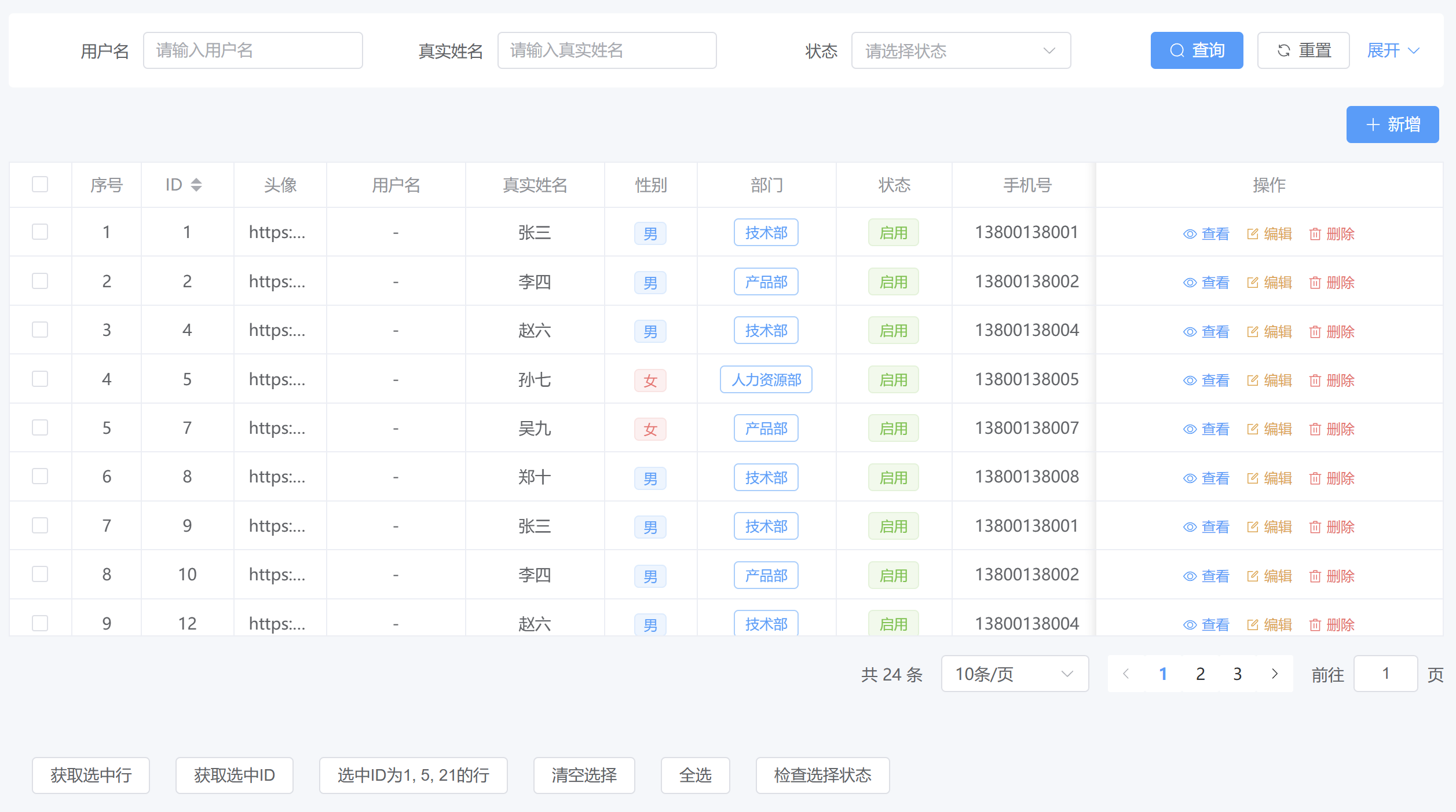
|
|
28
|
+
|
|
23
29
|
### NsOffice
|
|
24
30
|
|
|
25
31
|

|
|
@@ -207,12 +213,8 @@ app.use(NsComponents)
|
|
|
207
213
|
|
|
208
214
|
```bash
|
|
209
215
|
# 1. 引入组件库
|
|
210
|
-
pnpm i element-plus
|
|
211
|
-
pnpm i vue3-components-plus -S --registry=http://199.10.9.178:8081/repository/npm-group/
|
|
212
|
-
# 安装失败:pnpm i vue3-components-plus --registry=http://199.10.9.178:8081/repository/npm-hosted/
|
|
216
|
+
pnpm i vue3-components-plus element-plus
|
|
213
217
|
|
|
214
|
-
# 非初始化安装
|
|
215
|
-
pnpm i -S --registry=http://199.10.9.178:8081/repository/npm-group/
|
|
216
218
|
```
|
|
217
219
|
|
|
218
220
|
```typescript
|
|
@@ -1014,7 +1016,14 @@ autoScaleInit(document.querySelector('body'), {
|
|
|
1014
1016
|
## 更新日志
|
|
1015
1017
|
|
|
1016
1018
|
```text
|
|
1017
|
-
version: 3.0.
|
|
1019
|
+
version: 3.0.14
|
|
1020
|
+
日期: 2026-03-16
|
|
1021
|
+
更新内容:
|
|
1022
|
+
1. 修复使用 v-length.range="{ min: 0, max: 10, maxLength: 10 }"指令时int:false,可输入负数的问题
|
|
1023
|
+
```
|
|
1024
|
+
|
|
1025
|
+
```text
|
|
1026
|
+
version: 3.0.13
|
|
1018
1027
|
日期: 2026-03-13
|
|
1019
1028
|
更新内容:
|
|
1020
1029
|
1. 添加NsTableContainer带搜索条件的表格
|
|
@@ -47,7 +47,7 @@
|
|
|
47
47
|
<div class="selection-actions">
|
|
48
48
|
<el-button @click="getSelectedRows">获取选中行</el-button>
|
|
49
49
|
<el-button @click="getSelectedKeys">获取选中ID</el-button>
|
|
50
|
-
<el-button @click="selectRows([1,
|
|
50
|
+
<el-button @click="selectRows([1, 5, 21])">选中ID为1, 5, 21的行</el-button>
|
|
51
51
|
<el-button @click="clearSelection">清空选择</el-button>
|
|
52
52
|
<el-button @click="selectAll">全选</el-button>
|
|
53
53
|
<el-button @click="checkSelection">检查选择状态</el-button>
|
|
@@ -377,16 +377,14 @@ const selectRows = (ids) => {
|
|
|
377
377
|
containerRef.value.setSelectionKeys(ids)
|
|
378
378
|
|
|
379
379
|
// 延迟检查选择结果
|
|
380
|
-
|
|
381
|
-
|
|
382
|
-
|
|
383
|
-
|
|
384
|
-
|
|
385
|
-
|
|
386
|
-
|
|
387
|
-
|
|
388
|
-
}
|
|
389
|
-
}, 100)
|
|
380
|
+
const selectedRows = containerRef.value.getSelectionRows()
|
|
381
|
+
const selectedKeys = containerRef.value.getSelectionKeys()
|
|
382
|
+
|
|
383
|
+
if (selectedRows.length > 0) {
|
|
384
|
+
ElMessage.success(`已选中ID为 ${ids.join(', ')} 的行,实际选中:${selectedKeys.join(', ')}`)
|
|
385
|
+
} else {
|
|
386
|
+
ElMessage.warning(`未选中任何行,请检查数据是否正确`)
|
|
387
|
+
}
|
|
390
388
|
} catch (error) {
|
|
391
389
|
console.error('选择出错:', error)
|
|
392
390
|
ElMessage.error(`选择失败:${error.message}`)
|