vue2-components-plus 1.0.0 → 1.0.2
This diff represents the content of publicly available package versions that have been released to one of the supported registries. The information contained in this diff is provided for informational purposes only and reflects changes between package versions as they appear in their respective public registries.
- package/README.md +417 -0
- package/package.json +1 -1
package/README.md
ADDED
|
@@ -0,0 +1,417 @@
|
|
|
1
|
+
# vue2-components-plus 组件库
|
|
2
|
+
|
|
3
|
+
## 简介
|
|
4
|
+
|
|
5
|
+
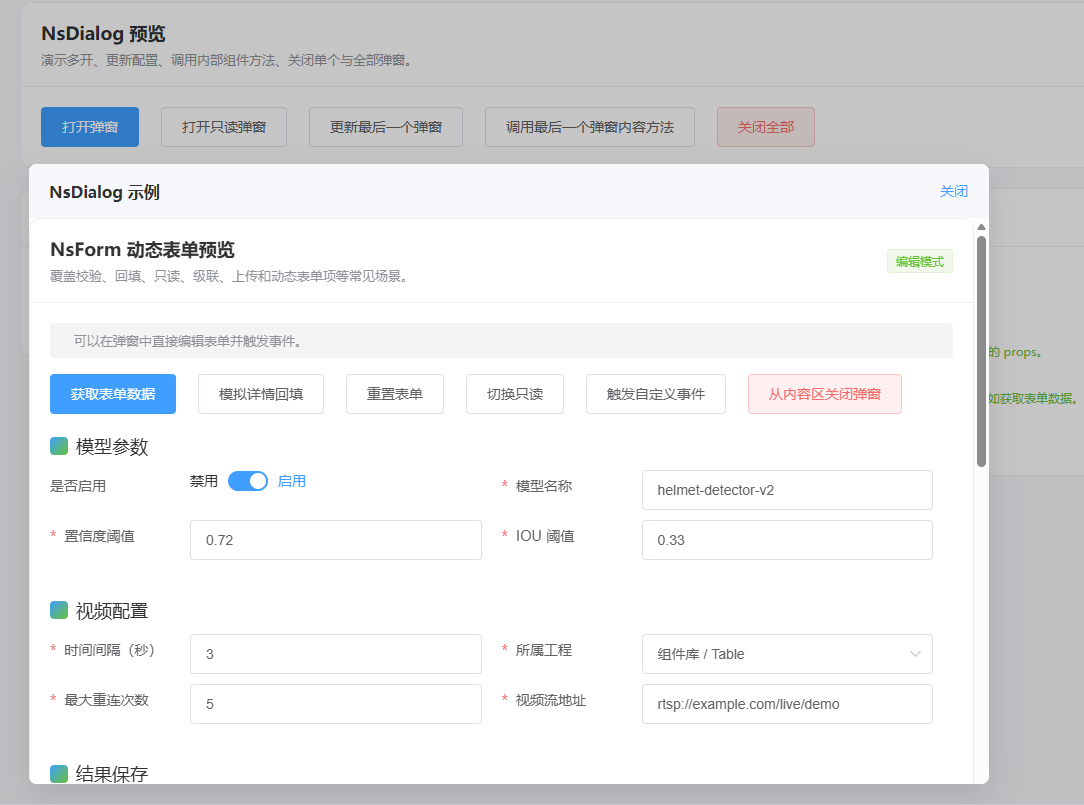
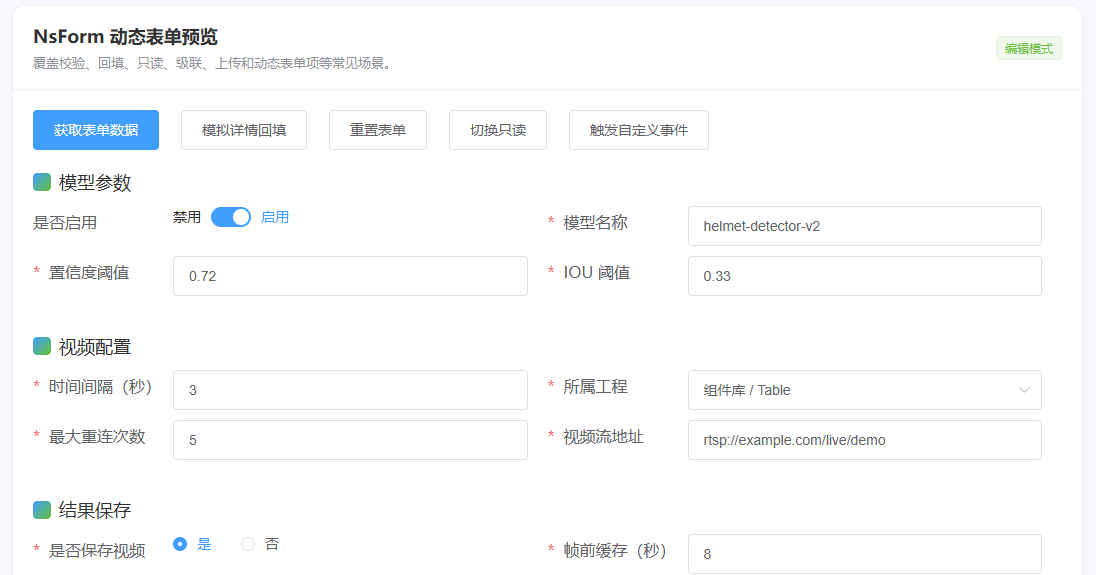
vue2-components-plus 是一个功能丰富的 Vue 3 企业级组件库,提供动态表单、函数弹出框组件、带搜索条件的表格、权限控制等完整解决方案。
|
|
6
|
+
|
|
7
|
+
组件使用示例参考 `dist/ComponentDemo`
|
|
8
|
+
|
|
9
|
+
## 📸 部分组件预览
|
|
10
|
+
|
|
11
|
+
### NsDialog
|
|
12
|
+
|
|
13
|
+
|
|
14
|
+
|
|
15
|
+
### NsForm
|
|
16
|
+
|
|
17
|
+
|
|
18
|
+
|
|
19
|
+
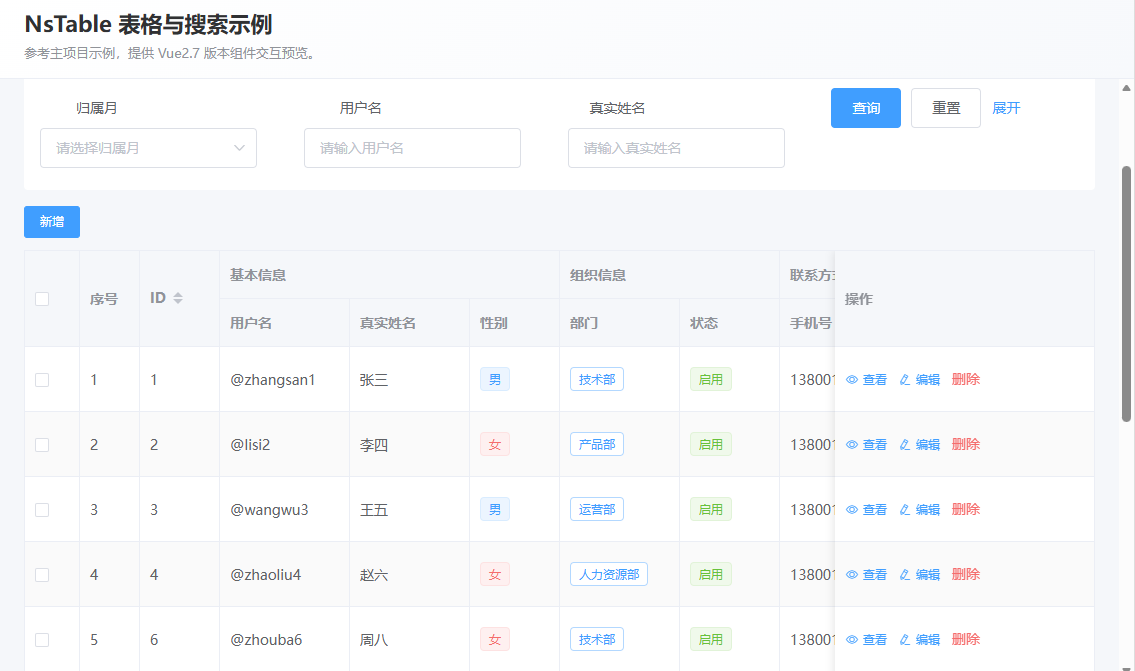
### NsTableContainer
|
|
20
|
+
|
|
21
|
+
|
|
22
|
+
|
|
23
|
+
|
|
24
|
+
## 📊 功能特性总结
|
|
25
|
+
|
|
26
|
+
### 组件功能
|
|
27
|
+
|
|
28
|
+
- ✅ **NsForm**: 动态表单生成和管理
|
|
29
|
+
- ✅ **NsDialog**: 灵活弹窗对话框
|
|
30
|
+
- ✅ **NsTableContainer**: 动态表格+搜索条件
|
|
31
|
+
|
|
32
|
+
### 指令功能
|
|
33
|
+
|
|
34
|
+
- ✅ **v-permission**: 按钮权限控制
|
|
35
|
+
- ✅ **v-length**: 输入长度和格式限制
|
|
36
|
+
- ✅ **v-sline**: 单行文本省略
|
|
37
|
+
- ✅ **v-event-unuse/use**: 事件穿透控制
|
|
38
|
+
|
|
39
|
+
## 使用公共组件库
|
|
40
|
+
|
|
41
|
+
```bash
|
|
42
|
+
# 1. 引入组件库
|
|
43
|
+
pnpm i vue2-components-plus element-ui
|
|
44
|
+
|
|
45
|
+
```
|
|
46
|
+
|
|
47
|
+
```typescript
|
|
48
|
+
// 2. main.ts中引入
|
|
49
|
+
// 安装 Element-Plus
|
|
50
|
+
import 'element-plus/dist/index.css'
|
|
51
|
+
import ElementUI from 'element-ui'
|
|
52
|
+
Vue.use(ElementUI)
|
|
53
|
+
// 安装组件库(ts需要//@ts-ignore)
|
|
54
|
+
//@ts-ignore
|
|
55
|
+
import NsComponents from 'vue2-components-plus'
|
|
56
|
+
import 'vue2-components-plus/dist/vue2-components-plus.css'
|
|
57
|
+
Vue.use(Vue2ComponentsPlus)
|
|
58
|
+
```
|
|
59
|
+
|
|
60
|
+
## 📋 组件列表
|
|
61
|
+
|
|
62
|
+
### NsForm - 动态表单组件
|
|
63
|
+
|
|
64
|
+
```vue
|
|
65
|
+
<template>
|
|
66
|
+
<NsForm :rows="formConfig" ref="formRef" />
|
|
67
|
+
</template>
|
|
68
|
+
|
|
69
|
+
<script setup>
|
|
70
|
+
import { ref } from 'vue'
|
|
71
|
+
import { NsForm } from 'vue2-components-plus'
|
|
72
|
+
|
|
73
|
+
const formRef = ref()
|
|
74
|
+
const formConfig = [
|
|
75
|
+
{
|
|
76
|
+
key: 'name',
|
|
77
|
+
label: '姓名',
|
|
78
|
+
component: 'el-input',
|
|
79
|
+
props: { placeholder: '请输入姓名' }
|
|
80
|
+
},
|
|
81
|
+
{
|
|
82
|
+
key: 'age',
|
|
83
|
+
label: '年龄',
|
|
84
|
+
component: 'el-input-number',
|
|
85
|
+
props: { min: 0, max: 100 }
|
|
86
|
+
}
|
|
87
|
+
]
|
|
88
|
+
|
|
89
|
+
// 获取表单数据
|
|
90
|
+
const formData = formRef.value?.getFormData()
|
|
91
|
+
|
|
92
|
+
// 重置表单
|
|
93
|
+
formRef.value?.resetForm()
|
|
94
|
+
|
|
95
|
+
// 验证表单
|
|
96
|
+
const isValid = formRef.value?.validate()
|
|
97
|
+
</script>
|
|
98
|
+
```
|
|
99
|
+
|
|
100
|
+
### NsDialog - 弹出框组件
|
|
101
|
+
|
|
102
|
+
```javascript
|
|
103
|
+
import { NsDialog, closeAllNsDialog } from 'vue2-components-plus'
|
|
104
|
+
|
|
105
|
+
// 打开对话框
|
|
106
|
+
NsDialog({
|
|
107
|
+
title: '测试',
|
|
108
|
+
// 任何组件添加 $emit('close') 时,会触发关闭弹出框事件
|
|
109
|
+
dom: VideoDemo, // 也可以通过异步方式:import("@/views/VideoDemo.vue") 和 () => import("@/views/VideoDemo.vue")
|
|
110
|
+
option: {
|
|
111
|
+
// dom对应的自定义组件props属性
|
|
112
|
+
...data,
|
|
113
|
+
},
|
|
114
|
+
events: {
|
|
115
|
+
// dom组件内部自定义事件emit('btnClick', xxx)
|
|
116
|
+
btnClick: () => {
|
|
117
|
+
console.log("点击中间区域内容");
|
|
118
|
+
},
|
|
119
|
+
},
|
|
120
|
+
modalColor: 'rgb(0 21 115 / 20%)', // 遮罩层颜色
|
|
121
|
+
width: '800px', // 宽度, 整个弹出框的高度,非内容高度
|
|
122
|
+
height: '450px', // 高度, 不配置则默认为内容高度
|
|
123
|
+
dialogPadding: [10, 20], // 弹窗内padding
|
|
124
|
+
showFooter: true, // 默认显示底部按钮
|
|
125
|
+
immediately: false, // true立即取消弹出框, false异步请求后取消弹出框,默认false
|
|
126
|
+
draggable: true, // 是否可拖拽,默认false
|
|
127
|
+
|
|
128
|
+
confirm: async (closeFn, componentRef, footerLoading) => { // 底部确认按钮回调事件
|
|
129
|
+
// componentRef可以调用内部函数,前提需要defineExpose
|
|
130
|
+
try{
|
|
131
|
+
const selectRows = componentRef?.value?.getSelectedRows();
|
|
132
|
+
console.log("点击确认,选择数据:", selectRows);
|
|
133
|
+
} catch(e) {
|
|
134
|
+
console.log(e)
|
|
135
|
+
await new Promise(resolve => setTimeout(resolve, 1000))
|
|
136
|
+
}
|
|
137
|
+
// footerLoading可以控制底部loading状态
|
|
138
|
+
if(footerLoading) {
|
|
139
|
+
footerLoading.value = false
|
|
140
|
+
}
|
|
141
|
+
// 请求数据,再关闭
|
|
142
|
+
if(closeFn) {
|
|
143
|
+
closeFn()
|
|
144
|
+
}
|
|
145
|
+
},
|
|
146
|
+
close: () => { // 关闭弹出时立即出发
|
|
147
|
+
console.log("点击关闭");
|
|
148
|
+
},
|
|
149
|
+
closed: () => { // 弹窗销毁时触发
|
|
150
|
+
console.log("完成关闭");
|
|
151
|
+
},
|
|
152
|
+
// 头部+底部自定义配置
|
|
153
|
+
headerDom: xxx,
|
|
154
|
+
headerOption: {},
|
|
155
|
+
headerEvents: {},
|
|
156
|
+
footerDom: yyy,
|
|
157
|
+
footerOption: {},
|
|
158
|
+
footerEvents: {},
|
|
159
|
+
// 底部按钮名称
|
|
160
|
+
footerTitle: {
|
|
161
|
+
close: "取消",
|
|
162
|
+
confirm: "确定",
|
|
163
|
+
},
|
|
164
|
+
}, true, '#app') // true为是否遮罩(非必填), '#app'为挂载点(非必填)
|
|
165
|
+
|
|
166
|
+
// 关闭所有对话框
|
|
167
|
+
closeAllNsDialog()
|
|
168
|
+
```
|
|
169
|
+
|
|
170
|
+
## 🔧 自定义指令
|
|
171
|
+
|
|
172
|
+
### 1. v-permission - 按钮权限控制
|
|
173
|
+
|
|
174
|
+
```vue
|
|
175
|
+
<template>
|
|
176
|
+
<!-- 使用class控制权限,无权限时隐藏 -->
|
|
177
|
+
<el-button v-permission.class.display>查看</el-button>
|
|
178
|
+
|
|
179
|
+
<!-- 使用id控制权限,无权限时隐藏 -->
|
|
180
|
+
<el-button v-permission.id>编辑</el-button>
|
|
181
|
+
|
|
182
|
+
<!-- 默认使用id控制权限 -->
|
|
183
|
+
<el-button id="zuhu_list_add" v-permission>新增</el-button>
|
|
184
|
+
</template>
|
|
185
|
+
|
|
186
|
+
<script setup>
|
|
187
|
+
// 权限配置(需要在引入组件库之前设置)
|
|
188
|
+
import { createApp } from 'vue'
|
|
189
|
+
|
|
190
|
+
const app = createApp(App)
|
|
191
|
+
|
|
192
|
+
// 方式1:使用 provide/inject
|
|
193
|
+
const btnsPermission = ['zuhu_list_add', 'zuhu_list_edit', 'admin-btn']
|
|
194
|
+
app.provide('btnsPermission', btnsPermission)
|
|
195
|
+
|
|
196
|
+
// 方式2:使用全局属性
|
|
197
|
+
app.config.globalProperties.$btnsPermission = ['zuhu_list_add', 'zuhu_list_edit']
|
|
198
|
+
|
|
199
|
+
// 方式3:使用 sessionStorage(适用于动态权限)(推荐)
|
|
200
|
+
sessionStorage.setItem('btnsPermission', JSON.stringify(['zuhu_list_add', 'zuhu_list_edit']))
|
|
201
|
+
|
|
202
|
+
// 方式4:使用 localStorage(持久化权限)
|
|
203
|
+
localStorage.setItem('btnsPermission', JSON.stringify(['zuhu_list_add', 'zuhu_list_edit']))
|
|
204
|
+
|
|
205
|
+
app.use(NsComponents) // 引入组件库
|
|
206
|
+
</script>
|
|
207
|
+
```
|
|
208
|
+
|
|
209
|
+
#### 权限控制优先级说明
|
|
210
|
+
|
|
211
|
+
权限控制按以下优先级进行判断(从高到低):
|
|
212
|
+
|
|
213
|
+
1. **sessionStorage** → `sessionStorage.getItem('btnsPermission')`
|
|
214
|
+
2. **localStorage** → `localStorage.getItem('btnsPermission')`
|
|
215
|
+
3. **全局属性** → `app.config.globalProperties.$btnsPermission`
|
|
216
|
+
4. **provide/inject** → `app.provide('btnsPermission', btnsPermission)`
|
|
217
|
+
|
|
218
|
+
#### 指令修饰符说明
|
|
219
|
+
|
|
220
|
+
- **v-permission** - 默认模式,使用 `id` 选择器,无权限时设置 `visibility: hidden`
|
|
221
|
+
- **v-permission.id** - 显式指定使用 `id` 选择器
|
|
222
|
+
- **v-permission.class** - 使用 `class` 选择器
|
|
223
|
+
- **v-permission.id.display** - 使用 `id` 选择器,无权限时设置 `display: none`
|
|
224
|
+
- **v-permission.class.display** - 使用 `class` 选择器,无权限时设置 `display: none`
|
|
225
|
+
|
|
226
|
+
#### 动态权限切换示例
|
|
227
|
+
|
|
228
|
+
```javascript
|
|
229
|
+
// 动态切换权限
|
|
230
|
+
function togglePermission() {
|
|
231
|
+
// 获取当前权限列表
|
|
232
|
+
let btnsPermission = JSON.parse(sessionStorage.getItem('btnsPermission')) || []
|
|
233
|
+
|
|
234
|
+
// 添加新权限
|
|
235
|
+
if (!btnsPermission.includes('delete_btn')) {
|
|
236
|
+
btnsPermission.push('delete_btn')
|
|
237
|
+
} else {
|
|
238
|
+
// 移除权限
|
|
239
|
+
btnsPermission = btnsPermission.filter(item => item !== 'delete_btn')
|
|
240
|
+
}
|
|
241
|
+
|
|
242
|
+
// 更新权限存储
|
|
243
|
+
sessionStorage.setItem('btnsPermission', JSON.stringify(btnsPermission))
|
|
244
|
+
|
|
245
|
+
// 刷新页面或重新渲染组件
|
|
246
|
+
location.reload() // 或使用响应式更新
|
|
247
|
+
}
|
|
248
|
+
```
|
|
249
|
+
|
|
250
|
+
#### 实际应用场景
|
|
251
|
+
|
|
252
|
+
```vue
|
|
253
|
+
<template>
|
|
254
|
+
<!-- 按钮组权限控制 -->
|
|
255
|
+
<div class="toolbar">
|
|
256
|
+
<el-button id="add_btn" v-permission type="primary">添加</el-button>
|
|
257
|
+
<el-button id="edit_btn" v-permission type="success">编辑</el-button>
|
|
258
|
+
<el-button id="delete_btn" v-permission type="danger">删除</el-button>
|
|
259
|
+
<el-button id="export_btn" v-permission.id.display type="warning">导出</el-button>
|
|
260
|
+
<el-button class="admin-btn" v-permission.class type="info">管理员</el-button>
|
|
261
|
+
</div>
|
|
262
|
+
|
|
263
|
+
<!-- 菜单权限控制 -->
|
|
264
|
+
<el-menu>
|
|
265
|
+
<el-menu-item index="1" id="dashboard_menu" v-permission>
|
|
266
|
+
<span>仪表盘</span>
|
|
267
|
+
</el-menu-item>
|
|
268
|
+
<el-menu-item index="2" class="user-menu" v-permission.class>
|
|
269
|
+
<span>用户管理</span>
|
|
270
|
+
</el-menu-item>
|
|
271
|
+
</el-menu>
|
|
272
|
+
</template>
|
|
273
|
+
|
|
274
|
+
<script setup>
|
|
275
|
+
// 权限配置示例
|
|
276
|
+
const app = createApp(App)
|
|
277
|
+
|
|
278
|
+
// 实际项目中,权限数据通常从后端获取
|
|
279
|
+
const userPermissions = {
|
|
280
|
+
// 普通用户权限
|
|
281
|
+
normal: ['add_btn', 'edit_btn', 'dashboard_menu'],
|
|
282
|
+
// 管理员权限
|
|
283
|
+
admin: ['add_btn', 'edit_btn', 'delete_btn', 'export_btn', 'admin-btn', 'user-menu']
|
|
284
|
+
}
|
|
285
|
+
|
|
286
|
+
// 根据用户角色设置权限
|
|
287
|
+
const userRole = 'admin' // 从登录信息获取
|
|
288
|
+
app.provide('btnsPermission', userPermissions[userRole])
|
|
289
|
+
|
|
290
|
+
app.use(NsComponents)
|
|
291
|
+
</script>
|
|
292
|
+
```
|
|
293
|
+
|
|
294
|
+
### 2. v-length - 输入长度限制
|
|
295
|
+
|
|
296
|
+
```vue
|
|
297
|
+
<template>
|
|
298
|
+
<!-- 限制最大长度50(默认) -->
|
|
299
|
+
<el-input v-length placeholder="请输入用户名" />
|
|
300
|
+
|
|
301
|
+
<!-- 自定义长度限制 -->
|
|
302
|
+
<el-input v-length="100" placeholder="最多100字符" />
|
|
303
|
+
|
|
304
|
+
<!-- 仅允许输入数字 -->
|
|
305
|
+
<el-input v-length.number="11" placeholder="请输入手机号" />
|
|
306
|
+
|
|
307
|
+
<!-- 自定义正则表达式 -->
|
|
308
|
+
<el-input v-length.regex="{ maxLength: 10, pattern: /^[a-zA-Z]*$/ }" placeholder="仅允许字母" />
|
|
309
|
+
|
|
310
|
+
<!-- 数字范围限制 -->
|
|
311
|
+
<el-input v-length.range="{ min: 0, max: 100, int: true, maxLength: 10 }" placeholder="0-100整数" />
|
|
312
|
+
</template>
|
|
313
|
+
```
|
|
314
|
+
|
|
315
|
+
### 3. v-sline - 单行文本省略
|
|
316
|
+
|
|
317
|
+
```vue
|
|
318
|
+
<template>
|
|
319
|
+
<span v-sline>这是一段很长的文本内容,超出部分会自动显示省略号...</span>
|
|
320
|
+
</template>
|
|
321
|
+
```
|
|
322
|
+
|
|
323
|
+
### 4. v-event-unuse / v-event-use - 事件穿透控制
|
|
324
|
+
|
|
325
|
+
```vue
|
|
326
|
+
<template>
|
|
327
|
+
<!-- 阻止事件穿透 -->
|
|
328
|
+
<div v-event-use>
|
|
329
|
+
<button>这个按钮可以点击</button>
|
|
330
|
+
</div>
|
|
331
|
+
|
|
332
|
+
<!-- 允许事件穿透 -->
|
|
333
|
+
<div v-event-unuse>
|
|
334
|
+
<div>这个区域的事件会穿透到下层</div>
|
|
335
|
+
</div>
|
|
336
|
+
</template>
|
|
337
|
+
```
|
|
338
|
+
|
|
339
|
+
## 🔧 工具函数
|
|
340
|
+
|
|
341
|
+
### 1. 通用工具函数
|
|
342
|
+
|
|
343
|
+
```javascript
|
|
344
|
+
import { isNotNull } from 'vue2-components-plus'
|
|
345
|
+
|
|
346
|
+
// 检查值是否非空
|
|
347
|
+
const result = isNotNull(value) // 返回布尔值
|
|
348
|
+
```
|
|
349
|
+
|
|
350
|
+
### 2. 动态资源加载
|
|
351
|
+
|
|
352
|
+
```javascript
|
|
353
|
+
import { loadAccess, removeDynamicAccess } from 'vue2-components-plus'
|
|
354
|
+
|
|
355
|
+
// 加载JS/CSS资源
|
|
356
|
+
await loadAccess('https://example.com/script.js', 'script-tag', false)
|
|
357
|
+
|
|
358
|
+
// 移除动态加载的资源
|
|
359
|
+
removeDynamicAccess('script-tag')
|
|
360
|
+
```
|
|
361
|
+
|
|
362
|
+
### 3. CSS变量管理
|
|
363
|
+
|
|
364
|
+
```javascript
|
|
365
|
+
import { loadCssVars } from 'vue2-components-plus'
|
|
366
|
+
|
|
367
|
+
// 获取所有CSS变量
|
|
368
|
+
const cssVars = loadCssVars()
|
|
369
|
+
console.log(cssVars['--matrix-primary-color'])
|
|
370
|
+
```
|
|
371
|
+
|
|
372
|
+
### 4. 表格排序工具
|
|
373
|
+
|
|
374
|
+
```javascript
|
|
375
|
+
import { handleSortChange, headerClick, handleHeaderCellClass } from 'vue2-components-plus'
|
|
376
|
+
|
|
377
|
+
// 在表格组件中使用
|
|
378
|
+
<el-table
|
|
379
|
+
@sort-change="(sort) => handleSortChange(sort, searchForm, getList)"
|
|
380
|
+
@header-click="headerClick"
|
|
381
|
+
:header-cell-class-name="(params) => handleHeaderCellClass(params, searchForm)"
|
|
382
|
+
>
|
|
383
|
+
<!-- 表格内容 -->
|
|
384
|
+
</el-table>
|
|
385
|
+
```
|
|
386
|
+
|
|
387
|
+
### 5. SM2加密工具
|
|
388
|
+
|
|
389
|
+
```javascript
|
|
390
|
+
import { getEncryptSm2 } from 'vue2-components-plus'
|
|
391
|
+
|
|
392
|
+
// 使用SM2加密
|
|
393
|
+
const encrypted = getEncryptSm2(publicKey, ["xxx", "yyy"], isAdd04=false, cipherMode=1)
|
|
394
|
+
```
|
|
395
|
+
|
|
396
|
+
### 6. 动态表单工具函数
|
|
397
|
+
|
|
398
|
+
```javascript
|
|
399
|
+
import {
|
|
400
|
+
useFileUpload,
|
|
401
|
+
getAllFormNodeByKey,
|
|
402
|
+
getAllFormKvData,
|
|
403
|
+
getAllFormNodeRefByKey
|
|
404
|
+
} from 'vue2-components-plus'
|
|
405
|
+
|
|
406
|
+
// 表单文件上传hook
|
|
407
|
+
const { uploadFile, deleteFile } = useFileUpload()
|
|
408
|
+
|
|
409
|
+
// 根据key获取表单节点信息
|
|
410
|
+
const formNode = getAllFormNodeByKey(formRows, 'username')
|
|
411
|
+
|
|
412
|
+
// 获取表单所有键值对数据
|
|
413
|
+
const formData = getAllFormKvData(formRows)
|
|
414
|
+
|
|
415
|
+
// 根据key获取表单节点引用
|
|
416
|
+
const nodeRef = getAllFormNodeRefByKey(formRows, 'username')
|
|
417
|
+
```
|