vue-print-designer 1.0.3 → 1.0.5
This diff represents the content of publicly available package versions that have been released to one of the supported registries. The information contained in this diff is provided for informational purposes only and reflects changes between package versions as they appear in their respective public registries.
- package/README.md +34 -23
- package/dist/{index.es-Ci79IlrF.js → index.es-DKZEo7bA.js} +1 -1
- package/dist/print-designer.es.js +1 -1
- package/dist/print-designer.umd.js +149 -176
- package/dist/purify.es-CRlZ0Imf.js +553 -0
- package/dist/{web-component-skZY2PxI.js → web-component-Lph2pubp.js} +25741 -23299
- package/package.json +4 -4
- package/dist/purify.es-CKk_t3XZ.js +0 -471
package/README.md
CHANGED
|
@@ -16,22 +16,45 @@ Vue Print Designer 是一款可视化打印设计器,面向业务表单、标
|
|
|
16
16
|
|
|
17
17
|
## 界面预览
|
|
18
18
|
|
|
19
|
-
|
|
|
19
|
+
| 设计器主界面与画布视图 | 打印预览 | 打印参数配置 |
|
|
20
20
|
| --- | --- | --- |
|
|
21
|
-
|
|
|
22
|
-
| **系统设置与偏好**<br>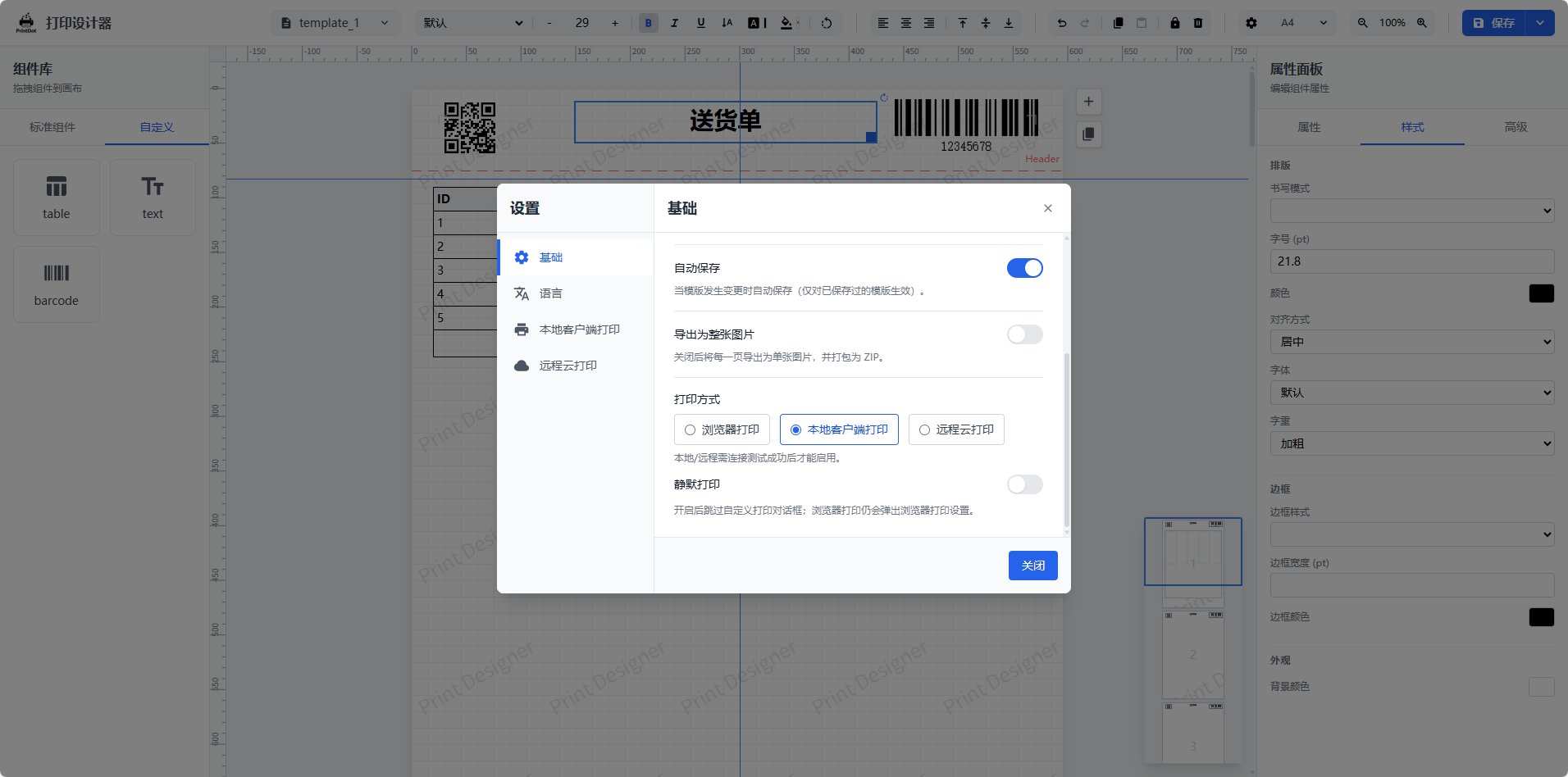 | **快捷键说明**<br>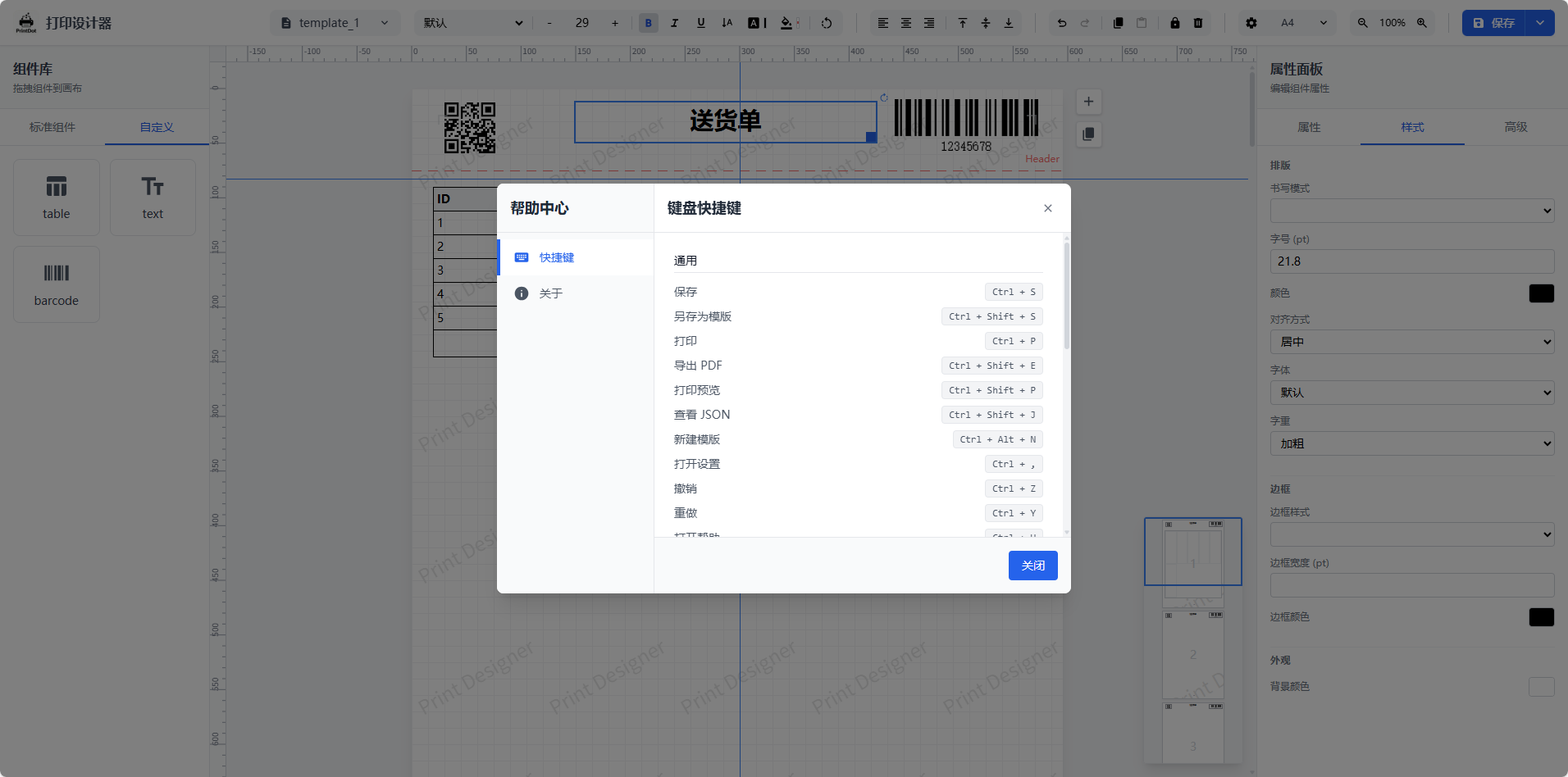 | **高级表格编辑**<br>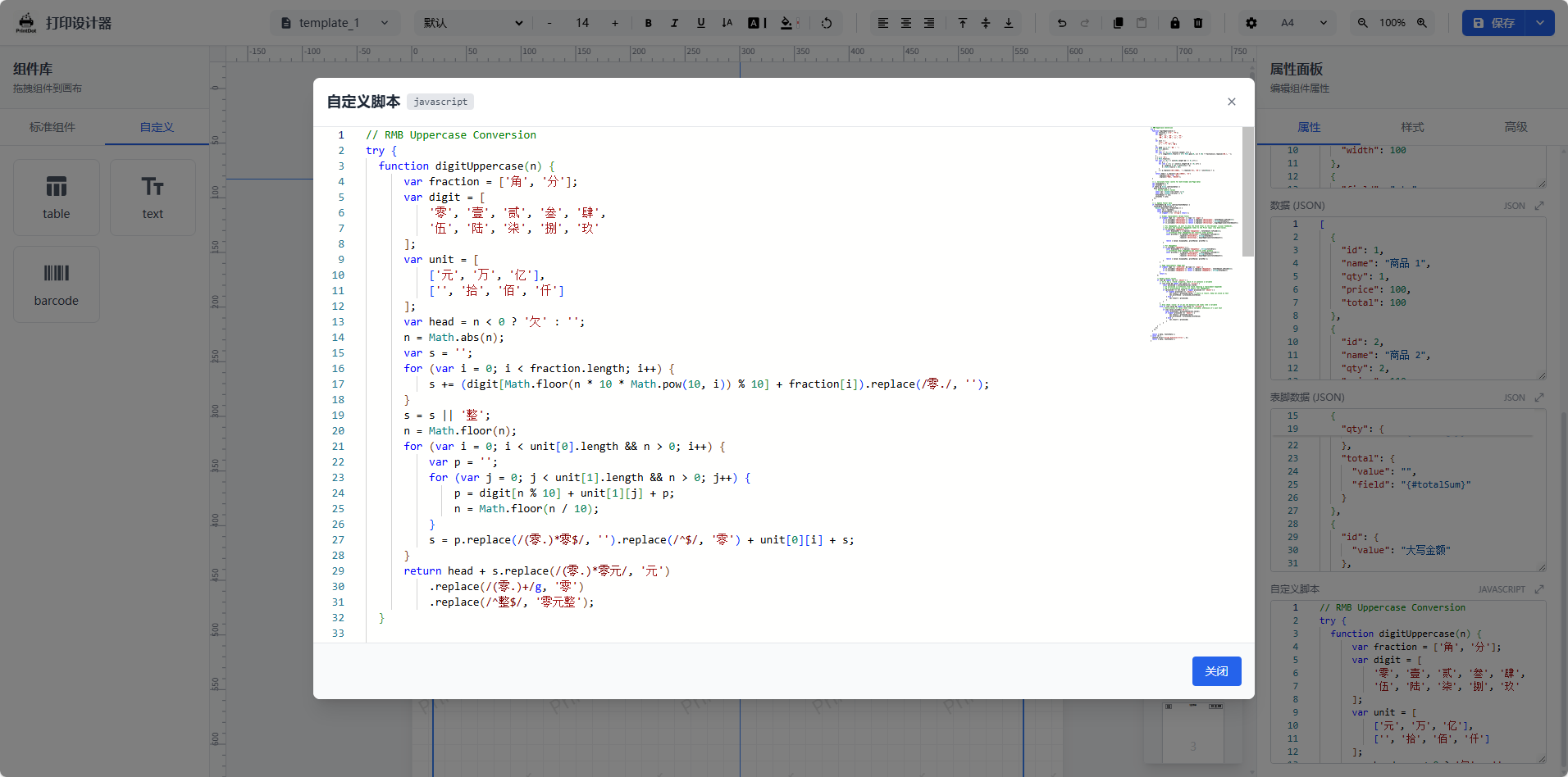 |
|
|
21
|
+
| <img src="https://raw.githubusercontent.com/0ldFive/Vue-Print-Designer/master/docs/images/1.png" alt="设计器主界面" width="240" /> | <img src="https://raw.githubusercontent.com/0ldFive/Vue-Print-Designer/master/docs/images/2.png" alt="打印预览" width="240" /> | <img src="https://raw.githubusercontent.com/0ldFive/Vue-Print-Designer/master/docs/images/3.png" alt="打印参数" width="240" /> |
|
|
23
22
|
|
|
24
|
-
|
|
23
|
+
| 系统设置与偏好 | 快捷键说明 | 高级表格编辑 |
|
|
24
|
+
| --- | --- | --- |
|
|
25
|
+
| <img src="https://raw.githubusercontent.com/0ldFive/Vue-Print-Designer/master/docs/images/4.png" alt="系统设置" width="240" /> | <img src="https://raw.githubusercontent.com/0ldFive/Vue-Print-Designer/master/docs/images/5.png" alt="快捷键" width="240" /> | <img src="https://raw.githubusercontent.com/0ldFive/Vue-Print-Designer/master/docs/images/6.png" alt="高级表格" width="240" /> |
|
|
26
|
+
|
|
27
|
+
## 集成示例
|
|
25
28
|
|
|
26
|
-
|
|
29
|
+
我们提供了一个基于 **Vue 3 + Element Plus** 的完整集成示例项目,演示如何在实际业务系统中嵌入打印设计器。
|
|
30
|
+
|
|
31
|
+
| 参数调试 | 设计器 | 暗色模式 |
|
|
32
|
+
| --- | --- | --- |
|
|
33
|
+
| <img src="https://raw.githubusercontent.com/0ldFive/Vue-Print-Designer/master/docs/images/11.png" alt="集成示例图 11" width="240" /> | <img src="https://raw.githubusercontent.com/0ldFive/Vue-Print-Designer/master/docs/images/12.png" alt="集成示例图 12" width="240" /> | <img src="https://raw.githubusercontent.com/0ldFive/Vue-Print-Designer/master/docs/images/13.png" alt="集成示例图 13" width="240" /> |
|
|
34
|
+
|
|
35
|
+
- **项目地址**:[https://github.com/0ldFive/vue-designer-sample](https://github.com/0ldFive/vue-designer-sample)
|
|
36
|
+
- **在线演示**:[https://0ldfive.github.io/vue-designer-sample/#/designer](https://0ldfive.github.io/vue-designer-sample/#/designer)
|
|
37
|
+
- **技术栈**:Vue 3, TypeScript, Element Plus, Vite
|
|
38
|
+
|
|
39
|
+
## 社区交流
|
|
40
|
+
|
|
41
|
+
欢迎加入 QQ 群一起交流功能使用、二次开发与问题排查。
|
|
42
|
+
|
|
43
|
+
- QQ 群号:**1038069636**
|
|
44
|
+
|
|
45
|
+
<p>
|
|
46
|
+
<img src="./docs/images/qq_group.jpg" alt="Vue Print Designer QQ 群二维码(1038069636)" width="120" />
|
|
47
|
+
</p>
|
|
48
|
+
|
|
49
|
+
## 核心特性与功能亮点
|
|
50
|
+
|
|
51
|
+
多数打印插件要么框架耦合重,要么功能偏基础。我们聚焦复杂分页与低成本集成,提供企业级打印方案:
|
|
27
52
|
|
|
28
53
|
- **开箱即用**:不同于手写分页逻辑,内置完整的拖拽设计器与预览引擎,自动处理表格分页与表头重复。
|
|
29
54
|
- **跨框架支持**:拒绝框架锁定,基于 Web Components,完美适配 Vue/React/Angular/原生 HTML 等所有技术栈。
|
|
30
55
|
- **工程化完备**:不仅是打印,更提供静默打印、云打印、PDF/图片导出及精细的打印参数控制。
|
|
31
56
|
- **灵活扩展**:支持自定义元素与 API 对接,满足深度业务定制需求。
|
|
32
57
|
|
|
33
|
-
## 功能亮点
|
|
34
|
-
|
|
35
58
|
- 拖拽式页面编辑,支持文本、图片、条码、二维码、表格、形状
|
|
36
59
|
- 表格自动分页(支持表头/表尾重复)
|
|
37
60
|
- 多页面布局、网格/标尺、缩放与对齐工具
|
|
@@ -48,9 +71,9 @@ PrintDot Client 是配套的桌面打印助手(Wails + Vue),用于设备
|
|
|
48
71
|
- 关键能力:自动发现与识别设备、稳定连接维护与转发队列、轻量后台运行
|
|
49
72
|
- 项目地址:https://github.com/0ldFive/PrintDot-Client
|
|
50
73
|
|
|
51
|
-
|
|
|
74
|
+
| 主界面 - 设备状态与连接管理 | 设置页面 - 偏好与配置选项 |
|
|
52
75
|
| --- | --- |
|
|
53
|
-
|
|
|
76
|
+
| <img src="https://raw.githubusercontent.com/0ldFive/Vue-Print-Designer/master/docs/images/7.png" alt="PrintDot 主界面" width="140" /> | <img src="https://raw.githubusercontent.com/0ldFive/Vue-Print-Designer/master/docs/images/8.png" alt="PrintDot 设置页面" width="140" /> |
|
|
54
77
|
|
|
55
78
|
<p>
|
|
56
79
|
<a href="https://github.com/0ldFive/PrintDot-Client/releases" target="_blank" rel="noopener noreferrer">⬇ 下载 PrintDot Client</a>
|
|
@@ -73,13 +96,13 @@ PrintDot Client 是配套的桌面打印助手(Wails + Vue),用于设备
|
|
|
73
96
|
- 自定义元素 CRUD:`useDesignerStore` 中的 `customElements`
|
|
74
97
|
- 变量与模板数据:组件实例方法 `setVariables` / `loadTemplateData`
|
|
75
98
|
|
|
76
|
-
自定义元素扩展请查看:[自定义元素扩展指南](https://
|
|
99
|
+
自定义元素扩展请查看:[自定义元素扩展指南](https://printdot.cc/docs)
|
|
77
100
|
|
|
78
101
|
### 方式二:npm 组件(Web Components)
|
|
79
102
|
|
|
80
103
|
适合任何技术栈(Vue/React/Angular/原生)。Web Components 方式**支持 Vue 2**(作为自定义元素使用),无需 Vue 2 组件适配。
|
|
81
104
|
|
|
82
|
-
详细参数、CRUD 与 JSON 示例请查看:[Web Components API 用户手册](https://
|
|
105
|
+
详细参数、CRUD 与 JSON 示例请查看:[Web Components API 用户手册](https://printdot.cc/docs)
|
|
83
106
|
|
|
84
107
|
#### 安装依赖
|
|
85
108
|
|
|
@@ -162,19 +185,7 @@ el.addEventListener('error', (e) => {
|
|
|
162
185
|
});
|
|
163
186
|
```
|
|
164
187
|
|
|
165
|
-
#### 4) 集成示例
|
|
166
|
-
|
|
167
|
-
我们提供了一个基于 **Vue 3 + Element Plus** 的完整集成示例项目,演示如何在实际业务系统中嵌入打印设计器。
|
|
168
|
-
|
|
169
|
-
<p align="left">
|
|
170
|
-
<img src="https://raw.githubusercontent.com/0ldFive/Vue-Print-Designer/master/docs/images/11.png" alt="集成示例图 11" width="240" />
|
|
171
|
-
<img src="https://raw.githubusercontent.com/0ldFive/Vue-Print-Designer/master/docs/images/12.png" alt="集成示例图 12" width="240" />
|
|
172
|
-
<img src="https://raw.githubusercontent.com/0ldFive/Vue-Print-Designer/master/docs/images/13.png" alt="集成示例图 13" width="240" />
|
|
173
|
-
</p>
|
|
174
188
|
|
|
175
|
-
- **项目地址**:[https://github.com/0ldFive/vue-designer-sample](https://github.com/0ldFive/vue-designer-sample)
|
|
176
|
-
- **在线演示**:[https://0ldfive.github.io/vue-designer-sample/#/designer](https://0ldfive.github.io/vue-designer-sample/#/designer)
|
|
177
|
-
- **技术栈**:Vue 3, TypeScript, Element Plus, Vite
|
|
178
189
|
|
|
179
190
|
## 项目结构
|
|
180
191
|
|