vue-print-designer 0.9.0 → 0.9.1
This diff represents the content of publicly available package versions that have been released to one of the supported registries. The information contained in this diff is provided for informational purposes only and reflects changes between package versions as they appear in their respective public registries.
- package/README.md +80 -33
- package/dist/{index.es-czeKiBlL.js → index.es-cTuJn9Gw.js} +1 -1
- package/dist/print-designer.css +1 -1
- package/dist/print-designer.es.js +1 -1
- package/dist/print-designer.umd.js +2 -2
- package/dist/{web-component-D35fXbFw.js → web-component-Hp26EByS.js} +3 -3
- package/package.json +1 -1
package/README.md
CHANGED
|
@@ -1,5 +1,7 @@
|
|
|
1
|
+
|
|
2
|
+
|
|
1
3
|
<p align="center">
|
|
2
|
-
<img src="
|
|
4
|
+
<img src="https://raw.githubusercontent.com/0ldFive/Vue-Print-Designer/master/src/assets/logo.png" alt="Vue Print Designer" width="96" height="96" />
|
|
3
5
|
</p>
|
|
4
6
|
|
|
5
7
|
<h1 align="center">Vue Print Designer</h1>
|
|
@@ -10,6 +12,14 @@
|
|
|
10
12
|
|
|
11
13
|
Vue Print Designer 是一款可视化打印设计器,面向业务表单、标签、票据、快递单等场景,支持模板化、变量化,并提供静默打印与云打印能力,同时兼容多种导出/打印方式。
|
|
12
14
|
|
|
15
|
+
## 界面预览
|
|
16
|
+
|
|
17
|
+
| | |
|
|
18
|
+
| --- | --- |
|
|
19
|
+
| **设计器主界面与画布视图**<br>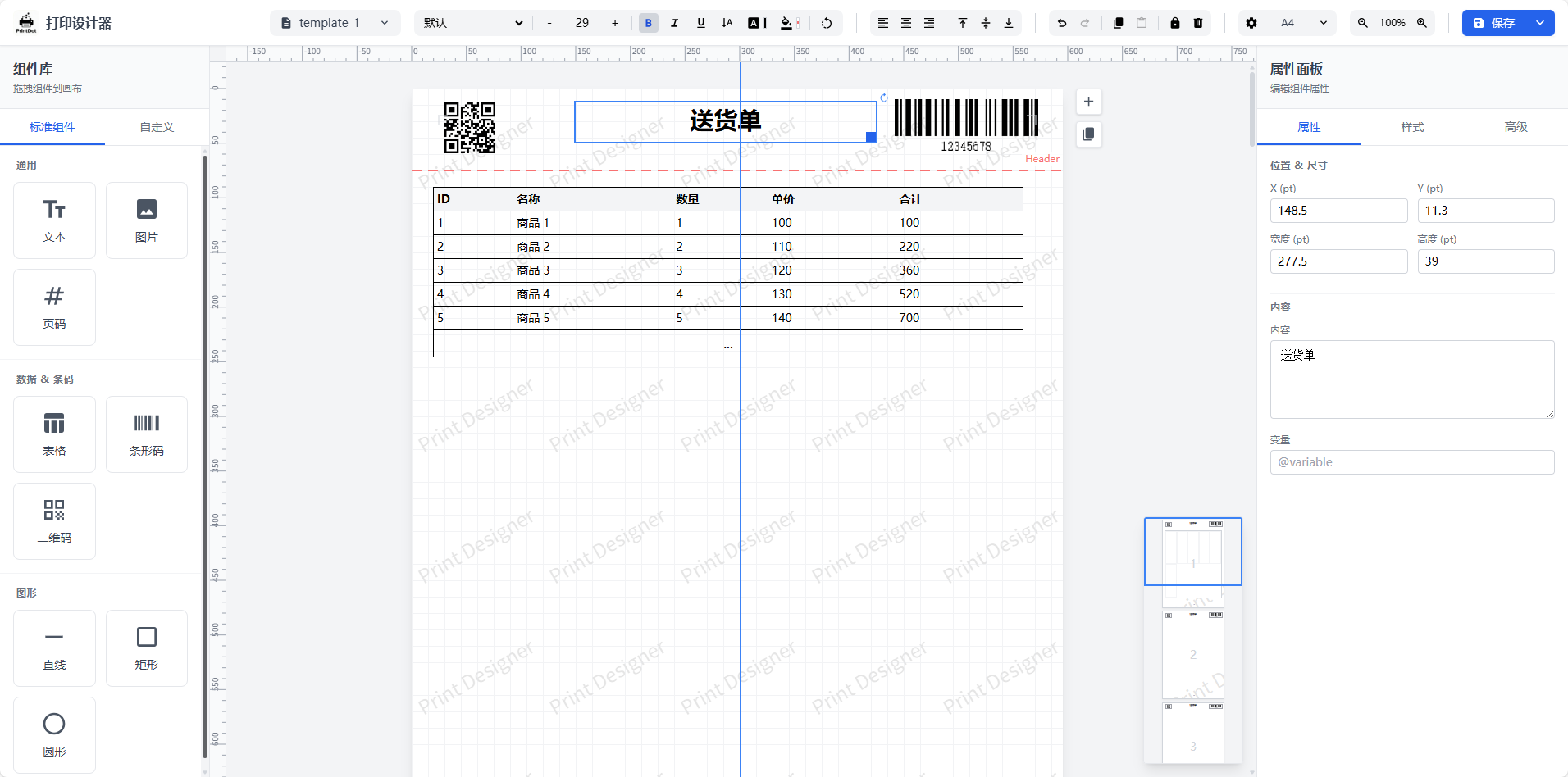 | **打印预览**<br>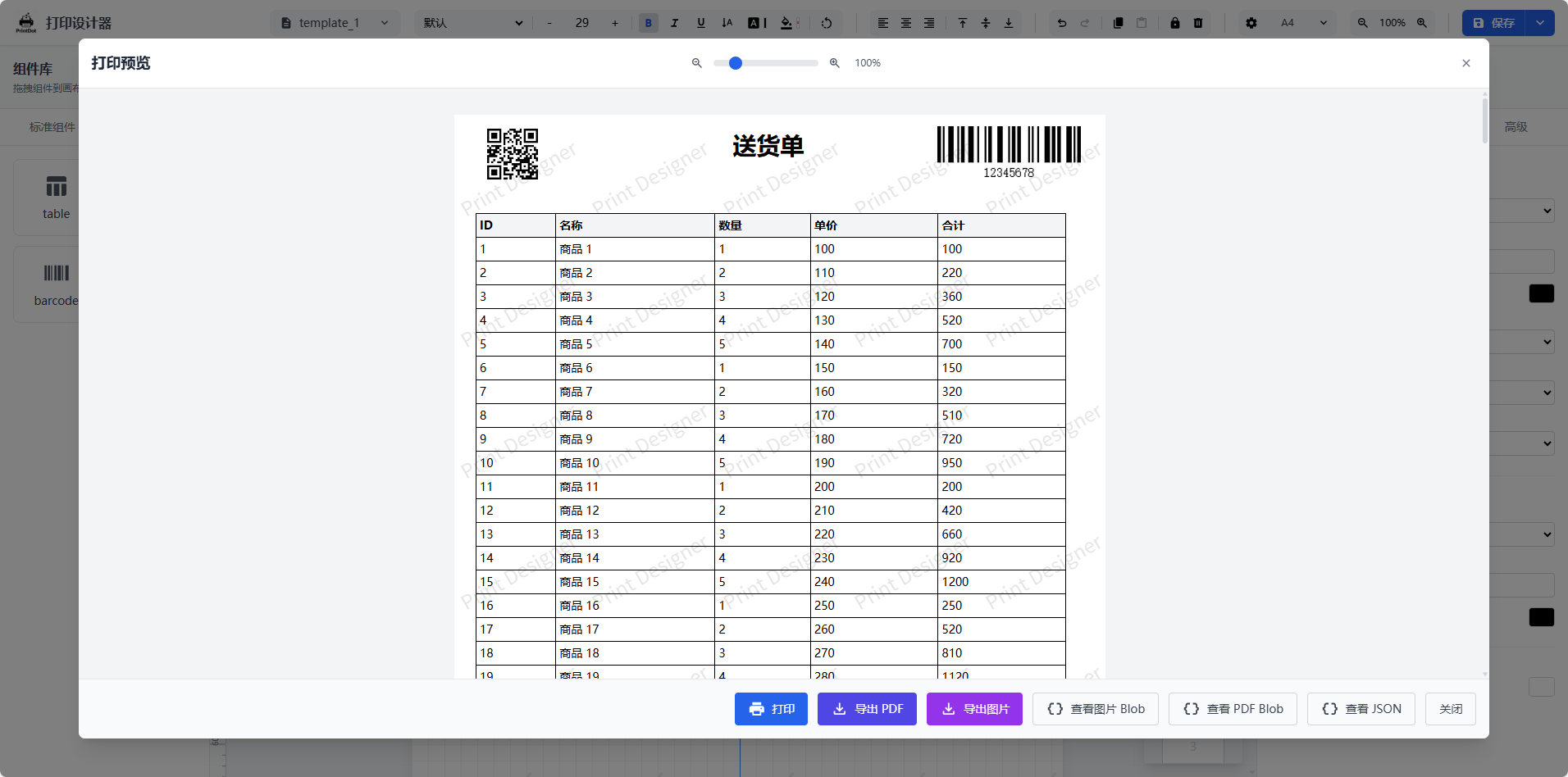 |
|
|
20
|
+
| **打印参数配置**<br>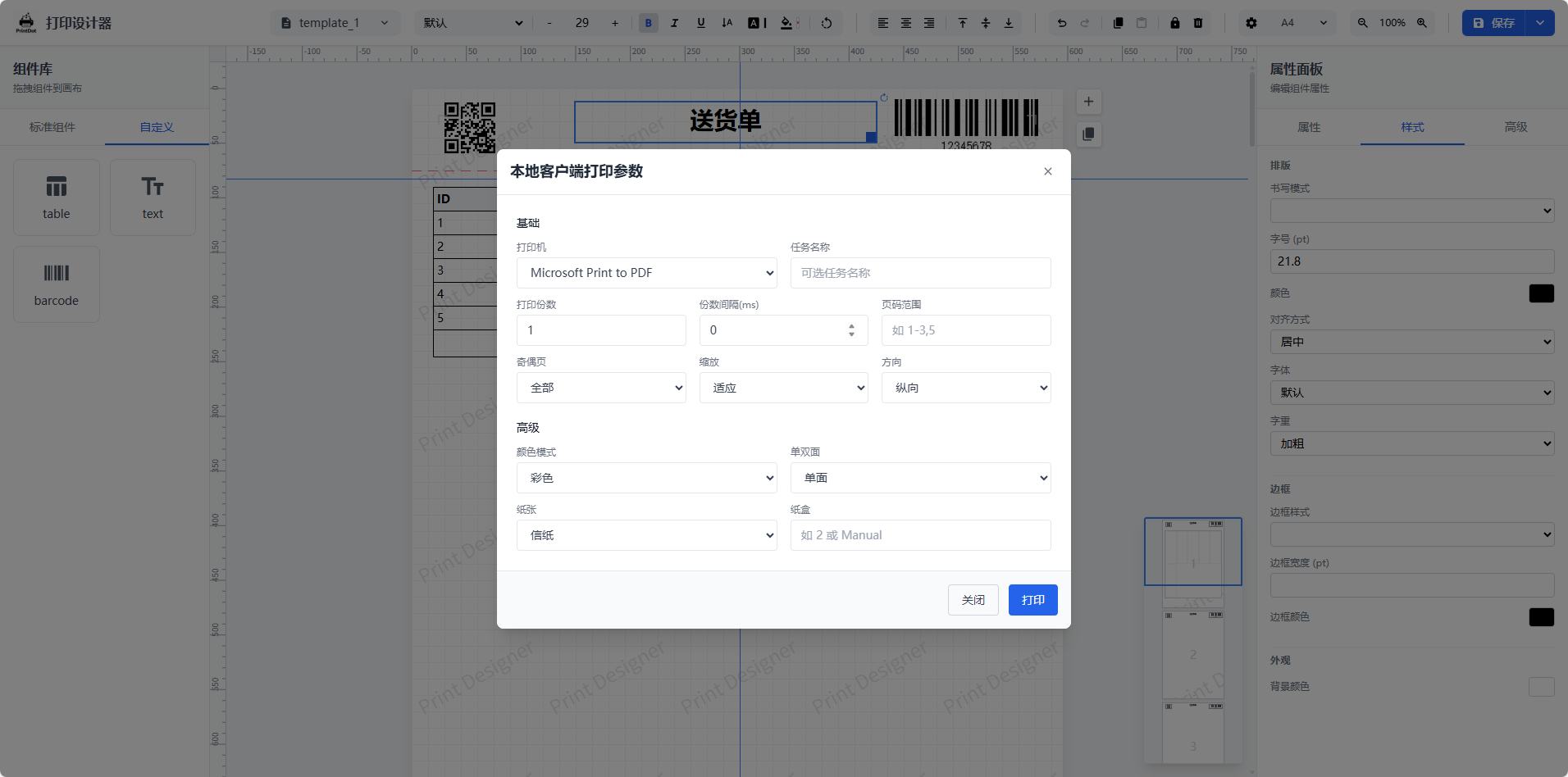 | **系统设置与偏好**<br>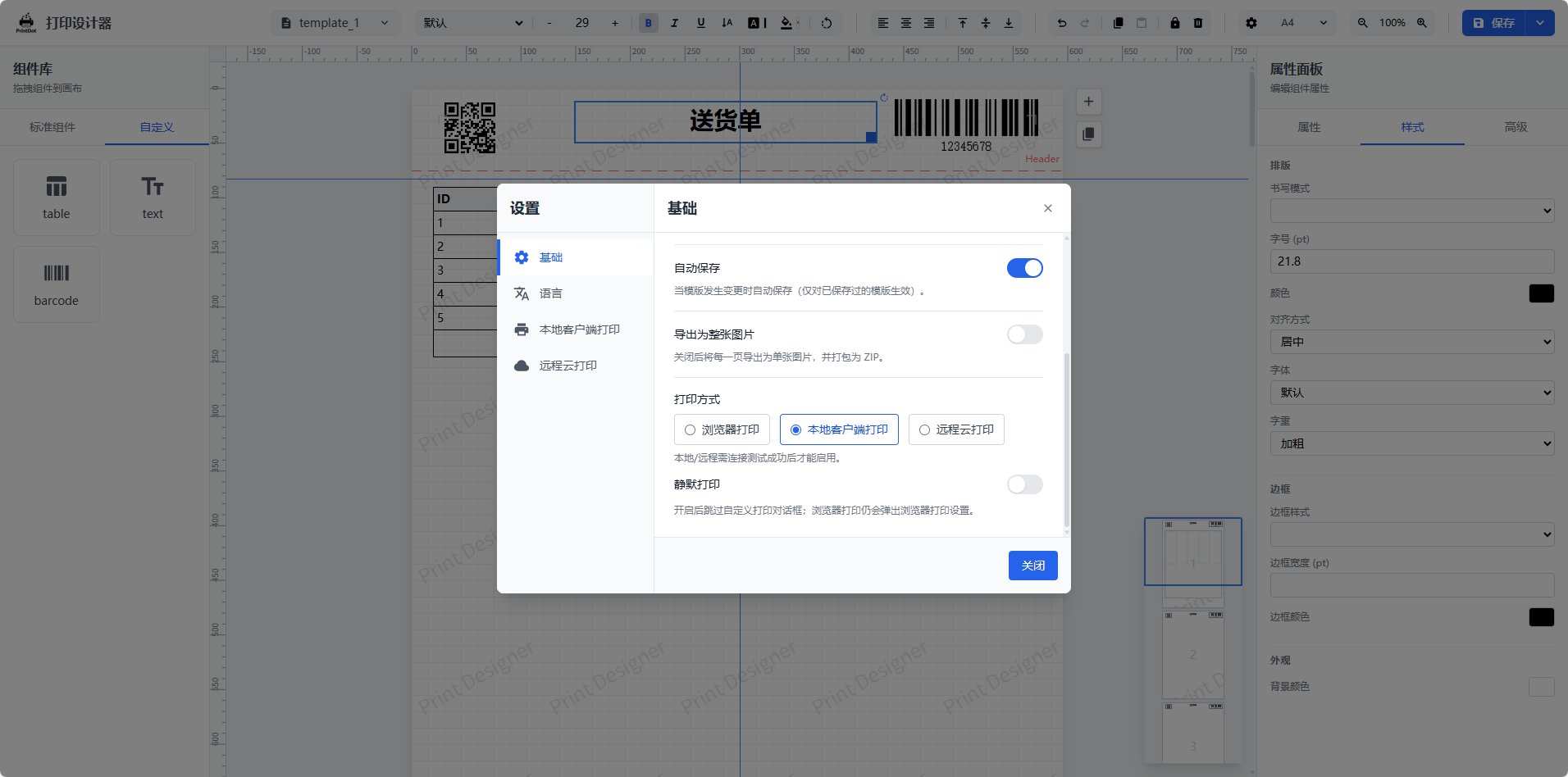 |
|
|
21
|
+
| **快捷键说明**<br>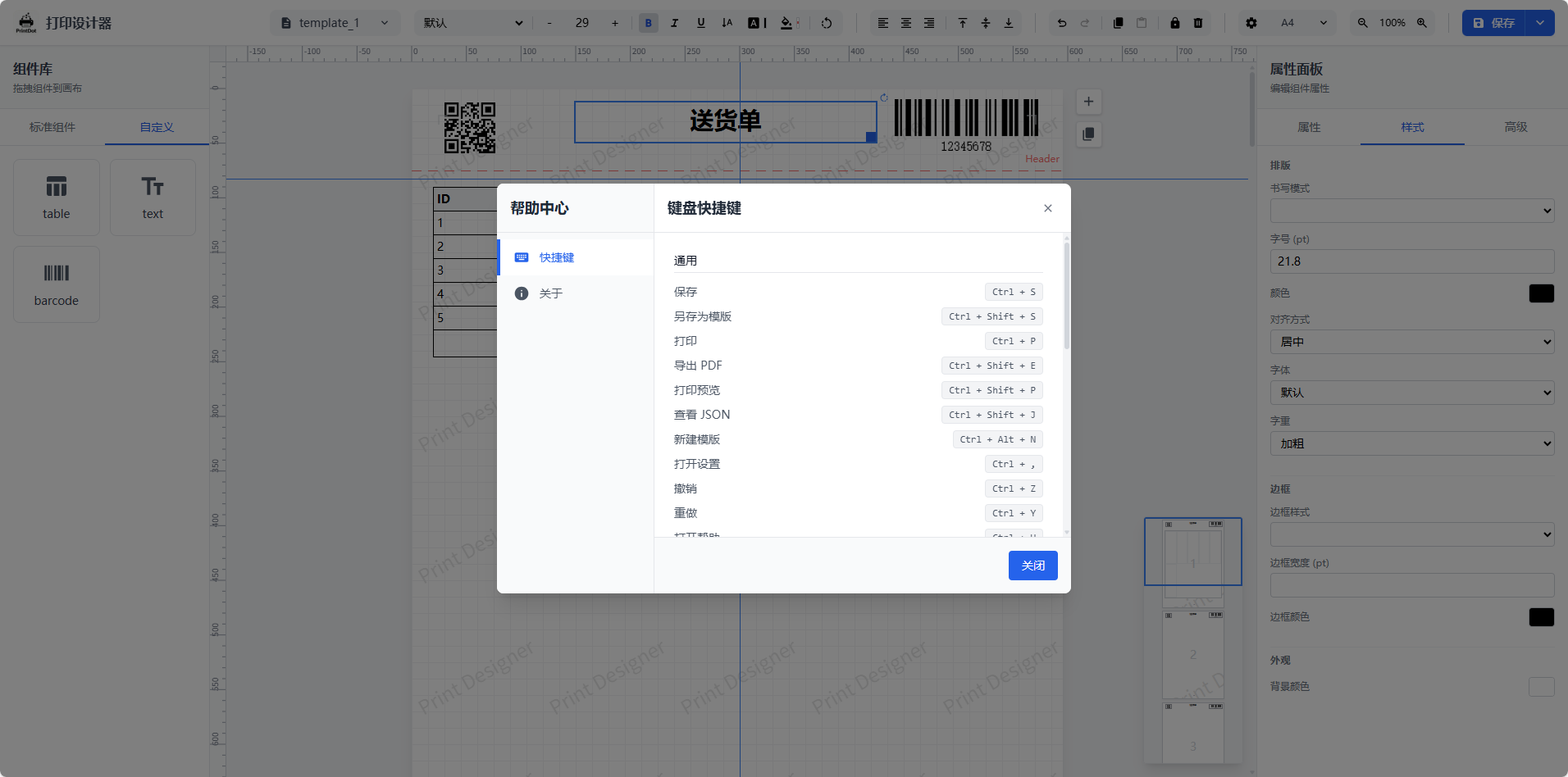 | **高级表格编辑**<br>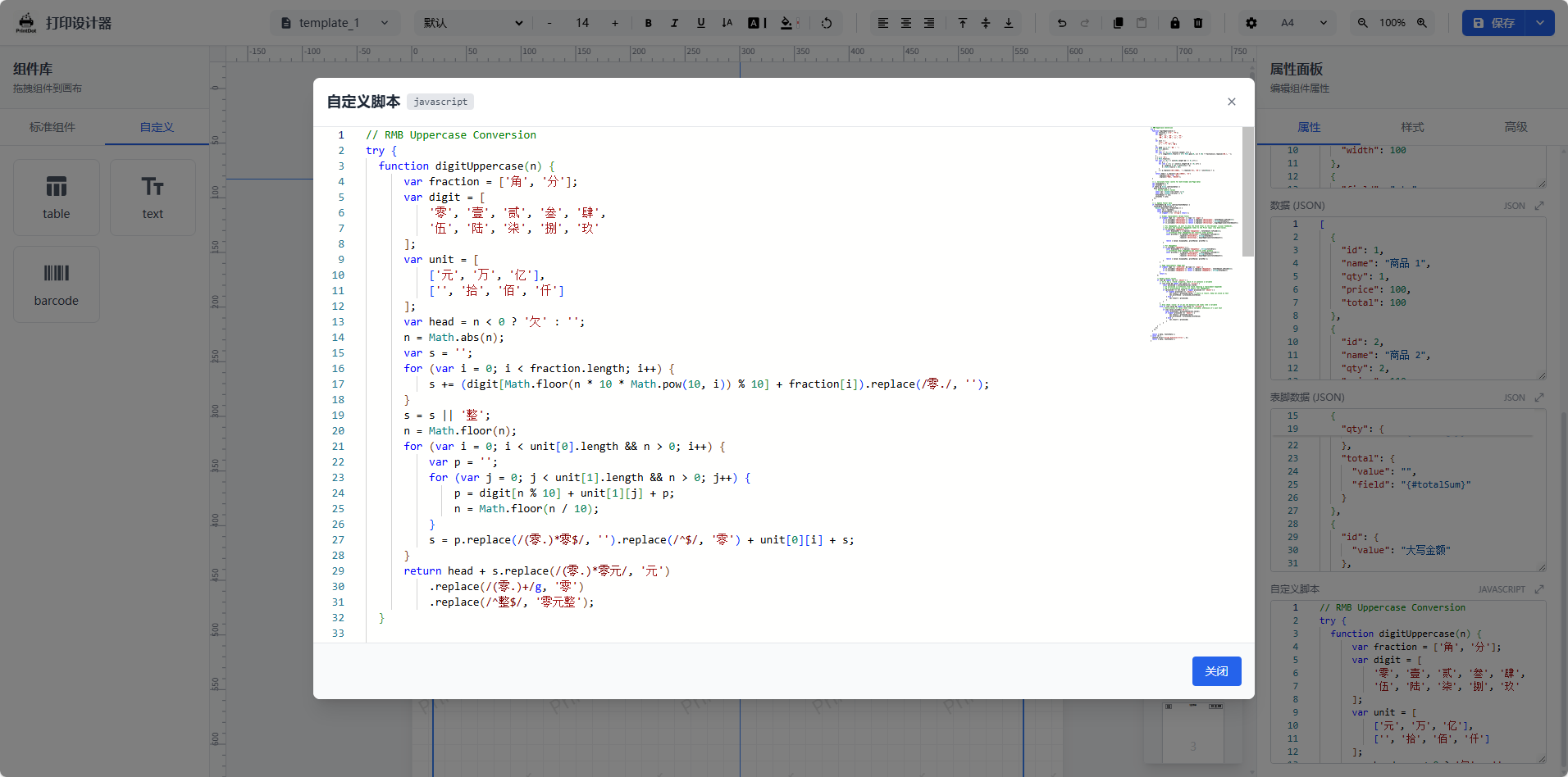 |
|
|
22
|
+
|
|
13
23
|
## 我们解决了什么问题
|
|
14
24
|
|
|
15
25
|
- 设计与打印链路割裂,模板无法复用,改一个字段要改一堆代码
|
|
@@ -36,50 +46,71 @@ Vue Print Designer 是一款可视化打印设计器,面向业务表单、标
|
|
|
36
46
|
- **静默打印**:支持本地客户端直打,无需人工确认
|
|
37
47
|
- **云打印**:支持远程客户端接入与云端下发打印任务
|
|
38
48
|
|
|
39
|
-
##
|
|
49
|
+
## 快速开始
|
|
40
50
|
|
|
41
|
-
|
|
42
|
-
| --- | --- |
|
|
43
|
-
| **设计器主界面与画布视图**<br> | **打印预览**<br> |
|
|
44
|
-
| **打印参数配置**<br> | **系统设置与偏好**<br> |
|
|
45
|
-
| **快捷键说明**<br> | **高级表格编辑**<br> |
|
|
51
|
+
### 环境要求
|
|
46
52
|
|
|
47
|
-
|
|
53
|
+
- Node.js >= 16.0.0
|
|
54
|
+
- npm >= 7.0.0 或 yarn / pnpm
|
|
48
55
|
|
|
49
|
-
|
|
56
|
+
### 安装依赖
|
|
50
57
|
|
|
51
58
|
```bash
|
|
52
59
|
npm install
|
|
53
|
-
npm run dev
|
|
54
60
|
```
|
|
55
61
|
|
|
56
|
-
|
|
62
|
+
### 开发模式
|
|
57
63
|
|
|
58
|
-
|
|
59
|
-
|
|
60
|
-
|
|
64
|
+
```bash
|
|
65
|
+
npm run dev
|
|
66
|
+
```
|
|
61
67
|
|
|
62
|
-
|
|
68
|
+
启动后访问本地服务即可使用设计器。
|
|
63
69
|
|
|
64
|
-
|
|
70
|
+
### 生产构建
|
|
65
71
|
|
|
66
72
|
```bash
|
|
67
73
|
npm run build
|
|
68
74
|
```
|
|
69
75
|
|
|
70
|
-
|
|
76
|
+
### 构建 Web Components 包
|
|
71
77
|
|
|
72
|
-
|
|
78
|
+
```bash
|
|
79
|
+
npm run build:wc
|
|
80
|
+
```
|
|
81
|
+
|
|
82
|
+
产物说明:
|
|
83
|
+
|
|
84
|
+
- `dist/print-designer.es.js` - ES 模块版本
|
|
85
|
+
- `dist/print-designer.umd.js` - UMD 版本
|
|
86
|
+
- `dist/print-designer.css` - 样式文件
|
|
87
|
+
- `dist/web-component.d.ts` - TypeScript 类型声明
|
|
88
|
+
|
|
89
|
+
## 引入方式
|
|
73
90
|
|
|
74
|
-
|
|
91
|
+
### 方式一:下载源码自行改造与集成 API
|
|
75
92
|
|
|
76
|
-
|
|
93
|
+
适合有深度定制需求的团队。
|
|
94
|
+
|
|
95
|
+
建议接入点:
|
|
96
|
+
|
|
97
|
+
- 模板 CRUD:`useTemplateStore`(可替换为接口读写)
|
|
98
|
+
- 自定义元素 CRUD:`useDesignerStore` 中的 `customElements`
|
|
99
|
+
- 变量与模板数据:组件实例方法 `setVariables` / `loadTemplateData`
|
|
100
|
+
|
|
101
|
+
自定义元素扩展请查看:[自定义元素扩展指南](docs/zh/guide/custom-element.md)
|
|
102
|
+
|
|
103
|
+
### 方式二:npm 组件(Web Components)
|
|
104
|
+
|
|
105
|
+
适合任何技术栈(Vue/React/Angular/原生)。Web Components 方式**支持 Vue 2**(作为自定义元素使用),无需 Vue 2 组件适配。
|
|
106
|
+
|
|
107
|
+
详细参数、CRUD 与 JSON 示例请查看:[Web Components API 用户手册](docs/zh/guide/web-components-guide.md)
|
|
77
108
|
|
|
78
109
|
```bash
|
|
79
|
-
npm
|
|
110
|
+
npm i vue-print-designer
|
|
80
111
|
```
|
|
81
112
|
|
|
82
|
-
|
|
113
|
+
#### 1) 使用组件(Vue 3 / Vite)
|
|
83
114
|
|
|
84
115
|
在入口文件中引入:
|
|
85
116
|
|
|
@@ -97,7 +128,7 @@ import '@your-scope/print-designer/style.css';
|
|
|
97
128
|
</template>
|
|
98
129
|
```
|
|
99
130
|
|
|
100
|
-
|
|
131
|
+
#### 2) Vue 3 选项式 API:初始化与调用分离
|
|
101
132
|
|
|
102
133
|
**设计器页(初始化与编辑)**
|
|
103
134
|
|
|
@@ -135,7 +166,7 @@ await el.export({ type: 'pdf', filename: 'order-20240223.pdf' });
|
|
|
135
166
|
const pdfBlob = await el.export({ type: 'pdfBlob' });
|
|
136
167
|
```
|
|
137
168
|
|
|
138
|
-
|
|
169
|
+
#### 3) 事件回调
|
|
139
170
|
|
|
140
171
|
```ts
|
|
141
172
|
el.addEventListener('ready', () => {});
|
|
@@ -148,21 +179,37 @@ el.addEventListener('error', (e) => {
|
|
|
148
179
|
});
|
|
149
180
|
```
|
|
150
181
|
|
|
151
|
-
##
|
|
182
|
+
## 项目结构
|
|
152
183
|
|
|
153
|
-
```
|
|
154
|
-
|
|
184
|
+
```
|
|
185
|
+
src/
|
|
186
|
+
├── assets/ # 静态资源(Logo、图标)
|
|
187
|
+
├── components/ # Vue 组件
|
|
188
|
+
│ ├── canvas/ # 画布组件
|
|
189
|
+
│ ├── common/ # 通用组件(颜色选择器、弹窗等)
|
|
190
|
+
│ ├── elements/ # 打印元素组件(文本、图片、表格、条码等)
|
|
191
|
+
│ ├── layout/ # 布局组件(头部、侧边栏、属性面板等)
|
|
192
|
+
│ ├── print/ # 打印渲染组件
|
|
193
|
+
│ └── properties/ # 属性配置组件
|
|
194
|
+
├── composables/ # Vue 组合式函数
|
|
195
|
+
│ ├── useAutoSave.ts # 自动保存
|
|
196
|
+
│ ├── usePrintSettings.ts # 打印设置
|
|
197
|
+
│ └── useTheme.ts # 主题管理
|
|
198
|
+
├── constants/ # 常量定义
|
|
199
|
+
├── locales/ # 国际化语言包
|
|
200
|
+
├── stores/ # Pinia 状态管理
|
|
201
|
+
├── types/ # TypeScript 类型声明
|
|
202
|
+
├── utils/ # 工具函数
|
|
203
|
+
├── web-component.ts # Web Components 入口
|
|
204
|
+
└── main.ts # 应用入口
|
|
155
205
|
```
|
|
156
206
|
|
|
157
|
-
|
|
207
|
+
## 国际化
|
|
158
208
|
|
|
159
|
-
|
|
160
|
-
- `dist/print-designer.umd.js`
|
|
161
|
-
- `dist/print-designer.css`
|
|
162
|
-
- `dist/web-component.d.ts`
|
|
209
|
+
项目内置中文(zh)和英文(en)语言支持,默认根据浏览器语言自动切换,也可通过 API 手动设置。
|
|
163
210
|
|
|
164
211
|
## License
|
|
165
212
|
|
|
166
213
|
Apache-2.0
|
|
167
214
|
|
|
168
|
-
品牌与 Logo 使用请遵循 [TRADEMARKS.md](TRADEMARKS.md)。如需移除或替换品牌标识,请参考 [COMMERCIAL_LICENSE.md](COMMERCIAL_LICENSE.md)。
|
|
215
|
+
品牌与 Logo 使用请遵循 [TRADEMARKS.md](TRADEMARKS.md)。如需移除或替换品牌标识,请参考 [COMMERCIAL_LICENSE.md](COMMERCIAL_LICENSE.md)。
|
package/dist/print-designer.css
CHANGED
|
@@ -1 +1 @@
|
|
|
1
|
-
.animate-fade-in[data-v-
|
|
1
|
+
.animate-fade-in[data-v-556dbf10]{animation:fadeIn-556dbf10 .2s ease-out}@keyframes fadeIn-556dbf10{0%{opacity:0;transform:scale(.95)}to{opacity:1;transform:scale(1)}}[data-v-c539a81c] .print-page{margin-bottom:20px;background:#fff;box-shadow:none!important;position:relative!important;left:auto!important;top:auto!important}[data-v-c539a81c] .print-page:last-child{margin-bottom:0}.preview-content[data-v-c539a81c] *{cursor:default!important}.resize-y[data-v-8f366b64]{resize:vertical}.custom-scrollbar[data-v-5c0d893a]::-webkit-scrollbar{width:6px}.custom-scrollbar[data-v-5c0d893a]::-webkit-scrollbar-track{background:transparent}.custom-scrollbar[data-v-5c0d893a]::-webkit-scrollbar-thumb{background-color:#e5e7eb;border-radius:3px}.custom-scrollbar[data-v-5c0d893a]::-webkit-scrollbar-thumb:hover{background-color:#d1d5db}.no-scrollbar[data-v-2c08a393]{-ms-overflow-style:none;scrollbar-width:none}.no-scrollbar[data-v-2c08a393]::-webkit-scrollbar{display:none}
|