vovk 0.1.6 → 0.1.8
This diff represents the content of publicly available package versions that have been released to one of the supported registries. The information contained in this diff is provided for informational purposes only and reflects changes between package versions as they appear in their respective public registries.
- package/README.md +40 -818
- package/Segment.js +2 -2
- package/client/defaultFetcher.js +1 -1
- package/client/defaultStreamFetcher.js +1 -1
- package/client/index.d.ts +2 -3
- package/client/index.js +1 -3
- package/client/types.d.ts +1 -1
- package/index.d.ts +2 -3
- package/index.js +1 -3
- package/package.json +8 -7
- package/tsconfig.tsbuildinfo +1 -1
- package/types.d.ts +1 -1
package/README.md
CHANGED
|
@@ -8,826 +8,48 @@
|
|
|
8
8
|
</p>
|
|
9
9
|
|
|
10
10
|
<p align="center">
|
|
11
|
-
|
|
12
|
-
<br><br>
|
|
13
|
-
<picture>
|
|
14
|
-
<source width="200" media="(prefers-color-scheme: dark)" srcset="https://github.com/finom/vovk/assets/1082083/d802ddc7-dc93-4f9c-8531-1f847148a0d7">
|
|
15
|
-
<source width="200" media="(prefers-color-scheme: light)" srcset="https://github.com/finom/vovk/assets/1082083/a4606ef0-74fd-46e8-bb0e-a67401285e57">
|
|
16
|
-
<img width="200" alt="next" src="https://github.com/finom/vovk/assets/1082083/a4606ef0-74fd-46e8-bb0e-a67401285e57">
|
|
17
|
-
</picture>
|
|
11
|
+
Meta-isomorphic framework built on top of <strong>Next.js</strong> public API
|
|
18
12
|
</p>
|
|
19
13
|
|
|
14
|
+
<p align="center">
|
|
15
|
+
<a href="https://vovk.dev/">
|
|
16
|
+
Website
|
|
17
|
+
</a>
|
|
18
|
+
|
|
19
|
+
<a href="https://docs.vovk.dev/">
|
|
20
|
+
Documentation
|
|
21
|
+
</a>
|
|
22
|
+
|
|
23
|
+
<a href="https://github.com/finom/vovk-zod">
|
|
24
|
+
vovk-zod
|
|
25
|
+
</a>
|
|
26
|
+
|
|
27
|
+
<a href="https://github.com/finom/vovk-hello-world">
|
|
28
|
+
vovk-hello-world
|
|
29
|
+
</a>
|
|
30
|
+
</p>
|
|
31
|
+
<br>
|
|
32
|
+
<p align="center">
|
|
33
|
+
<a href="https://www.npmjs.com/package/vovk">
|
|
34
|
+
<img src="https://badge.fury.io/js/vovk.svg" alt="npm version" />
|
|
35
|
+
</a>
|
|
36
|
+
<a href="https://www.typescriptlang.org/">
|
|
37
|
+
<img src="https://img.shields.io/badge/%3C%2F%3E-TypeScript-%230074c1.svg" alt="TypeScript" />
|
|
38
|
+
</a>
|
|
39
|
+
<a href="https://github.com/finom/vovk/actions/workflows/main.yml">
|
|
40
|
+
<img src="https://github.com/finom/vovk/actions/workflows/main.yml/badge.svg" alt="Build status" />
|
|
41
|
+
</a>
|
|
42
|
+
</p>
|
|
20
43
|
|
|
21
|
-
|
|
22
|
-
|
|
23
|
-
Set up a regular Next.js project with App routerusing [CLI and this instruction](https://nextjs.org/docs/getting-started/installation).
|
|
24
|
-
|
|
25
|
-
Install the library: `npm i vovk` or `yarn add vovk`.
|
|
26
|
-
|
|
27
|
-
Create the first controller:
|
|
28
|
-
|
|
29
|
-
```ts
|
|
30
|
-
// /src/controllers/UserController.ts
|
|
31
|
-
import { get, post, prefix } from 'vovk';
|
|
32
|
-
import type { NextRequest } from 'next/server';
|
|
33
|
-
|
|
34
|
-
@prefix('users')
|
|
35
|
-
export default class UserController {
|
|
36
|
-
@get() // Handles GET requests to '/api/users'
|
|
37
|
-
static getHelloWorld() {
|
|
38
|
-
return { hello: 'world' };
|
|
39
|
-
}
|
|
40
|
-
|
|
41
|
-
@post('hello/:id/world') // Handles POST requests to '/api/users/hello/:id/world'
|
|
42
|
-
static postHelloWorld(req: NextRequest, { id }: { id: string }) {
|
|
43
|
-
const q = req.nextUrl.searchParams.get('q');
|
|
44
|
-
const body = await req.json();
|
|
45
|
-
return { id, q, body };
|
|
46
|
-
}
|
|
47
|
-
}
|
|
48
|
-
```
|
|
49
|
-
|
|
50
|
-
Finally, create the catch-all route with an optional slug (`[[...slug]]`) and call `initVovk` with all your controllers. The slug is never used so you may want to keep it empty (`[[...]]`).
|
|
51
|
-
|
|
52
|
-
```ts
|
|
53
|
-
// /src/app/api/[[...]]/route.ts
|
|
54
|
-
import { initVovk } from 'vovk';
|
|
55
|
-
import UserController from '../../../controllers/UserController';
|
|
56
|
-
|
|
57
|
-
export const { GET, POST } = initVovk([UserController]);
|
|
58
|
-
```
|
|
59
|
-
|
|
60
|
-
After that you can load the data using any fetching library.
|
|
61
|
-
|
|
62
|
-
```ts
|
|
63
|
-
fetch('/api/users');
|
|
64
|
-
fetch(`/api/users/hello/${id}/world?q=foo`, {
|
|
65
|
-
method: 'POST',
|
|
66
|
-
body: JSON.stringify({ hello: 'world' }),
|
|
67
|
-
});
|
|
68
|
-
```
|
|
69
|
-
|
|
70
|
-
<a href="https://www.npmjs.com/package/vovk">
|
|
71
|
-
<img src="https://badge.fury.io/js/vovk.svg" alt="npm version" />
|
|
72
|
-
</a>
|
|
73
|
-
<a href="https://www.typescriptlang.org/">
|
|
74
|
-
<img src="https://img.shields.io/badge/%3C%2F%3E-TypeScript-%230074c1.svg" alt="TypeScript" />
|
|
75
|
-
</a>
|
|
76
|
-
<a href="https://github.com/finom/vovk/actions/workflows/main.yml">
|
|
77
|
-
<img src="https://github.com/finom/vovk/actions/workflows/main.yml/badge.svg" alt="Build status" />
|
|
78
|
-
</a>
|
|
79
|
-
|
|
80
|
-
|
|
81
|
-
## Table of contents
|
|
82
|
-
|
|
83
|
-
<!-- toc -->
|
|
84
|
-
|
|
85
|
-
- [Features](#features)
|
|
86
|
-
- [Overview](#overview)
|
|
87
|
-
* [Why Next.js is a good choice?](#why-nextjs-is-a-good-choice)
|
|
88
|
-
* [Limitations of Next.js API Routes](#limitations-of-nextjs-api-routes)
|
|
89
|
-
* [A potential solution: Pairing Next.js with NestJS](#a-potential-solution-pairing-nextjs-with-nestjs)
|
|
90
|
-
* [The new solution: vovk](#the-new-solution-vovk)
|
|
91
|
-
+ [Custom decorators](#custom-decorators)
|
|
92
|
-
+ [Service-Controller pattern](#service-controller-pattern)
|
|
93
|
-
+ [Return type](#return-type)
|
|
94
|
-
+ [Error handling](#error-handling)
|
|
95
|
-
- [API](#api)
|
|
96
|
-
* [`createSegment` function, global decorators and handlers](#createsegment-function-global-decorators-and-handlers)
|
|
97
|
-
* [`HttpException` class and `HttpStatus` enum](#httpexception-class-and-httpstatus-enum)
|
|
98
|
-
* [`HttpMethod` enum](#httpmethod-enum)
|
|
99
|
-
* [`createDecorator` function](#createdecorator-function)
|
|
100
|
-
+ [`authGuard` example](#authguard-example)
|
|
101
|
-
+ [`handleZodErrors` example](#handlezoderrors-example)
|
|
102
|
-
|
|
103
|
-
<!-- tocstop -->
|
|
104
|
-
|
|
105
|
-
## Features
|
|
106
|
-
|
|
107
|
-
**vovk** offers a range of features to streamline your Next.js [App Router](https://nextjs.org/docs/app) experience:
|
|
108
|
-
|
|
109
|
-
- Elegant decorator syntax (all HTTP methods are available). Custom decorators for varied needs are supported.
|
|
110
|
-
- Direct data return from the handler (`Response` or `NextResponse` usage isn't required).
|
|
111
|
-
- Pleasant error handling (no need to use `try..catch` and `NextResponse` to return an error to the client).
|
|
112
|
-
- Service-Controller pattern is supported.
|
|
113
|
-
- The library does not interfere with built-in Next.js features including extending of request object.
|
|
114
|
-
|
|
115
|
-
## Overview
|
|
116
|
-
|
|
117
|
-
### Why Next.js is a good choice?
|
|
118
|
-
|
|
119
|
-
Next.js 13+ with App Router is a great ready-to-go framework that saves a lot of time and effort setting up and maintaining a React project. With Next.js:
|
|
120
|
-
|
|
121
|
-
- You don't need to manually set up Webpack, Babel, ESLint, TypeScript.
|
|
122
|
-
- Hot module reload is enabled by default and always works, so you don't need to find out why it stopped working after a dependency update.
|
|
123
|
-
- Server-side rendering is enabled by default.
|
|
124
|
-
- Routing and file structure are well-documented, eliminating the need for custom design.
|
|
125
|
-
- It doesn't require you to "eject" scripts and configs if you want to modify them.
|
|
126
|
-
- It's a widely known and well-used framework, no need to spend time thinking of a choice.
|
|
127
|
-
|
|
128
|
-
As result both long-term and short-term the development is cheaper, faster and more efficient.
|
|
129
|
-
|
|
130
|
-
### Limitations of Next.js API Routes
|
|
131
|
-
|
|
132
|
-
The pros mentioned above are about front-end part (routes created with `page.tsx`), but the API route handlers provide very specific and very limited way to define API routes. Per every endpoint you're going to create a separate file called `route.ts` that exports route handlers that implement an HTTP method corresponding to their name:
|
|
133
|
-
|
|
134
|
-
```ts
|
|
135
|
-
export async function GET() {
|
|
136
|
-
// ...
|
|
137
|
-
return NextResponse.json(data)
|
|
138
|
-
}
|
|
139
|
-
|
|
140
|
-
export async function POST() {
|
|
141
|
-
// ...
|
|
142
|
-
return NextResponse.json(data)
|
|
143
|
-
}
|
|
144
|
-
```
|
|
145
|
-
|
|
146
|
-
Let's imagine that your app requires to build the following endpoints:
|
|
147
|
-
|
|
148
|
-
```
|
|
149
|
-
GET /user - get all users
|
|
150
|
-
POST /user - create user
|
|
151
|
-
GET /user/me - get current user
|
|
152
|
-
PUT /user/me - update current user (password, etc)
|
|
153
|
-
GET /user/[id] - get specified user by ID
|
|
154
|
-
PUT /user/[id] - update a specified user (let's say, name only)
|
|
155
|
-
GET /team - get all teams
|
|
156
|
-
GET /team/[id] - get a specific team
|
|
157
|
-
POST /team/[id]/assign-user - some specialised endpoint that assigns a user to a specific team (whatever that means)
|
|
158
|
-
```
|
|
159
|
-
|
|
160
|
-
With the built-in Next.js 13+ features your API folder structure is going to look the following:
|
|
161
|
-
|
|
162
|
-
```
|
|
163
|
-
/api/user/
|
|
164
|
-
/route.ts
|
|
165
|
-
/me/
|
|
166
|
-
/route.ts
|
|
167
|
-
/[id]/
|
|
168
|
-
/route.ts
|
|
169
|
-
/api/team/
|
|
170
|
-
/route.ts
|
|
171
|
-
/[id]/
|
|
172
|
-
/route.ts
|
|
173
|
-
/assign-user/
|
|
174
|
-
/route.ts
|
|
175
|
-
|
|
176
|
-
```
|
|
177
|
-
|
|
178
|
-
It's hard to manage this file structure (especially if you have complex API), and you may want to apply some creativity to reduce number of files and simplify the structure:
|
|
179
|
-
|
|
180
|
-
- Move all features from /users folder (`/me` and `/[id]`) to `/user/route.ts` and use query parameter instead: `/user`, `/user/?who=me`, `/user/?who=[id]`
|
|
181
|
-
- Do the same trick with the teams: `/team`, `/team?id=[id]`, `/team?id=[id]&action=assign-user`
|
|
182
|
-
|
|
183
|
-
The file structure now looks like the following:
|
|
184
|
-
|
|
185
|
-
```
|
|
186
|
-
/api/user/
|
|
187
|
-
/route.ts
|
|
188
|
-
/api/team/
|
|
189
|
-
/route.ts
|
|
190
|
-
```
|
|
191
|
-
|
|
192
|
-
It looks better (even though it still looks wrong) but the code inside these files make you write too many `if` conditions and will definitely make your code less readable. To make this documentation shorter, let me rely on your imagination.
|
|
193
|
-
|
|
194
|
-
### A potential solution: Pairing Next.js with NestJS
|
|
195
|
-
|
|
196
|
-
Last few years I solved the problem above by combining Next.js and NestJS framework in one project. Next.js was used as a front-end framework and NestJS was used as back-end framework. Unfortunately this solution requires to spend resources on additional code and deployment management:
|
|
197
|
-
|
|
198
|
-
- Should it be a monorepo or 2 different repositories?
|
|
199
|
-
- Monorepo is harder to manage and deploy.
|
|
200
|
-
- Two repos are harder to synchronize (if deployed back-end code and front-end code compatible to each other at this moment of time?).
|
|
201
|
-
- Both applications require to be run on their own port and we need to deploy them to 2 different servers. Multiply that by the numbers of environments (the most common are: dev, staging, prod) and you'll need to handle too many servers.
|
|
202
|
-
|
|
203
|
-
It would be nice if we could:
|
|
204
|
-
|
|
205
|
-
- Use a single NodeJS project run in 1 port;
|
|
206
|
-
- Keep the project in one simple repository;
|
|
207
|
-
- Use single deployment server;
|
|
208
|
-
- Apply NestJS-like syntax to define routes;
|
|
209
|
-
- Make the project development and infrastructure cheaper.
|
|
210
|
-
|
|
211
|
-
### The new solution: vovk
|
|
212
|
-
|
|
213
|
-
Next.js includes [Dynamic Routes](https://nextjs.org/docs/app/building-your-application/routing/dynamic-routes) that enable us to create "catch-all" route handlers for a specific endpoint prefix. The library uses this feature to implement creation of route handlers with much more friendly syntax. The route handlers are going to be exported on one catch-all route file. To achieve that you're going to need to create the following files:
|
|
214
|
-
|
|
215
|
-
```
|
|
216
|
-
/api/[[...]]/route.ts
|
|
217
|
-
/controllers
|
|
218
|
-
/UserController.ts
|
|
219
|
-
/TeamController.ts
|
|
220
|
-
```
|
|
221
|
-
|
|
222
|
-
First, `/controllers` is a folder that contains our dynamic controller files. The names of the folder and files don't matter so you can name it `/routers` for example.
|
|
223
|
-
|
|
224
|
-
Create your controllers:
|
|
225
|
-
|
|
226
|
-
```ts
|
|
227
|
-
// /controllers/UserController.ts
|
|
228
|
-
import { get, post, put, prefix } from 'vovk';
|
|
229
|
-
|
|
230
|
-
@prefix('users')
|
|
231
|
-
export default class UserController {
|
|
232
|
-
@get()
|
|
233
|
-
static getAll() {
|
|
234
|
-
return someORM.getAllUsers();
|
|
235
|
-
}
|
|
236
|
-
|
|
237
|
-
@get('me')
|
|
238
|
-
static getMe() {
|
|
239
|
-
// ...
|
|
240
|
-
}
|
|
241
|
-
|
|
242
|
-
@put('me')
|
|
243
|
-
static async updateMe(req: NextRequest) {
|
|
244
|
-
const body = await req.json() as { firstName: string; lastName: string; };
|
|
245
|
-
// ...
|
|
246
|
-
}
|
|
247
|
-
|
|
248
|
-
@get(':id')
|
|
249
|
-
static async getOneUser(req: NextRequest, { id }: { id: string }) {
|
|
250
|
-
return someORM.getUserById(id);
|
|
251
|
-
}
|
|
252
|
-
|
|
253
|
-
@put(':id')
|
|
254
|
-
static async updateOneUser(req: NextRequest, { id }: { id: string }) {
|
|
255
|
-
const body = await req.json() as { firstName: string; lastName: string; };
|
|
256
|
-
|
|
257
|
-
return someORM.updateUserById(id, body);
|
|
258
|
-
}
|
|
259
|
-
}
|
|
260
|
-
```
|
|
261
|
-
|
|
262
|
-
```ts
|
|
263
|
-
// /controllers/TeamController.ts
|
|
264
|
-
import { get, post, prefix } from 'vovk';
|
|
265
|
-
|
|
266
|
-
@prefix('teams')
|
|
267
|
-
export default class TeamController {
|
|
268
|
-
@get()
|
|
269
|
-
static getAll() {
|
|
270
|
-
return someORM.getAllTeams();
|
|
271
|
-
}
|
|
272
|
-
|
|
273
|
-
@get(':id')
|
|
274
|
-
static getOneTeam(req: NextRequest, { id }: { id: string }) {
|
|
275
|
-
// ...
|
|
276
|
-
}
|
|
277
|
-
|
|
278
|
-
@post(':id/assign-user')
|
|
279
|
-
static assignUser() {
|
|
280
|
-
// ...
|
|
281
|
-
}
|
|
282
|
-
}
|
|
283
|
-
```
|
|
284
|
-
|
|
285
|
-
Finally, create the catch-all route.
|
|
286
|
-
|
|
287
|
-
```ts
|
|
288
|
-
// /api/[[...]]/route.ts - this is a real file path where [[...]] is a folder name
|
|
289
|
-
import { initVovk } from 'vovk';
|
|
290
|
-
import UserController from '../controllers/UserController';
|
|
291
|
-
import TeamController from '../controllers/TeamController';
|
|
292
|
-
|
|
293
|
-
export const { GET, POST, PUT } = initVovk([UserController, TeamController]);
|
|
294
|
-
```
|
|
295
|
-
|
|
296
|
-
That's it. Notice that the methods modified by the decorators defined as `static` methods and the classes are never instantiated.
|
|
297
|
-
|
|
298
|
-
Also it's worthy to mention that `@prefix` decorator is just syntax sugar and you're not required to use it.
|
|
299
|
-
|
|
300
|
-
#### Custom decorators
|
|
301
|
-
|
|
302
|
-
You can extend features of the controller by defining a [custom decorator](https://www.typescriptlang.org/docs/handbook/decorators.html) that can:
|
|
303
|
-
|
|
304
|
-
- Run additional request validation, for example to check if user is authorised.
|
|
305
|
-
- Catch specific errors.
|
|
306
|
-
- Add more properties to the `req` object: current user, parsed and modified request body, etc.
|
|
307
|
-
|
|
308
|
-
There is typical code from a random project:
|
|
309
|
-
|
|
310
|
-
```ts
|
|
311
|
-
// ...
|
|
312
|
-
export default class MyController {
|
|
313
|
-
// ...
|
|
314
|
-
|
|
315
|
-
@post()
|
|
316
|
-
@authGuard()
|
|
317
|
-
@permissionGuard(Permission.CREATE)
|
|
318
|
-
@log(Action.CREATE, { model: 'MyModel' })
|
|
319
|
-
@handleZodErrors()
|
|
320
|
-
static async create(req: GuardedRequest) {
|
|
321
|
-
const body = ZodModel.parse(await req.json());
|
|
322
|
-
|
|
323
|
-
return this.myService.create(body);
|
|
324
|
-
}
|
|
325
|
-
|
|
326
|
-
// ...
|
|
327
|
-
}
|
|
328
|
-
```
|
|
329
|
-
|
|
330
|
-
To create a decorator you can use `createDecorator` that's described at the API section with a few examples.
|
|
331
|
-
|
|
332
|
-
All further examples are going to use Prisma ORM but you can use any ORM you like.
|
|
333
|
-
|
|
334
|
-
#### Service-Controller pattern
|
|
335
|
-
|
|
336
|
-
Optionally, you can improve your controller code by splitting it into service and controller. Service is a place where you make database requests and perform other data manipulation actions. Controller is where we use the decorators, check permissions, and validate incoming data, then call methods of the service. To achieve that, create another simple class (without no parent or decorators) with static methods:
|
|
337
|
-
|
|
338
|
-
```ts
|
|
339
|
-
// /controllers/user/UserService.ts
|
|
340
|
-
export default class UserService {
|
|
341
|
-
static findAllUsers() {
|
|
342
|
-
return prisma.user.findMany();
|
|
343
|
-
}
|
|
344
|
-
}
|
|
345
|
-
```
|
|
346
|
-
|
|
347
|
-
Then inject the service as another static property to the controller
|
|
348
|
-
|
|
349
|
-
```ts
|
|
350
|
-
// /controllers/user/UserController.ts
|
|
351
|
-
import UserService from './UserService';
|
|
352
|
-
|
|
353
|
-
// ...
|
|
354
|
-
@prefix('users')
|
|
355
|
-
export default class UserController {
|
|
356
|
-
private static userService = UserService;
|
|
357
|
-
|
|
358
|
-
@get()
|
|
359
|
-
@authGuard()
|
|
360
|
-
static getAllUsers() {
|
|
361
|
-
return this.userService.findAllUsers();
|
|
362
|
-
}
|
|
363
|
-
}
|
|
364
|
-
```
|
|
365
|
-
|
|
366
|
-
Then initialise the controller as before:
|
|
367
|
-
|
|
368
|
-
```ts
|
|
369
|
-
// /api/[[...]]/route.ts
|
|
370
|
-
import { initVovk } from 'vovk';
|
|
371
|
-
import UserController from '../controllers/user/UserController';
|
|
372
|
-
|
|
373
|
-
export const { GET } = initVovk([UserController]);
|
|
374
|
-
```
|
|
375
|
-
|
|
376
|
-
Potential file structure with users, posts and comments may look like that:
|
|
377
|
-
|
|
378
|
-
```
|
|
379
|
-
/controllers/
|
|
380
|
-
/user/
|
|
381
|
-
/UserService.ts
|
|
382
|
-
/UserController.ts
|
|
383
|
-
/post/
|
|
384
|
-
/PostService.ts
|
|
385
|
-
/PostController.ts
|
|
386
|
-
/comment/
|
|
387
|
-
/CommentService.ts
|
|
388
|
-
/CommentController.ts
|
|
389
|
-
```
|
|
390
|
-
|
|
391
|
-
Services can use other services:
|
|
392
|
-
|
|
393
|
-
```ts
|
|
394
|
-
// /controllers/user/UserService.ts
|
|
395
|
-
import PostService from '../post/PostService';
|
|
396
|
-
|
|
397
|
-
export default class UserService {
|
|
398
|
-
private static postService = PostService;
|
|
399
|
-
|
|
400
|
-
static doSomething() {
|
|
401
|
-
this.postService.doSomething();
|
|
402
|
-
}
|
|
403
|
-
}
|
|
404
|
-
```
|
|
405
|
-
|
|
406
|
-
In case service A is dependent on service B, and service B is dependent on service A you can turn the other service property into a getter:
|
|
407
|
-
|
|
408
|
-
|
|
409
|
-
```ts
|
|
410
|
-
// /controllers/user/UserService.ts
|
|
411
|
-
import PostService from '../post/PostService';
|
|
412
|
-
|
|
413
|
-
export default class UserService {
|
|
414
|
-
private static get postService() { return PostService; };
|
|
415
|
-
|
|
416
|
-
static doSomething1() {
|
|
417
|
-
this.postService.doSomething2();
|
|
418
|
-
}
|
|
419
|
-
}
|
|
420
|
-
```
|
|
421
|
-
|
|
422
|
-
|
|
423
|
-
```ts
|
|
424
|
-
// /controllers/user/PostService.ts
|
|
425
|
-
import UserService from '../post/UserService';
|
|
426
|
-
|
|
427
|
-
export default class PostService {
|
|
428
|
-
private static get userService() { return UserService; };
|
|
429
|
-
|
|
430
|
-
static doSomething2() {
|
|
431
|
-
this.userService.doSomething1();
|
|
432
|
-
}
|
|
433
|
-
}
|
|
434
|
-
```
|
|
435
|
-
|
|
436
|
-
Or you can avoid setting up service as a property at all:
|
|
437
|
-
|
|
438
|
-
```ts
|
|
439
|
-
// /controllers/user/UserController.ts
|
|
440
|
-
import UserService from './UserService';
|
|
441
|
-
|
|
442
|
-
// ...
|
|
443
|
-
@prefix('users')
|
|
444
|
-
export default class UserController {
|
|
445
|
-
@get()
|
|
446
|
-
@authGuard()
|
|
447
|
-
static getAllUsers() {
|
|
448
|
-
return UserService.findAllUsers();
|
|
449
|
-
}
|
|
450
|
-
}
|
|
451
|
-
```
|
|
452
|
-
|
|
453
|
-
```ts
|
|
454
|
-
// /controllers/user/UserService.ts
|
|
455
|
-
import PostService from '../post/PostService';
|
|
456
|
-
|
|
457
|
-
export default class UserService {
|
|
458
|
-
static doSomething1() {
|
|
459
|
-
PostService.doSomething2();
|
|
460
|
-
}
|
|
461
|
-
}
|
|
462
|
-
```
|
|
463
|
-
|
|
464
|
-
But it is still recommended to declare services as class properties to keep the classes self-documented.
|
|
465
|
-
|
|
466
|
-
#### Return type
|
|
467
|
-
|
|
468
|
-
Controller method can return an instance of `Response` or custom data. Custom data is serialised to JSON and returned with status 200.
|
|
469
|
-
|
|
470
|
-
```ts
|
|
471
|
-
@get()
|
|
472
|
-
static getSomething() {
|
|
473
|
-
// same as NextResponse.json({ hello: 'world' }, { status: 200 })
|
|
474
|
-
return { hello: 'world' };
|
|
475
|
-
}
|
|
476
|
-
```
|
|
477
|
-
|
|
478
|
-
- If `Response` instance (that also extends `NextResponse`) or `undefined` is returned, passes it to the route handler as is.
|
|
479
|
-
- If something else is returned, the library asumes that the value is an variable that needs to be serialised into JSON and sent to the client.
|
|
480
|
-
|
|
481
|
-
Take a look at this example:
|
|
482
|
-
|
|
483
|
-
```ts
|
|
484
|
-
import { redirect } from 'next/navigation';
|
|
485
|
-
|
|
486
|
-
class ExampleService {
|
|
487
|
-
@get('a')
|
|
488
|
-
static getA() {
|
|
489
|
-
return NextResponse.json({ hello: 'world' }, { status: 200 });
|
|
490
|
-
}
|
|
491
|
-
|
|
492
|
-
@get('b')
|
|
493
|
-
static getB() {
|
|
494
|
-
return new Response(JSON.stringify({ hello: 'world' }), {
|
|
495
|
-
status: 200,
|
|
496
|
-
headers: {
|
|
497
|
-
'Content-Type': 'application/json',
|
|
498
|
-
},
|
|
499
|
-
});
|
|
500
|
-
}
|
|
501
|
-
|
|
502
|
-
@get('c')
|
|
503
|
-
static getC() {
|
|
504
|
-
// return nothing (undefined)
|
|
505
|
-
}
|
|
506
|
-
|
|
507
|
-
@get('d')
|
|
508
|
-
static getD() {
|
|
509
|
-
return { hello: 'world' };
|
|
510
|
-
}
|
|
511
|
-
}
|
|
512
|
-
```
|
|
513
|
-
|
|
514
|
-
- The routes A and B respond with result as is because they both return an instance of `Response`.
|
|
515
|
-
- Route C returns `undefined` as is and causes an error "No response is returned from route handler".
|
|
516
|
-
- Route D serialises the returned custom data and sends it to the client. The following snippet of code will probably make it clearer:
|
|
517
|
-
|
|
518
|
-
```ts
|
|
519
|
-
export default function GET() {
|
|
520
|
-
// ...
|
|
521
|
-
|
|
522
|
-
// A, B, C
|
|
523
|
-
if(result instanceof Response || typeof result === 'undefined') {
|
|
524
|
-
return result;
|
|
525
|
-
}
|
|
526
|
-
|
|
527
|
-
// D
|
|
528
|
-
return NextResponse.json(result);
|
|
529
|
-
}
|
|
530
|
-
```
|
|
531
|
-
|
|
532
|
-
#### Error handling
|
|
533
|
-
|
|
534
|
-
You can throw errors directly from the controller method. The library catches thrown exception and returns an object of type `ErrorResponseBody`.
|
|
535
|
-
|
|
536
|
-
```ts
|
|
537
|
-
// some client-side code
|
|
538
|
-
import { type ErrorResponseBody } from 'vovk';
|
|
539
|
-
|
|
540
|
-
const dataOrError: MyData | ErrorResponseBody = await (await fetch('...')).json();
|
|
541
|
-
```
|
|
542
|
-
|
|
543
|
-
The shape of this type is the following:
|
|
544
|
-
|
|
545
|
-
```ts
|
|
546
|
-
type ErrorResponseBody = {
|
|
547
|
-
statusCode: HttpStatus;
|
|
548
|
-
message: string;
|
|
549
|
-
isError: true;
|
|
550
|
-
}
|
|
551
|
-
```
|
|
552
|
-
|
|
553
|
-
To throw an error you can use `HttpException` class together with `HttpStatus` enum. You can also throw the errors from the service methods.
|
|
554
|
-
|
|
555
|
-
```ts
|
|
556
|
-
import { HttpException, HttpStatus } from 'vovk'
|
|
557
|
-
|
|
558
|
-
// ...
|
|
559
|
-
@get()
|
|
560
|
-
static getSomething() {
|
|
561
|
-
if(somethingWrong) {
|
|
562
|
-
throw new HttpException(HttpStatus.I_AM_A_TEAPOT, "I'm a teapot");
|
|
563
|
-
}
|
|
564
|
-
// ...
|
|
565
|
-
}
|
|
566
|
-
// ...
|
|
567
|
-
```
|
|
568
|
-
|
|
569
|
-
All other exceptions are considered as 500 errors and handled similarly.
|
|
570
|
-
|
|
571
|
-
```ts
|
|
572
|
-
// ...
|
|
573
|
-
@get()
|
|
574
|
-
static getSomething() {
|
|
575
|
-
if(somethingWrong) {
|
|
576
|
-
throw new Error('Something is wrong');
|
|
577
|
-
}
|
|
578
|
-
// ...
|
|
579
|
-
}
|
|
580
|
-
// ...
|
|
581
|
-
```
|
|
582
|
-
|
|
583
|
-
## API
|
|
584
|
-
|
|
585
|
-
```ts
|
|
586
|
-
import {
|
|
587
|
-
// main API
|
|
588
|
-
type ErrorResponseBody,
|
|
589
|
-
HttpException,
|
|
590
|
-
HttpStatus,
|
|
591
|
-
createSegment,
|
|
592
|
-
createDecorator,
|
|
593
|
-
|
|
594
|
-
// global controller members created with createSegment
|
|
595
|
-
get, post, put, patch, del, head, options,
|
|
596
|
-
prefix,
|
|
597
|
-
initVovk,
|
|
598
|
-
} from 'vovk';
|
|
599
|
-
```
|
|
600
|
-
|
|
601
|
-
### `createSegment` function, global decorators and handlers
|
|
602
|
-
|
|
603
|
-
The function `createSegment` initialises route handlers for one particular router segment. Using the function directly allows you to isolate some particular route path from other route handlers and provides a chance to refactor your code partially. Let's say you want to override only `/users` route handlers by using the library but keep `/comments` and `/posts` as is.
|
|
604
|
-
|
|
605
|
-
|
|
606
|
-
```
|
|
607
|
-
/api/posts/
|
|
608
|
-
/route.ts
|
|
609
|
-
/[id]/
|
|
610
|
-
/route.ts
|
|
611
|
-
/api/comments/
|
|
612
|
-
/route.ts
|
|
613
|
-
/[id]/
|
|
614
|
-
/route.ts
|
|
615
|
-
/api/users/[[...]]/
|
|
616
|
-
/route.ts
|
|
617
|
-
```
|
|
618
|
-
|
|
619
|
-
In this example, only the `users` dynamic route will utilize the library. With `createSegment` you can define local variables that are going to be used for one particular segment.
|
|
620
|
-
|
|
621
|
-
```ts
|
|
622
|
-
import { createSegment } from 'vovk';
|
|
623
|
-
|
|
624
|
-
const { get, post, initVovk } = createSegment();
|
|
625
|
-
|
|
626
|
-
class UserController {
|
|
627
|
-
@get()
|
|
628
|
-
static getAll() {
|
|
629
|
-
// ...
|
|
630
|
-
}
|
|
631
|
-
|
|
632
|
-
@post()
|
|
633
|
-
static create() {
|
|
634
|
-
// ...
|
|
635
|
-
}
|
|
636
|
-
}
|
|
637
|
-
|
|
638
|
-
export const { GET, POST } = initVovk([UserController]);
|
|
639
|
-
```
|
|
640
|
-
|
|
641
|
-
This is what `createSegment` returns:
|
|
642
|
-
|
|
643
|
-
```ts
|
|
644
|
-
const {
|
|
645
|
-
get, post, put, patch, del, head, options, // HTTP methods
|
|
646
|
-
prefix,
|
|
647
|
-
initVovk,
|
|
648
|
-
} = createSegment();
|
|
649
|
-
```
|
|
650
|
-
|
|
651
|
-
(notice that DELETE method decorator is shortned to `@del`).
|
|
652
|
-
|
|
653
|
-
`initVovk` returns all route handlers for all supported HTTP methods and also accepts options with `onError` handler that allows to listen to all errors for logging. It is important to remember that it is also called on [NEXT_REDIRECT](https://nextjs.org/docs/app/api-reference/functions/redirect).
|
|
654
|
-
|
|
655
|
-
```ts
|
|
656
|
-
export const { GET, POST, PUT, PATCH, DELETE, OPTIONS, HEAD } = initVovk(controllers, {
|
|
657
|
-
onError(error) {
|
|
658
|
-
console.log(error);
|
|
659
|
-
}
|
|
660
|
-
});
|
|
661
|
-
```
|
|
662
|
-
|
|
663
|
-
As you may already guess, some of the the variables imported from the library are created by `createSegment` to keep the code cleaner for the "global" segment instance.
|
|
664
|
-
|
|
665
|
-
```ts
|
|
666
|
-
// these vars are initialised within the library by createSegment
|
|
667
|
-
import {
|
|
668
|
-
get, post, put, patch, del, head, options,
|
|
669
|
-
prefix,
|
|
670
|
-
initVovk,
|
|
671
|
-
} from 'vovk';
|
|
672
|
-
```
|
|
673
|
-
|
|
674
|
-
|
|
675
|
-
### `HttpException` class and `HttpStatus` enum
|
|
676
|
-
|
|
677
|
-
|
|
678
|
-
`HttpException` accepts 2 arguments. The first one is an HTTP code that can be retrieved from `HttpStatus`, the other one is error text.
|
|
679
|
-
|
|
680
|
-
```ts
|
|
681
|
-
import { HttpException, HttpStatus } from 'vovk';
|
|
682
|
-
|
|
683
|
-
// ...
|
|
684
|
-
throw new HttpException(HttpStatus.BAD_REQUEST, 'Something went wrong');
|
|
685
|
-
```
|
|
686
|
-
|
|
687
|
-
### `HttpMethod` enum
|
|
688
|
-
|
|
689
|
-
`HttpMethod` enum has no specific purpose. It is used internally and I thought it might be useful to export it. You can use it with your fetching library for example:
|
|
690
|
-
|
|
691
|
-
```ts
|
|
692
|
-
fetch('...', {
|
|
693
|
-
method: HttpMethod.POST,
|
|
694
|
-
})
|
|
695
|
-
```
|
|
696
|
-
|
|
697
|
-
### `createDecorator` function
|
|
698
|
-
|
|
699
|
-
`createDecorator` is a higher-order function that produces a decorator factory (a function that returns a decorator). It accepts a middleware function with the following parameters:
|
|
700
|
-
|
|
701
|
-
|
|
702
|
-
- `request`, which extends `NextRequest`.
|
|
703
|
-
- `next`, a function that should be invoked and its result returned to call subsequent decorators or the route handler.
|
|
704
|
-
- Additional arguments are passed through to the decorator factory.
|
|
705
|
-
|
|
706
|
-
```ts
|
|
707
|
-
import { createDecorator, get } from 'vovk';
|
|
708
|
-
|
|
709
|
-
const myDecorator = createDecorator((req, next, a: string, b: number) => {
|
|
710
|
-
console.log(a, b); // Outputs: "foo", 1
|
|
711
|
-
|
|
712
|
-
if(isSomething) {
|
|
713
|
-
// override route method behavior and return { hello: 'world' } from the endpoint
|
|
714
|
-
return { hello: 'world' };
|
|
715
|
-
}
|
|
716
|
-
|
|
717
|
-
return next();
|
|
718
|
-
});
|
|
719
|
-
|
|
720
|
-
class MyController {
|
|
721
|
-
@get()
|
|
722
|
-
@myDecorator('foo', 1) // Passes 'foo' as 'a', and 1 as 'b'
|
|
723
|
-
static get() {
|
|
724
|
-
// ...
|
|
725
|
-
}
|
|
726
|
-
}
|
|
727
|
-
```
|
|
728
|
-
|
|
729
|
-
#### `authGuard` example
|
|
730
|
-
|
|
731
|
-
There is the example code that defines `authGuard` decorator that does two things:
|
|
732
|
-
|
|
733
|
-
- Checks if a user is authorised and returns an Unauthorised status if not.
|
|
734
|
-
- Adds `currentUser` to the request object.
|
|
735
|
-
|
|
736
|
-
To extend `req` object you can define your custom interface that extends `NextRequest`.
|
|
737
|
-
|
|
738
|
-
```ts
|
|
739
|
-
// types.ts
|
|
740
|
-
import { type NextRequest } from 'next/server'
|
|
741
|
-
import { type User } from '@prisma/client';
|
|
742
|
-
|
|
743
|
-
export default interface GuardedRequest extends NextRequest {
|
|
744
|
-
currentUser: User;
|
|
745
|
-
}
|
|
746
|
-
```
|
|
747
|
-
|
|
748
|
-
Then define the `authGuard` decorator itself.
|
|
749
|
-
|
|
750
|
-
```ts
|
|
751
|
-
// authGuard.ts
|
|
752
|
-
import { HttpException, HttpStatus, createDecorator } from 'vovk';
|
|
753
|
-
import { NextRequest } from 'next/server';
|
|
754
|
-
import checkAuth from './checkAuth';
|
|
755
|
-
|
|
756
|
-
const authGuard = createDecorator(async (req: GuardedRequest, next) => {
|
|
757
|
-
// ... define userId and isAuthorised
|
|
758
|
-
// parse access token for example
|
|
759
|
-
|
|
760
|
-
if (!isAuthorised) {
|
|
761
|
-
throw new HttpException(HttpStatus.UNAUTHORIZED, 'Unauthorized');
|
|
762
|
-
}
|
|
763
|
-
|
|
764
|
-
// let's imagine you use Prisma and you want to find a user by userId
|
|
765
|
-
const currentUser = await prisma.user.findUnique({ where: { id: userId } });
|
|
766
|
-
|
|
767
|
-
req.currentUser = currentUser;
|
|
768
|
-
|
|
769
|
-
return next();
|
|
770
|
-
});
|
|
771
|
-
|
|
772
|
-
export default authGuard;
|
|
773
|
-
```
|
|
774
|
-
|
|
775
|
-
And finally use the decorator as we did above:
|
|
776
|
-
|
|
777
|
-
```ts
|
|
778
|
-
// ...
|
|
779
|
-
export default class UserController {
|
|
780
|
-
// ...
|
|
781
|
-
@get('me')
|
|
782
|
-
@authGuard()
|
|
783
|
-
static async getMe(req: GuardedRequest) {
|
|
784
|
-
return req.currentUser;
|
|
785
|
-
}
|
|
786
|
-
|
|
787
|
-
// ...
|
|
788
|
-
}
|
|
789
|
-
```
|
|
790
|
-
|
|
791
|
-
#### `handleZodErrors` example
|
|
792
|
-
|
|
793
|
-
You can catch any error in your custom decorator and provide relevant response to the client. At this exmple we're checking if `ZodError` is thrown.
|
|
794
|
-
|
|
795
|
-
```ts
|
|
796
|
-
import { ZodError } from 'zod';
|
|
797
|
-
import { HttpException, HttpStatus, createDecorator } from 'vovk';
|
|
798
|
-
|
|
799
|
-
const handleZodErrors = createDecorator(async (req, next) => {
|
|
800
|
-
try {
|
|
801
|
-
return await next();
|
|
802
|
-
} catch (e) {
|
|
803
|
-
if (e instanceof ZodError) {
|
|
804
|
-
throw new HttpException(
|
|
805
|
-
HttpStatus.BAD_REQUEST,
|
|
806
|
-
e.errors?.map((error) => `${error.code}: ${error.message}`).join('; ') ?? 'Validation error'
|
|
807
|
-
);
|
|
808
|
-
}
|
|
809
|
-
|
|
810
|
-
throw e;
|
|
811
|
-
}
|
|
812
|
-
});
|
|
813
|
-
|
|
814
|
-
export default handleZodErrors;
|
|
815
|
-
```
|
|
816
|
-
|
|
817
|
-
If `ZodModel.parse` encounters an error and throws a `ZodError` the decorator is going to catch it and return corresponding response.
|
|
818
|
-
|
|
819
|
-
```ts
|
|
820
|
-
// ...
|
|
821
|
-
export default class UserController {
|
|
822
|
-
// ...
|
|
823
|
-
@post()
|
|
824
|
-
@handleZodErrors()
|
|
825
|
-
static async create(req: NextRequest) {
|
|
826
|
-
const data = ZodModel.parse(await req.json());
|
|
827
|
-
}
|
|
44
|
+
**Vovk.ts** is a meta-isomorphic full-stack framework built on top of Next.js that solves multiple core issues in web development:
|
|
828
45
|
|
|
829
|
-
|
|
830
|
-
|
|
831
|
-
|
|
46
|
+
1. Run well-structured back-end and front-end on one port.
|
|
47
|
+
- Next.js provides well-established front-end arthitecture with settings preset that implement SSR, HMR, Web Worker Webpack loader, router structure, and many other things that developers needed to set up manually before.
|
|
48
|
+
- Vovk.ts is built over the public Next.js App router API and provides the missing detail: clear, well-structured decorator-based (insppired by NestJS) routes.
|
|
49
|
+
1. Create a TypeScript library with `clientizeController` that fetches controller methods using their types and metadata. Types are read directly from a controller using `VovkRequest<BODY, QUERY>` that extends `NextRequest`.
|
|
50
|
+
1. Provides useful interface to use Web Workers with `promisifyWorker` that intended to popularise usage of Web Workers and make web a little bit faster.
|
|
51
|
+
1. Introduces the new architecture pattern to keep all your back-end and app state code in one place.
|
|
52
|
+
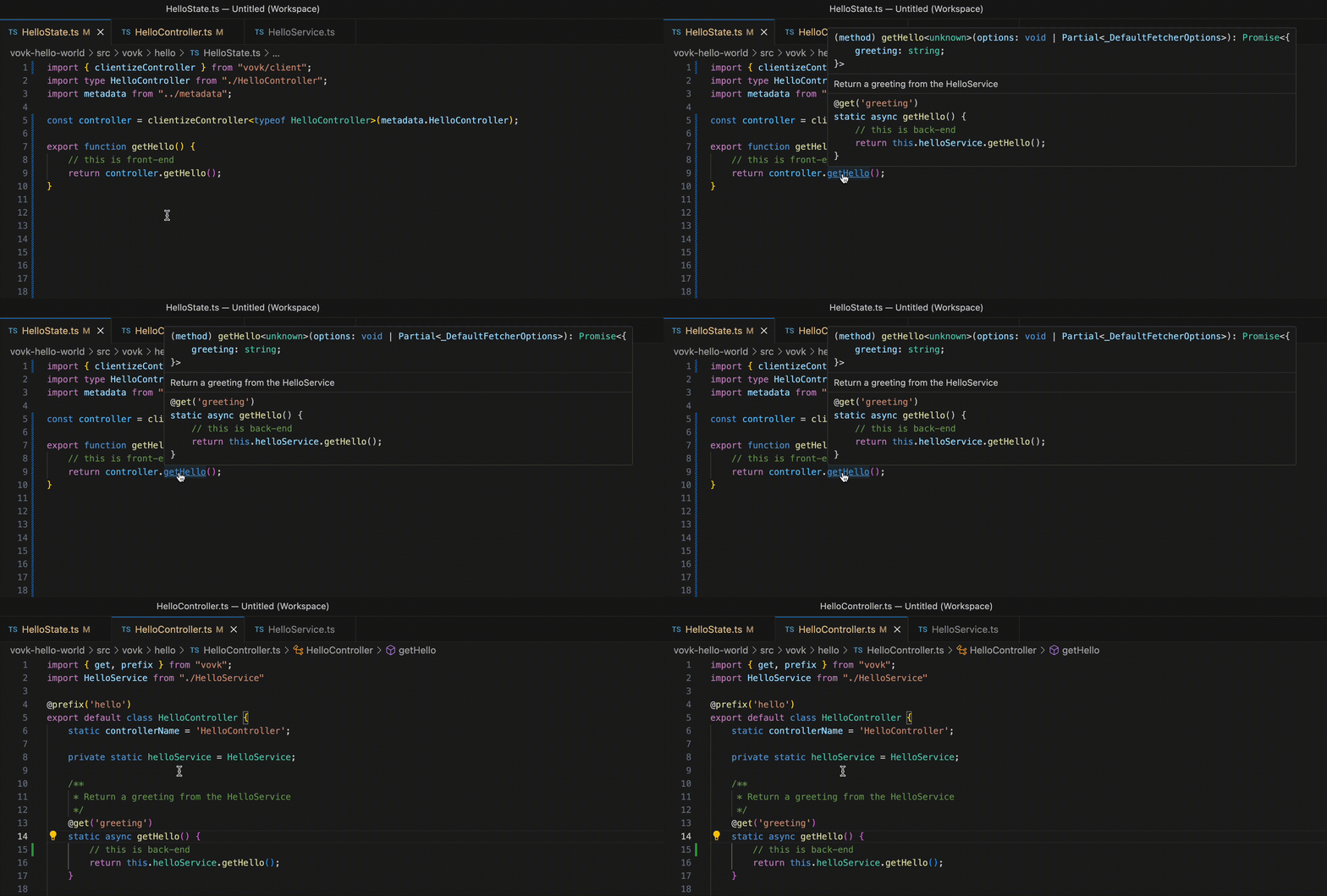
- No need to switch between repositories or folders in a monorepository. Jump thraight to the controller implementation with Ctrl+Click in VSCode.
|
|
53
|
+
- Solves very old problem on how to share TypeScript code between back-end and front-end introducing so-called Isomorphic Service
|
|
832
54
|
|
|
833
|
-
|
|
55
|
+
|