virtual-scroller 1.13.1 → 1.14.0
This diff represents the content of publicly available package versions that have been released to one of the supported registries. The information contained in this diff is provided for informational purposes only and reflects changes between package versions as they appear in their respective public registries.
- package/CHANGELOG.md +13 -0
- package/README.md +712 -524
- package/bundle/index-dom.html +2 -0
- package/bundle/virtual-scroller-dom.js +1 -1
- package/bundle/virtual-scroller-dom.js.map +1 -1
- package/bundle/virtual-scroller-react.js +1 -1
- package/bundle/virtual-scroller-react.js.map +1 -1
- package/bundle/virtual-scroller.js +1 -1
- package/bundle/virtual-scroller.js.map +1 -1
- package/commonjs/DOM/VirtualScroller.js +60 -31
- package/commonjs/DOM/VirtualScroller.js.map +1 -1
- package/commonjs/DOM/tbody.js +9 -9
- package/commonjs/DOM/tbody.js.map +1 -1
- package/commonjs/Layout.js +3 -3
- package/commonjs/Layout.js.map +1 -1
- package/commonjs/Scroll.js +3 -3
- package/commonjs/Scroll.js.map +1 -1
- package/commonjs/ScrollableContainerResizeHandler.js +4 -5
- package/commonjs/ScrollableContainerResizeHandler.js.map +1 -1
- package/commonjs/VirtualScroller.constructor.js +15 -27
- package/commonjs/VirtualScroller.constructor.js.map +1 -1
- package/commonjs/VirtualScroller.js +21 -14
- package/commonjs/VirtualScroller.js.map +1 -1
- package/commonjs/VirtualScroller.layout.js +2 -2
- package/commonjs/VirtualScroller.layout.js.map +1 -1
- package/commonjs/VirtualScroller.onRender.js +1 -1
- package/commonjs/VirtualScroller.onRender.js.map +1 -1
- package/commonjs/VirtualScroller.state.js +8 -0
- package/commonjs/VirtualScroller.state.js.map +1 -1
- package/commonjs/react/VirtualScroller.js +15 -5
- package/commonjs/react/VirtualScroller.js.map +1 -1
- package/commonjs/react/useState.js +1 -2
- package/commonjs/react/useState.js.map +1 -1
- package/commonjs/react/useVirtualScroller.js +8 -11
- package/commonjs/react/useVirtualScroller.js.map +1 -1
- package/dom/index.d.ts +5 -4
- package/index.d.ts +0 -1
- package/modules/DOM/VirtualScroller.js +60 -31
- package/modules/DOM/VirtualScroller.js.map +1 -1
- package/modules/DOM/tbody.js +10 -9
- package/modules/DOM/tbody.js.map +1 -1
- package/modules/Layout.js +3 -3
- package/modules/Layout.js.map +1 -1
- package/modules/Scroll.js +3 -3
- package/modules/Scroll.js.map +1 -1
- package/modules/ScrollableContainerResizeHandler.js +4 -5
- package/modules/ScrollableContainerResizeHandler.js.map +1 -1
- package/modules/VirtualScroller.constructor.js +16 -27
- package/modules/VirtualScroller.constructor.js.map +1 -1
- package/modules/VirtualScroller.js +21 -14
- package/modules/VirtualScroller.js.map +1 -1
- package/modules/VirtualScroller.layout.js +2 -2
- package/modules/VirtualScroller.layout.js.map +1 -1
- package/modules/VirtualScroller.onRender.js +1 -1
- package/modules/VirtualScroller.onRender.js.map +1 -1
- package/modules/VirtualScroller.state.js +8 -0
- package/modules/VirtualScroller.state.js.map +1 -1
- package/modules/react/VirtualScroller.js +15 -5
- package/modules/react/VirtualScroller.js.map +1 -1
- package/modules/react/useState.js +1 -2
- package/modules/react/useState.js.map +1 -1
- package/modules/react/useVirtualScroller.js +6 -9
- package/modules/react/useVirtualScroller.js.map +1 -1
- package/package.json +1 -1
- package/source/DOM/VirtualScroller.js +58 -27
- package/source/DOM/tbody.js +10 -9
- package/source/Layout.js +3 -3
- package/source/Scroll.js +3 -3
- package/source/ScrollableContainerResizeHandler.js +4 -4
- package/source/VirtualScroller.constructor.js +13 -27
- package/source/VirtualScroller.js +26 -13
- package/source/VirtualScroller.layout.js +2 -2
- package/source/VirtualScroller.onRender.js +1 -1
- package/source/VirtualScroller.state.js +8 -0
- package/source/react/VirtualScroller.js +16 -4
- package/source/react/useState.js +1 -2
- package/source/react/useVirtualScroller.js +0 -3
package/README.md
CHANGED
|
@@ -4,50 +4,48 @@ A universal open-source implementation of Twitter's [`VirtualScroller`](https://
|
|
|
4
4
|
|
|
5
5
|
<!-- Automatically measures items as they're rendered and supports items of variable/dynamic height. -->
|
|
6
6
|
|
|
7
|
-
* For React users,
|
|
8
|
-
* For those who prefer "vanilla" DOM,
|
|
9
|
-
* For everyone else,
|
|
7
|
+
* For React users, it exports a [React](#react) component from `virtual-scroller/react`.
|
|
8
|
+
* For those who prefer "vanilla" DOM, it exports a [DOM](#dom) component from `virtual-scroller/dom`.
|
|
9
|
+
* For everyone else, it exports a low-level [core](#core) component from `virtual-scroller`. The core component supports any type of UI "framework", or even any type of [rendering engine](#rendering-engine), not just DOM. Use it to create your own implementation for any UI "framework" or non-browser environment.
|
|
10
10
|
|
|
11
11
|
## Demo
|
|
12
12
|
|
|
13
|
-
[DOM](#dom)
|
|
13
|
+
[DOM](#dom) component
|
|
14
14
|
|
|
15
|
-
* [
|
|
16
|
-
* [
|
|
15
|
+
* [List](https://catamphetamine.gitlab.io/virtual-scroller/index-dom.html)
|
|
16
|
+
* [Paginated List](https://catamphetamine.gitlab.io/virtual-scroller/index-dom.html?dynamic=✓)
|
|
17
|
+
* [Table](https://catamphetamine.gitlab.io/virtual-scroller/index-tbody.html)
|
|
18
|
+
* [Table in a scrollable container](https://catamphetamine.gitlab.io/virtual-scroller/index-tbody-scrollableContainer.html)
|
|
17
19
|
|
|
18
|
-
[React](#react)
|
|
20
|
+
[React](#react) component
|
|
19
21
|
|
|
20
|
-
* [
|
|
21
|
-
* [
|
|
22
|
-
|
|
23
|
-
[Grid
|
|
24
|
-
|
|
25
|
-
* [Basic](https://catamphetamine.gitlab.io/virtual-scroller/index-grid.html)
|
|
26
|
-
* [Dynamically loaded](https://catamphetamine.gitlab.io/virtual-scroller/index-grid.html?dynamic=✓)
|
|
22
|
+
* [List](https://catamphetamine.gitlab.io/virtual-scroller/)
|
|
23
|
+
* [Paginated List](https://catamphetamine.gitlab.io/virtual-scroller/?dynamic=✓)
|
|
24
|
+
* [List in a scrollable container](https://catamphetamine.gitlab.io/virtual-scroller/index-scrollableContainer.html)
|
|
25
|
+
* [Grid](https://catamphetamine.gitlab.io/virtual-scroller/index-grid.html)
|
|
26
|
+
* [Paginated Grid](https://catamphetamine.gitlab.io/virtual-scroller/index-grid.html?dynamic=✓)
|
|
27
27
|
|
|
28
28
|
## Rationale
|
|
29
29
|
|
|
30
|
-
Rendering
|
|
30
|
+
Rendering extremely long lists in HTML can be performance-intensive and could lead to slow page load times and wasting mobile device battery. For example, consider a "messenger" app that renders a list of a thousand comments. Depending on the user's device and the complexity of the message component, the full render cycle could be anywhere from 100 milliseconds to 1 second. That kind of a delay results in degradation of the percieved performance and could lead to the user not wanting to use the website or the application.
|
|
31
31
|
|
|
32
|
-
|
|
32
|
+
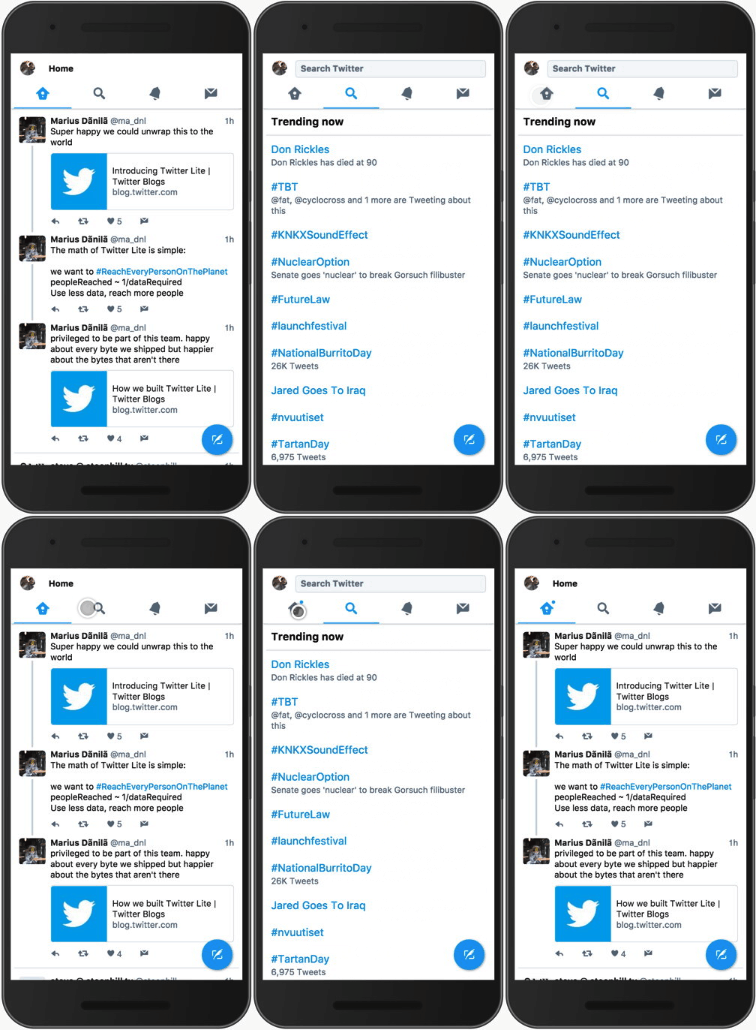
|
|
33
33
|
|
|
34
|
-
|
|
34
|
+
Twitter was experiencing the same issues and in 2017 they completely redesigned their website with responsiveness and performance in mind using the latest performance-boosting techniques available at the time. Afterwards, they wrote an [article](https://medium.com/@paularmstrong/twitter-lite-and-high-performance-react-progressive-web-apps-at-scale-d28a00e780a3) where they briefly mentioned this:
|
|
35
35
|
|
|
36
36
|
> On slower devices, we noticed that it could take a long time for our main navigation bar to appear to respond to taps, often leading us to tap multiple times, thinking that perhaps the first tap didn’t register.
|
|
37
37
|
It turns out that mounting and unmounting large trees of components (like timelines of Tweets) is very expensive in React.
|
|
38
38
|
Over time, we developed a new infinite scrolling component called VirtualScroller. With this new component, we know exactly what slice of Tweets are being rendered into a timeline at any given time, avoiding the need to make expensive calculations as to where we are visually.
|
|
39
39
|
|
|
40
|
-
However, Twitter didn't share the code for their `VirtualScroller` component
|
|
40
|
+
However, Twitter didn't share the code for their `VirtualScroller` component — unlike Facebook, Twitter doesn't share much of their code. This library is an attempt to create an open-source implementation of such `VirtualScroller` component for anyone to use in their projects.
|
|
41
41
|
|
|
42
|
-
There's also an ["RFC"](https://github.com/WICG/virtual-scroller) for a native `VirtualScroller` component where they try to formulate what is a `VirtualScroller` component and how it should behave.
|
|
42
|
+
<!-- There's also an ["RFC"](https://github.com/WICG/virtual-scroller) for a native `VirtualScroller` component where they try to formulate what is a `VirtualScroller` component and how it should behave. -->
|
|
43
43
|
|
|
44
44
|
## How it works
|
|
45
45
|
|
|
46
|
-
`VirtualScroller` works by measuring each list item's height as
|
|
46
|
+
`VirtualScroller` works by measuring each list item's height. As soon as the total height of the list items surpasses the window height, it stops the rendering because the user won't see those other items anyway. The non-rendered items are replaced with an empty space: not-visible items at the top are replaced with `padding-top` on the list element, and not-visible items at the bottom are replaced with `padding-bottom` on the list element. Then it listens to `scroll` / `resize` events and re-renders the list when the user scrolls the page or when the browser window is resized.
|
|
47
47
|
|
|
48
|
-
To observe
|
|
49
|
-
|
|
50
|
-
To add some inter-item spacing, one could use `margin-top` / `margin-bottom` or `border-top` / `border-bottom`: see the [Gotchas](#gotchas) section for more details on how to do that properly.
|
|
48
|
+
To observe the whole process in real time, go to the [demo](https://catamphetamine.gitlab.io/virtual-scroller) page, open Developer Tools, switch to the "Elements" tab, find `<div id="messages"/>` element, expand it and observe how it changes while scrolling the page.
|
|
51
49
|
|
|
52
50
|
## Install
|
|
53
51
|
|
|
@@ -55,17 +53,498 @@ To add some inter-item spacing, one could use `margin-top` / `margin-bottom` or
|
|
|
55
53
|
npm install virtual-scroller --save
|
|
56
54
|
```
|
|
57
55
|
|
|
58
|
-
|
|
56
|
+
Alternatively, one could include it on a web page [directly](#cdn) via a `<script/>` tag.
|
|
57
|
+
|
|
58
|
+
## Use
|
|
59
|
+
|
|
60
|
+
As it has been mentioned, this package exports three different components:
|
|
61
|
+
|
|
62
|
+
* For React framework — `virtual-scroller/react`
|
|
63
|
+
* For "vanilla" DOM — `virtual-scroller/dom`
|
|
64
|
+
* For any other case ("core") — `virtual-scroller`
|
|
65
|
+
|
|
66
|
+
Below is a description of each component.
|
|
67
|
+
|
|
68
|
+
## React
|
|
69
|
+
|
|
70
|
+
`virtual-scroller/react` exports a React component — `<VirtualScroller/>` — that implements a "virtual scroller" in a [React](https://reactjs.org/) environment.
|
|
71
|
+
|
|
72
|
+
The React component is based on the ["core"](#core) component, and it requires the following properties:
|
|
73
|
+
|
|
74
|
+
* `items` — The list of items.
|
|
75
|
+
|
|
76
|
+
* `itemComponent` — The React component for a list item.
|
|
77
|
+
|
|
78
|
+
* The `itemComponent` will receive properties:
|
|
79
|
+
* `item` — The item object (an element of the `items` array). Use it to render the item.
|
|
80
|
+
* `state` and `setState()` — Item component state management properties.
|
|
81
|
+
* Use these instead of the standard `const [state, setState] = useState()`. The reason is that the standard `useState()` will always disappear when the item component is no longer rendered when it goes off-screen whereas this "special" state will always be preserved.
|
|
82
|
+
<!-- * `state` — The item component's "state". -->
|
|
83
|
+
<!-- * Curious readers may see the description of `itemStates` property of the `state` object in the ["core"](#core) component section. -->
|
|
84
|
+
<!-- * `setState(newState)` — Sets the item component's "state". -->
|
|
85
|
+
<!-- * Curious readers may see the description of `setItemState(i, newState)` function in the ["core"](#core) component section. -->
|
|
86
|
+
* `onHeightDidChange()` — Call this function whenever the item's height changes, if it ever does. For example, if the item could be "expanded" and the user clicks that button. The reason for manually calling this function is because `<VirtualScroller/>` only bothers measuring the item's height when the items is initially rendered. After that, it just assumes that the item's height always stays the same and doesn't track it in any way. Hence, a developer is responsible for manually telling it to re-measure the item's height if it has changed for whatever reason.
|
|
87
|
+
* When calling this function, do it immediately after the item's height has changed on the screen, i.e. do it in `useLayoutEffect()` hook.
|
|
88
|
+
|
|
89
|
+
* As an optional performance optimization, it is advised to wrap the `itemComponent` with a [`React.memo()`](https://react.dev/reference/react/memo) function. It will prevent needless re-renders of the component when its props haven't changed (and they never do). The rationale is that all visible items get frequently re-rendered during scroll.
|
|
90
|
+
|
|
91
|
+
Code example:
|
|
92
|
+
|
|
93
|
+
#####
|
|
94
|
+
|
|
95
|
+
```js
|
|
96
|
+
import React from 'react'
|
|
97
|
+
import VirtualScroller from 'virtual-scroller/react'
|
|
98
|
+
|
|
99
|
+
function List({ items }) {
|
|
100
|
+
return (
|
|
101
|
+
<VirtualScroller
|
|
102
|
+
items={items}
|
|
103
|
+
itemComponent={ListItem}
|
|
104
|
+
/>
|
|
105
|
+
)
|
|
106
|
+
}
|
|
107
|
+
|
|
108
|
+
function ListItem({ item }) {
|
|
109
|
+
const { username, date, text } = item
|
|
110
|
+
return (
|
|
111
|
+
<article>
|
|
112
|
+
<a href={`/users/${username}`}>
|
|
113
|
+
@{username}
|
|
114
|
+
</a>
|
|
115
|
+
<time dateTime={date.toISOString()}>
|
|
116
|
+
{date.toString()}
|
|
117
|
+
</time>
|
|
118
|
+
<p>
|
|
119
|
+
{text}
|
|
120
|
+
</p>
|
|
121
|
+
</article>
|
|
122
|
+
)
|
|
123
|
+
}
|
|
124
|
+
```
|
|
125
|
+
|
|
126
|
+
<!--
|
|
127
|
+
import PropTypes from 'prop-types'
|
|
128
|
+
|
|
129
|
+
const item = PropTypes.shape({
|
|
130
|
+
username: PropTypes.string.isRequired,
|
|
131
|
+
date: PropTypes.instanceOf(Date).isRequired,
|
|
132
|
+
text: PropTypes.string.isRequired
|
|
133
|
+
})
|
|
134
|
+
|
|
135
|
+
List.propTypes = {
|
|
136
|
+
items: PropTypes.arrayOf(item).isRequired
|
|
137
|
+
}
|
|
138
|
+
|
|
139
|
+
ListItem.propTypes = {
|
|
140
|
+
item: item.isRequired
|
|
141
|
+
}
|
|
142
|
+
|
|
143
|
+
function App() {
|
|
144
|
+
return (
|
|
145
|
+
<List items=[{
|
|
146
|
+
username: 'barackobama',
|
|
147
|
+
date: new Date(),
|
|
148
|
+
text: 'Hey hey people'
|
|
149
|
+
}]/>
|
|
150
|
+
)
|
|
151
|
+
}
|
|
152
|
+
-->
|
|
153
|
+
|
|
154
|
+
<details>
|
|
155
|
+
<summary>More on <code>state</code>, <code>setState</code> and <code>onHeightChange()</code></summary>
|
|
156
|
+
|
|
157
|
+
#####
|
|
158
|
+
|
|
159
|
+
If the `itemComponent` has any internal state, it should be stored in the "virtual scroller" `state` rather than in the usual React state. This is because an item component gets unmounted as soon as it goes off screen, and when it does, all its React state is lost. If the user then scrolls back, the item will be re-rendered "from scratch", without any previous state, which could cause a "jump of content" if the item was somehow "expanded" before it got unmounted.
|
|
160
|
+
|
|
161
|
+
For example, consider a social network feed where the feed items (posts) can be expanded or collapsed via a "Show more"/"Show less" button. Suppose a user clicks a "Show more" button in a post resulting in that post expanding in height. Then the user scrolls down, and since the post is no longer visible, it gets unmounted. Since no state is preserved by default, when the user scrolls back up and the post gets mounted again, its previous state will be lost and it will render in a default non-expanded state, resulting in a perceived "jump" of page content by the difference in height between the expanded and non-expanded post state.
|
|
162
|
+
|
|
163
|
+
To fix that, `itemComponent` receives the following state management properties:
|
|
164
|
+
|
|
165
|
+
* `state` — The state of the item component. It is persisted throughout the entire lifecycle of the list.
|
|
166
|
+
|
|
167
|
+
* In the example described above, `state` might look like `{ expanded: true }`.
|
|
168
|
+
|
|
169
|
+
* This is simply a proxy for the ["core"](#core) component's `.getState().itemStates[i]`.
|
|
170
|
+
|
|
171
|
+
* `setState(newState)` — Use this function to save the item component state whenever it changes.
|
|
172
|
+
|
|
173
|
+
* In the example described above, `setState({ expanded: true/false })` would be called whenever a user clicks a "Show more"/"Show less" button.
|
|
174
|
+
|
|
175
|
+
* This is simply a proxy for the ["core"](#core) component's `.setItemState(i, newState)`.
|
|
176
|
+
|
|
177
|
+
* `onHeightDidChange()` — Call this function immediately after (if ever) the item element height has changed.
|
|
178
|
+
|
|
179
|
+
* In the example described above, `onHeightDidChange()` would be called immediately after a user has clicked a "Show more"/"Show less" button and the component has re-rendered itself. Because that sequence of events has resulted in a change of the item element's height, `VirtualScroller` should re-measure the item's height in order for its internal calculations to stay in sync.
|
|
180
|
+
|
|
181
|
+
* This is simply a proxy for the ["core"](#core) component's `.onItemHeightDidChange(i)`.
|
|
182
|
+
|
|
183
|
+
Example of using `state`/`setState()`/`onHeightDidChange()`:
|
|
184
|
+
|
|
185
|
+
```js
|
|
186
|
+
function ItemComponent({
|
|
187
|
+
item,
|
|
188
|
+
state,
|
|
189
|
+
setState,
|
|
190
|
+
onHeightDidChange
|
|
191
|
+
}) {
|
|
192
|
+
const [internalState, setInternalState] = useState(state)
|
|
193
|
+
|
|
194
|
+
const hasMounted = useRef()
|
|
195
|
+
|
|
196
|
+
useLayoutEffect(() => {
|
|
197
|
+
if (hasMounted.current) {
|
|
198
|
+
setState(internalState)
|
|
199
|
+
onHeightDidChange()
|
|
200
|
+
} else {
|
|
201
|
+
// Skip the initial mount.
|
|
202
|
+
// Only handle the changes of the `internalState`.
|
|
203
|
+
hasMounted.current = true
|
|
204
|
+
}
|
|
205
|
+
}, [internalState])
|
|
206
|
+
|
|
207
|
+
return (
|
|
208
|
+
<section>
|
|
209
|
+
<h1>
|
|
210
|
+
{item.title}
|
|
211
|
+
</h1>
|
|
212
|
+
{internalState && internalState.expanded &&
|
|
213
|
+
<p>{item.text}</p>
|
|
214
|
+
}
|
|
215
|
+
<button onClick={() => {
|
|
216
|
+
setInternalState({
|
|
217
|
+
...internalState,
|
|
218
|
+
expanded: !expanded
|
|
219
|
+
})
|
|
220
|
+
}}>
|
|
221
|
+
{internalState && internalState.expanded ? 'Show less' : 'Show more'}
|
|
222
|
+
</button>
|
|
223
|
+
</section>
|
|
224
|
+
)
|
|
225
|
+
}
|
|
226
|
+
```
|
|
227
|
+
</details>
|
|
228
|
+
|
|
229
|
+
#####
|
|
230
|
+
|
|
231
|
+
<details>
|
|
232
|
+
<summary><code><VirtualScroller/></code> optional properties</summary>
|
|
233
|
+
|
|
234
|
+
#####
|
|
235
|
+
|
|
236
|
+
<!-- Note: When passing any core `VirtualScroller` class options, only the initial values of those options will be applied, and any updates to those options will be ignored. That's because those options are only passed to the `VirtualScroller` base class constructor at initialization time. That means that none of those options should depend on any variable state or props. For example, if `getColumnsCount()` parameter was defined as `() => props.columnsCount`, then, if the `columnsCount` property changes, the underlying `VirtualScroller` instance won't see that change. -->
|
|
237
|
+
|
|
238
|
+
* `as` — a React component that will be used as a container for the list items. Is `"div"` by default.
|
|
239
|
+
* Edge case: when list items are rendered as `<tr/>`s and the items container is a `<tbody/>`, `as` property value must be `"tbody"`, otherwise it won't work correctly.
|
|
240
|
+
|
|
241
|
+
* `itemComponentProps: object` — These props will be passed through to the `itemComponent`.
|
|
242
|
+
|
|
243
|
+
* `getColumnsCount(): number` — Returns the count of the columns.
|
|
244
|
+
* This is simply a proxy for the ["core"](#core) component's `getColumnsCount` option.
|
|
245
|
+
* Only the initial value of this property is used, and any changes to it will be ignored.
|
|
246
|
+
|
|
247
|
+
* `getInitialItemState: (item: any) => any?` — If you're using `state`/`setState()` properties, this function could be used to define the initial `state` for every item in the list. By default, the initial state of an item is `undefined`.
|
|
248
|
+
* This is simply a proxy for the ["core"](#core) component's `getInitialItemState` option.
|
|
249
|
+
* Only the initial value of this property is used, and any changes to it will be ignored.
|
|
250
|
+
|
|
251
|
+
* `initialState: object` — The initial state of the entire list, including the initial state of each item. For example, one could snapshot this state right before the list is unmounted and then pass it back in the form of the `initialState` property when the list is re-mounted, effectively preserving the list's state. This could be used, for example, to instantly restore the list and its scroll position when the user navigates "Back" to the list's page in a web browser. P.S. In that specific case of using `initialState` property for "Back" restoration, a developer might need to pass `readyToStart: false` property until the "Back" page's scroll position has been restored.
|
|
252
|
+
* This is simply a proxy for the ["core"](#core) component's `state` option.
|
|
253
|
+
* Only the initial value of this property is used, and any changes to it will be ignored.
|
|
254
|
+
|
|
255
|
+
<!-- * `initialCustomState: object` — (advanced) The initial "custom" state for `VirtualScroller`: the `initialCustomState` option of `VirtualScroller`. It can be used to initialize the "custom" part of `VirtualScroller` state in cases when `VirtualScroller` state is used to store some "custom" list state. -->
|
|
256
|
+
|
|
257
|
+
* `onStateChange(newState: object, previousState: object?)` — When this function is passed, it will be called every time the list's state is changed. Use it together with `initialState` property to preserve the list's state while it is unmounted.
|
|
258
|
+
* This is simply a proxy for the ["core"](#core) component's `onStateChange` option.
|
|
259
|
+
* Only the initial value of this property is used, and any changes to it will be ignored.
|
|
260
|
+
|
|
261
|
+
Example of using `initialState`/`onStateChange()`:
|
|
262
|
+
|
|
263
|
+
```js
|
|
264
|
+
function ListWithPreservedState() {
|
|
265
|
+
const listState = useRef()
|
|
266
|
+
|
|
267
|
+
const onListStateChange = useCallback(
|
|
268
|
+
(state) => {
|
|
269
|
+
listState.current = state
|
|
270
|
+
},
|
|
271
|
+
[]
|
|
272
|
+
)
|
|
273
|
+
|
|
274
|
+
useEffect(() => {
|
|
275
|
+
return () => {
|
|
276
|
+
saveListState(listState.current)
|
|
277
|
+
}
|
|
278
|
+
}, [])
|
|
279
|
+
|
|
280
|
+
return (
|
|
281
|
+
<VirtualScroller
|
|
282
|
+
{...}
|
|
283
|
+
initialState={hasUserNavigatedBackToThisPage ? getSavedListState() : undefined}
|
|
284
|
+
onStateChange={onListStateChange}
|
|
285
|
+
/>
|
|
286
|
+
)
|
|
287
|
+
}
|
|
288
|
+
```
|
|
289
|
+
|
|
290
|
+
* `getItemId(item): any`
|
|
291
|
+
* This is simply a proxy for the ["core"](#core) component's `getItemId` option.
|
|
292
|
+
* Only the initial value of this property is used, and any changes to it will be ignored.
|
|
293
|
+
* `<VirtualScroller/>` also uses it to create a React `key` for every item's element. When `getItemId()` property is not passed, an item element's `key` will consist of the item's index in the `items` array plus a random-generated prefix that changes every time when `items` property value changes. This means that when the application frequently changes the `items` property, a developer could optimize it a little bit by supplying a custom `getItemId()` function whose result doesn't change when new `items` are supplied, preventing `<VirtualScroller/>` from needlessly re-rendering all visible items every time the `items` property is updated.
|
|
294
|
+
|
|
295
|
+
* `preserveScrollPositionOnPrependItems: boolean` — By default, when prepending new items to the list, the existing items will be pushed downwards on screen. For a user, it would look as if the scroll position has suddenly "jumped", even though technically the scroll position has stayed the same — it's just that the content itself has "jumped". But the user's perception is still that the scroll position has "jumped", as if the application was "buggy". In order to fix such inconvenience, one could pass `true` value here to automatically adjust the scroll position every time when prepending new items to the list. To the end user it would look as if the scroll position is correctly "preserved" when prepending new items to the list, i.e. the application works correctly.
|
|
296
|
+
* This is simply a proxy for the ["core"](#core) component's `.setItems()` method's `preserveScrollPositionOnPrependItems` option.
|
|
297
|
+
* Only the initial value of this property is used, and any changes to it will be ignored.
|
|
298
|
+
|
|
299
|
+
* `readyToStart: boolean` — One could initially pass `false` here in order to just initially render the `<VirtualScroller/>` with the provided `initialState` and then hold off calling the `.start()` method of the ["core"](#core) component, effectively "freezing" the `<VirtualScroller/>` until the `false` value is changed to `true`. While in "frozen" state, the `<VirtualScroller/>` will not attempt to re-render itself according to the current scroll position, postponing any such re-renders until `readyToStart` property `false` value is changed to `true`.
|
|
300
|
+
* An example when this could be required is when a user navigates "Back" to the list's page in a web browser. In that case, the application may use the `initialState` property in an attempt to instantly restore the state of the entire list from a previously-saved snapshot, so that it immediately shows the same items that it was showing before the user navigated away from the list's page. But even if the application passes the previously-snapshotted `initialState`, by default the list will still re-render itself according to the current scroll position. And there wouldn't be any issue with that if the page's scroll position has already been restored to what it was before the user navigated away from the list's page. But if by the time the list is mounted, the page's scroll position hasn't been restored yet, the list will re-render itself with an "incorrect" scroll position, and it will "jump" to completely different items, very unexpectedly to the user, as if the application was "buggy". How could scroll position restoration possibly lag behind? In React it's actually very simple: `<VirtualScroller/>` re-renders itself in a `useLayoutEffect()` hook, which, by React's design, runs before any `useLayoutEffect()` hook in any of the parent components, including the top-level "router" component that handles scroll position restoration on page mount. So it becomes a ["chicken-and-egg"](https://en.wikipedia.org/wiki/Chicken_or_the_egg) problem. And `readyToStart: false` property is the only viable workaround for this dilemma: as soon as the top-level "router" component has finished restoring the scroll position, it could somehow signal that to the rest of the application, and then the application would pass `readyToStart: true` property to the `<VirtualScroller/>` component, unblocking it from re-rendering itself.
|
|
301
|
+
|
|
302
|
+
* `getScrollableContainer(): Element`
|
|
303
|
+
* This is simply a proxy for the ["core"](#core) component's `getScrollableContainer` option.
|
|
304
|
+
* Only the initial value of this property is used, and any changes to it will be ignored.
|
|
305
|
+
* This function will first be called only after `<VirtualScroller/>` component is mounted, and by that time all of its ancestors are also mounted. Until then, this function will not be called, so it's completely fine if it returns `undefined` before the component is mounted.
|
|
306
|
+
|
|
307
|
+
Example of `getScrollableContainer()`:
|
|
308
|
+
|
|
309
|
+
```js
|
|
310
|
+
function ListContainer() {
|
|
311
|
+
const scrollableContainer = useRef()
|
|
312
|
+
|
|
313
|
+
// This function returns `undefined` until the `<ListContainer/>` is mounted, but it's fine,
|
|
314
|
+
// because the `<VirtualScroller/>` will only call it when it itself has mounted, and by that time
|
|
315
|
+
// `scrollableContainer.current` will already have been set to a non-`undefined` `HTMLDivElement`.
|
|
316
|
+
const getScrollableContainer = useCallback(() => {
|
|
317
|
+
return scrollableContainer.current
|
|
318
|
+
}, [])
|
|
319
|
+
|
|
320
|
+
return (
|
|
321
|
+
<div ref={scrollableContainer} style={{ height: "400px", overflow: "scroll" }}>
|
|
322
|
+
<VirtualScroller
|
|
323
|
+
{...}
|
|
324
|
+
getScrollableContainer={getScrollableContainer}
|
|
325
|
+
/>
|
|
326
|
+
</div>
|
|
327
|
+
)
|
|
328
|
+
}
|
|
329
|
+
```
|
|
330
|
+
|
|
331
|
+
<!--
|
|
332
|
+
(this property has been ignored for a long time and was eventually removed)
|
|
333
|
+
|
|
334
|
+
* `tbody: boolean` — When the container for the list items is going to be a `<tbody/>`, a developer must pass a `tbody: true` property in order for the `<VirtualScroller/>` to work correctly.
|
|
335
|
+
* This is simply a proxy for the ["core"](#core) component's `tbody` option.
|
|
336
|
+
* Only the initial value of this property is used, and any changes to it will be ignored.
|
|
337
|
+
-->
|
|
338
|
+
|
|
339
|
+
* `onItemInitialRender(item)` — When passed, this function will be called for each item when it's rendered for the first time. It could be used to somehow "initialize" an item, if required.
|
|
340
|
+
* This is simply a proxy for the ["core"](#core) component's `onItemInitialRender` option.
|
|
341
|
+
* Only the initial value of this property is used, and any changes to it will be ignored.
|
|
342
|
+
|
|
343
|
+
* `bypass: boolean` — Disables the "virtual" aspect of the list, effectively making it a regular "dumb" list that just renders all items.
|
|
344
|
+
* This is simply a proxy for the ["core"](#core) component's `bypass` option.
|
|
345
|
+
* Only the initial value of this property is used, and any changes to it will be ignored.
|
|
346
|
+
|
|
347
|
+
* `getEstimatedItemHeight: () => number` — (unimportant)
|
|
348
|
+
* This is simply a proxy for the ["core"](#core) component's `getEstimatedItemHeight` option.
|
|
349
|
+
* Only the initial value of this property is used, and any changes to it will be ignored.
|
|
350
|
+
|
|
351
|
+
* `getEstimatedVisibleItemRowsCount: () => number` — (unimportant)
|
|
352
|
+
* This is simply a proxy for the ["core"](#core) component's `getEstimatedVisibleItemRowsCount` option.
|
|
353
|
+
* Only the initial value of this property is used, and any changes to it will be ignored.
|
|
354
|
+
|
|
355
|
+
* `measureItemsBatchSize: number` — (unimportant)
|
|
356
|
+
* This is simply a proxy for the ["core"](#core) component's `measureItemsBatchSize` option.
|
|
357
|
+
* Only the initial value of this property is used, and any changes to it will be ignored.
|
|
358
|
+
|
|
359
|
+
<!-- * `onMount()` — Is called after `<VirtualScroller/>` component has been mounted and before `VirtualScroller.onMount()` is called. -->
|
|
360
|
+
|
|
361
|
+
<!-- * `shouldUpdateLayoutOnScreenResize(event)` — The `shouldUpdateLayoutOnScreenResize` option of `VirtualScroller` class. -->
|
|
362
|
+
|
|
363
|
+
<!--
|
|
364
|
+
If one considers that `useEffect()` hooks [run in the order from child element to parent element](https://stackoverflow.com/questions/58352375/what-is-the-correct-order-of-execution-of-useeffect-in-react-parent-and-child-co), one can conclude that there's no way that the application's `useLayoutEffect()` hook could run before the `useLayoutEffect()` hook in a `<VirtualScroller/>` component. Therefore, there's only one option to make it work, and that would be only rendering `<VirtualScroller/>` after the scrollable container has mounted:
|
|
365
|
+
|
|
366
|
+
```js
|
|
367
|
+
import React, { useState, useLayoutEffect } from 'react'
|
|
368
|
+
import VirtualScroller from 'virtual-scroller'
|
|
369
|
+
|
|
370
|
+
function ListContainer() {
|
|
371
|
+
return (
|
|
372
|
+
<div id="ListContainer">
|
|
373
|
+
<List/>
|
|
374
|
+
</div>
|
|
375
|
+
)
|
|
376
|
+
}
|
|
377
|
+
|
|
378
|
+
function List() {
|
|
379
|
+
const [scrollableContainerHasMounted, setScrollableContainerHasMounted] = useState()
|
|
380
|
+
|
|
381
|
+
useLayoutEffect(() => {
|
|
382
|
+
setScrollableContainerHasMounted(true)
|
|
383
|
+
}, [])
|
|
384
|
+
|
|
385
|
+
if (!scrollableContainerHasMounted) {
|
|
386
|
+
return null
|
|
387
|
+
}
|
|
388
|
+
|
|
389
|
+
return (
|
|
390
|
+
<VirtualScroller
|
|
391
|
+
items={...}
|
|
392
|
+
itemComponent={...}
|
|
393
|
+
getScrollableContainer={getScrollableContainer}
|
|
394
|
+
/>
|
|
395
|
+
)
|
|
396
|
+
}
|
|
397
|
+
|
|
398
|
+
function getScrollableContainer() {
|
|
399
|
+
return document.getElementById('ListContainer')
|
|
400
|
+
}
|
|
401
|
+
```
|
|
402
|
+
|
|
403
|
+
```css
|
|
404
|
+
#ListContainer {
|
|
405
|
+
max-height: 30rem;
|
|
406
|
+
overflow-y: auto;
|
|
407
|
+
}
|
|
408
|
+
```
|
|
409
|
+
-->
|
|
410
|
+
</details>
|
|
411
|
+
|
|
412
|
+
#####
|
|
413
|
+
|
|
414
|
+
<details>
|
|
415
|
+
<summary><code><VirtualScroller/></code> instance methods</summary>
|
|
416
|
+
|
|
417
|
+
#####
|
|
418
|
+
|
|
419
|
+
<!--
|
|
420
|
+
* `renderItem(i)` — Calls `.forceUpdate()` on the `itemComponent` instance for the item with index `i`. Does nothing if the item isn't currently rendered. Is only supported for `itemComponent`s that are `React.Component`s. The `i` item index argument could be replaced with the item object itself, in which case `<VirtualScroller/>` will get `i` as `items.indexOf(item)`.
|
|
421
|
+
-->
|
|
422
|
+
|
|
423
|
+
<!-- * `getItemCoordinates(i)` — A proxy for the corresponding `VirtualScroller` method. -->
|
|
424
|
+
|
|
425
|
+
* `updateLayout()` — Forces a re-calculation and re-render of the list.
|
|
426
|
+
* This is simply a proxy for the ["core"](#core) component's `.updateLayout()` method.
|
|
427
|
+
|
|
428
|
+
</details>
|
|
429
|
+
|
|
430
|
+
## DOM
|
|
431
|
+
|
|
432
|
+
`virtual-scroller/dom` exports a `VirtualScroller` class that implements a "virtual scroller" in a standard [Document Object Model](https://en.wikipedia.org/wiki/Document_Object_Model) environment such as a web browser.
|
|
433
|
+
|
|
434
|
+
The `VirtualScroller` class is based on the ["core"](#core) component, and its constructor has the following arguments:
|
|
435
|
+
|
|
436
|
+
* `itemsContainerElement` — Items container DOM `Element`. Alternatively, one could pass a `getItemsContainerElement()` function that returns a DOM `Element`.
|
|
437
|
+
* `items` — The list of items.
|
|
438
|
+
* `renderItem(item): Element` — A function that transforms an `item` into a DOM `Element`.
|
|
439
|
+
* `options` — (optional) See the "Available options" section below.
|
|
440
|
+
|
|
441
|
+
<!-- It `.start()`s automatically upon being created, so there's no need to call `.start()` after creating it. -->
|
|
442
|
+
|
|
443
|
+
Code example:
|
|
444
|
+
|
|
445
|
+
```js
|
|
446
|
+
import VirtualScroller from 'virtual-scroller/dom'
|
|
447
|
+
|
|
448
|
+
// A list of comments.
|
|
449
|
+
const items = [
|
|
450
|
+
{
|
|
451
|
+
username: 'john.smith',
|
|
452
|
+
date: new Date(),
|
|
453
|
+
comment: 'I woke up today'
|
|
454
|
+
},
|
|
455
|
+
...
|
|
456
|
+
]
|
|
457
|
+
|
|
458
|
+
function renderItem(item) {
|
|
459
|
+
const { username, date, comment } = item
|
|
460
|
+
|
|
461
|
+
// Comment element.
|
|
462
|
+
const element = document.createElement('article')
|
|
463
|
+
|
|
464
|
+
// Comment author.
|
|
465
|
+
const author = document.createElement('a')
|
|
466
|
+
author.setAttribute('href', `/users/${username}`)
|
|
467
|
+
author.textContent = `@${username}`
|
|
468
|
+
element.appendChild(author)
|
|
469
|
+
|
|
470
|
+
// Comment date.
|
|
471
|
+
const time = document.createElement('time')
|
|
472
|
+
time.setAttribute('datetime', date.toISOString())
|
|
473
|
+
time.textContent = date.toString()
|
|
474
|
+
element.appendChild(time)
|
|
475
|
+
|
|
476
|
+
// Comment text.
|
|
477
|
+
const text = document.createElement('p')
|
|
478
|
+
text.textContent = comment
|
|
479
|
+
element.appendChild(text)
|
|
480
|
+
|
|
481
|
+
// Return the DOM Element.
|
|
482
|
+
return element
|
|
483
|
+
}
|
|
484
|
+
|
|
485
|
+
// Where the list items will be rendered.
|
|
486
|
+
const itemsContainerElement = document.getElementById('comments')
|
|
487
|
+
|
|
488
|
+
// Create a "virtual scroller" instance.
|
|
489
|
+
// It automatically renders the list and starts listening to scroll events.
|
|
490
|
+
const virtualScroller = new VirtualScroller(
|
|
491
|
+
itemsContainerElement,
|
|
492
|
+
items,
|
|
493
|
+
renderItem
|
|
494
|
+
)
|
|
495
|
+
|
|
496
|
+
// When the list will no longer be rendered, the "virtual scroller" should be stopped.
|
|
497
|
+
// For example, that could happen when the user navigates away from the page.
|
|
498
|
+
//
|
|
499
|
+
// virtualScroller.stop()
|
|
500
|
+
```
|
|
501
|
+
<details>
|
|
502
|
+
<summary>Available <code>options</code></summary>
|
|
503
|
+
|
|
504
|
+
#####
|
|
505
|
+
|
|
506
|
+
<!-- * `onMount()` — Is called before `VirtualScroller.onMount()` is called. -->
|
|
507
|
+
|
|
508
|
+
* `onItemUnmount(itemElement: Element)` — Will be called every time when the list unmounts a DOM `Element` for some item that is no longer visible. Rather than discarding such a DOM `Element`, the application could reuse it for another item. Why? Because they say that reusing existing DOM `Element`s is 2-6 times [faster](https://github.com/ChrisAntaki/dom-pool#what-performance-gains-can-i-expect) than creating new ones.
|
|
509
|
+
|
|
510
|
+
* `readyToStart: boolean` — By default, the list gets rendered and starts working immediately after `new VirtualScroller()` constructor is called. Theoretically, one could imagine how such streamlined pipeline might not be suitable for all possible edge cases, so to opt out of the immediate auto-start behavior, a developer could pass a `readyToStart: false` option when creating a `VirtualScroller` instance. In that case, the `VirtualScroller` instance will perform just the initial render (with the initial `state`), after which it will "freeze" itself until the developer manually calls `.start()` instance method, at which point the list will be unblocked from re-rendering itself in response to user's actions, such as scrolling the page.
|
|
511
|
+
|
|
512
|
+
* `readyToRender: boolean` — The `readyToStart: false` option described above "freezes" the list for any updates but it still performs the initial render of it. If even the initial render of the list should be postponed, pass `readyToRender: false` option, and it will not only prevent the automatic "start" of the `VirtualScroller` at creation time, but it will also prevent the automatic initial render of it until the developer manually calls `.start()` instance method.
|
|
513
|
+
|
|
514
|
+
* Any other options are simply passed through to the ["core"](#core) component.
|
|
515
|
+
</details>
|
|
516
|
+
|
|
517
|
+
#####
|
|
518
|
+
|
|
519
|
+
<details>
|
|
520
|
+
<summary>Instance methods</summary>
|
|
521
|
+
|
|
522
|
+
#####
|
|
523
|
+
|
|
524
|
+
The following instance methods are just proxies for the corresponding methods of the ["core"](#core) component:
|
|
525
|
+
|
|
526
|
+
* `start()`
|
|
527
|
+
* `stop()`
|
|
528
|
+
* `setItems(items, options)`
|
|
529
|
+
* `setItemState(i, itemState)`
|
|
530
|
+
* `onItemHeightDidChange(i)`
|
|
531
|
+
|
|
532
|
+
<!-- * `getItemCoordinates(i)` -->
|
|
533
|
+
</details>
|
|
59
534
|
|
|
60
535
|
## Core
|
|
61
536
|
|
|
62
|
-
The default export is a low-level `VirtualScroller` class: it implements the core logic of a
|
|
537
|
+
The default export is a low-level `VirtualScroller` class: it implements the core logic of a "virtual scroller" component and can be used to build a "virtual scroller" for any UI framework or even any [rendering engine](#rendering-engine) other than DOM. This core class is not meant to be used in applications directly. Instead, prefer using one of the high-level components provided by this library: [`virtual-scroller/react`](#react) or [`virtual-scroller/dom`](#dom). Or implement your own: see `source/test` folder for an example of using the core component to build an "imaginary" renderer implementation.
|
|
538
|
+
|
|
539
|
+
### State
|
|
540
|
+
|
|
541
|
+
The core `VirtualScroller` component works as a "state machine", i.e. at any given moment in time, anything that is rendered on screen is precisely expressed by the `state`, and vice versa. I'll call it a "contract".
|
|
63
542
|
|
|
64
|
-
|
|
543
|
+
So every time the user scrolls, the "virtual scroller" core component recalculates the currently-visible item indexes and updates the `state`, which triggers a re-render.
|
|
65
544
|
|
|
66
|
-
The
|
|
545
|
+
The "re-render" part is completely outsourced to a given higher-level "implementation", such as [`virtual-scroller/dom`](#dom), which passes a `render(state)` function as a parameter to the core component. And, since the "re-render" must not break the "contract", it must render everything immediately and in-full in that function.
|
|
67
546
|
|
|
68
|
-
|
|
547
|
+
Sometimes though, by design, re-rendering could only be done "asynchronously" (i.e. after a short delay), such as in React and [`virtual-scroller/react`](#react). In that case, in order to not break the "contract", the `state` update will have to be put on hold by the same exact delay. `virtual-scroller/react` achieves that by passing custom `setState()` and `getState()` functions as parameters to the core component, instead of passing a `render()` function parameter. The custom `setState()` and `getState()` functions temporarily "hide" the `state` changes until those changes have been rendered by React.
|
|
69
548
|
|
|
70
549
|
<details>
|
|
71
550
|
<summary><code>state</code> properties</summary>
|
|
@@ -109,12 +588,10 @@ The following `state` properties are only used for saving and restoring `Virtual
|
|
|
109
588
|
* `scrollableContainerWidth: number?` — The width of the scrollable container. For DOM implementations, that's gonna be either the browser window width or some scrollable parent element width. Is `undefined` until it has been measured after the `VirtualScroller` has been `start()`-ed.
|
|
110
589
|
</details>
|
|
111
590
|
|
|
112
|
-
#### Example
|
|
113
|
-
|
|
114
|
-
A general idea of using the low-level <code>VirtualScroller</code> class:
|
|
115
|
-
|
|
116
591
|
#####
|
|
117
592
|
|
|
593
|
+
Code example:
|
|
594
|
+
|
|
118
595
|
```js
|
|
119
596
|
import VirtualScroller from 'virtual-scroller'
|
|
120
597
|
|
|
@@ -124,11 +601,11 @@ const items = [
|
|
|
124
601
|
...
|
|
125
602
|
]
|
|
126
603
|
|
|
127
|
-
const getContainerElement = () => document.getElementById(
|
|
604
|
+
const getContainerElement = () => document.getElementById('fruits-list')
|
|
128
605
|
|
|
129
606
|
const virtualScroller = new VirtualScroller(getContainerElement, items, {
|
|
607
|
+
// Re-renders the list based on the `state`.
|
|
130
608
|
render(state) {
|
|
131
|
-
// Re-renders the list based on its `state`.
|
|
132
609
|
const {
|
|
133
610
|
items,
|
|
134
611
|
firstShownItemIndex,
|
|
@@ -153,14 +630,14 @@ virtualScroller.start()
|
|
|
153
630
|
virtualScroller.stop()
|
|
154
631
|
```
|
|
155
632
|
|
|
156
|
-
* `getContainerElement()` — Returns the list
|
|
633
|
+
* `getContainerElement()` — Returns the list items container "element".
|
|
157
634
|
* `items` — The list of items.
|
|
158
|
-
* `render(state, prevState)` — "
|
|
635
|
+
* `render(state, prevState)` — "re-renders" the list.
|
|
159
636
|
|
|
160
637
|
#####
|
|
161
638
|
|
|
162
639
|
<details>
|
|
163
|
-
<summary>An example of implementing a high-level <code>virtual-scroller/dom</code> component on top of the
|
|
640
|
+
<summary>An example of implementing a high-level <code>virtual-scroller/dom</code> component on top of the core <code>VirtualScroller</code> component.
|
|
164
641
|
</summary>
|
|
165
642
|
|
|
166
643
|
#####
|
|
@@ -252,513 +729,178 @@ virtualScroller.start()
|
|
|
252
729
|
// Stop VirtualScroller listening for scroll events
|
|
253
730
|
// when the user navigates to another page:
|
|
254
731
|
// router.onPageUnload(virtualScroller.stop)
|
|
255
|
-
```
|
|
256
|
-
</details>
|
|
257
|
-
|
|
258
|
-
#### Options
|
|
259
|
-
|
|
260
|
-
<details>
|
|
261
|
-
<summary><code>VirtualScroller</code> <code>options</code></summary>
|
|
262
|
-
|
|
263
|
-
#####
|
|
264
|
-
|
|
265
|
-
* `state: object` — The initial state for `VirtualScroller`. Can be used, for example, to quicky restore the list when it's re-rendered on "Back" navigation.
|
|
266
|
-
|
|
267
|
-
* `render(state: object, previousState: object?)` — When a developer doesn't pass custom `getState()`/`updateState()` parameters (more on that later), `VirtualScroller` uses the default ones. The default `updateState()` function relies on a developer-supplied `render()` function that must "render" the current `state` of the `VirtualScroller` on the screen. See DOM `VirtualScroller` implementation for an example of such a `render()` function.
|
|
268
|
-
|
|
269
|
-
* `onStateChange(newState: object, previousState: object?)` — An "on change" listener for the `VirtualScroller` `state` that gets called whenever `state` gets updated, including when setting the initial `state`.
|
|
270
|
-
|
|
271
|
-
* Is not called when individual item heights (including "before resize" ones) or individual item states are updated: instead, individual item heights or states are updated in-place, as `state.itemHeights[i] = newItemHeight` or `state.itemStates[i] = newItemState`. That's because those `state` properties are the ones that don’t affect the presentation, so there's no need to re-render the list when those properties do change — updates to those properties are just an effect of a re-render rather than a cause for a new re-render.
|
|
272
|
-
|
|
273
|
-
* `onStateChange()` parameter could be used to keep a copy of `VirtualScroller` `state` so that it could be quickly restored in case the `VirtualScroller` component gets unmounted and then re-mounted back again — for example, when the user navigates away by clicking on a list item and then navigates "Back" to the list.
|
|
274
|
-
|
|
275
|
-
* (advanced) If state updates are done "asynchronously" via a custom (external) `updateState()` function, then `onStateChange()` gets called after such state updates get "rendered" (after `virtualScroller.onRender()` gets called).
|
|
276
|
-
|
|
277
|
-
* `getScrollableContainer(): Element` — (advanced) If the list is being rendered in a "scrollable container" (for example, if one of the parent elements of the list is styled with `max-height` and `overflow: auto`), then passing the "scrollable container" DOM Element is required for correct operation. "Gotchas":
|
|
278
|
-
|
|
279
|
-
* If `getColumnsCount()` parameter depends on the "scrollable container" argument for getting the available area width, then the "scrollable container" element must already exist when creating a `VirtualScroller` class instance, because the initial `state` is calculated at construction time.
|
|
280
|
-
|
|
281
|
-
* When used with one of the DOM environment `VirtualScroller` implementations, the width and height of a "scrollable container" should only change when the browser window is resized, i.e. not manually via `scrollableContainerElement.width = 720`, because `VirtualScroller` only listens to browser window resize events, and any other changes in "scrollable container" width won't be detected.
|
|
282
|
-
|
|
283
|
-
* `getColumnsCount(container: ScrollableContainer): number` — (advanced) Provides support for ["grid"](#grid-layout) layout. Should return the columns count. The `container` argument provides a `.getWidth()` method for getting the available area width.
|
|
284
|
-
|
|
285
|
-
#### "Advanced" (rarely used) options
|
|
286
|
-
|
|
287
|
-
* `bypass: boolean` — Pass `true` to turn off `VirtualScroller` behavior and just render the full list of items.
|
|
288
|
-
|
|
289
|
-
* `getInitialItemState: (item: any) => any?` — Creates the initial state for an item. It can be used to populate the default initial states for list items. By default, an item's state is `undefined`.
|
|
290
|
-
|
|
291
|
-
* `initialScrollPosition: number` — If passed, the page will be scrolled to this `scrollY` position.
|
|
292
|
-
|
|
293
|
-
* `onScrollPositionChange(scrollY: number)` — Is called whenever a user scrolls the page.
|
|
294
|
-
|
|
295
|
-
<!-- * `customState: object` — (advanced) A developer might want to store some "custom" (additional) state along with the `VirtualScroller` state, for whatever reason. To do that, pass the initial value of such "custom" state as the `customState` option when creating a `VirtualScroller` instance. -->
|
|
296
|
-
|
|
297
|
-
* `getItemId(item)` — (advanced) When `items` are dynamically updated via `.setItems()`, `VirtualScroller` detects an "incremental" update by comparing "new" and "old" item ["references"](https://codeburst.io/explaining-value-vs-reference-in-javascript-647a975e12a0): this way, `VirtualScroller` can understand that the "new" `items` are (mostly) the same as the "old" `items` when some items get prepended or appended to the list, in which case it doesn't re-render the whole list from scratch, but rather just renders the "new" items that got prepended or appended. Sometimes though, some of the "old" items might get updated: for example, if `items` is a list of comments, then some of those comments might get edited in-between the refreshes. In that case, the edited comment object reference should change in order to indicate that the comment's content has changed and that the comment should be re-rendered (at least that's how it has to be done in React world). At the same time, changing the edited comment object reference would break `VirtualScroller`'s "incremental" update detection, and it would re-render the whole list of comments from scratch, which is not what it should be doing in such cases. So, in cases like this, `VirtualScroller` should have some way to understand that the updated item, even if its object reference has changed, is still the same as the old one, so that it doesn't break "incremental" update detection. For that, `getItemId(item)` parameter could be passed, which `VirtualScroller` would use to compare "old" and "new" items (instead of the default "reference equality" check), and that would fix the "re-rendering the whole list from scratch" issue. It can also be used when `items` are fetched from an external API, in which case all item object references change on every such fetch.
|
|
298
|
-
|
|
299
|
-
* `onItemInitialRender(item)` — (advanced) Will be called for each `item` when it's about to be rendered for the first time. This function could be used to somehow "initialize" an item before it gets rendered for the first time. For example, consider a list of items that must be somehow "preprocessed" (parsed, enhanced, etc) before being rendered, and such "preprocessing" puts some load on the CPU (and therefore takes some time). In such case, instead of "preprocessing" the whole list of items up front, the application could "preprocess" only the items that're actually visible, preventing the unnecessary work and reducing the "time to first render".
|
|
300
|
-
* The function is guaranteed to be called at least once for each item that ever gets rendered.
|
|
301
|
-
* In more complex and non-trivial cases it could be called multiple times for a given item, so it should be written in such a way that calling it multiple times wouldn't do anything. For example, it could set a boolean flag on an item and then check that flag on each subsequent invocation.
|
|
302
|
-
|
|
303
|
-
* One example of the function being called multiple times would be when run in an "asynchronous" rendering framework like React. In such frameworks, "rendering" and "painting" are two separate actions separated in time, so one doesn't necessarily cause the other. For example, React could render a component multiple times before it actually gets painted on screen. In that example, the function would be called for a given item on each render until it finally gets painted on screen.
|
|
304
|
-
* Another example would be calling `VirtualScroller.setItems()` function with a "non-incremental" `items` update. An `items` update would be "non-incremental", for example, if some items got removed from the list, or some new items got inserted in the middle of the list, or the order of the items changed. In case of a "non-incremental" `items` update, `VirtualScroller` resets then previous state and basically "forgets" everything about the previous items, including the fact that the function has already been called for some of the items.
|
|
305
|
-
|
|
306
|
-
<!-- * `shouldUpdateLayoutOnScreenResize(event: Event): boolean` — By default, `VirtualScroller` always performs a re-layout on window `resize` event. The `resize` event is not only triggered when a user resizes the window itself: it's also [triggered](https://developer.mozilla.org/en-US/docs/Web/API/Window/fullScreen#Notes) when the user switches into (and out of) fullscreen mode. By default, `VirtualScroller` performs a re-layout on all window `resize` events, except for ones that don't result in actual window width or height change, and except for cases when, for example, a video somewhere in a list is maximized into fullscreen. There still can be other "custom" cases: for example, when an application uses a custom "slideshow" component (rendered outside of the list DOM element) that goes into fullscreen when a user clicks a picture or a video in the list. For such "custom" cases `shouldUpdateLayoutOnScreenResize(event)` option / property can be specified. -->
|
|
307
|
-
|
|
308
|
-
* `measureItemsBatchSize: number` — (advanced) (experimental) Imagine a situation when a user doesn't gradually scroll through a huge list but instead hits an End key to scroll right to the end of such huge list: this will result in the whole list rendering at once (because an item needs to know the height of all previous items in order to render at correct scroll position) which could be CPU-intensive in some cases (for example, when using React due to its slow performance when initially rendering components on a page). To prevent freezing the UI in the process, a `measureItemsBatchSize` could be configured, that would limit the maximum count of items that're being rendered in a single pass for measuring their height: if `measureItemsBatchSize` is configured, then such items will be rendered and measured in batches. By default it's set to `100`. This is an experimental feature and could be removed in future non-major versions of this library. For example, the future React 17 will come with [Fiber](https://www.youtube.com/watch?v=ZCuYPiUIONs) rendering engine that is said to resolve such freezing issues internally. In that case, introducing this option may be reconsidered.
|
|
309
|
-
|
|
310
|
-
* `getEstimatedItemHeight: () => number` or `getEstimatedVisibleItemRowsCount: () => number` — These functions are only used during the initial render of the list to estimate how many of the list items should be rendered initially to cover the screen space plus some extra vertical margin (called "prerender margin") for future scrolling. The list will then immediately re-render itself the second time anyway, just to make sure that the layout has been calculated correctly, so the values returned by these functions doesn't have to be 100% accurate. But the more accurate they are, the more accurate is the initial render. The only purpose for the existence of these parameters is eliminating any potential initial "flash" of empty space on screen caused by the list of items being only half-rendered. These two parameters are mutually exclusive: one may only provide one of them. If none of these parameters is provided, then the list initially renders with just the first item being shown, then measures the first item's size, and then rerenders itself again using the measured item height as a substitute for `getEstimatedItemHeight()`.
|
|
311
|
-
|
|
312
|
-
* `prerenderMargin` — The list component renders not only the items that're currently visible but also the items that lie within some extra vertical margin (called "prerender margin") on top and bottom for future scrolling: this way, there'll be significantly less layout recalculations as the user scrolls, because now it doesn't have to recalculate layout on each scroll event. By default, the "prerender margin" is equal to the screen height: this seems to be the optimal value for "Page Up" / "Page Down" navigation and optimized mouse wheel scrolling. This parameter is currently ignored because the default value seems to fit all possible use cases.
|
|
313
|
-
</details>
|
|
314
|
-
|
|
315
|
-
#####
|
|
316
|
-
|
|
317
|
-
<details>
|
|
318
|
-
<summary><code>VirtualScroller</code> instance methods</summary>
|
|
319
|
-
|
|
320
|
-
#####
|
|
321
|
-
|
|
322
|
-
* `start()` — `VirtualScroller` starts listening for scroll events. Should be called after the list has been rendered initially.
|
|
323
|
-
|
|
324
|
-
* `stop()` — `VirtualScroller` stops listening for scroll events. Should be called when the list is about to be removed from the page. To re-start the `VirtualScroller`, call `.start()` method again.
|
|
325
|
-
|
|
326
|
-
* `getState(): object` — Returns `VirtualScroller` state.
|
|
327
|
-
|
|
328
|
-
* `setItems(newItems: any[], options: object?)` — Updates `VirtualScroller` `items`. For example, it can be used to prepend or append new items to the list. See [Dynamically Loaded Lists](#dynamically-loaded-lists) section for more details. Available options:
|
|
329
|
-
* `preserveScrollPositionOnPrependItems: boolean` — Set to `true` to enable "restore scroll position after prepending new items" feature (should be used when implementing a "Show previous items" button).
|
|
330
|
-
|
|
331
|
-
#### Custom (External) State Management
|
|
332
|
-
|
|
333
|
-
A developer might prefer to use custom (external) state management rather than the default one. That might be the case when a certain high-order `VirtualScroller` implementation comes with a specific state management paradigm, like in React. In such case, `VirtualScroller` provides the following instance methods:
|
|
334
|
-
|
|
335
|
-
* `onRender()` — When using custom (external) state management, `.onRender()` function must be called every time right after the list has been "rendered" (including the initial render). The list should always "render" only with the "latest" state where the "latest" state is defined as the argument of the latest `setState()` call. Otherwise, the component may not work correctly.
|
|
336
|
-
|
|
337
|
-
* `getInitialState(): object` — Returns the initial `VirtualScroller` state for the cases when a developer configures `VirtualScroller` for custom (external) state management.
|
|
338
|
-
|
|
339
|
-
* `useState({ getState, setState, updateState? })` — Enables custom (external) state management.
|
|
340
|
-
|
|
341
|
-
* `getState(): object` — Returns the externally managed `VirtualScroller` `state`.
|
|
342
|
-
|
|
343
|
-
* `setState(newState: object)` — Sets the externally managed `VirtualScroller` `state`. Must call `.onRender()` right after the updated `state` gets "rendered". A higher-order `VirtualScroller` implementation could either "render" the list immediately in its `setState()` function, in which case it would be better to use the default state management instead and pass a custom `render()` function, or the `setState()` function could "schedule" an "asynchronous" "re-render", like the React implementation does, in which case such `setState()` function would be called an ["asynchronous"](https://reactjs.org/docs/state-and-lifecycle.html#state-updates-may-be-asynchronous) one, meaning that state updates aren't "rendered" immediately and are instead queued and then "rendered" in a single compound state update for better performance.
|
|
344
|
-
|
|
345
|
-
* `updateState(stateUpdate: object)` — (optional) `setState()` parameter could be replaced with `updateState()` parameter. The only difference between the two is that `updateState()` gets called with just the portion of the state that is being updated while `setState()` gets called with the whole updated state object, so it's just a matter of preference.
|
|
346
|
-
|
|
347
|
-
For a usage example, see `./source/react/VirtualScroller.js`. The steps are:
|
|
348
|
-
|
|
349
|
-
* Create a `VirtualScroller` instance.
|
|
350
|
-
|
|
351
|
-
* Get the initial state value via `virtualScroller.getInitialState()`.
|
|
352
|
-
|
|
353
|
-
* Initialize the externally managed state with the initial state value.
|
|
354
|
-
|
|
355
|
-
* Define `getState()` and `updateState()` functions for reading or updating the externally managed state.
|
|
356
|
-
|
|
357
|
-
* Call `virtualScroller.useState({ getState, updateState })`.
|
|
358
|
-
|
|
359
|
-
* "Render" the list and call `virtualScroller.start()`.
|
|
360
|
-
|
|
361
|
-
When using custom (external) state management, contrary to the default (internal) state management approach, the `render()` function parameter can't be passed to the `VirtualScroller` constructor. The reason is that `VirtualScroller` wouldn't know when exactly should it call such `render()` function because by design it can only be called right after the state has been updated, and `VirtualScroller` doesn't know when exactly does the state get updated, because state updates are done via an "external" `updateState()` function that could as well apply state updates "asynchronously" (after a short delay), like in React, rather than "synchronously" (immediately). That's why the `updateState()` function must re-render the list by itself, at any time it finds appropriate, and right after the list has been re-rendered, it must call `virtualScroller.onRender()`.
|
|
362
|
-
|
|
363
|
-
#### "Advanced" (rarely used) instance methods
|
|
364
|
-
|
|
365
|
-
* `onItemHeightDidChange(i: number)` — (advanced) If an item's height could've changed, this function should be called immediately after the item's height has potentially changed. The function re-measures the item's height (the item must still be rendered) and re-calculates `VirtualScroller` layout. An example for using this function would be having an "Expand"/"Collapse" button in a list item.
|
|
366
|
-
|
|
367
|
-
* There's also a convention that every change in an item's height must come as a result of changing the item's "state". See the descripton of `itemStates` and `itemHeights` properties of the `VirtualScroller` [state](#state) for more details.
|
|
368
|
-
|
|
369
|
-
* Implementation-wise, calling `onItemHeightDidChange()` manually could be replaced with detecting item height changes automatically via [Resize Observer](https://caniuse.com/#search=Resize%20Observer) in some future version.
|
|
370
|
-
|
|
371
|
-
* `setItemState(i: number, itemState: any?)` — (advanced) Preserves a list item's "state" inside `VirtualScroller`'s built-in item "state" storage. See the descripton of `itemStates` property of the `VirtualScroller` [state](#state) for more details.
|
|
372
|
-
|
|
373
|
-
* A developer could use it to preserve an item's "state" if it could change. The reason is that offscreen items get unmounted and any unsaved state is lost in the process. If an item's state is correctly preserved, the item's latest-rendered appearance could be restored from that state when the item gets mounted again due to becoming visible again.
|
|
374
|
-
|
|
375
|
-
* Calling `setItemState()` doesn't trigger a re-layout of `VirtualScroller` because changing a list item's state doesn't necessarily mean a change of its height, so a re-layout might not be required. If an item's height did change as a result of changing its state, then `VirtualScroller` layout must be updated, and to do that, one should call `onItemHeightDidChange(i)` right after the change in the item's state has been reflected on screen.
|
|
376
|
-
|
|
377
|
-
* `getItemScrollPosition(i: number): number?` — (advanced) Returns an item's scroll position inside the scrollable container. Returns `undefined` if any of the items before this item haven't been rendered yet.
|
|
378
|
-
|
|
379
|
-
<!-- * `getItemCoordinates(i: number): object` — Returns coordinates of item with index `i` relative to the "scrollable container": `top` is the top offset of the item relative to the start of the "scrollable container", `bottom` is the top offset of the item's bottom edge relative to the start of the "scrollable container", `height` is the item's height. -->
|
|
380
|
-
|
|
381
|
-
* `updateLayout()` — (advanced) Triggers a re-layout of `VirtualScroller`. It's what's called every time on page scroll or window resize. You most likely won't ever need to call this method manually. Still, one could imagine a hypothetical case when a developer might want to call this method. For example, when the list's top position changes not as a result of scrolling the page or resizing the window, but rather because of some unrelated "dynamic" changes of the page's content. For example, if some DOM elements above the list are removed (like a closeable "info" notification element) or collapsed (like an "accordion" panel), then the list's top position changes, which means that now some of the previoulsy shown items might go off screen, revealing an unrendered blank area to the user. The area would be blank because the "shift" of the list's vertical position happened not as a result of the user scrolling the page or resizing the window, and, therefore, it won't be registered by the `VirtualScroller` component. To fix that, a developer might want to trigger a re-layout manually.
|
|
382
|
-
</details>
|
|
383
|
-
|
|
384
|
-
## DOM
|
|
385
|
-
|
|
386
|
-
`virtual-scroller/dom` component implements a `VirtualScroller` in a standard [Document Object Model](https://en.wikipedia.org/wiki/Document_Object_Model) environment (a web browser).
|
|
387
|
-
|
|
388
|
-
The DOM `VirtualScroller` component constructor accepts arguments:
|
|
389
|
-
|
|
390
|
-
* `container` — Container DOM `Element`.
|
|
391
|
-
* `items` — The list of items.
|
|
392
|
-
* `renderItem(item)` — A function that "renders" an `item` as a DOM `Element`.
|
|
393
|
-
* `options` — (optional) Core `VirtualScroller` options.
|
|
394
|
-
|
|
395
|
-
It `.start()`s automatically upon being created, so there's no need to call `.start()` after creating it.
|
|
396
|
-
|
|
397
|
-
```js
|
|
398
|
-
import VirtualScroller from 'virtual-scroller/dom'
|
|
399
|
-
|
|
400
|
-
const messages = [
|
|
401
|
-
{
|
|
402
|
-
username: 'john.smith',
|
|
403
|
-
date: new Date(),
|
|
404
|
-
text: 'I woke up today'
|
|
405
|
-
},
|
|
406
|
-
...
|
|
407
|
-
]
|
|
408
|
-
|
|
409
|
-
function renderMessage(message) {
|
|
410
|
-
// Message element.
|
|
411
|
-
const root = document.createElement('article')
|
|
412
|
-
|
|
413
|
-
// Message author.
|
|
414
|
-
const author = document.createElement('a')
|
|
415
|
-
author.setAttribute('href', `/users/${message.username}`)
|
|
416
|
-
author.textContent = `@${message.username}`
|
|
417
|
-
root.appendChild(author)
|
|
418
|
-
|
|
419
|
-
// Message date.
|
|
420
|
-
const time = document.createElement('time')
|
|
421
|
-
time.setAttribute('datetime', message.date.toISOString())
|
|
422
|
-
time.textContent = message.date.toString()
|
|
423
|
-
root.appendChild(time)
|
|
424
|
-
|
|
425
|
-
// Message text.
|
|
426
|
-
const text = document.createElement('p')
|
|
427
|
-
text.textContent = message.text
|
|
428
|
-
root.appendChild(text)
|
|
429
|
-
|
|
430
|
-
// Return message element.
|
|
431
|
-
return root
|
|
432
|
-
}
|
|
433
|
-
|
|
434
|
-
const virtualScroller = new VirtualScroller(
|
|
435
|
-
document.getElementById('messages'),
|
|
436
|
-
messages,
|
|
437
|
-
renderMessage
|
|
438
|
-
)
|
|
439
|
-
|
|
440
|
-
// When the `VirtualScroller` component is no longer needed on the page:
|
|
441
|
-
// virtualScroller.stop()
|
|
442
|
-
```
|
|
443
|
-
<details>
|
|
444
|
-
<summary>Additional DOM <code>VirtualScroller</code> options</summary>
|
|
445
|
-
|
|
446
|
-
#####
|
|
447
|
-
|
|
448
|
-
<!-- * `onMount()` — Is called before `VirtualScroller.onMount()` is called. -->
|
|
449
|
-
|
|
450
|
-
* `onItemUnmount(itemElement)` — Is called after a `VirtualScroller` item DOM `Element` is unmounted. Can be used to add DOM `Element` ["pooling"](https://github.com/ChrisAntaki/dom-pool#what-performance-gains-can-i-expect).
|
|
451
|
-
</details>
|
|
452
|
-
|
|
453
|
-
#####
|
|
454
|
-
|
|
455
|
-
<details>
|
|
456
|
-
<summary>DOM <code>VirtualScroller</code> instance methods</summary>
|
|
457
|
-
|
|
458
|
-
#####
|
|
459
|
-
|
|
460
|
-
* `start()` — A proxy for the corresponding `VirtualScroller` method.
|
|
461
|
-
|
|
462
|
-
* `stop()` — A proxy for the corresponding `VirtualScroller` method.
|
|
463
|
-
|
|
464
|
-
* `setItems(items, options)` — A proxy for the corresponding `VirtualScroller` method.
|
|
465
|
-
|
|
466
|
-
* `onItemHeightDidChange(i)` — A proxy for the corresponding `VirtualScroller` method.
|
|
467
|
-
|
|
468
|
-
* `setItemState(i, itemState)` — A proxy for the corresponding `VirtualScroller` method.
|
|
469
|
-
|
|
470
|
-
<!-- * `getItemCoordinates(i)` — A proxy for the corresponding `VirtualScroller` method. -->
|
|
471
|
-
</details>
|
|
472
|
-
|
|
473
|
-
## React
|
|
474
|
-
|
|
475
|
-
`virtual-scroller/react` component implements a `VirtualScroller` in a [React](https://reactjs.org/) environment.
|
|
476
|
-
|
|
477
|
-
The required properties are:
|
|
478
|
-
|
|
479
|
-
* `items` — The list of items.
|
|
480
|
-
|
|
481
|
-
* `itemComponent` — List item React component.
|
|
732
|
+
```
|
|
733
|
+
</details>
|
|
482
734
|
|
|
483
|
-
|
|
484
|
-
* `item: any` — The item object itself (an element of the `items` array).
|
|
485
|
-
* `state: any?` — Item's state. See the description of `itemStates` property of `VirtualScroller` `state` for more details.
|
|
486
|
-
* `setState(newState: any?)` — Can be called to replace item's state. See the description of `setItemState(i, newState)` function of `VirtualScroller` for more details.
|
|
487
|
-
* `onHeightDidChange(i)` — If an item's height could change after the initial render, this function should be called immediately after the item's height has potentially changed — in a `useLayoutEffect()`. See the description of `onItemHeightDidChange()` function of `VirtualScroller` for more details.
|
|
735
|
+
#### Options
|
|
488
736
|
|
|
489
|
-
|
|
737
|
+
<details>
|
|
738
|
+
<summary><code>VirtualScroller</code> <code>options</code></summary>
|
|
490
739
|
|
|
491
740
|
#####
|
|
492
741
|
|
|
493
|
-
|
|
494
|
-
import React from 'react'
|
|
495
|
-
import PropTypes from 'prop-types'
|
|
496
|
-
import VirtualScroller from 'virtual-scroller/react'
|
|
742
|
+
* `state: object` — The initial state for `VirtualScroller`. Can be used, for example, to quicky restore the list when it's re-rendered on "Back" navigation.
|
|
497
743
|
|
|
498
|
-
function
|
|
499
|
-
return (
|
|
500
|
-
<VirtualScroller
|
|
501
|
-
items={messages}
|
|
502
|
-
itemComponent={Message}
|
|
503
|
-
/>
|
|
504
|
-
)
|
|
505
|
-
}
|
|
744
|
+
* `render(state: object, previousState: object?)` — When a developer doesn't pass custom `getState()`/`updateState()` parameters (more on that later), `VirtualScroller` uses the default ones. The default `updateState()` function relies on a developer-supplied `render()` function that must "render" the current `state` of the `VirtualScroller` on the screen. See DOM `VirtualScroller` implementation for an example of such a `render()` function.
|
|
506
745
|
|
|
507
|
-
|
|
508
|
-
const {
|
|
509
|
-
username,
|
|
510
|
-
date,
|
|
511
|
-
text
|
|
512
|
-
} = message
|
|
513
|
-
return (
|
|
514
|
-
<article>
|
|
515
|
-
<a href={`/users/${username}`}>
|
|
516
|
-
@{username}
|
|
517
|
-
</a>
|
|
518
|
-
<time dateTime={date.toISOString()}>
|
|
519
|
-
{date.toString()}
|
|
520
|
-
</time>
|
|
521
|
-
<p>
|
|
522
|
-
{text}
|
|
523
|
-
</p>
|
|
524
|
-
</article>
|
|
525
|
-
)
|
|
526
|
-
}
|
|
746
|
+
* `onStateChange(newState: object, previousState: object?)` — An "on change" listener for the `VirtualScroller` `state` that gets called whenever `state` gets updated, including when setting the initial `state`.
|
|
527
747
|
|
|
528
|
-
|
|
529
|
-
username: PropTypes.string.isRequired,
|
|
530
|
-
date: PropTypes.instanceOf(Date).isRequired,
|
|
531
|
-
text: PropTypes.string.isRequired
|
|
532
|
-
})
|
|
748
|
+
* Is not called when individual item heights (including "before resize" ones) or individual item states are updated: instead, individual item heights or states are updated in-place, as `state.itemHeights[i] = newItemHeight` or `state.itemStates[i] = newItemState`. That's because those `state` properties are the ones that don’t affect the presentation, so there's no need to re-render the list when those properties do change — updates to those properties are just an effect of a re-render rather than a cause for a new re-render.
|
|
533
749
|
|
|
534
|
-
|
|
535
|
-
messages: PropTypes.arrayOf(message).isRequired
|
|
536
|
-
}
|
|
750
|
+
* `onStateChange()` parameter could be used to keep a copy of `VirtualScroller` `state` so that it could be quickly restored in case the `VirtualScroller` component gets unmounted and then re-mounted back again — for example, when the user navigates away by clicking on a list item and then navigates "Back" to the list.
|
|
537
751
|
|
|
538
|
-
|
|
539
|
-
item: message.isRequired
|
|
540
|
-
}
|
|
541
|
-
```
|
|
752
|
+
* (advanced) If state updates are done "asynchronously" via a custom (external) `updateState()` function, then `onStateChange()` gets called after such state updates get "rendered" (after `virtualScroller.onRender()` gets called).
|
|
542
753
|
|
|
543
|
-
|
|
544
|
-
<summary>Managing <code>itemComponent</code> state</summary>
|
|
754
|
+
* `getScrollableContainer(): Element` — (advanced) If the list is being rendered in a "scrollable container" (for example, if one of the parent elements of the list is styled with `max-height` and `overflow: auto`), then passing the "scrollable container" DOM Element is required for correct operation. "Gotchas":
|
|
545
755
|
|
|
546
|
-
|
|
756
|
+
* If `getColumnsCount()` parameter depends on the "scrollable container" argument for getting the available area width, then the "scrollable container" element must already exist when creating a `VirtualScroller` class instance, because the initial `state` is calculated at construction time.
|
|
547
757
|
|
|
548
|
-
|
|
758
|
+
* When used with one of the DOM environment `VirtualScroller` implementations, the width and height of a "scrollable container" should only change when the browser window is resized, i.e. not manually via `scrollableContainerElement.width = 720`, because `VirtualScroller` only listens to browser window resize events, and any other changes in "scrollable container" width won't be detected.
|
|
549
759
|
|
|
550
|
-
|
|
760
|
+
* `getColumnsCount(container: ScrollableContainer): number` — (advanced) Provides support for ["grid"](#grid-layout) layout. Should return the columns count. The `container` argument provides a `.getWidth()` method for getting the available area width.
|
|
551
761
|
|
|
552
|
-
|
|
762
|
+
#### "Advanced" (rarely used) options
|
|
553
763
|
|
|
554
|
-
* `
|
|
764
|
+
* `bypass: boolean` — Pass `true` to disable the "virtualization" behavior and just render the entire list of items.
|
|
555
765
|
|
|
556
|
-
|
|
766
|
+
* `getInitialItemState: (item: any) => any?` — Creates the initial state for an item. It can be used to populate the default initial states for list items. By default, an item's state is `undefined`.
|
|
557
767
|
|
|
558
|
-
|
|
768
|
+
* `initialScrollPosition: number` — If passed, the page will be scrolled to this `scrollY` position.
|
|
559
769
|
|
|
560
|
-
* `
|
|
770
|
+
* `onScrollPositionChange(scrollY: number)` — Is called whenever a user scrolls the page.
|
|
561
771
|
|
|
562
|
-
|
|
772
|
+
<!-- * `customState: object` — (advanced) A developer might want to store some "custom" (additional) state along with the `VirtualScroller` state, for whatever reason. To do that, pass the initial value of such "custom" state as the `customState` option when creating a `VirtualScroller` instance. -->
|
|
563
773
|
|
|
564
|
-
|
|
774
|
+
* `getItemId(item)` — (advanced) When `items` are dynamically updated via `.setItems()`, `VirtualScroller` detects an "incremental" update by comparing "new" and "old" item ["references"](https://codeburst.io/explaining-value-vs-reference-in-javascript-647a975e12a0): this way, `VirtualScroller` can understand that the "new" `items` are (mostly) the same as the "old" `items` when some items get prepended or appended to the list, in which case it doesn't re-render the whole list from scratch, but rather just renders the "new" items that got prepended or appended. Sometimes though, some of the "old" items might get updated: for example, if `items` is a list of comments, then some of those comments might get edited in-between the refreshes. In that case, the edited comment object reference should change in order to indicate that the comment's content has changed and that the comment should be re-rendered (at least that's how it has to be done in React world). At the same time, changing the edited comment object reference would break `VirtualScroller`'s "incremental" update detection, and it would re-render the whole list of comments from scratch, which is not what it should be doing in such cases. So, in cases like this, `VirtualScroller` should have some way to understand that the updated item, even if its object reference has changed, is still the same as the old one, so that it doesn't break "incremental" update detection. For that, `getItemId(item)` parameter could be passed, which `VirtualScroller` would use to compare "old" and "new" items (instead of the default "reference equality" check), and that would fix the "re-rendering the whole list from scratch" issue. It can also be used when `items` are fetched from an external API, in which case all item object references change on every such fetch.
|
|
565
775
|
|
|
566
|
-
* `
|
|
776
|
+
* `onItemInitialRender(item)` — (advanced) Will be called for each `item` when it's about to be rendered for the first time. This function could be used to somehow "initialize" an item before it gets rendered for the first time. For example, consider a list of items that must be somehow "preprocessed" (parsed, enhanced, etc) before being rendered, and such "preprocessing" puts some load on the CPU (and therefore takes some time). In such case, instead of "preprocessing" the whole list of items up front, the application could "preprocess" only the items that're actually visible, preventing the unnecessary work and reducing the "time to first render".
|
|
777
|
+
* The function is guaranteed to be called at least once for each item that ever gets rendered.
|
|
778
|
+
* In more complex and non-trivial cases it could be called multiple times for a given item, so it should be written in such a way that calling it multiple times wouldn't do anything. For example, it could set a boolean flag on an item and then check that flag on each subsequent invocation.
|
|
567
779
|
|
|
568
|
-
|
|
780
|
+
* One example of the function being called multiple times would be when run in an "asynchronous" rendering framework like React. In such frameworks, "rendering" and "painting" are two separate actions separated in time, so one doesn't necessarily cause the other. For example, React could render a component multiple times before it actually gets painted on screen. In that example, the function would be called for a given item on each render until it finally gets painted on screen.
|
|
781
|
+
* Another example would be calling `VirtualScroller.setItems()` function with a "non-incremental" `items` update. An `items` update would be "non-incremental", for example, if some items got removed from the list, or some new items got inserted in the middle of the list, or the order of the items changed. In case of a "non-incremental" `items` update, `VirtualScroller` resets then previous state and basically "forgets" everything about the previous items, including the fact that the function has already been called for some of the items.
|
|
569
782
|
|
|
570
|
-
|
|
783
|
+
<!-- * `shouldUpdateLayoutOnScreenResize(event: Event): boolean` — By default, `VirtualScroller` always performs a re-layout on window `resize` event. The `resize` event is not only triggered when a user resizes the window itself: it's also [triggered](https://developer.mozilla.org/en-US/docs/Web/API/Window/fullScreen#Notes) when the user switches into (and out of) fullscreen mode. By default, `VirtualScroller` performs a re-layout on all window `resize` events, except for ones that don't result in actual window width or height change, and except for cases when, for example, a video somewhere in a list is maximized into fullscreen. There still can be other "custom" cases: for example, when an application uses a custom "slideshow" component (rendered outside of the list DOM element) that goes into fullscreen when a user clicks a picture or a video in the list. For such "custom" cases `shouldUpdateLayoutOnScreenResize(event)` option / property can be specified. -->
|
|
571
784
|
|
|
572
|
-
|
|
573
|
-
function ItemComponent({
|
|
574
|
-
item,
|
|
575
|
-
state,
|
|
576
|
-
setState,
|
|
577
|
-
onHeightDidChange
|
|
578
|
-
}) {
|
|
579
|
-
const [internalState, setInternalState] = useState(state)
|
|
785
|
+
* `measureItemsBatchSize: number` — (advanced) (experimental) Imagine a situation when a user doesn't gradually scroll through a huge list but instead hits an End key to scroll right to the end of such huge list: this will result in the whole list rendering at once, because an item needs to know the height of all previous items in order to render at correct scroll position, which could be CPU-intensive in some cases — for example, when using React due to its slow performance when initially rendering components on a page. To prevent freezing the UI in the process, a `measureItemsBatchSize` could be configured, that would limit the maximum count of items that're being rendered in a single pass for measuring their height: if `measureItemsBatchSize` is configured, then such items will be rendered and measured in batches. By default it's set to `100`. This is an experimental feature and could be removed in future non-major versions of this library. For example, the future React 17 will come with [Fiber](https://www.youtube.com/watch?v=ZCuYPiUIONs) rendering engine that is said to resolve such freezing issues internally. In that case, introducing this option may be reconsidered.
|
|
580
786
|
|
|
581
|
-
|
|
787
|
+
<!-- * (alternative description) `getEstimatedItemHeight: () => number` — By default, `<VirtualScroller/>` uses an average measured item height as an estimate for the height of any item that hasn't been rendered yet. This way, it is able to guess what will be the total height of the items below the current scroll position, which is required in order to display a correct scrollbar. However, if the application thinks that it has a better idea of what the average item height is gonna be, it could force `<VirtualScroller/>` to use that value instead of the average measured one. -->
|
|
582
788
|
|
|
583
|
-
|
|
584
|
-
if (hasMounted.current) {
|
|
585
|
-
setState(internalState)
|
|
586
|
-
onHeightDidChange()
|
|
587
|
-
} else {
|
|
588
|
-
// Skip the initial mount.
|
|
589
|
-
// Only handle the changes of the `internalState`.
|
|
590
|
-
hasMounted.current = true
|
|
591
|
-
}
|
|
592
|
-
}, [internalState])
|
|
789
|
+
* `getEstimatedItemHeight: () => number` or `getEstimatedVisibleItemRowsCount: () => number` — These functions are only used during the initial render of the list to estimate how many of the list items should be rendered initially to cover the screen space plus some extra vertical margin (called "prerender margin") for future scrolling. The list will then immediately re-render itself the second time anyway, just to make sure that the layout has been calculated correctly, so the values returned by these functions doesn't have to be 100% accurate. But the more accurate they are, the more accurate is the initial render. The only purpose for the existence of these parameters is eliminating any potential initial "flash" of empty space on screen caused by the list of items being only half-rendered. These two parameters are mutually exclusive: one may only provide one of them. If none of these parameters is provided, then the list initially renders with just the first item being shown, then measures the first item's size, and then rerenders itself again using the measured item height as a substitute for `getEstimatedItemHeight()`.
|
|
593
790
|
|
|
594
|
-
|
|
595
|
-
<section>
|
|
596
|
-
<h1>
|
|
597
|
-
{item.title}
|
|
598
|
-
</h1>
|
|
599
|
-
{internalState && internalState.expanded &&
|
|
600
|
-
<p>{item.text}</p>
|
|
601
|
-
}
|
|
602
|
-
<button onClick={() => {
|
|
603
|
-
setInternalState({
|
|
604
|
-
...internalState,
|
|
605
|
-
expanded: !expanded
|
|
606
|
-
})
|
|
607
|
-
}}>
|
|
608
|
-
{internalState && internalState.expanded ? 'Show less' : 'Show more'}
|
|
609
|
-
</button>
|
|
610
|
-
</section>
|
|
611
|
-
)
|
|
612
|
-
}
|
|
613
|
-
```
|
|
791
|
+
* `prerenderMargin` — The list component renders not only the items that're currently visible but also the items that lie within some extra vertical margin (called "prerender margin") on top and bottom for future scrolling: this way, there'll be significantly less layout recalculations as the user scrolls, because now it doesn't have to recalculate layout on each scroll event. By default, the "prerender margin" is equal to the screen height: this seems to be the optimal value for "Page Up" / "Page Down" navigation and optimized mouse wheel scrolling. This parameter is currently ignored because the default value seems to fit all possible use cases.
|
|
614
792
|
</details>
|
|
615
793
|
|
|
616
794
|
#####
|
|
617
795
|
|
|
618
796
|
<details>
|
|
619
|
-
<summary><code
|
|
797
|
+
<summary><code>VirtualScroller</code> instance methods</summary>
|
|
620
798
|
|
|
621
799
|
#####
|
|
622
800
|
|
|
623
|
-
|
|
801
|
+
* `start()` — Performs an initial render of the `VirtualScroller` and starts listening to scroll events.
|
|
624
802
|
|
|
625
|
-
* `
|
|
803
|
+
* `stop()` — Stops listening to scroll events. Call this method when the list is about to be removed from the page. To re-start the `VirtualScroller`, call `.start()` method again.
|
|
626
804
|
|
|
627
|
-
* `
|
|
805
|
+
* `getState(): object` — Returns `VirtualScroller` state.
|
|
628
806
|
|
|
629
|
-
* `
|
|
807
|
+
* `setItems(newItems: any[], options: object?)` — Updates `VirtualScroller` `items`. For example, it can be used to prepend or append new items to the list. See [Dynamically Loaded Lists](#dynamically-loaded-lists) section for more details. Available options:
|
|
808
|
+
* `preserveScrollPositionOnPrependItems: boolean` — Set to `true` to enable "restore scroll position after prepending new items" feature (should be used when implementing a "Show previous items" button).
|
|
630
809
|
|
|
631
|
-
|
|
810
|
+
#### Custom (External) State Management
|
|
632
811
|
|
|
633
|
-
|
|
812
|
+
A developer might prefer to use custom (external) state management rather than the default one. That might be the case when a certain high-order `VirtualScroller` implementation comes with a specific state management paradigm, like in React. In such case, `VirtualScroller` provides the following instance methods:
|
|
634
813
|
|
|
635
|
-
|
|
814
|
+
* `onRender()` — When using custom (external) state management, `.onRender()` function must be called every time right after the list has been "rendered" (including the initial render). The list should always "render" only with the "latest" state where the "latest" state is defined as the argument of the latest `setState()` call. Otherwise, the component may not work correctly.
|
|
636
815
|
|
|
637
|
-
* `
|
|
816
|
+
* `getInitialState(): object` — Returns the initial `VirtualScroller` state for the cases when a developer configures `VirtualScroller` for custom (external) state management.
|
|
638
817
|
|
|
639
|
-
|
|
640
|
-
import {
|
|
641
|
-
readVirtualScrollerState,
|
|
642
|
-
saveVirtualScrollerState
|
|
643
|
-
} from './globalStorage'
|
|
818
|
+
* `useState({ getState, setState, updateState? })` — Enables custom (external) state management.
|
|
644
819
|
|
|
645
|
-
|
|
646
|
-
const virtualScrollerState = useRef()
|
|
820
|
+
* `getState(): object` — Returns the externally managed `VirtualScroller` `state`.
|
|
647
821
|
|
|
648
|
-
|
|
649
|
-
return () => {
|
|
650
|
-
// Save `VirtualScroller` state before the page unmounts.
|
|
651
|
-
saveVirtualScrollerState(virtualScrollerState.current)
|
|
652
|
-
}
|
|
653
|
-
})
|
|
822
|
+
* `setState(newState: object)` — Sets the externally managed `VirtualScroller` `state`. Must call `.onRender()` right after the updated `state` gets "rendered". A higher-order `VirtualScroller` implementation could either "render" the list immediately in its `setState()` function, in which case it would be better to use the default state management instead and pass a custom `render()` function, or the `setState()` function could "schedule" an "asynchronous" "re-render", like the React implementation does, in which case such `setState()` function would be called an ["asynchronous"](https://reactjs.org/docs/state-and-lifecycle.html#state-updates-may-be-asynchronous) one, meaning that state updates aren't "rendered" immediately and are instead queued and then "rendered" in a single compound state update for better performance.
|
|
654
823
|
|
|
655
|
-
|
|
656
|
-
<VirtualScroller
|
|
657
|
-
items={...}
|
|
658
|
-
itemComponent={...}
|
|
659
|
-
state={hasUserNavigatedBack ? readVirtualScrollerState() : undefined}
|
|
660
|
-
onStateChange={state => virtualScrollerState.current = state}
|
|
661
|
-
/>
|
|
662
|
-
)
|
|
663
|
-
}
|
|
664
|
-
```
|
|
824
|
+
* `updateState(stateUpdate: object)` — (optional) `setState()` parameter could be replaced with `updateState()` parameter. The only difference between the two is that `updateState()` gets called with just the portion of the state that is being updated while `setState()` gets called with the whole updated state object, so it's just a matter of preference.
|
|
665
825
|
|
|
666
|
-
|
|
826
|
+
For a usage example, see `./source/react/VirtualScroller.js`. The steps are:
|
|
667
827
|
|
|
668
|
-
*
|
|
828
|
+
* Create a `VirtualScroller` instance.
|
|
669
829
|
|
|
670
|
-
*
|
|
671
|
-
* For example, when navigating "Back" to a "Catalog" page, the application could fully restore the `VirtualScroller` state from a snapshot, but for that to work, the scroll position has to be restored independently by the application "router". When `VirtualScroller` attempts to "rehydrate" itself from a state snapshot, the scroll position should already be restored by the application "router". By default, `<VirtualScroller/>` component "rehydrates" itself in a `useLayoutEffect()`, which happens before `useLayoutEffect()` or `useEffect()` of the application "router" component according to the order in which React effects get executed: from child to parent. But at the same time, the application "router" component typically restores the scroll position in `useEffect()` meaning that the scroll position is not yet restored at the time `<VirtualScroller/>` component "rehydrates" itself. So the `<VirtualScroller/>` component should somehow "wait" for the application "router" to restore the scroll position, after which it should attempt to "rehydrate" itself. That's what the `readyToStart` property is for: until the scroll position is restored, it should pass `readyToStart={false}` property to the `<VirtualScroller/>`.
|
|
830
|
+
* Get the initial state value via `virtualScroller.getInitialState()`.
|
|
672
831
|
|
|
673
|
-
*
|
|
832
|
+
* Initialize the externally managed state with the initial state value.
|
|
674
833
|
|
|
675
|
-
*
|
|
834
|
+
* Define `getState()` and `updateState()` functions for reading or updating the externally managed state.
|
|
676
835
|
|
|
677
|
-
* `
|
|
836
|
+
* Call `virtualScroller.useState({ getState, updateState })`.
|
|
678
837
|
|
|
679
|
-
*
|
|
838
|
+
* "Render" the list and call `virtualScroller.start()`.
|
|
680
839
|
|
|
681
|
-
|
|
840
|
+
When using custom (external) state management, contrary to the default (internal) state management approach, the `render()` function parameter can't be passed to the `VirtualScroller` constructor. The reason is that `VirtualScroller` wouldn't know when exactly should it call such `render()` function because by design it can only be called right after the state has been updated, and `VirtualScroller` doesn't know when exactly does the state get updated, because state updates are done via an "external" `updateState()` function that could as well apply state updates "asynchronously" (after a short delay), like in React, rather than "synchronously" (immediately). That's why the `updateState()` function must re-render the list by itself, at any time it finds appropriate, and right after the list has been re-rendered, it must call `virtualScroller.onRender()`.
|
|
682
841
|
|
|
683
|
-
|
|
842
|
+
#### "Advanced" (rarely used) instance methods
|
|
684
843
|
|
|
685
|
-
* `
|
|
844
|
+
* `onItemHeightDidChange(i: number)` — (advanced) If an item's height could've changed, this function should be called immediately after the item's height has potentially changed. The function re-measures the item's height (the item must still be rendered) and re-calculates `VirtualScroller` layout. An example for using this function would be having an "Expand"/"Collapse" button in a list item.
|
|
686
845
|
|
|
687
|
-
|
|
846
|
+
* There's also a convention that every change in an item's height must come as a result of changing the item's "state". See the descripton of `itemStates` and `itemHeights` properties of the `VirtualScroller` [state](#state) for more details.
|
|
688
847
|
|
|
689
|
-
* `
|
|
848
|
+
* Implementation-wise, calling `onItemHeightDidChange()` manually could be replaced with detecting item height changes automatically via [Resize Observer](https://caniuse.com/#search=Resize%20Observer) in some future version.
|
|
690
849
|
|
|
691
|
-
|
|
692
|
-
If one considers that `useEffect()` hooks [run in the order from child element to parent element](https://stackoverflow.com/questions/58352375/what-is-the-correct-order-of-execution-of-useeffect-in-react-parent-and-child-co), one can conclude that there's no way that the application's `useLayoutEffect()` hook could run before the `useLayoutEffect()` hook in a `<VirtualScroller/>` component. Therefore, there's only one option to make it work, and that would be only rendering `<VirtualScroller/>` after the scrollable container has mounted:
|
|
850
|
+
* `setItemState(i: number, itemState: any?)` — (advanced) Preserves a list item's "state" inside `VirtualScroller`'s built-in item "state" storage. See the descripton of `itemStates` property of the `VirtualScroller` [state](#state) for more details.
|
|
693
851
|
|
|
694
|
-
|
|
695
|
-
import React, { useState, useLayoutEffect } from 'react'
|
|
696
|
-
import VirtualScroller from 'virtual-scroller'
|
|
852
|
+
* A developer could use it to preserve an item's "state" if it could change. The reason is that offscreen items get unmounted and any unsaved state is lost in the process. If an item's state is correctly preserved, the item's latest-rendered appearance could be restored from that state when the item gets mounted again due to becoming visible again.
|
|
697
853
|
|
|
698
|
-
|
|
699
|
-
return (
|
|
700
|
-
<div id="ListContainer">
|
|
701
|
-
<List/>
|
|
702
|
-
</div>
|
|
703
|
-
)
|
|
704
|
-
}
|
|
854
|
+
* Calling `setItemState()` doesn't trigger a re-layout of `VirtualScroller` because changing a list item's state doesn't necessarily mean a change of its height, so a re-layout might not be required. If an item's height did change as a result of changing its state, then `VirtualScroller` layout must be updated, and to do that, one should call `onItemHeightDidChange(i)` right after the change in the item's state has been reflected on screen.
|
|
705
855
|
|
|
706
|
-
|
|
707
|
-
const [scrollableContainerHasMounted, setScrollableContainerHasMounted] = useState()
|
|
856
|
+
* `getItemScrollPosition(i: number): number?` — (advanced) Returns an item's scroll position inside the scrollable container. Returns `undefined` if any of the items before this item haven't been rendered yet.
|
|
708
857
|
|
|
709
|
-
|
|
710
|
-
setScrollableContainerHasMounted(true)
|
|
711
|
-
}, [])
|
|
858
|
+
<!-- * `getItemCoordinates(i: number): object` — Returns coordinates of item with index `i` relative to the "scrollable container": `top` is the top offset of the item relative to the start of the "scrollable container", `bottom` is the top offset of the item's bottom edge relative to the start of the "scrollable container", `height` is the item's height. -->
|
|
712
859
|
|
|
713
|
-
|
|
714
|
-
|
|
715
|
-
}
|
|
860
|
+
* `updateLayout()` — (advanced) Triggers a re-layout of `VirtualScroller`. It's what's called every time on page scroll or window resize. You most likely won't ever need to call this method manually. Still, one could imagine a hypothetical case when a developer might want to call this method. For example, when the list's top position changes not as a result of scrolling the page or resizing the window, but rather because of some unrelated "dynamic" changes of the page's content. For example, if some DOM elements above the list are removed (like a closeable "info" notification element) or collapsed (like an "accordion" panel), then the list's top position changes, which means that now some of the previoulsy shown items might go off screen, revealing an unrendered blank area to the user. The area would be blank because the "shift" of the list's vertical position happened not as a result of the user scrolling the page or resizing the window, and, therefore, it won't be registered by the `VirtualScroller` component. To fix that, a developer might want to trigger a re-layout manually.
|
|
861
|
+
</details>
|
|
716
862
|
|
|
717
|
-
|
|
718
|
-
<VirtualScroller
|
|
719
|
-
items={...}
|
|
720
|
-
itemComponent={...}
|
|
721
|
-
getScrollableContainer={getScrollableContainer}
|
|
722
|
-
/>
|
|
723
|
-
)
|
|
724
|
-
}
|
|
863
|
+
## Updating Items
|
|
725
864
|
|
|
726
|
-
|
|
727
|
-
return document.getElementById('ListContainer')
|
|
728
|
-
}
|
|
729
|
-
```
|
|
865
|
+
If the list represents a social media feed, it has to be updated periodically as new posts get published.
|
|
730
866
|
|
|
731
|
-
|
|
732
|
-
|
|
733
|
-
|
|
734
|
-
|
|
867
|
+
A user looking at the feed in real time always "knows" which posts are new and which ones are old. Analogous, the "virtual scroller" also has to have a way of "knowing" which posts are new and which ones are old, so that it could correctly "carry over" its measurements and calculations from the old `items` to the new `items` without any ["content jumping"](https://css-tricks.com/content-jumping-avoid/) glitches.
|
|
868
|
+
|
|
869
|
+
The most obvious way of telling old items from new ones would be direct comparison using `===` operator.
|
|
870
|
+
|
|
871
|
+
```js
|
|
872
|
+
function isOldItem(item) {
|
|
873
|
+
return prevItems.some(_ => _ === item)
|
|
735
874
|
}
|
|
736
875
|
```
|
|
737
|
-
-->
|
|
738
|
-
</details>
|
|
739
|
-
|
|
740
|
-
#####
|
|
741
876
|
|
|
742
|
-
|
|
743
|
-
<summary><code><VirtualScroller/></code> instance methods</summary>
|
|
877
|
+
And it would work in case of appending or prepending items:
|
|
744
878
|
|
|
745
|
-
|
|
879
|
+
```js
|
|
880
|
+
async function updateFeed() {
|
|
881
|
+
const lastItem = items[items.length - 1]
|
|
882
|
+
const nextItems = await fetch(`https://social.com/feed?after=${lastItem.id}`)
|
|
883
|
+
items = items.concat(nextItems)
|
|
884
|
+
virtualScroller.setItems(items)
|
|
885
|
+
}
|
|
886
|
+
```
|
|
746
887
|
|
|
747
|
-
|
|
748
|
-
* `renderItem(i)` — Calls `.forceUpdate()` on the `itemComponent` instance for the item with index `i`. Does nothing if the item isn't currently rendered. Is only supported for `itemComponent`s that are `React.Component`s. The `i` item index argument could be replaced with the item object itself, in which case `<VirtualScroller/>` will get `i` as `items.indexOf(item)`.
|
|
749
|
-
-->
|
|
888
|
+
But it wouldn't work in a more simple case of just re-creating all items every time:
|
|
750
889
|
|
|
751
|
-
|
|
890
|
+
```js
|
|
891
|
+
async function updateFeed() {
|
|
892
|
+
items = await fetch('https://social.com/feed')
|
|
893
|
+
virtualScroller.setItems(items)
|
|
894
|
+
}
|
|
895
|
+
```
|
|
752
896
|
|
|
753
|
-
|
|
754
|
-
</details>
|
|
897
|
+
In such case, a developer should pass a `getItemId(item)` parameter to the "virtual scroller". This way, the "virtual scroller" will be able to tell new items from old ones, even if their "object reference" has changed.
|
|
755
898
|
|
|
756
|
-
|
|
899
|
+
With this, when new items are appended to the list, the page scroll position will remain unchanged and there'll be no ["content jumping"](https://css-tricks.com/content-jumping-avoid/). Same goes for prepending new items to the list: when new items are prepended to the list, the page scroll position will remain unchanged. But in the latter case, the prepended items will also push the previously-existing ones downwards, and to the user it would look as if the scroll position has "jumped", even though technically it hasn't. To fix that, pass `preserveScrollPositionOnPrependItems: true` option to the "virtual scroller", and it will automatically adjust the scroll position right after prepending new items so that to the user it looks as if the scroll position is correctly "preserved".
|
|
757
900
|
|
|
758
|
-
|
|
759
|
-
* When the user clicks "Show previous items" button, the `newItems` argument should be `previousItems.concat(currentlyShownItems)`.
|
|
760
|
-
* When the user clicks "Show next items" button, the `newItems` argument should be `currentlyShownItems.concat(nextItems)`.
|
|
901
|
+
<!-- For implementing "infinite scroll" lists, a developer could also use [`on-scroll-to`](https://gitlab.com/catamphetamine/on-scroll-to) component. -->
|
|
761
902
|
|
|
903
|
+
<!--
|
|
762
904
|
<details>
|
|
763
905
|
<summary>Find out what are "incremental" and "non-incremental" items updates, and why "incremental" updates are better.</summary>
|
|
764
906
|
|
|
@@ -774,84 +916,105 @@ For example, suppose a user navigates to a page where a list of `items: object[]
|
|
|
774
916
|
|
|
775
917
|
Another example. Suppose a user navigates to a page where they can filter a huge list by a query entered in a search bar. In that case, when the user edits the query in the search bar, `VirtualScroller.setItems()` method is called with a list of filtered items, and the entire list is rerendered from scratch. In this case, it's ok to reset the `VirtualScroller` state and the scroll position.
|
|
776
918
|
|
|
777
|
-
<!--
|
|
778
|
-
`virtualScroller.setItems(newItems)` also receives an optional second `options` argument having shape `{ state }` where `state` can be used for updating "custom state" previously set in `getInitialState(customState)` and can be an `object` or a function `(previousState, { prependedCount, appendedCount }) => object`. If the items update is not incremental (i.e. if `newItems` doesn't contain previous `items`) then both `prependedCount` and `appendedCount` will be `undefined`.
|
|
779
|
-
-->
|
|
780
|
-
|
|
781
919
|
When new items are appended to the list, the page scroll position remains unchanged. Same's for prepending new items to the list: the scroll position of the page stays the same, resulting in the list "jumping" down when new items get prepended. To fix that, pass `preserveScrollPositionOnPrependItems: true` option to the `VirtualScroller`. When using `virtual-scroller/dom` component, pass that option when creating a new instance, and when using `virtual-scroller/react` React component, pass `preserveScrollPositionOnPrependItems` property.
|
|
782
920
|
|
|
783
921
|
For implementing "infinite scroll" lists, a developer could also use [`on-scroll-to`](https://gitlab.com/catamphetamine/on-scroll-to) component.
|
|
784
922
|
</details>
|
|
923
|
+
-->
|
|
785
924
|
|
|
786
925
|
## Grid Layout
|
|
787
926
|
|
|
788
|
-
To display items using a "grid" layout
|
|
927
|
+
To display items using a "grid" layout — i.e. with multiple columns in each row — supply a `getColumnsCount()` parameter to the "virtual scroller".
|
|
789
928
|
|
|
790
|
-
For example, to show a three-column layout
|
|
929
|
+
For example, to only show a three-column layout if the screen is wider than `1280px`:
|
|
791
930
|
|
|
792
931
|
```js
|
|
793
|
-
function getColumnsCount(
|
|
794
|
-
// The `
|
|
795
|
-
|
|
932
|
+
function getColumnsCount(scrollableContainer) {
|
|
933
|
+
// The `scrollableContainer` argument provides a `.getWidth()` method.
|
|
934
|
+
// In the most common case, `scrollableContainer` is the web browser window.
|
|
935
|
+
if (scrollableContainer.getWidth() > 1280) {
|
|
796
936
|
return 3
|
|
797
937
|
}
|
|
798
938
|
return 1
|
|
799
939
|
}
|
|
800
|
-
|
|
801
|
-
<VirtualScroller getColumnsCount={getColumnsCount} .../>
|
|
802
940
|
```
|
|
803
941
|
|
|
804
942
|
```css
|
|
805
|
-
.
|
|
943
|
+
.list {
|
|
806
944
|
display: flex;
|
|
807
945
|
flex-wrap: wrap;
|
|
808
946
|
}
|
|
809
947
|
|
|
810
|
-
.item {
|
|
948
|
+
.list-item {
|
|
811
949
|
flex-basis: 33.333333%;
|
|
812
950
|
box-sizing: border-box;
|
|
813
951
|
}
|
|
814
952
|
|
|
815
953
|
@media screen and (max-width: 1280px) {
|
|
816
|
-
.item {
|
|
954
|
+
.list-item {
|
|
817
955
|
flex-basis: 100%;
|
|
818
956
|
}
|
|
819
957
|
}
|
|
820
958
|
```
|
|
821
959
|
|
|
822
|
-
##
|
|
960
|
+
## Tips & Tricks
|
|
823
961
|
|
|
824
|
-
###
|
|
962
|
+
### Adding Spacing Between List Items
|
|
825
963
|
|
|
826
|
-
|
|
964
|
+
To add some vertical spacing between the list items, one could add `margin-top` / `margin-bottom` or `border-top` / `border-bottom` on the list item elements. Before doing so, read the couple of sections below to avoid issues with "margin collapse" or unintended side-effects of `:first-child` / `:last-child` CSS selectors.
|
|
827
965
|
|
|
828
|
-
###
|
|
966
|
+
### Using `margin` on List Items Correctly
|
|
829
967
|
|
|
830
|
-
|
|
968
|
+
CSS has a pretty weird and unintuitive feature called ["margin collapse"](https://developer.mozilla.org/en-US/docs/Web/CSS/CSS_Box_Model/Mastering_margin_collapsing): if two adjacent sibling elements both have a margin, or if the first/last child and its parent both have a margin, then those two margins will be combined either as `margin1 + margin2` or `Math.max(margin1, margin2)`, depending on the circumstances, and the latter is the essense of the issue.
|
|
969
|
+
|
|
970
|
+
For example, if a first child element has `margin-top` and no `padding-top` or `border-top`, and the parent has `margin-top`, then the margins of the child and the parent will be combined as `Math.max(margin1, margin2)`.
|
|
971
|
+
|
|
972
|
+
And if a first child element has `margin-top` and also `padding-top` or `border-top`, and the parent has `margin-top`, then the margins of the child and the parent will be combined as `margin1 + margin2`.
|
|
973
|
+
|
|
974
|
+
Weird and unexpected. And it's not limited to just having or not having `padding` or `border` — the exact rules are much more [convoluted](https://developer.mozilla.org/en-US/docs/Web/CSS/CSS_Box_Model/Mastering_margin_collapsing).
|
|
975
|
+
|
|
976
|
+
So why does this become an issue with the "virtual scroller"? It's because "virtual scroller" will add or remove `padding-top` and `padding-bottom` to the list element (which is the "parent"), changing the formula of how the list's `margin` is combined with the list items' `margin`.
|
|
977
|
+
|
|
978
|
+
The result will be ["content jumping"](https://css-tricks.com/content-jumping-avoid/) when scrolling to or past the top or the bottom of the list.
|
|
979
|
+
|
|
980
|
+
To avoid such issues, when setting `margin` on list items, do any of the following:
|
|
981
|
+
* Set `padding-top` and `padding-bottom` on the list element
|
|
982
|
+
* Set `border-top` and `border-bottom` on the list element
|
|
983
|
+
* Set `margin-top` and `margin-bottom` on list items
|
|
984
|
+
* Reset `margin-top` on the first item of the list
|
|
985
|
+
* Reset `margin-bottom` on the last item of the list
|
|
986
|
+
|
|
987
|
+
Here's an example of how to set `margin` on list items correctly:
|
|
831
988
|
|
|
832
989
|
```css
|
|
833
|
-
/*
|
|
834
|
-
|
|
990
|
+
/* Adds a `20px` vertical spacing above and below the list. */
|
|
991
|
+
.list {
|
|
992
|
+
margin-top: 20px;
|
|
993
|
+
margin-bottom: 20px;
|
|
994
|
+
}
|
|
995
|
+
/* Adds a `10px` vertical spacing between list items. */
|
|
835
996
|
.list-item {
|
|
836
|
-
margin: 10px;
|
|
997
|
+
margin-top: 10px;
|
|
998
|
+
margin-bottom: 10px;
|
|
837
999
|
}
|
|
838
|
-
/* Fixes margin
|
|
1000
|
+
/* Fixes "margin collapse" issue for the first item. */
|
|
839
1001
|
.list-item:first-child {
|
|
840
1002
|
margin-top: 0;
|
|
841
1003
|
}
|
|
842
|
-
/* Fixes margin
|
|
1004
|
+
/* Fixes "margin collapse" issue for the last item. */
|
|
843
1005
|
.list-item:last-child {
|
|
844
|
-
margin-
|
|
1006
|
+
margin-bottom: 0;
|
|
845
1007
|
}
|
|
846
1008
|
```
|
|
847
1009
|
|
|
848
|
-
###
|
|
1010
|
+
### Using `:first-child` or `:last-child` CSS Selectors
|
|
849
1011
|
|
|
850
|
-
When
|
|
1012
|
+
When using `:first-child` or `:last-child` CSS selectors to add style to the first or last item in the list, one should check that such added style doesn't affect the item's `height`, i.e. one should not add any `border` or `padding` in a `:first-child` or `:last-child` CSS selector, otherwise the list items will "jump" by the amount of added `height` during scrolling.
|
|
851
1013
|
|
|
852
|
-
|
|
1014
|
+
Here's an example of a `:first-child`/`:last-child` style that will not work correctly with `VirtualScroller`:
|
|
853
1015
|
|
|
854
1016
|
```css
|
|
1017
|
+
/* Adds a 1px black border around each item in the list. Will not work correctly with `VirtualScroller`. */
|
|
855
1018
|
.list-item {
|
|
856
1019
|
border-bottom: 1px solid black;
|
|
857
1020
|
}
|
|
@@ -860,20 +1023,47 @@ An example of a `:first-child`/`:last-child` style that will not work correctly
|
|
|
860
1023
|
}
|
|
861
1024
|
```
|
|
862
1025
|
|
|
863
|
-
###
|
|
1026
|
+
### "Find on page" / Keyboard Focus Management / Text-To-Speech
|
|
1027
|
+
|
|
1028
|
+
Because "virtual scroller" only renders the items that're currently visible on screen, native web-browser features such as "Find on page" across the list items, shifting focus from one item to another using a `Tab` key, reading out loud the entire list contents using a "screen reader" — all those features simply can't work.
|
|
1029
|
+
|
|
1030
|
+
"Find on page" though is perhaps the simplest one of them to be able to work around: one could add a custom "🔍 Search" input field somewhere at the top of the list where a user would be able to input a search query and then the application would manually filter the items array and update the list to show only the matched ones.
|
|
1031
|
+
|
|
1032
|
+
### Image Dimensions
|
|
1033
|
+
|
|
1034
|
+
`VirtualScroller` measures item heights as soon as the items have rendered for the first time, and later uses those measurements to determine exactly which items should currently be visible when the user scrolls. This means that dynamic-height elements like `<img/>`s should have their dimensions fixed from the very start. For example, when rendering a simple `<img src="..."/>` element without specifying `width` and `height`, initially it renders itself with zero width and zero height, and only after the image file header has been downloaded and parsed does it resize itself to the actual size of the image. This would result in `VirtualScroller` initially measuring the image inside the list item as zero-width and zero-height, which will later cause a "jump of content" during scrolling because the item's height wasn't measured correctly. To avoid this bug, any `<img/>`s that're rendered inside `VirtualScroller` items must define their dimensions from the start, for example, using any of the following ways:
|
|
1035
|
+
|
|
1036
|
+
* Set explicit `width` and `height` in `<img/>` attributes or via CSS.
|
|
1037
|
+
|
|
1038
|
+
* Set `width: 100%` on the `<img/>` element and lock the [aspect ratio](https://www.w3schools.com/howto/howto_css_aspect_ratio.asp) by doing the following:
|
|
1039
|
+
* Wrap the `<img/>` element in a parent `<div/>` which has `position: relative` and `padding-bottom: ${100/aspectRatio}%`.
|
|
1040
|
+
* Set `position: absolute` on the `<img/>` element.
|
|
1041
|
+
|
|
1042
|
+
### How It Handles Window Resize
|
|
864
1043
|
|
|
865
|
-
|
|
1044
|
+
`VirtualScroller` automatically handles window resize. Here's a short technical description of how it does that internally for those who're curious. Anyone else should just skip this section.
|
|
866
1045
|
|
|
867
|
-
|
|
1046
|
+
When the items container width changes — for example, as a result of a window resize — any previously-measured item heights have to be reset because they're no longer relevant:
|
|
868
1047
|
|
|
869
|
-
*
|
|
1048
|
+
* If item elements include multi-line text content, the count of text lines might've changed because there's more or less width available now.
|
|
870
1049
|
|
|
871
|
-
|
|
1050
|
+
* Some CSS [`@media()`](https://developer.mozilla.org/en-US/docs/Web/CSS/Media_Queries) rules might have been added or removed, affecting the items layout.
|
|
1051
|
+
|
|
1052
|
+
If a resize happens when the list is showing items starting from the `N`-th one, all of the `N - 1` previous items' heights have to be remeasured too. Not right now though, because those items are currently not visible. They will be remeasured only if the user scrolls up to them. Until then, `VirtualScroller` will keep using the previously-measured item heights which, although no longer relevant, can't simply be thrown away without replacing them with the new measurements. So if the user will be scrolling up, those "stale" item heights will be gradually replaced with newly-measured ones, and the scroll position will be automatically corrected to avoid ["content jumping"](https://css-tricks.com/content-jumping-avoid/) during scrolling.
|
|
1053
|
+
|
|
1054
|
+
The "stale" item heights mentioned above are stored in `VirtualScroller` state under `beforeResize` key:
|
|
1055
|
+
|
|
1056
|
+
* `itemHeights: number[]`
|
|
1057
|
+
* `verticalSpacing: number`
|
|
1058
|
+
* `columnsCount: number`
|
|
1059
|
+
|
|
1060
|
+
<!--
|
|
1061
|
+
(I briefly revisited this seciton and it seems like this edge case is no longer reproduced in Chrome. Hence, commented out this edge case description)
|
|
872
1062
|
|
|
873
|
-
|
|
1063
|
+
This automatic scroll position correction works fine in all cases except for the single one that I've discovered.
|
|
874
1064
|
|
|
875
1065
|
<details>
|
|
876
|
-
<summary>
|
|
1066
|
+
<summary>See an example of a single edge case when the automatic scroll position correction doesn't seem to work.</summary>
|
|
877
1067
|
|
|
878
1068
|
#####
|
|
879
1069
|
|
|
@@ -931,26 +1121,17 @@ For now, I don't see it as a bug that would be worth fixing. The user could just
|
|
|
931
1121
|
</details>
|
|
932
1122
|
|
|
933
1123
|
#####
|
|
1124
|
+
-->
|
|
934
1125
|
|
|
935
|
-
|
|
936
|
-
|
|
937
|
-
* `itemHeights: number[]`
|
|
938
|
-
* `verticalSpacing: number`
|
|
939
|
-
* `columnsCount: number`
|
|
940
|
-
|
|
941
|
-
### `<tbody/>`
|
|
942
|
-
|
|
943
|
-
Due to the [inherent limitations](https://gitlab.com/catamphetamine/virtual-scroller/-/issues/1) of the `<tbody/>` HTML tag, when a `<tbody/>` is used as a container for the list items, the `VirtualScroller` code has to use a workaround involving CSS variables, and CSS variables aren't supported in Internet Explorer, so using a `<tbody/>` as a list items container won't work in Internet Explorer: in such case, `VirtualScroller` renders in "bypass" mode (render all items). In all browsers other than Internet Explorer it works as usual.
|
|
944
|
-
|
|
945
|
-
### Search, focus management.
|
|
1126
|
+
### Using `<tbody/>` in Internet Explorer
|
|
946
1127
|
|
|
947
|
-
Due to
|
|
1128
|
+
Due to the [inherent limitations](https://gitlab.com/catamphetamine/virtual-scroller/-/issues/1) of the `<tbody/>` HTML tag, when a `<tbody/>` is used as a container for the list items, the `VirtualScroller` ["core"](#core) component has to use a workaround that is based on CSS variables, and CSS variables aren't supported in Internet Explorer. Because of that, using a `<tbody/>` as a list items container won't work in Internet Explorer. In that case, `VirtualScroller` will render itself in "bypass" mode, i.e. it will just render all items from the start, without any "virtualization".
|
|
948
1129
|
|
|
949
|
-
### "Item index N height changed unexpectedly" warning on page load in
|
|
1130
|
+
### "Item index N height changed unexpectedly" warning on page load in development mode
|
|
950
1131
|
|
|
951
1132
|
`VirtualScroller` assumes there'd be no "unexpected" (unannounced) changes in items' heights. If an item's height changes for whatever reason, a developer must announce it immediately by calling `.onItemHeightDidChange(i)` instance method.
|
|
952
1133
|
|
|
953
|
-
There might still be cases outside of a developer's control when items' heights do change "unexpectedly". One such case is when running an application in "development" mode and the CSS styles or custom fonts haven't loaded yet, resulting in different item height measurements "before" and "after" the page has fully loaded.
|
|
1134
|
+
There might still be cases outside of a developer's control when items' heights do change "unexpectedly". One such case is when running an application in "development" mode in a bundler such as Webpack, and the CSS styles or custom fonts haven't loaded yet, resulting in different item height measurements "before" and "after" the page has fully loaded. Note that this is not a bug of `VirtualScroller`. It's just an inconvenience introduced by a bundler such as Webpack, and only in "development" mode, i.e. it won't happen in production.
|
|
954
1135
|
|
|
955
1136
|
<details>
|
|
956
1137
|
|
|
@@ -996,14 +1177,14 @@ export default function suppressVirtualScrollerDevModePageLoadWarnings() {
|
|
|
996
1177
|
```
|
|
997
1178
|
</details>
|
|
998
1179
|
|
|
999
|
-
###
|
|
1180
|
+
### Only the first item is rendered on page load in development mode
|
|
1000
1181
|
|
|
1001
1182
|
<details>
|
|
1002
1183
|
<summary>See the description of this very rare dev mode bug.</summary>
|
|
1003
1184
|
|
|
1004
1185
|
#####
|
|
1005
1186
|
|
|
1006
|
-
`VirtualScroller` calculates the shown item indexes when
|
|
1187
|
+
`VirtualScroller` calculates the shown item indexes when the list gets initially rendered. But if the page styles are applied after the list is initially rendered — for example, if styles are applied "asynchronously" via javascript, like Webpack does it in development mode with its dynamic `style-loader` — then the list might not render correctly and will only show the first item. The reason for that is because calling `.getBoundingClientRect()` on the list items container DOM element returns an "incorrect" `top` position at the time of the initial render because the styles haven't been applied yet, and so `VirtualScroller` thinks that it's not even visible on screen.
|
|
1007
1188
|
|
|
1008
1189
|
For example, consider a page:
|
|
1009
1190
|
|
|
@@ -1014,9 +1195,20 @@ For example, consider a page:
|
|
|
1014
1195
|
</div>
|
|
1015
1196
|
```
|
|
1016
1197
|
|
|
1017
|
-
|
|
1198
|
+
```css
|
|
1199
|
+
.sidebar {
|
|
1200
|
+
position: fixed;
|
|
1201
|
+
width: 25%;
|
|
1202
|
+
}
|
|
1203
|
+
|
|
1204
|
+
main {
|
|
1205
|
+
margin-left: 25%;
|
|
1206
|
+
}
|
|
1207
|
+
```
|
|
1208
|
+
|
|
1209
|
+
The sidebar is styled as `position: fixed`, but until the page styles have been applied, the sidebar is gonna be rendered like a regular `<div/>`, meaning that the `<main/>` element will initially be rendered below the entire sidebar block, causing the `<main/>` element to think that it's not even visible on screen, and so the list will only render the first item. Then, when page styles have been loaded and applied, the sidebar becomes `position: fixed`, and it no longer pushes the `<main/>` element downwards, making the `<main/>` element start at the top of the page, but `VirtualScroller` has already been initially rendered and it won't re-render itself until it has a reason to do so — that is when the user scrolls or the window is resized.
|
|
1018
1210
|
|
|
1019
|
-
This type of a bug
|
|
1211
|
+
This type of a bug won't occur in production, but it could appear in development mode when using Webpack. `VirtualScroller` works around this development-mode bug by periodically calling `.getBoundingClientRect()` on the list items container DOM element (every second) to check if the `top` coordinate of the list has changed unexpectedly as a result of applying CSS styles, and if it has then it recalculates the currently-visible item indexes and re-renders the list.
|
|
1020
1212
|
</details>
|
|
1021
1213
|
|
|
1022
1214
|
## Debug
|
|
@@ -1053,7 +1245,7 @@ new VirtualScroller(getItemsContainerElement, items, {
|
|
|
1053
1245
|
|
|
1054
1246
|
## CDN
|
|
1055
1247
|
|
|
1056
|
-
|
|
1248
|
+
To include this library directly via a `<script/>` tag on a page, one can use any npm CDN service, e.g. [unpkg.com](https://unpkg.com) or [jsdelivr.com](https://jsdelivr.com)
|
|
1057
1249
|
|
|
1058
1250
|
```html
|
|
1059
1251
|
<!-- Core. -->
|
|
@@ -1083,10 +1275,6 @@ One can use any npm CDN service, e.g. [unpkg.com](https://unpkg.com) or [jsdeliv
|
|
|
1083
1275
|
* Currently React `<VirtualScroller/>` passes `onHeightDidChange()` property and provides `.renderItem(i)` instance method. Both these features could be replaced with doing it internally in `VirtualScroller`'s `.setItems(newItems)` method: it could detect the items that have changed (`prevItems[i] !== newItems[i]`) and recalculate heights for such items, while the changed `item` properties would also cause the relevant React elements to be rerendered.
|
|
1084
1276
|
-->
|
|
1085
1277
|
|
|
1086
|
-
## TypeScript
|
|
1087
|
-
|
|
1088
|
-
This library comes with TypeScript "typings". If you happen to find any bugs in those, create an issue.
|
|
1089
|
-
|
|
1090
1278
|
## Possible enhancements
|
|
1091
1279
|
|
|
1092
1280
|
### Alternative approach in DOM rendering
|