vibemon 1.5.0
This diff represents the content of publicly available package versions that have been released to one of the supported registries. The information contained in this diff is provided for informational purposes only and reflects changes between package versions as they appear in their respective public registries.
- package/README.md +40 -0
- package/assets/characters/apto.png +0 -0
- package/assets/characters/claw.png +0 -0
- package/assets/characters/clawd.png +0 -0
- package/assets/characters/kiro.png +0 -0
- package/assets/generators/generate-icons.js +86 -0
- package/assets/generators/icon-128.png +0 -0
- package/assets/generators/icon-16.png +0 -0
- package/assets/generators/icon-256.png +0 -0
- package/assets/generators/icon-32.png +0 -0
- package/assets/generators/icon-64.png +0 -0
- package/assets/generators/icon-generator.html +221 -0
- package/assets/icon.icns +0 -0
- package/assets/icon.ico +0 -0
- package/assets/icon.png +0 -0
- package/bin/cli.js +16 -0
- package/index.html +26 -0
- package/main.js +358 -0
- package/modules/http-server.cjs +584 -0
- package/modules/http-utils.cjs +110 -0
- package/modules/multi-window-manager.cjs +927 -0
- package/modules/state-manager.cjs +168 -0
- package/modules/tray-manager.cjs +660 -0
- package/modules/validators.cjs +180 -0
- package/modules/ws-client.cjs +313 -0
- package/package.json +112 -0
- package/preload.js +22 -0
- package/renderer.js +84 -0
- package/shared/config.cjs +64 -0
- package/shared/constants.cjs +8 -0
- package/shared/data/constants.json +86 -0
- package/stats.html +521 -0
- package/styles.css +90 -0
package/README.md
ADDED
|
@@ -0,0 +1,40 @@
|
|
|
1
|
+
# VibeMon
|
|
2
|
+
|
|
3
|
+
[](https://www.npmjs.com/package/vibemon)
|
|
4
|
+
[](https://www.npmjs.com/package/vibemon)
|
|
5
|
+
[](https://github.com/nalbam/vibemon-app/blob/main/LICENSE)
|
|
6
|
+
|
|
7
|
+
**Real-time status monitor for AI assistants with pixel art character display.**
|
|
8
|
+
|
|
9
|
+
See at a glance what your AI assistant is doing — thinking, working, or waiting for input. A cute pixel art character visually represents the current state.
|
|
10
|
+
|
|
11
|
+
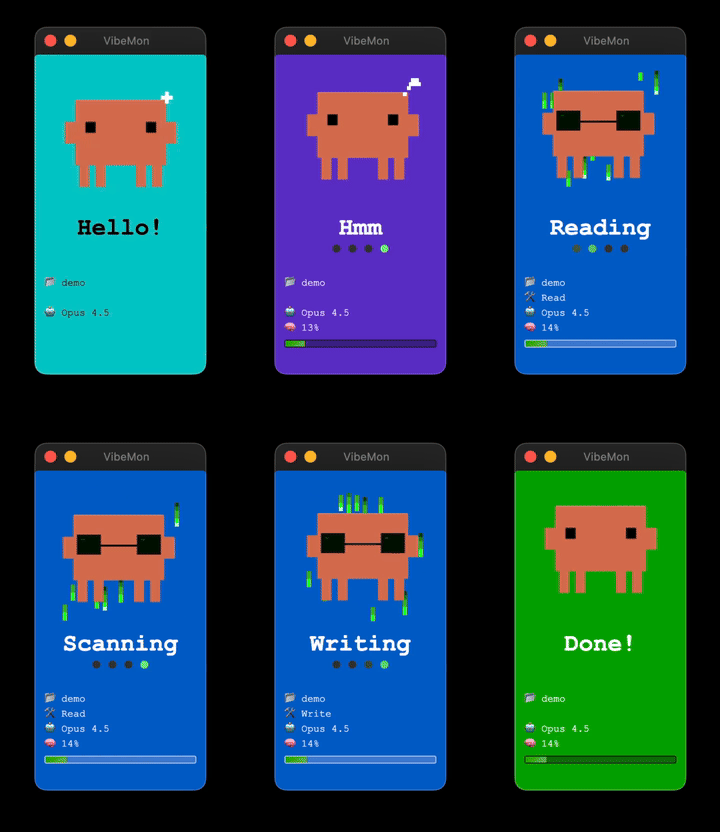
|
|
12
|
+
|
|
13
|
+
## Supported Tools
|
|
14
|
+
|
|
15
|
+
- **[Claude Code](https://claude.ai/code)** - Anthropic's AI coding assistant
|
|
16
|
+
- **[Kiro](https://kiro.dev/)** - AWS's AI coding assistant
|
|
17
|
+
- **[OpenClaw](https://openclaw.ai/)** - Open-source computer use agent
|
|
18
|
+
|
|
19
|
+
## Features
|
|
20
|
+
|
|
21
|
+
- **Frameless Window** - Clean floating design
|
|
22
|
+
- **Always on Top** - Always displayed above other windows
|
|
23
|
+
- **System Tray** - Quick control from the menu bar
|
|
24
|
+
- **Multi-window** - One window per project (up to 5)
|
|
25
|
+
- **HTTP API** - Easy integration with hooks
|
|
26
|
+
- **Auto-launch** - Hook scripts auto-start via `npx vibemon`
|
|
27
|
+
|
|
28
|
+
## Documentation
|
|
29
|
+
|
|
30
|
+
For installation and setup instructions, visit **[vibemon.io/docs](https://vibemon.io/docs)**.
|
|
31
|
+
|
|
32
|
+
## Links
|
|
33
|
+
|
|
34
|
+
- [Homepage](https://nalbam.github.io/vibemon-app/)
|
|
35
|
+
- [GitHub Repository](https://github.com/nalbam/vibemon-app)
|
|
36
|
+
- [Full Documentation](https://github.com/nalbam/vibemon-app#readme)
|
|
37
|
+
|
|
38
|
+
## License
|
|
39
|
+
|
|
40
|
+
MIT
|
|
Binary file
|
|
Binary file
|
|
Binary file
|
|
Binary file
|
|
@@ -0,0 +1,86 @@
|
|
|
1
|
+
const { createCanvas } = require('canvas');
|
|
2
|
+
const fs = require('fs');
|
|
3
|
+
const path = require('path');
|
|
4
|
+
|
|
5
|
+
const COLOR_CLAUDE = '#D97757';
|
|
6
|
+
const COLOR_EYE = '#000000';
|
|
7
|
+
const COLOR_BG = '#FFCC00';
|
|
8
|
+
|
|
9
|
+
function drawIcon(size) {
|
|
10
|
+
const canvas = createCanvas(size, size);
|
|
11
|
+
const ctx = canvas.getContext('2d');
|
|
12
|
+
const scale = size / 64;
|
|
13
|
+
|
|
14
|
+
function rect(x, y, w, h, color) {
|
|
15
|
+
ctx.fillStyle = color;
|
|
16
|
+
ctx.fillRect(x * scale, y * scale, w * scale, h * scale);
|
|
17
|
+
}
|
|
18
|
+
|
|
19
|
+
// Round rectangle background
|
|
20
|
+
const radius = size * 0.15;
|
|
21
|
+
ctx.fillStyle = COLOR_BG;
|
|
22
|
+
ctx.beginPath();
|
|
23
|
+
ctx.roundRect(0, 0, size, size, radius);
|
|
24
|
+
ctx.fill();
|
|
25
|
+
|
|
26
|
+
// Character positioning
|
|
27
|
+
const offsetX = 0;
|
|
28
|
+
const offsetY = 4;
|
|
29
|
+
|
|
30
|
+
// Main body (52x36)
|
|
31
|
+
rect(6 + offsetX, 8 + offsetY, 52, 36, COLOR_CLAUDE);
|
|
32
|
+
|
|
33
|
+
// Arms (6x10)
|
|
34
|
+
rect(0 + offsetX, 22 + offsetY, 6, 10, COLOR_CLAUDE);
|
|
35
|
+
rect(58 + offsetX, 22 + offsetY, 6, 10, COLOR_CLAUDE);
|
|
36
|
+
|
|
37
|
+
// Legs (4 legs)
|
|
38
|
+
rect(10 + offsetX, 44 + offsetY, 6, 12, COLOR_CLAUDE);
|
|
39
|
+
rect(18 + offsetX, 44 + offsetY, 6, 12, COLOR_CLAUDE);
|
|
40
|
+
rect(40 + offsetX, 44 + offsetY, 6, 12, COLOR_CLAUDE);
|
|
41
|
+
rect(48 + offsetX, 44 + offsetY, 6, 12, COLOR_CLAUDE);
|
|
42
|
+
|
|
43
|
+
// Alert eyes (round)
|
|
44
|
+
const leftX = 14 + offsetX;
|
|
45
|
+
const rightX = 44 + offsetX;
|
|
46
|
+
const eyeY = 22 + offsetY;
|
|
47
|
+
|
|
48
|
+
// Left eye
|
|
49
|
+
rect(leftX + 1, eyeY, 4, 6, COLOR_EYE);
|
|
50
|
+
rect(leftX, eyeY + 1, 6, 4, COLOR_EYE);
|
|
51
|
+
|
|
52
|
+
// Right eye
|
|
53
|
+
rect(rightX + 1, eyeY, 4, 6, COLOR_EYE);
|
|
54
|
+
rect(rightX, eyeY + 1, 6, 4, COLOR_EYE);
|
|
55
|
+
|
|
56
|
+
// Question mark
|
|
57
|
+
const qx = 50 + offsetX;
|
|
58
|
+
const qy = 2 + offsetY;
|
|
59
|
+
rect(qx + 1, qy, 4, 2, COLOR_EYE);
|
|
60
|
+
rect(qx + 4, qy + 2, 2, 2, COLOR_EYE);
|
|
61
|
+
rect(qx + 2, qy + 4, 2, 2, COLOR_EYE);
|
|
62
|
+
rect(qx + 2, qy + 6, 2, 2, COLOR_EYE);
|
|
63
|
+
rect(qx + 2, qy + 10, 2, 2, COLOR_EYE);
|
|
64
|
+
|
|
65
|
+
return canvas;
|
|
66
|
+
}
|
|
67
|
+
|
|
68
|
+
// Generate icons
|
|
69
|
+
const sizes = [512, 256, 128, 64, 32, 16];
|
|
70
|
+
const assetsDir = __dirname;
|
|
71
|
+
|
|
72
|
+
console.log('Generating icons...');
|
|
73
|
+
|
|
74
|
+
sizes.forEach(size => {
|
|
75
|
+
const canvas = drawIcon(size);
|
|
76
|
+
const filename = size === 512 ? 'icon.png' : `icon-${size}.png`;
|
|
77
|
+
const filepath = path.join(assetsDir, filename);
|
|
78
|
+
const buffer = canvas.toBuffer('image/png');
|
|
79
|
+
fs.writeFileSync(filepath, buffer);
|
|
80
|
+
console.log(`Created: ${filename} (${size}x${size})`);
|
|
81
|
+
});
|
|
82
|
+
|
|
83
|
+
console.log('\nDone! PNG files created.');
|
|
84
|
+
console.log('\nNext steps:');
|
|
85
|
+
console.log('1. For Windows (.ico): convert icon-256.png icon-128.png icon-64.png icon-32.png icon-16.png icon.ico');
|
|
86
|
+
console.log('2. For macOS (.icns): See instructions in icon-generator.html');
|
|
Binary file
|
|
Binary file
|
|
Binary file
|
|
Binary file
|
|
Binary file
|
|
@@ -0,0 +1,221 @@
|
|
|
1
|
+
<!DOCTYPE html>
|
|
2
|
+
<html lang="en">
|
|
3
|
+
<head>
|
|
4
|
+
<meta charset="UTF-8">
|
|
5
|
+
<title>VibeMon Icon Generator</title>
|
|
6
|
+
<style>
|
|
7
|
+
body {
|
|
8
|
+
font-family: -apple-system, BlinkMacSystemFont, 'Segoe UI', sans-serif;
|
|
9
|
+
background: #1a1a2e;
|
|
10
|
+
color: white;
|
|
11
|
+
padding: 40px;
|
|
12
|
+
text-align: center;
|
|
13
|
+
}
|
|
14
|
+
.container {
|
|
15
|
+
display: flex;
|
|
16
|
+
flex-wrap: wrap;
|
|
17
|
+
justify-content: center;
|
|
18
|
+
gap: 40px;
|
|
19
|
+
margin-top: 30px;
|
|
20
|
+
}
|
|
21
|
+
.icon-box {
|
|
22
|
+
background: #2d2d2d;
|
|
23
|
+
padding: 20px;
|
|
24
|
+
border-radius: 12px;
|
|
25
|
+
}
|
|
26
|
+
.icon-box h3 {
|
|
27
|
+
margin: 0 0 15px 0;
|
|
28
|
+
font-size: 14px;
|
|
29
|
+
color: #888;
|
|
30
|
+
}
|
|
31
|
+
canvas {
|
|
32
|
+
display: block;
|
|
33
|
+
margin: 0 auto 15px;
|
|
34
|
+
border-radius: 8px;
|
|
35
|
+
}
|
|
36
|
+
button {
|
|
37
|
+
background: #D97757;
|
|
38
|
+
color: white;
|
|
39
|
+
border: none;
|
|
40
|
+
padding: 10px 20px;
|
|
41
|
+
border-radius: 6px;
|
|
42
|
+
cursor: pointer;
|
|
43
|
+
font-size: 14px;
|
|
44
|
+
margin: 5px;
|
|
45
|
+
}
|
|
46
|
+
button:hover {
|
|
47
|
+
background: #c86a2f;
|
|
48
|
+
}
|
|
49
|
+
.info {
|
|
50
|
+
max-width: 600px;
|
|
51
|
+
margin: 30px auto;
|
|
52
|
+
text-align: left;
|
|
53
|
+
background: #2d2d2d;
|
|
54
|
+
padding: 20px;
|
|
55
|
+
border-radius: 12px;
|
|
56
|
+
}
|
|
57
|
+
.info h2 {
|
|
58
|
+
margin-top: 0;
|
|
59
|
+
color: #D97757;
|
|
60
|
+
}
|
|
61
|
+
.info code {
|
|
62
|
+
background: #1a1a1a;
|
|
63
|
+
padding: 2px 6px;
|
|
64
|
+
border-radius: 4px;
|
|
65
|
+
}
|
|
66
|
+
.info pre {
|
|
67
|
+
background: #1a1a1a;
|
|
68
|
+
padding: 10px;
|
|
69
|
+
border-radius: 6px;
|
|
70
|
+
overflow-x: auto;
|
|
71
|
+
}
|
|
72
|
+
</style>
|
|
73
|
+
</head>
|
|
74
|
+
<body>
|
|
75
|
+
<h1>VibeMon Icon Generator</h1>
|
|
76
|
+
<p>Notification character icons for desktop app</p>
|
|
77
|
+
|
|
78
|
+
<div class="container">
|
|
79
|
+
<div class="icon-box">
|
|
80
|
+
<h3>512x512 (Linux)</h3>
|
|
81
|
+
<canvas id="icon512" width="512" height="512"></canvas>
|
|
82
|
+
<button onclick="download('icon512', 'icon.png')">Download PNG</button>
|
|
83
|
+
</div>
|
|
84
|
+
<div class="icon-box">
|
|
85
|
+
<h3>256x256 (Windows)</h3>
|
|
86
|
+
<canvas id="icon256" width="256" height="256"></canvas>
|
|
87
|
+
<button onclick="download('icon256', 'icon-256.png')">Download PNG</button>
|
|
88
|
+
</div>
|
|
89
|
+
<div class="icon-box">
|
|
90
|
+
<h3>128x128</h3>
|
|
91
|
+
<canvas id="icon128" width="128" height="128"></canvas>
|
|
92
|
+
<button onclick="download('icon128', 'icon-128.png')">Download PNG</button>
|
|
93
|
+
</div>
|
|
94
|
+
<div class="icon-box">
|
|
95
|
+
<h3>64x64</h3>
|
|
96
|
+
<canvas id="icon64" width="64" height="64"></canvas>
|
|
97
|
+
<button onclick="download('icon64', 'icon-64.png')">Download PNG</button>
|
|
98
|
+
</div>
|
|
99
|
+
<div class="icon-box">
|
|
100
|
+
<h3>32x32</h3>
|
|
101
|
+
<canvas id="icon32" width="32" height="32"></canvas>
|
|
102
|
+
<button onclick="download('icon32', 'icon-32.png')">Download PNG</button>
|
|
103
|
+
</div>
|
|
104
|
+
<div class="icon-box">
|
|
105
|
+
<h3>16x16</h3>
|
|
106
|
+
<canvas id="icon16" width="16" height="16"></canvas>
|
|
107
|
+
<button onclick="download('icon16', 'icon-16.png')">Download PNG</button>
|
|
108
|
+
</div>
|
|
109
|
+
</div>
|
|
110
|
+
|
|
111
|
+
<div class="info">
|
|
112
|
+
<h2>How to Create Icon Files</h2>
|
|
113
|
+
<p><strong>1. Download the PNG files</strong></p>
|
|
114
|
+
<p><strong>2. For Windows (.ico):</strong></p>
|
|
115
|
+
<pre>brew install imagemagick
|
|
116
|
+
convert icon-256.png icon-128.png icon-64.png icon-32.png icon-16.png icon.ico</pre>
|
|
117
|
+
|
|
118
|
+
<p><strong>3. For macOS (.icns):</strong></p>
|
|
119
|
+
<pre>mkdir icon.iconset
|
|
120
|
+
cp icon.png icon.iconset/icon_512x512.png
|
|
121
|
+
sips -z 256 256 icon.png --out icon.iconset/icon_256x256.png
|
|
122
|
+
sips -z 128 128 icon.png --out icon.iconset/icon_128x128.png
|
|
123
|
+
sips -z 64 64 icon.png --out icon.iconset/icon_64x64.png
|
|
124
|
+
sips -z 32 32 icon.png --out icon.iconset/icon_32x32.png
|
|
125
|
+
sips -z 16 16 icon.png --out icon.iconset/icon_16x16.png
|
|
126
|
+
iconutil -c icns icon.iconset</pre>
|
|
127
|
+
|
|
128
|
+
<p><strong>4. Place files in <code>desktop/assets/</code>:</strong></p>
|
|
129
|
+
<ul>
|
|
130
|
+
<li><code>icon.png</code> - 512x512 for Linux</li>
|
|
131
|
+
<li><code>icon.ico</code> - for Windows</li>
|
|
132
|
+
<li><code>icon.icns</code> - for macOS</li>
|
|
133
|
+
</ul>
|
|
134
|
+
</div>
|
|
135
|
+
|
|
136
|
+
<script>
|
|
137
|
+
const COLOR_CLAUDE = '#D97757';
|
|
138
|
+
const COLOR_EYE = '#000000';
|
|
139
|
+
|
|
140
|
+
// Base design is 64x64, scale up for larger sizes
|
|
141
|
+
function drawIcon(canvasId, size) {
|
|
142
|
+
const canvas = document.getElementById(canvasId);
|
|
143
|
+
const ctx = canvas.getContext('2d');
|
|
144
|
+
const scale = size / 64;
|
|
145
|
+
|
|
146
|
+
function rect(x, y, w, h, color) {
|
|
147
|
+
ctx.fillStyle = color;
|
|
148
|
+
ctx.fillRect(x * scale, y * scale, w * scale, h * scale);
|
|
149
|
+
}
|
|
150
|
+
|
|
151
|
+
// Clear with transparent background
|
|
152
|
+
ctx.clearRect(0, 0, size, size);
|
|
153
|
+
|
|
154
|
+
// Round rectangle background (optional - for rounded icon look)
|
|
155
|
+
const radius = size * 0.15;
|
|
156
|
+
ctx.fillStyle = '#FFCC00';
|
|
157
|
+
ctx.beginPath();
|
|
158
|
+
ctx.roundRect(0, 0, size, size, radius);
|
|
159
|
+
ctx.fill();
|
|
160
|
+
|
|
161
|
+
// Character body - centered in 64x64 space
|
|
162
|
+
// Original positions adjusted for centering
|
|
163
|
+
const offsetX = 0;
|
|
164
|
+
const offsetY = 4;
|
|
165
|
+
|
|
166
|
+
// Main body (52x36 at position 6,8)
|
|
167
|
+
rect(6 + offsetX, 8 + offsetY, 52, 36, COLOR_CLAUDE);
|
|
168
|
+
|
|
169
|
+
// Arms (6x10)
|
|
170
|
+
rect(0 + offsetX, 22 + offsetY, 6, 10, COLOR_CLAUDE); // Left
|
|
171
|
+
rect(58 + offsetX, 22 + offsetY, 6, 10, COLOR_CLAUDE); // Right
|
|
172
|
+
|
|
173
|
+
// Legs (4 legs)
|
|
174
|
+
rect(10 + offsetX, 44 + offsetY, 6, 12, COLOR_CLAUDE); // Left outer
|
|
175
|
+
rect(18 + offsetX, 44 + offsetY, 6, 12, COLOR_CLAUDE); // Left inner
|
|
176
|
+
rect(40 + offsetX, 44 + offsetY, 6, 12, COLOR_CLAUDE); // Right inner
|
|
177
|
+
rect(48 + offsetX, 44 + offsetY, 6, 12, COLOR_CLAUDE); // Right outer
|
|
178
|
+
|
|
179
|
+
// Alert eyes (round)
|
|
180
|
+
const leftX = 14 + offsetX;
|
|
181
|
+
const rightX = 44 + offsetX;
|
|
182
|
+
const eyeY = 22 + offsetY;
|
|
183
|
+
|
|
184
|
+
// Left eye (circle approximation)
|
|
185
|
+
rect(leftX + 1, eyeY, 4, 6, COLOR_EYE);
|
|
186
|
+
rect(leftX, eyeY + 1, 6, 4, COLOR_EYE);
|
|
187
|
+
|
|
188
|
+
// Right eye (circle approximation)
|
|
189
|
+
rect(rightX + 1, eyeY, 4, 6, COLOR_EYE);
|
|
190
|
+
rect(rightX, eyeY + 1, 6, 4, COLOR_EYE);
|
|
191
|
+
|
|
192
|
+
// Question mark above head
|
|
193
|
+
const qx = 50 + offsetX;
|
|
194
|
+
const qy = 2 + offsetY;
|
|
195
|
+
rect(qx + 1, qy, 4, 2, COLOR_EYE); // Top curve
|
|
196
|
+
rect(qx + 4, qy + 2, 2, 2, COLOR_EYE); // Right side
|
|
197
|
+
rect(qx + 2, qy + 4, 2, 2, COLOR_EYE); // Middle
|
|
198
|
+
rect(qx + 2, qy + 6, 2, 2, COLOR_EYE); // Lower middle
|
|
199
|
+
rect(qx + 2, qy + 10, 2, 2, COLOR_EYE); // Dot
|
|
200
|
+
}
|
|
201
|
+
|
|
202
|
+
function download(canvasId, filename) {
|
|
203
|
+
const canvas = document.getElementById(canvasId);
|
|
204
|
+
const link = document.createElement('a');
|
|
205
|
+
link.download = filename;
|
|
206
|
+
link.href = canvas.toDataURL('image/png');
|
|
207
|
+
link.click();
|
|
208
|
+
}
|
|
209
|
+
|
|
210
|
+
// Draw all icons
|
|
211
|
+
window.onload = function() {
|
|
212
|
+
drawIcon('icon512', 512);
|
|
213
|
+
drawIcon('icon256', 256);
|
|
214
|
+
drawIcon('icon128', 128);
|
|
215
|
+
drawIcon('icon64', 64);
|
|
216
|
+
drawIcon('icon32', 32);
|
|
217
|
+
drawIcon('icon16', 16);
|
|
218
|
+
};
|
|
219
|
+
</script>
|
|
220
|
+
</body>
|
|
221
|
+
</html>
|
package/assets/icon.icns
ADDED
|
Binary file
|
package/assets/icon.ico
ADDED
|
Binary file
|
package/assets/icon.png
ADDED
|
Binary file
|
package/bin/cli.js
ADDED
|
@@ -0,0 +1,16 @@
|
|
|
1
|
+
#!/usr/bin/env node
|
|
2
|
+
|
|
3
|
+
const { spawn } = require('child_process');
|
|
4
|
+
const path = require('path');
|
|
5
|
+
|
|
6
|
+
const electron = require('electron');
|
|
7
|
+
const appPath = path.join(__dirname, '..');
|
|
8
|
+
|
|
9
|
+
const child = spawn(electron, [appPath], {
|
|
10
|
+
detached: true,
|
|
11
|
+
stdio: 'ignore'
|
|
12
|
+
});
|
|
13
|
+
|
|
14
|
+
child.unref();
|
|
15
|
+
|
|
16
|
+
console.log('VibeMon started (http://127.0.0.1:19280)');
|
package/index.html
ADDED
|
@@ -0,0 +1,26 @@
|
|
|
1
|
+
<!DOCTYPE html>
|
|
2
|
+
<html lang="en">
|
|
3
|
+
<head>
|
|
4
|
+
<meta charset="UTF-8">
|
|
5
|
+
<meta name="viewport" content="width=device-width, initial-scale=1.0">
|
|
6
|
+
<title>VibeMon</title>
|
|
7
|
+
<link rel="stylesheet" href="styles.css">
|
|
8
|
+
</head>
|
|
9
|
+
<body>
|
|
10
|
+
<!-- Draggable Title Bar -->
|
|
11
|
+
<div class="title-bar">
|
|
12
|
+
<div class="title-bar-buttons">
|
|
13
|
+
<button class="title-bar-btn btn-close" onclick="window.electronAPI.closeWindow()"></button>
|
|
14
|
+
</div>
|
|
15
|
+
<span class="title-text" id="title-text">VibeMon</span>
|
|
16
|
+
<div style="width: 20px;"></div>
|
|
17
|
+
</div>
|
|
18
|
+
|
|
19
|
+
<!-- Display -->
|
|
20
|
+
<div class="device-frame">
|
|
21
|
+
<div class="vibemon-display" id="vibemon-display"></div>
|
|
22
|
+
</div>
|
|
23
|
+
|
|
24
|
+
<script type="module" src="renderer.js"></script>
|
|
25
|
+
</body>
|
|
26
|
+
</html>
|