universalis-mcp-server 0.2.0 → 0.2.1
This diff represents the content of publicly available package versions that have been released to one of the supported registries. The information contained in this diff is provided for informational purposes only and reflects changes between package versions as they appear in their respective public registries.
- package/README.md +15 -0
- package/data/materia.json +1 -1
- package/dist/index.js +2 -0
- package/dist/instructions.js +6 -0
- package/dist/tools/wiki.js +176 -0
- package/docs/wiki/index.json +153 -0
- package/docs/wiki/saddlebag/allagan-tools-inventory-analysis.md +94 -0
- package/docs/wiki/saddlebag/api-call-guide.md +173 -0
- package/docs/wiki/saddlebag/ffxiv-advanced-undercut-alert-options.md +123 -0
- package/docs/wiki/saddlebag/ffxiv-experimental-discount-price-sniper.md +7 -0
- package/docs/wiki/saddlebag/ffxiv-job-category-ids.md +13 -0
- package/docs/wiki/saddlebag/ffxiv-sale-alerts.md +48 -0
- package/docs/wiki/saddlebag/ffxiv-sale-leads.md +42 -0
- package/docs/wiki/saddlebag/how-to-trade-using-our-ffxiv-market-overview.md +102 -0
- package/docs/wiki/saddlebag/how-to-use-the-ffxiv-crafting-profit-simulator-craftsim.md +88 -0
- package/docs/wiki/saddlebag/item-categories-ids-and-list.md +217 -0
- package/docs/wiki/saddlebag/tldr-how-to-earn-gil-with-cross-server-trading.md +89 -0
- package/docs/wiki/universalis/api-app-overview.md +236 -0
- package/docs/wiki/universalis/how-to-help-update-the-data-on-universalis.md +21 -0
- package/docs/wiki/universalis/how-to-make-universalis-lists.md +24 -0
- package/docs/wiki/universalis/how-to-search-for-items-on-universalis-and-saddlebag-exchange.md +56 -0
- package/docs/wiki/universalis/how-to-setup-universalis-alerts.md +54 -0
- package/docs/wiki/universalis/how-to-use-universalis-favorites.md +17 -0
- package/docs/wiki/universalis/interactive-tutorials.md +3 -0
- package/docs/wiki/universalis/navigating-an-item-overview-on-universalis.md +72 -0
- package/package.json +5 -3
|
@@ -0,0 +1,89 @@
|
|
|
1
|
+
# How to Earn Gold with Cross Realm Trading
|
|
2
|
+
|
|
3
|
+
Simple buy low in one realm, deposit an item in your warband bank, move it to another realm and sell high!
|
|
4
|
+
|
|
5
|
+
[ Watch this tutorial](https://youtu.be/31ey9tEPyTQ?t=160) if you're new to cross realm trading. It covers how to move items from one realm to another for trading.
|
|
6
|
+
|
|
7
|
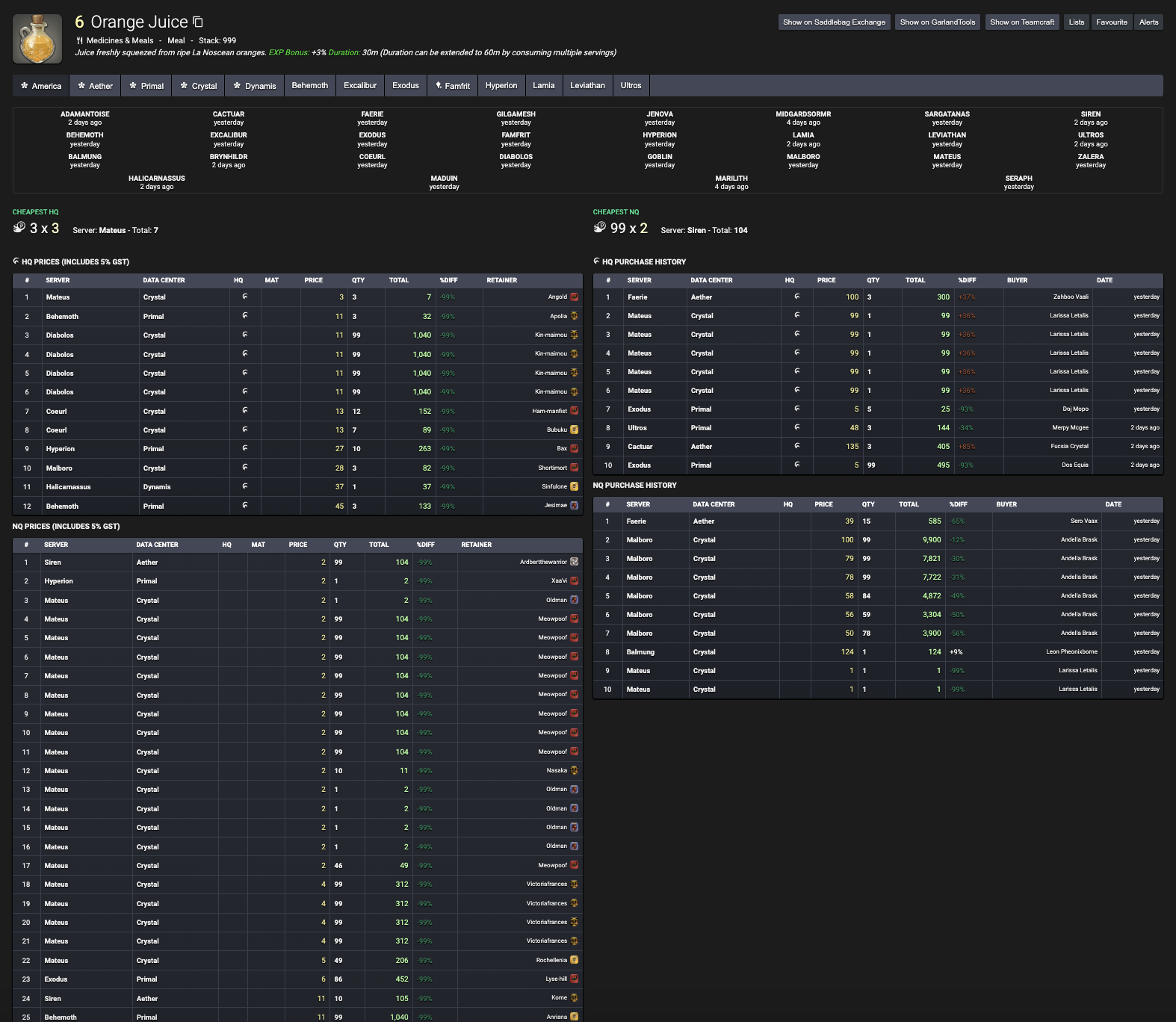
+
## TL;DR: How to Make Gil with a 4-Step Process
|
|
8
|
+
|
|
9
|
+
Here are some of the top ways to use Saddlebag for FFXIV, made simple for new users:
|
|
10
|
+
|
|
11
|
+
### 1. **Learn What to Sell and How Much to Sell It For**
|
|
12
|
+
|
|
13
|
+
Use the reselling, marketshare, best deals or craftsim searches to find good items to sell or craft (if youre an omnicrafter) and determine the average price you can sell them for:
|
|
14
|
+
|
|
15
|
+
- [Reselling Trade Search](https://saddlebagexchange.com/queries/recommended)
|
|
16
|
+
- [Best Deals](https://saddlebagexchange.com/ffxiv/best-deals/recommended)
|
|
17
|
+
- [Marketshare](https://saddlebagexchange.com/ffxiv/marketshare/queries)
|
|
18
|
+
- [Craftsim Search](https://saddlebagexchange.com/ffxiv/craftsim/queries)
|
|
19
|
+
- [Currency Conversion Search](https://saddlebagexchange.com/ffxiv/scrip-exchange)
|
|
20
|
+
- [Secret Sale Leads](https://github.com/ff14-advanced-market-search/saddlebag-with-pockets/wiki/FFXIV-Sale-Leads)
|
|
21
|
+
|
|
22
|
+
### 2. **Buy Low**
|
|
23
|
+
|
|
24
|
+
Search for good deals on those items using the [Experimental Discount Sniper](https://github.com/ff14-advanced-market-search/saddlebag-with-pockets/wiki/FFXIV-Experimental-Discount-Price-Sniper), reselling search, shopping list, or best deals, then buy them if not crafting. If you are crafting, use the [Discord bot price-alert](https://saddlebagexchange.com/price-sniper) to know when there are deals on your raw materials:
|
|
25
|
+
|
|
26
|
+
- [Reselling Trade Search](https://saddlebagexchange.com/queries/recommended)
|
|
27
|
+
- [Best Deals](https://saddlebagexchange.com/ffxiv/best-deals/recommended)
|
|
28
|
+
- [Discord Bot Price-Alert](https://saddlebagexchange.com/wow/price-alert)
|
|
29
|
+
- [Experimental Discount Sniper](https://github.com/ff14-advanced-market-search/saddlebag-with-pockets/wiki/FFXIV-Experimental-Discount-Price-Sniper)
|
|
30
|
+
- [Bulk Crafting Shopping List](https://saddlebagexchange.com/wow/shopping-list)
|
|
31
|
+
|
|
32
|
+
### 3. **Sell High**
|
|
33
|
+
|
|
34
|
+
In FFXIV you don't really need to make many alts and sell on different servers, our tools are geared towards selling on your own home server. Unlike WoW where you can make a fresh alt and start selling in 10 seconds, FFXIV requires you level to 20 and that can take time to make alts on each server. Its not really needed unless you really want to hardcore gil grind.
|
|
35
|
+
|
|
36
|
+
However if you have many alts and 2 accounts to move items between them, then you can sell anywhere! Use the export search to find the best realm with the highest population to sell any items you buy or craft.
|
|
37
|
+
|
|
38
|
+
- [Export Search](https://saddlebagexchange.com/queries/world-comparison)
|
|
39
|
+
|
|
40
|
+
### 4. **Check for Sales and Undercuts**
|
|
41
|
+
|
|
42
|
+
Use our alerts or allagan tool integration to help monitor your active listings and alert you when you should relist your items or when sales are made:
|
|
43
|
+
|
|
44
|
+
- [Allagan Tools Search](https://saddlebagexchange.com/allagan-data)
|
|
45
|
+
- [Discord Bot Undercut and Sale Alerts](https://saddlebagexchange.com/undercut)
|
|
46
|
+
- [Self Purchase History Search](https://saddlebagexchange.com/ffxiv/self-purchase)
|
|
47
|
+
___
|
|
48
|
+
|
|
49
|
+
```mermaid
|
|
50
|
+
flowchart LR
|
|
51
|
+
Start((Start)) --> Step1[ Learn What to Sell and How Much to Sell It For ]
|
|
52
|
+
|
|
53
|
+
subgraph Step 1 Research
|
|
54
|
+
Step1 --> S1A[Open Reselling, Marketshare, Best Deals, Craftsim, or Scrip Exchange]
|
|
55
|
+
S1A --> S1B[Find profitable items to sell or craft]
|
|
56
|
+
S1B --> S1C[Note average sale price and demand]
|
|
57
|
+
S1C --> S1D[Optionally check Secret Sale Leads for niche ideas]
|
|
58
|
+
end
|
|
59
|
+
|
|
60
|
+
Step1 --> Step2[ Buy Low]
|
|
61
|
+
|
|
62
|
+
subgraph Step 2 Snipe Deals
|
|
63
|
+
Step2 --> S2A[Search for underpriced listings]
|
|
64
|
+
S2A --> S2B[Use Experimental Discount Sniper, Best Deals, or Shopping List]
|
|
65
|
+
S2B --> S2C{Are you crafting items?}
|
|
66
|
+
S2C -- Yes --> S2D[Use Discord bot price-alert for cheap raw materials]
|
|
67
|
+
S2C -- No --> S2E[Buy finished items directly for resale]
|
|
68
|
+
end
|
|
69
|
+
|
|
70
|
+
Step2 --> Step3[ Sell High]
|
|
71
|
+
|
|
72
|
+
subgraph Step 3 List Items
|
|
73
|
+
Step3 --> S3A[Use Export Search]
|
|
74
|
+
S3A --> S3B[Find the best world/DC or confirm your home server]
|
|
75
|
+
S3B --> S3C[List items on retainers at target prices]
|
|
76
|
+
end
|
|
77
|
+
|
|
78
|
+
Step3 --> Step4[ Check for Sales and Undercuts]
|
|
79
|
+
|
|
80
|
+
subgraph Step 4 Monitor & Adjust
|
|
81
|
+
Step4 --> S4A[Use Allagan Tools data and Discord undercut/sale alerts]
|
|
82
|
+
S4A --> S4B[Check active listings for undercuts]
|
|
83
|
+
S4B --> S4C[Relist items or adjust prices when needed]
|
|
84
|
+
S4C --> S4D[Review Self Purchase History to see what actually sells]
|
|
85
|
+
end
|
|
86
|
+
|
|
87
|
+
Step4 --> End((Profit & Repeat))
|
|
88
|
+
|
|
89
|
+
```
|
|
@@ -0,0 +1,236 @@
|
|
|
1
|
+
## API Overview
|
|
2
|
+
|
|
3
|
+
```mermaid
|
|
4
|
+
graph TD
|
|
5
|
+
subgraph Client
|
|
6
|
+
Browser
|
|
7
|
+
end
|
|
8
|
+
|
|
9
|
+
subgraph Server
|
|
10
|
+
API["API Server (.NET 6)"]
|
|
11
|
+
Transformations["Data Transformations (F#)"]
|
|
12
|
+
DB[(MariaDB / PostgreSQL)]
|
|
13
|
+
Redis[(Redis)]
|
|
14
|
+
end
|
|
15
|
+
|
|
16
|
+
subgraph External
|
|
17
|
+
Game["Final Fantasy XIV"]
|
|
18
|
+
Uploader["ACT Plugin (Uploader)"]
|
|
19
|
+
end
|
|
20
|
+
|
|
21
|
+
Game --> Uploader --> API
|
|
22
|
+
Browser --> API
|
|
23
|
+
API -->|Reads/Writes| DB
|
|
24
|
+
API -->|Caching| Redis
|
|
25
|
+
Transformations -->|Processes Data| DB
|
|
26
|
+
Transformations --> Redis
|
|
27
|
+
|
|
28
|
+
```
|
|
29
|
+
|
|
30
|
+
### **Root Directory**
|
|
31
|
+
|
|
32
|
+
- **Dockerfile**: Defines the Docker image configuration for building and running the application in a containerized environment.
|
|
33
|
+
|
|
34
|
+
- **LICENSE**: Contains the licensing terms under which the project is distributed.
|
|
35
|
+
|
|
36
|
+
- **README.md**: The main documentation file providing an overview of the project, usage instructions, and other relevant information.
|
|
37
|
+
|
|
38
|
+
- **Universalis.sln**: The Visual Studio solution file that includes all the projects within the repository.
|
|
39
|
+
|
|
40
|
+
- **build.cmd**, **build.sh**, **build.ps1**: Scripts for building the project on Windows (`.cmd`), Unix/Linux (`.sh`), and PowerShell (`.ps1`) platforms.
|
|
41
|
+
|
|
42
|
+
### **Directories**
|
|
43
|
+
|
|
44
|
+
#### **build/**
|
|
45
|
+
|
|
46
|
+
Contains build scripts and configuration files for compiling and building the project.
|
|
47
|
+
|
|
48
|
+
- **Build.cs**, **Configuration.cs**: C# scripts that manage the build process and configurations.
|
|
49
|
+
|
|
50
|
+
- **Directory.Build.props**, **Directory.Build.targets**: MSBuild properties and targets applied to all projects in the solution.
|
|
51
|
+
|
|
52
|
+
- **Properties/launchSettings.json**: Defines settings for launching the application during development.
|
|
53
|
+
|
|
54
|
+
- **_build.csproj**, **_build.csproj.DotSettings**: Project files for the build scripts.
|
|
55
|
+
|
|
56
|
+
#### **deployment/**
|
|
57
|
+
|
|
58
|
+
Contains deployment configurations and resources.
|
|
59
|
+
|
|
60
|
+
- **docker-compose.yml**: Docker Compose file for deploying the application and its services.
|
|
61
|
+
|
|
62
|
+
- **prometheus.yml**: Configuration file for Prometheus monitoring.
|
|
63
|
+
|
|
64
|
+
- **README.md**: Documentation related to deployment processes.
|
|
65
|
+
|
|
66
|
+
#### **devenv/**
|
|
67
|
+
|
|
68
|
+
Contains development environment setup configurations.
|
|
69
|
+
|
|
70
|
+
- **docker-compose.yml**: Docker Compose file for setting up the development environment.
|
|
71
|
+
|
|
72
|
+
- **prometheus.yml**: Configuration for monitoring in the development environment.
|
|
73
|
+
|
|
74
|
+
- **README.md**: Documentation on setting up and using the development environment.
|
|
75
|
+
|
|
76
|
+
- **sqlinit/**: Contains SQL scripts for initializing the database.
|
|
77
|
+
|
|
78
|
+
- **01-GrantUserPrivileges.sql** to **17-SeedUserAlertEventsTable.sql**: Scripts for creating databases, tables, and seeding initial data.
|
|
79
|
+
|
|
80
|
+
- **websocket-client/**: Contains a sample WebSocket client for testing purposes.
|
|
81
|
+
|
|
82
|
+
- **index.js**: JavaScript implementation of the WebSocket client.
|
|
83
|
+
|
|
84
|
+
- **package.json**, **package-lock.json**: Node.js package configuration files.
|
|
85
|
+
|
|
86
|
+
#### **src/**
|
|
87
|
+
|
|
88
|
+
The main source code directory containing all the application modules.
|
|
89
|
+
|
|
90
|
+
##### **Universalis.Application/**
|
|
91
|
+
|
|
92
|
+
The core application project.
|
|
93
|
+
|
|
94
|
+
- **Program.cs**: The entry point of the application.
|
|
95
|
+
|
|
96
|
+
- **Startup.cs**: Configures services and the application's request pipeline.
|
|
97
|
+
|
|
98
|
+
- **appsettings.json**: Application configuration settings.
|
|
99
|
+
|
|
100
|
+
- **Common/**: Contains common utilities and helpers.
|
|
101
|
+
|
|
102
|
+
- **IPriceable.cs**, **InputProcessing.cs**, etc.: Interfaces and classes used across the application.
|
|
103
|
+
|
|
104
|
+
- **Controllers/**: Contains API controllers for handling HTTP requests.
|
|
105
|
+
|
|
106
|
+
- **V1/**, **V2/**, **V3/**: Controllers for different API versions.
|
|
107
|
+
|
|
108
|
+
- **V1/CurrentlyShownController.cs**: Handles requests for current market board data.
|
|
109
|
+
|
|
110
|
+
- **V1/HistoryController.cs**: Handles requests for historical market data.
|
|
111
|
+
|
|
112
|
+
- **V2/AggregatedMarketBoardDataController.cs**: Provides aggregated market data.
|
|
113
|
+
|
|
114
|
+
- **V3/Game/**: Controllers related to game data.
|
|
115
|
+
|
|
116
|
+
- **DataCentersController.cs**, **WorldsController.cs**: Provide data center and world (server) information.
|
|
117
|
+
|
|
118
|
+
- **V3/Market/**: Controllers related to market data.
|
|
119
|
+
|
|
120
|
+
- **OverviewController.cs**, **SalesController.cs**: Provide market overview and sales data.
|
|
121
|
+
|
|
122
|
+
- **ExceptionFilters/**: Contains filters for global exception handling.
|
|
123
|
+
|
|
124
|
+
- **Realtime/**: Implements real-time data handling and WebSocket support.
|
|
125
|
+
|
|
126
|
+
- **Messages/**: Defines message formats for real-time events.
|
|
127
|
+
|
|
128
|
+
- **SocketProcessor.cs**: Processes WebSocket connections and messages.
|
|
129
|
+
|
|
130
|
+
- **Uploads/**: Handles data uploads, including schemas and behaviors.
|
|
131
|
+
|
|
132
|
+
- **Schema/**: Defines data schemas for uploads.
|
|
133
|
+
|
|
134
|
+
- **Behaviors/**: Defines behaviors for processing uploads.
|
|
135
|
+
|
|
136
|
+
- **Views/**: Contains view models used by the controllers to structure response data.
|
|
137
|
+
|
|
138
|
+
- **V1/**, **V2/**, **V3/**: View models for different API versions.
|
|
139
|
+
|
|
140
|
+
##### **Universalis.Alerts/**
|
|
141
|
+
|
|
142
|
+
Handles alerting functionality within the application.
|
|
143
|
+
|
|
144
|
+
- **DiscordAlertsProvider.cs**: Provides alert notifications via Discord.
|
|
145
|
+
|
|
146
|
+
- **AlertExtensions.cs**, **IDiscordAlertsProvider.cs**: Supporting classes and interfaces for alerting features.
|
|
147
|
+
|
|
148
|
+
##### **Universalis.Common/**
|
|
149
|
+
|
|
150
|
+
Contains common code and utilities shared across different modules.
|
|
151
|
+
|
|
152
|
+
- **Caching/**: Interfaces and implementations for caching mechanisms.
|
|
153
|
+
|
|
154
|
+
- **GameData/**: Provides access to game data such as items, worlds, and data centers.
|
|
155
|
+
|
|
156
|
+
##### **Universalis.DbAccess/**
|
|
157
|
+
|
|
158
|
+
Data access layer for interacting with databases and Redis.
|
|
159
|
+
|
|
160
|
+
- **AccessControl/**: Manages API keys and trusted sources for access control.
|
|
161
|
+
|
|
162
|
+
- **MarketBoard/**: Data access code specific to market board data.
|
|
163
|
+
|
|
164
|
+
- **Uploads/**: Data access code for uploads and statistics.
|
|
165
|
+
|
|
166
|
+
- **Migrations/**: Database migration scripts for schema changes.
|
|
167
|
+
|
|
168
|
+
- **Metrics/**: Integration with Prometheus for metrics collection.
|
|
169
|
+
|
|
170
|
+
- **RedisDatabases.cs**, **Util.cs**, etc.: Utility classes for database operations.
|
|
171
|
+
|
|
172
|
+
##### **Universalis.Entities/**
|
|
173
|
+
|
|
174
|
+
Defines entity models representing data structures used throughout the application.
|
|
175
|
+
|
|
176
|
+
- **AccessControl/**, **MarketBoard/**, **Uploads/**: Entities related to their respective domains.
|
|
177
|
+
|
|
178
|
+
- **Materia.cs**, **TradeVelocity.cs**, etc.: Specific entities used in market data and other functionalities.
|
|
179
|
+
|
|
180
|
+
##### **Universalis.GameData/**
|
|
181
|
+
|
|
182
|
+
Provides implementations for accessing game-related data.
|
|
183
|
+
|
|
184
|
+
- **DataCenter.cs**, **World.cs**, **IGameDataProvider.cs**: Classes and interfaces for game data.
|
|
185
|
+
|
|
186
|
+
##### **Universalis.Mogboard/**
|
|
187
|
+
|
|
188
|
+
Contains code for integrating with Mogboard, the frontend application.
|
|
189
|
+
|
|
190
|
+
- **Entities/**: Data structures for user lists and other shared entities.
|
|
191
|
+
|
|
192
|
+
- **Doctrine/**: Parsers and serializers for Doctrine types used in Mogboard.
|
|
193
|
+
|
|
194
|
+
- **UserListsService.cs**: Service for handling user lists.
|
|
195
|
+
|
|
196
|
+
##### **Tests/**
|
|
197
|
+
|
|
198
|
+
Contains test projects for various modules to ensure code quality and correctness.
|
|
199
|
+
|
|
200
|
+
- **Universalis.Application.Tests/**: Tests for the application layer.
|
|
201
|
+
|
|
202
|
+
- **Universalis.DbAccess.Tests/**: Tests for the data access layer.
|
|
203
|
+
|
|
204
|
+
- **Universalis.GameData.Tests/**: Tests for game data access code.
|
|
205
|
+
|
|
206
|
+
- **Universalis.Mogboard.Tests/**: Tests for Mogboard integration.
|
|
207
|
+
|
|
208
|
+
- **Universalis.DataTransformations.Tests/**: Tests for data transformation logic.
|
|
209
|
+
|
|
210
|
+
- **Universalis.Tests/**: General tests for the Universalis project.
|
|
211
|
+
|
|
212
|
+
---
|
|
213
|
+
|
|
214
|
+
### **Overview**
|
|
215
|
+
|
|
216
|
+
The **Universalis** repository is a .NET application serving as a crowdsourced market board aggregator for **Final Fantasy XIV**. It provides APIs for retrieving market data, supports real-time updates via WebSockets, and integrates with a frontend application called **Mogboard**.
|
|
217
|
+
|
|
218
|
+
Key components and features include:
|
|
219
|
+
|
|
220
|
+
- **API Controllers**: Serve market data through RESTful endpoints, supporting multiple API versions.
|
|
221
|
+
|
|
222
|
+
- **Data Access Layer**: Interacts with relational databases (**PostgreSQL**, **MariaDB**) and caching systems (**Redis**) to store and retrieve market data.
|
|
223
|
+
|
|
224
|
+
- **Real-Time Data**: Implements WebSocket support for real-time market updates.
|
|
225
|
+
|
|
226
|
+
- **Uploads Handling**: Processes data uploads from trusted sources, including validation and aggregation.
|
|
227
|
+
|
|
228
|
+
- **Alerts System**: Sends notifications and alerts via platforms like Discord.
|
|
229
|
+
|
|
230
|
+
- **Game Data Integration**: Provides access to game-specific data such as items, worlds, and data centers.
|
|
231
|
+
|
|
232
|
+
- **Deployment Configurations**: Uses **Docker** and **Docker Compose** for containerization, easing deployment and development setup.
|
|
233
|
+
|
|
234
|
+
- **Monitoring and Metrics**: Integrates with **Prometheus** for collecting metrics and monitoring the application's performance.
|
|
235
|
+
|
|
236
|
+
- **Testing**: Comprehensive test suites across various modules to ensure reliability and correctness.
|
|
@@ -0,0 +1,21 @@
|
|
|
1
|
+
# How to Update Universalis
|
|
2
|
+
|
|
3
|
+
The data on Universalis is **crowdsourced**, meaning you have the power to update Universalis yourself! To contribute, install software like the [Dalamud Plugins FFXIV Quick Launcher](https://goatcorp.github.io/) or the [TeamCraft Desktop App](https://github.com/ffxiv-teamcraft/ffxiv-teamcraft/releases/latest). Once installed all you have to do is you visit the marketboard and look up items, the listings and history you see in-game of the items you look up will be sent to Universalis.
|
|
4
|
+
|
|
5
|
+
See all supported software here: [Supported Software](https://universalis.app/contribute).
|
|
6
|
+
|
|
7
|
+
## Updating Retainer Prices Does Not Update Universalis
|
|
8
|
+
|
|
9
|
+
Note that Universalis is only updated when you look up items on the marketboard. It is not updated when you change prices in your retainers. After you update prices, be sure to return to the marketboard and look up your items to ensure they get updated.
|
|
10
|
+
|
|
11
|
+
## If You Don't Update, Someone Eventually Will!
|
|
12
|
+
|
|
13
|
+
You don't have to do this all yourself! This is where the **crowdsourced** aspect becomes important. If you don't look up the items, eventually someone with the Quick Launcher or TeamCraft will look them up and update the items for you.
|
|
14
|
+
|
|
15
|
+
## How to Get Help If You Do Not Play on PC
|
|
16
|
+
|
|
17
|
+
If you do not play on PC, you cannot update Universalis yourself. If you want specific items updated, you can ask in the Universalis [Data Requests](https://discord.com/channels/616826096897228801/1192666174559891627) channel, and a PC player will assist you.
|
|
18
|
+
|
|
19
|
+
## Note on Privacy
|
|
20
|
+
|
|
21
|
+
There are multiple ways to contribute to Universalis, and all of your contributions are anonymous. No one will be able to refer back to your character or account to know that you have uploaded any data. The applications mentioned are tested by us to ensure they do not endanger your account or characters.
|
|
@@ -0,0 +1,24 @@
|
|
|
1
|
+
****A universalis list can help you track multiple items all at once, and provide API functionality!****
|
|
2
|
+
|
|
3
|
+
1. To add an item to a list, click on the LISTS button on any item overview page:
|
|
4
|
+
|
|
5
|
+
<img width="1009" alt="image" src="https://user-images.githubusercontent.com/17516896/230792991-0f2e478c-6966-4c71-aa10-4cd1ca854074.png">
|
|
6
|
+
|
|
7
|
+
2. Upon clicking a box will show allowing you to either add the item to an existing list or create a brand-new one.
|
|
8
|
+
|
|
9
|
+
<img width="416" alt="image" src="https://user-images.githubusercontent.com/17516896/230793037-d65ff642-da23-4b17-9c2f-c0afd75348b9.png">
|
|
10
|
+
|
|
11
|
+
3. This is where you will navigate to your homepage to select the list for an overview of the lowest prices for those items in your **data center.** This is displayed the same way
|
|
12
|
+
as your [Favorites List](https://github.com/Universalis-FFXIV/guides/wiki/How-to-use-Universalis-Favorites).
|
|
13
|
+
|
|
14
|
+
<img width="922" alt="image" src="https://user-images.githubusercontent.com/17516896/230793092-a0d125ef-ae8d-4e48-97c2-d77764f53b1c.png">
|
|
15
|
+
|
|
16
|
+
These lists are extremely useful for API applications. You can view details on how to make these API calls for your list [on the developer documentation](https://docs.universalis.app/#user-lists).
|
|
17
|
+
|
|
18
|
+
If you click on your universalis list, the following page will appear with more details on your select items. The URL ending is where the LIST ID of your universalis list is located:
|
|
19
|
+
|
|
20
|
+
<img width="1123" alt="image" src="https://user-images.githubusercontent.com/17516896/230793386-64175ff6-fef3-477e-a075-4349eb087803.png">
|
|
21
|
+
|
|
22
|
+
Plugging said information into the developer API will list the item IDs of all the items on your list:
|
|
23
|
+
|
|
24
|
+
<img width="1222" alt="image" src="https://user-images.githubusercontent.com/17516896/230793443-44dc419c-2914-459e-877d-b36b6620549d.png">
|
package/docs/wiki/universalis/how-to-search-for-items-on-universalis-and-saddlebag-exchange.md
ADDED
|
@@ -0,0 +1,56 @@
|
|
|
1
|
+
There are many different methods of searching the data available on Universalis to be covered in this guide.
|
|
2
|
+
|
|
3
|
+
[Saddlebag Exchange](https://saddlebagexchange.com/queries) is a second project which uses Universalis API data to provide advanced search functions for Universalis.
|
|
4
|
+
|
|
5
|
+
Together with both projects you are able to search for FFXIV marketable items in the following ways:
|
|
6
|
+
|
|
7
|
+
- [Search for a single item by item name](https://github.com/Universalis-FFXIV/guides/wiki/How-to-search-for-items-on-Universalis-and-Saddlebag-Exchange#search-for-a-single-item-by-item-name)
|
|
8
|
+
- [Search for a single item by item category](https://github.com/Universalis-FFXIV/guides/wiki/How-to-search-for-items-on-Universalis-and-Saddlebag-Exchange#search-for-a-single-item-by-item-category)
|
|
9
|
+
- [Search and compare multiple items by Sale Rate and Average Sale Price](https://github.com/Universalis-FFXIV/guides/wiki/How-to-search-for-items-on-Universalis-and-Saddlebag-Exchange#search-for-multiple-items-by-sale-rate-and-average-sale-price)
|
|
10
|
+
- [Search and compare multiple items to resell for a profit](https://github.com/Universalis-FFXIV/guides/wiki/How-to-search-for-items-on-Universalis-and-Saddlebag-Exchange#search-for-items-to-resell-for-a-profit)
|
|
11
|
+
- [Search using Developer API's](https://github.com/Universalis-FFXIV/guides/wiki/How-to-search-for-items-on-Universalis-and-Saddlebag-Exchange#search-using-developer-apis)
|
|
12
|
+
|
|
13
|
+
## Search for a single item by item name
|
|
14
|
+
|
|
15
|
+
You can search for a specific item by name in the search bar on the main Universalis website.
|
|
16
|
+
|
|
17
|
+
This will show you a general overview of the item with the current 10 lowest priced listings available and 10 most recent sales.
|
|
18
|
+
|
|
19
|
+
This can be filtered to listings and history on different servers, datacenter's and regions. See [the user guide on the item page navigation](https://github.com/Universalis-FFXIV/guides/wiki/Navigating-an-item-overview-on-Universalis) for more details.
|
|
20
|
+
|
|
21
|
+
<img width="701" alt="image" src="https://user-images.githubusercontent.com/17516896/229619968-4ade0c18-ca52-4e77-9a9e-8d5b97388dd7.png">
|
|
22
|
+
|
|
23
|
+
<img width="1440" alt="image" src="https://user-images.githubusercontent.com/17516896/229621186-3365cd86-5ddd-4ae0-9a7f-3d0bc66a9337.png">
|
|
24
|
+
|
|
25
|
+
## Search for a single item by item category
|
|
26
|
+
|
|
27
|
+
You can used the Universalis side bar to scroll by item category and sub category to find specific items. This will bring you to the items Universalis page.
|
|
28
|
+
|
|
29
|
+
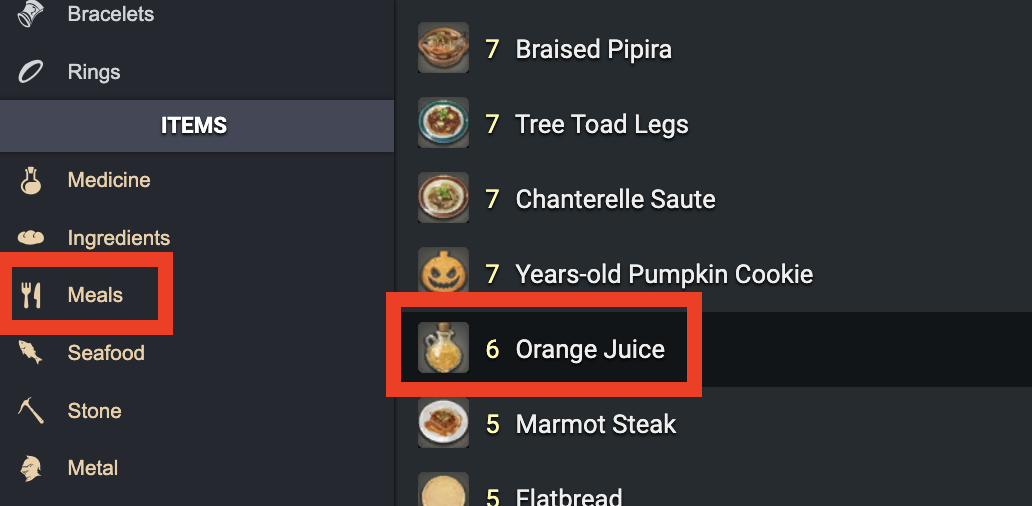
|
|
30
|
+
|
|
31
|
+
## Search for multiple items by Sale Rate and Average Sale Price
|
|
32
|
+
|
|
33
|
+
If you want to search by a sales statistic like `Rate of Sales` or `Average Sale Price` you can search the universalis data using the `Market Overview Search` from the website [Saddlebag Exchange](https://saddlebagexchange.com/ffxiv/marketshare/queries).
|
|
34
|
+
|
|
35
|
+
This website will help you find the fastest selling items, the items that earn the most gil, the items which increased in price the most and more!
|
|
36
|
+
|
|
37
|
+
Check out their [Market Overview Guide](https://github.com/ff14-advanced-market-search/saddlebag-with-pockets/wiki/How-to-trade-using-our-FFXIV-Market-Overview) for more information.
|
|
38
|
+
|
|
39
|
+
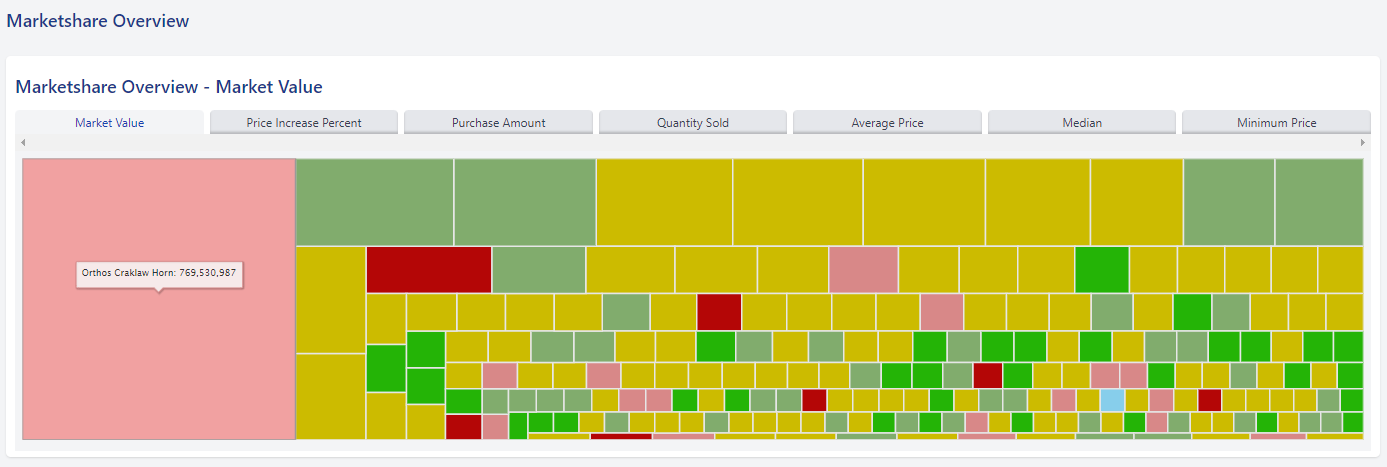
|
|
40
|
+
|
|
41
|
+
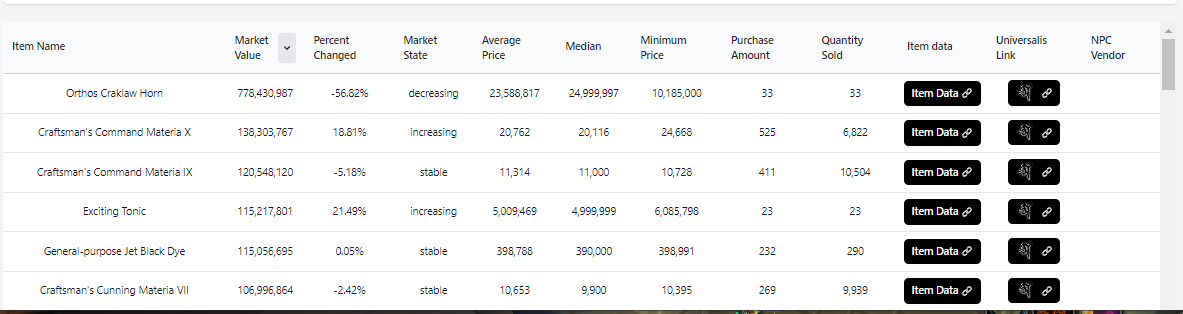
|
|
42
|
+
|
|
43
|
+
|
|
44
|
+
## Search for items to resell for a profit
|
|
45
|
+
|
|
46
|
+
If you want to find opportunities to profit from buying items on other servers to resell on your own [Saddlebag Exchange](https://saddlebagexchange.com/queries/recommended) has a reselling trade search with many options and premade filters designed to find great reselling opportunities. The search is 100% customizable and easy to bookmark if you wish to create your own searches.
|
|
47
|
+
|
|
48
|
+
Check out their [Reselling Trade Search Guide](https://github.com/ff14-advanced-market-search/saddlebag-with-pockets/wiki/How-to-Import,-Trade-and-Flip-items-on-the-FFXIV-Marketboard-using-Saddlebag-Exchange-Import-Searches) for more information.
|
|
49
|
+
|
|
50
|
+
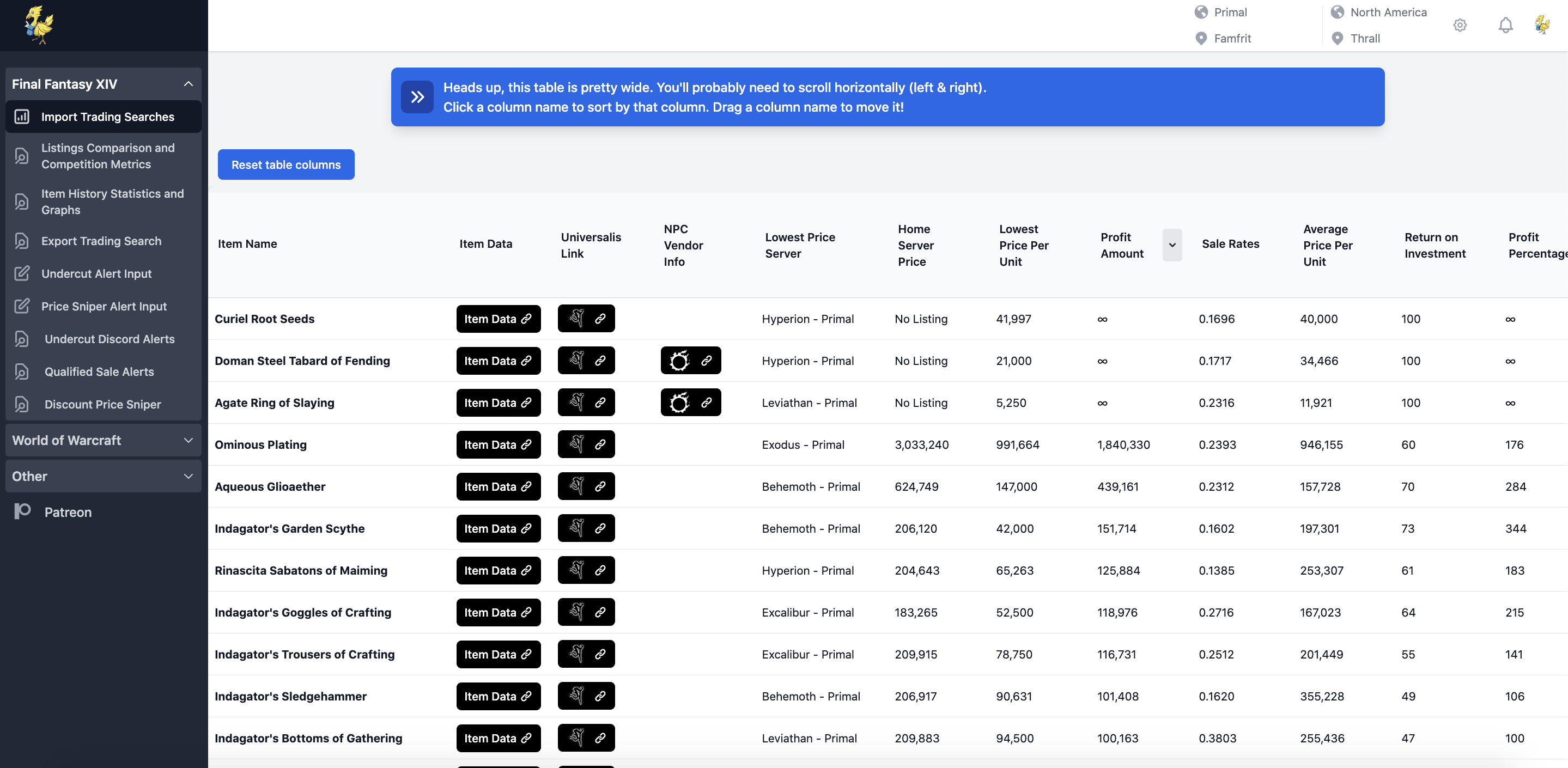
|
|
51
|
+
|
|
52
|
+
## Search using Developer API's
|
|
53
|
+
|
|
54
|
+
You can access the full universalis data directly using the Dev API. To find more information check out the [API Documentation here](https://universalis.app/docs/index.html).
|
|
55
|
+
|
|
56
|
+
Saddlebag Exchange also has an api to access their searches. You can check out their API guide [here](https://github.com/ff14-advanced-market-search/saddlebag-with-pockets/wiki/API-Call-Guide).
|
|
@@ -0,0 +1,54 @@
|
|
|
1
|
+
## Universalis Discord Webhooks
|
|
2
|
+
|
|
3
|
+
Universalis offers Discord webhooks that allow you to receive simple price and quantity-based alerts on your home server in a Discord channel you own.
|
|
4
|
+
|
|
5
|
+
For more user-friendly alerts with additional options designed to help you earn more gil, check out the [Saddlebag Exchange](https://saddlebagexchange.com/) alerts in their [Discord server](https://discord.gg/836C8wDVNq).
|
|
6
|
+
|
|
7
|
+
### Available Alerts
|
|
8
|
+
|
|
9
|
+
- [Undercut Alerts](https://github.com/ff14-advanced-market-search/saddlebag-with-pockets/wiki/Undercut-Alerts---Alpha-version)
|
|
10
|
+
- [Price Sniper Alerts](https://github.com/ff14-advanced-market-search/saddlebag-with-pockets/wiki/Price-Sniper-and-Item-Price-Alerts)
|
|
11
|
+
- [Sale Alerts](https://github.com/ff14-advanced-market-search/saddlebag-with-pockets/wiki/FFXIV-Sale-Alerts)
|
|
12
|
+
- [Shortage Quantity Alerts](https://github.com/ff14-advanced-market-search/saddlebag-with-pockets/wiki/Price-Sniper-and-Item-Price-Alerts)
|
|
13
|
+
|
|
14
|
+
## Example Alerts
|
|
15
|
+
|
|
16
|
+

|
|
17
|
+
|
|
18
|
+
## Setup Instructions
|
|
19
|
+
|
|
20
|
+
Follow these steps to set up your alerts:
|
|
21
|
+
|
|
22
|
+
1. **Login to Universalis with Discord:**
|
|
23
|
+
|
|
24
|
+

|
|
25
|
+
|
|
26
|
+
2. **Search for Your Favorite Items:**
|
|
27
|
+
|
|
28
|
+

|
|
29
|
+
|
|
30
|
+
3. **Create a Discord Webhook:**
|
|
31
|
+
|
|
32
|
+
Create a webhook on a Discord channel you manage or have admin permissions over. Check out the [Discord documentation for setting up webhooks](https://support.discord.com/hc/en-us/articles/228383668-Intro-to-Webhooks) if you need assistance.
|
|
33
|
+
|
|
34
|
+
4. **Select the Alerts Button:**
|
|
35
|
+
|
|
36
|
+
Click the Alerts button on an item you wish to monitor and create a new alert.
|
|
37
|
+
|
|
38
|
+

|
|
39
|
+
|
|
40
|
+

|
|
41
|
+
|
|
42
|
+
5. **Enter Your Alert Triggers:**
|
|
43
|
+
|
|
44
|
+
Customize your alert with the following options:
|
|
45
|
+
|
|
46
|
+
- **Name:** Give your alert a name.
|
|
47
|
+
- **World:** Select which server you wish to monitor.
|
|
48
|
+
- **Filter:** Specify if you want alerts only for HQ items. Leave blank for all qualities.
|
|
49
|
+
- **Using:** Choose between `Unit Price`, `Total`, or `Quantity` to set which metrics trigger alerts.
|
|
50
|
+
- **Calculate:** Choose `Minimum`, `Maximum`, or `Average` based on the metric selected in the `Using` field.
|
|
51
|
+
- **Compare:** Set `Result is greater than` or `Result is less than` to alert when the calculated value meets your criteria.
|
|
52
|
+
- **Discord Webhook:** Paste your Discord webhook URL from step 3.
|
|
53
|
+
|
|
54
|
+

|
|
@@ -0,0 +1,17 @@
|
|
|
1
|
+
## What is a Favorites List?
|
|
2
|
+
The Favorites list helps provide quick links and overviews for your selection of favorite items.
|
|
3
|
+
|
|
4
|
+
<img width="502" alt="image" src="https://user-images.githubusercontent.com/17516896/230792808-82584184-901c-4914-b2bd-fcae32d6586e.png">
|
|
5
|
+
|
|
6
|
+
# Adding to the favorites list
|
|
7
|
+
Click the "Favourites" button on any universalis page for any item as shown below.
|
|
8
|
+
|
|
9
|
+
<img width="1022" alt="image" src="https://user-images.githubusercontent.com/17516896/230792734-c55e94d9-d930-4904-b281-8aa7d19c746e.png">
|
|
10
|
+
|
|
11
|
+
Then go to the [Universalis Home Page](https://universalis.app) and click the favorites button:
|
|
12
|
+
|
|
13
|
+
<img width="1230" alt="image" src="https://user-images.githubusercontent.com/17516896/230792769-2367a524-127e-4fcb-8a96-4b2cabb2a1fc.png">
|
|
14
|
+
|
|
15
|
+
You will then be presented with a favorites box with information on the ****cheapest**** source in your datacenter.
|
|
16
|
+
|
|
17
|
+
<img width="1225" alt="image" src="https://user-images.githubusercontent.com/17516896/230792885-99a0727b-c65f-4ed6-8d43-723bb91980e7.png">
|
|
@@ -0,0 +1,72 @@
|
|
|
1
|
+
Each universalis item overview page has several options and different ways to view information on a particular item. This guide covers:
|
|
2
|
+
|
|
3
|
+
- [Navigation Bar, Links and Menus](https://github.com/Universalis-FFXIV/guides/wiki/Navigating-an-item-overview-on-Universalis#navigation-bar-links-and-menus)
|
|
4
|
+
- [Single Server Overview](https://github.com/Universalis-FFXIV/guides/wiki/Navigating-an-item-overview-on-Universalis#single-server-overview)
|
|
5
|
+
- [Datacenter Overview](https://github.com/Universalis-FFXIV/guides/wiki/Navigating-an-item-overview-on-Universalis#datacenter-overview)
|
|
6
|
+
- [Region Wide overview](https://github.com/Universalis-FFXIV/guides/wiki/Navigating-an-item-overview-on-Universalis#region-wide-overview)
|
|
7
|
+
|
|
8
|
+
## Navigation Bar, Links and Menus
|
|
9
|
+
|
|
10
|
+
<img width="1238" alt="image" src="https://user-images.githubusercontent.com/17516896/229813286-7e05573b-1771-4362-be91-17dfe3b53006.png">
|
|
11
|
+
|
|
12
|
+
The top of each universalis item page shows information on the name of the item, item category, item subcategory and the item description.
|
|
13
|
+
|
|
14
|
+
<img width="1046" alt="image" src="https://user-images.githubusercontent.com/17516896/230271518-b965bf08-6596-434b-8e1c-7cbb40b3f9a8.png">
|
|
15
|
+
|
|
16
|
+
The bar of servers, data centers and your regions name will show you different data for the listings and history on different scales.
|
|
17
|
+
|
|
18
|
+
<img width="664" alt="image" src="https://user-images.githubusercontent.com/17516896/230271475-ec9f70f5-8ed9-4230-8fbf-960ba3dd363a.png">
|
|
19
|
+
|
|
20
|
+
In the top right there are 3 buttons for your universalis lists, favorites, alerts and user menu. For more information on these features check out the following guides:
|
|
21
|
+
|
|
22
|
+
- [How to set up Universalis Alerts](https://github.com/Universalis-FFXIV/guides/wiki/How-to-setup-Universalis-Alerts)
|
|
23
|
+
- [How to use Universalis Favorites](https://github.com/Universalis-FFXIV/guides/wiki/How-to-use-Universalis-Favorites)
|
|
24
|
+
- [How to make Universalis Lists](https://github.com/Universalis-FFXIV/guides/wiki/How-to-make-Universalis-Lists)
|
|
25
|
+
|
|
26
|
+
There are also buttons linking to 3 other websites with more information on any marketable item:
|
|
27
|
+
|
|
28
|
+
- [Saddlebag Exchange](http://saddlebagexchange.com/): Showing advanced statistics on the item determined from the data on universalis. You can find more information on the SE item statistics [here in their guide](https://github.com/ff14-advanced-market-search/saddlebag-with-pockets/wiki/How-to-use-Item-Data-Searches-to-help-you-find-good-items-to-trade).
|
|
29
|
+
|
|
30
|
+
<img width="445" alt="image" src="https://user-images.githubusercontent.com/17516896/230269764-99307640-55e0-4cb6-b766-ae26ece0c729.png">
|
|
31
|
+
|
|
32
|
+
<img width="442" alt="image" src="https://user-images.githubusercontent.com/17516896/230269795-c6a52197-4330-4def-bc1a-c33b5dbf02d2.png">
|
|
33
|
+
|
|
34
|
+
<img width="449" alt="image" src="https://user-images.githubusercontent.com/17516896/230269825-3224646a-2ca3-4e9a-a1c7-cc66835555c4.png">
|
|
35
|
+
|
|
36
|
+
<img width="442" alt="image" src="https://user-images.githubusercontent.com/17516896/230269881-176ba9db-e5e1-4a56-861c-8b5d5fd318d0.png">
|
|
37
|
+
|
|
38
|
+
<img width="447" alt="image" src="https://user-images.githubusercontent.com/17516896/230269850-6ad4cb14-ab02-4a24-baa3-f99b11ed8a36.png">
|
|
39
|
+
|
|
40
|
+
|
|
41
|
+
- [Garland Tools](https://www.garlandtools.org/): Providing information on related uses and achievements:
|
|
42
|
+
|
|
43
|
+
<img width="1440" alt="image" src="https://user-images.githubusercontent.com/17516896/230269264-e4930f32-6010-4311-9dd9-2d2d3a9ac510.png">
|
|
44
|
+
|
|
45
|
+
- [Teamcraft](https://ffxivteamcraft.com/): Providing crafting data and information:
|
|
46
|
+
|
|
47
|
+
<img width="1439" alt="image" src="https://user-images.githubusercontent.com/17516896/230269367-2e06228a-aed5-463c-9d35-71947d957355.png">
|
|
48
|
+
|
|
49
|
+
|
|
50
|
+
## Single Server Overview
|
|
51
|
+
|
|
52
|
+
This view will show you the lowest 10 listings and last 10 sales on your home server or any individual server in your home datacenter.
|
|
53
|
+
|
|
54
|
+
The purchase history graph will show you the HQ and NQ sale prices over time.
|
|
55
|
+
|
|
56
|
+
The Stack Size Histogram will show you what stack sizes are listed for items that can be sold in stacks of more than 1.
|
|
57
|
+
|
|
58
|
+
<img width="1305" alt="image" src="https://user-images.githubusercontent.com/17516896/229696787-0c740cb2-628f-4ac3-8556-654203156136.png">
|
|
59
|
+
|
|
60
|
+
## Datacenter Overview
|
|
61
|
+
|
|
62
|
+
The datacenter overview will show you the last 10 sales and all listings in your datacenter or other datacenters in your region.
|
|
63
|
+
|
|
64
|
+
<img width="786" alt="image" src="https://user-images.githubusercontent.com/17516896/229697001-96e478c7-e285-4f37-bccf-0d81c61dbc34.png">
|
|
65
|
+
|
|
66
|
+
## Region Wide Overview
|
|
67
|
+
|
|
68
|
+
The datacenter overview will show you the last 10 sales and all listings in your region across all datacenters.
|
|
69
|
+
|
|
70
|
+
|
|
71
|
+
|
|
72
|
+
<img width="787" alt="image" src="https://user-images.githubusercontent.com/17516896/229697332-8d7c655c-c7e3-4543-a58e-781eca56af38.png">
|
package/package.json
CHANGED
|
@@ -1,7 +1,7 @@
|
|
|
1
1
|
{
|
|
2
2
|
"name": "universalis-mcp-server",
|
|
3
|
-
"version": "0.2.
|
|
4
|
-
"description": "MCP server for Universalis and XIVAPI",
|
|
3
|
+
"version": "0.2.1",
|
|
4
|
+
"description": "MCP server for Universalis, Saddlebag Exchange, and XIVAPI",
|
|
5
5
|
"author": "Jakub Mucha <jakub.mucha@icloud.com>",
|
|
6
6
|
"repository": {
|
|
7
7
|
"type": "git",
|
|
@@ -18,7 +18,8 @@
|
|
|
18
18
|
},
|
|
19
19
|
"files": [
|
|
20
20
|
"dist",
|
|
21
|
-
"data"
|
|
21
|
+
"data",
|
|
22
|
+
"docs/wiki"
|
|
22
23
|
],
|
|
23
24
|
"keywords": [
|
|
24
25
|
"mcp",
|
|
@@ -40,6 +41,7 @@
|
|
|
40
41
|
"scripts": {
|
|
41
42
|
"build": "tsc && chmod 755 ./dist/index.js",
|
|
42
43
|
"update-materia": "node scripts/update-materia-data.js",
|
|
44
|
+
"update-wiki-docs": "node scripts/update-wiki-docs.mjs",
|
|
43
45
|
"lint": "biome check .",
|
|
44
46
|
"format": "biome format --write ."
|
|
45
47
|
}
|