ultron-ai-sdk 1.1.4 → 1.1.6
This diff represents the content of publicly available package versions that have been released to one of the supported registries. The information contained in this diff is provided for informational purposes only and reflects changes between package versions as they appear in their respective public registries.
- package/README.md +44 -17
- package/dist/index.cjs +1 -1
- package/dist/index.mjs +1 -1
- package/package.json +1 -1
package/README.md
CHANGED
|
@@ -50,7 +50,7 @@ npm install ultron-ai-sdk
|
|
|
50
50
|
<script type="importmap">
|
|
51
51
|
{
|
|
52
52
|
"imports": {
|
|
53
|
-
"ultron-ai-sdk": "https://cdn.jsdelivr.net/npm/ultron-ai-sdk@1.
|
|
53
|
+
"ultron-ai-sdk": "https://cdn.jsdelivr.net/npm/ultron-ai-sdk@1.1.6/dist/index.mjs?module"
|
|
54
54
|
}
|
|
55
55
|
}
|
|
56
56
|
</script>
|
|
@@ -70,8 +70,9 @@ npm install ultron-ai-sdk
|
|
|
70
70
|
// sessionId: "SESSION_ID_FOR_CURRENT_USER" // Recomended method for secure access
|
|
71
71
|
},
|
|
72
72
|
options:{
|
|
73
|
-
hideClickMessage: true
|
|
74
|
-
alwaysListen: false // For Push to talk conversation
|
|
73
|
+
hideClickMessage: true // Remove default "Click message" on the avatar
|
|
74
|
+
alwaysListen: false, // For Push to talk conversation
|
|
75
|
+
highFidelityMode: true // Enables higher graphics quality (can impact performance on low-end devices)
|
|
75
76
|
}
|
|
76
77
|
}
|
|
77
78
|
await sceneCanvas.init(initializationSetting)
|
|
@@ -98,6 +99,14 @@ Check out our website for demo at: [🔗Talk to Avatar in metabrix website](http
|
|
|
98
99
|
|
|
99
100
|
|
|
100
101
|
|
|
102
|
+
---
|
|
103
|
+
|
|
104
|
+
#### Sample App with React
|
|
105
|
+
|
|
106
|
+
Check out the sample app git repository: [🔗React SDK Sample](https://github.com/METABRIX-ORG/react-sdk-sample)
|
|
107
|
+
|
|
108
|
+
|
|
109
|
+
|
|
101
110
|
---
|
|
102
111
|
|
|
103
112
|
## Target HTML Element
|
|
@@ -114,8 +123,17 @@ Check out our website for demo at: [🔗Talk to Avatar in metabrix website](http
|
|
|
114
123
|
|
|
115
124
|
```javascript
|
|
116
125
|
|
|
117
|
-
|
|
118
|
-
|
|
126
|
+
let sceneCanvas = new SceneCanvas('target-html-element')
|
|
127
|
+
|
|
128
|
+
await sceneCanvas.init({
|
|
129
|
+
avatarId: "AVATAR_ID",
|
|
130
|
+
config:{
|
|
131
|
+
sessionId: "SESSION_ID_FOR_CURRENT_USER"} // Recomended method for Secure access
|
|
132
|
+
apiKey: YOUR_API_KEY // Only for quick testing (Not recommended for production)
|
|
133
|
+
})
|
|
134
|
+
let character = sceneCanvas.character
|
|
135
|
+
|
|
136
|
+
// Use Either sessionId or apiKey (Not Both)
|
|
119
137
|
|
|
120
138
|
```
|
|
121
139
|
|
|
@@ -134,7 +152,7 @@ To get API key of your ultron account follow the steps below
|
|
|
134
152
|
|
|
135
153
|
### STEP 1: Click on account at top right corner
|
|
136
154
|
|
|
137
|
-

|
|
138
156
|
|
|
139
157
|
### STEP 2: Select API key from dropdown
|
|
140
158
|
|
|
@@ -177,21 +195,22 @@ This API allows you to create a new session.
|
|
|
177
195
|
```
|
|
178
196
|
|
|
179
197
|
```javascript
|
|
180
|
-
async function createSession(apiKey,
|
|
198
|
+
async function createSession(apiKey, AvatarId, expireDuration) {
|
|
181
199
|
const response = await fetch('https://api.ultronai.me/session/create', {
|
|
182
200
|
method: 'POST',
|
|
183
201
|
headers: {
|
|
184
202
|
'x-api-key': apiKey,
|
|
185
203
|
'Content-Type': 'application/json'
|
|
186
204
|
},
|
|
187
|
-
body: JSON.stringify({ requestID, expiresIn })
|
|
205
|
+
body: JSON.stringify({ requestID: AvatarId, expiresIn })
|
|
188
206
|
});
|
|
189
207
|
|
|
190
208
|
const data = await response.json();
|
|
191
209
|
console.log('Session Created:', data);
|
|
192
210
|
}
|
|
193
211
|
|
|
194
|
-
createSession('
|
|
212
|
+
const response = await createSession('YOUR_API_KEY', 'AVATAR_ID', 500);
|
|
213
|
+
|
|
195
214
|
|
|
196
215
|
// Use this sessionId in the SDK in your Web App
|
|
197
216
|
// Call this method on your server side for security and avoid exposing your API key
|
|
@@ -236,17 +255,17 @@ Loads a specific avatar into the container.
|
|
|
236
255
|
|
|
237
256
|
To get avatarId follow the steps below
|
|
238
257
|
|
|
239
|
-
### Step 1: Open the
|
|
258
|
+
### Step 1: Open the dashboard and hover the pointer on the desired Avatar (app.ultronai.me)
|
|
240
259
|
|
|
241
|
-
|
|
260
|
+
You can see different Avatars in different sections and you can copy the Avatar ID of any avatar from here
|
|
242
261
|
|
|
243
|
-

|
|
244
262
|
|
|
245
|
-
|
|
263
|
+
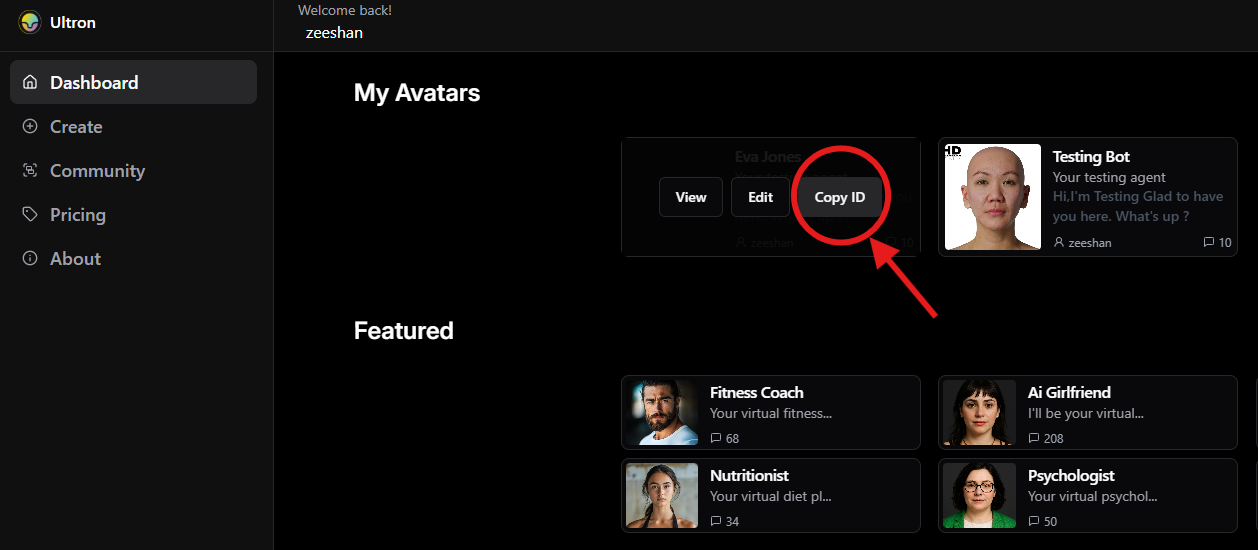
|
|
246
264
|
|
|
247
|
-
Step 2:
|
|
265
|
+
### Step 2: Click on Copy ID
|
|
266
|
+
|
|
267
|
+
The Avatar ID will be copied and can be used in SDK
|
|
248
268
|
|
|
249
|
-

|
|
250
269
|
|
|
251
270
|
---
|
|
252
271
|
|
|
@@ -290,7 +309,7 @@ ultronSDK.setAudioInputDevice(myDevice.deviceId)
|
|
|
290
309
|
|
|
291
310
|
## Best Practices
|
|
292
311
|
|
|
293
|
-
- Always initialize the SDK with a valid
|
|
312
|
+
- Always initialize the SDK with a valid SessionId
|
|
294
313
|
- Implement error handling for load failures
|
|
295
314
|
- Clean up resources when removing the avatar
|
|
296
315
|
- Optimize container size for better performance
|
|
@@ -402,6 +421,9 @@ Then add a handler to process transcribed speech:
|
|
|
402
421
|
character.onSpeechTranscribed = async (text) => {
|
|
403
422
|
console.log("User said:", text);
|
|
404
423
|
|
|
424
|
+
|
|
425
|
+
/////////////////////////// Your AI Workflow ///////////////////////////////////////
|
|
426
|
+
// The section below can be any API which chats with AI like openai or your own agentic API (Text to text)
|
|
405
427
|
// Send the transcribed text to your AI API
|
|
406
428
|
const response = await fetch("https://your-ai-api.com/endpoint", {
|
|
407
429
|
method: "POST",
|
|
@@ -411,8 +433,13 @@ character.onSpeechTranscribed = async (text) => {
|
|
|
411
433
|
|
|
412
434
|
const data = await response.json();
|
|
413
435
|
|
|
436
|
+
const AIResponseText = data.responseText
|
|
437
|
+
|
|
438
|
+
//////////////////////////////////////////////////////////////////////////////////
|
|
439
|
+
|
|
440
|
+
|
|
414
441
|
// Speak the AI response using the character
|
|
415
|
-
character.
|
|
442
|
+
character.say(AIResponseText);
|
|
416
443
|
};
|
|
417
444
|
```
|
|
418
445
|
|