ui-agent-annotation 0.1.4
This diff represents the content of publicly available package versions that have been released to one of the supported registries. The information contained in this diff is provided for informational purposes only and reflects changes between package versions as they appear in their respective public registries.
- package/README.md +336 -0
- package/dist/cjs/index.cjs +1783 -0
- package/dist/cjs/index.cjs.map +7 -0
- package/dist/cjs/index.native.cjs +1004 -0
- package/dist/cjs/index.native.cjs.map +7 -0
- package/dist/cjs/index.web.cjs +83 -0
- package/dist/cjs/index.web.cjs.map +7 -0
- package/dist/esm/index.js +1758 -0
- package/dist/esm/index.js.map +7 -0
- package/dist/esm/index.native.js +1012 -0
- package/dist/esm/index.native.js.map +7 -0
- package/dist/esm/index.web.js +62 -0
- package/dist/esm/index.web.js.map +7 -0
- package/dist/types/components/AnnotationInput.d.ts +8 -0
- package/dist/types/components/AnnotationList.d.ts +1 -0
- package/dist/types/components/Draggable.d.ts +10 -0
- package/dist/types/components/ErrorBoundary.d.ts +159 -0
- package/dist/types/components/Highlighter.d.ts +1 -0
- package/dist/types/components/Toolbar.d.ts +1 -0
- package/dist/types/index.d.ts +22 -0
- package/dist/types/index.web.d.ts +69 -0
- package/dist/types/store.d.ts +66 -0
- package/dist/types/utils/fiber.d.ts +51 -0
- package/dist/types/utils/platform.d.ts +8 -0
- package/dist/types/utils/screenshot.d.ts +28 -0
- package/package.json +115 -0
package/README.md
ADDED
|
@@ -0,0 +1,336 @@
|
|
|
1
|
+
# @np-dev/ui-ai-anotation
|
|
2
|
+
|
|
3
|
+
AI-powered annotation toolkit for React and React Native apps. Enables component inspection, annotation, and screenshot capture for AI-assisted development workflows.
|
|
4
|
+
|
|
5
|
+
## Demo
|
|
6
|
+
|
|
7
|
+
[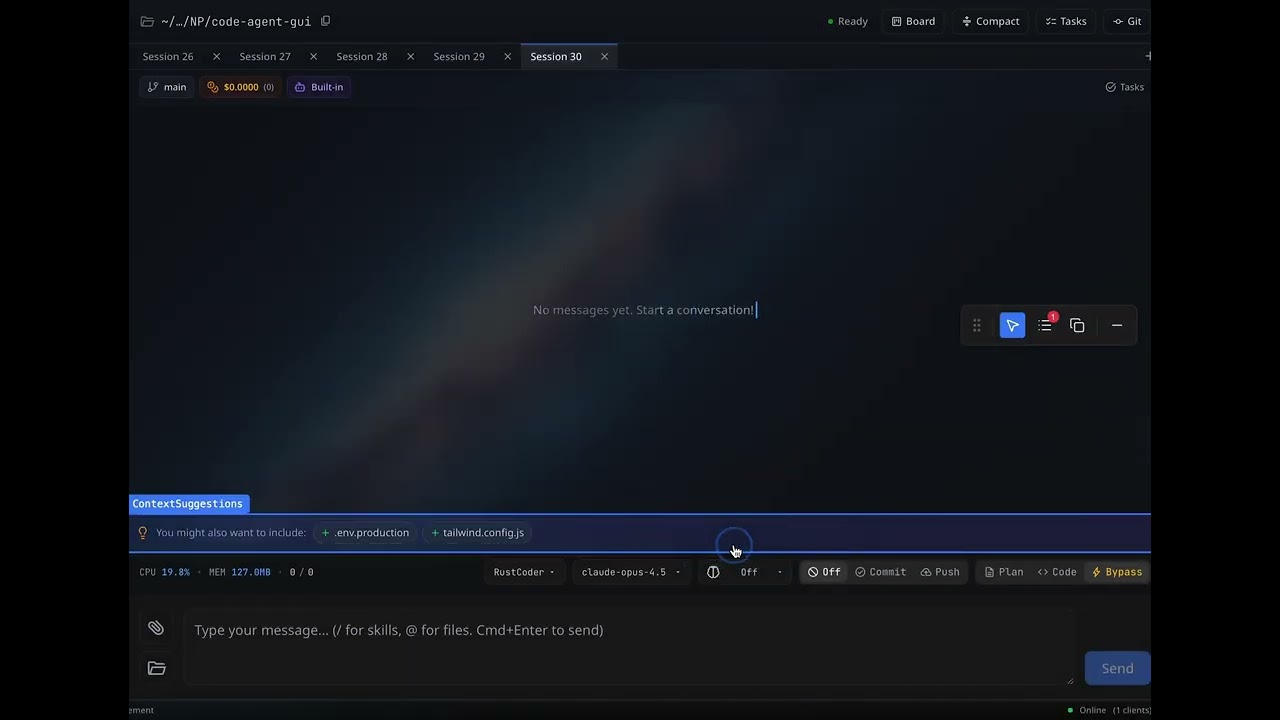](https://youtu.be/txwfiIXagQk)
|
|
8
|
+
|
|
9
|
+
▶️ *Click the image above to watch the demo video*
|
|
10
|
+
|
|
11
|
+
## Features
|
|
12
|
+
|
|
13
|
+
- 🔍 **Component Inspector** - Hover/tap to identify React components
|
|
14
|
+
- 📝 **Annotations** - Add notes to components for AI context
|
|
15
|
+
- 📷 **Screenshots** - Capture component screenshots (web + native)
|
|
16
|
+
- 🖱️ **Draggable Toolbar** - Non-intrusive floating UI
|
|
17
|
+
- 🌐 **Cross-platform** - Works on Web, iOS, and Android
|
|
18
|
+
- 🧩 **Chrome Extension** - Annotate any website!
|
|
19
|
+
|
|
20
|
+
## Installation
|
|
21
|
+
|
|
22
|
+
```bash
|
|
23
|
+
# Using npm
|
|
24
|
+
npm install @np-dev/ui-ai-anotation
|
|
25
|
+
|
|
26
|
+
# Using yarn
|
|
27
|
+
yarn add @np-dev/ui-ai-anotation
|
|
28
|
+
|
|
29
|
+
# Using bun
|
|
30
|
+
bun add @np-dev/ui-ai-anotation
|
|
31
|
+
```
|
|
32
|
+
|
|
33
|
+
### Additional dependencies
|
|
34
|
+
|
|
35
|
+
**For Web:**
|
|
36
|
+
```bash
|
|
37
|
+
npm install framer-motion html2canvas lucide-react
|
|
38
|
+
```
|
|
39
|
+
|
|
40
|
+
**For React Native:**
|
|
41
|
+
```bash
|
|
42
|
+
npm install react-native-view-shot
|
|
43
|
+
|
|
44
|
+
# Optional for clipboard support
|
|
45
|
+
npm install expo-clipboard
|
|
46
|
+
|
|
47
|
+
# Optional for saving to camera roll
|
|
48
|
+
npm install expo-media-library
|
|
49
|
+
```
|
|
50
|
+
|
|
51
|
+
## Usage
|
|
52
|
+
|
|
53
|
+
### Web (React)
|
|
54
|
+
|
|
55
|
+
```tsx
|
|
56
|
+
import { AgentAnnotationProvider } from '@np-dev/ui-ai-anotation';
|
|
57
|
+
|
|
58
|
+
function App() {
|
|
59
|
+
return (
|
|
60
|
+
<AgentAnnotationProvider>
|
|
61
|
+
<YourApp />
|
|
62
|
+
</AgentAnnotationProvider>
|
|
63
|
+
);
|
|
64
|
+
}
|
|
65
|
+
```
|
|
66
|
+
|
|
67
|
+
### React Native
|
|
68
|
+
|
|
69
|
+
```tsx
|
|
70
|
+
import { AgentAnnotationProvider } from '@np-dev/ui-ai-anotation/native';
|
|
71
|
+
// or
|
|
72
|
+
import { AgentAnnotationProvider } from '@np-dev/ui-ai-anotation';
|
|
73
|
+
|
|
74
|
+
function App() {
|
|
75
|
+
return (
|
|
76
|
+
<AgentAnnotationProvider>
|
|
77
|
+
<YourApp />
|
|
78
|
+
</AgentAnnotationProvider>
|
|
79
|
+
);
|
|
80
|
+
}
|
|
81
|
+
```
|
|
82
|
+
|
|
83
|
+
## API
|
|
84
|
+
|
|
85
|
+
### Components
|
|
86
|
+
|
|
87
|
+
#### `AgentAnnotationProvider`
|
|
88
|
+
|
|
89
|
+
Wraps your app to provide annotation functionality.
|
|
90
|
+
|
|
91
|
+
```tsx
|
|
92
|
+
<AgentAnnotationProvider>
|
|
93
|
+
{children}
|
|
94
|
+
</AgentAnnotationProvider>
|
|
95
|
+
```
|
|
96
|
+
|
|
97
|
+
#### `Toolbar`
|
|
98
|
+
|
|
99
|
+
The floating toolbar with annotation controls. Automatically rendered by the provider.
|
|
100
|
+
|
|
101
|
+
#### `Highlighter`
|
|
102
|
+
|
|
103
|
+
Component inspector overlay. Highlights components on hover (web) or tap (native).
|
|
104
|
+
|
|
105
|
+
**Native-specific props:**
|
|
106
|
+
```tsx
|
|
107
|
+
interface HighlighterProps {
|
|
108
|
+
onInspect?: (event: GestureResponderEvent) => {
|
|
109
|
+
name: string;
|
|
110
|
+
rect: { x: number; y: number; width: number; height: number };
|
|
111
|
+
} | null;
|
|
112
|
+
}
|
|
113
|
+
```
|
|
114
|
+
|
|
115
|
+
#### `ErrorBoundary`
|
|
116
|
+
|
|
117
|
+
A customizable error boundary component with copy-to-clipboard functionality for error reports.
|
|
118
|
+
|
|
119
|
+
```tsx
|
|
120
|
+
import { ErrorBoundary } from '@np-dev/ui-ai-anotation';
|
|
121
|
+
|
|
122
|
+
<ErrorBoundary>
|
|
123
|
+
<YourApp />
|
|
124
|
+
</ErrorBoundary>
|
|
125
|
+
```
|
|
126
|
+
|
|
127
|
+
**Props:**
|
|
128
|
+
|
|
129
|
+
| Prop | Type | Default | Description |
|
|
130
|
+
|------|------|---------|-------------|
|
|
131
|
+
| `children` | `ReactNode` | - | Child components to wrap |
|
|
132
|
+
| `fallback` | `React.ComponentType<FallbackProps>` | - | Fully custom fallback component |
|
|
133
|
+
| `fallbackElement` | `ReactNode` | - | Simple static fallback element |
|
|
134
|
+
| `title` | `string` | `"Something went wrong"` | Error page title |
|
|
135
|
+
| `subtitle` | `string` | `"An unexpected error..."` | Error description |
|
|
136
|
+
| `showErrorDetails` | `boolean` | `true` | Show/hide error stack trace |
|
|
137
|
+
| `showCopyButton` | `boolean` | `true` | Show/hide copy error button |
|
|
138
|
+
| `showRetryButton` | `boolean` | `true` | Show/hide retry button |
|
|
139
|
+
| `retryButtonLabel` | `string` | `"Try Again"` | Retry button text |
|
|
140
|
+
| `copyButtonLabel` | `string` | `"Copy Error Details"` | Copy button text |
|
|
141
|
+
| `customButtons` | `ErrorButtonConfig[]` | - | Additional custom buttons |
|
|
142
|
+
| `containerStyle` | `CSSProperties` | - | Override container styles |
|
|
143
|
+
| `errorDetailsStyle` | `CSSProperties` | - | Override error details styles |
|
|
144
|
+
| `onError` | `(error, errorInfo) => void` | - | Callback when error occurs |
|
|
145
|
+
| `onReset` | `() => void` | - | Callback when reset/retry |
|
|
146
|
+
|
|
147
|
+
**Custom Fallback Example:**
|
|
148
|
+
|
|
149
|
+
```tsx
|
|
150
|
+
<ErrorBoundary
|
|
151
|
+
fallback={({ error, errorInfo, reset, copyToClipboard, copied }) => (
|
|
152
|
+
<div>
|
|
153
|
+
<h1>Oops! {error.message}</h1>
|
|
154
|
+
<button onClick={reset}>Retry</button>
|
|
155
|
+
<button onClick={copyToClipboard}>
|
|
156
|
+
{copied ? 'Copied!' : 'Copy Error'}
|
|
157
|
+
</button>
|
|
158
|
+
</div>
|
|
159
|
+
)}
|
|
160
|
+
>
|
|
161
|
+
<App />
|
|
162
|
+
</ErrorBoundary>
|
|
163
|
+
```
|
|
164
|
+
|
|
165
|
+
**Custom Buttons Example:**
|
|
166
|
+
|
|
167
|
+
```tsx
|
|
168
|
+
<ErrorBoundary
|
|
169
|
+
title="Application Error"
|
|
170
|
+
subtitle="Please try again or contact support"
|
|
171
|
+
customButtons={[
|
|
172
|
+
{
|
|
173
|
+
label: 'Go Home',
|
|
174
|
+
onClick: () => window.location.href = '/',
|
|
175
|
+
style: { backgroundColor: '#4CAF50' }
|
|
176
|
+
},
|
|
177
|
+
{
|
|
178
|
+
label: 'Contact Support',
|
|
179
|
+
onClick: () => window.open('mailto:support@example.com')
|
|
180
|
+
}
|
|
181
|
+
]}
|
|
182
|
+
>
|
|
183
|
+
<App />
|
|
184
|
+
</ErrorBoundary>
|
|
185
|
+
```
|
|
186
|
+
|
|
187
|
+
**Minimal Error Page:**
|
|
188
|
+
|
|
189
|
+
```tsx
|
|
190
|
+
<ErrorBoundary
|
|
191
|
+
showErrorDetails={false}
|
|
192
|
+
showCopyButton={false}
|
|
193
|
+
title="Oops!"
|
|
194
|
+
subtitle="Something went wrong. Please refresh the page."
|
|
195
|
+
>
|
|
196
|
+
<App />
|
|
197
|
+
</ErrorBoundary>
|
|
198
|
+
```
|
|
199
|
+
|
|
200
|
+
### Hooks
|
|
201
|
+
|
|
202
|
+
#### `useAgentAnnotation()`
|
|
203
|
+
|
|
204
|
+
Access annotation state and dispatch actions.
|
|
205
|
+
|
|
206
|
+
```tsx
|
|
207
|
+
const { state, dispatch } = useAgentAnnotation();
|
|
208
|
+
|
|
209
|
+
// State shape
|
|
210
|
+
interface State {
|
|
211
|
+
mode: 'disabled' | 'inspecting';
|
|
212
|
+
annotations: Annotation[];
|
|
213
|
+
hoveredElement: any;
|
|
214
|
+
hoveredComponentInfo: { name: string } | null;
|
|
215
|
+
isMinimized: boolean;
|
|
216
|
+
showList: boolean;
|
|
217
|
+
}
|
|
218
|
+
|
|
219
|
+
// Actions
|
|
220
|
+
dispatch({ type: 'SET_MODE', payload: 'inspecting' });
|
|
221
|
+
dispatch({ type: 'ADD_ANNOTATION', payload: { id, componentName, note, timestamp } });
|
|
222
|
+
dispatch({ type: 'REMOVE_ANNOTATION', payload: annotationId });
|
|
223
|
+
dispatch({ type: 'CLEAR_ALL_ANNOTATIONS' });
|
|
224
|
+
dispatch({ type: 'TOGGLE_MINIMIZED' });
|
|
225
|
+
dispatch({ type: 'TOGGLE_LIST' });
|
|
226
|
+
```
|
|
227
|
+
|
|
228
|
+
### Utilities
|
|
229
|
+
|
|
230
|
+
#### `captureScreenshot(element, options)`
|
|
231
|
+
|
|
232
|
+
Capture a screenshot of an element/view.
|
|
233
|
+
|
|
234
|
+
**Web:**
|
|
235
|
+
```tsx
|
|
236
|
+
import { captureScreenshot } from '@np-dev/ui-ai-anotation';
|
|
237
|
+
|
|
238
|
+
const result = await captureScreenshot(htmlElement, {
|
|
239
|
+
scale: 2,
|
|
240
|
+
copyToClipboard: true,
|
|
241
|
+
download: false,
|
|
242
|
+
});
|
|
243
|
+
```
|
|
244
|
+
|
|
245
|
+
**Native:**
|
|
246
|
+
```tsx
|
|
247
|
+
import { captureScreenshot } from '@np-dev/ui-ai-anotation/native';
|
|
248
|
+
|
|
249
|
+
const viewRef = useRef<View>(null);
|
|
250
|
+
|
|
251
|
+
const result = await captureScreenshot(viewRef, {
|
|
252
|
+
scale: 2,
|
|
253
|
+
format: 'png',
|
|
254
|
+
copyToClipboard: true,
|
|
255
|
+
saveToCameraRoll: false,
|
|
256
|
+
});
|
|
257
|
+
```
|
|
258
|
+
|
|
259
|
+
#### Platform Detection
|
|
260
|
+
|
|
261
|
+
```tsx
|
|
262
|
+
import { isWeb, isNative, getPlatform, isTauriEnv } from '@np-dev/ui-ai-anotation';
|
|
263
|
+
|
|
264
|
+
if (isWeb) {
|
|
265
|
+
// Web-specific code
|
|
266
|
+
}
|
|
267
|
+
|
|
268
|
+
if (isNative) {
|
|
269
|
+
// React Native-specific code
|
|
270
|
+
}
|
|
271
|
+
|
|
272
|
+
const platform = getPlatform(); // 'web' | 'ios' | 'android' | 'native'
|
|
273
|
+
```
|
|
274
|
+
|
|
275
|
+
## Toolbar Controls
|
|
276
|
+
|
|
277
|
+
| Button | Description |
|
|
278
|
+
|--------|-------------|
|
|
279
|
+
| ⋮⋮ | Drag handle - move the toolbar |
|
|
280
|
+
| 👆/🚫 | Toggle inspection mode |
|
|
281
|
+
| 📋 | View annotation list |
|
|
282
|
+
| 📋 | Copy annotations as JSON |
|
|
283
|
+
| ➖/⬜ | Minimize/expand toolbar |
|
|
284
|
+
|
|
285
|
+
## Workflow
|
|
286
|
+
|
|
287
|
+
1. **Enable Inspection** - Click the inspection toggle
|
|
288
|
+
2. **Select Component** - Hover (web) or tap (native) on a component
|
|
289
|
+
3. **Lock Selection** - Click to lock the selection (web)
|
|
290
|
+
4. **Add Annotation** - Click the + button to add a note
|
|
291
|
+
5. **Copy Annotations** - Copy all annotations as JSON for AI context
|
|
292
|
+
|
|
293
|
+
## Tauri Support
|
|
294
|
+
|
|
295
|
+
The package includes special handling for Tauri apps (web apps running in Tauri):
|
|
296
|
+
|
|
297
|
+
```tsx
|
|
298
|
+
import { isTauriEnv, captureScreenshot } from '@np-dev/ui-ai-anotation';
|
|
299
|
+
|
|
300
|
+
if (isTauriEnv()) {
|
|
301
|
+
// Uses @tauri-apps/plugin-clipboard-manager for clipboard
|
|
302
|
+
}
|
|
303
|
+
```
|
|
304
|
+
|
|
305
|
+
## Chrome Extension
|
|
306
|
+
|
|
307
|
+
Use the annotation toolkit on any website as a Chrome extension!
|
|
308
|
+
|
|
309
|
+
### Build the Extension
|
|
310
|
+
|
|
311
|
+
```bash
|
|
312
|
+
cd packages/ui-ai-anotation
|
|
313
|
+
bun install
|
|
314
|
+
bun run build:extension
|
|
315
|
+
```
|
|
316
|
+
|
|
317
|
+
### Install in Chrome
|
|
318
|
+
|
|
319
|
+
1. Go to `chrome://extensions/`
|
|
320
|
+
2. Enable **Developer mode** (toggle in top right)
|
|
321
|
+
3. Click **Load unpacked**
|
|
322
|
+
4. Select the `dist/` folder
|
|
323
|
+
|
|
324
|
+
### Usage
|
|
325
|
+
|
|
326
|
+
1. Click the extension icon to open the popup
|
|
327
|
+
2. Toggle "Enable Inspector" to activate on the current page
|
|
328
|
+
3. Hover over elements to highlight them
|
|
329
|
+
4. Click to add annotations
|
|
330
|
+
5. Use the floating toolbar to manage annotations
|
|
331
|
+
|
|
332
|
+
See [extension/README.md](extension/README.md) for more details.
|
|
333
|
+
|
|
334
|
+
## License
|
|
335
|
+
|
|
336
|
+
MIT
|