truecanvas 0.2.0 → 0.4.0
This diff represents the content of publicly available package versions that have been released to one of the supported registries. The information contained in this diff is provided for informational purposes only and reflects changes between package versions as they appear in their respective public registries.
- package/README.md +81 -181
- package/dist/catalog-worker.js +1 -1
- package/dist/chunk-M7B3W7EP.js +659 -0
- package/dist/{chunk-ZPARY6OD.js → chunk-OVYSWA2F.js} +387 -340
- package/dist/chunk-PBKX3SBC.js +97 -0
- package/dist/chunk-TSHD2S36.js +28 -0
- package/dist/{chunk-T2TCBSTG.js → chunk-WU7NBTJH.js} +25 -18
- package/dist/cli.js +989 -257
- package/dist/core/index.d.ts +56 -10
- package/dist/core/index.js +16 -25
- package/dist/editor/assets/{Menu-DXPm0EXo.css → Menu-BJ3OmqzH.css} +1 -1
- package/dist/editor/assets/hub-B5hqZCM2.js +2 -0
- package/dist/editor/assets/{main-DlADROMw.js → main-woTyWmya.js} +5 -5
- package/dist/editor/hub.html +3 -3
- package/dist/editor/index.html +3 -3
- package/dist/next/index.js +3 -2
- package/dist/share/index.d.ts +36 -0
- package/dist/share/index.js +6 -0
- package/dist/vite/index.d.ts +33 -0
- package/dist/vite/index.js +81 -0
- package/package.json +19 -6
- package/dist/editor/assets/hub-BnbEAnt6.js +0 -2
- /package/dist/editor/assets/{Menu-BFifVcgz.js → Menu-C0Ti-6T2.js} +0 -0
package/README.md
CHANGED
|
@@ -4,199 +4,127 @@
|
|
|
4
4
|
|
|
5
5
|
**A Figma-like canvas for your real React components. The code is the document.**
|
|
6
6
|
|
|
7
|
-
[truecanvas
|
|
7
|
+
[](https://www.npmjs.com/package/truecanvas)
|
|
8
|
+
[](https://github.com/Nathandona/truecanvas/actions/workflows/ci.yml)
|
|
9
|
+
[](https://github.com/Nathandona/truecanvas/blob/main/LICENSE)
|
|
10
|
+
|
|
11
|
+
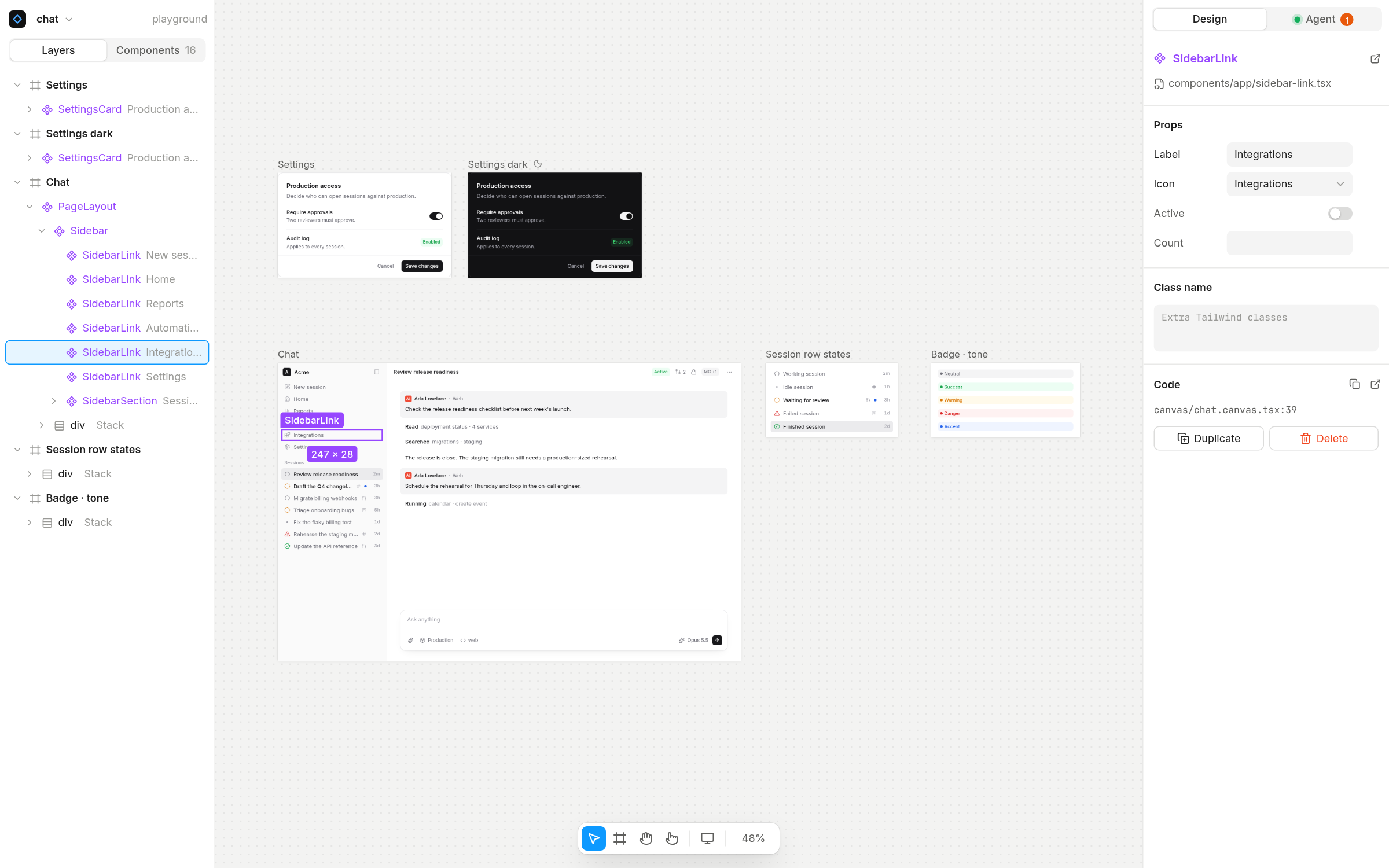
Truecanvas renders your actual `.tsx` components on an infinite canvas and writes every change back to plain TSX in your repo. It has no built-in AI: it is agent-first through **MCP**, so Claude Code, Cursor, Codex or any MCP client can read your design system, edit frames and take screenshots while you watch and steer.
|
|
8
12
|
|
|
9
|
-
|
|
13
|
+
[truecanvas.dev](https://truecanvas.dev)
|
|
10
14
|
|
|
11
15
|
|
|
12
16
|
|
|
13
|
-
|
|
14
|
-
|
|
15
|
-
- **
|
|
16
|
-
- **
|
|
17
|
-
- **
|
|
18
|
-
- **
|
|
19
|
-
- **
|
|
20
|
-
- **
|
|
21
|
-
- **
|
|
22
|
-
- **
|
|
23
|
-
- **
|
|
24
|
-
- **Light, dark, system.** Per-frame theme (Inherit / Light / Dark) and a canvas-wide theme, applied live without reloading frames.
|
|
25
|
-
- **Lightweight.** No second dev server. Frames render through your existing `next dev`, the editor is a static bundle, and headless Chromium only starts when an agent asks for a screenshot.
|
|
26
|
-
|
|
27
|
-
> Status: early (v0.1). Next.js App Router + Tailwind first. Linux-first, tested on Fedora 43.
|
|
17
|
+
## Features
|
|
18
|
+
|
|
19
|
+
- **Real components.** Layers are instances of your components, with a props panel generated from their TypeScript types.
|
|
20
|
+
- **Code is the document.** A canvas is a `.canvas.tsx` file. Edits are minimal patches that keep your formatting, so diffs stay reviewable.
|
|
21
|
+
- **Agent-first.** 45 MCP tools to read the tree, insert JSX, set props and classes, create frames and variants, and take screenshots.
|
|
22
|
+
- **Design on real pages.** Link any Next.js page as a frame: editing its layers edits `page.tsx` and its layouts.
|
|
23
|
+
- **Components and libraries.** Turn a selection into a component, edit main components, install icon sets (Lucide, Tabler, Phosphor, Heroicons, Radix) and add shadcn/ui components.
|
|
24
|
+
- **Share with clients.** One click freezes a page into a private link on your own domain: clients look and comment in their browser, nothing to install, and their comments land on your canvas for you or your agent to answer.
|
|
25
|
+
- **Git built in.** Per-frame change summaries, branches, commits, pull requests with before/after images, visual compare and comments that travel with branches.
|
|
26
|
+
- **Motion, devices, themes.** Scroll reveals and text animations, iPhone/Pixel/iPad presets with device chrome, and per-frame light and dark themes.
|
|
27
|
+
- **Lightweight.** Frames render through your existing dev server. Headless Chromium only starts when an agent asks for a screenshot.
|
|
28
28
|
|
|
29
29
|
## Quick start
|
|
30
30
|
|
|
31
|
-
|
|
31
|
+
In a **Next.js** (App Router, 15.3+) or **Vite + React** (5+) app:
|
|
32
32
|
|
|
33
33
|
```bash
|
|
34
34
|
npx truecanvas
|
|
35
35
|
```
|
|
36
36
|
|
|
37
|
-
|
|
37
|
+
The first run sets the project up: the dev dependency, the plugin in `next.config` or `vite.config`, a `canvas` script and a first canvas. It then starts your app and opens the editor. After that, use `npm run canvas`.
|
|
38
38
|
|
|
39
|
-
|
|
39
|
+
Start a new app instead:
|
|
40
40
|
|
|
41
41
|
```bash
|
|
42
|
-
npm create truecanvas@latest my-app
|
|
43
|
-
|
|
42
|
+
npm create truecanvas@latest my-app # asks Next.js or Vite
|
|
43
|
+
npm create truecanvas@latest my-app -- --vite
|
|
44
44
|
```
|
|
45
45
|
|
|
46
|
-
|
|
46
|
+
Run `npx truecanvas doctor` if anything looks off: it checks every requirement and prints a fix for each problem.
|
|
47
47
|
|
|
48
|
-
|
|
49
|
-
|
|
50
|
-
**Prefer an app to a terminal?** `npx truecanvas open` opens the Truecanvas window: your projects, one tab each, "Clone from GitHub" and "New project". `npx truecanvas desktop` adds it to your app launcher (Linux).
|
|
51
|
-
|
|
52
|
-
### Connect your agent
|
|
48
|
+
## Connect your agent
|
|
53
49
|
|
|
54
50
|
```bash
|
|
55
51
|
npx truecanvas connect
|
|
56
52
|
```
|
|
57
53
|
|
|
58
|
-
This
|
|
54
|
+
This adds Truecanvas to the project's `.mcp.json`. Commit it and every teammate's agent is connected.
|
|
59
55
|
|
|
60
56
|
| Client | Config |
|
|
61
57
|
| --- | --- |
|
|
62
|
-
| Claude Code | `.mcp.json
|
|
63
|
-
| Cursor | `.cursor/mcp.json
|
|
64
|
-
| VS Code | `.vscode/mcp.json
|
|
65
|
-
| Codex | `~/.codex/config.toml
|
|
66
|
-
| stdio
|
|
67
|
-
|
|
68
|
-
Then select something on the canvas and ask: *"Make my selection denser"*, *"Create a dark copy of the Chat frame and check it with a screenshot"*, *"Show every status of SessionRow"*.
|
|
69
|
-
|
|
70
|
-
## The Truecanvas window
|
|
71
|
-
|
|
72
|
-
```bash
|
|
73
|
-
npx truecanvas desktop # adds Truecanvas to your app launcher (GNOME, KDE…)
|
|
74
|
-
npx truecanvas hub # or start it from a terminal
|
|
75
|
-
```
|
|
76
|
-
|
|
77
|
-
One window for all your projects, with tabs like a browser. The **Dashboard** lists your recent projects (with their favicons) and the Next.js apps it finds on your computer. You can open a folder, set up Truecanvas in an existing app, or create a new project. Each tab is a project's editor. Opening a tab starts that project's app on free ports, and closing it stops the app and frees the memory (the tab bar shows how much is in use).
|
|
78
|
-
|
|
79
|
-
The hub serves MCP at the same `http://localhost:4800/mcp`, and your agent works on the project in the active tab. It can also call `list_projects` and `open_project` to switch itself.
|
|
80
|
-
|
|
81
|
-
## Collaborate
|
|
82
|
-
|
|
83
|
-
Everything Truecanvas makes is a file in your repo: canvases, comments, linked pages, the motion components they use, and `.mcp.json`. So git is the collaboration layer, and a team works on design the way it works on code.
|
|
84
|
-
|
|
85
|
-
### The workflow
|
|
86
|
-
|
|
87
|
-
1. **Set up once, commit it.** `npx truecanvas` in the repo, then commit `package.json`, `canvas/`, `next.config` and `.mcp.json`. Teammates run their usual install and `npm run canvas`; their agents are already connected.
|
|
88
|
-
2. **Design on real pages.** Linked frames are your production pages: editing them edits `page.tsx`. For bigger ideas, right-click → **Explore a copy**, iterate freely (you or your agent), then **Apply to page**. Delete explorations once applied.
|
|
89
|
-
3. **One branch per change.** On `main`, Truecanvas offers to start a branch and brings your edits along.
|
|
90
|
-
4. **Commit from the Git panel.** It lists what changed per frame in plain words and drafts the message.
|
|
91
|
-
5. **Open a pull request** from the panel: the description shows each changed frame, before and after.
|
|
92
|
-
6. **Review in Truecanvas too.** In the Truecanvas window, a project's menu → **Pull requests…** checks out any PR and shows it on the canvas, live, not just as pictures. Leave comments on frames; they're saved in the branch, and agents can read and resolve them.
|
|
93
|
-
7. **Merge.** There's no handoff: the design is already the code.
|
|
94
|
-
|
|
95
|
-
Designers who don't use a terminal can do all of it from the Truecanvas window: **Clone from GitHub** (clones, installs, sets up), open the project, branch, commit, open and review PRs.
|
|
96
|
-
|
|
97
|
-
### What's in the Git panel
|
|
98
|
-
|
|
99
|
-
|
|
100
|
-
- **Git panel** (the branch pill at the top left): what changed, frame by frame, in plain words ("Restyled h1 (+text-orange-600)", "Added a fade-up reveal to p"), with a commit message drafted from it. Changed frames get a dot on the canvas. Design commits include canvases, comments, linked pages and the motion components they use.
|
|
101
|
-
- **Review changes**: a full-screen before/after of each changed frame against the last commit (rendered by your app), plus the code diff.
|
|
102
|
-
- **Branch first**: on `main` with changes, Truecanvas offers to start a branch (named from the page and frames) and carries your edits over.
|
|
103
|
-
- **Pull requests** (GitHub, through the `gh` CLI): push and open a PR in one step. Its description lists the changes per frame, optionally with before/after images stored on a `truecanvas-previews` branch of the same repo. The branch pill then shows the PR's state: open, checks running or failing, approved, merged. No GitHub remote yet? "Publish" creates the repo (private by default).
|
|
104
|
-
- **Compare**: render this page as it was on another branch or commit, side by side or as an overlay with an opacity slider. Changed and new frames are flagged. This works because Truecanvas renders any version of the code.
|
|
105
|
-
- **Comments** (`C`): pin a comment on a frame or layer. Threads are saved in `canvas/<page>.comments.json`, so they travel with branches and show up in pull requests. Agents read them with `list_comments` (including the current source of the commented layer), fix things, and `resolve_comment` with a note.
|
|
106
|
-
|
|
107
|
-
### Good to know
|
|
108
|
-
|
|
109
|
-
- **Async, like code.** Collaboration happens through branches and pull requests. Live multiplayer on one canvas isn't supported; the live cursors you see are agents working on your machine.
|
|
110
|
-
- **Merges.** Canvas files are TSX with one block per frame and minimal edits, so two people changing different frames merge cleanly. When both change the same frame, resolve it like any code conflict and Truecanvas re-renders the result.
|
|
111
|
-
- **One agent config for everyone.** `.mcp.json` points at `http://localhost:4800/mcp`, which works whether each person runs `npm run canvas` or the Truecanvas window.
|
|
112
|
-
|
|
113
|
-
## Linked frames
|
|
58
|
+
| Claude Code | `.mcp.json`, or `claude mcp add --scope user --transport http truecanvas http://localhost:4800/mcp` |
|
|
59
|
+
| Cursor | `.cursor/mcp.json`: `{ "mcpServers": { "truecanvas": { "url": "http://localhost:4800/mcp" } } }` |
|
|
60
|
+
| VS Code | `.vscode/mcp.json`: `{ "servers": { "truecanvas": { "type": "http", "url": "http://localhost:4800/mcp" } } }` |
|
|
61
|
+
| Codex | `~/.codex/config.toml`: `[mcp_servers.truecanvas]` with `url = "http://localhost:4800/mcp"` |
|
|
62
|
+
| stdio clients | `{ "command": "npx", "args": ["truecanvas", "mcp"] }` |
|
|
114
63
|
|
|
115
|
-
|
|
116
|
-
|
|
117
|
-
```tsx
|
|
118
|
-
<Frame name="Home" x={0} y={0} width={1440} page="src/app/(marketing)/page.tsx">
|
|
119
|
-
<MarketingLayout>
|
|
120
|
-
<HomePage />
|
|
121
|
-
</MarketingLayout>
|
|
122
|
-
</Frame>
|
|
123
|
-
```
|
|
124
|
-
|
|
125
|
-
- The frame renders the real page through its layouts. Its layers are the JSX of `page.tsx` and of the layouts around it, and every edit goes to the file that layer lives in, keeping that file's formatting. The frame label shows **Live · page.tsx**.
|
|
126
|
-
- Undo, the Git panel (linked pages count as design files) and Compare (the page is rendered as it was at that commit) all work on the page files.
|
|
127
|
-
- Only plain composition is editable: a page whose component fetches data or has logic before its `return` is shown as one layer, **View only**. Explore a copy to design on it.
|
|
128
|
-
- **Explore a copy** creates `<Frame from="src/app/…/page.tsx">` with the page's JSX inline, in the canvas file. **Apply to page** replaces the page's returned JSX with the exploration's, adds the imports it needs and removes the ones it no longer uses.
|
|
129
|
-
- Page and layout layers get ids like `src/app/page.tsx#12:8`, stamped only in `next dev`. Production builds are untouched.
|
|
64
|
+
Then select something and ask: *"Make my selection denser"* or *"Show every status of SessionRow in a variants frame"*.
|
|
130
65
|
|
|
131
66
|
## A canvas file
|
|
132
67
|
|
|
133
68
|
```tsx
|
|
134
69
|
"use client";
|
|
135
70
|
import { Canvas, Frame } from "truecanvas";
|
|
136
|
-
import { SessionRow } from "@/components/
|
|
71
|
+
import { SessionRow } from "@/components/session-row";
|
|
137
72
|
|
|
138
73
|
export default function ChatCanvas() {
|
|
139
74
|
return (
|
|
140
75
|
<Canvas>
|
|
141
76
|
<Frame name="Sessions" x={0} y={0} width={320}>
|
|
142
|
-
<
|
|
143
|
-
<SessionRow title="Review release readiness" status="working" elapsed="2m" active />
|
|
144
|
-
<SessionRow title="Draft the Q4 changelog" status="review" source="slack" elapsed="3h" />
|
|
145
|
-
</div>
|
|
77
|
+
<SessionRow title="Review release readiness" status="working" />
|
|
146
78
|
</Frame>
|
|
147
79
|
<Frame name="Sessions dark" x={360} y={0} width={320} theme="dark">
|
|
148
|
-
|
|
80
|
+
<SessionRow title="Draft the changelog" status="review" />
|
|
149
81
|
</Frame>
|
|
150
82
|
</Canvas>
|
|
151
83
|
);
|
|
152
84
|
}
|
|
153
85
|
```
|
|
154
86
|
|
|
155
|
-
|
|
156
|
-
|
|
157
|
-
|
|
87
|
+
`<Frame>` takes `name`, `x`, `y`, `width`, and optionally `height`, `theme`, `device`, `page` (a linked page) or `component` (a main component). Each frame renders in its own iframe at its own width, so media queries, portals and `position: fixed` behave as in your app. Literal props are editable in the inspector; expressions still render but are read-only.
|
|
88
|
+
|
|
89
|
+
## How it works
|
|
90
|
+
|
|
91
|
+
1. A dev-only plugin (Turbopack/webpack loader for Next.js, Vite plugin for Vite) stamps each JSX element with its source position. Production builds are untouched.
|
|
92
|
+
2. Each frame loads `/truecanvas/<canvas>` from your dev server, where a small runtime maps what's under the pointer back to that position.
|
|
93
|
+
3. Your gestures and your agent's MCP calls become the same commands. The server patches the source and your dev server hot-reloads the frame.
|
|
158
94
|
|
|
159
95
|
## MCP tools
|
|
160
96
|
|
|
161
|
-
|
|
|
162
|
-
| --- | --- |
|
|
163
|
-
| `list_canvases`
|
|
164
|
-
|
|
|
165
|
-
|
|
|
166
|
-
| `
|
|
167
|
-
| `
|
|
168
|
-
| | `create_canvas` · `rename_canvas` · `delete_canvas` | |
|
|
169
|
-
| `get_selection` (what the user selected) | `create_variants_frame` · `add_background` · `apply_preset` | |
|
|
170
|
-
| `list_comments` | `reply_comment` · `resolve_comment` | |
|
|
171
|
-
| | `import_page` (linked by default) · `explore_copy` · `apply_to_page` | |
|
|
172
|
-
| | `add_animation` · `remove_animation` | `play_frame` (play, replay, stop) |
|
|
173
|
-
| | `create_component` · `open_component` | |
|
|
174
|
-
| `list_libraries` · `search_icons` | `install_library` · `insert_icon` · `add_shadcn_components` | |
|
|
175
|
-
|
|
176
|
-
Node ids are `line:col` of the JSX tag (`file#line:col` for layers of a linked page) and change after edits. Every write returns the fresh ids of the affected frame. Catalog components are imported automatically.
|
|
97
|
+
| | Tools |
|
|
98
|
+
| --- | --- |
|
|
99
|
+
| Read | `list_canvases` `get_canvas` `get_node` `get_selection` `list_components` `get_component` `get_design_tokens` `list_comments` |
|
|
100
|
+
| Edit | `insert_jsx` `replace_node` `set_props` `set_text` `set_class_name` `move_node` `duplicate_nodes` `delete_nodes` `wrap_nodes` `undo` `redo` |
|
|
101
|
+
| Frames and pages | `create_frame` `update_frame` `create_variants_frame` `create_canvas` `rename_canvas` `delete_canvas` `import_page` `explore_copy` `apply_to_page` |
|
|
102
|
+
| Components and libraries | `create_component` `open_component` `list_libraries` `install_library` `search_icons` `insert_icon` `add_shadcn_components` |
|
|
103
|
+
| Look and show | `share_canvas` `screenshot_frame` `focus` `play_frame` `add_animation` `remove_animation` `add_background` `apply_preset` `reply_comment` `resolve_comment` |
|
|
177
104
|
|
|
178
|
-
|
|
105
|
+
Node ids are the JSX tag's `line:col` and change after edits; every write returns the fresh ids. Catalog components are imported automatically.
|
|
179
106
|
|
|
180
|
-
|
|
181
|
-
your browser truecanvas dev (Node, 127.0.0.1:4800)
|
|
182
|
-
┌───────────────────────────┐ REST/SSE ┌──────────────────────────────────┐
|
|
183
|
-
│ editor UI (static bundle) │◀─────────▶│ Workspace: parse → patch → write │◀── MCP ── your agent
|
|
184
|
-
│ ┌──────┐ ┌──────┐ │ │ (Babel + magic-string, undo log) │
|
|
185
|
-
│ │iframe│ │iframe│ frames │ │ Catalog: TS checker → prop types │
|
|
186
|
-
│ └──┬───┘ └──┬───┘ │ └───────────────┬──────────────────┘
|
|
187
|
-
└─────┼────────┼────────────┘ │ writes canvas/*.canvas.tsx
|
|
188
|
-
│ └── postMessage: hit-test, rects, theme ▼
|
|
189
|
-
└──────────── /truecanvas/[canvas]?frame=… ── your `next dev` (HMR)
|
|
190
|
-
```
|
|
107
|
+
## Collaborate
|
|
191
108
|
|
|
192
|
-
|
|
193
|
-
|
|
194
|
-
|
|
195
|
-
|
|
109
|
+
Canvases, comments and linked pages are files in your repo, so design changes are branched, reviewed and merged like code. From the Git panel you can branch, commit with a per-frame summary, open a pull request with before/after images, and compare against any branch or commit. Comments are saved with the canvas and agents can read and resolve them.
|
|
110
|
+
|
|
111
|
+
The **Truecanvas window** (`npx truecanvas open`) manages several projects in tabs, clones from GitHub and reviews pull requests on the canvas.
|
|
112
|
+
|
|
113
|
+
## Share with clients
|
|
114
|
+
|
|
115
|
+
**Share** (top right in the editor), `npx truecanvas share <canvas>`, or your agent's `share_canvas` renders every frame through your app and freezes it into static HTML and CSS: no scripts, so a link can never call your API or leak a session. It's published to your own review site as a new version of that page's link. Clients open it in any browser, with an optional password, and pin comments on the frames. Their threads sync into the canvas's comments while Truecanvas runs; your replies and your agent's (`reply_comment`, `resolve_comment`) go back to the link, under your studio's name. Comments you start in Truecanvas stay internal. `--revoke` takes a link down and `--delete` removes it with its comments.
|
|
116
|
+
|
|
117
|
+
The review site is `packages/review`, a small Next.js app you deploy once to your Vercel account:
|
|
118
|
+
|
|
119
|
+
1. Create a Vercel project from this repo with **Root Directory** `packages/review`, and add a private **Blob** store and **Upstash for Redis** (both have free tiers).
|
|
120
|
+
2. Set `REVIEW_TOKEN` (a long random string), and optionally `BRAND_NAME` and `BRAND_LOGO` (a logo URL) for your studio's branding.
|
|
121
|
+
3. Add your domain (for example `review.your-studio.com`), then connect Truecanvas: `npx truecanvas share setup https://review.your-studio.com`.
|
|
122
|
+
|
|
123
|
+
Without a review site, Share still makes a local preview of what clients would see.
|
|
196
124
|
|
|
197
125
|
## Configuration
|
|
198
126
|
|
|
199
|
-
|
|
127
|
+
Everything is optional. Add a `truecanvas.config.json` at the project root:
|
|
200
128
|
|
|
201
129
|
```json
|
|
202
130
|
{
|
|
@@ -205,63 +133,35 @@ Optional `truecanvas.config.json` at the project root:
|
|
|
205
133
|
"canvasDir": "canvas",
|
|
206
134
|
"components": ["components/**/*.tsx"],
|
|
207
135
|
"darkMode": { "strategy": "class", "value": "dark" },
|
|
208
|
-
"
|
|
136
|
+
"css": ["/src/index.css"],
|
|
209
137
|
"editor": "code"
|
|
210
138
|
}
|
|
211
139
|
```
|
|
212
140
|
|
|
213
|
-
`
|
|
214
|
-
|
|
215
|
-
## Shortcuts
|
|
216
|
-
|
|
217
|
-
| | |
|
|
218
|
-
| --- | --- |
|
|
219
|
-
| Select / Frame / Hand / Interact | `V` `F` `H` `P` |
|
|
220
|
-
| Duplicate · Delete | `⌘D` · `⌫` |
|
|
221
|
-
| Wrap in auto layout | `⇧A` |
|
|
222
|
-
| Reorder in parent | `↑` `↓` or drag on the canvas |
|
|
223
|
-
| Parent / child | `⇧↵` / `↵` (or `Esc`) |
|
|
224
|
-
| Edit text | double-click or `↵` |
|
|
225
|
-
| Rename layer or page | double-click its name |
|
|
226
|
-
| Copy as JSX | `⌘C` |
|
|
227
|
-
| Pause / play animations | `⇧P` |
|
|
228
|
-
| Comment | `C` |
|
|
229
|
-
| Zoom to fit · selection · 100% | `⇧1` · `⇧2` · `⇧0` |
|
|
230
|
-
| Undo · Redo | `⌘Z` · `⇧⌘Z` |
|
|
231
|
-
|
|
232
|
-
On Linux, `⌘` is `Ctrl`. Pan with space-drag, middle mouse or two-finger scroll. Zoom with Ctrl+scroll or pinch.
|
|
141
|
+
`darkMode` describes how your app switches themes (a class, or `{ "strategy": "attribute", "attribute": "data-theme", "value": "dark" }`). `css` (Vite only) lists the stylesheets frames load; by default, the ones your entry module imports.
|
|
233
142
|
|
|
234
143
|
## Requirements
|
|
235
144
|
|
|
236
|
-
- Node
|
|
237
|
-
-
|
|
238
|
-
-
|
|
239
|
-
-
|
|
145
|
+
- Node 22+ (24 LTS recommended) and React 19
|
|
146
|
+
- Next.js 15.3+ (App Router) or Vite 5+. Tailwind is optional; the style controls write Tailwind classes.
|
|
147
|
+
- macOS, Linux or Windows
|
|
148
|
+
- Screenshots: Chrome, Edge or Chromium, or `npx playwright install chromium-headless-shell`
|
|
149
|
+
- Pull requests: the GitHub CLI (`gh auth login`)
|
|
240
150
|
|
|
241
|
-
|
|
151
|
+
Linked page frames need Next.js file-based routes. Everything else works the same in Vite apps.
|
|
242
152
|
|
|
243
|
-
##
|
|
153
|
+
## Development
|
|
244
154
|
|
|
245
155
|
```bash
|
|
246
156
|
pnpm install
|
|
247
|
-
pnpm build
|
|
248
|
-
pnpm --filter truecanvas test
|
|
249
|
-
pnpm dev
|
|
250
|
-
pnpm --filter truecanvas dev:editor # editor with
|
|
251
|
-
pnpm pack:local # an installable build, plus the command to add it to a project
|
|
157
|
+
pnpm build # library and editor
|
|
158
|
+
pnpm --filter truecanvas test # tests
|
|
159
|
+
pnpm dev # playground app and editor
|
|
160
|
+
pnpm --filter truecanvas dev:editor # editor with HMR on :4801
|
|
252
161
|
```
|
|
253
162
|
|
|
254
|
-
|
|
255
|
-
|
|
256
|
-
**Releasing:** `pnpm release 0.2.0` bumps `truecanvas` and `create-truecanvas`, commits and tags; `git push --follow-tags` runs the release workflow, which tests and publishes both to npm with provenance (needs an `NPM_TOKEN` secret in the GitHub repo).
|
|
257
|
-
|
|
258
|
-
## Roadmap
|
|
259
|
-
|
|
260
|
-
- Multi-frame drag and reparenting by dragging on the canvas
|
|
261
|
-
- Vite + React Router support, then CSS Modules
|
|
262
|
-
- Inline prop editing for `ReactNode` slots
|
|
263
|
-
- Desktop shell (AppImage / Flatpak) once the web version settles
|
|
163
|
+
Releases: `pnpm release <version>` bumps both packages and tags; `git push --follow-tags` publishes to npm from GitHub Actions with provenance.
|
|
264
164
|
|
|
265
165
|
## License
|
|
266
166
|
|
|
267
|
-
MIT
|
|
167
|
+
[MIT](https://github.com/Nathandona/truecanvas/blob/main/LICENSE)
|