trtc-electron-sdk 12.0.605 → 12.0.606
This diff represents the content of publicly available package versions that have been released to one of the supported registries. The information contained in this diff is provided for informational purposes only and reflects changes between package versions as they appear in their respective public registries.
- package/README.md +121 -208
- package/liteav/trtc.d.ts +6 -5
- package/liteav/trtc.js +4 -3
- package/liteav/trtc_define.d.ts +4 -16
- package/liteav/trtc_define.js +23 -7
- package/package.json +15 -9
- package/scripts/download.js +228 -187
- package/scripts/utils.js +91 -26
package/README.md
CHANGED
|
@@ -1,221 +1,134 @@
|
|
|
1
|
-
# TRTC
|
|
2
|
-
|
|
3
|
-
|
|
4
|
-
##
|
|
5
|
-
|
|
6
|
-
|
|
7
|
-
|
|
8
|
-
|
|
9
|
-
|
|
10
|
-
|
|
11
|
-
|
|
12
|
-
|
|
13
|
-
|
|
14
|
-
|
|
15
|
-
|
|
16
|
-
|
|
17
|
-
|
|
18
|
-
|
|
19
|
-
|
|
20
|
-
|
|
21
|
-
|
|
22
|
-
|
|
23
|
-
|
|
24
|
-
|
|
25
|
-
|
|
26
|
-
|
|
27
|
-
|
|
28
|
-
|
|
29
|
-
|
|
30
|
-
|
|
31
|
-
|
|
32
|
-
|
|
33
|
-
|
|
34
|
-
|
|
35
|
-
|
|
36
|
-
|
|
37
|
-
|
|
38
|
-
|
|
39
|
-
|
|
40
|
-
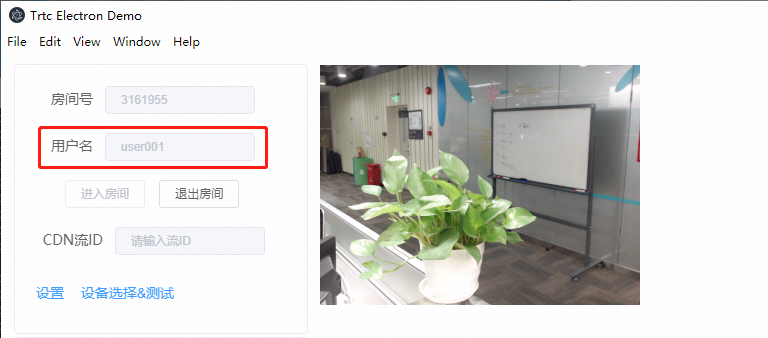
此时可以通过配置国内的镜像地址,或者从 [Github](https://github.com/electron/electron/releases) 下载对应的版本和 `SHASUMS256.txt` 文件到 `C:\Users\[您的用户名]\AppData\Local\electron\Cache` 目录下,如下图:
|
|
41
|
-
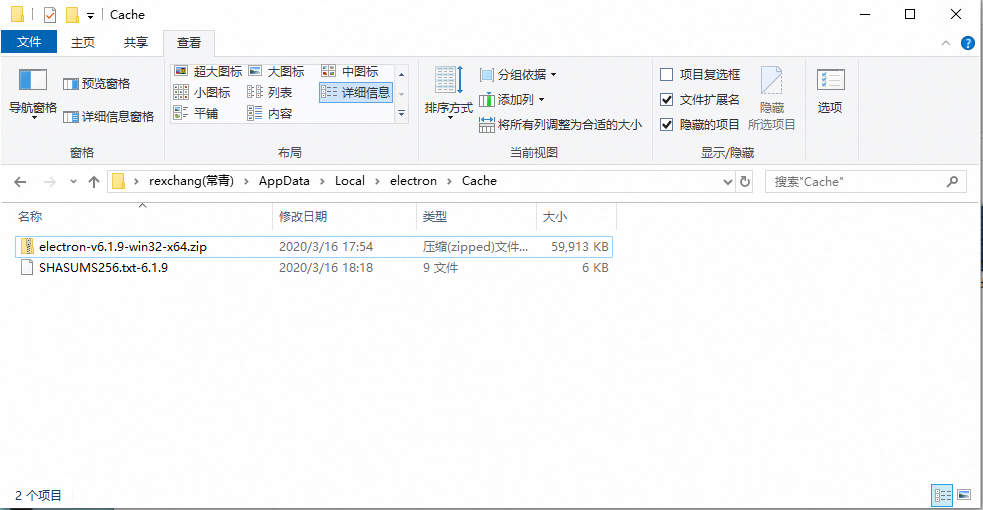
|
|
42
|
-
4. 待 npm 的依赖包都安装完成后,继续在命令行窗口运行如下命令,即可运行起 Electron Demo。
|
|
43
|
-
```
|
|
44
|
-
npm start
|
|
1
|
+
# TRTC SDK for Electron
|
|
2
|
+
Tencent Real-Time Communication (TRTC) is a set of low-latency, high-quality real-time communication services provided by Tencent Cloud, which is committed to providing stable, reliable and low-cost audio and video transmission capabilities for Tencent Cloud customers.
|
|
3
|
+
|
|
4
|
+
## ✨ Features
|
|
5
|
+
- 📺 [Video call](https://www.tencentcloud.com/document/product/647/35428)
|
|
6
|
+
- 🎵 [Audio call](https://www.tencentcloud.com/document/product/647/35428)
|
|
7
|
+
- 🚿 [Interactive video streaming](https://www.tencentcloud.com/document/product/647/35428)
|
|
8
|
+
- 💧 [Interactive audio streaming](https://www.tencentcloud.com/document/product/647/35428)
|
|
9
|
+
- 📼 [On-Cloud Recording](https://www.tencentcloud.com/document/product/647/45169)
|
|
10
|
+
- 📼 [On-Cloud MixTranscoding](https://www.tencentcloud.com/document/product/647/47858#)
|
|
11
|
+
- ⬆️ [Publishing to CSS CDN](https://www.tencentcloud.com/document/product/647/47858#)
|
|
12
|
+
|
|
13
|
+
## 💻 Environment Support
|
|
14
|
+
- 🍎 Support macOS x64 and arm64(**Electron 11+**)
|
|
15
|
+
- ⚙️ Support Windows ia32 and x64
|
|
16
|
+
- 🌈 Electron: 8.5.0 ~ 24.8.8
|
|
17
|
+
|
|
18
|
+
| macOS | Windows | Electron |
|
|
19
|
+
| :----------: | :---------: | :------------: |
|
|
20
|
+
| x64 \| arm64 | ia32 \| x64 | 8.5.0 ~ 24.8.8 |
|
|
21
|
+
|
|
22
|
+
|
|
23
|
+
## ⏬ Install
|
|
24
|
+
By default, it will install the SDK compatible with your device Operation System platform and node.js CPU architecture. If you want to install SDK for specific Operating System or CPU architecture. You can configure the `platform` and `arch` you want in `package.json` or `.npmrc` file as following code. If you configure both, the configuration in `package.json` will work and override that in `.npmrc`.
|
|
25
|
+
|
|
26
|
+
```json
|
|
27
|
+
// package.json
|
|
28
|
+
{
|
|
29
|
+
...
|
|
30
|
+
"trtc_electron" : {
|
|
31
|
+
"platform" : "win32",
|
|
32
|
+
"arch" : "ia32"
|
|
33
|
+
}
|
|
34
|
+
...
|
|
35
|
+
}
|
|
36
|
+
|
|
37
|
+
// .npmrc
|
|
38
|
+
trtc_electron_platform=win32
|
|
39
|
+
trtc_electron_arch=ia32 // only support windows
|
|
45
40
|
```
|
|
46
|
-
|
|
47
41
|
|
|
42
|
+
Properties detail:
|
|
43
|
+
- platform: darwin or win32
|
|
44
|
+
- arch: if not set, it will be `process.arch` of your installation node.js. **Only windows Supported.**
|
|
48
45
|
|
|
49
|
-
|
|
50
|
-
|
|
51
|
-
```
|
|
52
|
-
$ ruby -e "$(curl -fsSL https://raw.githubusercontent.com/Homebrew/install/master/install)"
|
|
53
|
-
```
|
|
54
|
-
2. 继续键入如下命令,安装 Node.js:
|
|
46
|
+
```bash
|
|
47
|
+
npm install trtc-electron-sdk
|
|
55
48
|
```
|
|
56
|
-
$ brew install node
|
|
57
|
-
```
|
|
58
|
-
3. 如果您在中国大陆,可能会发现使用 Homebrew 的默认地址安装 Node.js 会比较慢,此时可以考虑替换为国内镜像地址。
|
|
59
|
-
```cmd
|
|
60
|
-
$ cd `brew --repo`
|
|
61
|
-
$ git remote set-url origin https://mirrors.tuna.tsinghua.edu.cn/git/homebrew/brew.git
|
|
62
|
-
$ brew update
|
|
63
|
-
```
|
|
64
|
-
4. 通过 cd 命令定位到 [步骤3](#step3) 中解压到的目标路径,并运行如下命令:
|
|
65
|
-
```
|
|
66
|
-
npm install
|
|
67
|
-
```
|
|
68
|
-
|
|
69
|
-
5. 待 npm 的依赖包都安装完成后,继续在命令行窗口运行如下命令,即可运行起 Electron Demo。
|
|
70
|
-
```
|
|
71
|
-
npm start
|
|
72
|
-
```
|
|
73
|
-
|
|
74
49
|
|
|
50
|
+
## ⚠️ Notice
|
|
51
|
+
You can build Electron application for Windows and macOS on macOS.
|
|
75
52
|
|
|
76
|
-
## 参考文档
|
|
77
|
-
https://trtc-1252463788.file.myqcloud.com/electron_sdk/docs/index.html
|
|
78
53
|
|
|
79
|
-
|
|
54
|
+
On Windows you can only build Electron application for Windows.Can't build Electron application for macOS, for detail:https://www.electron.build/multi-platform-build.
|
|
80
55
|
|
|
81
|
-
|
|
82
|
-
```
|
|
83
|
-
npm install trtc-electron-sdk@latest --save-dev
|
|
84
|
-
```
|
|
85
|
-
|
|
86
|
-
#### step2. 对接基本功能函数
|
|
56
|
+
## 👋 Usage
|
|
87
57
|
```js
|
|
88
|
-
|
|
89
|
-
|
|
90
|
-
const
|
|
91
|
-
|
|
92
|
-
|
|
93
|
-
|
|
94
|
-
|
|
95
|
-
|
|
96
|
-
|
|
97
|
-
|
|
98
|
-
|
|
99
|
-
|
|
100
|
-
|
|
101
|
-
|
|
102
|
-
|
|
103
|
-
|
|
104
|
-
|
|
105
|
-
|
|
106
|
-
|
|
107
|
-
|
|
108
|
-
|
|
109
|
-
|
|
110
|
-
|
|
111
|
-
|
|
112
|
-
|
|
113
|
-
|
|
114
|
-
|
|
115
|
-
|
|
116
|
-
|
|
117
|
-
|
|
118
|
-
|
|
119
|
-
|
|
120
|
-
|
|
121
|
-
|
|
122
|
-
|
|
123
|
-
|
|
124
|
-
|
|
125
|
-
|
|
126
|
-
|
|
127
|
-
|
|
128
|
-
|
|
129
|
-
|
|
130
|
-
|
|
131
|
-
|
|
132
|
-
|
|
133
|
-
|
|
134
|
-
|
|
135
|
-
|
|
136
|
-
|
|
137
|
-
|
|
138
|
-
|
|
139
|
-
|
|
140
|
-
|
|
141
|
-
|
|
142
|
-
|
|
143
|
-
|
|
144
|
-
|
|
145
|
-
|
|
146
|
-
|
|
147
|
-
|
|
148
|
-
|
|
149
|
-
|
|
150
|
-
|
|
151
|
-
enableVideoCapture(true);
|
|
152
|
-
enableAudioCapture(true);
|
|
153
|
-
},
|
|
154
|
-
|
|
155
|
-
//5、退出房间
|
|
156
|
-
exitroom() {
|
|
157
|
-
this.rtcCloud.exitRoom();
|
|
158
|
-
},
|
|
159
|
-
|
|
160
|
-
//6、开启视频
|
|
161
|
-
enableVideoCapture(bEnable) {
|
|
162
|
-
if (bEnable) {
|
|
163
|
-
let view = this.findView("local", TRTCVideoStreamType.TRTCVideoStreamTypeBig);
|
|
164
|
-
this.rtcCloud.startLocalPreview(view);
|
|
58
|
+
import TRTCCloud from 'trtc-electron-sdk';
|
|
59
|
+
|
|
60
|
+
const rtcCloud = TRTCCloud.getTRTCShareInstance();
|
|
61
|
+
// Obtain the SDK version
|
|
62
|
+
const version = rtcCloud.getSDKVersion();
|
|
63
|
+
```
|
|
64
|
+
|
|
65
|
+
## 📦 Build
|
|
66
|
+
Taking webpack and electron-builder as example.
|
|
67
|
+
|
|
68
|
+
```json
|
|
69
|
+
// webpack config
|
|
70
|
+
module.exports = {
|
|
71
|
+
...
|
|
72
|
+
|
|
73
|
+
module: {
|
|
74
|
+
rules: [
|
|
75
|
+
{
|
|
76
|
+
test: /\.node$/,
|
|
77
|
+
loader: "native-ext-loader",
|
|
78
|
+
options: {
|
|
79
|
+
emit: true,
|
|
80
|
+
rewritePath:
|
|
81
|
+
process.env.NODE_ENV === "production"
|
|
82
|
+
? process.platform === "win32"
|
|
83
|
+
? ".\\"
|
|
84
|
+
: "../"
|
|
85
|
+
: "node_modules/trtc-electron-sdk/build/Release",
|
|
86
|
+
},
|
|
87
|
+
},
|
|
88
|
+
...
|
|
89
|
+
],
|
|
90
|
+
},
|
|
91
|
+
|
|
92
|
+
...
|
|
93
|
+
}
|
|
94
|
+
|
|
95
|
+
// electron-builder config
|
|
96
|
+
{
|
|
97
|
+
...
|
|
98
|
+
|
|
99
|
+
"build": {
|
|
100
|
+
"win": {
|
|
101
|
+
"extraFiles": [
|
|
102
|
+
{
|
|
103
|
+
"from": "node_modules/trtc-electron-sdk/build/Release/",
|
|
104
|
+
"to": "./"
|
|
105
|
+
},
|
|
106
|
+
...
|
|
107
|
+
]
|
|
108
|
+
},
|
|
109
|
+
"mac": {
|
|
110
|
+
"extraFiles": [
|
|
111
|
+
{
|
|
112
|
+
"from": "node_modules/trtc-electron-sdk/build/Release/${arch}/trtc_electron_sdk.node",
|
|
113
|
+
"to": "./"
|
|
114
|
+
},
|
|
115
|
+
{
|
|
116
|
+
"from": "node_modules/trtc-electron-sdk/build/mac-framework/${arch}/",
|
|
117
|
+
"to": "./Frameworks"
|
|
118
|
+
},
|
|
119
|
+
...
|
|
120
|
+
]
|
|
165
121
|
}
|
|
166
|
-
|
|
167
|
-
|
|
168
|
-
|
|
169
|
-
}
|
|
170
|
-
|
|
171
|
-
//7、开启音频
|
|
172
|
-
enableAudioCapture(bEnable) {
|
|
173
|
-
if (bEnable) {
|
|
174
|
-
this.rtcCloud.startLocalAudio();
|
|
175
|
-
}
|
|
176
|
-
else {
|
|
177
|
-
this.rtcCloud.stopLocalAudio();
|
|
178
|
-
}
|
|
179
|
-
},
|
|
180
|
-
|
|
181
|
-
//8、找个DOM结点,作为视频显示的view
|
|
182
|
-
findVideoView(uid, streamtype) {
|
|
183
|
-
let key = uid + String(streamtype);
|
|
184
|
-
var userVideoEl = document.getElementById(key);
|
|
185
|
-
if (!userVideoEl) {
|
|
186
|
-
userVideoEl = document.createElement('div');
|
|
187
|
-
userVideoEl.id = key;
|
|
188
|
-
userVideoEl.classList.add('video_view');
|
|
189
|
-
document.querySelector("#video_wrap").appendChild(userVideoEl);
|
|
190
|
-
}
|
|
191
|
-
return userVideoEl;
|
|
192
|
-
},
|
|
193
|
-
|
|
194
|
-
//9、在视频退出时,清掉一个DOM结点
|
|
195
|
-
destroyVideoView(uid, streamtype) {
|
|
196
|
-
let key = uid + String(streamtype);
|
|
197
|
-
var userVideoEl = document.getElementById(key);
|
|
198
|
-
if (userVideoEl) {
|
|
199
|
-
document.querySelector("#video_wrap").removeChild(userVideoEl);
|
|
200
|
-
}
|
|
201
|
-
},
|
|
122
|
+
}
|
|
123
|
+
|
|
124
|
+
...
|
|
125
|
+
}
|
|
202
126
|
|
|
203
127
|
```
|
|
204
128
|
|
|
205
|
-
##
|
|
206
|
-
|
|
207
|
-
|
|
208
|
-
|
|
209
|
-
|
|
210
|
-
|
|
211
|
-
1. 登录 [实时音视频控制台](https://console.cloud.tencent.com/trtc)。
|
|
212
|
-
2. 在左侧导航栏选择【应用管理】,单击目标应用所在行的【应用信息】。
|
|
213
|
-
3. 选择【快速上手】页签,单击【第二步 获取签发UserSig的密钥】区域的【点此升级】。
|
|
214
|
-
|
|
215
|
-
### 2. 两台设备同时运行 Demo,为什么看不到彼此的画面?
|
|
216
|
-
请确保两台设备在运行 Demo 时使用的是不同的 UserID,TRTC 不支持同一个 UserID (除非 SDKAppID 不同)在两个设备同时使用。
|
|
217
|
-
|
|
218
|
-
|
|
219
|
-
|
|
220
|
-
### 3. 防火墙有什么限制?
|
|
221
|
-
由于 SDK 使用 UDP 协议进行音视频传输,所以对 UDP 有拦截的办公网络下无法使用,如遇到类似问题,请参考文档:[应对公司防火墙限制](https://cloud.tencent.com/document/product/647/34399)。
|
|
129
|
+
## 🔗 Links
|
|
130
|
+
- [Official Site](https://trtc.io/products/rtc)
|
|
131
|
+
- [API Document](https://web.sdk.qcloud.com/trtc/electron/doc/en-us/trtc_electron_sdk/index.html
|
|
132
|
+
)
|
|
133
|
+
- [Online Demo](https://trtc.io/demo)
|
|
134
|
+
- [Github demo]( https://github.com/Tencent-RTC/TRTC_Electron)
|
package/liteav/trtc.d.ts
CHANGED
|
@@ -1,7 +1,7 @@
|
|
|
1
1
|
/// <reference types="node" />
|
|
2
2
|
import { EventEmitter } from 'events';
|
|
3
3
|
import { TRTCConfig } from './Renderer/util';
|
|
4
|
-
import { AudioMusicParam, Rect, TRTCAppScene, TRTCAudioEffectParam, TRTCAudioQuality, TRTCBeautyStyle, TRTCDeviceState, TRTCDeviceType, TRTCLogLevel, TRTCRenderParams, TRTCRoleType, TRTCSpeedTestResult, TRTCStatistics, TRTCSwitchRoomParam, TRTCVideoBufferType, TRTCVideoFillMode, TRTCAudioFrame, TRTCVideoPixelFormat, TRTCVideoRotation, TRTCVideoStreamType, TRTCVolumeInfo, TRTCWaterMarkSrcType, TRTCQualityInfo, TRTCPluginType, TRTCPluginInfo, TRTCVideoProcessPluginOptions, TRTCMediaEncryptDecryptPluginOptions, TRTCAudioRecordingParams, TRTCScreenCaptureSourceInfo, TRTCScreenCaptureProperty, TRTCSpeedTestParams, TRTCRecordType, TRTCDeviceInfo, TRTCCameraCaptureParams, TRTCImageBuffer, TRTCInitConfig, TRTCAudioParallelParams, TRTCVoiceReverbType, TRTCMusicPlayObserver, TRTCAudioFrameCallback } from './trtc_define';
|
|
4
|
+
import { AudioMusicParam, Rect, TRTCAppScene, TRTCAudioEffectParam, TRTCAudioQuality, TRTCBeautyStyle, TRTCDeviceState, TRTCDeviceType, TRTCLogLevel, TRTCRenderParams, TRTCRoleType, TRTCSpeedTestResult, TRTCStatistics, TRTCSwitchRoomParam, TRTCVideoBufferType, TRTCVideoFillMode, TRTCAudioFrame, TRTCVideoPixelFormat, TRTCVideoRotation, TRTCVideoStreamType, TRTCVolumeInfo, TRTCWaterMarkSrcType, TRTCQualityInfo, TRTCPluginType, TRTCPluginInfo, TRTCVideoProcessPluginOptions, TRTCMediaEncryptDecryptPluginOptions, TRTCAudioRecordingParams, TRTCScreenCaptureSourceInfo, TRTCScreenCaptureProperty, TRTCSpeedTestParams, TRTCRecordType, TRTCDeviceInfo, TRTCCameraCaptureParams, TRTCImageBuffer, TRTCInitConfig, TRTCAudioParallelParams, TRTCVoiceReverbType, TRTCMusicPlayObserver, TRTCAudioFrameCallback, TRTCAudioProcessPluginOptions } from './trtc_define';
|
|
5
5
|
export * from './trtc_define';
|
|
6
6
|
export * from './trtc_code';
|
|
7
7
|
export * from './vod_player';
|
|
@@ -1026,6 +1026,7 @@ declare class TRTCCloud extends EventEmitter {
|
|
|
1026
1026
|
* @param {Number} params.videoFps - 视频采集帧率
|
|
1027
1027
|
* @param {Number} params.videoBitrate - 视频上行码率
|
|
1028
1028
|
* @param {Number} params.minVideoBitrate - 视频最小码率
|
|
1029
|
+
* @param {Boolean} params.enableAdjustRes - 是否允许动态调整分辨率,默认值:关闭。
|
|
1029
1030
|
*/
|
|
1030
1031
|
setVideoEncoderParam(params: any): void;
|
|
1031
1032
|
/**
|
|
@@ -1630,8 +1631,8 @@ declare class TRTCCloud extends EventEmitter {
|
|
|
1630
1631
|
* true, // enable capture mouse
|
|
1631
1632
|
* true, // enable highlight
|
|
1632
1633
|
* true, // enable high performance
|
|
1633
|
-
*
|
|
1634
|
-
*
|
|
1634
|
+
* 0xFF66FF, // highlight color.
|
|
1635
|
+
* 8, // highlight width
|
|
1635
1636
|
* false // disable capture child window
|
|
1636
1637
|
* );
|
|
1637
1638
|
*
|
|
@@ -2426,9 +2427,9 @@ declare class TRTCCloud extends EventEmitter {
|
|
|
2426
2427
|
* 调用 [addPlugin]{@link TRTCCloud#addPlugin} 接口添加插件前,需要先调用本接口设置配置参数,否则插件不会启动、运行。
|
|
2427
2428
|
*
|
|
2428
2429
|
* @param type {TRTCPluginType} - 插件类型
|
|
2429
|
-
* @param config {
|
|
2430
|
+
* @param config {TRTCVideoProcessPluginOptions | TRTCMediaEncryptDecryptPluginOptions | TRTCAudioProcessPluginOptions} - 插件配置参数
|
|
2430
2431
|
*/
|
|
2431
|
-
setPluginParams(type: TRTCPluginType, options: TRTCVideoProcessPluginOptions | TRTCMediaEncryptDecryptPluginOptions): void;
|
|
2432
|
+
setPluginParams(type: TRTCPluginType, options: TRTCVideoProcessPluginOptions | TRTCMediaEncryptDecryptPluginOptions | TRTCAudioProcessPluginOptions): void;
|
|
2432
2433
|
private _setVideoProcessPluginParams;
|
|
2433
2434
|
private _setMediaEncryptDecryptPluginParams;
|
|
2434
2435
|
private _setAudioProcessPluginParams;
|
package/liteav/trtc.js
CHANGED
|
@@ -2120,6 +2120,7 @@ class TRTCCloud extends events_1.EventEmitter {
|
|
|
2120
2120
|
* @param {Number} params.videoFps - 视频采集帧率
|
|
2121
2121
|
* @param {Number} params.videoBitrate - 视频上行码率
|
|
2122
2122
|
* @param {Number} params.minVideoBitrate - 视频最小码率
|
|
2123
|
+
* @param {Boolean} params.enableAdjustRes - 是否允许动态调整分辨率,默认值:关闭。
|
|
2123
2124
|
*/
|
|
2124
2125
|
setVideoEncoderParam(params) {
|
|
2125
2126
|
if (params instanceof trtc_define_1.TRTCVideoEncParam) {
|
|
@@ -3022,8 +3023,8 @@ class TRTCCloud extends events_1.EventEmitter {
|
|
|
3022
3023
|
* true, // enable capture mouse
|
|
3023
3024
|
* true, // enable highlight
|
|
3024
3025
|
* true, // enable high performance
|
|
3025
|
-
*
|
|
3026
|
-
*
|
|
3026
|
+
* 0xFF66FF, // highlight color.
|
|
3027
|
+
* 8, // highlight width
|
|
3027
3028
|
* false // disable capture child window
|
|
3028
3029
|
* );
|
|
3029
3030
|
*
|
|
@@ -4242,7 +4243,7 @@ class TRTCCloud extends events_1.EventEmitter {
|
|
|
4242
4243
|
* 调用 [addPlugin]{@link TRTCCloud#addPlugin} 接口添加插件前,需要先调用本接口设置配置参数,否则插件不会启动、运行。
|
|
4243
4244
|
*
|
|
4244
4245
|
* @param type {TRTCPluginType} - 插件类型
|
|
4245
|
-
* @param config {
|
|
4246
|
+
* @param config {TRTCVideoProcessPluginOptions | TRTCMediaEncryptDecryptPluginOptions | TRTCAudioProcessPluginOptions} - 插件配置参数
|
|
4246
4247
|
*/
|
|
4247
4248
|
setPluginParams(type, options) {
|
|
4248
4249
|
this.logger.log(`setPluginParams params:`, type, options);
|
package/liteav/trtc_define.d.ts
CHANGED
|
@@ -174,7 +174,7 @@ export declare class TRTCScreenCaptureSourceInfo {
|
|
|
174
174
|
* @param {Boolean} enableCaptureMouse - 是否采集目标内容的同时采集鼠标,默认为 true
|
|
175
175
|
* @param {Boolean} enableHighLight - 是否高亮正在共享的窗口(在被分享目标周围绘制一个边框),默认为 true。
|
|
176
176
|
* @param {Boolean} enableHighPerformance - 是否开启高性能模式(只会在分享屏幕时会生效),默认为 true。【特殊说明】开启后屏幕采集性能最佳,但会丧失抗遮挡能力,如果您同时开启 enableHighLight + enableHighPerformance,远端用户可以看到高亮的边框。
|
|
177
|
-
* @param {Number} highLightColor - 指定高亮边框的颜色,RGB 格式,传入 0 时代表采用默认颜色,默认颜色为
|
|
177
|
+
* @param {Number} highLightColor - 指定高亮边框的颜色,RGB 格式,传入 0 时代表采用默认颜色,默认颜色为 0xFFE640。
|
|
178
178
|
* @param {Number} highLightWidth - 指定高亮边框的宽度,传入0时采用默认描边宽度,默认宽度为 5 像素,您可以设置的最大值为 50。
|
|
179
179
|
* @param {Boolean} enableCaptureChildWindow - 窗口采集时是否采集子窗口(需要子窗口与被采集窗口具有 Owner 或 Popup 属性),默认为 false。
|
|
180
180
|
*/
|
|
@@ -364,12 +364,9 @@ export declare class TRTCParams {
|
|
|
364
364
|
* 【特别说明】<br>
|
|
365
365
|
* - 当您把分辨率设置的比较高时,minVideoBitrate 不适合设置的太低,否则会出现画面模糊和大范围的马赛克宏块。
|
|
366
366
|
* 比如把分辨率设置为 720p,把码率设置为 200kbps,那么编码出的画面将会出现大范围区域性马赛克。
|
|
367
|
-
* @param {Boolean} enableAdjustRes -
|
|
368
|
-
*
|
|
369
|
-
*
|
|
370
|
-
* - 视频通话模式,若更关注流畅性,建议选择 YES,此时若遇到带宽有限的弱网,SDK 会自动降低分辨率以保障更好的流畅度(仅针对 TRTCVideoStreamTypeBig 生效)。
|
|
371
|
-
* - 默认值:NO。<br>
|
|
372
|
-
* 【特别说明】若有录制需求,选择 YES 时,请确保通话过程中,调整分辨率不会影响您的录制效果。<br>
|
|
367
|
+
* @param {Boolean} enableAdjustRes - 【字段含义】是否允许动态调整分辨率(开启后会对云端录制产生影响)<br>
|
|
368
|
+
* 【推荐取值】该功能适用于不需要云端录制的场景,开启后 SDK 会根据当前网络情况,智能选择出一个合适的分辨率,避免出现“大分辨率+小码率”的低效编码模式。<br>
|
|
369
|
+
* 【特别说明】默认值:关闭。如有云端录制的需求,请不要开启此功能,因为如果视频分辨率发生变化后,云端录制出的 MP4 在普通的播放器上无法正常播放。<br>
|
|
373
370
|
*/
|
|
374
371
|
export declare class TRTCVideoEncParam {
|
|
375
372
|
videoResolution: TRTCVideoResolution;
|
|
@@ -612,22 +609,13 @@ export interface PluginInfo {
|
|
|
612
609
|
setParameter: (param: string) => number;
|
|
613
610
|
}
|
|
614
611
|
export declare type TRTCPluginInfo = PluginInfo;
|
|
615
|
-
/**
|
|
616
|
-
* 视频处理插件选项
|
|
617
|
-
*/
|
|
618
612
|
export declare type TRTCVideoProcessPluginOptions = {
|
|
619
613
|
enable?: boolean;
|
|
620
614
|
pixelFormat?: TRTCVideoPixelFormat;
|
|
621
615
|
};
|
|
622
|
-
/**
|
|
623
|
-
* 音视频加解密插件选项
|
|
624
|
-
*/
|
|
625
616
|
export declare type TRTCMediaEncryptDecryptPluginOptions = {
|
|
626
617
|
enable?: boolean;
|
|
627
618
|
};
|
|
628
|
-
/**
|
|
629
|
-
* 音频自定义处理插件选项
|
|
630
|
-
*/
|
|
631
619
|
export declare type TRTCAudioProcessPluginOptions = {
|
|
632
620
|
enable?: boolean;
|
|
633
621
|
};
|
package/liteav/trtc_define.js
CHANGED
|
@@ -600,7 +600,7 @@ exports.TRTCScreenCaptureSourceInfo = TRTCScreenCaptureSourceInfo;
|
|
|
600
600
|
* @param {Boolean} enableCaptureMouse - 是否采集目标内容的同时采集鼠标,默认为 true
|
|
601
601
|
* @param {Boolean} enableHighLight - 是否高亮正在共享的窗口(在被分享目标周围绘制一个边框),默认为 true。
|
|
602
602
|
* @param {Boolean} enableHighPerformance - 是否开启高性能模式(只会在分享屏幕时会生效),默认为 true。【特殊说明】开启后屏幕采集性能最佳,但会丧失抗遮挡能力,如果您同时开启 enableHighLight + enableHighPerformance,远端用户可以看到高亮的边框。
|
|
603
|
-
* @param {Number} highLightColor - 指定高亮边框的颜色,RGB 格式,传入 0 时代表采用默认颜色,默认颜色为
|
|
603
|
+
* @param {Number} highLightColor - 指定高亮边框的颜色,RGB 格式,传入 0 时代表采用默认颜色,默认颜色为 0xFFE640。
|
|
604
604
|
* @param {Number} highLightWidth - 指定高亮边框的宽度,传入0时采用默认描边宽度,默认宽度为 5 像素,您可以设置的最大值为 50。
|
|
605
605
|
* @param {Boolean} enableCaptureChildWindow - 窗口采集时是否采集子窗口(需要子窗口与被采集窗口具有 Owner 或 Popup 属性),默认为 false。
|
|
606
606
|
*/
|
|
@@ -909,12 +909,9 @@ exports.TRTCParams = TRTCParams;
|
|
|
909
909
|
* 【特别说明】<br>
|
|
910
910
|
* - 当您把分辨率设置的比较高时,minVideoBitrate 不适合设置的太低,否则会出现画面模糊和大范围的马赛克宏块。
|
|
911
911
|
* 比如把分辨率设置为 720p,把码率设置为 200kbps,那么编码出的画面将会出现大范围区域性马赛克。
|
|
912
|
-
* @param {Boolean} enableAdjustRes -
|
|
913
|
-
*
|
|
914
|
-
*
|
|
915
|
-
* - 视频通话模式,若更关注流畅性,建议选择 YES,此时若遇到带宽有限的弱网,SDK 会自动降低分辨率以保障更好的流畅度(仅针对 TRTCVideoStreamTypeBig 生效)。
|
|
916
|
-
* - 默认值:NO。<br>
|
|
917
|
-
* 【特别说明】若有录制需求,选择 YES 时,请确保通话过程中,调整分辨率不会影响您的录制效果。<br>
|
|
912
|
+
* @param {Boolean} enableAdjustRes - 【字段含义】是否允许动态调整分辨率(开启后会对云端录制产生影响)<br>
|
|
913
|
+
* 【推荐取值】该功能适用于不需要云端录制的场景,开启后 SDK 会根据当前网络情况,智能选择出一个合适的分辨率,避免出现“大分辨率+小码率”的低效编码模式。<br>
|
|
914
|
+
* 【特别说明】默认值:关闭。如有云端录制的需求,请不要开启此功能,因为如果视频分辨率发生变化后,云端录制出的 MP4 在普通的播放器上无法正常播放。<br>
|
|
918
915
|
*/
|
|
919
916
|
class TRTCVideoEncParam {
|
|
920
917
|
constructor(videoResolution = TRTCVideoResolution.TRTCVideoResolution_640_360, resMode = TRTCVideoResolutionMode.TRTCVideoResolutionModeLandscape, videoFps = 15, videoBitrate = 550, minVideoBitrate = 0, enableAdjustRes = false) {
|
|
@@ -1317,6 +1314,25 @@ var TRTCPluginType;
|
|
|
1317
1314
|
* @property {Function} setParameter - 设置该插件的参数,返回值:0 成功,其他值表示失败,入参必须是序列化的 JSON 串,会透传到 C++ 插件层
|
|
1318
1315
|
*/
|
|
1319
1316
|
const TRTCPluginInfo_HACK_JSDOC = null;
|
|
1317
|
+
/**
|
|
1318
|
+
* 视频处理插件选项
|
|
1319
|
+
* @typedef {Object} TRTCVideoProcessPluginOptions
|
|
1320
|
+
* @property {Boolean} enable - 是否开启
|
|
1321
|
+
* @property {TRTCVideoPixelFormat} pixelFormat - 视频格式
|
|
1322
|
+
*/
|
|
1323
|
+
const TRTCVideoProcessPluginOptions_HACK_JSDOC = null;
|
|
1324
|
+
/**
|
|
1325
|
+
* 音视频加解密插件选项
|
|
1326
|
+
* @typedef {Object} TRTCMediaEncryptDecryptPluginOptions
|
|
1327
|
+
* @property {Boolean} enable - 是否开启
|
|
1328
|
+
*/
|
|
1329
|
+
const TRTCMediaEncryptDecryptPluginOptions_HACK_JSDOC = null;
|
|
1330
|
+
/**
|
|
1331
|
+
* 音频自定义处理插件选项
|
|
1332
|
+
* @typedef {Object} TRTCAudioProcessPluginOptions
|
|
1333
|
+
* @property {Boolean} enable - 是否开启
|
|
1334
|
+
*/
|
|
1335
|
+
const TRTCAudioProcessPluginOptions_HACK_JSDOC = null;
|
|
1320
1336
|
/**
|
|
1321
1337
|
* 云端混流(转码)配置
|
|
1322
1338
|
*
|
package/package.json
CHANGED
|
@@ -1,6 +1,6 @@
|
|
|
1
1
|
{
|
|
2
2
|
"name": "trtc-electron-sdk",
|
|
3
|
-
"version": "12.0.
|
|
3
|
+
"version": "12.0.606",
|
|
4
4
|
"description": "trtc electron sdk",
|
|
5
5
|
"main": "./liteav/trtc.js",
|
|
6
6
|
"types": "./liteav/trtc.d.ts",
|
|
@@ -38,32 +38,38 @@
|
|
|
38
38
|
"typescript": "^4.0.3"
|
|
39
39
|
},
|
|
40
40
|
"scripts": {
|
|
41
|
-
"install": "npm run download",
|
|
41
|
+
"install": "npm run download ",
|
|
42
42
|
"download": "node ./scripts/download.js",
|
|
43
43
|
"postinstall": "node ./scripts/postinstall.js",
|
|
44
|
-
"dev": "npm run build && npm run doc && npm run copy:sdk",
|
|
44
|
+
"dev": "npm run build && npm run doc && npm run copy:sdk ",
|
|
45
45
|
"copy:sdk": "rimraf ./build && node ./scripts/copy-sdk.js",
|
|
46
|
-
"build": "npm run build:types && npm run build:js && npm run copy:types && npm run copy:sdk",
|
|
46
|
+
"build": "npm run build:types && npm run build:js && npm run copy:types && npm run copy:sdk ",
|
|
47
47
|
"build:types": "rimraf ./types && tsc -p dtsconfig.json",
|
|
48
48
|
"build:js": "rimraf ./liteav && tsc -p tsconfig.json",
|
|
49
49
|
"copy:types": "node ./scripts/copy-types.js",
|
|
50
|
-
"watch": "npm run dev && npm run watch:js",
|
|
50
|
+
"watch": "npm run dev && npm run watch:js ",
|
|
51
51
|
"watch:types": "rimraf ./types && tsc --watch -p dtsconfig.json",
|
|
52
52
|
"watch:js": "rimraf ./liteav && tsc --watch -p tsconfig.json",
|
|
53
53
|
"publish_doc": "node ./scripts/publish-doc.js",
|
|
54
|
-
"doc": "npm run doc:clean && npm run doc:build",
|
|
55
|
-
"doc:build": "npm run doc:build-zh && npm run doc:build-en",
|
|
54
|
+
"doc": "npm run doc:clean && npm run doc:build ",
|
|
55
|
+
"doc:build": "npm run doc:build-zh && npm run doc:build-en ",
|
|
56
56
|
"doc:build-zh": "jsdoc -c ./jsdoc/jsdoc_zh.json && node ./jsdoc/fix-doc_zh.js",
|
|
57
57
|
"doc:build-en": "jsdoc -c ./jsdoc/jsdoc_en.json && node ./jsdoc/fix-doc_en.js",
|
|
58
58
|
"doc:clean": "node ./jsdoc/clean-doc.js",
|
|
59
|
-
"prerelease": "npm run build && npm run doc && node ./scripts/prerelase.js",
|
|
59
|
+
"prerelease": "npm run build && npm run doc && node ./scripts/prerelase.js ",
|
|
60
60
|
"publish_npm": "node scripts/publish-npm.js"
|
|
61
61
|
},
|
|
62
62
|
"repository": {
|
|
63
63
|
"type": "git",
|
|
64
64
|
"url": "git@git.code.oa.com:TRDCWeb/trtc-electron-sdk.git"
|
|
65
65
|
},
|
|
66
|
-
"keywords": [
|
|
66
|
+
"keywords": [
|
|
67
|
+
"RTC",
|
|
68
|
+
"TRTC",
|
|
69
|
+
"Electron",
|
|
70
|
+
"Windows",
|
|
71
|
+
"Mac"
|
|
72
|
+
],
|
|
67
73
|
"author": "",
|
|
68
74
|
"license": "ISC",
|
|
69
75
|
"files": [
|
package/scripts/download.js
CHANGED
|
@@ -1,203 +1,244 @@
|
|
|
1
|
-
const download = require(
|
|
2
|
-
const path = require(
|
|
3
|
-
const fs = require(
|
|
4
|
-
const rimraf = require(
|
|
5
|
-
const signale = require(
|
|
6
|
-
const {
|
|
7
|
-
const { HttpsProxyAgent } = require('hpagent');
|
|
1
|
+
const download = require("download");
|
|
2
|
+
const path = require("path");
|
|
3
|
+
const fs = require("fs-extra");
|
|
4
|
+
const rimraf = require("rimraf");
|
|
5
|
+
const signale = require("signale");
|
|
6
|
+
const { HttpsProxyAgent } = require("hpagent");
|
|
8
7
|
|
|
9
8
|
const currentPath = process.cwd();
|
|
10
|
-
const pathFlagValue = `packages${
|
|
9
|
+
const pathFlagValue = `packages${
|
|
10
|
+
process.platform === "win32" ? "\\" : "/"
|
|
11
|
+
}trtc-electron-sdk`;
|
|
11
12
|
if (currentPath.indexOf(pathFlagValue) !== -1) {
|
|
12
|
-
|
|
13
|
-
|
|
13
|
+
signale.info(
|
|
14
|
+
"trtc-electron-sdk: development mode, skip native sdk lib download"
|
|
15
|
+
);
|
|
16
|
+
return;
|
|
14
17
|
}
|
|
15
18
|
|
|
16
19
|
const {
|
|
17
|
-
|
|
18
|
-
|
|
19
|
-
|
|
20
|
-
|
|
21
|
-
|
|
22
|
-
|
|
23
|
-
|
|
24
|
-
|
|
20
|
+
readCliArgv,
|
|
21
|
+
readArgvFromNpmEnv,
|
|
22
|
+
detectOS,
|
|
23
|
+
detectOwnVersion,
|
|
24
|
+
detectOwnName,
|
|
25
|
+
readProxyUrlFromEnv,
|
|
26
|
+
readArgvFromPkgJson,
|
|
27
|
+
detectConfigArgv,
|
|
28
|
+
} = require("./utils");
|
|
29
|
+
const { Platform } = require("./constant");
|
|
25
30
|
|
|
26
31
|
const buildDownloadInfo = () => {
|
|
27
|
-
|
|
28
|
-
|
|
29
|
-
|
|
30
|
-
|
|
31
|
-
|
|
32
|
-
|
|
33
|
-
|
|
34
|
-
|
|
35
|
-
|
|
36
|
-
|
|
37
|
-
|
|
38
|
-
|
|
39
|
-
|
|
40
|
-
|
|
41
|
-
|
|
42
|
-
|
|
43
|
-
|
|
44
|
-
|
|
45
|
-
|
|
46
|
-
|
|
47
|
-
|
|
48
|
-
|
|
49
|
-
|
|
32
|
+
let configArgv = Object.assign(
|
|
33
|
+
{
|
|
34
|
+
arch: process.arch,
|
|
35
|
+
platform: process.platform,
|
|
36
|
+
},
|
|
37
|
+
readCliArgv(),
|
|
38
|
+
readArgvFromNpmEnv(),
|
|
39
|
+
readArgvFromPkgJson()
|
|
40
|
+
);
|
|
41
|
+
|
|
42
|
+
configArgv = detectConfigArgv(configArgv);
|
|
43
|
+
// build os label
|
|
44
|
+
const osLabel = detectOS(configArgv.arch, configArgv.platform);
|
|
45
|
+
// build version label
|
|
46
|
+
const { version } = detectOwnVersion();
|
|
47
|
+
signale.info("buildDownloadInfo version=", version);
|
|
48
|
+
|
|
49
|
+
const name = detectOwnName();
|
|
50
|
+
signale.info("buildDownloadInfo name=", name);
|
|
51
|
+
console.log("detectedArgv", osLabel);
|
|
52
|
+
// generate download url
|
|
53
|
+
return {
|
|
54
|
+
platform: osLabel,
|
|
55
|
+
downloadUrl: `https://web.sdk.qcloud.com/trtc/electron/download/${name}/${version}/${name}-${osLabel}-${version}.zip`,
|
|
56
|
+
name,
|
|
57
|
+
version,
|
|
58
|
+
archType: configArgv.arch,
|
|
59
|
+
};
|
|
50
60
|
};
|
|
51
61
|
|
|
52
62
|
const main = () => {
|
|
53
|
-
|
|
54
|
-
|
|
55
|
-
|
|
56
|
-
|
|
57
|
-
|
|
58
|
-
|
|
59
|
-
|
|
60
|
-
|
|
61
|
-
|
|
62
|
-
|
|
63
|
-
|
|
64
|
-
|
|
65
|
-
|
|
66
|
-
|
|
67
|
-
|
|
68
|
-
|
|
69
|
-
|
|
70
|
-
|
|
71
|
-
|
|
72
|
-
|
|
73
|
-
|
|
74
|
-
|
|
75
|
-
|
|
76
|
-
|
|
77
|
-
|
|
78
|
-
|
|
79
|
-
|
|
80
|
-
|
|
63
|
+
const {
|
|
64
|
+
platform,
|
|
65
|
+
downloadUrl,
|
|
66
|
+
name,
|
|
67
|
+
version,
|
|
68
|
+
archType,
|
|
69
|
+
} = buildDownloadInfo();
|
|
70
|
+
|
|
71
|
+
const outputDir = path.join(__dirname, "../temp");
|
|
72
|
+
const buildDir = path.join(__dirname, "../build");
|
|
73
|
+
|
|
74
|
+
rimraf.sync(outputDir);
|
|
75
|
+
rimraf(buildDir, (err) => {
|
|
76
|
+
if (err) {
|
|
77
|
+
signale.fatal(err);
|
|
78
|
+
process.exit(1);
|
|
79
|
+
}
|
|
80
|
+
|
|
81
|
+
// print download info
|
|
82
|
+
signale.info("removeDir =", buildDir);
|
|
83
|
+
signale.info("outputDir =", outputDir);
|
|
84
|
+
|
|
85
|
+
signale.info("Package Version =", version);
|
|
86
|
+
signale.info("Platform =", platform);
|
|
87
|
+
signale.info("Download Url =", downloadUrl, "\n");
|
|
88
|
+
|
|
89
|
+
signale.pending("Downloading C++ addon Electron SDK...\n");
|
|
90
|
+
const downloadOptions = {
|
|
91
|
+
strip: 0,
|
|
92
|
+
extract: true,
|
|
93
|
+
};
|
|
94
|
+
const proxyUrl = readProxyUrlFromEnv(downloadUrl);
|
|
95
|
+
if (proxyUrl) {
|
|
96
|
+
downloadOptions.agent = {
|
|
97
|
+
https: new HttpsProxyAgent({
|
|
98
|
+
keepAlive: true,
|
|
99
|
+
keepAliveMsecs: 1000,
|
|
100
|
+
maxSockets: 256,
|
|
101
|
+
maxFreeSockets: 256,
|
|
102
|
+
scheduling: "lifo",
|
|
103
|
+
proxy: proxyUrl,
|
|
104
|
+
}),
|
|
105
|
+
};
|
|
106
|
+
}
|
|
107
|
+
download(downloadUrl, outputDir, downloadOptions)
|
|
108
|
+
.then(() => {
|
|
109
|
+
signale.success(`Download finished - ${platform}`);
|
|
110
|
+
|
|
111
|
+
fs.copySync(
|
|
112
|
+
path.join(outputDir, "./build/Release"),
|
|
113
|
+
path.join(buildDir, "Release")
|
|
114
|
+
);
|
|
115
|
+
signale.success(`copy success! - ${platform}`);
|
|
116
|
+
|
|
117
|
+
if (
|
|
118
|
+
platform === Platform.WINDOWS32 ||
|
|
119
|
+
platform === Platform.WINDOWS64
|
|
120
|
+
) {
|
|
121
|
+
// windows 下
|
|
122
|
+
rimraf.sync(outputDir);
|
|
123
|
+
} else if (
|
|
124
|
+
platform === Platform.MACOS ||
|
|
125
|
+
platform === Platform.MACOS_ARM
|
|
126
|
+
) {
|
|
127
|
+
// mac 下
|
|
128
|
+
const arch = archType;
|
|
129
|
+
fs.copySync(
|
|
130
|
+
path.join(outputDir, "./build/Release/trtc_electron_sdk.node"),
|
|
131
|
+
path.join(buildDir, "Release", arch, "trtc_electron_sdk.node")
|
|
132
|
+
);
|
|
133
|
+
fs.copySync(
|
|
134
|
+
path.join(outputDir, "./build/mac-framework", arch),
|
|
135
|
+
path.join(buildDir, "mac-framework", arch)
|
|
136
|
+
);
|
|
137
|
+
signale.success(`copy success! - mac ${arch}`, "\n");
|
|
138
|
+
|
|
139
|
+
let anotherPlatform, anotherArch;
|
|
140
|
+
if (arch === "x64") {
|
|
141
|
+
// download arm64
|
|
142
|
+
anotherPlatform = Platform.MACOS_ARM;
|
|
143
|
+
anotherArch = "arm64";
|
|
144
|
+
} else {
|
|
145
|
+
// arch = arm64, download x64
|
|
146
|
+
anotherPlatform = Platform.MACOS;
|
|
147
|
+
anotherArch = "x64";
|
|
148
|
+
}
|
|
149
|
+
const anotherDownloadUrl = `https://web.sdk.qcloud.com/trtc/electron/download/${name}/${version}/${name}-${anotherPlatform}-${version}.zip`;
|
|
150
|
+
signale.info("Download Url =", anotherDownloadUrl, "\n");
|
|
151
|
+
signale.pending(
|
|
152
|
+
`Downloading C++ addon Electron SDK... ${anotherArch}\n`
|
|
153
|
+
);
|
|
154
|
+
download(anotherDownloadUrl, path.join(outputDir, anotherPlatform), {
|
|
155
|
+
strip: 0,
|
|
156
|
+
extract: true,
|
|
157
|
+
})
|
|
158
|
+
.then(() => {
|
|
159
|
+
signale.success(`Download finished - mac ${anotherArch}`);
|
|
160
|
+
|
|
161
|
+
fs.copySync(
|
|
162
|
+
path.join(
|
|
163
|
+
outputDir,
|
|
164
|
+
anotherPlatform,
|
|
165
|
+
"/build/Release/trtc_electron_sdk.node"
|
|
166
|
+
),
|
|
167
|
+
path.join(
|
|
168
|
+
buildDir,
|
|
169
|
+
"Release",
|
|
170
|
+
anotherArch,
|
|
171
|
+
"trtc_electron_sdk.node"
|
|
172
|
+
)
|
|
173
|
+
);
|
|
174
|
+
fs.copySync(
|
|
175
|
+
path.join(
|
|
176
|
+
outputDir,
|
|
177
|
+
anotherPlatform,
|
|
178
|
+
"/build/mac-framework",
|
|
179
|
+
anotherArch
|
|
180
|
+
),
|
|
181
|
+
path.join(buildDir, "mac-framework", anotherArch)
|
|
182
|
+
);
|
|
183
|
+
signale.success(`copy success! - mac ${anotherArch}`);
|
|
184
|
+
|
|
185
|
+
rimraf.sync(outputDir);
|
|
186
|
+
})
|
|
187
|
+
.catch((err) => {
|
|
188
|
+
signale.fatal(`download error! - mac ${anotherPlatform}`, err);
|
|
189
|
+
});
|
|
190
|
+
} else if (
|
|
191
|
+
platform === Platform.LINUX_X64 ||
|
|
192
|
+
platform === Platform.LINUX_ARM64
|
|
193
|
+
) {
|
|
194
|
+
// Linux 下
|
|
195
|
+
const arch = process.arch;
|
|
196
|
+
fs.copySync(
|
|
197
|
+
path.join(outputDir, "./build/Release"),
|
|
198
|
+
path.join(buildDir, "Release", arch)
|
|
199
|
+
);
|
|
200
|
+
signale.success(`copy success! - linux ${arch}`, "\n");
|
|
201
|
+
|
|
202
|
+
let anotherPlatform, anotherArch;
|
|
203
|
+
if (arch === "x64") {
|
|
204
|
+
// download arm64
|
|
205
|
+
anotherPlatform = Platform.LINUX_ARM64;
|
|
206
|
+
anotherArch = "arm64";
|
|
207
|
+
} else {
|
|
208
|
+
// arch = arm64, download x64
|
|
209
|
+
anotherPlatform = Platform.LINUX_X64;
|
|
210
|
+
anotherArch = "x64";
|
|
211
|
+
}
|
|
212
|
+
const anotherDownloadUrl = `https://web.sdk.qcloud.com/trtc/electron/download/${name}/${version}/${name}-${anotherPlatform}-${version}.zip`;
|
|
213
|
+
signale.info("Download Url =", anotherDownloadUrl, "\n");
|
|
214
|
+
signale.pending(
|
|
215
|
+
`Downloading C++ addon Electron SDK... ${anotherArch}\n`
|
|
216
|
+
);
|
|
217
|
+
download(anotherDownloadUrl, path.join(outputDir, anotherPlatform), {
|
|
81
218
|
strip: 0,
|
|
82
|
-
extract: true
|
|
83
|
-
|
|
84
|
-
|
|
85
|
-
|
|
86
|
-
|
|
87
|
-
|
|
88
|
-
|
|
89
|
-
|
|
90
|
-
|
|
91
|
-
|
|
92
|
-
|
|
93
|
-
|
|
94
|
-
|
|
95
|
-
|
|
219
|
+
extract: true,
|
|
220
|
+
})
|
|
221
|
+
.then(() => {
|
|
222
|
+
signale.success(`Download finished - linux ${anotherArch}`);
|
|
223
|
+
fs.copySync(
|
|
224
|
+
path.join(outputDir, anotherPlatform, "/build/Release"),
|
|
225
|
+
path.join(buildDir, "Release", anotherArch)
|
|
226
|
+
);
|
|
227
|
+
signale.success(`copy success! - linux ${anotherArch}`);
|
|
228
|
+
|
|
229
|
+
rimraf.sync(outputDir);
|
|
230
|
+
})
|
|
231
|
+
.catch((err) => {
|
|
232
|
+
signale.fatal(`download error! - linux ${anotherPlatform}`, err);
|
|
233
|
+
});
|
|
234
|
+
} else {
|
|
235
|
+
signale.warn(`Not supported platform: ${platform}`);
|
|
96
236
|
}
|
|
97
|
-
|
|
98
|
-
|
|
99
|
-
|
|
100
|
-
|
|
101
|
-
|
|
102
|
-
path.join(buildDir, 'Release')
|
|
103
|
-
);
|
|
104
|
-
signale.success(`copy success! - ${platform}`);
|
|
105
|
-
|
|
106
|
-
if (platform === Platform.WINDOWS32 || platform === Platform.WINDOWS64) {
|
|
107
|
-
// windows 下
|
|
108
|
-
rimraf.sync(outputDir);
|
|
109
|
-
} else if (platform === 'mac' || platform === 'mac-arm64') {
|
|
110
|
-
// mac 下
|
|
111
|
-
const arch = archType;
|
|
112
|
-
fs.copySync(
|
|
113
|
-
path.join(outputDir, './build/Release/trtc_electron_sdk.node'),
|
|
114
|
-
path.join(buildDir, 'Release', arch, 'trtc_electron_sdk.node')
|
|
115
|
-
);
|
|
116
|
-
fs.copySync(
|
|
117
|
-
path.join(outputDir, './build/mac-framework', arch),
|
|
118
|
-
path.join(buildDir, 'mac-framework', arch)
|
|
119
|
-
);
|
|
120
|
-
signale.success(`copy success! - mac ${arch}`, '\n');
|
|
121
|
-
|
|
122
|
-
let anotherPlatform, anotherArch;
|
|
123
|
-
if (arch === 'x64') {
|
|
124
|
-
// download arm64
|
|
125
|
-
anotherPlatform = Platform.MACOS_ARM;
|
|
126
|
-
anotherArch = 'arm64';
|
|
127
|
-
} else {
|
|
128
|
-
// arch = arm64, download x64
|
|
129
|
-
anotherPlatform = Platform.MACOS;
|
|
130
|
-
anotherArch = 'x64';
|
|
131
|
-
}
|
|
132
|
-
const anotherDownloadUrl = `https://web.sdk.qcloud.com/trtc/electron/download/${name}/${version}/${name}-${anotherPlatform}-${version}.zip`;
|
|
133
|
-
signale.info('Download Url =', anotherDownloadUrl, '\n');
|
|
134
|
-
signale.pending(`Downloading C++ addon Electron SDK... ${anotherArch}\n`);
|
|
135
|
-
download(anotherDownloadUrl, path.join(outputDir, anotherPlatform), {
|
|
136
|
-
strip: 0,
|
|
137
|
-
extract: true
|
|
138
|
-
})
|
|
139
|
-
.then(() => {
|
|
140
|
-
signale.success(`Download finished - mac ${anotherArch}`);
|
|
141
|
-
|
|
142
|
-
fs.copySync(
|
|
143
|
-
path.join(outputDir, anotherPlatform, '/build/Release/trtc_electron_sdk.node'),
|
|
144
|
-
path.join(buildDir, 'Release', anotherArch, 'trtc_electron_sdk.node')
|
|
145
|
-
);
|
|
146
|
-
fs.copySync(
|
|
147
|
-
path.join(outputDir, anotherPlatform, '/build/mac-framework', anotherArch),
|
|
148
|
-
path.join(buildDir, 'mac-framework', anotherArch)
|
|
149
|
-
);
|
|
150
|
-
signale.success(`copy success! - mac ${anotherArch}`);
|
|
151
|
-
|
|
152
|
-
rimraf.sync(outputDir);
|
|
153
|
-
})
|
|
154
|
-
.catch(err => {
|
|
155
|
-
signale.fatal(`download error! - mac ${anotherPlatform}`, err);
|
|
156
|
-
});
|
|
157
|
-
} else if (platform === 'linux-x64' || platform === 'linux-arm64') {
|
|
158
|
-
// Linux 下
|
|
159
|
-
const arch = process.arch;
|
|
160
|
-
fs.copySync(
|
|
161
|
-
path.join(outputDir, './build/Release'),
|
|
162
|
-
path.join(buildDir, 'Release', arch)
|
|
163
|
-
);
|
|
164
|
-
signale.success(`copy success! - linux ${arch}`, '\n');
|
|
165
|
-
|
|
166
|
-
let anotherPlatform, anotherArch;
|
|
167
|
-
if (arch === 'x64') {
|
|
168
|
-
// download arm64
|
|
169
|
-
anotherPlatform = Platform.LINUX_ARM64;
|
|
170
|
-
anotherArch = 'arm64';
|
|
171
|
-
} else {
|
|
172
|
-
// arch = arm64, download x64
|
|
173
|
-
anotherPlatform = Platform.LINUX_X64;
|
|
174
|
-
anotherArch = 'x64';
|
|
175
|
-
}
|
|
176
|
-
const anotherDownloadUrl = `https://web.sdk.qcloud.com/trtc/electron/download/${name}/${version}/${name}-${anotherPlatform}-${version}.zip`;
|
|
177
|
-
signale.info('Download Url =', anotherDownloadUrl, '\n');
|
|
178
|
-
signale.pending(`Downloading C++ addon Electron SDK... ${anotherArch}\n`);
|
|
179
|
-
download(anotherDownloadUrl, path.join(outputDir, anotherPlatform), {
|
|
180
|
-
strip: 0,
|
|
181
|
-
extract: true
|
|
182
|
-
}).then(() => {
|
|
183
|
-
signale.success(`Download finished - linux ${anotherArch}`);
|
|
184
|
-
fs.copySync(
|
|
185
|
-
path.join(outputDir, anotherPlatform, '/build/Release'),
|
|
186
|
-
path.join(buildDir, 'Release', anotherArch)
|
|
187
|
-
);
|
|
188
|
-
signale.success(`copy success! - linux ${anotherArch}`);
|
|
189
|
-
|
|
190
|
-
rimraf.sync(outputDir);
|
|
191
|
-
}).catch(err => {
|
|
192
|
-
signale.fatal(`download error! - linux ${anotherPlatform}`, err);
|
|
193
|
-
})
|
|
194
|
-
} else {
|
|
195
|
-
signale.warn(`Not supported platform: ${platform}`);
|
|
196
|
-
}
|
|
197
|
-
}).catch(err => {
|
|
198
|
-
signale.fatal(`Failed! Download error - ${platform}`, err);
|
|
199
|
-
});
|
|
200
|
-
});
|
|
237
|
+
})
|
|
238
|
+
.catch((err) => {
|
|
239
|
+
signale.fatal(`Failed! Download error - ${platform}`, err);
|
|
240
|
+
});
|
|
241
|
+
});
|
|
201
242
|
};
|
|
202
243
|
|
|
203
244
|
main();
|
package/scripts/utils.js
CHANGED
|
@@ -1,17 +1,16 @@
|
|
|
1
1
|
/**
|
|
2
2
|
* Utils for command line tools
|
|
3
3
|
*/
|
|
4
|
-
const semver = require(
|
|
5
|
-
const pkg = require(
|
|
4
|
+
const semver = require("semver");
|
|
5
|
+
const pkg = require("../package.json");
|
|
6
|
+
const { Platform } = require("./constant");
|
|
6
7
|
|
|
7
|
-
|
|
8
|
-
|
|
9
|
-
module.exports.readCliArgv = function() {
|
|
8
|
+
module.exports.readCliArgv = function () {
|
|
10
9
|
const cliArgv = process.argv;
|
|
11
10
|
const newArgv = {};
|
|
12
11
|
let tmp = [];
|
|
13
|
-
console.log(
|
|
14
|
-
for (let i = 0, len = cliArgv.length
|
|
12
|
+
console.log("readCliArgv", cliArgv);
|
|
13
|
+
for (let i = 0, len = cliArgv.length; i < len; i++) {
|
|
15
14
|
if (i === 0) {
|
|
16
15
|
newArgv.nodeDir = cliArgv[i];
|
|
17
16
|
continue;
|
|
@@ -20,21 +19,21 @@ module.exports.readCliArgv = function() {
|
|
|
20
19
|
newArgv.scriptDir = cliArgv[i];
|
|
21
20
|
continue;
|
|
22
21
|
}
|
|
23
|
-
tmp = cliArgv[i].replace(
|
|
22
|
+
tmp = cliArgv[i].replace("--", "").split("=");
|
|
24
23
|
newArgv[tmp[0]] = tmp[1];
|
|
25
24
|
tmp = [];
|
|
26
25
|
}
|
|
27
26
|
return newArgv;
|
|
28
27
|
};
|
|
29
28
|
|
|
30
|
-
module.exports.readProxyUrlFromEnv = function(downloadUrl) {
|
|
31
|
-
if (downloadUrl.indexOf(
|
|
32
|
-
return process.env.https_proxy ||
|
|
29
|
+
module.exports.readProxyUrlFromEnv = function (downloadUrl) {
|
|
30
|
+
if (downloadUrl.indexOf("https") === 0) {
|
|
31
|
+
return process.env.https_proxy || "";
|
|
33
32
|
}
|
|
34
|
-
return process.env.http_proxy ||
|
|
35
|
-
}
|
|
33
|
+
return process.env.http_proxy || "";
|
|
34
|
+
};
|
|
36
35
|
|
|
37
|
-
module.exports.readArgvFromNpmEnv = function() {
|
|
36
|
+
module.exports.readArgvFromNpmEnv = function () {
|
|
38
37
|
const result = {};
|
|
39
38
|
if (process.env.npm_config_trtc_electron_arch) {
|
|
40
39
|
result.arch = process.env.npm_config_trtc_electron_arch;
|
|
@@ -45,25 +44,89 @@ module.exports.readArgvFromNpmEnv = function() {
|
|
|
45
44
|
return result;
|
|
46
45
|
};
|
|
47
46
|
|
|
48
|
-
module.exports.
|
|
49
|
-
|
|
50
|
-
|
|
51
|
-
|
|
52
|
-
|
|
47
|
+
module.exports.readArgvFromPkgJson = function () {
|
|
48
|
+
let INIT_CWD = process.env["INIT_CWD"];
|
|
49
|
+
if (!INIT_CWD) return {};
|
|
50
|
+
let rootDirIndex = 0;
|
|
51
|
+
let PkgJsonDir = "";
|
|
52
|
+
if (process.platform === "win32") {
|
|
53
|
+
INIT_CWD = INIT_CWD.split("\\");
|
|
54
|
+
rootDirIndex = INIT_CWD.findIndex((item) => item === "node_modules");
|
|
55
|
+
PkgJsonDir =
|
|
56
|
+
INIT_CWD.splice(0, rootDirIndex).join("\\\\") + "\\\\package.json";
|
|
57
|
+
} else {
|
|
58
|
+
INIT_CWD = INIT_CWD.split("/");
|
|
59
|
+
rootDirIndex = INIT_CWD.findIndex((item) => item === "node_modules");
|
|
60
|
+
PkgJsonDir = INIT_CWD.splice(0, rootDirIndex).join("/") + "/package.json";
|
|
61
|
+
}
|
|
62
|
+
const { trtc_electron } = require(PkgJsonDir);
|
|
63
|
+
console.log(
|
|
64
|
+
"INIT_CWD",
|
|
65
|
+
INIT_CWD,
|
|
66
|
+
"PkgJsonDir",
|
|
67
|
+
PkgJsonDir,
|
|
68
|
+
"trtc_electron",
|
|
69
|
+
trtc_electron
|
|
70
|
+
);
|
|
71
|
+
|
|
72
|
+
if (!trtc_electron) {
|
|
73
|
+
return {};
|
|
74
|
+
}
|
|
75
|
+
const { platform, arch } = trtc_electron;
|
|
76
|
+
const result = {};
|
|
77
|
+
if (platform) {
|
|
78
|
+
result.platform = platform;
|
|
79
|
+
}
|
|
80
|
+
if (arch) {
|
|
81
|
+
result.arch = arch;
|
|
82
|
+
}
|
|
83
|
+
return result;
|
|
84
|
+
};
|
|
85
|
+
|
|
86
|
+
module.exports.detectConfigArgv = function (configArgv) {
|
|
87
|
+
if (Object.prototype.toString.call(configArgv) === "[object Object]") {
|
|
88
|
+
const { platform, arch } = configArgv;
|
|
89
|
+
if (platform === "darwin") {
|
|
90
|
+
if (arch !== "x64" && arch !== "arm64") {
|
|
91
|
+
configArgv.arch = "x64";
|
|
92
|
+
}
|
|
93
|
+
} else if (platform === "win32") {
|
|
94
|
+
if (arch !== "ia32" && arch !== "x64") {
|
|
95
|
+
configArgv.arch = "x64";
|
|
96
|
+
}
|
|
97
|
+
} else if (platform === "linux") {
|
|
98
|
+
if (arch !== "x64" && arch !== "arm64") {
|
|
99
|
+
configArgv.arch = "x64";
|
|
100
|
+
}
|
|
101
|
+
}
|
|
102
|
+
return configArgv;
|
|
103
|
+
} else {
|
|
104
|
+
return {
|
|
105
|
+
platform: process.arch,
|
|
106
|
+
arch: process.platform,
|
|
107
|
+
};
|
|
108
|
+
}
|
|
109
|
+
};
|
|
110
|
+
|
|
111
|
+
module.exports.detectOS = (archType = "", platformType = "") => {
|
|
112
|
+
const platform = platformType !== "" ? platformType : process.platform;
|
|
113
|
+
const arch = archType !== "" ? archType : process.arch;
|
|
114
|
+
if (platform === "darwin") {
|
|
115
|
+
if (arch === "x64") {
|
|
53
116
|
return Platform.MACOS;
|
|
54
117
|
} else {
|
|
55
118
|
return Platform.MACOS_ARM;
|
|
56
119
|
}
|
|
57
|
-
} else if (platform ===
|
|
58
|
-
if (arch ===
|
|
120
|
+
} else if (platform === "win32") {
|
|
121
|
+
if (arch === "x64") {
|
|
59
122
|
return Platform.WINDOWS64;
|
|
60
123
|
} else {
|
|
61
124
|
return Platform.WINDOWS32;
|
|
62
125
|
}
|
|
63
|
-
} else if (platform ===
|
|
64
|
-
if (arch ===
|
|
126
|
+
} else if (platform === "linux") {
|
|
127
|
+
if (arch === "x64") {
|
|
65
128
|
return Platform.LINUX_X64;
|
|
66
|
-
} else if (arch ===
|
|
129
|
+
} else if (arch === "arm64") {
|
|
67
130
|
return Platform.LINUX_ARM64;
|
|
68
131
|
} else {
|
|
69
132
|
// unsupported
|
|
@@ -75,7 +138,10 @@ module.exports.detectOS = (archType = '', platformType = '') => {
|
|
|
75
138
|
module.exports.detectOwnVersion = () => {
|
|
76
139
|
const { major, minor, patch } = semver.coerce(pkg.version);
|
|
77
140
|
return {
|
|
78
|
-
major,
|
|
141
|
+
major,
|
|
142
|
+
minor,
|
|
143
|
+
patch,
|
|
144
|
+
version: pkg.version,
|
|
79
145
|
};
|
|
80
146
|
};
|
|
81
147
|
|
|
@@ -83,4 +149,3 @@ module.exports.detectOwnName = () => {
|
|
|
83
149
|
const name = pkg.name;
|
|
84
150
|
return name;
|
|
85
151
|
};
|
|
86
|
-
|