tradingview-desktop-mcp 0.1.0 → 0.1.2
This diff represents the content of publicly available package versions that have been released to one of the supported registries. The information contained in this diff is provided for informational purposes only and reflects changes between package versions as they appear in their respective public registries.
- package/CHANGELOG.md +25 -1
- package/README.md +85 -48
- package/dist/{chunk-W7LT3APX.js → chunk-IQXMHN2G.js} +4 -4
- package/dist/cli.js +1 -1
- package/dist/index.js +1 -1
- package/package.json +4 -4
package/CHANGELOG.md
CHANGED
|
@@ -5,6 +5,28 @@ All notable changes to this project are documented in this file.
|
|
|
5
5
|
The format is based on [Keep a Changelog](https://keepachangelog.com/en/1.1.0/), and this project
|
|
6
6
|
adheres to [Semantic Versioning](https://semver.org/spec/v2.0.0.html).
|
|
7
7
|
|
|
8
|
+
## [0.1.2] - 2026-10-25
|
|
9
|
+
|
|
10
|
+
### Changed
|
|
11
|
+
|
|
12
|
+
- **A shorter install prompt.** The prompt in the README that has the AI app install the server no
|
|
13
|
+
longer tells the app who is asking; it only asks for the steps in simple words.
|
|
14
|
+
|
|
15
|
+
## [0.1.1] - 2026-10-25
|
|
16
|
+
|
|
17
|
+
### Added
|
|
18
|
+
|
|
19
|
+
- **Install by asking your AI app.** The README starts its install steps with a prompt to paste
|
|
20
|
+
into an AI app that runs commands, such as Claude Code or Cursor. The app checks Node.js, adds
|
|
21
|
+
the server to its configuration, starts TradingView with its debug port and runs `doctor`, so
|
|
22
|
+
you do not have to type the commands yourself.
|
|
23
|
+
|
|
24
|
+
### Changed
|
|
25
|
+
|
|
26
|
+
- **The repository is now `Mochamad-Rizky/tradingview-desktop-mcp`**, named like the package. The
|
|
27
|
+
package metadata, the README and the security policy link to the new address; GitHub forwards
|
|
28
|
+
the old one.
|
|
29
|
+
|
|
8
30
|
## [0.1.0] - 2026-10-25
|
|
9
31
|
|
|
10
32
|
The first public release. The version is below 1.0, so tool names, inputs and options may still
|
|
@@ -64,4 +86,6 @@ change in a minor release.
|
|
|
64
86
|
and worked examples generated from the server itself, a security policy with advice on running
|
|
65
87
|
the server safely, and a testing guide.
|
|
66
88
|
|
|
67
|
-
[0.1.
|
|
89
|
+
[0.1.2]: https://github.com/Mochamad-Rizky/tradingview-desktop-mcp/releases/tag/v0.1.2
|
|
90
|
+
[0.1.1]: https://github.com/Mochamad-Rizky/tradingview-desktop-mcp/releases/tag/v0.1.1
|
|
91
|
+
[0.1.0]: https://github.com/Mochamad-Rizky/tradingview-desktop-mcp/releases/tag/v0.1.0
|
package/README.md
CHANGED
|
@@ -1,9 +1,9 @@
|
|
|
1
1
|
# tradingview-desktop-mcp
|
|
2
2
|
|
|
3
3
|
[](https://www.npmjs.com/package/tradingview-desktop-mcp)
|
|
4
|
-
[](https://github.com/Mochamad-Rizky/tradingview-mcp/actions/workflows/ci.yml)
|
|
5
|
-
[](https://codecov.io/gh/Mochamad-Rizky/tradingview-mcp)
|
|
6
|
-
[](https://github.com/Mochamad-Rizky/tradingview-mcp/blob/main/LICENSE)
|
|
4
|
+
[](https://github.com/Mochamad-Rizky/tradingview-desktop-mcp/actions/workflows/ci.yml)
|
|
5
|
+
[](https://codecov.io/gh/Mochamad-Rizky/tradingview-desktop-mcp)
|
|
6
|
+
[](https://github.com/Mochamad-Rizky/tradingview-desktop-mcp/blob/main/LICENSE)
|
|
7
7
|
|
|
8
8
|
An [MCP](https://modelcontextprotocol.io) server that lets AI assistants read and control the
|
|
9
9
|
TradingView Desktop app on your own machine. It drives the app you are already logged in to over the
|
|
@@ -28,10 +28,47 @@ the chart state and bars, the Pine source and the last compile result, the strat
|
|
|
28
28
|
active watchlist), each along with the tool it shares its data with, and five prompts for common
|
|
29
29
|
jobs. A web dashboard shows the calls live and runs tools by hand (see [Dashboard](#dashboard)).
|
|
30
30
|
|
|
31
|
-
Contents: [Install
|
|
32
|
-
[
|
|
33
|
-
[
|
|
34
|
-
[Contributing](#contributing).
|
|
31
|
+
Contents: [Install by asking your AI app](#install-by-asking-your-ai-app), [Install](#install),
|
|
32
|
+
[Connect your AI app](#connect-your-ai-app), [Remote clients and tunnels](#remote-clients-and-tunnels),
|
|
33
|
+
[Quick start from source](#quick-start-from-source), [Use it](#use-it),
|
|
34
|
+
[Troubleshooting](#troubleshooting), [Dashboard](#dashboard), [Contributing](#contributing).
|
|
35
|
+
|
|
36
|
+
## Install by asking your AI app
|
|
37
|
+
|
|
38
|
+
You do not have to type any commands yourself. If your AI app can run commands on your computer,
|
|
39
|
+
as Claude Code, Cursor, VS Code, Windsurf, Gemini CLI and Codex CLI can, it can do the setup for
|
|
40
|
+
you. First:
|
|
41
|
+
|
|
42
|
+
1. Install [TradingView Desktop](https://www.tradingview.com/desktop/) and log in.
|
|
43
|
+
2. Install [Node.js](https://nodejs.org) (the LTS version), if you do not have it yet.
|
|
44
|
+
|
|
45
|
+
Then copy this prompt, paste it into your AI app and send it:
|
|
46
|
+
|
|
47
|
+
```text
|
|
48
|
+
Install the TradingView MCP server for me. It is the npm package tradingview-desktop-mcp
|
|
49
|
+
(https://github.com/Mochamad-Rizky/tradingview-desktop-mcp). Follow these steps and explain each one
|
|
50
|
+
to me in simple words:
|
|
51
|
+
|
|
52
|
+
1. Check that Node.js 20.19 or newer is installed. If it is not, stop and tell me how to install it.
|
|
53
|
+
2. Run "npx -y tradingview-desktop-mcp config <client>", with <client> being the app you are
|
|
54
|
+
running in (claude-code, cursor, vscode, windsurf, gemini-cli or codex-cli). Do what it prints
|
|
55
|
+
to add the server to my configuration, and keep any other servers that are already there.
|
|
56
|
+
3. Start TradingView with "npx -y tradingview-desktop-mcp launch". If it says TradingView is
|
|
57
|
+
already running without the debug port, ask me first, and only when I agree run it again
|
|
58
|
+
with --restart, because that closes TradingView and I may lose unsaved changes.
|
|
59
|
+
4. Run "npx -y tradingview-desktop-mcp doctor" and tell me whether all checks pass. If the
|
|
60
|
+
chart check fails, tell me to bring the chart tab to the front in TradingView.
|
|
61
|
+
5. Tell me whether I have to restart you, or open a new chat, before the TradingView tools show up.
|
|
62
|
+
```
|
|
63
|
+
|
|
64
|
+
When it is done, restart the app or open a new chat if it told you to, and ask "Check that
|
|
65
|
+
TradingView is connected." Then try the [prompts below](#try-these-prompts).
|
|
66
|
+
|
|
67
|
+
Using Claude Desktop? It cannot run commands, but Claude Code, Cursor and the other apps above can
|
|
68
|
+
set it up for you: add "Set it up for Claude Desktop (config claude-desktop), not for this app." to
|
|
69
|
+
the end of the prompt. ChatGPT and the OpenAI API need a tunnel, which you set up by hand (see
|
|
70
|
+
[Remote clients and tunnels](#remote-clients-and-tunnels)). If the assistant gets stuck, follow the
|
|
71
|
+
steps below yourself.
|
|
35
72
|
|
|
36
73
|
## Install
|
|
37
74
|
|
|
@@ -58,7 +95,7 @@ npx -y tradingview-desktop-mcp doctor
|
|
|
58
95
|
|
|
59
96
|
`doctor` fails its chart check while the chart tab is in the background, behind the New tab page or
|
|
60
97
|
another tab without a chart, so bring the chart tab to the front.
|
|
61
|
-
`npx -y tradingview-desktop-mcp --help` lists the options, and [.env.example](https://github.com/Mochamad-Rizky/tradingview-mcp/blob/main/.env.example) the
|
|
98
|
+
`npx -y tradingview-desktop-mcp --help` lists the options, and [.env.example](https://github.com/Mochamad-Rizky/tradingview-desktop-mcp/blob/main/.env.example) the
|
|
62
99
|
environment variables.
|
|
63
100
|
|
|
64
101
|
## Connect your AI app
|
|
@@ -68,15 +105,15 @@ below holds the same snippet, the steps for that app and what to do when it does
|
|
|
68
105
|
|
|
69
106
|
| Client | Print the snippet |
|
|
70
107
|
| ------------------------------------------------ | ------------------------------------------------------ |
|
|
71
|
-
| [Claude Desktop](https://github.com/Mochamad-Rizky/tradingview-mcp/blob/main/docs/clients/claude-desktop.md) | `npx -y tradingview-desktop-mcp config claude-desktop` |
|
|
72
|
-
| [Claude Code](https://github.com/Mochamad-Rizky/tradingview-mcp/blob/main/docs/clients/claude-code.md) | `npx -y tradingview-desktop-mcp config claude-code` |
|
|
73
|
-
| [Cursor](https://github.com/Mochamad-Rizky/tradingview-mcp/blob/main/docs/clients/cursor.md) | `npx -y tradingview-desktop-mcp config cursor` |
|
|
74
|
-
| [VS Code](https://github.com/Mochamad-Rizky/tradingview-mcp/blob/main/docs/clients/vscode.md) | `npx -y tradingview-desktop-mcp config vscode` |
|
|
75
|
-
| [Windsurf](https://github.com/Mochamad-Rizky/tradingview-mcp/blob/main/docs/clients/windsurf.md) | `npx -y tradingview-desktop-mcp config windsurf` |
|
|
76
|
-
| [Gemini CLI](https://github.com/Mochamad-Rizky/tradingview-mcp/blob/main/docs/clients/gemini-cli.md) | `npx -y tradingview-desktop-mcp config gemini-cli` |
|
|
77
|
-
| [Codex CLI](https://github.com/Mochamad-Rizky/tradingview-mcp/blob/main/docs/clients/codex-cli.md) | `npx -y tradingview-desktop-mcp config codex-cli` |
|
|
78
|
-
| [ChatGPT](https://github.com/Mochamad-Rizky/tradingview-mcp/blob/main/docs/clients/chatgpt.md) | `npx -y tradingview-desktop-mcp config chatgpt` |
|
|
79
|
-
| [OpenAI API](https://github.com/Mochamad-Rizky/tradingview-mcp/blob/main/docs/clients/openai-api.md) | `npx -y tradingview-desktop-mcp config openai-api` |
|
|
108
|
+
| [Claude Desktop](https://github.com/Mochamad-Rizky/tradingview-desktop-mcp/blob/main/docs/clients/claude-desktop.md) | `npx -y tradingview-desktop-mcp config claude-desktop` |
|
|
109
|
+
| [Claude Code](https://github.com/Mochamad-Rizky/tradingview-desktop-mcp/blob/main/docs/clients/claude-code.md) | `npx -y tradingview-desktop-mcp config claude-code` |
|
|
110
|
+
| [Cursor](https://github.com/Mochamad-Rizky/tradingview-desktop-mcp/blob/main/docs/clients/cursor.md) | `npx -y tradingview-desktop-mcp config cursor` |
|
|
111
|
+
| [VS Code](https://github.com/Mochamad-Rizky/tradingview-desktop-mcp/blob/main/docs/clients/vscode.md) | `npx -y tradingview-desktop-mcp config vscode` |
|
|
112
|
+
| [Windsurf](https://github.com/Mochamad-Rizky/tradingview-desktop-mcp/blob/main/docs/clients/windsurf.md) | `npx -y tradingview-desktop-mcp config windsurf` |
|
|
113
|
+
| [Gemini CLI](https://github.com/Mochamad-Rizky/tradingview-desktop-mcp/blob/main/docs/clients/gemini-cli.md) | `npx -y tradingview-desktop-mcp config gemini-cli` |
|
|
114
|
+
| [Codex CLI](https://github.com/Mochamad-Rizky/tradingview-desktop-mcp/blob/main/docs/clients/codex-cli.md) | `npx -y tradingview-desktop-mcp config codex-cli` |
|
|
115
|
+
| [ChatGPT](https://github.com/Mochamad-Rizky/tradingview-desktop-mcp/blob/main/docs/clients/chatgpt.md) | `npx -y tradingview-desktop-mcp config chatgpt` |
|
|
116
|
+
| [OpenAI API](https://github.com/Mochamad-Rizky/tradingview-desktop-mcp/blob/main/docs/clients/openai-api.md) | `npx -y tradingview-desktop-mcp config openai-api` |
|
|
80
117
|
|
|
81
118
|
The default transport is stdio, where stdout carries only MCP messages and logs go to stderr. The
|
|
82
119
|
first seven clients start the server themselves. On Windows, a client that cannot start `npx`
|
|
@@ -90,9 +127,9 @@ public HTTPS address, so you run it over HTTP and put a tunnel in front of it. T
|
|
|
90
127
|
that can control your logged-in TradingView on the internet: use `--profile readonly`, a strong
|
|
91
128
|
token (`TV_MCP_AUTH_TOKEN`), the public host of the tunnel in `--allowed-hosts`
|
|
92
129
|
(`TV_MCP_ALLOWED_HOSTS`), and `--no-dashboard`, so that the files of the dashboard are not served
|
|
93
|
-
through the tunnel. The tutorials for [ChatGPT](https://github.com/Mochamad-Rizky/tradingview-mcp/blob/main/docs/clients/chatgpt.md) and the
|
|
94
|
-
[OpenAI API](https://github.com/Mochamad-Rizky/tradingview-mcp/blob/main/docs/clients/openai-api.md) walk through it, and
|
|
95
|
-
[SECURITY.md](https://github.com/Mochamad-Rizky/tradingview-mcp/blob/main/SECURITY.md#tunnels-and-remote-clients) lists what a read-only token can still reach.
|
|
130
|
+
through the tunnel. The tutorials for [ChatGPT](https://github.com/Mochamad-Rizky/tradingview-desktop-mcp/blob/main/docs/clients/chatgpt.md) and the
|
|
131
|
+
[OpenAI API](https://github.com/Mochamad-Rizky/tradingview-desktop-mcp/blob/main/docs/clients/openai-api.md) walk through it, and
|
|
132
|
+
[SECURITY.md](https://github.com/Mochamad-Rizky/tradingview-desktop-mcp/blob/main/SECURITY.md#tunnels-and-remote-clients) lists what a read-only token can still reach.
|
|
96
133
|
|
|
97
134
|
## Quick start from source
|
|
98
135
|
|
|
@@ -101,8 +138,8 @@ To run a checkout instead of the published package, you need Node.js 24 to build
|
|
|
101
138
|
server runs on Node.js 20.19 or newer.
|
|
102
139
|
|
|
103
140
|
```sh
|
|
104
|
-
git clone https://github.com/Mochamad-Rizky/tradingview-mcp.git
|
|
105
|
-
cd tradingview-mcp
|
|
141
|
+
git clone https://github.com/Mochamad-Rizky/tradingview-desktop-mcp.git
|
|
142
|
+
cd tradingview-desktop-mcp
|
|
106
143
|
pnpm install && pnpm build
|
|
107
144
|
node packages/server/dist/cli.js launch
|
|
108
145
|
node packages/server/dist/cli.js doctor
|
|
@@ -117,25 +154,25 @@ configuration, the entry looks like this:
|
|
|
117
154
|
"mcpServers": {
|
|
118
155
|
"tradingview": {
|
|
119
156
|
"command": "node",
|
|
120
|
-
"args": ["/absolute/path/to/tradingview-mcp/packages/server/dist/cli.js"]
|
|
157
|
+
"args": ["/absolute/path/to/tradingview-desktop-mcp/packages/server/dist/cli.js"]
|
|
121
158
|
}
|
|
122
159
|
}
|
|
123
160
|
}
|
|
124
161
|
```
|
|
125
162
|
|
|
126
|
-
There is also an HTTP transport (`--transport http`); read [SECURITY.md](https://github.com/Mochamad-Rizky/tradingview-mcp/blob/main/SECURITY.md) before you use
|
|
163
|
+
There is also an HTTP transport (`--transport http`); read [SECURITY.md](https://github.com/Mochamad-Rizky/tradingview-desktop-mcp/blob/main/SECURITY.md) before you use
|
|
127
164
|
it.
|
|
128
165
|
|
|
129
166
|
## Use it
|
|
130
167
|
|
|
131
168
|
Connect an MCP client as described above, with TradingView running with its debug port, and ask for
|
|
132
169
|
what you want in plain words. The assistant picks the tools and calls them, so you do not need to
|
|
133
|
-
know their names. The [tool reference](https://github.com/Mochamad-Rizky/tradingview-mcp/blob/main/docs/tools.md) lists every tool with its inputs and the
|
|
170
|
+
know their names. The [tool reference](https://github.com/Mochamad-Rizky/tradingview-desktop-mcp/blob/main/docs/tools.md) lists every tool with its inputs and the
|
|
134
171
|
profiles it belongs to.
|
|
135
172
|
|
|
136
173
|
### Try these prompts
|
|
137
174
|
|
|
138
|
-
Each prompt below is one of the examples in [docs/examples.md](https://github.com/Mochamad-Rizky/tradingview-mcp/blob/main/docs/examples.md), which shows the
|
|
175
|
+
Each prompt below is one of the examples in [docs/examples.md](https://github.com/Mochamad-Rizky/tradingview-desktop-mcp/blob/main/docs/examples.md), which shows the
|
|
139
176
|
tool calls the assistant makes and the results, with lists longer than three items cut, the
|
|
140
177
|
duration of each call (`durationMs`) left out and a screenshot named in a note instead of shown.
|
|
141
178
|
The excerpts are lines of those results, and `…` marks where lines of other parts of a result are
|
|
@@ -146,7 +183,7 @@ not been read from the real app yet.
|
|
|
146
183
|
|
|
147
184
|
**"What am I looking at on my chart? Tell me the symbol, the timeframe and which indicators are on
|
|
148
185
|
it."** The assistant reads the chart with `chart_get_state`
|
|
149
|
-
([details](https://github.com/Mochamad-Rizky/tradingview-mcp/blob/main/docs/examples.md#1-read-the-chart)):
|
|
186
|
+
([details](https://github.com/Mochamad-Rizky/tradingview-desktop-mcp/blob/main/docs/examples.md#1-read-the-chart)):
|
|
150
187
|
|
|
151
188
|
```json
|
|
152
189
|
"symbol": "NASDAQ:AAPL",
|
|
@@ -155,7 +192,7 @@ it."** The assistant reads the chart with `chart_get_state`
|
|
|
155
192
|
```
|
|
156
193
|
|
|
157
194
|
**"Show me the last 3 daily candles."** It reads the bars with `data_get_ohlcv`
|
|
158
|
-
([details](https://github.com/Mochamad-Rizky/tradingview-mcp/blob/main/docs/examples.md#3-read-the-last-candles)):
|
|
195
|
+
([details](https://github.com/Mochamad-Rizky/tradingview-desktop-mcp/blob/main/docs/examples.md#3-read-the-last-candles)):
|
|
159
196
|
|
|
160
197
|
```json
|
|
161
198
|
"timeIso": "2024-10-27T00:00:00Z",
|
|
@@ -165,7 +202,7 @@ it."** The assistant reads the chart with `chart_get_state`
|
|
|
165
202
|
|
|
166
203
|
**"Add the MACD to my chart."** On a chart that holds as many indicators as the plan allows,
|
|
167
204
|
`indicator_add` adds nothing and reports the limit, and removing one of your indicators to make room
|
|
168
|
-
needs your confirmation ([details](https://github.com/Mochamad-Rizky/tradingview-mcp/blob/main/docs/examples.md#5-add-an-indicator-to-a-full-chart)):
|
|
205
|
+
needs your confirmation ([details](https://github.com/Mochamad-Rizky/tradingview-desktop-mcp/blob/main/docs/examples.md#5-add-an-indicator-to-a-full-chart)):
|
|
169
206
|
|
|
170
207
|
```json
|
|
171
208
|
"code": "PLAN_LIMIT",
|
|
@@ -174,7 +211,7 @@ needs your confirmation ([details](https://github.com/Mochamad-Rizky/tradingview
|
|
|
174
211
|
|
|
175
212
|
**"Write a Pine Script indicator that plots a 9-bar and a 21-bar moving average of the close, and
|
|
176
213
|
check that it compiles."** It puts the script in the Pine Editor with `pine_new` and compiles it with
|
|
177
|
-
`pine_compile` ([details](https://github.com/Mochamad-Rizky/tradingview-mcp/blob/main/docs/examples.md#6-write-and-compile-a-pine-script)):
|
|
214
|
+
`pine_compile` ([details](https://github.com/Mochamad-Rizky/tradingview-desktop-mcp/blob/main/docs/examples.md#6-write-and-compile-a-pine-script)):
|
|
178
215
|
|
|
179
216
|
```json
|
|
180
217
|
"success": true,
|
|
@@ -185,7 +222,7 @@ check that it compiles."** It puts the script in the Pine Editor with `pine_new`
|
|
|
185
222
|
**"The script in my Pine Editor will not compile. Can you fix it?"** `pine_smart_compile` compiles
|
|
186
223
|
the script, applies rule-based fixes for the errors it knows, such as Pine v4 names in a v6 script,
|
|
187
224
|
and compiles again, without changing the editor
|
|
188
|
-
([details](https://github.com/Mochamad-Rizky/tradingview-mcp/blob/main/docs/examples.md#7-fix-a-pine-script-with-smart-compile)):
|
|
225
|
+
([details](https://github.com/Mochamad-Rizky/tradingview-desktop-mcp/blob/main/docs/examples.md#7-fix-a-pine-script-with-smart-compile)):
|
|
189
226
|
|
|
190
227
|
```json
|
|
191
228
|
"message": "Could not find function or function reference 'study'",
|
|
@@ -197,7 +234,7 @@ and compiles again, without changing the editor
|
|
|
197
234
|
|
|
198
235
|
**"How did the strategy on my chart do in the backtest?"** It reads the Strategy Tester with
|
|
199
236
|
`strategy_get_results` and `strategy_get_trades`
|
|
200
|
-
([details](https://github.com/Mochamad-Rizky/tradingview-mcp/blob/main/docs/examples.md#8-read-backtest-results)):
|
|
237
|
+
([details](https://github.com/Mochamad-Rizky/tradingview-desktop-mcp/blob/main/docs/examples.md#8-read-backtest-results)):
|
|
201
238
|
|
|
202
239
|
```json
|
|
203
240
|
"netProfit": 155,
|
|
@@ -208,7 +245,7 @@ and compiles again, without changing the editor
|
|
|
208
245
|
|
|
209
246
|
**"Draw a support line at 102.80 on my chart."** It draws a horizontal line with `drawing_create`,
|
|
210
247
|
and `drawing_list` shows it next to your own drawings, marked as drawn by this session
|
|
211
|
-
([details](https://github.com/Mochamad-Rizky/tradingview-mcp/blob/main/docs/examples.md#9-draw-a-support-line)):
|
|
248
|
+
([details](https://github.com/Mochamad-Rizky/tradingview-desktop-mcp/blob/main/docs/examples.md#9-draw-a-support-line)):
|
|
212
249
|
|
|
213
250
|
```json
|
|
214
251
|
"id": "DRW001",
|
|
@@ -218,9 +255,9 @@ and `drawing_list` shows it next to your own drawings, marked as drawn by this s
|
|
|
218
255
|
```
|
|
219
256
|
|
|
220
257
|
**"Alert me when Apple crosses 110."** `alert_create` sets a price alert in your TradingView account
|
|
221
|
-
([details](https://github.com/Mochamad-Rizky/tradingview-mcp/blob/main/docs/examples.md#10-create-a-price-alert)). When the plan already holds as many alerts
|
|
258
|
+
([details](https://github.com/Mochamad-Rizky/tradingview-desktop-mcp/blob/main/docs/examples.md#10-create-a-price-alert)). When the plan already holds as many alerts
|
|
222
259
|
as it allows, it creates nothing and reports the limit, and `alert_list` shows the alerts that fill
|
|
223
|
-
it ([details](https://github.com/Mochamad-Rizky/tradingview-mcp/blob/main/docs/examples.md#11-create-an-alert-when-the-plan-is-full)):
|
|
260
|
+
it ([details](https://github.com/Mochamad-Rizky/tradingview-desktop-mcp/blob/main/docs/examples.md#11-create-an-alert-when-the-plan-is-full)):
|
|
224
261
|
|
|
225
262
|
```json
|
|
226
263
|
"symbol": "NASDAQ:AAPL",
|
|
@@ -231,7 +268,7 @@ it ([details](https://github.com/Mochamad-Rizky/tradingview-mcp/blob/main/docs/e
|
|
|
231
268
|
|
|
232
269
|
**"Add these symbols to my watchlist: NYSE:IBM, FX:EURUSD, NASDAQ:MSFT and NASDAQ:MSTF."**
|
|
233
270
|
`watchlist_add_bulk` checks each symbol with the symbol search of TradingView, adds the new ones and
|
|
234
|
-
says why it skipped the others ([details](https://github.com/Mochamad-Rizky/tradingview-mcp/blob/main/docs/examples.md#12-add-symbols-to-a-watchlist)):
|
|
271
|
+
says why it skipped the others ([details](https://github.com/Mochamad-Rizky/tradingview-desktop-mcp/blob/main/docs/examples.md#12-add-symbols-to-a-watchlist)):
|
|
235
272
|
|
|
236
273
|
```json
|
|
237
274
|
"added": ["NYSE:IBM", "FX:EURUSD"],
|
|
@@ -243,7 +280,7 @@ says why it skipped the others ([details](https://github.com/Mochamad-Rizky/trad
|
|
|
243
280
|
**"Let me practice on a bar replay of my chart from 2024-06-03: step five bars forward, tell me
|
|
244
281
|
where we are, then end the replay."** It starts bar replay with `replay_start`, steps with
|
|
245
282
|
`replay_step`, reads where replay is with `replay_status` and leaves it with `replay_stop`. Nothing
|
|
246
|
-
is traded: no tool places orders ([details](https://github.com/Mochamad-Rizky/tradingview-mcp/blob/main/docs/examples.md#13-practice-with-bar-replay)):
|
|
283
|
+
is traded: no tool places orders ([details](https://github.com/Mochamad-Rizky/tradingview-desktop-mcp/blob/main/docs/examples.md#13-practice-with-bar-replay)):
|
|
247
284
|
|
|
248
285
|
```json
|
|
249
286
|
"dateIso": "2024-06-07T00:00:00Z",
|
|
@@ -255,7 +292,7 @@ is traded: no tool places orders ([details](https://github.com/Mochamad-Rizky/tr
|
|
|
255
292
|
|
|
256
293
|
**"Take a screenshot of my chart."** `screenshot_capture` hands the picture to the assistant as an
|
|
257
294
|
image, along with its size, and writes nothing to disk
|
|
258
|
-
([details](https://github.com/Mochamad-Rizky/tradingview-mcp/blob/main/docs/examples.md#14-take-a-screenshot)):
|
|
295
|
+
([details](https://github.com/Mochamad-Rizky/tradingview-desktop-mcp/blob/main/docs/examples.md#14-take-a-screenshot)):
|
|
259
296
|
|
|
260
297
|
```json
|
|
261
298
|
"data": { "target": "chart", "format": "jpeg", "width": 1180, "height": 640, "bytes": 3100 },
|
|
@@ -313,11 +350,11 @@ which the assistant cannot call under `core`. The resources follow the tools: ea
|
|
|
313
350
|
only with the tool it shares its data with, such as `tradingview://pine/source` with
|
|
314
351
|
`pine_get_source`, so `--tools 'chart_*'` offers the chart state and nothing of the Pine Editor.
|
|
315
352
|
|
|
316
|
-
The [tool reference](https://github.com/Mochamad-Rizky/tradingview-mcp/blob/main/docs/tools.md) lists every tool with its inputs and the profiles it belongs to.
|
|
353
|
+
The [tool reference](https://github.com/Mochamad-Rizky/tradingview-desktop-mcp/blob/main/docs/tools.md) lists every tool with its inputs and the profiles it belongs to.
|
|
317
354
|
|
|
318
355
|
## Troubleshooting
|
|
319
356
|
|
|
320
|
-
[docs/troubleshooting.md](https://github.com/Mochamad-Rizky/tradingview-mcp/blob/main/docs/troubleshooting.md) explains each error code and what to do when
|
|
357
|
+
[docs/troubleshooting.md](https://github.com/Mochamad-Rizky/tradingview-desktop-mcp/blob/main/docs/troubleshooting.md) explains each error code and what to do when
|
|
321
358
|
TradingView is not found, the debug port is busy, a client does not show the tools or a tunnel
|
|
322
359
|
refuses a request. `npx -y tradingview-desktop-mcp doctor` is the first thing to run.
|
|
323
360
|
|
|
@@ -327,7 +364,7 @@ The server comes with a web dashboard for watching what your assistant does and
|
|
|
327
364
|
by hand. It needs no extra install: the published package carries it, and `pnpm build` builds it into the
|
|
328
365
|
server of a checkout.
|
|
329
366
|
|
|
330
|
-
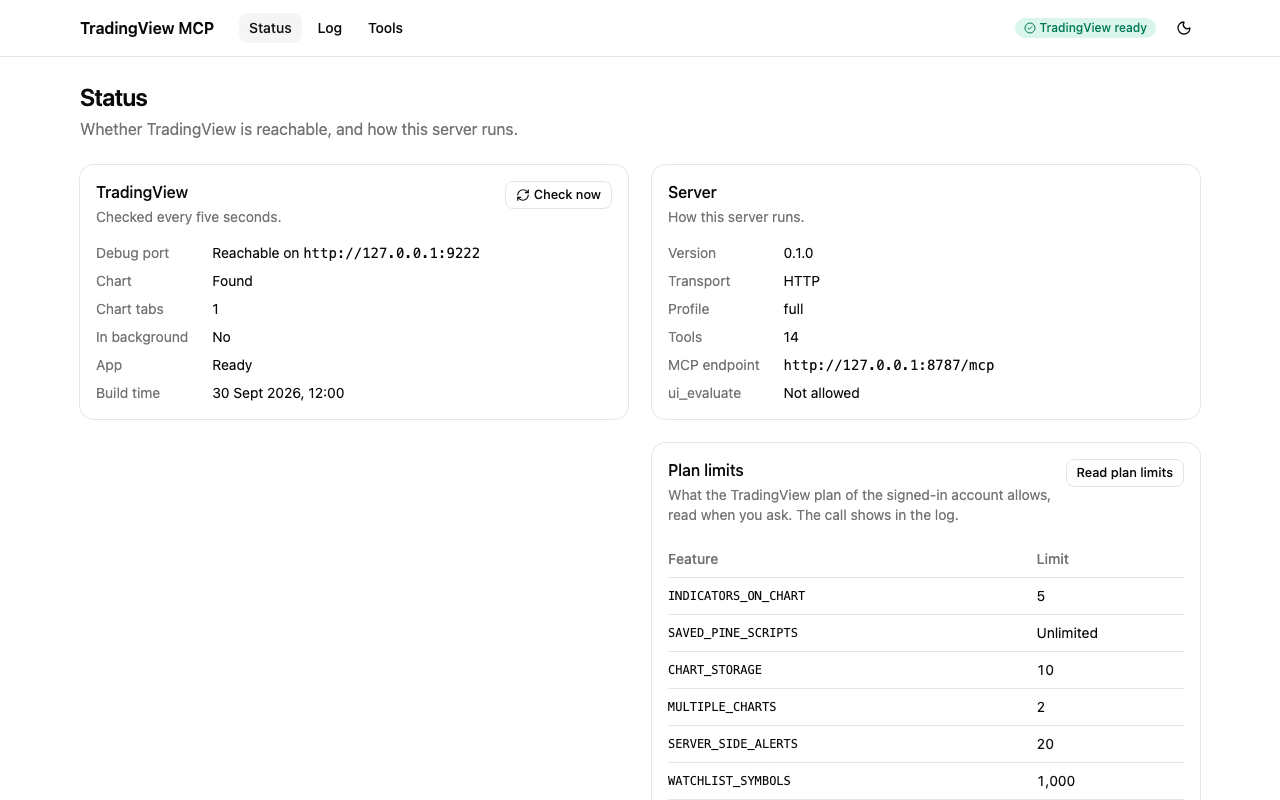
|
|
367
|
+
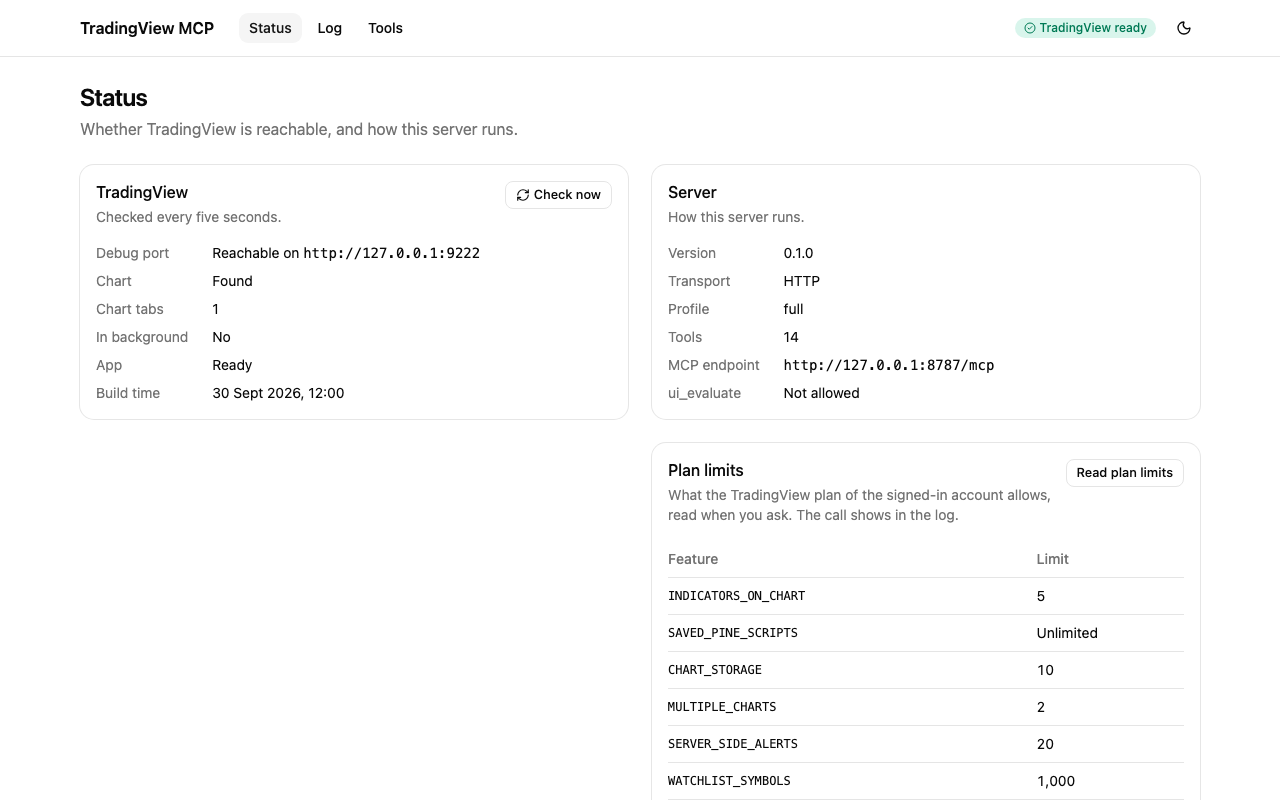
|
|
331
368
|
|
|
332
369
|
### Open it
|
|
333
370
|
|
|
@@ -355,11 +392,11 @@ The page asks for the token (`TV_MCP_AUTH_TOKEN`) before it shows anything. Past
|
|
|
355
392
|
it from the address, and the fragment is never sent to the server. The page keeps the token in
|
|
356
393
|
`sessionStorage`, so it is gone when you close the tab, and it sends the token only as
|
|
357
394
|
`Authorization: Bearer <token>`, never in a URL. When the server restarts with another token, the page
|
|
358
|
-
asks again. See [SECURITY.md](https://github.com/Mochamad-Rizky/tradingview-mcp/blob/main/SECURITY.md#the-dashboard).
|
|
395
|
+
asks again. See [SECURITY.md](https://github.com/Mochamad-Rizky/tradingview-desktop-mcp/blob/main/SECURITY.md#the-dashboard).
|
|
359
396
|
|
|
360
397
|
### What it shows
|
|
361
398
|
|
|
362
|
-
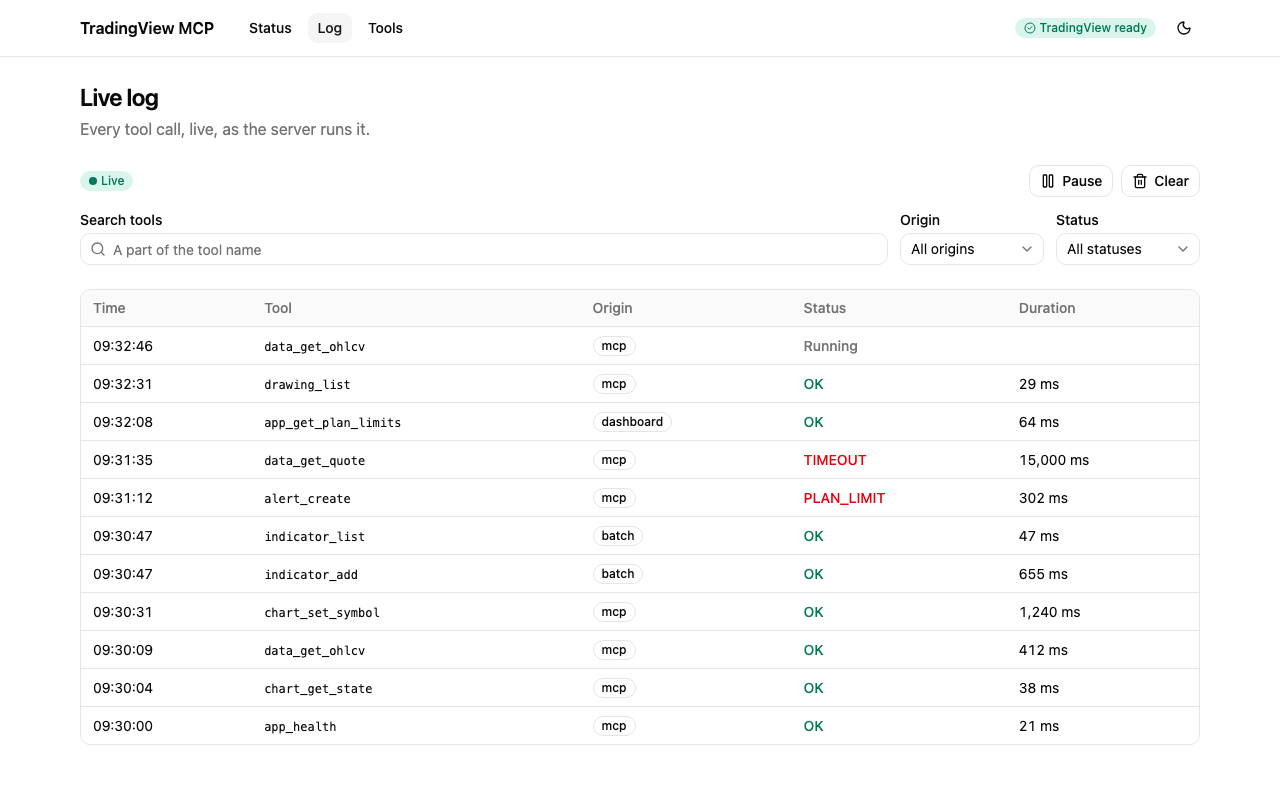
|
|
399
|
+
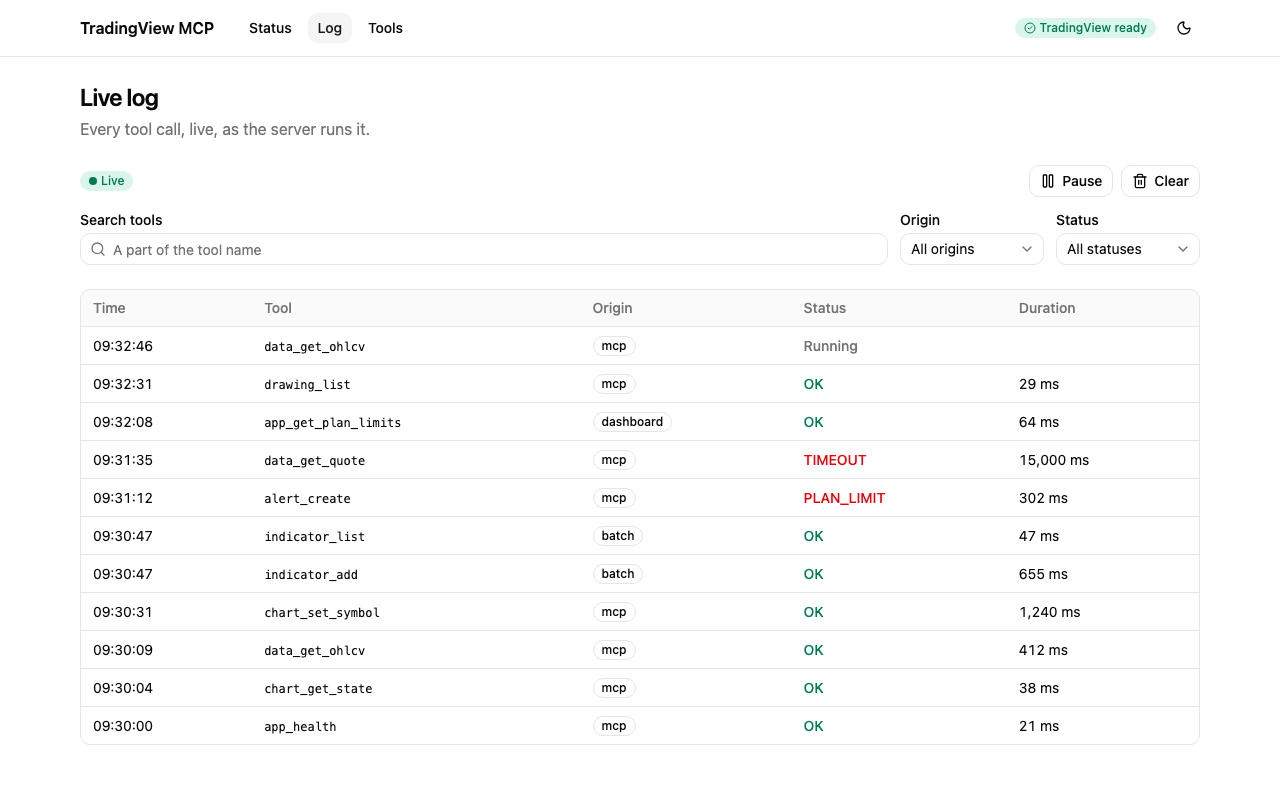
|
|
363
400
|
|
|
364
401
|
- **Status** shows whether TradingView is reachable (and how to start it when it is not), how the
|
|
365
402
|
server runs, the plan limits and the latest calls.
|
|
@@ -372,7 +409,7 @@ asks again. See [SECURITY.md](https://github.com/Mochamad-Rizky/tradingview-mcp/
|
|
|
372
409
|
- **Tools** lists the tools the server offers, with their inputs, and runs one by hand. The result
|
|
373
410
|
is shown as it came back, with long JSON collapsed behind "Show all" and images as images.
|
|
374
411
|
|
|
375
|
-
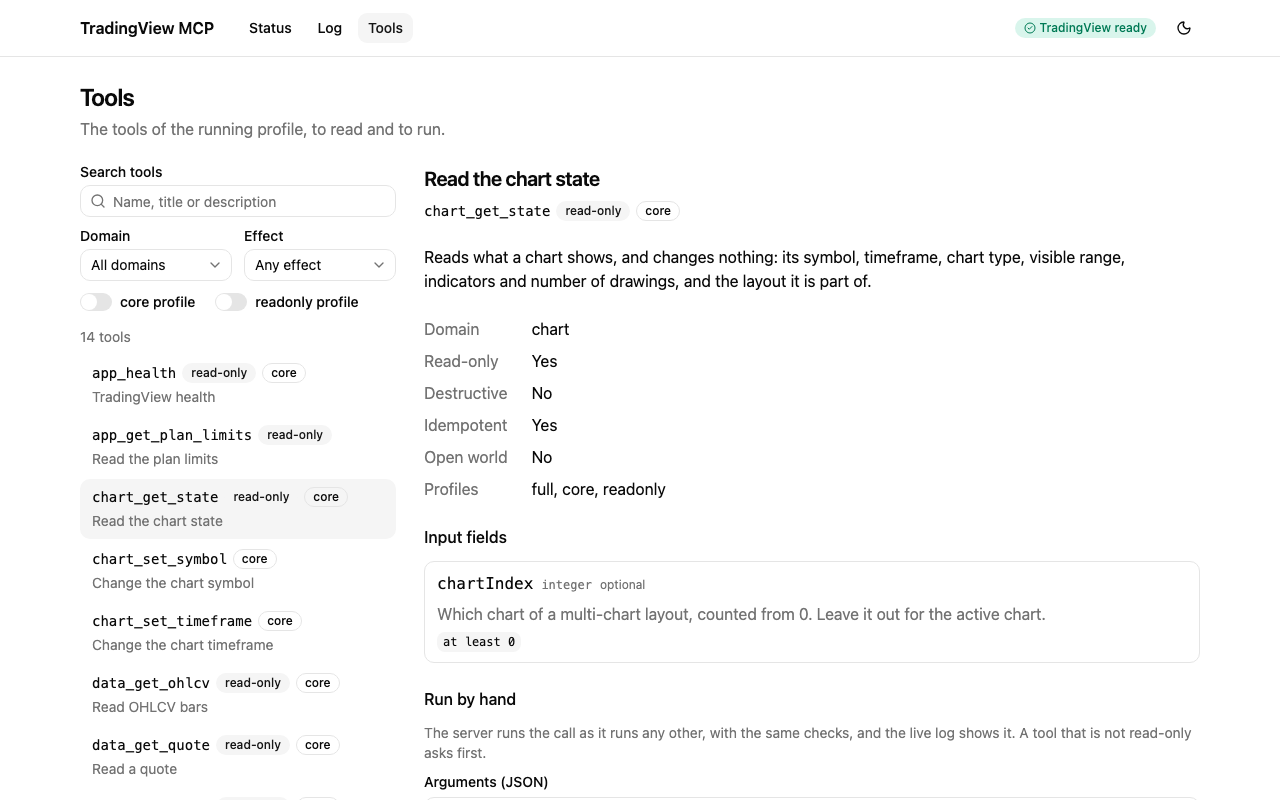
|
|
412
|
+
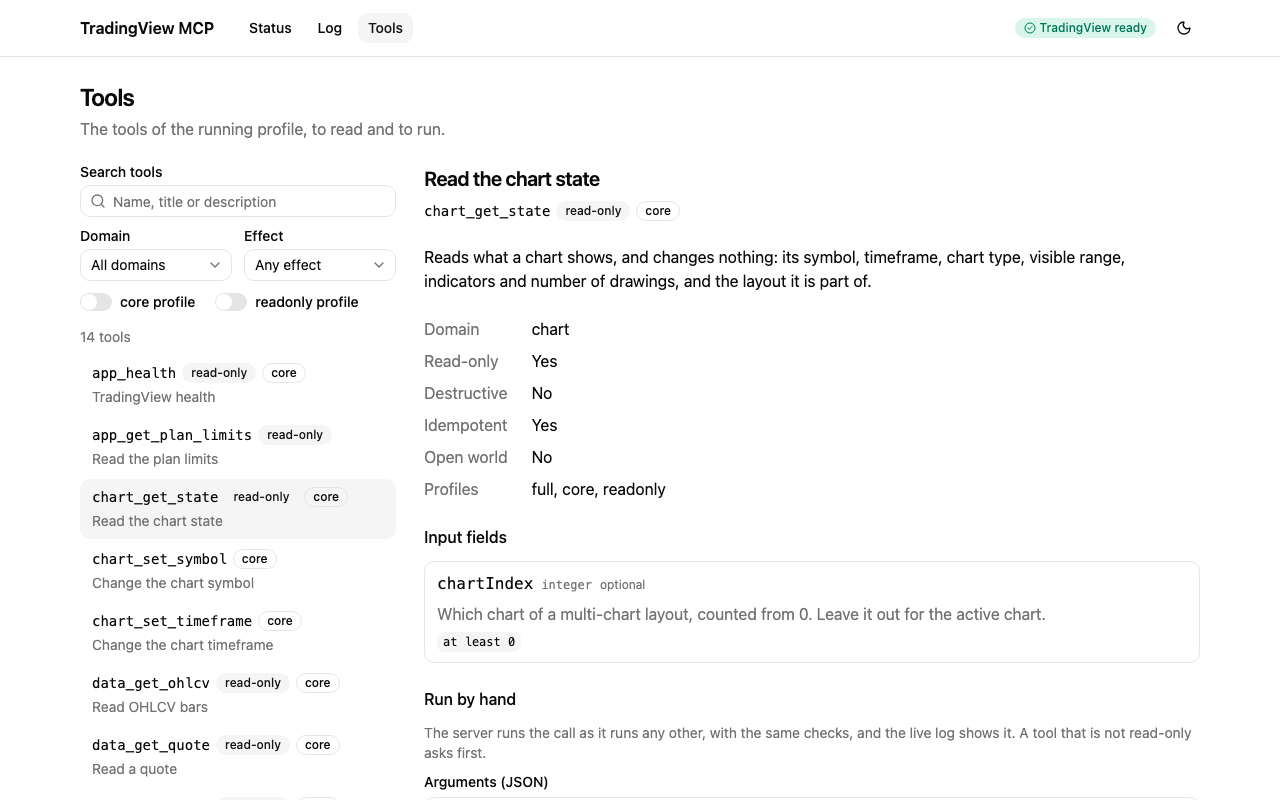
|
|
376
413
|
|
|
377
414
|
A run from the dashboard is a real tool call. It goes through the same registry as an MCP call, so
|
|
378
415
|
the same schemas, profile, `confirm` rules and plan limit checks apply, and it appears in the log.
|
|
@@ -396,9 +433,9 @@ The files of the page itself, at `/`, need no token and hold no data.
|
|
|
396
433
|
|
|
397
434
|
## Contributing
|
|
398
435
|
|
|
399
|
-
See [CONTRIBUTING.md](https://github.com/Mochamad-Rizky/tradingview-mcp/blob/main/CONTRIBUTING.md) for the local setup, the test levels, the commit
|
|
400
|
-
conventions and how a release is made, and [docs/testing.md](https://github.com/Mochamad-Rizky/tradingview-mcp/blob/main/docs/testing.md) for the testing guide. To report a
|
|
401
|
-
vulnerability, follow [SECURITY.md](https://github.com/Mochamad-Rizky/tradingview-mcp/blob/main/SECURITY.md).
|
|
436
|
+
See [CONTRIBUTING.md](https://github.com/Mochamad-Rizky/tradingview-desktop-mcp/blob/main/CONTRIBUTING.md) for the local setup, the test levels, the commit
|
|
437
|
+
conventions and how a release is made, and [docs/testing.md](https://github.com/Mochamad-Rizky/tradingview-desktop-mcp/blob/main/docs/testing.md) for the testing guide. To report a
|
|
438
|
+
vulnerability, follow [SECURITY.md](https://github.com/Mochamad-Rizky/tradingview-desktop-mcp/blob/main/SECURITY.md).
|
|
402
439
|
|
|
403
440
|
## Disclaimer
|
|
404
441
|
|
|
@@ -409,4 +446,4 @@ terms of use.
|
|
|
409
446
|
|
|
410
447
|
## License
|
|
411
448
|
|
|
412
|
-
Released under the [MIT license](https://github.com/Mochamad-Rizky/tradingview-mcp/blob/main/LICENSE).
|
|
449
|
+
Released under the [MIT license](https://github.com/Mochamad-Rizky/tradingview-desktop-mcp/blob/main/LICENSE).
|
|
@@ -477,7 +477,7 @@ function loadConfig(input) {
|
|
|
477
477
|
// package.json
|
|
478
478
|
var package_default = {
|
|
479
479
|
name: "tradingview-desktop-mcp",
|
|
480
|
-
version: "0.1.
|
|
480
|
+
version: "0.1.2",
|
|
481
481
|
description: "MCP server that controls the TradingView Desktop app over the Chrome DevTools Protocol",
|
|
482
482
|
keywords: [
|
|
483
483
|
"mcp",
|
|
@@ -490,11 +490,11 @@ var package_default = {
|
|
|
490
490
|
"ai",
|
|
491
491
|
"chrome-devtools-protocol"
|
|
492
492
|
],
|
|
493
|
-
homepage: "https://github.com/Mochamad-Rizky/tradingview-mcp#readme",
|
|
494
|
-
bugs: "https://github.com/Mochamad-Rizky/tradingview-mcp/issues",
|
|
493
|
+
homepage: "https://github.com/Mochamad-Rizky/tradingview-desktop-mcp#readme",
|
|
494
|
+
bugs: "https://github.com/Mochamad-Rizky/tradingview-desktop-mcp/issues",
|
|
495
495
|
repository: {
|
|
496
496
|
type: "git",
|
|
497
|
-
url: "git+https://github.com/Mochamad-Rizky/tradingview-mcp.git",
|
|
497
|
+
url: "git+https://github.com/Mochamad-Rizky/tradingview-desktop-mcp.git",
|
|
498
498
|
directory: "packages/server"
|
|
499
499
|
},
|
|
500
500
|
license: "MIT",
|
package/dist/cli.js
CHANGED
package/dist/index.js
CHANGED
package/package.json
CHANGED
|
@@ -1,6 +1,6 @@
|
|
|
1
1
|
{
|
|
2
2
|
"name": "tradingview-desktop-mcp",
|
|
3
|
-
"version": "0.1.
|
|
3
|
+
"version": "0.1.2",
|
|
4
4
|
"description": "MCP server that controls the TradingView Desktop app over the Chrome DevTools Protocol",
|
|
5
5
|
"keywords": [
|
|
6
6
|
"mcp",
|
|
@@ -13,11 +13,11 @@
|
|
|
13
13
|
"ai",
|
|
14
14
|
"chrome-devtools-protocol"
|
|
15
15
|
],
|
|
16
|
-
"homepage": "https://github.com/Mochamad-Rizky/tradingview-mcp#readme",
|
|
17
|
-
"bugs": "https://github.com/Mochamad-Rizky/tradingview-mcp/issues",
|
|
16
|
+
"homepage": "https://github.com/Mochamad-Rizky/tradingview-desktop-mcp#readme",
|
|
17
|
+
"bugs": "https://github.com/Mochamad-Rizky/tradingview-desktop-mcp/issues",
|
|
18
18
|
"repository": {
|
|
19
19
|
"type": "git",
|
|
20
|
-
"url": "git+https://github.com/Mochamad-Rizky/tradingview-mcp.git",
|
|
20
|
+
"url": "git+https://github.com/Mochamad-Rizky/tradingview-desktop-mcp.git",
|
|
21
21
|
"directory": "packages/server"
|
|
22
22
|
},
|
|
23
23
|
"license": "MIT",
|