tmui-cli 1.0.4 → 1.0.7
This diff represents the content of publicly available package versions that have been released to one of the supported registries. The information contained in this diff is provided for informational purposes only and reflects changes between package versions as they appear in their respective public registries.
- package/README.md +90 -0
- package/bin/tmui.js +121 -109
- package/package.json +4 -1
- package/src/create.js +42 -18
- package/src/createHbx.js +23 -3
- package/src/rcli.js +27 -6
- package/src/rhbx.js +23 -3
- package/READE.md +0 -0
package/README.md
ADDED
|
@@ -0,0 +1,90 @@
|
|
|
1
|
+
|
|
2
|
+
|
|
3
|
+
# TMUI 3.0
|
|
4
|
+
|
|
5
|
+

|
|
6
|
+
|
|
7
|
+
### tmui-cli使用介绍
|
|
8
|
+
|
|
9
|
+
#### 全局安装
|
|
10
|
+
|
|
11
|
+
```npm
|
|
12
|
+
npm -g install tmui-cli
|
|
13
|
+
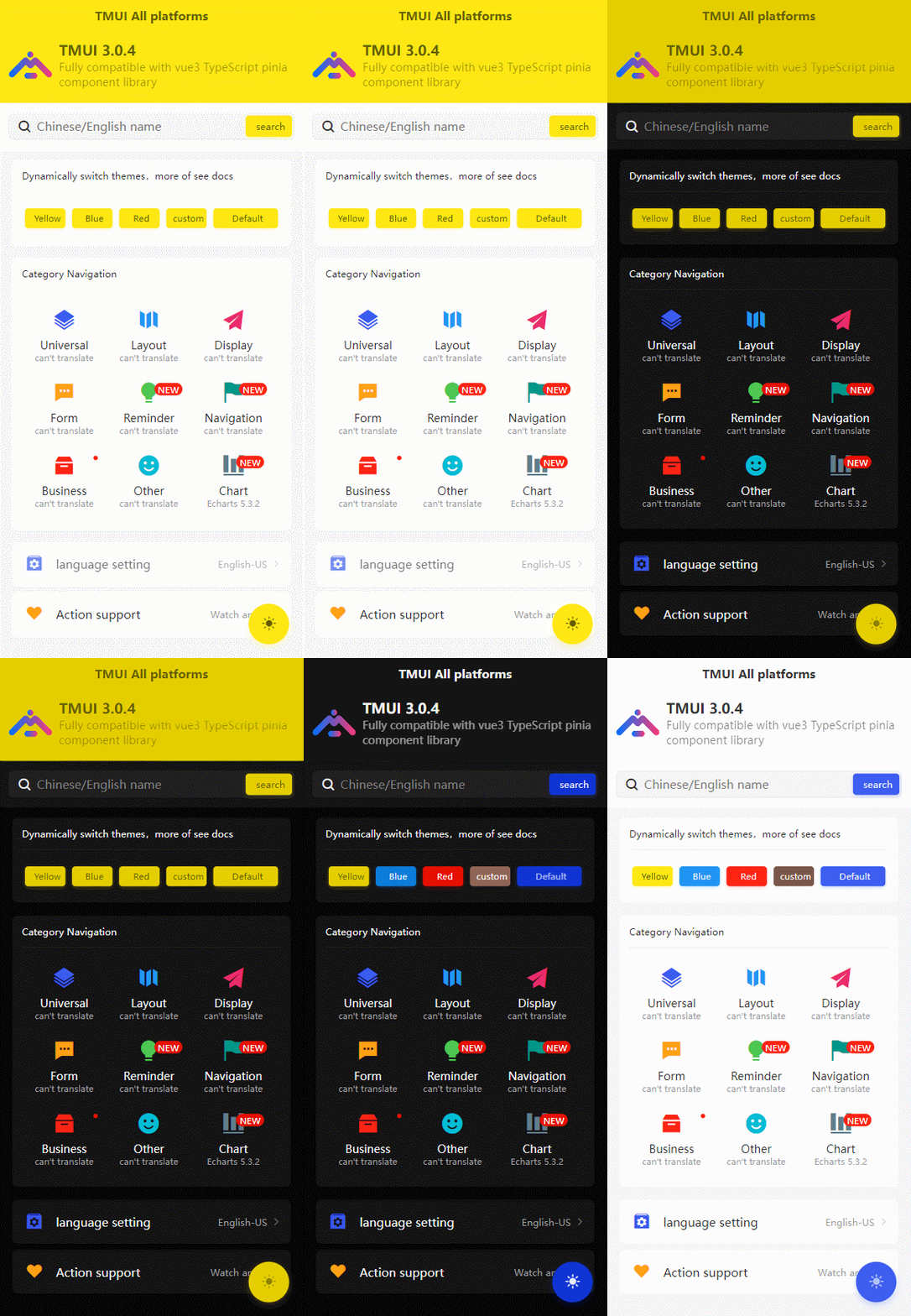
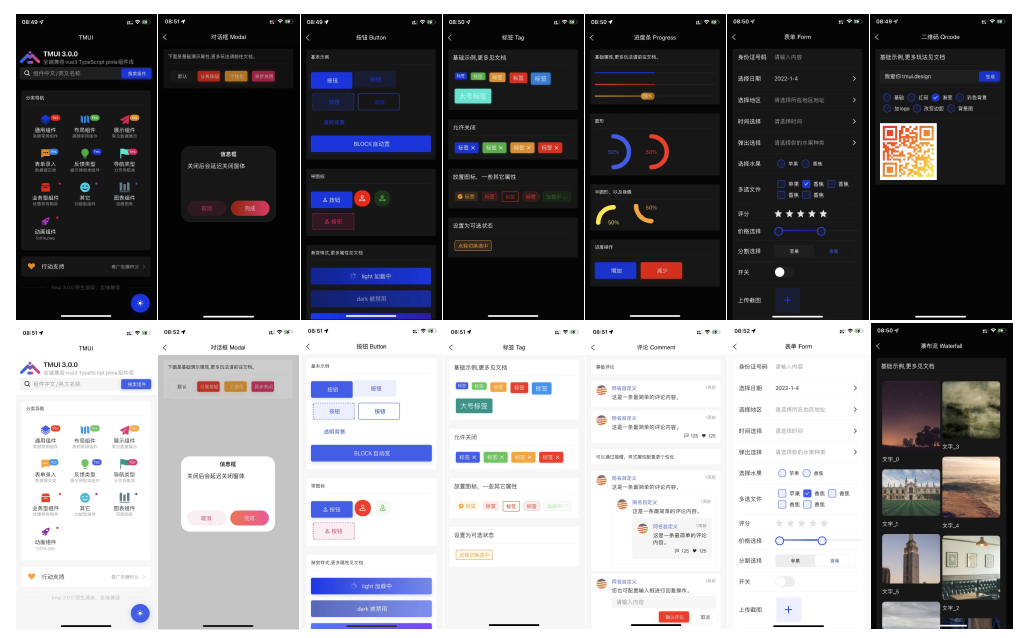
安装成功后输入:tmui
|
|
14
|
+
即可查看所有可用命令
|
|
15
|
+
```
|
|
16
|
+
|
|
17
|
+
#### 使用
|
|
18
|
+
请在项目文件的根目录下执行命令
|
|
19
|
+
输入 ```tmui```
|
|
20
|
+
即可取得所有可控的命令行
|
|
21
|
+
|
|
22
|
+
#### 命令解释
|
|
23
|
+
|
|
24
|
+
0. tmui cli 创建uniapp 平台的cli初始项目,内部已经包含了tmui最新框架(自动更新)
|
|
25
|
+
1. tmui hbx 创建uniapp 平台的HBX初始项目,内部已经包含了tmui最新框架(自动更新)
|
|
26
|
+
2. tmui rcli 为【已有】uniapp 平台的cli项目,更新和下载tmui最新框架(自动更新)
|
|
27
|
+
3. tmui rhbx 为【已有】uniapp 平台的HBX项目,更新和下载tmui最新框架(自动更新)
|
|
28
|
+
4. tmui use 为保姆级引导式下载安装上述功能项目。
|
|
29
|
+
|
|
30
|
+
#### 注意事项
|
|
31
|
+
如果你是需要创建tmui新项目可以使用命令行创建全新的项目。<br>
|
|
32
|
+
如果你是为老项目添加本tmui框架,你下载安装后,还需要按照文档步骤配置 [配置](https://tmui.design/doc/start/%E5%BF%AB%E9%80%9F%E4%B8%8A%E6%89%8B.html)<br>
|
|
33
|
+
如果是全新的使用本cli创建项目,则是一键配置到位,安装完立即就可以编译出一个tmui 程序的demo
|
|
34
|
+
|
|
35
|
+
|
|
36
|
+
|
|
37
|
+
[](https://gitee.com/LYTB/tmui-design/stargazers) [](https://gitee.com/LYTB/tmui-design/members)
|
|
38
|
+
|
|
39
|
+
### [tmui3.0开发文档](https://tmui.design/)
|
|
40
|
+
|
|
41
|
+
TMUI 3.0有以下可见的优势方案执行未来的发展:
|
|
42
|
+
- 暗黑模式更为可靠
|
|
43
|
+
- 主题配置更为简单
|
|
44
|
+
- 组件库精细化打磨
|
|
45
|
+
- 依托UNIAPP全平台兼容性,以原生渲染为基础的全平台兼容。
|
|
46
|
+
- 常用功能组件不断迭代更新发布
|
|
47
|
+
- 各组件样式设置丰富,不局限,尽量能做到千人千面。
|
|
48
|
+
- 各组件经过微信开发工具的性能测试>=96分以上
|
|
49
|
+
|
|
50
|
+
[](https://gitee.com/LYTB/tmui-design)
|
|
51
|
+
|
|
52
|
+
[tmui2.0文档](https://ext.dcloud.net.cn/plugin?id=5949)
|
|
53
|
+
|
|
54
|
+
### [注意事项](https://ext.dcloud.net.cn/plugin?name=tm-ui)
|
|
55
|
+
|
|
56
|
+
- 提出建议和bug,请访问码云代码库:[点击打开](https://gitee.com/LYTB/tmui-design)
|
|
57
|
+
,并反馈相关bug或者建议.
|
|
58
|
+
|
|
59
|
+
---
|
|
60
|
+
### [贡献者](https://tmui.design/doc/start/%E8%B4%A1%E7%8C%AE%E8%80%85.html#%E8%B4%A1%E7%8C%AE%E4%BA%BA%E5%91%98)
|
|
61
|
+
在伟大的无私贡献人员帮助下,使得此开源项目的可持续性发展更加的持久。他/她们理应得到展示,并为大家所知。不管是如何的贡献,哪怕很小的一部分也值得称赞!!<br>
|
|
62
|
+
点击图片查看更多
|
|
63
|
+
|
|
64
|
+
[](https://tmui.design/doc/start/%E8%B4%A1%E7%8C%AE%E8%80%85.html)
|
|
65
|
+
|
|
66
|
+
**微信用户群2** <br>
|
|
67
|
+

|
|
68
|
+
|
|
69
|
+
----
|
|
70
|
+
|
|
71
|
+
### 版本预览
|
|
72
|
+
|
|
73
|
+

|
|
74
|
+
|
|
75
|
+
----
|
|
76
|
+
|
|
77
|
+
### 赞助项目,以持续更新
|
|
78
|
+
|
|
79
|
+
如果帮到了你,适当的赞助有助力作者成果上的回报,报以项目的持续更新。
|
|
80
|
+
|
|
81
|
+

|
|
82
|
+
|
|
83
|
+
----
|
|
84
|
+
|
|
85
|
+
### 3.0.4新功能特性快速了解
|
|
86
|
+
|
|
87
|
+

|
|
88
|
+
|
|
89
|
+
|
|
90
|
+
|
package/bin/tmui.js
CHANGED
|
@@ -12,120 +12,132 @@ const viewTmuiVer = require("../src/viewTmuiVer")
|
|
|
12
12
|
const tm2 = require("../src/tmui2")
|
|
13
13
|
const inquirer = import('inquirer');
|
|
14
14
|
const ft = import("node-fetch")
|
|
15
|
+
var clear = require('clear');
|
|
16
|
+
var figlet = require('figlet');
|
|
17
|
+
clear()
|
|
15
18
|
chalk.then(v=>{
|
|
16
19
|
const ck = new v.Chalk();
|
|
17
|
-
|
|
18
|
-
|
|
19
|
-
|
|
20
|
-
|
|
21
|
-
|
|
22
|
-
|
|
23
|
-
|
|
24
|
-
|
|
25
|
-
|
|
26
|
-
|
|
27
|
-
|
|
28
|
-
|
|
29
|
-
|
|
30
|
-
.action(function(type, name){
|
|
31
|
-
create.run(type,name)
|
|
32
|
-
})
|
|
33
|
-
program.command('hbx')
|
|
34
|
-
.description('[可选指定版本号] 创建hbx uniapp tmui3.0 项目[不推荐]')
|
|
35
|
-
.action(function(type, name){
|
|
36
|
-
createHbx.run(type,name)
|
|
37
|
-
})
|
|
38
|
-
program.command('rcli')
|
|
39
|
-
.description('[可选指定版本号] 已有cli项目下载/更新tmui3.0')
|
|
40
|
-
.action(function(type, name){
|
|
41
|
-
rcli.run(type,name)
|
|
42
|
-
})
|
|
43
|
-
program.command('rhbx')
|
|
44
|
-
.description('[可选指定版本号] 已有hbx项目下载/更新tmui3.0')
|
|
45
|
-
.action(function(type, name){
|
|
46
|
-
rhbx.run(type,name)
|
|
47
|
-
})
|
|
48
|
-
program.command('ver')
|
|
49
|
-
.description('查看tmui可用版本号')
|
|
50
|
-
.action(function(type, name){
|
|
51
|
-
viewTmuiVer.run(type,name)
|
|
52
|
-
})
|
|
53
|
-
program.command('use')
|
|
54
|
-
.description('引导式安装tmui组件!!!')
|
|
55
|
-
.action(function(type, name){
|
|
56
|
-
const { prompt,Separator} = ivk.default;
|
|
57
|
-
prompt([
|
|
58
|
-
{
|
|
59
|
-
type: 'list',
|
|
60
|
-
name: 'tmuiVerName',
|
|
61
|
-
message: '请选择你的uniApp项目的vue版本',
|
|
62
|
-
choices: [
|
|
63
|
-
'vue2',
|
|
64
|
-
'vue3'
|
|
65
|
-
],
|
|
66
|
-
}
|
|
67
|
-
])
|
|
68
|
-
.then((answers) => {
|
|
69
|
-
if(answers.tmuiVerName=="vue2"){
|
|
70
|
-
console.log("tmui2.0版本只支持uniApp HBX项目,请务必当前目录在你的项目文件夹下/或者一个空文件都可以。")
|
|
71
|
-
console.log("正在为你的项目下载/更新tmui2.0的最新版本。")
|
|
72
|
-
tm2.run()
|
|
73
|
-
}else if(answers.tmuiVerName=='vue3'){
|
|
20
|
+
|
|
21
|
+
figlet('TMUI3.0 CLI', function(err, data) {
|
|
22
|
+
if (err) {
|
|
23
|
+
console.log('Something went wrong...');
|
|
24
|
+
console.dir(err);
|
|
25
|
+
return;
|
|
26
|
+
}
|
|
27
|
+
console.log(ck.white(`---------------------------------------------------`))
|
|
28
|
+
console.log(ck.white(`---------------------------------------------------`))
|
|
29
|
+
console.log(ck.green(data))
|
|
30
|
+
console.log(ck.green(`文档地址:https://tmui.design`))
|
|
31
|
+
console.log(ck.white(`---------------------------------------------------`))
|
|
32
|
+
console.log(ck.white(`---------------------------------------------------`))
|
|
74
33
|
|
|
75
|
-
|
|
76
|
-
|
|
77
|
-
|
|
78
|
-
|
|
79
|
-
|
|
80
|
-
|
|
81
|
-
|
|
82
|
-
|
|
83
|
-
|
|
84
|
-
|
|
85
|
-
|
|
86
|
-
|
|
87
|
-
|
|
88
|
-
|
|
89
|
-
|
|
90
|
-
|
|
91
|
-
|
|
92
|
-
|
|
93
|
-
|
|
94
|
-
|
|
95
|
-
|
|
96
|
-
|
|
97
|
-
|
|
98
|
-
|
|
99
|
-
|
|
100
|
-
|
|
101
|
-
|
|
102
|
-
|
|
103
|
-
|
|
104
|
-
|
|
105
|
-
|
|
106
|
-
|
|
107
|
-
|
|
108
|
-
|
|
109
|
-
|
|
110
|
-
|
|
111
|
-
|
|
112
|
-
|
|
113
|
-
|
|
114
|
-
|
|
115
|
-
|
|
116
|
-
|
|
117
|
-
|
|
34
|
+
inquirer.then(ivk=>{
|
|
35
|
+
program
|
|
36
|
+
.version(require('../package').version)
|
|
37
|
+
program.command('cli')
|
|
38
|
+
.description('[可选指定版本号] 创建cli uniapp tmui3.0 项目[推荐]')
|
|
39
|
+
.action(function(type, name){
|
|
40
|
+
create.run(type,name)
|
|
41
|
+
})
|
|
42
|
+
program.command('hbx')
|
|
43
|
+
.description('[可选指定版本号] 创建hbx uniapp tmui3.0 项目[不推荐]')
|
|
44
|
+
.action(function(type, name){
|
|
45
|
+
createHbx.run(type,name)
|
|
46
|
+
})
|
|
47
|
+
program.command('rcli')
|
|
48
|
+
.description('[可选指定版本号] 已有cli项目下载/更新tmui3.0')
|
|
49
|
+
.action(function(type, name){
|
|
50
|
+
rcli.run(type,name)
|
|
51
|
+
})
|
|
52
|
+
program.command('rhbx')
|
|
53
|
+
.description('[可选指定版本号] 已有hbx项目下载/更新tmui3.0')
|
|
54
|
+
.action(function(type, name){
|
|
55
|
+
rhbx.run(type,name)
|
|
56
|
+
})
|
|
57
|
+
program.command('ver')
|
|
58
|
+
.description('查看tmui可用版本号')
|
|
59
|
+
.action(function(type, name){
|
|
60
|
+
viewTmuiVer.run(type,name)
|
|
61
|
+
})
|
|
62
|
+
program.command('use')
|
|
63
|
+
.description('引导式安装tmui组件!!!')
|
|
64
|
+
.action(function(type, name){
|
|
65
|
+
const { prompt,Separator} = ivk.default;
|
|
66
|
+
prompt([
|
|
67
|
+
{
|
|
68
|
+
type: 'list',
|
|
69
|
+
name: 'tmuiVerName',
|
|
70
|
+
message: '请选择你的uniApp项目的vue版本',
|
|
71
|
+
choices: [
|
|
72
|
+
'vue2',
|
|
73
|
+
'vue3'
|
|
74
|
+
],
|
|
75
|
+
}
|
|
76
|
+
])
|
|
77
|
+
.then((answers) => {
|
|
78
|
+
if(answers.tmuiVerName=="vue2"){
|
|
79
|
+
console.log("tmui2.0版本只支持uniApp HBX项目,请务必当前目录在你的项目文件夹下/或者一个空文件都可以。")
|
|
80
|
+
console.log("正在为你的项目下载/更新tmui2.0的最新版本。")
|
|
81
|
+
tm2.run()
|
|
82
|
+
}else if(answers.tmuiVerName=='vue3'){
|
|
83
|
+
|
|
84
|
+
ft.then((fah)=>{
|
|
85
|
+
const fetch = fah.default
|
|
86
|
+
fetch('https://cdn.tmui.design/tmuiVer.txt').then(async (res)=>{
|
|
87
|
+
let verText = await res.text();
|
|
88
|
+
let lastVer = verText.split('\n').slice(0,10)
|
|
89
|
+
prompt([
|
|
90
|
+
{
|
|
91
|
+
type: 'list',
|
|
92
|
+
name: 'moshi',
|
|
93
|
+
message: '选择安装方式:',
|
|
94
|
+
choices: [
|
|
95
|
+
'cli',
|
|
96
|
+
'rcli',
|
|
97
|
+
'hbx',
|
|
98
|
+
'rhbx',
|
|
99
|
+
],
|
|
100
|
+
},
|
|
101
|
+
{
|
|
102
|
+
type: 'list',
|
|
103
|
+
name: 'ver',
|
|
104
|
+
message: '选择最近的版本号',
|
|
105
|
+
choices: lastVer,
|
|
106
|
+
},
|
|
107
|
+
|
|
108
|
+
])
|
|
109
|
+
.then((answers) => {
|
|
110
|
+
let ms = answers.moshi;
|
|
111
|
+
let ver = answers.ver.trim()
|
|
112
|
+
if(!ver||typeof ver=="undefined"){
|
|
113
|
+
console.log(ck.red("请正确输入版本号"))
|
|
114
|
+
return;
|
|
115
|
+
}
|
|
116
|
+
if(ms=="cli"){
|
|
117
|
+
create.run(null,null,ver)
|
|
118
|
+
}else if(ms=="rcli"){
|
|
119
|
+
rcli.run(null,null,ver)
|
|
120
|
+
}else if(ms=="hbx"){
|
|
121
|
+
createHbx.run(null,null,ver)
|
|
122
|
+
}else if(ms=="rhbx"){
|
|
123
|
+
rhbx.run(null,null,ver)
|
|
124
|
+
}
|
|
125
|
+
})
|
|
126
|
+
})
|
|
127
|
+
|
|
128
|
+
})
|
|
118
129
|
|
|
119
|
-
}
|
|
120
|
-
|
|
121
|
-
|
|
122
|
-
|
|
130
|
+
}
|
|
131
|
+
});
|
|
132
|
+
|
|
133
|
+
|
|
134
|
+
})
|
|
135
|
+
program.parse();
|
|
136
|
+
|
|
137
|
+
})
|
|
138
|
+
});
|
|
123
139
|
|
|
124
|
-
|
|
125
|
-
})
|
|
126
|
-
program.parse();
|
|
127
|
-
|
|
128
|
-
})
|
|
140
|
+
|
|
129
141
|
|
|
130
142
|
|
|
131
143
|
})
|
package/package.json
CHANGED
|
@@ -31,8 +31,11 @@
|
|
|
31
31
|
"bundleDependencies": false,
|
|
32
32
|
"dependencies": {
|
|
33
33
|
"chalk": "^5.0.1",
|
|
34
|
+
"clear": "^0.1.0",
|
|
35
|
+
"clui": "^0.3.6",
|
|
34
36
|
"commander": "^9.4.0",
|
|
35
37
|
"compressing": "^1.6.2",
|
|
38
|
+
"figlet": "^1.5.2",
|
|
36
39
|
"inquirer": "^9.1.0",
|
|
37
40
|
"node-fetch": "^3.2.10"
|
|
38
41
|
},
|
|
@@ -46,5 +49,5 @@
|
|
|
46
49
|
"main": "./bin/tmui.js",
|
|
47
50
|
"name": "tmui-cli",
|
|
48
51
|
"scripts": {},
|
|
49
|
-
"version": "1.0.
|
|
52
|
+
"version": "1.0.7"
|
|
50
53
|
}
|
package/src/create.js
CHANGED
|
@@ -4,12 +4,18 @@ const fs = require("fs")
|
|
|
4
4
|
const ft = import("node-fetch")
|
|
5
5
|
const compressing = require("compressing")
|
|
6
6
|
const chilPro = require("child_process")
|
|
7
|
+
var clear = require('clear');
|
|
8
|
+
var figlet = require('figlet');
|
|
9
|
+
var CLI = require('clui'),
|
|
10
|
+
Spinner = CLI.Spinner;
|
|
11
|
+
var countdown = new Spinner('请等待... ', ['/','\\','/','\\']);
|
|
7
12
|
|
|
8
13
|
exports.run = function(type, name,vr) {
|
|
9
14
|
chalk.then(v=>{
|
|
10
15
|
const ck = new v.Chalk();
|
|
11
16
|
const nowPath = path.resolve('./');
|
|
12
|
-
|
|
17
|
+
|
|
18
|
+
countdown.message(ck.bgBlue('不 要 关闭窗体,正在创建中....'))
|
|
13
19
|
let userInputVer = "";
|
|
14
20
|
if(vr!=null){
|
|
15
21
|
userInputVer = vr;
|
|
@@ -27,7 +33,7 @@ exports.run = function(type, name,vr) {
|
|
|
27
33
|
userInputVer = typeof userInputVer=='undefined'?"":userInputVer
|
|
28
34
|
}
|
|
29
35
|
}
|
|
30
|
-
|
|
36
|
+
countdown.start()
|
|
31
37
|
// 检查是否有router目录?
|
|
32
38
|
// fs.existsSync(path.join(nowPath,'router','index.ts'))
|
|
33
39
|
ft.then((fah)=>{
|
|
@@ -40,19 +46,18 @@ exports.run = function(type, name,vr) {
|
|
|
40
46
|
}
|
|
41
47
|
let isVer = verText.includes(ver)
|
|
42
48
|
if(!isVer){
|
|
49
|
+
countdown.stop();
|
|
43
50
|
console.log(ck.red('不存在版本号:'+ver))
|
|
44
51
|
return;
|
|
45
52
|
}
|
|
46
53
|
|
|
47
|
-
|
|
48
|
-
|
|
49
|
-
console.log(ck.green('正在使用版本号:'+ver))
|
|
50
|
-
console.log(ck.green(`---------------------------------------------------`))
|
|
51
|
-
console.log(ck.bgBlue('不 要 关闭窗体,正在创建中....'))
|
|
54
|
+
|
|
55
|
+
countdown.message(ck.green('正在使用版本号:'+ver))
|
|
52
56
|
fetch(`https://cdn.tmui.design/public/static/cli.zip`).then(async (rf)=>{
|
|
53
57
|
let d = await rf.buffer()
|
|
54
58
|
fs.writeFile(path.join(nowPath,'cli.zip'),d,(err)=>{
|
|
55
59
|
if(err){
|
|
60
|
+
countdown.stop();
|
|
56
61
|
console.log(ck.bgRed(err))
|
|
57
62
|
return;
|
|
58
63
|
}
|
|
@@ -69,29 +74,38 @@ exports.run = function(type, name,vr) {
|
|
|
69
74
|
fs.writeFileSync(path.join(nowPath,'tmui.zip'),await tmuires.buffer())
|
|
70
75
|
compressing.zip.uncompress(path.join(nowPath,'tmui.zip'),tmuipath)
|
|
71
76
|
.then(comtmui=>{
|
|
72
|
-
|
|
73
|
-
|
|
77
|
+
countdown.message(ck.green('非常nice,安装成功,正在清理'))
|
|
74
78
|
if(fs.existsSync(path.join(nowPath,'tmui.zip'))){
|
|
75
79
|
fs.unlinkSync(path.join(nowPath,'tmui.zip'))
|
|
76
80
|
}
|
|
77
81
|
if(fs.existsSync(path.join(nowPath,'cli.zip'))){
|
|
78
82
|
fs.unlinkSync(path.join(nowPath,'cli.zip'))
|
|
79
83
|
}
|
|
80
|
-
|
|
81
|
-
|
|
84
|
+
countdown.message(ck.green('正在安装依赖'))
|
|
82
85
|
const installNpm = chilPro.exec('npm install',(error, stdout, stderr)=>{
|
|
83
86
|
|
|
84
87
|
if(error){
|
|
88
|
+
countdown.stop()
|
|
85
89
|
console.log('安装失败,请在当前目录手动安装依赖文件执行:',ck.bgRed(error))
|
|
86
90
|
console.log(ck.green('npm install'))
|
|
87
91
|
return
|
|
88
92
|
}
|
|
89
|
-
|
|
90
|
-
|
|
91
|
-
|
|
92
|
-
|
|
93
|
-
|
|
94
|
-
|
|
93
|
+
countdown.stop()
|
|
94
|
+
clear()
|
|
95
|
+
figlet('TMUI OK!!', function(err, data) {
|
|
96
|
+
if (err) {
|
|
97
|
+
console.log('Something went wrong...');
|
|
98
|
+
console.dir(err);
|
|
99
|
+
return;
|
|
100
|
+
}
|
|
101
|
+
console.log(ck.bgGreen(data))
|
|
102
|
+
console.log(ck.green(`---------------------------------------------------`))
|
|
103
|
+
console.log(ck.green(`---------------------------------------------------`))
|
|
104
|
+
console.log(ck.green('安装成功请执行uni cli命令,编译一个H5项目试:'))
|
|
105
|
+
console.log(ck.green('npm run dev:h5'))
|
|
106
|
+
console.log(ck.green('在本窗口输入上述命令,按回车键编译。'))
|
|
107
|
+
})
|
|
108
|
+
|
|
95
109
|
})
|
|
96
110
|
|
|
97
111
|
installNpm.stdout?.on("data",(msg)=>{
|
|
@@ -99,21 +113,31 @@ exports.run = function(type, name,vr) {
|
|
|
99
113
|
})
|
|
100
114
|
|
|
101
115
|
}).catch(err=>{
|
|
116
|
+
countdown.stop()
|
|
102
117
|
console.log(ck.bgRed(err))
|
|
103
118
|
})
|
|
104
119
|
})
|
|
105
120
|
.catch(e=>{
|
|
121
|
+
countdown.stop()
|
|
106
122
|
console.log(ck.bgRed(e))
|
|
107
123
|
})
|
|
108
124
|
|
|
109
125
|
}).catch(errs=>{
|
|
126
|
+
countdown.stop()
|
|
110
127
|
console.log(ck.bgRed(errs))
|
|
111
128
|
})
|
|
112
129
|
})
|
|
113
130
|
}).catch(e=>{
|
|
114
|
-
|
|
131
|
+
countdown.stop();
|
|
132
|
+
console.log(ck.red(e))
|
|
115
133
|
})
|
|
134
|
+
}).catch(e=>{
|
|
135
|
+
countdown.stop();
|
|
136
|
+
console.log(ck.red(e))
|
|
116
137
|
})
|
|
138
|
+
}).catch(e=>{
|
|
139
|
+
countdown.stop();
|
|
140
|
+
console.log(ck.red(e))
|
|
117
141
|
})
|
|
118
142
|
// fetch()tmuiVer.txt
|
|
119
143
|
})
|
package/src/createHbx.js
CHANGED
|
@@ -4,8 +4,14 @@ const fs = require("fs")
|
|
|
4
4
|
const ft = import("node-fetch")
|
|
5
5
|
const compressing = require("compressing")
|
|
6
6
|
const chilPro = require("child_process")
|
|
7
|
+
var clear = require('clear');
|
|
8
|
+
var figlet = require('figlet');
|
|
9
|
+
var CLI = require('clui'),
|
|
10
|
+
Spinner = CLI.Spinner;
|
|
11
|
+
var countdown = new Spinner('请等待... ', ['/','\\','/','\\']);
|
|
7
12
|
exports.run = function(type, name,vr) {
|
|
8
13
|
chalk.then(v=>{
|
|
14
|
+
clear()
|
|
9
15
|
const ck = new v.Chalk();
|
|
10
16
|
const nowPath = path.resolve('./');
|
|
11
17
|
console.log(ck.bgBlue('不 要 关闭窗体,正在创建中....'))
|
|
@@ -59,6 +65,7 @@ exports.run = function(type, name,vr) {
|
|
|
59
65
|
if(!fs.existsSync(tmuipath)){
|
|
60
66
|
fs.mkdirSync(tmuipath);
|
|
61
67
|
}
|
|
68
|
+
countdown.start()
|
|
62
69
|
//下载tmui
|
|
63
70
|
let donloadTmui = `https://cdn.tmui.design/public/static/tmui${ver}.zip`
|
|
64
71
|
fetch(donloadTmui).then(async (tmuires)=>{
|
|
@@ -74,20 +81,33 @@ exports.run = function(type, name,vr) {
|
|
|
74
81
|
}
|
|
75
82
|
console.log(ck.bgGreen('清理成功,正在安装依赖时间稍长~'))
|
|
76
83
|
chilPro.exec('npm install echarts --save',error=>{
|
|
84
|
+
countdown.stop()
|
|
77
85
|
if(error){
|
|
78
86
|
console.log('安装失败,请在当前目录手动安装依赖文件执行:',ck.bgRed(error))
|
|
79
87
|
console.log(ck.green('npm install'))
|
|
80
88
|
return
|
|
81
89
|
}
|
|
82
|
-
|
|
83
|
-
|
|
84
|
-
|
|
90
|
+
clear()
|
|
91
|
+
figlet('TMUI OK!!', function(err, data) {
|
|
92
|
+
if (err) {
|
|
93
|
+
console.log('Something went wrong...');
|
|
94
|
+
console.dir(err);
|
|
95
|
+
return;
|
|
96
|
+
}
|
|
97
|
+
console.log(ck.bgGreen(data))
|
|
98
|
+
console.log(ck.green(`---------------------------------------------------`))
|
|
99
|
+
console.log(ck.red(`截止3.5.4 hbx版本号,运行到浏览器会报错,其它平台没问题。这是uni的bug。但cli模式不会有问题。`))
|
|
100
|
+
console.log(ck.bgGreen('安装成功,请使用hbx导入项目,运行本项目。'))
|
|
101
|
+
})
|
|
102
|
+
|
|
85
103
|
})
|
|
86
104
|
}).catch(err=>{
|
|
105
|
+
countdown.stop()
|
|
87
106
|
console.log(ck.bgRed(err))
|
|
88
107
|
})
|
|
89
108
|
})
|
|
90
109
|
.catch(e=>{
|
|
110
|
+
countdown.stop()
|
|
91
111
|
console.log(ck.bgRed(e))
|
|
92
112
|
})
|
|
93
113
|
|
package/src/rcli.js
CHANGED
|
@@ -4,6 +4,12 @@ const fs = require("fs")
|
|
|
4
4
|
const ft = import("node-fetch")
|
|
5
5
|
const compressing = require("compressing")
|
|
6
6
|
const chilPro = require("child_process")
|
|
7
|
+
var clear = require('clear');
|
|
8
|
+
var figlet = require('figlet');
|
|
9
|
+
var CLI = require('clui'),
|
|
10
|
+
Spinner = CLI.Spinner;
|
|
11
|
+
var countdown = new Spinner('请等待... ', ['/','\\','/','\\']);
|
|
12
|
+
|
|
7
13
|
exports.run = function(type, name,vr) {
|
|
8
14
|
chalk.then(v=>{
|
|
9
15
|
const ck = new v.Chalk();
|
|
@@ -54,12 +60,15 @@ exports.run = function(type, name,vr) {
|
|
|
54
60
|
if(!fs.existsSync(tmuipath)){
|
|
55
61
|
fs.mkdirSync(tmuipath);
|
|
56
62
|
}
|
|
63
|
+
|
|
64
|
+
countdown.start()
|
|
57
65
|
//下载tmui
|
|
58
66
|
let donloadTmui = `https://cdn.tmui.design/public/static/tmui${ver}.zip`
|
|
59
67
|
fetch(donloadTmui).then(async (tmuires)=>{
|
|
60
68
|
fs.writeFileSync(path.join(nowPath,'tmui.zip'),await tmuires.buffer())
|
|
61
69
|
compressing.zip.uncompress(path.join(nowPath,'tmui.zip'),tmuipath)
|
|
62
70
|
.then(comtmui=>{
|
|
71
|
+
|
|
63
72
|
console.log(ck.bgGreen('非常nice,安装成功,正在清理'))
|
|
64
73
|
|
|
65
74
|
if(fs.existsSync(path.join(nowPath,'tmui.zip'))){
|
|
@@ -69,24 +78,36 @@ exports.run = function(type, name,vr) {
|
|
|
69
78
|
fs.unlinkSync(path.join(nowPath,'cli.zip'))
|
|
70
79
|
}
|
|
71
80
|
console.log(ck.bgGreen('清理成功,正在安装依赖时间稍长~'))
|
|
81
|
+
clear()
|
|
72
82
|
chilPro.exec('npm install',error=>{
|
|
83
|
+
countdown.stop()
|
|
73
84
|
if(error){
|
|
74
85
|
console.log('安装失败,请在当前目录手动安装依赖文件执行:',ck.bgRed(error))
|
|
75
86
|
console.log(ck.green('npm install'))
|
|
76
87
|
return
|
|
77
88
|
}
|
|
78
|
-
|
|
79
|
-
|
|
80
|
-
|
|
81
|
-
|
|
82
|
-
|
|
83
|
-
|
|
89
|
+
|
|
90
|
+
figlet('TMUI OK!!', function(err, data) {
|
|
91
|
+
if (err) {
|
|
92
|
+
console.log('Something went wrong...');
|
|
93
|
+
console.dir(err);
|
|
94
|
+
return;
|
|
95
|
+
}
|
|
96
|
+
console.log(ck.bgGreen(data))
|
|
97
|
+
console.log(ck.green(`---------------------------------------------------`))
|
|
98
|
+
console.log(ck.green(`---------------------------------------------------`))
|
|
99
|
+
console.log(ck.green('安装成功 请执行uni cli命令,编译一个H5项目试:'))
|
|
100
|
+
console.log(ck.green('npm run dev:h5'))
|
|
101
|
+
console.log(ck.green('在本窗口输入上述命令,按回车键编译。'))
|
|
102
|
+
})
|
|
103
|
+
|
|
84
104
|
})
|
|
85
105
|
}).catch(err=>{
|
|
86
106
|
console.log(ck.bgRed(err))
|
|
87
107
|
})
|
|
88
108
|
})
|
|
89
109
|
.catch(e=>{
|
|
110
|
+
countdown.stop()
|
|
90
111
|
console.log(ck.bgRed(e))
|
|
91
112
|
})
|
|
92
113
|
})
|
package/src/rhbx.js
CHANGED
|
@@ -4,8 +4,14 @@ const fs = require("fs")
|
|
|
4
4
|
const ft = import("node-fetch")
|
|
5
5
|
const compressing = require("compressing")
|
|
6
6
|
const chilPro = require("child_process")
|
|
7
|
+
var clear = require('clear');
|
|
8
|
+
var figlet = require('figlet');
|
|
9
|
+
var CLI = require('clui'),
|
|
10
|
+
Spinner = CLI.Spinner;
|
|
11
|
+
var countdown = new Spinner('请等待... ', ['/','\\','/','\\']);
|
|
7
12
|
exports.run = function(type, name,vr) {
|
|
8
13
|
chalk.then(v=>{
|
|
14
|
+
clear()
|
|
9
15
|
const ck = new v.Chalk();
|
|
10
16
|
const nowPath = path.resolve('./');
|
|
11
17
|
console.log(ck.bgBlue('不 要 关闭窗体,正在创建中....'))
|
|
@@ -68,6 +74,7 @@ exports.run = function(type, name,vr) {
|
|
|
68
74
|
console.log(ck.green('正在使用版本号:'+ver))
|
|
69
75
|
console.log(ck.green(`---------------------------------------------------`))
|
|
70
76
|
console.log(ck.bgBlue('不 要 关闭窗体,正在创建中....'))
|
|
77
|
+
countdown.start()
|
|
71
78
|
//下载tmui
|
|
72
79
|
let donloadTmui = `https://cdn.tmui.design/public/static/tmui${ver}.zip`
|
|
73
80
|
fetch(donloadTmui).then(async (tmuires)=>{
|
|
@@ -85,20 +92,33 @@ exports.run = function(type, name,vr) {
|
|
|
85
92
|
|
|
86
93
|
console.log(ck.bgGreen('清理成功,正在安装依赖时间稍长~'))
|
|
87
94
|
chilPro.exec('npm install echarts --save',error=>{
|
|
95
|
+
countdown.stop()
|
|
88
96
|
if(error){
|
|
89
97
|
console.log('安装失败,请在当前目录手动安装依赖文件执行:',ck.bgRed(error))
|
|
90
98
|
console.log(ck.green('npm install'))
|
|
91
99
|
return
|
|
92
100
|
}
|
|
93
|
-
|
|
94
|
-
|
|
95
|
-
|
|
101
|
+
clear();
|
|
102
|
+
figlet('TMUI OK!!', function(err, data) {
|
|
103
|
+
if (err) {
|
|
104
|
+
console.log('Something went wrong...');
|
|
105
|
+
console.dir(err);
|
|
106
|
+
return;
|
|
107
|
+
}
|
|
108
|
+
console.log(ck.bgGreen(data))
|
|
109
|
+
console.log(ck.green(`---------------------------------------------------`))
|
|
110
|
+
console.log(ck.red(`截止3.5.4 hbx版本号,运行到浏览器会报错,其它平台没问题。这是uni的bug。但cli模式不会有问题。`))
|
|
111
|
+
console.log(ck.bgGreen('安装成功,请使用hbx导入项目,运行本项目。'))
|
|
112
|
+
})
|
|
113
|
+
|
|
96
114
|
})
|
|
97
115
|
}).catch(err=>{
|
|
116
|
+
countdown.stop()
|
|
98
117
|
console.log(ck.bgRed(err))
|
|
99
118
|
})
|
|
100
119
|
})
|
|
101
120
|
.catch(e=>{
|
|
121
|
+
countdown.stop()
|
|
102
122
|
console.log(ck.bgRed(e))
|
|
103
123
|
})
|
|
104
124
|
})
|
package/READE.md
DELETED
|
File without changes
|