tiro-notes 0.30.1-dev → 0.30.4-2.15
This diff represents the content of publicly available package versions that have been released to one of the supported registries. The information contained in this diff is provided for informational purposes only and reflects changes between package versions as they appear in their respective public registries.
- package/README.md +22 -232
- package/cli.js +105 -4
- package/client/asset-manifest.json +83 -83
- package/client/custom-tag-iframe.html +21 -0
- package/client/index.html +1 -1
- package/client/static/js/{0.43d8c29c.chunk.js → 0.c490099b.chunk.js} +1 -1
- package/client/static/js/{1.30b12192.chunk.js → 1.d5c20c38.chunk.js} +1 -1
- package/client/static/js/{10.1f939558.chunk.js → 10.95b2edda.chunk.js} +1 -1
- package/client/static/js/{11.da8c6279.chunk.js → 11.04e83a60.chunk.js} +1 -1
- package/client/static/js/{12.ab8c3622.chunk.js → 12.23f17cae.chunk.js} +1 -1
- package/client/static/js/{13.15899790.chunk.js → 13.e2ce43ca.chunk.js} +1 -1
- package/client/static/js/{14.fe4496db.chunk.js → 14.d1f78332.chunk.js} +1 -1
- package/client/static/js/{15.458c32ef.chunk.js → 15.19558fb3.chunk.js} +1 -1
- package/client/static/js/{16.47c10524.chunk.js → 16.9356c734.chunk.js} +1 -1
- package/client/static/js/{17.c1cef314.chunk.js → 17.249c76f1.chunk.js} +1 -1
- package/client/static/js/{18.7c22fec0.chunk.js → 18.6f0a373c.chunk.js} +1 -1
- package/client/static/js/{19.bbdfb6fe.chunk.js → 19.545642bc.chunk.js} +1 -1
- package/client/static/js/{20.e811462c.chunk.js → 20.f8215841.chunk.js} +1 -1
- package/client/static/js/{21.2f0eaa23.chunk.js → 21.e5f7c151.chunk.js} +1 -1
- package/client/static/js/{22.559dcebc.chunk.js → 22.ed91e085.chunk.js} +1 -1
- package/client/static/js/{23.9041e0ec.chunk.js → 23.7dadd977.chunk.js} +1 -1
- package/client/static/js/{24.9a2e90e8.chunk.js → 24.966c0e2e.chunk.js} +1 -1
- package/client/static/js/{25.8107775f.chunk.js → 25.f5bf249a.chunk.js} +1 -1
- package/client/static/js/{26.16cf78b3.chunk.js → 26.f1dbe9b2.chunk.js} +1 -1
- package/client/static/js/{27.bdd0e40e.chunk.js → 27.50ee22bc.chunk.js} +1 -1
- package/client/static/js/{28.1d7ad7cc.chunk.js → 28.7a8292e6.chunk.js} +1 -1
- package/client/static/js/{29.2b48339b.chunk.js → 29.54345dda.chunk.js} +1 -1
- package/client/static/js/{30.d623c578.chunk.js → 30.2ba035b4.chunk.js} +1 -1
- package/client/static/js/{31.d80dc0aa.chunk.js → 31.32245201.chunk.js} +1 -1
- package/client/static/js/{32.b19380a2.chunk.js → 32.5a19b5ee.chunk.js} +1 -1
- package/client/static/js/{33.50a4fb3e.chunk.js → 33.f99079cd.chunk.js} +1 -1
- package/client/static/js/{34.4dd61be8.chunk.js → 34.a20b4464.chunk.js} +1 -1
- package/client/static/js/{35.a762ad43.chunk.js → 35.506e1750.chunk.js} +1 -1
- package/client/static/js/{36.879e538d.chunk.js → 36.45194f2c.chunk.js} +1 -1
- package/client/static/js/{37.bb0854c9.chunk.js → 37.6cacdf19.chunk.js} +1 -1
- package/client/static/js/{38.66295a8c.chunk.js → 38.26ac693b.chunk.js} +1 -1
- package/client/static/js/{39.af287ca5.chunk.js → 39.c4112562.chunk.js} +1 -1
- package/client/static/js/{4.bcd93f74.chunk.js → 4.83d4d41c.chunk.js} +2 -2
- package/client/static/js/{4.bcd93f74.chunk.js.LICENSE.txt → 4.83d4d41c.chunk.js.LICENSE.txt} +0 -0
- package/client/static/js/{40.7291073c.chunk.js → 40.eeca90df.chunk.js} +1 -1
- package/client/static/js/{41.d73d08b0.chunk.js → 41.7b68c511.chunk.js} +1 -1
- package/client/static/js/{42.6c45ead9.chunk.js → 42.9c2c5e97.chunk.js} +1 -1
- package/client/static/js/{43.6841a902.chunk.js → 43.5d7317a5.chunk.js} +1 -1
- package/client/static/js/{44.3d0041b5.chunk.js → 44.fe9af4f2.chunk.js} +1 -1
- package/client/static/js/{45.43cf5075.chunk.js → 45.44342f11.chunk.js} +1 -1
- package/client/static/js/{46.b99f85f2.chunk.js → 46.e98dbf2f.chunk.js} +1 -1
- package/client/static/js/{47.e6ee2fff.chunk.js → 47.7557c994.chunk.js} +1 -1
- package/client/static/js/{48.4b9a9b3c.chunk.js → 48.6196bde4.chunk.js} +1 -1
- package/client/static/js/{49.353b6b8a.chunk.js → 49.96931133.chunk.js} +1 -1
- package/client/static/js/{5.56a92d4a.chunk.js → 5.7154c544.chunk.js} +1 -1
- package/client/static/js/{50.9a3a7282.chunk.js → 50.4b6c4945.chunk.js} +1 -1
- package/client/static/js/{51.e08e99c2.chunk.js → 51.a0453ca7.chunk.js} +1 -1
- package/client/static/js/{52.439f9b01.chunk.js → 52.02d806fa.chunk.js} +1 -1
- package/client/static/js/{53.02d7e57d.chunk.js → 53.2eb3a4c2.chunk.js} +1 -1
- package/client/static/js/{54.6d701d6f.chunk.js → 54.d45590e9.chunk.js} +1 -1
- package/client/static/js/{55.e213fb95.chunk.js → 55.7b65aff4.chunk.js} +1 -1
- package/client/static/js/{56.c661a32d.chunk.js → 56.aba293cf.chunk.js} +1 -1
- package/client/static/js/{57.3e717bfb.chunk.js → 57.fe307fff.chunk.js} +1 -1
- package/client/static/js/{58.0614b3a5.chunk.js → 58.9911af61.chunk.js} +1 -1
- package/client/static/js/{59.6fc2e5cc.chunk.js → 59.3ece5218.chunk.js} +1 -1
- package/client/static/js/{6.7642c346.chunk.js → 6.3b3ed6b3.chunk.js} +1 -1
- package/client/static/js/{60.ae51a40a.chunk.js → 60.8022a138.chunk.js} +1 -1
- package/client/static/js/{61.a869dd36.chunk.js → 61.aa0a68a3.chunk.js} +1 -1
- package/client/static/js/{62.00c7ec9f.chunk.js → 62.5b759580.chunk.js} +1 -1
- package/client/static/js/{63.3cab55ab.chunk.js → 63.3704ad94.chunk.js} +1 -1
- package/client/static/js/{64.f3ac1e2e.chunk.js → 64.a56b476c.chunk.js} +1 -1
- package/client/static/js/{65.a887d93d.chunk.js → 65.5cb7a5a5.chunk.js} +1 -1
- package/client/static/js/{66.1b8506f3.chunk.js → 66.c79fff81.chunk.js} +1 -1
- package/client/static/js/{67.679400cd.chunk.js → 67.fbae1306.chunk.js} +1 -1
- package/client/static/js/{68.7ce66f7e.chunk.js → 68.7889a44c.chunk.js} +1 -1
- package/client/static/js/{69.b3d6e84c.chunk.js → 69.39edff23.chunk.js} +1 -1
- package/client/static/js/{7.03909d07.chunk.js → 7.05cc9dbd.chunk.js} +1 -1
- package/client/static/js/{70.6797019d.chunk.js → 70.16aeae57.chunk.js} +2 -2
- package/client/static/js/{70.6797019d.chunk.js.LICENSE.txt → 70.16aeae57.chunk.js.LICENSE.txt} +0 -0
- package/client/static/js/{71.68643822.chunk.js → 71.a1d51cd4.chunk.js} +1 -1
- package/client/static/js/{72.c9a75ae3.chunk.js → 72.27125a85.chunk.js} +1 -1
- package/client/static/js/{73.3894d673.chunk.js → 73.e79ee491.chunk.js} +1 -1
- package/client/static/js/{74.6e19d1d1.chunk.js → 74.17cd2084.chunk.js} +1 -1
- package/client/static/js/{75.7bfe9d03.chunk.js → 75.804c47a0.chunk.js} +1 -1
- package/client/static/js/{76.7a4c517b.chunk.js → 76.6e339e9f.chunk.js} +1 -1
- package/client/static/js/{77.19630341.chunk.js → 77.46a6b6a0.chunk.js} +1 -1
- package/client/static/js/{8.9d4d3b3f.chunk.js → 8.02f6f6d2.chunk.js} +1 -1
- package/client/static/js/{9.7224b1b6.chunk.js → 9.0cb915ad.chunk.js} +1 -1
- package/client/static/js/main.06401a25.chunk.js +1 -0
- package/client/static/js/runtime-main.8aa8b9eb.js +1 -0
- package/package.json +19 -19
- package/server/tiro-server.js +1 -1
- package/server/tiro-server.js.LICENSE.txt +6 -0
- package/shared.helpers.build.js +64 -3
- package/client/static/js/main.728753b7.chunk.js +0 -1
- package/client/static/js/runtime-main.32b15f32.js +0 -1
package/README.md
CHANGED
|
@@ -1,63 +1,30 @@
|
|
|
1
1
|
# Tiro Notes
|
|
2
2
|
|
|
3
|
-
An
|
|
3
|
+
An open-source, cross-platform markdown editor designed for extensibility & flexibility
|
|
4
4
|
|
|
5
|
-
|
|
5
|
+
🌐 website| 📘 guides| ⬇️ downloads| 💬 forum | 📢 news| Version |
|
|
6
|
+
-|-|-|-|-|-
|
|
7
|
+
[tiro-notes.org](https://tiro-notes.org)|[guides](https://tiro-notes.org/#/guide-custom-tags)|[download](https://tiro-notes.org/#/downloads)|[forum](https://github.com/dotgreg/tiro-notes/discussions)|[twitter](https://twitter.com/NotesTiro)| 0.30 (beta)
|
|
6
8
|
|
|
7
|
-
Twitter News & Updates : https://twitter.com/NotesTiro
|
|
8
9
|
|
|
9
|
-
|
|
10
|
-
|
|
11
|
-
Tiro Notes is designed to be a viable open source alternative to proprietary software like Evernote, OneNote etc.
|
|
10
|
+
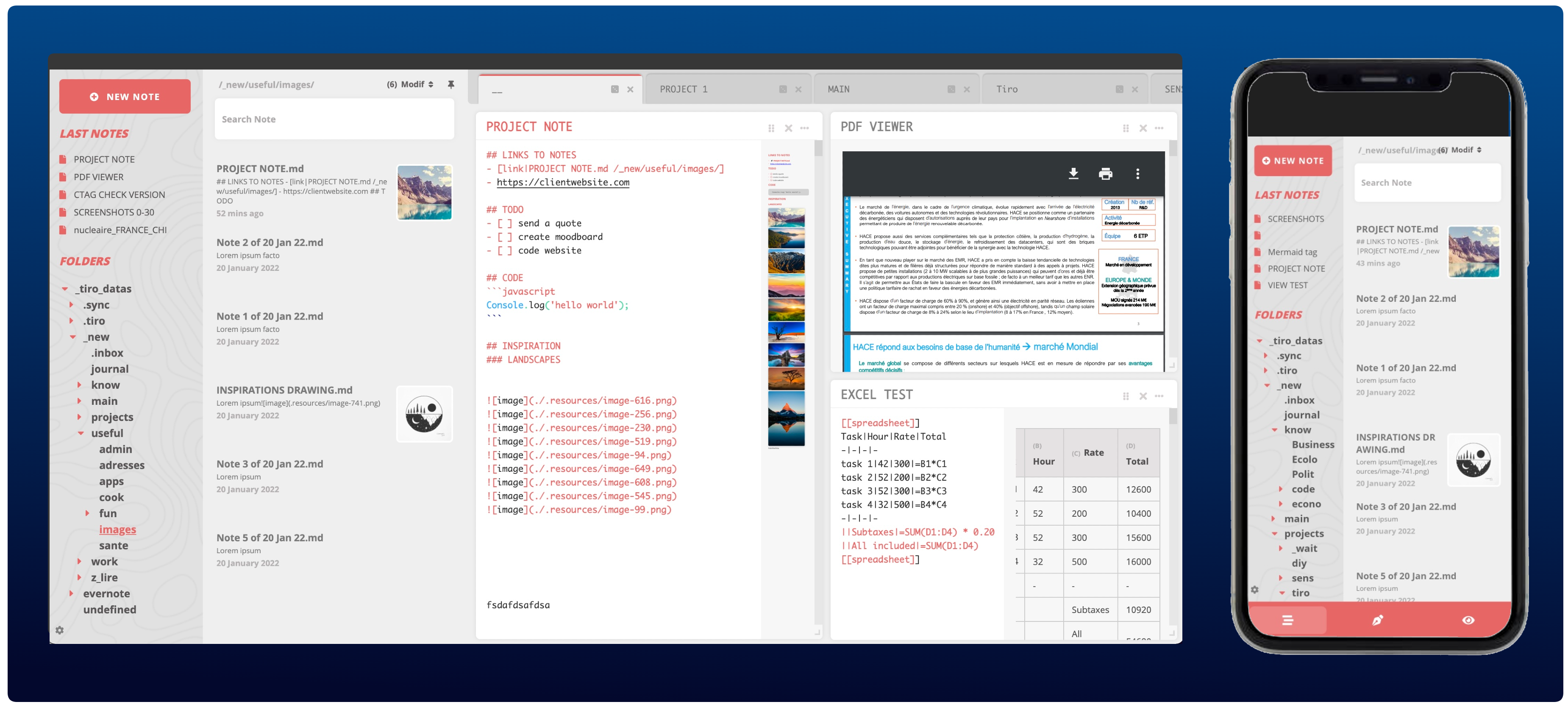
|
|
12
11
|
|
|
13
12
|
Tiro Notes focus points are :
|
|
14
13
|
|
|
15
|
-
-
|
|
16
|
-
|
|
17
|
-
-
|
|
18
|
-
|
|
19
|
-
- 🏋 **Extensible** : create custom markdown tag like [[calendar]], [[uml]] and other within seconds. Use [[latex]]. Create your own tag with [[script]] and the client api
|
|
20
|
-
|
|
21
|
-
## MENU
|
|
22
|
-
* [Why](#why)
|
|
23
|
-
* [Usage](#usage)
|
|
24
|
-
+ [Desktop Applications](#desktop-applications)
|
|
25
|
-
+ [Command Line](#command-line)
|
|
26
|
-
* [Functionalities List](#functionalities-list)
|
|
27
|
-
* [Documentation](#documentation)
|
|
28
|
-
+ [Available Custom Tags](#available-custom-tags)
|
|
29
|
-
+ [Add scripts in your note](#add-scripts-in-your-note)
|
|
30
|
-
+ [Create your own custom tags](#create-your-own-custom-tags)
|
|
31
|
-
- [1) How to create a new custom tag [[mail-address]]](#1--how-to-create-a-new-custom-tag--)
|
|
32
|
-
- [2) Using {{InnerTag}}](#2--using---innertag--)
|
|
33
|
-
- [3) Add script logic in your tag](#3--add-script-logic-in-your-tag--)
|
|
34
|
-
+ [Client API](#client-api)
|
|
35
|
-
* [Faq](#faq)
|
|
36
|
-
+ [How can I sync my notes folder on other devices?](#how-can-i-sync-my-notes-folder-on-other-devices)
|
|
37
|
-
+ [Can I edit my notes on another application?](#can-i-edit-my-notes-on-another-application)
|
|
38
|
-
+ [How can I access to Tiro on my device](#how-can-i-access-to-tiro-on-my-device)
|
|
39
|
-
+ [What is the current status of Tiro Notes?](#what-is-the-current-status-of-tiro-notes)
|
|
14
|
+
- 🏋 **Extensibility** : Tiro Notes uses a system of custom tags to extend its capabilities :
|
|
15
|
+
- Add [```[[latex]]```](https://tiro-notes.org/#/custom-tags?id=latex), [```[[uml]]```](https://tiro-notes.org/#/custom-tags?id=mermaid) or [```[[charts]]```](https://tiro-notes.org/#/custom-tags?id=mermaid), preview your pdf, mp4 or youtube links using [```[[view]]```](https://tiro-notes.org/#/custom-tags?id=view). Add [```[[spreadsheet]]```](https://tiro-notes.org/#/custom-tags?id=spreadsheet) logic to your markdown tables.
|
|
16
|
+
- Use Tiro as an app platform with a [```[[rss]]```](https://tiro-notes.org/#/custom-tags?id=rss) reader or a [```[[calendar]]```](https://tiro-notes.org/#/custom-tags?id=calendar) in it.
|
|
17
|
+
- [Create your own custom tags](https://tiro-notes.org/#/guide-custom-tags) and use the [Client API](https://tiro-notes.org/#/guide-custom-tags?id=using-tiro-client-api).
|
|
40
18
|
|
|
41
|
-
|
|
19
|
+
- 🎛️ **Flexibility** : multi-window interface to create a custom workspace. Create multiple workspaces organized by tabs. Keep these workspaces synced accross your devices.
|
|
42
20
|
|
|
43
|
-
|
|
21
|
+
- 👑 **Open source & Open Data**: Code is open source and free. No database required. Markdown files only. You can edit and sync your files with external software as you need.
|
|
44
22
|
|
|
45
|
-
|
|
46
|
-
|
|
47
|
-
### COMMAND LINE
|
|
48
|
-
- Requirements : [NodeJs](https://nodejs.org/en/download/) and [RipGrep](https://github.com/BurntSushi/ripgrep)
|
|
49
|
-
|
|
50
|
-
```
|
|
51
|
-
npx tiro-notes
|
|
52
|
-
```
|
|
53
|
-
|
|
54
|
-
<img src="https://user-images.githubusercontent.com/2981891/159723396-b5e81dcd-a4aa-4581-9b7f-e3b62bcdef65.gif" width="600"/>
|
|
23
|
+
- ☁️ / 🖥️ / 💻 / 📱 **Cross-platform & Web** : Windows, macOS, Android, Linux, Web. Start an App or with CLI and access it anywhere on your local network.
|
|
55
24
|
|
|
56
|
-
- This works with any platform/device, including unrooted Android with [Termux](https://termux.com) and possibly iOS with iSH (untested)
|
|
57
|
-
- ```npx tiro-notes --help``` for all available options
|
|
58
25
|
|
|
59
26
|
|
|
60
|
-
|
|
27
|
+
# Functionalities
|
|
61
28
|
|
|
62
29
|
**Note Edition**
|
|
63
30
|
- 🖊️ Mardown notes edition
|
|
@@ -66,16 +33,18 @@ npx tiro-notes
|
|
|
66
33
|
- 🔑 End to end (E2E) note encryption (RSA 2048)
|
|
67
34
|
- 🏛 Note changes history
|
|
68
35
|
- 📄 Export to PDF
|
|
69
|
-
- 🏋 Embed videos and other web content (with iframe)
|
|
70
|
-
- 🏋 create javascript applications within your note with [[script]]
|
|
71
|
-
- 💱 display math formulas with [[latex]]
|
|
72
|
-
- 🧬 display UML and other diagrams with [[diagram]] (custom tags)
|
|
73
36
|
- (🔧) 💬 Text to Speech (beta)
|
|
74
|
-
|
|
37
|
+
|
|
38
|
+
**Custom Tags**
|
|
39
|
+
- 💱 display math formulas with [[latex]]
|
|
40
|
+
- 🧬 display UML and other diagrams with [[diagram]]
|
|
41
|
+
- 🏋 Embed videos, pdf and web content with [[view]]
|
|
42
|
+
- 🏋 create javascript applications within your note with [[script]]
|
|
43
|
+
- 🧬 leverage the full [Client API](guide-custom-tags?id=using-tiro-client-api) in [[script]]
|
|
75
44
|
|
|
76
45
|
**Search**
|
|
77
46
|
- 🔍 Fast search (~2s for 30k notes)
|
|
78
|
-
- 🔬 Search filters (intitle: etc
|
|
47
|
+
- 🔬 Search filters (intitle: etc.)
|
|
79
48
|
|
|
80
49
|
**Folders Tree & Notes List**
|
|
81
50
|
- 🗂️ Folders management (create/rename/move/delete)
|
|
@@ -97,183 +66,4 @@ npx tiro-notes
|
|
|
97
66
|
- 📟 Use it on any device with a browser (Mobile, tablet and Desktop interface)
|
|
98
67
|
- (🔧)📱 Install on iOS with iSH and NPX (to be tested...)
|
|
99
68
|
|
|
100
|
-
|
|
101
|
-
## DOCUMENTATION
|
|
102
|
-
|
|
103
|
-
### Available Custom Tags
|
|
104
|
-
- [[calendar]] a fully functional calendar that stored data on a note : [install instructions & screenshot](https://github.com/dotgreg/tiro-notes/blob/master/documentation/custom-tag-calendar.md)
|
|
105
|
-
- [[mermaid]] Uml, Gantt and flowcharts : [install instructions & screenshot](https://github.com/dotgreg/tiro-notes/blob/master/documentation/custom-tag-mermaid.md)
|
|
106
|
-
|
|
107
|
-
### Add scripts in your note
|
|
108
|
-
|
|
109
|
-
<details>
|
|
110
|
-
<summary>Expand for details</summary>
|
|
111
|
-
You can add javascript logic in your note with the special tag [[script]]
|
|
112
|
-
|
|
113
|
-
You need to use ```return``` to output it in the preview.
|
|
114
|
-
|
|
115
|
-
```
|
|
116
|
-
.... Note content ....
|
|
117
|
-
|
|
118
|
-
[[script]]]
|
|
119
|
-
const stringToDisplay = `this is a hello world from javascript`
|
|
120
|
-
const randomNumber = Math.round(Math.random() * 1000)
|
|
121
|
-
return `${stringToDisplay} ${randomNumber} `
|
|
122
|
-
[[script]]
|
|
123
|
-
|
|
124
|
-
.... Note content ....
|
|
125
|
-
```
|
|
126
|
-
|
|
127
|
-
will output something like
|
|
128
|
-
|
|
129
|
-
```
|
|
130
|
-
.... Note content ....
|
|
131
|
-
|
|
132
|
-
this is a hello world from javascript 102
|
|
133
|
-
|
|
134
|
-
.... Note content ....
|
|
135
|
-
|
|
136
|
-
```
|
|
137
|
-
</details>
|
|
138
|
-
|
|
139
|
-
### Create your own custom tags
|
|
140
|
-
|
|
141
|
-
<details>
|
|
142
|
-
<summary>Expand for details</summary>
|
|
143
|
-
|
|
144
|
-
#### 1) How to create a new custom tag [[mail-address]]
|
|
145
|
-
In order to install a new tag, you need to create a new note in ```/.tiro/tags/``` folder. (create the /tags directory if doesn't exists).
|
|
146
|
-
|
|
147
|
-
The content of that note will then be placed instead of the tag.
|
|
148
|
-
|
|
149
|
-
So in order to create a custom tag [[mail-address]], you will need to create ```/.tiro/tags/mail-address.md```
|
|
150
|
-
|
|
151
|
-
So with ```/.tiro/tags/mail-address.md``` content being :
|
|
152
|
-
```
|
|
153
|
-
10 Downing Street
|
|
154
|
-
City of Westminster
|
|
155
|
-
London, SW1
|
|
156
|
-
```
|
|
157
|
-
|
|
158
|
-
And your note content being
|
|
159
|
-
|
|
160
|
-
```
|
|
161
|
-
.... Note content ....
|
|
162
|
-
|
|
163
|
-
[[mail-address]] [[mail-address]]
|
|
164
|
-
|
|
165
|
-
.... Note content ....
|
|
166
|
-
|
|
167
|
-
```
|
|
168
|
-
|
|
169
|
-
The result will give
|
|
170
|
-
|
|
171
|
-
```
|
|
172
|
-
.... Note content ....
|
|
173
|
-
|
|
174
|
-
10 Downing Street
|
|
175
|
-
City of Westminster
|
|
176
|
-
London, SW1
|
|
177
|
-
|
|
178
|
-
.... Note content ....
|
|
179
|
-
|
|
180
|
-
```
|
|
181
|
-
|
|
182
|
-
|
|
183
|
-
#### 2) Using {{InnerTag}}
|
|
184
|
-
The content inside the custom tags can be fetched with the special tag ```{{innerTag}}```
|
|
185
|
-
|
|
186
|
-
So with ```/.tiro/tags/mail-address.md``` content being :
|
|
187
|
-
```
|
|
188
|
-
10 Downing Street
|
|
189
|
-
City of Westminster
|
|
190
|
-
London, SW1
|
|
191
|
-
{{innerTag}}
|
|
192
|
-
```
|
|
193
|
-
|
|
194
|
-
Calling ```[[mail-address]] John Foo [[mail-address]]``` in any note will be replaced by
|
|
195
|
-
|
|
196
|
-
```
|
|
197
|
-
10 Downing Street
|
|
198
|
-
City of Westminster
|
|
199
|
-
London, SW1
|
|
200
|
-
John Foo
|
|
201
|
-
```
|
|
202
|
-
|
|
203
|
-
### 3) Add script logic in your tag
|
|
204
|
-
|
|
205
|
-
You can add javascript to your custom tag with the special tag [[script]]
|
|
206
|
-
|
|
207
|
-
If we have ```/.tiro/tags/square-number.md``` with the following content :
|
|
208
|
-
```
|
|
209
|
-
The multiplied result is :
|
|
210
|
-
[[script]]]
|
|
211
|
-
const numberToSquare = {{innerTag}}
|
|
212
|
-
return `${numberToSquare * numberToSquare}`
|
|
213
|
-
[[script]]
|
|
214
|
-
```
|
|
215
|
-
|
|
216
|
-
Using ```[[square-number]] 4 [[square-number]]``` will return ```The multiplied result is : 16```
|
|
217
|
-
|
|
218
|
-
|
|
219
|
-
</details>
|
|
220
|
-
|
|
221
|
-
|
|
222
|
-
### Client API (Beta)
|
|
223
|
-
<details>
|
|
224
|
-
<summary>Expand for details</summary>
|
|
225
|
-
|
|
226
|
-
|
|
227
|
-
Tiro Notes provides a Client API accessible using the developer console of your browser :
|
|
228
|
-

|
|
229
|
-
|
|
230
|
-
typing ``` window.tiroCli ``` will give you the updated list of available functions. Each function has a description ```window.tiroCli.FUNCTION.description``` and can be called like that ```window.tiroCli.FUNCTION.f()```
|
|
231
|
-
|
|
232
|
-
The Tiro Cli allows you to :
|
|
233
|
-
- fetch a note content : ```window.tiroCli.clientApiGetFileContent```
|
|
234
|
-
- modify a note content : ```window.tiroCli.clientApiSetFileContent```
|
|
235
|
-
- Load an external javascript file : ```window.tiroCli.loadScripts(['https://', 'https://', ...], function () => {})```
|
|
236
|
-
- Show the current note content : ```window.tiroCli.fileContent```
|
|
237
|
-
- Trigger a search in the interface : ```window.tiroCli.triggerSearch```
|
|
238
|
-
- Set the Dual Editor view type temporarily : ```window.tiroCli.setTempViewType ("both", "editor", "preview")```
|
|
239
|
-
|
|
240
|
-
/!\ this API and CLI structure is meant to change in term of structure, make sure to check window.tiroCli when upgrading to a new version /!\
|
|
241
|
-
|
|
242
|
-
</details>
|
|
243
|
-
|
|
244
|
-
|
|
245
|
-
|
|
246
|
-
## FAQ
|
|
247
|
-
|
|
248
|
-
### How can I sync my notes folder on other devices?
|
|
249
|
-
You can use any sync solution like dropbox, google drive, resilio sync, syncthings etc...
|
|
250
|
-
|
|
251
|
-
### Can I edit my notes on another application?
|
|
252
|
-
Yes, all the datas Tiro uses is coming from markdown notes. So you can edit your notes in other applications without any problem.
|
|
253
|
-
|
|
254
|
-
### Where are located the configuration file and the logs of Tiro?
|
|
255
|
-
The configuration file is located at ```~/.tiro-config.json``` for linux, mac and termux android and under ```/Users/USER_NAME/.tiro-config.json```in windows.
|
|
256
|
-
The logs are also located at the same path ```.tiro-logs.txt``` if using NPX or Node directly and ```.tiro-electron-log.txt``` if using Tiro Notes Desktop Apps.
|
|
257
|
-
|
|
258
|
-
### How can I use Tiro in the Web?
|
|
259
|
-
1) Device where tiro is installed : http://localhost:3023
|
|
260
|
-
2) If on same Wifi/local network: http://192.168.xx.xx:3023 where that ip is the ip of the device where tiro is installed
|
|
261
|
-
3) Not on same network : Tiro works great using SSH tunneling, AutoSSH or similar (free ssh tunnels solutions exists like https://opentunnel.net/). Npx tiro-notes also includes a --tunnel option for easy tunneling.
|
|
262
|
-
4) On the cloud: You can self-host/install Tiro Notes on your server and access it from anywhere.
|
|
263
|
-
|
|
264
|
-
### What is the current status of Tiro Notes?
|
|
265
|
-
I have been developing it for over a year and using it as my daily note app for over 6 months now, its core functionalities seems stable enough for my use so far.
|
|
266
|
-
I haven't been loosing any data so far, and there is always the history note functionality in that case.
|
|
267
|
-
|
|
268
|
-
However, I consider that application still in alpha phase, it still needs a lot of testing to be considered robust.
|
|
269
|
-
So use it at your own risk, and always with data you can afford to lose.
|
|
270
|
-
|
|
271
|
-
### How can I contribute?
|
|
272
|
-
|
|
273
|
-
Contributions and PR are welcome! You can contact me for more details on the ROADMAP and how to be involved.
|
|
274
|
-
|
|
275
|
-
Right now, Tiro Notes needs testers to stabilize the current scope of functionalities and to give feedbacks on it.
|
|
276
|
-
|
|
277
|
-
Also translation can be a nice thing to have in the future.
|
|
278
|
-
|
|
279
|
-
Twitter News & Updates : https://twitter.com/NotesTiro
|
|
69
|
+
>"Marcus Tullius Tiro, a learned freedman who was a member of Cicero’s household, invented the Tironian notes, the first Latin shorthand system. Tironian notes consist of letters of the alphabet, simplified and modified to achieve greater speed in their writing."
|
package/cli.js
CHANGED
|
@@ -3,6 +3,7 @@
|
|
|
3
3
|
// const isDev = false
|
|
4
4
|
const isDev = process.env.ISDEV
|
|
5
5
|
const tHelpers = isDev ? require('../shared.helpers.js') : require(`./shared.helpers.build.js`);
|
|
6
|
+
const pathServerJs = isDev ? `${__dirname}/node-build/server/tiro-server.js` : `${__dirname}/server/tiro-server.js`
|
|
6
7
|
|
|
7
8
|
|
|
8
9
|
// CLI HELP MANUAL
|
|
@@ -22,7 +23,15 @@ ARGS:
|
|
|
22
23
|
|
|
23
24
|
--https/-s : enable https ssl with self signed certificate (boolean, false by default)
|
|
24
25
|
--port/-p : port to use (number, 3023 by default)
|
|
25
|
-
--
|
|
26
|
+
--no-open/-no : do not open Tiro in browser when starting
|
|
27
|
+
--verbose/-v : more verbose logs
|
|
28
|
+
|
|
29
|
+
--tunnel/-t : [require autossh] uses autossh to "publish" the app on the web, requires a server you can access with ssh and autossh installed on that device. (ex:npx tiro-notes@latest -t REMOTE_USER@REMOTE_URL:REMOTE_PORT)
|
|
30
|
+
|
|
31
|
+
--backup/-b : [require tar] will incrementally backup changes in archives like tiro.0.xz.tar, tiro.1.xz.tar... every day in a specific folder. You can then execute commands after that process in a post backup script (useful for syncing these archives to clouds, think rsync, rclone etc.)
|
|
32
|
+
--backup-folder : modify backup folder destination. (default: "your/path/to/tiro/data_folder"+_backup
|
|
33
|
+
--backup-post-script : modify script to be executed after a backup finishes. Should be a ".txt" file with your OS commands. (default: "your/path/to/tiro/data_folder"+_backup/post_backup_script.txt
|
|
34
|
+
|
|
26
35
|
--help/-h : help
|
|
27
36
|
|
|
28
37
|
EXAMPLES:
|
|
@@ -48,6 +57,13 @@ function getCliArgs () {
|
|
|
48
57
|
port: 3023,
|
|
49
58
|
https: false,
|
|
50
59
|
help: false,
|
|
60
|
+
open: true,
|
|
61
|
+
verbose: false,
|
|
62
|
+
backup: {
|
|
63
|
+
enabled: false,
|
|
64
|
+
location: "default",
|
|
65
|
+
scriptLocation: "default"
|
|
66
|
+
},
|
|
51
67
|
tunnel: {
|
|
52
68
|
enabled: false,
|
|
53
69
|
},
|
|
@@ -60,6 +76,13 @@ function getCliArgs () {
|
|
|
60
76
|
if (argName === 'p' || argName === 'port') argsObj.port = parseInt(argVal);
|
|
61
77
|
if (argName === 's' || argName === 'https') argsObj.https = true
|
|
62
78
|
if (argName === 'h' || argName === 'help') argsObj.help = true
|
|
79
|
+
if (argName === 'no-open' || argName === 'no') argsObj.open = false
|
|
80
|
+
if (argName === 'v' || argName === 'verbose') argsObj.verbose = true
|
|
81
|
+
|
|
82
|
+
if (argName === 'b' || argName === 'backup') argsObj.backup.enabled = true
|
|
83
|
+
if (argName === 'backup-location') argsObj.backup.location = argVal
|
|
84
|
+
if (argName === 'backup-post-script') argsObj.backup.scriptLocation = argVal
|
|
85
|
+
|
|
63
86
|
if (argName === 't' || argName === 'tunnel') {
|
|
64
87
|
const argsArr = argVal.split(':')
|
|
65
88
|
if (argsArr.length > 1) {
|
|
@@ -79,19 +102,90 @@ function startTiroServer (argsObj, cb) {
|
|
|
79
102
|
tHelpers.killPreviousInstances(() => {
|
|
80
103
|
|
|
81
104
|
// start tiro server, detect success message and get server params
|
|
82
|
-
tHelpers.execCmd('node', [
|
|
105
|
+
tHelpers.execCmd('node', [pathServerJs], {
|
|
106
|
+
showLog: argsObj.verbose,
|
|
83
107
|
env: {
|
|
84
108
|
TIRO_PORT: argsObj.port,
|
|
85
109
|
TIRO_HTTPS: argsObj.https
|
|
86
110
|
},
|
|
87
111
|
logName: 'tiroServer',
|
|
88
112
|
onLog: str => {
|
|
113
|
+
// we get params like dataFolder from server.js directly
|
|
89
114
|
tHelpers.checkAndGetTiroConfig(str, {platform: 'cli', cb})
|
|
90
115
|
}
|
|
91
116
|
})
|
|
92
117
|
});
|
|
93
118
|
}
|
|
94
119
|
|
|
120
|
+
const startBackupScript = async (argsObj, dataFolder) => {
|
|
121
|
+
console.log ("[BACKUP] init1");
|
|
122
|
+
if (argsObj.backup.enabled) return;
|
|
123
|
+
console.log ("[BACKUP] init2");
|
|
124
|
+
if (!dataFolder) return console.warn ("[BACKUP] no dataFolder detected!");
|
|
125
|
+
console.log ("[BACKUP] init3");
|
|
126
|
+
|
|
127
|
+
// get BACKUP_FOLDER path
|
|
128
|
+
const defaultBackupFolder = dataFolder + "_backup/"
|
|
129
|
+
const backupFolder = argsObj.backup.location !== "default" ? argsObj.backup.location : defaultBackupFolder
|
|
130
|
+
// if does not exists, create it
|
|
131
|
+
if (!tHelpers.fileExists(backupFolder)) await tHelpers.createDir(backupFolder)
|
|
132
|
+
|
|
133
|
+
|
|
134
|
+
// get POST_BACKUP_SCRIPT
|
|
135
|
+
const defaultPostBackupScript = backupFolder + "post_backup_script.txt"
|
|
136
|
+
const postBackupScriptFile = argsObj.backup.scriptLocation !== "default" ? argsObj.backup.scriptLocation : defaultPostBackupScript
|
|
137
|
+
// if does not exists, create it, empty
|
|
138
|
+
if (!tHelpers.fileExists(postBackupScriptFile)) await tHelpers.saveFile(postBackupScriptFile, "")
|
|
139
|
+
let postBackupScript = await tHelpers.openFile(postBackupScriptFile)
|
|
140
|
+
if (postBackupScript) postBackupScript += ";"
|
|
141
|
+
|
|
142
|
+
|
|
143
|
+
// get LAST_BACKUP_TIMESTAMP
|
|
144
|
+
const timestampFile = backupFolder + "last_backup_timestamp.txt"
|
|
145
|
+
const now = () => new Date().getTime()
|
|
146
|
+
// if does not exists, create it, then give a timestamp of 0
|
|
147
|
+
if (!tHelpers.fileExists(timestampFile)) await tHelpers.saveFile(timestampFile, "0")
|
|
148
|
+
let lastBackupTimestampRaw = await tHelpers.openFile(timestampFile);
|
|
149
|
+
let lastBackupTimestamp = parseInt(lastBackupTimestampRaw)
|
|
150
|
+
let replaceTimestampCli = () => `echo ${now()} > '${timestampFile}'`
|
|
151
|
+
|
|
152
|
+
// START INTERVAL
|
|
153
|
+
const timeInterval = 1000 * 60 * 60 // one hour
|
|
154
|
+
const backupInterval = 1000 * 60 * 60 * 24 // one day
|
|
155
|
+
|
|
156
|
+
const tarExec = process.platform === "darwin" ? "gtar" : "tar"
|
|
157
|
+
|
|
158
|
+
let backupCli = `mkdir '${backupFolder}'; mkdir '${backupFolder}/backups'; cd '${backupFolder}'; ${tarExec} --xz --verbose --create --file="backups/tiro.$(ls backups/ | wc -l | sed 's/^ *//;s/ *$//').tar.xz" '${dataFolder}' --listed-incremental='${backupFolder}metadata.snar'; ${replaceTimestampCli()}; ${postBackupScript}`
|
|
159
|
+
|
|
160
|
+
const debugObj = {backupFolder, postBackupScriptFile, postBackupScript, lastBackupTimestamp, timeInterval, backupCli}
|
|
161
|
+
console.log ("[BACKUP] starting backup logic!");
|
|
162
|
+
console.log (debugObj);
|
|
163
|
+
|
|
164
|
+
const debugBackupNow = isDev ? false : false
|
|
165
|
+
const processBackupEveryDay = () => {
|
|
166
|
+
// if > 1 day
|
|
167
|
+
const diff = backupInterval + lastBackupTimestamp - new Date().getTime()
|
|
168
|
+
const diffMin = Math.round(diff / (1000 * 60))
|
|
169
|
+
if (diff < 0 || debugBackupNow) {
|
|
170
|
+
console.log(`[BACKUP] time has come, BACKUP!`);
|
|
171
|
+
// append to backup CLI current timestamp to last_backup_timestamp
|
|
172
|
+
// execute cli
|
|
173
|
+
tHelpers.execCmdInFile(backupCli, backupFolder+"cli.sh", {
|
|
174
|
+
showLog: argsObj.verbose
|
|
175
|
+
})
|
|
176
|
+
} else {
|
|
177
|
+
console.log(`[BACKUP] time has no come... still waiting for ${diffMin} mins`);
|
|
178
|
+
}
|
|
179
|
+
}
|
|
180
|
+
|
|
181
|
+
// every hour
|
|
182
|
+
processBackupEveryDay();
|
|
183
|
+
let int = setInterval(() => {
|
|
184
|
+
processBackupEveryDay()
|
|
185
|
+
}, timeInterval)
|
|
186
|
+
|
|
187
|
+
}
|
|
188
|
+
|
|
95
189
|
const startSshTunnel = (argsObj) => {
|
|
96
190
|
if (argsObj.tunnel.enabled) {
|
|
97
191
|
// kill previous autossh processes
|
|
@@ -135,12 +229,16 @@ function main () {
|
|
|
135
229
|
const c = configServerObj
|
|
136
230
|
const protocol = c.https ? 'https' : 'http'
|
|
137
231
|
const port = c.port
|
|
232
|
+
const dataFolder = c.dataFolder
|
|
138
233
|
|
|
139
234
|
// open in browser
|
|
140
|
-
openInBrowser(`${protocol}://localhost:${port}`);
|
|
235
|
+
if (argsObj.open) openInBrowser(`${protocol}://localhost:${port}`);
|
|
141
236
|
|
|
142
237
|
// start tunnel with autossh if asked
|
|
143
238
|
startSshTunnel(argsObj);
|
|
239
|
+
|
|
240
|
+
// start backup script
|
|
241
|
+
startBackupScript(argsObj, dataFolder);
|
|
144
242
|
|
|
145
243
|
})
|
|
146
244
|
}
|
|
@@ -148,7 +246,10 @@ function main () {
|
|
|
148
246
|
|
|
149
247
|
const test = () => {
|
|
150
248
|
var argsObj = getCliArgs();
|
|
151
|
-
startSshTunnel(argsObj);
|
|
249
|
+
// startSshTunnel(argsObj);
|
|
250
|
+
console.log(argsObj);
|
|
251
|
+
// startBackupScript(argsObj, "/Users/gregoirethiebault/Desktop/your markdown notes")
|
|
252
|
+
startBackupScript(argsObj, "/Users/gregoirethiebault/Desktop/nodal_ex")
|
|
152
253
|
}
|
|
153
254
|
|
|
154
255
|
|