tienjs-chartbrew-plugin-strapi 0.1.0
This diff represents the content of publicly available package versions that have been released to one of the supported registries. The information contained in this diff is provided for informational purposes only and reflects changes between package versions as they appear in their respective public registries.
- package/LICENSE +21 -0
- package/README.md +187 -0
- package/dist/_chunks/App-Be1FtvNK.mjs +618 -0
- package/dist/_chunks/App-ngsyON1R.js +618 -0
- package/dist/_chunks/Setup-CL3F4zOi.js +304 -0
- package/dist/_chunks/Setup-C_xPro4U.mjs +304 -0
- package/dist/_chunks/en-B4KWt_jN.js +4 -0
- package/dist/_chunks/en-Byx4XI2L.mjs +4 -0
- package/dist/_chunks/fr-C8Qw4iPZ.js +4 -0
- package/dist/_chunks/fr-hkSxFuzl.mjs +4 -0
- package/dist/_chunks/index-Bk9ujIXz.js +96 -0
- package/dist/_chunks/index-CXvgiYYO.mjs +97 -0
- package/dist/_chunks/store-B-zkLoDr.js +2505 -0
- package/dist/_chunks/store-CES_iNgI.mjs +2506 -0
- package/dist/admin/index.js +3 -0
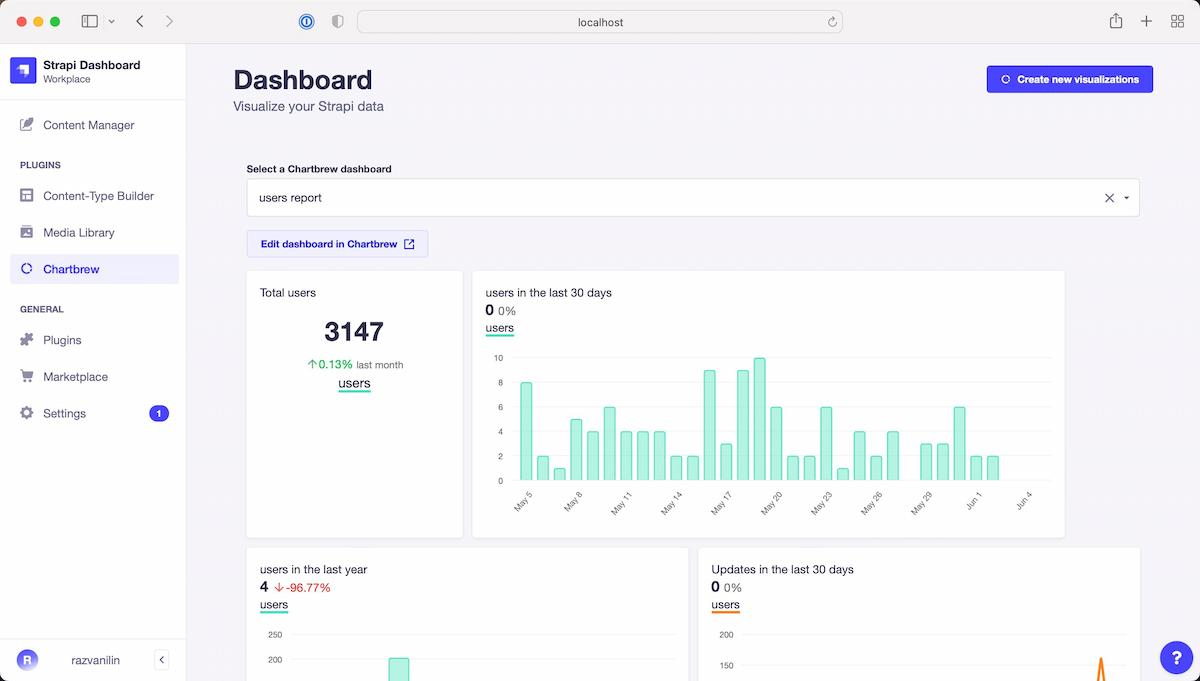
- package/dist/admin/index.mjs +4 -0
- package/dist/server/index.js +252 -0
- package/dist/server/index.mjs +251 -0
- package/package.json +75 -0
package/LICENSE
ADDED
|
@@ -0,0 +1,21 @@
|
|
|
1
|
+
MIT License
|
|
2
|
+
|
|
3
|
+
Copyright (c) 2022 Chartbrew
|
|
4
|
+
|
|
5
|
+
Permission is hereby granted, free of charge, to any person obtaining a copy
|
|
6
|
+
of this software and associated documentation files (the "Software"), to deal
|
|
7
|
+
in the Software without restriction, including without limitation the rights
|
|
8
|
+
to use, copy, modify, merge, publish, distribute, sublicense, and/or sell
|
|
9
|
+
copies of the Software, and to permit persons to whom the Software is
|
|
10
|
+
furnished to do so, subject to the following conditions:
|
|
11
|
+
|
|
12
|
+
The above copyright notice and this permission notice shall be included in all
|
|
13
|
+
copies or substantial portions of the Software.
|
|
14
|
+
|
|
15
|
+
THE SOFTWARE IS PROVIDED "AS IS", WITHOUT WARRANTY OF ANY KIND, EXPRESS OR
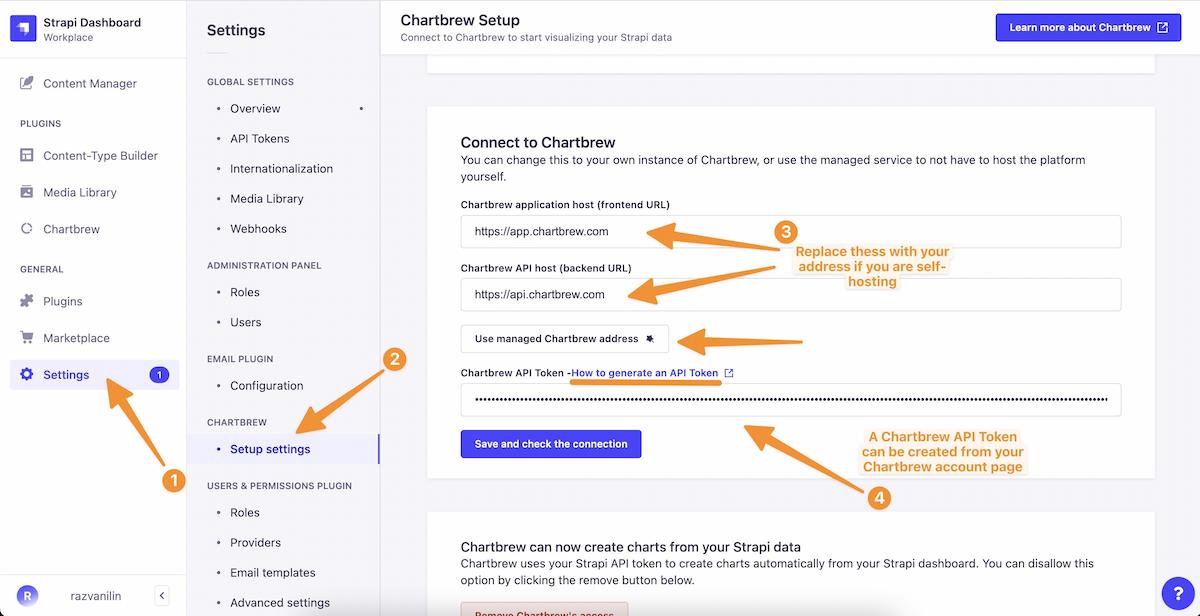
|
|
16
|
+
IMPLIED, INCLUDING BUT NOT LIMITED TO THE WARRANTIES OF MERCHANTABILITY,
|
|
17
|
+
FITNESS FOR A PARTICULAR PURPOSE AND NONINFRINGEMENT. IN NO EVENT SHALL THE
|
|
18
|
+
AUTHORS OR COPYRIGHT HOLDERS BE LIABLE FOR ANY CLAIM, DAMAGES OR OTHER
|
|
19
|
+
LIABILITY, WHETHER IN AN ACTION OF CONTRACT, TORT OR OTHERWISE, ARISING FROM,
|
|
20
|
+
OUT OF OR IN CONNECTION WITH THE SOFTWARE OR THE USE OR OTHER DEALINGS IN THE
|
|
21
|
+
SOFTWARE.
|
package/README.md
ADDED
|
@@ -0,0 +1,187 @@
|
|
|
1
|
+
<p align="center">
|
|
2
|
+
<a href="https://chartbrew.com">
|
|
3
|
+
<img src="https://chartbrew-static.b-cdn.net/chartbrew-strapi-plugin-1.png" alt="Chartbrew logo" width="200"/>
|
|
4
|
+
</a>
|
|
5
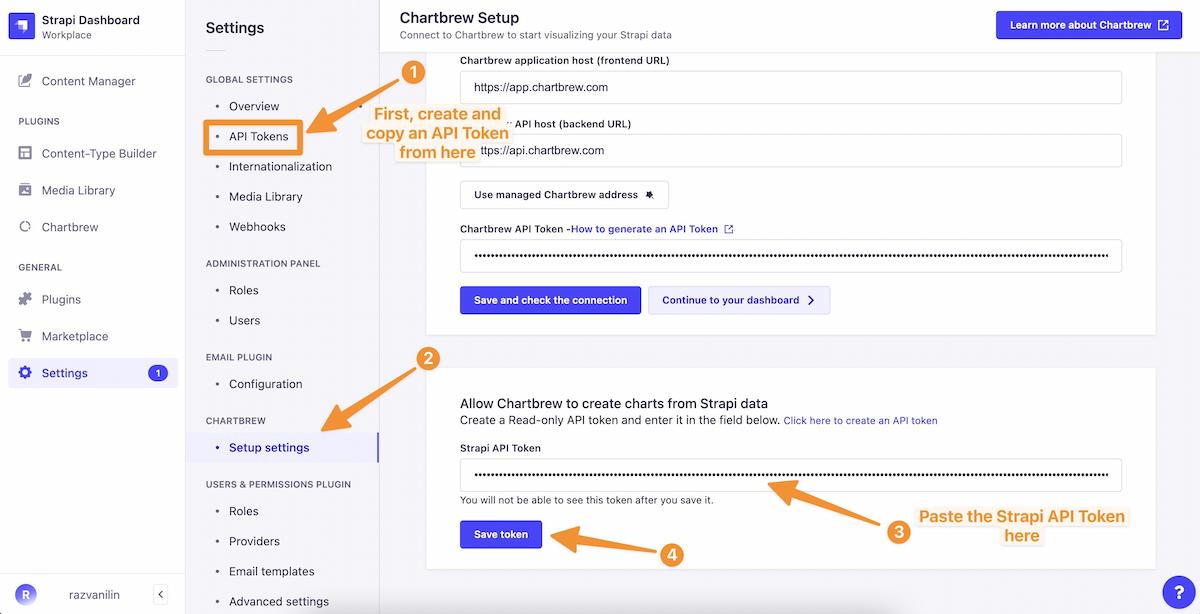
|
+
</a>
|
|
6
|
+
|
|
7
|
+
<p align="center">
|
|
8
|
+
<a href="https://discord.gg/KwGEbFk" target="_blank"><img src="https://img.shields.io/discord/656557151048957995?label=Chartbrew Discord" alt="" /></a>
|
|
9
|
+
</p>
|
|
10
|
+
|
|
11
|
+
<p align="center">
|
|
12
|
+
<h1 align="center">Chartbrew plugin for Strapi</h1>
|
|
13
|
+
</p>
|
|
14
|
+
|
|
15
|
+
<p align="center">
|
|
16
|
+
<strong>
|
|
17
|
+
This is the official <a href="https://chartbrew.com">Chartbrew</a> plugin for <a href="https://strapi.io">Strapi</a>. Chartbrew is an open-source web application that can connect directly to Strapi and other data sources and use the data to create beautiful charts. It features a chart builder, editable dashboards, embedable charts, query & requests editor, and team capabilities.
|
|
18
|
+
</strong>
|
|
19
|
+
</p>
|
|
20
|
+
|
|
21
|
+
<br />
|
|
22
|
+
|
|
23
|
+
|
|
24
|
+
|
|
25
|
+
<br />
|
|
26
|
+
|
|
27
|
+
## ✨ Plugin features
|
|
28
|
+
|
|
29
|
+
* Explore your Chartbrew dashboards directly on Strapi
|
|
30
|
+
* Multi-dashboard support, can switch between them
|
|
31
|
+
* Create dashboards from your collection types from the Strapi interface
|
|
32
|
+
* Add charts to existing dashboards straight from Strapi
|
|
33
|
+
* The charts are kept up-to-date automatically (you can set an update schedule on Chartbrew)
|
|
34
|
+
|
|
35
|
+
## 📦 Plugin versions
|
|
36
|
+
* If you are using Strapi v5 and Chartbrew v4, use version `3+`
|
|
37
|
+
* If you are using Strapi v5 and Chartbrew v3, use version `2.x.x`
|
|
38
|
+
* If you are using Strapi v4, use version `1.x.x`
|
|
39
|
+
|
|
40
|
+
## 👋 Get started with Chartbrew
|
|
41
|
+
|
|
42
|
+
To use this plugin, you will need to have a Chartbrew account, or self-host the platform.
|
|
43
|
+
|
|
44
|
+
### Chartbrew account
|
|
45
|
+
|
|
46
|
+
Chartbrew is offered as a managed service in exchange for a monthly subscription. This is the fastest way to get started and create visualizations in Strapi. Follow the instructions below to get started:
|
|
47
|
+
|
|
48
|
+
1. [Create a new account here](https://app.chartbrew.com/signup)
|
|
49
|
+
2. [Follow this tutorial](https://chartbrew.com/blog/how-to-create-api-keys-in-chartbrew/) to get a Chartbrew API Key to use for Strapi
|
|
50
|
+
|
|
51
|
+
### Self-hosting
|
|
52
|
+
|
|
53
|
+
Chartbrew is 100% open-source and can be self-hosted. Check out some links to get you started:
|
|
54
|
+
|
|
55
|
+
* 😺 [Chartbrew GitHub](https://github.com/chartbrew/chartbrew)
|
|
56
|
+
* 📔 [Chartbrew docs](https://docs.chartbrew.com)
|
|
57
|
+
* 🐳 [Get started with the Chartbrew Docker image](https://docs.chartbrew.com/deployment/#run-the-application-with-docker)
|
|
58
|
+
* 🚀 [Deploy Chartbrew on Heroku & Vercel](https://chartbrew.com/blog/how-to-deploy-chartbrew-on-heroku-and-vercel/)
|
|
59
|
+
|
|
60
|
+
## 🔧 Plugin Installation
|
|
61
|
+
|
|
62
|
+
Navigate to the root of your Strapi folder and run the installation commands below.
|
|
63
|
+
|
|
64
|
+
With `npm`:
|
|
65
|
+
|
|
66
|
+
```
|
|
67
|
+
npm install --save @chartbrew/plugin-strapi
|
|
68
|
+
```
|
|
69
|
+
|
|
70
|
+
With `yarn`:
|
|
71
|
+
|
|
72
|
+
```
|
|
73
|
+
yarn add @chartbrew/plugin-strapi
|
|
74
|
+
```
|
|
75
|
+
|
|
76
|
+
Add the following attribute in the `config/plugins.js` file:
|
|
77
|
+
|
|
78
|
+
```
|
|
79
|
+
chartbrew: true
|
|
80
|
+
```
|
|
81
|
+
|
|
82
|
+
Or if you do not have the `plugins.js` file yet, add the file with the following contents:
|
|
83
|
+
|
|
84
|
+
```
|
|
85
|
+
module.exports = () => ({
|
|
86
|
+
chartbrew: true,
|
|
87
|
+
});
|
|
88
|
+
```
|
|
89
|
+
|
|
90
|
+
And finally, run the build command:
|
|
91
|
+
|
|
92
|
+
```
|
|
93
|
+
npm run build
|
|
94
|
+
```
|
|
95
|
+
|
|
96
|
+
Or if you are using `yarn`:
|
|
97
|
+
|
|
98
|
+
```
|
|
99
|
+
yarn build
|
|
100
|
+
```
|
|
101
|
+
|
|
102
|
+
## ⚙️ Plugin settings
|
|
103
|
+
|
|
104
|
+
In order for the plugin to work properly, it needs the right credentials to authenticate with Chartbrew.
|
|
105
|
+
|
|
106
|
+
The plugin can also create charts straight from Strapi, but this needs access to Strapi through an API token.
|
|
107
|
+
|
|
108
|
+
Follow the instructions below to learn how to configure the plugin.
|
|
109
|
+
|
|
110
|
+
### Chartbrew connection
|
|
111
|
+
|
|
112
|
+
If you self-host Chartbrew, you will have to enter the frontend and backend addresses. The default values are:
|
|
113
|
+
|
|
114
|
+
* Frontend: `http://localhost:4018`
|
|
115
|
+
* Backend: `http://localhost:4019`
|
|
116
|
+
|
|
117
|
+
If you want to use the plugin with a managed service account at [chartbrew.com](https://chartbrew.com), click on the **Use managed Chartbrew address** button as shown below:
|
|
118
|
+
|
|
119
|
+
|
|
120
|
+
|
|
121
|
+
### Cannot load the dashboards
|
|
122
|
+
|
|
123
|
+
If you cannot load the dashboard, you may have to tweak the Strapi security settings. To do this, open the `config/middlewares.js` file and add the following attribute:
|
|
124
|
+
|
|
125
|
+
```
|
|
126
|
+
{
|
|
127
|
+
name: "strapi::security",
|
|
128
|
+
config: {
|
|
129
|
+
contentSecurityPolicy: {
|
|
130
|
+
useDefaults: true,
|
|
131
|
+
directives: {
|
|
132
|
+
"default-src": ["'self'"],
|
|
133
|
+
"frame-src": ["'self'", "https://app.chartbrew.com"], // allow Chartbrew iframe
|
|
134
|
+
// If your Strapi admin runs on localhost and does websockets, keep these sane too:
|
|
135
|
+
"connect-src": ["'self'", "ws://localhost:1337", "https://app.chartbrew.com"],
|
|
136
|
+
},
|
|
137
|
+
},
|
|
138
|
+
},
|
|
139
|
+
}
|
|
140
|
+
```
|
|
141
|
+
|
|
142
|
+
If you are self-hosting Chartbrew, you will need to replace `https://app.chartbrew.com` with your own Chartbrew client URL.
|
|
143
|
+
|
|
144
|
+
### Cannot authenticate with Chartbrew
|
|
145
|
+
|
|
146
|
+
[**Read more here**](https://github.com/chartbrew/strapi-plugin-chartbrew/issues/13)
|
|
147
|
+
|
|
148
|
+
If you run both Strapi and Chartbrew on `localhost` or on a non-secure connection (http), you will need to tweak the Strapi security settings. To do this, open the `config/middlewares.js` file and add the following attribute:
|
|
149
|
+
|
|
150
|
+
```
|
|
151
|
+
module.exports = [
|
|
152
|
+
...
|
|
153
|
+
{
|
|
154
|
+
name: 'strapi::security',
|
|
155
|
+
config: {
|
|
156
|
+
contentSecurityPolicy: {
|
|
157
|
+
useDefaults: true,
|
|
158
|
+
directives: {
|
|
159
|
+
'connect-src': ["'self'", 'http:', 'https:'],
|
|
160
|
+
upgradeInsecureRequests: null,
|
|
161
|
+
},
|
|
162
|
+
},
|
|
163
|
+
},
|
|
164
|
+
},
|
|
165
|
+
...
|
|
166
|
+
];
|
|
167
|
+
```
|
|
168
|
+
|
|
169
|
+
And don't forget to build the Strapi project again:
|
|
170
|
+
|
|
171
|
+
```
|
|
172
|
+
# npm
|
|
173
|
+
npm run build
|
|
174
|
+
|
|
175
|
+
# yarn
|
|
176
|
+
yarn build
|
|
177
|
+
```
|
|
178
|
+
|
|
179
|
+
### Create charts from Strapi
|
|
180
|
+
|
|
181
|
+
You can create charts directly from your Strapi dashboards. To do this, you will need to create a Strapi API Token and add it in the Chartbrew settings page.
|
|
182
|
+
|
|
183
|
+
|
|
184
|
+
|
|
185
|
+
## ⚠️ Dependencies
|
|
186
|
+
|
|
187
|
+
* Strapi v5+
|