tidy-table 4.0.0
This diff represents the content of publicly available package versions that have been released to one of the supported registries. The information contained in this diff is provided for informational purposes only and reflects changes between package versions as they appear in their respective public registries.
- package/LICENSE +21 -0
- package/README.md +161 -0
- package/images/arrow-down.svg +1 -0
- package/images/arrow-up.svg +1 -0
- package/package.json +51 -0
- package/src/tidy-table.js +402 -0
- package/src/tidy-table.scss +143 -0
package/LICENSE
ADDED
|
@@ -0,0 +1,21 @@
|
|
|
1
|
+
MIT License
|
|
2
|
+
|
|
3
|
+
Copyright (c) 2012-2023 Marc S. Brooks (https://mbrooks.info)
|
|
4
|
+
|
|
5
|
+
Permission is hereby granted, free of charge, to any person obtaining a copy
|
|
6
|
+
of this software and associated documentation files (the "Software"), to deal
|
|
7
|
+
in the Software without restriction, including without limitation the rights
|
|
8
|
+
to use, copy, modify, merge, publish, distribute, sublicense, and/or sell
|
|
9
|
+
copies of the Software, and to permit persons to whom the Software is
|
|
10
|
+
furnished to do so, subject to the following conditions:
|
|
11
|
+
|
|
12
|
+
The above copyright notice and this permission notice shall be included in all
|
|
13
|
+
copies or substantial portions of the Software.
|
|
14
|
+
|
|
15
|
+
THE SOFTWARE IS PROVIDED "AS IS", WITHOUT WARRANTY OF ANY KIND, EXPRESS OR
|
|
16
|
+
IMPLIED, INCLUDING BUT NOT LIMITED TO THE WARRANTIES OF MERCHANTABILITY,
|
|
17
|
+
FITNESS FOR A PARTICULAR PURPOSE AND NONINFRINGEMENT. IN NO EVENT SHALL THE
|
|
18
|
+
AUTHORS OR COPYRIGHT HOLDERS BE LIABLE FOR ANY CLAIM, DAMAGES OR OTHER
|
|
19
|
+
LIABILITY, WHETHER IN AN ACTION OF CONTRACT, TORT OR OTHERWISE, ARISING FROM,
|
|
20
|
+
OUT OF OR IN CONNECTION WITH THE SOFTWARE OR THE USE OR OTHER DEALINGS IN THE
|
|
21
|
+
SOFTWARE.
|
package/README.md
ADDED
|
@@ -0,0 +1,161 @@
|
|
|
1
|
+
# tidy-table [](https://badge.fury.io/js/tidy-table) [](https://www.npmjs.com/package/tidy-table)
|
|
2
|
+
|
|
3
|
+
Create a HTML table that can be sorted, selected, and post-processed using a simple callback.
|
|
4
|
+
|
|
5
|
+
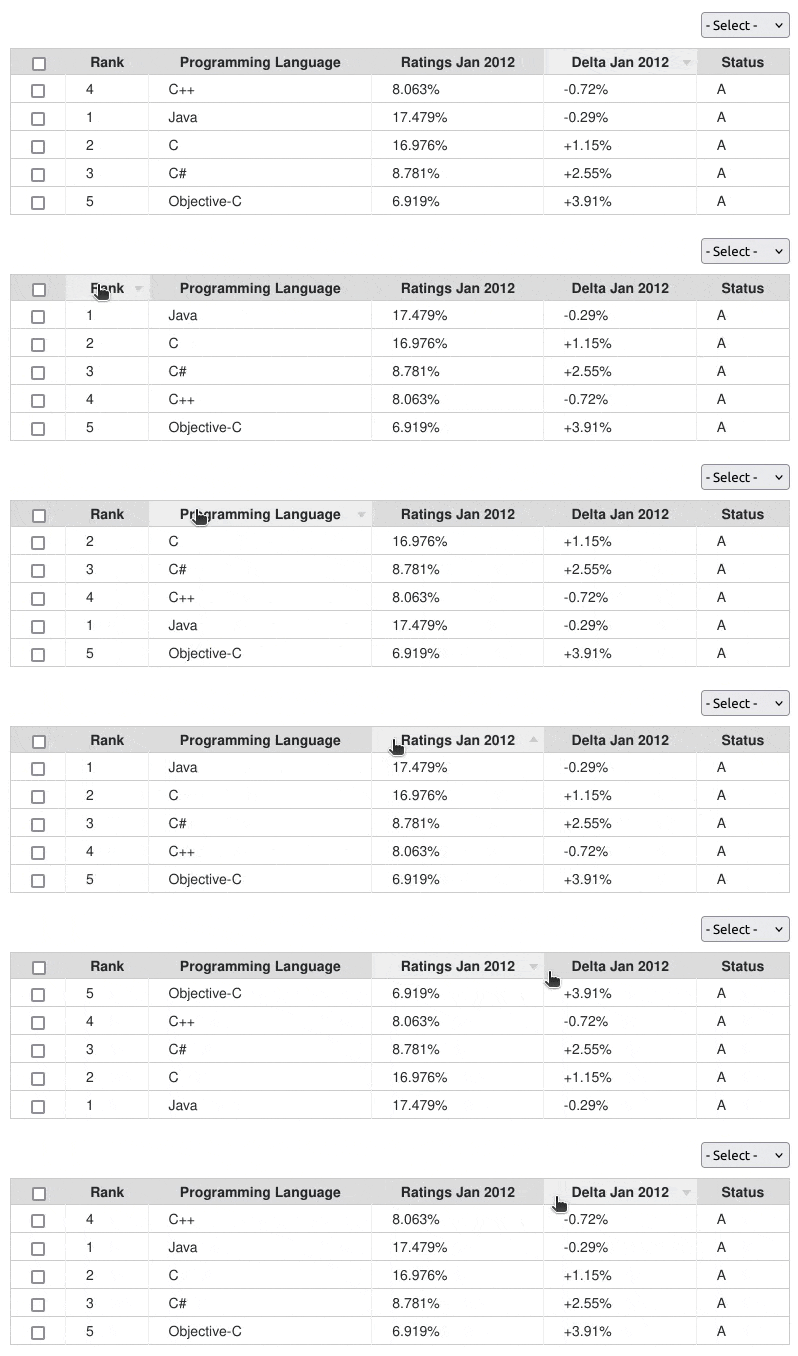
|
|
6
|
+
|
|
7
|
+
Checkout the [demo](https://nuxy.github.io/tidy-table) for examples of use.
|
|
8
|
+
|
|
9
|
+
## Features
|
|
10
|
+
|
|
11
|
+
- Extensible HTML/CSS interface.
|
|
12
|
+
- Compatible with all modern desktop and mobile web browsers.
|
|
13
|
+
- Fully responsive layout with touch event support.
|
|
14
|
+
- Easy to set-up and customize.
|
|
15
|
+
- Customizable callback functions for post-processing selected results.
|
|
16
|
+
- Post-process options for manipulating table/column/menu elements.
|
|
17
|
+
- Fast and lightweight (JavaScript plug-in *only 4 kB)
|
|
18
|
+
|
|
19
|
+
## Dependencies
|
|
20
|
+
|
|
21
|
+
- [Node.js](https://nodejs.org)
|
|
22
|
+
|
|
23
|
+
## Installation
|
|
24
|
+
|
|
25
|
+
Install the package into your project using [NPM](https://npmjs.com), or download the [sources](https://github.com/nuxy/tidy-table/archive/master.zip).
|
|
26
|
+
|
|
27
|
+
$ npm install tidy-table
|
|
28
|
+
|
|
29
|
+
## Usage
|
|
30
|
+
|
|
31
|
+
There are two ways you can use this package. One is by including the JavaScript/CSS sources directly. The other is by importing the module into your component.
|
|
32
|
+
|
|
33
|
+
### Script include
|
|
34
|
+
|
|
35
|
+
After you [build the distribution sources](#cli-options) the set-up is fairly simple..
|
|
36
|
+
|
|
37
|
+
```html
|
|
38
|
+
<script type="text/javascript" src="path/to/tidy-table.min.js"></script>
|
|
39
|
+
<link rel="stylesheet" href="path/to/tidy-table.min.css" media="all" />
|
|
40
|
+
|
|
41
|
+
<script type="text/javascript">
|
|
42
|
+
var tidyTable = tidyTable(container, settings, options);
|
|
43
|
+
</script>
|
|
44
|
+
```
|
|
45
|
+
|
|
46
|
+
### Module import
|
|
47
|
+
|
|
48
|
+
If your using a modern framework like [Aurelia](https://aurelia.io), [Angular](https://angular.io), [React](https://reactjs.org), or [Vue](https://vuejs.org)
|
|
49
|
+
|
|
50
|
+
```javascript
|
|
51
|
+
import TidyTable from 'tidy-table';
|
|
52
|
+
import 'tidy-table/dist/tidy-table.css';
|
|
53
|
+
|
|
54
|
+
const tidyTable = new TidyTable(container, settings, options);
|
|
55
|
+
```
|
|
56
|
+
|
|
57
|
+
## HTML markup
|
|
58
|
+
|
|
59
|
+
```javascript
|
|
60
|
+
const options = {
|
|
61
|
+
enableCheckbox: true,
|
|
62
|
+
enableMenu: true,
|
|
63
|
+
reverseSortDir: true,
|
|
64
|
+
responsive: true
|
|
65
|
+
};
|
|
66
|
+
|
|
67
|
+
const settings = {
|
|
68
|
+
columnTitles: ['Rank', 'Programming Language', 'Ratings Jan 2012', 'Delta Jan 2012', 'Status'],
|
|
69
|
+
columnValues: [
|
|
70
|
+
['1', 'Java', '17.479%', '-0.29%', 'A'],
|
|
71
|
+
['2', 'C', '16.976%', '+1.15%', 'A'],
|
|
72
|
+
['3', 'C#', '8.781%', '+2.55%', 'A'],
|
|
73
|
+
['4', 'C++', '8.063%', '-0.72%', 'A'],
|
|
74
|
+
['5', 'Objective-C', '6.919%', '+3.91%','A']
|
|
75
|
+
],
|
|
76
|
+
|
|
77
|
+
// Add menu options to bind result events.
|
|
78
|
+
menuOptions: [
|
|
79
|
+
['- Action -', null],
|
|
80
|
+
['Callback 1', {callback: (rows) => {}}],
|
|
81
|
+
['Callback 2', {callback: (rows) => {}}]
|
|
82
|
+
],
|
|
83
|
+
|
|
84
|
+
// Post-process rendered HTML output.
|
|
85
|
+
postProcess: {
|
|
86
|
+
table: (HTMLTableElement) => {},
|
|
87
|
+
column: (HTMLTableCellElement) => {},
|
|
88
|
+
menu: (HTMLTableElement) => {}
|
|
89
|
+
},
|
|
90
|
+
|
|
91
|
+
// Pre-process column values before sort.
|
|
92
|
+
sortByPattern: function(colNum, val) {
|
|
93
|
+
if (colNum !== 1) return val;
|
|
94
|
+
|
|
95
|
+
return val?.replace(/\$|%|#/g, '');
|
|
96
|
+
}
|
|
97
|
+
};
|
|
98
|
+
```
|
|
99
|
+
|
|
100
|
+
## Table options
|
|
101
|
+
|
|
102
|
+
Overriding defaults can be done using the following options:
|
|
103
|
+
|
|
104
|
+
| Option | Description | Default |
|
|
105
|
+
|----------------|------------------------------------------------|---------|
|
|
106
|
+
| enableCheckbox | Add checkbox functionality to table output. | false |
|
|
107
|
+
| enableMenu | Add select menu options to alter table output. | false |
|
|
108
|
+
| reverseSortDir | Change the sorting arrow image direction. | false |
|
|
109
|
+
| responsive | Enable/disable responsive layout support. | false |
|
|
110
|
+
|
|
111
|
+
## Design template
|
|
112
|
+
|
|
113
|
+
The Illustrator [template](https://github.com/nuxy/tidy-table/blob/develop/images/arrow.ai) used to create the sort arrows has been provided with this package for reference.
|
|
114
|
+
|
|
115
|
+
## Developers
|
|
116
|
+
|
|
117
|
+
### CLI options
|
|
118
|
+
|
|
119
|
+
Run [ESLint](https://eslint.org) on project sources:
|
|
120
|
+
|
|
121
|
+
$ npm run lint
|
|
122
|
+
|
|
123
|
+
Transpile ES6 sources (using [Babel](https://babeljs.io)) and minify to a distribution:
|
|
124
|
+
|
|
125
|
+
$ npm run build
|
|
126
|
+
|
|
127
|
+
Run [WebdriverIO](https://webdriver.io) E2E tests:
|
|
128
|
+
|
|
129
|
+
$ npm run test
|
|
130
|
+
|
|
131
|
+
## Unsupported releases
|
|
132
|
+
|
|
133
|
+
To install deprecated versions use [Bower](http://bower.io) or download the package [by tag](https://github.com/nuxy/tidy-table/tags).
|
|
134
|
+
|
|
135
|
+
### v3 (no dependencies)
|
|
136
|
+
|
|
137
|
+
$ bower install tidy-table#3
|
|
138
|
+
|
|
139
|
+
### v2 (requires [jQuery 1.8.3](http://ajax.googleapis.com/ajax/libs/jquery/1.8.3/jquery.min.js))
|
|
140
|
+
|
|
141
|
+
Compatible with Firefox 3.6, Chrome, Safari 5, Opera, and Internet Explorer 7+ web browsers.
|
|
142
|
+
|
|
143
|
+
$ bower install tidy-table#2
|
|
144
|
+
|
|
145
|
+
## Contributions
|
|
146
|
+
|
|
147
|
+
If you fix a bug, or have a code you want to contribute, please send a pull-request with your changes. (Note: Before committing your code please ensure that you are following the [Node.js style guide](https://github.com/felixge/node-style-guide))
|
|
148
|
+
|
|
149
|
+
## Versioning
|
|
150
|
+
|
|
151
|
+
This package is maintained under the [Semantic Versioning](https://semver.org) guidelines.
|
|
152
|
+
|
|
153
|
+
## License and Warranty
|
|
154
|
+
|
|
155
|
+
This package is distributed in the hope that it will be useful, but without any warranty; without even the implied warranty of merchantability or fitness for a particular purpose.
|
|
156
|
+
|
|
157
|
+
_tidy-table_ is provided under the terms of the [MIT license](http://www.opensource.org/licenses/mit-license.php)
|
|
158
|
+
|
|
159
|
+
## Author
|
|
160
|
+
|
|
161
|
+
[Marc S. Brooks](https://github.com/nuxy)
|
|
@@ -0,0 +1 @@
|
|
|
1
|
+
<svg xmlns="http://www.w3.org/2000/svg" width="15" height="8" xml:space="preserve"><path fill="#cccccc" d="m4.469 8 4.5-6H0z"/></svg>
|
|
@@ -0,0 +1 @@
|
|
|
1
|
+
<svg xmlns="http://www.w3.org/2000/svg" width="15" height="8" xml:space="preserve"><path fill="#cccccc" d="M4.5 0 0 6h8.969z"/></svg>
|
package/package.json
ADDED
|
@@ -0,0 +1,51 @@
|
|
|
1
|
+
{
|
|
2
|
+
"name": "tidy-table",
|
|
3
|
+
"version": "4.0.0",
|
|
4
|
+
"description": "Create a HTML table that can be sorted, selected, and post-processed using a simple callback.",
|
|
5
|
+
"main": "src/tidy-table.js",
|
|
6
|
+
"scripts": {
|
|
7
|
+
"build": "babel src -s -D -d dist && npm run sass && npm run minify-css && npm run minify-js",
|
|
8
|
+
"lint": "eslint --ignore-path .gitignore src test",
|
|
9
|
+
"sass": "sass src/tidy-table.scss dist/tidy-table.css",
|
|
10
|
+
"minify-css": "node-minify --compressor clean-css --input 'dist/tidy-table.css' --output 'dist/tidy-table.min.css'",
|
|
11
|
+
"minify-js": "node-minify --compressor uglify-js --input 'dist/tidy-table.js' --output 'dist/tidy-table.min.js'",
|
|
12
|
+
"test": "wdio wdio.conf.js"
|
|
13
|
+
},
|
|
14
|
+
"repository": {
|
|
15
|
+
"type": "git",
|
|
16
|
+
"url": "git+https://github.com/nuxy/tidy-table.git"
|
|
17
|
+
},
|
|
18
|
+
"keywords": [
|
|
19
|
+
"javascript",
|
|
20
|
+
"browser",
|
|
21
|
+
"plugin",
|
|
22
|
+
"table",
|
|
23
|
+
"results"
|
|
24
|
+
],
|
|
25
|
+
"bugs": {
|
|
26
|
+
"url": "https://github.com/nuxy/tidy-table/issues"
|
|
27
|
+
},
|
|
28
|
+
"homepage": "https://github.com/nuxy/tidy-table#readme",
|
|
29
|
+
"author": "Marc S. Brooks <devel@mbrooks.info> (https://mbrooks.info)",
|
|
30
|
+
"license": "MIT",
|
|
31
|
+
"devDependencies": {
|
|
32
|
+
"@babel/cli": "^7.18.6",
|
|
33
|
+
"@babel/core": "^7.18.0",
|
|
34
|
+
"@babel/eslint-parser": "^7.17.0",
|
|
35
|
+
"@babel/plugin-proposal-class-properties": "^7.17.12",
|
|
36
|
+
"@babel/plugin-proposal-decorators": "^7.18.6",
|
|
37
|
+
"@babel/plugin-syntax-dynamic-import": "^7.8.3",
|
|
38
|
+
"@babel/preset-env": "^7.18.0",
|
|
39
|
+
"@babel/register": "^7.17.7",
|
|
40
|
+
"@node-minify/clean-css": "^4.0.5",
|
|
41
|
+
"@node-minify/cli": "^6.2.0",
|
|
42
|
+
"@node-minify/uglify-js": "^4.0.5",
|
|
43
|
+
"@wdio/cli": "^8.8.8",
|
|
44
|
+
"@wdio/local-runner": "^8.8.8",
|
|
45
|
+
"@wdio/mocha-framework": "^8.8.7",
|
|
46
|
+
"@wdio/selenium-standalone-service": "^8.8.7",
|
|
47
|
+
"@wdio/spec-reporter": "^8.8.7",
|
|
48
|
+
"eslint": "^8.18.0",
|
|
49
|
+
"sass": "^1.53.0"
|
|
50
|
+
}
|
|
51
|
+
}
|
|
@@ -0,0 +1,402 @@
|
|
|
1
|
+
/**
|
|
2
|
+
* tidy-table
|
|
3
|
+
* Create a HTML table that can be sorted, selected and
|
|
4
|
+
* post-processed using a simple callback.
|
|
5
|
+
*
|
|
6
|
+
* Copyright 2012-2023, Marc S. Brooks (https://mbrooks.info)
|
|
7
|
+
* Licensed under the MIT license:
|
|
8
|
+
* http://www.opensource.org/licenses/mit-license.php
|
|
9
|
+
*/
|
|
10
|
+
|
|
11
|
+
'use strict';
|
|
12
|
+
|
|
13
|
+
/**
|
|
14
|
+
* @param {Element} container
|
|
15
|
+
* Containing HTML element.
|
|
16
|
+
*
|
|
17
|
+
* @param {Object} settings
|
|
18
|
+
* Table settings.
|
|
19
|
+
*
|
|
20
|
+
* @param {Object} options
|
|
21
|
+
* Configuration overrides (optional).
|
|
22
|
+
*/
|
|
23
|
+
function TidyTable(container, settings, options = {}) {
|
|
24
|
+
const self = this;
|
|
25
|
+
|
|
26
|
+
const defaults = {
|
|
27
|
+
enableCheckbox: false,
|
|
28
|
+
enableMenu: false,
|
|
29
|
+
reverseSortDir: false,
|
|
30
|
+
responsive: false
|
|
31
|
+
};
|
|
32
|
+
|
|
33
|
+
(function() {
|
|
34
|
+
self.options = Object.assign(defaults, options);
|
|
35
|
+
|
|
36
|
+
const {columnTitles, columnValues} = settings;
|
|
37
|
+
|
|
38
|
+
if (columnTitles.length && columnValues.length) {
|
|
39
|
+
renderTable();
|
|
40
|
+
} else {
|
|
41
|
+
throw new Error('Failed to initialize (missing settings)');
|
|
42
|
+
}
|
|
43
|
+
})();
|
|
44
|
+
|
|
45
|
+
/**
|
|
46
|
+
* Render a new table instance.
|
|
47
|
+
*/
|
|
48
|
+
function renderTable() {
|
|
49
|
+
const table = createTableElm();
|
|
50
|
+
|
|
51
|
+
// Post-process table results HTML object.
|
|
52
|
+
if (typeof settings.postProcess?.table === 'function') {
|
|
53
|
+
settings.postProcess.table(table);
|
|
54
|
+
}
|
|
55
|
+
|
|
56
|
+
// Replace the element, if already exists.
|
|
57
|
+
const block = container.querySelector('.tidy-table table');
|
|
58
|
+
|
|
59
|
+
if (block) {
|
|
60
|
+
block.parentNode.replaceChild(table, block);
|
|
61
|
+
} else {
|
|
62
|
+
|
|
63
|
+
// Generate select menu elements.
|
|
64
|
+
if (self.options.enableMenu) {
|
|
65
|
+
container.appendChild(createMenuElm('options'));
|
|
66
|
+
}
|
|
67
|
+
|
|
68
|
+
container.classList.add('tidy-table');
|
|
69
|
+
container.appendChild(table);
|
|
70
|
+
}
|
|
71
|
+
|
|
72
|
+
// Enable/disable responsive layout support.
|
|
73
|
+
if (defaults.responsive) {
|
|
74
|
+
container.classList.add('responsive');
|
|
75
|
+
}
|
|
76
|
+
}
|
|
77
|
+
|
|
78
|
+
/**
|
|
79
|
+
* Create table elements.
|
|
80
|
+
*
|
|
81
|
+
* @return {Element}
|
|
82
|
+
*/
|
|
83
|
+
function createTableElm() {
|
|
84
|
+
const table = document.createElement('table');
|
|
85
|
+
table.appendChild(createTableHeaderElm());
|
|
86
|
+
table.appendChild(createTableBodyElm());
|
|
87
|
+
|
|
88
|
+
// Append check boxes to beginning each row.
|
|
89
|
+
if (self.options.enableCheckbox) {
|
|
90
|
+
const rows = table.querySelectorAll('tr');
|
|
91
|
+
|
|
92
|
+
for (let i = 0; i < rows.length; i++) {
|
|
93
|
+
const input = createCheckboxElm();
|
|
94
|
+
|
|
95
|
+
let col;
|
|
96
|
+
|
|
97
|
+
// First row is always the header.
|
|
98
|
+
if (i === 0) {
|
|
99
|
+
col = document.createElement('th');
|
|
100
|
+
|
|
101
|
+
// Attach event to check all boxes.
|
|
102
|
+
input.addEventListener('click', function() {
|
|
103
|
+
toggleSelRows(rows);
|
|
104
|
+
});
|
|
105
|
+
}
|
|
106
|
+
else {
|
|
107
|
+
col = document.createElement('td');
|
|
108
|
+
|
|
109
|
+
// Attach events to each checkbox.
|
|
110
|
+
input.addEventListener('click', function(index) {
|
|
111
|
+
toggleSelRows(rows, index);
|
|
112
|
+
}.bind(null, i), false);
|
|
113
|
+
}
|
|
114
|
+
|
|
115
|
+
col.appendChild(input);
|
|
116
|
+
|
|
117
|
+
// Insert before first cell.
|
|
118
|
+
rows[i].insertBefore(col, rows[i].firstChild);
|
|
119
|
+
}
|
|
120
|
+
}
|
|
121
|
+
|
|
122
|
+
return table;
|
|
123
|
+
}
|
|
124
|
+
|
|
125
|
+
/**
|
|
126
|
+
* Create table body elements.
|
|
127
|
+
*
|
|
128
|
+
* @return {Element}
|
|
129
|
+
*/
|
|
130
|
+
function createTableBodyElm() {
|
|
131
|
+
const tbody = document.createElement('tbody');
|
|
132
|
+
|
|
133
|
+
const vals = settings.columnValues;
|
|
134
|
+
|
|
135
|
+
for (let i = 0; i < vals.length; i++) {
|
|
136
|
+
const row = document.createElement('tr');
|
|
137
|
+
|
|
138
|
+
for (let j = 0; j < vals[i].length; j++) {
|
|
139
|
+
const val = vals[i][j];
|
|
140
|
+
|
|
141
|
+
const col = document.createElement('td');
|
|
142
|
+
col.appendChild(document.createTextNode(val));
|
|
143
|
+
col.setAttribute('title', val);
|
|
144
|
+
row.appendChild(col);
|
|
145
|
+
|
|
146
|
+
// Post-process table column HTML object.
|
|
147
|
+
if (typeof settings.postProcess?.column === 'function') {
|
|
148
|
+
settings.postProcess.column(col);
|
|
149
|
+
}
|
|
150
|
+
}
|
|
151
|
+
|
|
152
|
+
tbody.appendChild(row);
|
|
153
|
+
}
|
|
154
|
+
|
|
155
|
+
return tbody;
|
|
156
|
+
}
|
|
157
|
+
|
|
158
|
+
/**
|
|
159
|
+
* Create table header elements.
|
|
160
|
+
*
|
|
161
|
+
* @return {Element}
|
|
162
|
+
*/
|
|
163
|
+
function createTableHeaderElm() {
|
|
164
|
+
const thead = document.createElement('thead');
|
|
165
|
+
const row = document.createElement('tr');
|
|
166
|
+
|
|
167
|
+
const titles = settings.columnTitles;
|
|
168
|
+
|
|
169
|
+
let sortOrder = self.sortOrder;
|
|
170
|
+
|
|
171
|
+
for (let i = 0; i < titles.length; i++) {
|
|
172
|
+
const title = titles[i];
|
|
173
|
+
|
|
174
|
+
const col = document.createElement('th');
|
|
175
|
+
col.appendChild(document.createTextNode(title));
|
|
176
|
+
col.setAttribute('title', title);
|
|
177
|
+
|
|
178
|
+
row.appendChild(col);
|
|
179
|
+
|
|
180
|
+
if (self.selected === i) {
|
|
181
|
+
let className;
|
|
182
|
+
|
|
183
|
+
// Determine column result order.
|
|
184
|
+
if (!self.options.reverseSortDir) {
|
|
185
|
+
if (sortOrder === 'asc' || !sortOrder) {
|
|
186
|
+
className = 'arrow-up';
|
|
187
|
+
sortOrder = 'desc';
|
|
188
|
+
}
|
|
189
|
+
else {
|
|
190
|
+
className = 'arrow-up';
|
|
191
|
+
sortOrder = 'asc';
|
|
192
|
+
}
|
|
193
|
+
}
|
|
194
|
+
else {
|
|
195
|
+
if (sortOrder === 'desc' || !sortOrder) {
|
|
196
|
+
className = 'arrow-down';
|
|
197
|
+
sortOrder = 'asc';
|
|
198
|
+
}
|
|
199
|
+
else {
|
|
200
|
+
className = 'arrow-up';
|
|
201
|
+
sortOrder = 'desc';
|
|
202
|
+
}
|
|
203
|
+
}
|
|
204
|
+
|
|
205
|
+
// Highlight selected column.
|
|
206
|
+
col.classList.add(className);
|
|
207
|
+
}
|
|
208
|
+
|
|
209
|
+
// Attach column sorting events.
|
|
210
|
+
col.addEventListener('click', function(index) {
|
|
211
|
+
self.sortOrder = (self.selected === i) ? sortOrder : 'asc';
|
|
212
|
+
|
|
213
|
+
sortByColumn(index, sortOrder);
|
|
214
|
+
|
|
215
|
+
self.selected = index;
|
|
216
|
+
|
|
217
|
+
renderTable();
|
|
218
|
+
}.bind(null, i), false);
|
|
219
|
+
}
|
|
220
|
+
|
|
221
|
+
thead.appendChild(row);
|
|
222
|
+
|
|
223
|
+
return thead;
|
|
224
|
+
}
|
|
225
|
+
|
|
226
|
+
/**
|
|
227
|
+
* Create checkbox element.
|
|
228
|
+
*
|
|
229
|
+
* @returns {Element}
|
|
230
|
+
*/
|
|
231
|
+
function createCheckboxElm() {
|
|
232
|
+
const input = document.createElement('input');
|
|
233
|
+
input.setAttribute('type', 'checkbox');
|
|
234
|
+
|
|
235
|
+
return input;
|
|
236
|
+
}
|
|
237
|
+
|
|
238
|
+
/**
|
|
239
|
+
* Create select menu element.
|
|
240
|
+
*
|
|
241
|
+
* @returns {Element}
|
|
242
|
+
*/
|
|
243
|
+
function createMenuElm(name) {
|
|
244
|
+
|
|
245
|
+
// Create reusable elements.
|
|
246
|
+
const select = document.createElement('select');
|
|
247
|
+
select.classList.add(name);
|
|
248
|
+
|
|
249
|
+
// Listen for select menu events.
|
|
250
|
+
select.addEventListener('change', function() {
|
|
251
|
+
|
|
252
|
+
// Execute callback.
|
|
253
|
+
const callback = settings.menuOptions[this.value][1].callback;
|
|
254
|
+
|
|
255
|
+
if (typeof callback === 'function') {
|
|
256
|
+
callback(getCheckedAsObj());
|
|
257
|
+
}
|
|
258
|
+
|
|
259
|
+
this.value = 0;
|
|
260
|
+
});
|
|
261
|
+
|
|
262
|
+
// .. Options
|
|
263
|
+
for (let i = 0; i < settings.menuOptions.length; i++) {
|
|
264
|
+
const option = document.createElement('option');
|
|
265
|
+
option.text = settings.menuOptions[i][0];
|
|
266
|
+
option.value = i;
|
|
267
|
+
|
|
268
|
+
select.appendChild(option);
|
|
269
|
+
}
|
|
270
|
+
|
|
271
|
+
// Post-process select menu HTML object.
|
|
272
|
+
if (typeof settings.postProcess?.menu === 'function') {
|
|
273
|
+
settings.postProcess.menu(select);
|
|
274
|
+
}
|
|
275
|
+
|
|
276
|
+
return select;
|
|
277
|
+
}
|
|
278
|
+
|
|
279
|
+
/**
|
|
280
|
+
* Return selected row values as array of objects.
|
|
281
|
+
*
|
|
282
|
+
* @returns {Array<Object>}
|
|
283
|
+
*/
|
|
284
|
+
function getCheckedAsObj() {
|
|
285
|
+
const rows = container.querySelectorAll('tbody > tr');
|
|
286
|
+
const objs = [];
|
|
287
|
+
|
|
288
|
+
for (let i = 0; i < rows.length; i++) {
|
|
289
|
+
const cols = rows[i].childNodes;
|
|
290
|
+
|
|
291
|
+
// If the row checkbox is selected.
|
|
292
|
+
if (cols[0].firstChild.checked) {
|
|
293
|
+
const row = [];
|
|
294
|
+
|
|
295
|
+
// Simulate an associative array.
|
|
296
|
+
for (let j = 1; j < cols.length; j++) {
|
|
297
|
+
row[j - 1] = cols[j].textContent;
|
|
298
|
+
}
|
|
299
|
+
|
|
300
|
+
objs.push(row);
|
|
301
|
+
}
|
|
302
|
+
}
|
|
303
|
+
|
|
304
|
+
return objs;
|
|
305
|
+
}
|
|
306
|
+
|
|
307
|
+
/**
|
|
308
|
+
* Select/Deselect (input checkbox and row highlight).
|
|
309
|
+
*/
|
|
310
|
+
function toggleSelRows(rows, num) {
|
|
311
|
+
let checked;
|
|
312
|
+
|
|
313
|
+
for (let i = 0; i < rows.length; i++) {
|
|
314
|
+
const row = rows[i];
|
|
315
|
+
|
|
316
|
+
const input = row.querySelector('input[type=checkbox]');
|
|
317
|
+
|
|
318
|
+
// Update all rows.
|
|
319
|
+
if (!num) {
|
|
320
|
+
if (i === 0) {
|
|
321
|
+
checked = input.checked;
|
|
322
|
+
continue;
|
|
323
|
+
}
|
|
324
|
+
|
|
325
|
+
if (checked) {
|
|
326
|
+
row.classList.replace('check-off', 'check-on') || row.classList.add('check-on');
|
|
327
|
+
input.checked = true;
|
|
328
|
+
}
|
|
329
|
+
else {
|
|
330
|
+
row.classList.replace('check-on', 'check-off');
|
|
331
|
+
input.checked = false;
|
|
332
|
+
}
|
|
333
|
+
}
|
|
334
|
+
|
|
335
|
+
// Update selected row.
|
|
336
|
+
else {
|
|
337
|
+
if (i === 0) {
|
|
338
|
+
continue;
|
|
339
|
+
}
|
|
340
|
+
|
|
341
|
+
if (input.checked === true) {
|
|
342
|
+
row.classList.replace('check-off', 'check-on') || row.classList.add('check-on');
|
|
343
|
+
input.checked = true;
|
|
344
|
+
}
|
|
345
|
+
else {
|
|
346
|
+
row.classList.replace('check-on', 'check-off');
|
|
347
|
+
input.checked = false;
|
|
348
|
+
}
|
|
349
|
+
}
|
|
350
|
+
}
|
|
351
|
+
}
|
|
352
|
+
|
|
353
|
+
/**
|
|
354
|
+
* Display results ordered by selected column.
|
|
355
|
+
*/
|
|
356
|
+
function sortByColumn(num, order) {
|
|
357
|
+
let sortByPattern = settings.sortByPattern;
|
|
358
|
+
|
|
359
|
+
if (typeof sortByPattern !== 'function') {
|
|
360
|
+
sortByPattern = function(val) {
|
|
361
|
+
return val?.replace(/\$|%|#/g, '');
|
|
362
|
+
};
|
|
363
|
+
}
|
|
364
|
+
|
|
365
|
+
const reverse = (order === 'desc') ? -1 : 1;
|
|
366
|
+
|
|
367
|
+
// Sort object by array index.
|
|
368
|
+
settings.columnValues.sort(function(a, b) {
|
|
369
|
+
const str1 = sortByPattern(a[num]);
|
|
370
|
+
const str2 = sortByPattern(b[num]);
|
|
371
|
+
|
|
372
|
+
if (isNaN(str1)) {
|
|
373
|
+
return [reverse * cmpAny(str1, str2)] >
|
|
374
|
+
[reverse * cmpAny(str2, str1)] ? -1 : 1;
|
|
375
|
+
}
|
|
376
|
+
|
|
377
|
+
return [reverse * cmpInt(str1, str2)];
|
|
378
|
+
});
|
|
379
|
+
}
|
|
380
|
+
|
|
381
|
+
/**
|
|
382
|
+
* Generic string comparison functions.
|
|
383
|
+
*/
|
|
384
|
+
function cmpAny(a, b) {
|
|
385
|
+
return (a > b) ? 1 : (a < b) ? -1 : 0;
|
|
386
|
+
}
|
|
387
|
+
|
|
388
|
+
function cmpInt(a, b) {
|
|
389
|
+
return b - a;
|
|
390
|
+
}
|
|
391
|
+
}
|
|
392
|
+
|
|
393
|
+
/**
|
|
394
|
+
* Set global/exportable instance, where supported.
|
|
395
|
+
*/
|
|
396
|
+
window.tidyTable = function(container, settings, options) {
|
|
397
|
+
return new TidyTable(container, settings, options);
|
|
398
|
+
};
|
|
399
|
+
|
|
400
|
+
if (typeof module !== 'undefined' && module.exports) {
|
|
401
|
+
module.exports = TidyTable;
|
|
402
|
+
}
|
|
@@ -0,0 +1,143 @@
|
|
|
1
|
+
/**
|
|
2
|
+
* tidy-table
|
|
3
|
+
* Create a HTML table that can be sorted, selected and
|
|
4
|
+
* post-processed using a simple callback.
|
|
5
|
+
*
|
|
6
|
+
* Copyright 2012-2023, Marc S. Brooks (https://mbrooks.info)
|
|
7
|
+
* Licensed under the MIT license:
|
|
8
|
+
* http://www.opensource.org/licenses/mit-license.php
|
|
9
|
+
*/
|
|
10
|
+
|
|
11
|
+
.tidy-table {
|
|
12
|
+
table {
|
|
13
|
+
background-color: #fff;
|
|
14
|
+
border-collapse: collapse;
|
|
15
|
+
border: 1px solid #ccc;
|
|
16
|
+
cursor: pointer;
|
|
17
|
+
white-space: nowrap;
|
|
18
|
+
|
|
19
|
+
thead, tbody {
|
|
20
|
+
input[type='checkbox'] {
|
|
21
|
+
display: block;
|
|
22
|
+
margin: 0px auto;
|
|
23
|
+
}
|
|
24
|
+
|
|
25
|
+
td, th {
|
|
26
|
+
padding: 6px 20px;
|
|
27
|
+
|
|
28
|
+
&:nth-child(1) {
|
|
29
|
+
width: 10px;
|
|
30
|
+
}
|
|
31
|
+
}
|
|
32
|
+
}
|
|
33
|
+
|
|
34
|
+
thead {
|
|
35
|
+
border: none;
|
|
36
|
+
|
|
37
|
+
th {
|
|
38
|
+
background-color: #ddd;
|
|
39
|
+
|
|
40
|
+
&.arrow-down {
|
|
41
|
+
background: #eee url('../images/arrow-down.svg') no-repeat right center;
|
|
42
|
+
}
|
|
43
|
+
|
|
44
|
+
&.arrow-up {
|
|
45
|
+
background: #eee url('../images/arrow-up.svg') no-repeat right center;
|
|
46
|
+
}
|
|
47
|
+
}
|
|
48
|
+
}
|
|
49
|
+
|
|
50
|
+
tbody {
|
|
51
|
+
tr {
|
|
52
|
+
&.check-on {
|
|
53
|
+
background-color: #f5f5f5;
|
|
54
|
+
}
|
|
55
|
+
|
|
56
|
+
&.check-off {
|
|
57
|
+
background-color: #fff;
|
|
58
|
+
}
|
|
59
|
+
|
|
60
|
+
td {
|
|
61
|
+
border-right: 1px solid #eee;
|
|
62
|
+
border-top: 1px solid #ccc;
|
|
63
|
+
padding: 7px 20px;
|
|
64
|
+
|
|
65
|
+
.label {
|
|
66
|
+
display: none;
|
|
67
|
+
}
|
|
68
|
+
|
|
69
|
+
&:nth-child(1) {
|
|
70
|
+
border-right: 1px solid #eee;
|
|
71
|
+
}
|
|
72
|
+
|
|
73
|
+
&:nth-last-child(1) {
|
|
74
|
+
border-right: none;
|
|
75
|
+
}
|
|
76
|
+
}
|
|
77
|
+
}
|
|
78
|
+
}
|
|
79
|
+
}
|
|
80
|
+
|
|
81
|
+
@media only screen and (min-device-width: 0px) and (max-device-width: 800px) {
|
|
82
|
+
&.responsive {
|
|
83
|
+
margin: 0px !important;
|
|
84
|
+
overflow: auto;
|
|
85
|
+
width: auto !important;
|
|
86
|
+
|
|
87
|
+
table {
|
|
88
|
+
border: 0px;
|
|
89
|
+
border-top: 1px solid #ddd;
|
|
90
|
+
width: 100%;
|
|
91
|
+
|
|
92
|
+
thead, tbody {
|
|
93
|
+
td, th {
|
|
94
|
+
border: 0px;
|
|
95
|
+
box-sizing: border-box;
|
|
96
|
+
clear: both;
|
|
97
|
+
float: left;
|
|
98
|
+
padding-left: 10px;
|
|
99
|
+
|
|
100
|
+
&:first-child {
|
|
101
|
+
background-color: transparent;
|
|
102
|
+
padding: 10px;
|
|
103
|
+
position: absolute;
|
|
104
|
+
right: 0px;
|
|
105
|
+
top: 2px;
|
|
106
|
+
width: auto;
|
|
107
|
+
}
|
|
108
|
+
}
|
|
109
|
+
}
|
|
110
|
+
|
|
111
|
+
thead {
|
|
112
|
+
th {
|
|
113
|
+
text-align: left;
|
|
114
|
+
width: 100%;
|
|
115
|
+
|
|
116
|
+
&:first-child {
|
|
117
|
+
top: -40px;
|
|
118
|
+
}
|
|
119
|
+
}
|
|
120
|
+
}
|
|
121
|
+
|
|
122
|
+
tbody {
|
|
123
|
+
tr {
|
|
124
|
+
border-bottom: 1px solid #ccc;
|
|
125
|
+
position: relative;
|
|
126
|
+
|
|
127
|
+
&:last-child {
|
|
128
|
+
border: none;
|
|
129
|
+
}
|
|
130
|
+
}
|
|
131
|
+
|
|
132
|
+
td {
|
|
133
|
+
background-color: transparent;
|
|
134
|
+
|
|
135
|
+
&:first-child {
|
|
136
|
+
border: none;
|
|
137
|
+
}
|
|
138
|
+
}
|
|
139
|
+
}
|
|
140
|
+
}
|
|
141
|
+
}
|
|
142
|
+
}
|
|
143
|
+
}
|