tide-commander 1.205.0 → 1.207.0
This diff represents the content of publicly available package versions that have been released to one of the supported registries. The information contained in this diff is provided for informational purposes only and reflects changes between package versions as they appear in their respective public registries.
- package/CHANGELOG.md +22 -0
- package/README.md +379 -344
- package/dist/assets/{AudioPlayer-DWljsB_1.js → AudioPlayer-Cy_TeVBx.js} +1 -1
- package/dist/assets/{BossLogsModal-BaynJpWe.js → BossLogsModal-CoW7J34q.js} +1 -1
- package/dist/assets/{BossSpawnModal-CpGk0Eq6.js → BossSpawnModal-D-lhZlyr.js} +1 -1
- package/dist/assets/{ControlsModal-DZD3GSP6.js → ControlsModal-Djve5oZ_.js} +1 -1
- package/dist/assets/{DockerLogsModal-DD2rns-R.js → DockerLogsModal-C8KDd44d.js} +1 -1
- package/dist/assets/{EmbeddedEditor-DiTc501E.js → EmbeddedEditor-CfNLAzM9.js} +1 -1
- package/dist/assets/{FcStdViewer-91AFE0Ij.js → FcStdViewer-B_CE5SK3.js} +1 -1
- package/dist/assets/{GcodeViewer-BeQf4EGZ.js → GcodeViewer-DGdbmT6H.js} +1 -1
- package/dist/assets/{GlbViewer-BI9nDHrC.js → GlbViewer-q532WTco.js} +1 -1
- package/dist/assets/{GmailOAuthSetup-BtJWKq62.js → GmailOAuthSetup-DyxXCAji.js} +1 -1
- package/dist/assets/{GoogleOAuthSetup-CGzs-XZT.js → GoogleOAuthSetup-DgmuAdcX.js} +1 -1
- package/dist/assets/{IframeModal-Ds3-xCdI.js → IframeModal-BYxamvsL.js} +1 -1
- package/dist/assets/{IntegrationsPanel-CXrRxU-x.js → IntegrationsPanel-78v2qMHI.js} +2 -2
- package/dist/assets/{LogViewerModal-DurJ7MQD.js → LogViewerModal-DjcAlSIk.js} +1 -1
- package/dist/assets/{MonitoringModal-CKaKclyP.js → MonitoringModal-BI2jP9mt.js} +1 -1
- package/dist/assets/{PM2LogsModal-B5nf0Euv.js → PM2LogsModal-DYohjAhc.js} +1 -1
- package/dist/assets/PluginsPanel-Bik57eKk.js +2 -0
- package/dist/assets/{RestoreArchivedAreaModal-rGMIsNKR.js → RestoreArchivedAreaModal-BNvZeakH.js} +1 -1
- package/dist/assets/{Scene2DCanvas--cmecCjz.js → Scene2DCanvas--X3aFvUn.js} +1 -1
- package/dist/assets/{SceneManager-0ByT2uJb.js → SceneManager-DUF2LvRb.js} +3 -3
- package/dist/assets/{SkillsPanel-B4fECgPo.js → SkillsPanel-Dia5yMv6.js} +1 -1
- package/dist/assets/{SlackMultiInstanceSetup-Bjrnpo2Y.js → SlackMultiInstanceSetup-Ce2FAGMK.js} +1 -1
- package/dist/assets/{SpawnModal-CiPhacNN.js → SpawnModal-Bh4WjS1f.js} +1 -1
- package/dist/assets/{StatisticsModal-C218OlUZ.js → StatisticsModal-C4wOkGm4.js} +1 -1
- package/dist/assets/{StlViewer-CaSZrsJ9.js → StlViewer-T9Q1QLVU.js} +1 -1
- package/dist/assets/{SubordinateAssignmentModal-id7rHl2A.js → SubordinateAssignmentModal-CxRpjOD1.js} +1 -1
- package/dist/assets/{ThreeAreaSelector-C4CswHgL.js → ThreeAreaSelector-BCaXHGHO.js} +2 -2
- package/dist/assets/{ThreeViewShortcuts-Cux2S_N8.js → ThreeViewShortcuts-FzJ_XmZN.js} +1 -1
- package/dist/assets/{TriggerManagerPanel-Byynw1eA.js → TriggerManagerPanel-Bv-VOx4r.js} +1 -1
- package/dist/assets/{VideoPlayer-GR_LMIva.js → VideoPlayer-DqVsvgbx.js} +1 -1
- package/dist/assets/{WorkflowEditorPanel-7rYyfuLN.js → WorkflowEditorPanel-Bccb2Fz1.js} +1 -1
- package/dist/assets/{abnfDiagram-VRR7QNED--G1drj4k.js → abnfDiagram-VRR7QNED-CxgDweJQ.js} +1 -1
- package/dist/assets/{arc-cbDDa5pf.js → arc-dt_QJOLm.js} +1 -1
- package/dist/assets/{architectureDiagram-ZJ3FMSHR-rF0Q6DjU.js → architectureDiagram-ZJ3FMSHR-D4N51MzU.js} +1 -1
- package/dist/assets/{area-logos-DgMtpfmY.js → area-logos-CcHP87oH.js} +1 -1
- package/dist/assets/{blockDiagram-677ZJIJ3-87pXpuR2.js → blockDiagram-677ZJIJ3-DqqhdZ31.js} +1 -1
- package/dist/assets/{c4Diagram-LMCZKHZV-lhUfFA1m.js → c4Diagram-LMCZKHZV-DHgQZF4A.js} +1 -1
- package/dist/assets/channel-EyUMHYTi.js +1 -0
- package/dist/assets/{chunk-2Q5K7J3B-n8m4B3nF.js → chunk-2Q5K7J3B-CRFi7Bnd.js} +1 -1
- package/dist/assets/{chunk-32BRIVSS-D8POmf7h.js → chunk-32BRIVSS-DmGH-GJx.js} +1 -1
- package/dist/assets/{chunk-5VM5RSS4-DHaXwxwK.js → chunk-5VM5RSS4-CkZ8Zz5F.js} +1 -1
- package/dist/assets/{chunk-EX3LRPZG-COjCpKmD.js → chunk-EX3LRPZG-DUeDyTvl.js} +1 -1
- package/dist/assets/{chunk-JWPE2WC7-Aw4B2_Kc.js → chunk-JWPE2WC7-BfVHwUZG.js} +1 -1
- package/dist/assets/{chunk-MOJQB5TN-iPJgKpUI.js → chunk-MOJQB5TN-LLiw5AUo.js} +1 -1
- package/dist/assets/{chunk-RYQCIY6F-BQSWclMh.js → chunk-RYQCIY6F-D1sOzyLw.js} +1 -1
- package/dist/assets/{chunk-V7JOEXUC-D3tfIWUX.js → chunk-V7JOEXUC-B-XSUcKO.js} +1 -1
- package/dist/assets/{chunk-VR4S4FIN-CEvfcnFW.js → chunk-VR4S4FIN-BB-vADmU.js} +1 -1
- package/dist/assets/{chunk-XXDRQBXY-CtR6wGug.js → chunk-XXDRQBXY-Df5gYiIF.js} +1 -1
- package/dist/assets/classDiagram-OUVF2IWQ-BabuacCG.js +1 -0
- package/dist/assets/classDiagram-v2-EOCWNBFH-BabuacCG.js +1 -0
- package/dist/assets/{cose-bilkent-JH36ORCC-CSmltbZO.js → cose-bilkent-JH36ORCC-CSof3glh.js} +1 -1
- package/dist/assets/{cynefin-VYW2F7L2-Bx8oZmoL.js → cynefin-VYW2F7L2-D6aJlA1P.js} +1 -1
- package/dist/assets/{cynefinDiagram-TSTJHNR4-Czl1PIb7.js → cynefinDiagram-TSTJHNR4-2q1eX1qw.js} +1 -1
- package/dist/assets/{dagre-VKFMJZFB-BY34Re2C.js → dagre-VKFMJZFB-BAtdrPUU.js} +1 -1
- package/dist/assets/{diagram-FQU43EPY-D26fIH9X.js → diagram-FQU43EPY-D2ed_-5E.js} +1 -1
- package/dist/assets/{diagram-G47NLZAW-DZzU93fp.js → diagram-G47NLZAW-BBDpBBze.js} +1 -1
- package/dist/assets/{diagram-NH7WQ7WH-BsOHy5tf.js → diagram-NH7WQ7WH-DtXw7LdC.js} +1 -1
- package/dist/assets/{diagram-OA4YK3LP-CkN9Y1R9.js → diagram-OA4YK3LP-cIiaBgPE.js} +1 -1
- package/dist/assets/{diagram-WEI45ONY-HMTcjxSU.js → diagram-WEI45ONY-Ct5E1Ygr.js} +1 -1
- package/dist/assets/{ebnfDiagram-CCIWWBDH-CcOGBUbz.js → ebnfDiagram-CCIWWBDH-K1Ygn7oK.js} +1 -1
- package/dist/assets/{erDiagram-Q63AITRT-DYUkHrZY.js → erDiagram-Q63AITRT-NeM7n7WP.js} +1 -1
- package/dist/assets/{flowDiagram-23GEKE2U-7c_ApgOb.js → flowDiagram-23GEKE2U--UYj6NSc.js} +1 -1
- package/dist/assets/{ganttDiagram-NO4QXBWP-kZptXral.js → ganttDiagram-NO4QXBWP-zd6Npx_K.js} +1 -1
- package/dist/assets/{gitGraphDiagram-IHSO6WYX-llaJc1KQ.js → gitGraphDiagram-IHSO6WYX-BlTq0xmM.js} +1 -1
- package/dist/assets/{index-BEBupvc6.js → index-BUS-htu3.js} +2 -2
- package/dist/assets/{index-B2REi-VR.js → index-Bn07Gb4z.js} +2 -2
- package/dist/assets/index-C6-IHmlw.js +1 -0
- package/dist/assets/{index-_ARvg14-.js → index-CKYI8Bkt.js} +1 -1
- package/dist/assets/{index-DgqUdMhN.js → index-COzEkPkG.js} +3 -3
- package/dist/assets/{index-CjwAL_ks.js → index-CSkthl1_.js} +1 -1
- package/dist/assets/{index-Cu3tVjzy.js → index-CaC-dqG9.js} +5 -5
- package/dist/assets/{index-CLh6ux4-.js → index-CcEetYp2.js} +1 -1
- package/dist/assets/index-CxM_Bi9f.js +1 -0
- package/dist/assets/{infoDiagram-FWYZ7A6U-CXq1Y8Vt.js → infoDiagram-FWYZ7A6U-DK8LZhro.js} +1 -1
- package/dist/assets/{ishikawaDiagram-FXEZZL3T-Fg-0UodA.js → ishikawaDiagram-FXEZZL3T-CXl-pW0N.js} +1 -1
- package/dist/assets/{journeyDiagram-5HDEW3XC-CdDYINP5.js → journeyDiagram-5HDEW3XC-D0ZWTG40.js} +1 -1
- package/dist/assets/{kanban-definition-HUTT4EX6-Bn7vyIoR.js → kanban-definition-HUTT4EX6-D5LHyFdP.js} +1 -1
- package/dist/assets/{linear-B3YHUtqR.js → linear-BlP2Riup.js} +1 -1
- package/dist/assets/{main-CRyYJvEK.js → main-BLTffCdF.js} +162 -162
- package/dist/assets/{main-DxDRFvfz.css → main-C57NihJ3.css} +1 -1
- package/dist/assets/{mermaid.core-BUL3cVyt.js → mermaid.core-BSzw4pY8.js} +4 -4
- package/dist/assets/{mindmap-definition-LN4V7U3C-D7p1jQwy.js → mindmap-definition-LN4V7U3C-DSmD1ecU.js} +1 -1
- package/dist/assets/{pegDiagram-2B236MQR-VtiZuqOm.js → pegDiagram-2B236MQR-DSXlXBOH.js} +1 -1
- package/dist/assets/{pieDiagram-ENE6RG2P-Dqe26MWi.js → pieDiagram-ENE6RG2P-BHp-7bcd.js} +1 -1
- package/dist/assets/{quadrantDiagram-ABIIQ3AL-BSrE9h67.js → quadrantDiagram-ABIIQ3AL-BGEDIKVL.js} +1 -1
- package/dist/assets/{railroadDiagram-RFXS5EU6-PzhFwweq.js → railroadDiagram-RFXS5EU6-BED3Ws5z.js} +1 -1
- package/dist/assets/{requirementDiagram-TGXJPOKE-BslMJmSg.js → requirementDiagram-TGXJPOKE-D0pCX66L.js} +1 -1
- package/dist/assets/{sankeyDiagram-HTMAVEWB-DXUXJ3fe.js → sankeyDiagram-HTMAVEWB-Bo7pUfaL.js} +1 -1
- package/dist/assets/{sequenceDiagram-DBY2YBRQ-DedCZsyI.js → sequenceDiagram-DBY2YBRQ-B0VaWOEp.js} +1 -1
- package/dist/assets/{sizeCapture-X5ZJPWSS-BOHdIxpV.js → sizeCapture-X5ZJPWSS-BZmJCnVp.js} +1 -1
- package/dist/assets/{stateDiagram-2N3HPSRC-BgBHyOZA.js → stateDiagram-2N3HPSRC-DkrcIkim.js} +1 -1
- package/dist/assets/stateDiagram-v2-6OUMAXLB-CxhYcUbl.js +1 -0
- package/dist/assets/{swimlanes-5IMT3BWC-D4fkhk_i.js → swimlanes-5IMT3BWC-BRuHXjdF.js} +2 -2
- package/dist/assets/swimlanesDiagram-G3AALYLV-C6pQ9VFF.js +8 -0
- package/dist/assets/{timeline-definition-FHXFAJF6-cddvPgn6.js → timeline-definition-FHXFAJF6-BBNBrASN.js} +1 -1
- package/dist/assets/{vennDiagram-L72KCM5P-BcwsR8SX.js → vennDiagram-L72KCM5P-CRmcC_73.js} +1 -1
- package/dist/assets/{wardleyDiagram-EHGQE667-BEu_fD71.js → wardleyDiagram-EHGQE667-D81cH0Ig.js} +1 -1
- package/dist/assets/{web-OFKMqcGj.js → web-COwZWape.js} +1 -1
- package/dist/assets/{web-fTMyPtmZ.js → web-DYc-4l9Y.js} +1 -1
- package/dist/assets/{web-DqtweFWO.js → web-De7YKt9a.js} +1 -1
- package/dist/assets/{xychartDiagram-FW5EYKEG-CdL4dM87.js → xychartDiagram-FW5EYKEG-B7on2OOw.js} +1 -1
- package/dist/build-info.json +1 -1
- package/dist/index.html +2 -2
- package/dist/src/packages/server/claude/session-loader.js +243 -39
- package/dist/src/packages/server/data/builtin-skills/execute-slash-commands.js +35 -0
- package/dist/src/packages/server/data/builtin-skills/index.js +2 -0
- package/dist/src/packages/server/plugins/builtin/gmail-pending.js +18 -2
- package/dist/src/packages/server/plugins/builtin/shell-commands.js +13 -0
- package/dist/src/packages/server/plugins/index.js +5 -1
- package/dist/src/packages/server/plugins/manager.js +11 -1
- package/dist/src/packages/server/routes/exec.js +177 -27
- package/dist/src/packages/server/routes/plugins.js +151 -1
- package/dist/src/packages/server/routes/sessions.js +1 -0
- package/dist/src/packages/server/services/plugin-shell-command-service.js +477 -0
- package/package.json +1 -1
- package/dist/assets/PluginsPanel-B3uDAA5Z.js +0 -1
- package/dist/assets/channel-D7PSx1th.js +0 -1
- package/dist/assets/classDiagram-OUVF2IWQ-D_rYR61X.js +0 -1
- package/dist/assets/classDiagram-v2-EOCWNBFH-D_rYR61X.js +0 -1
- package/dist/assets/index-BS03Gvh6.js +0 -1
- package/dist/assets/index-Oedjb-sU.js +0 -1
- package/dist/assets/stateDiagram-v2-6OUMAXLB-DCrkNqNt.js +0 -1
- package/dist/assets/swimlanesDiagram-G3AALYLV-CxQNNakx.js +0 -8
package/README.md
CHANGED
|
@@ -1,429 +1,455 @@
|
|
|
1
1
|
<p align="center">
|
|
2
|
-
<img src="https://raw.githubusercontent.com/deivid11/tide-commander/master/docs/tide-commander-logo.png" alt="Tide Commander" width="
|
|
2
|
+
<img src="https://raw.githubusercontent.com/deivid11/tide-commander/master/docs/tide-commander-logo.png" alt="Tide Commander" width="360" />
|
|
3
3
|
</p>
|
|
4
4
|
|
|
5
|
-
<
|
|
5
|
+
<h1 align="center">Tide Commander</h1>
|
|
6
6
|
|
|
7
|
-
|
|
7
|
+
<p align="center">
|
|
8
|
+
<strong>The visual AI build suite for a new generation of creators.</strong>
|
|
9
|
+
</p>
|
|
10
|
+
|
|
11
|
+
<p align="center">
|
|
12
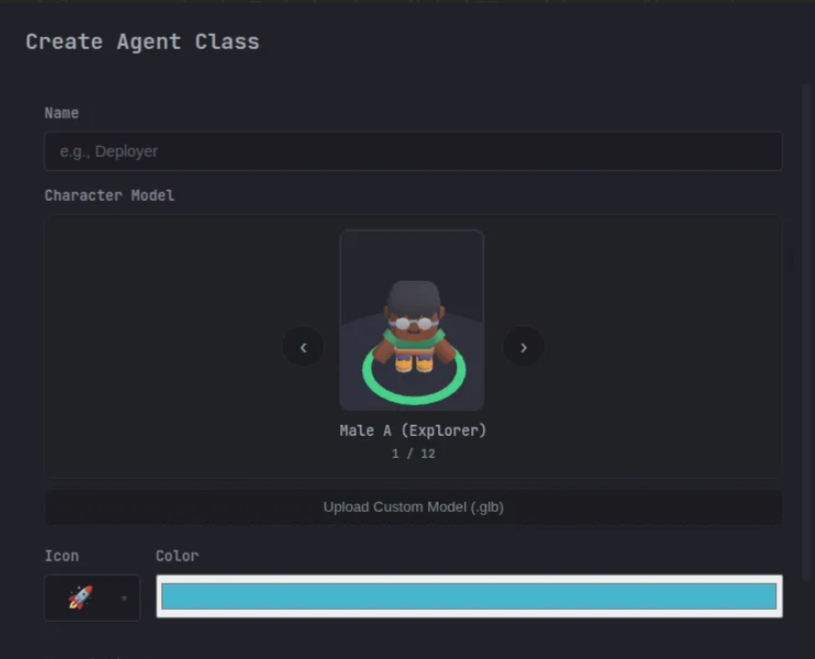
|
+
Turn ideas into software, automations, workflows, documents, data tools, and 3D projects—without living inside an IDE.
|
|
13
|
+
</p>
|
|
14
|
+
|
|
15
|
+
<p align="center">
|
|
16
|
+
Claude Code · Codex · OpenCode · Grok · Pi
|
|
17
|
+
</p>
|
|
8
18
|
|
|
9
|
-
|
|
10
|
-
|
|
11
|
-
|
|
19
|
+
<p align="center">
|
|
20
|
+
<a href="https://www.npmjs.com/package/tide-commander"><img src="https://img.shields.io/npm/v/tide-commander?style=flat-square&logo=npm" alt="npm version" /></a>
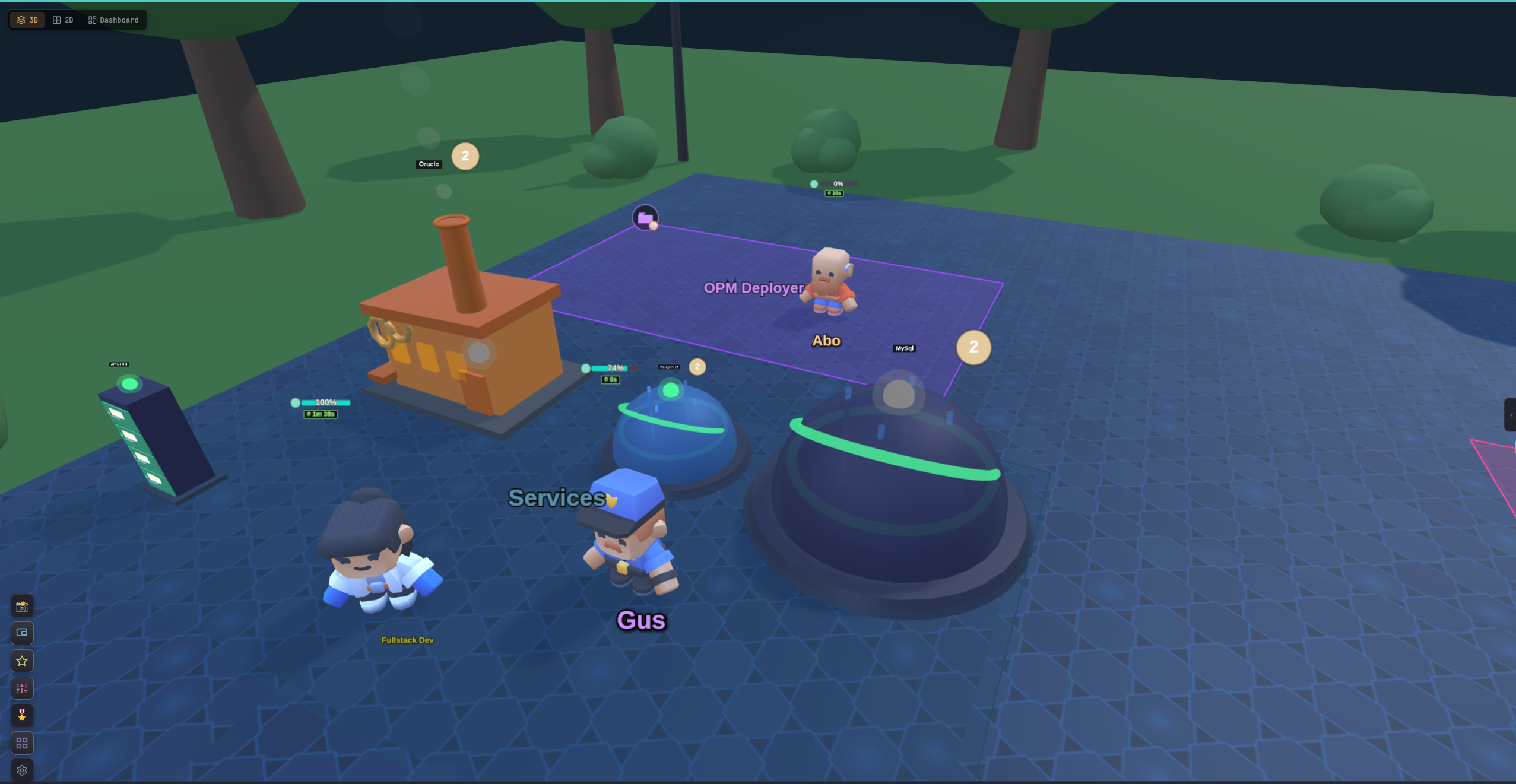
|
|
21
|
+
<a href="https://github.com/deivid11/tide-commander/stargazers"><img src="https://img.shields.io/github/stars/deivid11/tide-commander?style=flat-square&logo=github" alt="GitHub stars" /></a>
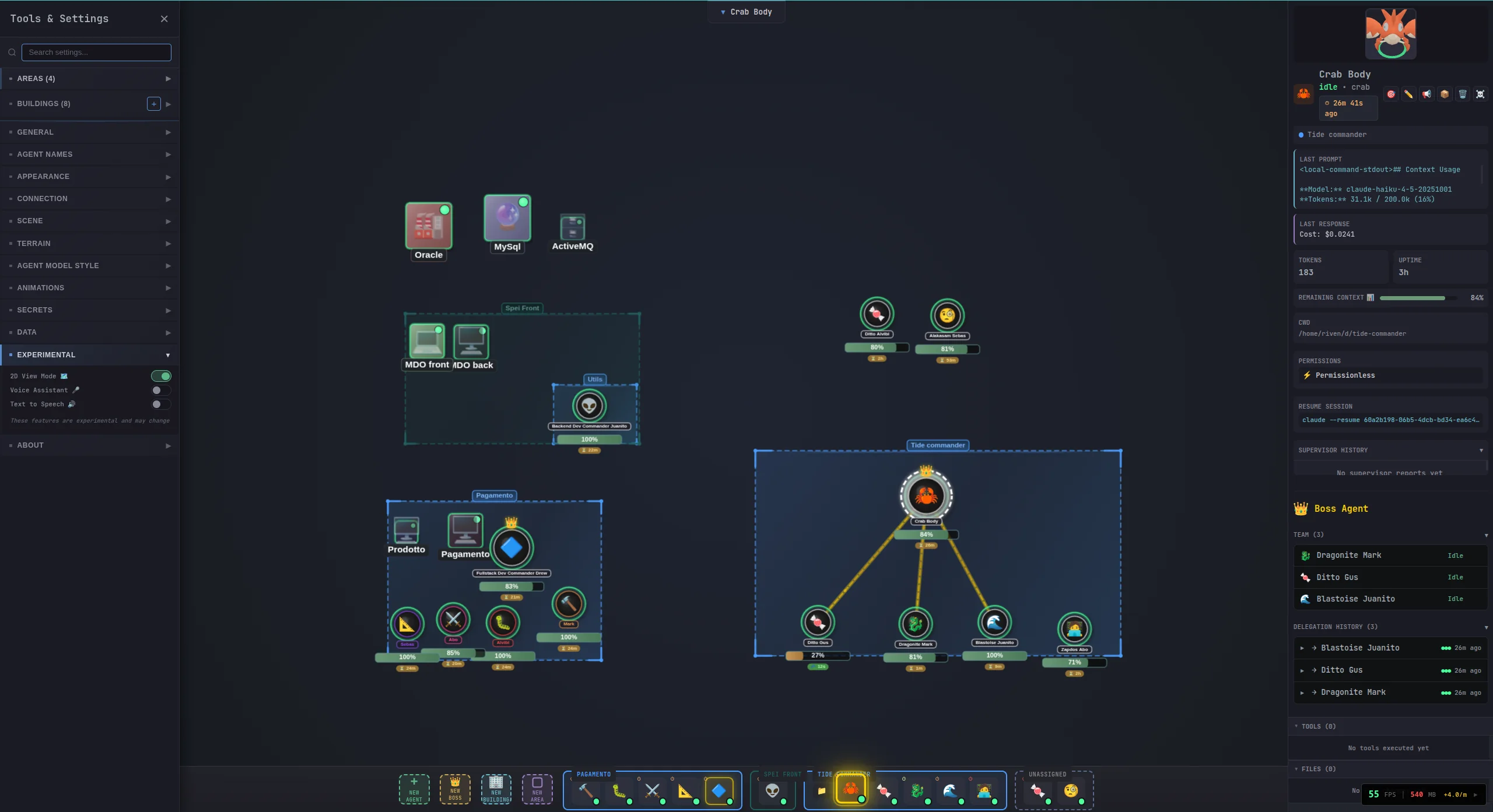
|
|
22
|
+
<a href="https://github.com/deivid11/tide-commander/blob/master/LICENSE"><img src="https://img.shields.io/github/license/deivid11/tide-commander?style=flat-square" alt="MIT license" /></a>
|
|
23
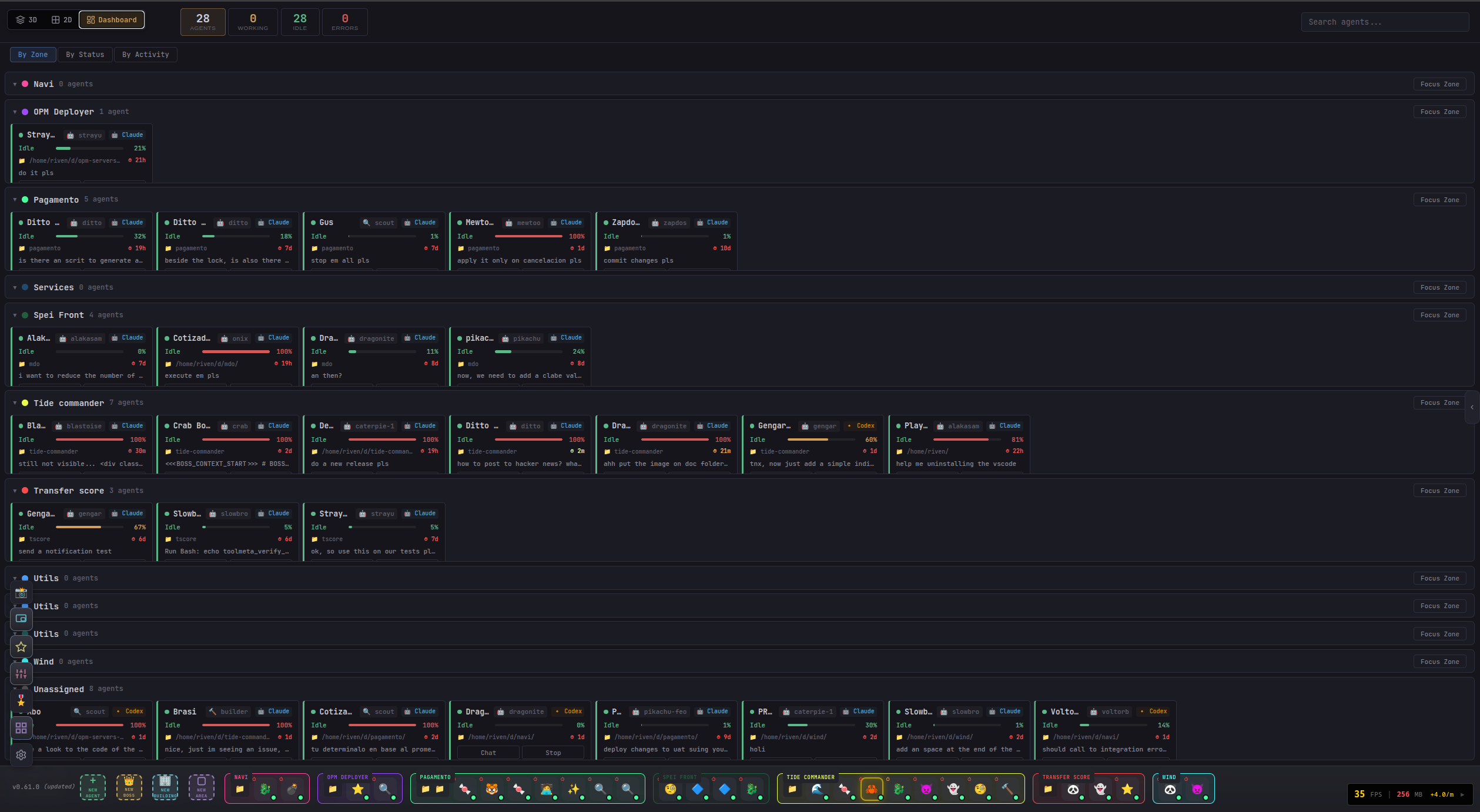
|
+
<img src="https://img.shields.io/badge/Node.js-18%2B-339933?style=flat-square&logo=node.js&logoColor=white" alt="Node.js 18+" />
|
|
24
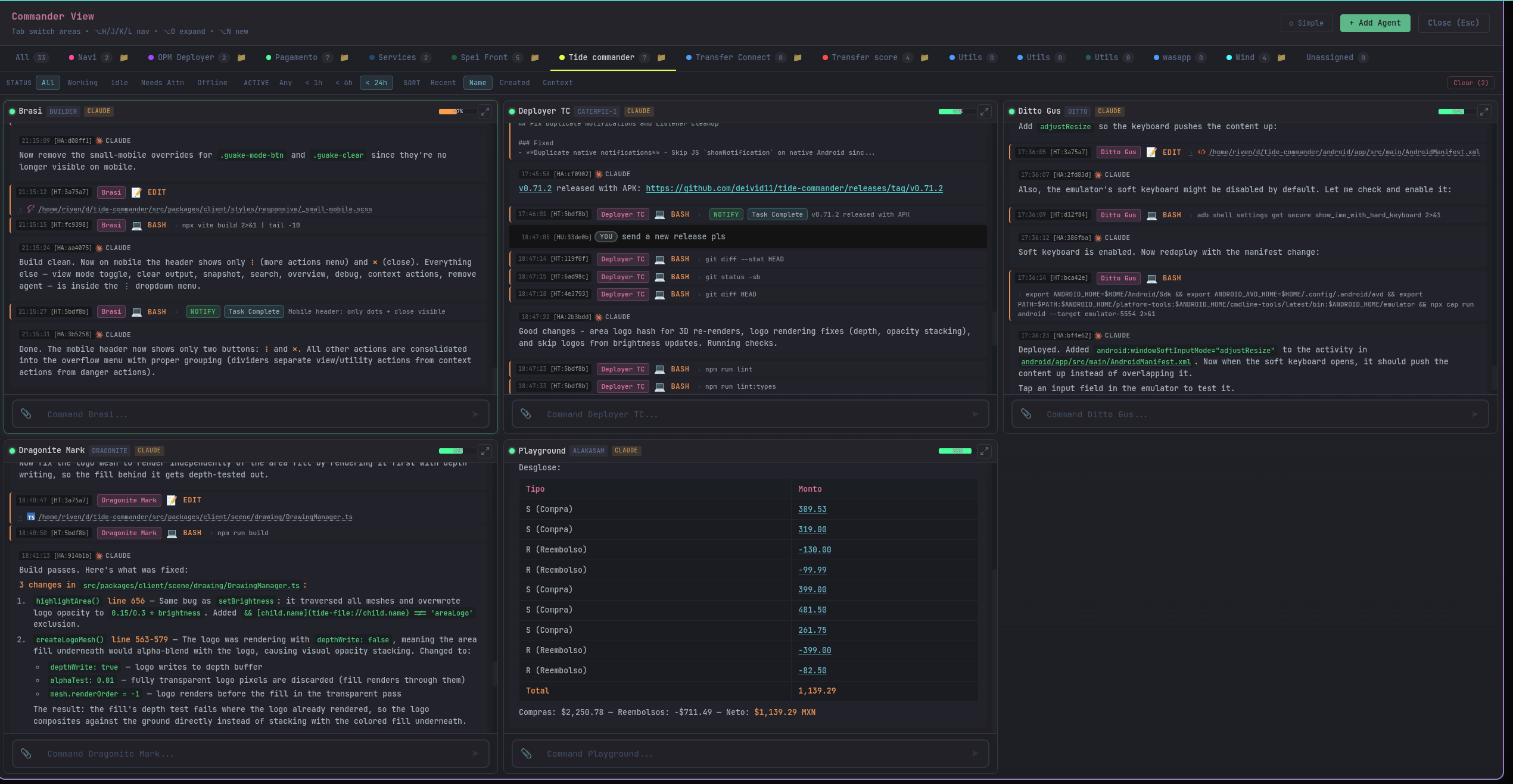
|
+
</p>
|
|
12
25
|
|
|
13
|
-
|
|
26
|
+
<p align="center">
|
|
27
|
+
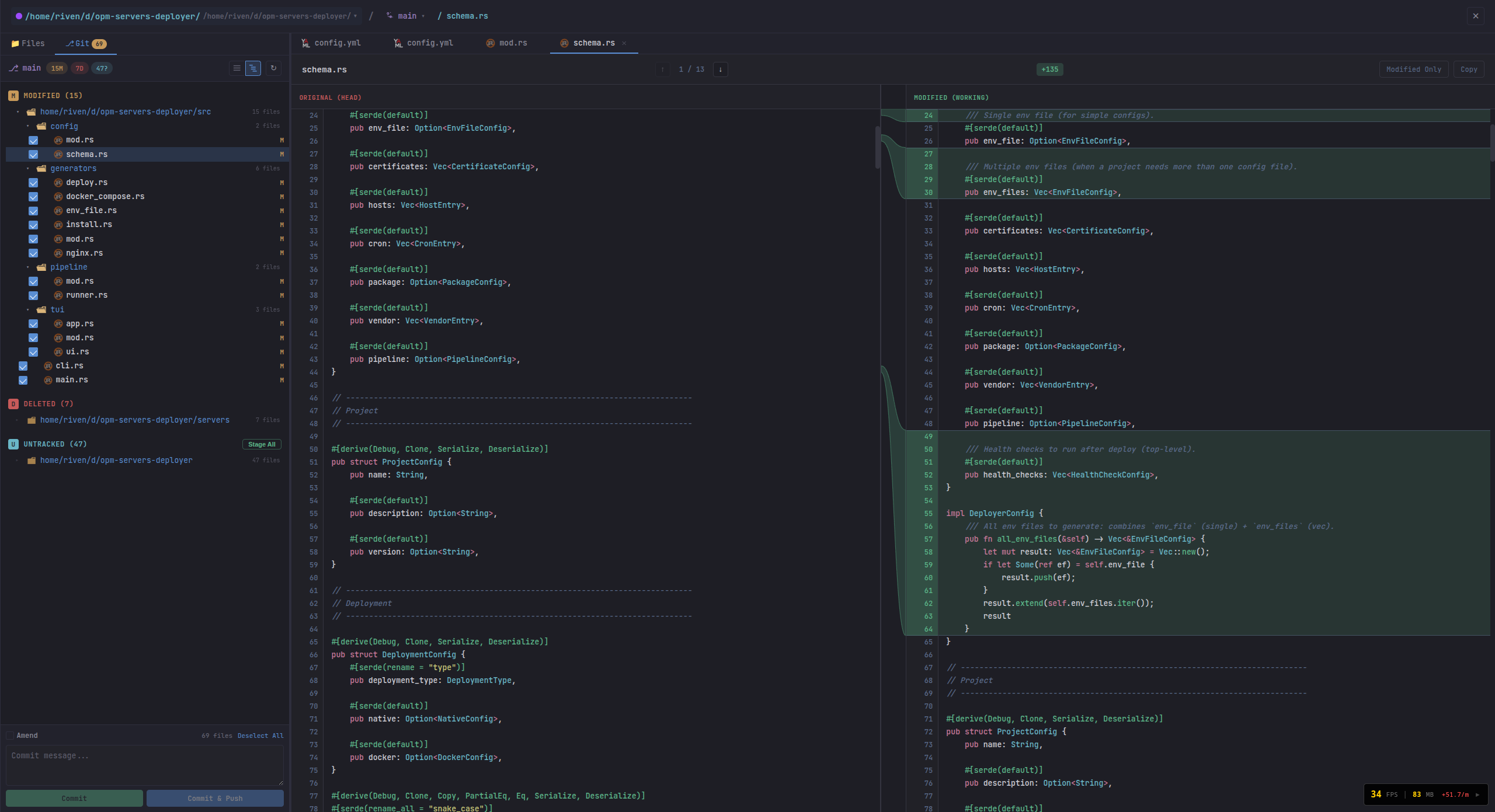
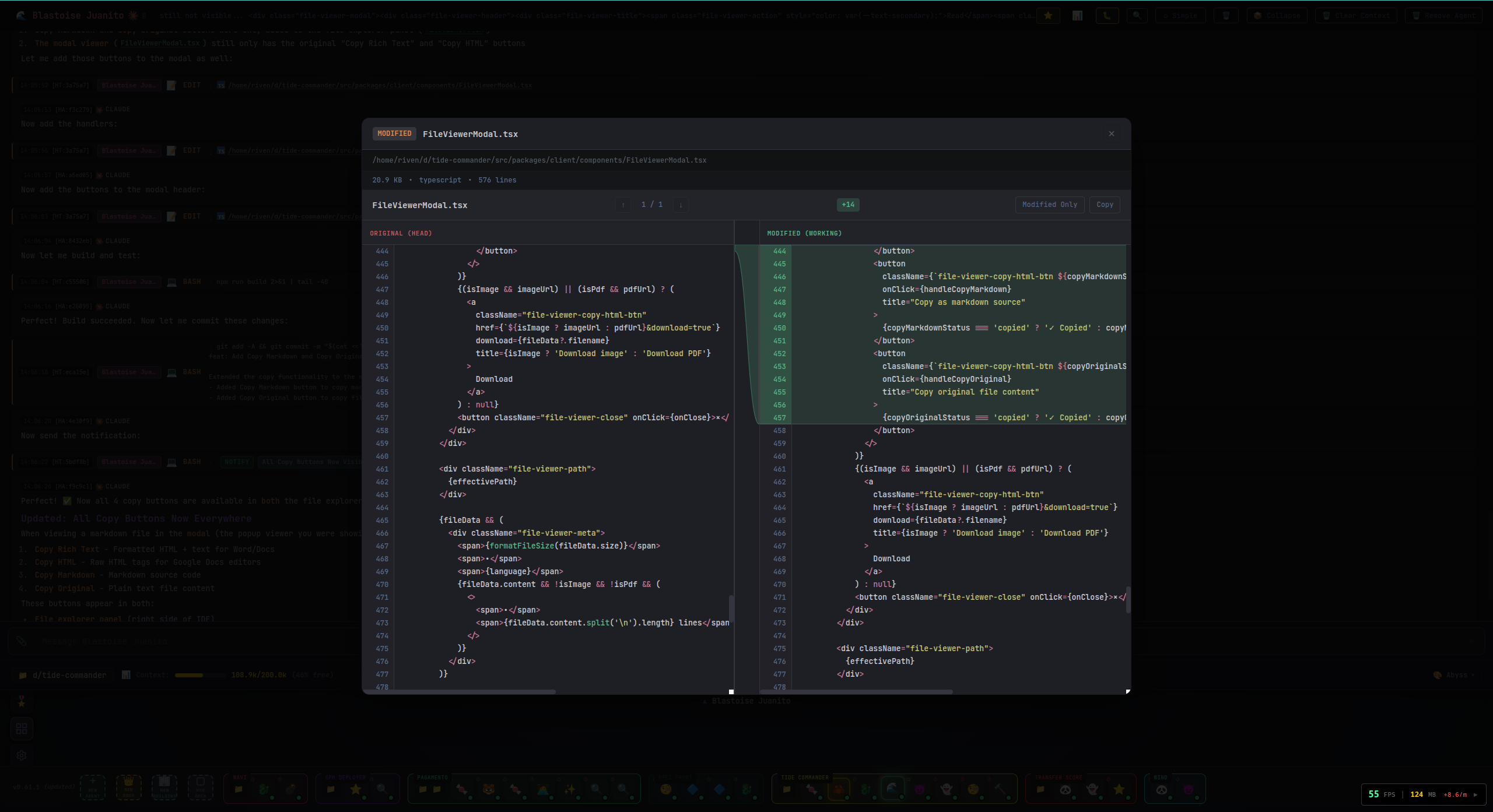
<a href="https://tidecommander.com/app"><img src="https://img.shields.io/badge/TRY_LIVE_DEMO-OPEN-2563EB?style=for-the-badge&logo=googlechrome&logoColor=white" alt="Try the live demo" /></a>
|
|
28
|
+
<a href="https://www.youtube.com/watch?v=r1Op_xfhqOM"><img src="https://img.shields.io/badge/WATCH_DEMO-YOUTUBE-DC2626?style=for-the-badge&logo=youtube&logoColor=white" alt="Watch the demo" /></a>
|
|
29
|
+
</p>
|
|
14
30
|
|
|
15
|
-
|
|
31
|
+
|
|
16
32
|
|
|
17
|
-
|
|
18
|
-
- Node.js 18+
|
|
19
|
-
- At least one supported CLI provider:
|
|
20
|
-
- **Claude Code** — `claude` command in PATH
|
|
21
|
-
- **Codex** — `codex` command in PATH (OpenAI Codex CLI)
|
|
22
|
-
- **OpenCode** — `opencode` command in PATH ([opencode CLI](https://github.com/nicholasgriffintn/opencode))
|
|
23
|
-
- **Grok** — `grok` command in PATH (Grok Build CLI headless mode)
|
|
24
|
-
- **Pi** — `pi` command in PATH ([pi coding agent](https://github.com/earendil-works/pi-mono), `npm i -g @earendil-works/pi-coding-agent`)
|
|
33
|
+
> **More than an agent manager. More than an IDE.** Tide Commander is a complete build environment designed around teams of AI agents. Every character is a real process working on real project files with native tools, credentials, context, and session history.
|
|
25
34
|
|
|
26
|
-
|
|
35
|
+
Traditional creation tools split the work across an IDE, terminal multiplexer, Git client, file browser, automation canvas, infrastructure dashboard, and a growing pile of AI chats. Tide Commander brings those surfaces together so you can move from intent to finished output in one place.
|
|
27
36
|
|
|
28
|
-
|
|
29
|
-
# Run directly without installing (recommended)
|
|
30
|
-
bunx tide-commander
|
|
37
|
+
You do not have to live in code to use it. Start with natural language and visual controls; open the exact files, commands, diffs, data, or infrastructure only when you want deeper control.
|
|
31
38
|
|
|
32
|
-
|
|
33
|
-
|
|
34
|
-
|
|
39
|
+
## ⚡ Run it in 30 seconds
|
|
40
|
+
|
|
41
|
+
```bash
|
|
42
|
+
npx tide-commander@latest
|
|
35
43
|
```
|
|
36
44
|
|
|
37
|
-
|
|
45
|
+
Open **[http://localhost:6200](http://localhost:6200)**. If Claude Code, Codex, OpenCode, Grok, or Pi is already installed and authenticated, you are ready to spawn your first agent.
|
|
46
|
+
|
|
47
|
+
Prefer Bun? Use `bunx tide-commander@latest`.
|
|
48
|
+
|
|
49
|
+
## Why creators use Tide Commander
|
|
50
|
+
|
|
51
|
+
Traditional IDEs were designed for one person editing one file at a time. AI-native creation is different: multiple agents can research, plan, build, test, document, automate, and operate in parallel. Tide Commander is a workspace for that shift—a visual build suite where you direct the outcome while the team handles the execution.
|
|
52
|
+
|
|
53
|
+
<p align="center"><strong>For solo creators, founders, researchers, operators, engineers, product teams, and anyone who builds with AI.</strong></p>
|
|
54
|
+
|
|
55
|
+
<table>
|
|
56
|
+
<tr>
|
|
57
|
+
<td width="33%" valign="top">
|
|
58
|
+
<h3>✨ Create from intent</h3>
|
|
59
|
+
Start with the outcome you want. Spawn specialists, give them context, and let boss agents coordinate the work.
|
|
60
|
+
</td>
|
|
61
|
+
<td width="33%" valign="top">
|
|
62
|
+
<h3>👀 See the work happen</h3>
|
|
63
|
+
Follow tool calls, PTY output, background jobs, queues, context usage, and blockers live instead of watching silent spinners.
|
|
64
|
+
</td>
|
|
65
|
+
<td width="33%" valign="top">
|
|
66
|
+
<h3>🛠️ Replace tool switching</h3>
|
|
67
|
+
Work with files, source, Git, tests, documents, data, terminals, services, and rich previews in the same build suite.
|
|
68
|
+
</td>
|
|
69
|
+
</tr>
|
|
70
|
+
<tr>
|
|
71
|
+
<td width="33%" valign="top">
|
|
72
|
+
<h3>🔀 Use the right harness</h3>
|
|
73
|
+
Mix Claude, Codex, OpenCode, Grok, and Pi in one team—and migrate a conversation when another runtime fits better.
|
|
74
|
+
</td>
|
|
75
|
+
<td width="33%" valign="top">
|
|
76
|
+
<h3>⚙️ Automate the repeatable</h3>
|
|
77
|
+
Build workflows and triggers, connect your services, or add local plugins and slash commands that bypass the LLM.
|
|
78
|
+
</td>
|
|
79
|
+
<td width="33%" valign="top">
|
|
80
|
+
<h3>📱 Pick up anywhere</h3>
|
|
81
|
+
Reconnect to the same server-side sessions from desktop, mobile, Android, or the browser extension.
|
|
82
|
+
</td>
|
|
83
|
+
</tr>
|
|
84
|
+
</table>
|
|
85
|
+
|
|
86
|
+
## Everything you need to create
|
|
87
|
+
|
|
88
|
+
| | |
|
|
89
|
+
|---|---|
|
|
90
|
+
| **🎯 Orchestration**<br>Boss/subordinate teams, delegation reports, project areas, task labels, tracking boards, agent memory, prompt stacking, skills, and runtime migration. | **📡 Observability**<br>Structured tool cards, streamed PTY commands, a live background-task rail, server-side message queues, interrupts, context gauges, account limits, and reconnect recovery. |
|
|
91
|
+
| **📁 Unified build workspace**<br>Multi-root file explorer, source editing, Git status/diffs/history, branch comparison, project-wide filename/content search, tests, and `@file` / `@folder` / `@agent` context. | **🧩 Extensibility**<br>Trusted plugins, slash commands, shell scripts, workflows, webhooks, integrations, custom skills/classes/models, REST API, WebSocket API, and browser automation. |
|
|
92
|
+
| **🖼️ Rich previews**<br>Markdown, Mermaid, PlantUML, Office documents, spreadsheets, archives, images, PDF, audio/video, STL, GLB, FreeCAD, and G-code. | **🌐 Flexible UI**<br>3D, 2D, Flat, Dashboard, Commander, and Guake views; Android support; custom themes, shortcuts, sounds, haptics, and 10 UI languages. |
|
|
93
|
+
|
|
94
|
+
## 🤖 Bring your favorite AI harness
|
|
95
|
+
|
|
96
|
+
Use different harnesses side by side—even inside the same project. Tide Commander normalizes their event streams into one conversation, tool, status, context, and file-diff experience without hiding each provider's native sessions or strengths.
|
|
97
|
+
|
|
98
|
+
| Harness | Required command | Default runtime | Optional persistent/streaming mode |
|
|
99
|
+
|---|---|---|---|
|
|
100
|
+
| **Claude Code** | `claude` | Headless `stream-json` process with stdin follow-ups | Interactive Claude TUI in tmux; general tmux mode can preserve processes across Commander restarts |
|
|
101
|
+
| **Codex** | `codex` | `codex exec --experimental-json` with native session resume | Persistent `codex app-server` for token streaming, detached turns, reconnect, and native thread forking |
|
|
102
|
+
| **OpenCode** | `opencode` | `opencode run --format json` with session resume | Persistent `opencode serve` daemon with streaming and restart recovery |
|
|
103
|
+
| **Grok** | `grok` | Headless `streaming-json` with native resume | Model/effort selection, account profiles, context tracking, and usage gauges |
|
|
104
|
+
| **Pi** | `pi` | `pi --mode json` NDJSON sessions | Persistent `pi --mode rpc` with mid-turn steering, native `/compact`, live model/provider switching, and tmux reconnect |
|
|
105
|
+
|
|
106
|
+
Persistent modes are opt-in under **Settings → General**. Pi can use any model provider loaded by Pi—for example Anthropic, OpenAI Codex, xAI, Gemini, Copilot, OpenCode Go, or a local provider—and Tide displays the active model provider separately from the Pi harness.
|
|
107
|
+
|
|
108
|
+
### Switch harness without throwing the conversation away
|
|
109
|
+
|
|
110
|
+
The agent editor can change any agent to any supported harness:
|
|
111
|
+
|
|
112
|
+
- **Smart Context** — a compact hand-off fitted to the target context window
|
|
113
|
+
- **Visible Transcript** — a budgeted readable copy of the conversation
|
|
114
|
+
- **Fresh Start** — change the runtime without importing conversation content
|
|
115
|
+
|
|
116
|
+
Claude, Codex, Grok, and Pi have writable native session stores and support imported context. OpenCode can be selected with Fresh Start. Every provider can be the source of a migration. Tide validates the new session, reports imported/dropped content, archives the original, and provides rollback through session history.
|
|
117
|
+
|
|
118
|
+
## 📦 Installation and CLI
|
|
119
|
+
|
|
120
|
+
### Requirements
|
|
121
|
+
|
|
122
|
+
- **Node.js 18+** (Node.js 22 is used in CI), or Bun for `bunx`
|
|
123
|
+
- At least one supported AI agent CLI installed and authenticated: `claude`, `codex`, `opencode`, `grok`, or `pi`
|
|
124
|
+
- Optional: `tmux` for process persistence, Pi RPC restart recovery, and Claude interactive TUI mode
|
|
125
|
+
|
|
126
|
+
### Run without installing
|
|
38
127
|
|
|
39
128
|
```bash
|
|
40
|
-
#
|
|
41
|
-
tide-commander
|
|
129
|
+
# Bun
|
|
130
|
+
bunx tide-commander@latest
|
|
42
131
|
|
|
43
|
-
#
|
|
44
|
-
tide-commander
|
|
132
|
+
# Or npm
|
|
133
|
+
npx tide-commander@latest
|
|
134
|
+
```
|
|
45
135
|
|
|
46
|
-
|
|
47
|
-
tide-commander status
|
|
136
|
+
Open `http://localhost:6200`.
|
|
48
137
|
|
|
49
|
-
|
|
50
|
-
tide-commander logs
|
|
138
|
+
### Install globally
|
|
51
139
|
|
|
52
|
-
|
|
53
|
-
tide-commander
|
|
140
|
+
```bash
|
|
141
|
+
npm install -g tide-commander@latest
|
|
142
|
+
tide-commander start
|
|
54
143
|
```
|
|
55
144
|
|
|
56
|
-
|
|
145
|
+
The server starts in the background by default:
|
|
57
146
|
|
|
58
147
|
```bash
|
|
59
|
-
tide-commander
|
|
60
|
-
tide-commander --foreground
|
|
61
|
-
tide-commander
|
|
62
|
-
tide-commander
|
|
63
|
-
tide-commander
|
|
64
|
-
tide-commander
|
|
65
|
-
tide-commander
|
|
148
|
+
tide-commander start # Start in background
|
|
149
|
+
tide-commander start --foreground # Keep attached to this terminal
|
|
150
|
+
tide-commander stop
|
|
151
|
+
tide-commander status
|
|
152
|
+
tide-commander logs
|
|
153
|
+
tide-commander logs --follow
|
|
154
|
+
tide-commander version
|
|
66
155
|
```
|
|
67
156
|
|
|
68
|
-
|
|
157
|
+
Common server options:
|
|
69
158
|
|
|
70
159
|
```bash
|
|
160
|
+
tide-commander start --port 8080 --host 127.0.0.1
|
|
161
|
+
tide-commander start --listen-all --port 8080
|
|
162
|
+
tide-commander start --restart
|
|
163
|
+
tide-commander start --https --tls-key ./certs/key.pem --tls-cert ./certs/cert.pem
|
|
71
164
|
tide-commander start --install-local-cert --https
|
|
165
|
+
tide-commander start --https --generate-auth-token
|
|
72
166
|
```
|
|
73
167
|
|
|
74
|
-
|
|
168
|
+
Run `tide-commander --help` for the complete CLI reference.
|
|
75
169
|
|
|
76
|
-
|
|
170
|
+
## 🔒 Remote Access and HTTPS
|
|
77
171
|
|
|
78
|
-
|
|
79
|
-
- Generate and install a trusted local cert with `mkcert`: `tide-commander start --install-local-cert --https`
|
|
80
|
-
- Set an auth token explicitly: `tide-commander start --https --auth-token <your-token>`
|
|
81
|
-
- Generate a secure auth token automatically: `tide-commander start --https --generate-auth-token`
|
|
82
|
-
- For development UI over HTTPS, set `DEV_HTTPS=1` and provide `DEV_TLS_KEY_PATH` + `DEV_TLS_CERT_PATH`.
|
|
172
|
+
Tide Commander executes local tools and exposes project files, so use HTTPS/WSS and an auth token whenever it is reachable beyond localhost.
|
|
83
173
|
|
|
84
|
-
|
|
174
|
+
```bash
|
|
175
|
+
tide-commander start \
|
|
176
|
+
--listen-all \
|
|
177
|
+
--https \
|
|
178
|
+
--install-local-cert \
|
|
179
|
+
--generate-auth-token
|
|
180
|
+
```
|
|
85
181
|
|
|
86
|
-
|
|
87
|
-
**both**, set `HTTPS_PORT` instead: `PORT` keeps serving `http://` while TLS is served
|
|
88
|
-
on `HTTPS_PORT`, from the same process, sharing one WebSocket client set.
|
|
182
|
+
You can also serve HTTP and HTTPS from the same process. `PORT` keeps the plain listener and `HTTPS_PORT` adds TLS; both listeners share the same agents and WebSocket clients.
|
|
89
183
|
|
|
90
184
|
```bash
|
|
91
|
-
|
|
185
|
+
PORT=6200 \
|
|
186
|
+
HTTPS_PORT=6201 \
|
|
92
187
|
TLS_KEY_PATH=~/.tide-commander/certs/localhost-key.pem \
|
|
93
188
|
TLS_CERT_PATH=~/.tide-commander/certs/localhost.pem \
|
|
94
189
|
tide-commander start
|
|
95
190
|
```
|
|
96
191
|
|
|
97
|
-
|
|
98
|
-
another machine over a VPN) need a secure context for the clipboard API, service workers
|
|
99
|
-
and `crypto.randomUUID`. `HTTPS_PORT` takes precedence if `HTTPS=1` is also set.
|
|
192
|
+
This is useful when localhost can stay on HTTP while a phone or another computer needs a secure context. If `HTTPS=1` is used without `HTTPS_PORT`, HTTPS replaces the plain listener.
|
|
100
193
|
|
|
101
194
|
Notes:
|
|
102
|
-
- Local certs are stored in `~/.tide-commander/certs/` when using `--install-local-cert`.
|
|
103
|
-
- For a cert that also covers a LAN/VPN address, include it in the mkcert SAN list:
|
|
104
|
-
`mkcert -cert-file … -key-file … localhost 127.0.0.1 ::1 192.168.1.100`.
|
|
105
|
-
- `--generate-auth-token` prints the generated token at startup; save it in a secure password manager.
|
|
106
|
-
- If `AUTH_TOKEN` is configured, keep using it with HTTPS for transport encryption plus access control.
|
|
107
195
|
|
|
108
|
-
|
|
196
|
+
- `--install-local-cert` uses `mkcert` and stores certificates in `~/.tide-commander/certs/`.
|
|
197
|
+
- Add LAN or VPN addresses to the certificate SAN list when remote clients use those addresses.
|
|
198
|
+
- Keep generated auth tokens in a password manager.
|
|
199
|
+
- HTTPS protects transport; `AUTH_TOKEN` controls access. Use both remotely.
|
|
109
200
|
|
|
110
|
-
|
|
201
|
+
## 🎖️ Core Concepts
|
|
111
202
|
|
|
112
|
-
|
|
113
|
-
# Install dependencies
|
|
114
|
-
bun install
|
|
203
|
+
### Agents, bosses, and delegation
|
|
115
204
|
|
|
116
|
-
|
|
117
|
-
bun run dev
|
|
118
|
-
```
|
|
205
|
+
Every character is a real AI harness process with its own working directory, provider, model, session, prompt stack, memory, permissions, skills, context usage, and task state. A **boss** can own subordinate agents, choose specialists, send tasks through the Tide Commander API, wait for reports, and summarize the team's progress.
|
|
119
206
|
|
|
120
|
-
|
|
207
|
+
Task labels and tracking states make the work visible outside the chat. Agents can report that they are thinking, working, blocked, waiting for subordinates, ready for review, or safe to clear from context.
|
|
121
208
|
|
|
122
|
-
|
|
209
|
+
### Areas
|
|
123
210
|
|
|
124
|
-
|
|
211
|
+
Rectangle or circular areas organize agents by project or responsibility. Areas can own multiple project folders, add area-specific instructions to agents inside them, expose an instant tmux terminal rooted in the project, and group agents in Commander and Flat views. Finished areas can be archived and restored without deleting their agents.
|
|
125
212
|
|
|
126
|
-
|
|
213
|
+
### Agent classes and custom models
|
|
127
214
|
|
|
128
|
-
|
|
215
|
+
Classes bundle a role, model, instructions, and default skills. Tide includes Scout, Builder, Debugger, Architect, Warrior, Support, and Boss classes. Custom classes can use uploaded GLB character models with scale, offsets, and idle/walk/working animation mappings.
|
|
129
216
|
|
|
130
|
-
|
|
217
|
+
|
|
131
218
|
|
|
132
|
-
|
|
219
|
+
### Prompt stacking and memory
|
|
133
220
|
|
|
134
|
-
|
|
135
|
-
The boss agent has context of other agents assigned to him. The boss can delegate tasks. Imagine you have a single boss to talk with, and the boss decides which of the subordinate agents is the most capable of doing the requested task. This saves a lot of time, without having to know which Claude Code terminal has which context. The boss can also give you a summary of the progress of their workers.
|
|
221
|
+
Instructions are composed in layers:
|
|
136
222
|
|
|
137
|
-
|
|
138
|
-
|
|
223
|
+
1. Tide Commander base rules
|
|
224
|
+
2. Global system prompt
|
|
225
|
+
3. Area prompt
|
|
226
|
+
4. Agent-class instructions
|
|
227
|
+
5. Individual agent instructions
|
|
228
|
+
6. Assigned skills, identity, and persistent agent memory
|
|
139
229
|
|
|
140
|
-
|
|
141
|
-
3D models placed on the battlefield with real functionality. Building types include:
|
|
142
|
-
- **Server** - Start/stop/restart services with real-time log streaming (supports PM2 and Docker)
|
|
143
|
-
- **Database** - Connect to MySQL, PostgreSQL, or Oracle with a built-in SQL query editor, schema browser, and query history
|
|
144
|
-
- **Docker** - Manage containers and compose projects with health checks and port detection
|
|
145
|
-
- **Link** - Quick URL shortcuts accessible from the field
|
|
146
|
-
- **Folder** - Opens the file explorer for a specific directory
|
|
147
|
-
- **Boss Building** - Manages multiple subordinate buildings with unified controls
|
|
230
|
+
This lets you define organization-wide conventions once, specialize them by project/class, and keep durable notes per agent without copying the same prompt everywhere.
|
|
148
231
|
|
|
149
|
-
###
|
|
150
|
-
Like COD or Minecraft classes, you assign a class to the agent character. It has a linked model, a definition of instructions (like a claude.md), and a definition of skills (you can also create skills on the same interface).
|
|
232
|
+
### Skills
|
|
151
233
|
|
|
152
|
-
Built-
|
|
234
|
+
Skills are reusable instruction sets with tool permissions and optional model/context behavior. They can be assigned directly or inherited from a class. Built-ins cover notifications, inter-agent messaging, delegation reports, tracking, persistent memory, streaming execution, Git/release workflows, server/PM2 logs, tests, databases, browser/computer control, HTTP requests, workflows, triggers, Mermaid, Bitbucket review, and backup/restore.
|
|
153
235
|
|
|
154
|
-
|
|
236
|
+
Custom skills are Markdown-based and can be managed from the UI. Changes hot-reload into assigned agents while preserving their sessions.
|
|
155
237
|
|
|
156
|
-
###
|
|
157
|
-
You can upload your own 3D character models in **GLB format**. Custom models support animation mapping for idle, walk, and working states. Models are uploaded through the class editor and stored locally. Scaling and position offsets are configurable per model.
|
|
238
|
+
### Plugins
|
|
158
239
|
|
|
159
|
-
|
|
160
|
-
A view where you can see all the Claude Code agent terminals on a single view, grouped by areas.
|
|
240
|
+
Trusted local plugins can add:
|
|
161
241
|
|
|
162
|
-
|
|
242
|
+
- slash commands that bypass the LLM
|
|
243
|
+
- structured Guake/Spotlight result cards
|
|
244
|
+
- right-sidebar views and modals
|
|
245
|
+
- interactive actions and WebSocket patches
|
|
246
|
+
- browser-side UI bundles and styles
|
|
247
|
+
- server handlers and integration-backed settings
|
|
248
|
+
- configurable global shortcuts
|
|
163
249
|
|
|
164
|
-
|
|
165
|
-
Built-in and custom skills that extend what agents can do. Skills are like plugins with defined tool permissions and can be assigned to specific agents or classes. Built-in skills include notifications, inter-agent messaging, git workflows, server log access, and streaming command execution. You can create your own skills in TypeScript.
|
|
250
|
+
Recent built-ins expose Gmail inbox cards, Jira ticket search/details, account usage across every harness, task boards, and managed shell commands. Plugins run with Tide Commander's local privileges, so only install code you trust.
|
|
166
251
|
|
|
167
|
-
###
|
|
168
|
-
Save the full conversation history and any created/modified files from an agent's session. Snapshots can be reviewed later with full tool formatting, and files can be restored from them.
|
|
252
|
+
### Workflows and triggers
|
|
169
253
|
|
|
170
|
-
|
|
171
|
-
Securely store API keys, tokens, and other credentials. Use `{{SECRET_NAME}}` placeholders in your prompts, and the server injects the real values before sending to Claude. Secrets never leave the server.
|
|
254
|
+
The workflow editor builds state machines from action, wait, decision, and end states. Actions can assign agent tasks, wait for events, set variables, and transition on agent completion, variable conditions, timeouts, cron schedules, triggers, or manual decisions. Running instances support pause, resume, cancel, timelines, variables, reasoning traces, and scoped workflow chat.
|
|
172
255
|
|
|
173
|
-
|
|
174
|
-
Define global instructions that apply to all agents, then layer them with class-specific and individual agent customizations for fine-grained control.
|
|
256
|
+
Triggers can react to webhooks, cron/one-shot schedules, Gmail, Slack, Jira, WhatsApp, and Bitbucket. Matching can be structural, LLM-based, or hybrid, with optional variable extraction, signature validation, delivery deduplication, and fire/matcher history.
|
|
175
257
|
|
|
176
|
-
|
|
177
|
-
|
|
178
|
-
|
|
179
|
-
|
|
180
|
-
|
|
181
|
-
|
|
258
|
+
### Buildings
|
|
259
|
+
|
|
260
|
+
Buildings are functional objects, not decoration:
|
|
261
|
+
|
|
262
|
+
| Type | What it does |
|
|
263
|
+
|---|---|
|
|
264
|
+
| **Server** | Custom or PM2 start/stop/restart, logs, health, CPU/memory, and port detection |
|
|
265
|
+
| **Docker** | Create/adopt containers or control Compose projects, logs, health, and ports |
|
|
266
|
+
| **Database** | MySQL, PostgreSQL, and Oracle connections, schema browser, SQL editor, and history |
|
|
267
|
+
| **Terminal** | Persistent browser terminal through ttyd |
|
|
268
|
+
| **Tests** | Scan and run Maven/JUnit, Cucumber, Vitest, and PHPUnit suites down to a method |
|
|
269
|
+
| **HTTP Requests** | Browse and run IntelliJ-style `.http`/`.rest` requests with environments |
|
|
270
|
+
| **Monitor** | System metrics and monitoring |
|
|
271
|
+
| **Folder** | Open a project path in the file explorer |
|
|
272
|
+
| **Link** | Open a dashboard, admin panel, or other URL |
|
|
273
|
+
| **Boss Building** | Aggregate subordinate buildings and control them together |
|
|
182
274
|
|
|
183
|
-
|
|
184
|
-
- Set a global system prompt in **Settings > System Prompt** to define coding standards, communication rules, or project conventions that all agents should follow
|
|
185
|
-
- Assign custom agent classes to inherit group-level instructions on top of the global prompt
|
|
186
|
-
- Add individual agent instructions to override or specialize behavior for a specific agent
|
|
187
|
-
- Global prompts persist across agent restarts and server restarts
|
|
188
|
-
- Export/import global prompts with your agent configurations
|
|
275
|
+
## 🖥️ Views and Navigation
|
|
189
276
|
|
|
190
|
-
|
|
191
|
-
- Define team coding style guidelines once, apply to all agents via global prompt
|
|
192
|
-
- Create "Backend Developer" and "Frontend Developer" classes with specialized instructions
|
|
193
|
-
- Override an agent's behavior for specific projects or tasks with individual instructions
|
|
194
|
-
- Set security best practices globally, then customize per-agent as needed
|
|
277
|
+
### 3D battlefield
|
|
195
278
|
|
|
196
|
-
|
|
197
|
-
Four ways to view the battlefield (cycle with Alt+2):
|
|
198
|
-
- **3D View** - Full Three.js battlefield with character models and post-processing (default)
|
|
279
|
+
The default Three.js view provides RTS-style selection, movement, camera controls, buildings, project areas, custom characters, and animated work/status effects.
|
|
199
280
|
|
|
200
281
|
|
|
201
282
|
|
|
202
|
-
|
|
283
|
+
### 2D view
|
|
284
|
+
|
|
285
|
+
A lightweight top-down canvas with the same agents, areas, and buildings for lower-power devices or very large teams.
|
|
203
286
|
|
|
204
287
|
|
|
205
288
|
|
|
206
|
-
|
|
289
|
+
### Flat view
|
|
207
290
|
|
|
208
|
-
|
|
291
|
+
An IDE-style, low-overhead project layout with area status bars, buildings, agent lists, and embedded conversations. It keeps the operational controls without rendering a battlefield.
|
|
209
292
|
|
|
210
|
-
|
|
293
|
+
### Dashboard
|
|
211
294
|
|
|
212
|
-
|
|
295
|
+
Metrics and cards for agent state, current work, errors, context, and infrastructure.
|
|
213
296
|
|
|
214
|
-
|
|
215
|
-
Press **Ctrl+K** (or Alt+P) to open the command palette. Search for agents by name, class, or current task. Jump to areas, find modified files across all agents, or trigger quick actions.
|
|
297
|
+
|
|
216
298
|
|
|
217
|
-
|
|
299
|
+
### Commander view
|
|
218
300
|
|
|
219
|
-
|
|
301
|
+
A live multi-terminal grid grouped by area. See every conversation at once, switch area tabs, and expand an agent without losing the overview.
|
|
220
302
|
|
|
221
|
-
|
|
222
|
-
- 🎯 **RTS Controls** - Click to select, right-click to move, number keys for quick selection
|
|
223
|
-
- 📡 **Real-time Activity Feed** - Watch your agents work in real-time
|
|
224
|
-
- 🤹 **Multi-Agent Management** - Spawn and control multiple Claude/Codex/OpenCode instances simultaneously
|
|
225
|
-
- 💾 **Session Persistence** - Agents resume their Claude Code, Codex, or OpenCode sessions across restarts
|
|
226
|
-
- 📊 **Context Tracking** - Mana bar visualization showing agent context usage
|
|
227
|
-
- 📁 **File Explorer** - Built-in file browser with git diff viewer for uncommitted changes
|
|
303
|
+
|
|
228
304
|
|
|
229
|
-
|
|
230
|
-
- 📋 **Large Text & Screenshot Paste** - Compact and send large content easily
|
|
231
|
-
- ⌨️ **Custom Hotkeys** - Configurable keyboard shortcuts
|
|
232
|
-
- 🔐 **Permission Control** - Permissionless or permission-enabled per agent
|
|
233
|
-
- 🎬 **Custom 3D Models** - Upload your own GLB models with animation mapping
|
|
234
|
-
- 🏗️ **Buildings** - Servers, databases, Docker containers, and links managed from the battlefield
|
|
235
|
-
- 🧩 **Skills System** - Built-in and custom skills assignable to agents or classes
|
|
236
|
-
- 📸 **Snapshots** - Save conversation history and modified files for later review or restore
|
|
237
|
-
- 🔑 **Secrets Management** - Secure storage with `{{PLACEHOLDER}}` injection into prompts
|
|
238
|
-
- 🔍 **Spotlight Search** - Command palette (Ctrl+K) to find agents, files, and actions
|
|
239
|
-
- 📺 **Commander View** - See all agent terminals at once in a grid, grouped by area
|
|
240
|
-
- 📊 **Dashboard View** - Agent status cards, building overview, and metrics
|
|
241
|
-
- 🖥️ **Guake Terminal** - Drop-down terminal overlay for agent conversations
|
|
242
|
-
- 🔎 **Inline File Inspection** - Click on files added or edited by the agent directly in the chat to view diffs and contents — no need to leave Commander or open an IDE
|
|
305
|
+
### Guake terminal
|
|
243
306
|
|
|
244
|
-
|
|
245
|
-
- 🌐 **Multiplayer** - WebSocket-based multi-user support
|
|
246
|
-
- 🌍 **Multilingual** - Full i18n support with 10 languages: English, Spanish, French, German, Italian, Portuguese, Russian, Chinese, Japanese, and Hindi
|
|
247
|
-
- 📱 **Mobile Compatible** - Works on mobile devices and Android (optional APK)
|
|
307
|
+
The main agent conversation surface supports multiple rendering levels, Markdown, syntax highlighting, structured tool cards, permission prompts, Git/building/workflow/tracking side panels, message search, pinned/recent agents, file attachments, screenshots, interrupts, and queued follow-ups.
|
|
248
308
|
|
|
249
|
-
|
|
309
|
+
### Spotlight
|
|
250
310
|
|
|
251
|
-
|
|
311
|
+
Press **Ctrl+K** (or **Alt+P**) to search and act across Tide Commander. Spotlight finds:
|
|
252
312
|
|
|
253
|
-
|
|
313
|
+
- agents by name, class, area, provider, status, current task, or recent activity
|
|
314
|
+
- current and archived conversations, with ranked matching extracts
|
|
315
|
+
- filenames and file contents across every area project
|
|
316
|
+
- modified files and Git changes
|
|
317
|
+
- buildings, areas, folders, settings, sessions, and commands
|
|
318
|
+
- plugin slash commands and their structured results
|
|
254
319
|
|
|
255
|
-
|
|
320
|
+
Search is accent-insensitive, supports multi-word matches across different fields, and can open a file directly at the matching line.
|
|
256
321
|
|
|
257
|
-
##
|
|
322
|
+
## 🧰 The build workspace that can replace your IDE
|
|
258
323
|
|
|
259
|
-
|
|
260
|
-
|
|
261
|
-
| Topic | Description |
|
|
262
|
-
|-------|-------------|
|
|
263
|
-
| [Buildings](docs/buildings.md) | Server, Database, Docker, and Boss building types with PM2 integration |
|
|
264
|
-
| [Custom Classes & 3D Models](docs/custom-classes.md) | Create custom agent classes with your own GLB models and animations |
|
|
265
|
-
| [Skills](docs/skills.md) | Built-in and custom skills, tool permissions, and assignment |
|
|
266
|
-
| [Snapshots](docs/snapshots.md) | Save and restore conversation history and file artifacts |
|
|
267
|
-
| [Secrets](docs/secrets.md) | Secure credential storage with placeholder injection |
|
|
268
|
-
| [Architecture](docs/architecture.md) | Runtime architecture, command flow, and incremental improvements |
|
|
269
|
-
| [REST API (OpenAPI)](docs/openapi.yaml) | Machine-readable OpenAPI 3.1 spec for `/api` HTTP routes |
|
|
270
|
-
| [WebSocket API (AsyncAPI)](docs/asyncapi.yaml) | Machine-readable AsyncAPI 2.6 spec for `/ws` message contracts |
|
|
271
|
-
| [Views & UI](docs/views.md) | 3D, 2D, Dashboard, Commander View, Guake terminal, and Spotlight |
|
|
272
|
-
| [Android APK](docs/android.md) | Build and install the optional mobile companion app |
|
|
273
|
-
| [Docker Deployment](docs/docker.md) | Run Tide Commander in a Docker container |
|
|
274
|
-
| [Contributing](CONTRIBUTING.md) | Setup, workflow, and pull request guidelines for contributors |
|
|
275
|
-
| [Security Policy](SECURITY.md) | Supported versions, vulnerability reporting, and disclosure process |
|
|
276
|
-
|
|
277
|
-
## 🎮 How to Use
|
|
278
|
-
|
|
279
|
-
1. **Deploy an agent** - Click the **+ New Agent** button ➕
|
|
280
|
-
2. **Configure it** - Give it a name and choose a working directory 📁
|
|
281
|
-
3. **Select it** - Click on the agent in the 3D view or press 1-9 👆
|
|
282
|
-
4. **Send commands** - Type your task in the command bar and press Enter ⌨️
|
|
283
|
-
5. **Watch it work** - The activity feed shows real-time progress 👀
|
|
284
|
-
6. **Send follow-ups** - Agents maintain context, so you can have ongoing conversations 💬
|
|
285
|
-
|
|
286
|
-
You can spawn multiple agents, each working in different directories or on different tasks. Switch between them by clicking or using number keys.
|
|
287
|
-
|
|
288
|
-
## ⌨️ Keyboard Shortcuts
|
|
324
|
+
For many projects, the whole creation loop—from brief and research to files, commands, diffs, tests, previews, and operations—can stay inside Tide Commander. The file explorer supports multiple project roots, project-scoped tabs and expanded folders, source editing, Git status, working-tree diffs, binary/image/PDF diffs, branch comparison, file history, and test results. Files changed by an agent are clickable directly from its tool card or message.
|
|
289
325
|
|
|
290
|
-
|
|
291
|
-
|-----|--------|
|
|
292
|
-
| 1-9 | Select agent by index |
|
|
293
|
-
| Escape | Deselect / Close modal |
|
|
294
|
-
| Alt+N | Spawn new agent |
|
|
295
|
-
| Enter | Send command (when input focused) |
|
|
296
|
-
| Ctrl+K / Alt+P | Spotlight search |
|
|
297
|
-
| Alt+2 | Cycle view mode (3D / 2D / Dashboard) |
|
|
298
|
-
| Alt+S | Toggle sidebar |
|
|
299
|
-
| Alt+R | Toggle right panel |
|
|
300
|
-
| Alt+E | Toggle file explorer |
|
|
301
|
-
| Alt+J / Alt+K | Navigate messages in terminal |
|
|
302
|
-
| ` (backtick) | Toggle Guake terminal |
|
|
326
|
+
|
|
303
327
|
|
|
304
|
-
|
|
328
|
+
|
|
305
329
|
|
|
306
|
-
|
|
330
|
+
Specialized viewers include:
|
|
307
331
|
|
|
308
|
-
|
|
332
|
+
- rendered Markdown, Mermaid, PlantUML, SVG, images, and PDF
|
|
333
|
+
- `.docx`, `.docm`, `.odt`, `.fodt`, `.doc`, and `.rtf` documents
|
|
334
|
+
- `.xlsx`, `.xlsm`, `.xls`, `.ods`, `.csv`, and `.tsv` spreadsheets with virtualized grids, filter/sort, selections, and statistics
|
|
335
|
+
- zip/tar/7z/rar and many package/archive formats as browsable trees
|
|
336
|
+
- audio waveforms and video playback
|
|
337
|
+
- interactive STL, GLB, FreeCAD (`.FCStd`), and layer-aware G-code previews
|
|
309
338
|
|
|
310
|
-
|
|
339
|
+
You can browse from inside a viewer, drag files out to the desktop, download folders as streaming zip files, and export rendered Markdown to PDF.
|
|
311
340
|
|
|
312
|
-
|
|
341
|
+
## 🔌 Integrations and External Control
|
|
313
342
|
|
|
314
|
-
|
|
315
|
-
- 3D battlefield where agents are visualized as characters
|
|
316
|
-
- WebSocket connection to receive real-time updates
|
|
317
|
-
- Command input for sending tasks to agents
|
|
318
|
-
- Activity feed showing what each agent is doing
|
|
343
|
+
Built-in integrations provide settings, secure secrets, API routes, agent skills, and trigger handlers for:
|
|
319
344
|
|
|
320
|
-
|
|
321
|
-
-
|
|
322
|
-
-
|
|
323
|
-
-
|
|
345
|
+
- Slack (including multiple instances, messages, threads, files, reactions, and inbound events)
|
|
346
|
+
- Gmail
|
|
347
|
+
- Google Calendar
|
|
348
|
+
- Google Drive
|
|
349
|
+
- Jira Cloud / Service Desk
|
|
350
|
+
- WhatsApp through the local bridge
|
|
351
|
+
- DOCX document generation
|
|
324
352
|
|
|
325
|
-
|
|
326
|
-
- Claude agents run `claude` with `--output-format stream-json` and use stdin for follow-up messages
|
|
327
|
-
- Codex agents run `codex exec --experimental-json` and resume via session-based command args
|
|
328
|
-
- OpenCode agents run `opencode run --format json` for NDJSON streaming and resume via `-s <sessionId>`
|
|
329
|
-
- Grok agents run `grok -p … --output-format streaming-json` (headless) and resume via `--resume <sessionId>`
|
|
330
|
-
- Pi agents run `pi --mode json -p …` (headless NDJSON) and resume via `--session <sessionId>`; the optional Pi RPC mode (Config → General) keeps a persistent `pi --mode rpc` process per agent and STEERS mid-turn messages into the live run instead of queueing them. Pi RPC agents can switch between authenticated model providers (for example Anthropic → OpenAI Codex) in the same conversation through the agent editor or Bulk Manage. Any agent can also be migrated to another harness from the agent editor (Claude ⇄ Codex ⇄ Grok ⇄ Pi ⇄ OpenCode, `POST /api/agents/:id/convert-runtime`): Commander copies the visible conversation into a new validated native session for the target runtime — Smart Context, a budgeted visible transcript, or a fresh start — while archiving the original session for one-click rollback from the session history. Claude, Codex, Grok, and Pi have writable session stores; OpenCode is fresh-start only. With tmux mode enabled, Pi RPC processes survive Commander restarts and reconnect automatically
|
|
331
|
-
- Events (tool usage, text output, errors) are parsed from stdout for all providers
|
|
332
|
-
- Sessions are persisted and can be resumed
|
|
333
|
-
- OpenCode reads `.claude/CLAUDE.md` natively (like Claude Code)
|
|
353
|
+
Tide Commander also ships an optional Chromium browser extension that captures console/network failures, opens an agent chat side panel, sends requests or selected DOM/React components as context, and supports multiple Commander servers. macOS Alfred and KDE KRunner launch/search integrations are included in the repository.
|
|
334
354
|
|
|
335
|
-
|
|
355
|
+
## 📡 Live Execution and Session Control
|
|
336
356
|
|
|
337
|
-
|
|
357
|
+
Long commands can run through Tide Commander's exec API in a PTY-backed card. Output streams with ANSI color and terminal redraw handling, survives UI reconnects, can be stopped with its whole process tree, and returns a bounded tail to the agent without hiding the full live output from the user. Active ordinary CLI Bash/Task jobs also appear in the background-task rail.
|
|
338
358
|
|
|
339
|
-
|
|
359
|
+
Prompts sent while an agent is busy are kept in a server-side queue. Message bursts are merged into one follow-up, queued items can be interrupted or removed, and supported persistent runtimes reconnect to in-flight turns after a Commander restart. **Ctrl+C** in an open terminal interrupts the active run when no text selection is being copied.
|
|
340
360
|
|
|
341
|
-
|
|
361
|
+
Session history can restore a past conversation onto the same or a new agent, pre-filling its original harness/model/reasoning configuration. Spotlight searches both active and archived sessions.
|
|
342
362
|
|
|
343
|
-
|
|
344
|
-
- `agents.json` - Agent configurations (name, position, session mapping, token usage)
|
|
345
|
-
- `areas.json` - Drawing areas synced from the frontend
|
|
346
|
-
- `buildings.json` - Building configurations and service definitions
|
|
347
|
-
- `skills.json` - Custom skill definitions
|
|
348
|
-
- `custom-agent-classes.json` - Custom agent class definitions
|
|
349
|
-
- `secrets.json` - Encrypted secrets storage
|
|
350
|
-
- `snapshots/` - Saved conversation snapshots with file captures
|
|
363
|
+
## 📲 Resume Anywhere
|
|
351
364
|
|
|
352
|
-
|
|
365
|
+
Agent sessions live on the server rather than in one browser tab. Start on desktop and reconnect from a phone, tablet, browser extension, or another computer. The Android app adds local notifications, haptics, optional background connectivity, and in-app APK/UI updates.
|
|
353
366
|
|
|
354
|
-
|
|
355
|
-
- Claude Code stores session files as JSONL (one JSON object per line)
|
|
356
|
-
- Directory names encode the working directory path (e.g., `/home/user/project` → `-home-user-project`)
|
|
357
|
-
- Tide Commander reads these to resume sessions and display conversation history
|
|
367
|
+
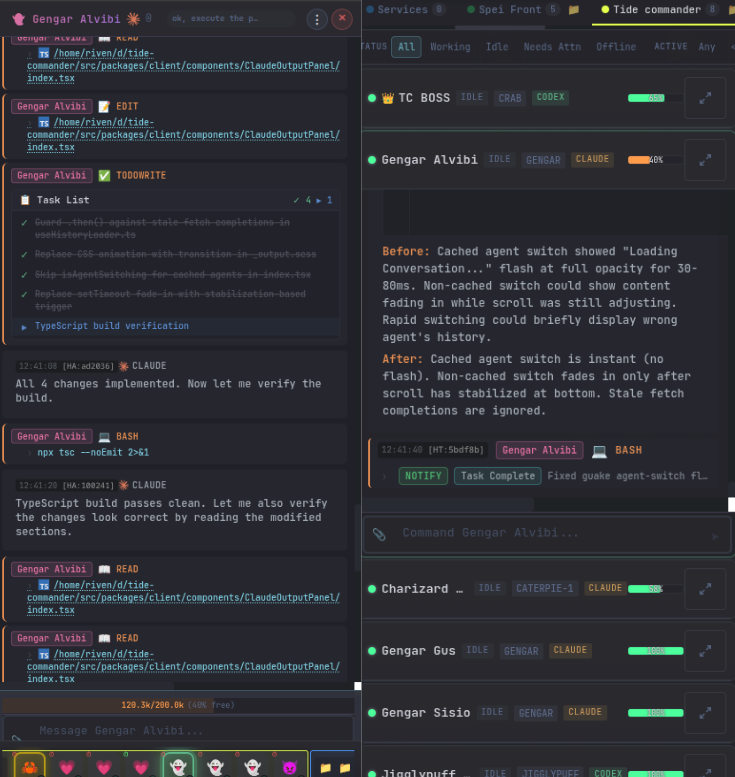
|
|
358
368
|
|
|
359
|
-
##
|
|
369
|
+
## 🎮 What a real workflow looks like
|
|
360
370
|
|
|
361
|
-
|
|
371
|
+
1. **Create a project area** and attach one or more project folders.
|
|
372
|
+
2. **Spawn a small team**—for example a boss, a researcher, a builder, and a test/review specialist—using whichever harness fits each role.
|
|
373
|
+
3. **Give the boss the outcome**, not a list of terminal commands. It can delegate focused tasks and collect reports from its subordinates.
|
|
374
|
+
4. **Watch execution live** in Commander view: tool cards, streamed commands, background jobs, current prompts, blockers, and context pressure stay visible.
|
|
375
|
+
5. **Review the result in place** through rendered documents, data grids, 3D previews, file viewers, Git diffs, and test output.
|
|
376
|
+
6. **Keep the useful context** by sending follow-ups, restoring an older session, or moving the conversation to another harness.
|
|
377
|
+
7. **Walk away without losing visibility**—notifications and the mobile clients keep you connected to the same running team.
|
|
362
378
|
|
|
363
|
-
|
|
364
|
-
Agents run with `--dangerously-skip-permissions`, allowing them to execute any tool (Bash, Edit, Write, etc.) without asking for approval. This is ideal for trusted, autonomous work.
|
|
379
|
+
## ⌨️ Default Keyboard Shortcuts
|
|
365
380
|
|
|
366
|
-
|
|
367
|
-
|
|
381
|
+
| Key | Action |
|
|
382
|
+
|---|---|
|
|
383
|
+
| `Ctrl+K` / `Alt+P` | Open Spotlight |
|
|
384
|
+
| `Tab` | Toggle Commander view |
|
|
385
|
+
| `Alt+N` | Spawn an agent |
|
|
386
|
+
| `Ctrl+1` … `Ctrl+9` | Select agent by index |
|
|
387
|
+
| `Space` | Open the selected agent terminal |
|
|
388
|
+
| `Alt+2` | Cycle 3D / 2D / Flat / Dashboard |
|
|
389
|
+
| `Alt+E` | Toggle file explorer |
|
|
390
|
+
| `Ctrl+L` | Open recent agents and buildings |
|
|
391
|
+
| `Ctrl+Shift+F` | Open the global session finder |
|
|
392
|
+
| `Ctrl+T` | Toggle test results |
|
|
393
|
+
| `Alt+J` / `Alt+K` | Cycle pinned agents in the terminal |
|
|
394
|
+
| `Alt+H` / `Alt+L` | Previous / next agent |
|
|
395
|
+
| `Escape` | Deselect or close the active surface |
|
|
396
|
+
|
|
397
|
+
Shortcuts can be rebound or disabled in Settings. Plugin commands can also define global shortcuts.
|
|
398
|
+
|
|
399
|
+
## 🔐 Permission Modes and Secrets
|
|
400
|
+
|
|
401
|
+
- **Bypass mode** lets a trusted autonomous CLI execute without approval prompts.
|
|
402
|
+
- **Interactive mode** asks for approval on protected operations and supports remembered file/command patterns. Claude uses Tide's hook-based approval bridge; other harness behavior follows the capabilities of their CLI runtime.
|
|
403
|
+
- **Plugin command sudo** always requires a short-lived user authorization flow. Passwords are not persisted, logged, put in command arguments/environment variables, or exposed to agents.
|
|
404
|
+
- **Secrets** are encrypted in the server store and referenced as `{{SECRET_NAME}}`; the real value is injected server-side instead of being saved in agent prompts.
|
|
368
405
|
|
|
369
|
-
|
|
370
|
-
These read-only tools are automatically approved without prompting:
|
|
371
|
-
- `Read`, `Glob`, `Grep` - File reading and searching
|
|
372
|
-
- `Task`, `TaskOutput` - Agent task management
|
|
373
|
-
- `WebFetch`, `WebSearch` - Web content fetching
|
|
374
|
-
- `TodoWrite` - Task list management
|
|
375
|
-
- `AskUserQuestion` - User interaction
|
|
376
|
-
- `EnterPlanMode`, `ExitPlanMode`, `Skill` - Planning tools
|
|
406
|
+
## ⚙️ Configuration
|
|
377
407
|
|
|
378
|
-
|
|
379
|
-
These tools prompt for user permission:
|
|
380
|
-
- `Bash` - Shell command execution
|
|
381
|
-
- `Edit`, `Write` - File modifications
|
|
382
|
-
- `NotebookEdit` - Jupyter notebook edits
|
|
408
|
+
The most common environment variables are:
|
|
383
409
|
|
|
384
|
-
|
|
385
|
-
|
|
386
|
-
|
|
387
|
-
|
|
410
|
+
| Variable | Default | Description |
|
|
411
|
+
|---|---:|---|
|
|
412
|
+
| `PORT` | `6200` | Backend and production web-app port |
|
|
413
|
+
| `HOST` | `127.0.0.1` | Backend bind host |
|
|
414
|
+
| `VITE_PORT` | `5173` | Development frontend port |
|
|
415
|
+
| `LISTEN_ALL_INTERFACES` | unset | Set to `1` to bind `0.0.0.0` |
|
|
416
|
+
| `AUTH_TOKEN` | unset | HTTP and WebSocket authentication token |
|
|
417
|
+
| `HTTPS` | unset | Set to `1` to replace HTTP with HTTPS/WSS |
|
|
418
|
+
| `HTTPS_PORT` | unset | Add an HTTPS/WSS listener alongside `PORT` |
|
|
419
|
+
| `TLS_KEY_PATH` | `~/.tide-commander/certs/localhost-key.pem` | Backend TLS private key |
|
|
420
|
+
| `TLS_CERT_PATH` | `~/.tide-commander/certs/localhost.pem` | Backend TLS certificate |
|
|
421
|
+
| `DEV_HTTPS` | unset | Enable HTTPS for Vite development |
|
|
422
|
+
| `DEV_TLS_KEY_PATH` | unset | Vite TLS private key |
|
|
423
|
+
| `DEV_TLS_CERT_PATH` | unset | Vite TLS certificate |
|
|
424
|
+
| `CODEX_BINARY` | auto | Override the Codex executable path |
|
|
388
425
|
|
|
389
|
-
|
|
426
|
+
See [`.env.example`](.env.example) for the maintained template.
|
|
390
427
|
|
|
391
|
-
|
|
392
|
-
When spawning an agent, select the permission mode in the spawn dialog. You can also change it later by editing the agent configuration.
|
|
428
|
+
### Data storage
|
|
393
429
|
|
|
394
|
-
|
|
430
|
+
Tide Commander stores application state under the XDG data directory, normally `~/.local/share/tide-commander/`. This includes agents, areas, buildings, skills, classes, secrets, session history, workflows, triggers, plugin state, command definitions, and the SQLite integration/monitoring event store. Runtime-only process state is also persisted there for recovery.
|
|
395
431
|
|
|
396
|
-
|
|
432
|
+
Provider conversations remain in each CLI's native session store. Tide references and reads those sessions rather than replacing the provider's own history format. Custom 3D models are stored under `~/.tide-commander/custom-models/`.
|
|
397
433
|
|
|
398
|
-
|
|
399
|
-
|----------|---------|-------------|
|
|
400
|
-
| `PORT` | 5174 | Backend server port |
|
|
401
|
-
| `HOST` | `127.0.0.1` | Backend bind host |
|
|
402
|
-
| `VITE_PORT` | 5173 | Vite dev server port |
|
|
403
|
-
| `TIDE_SERVER` | `http://localhost:$PORT` | Server URL for hooks |
|
|
404
|
-
| `LISTEN_ALL_INTERFACES` | _(unset)_ | Set to `1` to listen on 0.0.0.0 instead of localhost |
|
|
405
|
-
| `AUTH_TOKEN` | _(unset)_ | Token for authenticating WebSocket and HTTP connections |
|
|
406
|
-
| `HTTPS` | _(unset)_ | Set to `1` to serve backend over HTTPS/WSS **instead of** HTTP |
|
|
407
|
-
| `HTTPS_PORT` | _(unset)_ | Serve TLS on this port **in addition to** plain HTTP on `PORT`; takes precedence over `HTTPS` |
|
|
408
|
-
| `TLS_KEY_PATH` | `~/.tide-commander/certs/localhost-key.pem` | TLS private key path for backend HTTPS |
|
|
409
|
-
| `TLS_CERT_PATH` | `~/.tide-commander/certs/localhost.pem` | TLS certificate path for backend HTTPS |
|
|
410
|
-
| `DEV_HTTPS` | _(unset)_ | Set to `1` to run Vite dev server over HTTPS |
|
|
411
|
-
| `DEV_TLS_KEY_PATH` | _(unset)_ | TLS private key path for Vite dev HTTPS |
|
|
412
|
-
| `DEV_TLS_CERT_PATH` | _(unset)_ | TLS certificate path for Vite dev HTTPS |
|
|
413
|
-
|
|
414
|
-
## 🛠️ Development
|
|
434
|
+
## 🧑💻 Development
|
|
415
435
|
|
|
416
436
|
```bash
|
|
417
|
-
#
|
|
418
|
-
bun
|
|
437
|
+
# Install dependencies
|
|
438
|
+
bun install
|
|
419
439
|
|
|
420
|
-
#
|
|
440
|
+
# Start Vite (5173) and the API server (6200)
|
|
441
|
+
bun run dev
|
|
442
|
+
|
|
443
|
+
# Individual processes
|
|
444
|
+
bun run dev:client
|
|
421
445
|
bun run dev:server
|
|
422
446
|
|
|
423
|
-
#
|
|
424
|
-
bun run
|
|
447
|
+
# Quality checks
|
|
448
|
+
bun run lint:types
|
|
449
|
+
bun run lint
|
|
450
|
+
bun run test
|
|
425
451
|
|
|
426
|
-
#
|
|
452
|
+
# Production build
|
|
427
453
|
bun run build
|
|
428
454
|
```
|
|
429
455
|
|
|
@@ -431,78 +457,87 @@ bun run build
|
|
|
431
457
|
|
|
432
458
|
```bash
|
|
433
459
|
docker build -t tide-commander .
|
|
434
|
-
docker run -p
|
|
460
|
+
docker run -p 6200:6200 \
|
|
435
461
|
-v ~/.local/share/tide-commander:/root/.local/share/tide-commander \
|
|
436
462
|
tide-commander
|
|
437
463
|
```
|
|
438
464
|
|
|
439
|
-
|
|
440
|
-
|
|
441
|
-
## 📱 Android APK (Optional)
|
|
465
|
+
At least one supported AI agent CLI and its credentials must also be available inside the container for agents to run. See the Docker guide for host CLI mounts and deployment details.
|
|
442
466
|
|
|
443
|
-
|
|
467
|
+
## 📱 Android APK
|
|
444
468
|
|
|
445
|
-
|
|
469
|
+
Prerequisites: Android SDK and Java 17+.
|
|
446
470
|
|
|
447
471
|
```bash
|
|
448
|
-
# Build debug APK
|
|
449
472
|
make apk
|
|
450
|
-
|
|
451
|
-
# Or build release APK
|
|
452
473
|
make apk-release
|
|
453
|
-
|
|
454
|
-
# Build debug APK pointing to a live dev server
|
|
455
474
|
make dev-apk CAP_SERVER_URL=http://192.168.1.100:5173
|
|
456
475
|
```
|
|
457
476
|
|
|
458
|
-
The APK
|
|
477
|
+
The debug APK is written to `android/app/build/outputs/apk/debug/app-debug.apk`. For a normal APK, leave `CAP_SERVER_URL` unset and configure the Commander server URL in the app. Remote Android connections require the server to listen beyond localhost; HTTPS is strongly recommended.
|
|
459
478
|
|
|
460
|
-
|
|
479
|
+
## 📚 Documentation
|
|
461
480
|
|
|
462
|
-
|
|
481
|
+
| Topic | Guide |
|
|
482
|
+
|---|---|
|
|
483
|
+
| Architecture | [Runtime and server architecture](docs/architecture.md) |
|
|
484
|
+
| Buildings | [Servers, Docker, databases, tests, HTTP requests, and more](docs/buildings.md) |
|
|
485
|
+
| Views | [3D, 2D, Dashboard, Commander, Guake, and UI navigation](docs/views.md) |
|
|
486
|
+
| Custom classes | [Custom classes, GLB models, and animation mapping](docs/custom-classes.md) |
|
|
487
|
+
| Skills | [Built-in/custom skills, permissions, assignment, and hot reload](docs/skills.md) |
|
|
488
|
+
| Plugins | [Trusted local plugins, slash commands, renderers, sidebars, and actions](docs/plugins.md) |
|
|
489
|
+
| Secrets | [Encrypted values and prompt placeholders](docs/secrets.md) |
|
|
490
|
+
| Browser bridge | [Browser control and integration](docs/browser-bridge.md) |
|
|
491
|
+
| Headless CAD | [FreeCAD jobs and generated previews](docs/headless-cad.md) |
|
|
492
|
+
| Bitbucket review | [Automated pull-request review triggers](docs/bitbucket-pr-review.md) |
|
|
493
|
+
| Android | [Build and configure the Android app](docs/android.md) |
|
|
494
|
+
| Docker | [Container deployment](docs/docker.md) |
|
|
495
|
+
| REST API | [OpenAPI 3.1 specification](docs/openapi.yaml) |
|
|
496
|
+
| WebSocket API | [AsyncAPI 2.6 specification](docs/asyncapi.yaml) |
|
|
497
|
+
| Releases | [Full changelog](CHANGELOG.md) |
|
|
498
|
+
| Contributing | [Contributor guide](CONTRIBUTING.md) |
|
|
499
|
+
| Security | [Security policy](SECURITY.md) |
|
|
463
500
|
|
|
464
501
|
## 🐛 Troubleshooting
|
|
465
502
|
|
|
466
|
-
**
|
|
467
|
-
- The Claude process may have died unexpectedly
|
|
468
|
-
- Refresh the page - status sync runs on reconnect
|
|
469
|
-
- Check server logs for errors
|
|
503
|
+
**A harness is not detected**
|
|
470
504
|
|
|
471
|
-
|
|
472
|
-
-
|
|
473
|
-
-
|
|
474
|
-
- For OpenCode agents, ensure `opencode` is in your PATH (`which opencode`)
|
|
505
|
+
- Run `which claude`, `which codex`, `which opencode`, `which grok`, or `which pi` as appropriate.
|
|
506
|
+
- Authenticate the CLI outside Tide Commander once before spawning an agent.
|
|
507
|
+
- Pi validates that `pi` is the coding agent rather than the unrelated Anaconda utility with the same command name.
|
|
475
508
|
|
|
476
|
-
**
|
|
477
|
-
- Check that the server is running (default port 6200, or your configured `PORT`)
|
|
478
|
-
- Look for CORS or firewall issues
|
|
509
|
+
**An agent is stuck in “working”**
|
|
479
510
|
|
|
480
|
-
|
|
511
|
+
- Open its background-task rail and server logs to check for a live child process.
|
|
512
|
+
- Use the terminal interrupt/stop action before killing the agent.
|
|
513
|
+
- Persistent Codex, OpenCode, and Pi modes may reconnect to a still-running detached turn after a server restart.
|
|
481
514
|
|
|
482
|
-
|
|
515
|
+
**The web app cannot connect**
|
|
483
516
|
|
|
484
|
-
|
|
517
|
+
- The production default is `http://localhost:6200`; development uses `http://localhost:5173` for Vite and proxies to port `6200`.
|
|
518
|
+
- Verify `tide-commander status`, then inspect `tide-commander logs`.
|
|
519
|
+
- For remote clients, verify bind host, firewall, URL scheme, certificate, and auth token.
|
|
485
520
|
|
|
486
|
-
##
|
|
521
|
+
## Ready to command the team?
|
|
487
522
|
|
|
488
|
-
|
|
523
|
+
```bash
|
|
524
|
+
npx tide-commander@latest
|
|
525
|
+
```
|
|
489
526
|
|
|
490
|
-
|
|
491
|
-
|
|
492
|
-
|
|
493
|
-
|
|
494
|
-
|
|
495
|
-
-
|
|
496
|
-
|
|
497
|
-
|
|
498
|
-
|
|
527
|
+
<p align="center">
|
|
528
|
+
<a href="https://tidecommander.com/app"><strong>Try the live demo</strong></a>
|
|
529
|
+
·
|
|
530
|
+
<a href="https://www.youtube.com/watch?v=r1Op_xfhqOM"><strong>Watch it in action</strong></a>
|
|
531
|
+
·
|
|
532
|
+
<a href="https://github.com/deivid11/tide-commander/stargazers"><strong>Star the project</strong></a>
|
|
533
|
+
</p>
|
|
534
|
+
|
|
535
|
+
## 💬 Community
|
|
499
536
|
|
|
500
|
-
|
|
537
|
+
[](https://discord.gg/MymXXDCvf)
|
|
538
|
+
|
|
539
|
+
Found a bug or have a feature idea? Open a [GitHub issue](https://github.com/deivid11/tide-commander/issues) or join the Discord community. If Tide Commander improves your workflow, a GitHub star helps more creators find it.
|
|
501
540
|
|
|
502
541
|
## 📄 License
|
|
503
542
|
|
|
504
543
|
MIT
|
|
505
|
-
|
|
506
|
-
|
|
507
|
-
Added a line.
|
|
508
|
-
Another line added.
|