thepopebot 1.2.76-beta.38 → 1.2.76-beta.39
This diff represents the content of publicly available package versions that have been released to one of the supported registries. The information contained in this diff is provided for informational purposes only and reflects changes between package versions as they appear in their respective public registries.
- package/README.md +147 -124
- package/bin/cli.js +22 -0
- package/lib/chat/components/code-mode-toggle.js +11 -1
- package/lib/chat/components/code-mode-toggle.jsx +11 -1
- package/package.json +1 -1
- package/setup/setup.mjs +40 -33
- package/templates/CLAUDE.md.template +6 -5
- package/templates/agent-job/SYSTEM.md +8 -5
- package/templates/agents/CLAUDE.md.template +2 -2
- package/templates/skills/CLAUDE.md.template +12 -117
- package/templates/skills-library/CLAUDE.md.template +151 -0
- /package/templates/{skills → skills-library}/agent-job-background/SKILL.md +0 -0
- /package/templates/{skills → skills-library}/agent-job-background/agent-job-background.js +0 -0
- /package/templates/{skills → skills-library}/agent-job-dm/SKILL.md +0 -0
- /package/templates/{skills → skills-library}/agent-job-dm/agent-job-dm.js +0 -0
- /package/templates/{skills → skills-library}/agent-job-secrets/SKILL.md +0 -0
- /package/templates/{skills → skills-library}/agent-job-secrets/agent-job-secrets.js +0 -0
- /package/templates/{skills → skills-library}/playwright-cli/SKILL.md +0 -0
package/README.md
CHANGED
|
@@ -1,194 +1,217 @@
|
|
|
1
|
-
#
|
|
1
|
+
# thepopebot
|
|
2
2
|
|
|
3
|
-
|
|
3
|
+
Your personal agent, coding environment, and communication platform — all in
|
|
4
|
+
one app. Works with any LLM or coding agent. Designed to be simple, unified,
|
|
5
|
+
secure, and easy.
|
|
4
6
|
|
|
5
|
-
|
|
7
|
+
- 💬 **Smart chat integrations** — Telegram today; Slack and Discord coming soon. Plus the built-in web chat.
|
|
8
|
+
- 🧠 **Any LLM** — Anthropic, OpenAI, Google, DeepSeek, MiniMax, Mistral, xAI, Kimi, OpenRouter, NVIDIA, or any OpenAI-compatible endpoint.
|
|
9
|
+
- 🤖 **Any coding agent** — Claude Code, Codex, Gemini, OpenCode, Pi, or Kimi.
|
|
10
|
+
- 💻 **Live coding workspaces** — open a terminal in your browser, attach to a running container, share the same session as your chat.
|
|
11
|
+
- 🔧 **Real work, not just chat** — agent writes code, opens a PR, auto-merges, DMs you when it's done.
|
|
12
|
+
- 🔐 **Yours, fully** — runs on your hardware, your repo, your tokens.
|
|
6
13
|
|
|
7
|
-
-
|
|
8
|
-
- **Does real work** — writes code, opens pull requests, completes multi-step tasks end to end
|
|
9
|
-
- **Agent clusters** — build teams of agents that coordinate and work together on bigger jobs
|
|
10
|
-
- **Full visibility** — every action is a commit you can review, approve, or undo
|
|
11
|
-
|
|
12
|
-
<a href="https://www.skool.com/ai-architects"><img src="docs/hero.png" width="100" alt="ThePopeBot" /></a>
|
|
14
|
+
<a href="https://www.skool.com/ai-architects"><img src="docs/hero.png" width="100" alt="thepopebot" /></a>
|
|
13
15
|
|
|
14
16
|
[Get priority support HERE](https://www.skool.com/ai-architects)
|
|
15
17
|
|
|
16
18
|
---
|
|
17
19
|
|
|
18
|
-
## How
|
|
20
|
+
## How it works
|
|
21
|
+
|
|
22
|
+
Three doors, one brain:
|
|
19
23
|
|
|
20
24
|
```
|
|
21
|
-
|
|
22
|
-
│
|
|
23
|
-
│
|
|
24
|
-
│ │
|
|
25
|
-
│ │
|
|
26
|
-
│
|
|
27
|
-
│
|
|
28
|
-
│
|
|
29
|
-
│
|
|
30
|
-
│
|
|
31
|
-
│
|
|
32
|
-
|
|
33
|
-
│
|
|
34
|
-
|
|
35
|
-
|
|
36
|
-
|
|
37
|
-
│
|
|
38
|
-
│
|
|
39
|
-
│
|
|
40
|
-
│
|
|
41
|
-
│ │
|
|
42
|
-
│
|
|
43
|
-
│
|
|
44
|
-
│
|
|
45
|
-
│
|
|
46
|
-
|
|
47
|
-
│ 5 (notify-pr-complete.yml → │
|
|
48
|
-
│ │ webhook to event handler) │
|
|
49
|
-
│ └──────────────────────────► Event Handler │
|
|
50
|
-
│ │
|
|
51
|
-
└──────────────────────────────────────────────────────────────────────┘
|
|
25
|
+
┌── Browser chat ──┐ ┌── Telegram (verified per-user)
|
|
26
|
+
│ ▼ ▼
|
|
27
|
+
│ ┌──────────────────────────────────┐
|
|
28
|
+
│ attach │ The Brain │
|
|
29
|
+
│ a live │ (your event handler) │
|
|
30
|
+
│ terminal │ │
|
|
31
|
+
│ │ • picks the coding agent │
|
|
32
|
+
│ │ • picks the coding agent │
|
|
33
|
+
│ │ • remembers the session │
|
|
34
|
+
│ │ • runs Docker for you │
|
|
35
|
+
└── Code ────┤ │
|
|
36
|
+
workspace └──────────────┬───────────────────┘
|
|
37
|
+
│
|
|
38
|
+
┌────────┴────────┐
|
|
39
|
+
▼ ▼
|
|
40
|
+
┌─────────────┐ ┌─────────────────┐
|
|
41
|
+
│ Live chat │ │ Agent job │
|
|
42
|
+
│ (right now) │ │ (background) │
|
|
43
|
+
│ │ │ │
|
|
44
|
+
│ same coding │ │ same coding │
|
|
45
|
+
│ agent runs │ │ agent runs in │
|
|
46
|
+
│ in-process │ │ a fresh Docker │
|
|
47
|
+
│ or in a │ │ container, │
|
|
48
|
+
│ headless │ │ opens a PR, │
|
|
49
|
+
│ container │ │ DMs you back │
|
|
50
|
+
└─────────────┘ └─────────────────┘
|
|
52
51
|
```
|
|
53
52
|
|
|
54
|
-
|
|
53
|
+
### Live chat vs. agent job
|
|
55
54
|
|
|
56
|
-
|
|
55
|
+
| Path | When | What happens |
|
|
56
|
+
|----------------|-------------------------------|----------------------------------------------------|
|
|
57
|
+
| **Live chat** | Quick questions, small edits | Coding agent runs now, streams to your screen |
|
|
58
|
+
| **Agent job** | "Build it. DM me when done." | Background worker opens a PR, auto-merges, DMs you |
|
|
57
59
|
|
|
58
|
-
|
|
60
|
+
### Two flavors of chat (`chatMode`)
|
|
59
61
|
|
|
60
|
-
|
|
62
|
+
| `chatMode` | Repo & branch | Use it for |
|
|
63
|
+
|------------|----------------------------|---------------------------------------------|
|
|
64
|
+
| `agent` | Your bot's own repo | Talking *to* your bot — config, skills, ops |
|
|
65
|
+
| `code` | Any repo + branch you pick | Real coding sessions on a project |
|
|
66
|
+
|
|
67
|
+
### Live coding workspaces
|
|
68
|
+
|
|
69
|
+
Open a workspace from any code-mode chat and the browser attaches a terminal
|
|
70
|
+
to a persistent container running your coding agent of choice. Workspace and
|
|
71
|
+
chat share the same session — fire a question in chat, hop into the terminal,
|
|
72
|
+
the agent already knows what you were just talking about.
|
|
73
|
+
|
|
74
|
+
### When you ask for a job
|
|
75
|
+
|
|
76
|
+
```
|
|
77
|
+
you ──► chat ──► event handler ──► creates `agent-job/<id>` branch
|
|
78
|
+
│
|
|
79
|
+
▼
|
|
80
|
+
launches a Docker container
|
|
81
|
+
locally (your chosen agent)
|
|
82
|
+
│
|
|
83
|
+
▼
|
|
84
|
+
agent commits, pushes,
|
|
85
|
+
opens a PR
|
|
86
|
+
│
|
|
87
|
+
▼
|
|
88
|
+
auto-merge.yml ──► merged
|
|
89
|
+
│
|
|
90
|
+
▼
|
|
91
|
+
notify-pr-complete.yml ──► DM to you
|
|
92
|
+
```
|
|
61
93
|
|
|
62
94
|
---
|
|
63
95
|
|
|
64
|
-
##
|
|
96
|
+
## Install
|
|
65
97
|
|
|
66
98
|
### Prerequisites
|
|
67
99
|
|
|
68
100
|
| Requirement | Install |
|
|
69
101
|
|-------------|---------|
|
|
70
102
|
| **Node.js 18+** | [nodejs.org](https://nodejs.org) |
|
|
71
|
-
| **npm** | Included with Node.js |
|
|
72
103
|
| **Git** | [git-scm.com](https://git-scm.com) |
|
|
73
104
|
| **GitHub CLI** | [cli.github.com](https://cli.github.com) |
|
|
74
|
-
| **Docker + Docker Compose** | [docker.com](https://docs.docker.com/get-docker/)
|
|
75
|
-
| **ngrok*** | [ngrok.com](https://ngrok.com/download) (free account + authtoken
|
|
105
|
+
| **Docker + Docker Compose** | [docker.com](https://docs.docker.com/get-docker/) |
|
|
106
|
+
| **ngrok*** | [ngrok.com](https://ngrok.com/download) (free account + authtoken) |
|
|
76
107
|
|
|
77
|
-
*\*ngrok is only
|
|
108
|
+
*\*ngrok is only needed for local installs without port forwarding. VPS/cloud deployments don't need it.*
|
|
78
109
|
|
|
79
110
|
### Two steps
|
|
80
111
|
|
|
81
|
-
**Step 1** — Scaffold a new project:
|
|
82
|
-
|
|
83
112
|
```bash
|
|
84
113
|
mkdir my-agent && cd my-agent
|
|
85
|
-
npx thepopebot@latest init
|
|
114
|
+
npx thepopebot@latest init # scaffold project
|
|
115
|
+
npm run setup # interactive wizard
|
|
86
116
|
```
|
|
87
117
|
|
|
88
|
-
|
|
118
|
+
The wizard checks prerequisites, creates a GitHub repo, generates a PAT, configures your URL, and starts Docker. Visit your APP_URL when it finishes.
|
|
119
|
+
|
|
120
|
+
> **Local installs**: your server needs to be reachable from the internet for GitHub webhooks and Telegram. Use [ngrok](https://ngrok.com) (`ngrok http 80`). If your ngrok URL changes, run `npx thepopebot set-var APP_URL <new-url>` and re-register the Telegram webhook from `/admin/event-handler/telegram`.
|
|
89
121
|
|
|
90
|
-
|
|
122
|
+
---
|
|
123
|
+
|
|
124
|
+
## Upgrade
|
|
91
125
|
|
|
92
126
|
```bash
|
|
93
|
-
|
|
127
|
+
npx thepopebot upgrade # latest stable
|
|
128
|
+
npx thepopebot upgrade @beta # latest beta
|
|
129
|
+
npx thepopebot upgrade 1.2.72 # specific version
|
|
130
|
+
```
|
|
131
|
+
|
|
132
|
+
Installs the new package, syncs managed files, rebuilds, restarts Docker.
|
|
133
|
+
|
|
134
|
+
### What's protected, what gets updated
|
|
135
|
+
|
|
136
|
+
Two kinds of files behave differently — by design, so an upgrade never blows
|
|
137
|
+
away your customizations.
|
|
138
|
+
|
|
139
|
+
```
|
|
140
|
+
┌─ Managed files ──────────────┐ ┌─ Your files ─────────────────┐
|
|
141
|
+
│ .github/workflows/ │ │ agent-job/SYSTEM.md │
|
|
142
|
+
│ docker-compose.yml │ │ agent-job/CRONS.json │
|
|
143
|
+
│ .gitignore │ │ event-handler/TRIGGERS.json │
|
|
144
|
+
│ │ │ agents/ │
|
|
145
|
+
│ Always replaced with the │ │ skills-library/, skills/ │
|
|
146
|
+
│ latest version on every │ │ .env, secrets │
|
|
147
|
+
│ init / upgrade. │ │ Never touched by upgrade. │
|
|
148
|
+
└──────────────────────────────┘ └──────────────────────────────┘
|
|
94
149
|
```
|
|
95
150
|
|
|
96
|
-
|
|
97
|
-
|
|
98
|
-
- Creates a GitHub repository and pushes your initial commit
|
|
99
|
-
- Creates a GitHub Personal Access Token (scoped to your repo)
|
|
100
|
-
- Configures your public URL and webhook secret
|
|
101
|
-
- Syncs settings to `.env`, database, and GitHub secrets/variables
|
|
102
|
-
- Starts Docker for you
|
|
151
|
+
So you never lose your work — but you might miss a useful template change.
|
|
152
|
+
Three commands let you pull updates in deliberately:
|
|
103
153
|
|
|
104
|
-
|
|
154
|
+
```bash
|
|
155
|
+
npx thepopebot audit # show what's drifted from the templates
|
|
156
|
+
npx thepopebot diff <file> # show the diff for one file
|
|
157
|
+
npx thepopebot reset <file> # replace one file with the latest template
|
|
158
|
+
npx thepopebot reset-all # ⚠ nuclear: wipe local edits, restore everything
|
|
159
|
+
```
|
|
105
160
|
|
|
106
|
-
|
|
107
|
-
- **Telegram** (optional): Connect a Telegram bot from `/admin/event-handler/telegram`
|
|
108
|
-
- **Webhook**: Send a POST to `/api/create-agent-job` with your API key to create jobs programmatically
|
|
109
|
-
- **Cron**: Edit `agent-job/CRONS.json` to schedule recurring jobs
|
|
161
|
+
Use them when release notes mention a SYSTEM.md or workflow improvement you want.
|
|
110
162
|
|
|
111
|
-
|
|
163
|
+
> **Upgrade failed?** See [Recovering from a Failed Upgrade](docs/UPGRADE.md#recovering-from-a-failed-upgrade).
|
|
112
164
|
|
|
113
|
-
|
|
165
|
+
---
|
|
114
166
|
|
|
115
|
-
|
|
167
|
+
## How LLMs are wired
|
|
116
168
|
|
|
117
|
-
|
|
169
|
+
Two slots, you pick whether they share a model.
|
|
118
170
|
|
|
119
|
-
|
|
171
|
+
- **Coding agent** — drives **everything you actually talk to**: live chat in the browser/Telegram, code workspaces, and background agent jobs. One agent, one model. For Claude Code the chat runs in-process via the Claude Agent SDK; for any other agent (Pi, Codex, Gemini, OpenCode, Kimi) it runs in an ephemeral headless container — same chunk shape either way. Configured at `/admin/event-handler/coding-agents`.
|
|
172
|
+
- **Helper LLM** — small one-shot calls only: chat auto-titles, agent-job titles, PR-merge summaries. Independent provider/model from the coding agent. Configured at `/admin/event-handler/helper-llm`.
|
|
120
173
|
|
|
121
|
-
|
|
174
|
+
A coding-agent task can override its model per-run via `agent_backend` + `llm_model` on a cron, trigger, or chained agent job.
|
|
122
175
|
|
|
123
|
-
|
|
176
|
+
### Using a Claude subscription
|
|
124
177
|
|
|
125
|
-
|
|
178
|
+
If you have Claude Pro or Max, you can power Claude Code with your subscription instead of API billing. Generate a token:
|
|
126
179
|
|
|
127
180
|
```bash
|
|
128
|
-
# Install Claude Code CLI (if you don't have it)
|
|
129
181
|
npm install -g @anthropic-ai/claude-code
|
|
130
|
-
|
|
131
|
-
# Generate your token (opens browser to log in)
|
|
132
182
|
claude setup-token
|
|
133
183
|
```
|
|
134
184
|
|
|
135
|
-
Paste
|
|
136
|
-
|
|
137
|
-
See [Coding Agents](docs/CODING_AGENTS.md) for details on all five agent backends.
|
|
185
|
+
Paste it (starts with `sk-ant-oat01-`) into Admin > Event Handler > Coding Agents > Claude Code (auth mode: OAuth). The same token drives live chat *and* background agent jobs — no separate API key needed for chat. Add multiple tokens and they rotate LRU on each container launch.
|
|
138
186
|
|
|
139
|
-
|
|
140
|
-
>
|
|
141
|
-
> **If your ngrok URL changes** (it changes every time you restart ngrok on the free plan), you must update APP_URL everywhere:
|
|
142
|
-
>
|
|
143
|
-
> ```bash
|
|
144
|
-
> # Update .env and GitHub variable in one command:
|
|
145
|
-
> npx thepopebot set-var APP_URL https://your-new-url.ngrok.io
|
|
146
|
-
> ```
|
|
147
|
-
>
|
|
148
|
-
> If Telegram is configured, click **Re-register webhook** at `/admin/event-handler/telegram` after the URL change.
|
|
187
|
+
See [Coding Agents](docs/CODING_AGENTS.md) for details on all six agent backends.
|
|
149
188
|
|
|
150
189
|
---
|
|
151
190
|
|
|
152
|
-
##
|
|
191
|
+
## Connect Telegram (optional)
|
|
153
192
|
|
|
154
|
-
|
|
155
|
-
npx thepopebot upgrade # latest stable
|
|
156
|
-
npx thepopebot upgrade @beta # latest beta
|
|
157
|
-
npx thepopebot upgrade 1.2.72 # specific version
|
|
158
|
-
```
|
|
159
|
-
|
|
160
|
-
Saves your local changes, syncs with GitHub, installs the new version, rebuilds, pushes, and restarts Docker.
|
|
161
|
-
|
|
162
|
-
**What it does:**
|
|
193
|
+
Talk to your bot from your phone. Two steps:
|
|
163
194
|
|
|
164
|
-
1.
|
|
165
|
-
2.
|
|
166
|
-
3. Installs the new version and updates project files
|
|
167
|
-
4. Rebuilds your project
|
|
168
|
-
5. Pushes everything to GitHub
|
|
169
|
-
6. Restarts Docker containers (if running)
|
|
195
|
+
1. **Wire up the bot** — at `/admin/event-handler/telegram`, paste the bot token from [@BotFather](https://t.me/BotFather) and click **Register webhook**.
|
|
196
|
+
2. **Verify your account** — at `/profile/telegram`, generate a one-time code and send `/verify <code>` to your bot. The bot only responds to verified users; unbound chats are silently dropped.
|
|
170
197
|
|
|
171
|
-
|
|
198
|
+
Once verified: `/session` lists your active threads, `/session <id>` switches the thread your messages route to. Voice notes are transcribed when an `ASSEMBLYAI_API_KEY` is set in `/admin/event-handler/voice`.
|
|
172
199
|
|
|
173
|
-
|
|
174
|
-
|
|
175
|
-
See [CLI Reference](docs/CLI.md) for full details on `init`, managed vs user files, template conventions, and all CLI commands.
|
|
200
|
+
See [Chat Integrations](docs/CHAT_INTEGRATIONS.md) for the channel adapter pattern and how to add new channels (Slack, Discord coming soon).
|
|
176
201
|
|
|
177
202
|
---
|
|
178
203
|
|
|
179
204
|
## Security
|
|
180
205
|
|
|
181
|
-
thepopebot includes API key authentication, webhook secret validation (fail-closed), session encryption,
|
|
206
|
+
thepopebot includes API key authentication, webhook secret validation (fail-closed), session encryption (AES-256-GCM keyed off `AUTH_SECRET`), per-job API keys with maintenance-cron expiry, and auto-merge path restrictions. All software carries risk — thepopebot is provided as-is, and you are responsible for securing your own infrastructure. If you're running locally with a tunnel, your dev server endpoints are publicly accessible with no rate limiting and no TLS on the local hop.
|
|
182
207
|
|
|
183
|
-
See [Security](docs/SECURITY.md) for full details
|
|
208
|
+
See [Security](docs/SECURITY.md) for full details.
|
|
184
209
|
|
|
185
210
|
---
|
|
186
211
|
|
|
187
|
-
##
|
|
188
|
-
|
|
189
|
-
thepopebot supports 9 built-in LLM providers (Anthropic, OpenAI, Google, DeepSeek, MiniMax, Mistral, xAI, Kimi, OpenRouter) plus custom OpenAI-compatible endpoints. The chat layer and coding agents are independent — use Claude for interactive chat and a different model for code tasks, or run everything on a single provider.
|
|
212
|
+
## Star History
|
|
190
213
|
|
|
191
|
-
|
|
214
|
+
[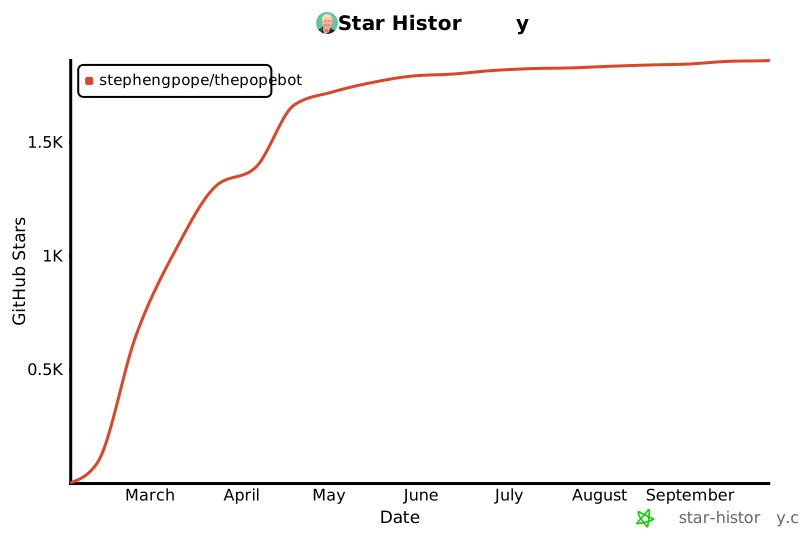](https://www.star-history.com/#stephengpope/thepopebot&type=date&legend=top-left)
|
|
192
215
|
|
|
193
216
|
---
|
|
194
217
|
|
|
@@ -198,8 +221,8 @@ See [Different Models](docs/RUNNING_DIFFERENT_MODELS.md) for the full provider r
|
|
|
198
221
|
|
|
199
222
|
SQLite can't create or open its shared-memory (`.shm`) file. Common causes:
|
|
200
223
|
|
|
201
|
-
- **Antivirus**
|
|
202
|
-
- **Cloud-synced folders** (OneDrive, Dropbox, Google Drive) — move your project to a non-synced directory
|
|
224
|
+
- **Antivirus** locking the database — add your project folder to the exclusion list
|
|
225
|
+
- **Cloud-synced folders** (OneDrive, Dropbox, Google Drive) — move your project to a non-synced directory
|
|
203
226
|
|
|
204
227
|
---
|
|
205
228
|
|
|
@@ -209,13 +232,13 @@ SQLite can't create or open its shared-memory (`.shm`) file. Common causes:
|
|
|
209
232
|
|----------|-------------|
|
|
210
233
|
| [Architecture](docs/ARCHITECTURE.md) | Two-layer design, file structure, API endpoints, GitHub Actions, Docker agent |
|
|
211
234
|
| [CLI Reference](docs/CLI.md) | `init`, managed vs user files, template conventions, all CLI commands |
|
|
212
|
-
| [Configuration](docs/CONFIGURATION.md) | Admin UI, DB-backed config, infrastructure variables,
|
|
213
|
-
| [Customization](docs/CUSTOMIZATION.md) | Personality, skills, operating system files, using your bot
|
|
235
|
+
| [Configuration](docs/CONFIGURATION.md) | Admin UI, DB-backed config, infrastructure variables, Docker Compose |
|
|
236
|
+
| [Customization](docs/CUSTOMIZATION.md) | Personality, skills, operating system files, using your bot |
|
|
214
237
|
| [Chat Integrations](docs/CHAT_INTEGRATIONS.md) | Web chat, Telegram, adding new channels |
|
|
215
|
-
| [Different Models](docs/RUNNING_DIFFERENT_MODELS.md) |
|
|
238
|
+
| [Different Models](docs/RUNNING_DIFFERENT_MODELS.md) | 10 built-in LLM providers, helper LLM vs coding agent split, per-job overrides, custom providers |
|
|
216
239
|
| [Auto-Merge](docs/AUTO_MERGE.md) | Auto-merge controls, ALLOWED_PATHS configuration |
|
|
217
240
|
| [Deployment](docs/DEPLOYMENT.md) | VPS setup, Docker Compose, HTTPS with Let's Encrypt |
|
|
218
|
-
| [Coding Agents](docs/CODING_AGENTS.md) |
|
|
241
|
+
| [Coding Agents](docs/CODING_AGENTS.md) | 6 coding agent backends, OAuth tokens, LiteLLM proxy, per-agent config |
|
|
219
242
|
| [How to Build Skills](docs/HOW_TO_BUILD_SKILLS.md) | Guide to building and activating agent skills |
|
|
220
243
|
| [Pre-Release](docs/PRE_RELEASE.md) | Installing beta/alpha builds |
|
|
221
244
|
| [Code Workspaces](docs/CODE_WORKSPACES.md) | Interactive Docker containers with in-browser terminal |
|
package/bin/cli.js
CHANGED
|
@@ -129,6 +129,11 @@ async function init(options = {}) {
|
|
|
129
129
|
|
|
130
130
|
console.log('\nScaffolding thepopebot project...\n');
|
|
131
131
|
|
|
132
|
+
// Capture pre-init state of skills/ so we know whether to populate
|
|
133
|
+
// first-init activation symlinks below. Must be checked BEFORE scaffolding,
|
|
134
|
+
// since templates/skills/CLAUDE.md.template will create skills/ as a side effect.
|
|
135
|
+
const isFreshSkillsInstall = !fs.existsSync(path.join(cwd, 'skills'));
|
|
136
|
+
|
|
132
137
|
const templateFiles = getTemplateFiles(templatesDir);
|
|
133
138
|
const created = [];
|
|
134
139
|
const skipped = [];
|
|
@@ -292,6 +297,23 @@ async function init(options = {}) {
|
|
|
292
297
|
}
|
|
293
298
|
}
|
|
294
299
|
|
|
300
|
+
// First-init activation: populate skills/<X> → ../skills-library/<X> symlinks
|
|
301
|
+
// for every bundled skill. Only runs when skills/ did not pre-exist, so users
|
|
302
|
+
// who deactivate a skill (rm skills/<X>) don't get it auto-reactivated on upgrade.
|
|
303
|
+
if (isFreshSkillsInstall) {
|
|
304
|
+
const libraryDir = path.join(cwd, 'skills-library');
|
|
305
|
+
if (fs.existsSync(libraryDir)) {
|
|
306
|
+
const entries = fs.readdirSync(libraryDir, { withFileTypes: true });
|
|
307
|
+
fs.mkdirSync(path.join(cwd, 'skills'), { recursive: true });
|
|
308
|
+
for (const entry of entries) {
|
|
309
|
+
if (!entry.isDirectory()) continue;
|
|
310
|
+
const link = path.join(cwd, 'skills', entry.name);
|
|
311
|
+
if (fs.existsSync(link)) continue;
|
|
312
|
+
createDirLink(`../skills-library/${entry.name}`, link);
|
|
313
|
+
console.log(` Activated skills/${entry.name} → ../skills-library/${entry.name}`);
|
|
314
|
+
}
|
|
315
|
+
}
|
|
316
|
+
}
|
|
295
317
|
|
|
296
318
|
// Report backed-up files
|
|
297
319
|
if (backedUp.length > 0) {
|
|
@@ -212,7 +212,17 @@ function WorkspaceBar({
|
|
|
212
212
|
return /* @__PURE__ */ jsxs("div", { className: "flex items-center gap-2 text-xs min-w-0 px-1 py-0.5", children: [
|
|
213
213
|
/* @__PURE__ */ jsxs("div", { className: "flex items-center gap-1.5 text-muted-foreground min-w-0", children: [
|
|
214
214
|
/* @__PURE__ */ jsx(GitBranchIcon, { size: 12, className: "shrink-0" }),
|
|
215
|
-
repoName && /* @__PURE__ */ jsx(
|
|
215
|
+
repoName && /* @__PURE__ */ jsx(
|
|
216
|
+
"a",
|
|
217
|
+
{
|
|
218
|
+
href: `https://github.com/${repo}`,
|
|
219
|
+
target: "_blank",
|
|
220
|
+
rel: "noopener noreferrer",
|
|
221
|
+
title: repo,
|
|
222
|
+
className: "shrink-0 hidden md:inline font-medium text-foreground hover:text-primary transition-colors",
|
|
223
|
+
children: repoName
|
|
224
|
+
}
|
|
225
|
+
),
|
|
216
226
|
branch && /* @__PURE__ */ jsxs(Fragment, { children: [
|
|
217
227
|
/* @__PURE__ */ jsx("span", { className: "shrink-0 text-muted-foreground/30 hidden md:inline", children: "/" }),
|
|
218
228
|
/* @__PURE__ */ jsx("div", { className: "min-w-0", children: /* @__PURE__ */ jsx(
|
|
@@ -235,7 +235,17 @@ export function WorkspaceBar({
|
|
|
235
235
|
<div className="flex items-center gap-2 text-xs min-w-0 px-1 py-0.5">
|
|
236
236
|
<div className="flex items-center gap-1.5 text-muted-foreground min-w-0">
|
|
237
237
|
<GitBranchIcon size={12} className="shrink-0" />
|
|
238
|
-
{repoName &&
|
|
238
|
+
{repoName && (
|
|
239
|
+
<a
|
|
240
|
+
href={`https://github.com/${repo}`}
|
|
241
|
+
target="_blank"
|
|
242
|
+
rel="noopener noreferrer"
|
|
243
|
+
title={repo}
|
|
244
|
+
className="shrink-0 hidden md:inline font-medium text-foreground hover:text-primary transition-colors"
|
|
245
|
+
>
|
|
246
|
+
{repoName}
|
|
247
|
+
</a>
|
|
248
|
+
)}
|
|
239
249
|
{branch && (
|
|
240
250
|
<>
|
|
241
251
|
<span className="shrink-0 text-muted-foreground/30 hidden md:inline">/</span>
|
package/package.json
CHANGED
package/setup/setup.mjs
CHANGED
|
@@ -435,24 +435,33 @@ async function main() {
|
|
|
435
435
|
// ─── Step 5: Start Server ─────────────────────────────────────────────
|
|
436
436
|
clack.log.step(`[${++currentStep}/${TOTAL_STEPS}] Start Server`);
|
|
437
437
|
|
|
438
|
-
|
|
439
|
-
|
|
440
|
-
|
|
441
|
-
|
|
442
|
-
|
|
443
|
-
|
|
444
|
-
|
|
445
|
-
|
|
446
|
-
|
|
438
|
+
// Probe /login (not /api/ping) to confirm Next.js can actually render
|
|
439
|
+
// the page, not just answer API routes. /login serves SetupForm on a
|
|
440
|
+
// fresh install; LoginForm once a user exists. Either way it's HTML.
|
|
441
|
+
async function isLoginPageReady(timeoutMs = 2000) {
|
|
442
|
+
try {
|
|
443
|
+
const res = await fetch('http://localhost:80/login', {
|
|
444
|
+
method: 'GET',
|
|
445
|
+
signal: AbortSignal.timeout(timeoutMs),
|
|
446
|
+
redirect: 'manual',
|
|
447
|
+
});
|
|
448
|
+
if (!res.ok) return false;
|
|
449
|
+
const ct = res.headers.get('content-type') || '';
|
|
450
|
+
return ct.includes('text/html');
|
|
451
|
+
} catch {
|
|
452
|
+
return false;
|
|
453
|
+
}
|
|
447
454
|
}
|
|
448
455
|
|
|
449
|
-
|
|
456
|
+
let serverUp = await isLoginPageReady(3000);
|
|
457
|
+
|
|
458
|
+
if (serverUp) {
|
|
450
459
|
if (await confirm('Server is already running. Restart?')) {
|
|
451
460
|
clack.log.info('Restarting server...');
|
|
452
461
|
try {
|
|
453
462
|
execSync('docker compose down && docker compose up -d', { stdio: 'inherit' });
|
|
454
463
|
clack.log.success('Server restarted');
|
|
455
|
-
|
|
464
|
+
serverUp = false; // Need to wait for it to come back up
|
|
456
465
|
} catch (err) {
|
|
457
466
|
const output = (err.stderr || err.stdout || err.message || '').toString().trim();
|
|
458
467
|
clack.log.warn('Failed to restart.');
|
|
@@ -474,32 +483,25 @@ async function main() {
|
|
|
474
483
|
}
|
|
475
484
|
|
|
476
485
|
// Poll for the server to come up (max 60 seconds)
|
|
477
|
-
if (!
|
|
486
|
+
if (!serverUp) {
|
|
478
487
|
const pollSpinner = clack.spinner();
|
|
479
488
|
pollSpinner.start('Waiting for server to come up...');
|
|
480
489
|
|
|
481
490
|
const startTime = Date.now();
|
|
482
491
|
const timeout = 60_000;
|
|
483
|
-
let detected = false;
|
|
484
492
|
|
|
485
493
|
while (Date.now() - startTime < timeout) {
|
|
486
|
-
|
|
487
|
-
|
|
488
|
-
method: 'GET',
|
|
489
|
-
signal: AbortSignal.timeout(2000),
|
|
490
|
-
});
|
|
491
|
-
detected = true;
|
|
494
|
+
if (await isLoginPageReady()) {
|
|
495
|
+
serverUp = true;
|
|
492
496
|
break;
|
|
493
|
-
} catch {
|
|
494
|
-
await new Promise((r) => setTimeout(r, 2000));
|
|
495
497
|
}
|
|
498
|
+
await new Promise((r) => setTimeout(r, 2000));
|
|
496
499
|
}
|
|
497
500
|
|
|
498
|
-
if (
|
|
501
|
+
if (serverUp) {
|
|
499
502
|
pollSpinner.stop('Server is up!');
|
|
500
503
|
} else {
|
|
501
504
|
pollSpinner.stop('Could not detect the server after 60 seconds.');
|
|
502
|
-
clack.log.warn(`Check docker logs and visit ${appUrl}/admin manually to finish setup.`);
|
|
503
505
|
}
|
|
504
506
|
}
|
|
505
507
|
|
|
@@ -512,18 +514,23 @@ async function main() {
|
|
|
512
514
|
|
|
513
515
|
clack.note(summary, 'Configuration');
|
|
514
516
|
|
|
515
|
-
|
|
516
|
-
|
|
517
|
-
//
|
|
518
|
-
|
|
519
|
-
|
|
520
|
-
|
|
521
|
-
|
|
522
|
-
|
|
523
|
-
await
|
|
517
|
+
// Only offer the link once the server is actually serving the login page.
|
|
518
|
+
// /admin would 401 — a fresh install has no users yet, so the root sends
|
|
519
|
+
// them to /login where the first-user setup form is shown.
|
|
520
|
+
if (serverUp) {
|
|
521
|
+
clack.log.info('Create your admin account, then configure your LLM provider, API keys, and agent settings under Admin.');
|
|
522
|
+
|
|
523
|
+
if (canOpenBrowser()) {
|
|
524
|
+
const open = (await import('open')).default;
|
|
525
|
+
const shouldOpen = await confirm(`Open ${appUrl} in your browser?`, true);
|
|
526
|
+
if (shouldOpen) {
|
|
527
|
+
await open(appUrl);
|
|
528
|
+
}
|
|
529
|
+
} else {
|
|
530
|
+
clack.log.info(`Visit ${appUrl} to create your admin account.`);
|
|
524
531
|
}
|
|
525
532
|
} else {
|
|
526
|
-
clack.log.
|
|
533
|
+
clack.log.warn(`Server didn't respond. Check docker logs, then visit ${appUrl} to create your admin account.`);
|
|
527
534
|
}
|
|
528
535
|
|
|
529
536
|
clack.outro('Setup complete!');
|
|
@@ -8,7 +8,8 @@ This is a [thepopebot](https://github.com/stephengpope/thepopebot) project.
|
|
|
8
8
|
- **`coding-workspace/`** — Optional system prompt (`SYSTEM.md`) for code mode workspaces. Empty by default.
|
|
9
9
|
- **`agents/`** — Custom agent definitions. Each subdirectory defines an agent (see Managing Agents below).
|
|
10
10
|
- **`event-handler/`** — Event handler configuration: chat system prompts, trigger definitions (`TRIGGERS.json`), cluster templates, and LiteLLM proxy config.
|
|
11
|
-
- **`skills/`** —
|
|
11
|
+
- **`skills-library/`** — Canonical skill source. All `SKILL.md` files and scripts live here.
|
|
12
|
+
- **`skills/`** — Activation surface. Each entry is a symlink to `../skills-library/<name>` — present means active, absent means deactivated. Coding agents only see skills symlinked here.
|
|
12
13
|
- **`data/`** — Runtime data (SQLite database, cluster state). Not checked into git.
|
|
13
14
|
- **`logs/`** — Agent job logs, organized by job ID. Not checked into git.
|
|
14
15
|
|
|
@@ -27,7 +28,7 @@ Some files are auto-synced by `npx thepopebot init` and will be overwritten on e
|
|
|
27
28
|
- `.dockerignore`
|
|
28
29
|
- `.gitignore`
|
|
29
30
|
|
|
30
|
-
The `CLAUDE.md` files scattered through the project tree (e.g. `agent-job/CLAUDE.md`, `agents/CLAUDE.md`, `event-handler/CLAUDE.md`, `skills/CLAUDE.md`) are scaffolded by `init` from `*.template` sources but are **not** in the managed-paths list — they will not be overwritten if you have edited them. Run `npx thepopebot reset <path>` to restore one to its template default, or `npx thepopebot diff <path>` to see your local changes.
|
|
31
|
+
The `CLAUDE.md` files scattered through the project tree (e.g. `agent-job/CLAUDE.md`, `agents/CLAUDE.md`, `event-handler/CLAUDE.md`, `skills/CLAUDE.md`, `skills-library/CLAUDE.md`) are scaffolded by `init` from `*.template` sources but are **not** in the managed-paths list — they will not be overwritten if you have edited them. Run `npx thepopebot reset <path>` to restore one to its template default, or `npx thepopebot diff <path>` to see your local changes.
|
|
31
32
|
|
|
32
33
|
## Agent Scoping
|
|
33
34
|
|
|
@@ -40,15 +41,15 @@ agents/
|
|
|
40
41
|
gary-vee/
|
|
41
42
|
CLAUDE.md ← agent-specific context (optional)
|
|
42
43
|
SYSTEM.md ← agent-specific system prompt (optional)
|
|
43
|
-
skills/ ← agent-specific skills (optional, overrides root skills/)
|
|
44
|
-
agent-job-secrets → ../../../skills/agent-job-secrets (symlink)
|
|
44
|
+
skills/ ← agent-specific skills (optional, overrides root skills/ for this scope)
|
|
45
|
+
agent-job-secrets → ../../../skills-library/agent-job-secrets (symlink)
|
|
45
46
|
custom-skill/
|
|
46
47
|
```
|
|
47
48
|
|
|
48
49
|
### How Scoping Works
|
|
49
50
|
|
|
50
51
|
- **Working directory** — The agent's cwd is set to the scoped directory. It still has access to the full repo.
|
|
51
|
-
- **Skills** — If the scoped directory has a `skills/` folder, those skills are used. If not, the root `skills/` folder is used as a fallback. Sub-agent skills can symlink back to
|
|
52
|
+
- **Skills** — If the scoped directory has a `skills/` folder, those skills are used. If not, the root `skills/` folder is used as a fallback. Sub-agent skills can symlink back to entries in the canonical `skills-library/` (e.g. `agents/<name>/skills/agent-job-secrets → ../../../skills-library/agent-job-secrets`).
|
|
52
53
|
- **CLAUDE.md** — The coding agent automatically picks up `.claude/` and `CLAUDE.md` files relative to its working directory.
|
|
53
54
|
- **Default scope** — When no scope is selected, the agent runs from the repository root with root-level skills.
|
|
54
55
|
|
|
@@ -16,14 +16,16 @@ Everything in the workspace `/home/coding-agent/workspace` is automatically comm
|
|
|
16
16
|
- `agents/` — Agent definitions. Each subdirectory defines an agent with its own prompts.
|
|
17
17
|
- `agent-job/` — Runtime config: system prompt (`SYSTEM.md`), cron schedules (`CRONS.json`), heartbeat prompt.
|
|
18
18
|
- `event-handler/` — Event handler config. Do not edit — managed by the event handler.
|
|
19
|
-
- `skills/` —
|
|
19
|
+
- `skills-library/` — Canonical skill source. All `SKILL.md` files and scripts live here.
|
|
20
|
+
- `skills/` — Activation surface. Each entry is a symlink to `../skills-library/<name>` — only symlinked skills are visible to you.
|
|
20
21
|
- `data/`, `logs/` — Runtime data and job logs.
|
|
21
22
|
|
|
22
23
|
## What You Can Edit
|
|
23
24
|
|
|
24
25
|
- `agent-job/CRONS.json` — Add, remove, or change scheduled jobs
|
|
25
26
|
- `agents/` — Create or remove agent definitions
|
|
26
|
-
- `skills/` — Add or remove skill directories
|
|
27
|
+
- `skills-library/` — Add or remove skill source directories
|
|
28
|
+
- `skills/` — Activate/deactivate skills via symlinks
|
|
27
29
|
- Agent prompt files (`.md`) in `agent-job/` and `agents/`
|
|
28
30
|
- Reports and output files
|
|
29
31
|
|
|
@@ -37,7 +39,8 @@ Everything in the workspace `/home/coding-agent/workspace` is automatically comm
|
|
|
37
39
|
|
|
38
40
|
Agents can be scoped to subdirectories under `agents/`. When scoped, the agent's working directory is set to that subdirectory (e.g., `agents/gary-vee/`). The full repo is still accessible.
|
|
39
41
|
|
|
40
|
-
- **Skills fallback** — If the scoped directory has a `skills/` folder, those are used. Otherwise, the root `skills/` folder applies. Sub-agents can symlink individual skills from
|
|
42
|
+
- **Skills fallback** — If the scoped directory has a `skills/` folder, those are used. Otherwise, the root `skills/` folder applies. Sub-agents can symlink individual skills from the canonical `skills-library/`: `agents/<name>/skills/agent-job-secrets → ../../../skills-library/agent-job-secrets`.
|
|
43
|
+
- **Add a new skill** — Create the source in `skills-library/<name>/SKILL.md` (the canonical store), then symlink it to activate: `ln -s ../skills-library/<name> skills/<name>`. Removing the symlink deactivates without deleting the source.
|
|
41
44
|
- **No skills folder needed** — If you don't create a `skills/` directory in the agent scope, it inherits all root skills automatically.
|
|
42
45
|
|
|
43
46
|
## Self-Modification
|
|
@@ -48,9 +51,9 @@ Agents can be scoped to subdirectories under `agents/`. When scoped, the agent's
|
|
|
48
51
|
|
|
49
52
|
**Change a schedule** — Edit `agent-job/CRONS.json` (cron expressions, enable/disable).
|
|
50
53
|
|
|
51
|
-
**Add a skill** — Create
|
|
54
|
+
**Add a skill** — Create the source directory in `skills-library/<name>/` with a `SKILL.md`, then activate with `ln -s ../skills-library/<name> skills/<name>`. Update root `CLAUDE.md`.
|
|
52
55
|
|
|
53
|
-
**Remove a skill** — Delete the
|
|
56
|
+
**Remove a skill** — Delete the symlink from `skills/<name>` (deactivates without losing source). To delete permanently, also `rm -rf skills-library/<name>/`. Update root `CLAUDE.md`.
|
|
54
57
|
|
|
55
58
|
**Keep CLAUDE.md files current** — When you change the structure of the instance (add/remove agents, change schedules, activate skills), update the root `CLAUDE.md` and any affected folder-level `CLAUDE.md` files so the next agent has an accurate picture.
|
|
56
59
|
|
|
@@ -9,13 +9,13 @@ agents/
|
|
|
9
9
|
└── my-agent/
|
|
10
10
|
├── SYSTEM.md # System prompt — identity, instructions, constraints (required)
|
|
11
11
|
├── CLAUDE.md # Optional — guidance for AI assistants editing this agent's files
|
|
12
|
-
├── skills/ # Optional — agent-specific skills (overrides root skills/ for this scope)
|
|
12
|
+
├── skills/ # Optional — agent-specific skills (overrides root skills/ for this scope; symlink entries from ../../skills-library/)
|
|
13
13
|
└── jobs/ # Optional — reusable task prompts referenced from CRONS.json
|
|
14
14
|
```
|
|
15
15
|
|
|
16
16
|
`SYSTEM.md` is the agent's system prompt. Write it in markdown addressed to the agent (e.g. "You are a code reviewer..."). `CLAUDE.md` (if present) is read by AI assistants working in this directory — use it for non-obvious context only.
|
|
17
17
|
|
|
18
|
-
**Skills resolution**: when a job runs with `scope: "agents/my-agent"`, the runtime checks `agents/my-agent/skills/` first; missing skills fall back to root `skills/`. To override a built-in skill for one agent,
|
|
18
|
+
**Skills resolution**: when a job runs with `scope: "agents/my-agent"`, the runtime checks `agents/my-agent/skills/` first; missing skills fall back to root `skills/`. To override a built-in skill for one agent, create the override in `skills-library/<override-name>/` and symlink it from `agents/my-agent/skills/`. To inherit a root skill into a scope, symlink it: `ln -s ../../../skills-library/agent-job-secrets agents/my-agent/skills/agent-job-secrets`.
|
|
19
19
|
|
|
20
20
|
> **Important:** `agents/<name>/SYSTEM.md` **replaces** `agent-job/SYSTEM.md` when the agent is scoped — it doesn't extend it. Use `agent-job/SYSTEM.md` as a starting template and adapt it: keep the runtime environment notes, the `/tmp` scratch directive, and add the `{{skills}}` token if you want skill descriptions injected. Then add the agent's identity-specific instructions on top.
|
|
21
21
|
|
|
@@ -1,132 +1,27 @@
|
|
|
1
|
-
# skills/ —
|
|
1
|
+
# skills/ — Activation Surface
|
|
2
2
|
|
|
3
|
-
|
|
3
|
+
This directory is **not** where skills live. It's where active skills are turned on.
|
|
4
4
|
|
|
5
|
-
|
|
5
|
+
The real skill files (SKILL.md, scripts, package.json, etc.) live in `skills-library/`. Each entry here is a **symlink** pointing at a skill in `skills-library/`. The coding agents discover skills by walking into this directory through their per-agent bridges (`.claude/skills`, `.pi/skills`, `.codex/skills`, `.gemini/skills`, `.kimi/skills` → `../skills`).
|
|
6
6
|
|
|
7
|
-
|
|
8
|
-
2. **Frontmatter loaded** — The `description` from YAML frontmatter is included in the system prompt under "Active skills" (via the `{{skills}}` template variable).
|
|
9
|
-
3. **Full SKILL.md read on demand** — When the agent decides to use a skill, it reads the full `SKILL.md` for detailed usage instructions.
|
|
10
|
-
|
|
11
|
-
All coding agents discover skills from the same `skills/` directory (via `.pi/skills`, `.claude/skills`, etc. symlink bridges).
|
|
12
|
-
|
|
13
|
-
## Conventions
|
|
14
|
-
|
|
15
|
-
### Language Preference
|
|
16
|
-
|
|
17
|
-
**Bash first.** Skills are glue code — API calls, data piping, file manipulation. Bash + curl + python3 (for JSON) handles nearly everything. No module systems, no dependency management, no surprises.
|
|
18
|
-
|
|
19
|
-
Use Node.js **only** when a required library has no alternative (e.g., `youtube-transcript-plus`). Never for new skills where bash + curl would work.
|
|
20
|
-
|
|
21
|
-
### Bash Script Standards
|
|
22
|
-
|
|
23
|
-
- Include `#!/bin/bash` and `set -euo pipefail` at the top
|
|
24
|
-
- `chmod +x` after creating
|
|
25
|
-
|
|
26
|
-
### Node.js Module Rules
|
|
27
|
-
|
|
28
|
-
The root `package.json` has `"type": "module"`, which forces **all** `.js` files in the project tree to be treated as ESM. This silently breaks any script using `require()`.
|
|
29
|
-
|
|
30
|
-
- **`.cjs`** — for CommonJS scripts (uses `require()`)
|
|
31
|
-
- **`.mjs`** — for ESM scripts (uses `import`)
|
|
32
|
-
- **Never use plain `.js`** for skill scripts. The behavior depends on the nearest `package.json` and will break unpredictably.
|
|
33
|
-
|
|
34
|
-
If you encounter a broken `.js` script in a skill, rename it to `.cjs` or `.mjs` as appropriate and update SKILL.md references.
|
|
35
|
-
|
|
36
|
-
### SKILL.md Format
|
|
37
|
-
|
|
38
|
-
Every skill must have a `SKILL.md` with YAML frontmatter:
|
|
39
|
-
|
|
40
|
-
```markdown
|
|
41
|
-
---
|
|
42
|
-
name: skill-name-in-kebab-case
|
|
43
|
-
description: One sentence describing what the skill does and when to use it.
|
|
44
|
-
---
|
|
45
|
-
|
|
46
|
-
# Skill Name
|
|
47
|
-
|
|
48
|
-
## Usage
|
|
49
|
-
|
|
50
|
-
```bash
|
|
51
|
-
skills/skill-name/script.sh <args>
|
|
52
|
-
```
|
|
53
|
-
```
|
|
54
|
-
|
|
55
|
-
- The `description` field appears in the system prompt — keep it concise and action-oriented.
|
|
56
|
-
- Use project-root-relative paths in documentation (e.g., `skills/skill-name/script.sh`).
|
|
57
|
-
|
|
58
|
-
### Skill Structure
|
|
59
|
-
|
|
60
|
-
- **`SKILL.md`** (required) — YAML frontmatter + markdown documentation
|
|
61
|
-
- **Scripts** — bash (`.sh`) by default, `.cjs`/`.mjs` only when necessary
|
|
62
|
-
- **`package.json`** (optional) — only if Node.js dependencies are truly needed
|
|
63
|
-
|
|
64
|
-
### Credential Setup
|
|
65
|
-
|
|
66
|
-
If a skill needs an API key, add it via the admin UI (Settings > Agent Jobs > Secrets). The secret will be injected as an env var into Docker containers. The agent can discover available secrets via the `get-secret` skill.
|
|
67
|
-
|
|
68
|
-
### Activation & Deactivation
|
|
69
|
-
|
|
70
|
-
Skills are active when present in the `skills/` directory. To deactivate, remove or move the skill directory out.
|
|
71
|
-
|
|
72
|
-
All coding agents discover skills from the same `skills/` directory via symlink bridges created by `npx thepopebot init`:
|
|
73
|
-
|
|
74
|
-
- `.claude/skills → ../skills` (Claude Code)
|
|
75
|
-
- `.pi/skills → ../skills` (Pi)
|
|
76
|
-
- `.codex/skills → ../skills` (Codex CLI)
|
|
77
|
-
- `.gemini/skills → ../skills` (Gemini CLI)
|
|
78
|
-
- `.kimi/skills → ../skills` (Kimi CLI)
|
|
79
|
-
- `.agents/skills → ../skills` (OpenCode and other plugin-style agents)
|
|
80
|
-
|
|
81
|
-
## Creating a Skill
|
|
82
|
-
|
|
83
|
-
### Simple bash skill (most common)
|
|
7
|
+
## Activate a skill
|
|
84
8
|
|
|
85
9
|
```bash
|
|
86
|
-
|
|
10
|
+
ln -s ../skills-library/<skill-name> skills/<skill-name>
|
|
87
11
|
```
|
|
88
12
|
|
|
89
|
-
|
|
90
|
-
```markdown
|
|
91
|
-
---
|
|
92
|
-
name: my-skill
|
|
93
|
-
description: Does X when the agent needs to Y.
|
|
94
|
-
---
|
|
95
|
-
|
|
96
|
-
# My Skill
|
|
13
|
+
## Deactivate a skill
|
|
97
14
|
|
|
98
|
-
## Setup
|
|
99
|
-
Requires MY_API_KEY environment variable.
|
|
100
|
-
|
|
101
|
-
## Usage
|
|
102
|
-
```bash
|
|
103
|
-
skills/my-skill/run.sh <args>
|
|
104
|
-
```
|
|
105
|
-
```
|
|
106
|
-
|
|
107
|
-
**skills/my-skill/run.sh:**
|
|
108
15
|
```bash
|
|
109
|
-
|
|
110
|
-
set -euo pipefail
|
|
111
|
-
|
|
112
|
-
if [ -z "$1" ]; then echo "Usage: run.sh <args>"; exit 1; fi
|
|
113
|
-
if [ -z "$MY_API_KEY" ]; then echo "Error: MY_API_KEY not set"; exit 1; fi
|
|
114
|
-
# ... skill logic
|
|
16
|
+
rm skills/<skill-name>
|
|
115
17
|
```
|
|
116
18
|
|
|
117
|
-
|
|
118
|
-
```bash
|
|
119
|
-
chmod +x skills/my-skill/run.sh
|
|
120
|
-
```
|
|
121
|
-
|
|
122
|
-
### Node.js skill
|
|
123
|
-
|
|
124
|
-
Use only when a required library has no bash/curl alternative. Add a `package.json` with dependencies — they're installed automatically in Docker. Use `.cjs` for CommonJS or `.mjs` for ESM — never plain `.js`.
|
|
19
|
+
This only removes the symlink — the skill source in `skills-library/<skill-name>/` is untouched and can be re-activated later.
|
|
125
20
|
|
|
126
|
-
##
|
|
21
|
+
## Add a new skill
|
|
127
22
|
|
|
128
|
-
|
|
23
|
+
Don't put real files here. Create the skill in `skills-library/<your-skill>/`, then symlink it into this directory. See `skills-library/CLAUDE.md` for the full guide.
|
|
129
24
|
|
|
130
|
-
##
|
|
25
|
+
## First-init activation
|
|
131
26
|
|
|
132
|
-
|
|
27
|
+
`npx thepopebot init` populates this directory with a symlink for every skill in `skills-library/` **only on first install** (when this directory does not yet exist). Subsequent `init` / `upgrade` runs leave it alone — new bundled skills land in `skills-library/` un-activated, and you choose whether to symlink them.
|
|
@@ -0,0 +1,151 @@
|
|
|
1
|
+
# skills-library/ — Canonical Skill Store
|
|
2
|
+
|
|
3
|
+
All skill source files live here. This is the canonical location for SKILL.md files, scripts, package.json, etc.
|
|
4
|
+
|
|
5
|
+
Skills in this directory are **inactive by default**. To make a skill available to coding agents, create a symlink in `skills/` pointing here:
|
|
6
|
+
|
|
7
|
+
```bash
|
|
8
|
+
ln -s ../skills-library/<skill-name> skills/<skill-name>
|
|
9
|
+
```
|
|
10
|
+
|
|
11
|
+
The agents discover active skills through their per-agent bridges (`.claude/skills → ../skills`, etc.) — those bridges target `skills/`, which is just a curated set of symlinks back to here.
|
|
12
|
+
|
|
13
|
+
## Why two directories?
|
|
14
|
+
|
|
15
|
+
- **`skills-library/`** — the package. Source of truth, never deleted by deactivation.
|
|
16
|
+
- **`skills/`** — the activation surface. Add a symlink to turn a skill on; remove the symlink to turn it off without losing the skill source.
|
|
17
|
+
|
|
18
|
+
This makes it cheap to toggle skills on/off (especially when narrowing what a particular install exposes to agents) without copying, archiving, or version-controlling deletions.
|
|
19
|
+
|
|
20
|
+
## How Skills Work
|
|
21
|
+
|
|
22
|
+
1. **Discovery** — At system-prompt build time, the renderer scans `skills/` for entries with a `SKILL.md` (real or symlinked).
|
|
23
|
+
2. **Frontmatter loaded** — The `description` from YAML frontmatter is included in the system prompt under "Active skills" (via the `{{skills}}` template variable).
|
|
24
|
+
3. **Full SKILL.md read on demand** — When the agent decides to use a skill, it reads the full `SKILL.md` for detailed usage instructions.
|
|
25
|
+
|
|
26
|
+
All coding agents use the same activation set (`skills/`) via symlink bridges created by `npx thepopebot init`:
|
|
27
|
+
|
|
28
|
+
- `.claude/skills → ../skills` (Claude Code)
|
|
29
|
+
- `.pi/skills → ../skills` (Pi)
|
|
30
|
+
- `.codex/skills → ../skills` (Codex CLI)
|
|
31
|
+
- `.gemini/skills → ../skills` (Gemini CLI)
|
|
32
|
+
- `.kimi/skills → ../skills` (Kimi CLI)
|
|
33
|
+
|
|
34
|
+
## Conventions
|
|
35
|
+
|
|
36
|
+
### Language Preference
|
|
37
|
+
|
|
38
|
+
**Bash first.** Skills are glue code — API calls, data piping, file manipulation. Bash + curl + python3 (for JSON) handles nearly everything. No module systems, no dependency management, no surprises.
|
|
39
|
+
|
|
40
|
+
Use Node.js **only** when a required library has no alternative (e.g., `youtube-transcript-plus`). Never for new skills where bash + curl would work.
|
|
41
|
+
|
|
42
|
+
### Bash Script Standards
|
|
43
|
+
|
|
44
|
+
- Include `#!/bin/bash` and `set -euo pipefail` at the top
|
|
45
|
+
- `chmod +x` after creating
|
|
46
|
+
|
|
47
|
+
### Node.js Module Rules
|
|
48
|
+
|
|
49
|
+
The root `package.json` has `"type": "module"`, which forces **all** `.js` files in the project tree to be treated as ESM. This silently breaks any script using `require()`.
|
|
50
|
+
|
|
51
|
+
- **`.cjs`** — for CommonJS scripts (uses `require()`)
|
|
52
|
+
- **`.mjs`** — for ESM scripts (uses `import`)
|
|
53
|
+
- **Never use plain `.js`** for skill scripts. The behavior depends on the nearest `package.json` and will break unpredictably.
|
|
54
|
+
|
|
55
|
+
If you encounter a broken `.js` script in a skill, rename it to `.cjs` or `.mjs` as appropriate and update SKILL.md references.
|
|
56
|
+
|
|
57
|
+
### SKILL.md Format
|
|
58
|
+
|
|
59
|
+
Every skill must have a `SKILL.md` with YAML frontmatter:
|
|
60
|
+
|
|
61
|
+
```markdown
|
|
62
|
+
---
|
|
63
|
+
name: skill-name-in-kebab-case
|
|
64
|
+
description: One sentence describing what the skill does and when to use it.
|
|
65
|
+
---
|
|
66
|
+
|
|
67
|
+
# Skill Name
|
|
68
|
+
|
|
69
|
+
## Usage
|
|
70
|
+
|
|
71
|
+
```bash
|
|
72
|
+
skills/skill-name/script.sh <args>
|
|
73
|
+
```
|
|
74
|
+
```
|
|
75
|
+
|
|
76
|
+
- The `description` field appears in the system prompt — keep it concise and action-oriented.
|
|
77
|
+
- Use `skills/<skill-name>/...` paths in documentation (the symlink path the agent sees), not `skills-library/...`.
|
|
78
|
+
|
|
79
|
+
### Skill Structure
|
|
80
|
+
|
|
81
|
+
- **`SKILL.md`** (required) — YAML frontmatter + markdown documentation
|
|
82
|
+
- **Scripts** — bash (`.sh`) by default, `.cjs`/`.mjs` only when necessary
|
|
83
|
+
- **`package.json`** (optional) — only if Node.js dependencies are truly needed
|
|
84
|
+
|
|
85
|
+
### Credential Setup
|
|
86
|
+
|
|
87
|
+
If a skill needs an API key, add it via the admin UI (Settings > Agent Jobs > Secrets). The secret will be injected as an env var into Docker containers. The agent can discover available secrets via the `agent-job-secrets` skill.
|
|
88
|
+
|
|
89
|
+
## Creating a Skill
|
|
90
|
+
|
|
91
|
+
### Simple bash skill (most common)
|
|
92
|
+
|
|
93
|
+
1. Create the skill in `skills-library/`:
|
|
94
|
+
|
|
95
|
+
```bash
|
|
96
|
+
mkdir skills-library/my-skill
|
|
97
|
+
```
|
|
98
|
+
|
|
99
|
+
2. Add `skills-library/my-skill/SKILL.md`:
|
|
100
|
+
|
|
101
|
+
```markdown
|
|
102
|
+
---
|
|
103
|
+
name: my-skill
|
|
104
|
+
description: Does X when the agent needs to Y.
|
|
105
|
+
---
|
|
106
|
+
|
|
107
|
+
# My Skill
|
|
108
|
+
|
|
109
|
+
## Setup
|
|
110
|
+
Requires MY_API_KEY environment variable.
|
|
111
|
+
|
|
112
|
+
## Usage
|
|
113
|
+
```bash
|
|
114
|
+
skills/my-skill/run.sh <args>
|
|
115
|
+
```
|
|
116
|
+
```
|
|
117
|
+
|
|
118
|
+
3. Add `skills-library/my-skill/run.sh`:
|
|
119
|
+
|
|
120
|
+
```bash
|
|
121
|
+
#!/bin/bash
|
|
122
|
+
set -euo pipefail
|
|
123
|
+
|
|
124
|
+
if [ -z "$1" ]; then echo "Usage: run.sh <args>"; exit 1; fi
|
|
125
|
+
if [ -z "$MY_API_KEY" ]; then echo "Error: MY_API_KEY not set"; exit 1; fi
|
|
126
|
+
# ... skill logic
|
|
127
|
+
```
|
|
128
|
+
|
|
129
|
+
4. Make it executable and activate:
|
|
130
|
+
|
|
131
|
+
```bash
|
|
132
|
+
chmod +x skills-library/my-skill/run.sh
|
|
133
|
+
ln -s ../skills-library/my-skill skills/my-skill
|
|
134
|
+
```
|
|
135
|
+
|
|
136
|
+
### Node.js skill
|
|
137
|
+
|
|
138
|
+
Use only when a required library has no bash/curl alternative. Add a `package.json` with dependencies — they're installed automatically in Docker. Use `.cjs` for CommonJS or `.mjs` for ESM — never plain `.js`.
|
|
139
|
+
|
|
140
|
+
## Testing
|
|
141
|
+
|
|
142
|
+
Always build AND test a skill in the same job. Tell the agent to test with real input after creating the skill and fix any issues before committing.
|
|
143
|
+
|
|
144
|
+
## Default Skills
|
|
145
|
+
|
|
146
|
+
Bundled in this directory and activated by default on first install:
|
|
147
|
+
|
|
148
|
+
- `agent-job-secrets` — list/get agent-job secrets and OAuth credentials
|
|
149
|
+
- `agent-job-dm` — list users + send DMs/broadcasts via the recipient's default channel
|
|
150
|
+
- `agent-job-background` — spawn/check background agent jobs (defaults `--user-id` to the running container's `USER_ID`)
|
|
151
|
+
- `playwright-cli` — browser automation via Playwright CLI
|
|
File without changes
|
|
File without changes
|
|
File without changes
|
|
File without changes
|
|
File without changes
|
|
File without changes
|
|
File without changes
|