tf-checkout-react-native 1.0.2 → 1.0.7
This diff represents the content of publicly available package versions that have been released to one of the supported registries. The information contained in this diff is provided for informational purposes only and reflects changes between package versions as they appear in their respective public registries.
- package/README.md +362 -7
- package/assets/icons/ic_error.png +0 -0
- package/lib/api/ApiClient.d.ts +7 -4
- package/lib/api/ApiClient.js +119 -98
- package/lib/api/ApiClient.js.map +1 -1
- package/lib/api/Constants.d.ts +1 -0
- package/lib/api/Constants.js +1 -0
- package/lib/api/Constants.js.map +1 -1
- package/lib/api/types.d.ts +23 -3
- package/lib/api/types.js +0 -1
- package/lib/api/types.js.map +1 -1
- package/lib/components/button/Button.d.ts +2 -1
- package/lib/components/button/Button.js +7 -6
- package/lib/components/button/Button.js.map +1 -1
- package/lib/components/checkbox/types.d.ts +1 -1
- package/lib/components/datePicker/DatePicker.d.ts +1 -1
- package/lib/components/datePicker/DatePicker.js +10 -7
- package/lib/components/datePicker/DatePicker.js.map +1 -1
- package/lib/components/datePicker/styles.d.ts +0 -1
- package/lib/components/datePicker/styles.js +0 -1
- package/lib/components/datePicker/styles.js.map +1 -1
- package/lib/components/datePicker/types.d.ts +12 -4
- package/lib/components/dropdown/Dropdown.d.ts +1 -1
- package/lib/components/dropdown/Dropdown.js +26 -14
- package/lib/components/dropdown/Dropdown.js.map +1 -1
- package/lib/components/dropdown/DropdownListItem.d.ts +1 -1
- package/lib/components/dropdown/DropdownListItem.js +7 -5
- package/lib/components/dropdown/DropdownListItem.js.map +1 -1
- package/lib/components/dropdown/styles.d.ts +15 -3
- package/lib/components/dropdown/styles.js +22 -4
- package/lib/components/dropdown/styles.js.map +1 -1
- package/lib/components/dropdown/types.d.ts +16 -7
- package/lib/components/formField/FormField.d.ts +1 -1
- package/lib/components/formField/FormField.js +11 -8
- package/lib/components/formField/FormField.js.map +1 -1
- package/lib/components/formField/types.d.ts +5 -3
- package/lib/components/input/Input.js +5 -2
- package/lib/components/input/Input.js.map +1 -1
- package/lib/components/input/types.d.ts +2 -0
- package/lib/components/loggedIn/LoggedIn.js +21 -7
- package/lib/components/loggedIn/LoggedIn.js.map +1 -1
- package/lib/components/loggedIn/types.d.ts +17 -5
- package/lib/components/login/Login.d.ts +1 -1
- package/lib/components/login/Login.js +21 -17
- package/lib/components/login/Login.js.map +1 -1
- package/lib/components/login/LoginView.d.ts +1 -1
- package/lib/components/login/LoginView.js +42 -20
- package/lib/components/login/LoginView.js.map +1 -1
- package/lib/components/login/styles.d.ts +5 -0
- package/lib/components/login/styles.js +5 -0
- package/lib/components/login/styles.js.map +1 -1
- package/lib/components/login/types.d.ts +42 -7
- package/lib/components/promoCode/PromoCode.js +9 -1
- package/lib/components/promoCode/PromoCode.js.map +1 -1
- package/lib/containers/billingInfo/Billing.d.ts +3 -0
- package/lib/containers/billingInfo/Billing.js +587 -0
- package/lib/containers/billingInfo/Billing.js.map +1 -0
- package/lib/containers/billingInfo/styles.d.ts +36 -0
- package/lib/containers/billingInfo/styles.js +37 -0
- package/lib/containers/billingInfo/styles.js.map +1 -1
- package/lib/containers/billingInfo/types.d.ts +47 -4
- package/lib/containers/checkout/Checkout.d.ts +1 -1
- package/lib/containers/checkout/Checkout.js +54 -32
- package/lib/containers/checkout/Checkout.js.map +1 -1
- package/lib/containers/checkout/CheckoutData.js +9 -9
- package/lib/containers/checkout/CheckoutData.js.map +1 -1
- package/lib/containers/checkout/CheckoutView.d.ts +1 -1
- package/lib/containers/checkout/CheckoutView.js +24 -10
- package/lib/containers/checkout/CheckoutView.js.map +1 -1
- package/lib/containers/checkout/components/OrderReview.d.ts +1 -1
- package/lib/containers/checkout/components/OrderReview.js +4 -4
- package/lib/containers/checkout/components/OrderReview.js.map +1 -1
- package/lib/containers/checkout/styles.d.ts +17 -2
- package/lib/containers/checkout/styles.js +17 -2
- package/lib/containers/checkout/styles.js.map +1 -1
- package/lib/containers/checkout/types.d.ts +50 -5
- package/lib/containers/index.d.ts +1 -1
- package/lib/containers/index.js +1 -1
- package/lib/containers/index.js.map +1 -1
- package/lib/containers/myOrderDetails/MyOrderDetails.js +61 -6
- package/lib/containers/myOrderDetails/MyOrderDetails.js.map +1 -1
- package/lib/containers/myOrderDetails/MyOrderDetailsView.js +140 -36
- package/lib/containers/myOrderDetails/MyOrderDetailsView.js.map +1 -1
- package/lib/containers/myOrderDetails/components/Notification.d.ts +6 -0
- package/lib/containers/myOrderDetails/components/Notification.js +16 -0
- package/lib/containers/myOrderDetails/components/Notification.js.map +1 -0
- package/lib/containers/myOrderDetails/components/styles.d.ts +38 -0
- package/lib/containers/myOrderDetails/components/styles.js +41 -0
- package/lib/containers/myOrderDetails/components/styles.js.map +1 -0
- package/lib/containers/myOrderDetails/styles.d.ts +54 -0
- package/lib/containers/myOrderDetails/styles.js +54 -1
- package/lib/containers/myOrderDetails/styles.js.map +1 -1
- package/lib/containers/myOrderDetails/types.d.ts +70 -6
- package/lib/containers/myOrders/MyOrders.d.ts +1 -6
- package/lib/containers/myOrders/MyOrders.js +18 -15
- package/lib/containers/myOrders/MyOrders.js.map +1 -1
- package/lib/containers/myOrders/MyOrdersView.d.ts +1 -1
- package/lib/containers/myOrders/MyOrdersView.js +36 -14
- package/lib/containers/myOrders/MyOrdersView.js.map +1 -1
- package/lib/containers/myOrders/components/OrderListItem.js +1 -1
- package/lib/containers/myOrders/components/OrderListItem.js.map +1 -1
- package/lib/containers/myOrders/components/styles.d.ts +4 -0
- package/lib/containers/myOrders/components/styles.js +4 -0
- package/lib/containers/myOrders/components/styles.js.map +1 -1
- package/lib/containers/myOrders/styles.d.ts +19 -2
- package/lib/containers/myOrders/styles.js +20 -2
- package/lib/containers/myOrders/styles.js.map +1 -1
- package/lib/containers/myOrders/types.d.ts +20 -15
- package/lib/containers/purchaseConfirmation/PurchaseConfirmation.d.ts +1 -1
- package/lib/containers/purchaseConfirmation/PurchaseConfirmation.js +2 -2
- package/lib/containers/purchaseConfirmation/PurchaseConfirmation.js.map +1 -1
- package/lib/containers/purchaseConfirmation/PurchaseConfirmationView.js +4 -4
- package/lib/containers/purchaseConfirmation/PurchaseConfirmationView.js.map +1 -1
- package/lib/containers/purchaseConfirmation/types.d.ts +4 -0
- package/lib/containers/tickets/Tickets.d.ts +1 -1
- package/lib/containers/tickets/Tickets.js +20 -17
- package/lib/containers/tickets/Tickets.js.map +1 -1
- package/lib/containers/tickets/TicketsView.d.ts +1 -1
- package/lib/containers/tickets/TicketsView.js +7 -9
- package/lib/containers/tickets/TicketsView.js.map +1 -1
- package/lib/containers/tickets/components/TicketListItem.js +24 -8
- package/lib/containers/tickets/components/TicketListItem.js.map +1 -1
- package/lib/containers/tickets/types.d.ts +15 -2
- package/lib/helpers/Config.d.ts +12 -0
- package/lib/helpers/Config.js +32 -0
- package/lib/helpers/Config.js.map +1 -0
- package/lib/helpers/LocalStorage.d.ts +1 -0
- package/lib/helpers/LocalStorage.js +15 -3
- package/lib/helpers/LocalStorage.js.map +1 -1
- package/lib/helpers/Validators.d.ts +1 -0
- package/lib/helpers/Validators.js +5 -0
- package/lib/helpers/Validators.js.map +1 -1
- package/lib/index.d.ts +4 -1
- package/lib/index.js +5 -1
- package/lib/index.js.map +1 -1
- package/lib/res/colors.d.ts +2 -0
- package/lib/res/colors.js +4 -0
- package/lib/res/colors.js.map +1 -1
- package/lib/res/icons.d.ts +1 -0
- package/lib/res/icons.js +1 -0
- package/lib/res/icons.js.map +1 -1
- package/lib/res/index.d.ts +3 -0
- package/lib/types/IUserProfile.d.ts +1 -1
- package/package.json +9 -2
- package/lib/containers/billingInfo/BillingInfo.d.ts +0 -3
- package/lib/containers/billingInfo/BillingInfo.js +0 -627
- package/lib/containers/billingInfo/BillingInfo.js.map +0 -1
- package/lib/containers/billingInfo/BillingInfoData.d.ts +0 -6
- package/lib/containers/billingInfo/BillingInfoData.js +0 -79
- package/lib/containers/billingInfo/BillingInfoData.js.map +0 -1
- package/lib/containers/billingInfo/BillingInfoView.d.ts +0 -3
- package/lib/containers/billingInfo/BillingInfoView.js +0 -23
- package/lib/containers/billingInfo/BillingInfoView.js.map +0 -1
package/README.md
CHANGED
|
@@ -6,15 +6,98 @@ React Native library for Ticket Fairy checkout
|
|
|
6
6
|
|
|
7
7
|
Configure [ReactNative environment](https://reactnative.dev/docs/environment-setup) for desired platforms (iOS, Android or both).
|
|
8
8
|
|
|
9
|
-
|
|
9
|
+
### Android
|
|
10
10
|
|
|
11
|
-
|
|
11
|
+
- Android 5.0 (API level 21) and above
|
|
12
|
+
- Android gradle plugin 4.x and above
|
|
12
13
|
|
|
13
|
-
|
|
14
|
+
To download the PDFs, add the `WRITE_EXTERNAL_STORAGE` permission to the Android's Manifest file.
|
|
15
|
+
|
|
16
|
+
```xml
|
|
17
|
+
<uses-permission android:name="android.permission.WRITE_EXTERNAL_STORAGE"/>
|
|
18
|
+
```
|
|
19
|
+
|
|
20
|
+
### iOS
|
|
21
|
+
|
|
22
|
+
- Compatible with apps targeting iOS 11 or above.
|
|
23
|
+
|
|
24
|
+
To download the PDFs, add the following flags to `Info.plist` file:
|
|
25
|
+
|
|
26
|
+
- UIFileSharingEnabled: Application supports iTunes file sharing
|
|
27
|
+
- LSSupportsOpeningDocumentsInPlace: Supports opening documents in place
|
|
28
|
+
|
|
29
|
+
# Installation
|
|
30
|
+
|
|
31
|
+
```node
|
|
32
|
+
yarn add tf-checkout-react-native
|
|
33
|
+
```
|
|
14
34
|
|
|
15
35
|
or
|
|
16
36
|
|
|
17
|
-
|
|
37
|
+
```node
|
|
38
|
+
npm install tf-checkout-react-native
|
|
39
|
+
```
|
|
40
|
+
|
|
41
|
+
## Required for Android
|
|
42
|
+
|
|
43
|
+
Add below dependency to your `app/build.gradle` file with specified version (in our example we are using `1.4.0`).
|
|
44
|
+
|
|
45
|
+
```java
|
|
46
|
+
implementation 'com.google.android.material:material:<version>'
|
|
47
|
+
```
|
|
48
|
+
|
|
49
|
+
Set appropriate style in your styles.xml file.
|
|
50
|
+
|
|
51
|
+
```xml
|
|
52
|
+
<style name="Theme.MyApp" parent="Theme.MaterialComponents.DayNight.NoActionBar">
|
|
53
|
+
<!-- ... -->
|
|
54
|
+
</style>
|
|
55
|
+
```
|
|
56
|
+
|
|
57
|
+
# Set your configuration
|
|
58
|
+
|
|
59
|
+
Import the function from the library.
|
|
60
|
+
|
|
61
|
+
```js
|
|
62
|
+
import { setConfig } from 'tf-checkout-react-native'
|
|
63
|
+
```
|
|
64
|
+
|
|
65
|
+
Use it in your initial useEffect function:
|
|
66
|
+
|
|
67
|
+
```js
|
|
68
|
+
setConfig({
|
|
69
|
+
DOMAIN: 'https://yourdomain.mx',
|
|
70
|
+
IS_BILLING_STREET_NAME_REQUIRED: false,
|
|
71
|
+
})
|
|
72
|
+
```
|
|
73
|
+
|
|
74
|
+
`setConfig` set your event's configuration, with the following options:
|
|
75
|
+
|
|
76
|
+
```js
|
|
77
|
+
{
|
|
78
|
+
DOMAIN?: string,
|
|
79
|
+
BASE_URL?: string,
|
|
80
|
+
CLIENT_ID?: string,
|
|
81
|
+
CLIENT_SECRET?: string,
|
|
82
|
+
TIMEOUT?: number,
|
|
83
|
+
BRAND?: string,
|
|
84
|
+
IS_BILLING_STREET_NAME_REQUIRED?: boolean,
|
|
85
|
+
}
|
|
86
|
+
```
|
|
87
|
+
|
|
88
|
+
`DOMAIN` Specify your domains name example: `https://google.com` this is important to maintain cart session active and prevent it from expiring when user login in the BillingInfo component.
|
|
89
|
+
|
|
90
|
+
`BASE_URL` If our dev team gives you a custom BASE_URL.
|
|
91
|
+
|
|
92
|
+
`CLIENT_ID` Set your CLIENT_ID.
|
|
93
|
+
|
|
94
|
+
`CLIENT_SECRET` Set your CLIENT_SECRET.
|
|
95
|
+
|
|
96
|
+
`BRAND`: Set your BRAND so users can only see this brand in their orders.
|
|
97
|
+
|
|
98
|
+
`TIMEOUT` Set custom timeout for the APIs requests.
|
|
99
|
+
|
|
100
|
+
`IS_BILLING_STREET_NAME_REQUIRED`: Whether or not the Street name is required in the billing component.
|
|
18
101
|
|
|
19
102
|
# Run the example app
|
|
20
103
|
|
|
@@ -26,9 +109,13 @@ or
|
|
|
26
109
|
5. Run `yarn ios` or `npm run ios` to initialize and run in the iPhone simulator.
|
|
27
110
|
6. If running on Android, run `yarn android` or `npm run android` to run it in the Android emulator or connected physical device.
|
|
28
111
|
|
|
29
|
-
# Features
|
|
112
|
+
# Features [🚧 WIP 🚧]
|
|
30
113
|
|
|
31
|
-
This library exports
|
|
114
|
+
This library exports the following components:
|
|
115
|
+
|
|
116
|
+
## Login
|
|
117
|
+
|
|
118
|
+
This is used to authenticate the user.
|
|
32
119
|
|
|
33
120
|
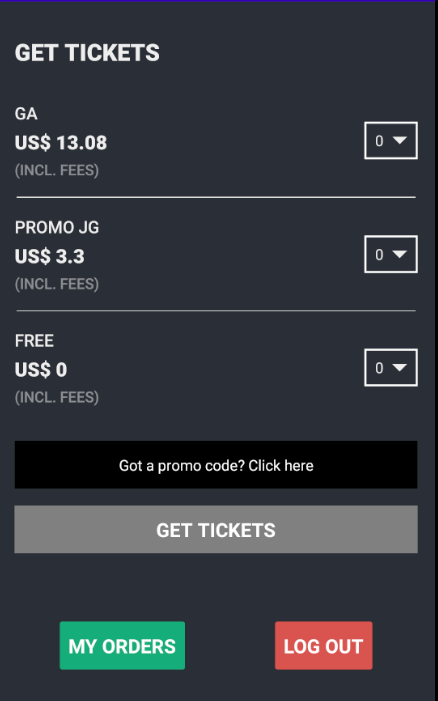
## Tickets
|
|
34
121
|
|
|
@@ -50,10 +137,96 @@ TicketFairy doesn't store any card related data, we use [Stripe](https://stripe.
|
|
|
50
137
|
|
|
51
138
|
This is shown once the payment is successfully completed, could show components to share the purchase in social media or refer it with friends to get discounts on the purchase.
|
|
52
139
|
|
|
140
|
+
## My Orders
|
|
141
|
+
|
|
142
|
+
Will show the purchased orders for the logged user.
|
|
143
|
+
|
|
144
|
+
## My Order details
|
|
145
|
+
|
|
146
|
+
Will show the details for the selected Order, it also allows the user to download the Ticket PDF.
|
|
147
|
+
|
|
53
148
|
# Usage [🚧 WIP 🚧]
|
|
54
149
|
|
|
150
|
+
## Login
|
|
151
|
+
|
|
152
|
+
Import the component from the library
|
|
153
|
+
|
|
154
|
+
```js
|
|
155
|
+
import { Login } from 'tf-checkout-react-native'
|
|
156
|
+
```
|
|
157
|
+
|
|
158
|
+
Then add it to the render function.
|
|
159
|
+
|
|
160
|
+
```js
|
|
161
|
+
<Login
|
|
162
|
+
onLoginSuccessful={handleOnLoginDialogSuccess}
|
|
163
|
+
isLoginDialogVisible={isLoginDialogVisible}
|
|
164
|
+
showLoginDialog={() => setIsLoginDialogVisible(true)}
|
|
165
|
+
hideLoginDialog={() => setIsLoginDialogVisible(false)}
|
|
166
|
+
userFirstName={loggedUserName}
|
|
167
|
+
refs={{
|
|
168
|
+
inputs?: {
|
|
169
|
+
email?: any
|
|
170
|
+
password?: any
|
|
171
|
+
}
|
|
172
|
+
button?: {
|
|
173
|
+
containerView?: any
|
|
174
|
+
touchableOpacity?: any
|
|
175
|
+
loadingView?: any
|
|
176
|
+
activityIndicator?: any
|
|
177
|
+
loadingText?: any
|
|
178
|
+
}}
|
|
179
|
+
/>
|
|
180
|
+
```
|
|
181
|
+
|
|
182
|
+
## Props
|
|
183
|
+
|
|
184
|
+
`onLoginSuccessful: (userProfile: IUserProfile, accessToken: string)`
|
|
185
|
+
When login was successful, return userProfile data and the access token to use if for future API requests.
|
|
186
|
+
|
|
187
|
+
`onLoginFailure?: (error: string)`
|
|
188
|
+
When login fails will return the error received.
|
|
189
|
+
|
|
190
|
+
`onFetchUserProfileFailure?: (error: string)`
|
|
191
|
+
This is used if the authentication worked but the fetch of the userProfile failed.
|
|
192
|
+
|
|
193
|
+
`onFetchAccessTokenFailure?: (error: string)`
|
|
194
|
+
When the fetch of the access token failed.
|
|
195
|
+
|
|
196
|
+
`isLoginDialogVisible: boolean`
|
|
197
|
+
Flag to show or hide the login dialog.
|
|
198
|
+
|
|
199
|
+
`showLoginDialog: () => void`
|
|
200
|
+
Callback to show the Login dialog.
|
|
201
|
+
|
|
202
|
+
`hideLoginDialog: () => void`
|
|
203
|
+
Callback to hide the login dialog.
|
|
204
|
+
|
|
205
|
+
`onLogoutSuccess?: () => void`
|
|
206
|
+
Use it to logout the authenticated user. It will delete all the stored data, including access token. Please make sure to update the `userFirstName` prop so the component will show the logged out view.
|
|
207
|
+
|
|
208
|
+
`onLogoutFail?: () => void`
|
|
209
|
+
Will be called if something went wrong while deleting the local data.
|
|
210
|
+
|
|
211
|
+
`styles?: ILoginViewStyles`
|
|
212
|
+
Use this to style your components.
|
|
213
|
+
|
|
214
|
+
`texts?: ILoginViewTexts`
|
|
215
|
+
Use this to change some texts that appear in this component.
|
|
216
|
+
|
|
217
|
+
`userFirstName?: string`
|
|
218
|
+
Once authenticated send the received firstName data to this prop, so the component can render the Logged in view.
|
|
219
|
+
|
|
220
|
+
# styles
|
|
221
|
+
|
|
222
|
+
<img width="899" alt="image" src="https://user-images.githubusercontent.com/66479719/154158723-864cdabd-2a0b-4a84-95ad-3176c67f7e8b.png">
|
|
223
|
+
|
|
224
|
+
---
|
|
225
|
+
|
|
55
226
|
## Tickets
|
|
56
227
|
|
|
228
|
+
|
|
229
|
+
|
|
57
230
|
Import the component from the library
|
|
58
231
|
|
|
59
232
|
```js
|
|
@@ -66,6 +239,8 @@ Then add it to the render function.
|
|
|
66
239
|
<Tickets eventId={EVENT_ID} onAddToCartSuccess={handleOnAddToCartSuccess} />
|
|
67
240
|
```
|
|
68
241
|
|
|
242
|
+
## Props
|
|
243
|
+
|
|
69
244
|
`eventId` is required in order to fetch the tickets from this event.
|
|
70
245
|
`onAddToCartSuccess` is called after the Add to Cart was completed successfully, it will return the following data:
|
|
71
246
|
|
|
@@ -79,6 +254,38 @@ Then add it to the render function.
|
|
|
79
254
|
|
|
80
255
|
You can then call the `BillingInfo` component and pass them as props in the `cartProps` prop.
|
|
81
256
|
|
|
257
|
+
## styles
|
|
258
|
+
|
|
259
|
+
Receives several props to style its sub-components.
|
|
260
|
+
|
|
261
|
+
rootContainer?: ViewStyle
|
|
262
|
+
|
|
263
|
+
container?: ViewStyle
|
|
264
|
+
|
|
265
|
+
title?: TextStyle
|
|
266
|
+
|
|
267
|
+
getTicketsButtonDisabled?: IButtonStyles
|
|
268
|
+
|
|
269
|
+
getTicketsButtonActive?: IButtonStyles
|
|
270
|
+
|
|
271
|
+
promoCode?: IPromoCodeStyles
|
|
272
|
+
|
|
273
|
+
ticketList?: ITicketListStyles
|
|
274
|
+
|
|
275
|
+
loading?: ILoadingStyles
|
|
276
|
+
|
|
277
|
+
waitingList?: IWaitingListStyles
|
|
278
|
+
|
|
279
|
+
loggedIn?: ILoggedInStyles
|
|
280
|
+
|
|
281
|
+
<img width="790" alt="props" src="https://user-images.githubusercontent.com/66479719/153976200-4bd6b254-6e80-49d6-bacc-076c59873434.png">
|
|
282
|
+
|
|
283
|
+
<img width="675" alt="Screen Shot 2022-02-14 at 19 37 40" src="https://user-images.githubusercontent.com/66479719/153976314-9b4431bd-ea2f-49db-87ab-fb7d68b02a0c.png">
|
|
284
|
+
|
|
285
|
+
<img width="682" alt="image" src="https://user-images.githubusercontent.com/66479719/154126406-101af4ca-7586-4686-9a93-88ef0375968e.png">
|
|
286
|
+
|
|
287
|
+
---
|
|
288
|
+
|
|
82
289
|
## BillingInfo
|
|
83
290
|
|
|
84
291
|
Import the component from the library
|
|
@@ -106,7 +313,9 @@ Add it to the render function.
|
|
|
106
313
|
}
|
|
107
314
|
```
|
|
108
315
|
|
|
109
|
-
|
|
316
|
+
### onCheckoutSuccess
|
|
317
|
+
|
|
318
|
+
Will be called when the user completes all the data required in the form and taps on the button. Will return the following data:
|
|
110
319
|
|
|
111
320
|
```js
|
|
112
321
|
{
|
|
@@ -119,6 +328,16 @@ Add it to the render function.
|
|
|
119
328
|
|
|
120
329
|
`hash` and `total` will be used in the `Checkout` component.
|
|
121
330
|
|
|
331
|
+
### skipBilling
|
|
332
|
+
|
|
333
|
+
Will auto-populate the checkout form with the logged user data, perform the order `Checkout` and call the callback `onCheckoutSuccess` so you can call the next component.
|
|
334
|
+
|
|
335
|
+
### canSkipHolderNames
|
|
336
|
+
|
|
337
|
+
Will skip the need of holder names information and will be automatically filled with the logged user data.
|
|
338
|
+
|
|
339
|
+
---
|
|
340
|
+
|
|
122
341
|
## Checkout
|
|
123
342
|
|
|
124
343
|
Import the component from the library
|
|
@@ -146,6 +365,10 @@ Add it to the render function.
|
|
|
146
365
|
|
|
147
366
|
`onPaymentSuccess` will handle the success in the payment process. Will return the `hash`.
|
|
148
367
|
|
|
368
|
+
If the you need to modify the card container, use the `styles.payment.cardContainer` prop. Useful if the card is to short and the zip code is not visible.
|
|
369
|
+
|
|
370
|
+
---
|
|
371
|
+
|
|
149
372
|
## PurchaseConfirmation
|
|
150
373
|
|
|
151
374
|
Import the component from the library
|
|
@@ -166,3 +389,135 @@ Add it to the render function.
|
|
|
166
389
|
`orderHash` the `hash` returned in the `BillingInfo` component.
|
|
167
390
|
|
|
168
391
|
`onComplete` to handle the completion of the flow. Here you can handle the unmount of the component or navigate to another screen.
|
|
392
|
+
|
|
393
|
+
---
|
|
394
|
+
|
|
395
|
+
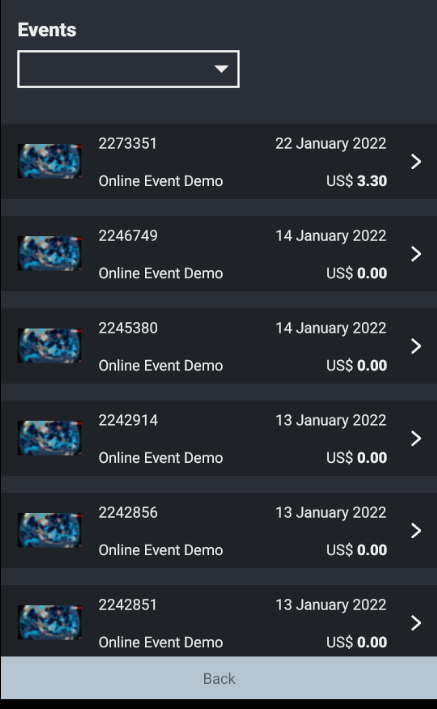
## MyOrders
|
|
396
|
+
|
|
397
|
+
|
|
398
|
+
|
|
399
|
+
If there is a valid session, there will appear a button to access `MyOrders` in the `Tickets` component.
|
|
400
|
+
|
|
401
|
+
Import the component from the library.
|
|
402
|
+
|
|
403
|
+
```js
|
|
404
|
+
import { MyOrders } from 'tf-checkout-react-native'
|
|
405
|
+
```
|
|
406
|
+
|
|
407
|
+
There is no need to pass any data prop to it.
|
|
408
|
+
|
|
409
|
+
### Props
|
|
410
|
+
|
|
411
|
+
`onSelectOrder` handler to know which order the user has selected. Will return an object with following structure:
|
|
412
|
+
|
|
413
|
+
```js
|
|
414
|
+
order: {
|
|
415
|
+
header: {
|
|
416
|
+
isReferralDisabled: boolean
|
|
417
|
+
shareLink: string
|
|
418
|
+
total: string
|
|
419
|
+
salesReferred: string
|
|
420
|
+
},
|
|
421
|
+
items: [
|
|
422
|
+
{
|
|
423
|
+
name: string
|
|
424
|
+
currency: string
|
|
425
|
+
price: string
|
|
426
|
+
discount: string
|
|
427
|
+
quantity: string
|
|
428
|
+
total: string
|
|
429
|
+
},
|
|
430
|
+
{...}
|
|
431
|
+
],
|
|
432
|
+
tickets: [
|
|
433
|
+
{
|
|
434
|
+
hash: string
|
|
435
|
+
ticketType: string
|
|
436
|
+
holderName: string
|
|
437
|
+
status: string
|
|
438
|
+
pdfLink: string
|
|
439
|
+
},
|
|
440
|
+
{...}
|
|
441
|
+
]
|
|
442
|
+
}
|
|
443
|
+
```
|
|
444
|
+
|
|
445
|
+
`styles` to customize the component look & feel.
|
|
446
|
+
|
|
447
|
+
`onFetchOrderDetailsFail` if the fetching fails, you can use this to know what happened.
|
|
448
|
+
|
|
449
|
+
---
|
|
450
|
+
|
|
451
|
+
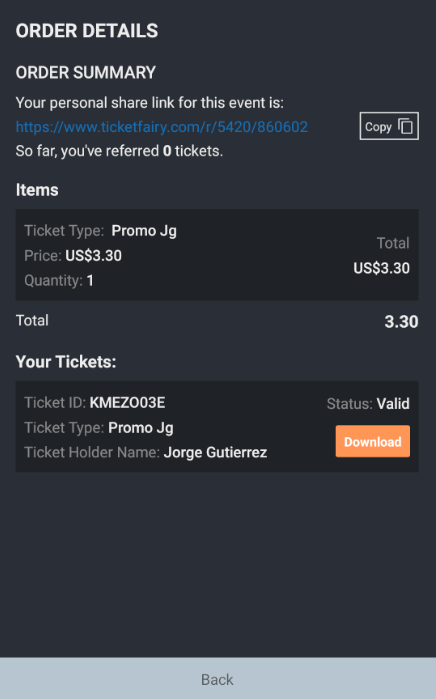
## MyOrderDetails
|
|
452
|
+
|
|
453
|
+
|
|
454
|
+
|
|
455
|
+
When user selects an order from the `MyOrders`component, will show it details.
|
|
456
|
+
|
|
457
|
+
Import the component from the library.
|
|
458
|
+
|
|
459
|
+
```js
|
|
460
|
+
import { MyOrderDetails } from 'tf-checkout-react-native'
|
|
461
|
+
```
|
|
462
|
+
|
|
463
|
+
### Props
|
|
464
|
+
|
|
465
|
+
`data` receives same data as the one of the object received from the `onSelectOrder` handler in `MyOrders`component:
|
|
466
|
+
|
|
467
|
+
```js
|
|
468
|
+
order: {
|
|
469
|
+
header: {
|
|
470
|
+
isReferralDisabled: boolean
|
|
471
|
+
shareLink: string
|
|
472
|
+
total: string
|
|
473
|
+
salesReferred: string
|
|
474
|
+
},
|
|
475
|
+
items: [
|
|
476
|
+
{
|
|
477
|
+
name: string
|
|
478
|
+
currency: string
|
|
479
|
+
price: string
|
|
480
|
+
discount: string
|
|
481
|
+
quantity: string
|
|
482
|
+
total: string
|
|
483
|
+
},
|
|
484
|
+
{...}
|
|
485
|
+
],
|
|
486
|
+
tickets: [
|
|
487
|
+
{
|
|
488
|
+
hash: string
|
|
489
|
+
ticketType: string
|
|
490
|
+
holderName: string
|
|
491
|
+
status: string
|
|
492
|
+
pdfLink: string
|
|
493
|
+
},
|
|
494
|
+
{...}
|
|
495
|
+
]
|
|
496
|
+
}
|
|
497
|
+
```
|
|
498
|
+
|
|
499
|
+
`styles` optional, to customize the component look & feel.
|
|
500
|
+
`texts` optional, to customize the texts that shows on the labels.
|
|
501
|
+
|
|
502
|
+
```js
|
|
503
|
+
texts?: {
|
|
504
|
+
title?: string
|
|
505
|
+
subTitle?: string
|
|
506
|
+
referralLink?: string
|
|
507
|
+
listItem?: {
|
|
508
|
+
title?: string
|
|
509
|
+
ticketType?: string
|
|
510
|
+
price?: string
|
|
511
|
+
quantity?: string
|
|
512
|
+
total?: string
|
|
513
|
+
}
|
|
514
|
+
ticketItem?: {
|
|
515
|
+
title?: string
|
|
516
|
+
ticketId?: string
|
|
517
|
+
ticketType?: string
|
|
518
|
+
ticketHolder?: string
|
|
519
|
+
status?: string
|
|
520
|
+
download?: string
|
|
521
|
+
}
|
|
522
|
+
}
|
|
523
|
+
```
|
|
Binary file
|
package/lib/api/ApiClient.d.ts
CHANGED
|
@@ -1,7 +1,7 @@
|
|
|
1
1
|
import { AxiosResponse } from 'axios';
|
|
2
2
|
import { IWaitingListFields } from '../components/waitingList/types';
|
|
3
3
|
import { IUserProfile } from '../types';
|
|
4
|
-
import { IAuthorizeResponse, ICheckoutResponse, IClientRequest, IEventResponse, IFetchTicketsResponse, IMyOrderDetailsResponse, IMyOrdersResponse, IOrderReviewResponse, IRegisterNewUserResponse } from './types';
|
|
4
|
+
import { IAuthorizeResponse, ICartResponse, ICheckoutResponse, IClientRequest, IEventResponse, IFetchTicketsResponse, IFreeRegistrationResponse, IMyOrderDetailsResponse, IMyOrdersResponse, IOrderReviewResponse, IRegisterNewUserResponse } from './types';
|
|
5
5
|
export declare const Client: IClientRequest;
|
|
6
6
|
export declare const setCustomHeader: (response: any) => void;
|
|
7
7
|
export declare const setAccessTokenHandler: (accessToken: string) => Promise<void>;
|
|
@@ -19,7 +19,7 @@ export declare const addToWaitingList: (id: number, values: IWaitingListFields)
|
|
|
19
19
|
addToWaitingListError: string;
|
|
20
20
|
addToWaitingListData: any;
|
|
21
21
|
}>;
|
|
22
|
-
export declare const fetchMyOrders: () => Promise<IMyOrdersResponse>;
|
|
22
|
+
export declare const fetchMyOrders: (filter?: string) => Promise<IMyOrdersResponse>;
|
|
23
23
|
export declare const fetchOrderDetails: (orderId: string) => Promise<{
|
|
24
24
|
orderDetailsError: string;
|
|
25
25
|
orderDetailsData: IMyOrderDetailsResponse | undefined;
|
|
@@ -30,6 +30,8 @@ export declare const addToCart: (id: string | number, data: any) => Promise<{
|
|
|
30
30
|
isBillingRequired: boolean;
|
|
31
31
|
isNameRequired: any;
|
|
32
32
|
isAgeRequired: any;
|
|
33
|
+
isPhoneRequired: any;
|
|
34
|
+
minimumAge: any;
|
|
33
35
|
} | undefined;
|
|
34
36
|
error: undefined;
|
|
35
37
|
}>;
|
|
@@ -43,8 +45,8 @@ export declare const fetchStates: (countryId: string) => Promise<{
|
|
|
43
45
|
data: any;
|
|
44
46
|
}>;
|
|
45
47
|
export declare const fetchCart: () => Promise<{
|
|
46
|
-
|
|
47
|
-
|
|
48
|
+
cartError: string;
|
|
49
|
+
cartData: ICartResponse;
|
|
48
50
|
}>;
|
|
49
51
|
export declare const checkoutOrder: (data: any, accessToken: string) => Promise<ICheckoutResponse>;
|
|
50
52
|
export declare const fetchEventConditions: (eventId: string) => Promise<{
|
|
@@ -56,6 +58,7 @@ export declare const postOnPaymentSuccess: (orderHash: string) => Promise<{
|
|
|
56
58
|
error: string;
|
|
57
59
|
data: any;
|
|
58
60
|
}>;
|
|
61
|
+
export declare const postOnFreeRegistration: (orderHash: string) => Promise<IFreeRegistrationResponse>;
|
|
59
62
|
export declare const fetchPurchaseConfirmation: (orderHash: string) => Promise<{
|
|
60
63
|
error: undefined;
|
|
61
64
|
data: void | AxiosResponse<any, any>;
|