testdriverai 6.1.2 → 6.1.3-canary.4aa7788.0
This diff represents the content of publicly available package versions that have been released to one of the supported registries. The information contained in this diff is provided for informational purposes only and reflects changes between package versions as they appear in their respective public registries.
- package/agent/index.js +2 -2
- package/agent/interface.js +4 -5
- package/docs/apps/tauri-apps.mdx +23 -53
- package/docs/getting-started/playwright.mdx +13 -16
- package/package.json +1 -1
package/agent/index.js
CHANGED
|
@@ -891,7 +891,7 @@ commands:
|
|
|
891
891
|
// based on the current state of the system (primarily the current screenshot)
|
|
892
892
|
// it will generate files that contain only "prompts"
|
|
893
893
|
// @todo revit the generate command
|
|
894
|
-
async generate(count = 1) {
|
|
894
|
+
async generate(count = 1, prompt = null) {
|
|
895
895
|
this.emitter.emit(events.log.debug, `generate called with count: ${count}`);
|
|
896
896
|
|
|
897
897
|
await this.runLifecycle("prerun");
|
|
@@ -909,7 +909,7 @@ commands:
|
|
|
909
909
|
let message = await this.sdk.req(
|
|
910
910
|
"generate",
|
|
911
911
|
{
|
|
912
|
-
prompt: "make sure to do a spellcheck",
|
|
912
|
+
prompt: prompt || "make sure to do a spellcheck",
|
|
913
913
|
image,
|
|
914
914
|
mousePosition: mouse,
|
|
915
915
|
activeWindow: activeWindow,
|
package/agent/interface.js
CHANGED
|
@@ -200,8 +200,8 @@ function createCommandDefinitions(agent) {
|
|
|
200
200
|
generate: {
|
|
201
201
|
description: "Generate test files based on current screen state",
|
|
202
202
|
args: {
|
|
203
|
-
|
|
204
|
-
description: "
|
|
203
|
+
prompt: Args.string({
|
|
204
|
+
description: "Multi-line text prompt describing what to generate",
|
|
205
205
|
required: false,
|
|
206
206
|
}),
|
|
207
207
|
},
|
|
@@ -227,9 +227,8 @@ function createCommandDefinitions(agent) {
|
|
|
227
227
|
}),
|
|
228
228
|
},
|
|
229
229
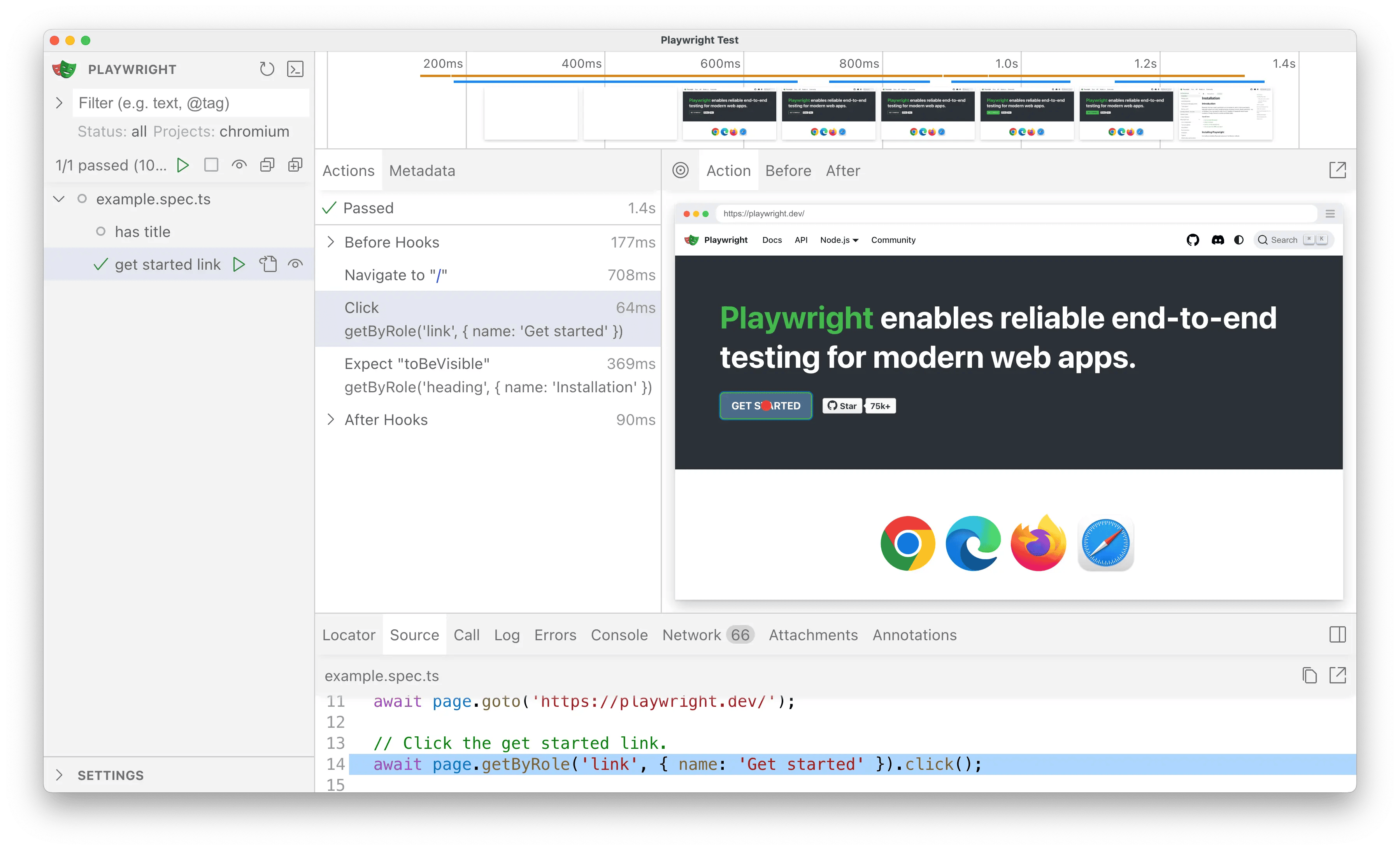
|
handler: async (args, flags) => {
|
|
230
|
-
//
|
|
231
|
-
|
|
232
|
-
await agent.generate(flags.count || 3);
|
|
230
|
+
// Call generate with the count and prompt
|
|
231
|
+
await agent.generate(flags.count || 3, args.prompt);
|
|
233
232
|
},
|
|
234
233
|
},
|
|
235
234
|
};
|
package/docs/apps/tauri-apps.mdx
CHANGED
|
@@ -7,18 +7,17 @@ icon: "https://tauri.app/favicon.svg"
|
|
|
7
7
|
|
|
8
8
|
> [Tauri](https://tauri.app/) is a framework for building tiny, fast binaries for all major desktop and mobile platforms. Developers can integrate any frontend framework that compiles to HTML, JavaScript, and CSS for building their user experience while leveraging languages such as Rust, Swift, and Kotlin for backend logic when needed.
|
|
9
9
|
>
|
|
10
|
-
>
|
|
10
|
+
> \
|
|
11
|
+
> – [https://tauri.app/start](https://tauri.app/start/)
|
|
11
12
|
|
|
12
13
|
## Testing Tauri apps with TestDriver
|
|
13
14
|
|
|
14
|
-
In this guide, we'll leverage [Playwright](https://playwright.dev/) and the
|
|
15
|
-
[TestDriver Playwright SDK](/getting-started/playwright) to convert the [Tauri Quick Start](https://tauri.app/start/create-project/)
|
|
16
|
-
to TestDriver's selectorless, Vision AI.
|
|
15
|
+
In this guide, we'll leverage [Playwright](https://playwright.dev/) and the [TestDriver Playwright SDK](/getting-started/playwright) to convert the [Tauri Quick Start](https://tauri.app/start/create-project/) to TestDriver's selectorless, Vision AI.
|
|
17
16
|
|
|
18
|
-
<
|
|
17
|
+
<Info>
|
|
19
18
|
View Source:
|
|
20
|
-
|
|
21
|
-
</
|
|
19
|
+
https://github.com/testdriverai/demo-tauri-app
|
|
20
|
+
</Info>
|
|
22
21
|
|
|
23
22
|
### Requirements
|
|
24
23
|
|
|
@@ -28,11 +27,14 @@ To start testing your Tauri app with TestDriver, you need the following:
|
|
|
28
27
|
<Accordion title="Create a TestDriver account">
|
|
29
28
|
<Steps>
|
|
30
29
|
<Step title="Create a TestDriver Account">
|
|
31
|
-
You will need a [TestDriver
|
|
32
|
-
|
|
30
|
+
You will need a [Free TestDriver Account](https://app.testdriver.ai/team) to get an API key.
|
|
31
|
+
|
|
32
|
+
<Card title="Sign Up for TestDriver" icon="user-plus" horizontal href="https://app.testdriver.ai/team">
|
|
33
|
+
|
|
34
|
+
</Card>
|
|
33
35
|
</Step>
|
|
34
36
|
<Step title="Set up your environment">
|
|
35
|
-
Copy your API key from [
|
|
37
|
+
Copy your API key from [your TestDriver dashboard](https://app.testdriver.ai/team), and set it as an environment variable.
|
|
36
38
|
|
|
37
39
|
<Tabs>
|
|
38
40
|
<Tab title="macOS / Linux">
|
|
@@ -51,27 +53,20 @@ To start testing your Tauri app with TestDriver, you need the following:
|
|
|
51
53
|
</Tab>
|
|
52
54
|
</Tabs>
|
|
53
55
|
</Step>
|
|
54
|
-
|
|
55
56
|
</Steps>
|
|
56
|
-
|
|
57
57
|
</Accordion>
|
|
58
|
-
|
|
59
58
|
<Accordion title="Create a Tauri project">
|
|
60
|
-
|
|
61
59
|
<Note>
|
|
62
60
|
Follow Tauri's [Create a Project](https://tauri.app/start/create-project/)
|
|
63
61
|
guide.
|
|
64
62
|
</Note>
|
|
65
|
-
|
|
66
63
|
</Accordion>
|
|
67
|
-
|
|
68
|
-
<Accordion title="Create a Playwright project">
|
|
64
|
+
<Accordion title="Create a Playwright project">
|
|
69
65
|
<Info>
|
|
70
66
|
This is a condensed version of [Playwright's Installation Instructions](https://playwright.dev/docs/intro).
|
|
71
67
|
|
|
72
68
|
**If you're new to Playwright, you should follow their guide first.**
|
|
73
69
|
</Info>
|
|
74
|
-
|
|
75
70
|
In your Tauri project, run:
|
|
76
71
|
|
|
77
72
|
<Tabs>
|
|
@@ -103,9 +98,7 @@ To start testing your Tauri app with TestDriver, you need the following:
|
|
|
103
98
|
✔ Install Playwright browsers (can be done manually via 'npx playwright install')? (Y/n)
|
|
104
99
|
> Y
|
|
105
100
|
```
|
|
106
|
-
|
|
107
101
|
</Accordion>
|
|
108
|
-
|
|
109
102
|
<Accordion title="Install the TestDriver Playwright SDK">
|
|
110
103
|
`@testdriver.ai/playwright` is an AI-powered extension of `@playwright/test`.
|
|
111
104
|
|
|
@@ -126,9 +119,7 @@ To start testing your Tauri app with TestDriver, you need the following:
|
|
|
126
119
|
```
|
|
127
120
|
</Tab>
|
|
128
121
|
</Tabs>
|
|
129
|
-
|
|
130
122
|
</Accordion>
|
|
131
|
-
|
|
132
123
|
</AccordionGroup>
|
|
133
124
|
|
|
134
125
|
## Testing the Tauri Web App
|
|
@@ -139,7 +130,6 @@ First, we need to modify the default Playwright configuration and our Tauri proj
|
|
|
139
130
|
|
|
140
131
|
<Steps>
|
|
141
132
|
<Step title="Configure Playwright to start the Tauri frontend">
|
|
142
|
-
|
|
143
133
|
In the `playwright.config.ts` file, we'll configure the [`webServer`](https://playwright.dev/docs/test-webserver)
|
|
144
134
|
to start the Tauri frontend for Playwright to test against:
|
|
145
135
|
|
|
@@ -156,11 +146,8 @@ First, we need to modify the default Playwright configuration and our Tauri proj
|
|
|
156
146
|
},
|
|
157
147
|
});
|
|
158
148
|
```
|
|
159
|
-
|
|
160
149
|
</Step>
|
|
161
|
-
|
|
162
150
|
<Step title="Mock Tauri APIs">
|
|
163
|
-
|
|
164
151
|
Since we're testing the Tauri frontend, we need to [mock IPC Requests](https://tauri.app/develop/tests/mocking/)
|
|
165
152
|
to simulate `invoke` calls to the Rust backend:
|
|
166
153
|
|
|
@@ -180,55 +167,43 @@ First, we need to modify the default Playwright configuration and our Tauri proj
|
|
|
180
167
|
```
|
|
181
168
|
|
|
182
169
|
We only need to do this once, as we'll be accessing `window.mockIPC` in our tests.
|
|
183
|
-
|
|
184
170
|
</Step>
|
|
185
|
-
|
|
186
171
|
<Step title="Create a new test file">
|
|
187
172
|
Create a new file (e.g. `tests/testdriver.spec.ts`) with:
|
|
188
173
|
|
|
189
174
|
```typescript tests/testdriver.spec.ts
|
|
190
175
|
import type { mockIPC } from "@tauri-apps/api/mocks";
|
|
191
176
|
import { expect, test } from "@playwright/test";
|
|
192
|
-
|
|
177
|
+
|
|
193
178
|
test.beforeEach(async ({ page }) => {
|
|
194
179
|
await page.goto("http://localhost:1420");
|
|
195
180
|
});
|
|
196
|
-
|
|
181
|
+
|
|
197
182
|
test("should have title", async ({ page }) => {
|
|
198
183
|
await expect(page).toHaveTitle("Tauri + React + TypeScript");
|
|
199
184
|
});
|
|
200
185
|
```
|
|
201
|
-
|
|
202
186
|
</Step>
|
|
203
|
-
|
|
204
187
|
<Step title="Run Playwright in UI Mode">
|
|
205
|
-
|
|
206
188
|
Now we're ready to run Playwright and start working on our tests:
|
|
207
189
|
|
|
208
190
|
<Tabs>
|
|
209
191
|
<Tab title="npm">
|
|
210
|
-
|
|
211
192
|
```bash
|
|
212
193
|
npx playwright test --ui
|
|
213
194
|
```
|
|
214
|
-
|
|
215
195
|
</Tab>
|
|
216
196
|
<Tab title="yarn">
|
|
217
|
-
|
|
218
197
|
```bash
|
|
219
198
|
yarn playwright test --ui
|
|
220
199
|
```
|
|
221
|
-
|
|
222
200
|
</Tab>
|
|
223
201
|
<Tab title="pnpm">
|
|
224
|
-
|
|
225
202
|
```bash
|
|
226
203
|
pnpm exec playwright test --ui
|
|
227
204
|
```
|
|
228
|
-
|
|
229
205
|
</Tab>
|
|
230
206
|
</Tabs>
|
|
231
|
-
|
|
232
207
|
|
|
233
208
|
|
|
234
209
|
Click the <Icon icon="play" /> button to successfully run the tests in the UI.
|
|
@@ -236,9 +211,7 @@ First, we need to modify the default Playwright configuration and our Tauri proj
|
|
|
236
211
|
<Tip>
|
|
237
212
|
Click the <Icon icon="eye" /> button to automatically re-run tests on save.
|
|
238
213
|
</Tip>
|
|
239
|
-
|
|
240
214
|
</Step>
|
|
241
|
-
|
|
242
215
|
</Steps>
|
|
243
216
|
|
|
244
217
|
### Usage
|
|
@@ -306,8 +279,7 @@ With TestDriver, we can skip the test implementation **entirely** and let AI per
|
|
|
306
279
|
|
|
307
280
|
<Steps>
|
|
308
281
|
<Step title="Mock the `greet` call">
|
|
309
|
-
|
|
310
|
-
First, we need to [mock our `invoke` calls](https://tauri.app/develop/tests/mocking/#ipc-requests),
|
|
282
|
+
First, we need to [`mock our invoke calls`](https://tauri.app/develop/tests/mocking/#ipc-requests),
|
|
311
283
|
since we're testing the frontend behavior and not our Tauri backend:
|
|
312
284
|
|
|
313
285
|
```typescript tests/testdriver.spec.ts
|
|
@@ -328,11 +300,8 @@ With TestDriver, we can skip the test implementation **entirely** and let AI per
|
|
|
328
300
|
});
|
|
329
301
|
});
|
|
330
302
|
```
|
|
331
|
-
|
|
332
303
|
</Step>
|
|
333
|
-
|
|
334
304
|
<Step title="Add an Agentic Test">
|
|
335
|
-
|
|
336
305
|
Next, wrap a _prompt_ in `test.agent` to perform the test:
|
|
337
306
|
|
|
338
307
|
```typescript tests/testdriver.spec.ts
|
|
@@ -344,7 +313,6 @@ With TestDriver, we can skip the test implementation **entirely** and let AI per
|
|
|
344
313
|
`);
|
|
345
314
|
});
|
|
346
315
|
```
|
|
347
|
-
|
|
348
316
|
</Step>
|
|
349
317
|
</Steps>
|
|
350
318
|
|
|
@@ -376,9 +344,10 @@ We can use TestDriver and natural language to test our Tauri desktop app:
|
|
|
376
344
|
</Tab>
|
|
377
345
|
</Tabs>
|
|
378
346
|
</Step>
|
|
379
|
-
|
|
380
347
|
<Step title="Continued Reading">
|
|
381
|
-
<Note>
|
|
348
|
+
<Note>
|
|
349
|
+
See [Desktop Apps](/apps/desktop-apps) for more information.
|
|
350
|
+
</Note>
|
|
382
351
|
</Step>
|
|
383
352
|
</Steps>
|
|
384
353
|
|
|
@@ -406,8 +375,9 @@ We can use TestDriver and natural language to test our Tauri iOS app:
|
|
|
406
375
|
</Tab>
|
|
407
376
|
</Tabs>
|
|
408
377
|
</Step>
|
|
409
|
-
|
|
410
378
|
<Step title="Continued Reading">
|
|
411
|
-
<Note>
|
|
379
|
+
<Note>
|
|
380
|
+
See [Mobile Apps](/apps/mobile-apps) for more information.
|
|
381
|
+
</Note>
|
|
412
382
|
</Step>
|
|
413
|
-
</Steps>
|
|
383
|
+
</Steps>
|
|
@@ -47,8 +47,11 @@ test.describe("get started link", () => {
|
|
|
47
47
|
|
|
48
48
|
<Steps>
|
|
49
49
|
<Step title="Create a TestDriver Account">
|
|
50
|
-
You will need a [TestDriver
|
|
51
|
-
|
|
50
|
+
You will need a [Free TestDriver Account](https://app.testdriver.ai/team) to get an API key.
|
|
51
|
+
|
|
52
|
+
<Card title="Sign Up for TestDriver" icon="user-plus" horizontal href="https://app.testdriver.ai/team">
|
|
53
|
+
|
|
54
|
+
</Card>
|
|
52
55
|
</Step>
|
|
53
56
|
<Step title="Set up your environment">
|
|
54
57
|
Copy your API key from [the TestDriver dashboard](https://app.testdriver.ai/team), and set it as an environment variable.
|
|
@@ -65,7 +68,6 @@ test.describe("get started link", () => {
|
|
|
65
68
|
```
|
|
66
69
|
</Tab>
|
|
67
70
|
</Tabs>
|
|
68
|
-
|
|
69
71
|
</Step>
|
|
70
72
|
</Steps>
|
|
71
73
|
|
|
@@ -129,7 +131,6 @@ test.describe("get started link", () => {
|
|
|
129
131
|
```
|
|
130
132
|
</Tab>
|
|
131
133
|
</Tabs>
|
|
132
|
-
|
|
133
134
|
</Step>
|
|
134
135
|
</Steps>
|
|
135
136
|
|
|
@@ -156,7 +157,6 @@ test.describe("get started link", () => {
|
|
|
156
157
|
```
|
|
157
158
|
</Tab>
|
|
158
159
|
</Tabs>
|
|
159
|
-
|
|
160
160
|
</Step>
|
|
161
161
|
<Step title="Run Playwright">
|
|
162
162
|
Before we start using TestDriver in our tests, run Playwright in [UI Mode](https://playwright.dev/docs/test-ui-mode):
|
|
@@ -182,7 +182,6 @@ test.describe("get started link", () => {
|
|
|
182
182
|
|
|
183
183
|
Clicking the ▶️ button should successfully run the tests in the UI,
|
|
184
184
|
just as they did before with `playwright test` in the CLI.
|
|
185
|
-
|
|
186
185
|
</Step>
|
|
187
186
|
<Step title="Import TestDriver">
|
|
188
187
|
For the sake of simplicity, we'll be working with one test file for now.
|
|
@@ -200,7 +199,6 @@ test.describe("get started link", () => {
|
|
|
200
199
|
<Tip>
|
|
201
200
|
Click the <Icon icon="eye" /> button to automatically re-run tests on save.
|
|
202
201
|
</Tip>
|
|
203
|
-
|
|
204
202
|
</Step>
|
|
205
203
|
</Steps>
|
|
206
204
|
|
|
@@ -268,15 +266,14 @@ Now, our test uses natural language to both describe & locate the element.
|
|
|
268
266
|
<Tip>
|
|
269
267
|
In the example above, you can still use Playwright to assert that the element is indeed a link for accessibility:
|
|
270
268
|
|
|
271
|
-
```typescript tests/example.spec.ts icon=square-js
|
|
272
|
-
const link = await testdriver(page).locate("Get started link");
|
|
273
|
-
// [!code ++]
|
|
274
|
-
expect(link).toHaveRole("link");
|
|
275
|
-
await link.click();
|
|
276
|
-
```
|
|
277
|
-
|
|
278
|
-
This way you can write user-centric tests _and_ validate the implementation.
|
|
269
|
+
```typescript tests/example.spec.ts icon=square-js
|
|
270
|
+
const link = await testdriver(page).locate("Get started link");
|
|
271
|
+
// [!code ++]
|
|
272
|
+
expect(link).toHaveRole("link");
|
|
273
|
+
await link.click();
|
|
274
|
+
```
|
|
279
275
|
|
|
276
|
+
This way you can write user-centric tests _and_ validate the implementation.
|
|
280
277
|
</Tip>
|
|
281
278
|
|
|
282
279
|
### Performing actions with `testdriver.act`
|
|
@@ -335,4 +332,4 @@ but replaced the `test` itself with `test.agent`.
|
|
|
335
332
|
|
|
336
333
|
## Conclusion
|
|
337
334
|
|
|
338
|
-
With `@testdriver.ai/playwright`, you can use as much or as little of Playwright's _or_ TestDriver's API as you need to validate correctness. It's up to you!
|
|
335
|
+
With `@testdriver.ai/playwright`, you can use as much or as little of Playwright's _or_ TestDriver's API as you need to validate correctness. It's up to you!
|