testdriverai 6.1.1-canary.df0c552.0 → 6.1.1
This diff represents the content of publicly available package versions that have been released to one of the supported registries. The information contained in this diff is provided for informational purposes only and reflects changes between package versions as they appear in their respective public registries.
- package/docs/apps/tauri-apps.mdx +413 -0
- package/docs/docs.json +2 -1
- package/docs/styles.css +10 -1
- package/package.json +1 -1
|
@@ -0,0 +1,413 @@
|
|
|
1
|
+
---
|
|
2
|
+
title: "Tauri Apps"
|
|
3
|
+
sidebarTitle: "Tauri Apps"
|
|
4
|
+
description: "Testing Tauri Apps with TestDriver"
|
|
5
|
+
icon: "https://tauri.app/favicon.svg"
|
|
6
|
+
---
|
|
7
|
+
|
|
8
|
+
> [Tauri](https://tauri.app/) is a framework for building tiny, fast binaries for all major desktop and mobile platforms. Developers can integrate any frontend framework that compiles to HTML, JavaScript, and CSS for building their user experience while leveraging languages such as Rust, Swift, and Kotlin for backend logic when needed.
|
|
9
|
+
>
|
|
10
|
+
> <br />– [https://tauri.app/start](https://tauri.app/start/)
|
|
11
|
+
|
|
12
|
+
## Testing Tauri apps with TestDriver
|
|
13
|
+
|
|
14
|
+
In this guide, we'll leverage [Playwright](https://playwright.dev/) and the
|
|
15
|
+
[TestDriver Playwright SDK](/getting-started/playwright) to convert the [Tauri Quick Start](https://tauri.app/start/create-project/)
|
|
16
|
+
to TestDriver's selectorless, Vision AI.
|
|
17
|
+
|
|
18
|
+
<Callout icon="code">
|
|
19
|
+
View Source:
|
|
20
|
+
[https://github.com/testdriverai/demo-tauri-app](https://github.com/testdriverai/demo-tauri-app)
|
|
21
|
+
</Callout>
|
|
22
|
+
|
|
23
|
+
### Requirements
|
|
24
|
+
|
|
25
|
+
To start testing your Tauri app with TestDriver, you need the following:
|
|
26
|
+
|
|
27
|
+
<AccordionGroup>
|
|
28
|
+
<Accordion title="Create a TestDriver account">
|
|
29
|
+
<Steps>
|
|
30
|
+
<Step title="Create a TestDriver Account">
|
|
31
|
+
You will need a [TestDriver Pro](https://app.testdriver.ai/team) account (\$20/month) to get an API key.
|
|
32
|
+
<Card title="Sign Up for TestDriver" icon="user-plus" horizontal href="https://app.testdriver.ai/team" />
|
|
33
|
+
</Step>
|
|
34
|
+
<Step title="Set up your environment">
|
|
35
|
+
Copy your API key from [the TestDriver dashboard](https://app.testdriver.ai/team), and set it as an environment variable.
|
|
36
|
+
|
|
37
|
+
<Tabs>
|
|
38
|
+
<Tab title="macOS / Linux">
|
|
39
|
+
Export an environment variable on macOS or Linux systems:
|
|
40
|
+
|
|
41
|
+
```bash
|
|
42
|
+
export TD_API_KEY="your_api_key_here"
|
|
43
|
+
```
|
|
44
|
+
</Tab>
|
|
45
|
+
<Tab title="Windows">
|
|
46
|
+
Export an environment variable in PowerShell:
|
|
47
|
+
|
|
48
|
+
```powershell
|
|
49
|
+
setx TD_API_KEY "your_api_key_here"
|
|
50
|
+
```
|
|
51
|
+
</Tab>
|
|
52
|
+
</Tabs>
|
|
53
|
+
</Step>
|
|
54
|
+
|
|
55
|
+
</Steps>
|
|
56
|
+
|
|
57
|
+
</Accordion>
|
|
58
|
+
|
|
59
|
+
<Accordion title="Create a Tauri project">
|
|
60
|
+
|
|
61
|
+
<Note>
|
|
62
|
+
Follow Tauri's [Create a Project](https://tauri.app/start/create-project/)
|
|
63
|
+
guide.
|
|
64
|
+
</Note>
|
|
65
|
+
|
|
66
|
+
</Accordion>
|
|
67
|
+
|
|
68
|
+
<Accordion title="Create a Playwright project">
|
|
69
|
+
<Info>
|
|
70
|
+
This is a condensed version of [Playwright's Installation Instructions](https://playwright.dev/docs/intro).
|
|
71
|
+
|
|
72
|
+
**If you're new to Playwright, you should follow their guide first.**
|
|
73
|
+
</Info>
|
|
74
|
+
|
|
75
|
+
In your Tauri project, run:
|
|
76
|
+
|
|
77
|
+
<Tabs>
|
|
78
|
+
<Tab title="npm">
|
|
79
|
+
```bash
|
|
80
|
+
npm init playwright@latest
|
|
81
|
+
```
|
|
82
|
+
</Tab>
|
|
83
|
+
<Tab title="yarn">
|
|
84
|
+
```bash
|
|
85
|
+
yarn create playwright
|
|
86
|
+
```
|
|
87
|
+
</Tab>
|
|
88
|
+
<Tab title="pnpm">
|
|
89
|
+
```bash
|
|
90
|
+
pnpm create playwright
|
|
91
|
+
```
|
|
92
|
+
</Tab>
|
|
93
|
+
</Tabs>
|
|
94
|
+
Select the following options when prompted:
|
|
95
|
+
|
|
96
|
+
```console
|
|
97
|
+
✔ Do you want to use TypeScript or JavaScript?
|
|
98
|
+
> TypeScript
|
|
99
|
+
✔ Where to put your end-to-end tests?
|
|
100
|
+
> tests
|
|
101
|
+
✔ Add a GitHub Actions workflow? (y/N)
|
|
102
|
+
> N
|
|
103
|
+
✔ Install Playwright browsers (can be done manually via 'npx playwright install')? (Y/n)
|
|
104
|
+
> Y
|
|
105
|
+
```
|
|
106
|
+
|
|
107
|
+
</Accordion>
|
|
108
|
+
|
|
109
|
+
<Accordion title="Install the TestDriver Playwright SDK">
|
|
110
|
+
`@testdriver.ai/playwright` is an AI-powered extension of `@playwright/test`.
|
|
111
|
+
|
|
112
|
+
<Tabs>
|
|
113
|
+
<Tab title="npm">
|
|
114
|
+
```bash
|
|
115
|
+
npm install @testdriver.ai/playwright
|
|
116
|
+
```
|
|
117
|
+
</Tab>
|
|
118
|
+
<Tab title="yarn">
|
|
119
|
+
```bash
|
|
120
|
+
yarn add @testdriver.ai/playwright
|
|
121
|
+
```
|
|
122
|
+
</Tab>
|
|
123
|
+
<Tab title="pnpm">
|
|
124
|
+
```bash
|
|
125
|
+
pnpm add @testdriver.ai/playwright
|
|
126
|
+
```
|
|
127
|
+
</Tab>
|
|
128
|
+
</Tabs>
|
|
129
|
+
|
|
130
|
+
</Accordion>
|
|
131
|
+
|
|
132
|
+
</AccordionGroup>
|
|
133
|
+
|
|
134
|
+
## Testing the Tauri Web App
|
|
135
|
+
|
|
136
|
+
### Setup
|
|
137
|
+
|
|
138
|
+
First, we need to modify the default Playwright configuration and our Tauri project to work together:
|
|
139
|
+
|
|
140
|
+
<Steps>
|
|
141
|
+
<Step title="Configure Playwright to start the Tauri frontend">
|
|
142
|
+
|
|
143
|
+
In the `playwright.config.ts` file, we'll configure the [`webServer`](https://playwright.dev/docs/test-webserver)
|
|
144
|
+
to start the Tauri frontend for Playwright to test against:
|
|
145
|
+
|
|
146
|
+
```typescript playwright.config.ts
|
|
147
|
+
/* Run your local dev server before starting the tests */
|
|
148
|
+
// [!code ++:8]
|
|
149
|
+
webServer: {
|
|
150
|
+
command: "npm run dev",
|
|
151
|
+
url: "http://localhost:1420",
|
|
152
|
+
reuseExistingServer: !process.env.CI,
|
|
153
|
+
env: {
|
|
154
|
+
VITE_PLAYWRIGHT: "true",
|
|
155
|
+
},
|
|
156
|
+
},
|
|
157
|
+
});
|
|
158
|
+
```
|
|
159
|
+
|
|
160
|
+
</Step>
|
|
161
|
+
|
|
162
|
+
<Step title="Mock Tauri APIs">
|
|
163
|
+
|
|
164
|
+
Since we're testing the Tauri frontend, we need to [mock IPC Requests](https://tauri.app/develop/tests/mocking/)
|
|
165
|
+
to simulate `invoke` calls to the Rust backend:
|
|
166
|
+
|
|
167
|
+
```html src/index.html
|
|
168
|
+
<body>
|
|
169
|
+
<div id="root"></div>
|
|
170
|
+
<!-- [!code ++:7] -->
|
|
171
|
+
<script type="module">
|
|
172
|
+
// This is set in playwright.config.ts to allow our tests to mock Tauri IPC `invoke` calls
|
|
173
|
+
if (import.meta.env.VITE_PLAYWRIGHT) {
|
|
174
|
+
const { mockIPC } = await import("@tauri-apps/api/mocks");
|
|
175
|
+
window.mockIPC = mockIPC;
|
|
176
|
+
}
|
|
177
|
+
</script>
|
|
178
|
+
<script type="module" src="/src/main.tsx"></script>
|
|
179
|
+
</body>
|
|
180
|
+
```
|
|
181
|
+
|
|
182
|
+
We only need to do this once, as we'll be accessing `window.mockIPC` in our tests.
|
|
183
|
+
|
|
184
|
+
</Step>
|
|
185
|
+
|
|
186
|
+
<Step title="Create a new test file">
|
|
187
|
+
Create a new file (e.g. `tests/testdriver.spec.ts`) with:
|
|
188
|
+
|
|
189
|
+
```typescript tests/testdriver.spec.ts
|
|
190
|
+
import type { mockIPC } from "@tauri-apps/api/mocks";
|
|
191
|
+
import { expect, test } from "@playwright/test";
|
|
192
|
+
|
|
193
|
+
test.beforeEach(async ({ page }) => {
|
|
194
|
+
await page.goto("http://localhost:1420");
|
|
195
|
+
});
|
|
196
|
+
|
|
197
|
+
test("should have title", async ({ page }) => {
|
|
198
|
+
await expect(page).toHaveTitle("Tauri + React + TypeScript");
|
|
199
|
+
});
|
|
200
|
+
```
|
|
201
|
+
|
|
202
|
+
</Step>
|
|
203
|
+
|
|
204
|
+
<Step title="Run Playwright in UI Mode">
|
|
205
|
+
|
|
206
|
+
Now we're ready to run Playwright and start working on our tests:
|
|
207
|
+
|
|
208
|
+
<Tabs>
|
|
209
|
+
<Tab title="npm">
|
|
210
|
+
|
|
211
|
+
```bash
|
|
212
|
+
npx playwright test --ui
|
|
213
|
+
```
|
|
214
|
+
|
|
215
|
+
</Tab>
|
|
216
|
+
<Tab title="yarn">
|
|
217
|
+
|
|
218
|
+
```bash
|
|
219
|
+
yarn playwright test --ui
|
|
220
|
+
```
|
|
221
|
+
|
|
222
|
+
</Tab>
|
|
223
|
+
<Tab title="pnpm">
|
|
224
|
+
|
|
225
|
+
```bash
|
|
226
|
+
pnpm exec playwright test --ui
|
|
227
|
+
```
|
|
228
|
+
|
|
229
|
+
</Tab>
|
|
230
|
+
</Tabs>
|
|
231
|
+
|
|
232
|
+
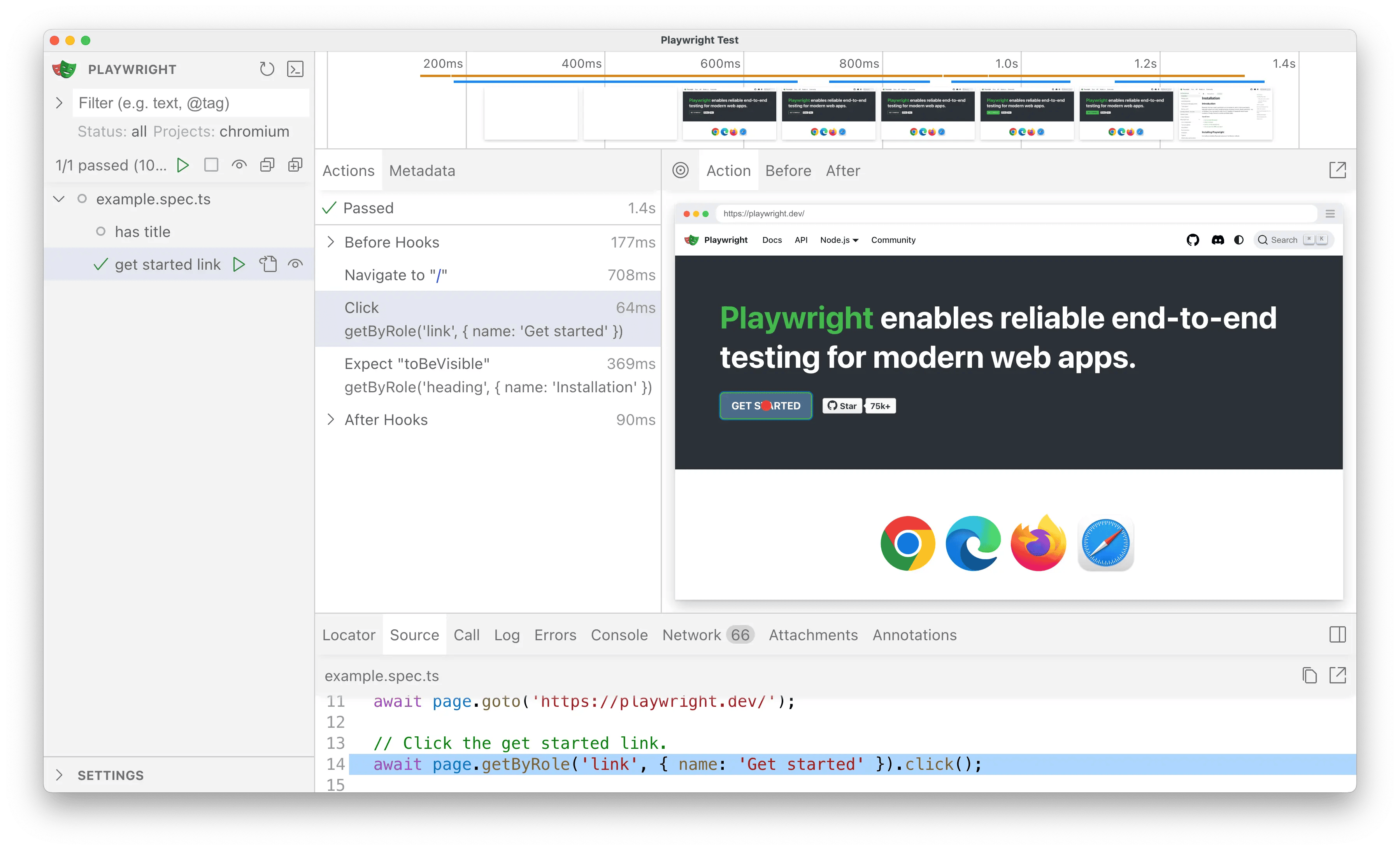
|
|
233
|
+
|
|
234
|
+
Click the <Icon icon="play" /> button to successfully run the tests in the UI.
|
|
235
|
+
|
|
236
|
+
<Tip>
|
|
237
|
+
Click the <Icon icon="eye" /> button to automatically re-run tests on save.
|
|
238
|
+
</Tip>
|
|
239
|
+
|
|
240
|
+
</Step>
|
|
241
|
+
|
|
242
|
+
</Steps>
|
|
243
|
+
|
|
244
|
+
### Usage
|
|
245
|
+
|
|
246
|
+
#### Import the TestDriver Playwright SDK
|
|
247
|
+
|
|
248
|
+
By changing **1 line**, we can add TestDriver's AI capabilities to Playwright:
|
|
249
|
+
|
|
250
|
+
```typescript tests/testdriver.spec.ts
|
|
251
|
+
import type { mockIPC } from "@tauri-apps/api/mocks";
|
|
252
|
+
// [!code --]
|
|
253
|
+
import { expect, test } from "@playwright/test";
|
|
254
|
+
// [!code ++]
|
|
255
|
+
import { expect, test } from "@testdriver.ai/playwright";
|
|
256
|
+
|
|
257
|
+
// For type-safety of the mockIPC function
|
|
258
|
+
declare global {
|
|
259
|
+
interface Window {
|
|
260
|
+
mockIPC: typeof mockIPC;
|
|
261
|
+
}
|
|
262
|
+
}
|
|
263
|
+
|
|
264
|
+
test.beforeEach(async ({ page }) => {
|
|
265
|
+
await page.goto("http://localhost:1420");
|
|
266
|
+
});
|
|
267
|
+
|
|
268
|
+
test("should have title", async ({ page }) => {
|
|
269
|
+
await expect(page).toHaveTitle("Tauri + React + TypeScript");
|
|
270
|
+
});
|
|
271
|
+
```
|
|
272
|
+
|
|
273
|
+
Notice how we're able to continue using Playwright's API (`toHaveTitle`)
|
|
274
|
+
with `@testdriver.ai/playwright`.
|
|
275
|
+
|
|
276
|
+
The test continues to pass as before, so now we can update our test to use natural language instead of selectors.
|
|
277
|
+
|
|
278
|
+
#### Assertions with `expect.toMatchPrompt`
|
|
279
|
+
|
|
280
|
+
With Playwright, we would normally use a `getByRole` selector to assert the heading text:
|
|
281
|
+
|
|
282
|
+
```typescript tests/example.spec.ts
|
|
283
|
+
test("should have heading", async ({ page }) => {
|
|
284
|
+
await expect(
|
|
285
|
+
page.getByRole("heading", { name: "Installation" }),
|
|
286
|
+
).toBeVisible();
|
|
287
|
+
});
|
|
288
|
+
```
|
|
289
|
+
|
|
290
|
+
With TestDriver, we can use natural language with `toMatchPrompt` instead:
|
|
291
|
+
|
|
292
|
+
```typescript tests/testdriver.spec.ts
|
|
293
|
+
test("should have heading", async ({ page }) => {
|
|
294
|
+
// [!code --:3]
|
|
295
|
+
await expect(
|
|
296
|
+
page.getByRole("heading", { name: "Installation" }),
|
|
297
|
+
).toBeVisible();
|
|
298
|
+
// [!code ++:1]
|
|
299
|
+
await expect(page).toMatchPrompt("Heading says 'Welcome to Tauri + React'");
|
|
300
|
+
});
|
|
301
|
+
```
|
|
302
|
+
|
|
303
|
+
#### Agentic tests with `test.agent`
|
|
304
|
+
|
|
305
|
+
With TestDriver, we can skip the test implementation **entirely** and let AI perform the test for us:
|
|
306
|
+
|
|
307
|
+
<Steps>
|
|
308
|
+
<Step title="Mock the `greet` call">
|
|
309
|
+
|
|
310
|
+
First, we need to [mock our `invoke` calls](https://tauri.app/develop/tests/mocking/#ipc-requests),
|
|
311
|
+
since we're testing the frontend behavior and not our Tauri backend:
|
|
312
|
+
|
|
313
|
+
```typescript tests/testdriver.spec.ts
|
|
314
|
+
test.beforeEach(async ({ page }) => {
|
|
315
|
+
await page.goto("http://localhost:1420");
|
|
316
|
+
// [!code ++:12]
|
|
317
|
+
await page.evaluate(() => {
|
|
318
|
+
// https://tauri.app/develop/tests/mocking/#mocking-commands-for-invoke
|
|
319
|
+
window.mockIPC((cmd, args) => {
|
|
320
|
+
switch (cmd) {
|
|
321
|
+
case "greet":
|
|
322
|
+
args = args as { name: string };
|
|
323
|
+
return `Hello, ${args.name}! You've been greeted from Rust!`;
|
|
324
|
+
default:
|
|
325
|
+
throw new Error(`Unsupported command: ${cmd}`);
|
|
326
|
+
}
|
|
327
|
+
});
|
|
328
|
+
});
|
|
329
|
+
});
|
|
330
|
+
```
|
|
331
|
+
|
|
332
|
+
</Step>
|
|
333
|
+
|
|
334
|
+
<Step title="Add an Agentic Test">
|
|
335
|
+
|
|
336
|
+
Next, wrap a _prompt_ in `test.agent` to perform the test:
|
|
337
|
+
|
|
338
|
+
```typescript tests/testdriver.spec.ts
|
|
339
|
+
test.describe("should greet with name", () => {
|
|
340
|
+
test.agent(`
|
|
341
|
+
- Enter the name "Tauri"
|
|
342
|
+
- Click the "Greet" button
|
|
343
|
+
- You should see the text "Hello, Tauri! You've been greeted from Rust!"
|
|
344
|
+
`);
|
|
345
|
+
});
|
|
346
|
+
```
|
|
347
|
+
|
|
348
|
+
</Step>
|
|
349
|
+
</Steps>
|
|
350
|
+
|
|
351
|
+
#### Continued Reading
|
|
352
|
+
|
|
353
|
+
[Learn more about TestDriver's Playwright SDK](/getting-started/playwright)
|
|
354
|
+
|
|
355
|
+
## Testing the Tauri Desktop App
|
|
356
|
+
|
|
357
|
+
We can use TestDriver and natural language to test our Tauri desktop app:
|
|
358
|
+
|
|
359
|
+
<Steps>
|
|
360
|
+
<Step title="Run the Desktop App">
|
|
361
|
+
<Tabs>
|
|
362
|
+
<Tab title="npm">
|
|
363
|
+
```bash
|
|
364
|
+
npm run tauri dev
|
|
365
|
+
```
|
|
366
|
+
</Tab>
|
|
367
|
+
<Tab title="yarn">
|
|
368
|
+
```bash
|
|
369
|
+
yarn tauri dev
|
|
370
|
+
```
|
|
371
|
+
</Tab>
|
|
372
|
+
<Tab title="pnpm">
|
|
373
|
+
```bash
|
|
374
|
+
pnpm tauri dev
|
|
375
|
+
```
|
|
376
|
+
</Tab>
|
|
377
|
+
</Tabs>
|
|
378
|
+
</Step>
|
|
379
|
+
|
|
380
|
+
<Step title="Continued Reading">
|
|
381
|
+
<Note>See [Desktop Apps](/apps/desktop-apps) for more information.</Note>
|
|
382
|
+
</Step>
|
|
383
|
+
</Steps>
|
|
384
|
+
|
|
385
|
+
## Testing the Tauri Mobile App
|
|
386
|
+
|
|
387
|
+
We can use TestDriver and natural language to test our Tauri iOS app:
|
|
388
|
+
|
|
389
|
+
<Steps>
|
|
390
|
+
<Step title="Run the Mobile App">
|
|
391
|
+
<Tabs>
|
|
392
|
+
<Tab title="npm">
|
|
393
|
+
```bash
|
|
394
|
+
npm run tauri ios dev
|
|
395
|
+
```
|
|
396
|
+
</Tab>
|
|
397
|
+
<Tab title="yarn">
|
|
398
|
+
```bash
|
|
399
|
+
yarn tauri ios dev
|
|
400
|
+
```
|
|
401
|
+
</Tab>
|
|
402
|
+
<Tab title="pnpm">
|
|
403
|
+
```bash
|
|
404
|
+
pnpm tauri ios dev
|
|
405
|
+
```
|
|
406
|
+
</Tab>
|
|
407
|
+
</Tabs>
|
|
408
|
+
</Step>
|
|
409
|
+
|
|
410
|
+
<Step title="Continued Reading">
|
|
411
|
+
<Note>See [Mobile Apps](/apps/mobile-apps) for more information.</Note>
|
|
412
|
+
</Step>
|
|
413
|
+
</Steps>
|
package/docs/docs.json
CHANGED
package/docs/styles.css
CHANGED